Trace Analysis Patterns (Part 146)

April 29th, 2017

The idea of Tensor Trace analysis pattern initially appeared in the context of memory dumps as general traces with several special traces inside but then developed further when working on Singleton Trace analysis pattern when we realized that several Singleton Traces may form a new separate log:

Therefore, we may combine several traces and logs into one global trace where each message references separate local traces and logs:

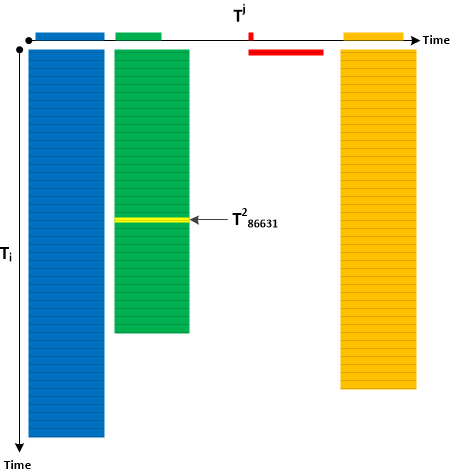
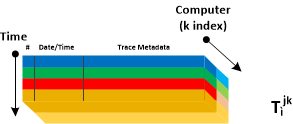
Typical example is a repeated tracing. Each trace has an i-th index spanning the number of trace messages. We say it is has Ti components. Each individual logging has an j-th index and overall global log has Tj components. Together the form the second rank tensor:

There can be Tensor Traces of the higher rank, for example, the 3rd component spanning computers:

This analysis pattern is different from Meta Trace where the latter is about trace evolution during software development. It is also different from Trace Dimension which is about one trace (Tensor Trace of rank 1).

- Dmitry Vostokov @ DumpAnalysis.org + TraceAnalysis.org -
Trace Analysis Patterns (Part 145)

April 29th, 2017

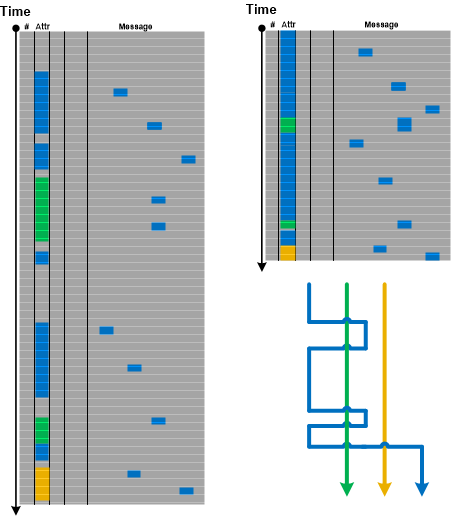
If we consider a log as a text, ignore its column structure, and do search for the particular attribute value (for example, PID) we get Message Set consisting of messages having that attribute value as column (Adjoint Thread of Activity) and messages having that attribute value referenced in their message text. We call this pattern Braid of Activity because metaphorically it looks like Adjoint Threads of Activity cross each other (like multibraiding):

- Dmitry Vostokov @ DumpAnalysis.org + TraceAnalysis.org -
Trace Analysis Patterns (Part 144)

April 19th, 2017

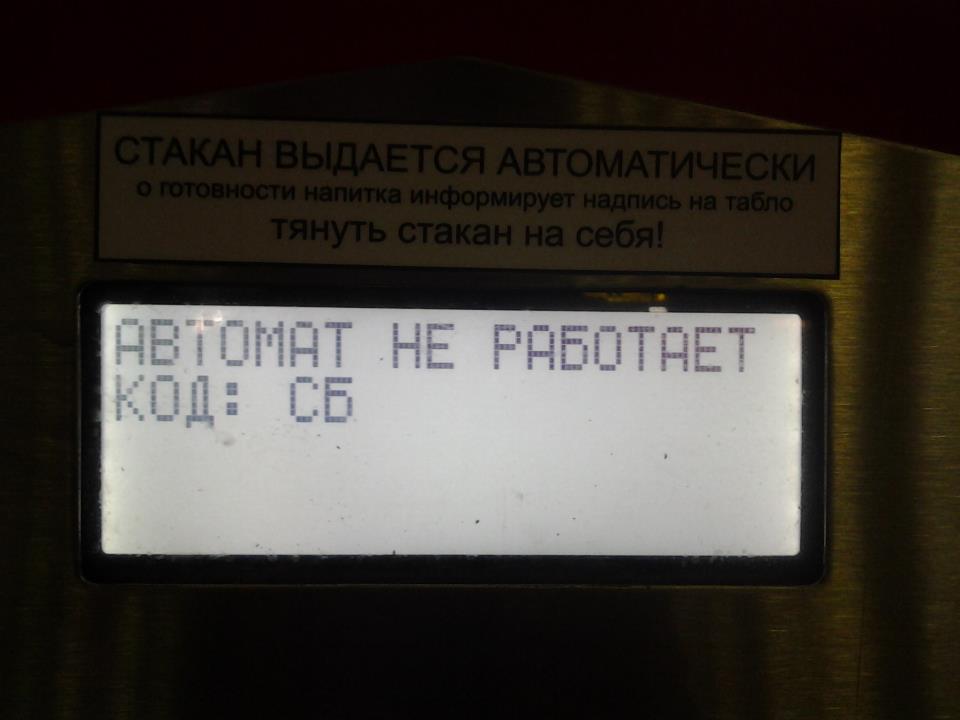
Status updates, error message boxes, and even abort errors can all be considered as examples of software traces and logs. We call such a log with one message only Singleton Trace. Please don’t confuse it with Singleton Event analysis pattern which is trivial for Singleton Traces. We illustrate this pattern with this picture of error message (in Russian it means “The machine doesn’t work. Code: SB”) from a lemonade-dispensing machine:

The message in such a trace may contain the associated stack trace as a trivial example of Fiber Bundle.

- Dmitry Vostokov @ DumpAnalysis.org + TraceAnalysis.org -
Trace Analysis Patterns (Part 143)

April 18th, 2017

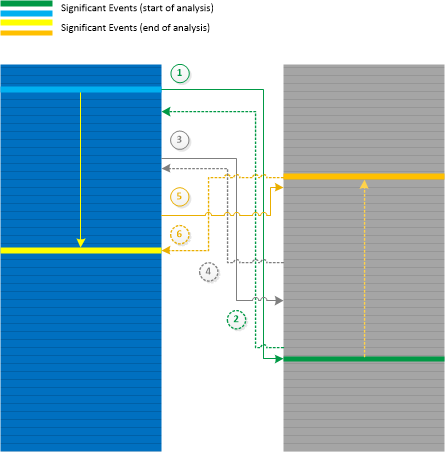
When doing Inter-Correlational analysis between different traces and logs we can move simultaneously along time direction or backwards (Back Tracing). In some cases we may start our analysis with the identification of Significant Events in both logs and then move in opposite directions finding another pair of messages that can be useful for diagnostic identification. We call this analysis pattern Galois Trace by analogy with Galois connection in mathematics. In our case moving from trace A to trace B and back corresponds to F and G functions with a and b as individual trace messages or their Message Contexts (as per monotone definition). The analysis pattern is illustrated in the following diagram:

- Dmitry Vostokov @ DumpAnalysis.org + TraceAnalysis.org -

Crash Dump Analysis Patterns (Part 250)

April 3rd, 2017

For completeness, we add Aggregated Frames analysis pattern implemented as “aggregated stack trace” in various software performance profiling tools. Such tools periodically record CPU Stack Trace Collection. Other tools profile memory allocations and their stack traces. By aggregation we mean summing up occurrences of modules and functions from all collected stack traces similar to this table:

ModuleA         88%
   +0x234          42%
   +0x123           8%
   !foo            38%
      +0xd            30%
      +0x56            2%
   !bar             6%
      +0x18            6%
ModuleB         12%
   !export         12%
      +0x2380          1%
      +0x1224          6%
      +0x3812          5%

Related to memory dump analysis we can either use Stack Trace Collection to detect Ubiquitous Component in user and kernel spaces, or database Stack Traces, for example, used in detection of process heap, handle, and reference Memory Leaks.

We do not include “stack” in the name of this pattern because frames are not sorted by the execution direction compared to Unified Stack Trace analysis pattern where we have some notion of aggregation depicted as multiplicities.

We can also name it as Frame Usage Signature similar to Stack Trace Signature.

- Dmitry Vostokov @ DumpAnalysis.org + TraceAnalysis.org -

Trace Analysis Patterns (Part 142)

April 2nd, 2017

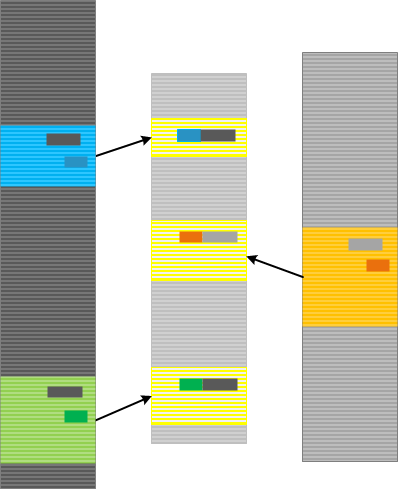
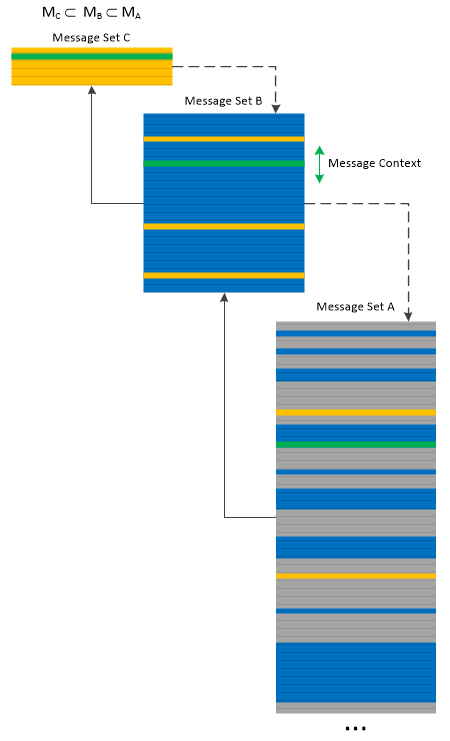
We can apply Message Set trace and log analysis pattern to itself and build multilevel Message Directory. The pattern name come from the analogy with memory management page tables, where we can select every 10th message to build a smaller Message Set, and then select every 10th message from it to build another Message Set, and so on. When looking at a higher level Message Set we can select a trace message and then look at its Message Context in the lower level Message Sets:

Message Directory is similar to Trace Frames analysis pattern but is fine-grained, and more individual message oriented than the latter analysis pattern. However, the former pattern can be used to implement the latter one.

- Dmitry Vostokov @ DumpAnalysis.org + TraceAnalysis.org -
Trace Analysis Patterns (Part 141)

March 24th, 2017

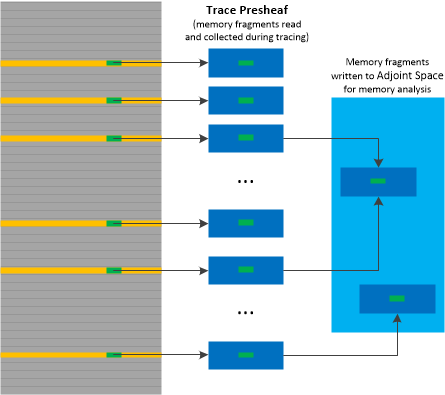
Adjoint Space and Trace Fibration analysis patterns may be useful in cases where complementing traces with memory dumps and vice versa provides better insight into software behavior. Ideally, every trace statement should have Adjoint Space but this is not feasible practically. The solution is to save memory regions surrounding trace message data, for example, structures referenced by pointers. This can be done either for each message or for selected Message Sets. Such memory data can be embedded inside logs as State Dump, Trace Extension or Inter-Correlation with a binary log of such memory fragments. This looks like a mapping between trace messages and memory objects. We call this analysis pattern Trace Presheaf by analogy with presheaves in mathematics. In case Adjoint Spaces are available (for example, memory dumps) such memory buffers can be written to memory by a debugger (in Windows by .readmem WinDbg command) and examined in association with the rest of Adjoint Space. This is illustrated in the following diagram:

- Dmitry Vostokov @ DumpAnalysis.org + TraceAnalysis.org -
Crash Dump Analysis Patterns (Part 249)

March 22nd, 2017

The dual analysis technique to Adjoint Spaces trace and log analysis pattern is called Memory Fibration (by analogy with fibrations in mathematics). Certain process spaces may have associated external logs so the dynamics of memory can be examined backwards. Such traces and logs may be the parts of just one bigger log as Adjoint Threads of Activity with their PIDs as ATIDs.

- Dmitry Vostokov @ DumpAnalysis.org + TraceAnalysis.org -
Trace Analysis Patterns (Part 140)

February 21st, 2017

Having chosen a trace message, we are interested in its Message Context which can span all “continuous” messages before and after from the same Thread of Activity. We it Activity Quantum which is variable and independent from the so-called CPU quantums. Different messages from Activity Quantum may be executed on different CPUs. The following diagram depicts this analysis pattern:

- Dmitry Vostokov @ DumpAnalysis.org + TraceAnalysis.org -
Crash Dump Analysis Patterns (Part 248)

February 19th, 2017

If OS is not inside a virtual machine it is difficult to get consistent live snapshots of physical memory (see Inconsistent Dump analysis pattern). Mirror dump options in LiveKd can save a consistent kernel memory dump. Then we can either use Fiber Bundle technique of saving individual process memory dumps or create inconsistent complete memory dump using LiveKd or both. We call this pattern Mirror Dump Set.

We can identify mirror dump with the following current stack trace:

0: kd> version
...
64-bit Kernel bitmap dump: ...
...

0: kd> k
# Child-SP RetAddr Call Site
00 ffffd000`26121700 fffff803`cf5f5ee3 nt!IopLiveDumpEndMirroringCallback+0x7f
01 ffffd000`26121750 fffff803`cf60561b nt!MmDuplicateMemory+0x807
02 ffffd000`26121830 fffff803`cf851c60 nt!IopLiveDumpCaptureMemoryPages+0x53
03 ffffd000`26121890 fffff803`cf447443 nt!IoCaptureLiveDump+0xf8
04 ffffd000`261218e0 fffff803`cf8ceb0d nt!DbgkCaptureLiveKernelDump+0x2e7
05 ffffd000`26121970 fffff803`cf3debb3 nt!NtSystemDebugControl+0x3f5
06 ffffd000`26121a90 00007ffa`2925205a nt!KiSystemServiceCopyEnd+0x13
07 000000a3`5bcddb48 00000000`00000000 0x00007ffa`2925205a

In one analysis case, we got such a set where we analyzed ALPC Wait Chains with user space stack traces in a complete memory having the endpoint blocked in a filter driver. But the search for stack traces having filter manager in their frames failed due to inconsistency:

0: kd> version
...
64-bit Full kernel dump: ...
...

0: kd> !stacks 2 FltMgr
...
TYPE mismatch for thread object at ffffe001b804d638
4.------ NO ETHREAD DATA
TYPE mismatch for thread object at ffffe001b804d638
4.------ NO ETHREAD DATA
TYPE mismatch for thread object at ffffe001b804d638
4.------ NO ETHREAD DATA
TYPE mismatch for thread object at ffffe001b804d638
4.------ NO ETHREAD DATA
TYPE mismatch for thread object at ffffe001b804d638
4.------ NO ETHREAD DATA
...

So we found such kernel space stack traces from the consistent mirror dump.

- Dmitry Vostokov @ DumpAnalysis.org + TraceAnalysis.org -
Trace Analysis Patterns (Part 139)

February 15th, 2017

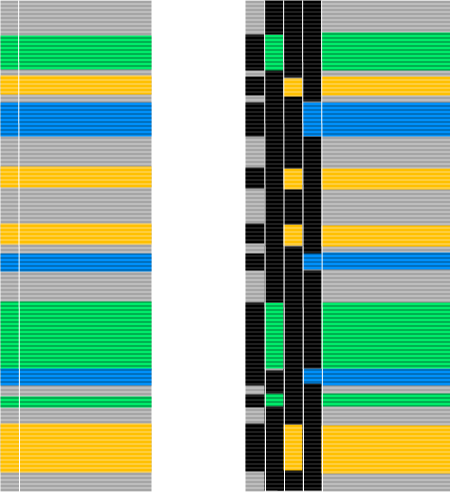
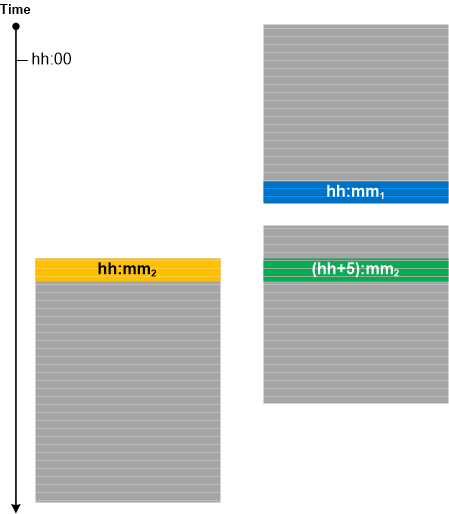
Here we introduce Delay Dynamics analysis pattern. It is not an oxymoron and dynamics is referred to by what actually happens during the delay (Discontinuity with Time Delta) in other Threads of Activity as depicted in the following diagram:

Instead of threads various Adjoint Threads of Activity may also be inspected.

- Dmitry Vostokov @ DumpAnalysis.org + TraceAnalysis.org -
Trace Analysis Patterns (Part 138)

February 7th, 2017

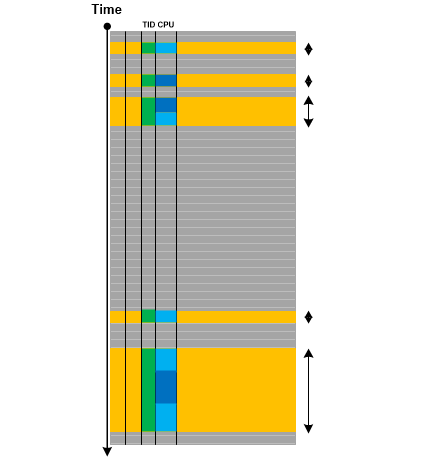
One of the trace attributes we didn’t pay much attention to in the past is CPU. This column is present in some ETW-based trace implementations such as Citrix CDF traces. As any trace attribute, it can be used to form Adjoint Thread of Activity (as all messages from code executed on that particular CPU). As we already considered threads as braids, we use braid groups as a further metaphor. In our case we combine CPUs and threads into one group which uses permutation for CPU scheduling. Instead of permutations, twists may be modeled as changes of threads. The Braid Group analysis pattern is illustrated in the following diagram:

This is a preliminary description of the analysis pattern. We plan to elaborate on it in further case studies. For example, instead of multithreading we can use multibraiding.

- Dmitry Vostokov @ DumpAnalysis.org + TraceAnalysis.org -
Crash Dump Analysis Patterns (Part 247)

February 5th, 2017

We got the idea of Unified Stack Trace analysis pattern from Flame Graphs. Like the latter, we combine Stack Trace Collection into one aggregate trace, but we may use the same length for repeated frames and may use different color intensities to present multiplicities. Different frame height may also be used to unify top frames such as waiting API. Different collections may be used in addition to database-like stack traces (Unmanaged, Managed, Predicate, I/O, CPU). The collections may be composed from different varieties of stack traces, such as General, Managed, Module, Quotient, Filters).

As a very simple example, consider this Stack Trace Collection from Notepad:

0:003> ~*kc

0  Id: 984.994 Suspend: 1 Teb: 00007ff6`f411d000 Unfrozen
# Call Site
00 USER32!NtUserGetMessage
01 USER32!GetMessageW
02 notepad!WinMain
03 notepad!WinMainCRTStartup
04 KERNEL32!BaseThreadInitThunk
05 ntdll!RtlUserThreadStart

1  Id: 984.eb8 Suspend: 1 Teb: 00007ff6`f411b000 Unfrozen
# Call Site
00 ntdll!NtWaitForWorkViaWorkerFactory
01 ntdll!TppWorkerThread
02 KERNEL32!BaseThreadInitThunk
03 ntdll!RtlUserThreadStart

2  Id: 984.1a8c Suspend: 1 Teb: 00007ff6`f4119000 Unfrozen
# Call Site
00 ntdll!NtWaitForWorkViaWorkerFactory
01 ntdll!TppWorkerThread
02 KERNEL32!BaseThreadInitThunk
03 ntdll!RtlUserThreadStart

#  3  Id: 984.11b0 Suspend: 1 Teb: 00007ff6`f4117000 Unfrozen
# Call Site
00 ntdll!DbgBreakPoint
01 ntdll!DbgUiRemoteBreakin
02 KERNEL32!BaseThreadInitThunk
03 ntdll!RtlUserThreadStart

The collection can be represented in a more compact form with multiplicities:

USER32!NtUserGetMessage
USER32!GetMessageW
notepad!WinMain           | 2* ntdll!NtWaitForWorkViaWorkerFactory | ntdll!DbgBreakPoint
notepad!WinMainCRTStartup | 2* ntdll!TppWorkerThread               | ntdll!DbgUiRemoteBreakin
4* KERNEL32!BaseThreadInitThunk
4* ntdll!RtlUserThreadStart

It can also be illustrated in the following diagram:

Such diagrams may help to spot Ubiquitous Components quickly.

Unified Stack Trace is also a generalization of Stack Trace Set where the latter only excludes fully duplicated stack traces but the former takes into account Constant Subtraces.

- Dmitry Vostokov @ DumpAnalysis.org + TraceAnalysis.org -

Trace Analysis Patterns (Part 137)

December 12th, 2016

Recently we found a correlation between software trace with high Statement Density and Current of Periodic Error with uniform Error Distribution and process heap Memory Leak suspected from  memory dump analysis. If we metaphorically view periodic errors as “frequency” and the size of a heap as “mass” we may see that the growth of “frequency” correlates with the growth of “mass” and vice versa. Since frequency is inversely proportional to wave length we see a metaphorical analog to Louis de Broglie’s wave-particle duality. In general, as we already pointed in the discussion of narrativity and spatiality of software execution artifacts (see also Software Trace and Memory Dump Analysis seminar), software traces / logs and memory dumps can be seen as “dual” to each other according (metaphorically again) to de Broglie’s “duality of the laws of nature”. So we name this analysis pattern De Broglie Trace Duality since some memory dump regions can be considered of a general trace nature. Our correlation can be depicted in this diagram:

Practically, when we see Memory Consumption Patterns (but don’t know their source / root cause yet) we can ask for traces and logs, and in the case of frequent Periodic Errors found there we can suggest troubleshooting steps that may serve as a resolution or workaround.

- Dmitry Vostokov @ DumpAnalysis.org + TraceAnalysis.org -
Crash Dump Analysis Patterns (Part 246)

December 7th, 2016

Visio was freezing after saving a diagram as a picture after we tried to close it. It eventually crashed with WER saving a crash dump file in LocalDumps folder. After a few such incidents Visio suggested to disable a 3rd-party plugin. We did that and double checked in Options \ Add-Ins dialog. Unfortunately, the same abnormal behaviour continued. When we looked at the crash dump stack trace we noticed Foreign Module Frame:

0:000> k
# ChildEBP RetAddr
00 0019cbac 746b1556 ntdll!NtWaitForMultipleObjects+0xc
01 0019cd40 746b1408 KERNELBASE!WaitForMultipleObjectsEx+0x136
02 0019cd5c 747ea02a KERNELBASE!WaitForMultipleObjects+0x18
03 0019d198 747e9ac6 kernel32!WerpReportFaultInternal+0x545
04 0019d1a8 747ccf09 kernel32!WerpReportFault+0x7a
05 0019d1b0 746c9f53 kernel32!BasepReportFault+0x19
06 0019d244 76fc2de5 KERNELBASE!UnhandledExceptionFilter+0x1b3
07 0019d2e8 76f8acd6 ntdll!LdrpLogFatalUserCallbackException+0x4d
08 0019d2f4 76f9d572 ntdll!KiUserCallbackExceptionHandler+0x26
09 0019d318 76f9d544 ntdll!ExecuteHandler2+0x26
0a 0019d3e0 76f8ad8f ntdll!ExecuteHandler+0x24
0b 0019d3e0 55403000 ntdll!KiUserExceptionDispatcher+0xf
WARNING: Stack unwind information not available. Following frames may be wrong.
0c 0019d8d0 55402faa VISLIB!Ordinal1+0x24f3b
0d 0019d914 5b85c67e VISLIB!Ordinal1+0x24ee5
0e 0019d940 5b85c638 MSO!Ordinal2138+0x10a
0f 0019d950 5b8e7620 MSO!Ordinal2138+0xc4
10 0019d964 5b8e7602 MSO!Ordinal9998+0x3bc
11 0019d97c 5bc938a6 MSO!Ordinal9998+0x39e
12 0019dbb0 5c240add MSO!Ordinal7238+0x25bef
13 0019ddec 65598ed1 MSO!Ordinal2007+0x1766
14 0019de78 655c5eaa VisioPlugin!DllRegisterServer+0×43bf1
15 0019dfbc 555601db VisioPlugin!DllRegisterServer+0×70bca

16 0019dfe8 5555fe61 VISLIB!Ordinal1+0×182116
17 0019e028 55421b7c VISLIB!Ordinal1+0×181d9c
18 0019e070 5549f1a9 VISLIB!Ordinal1+0×43ab7
19 0019e090 5549ebba VISLIB!Ordinal1+0xc10e4
1a 0019e0c0 5540dd14 VISLIB!Ordinal1+0xc0af5
1b 0019e110 55426168 VISLIB!Ordinal1+0×2fc4f
1c 0019e134 55425446 VISLIB!Ordinal1+0×480a3
1d 0019e20c 5549eace VISLIB!Ordinal1+0×47381
1e 0019e264 5549e90e VISLIB!Ordinal1+0xc0a09
1f 0019e28c 6571fb03 VISLIB!Ordinal1+0xc0849
20 0019e334 6571f6cc mfc90u!CWnd::OnWndMsg+0×410
21 0019e354 553ef572 mfc90u!CWnd::WindowProc+0×24
22 0019e370 6571e2f2 VISLIB!Ordinal1+0×114ad
23 0019e3d8 6571e57e mfc90u!AfxCallWndProc+0xa3
24 0019e3fc 553ef518 mfc90u!AfxWndProc+0×37
25 0019e440 553ef4d9 VISLIB!Ordinal1+0×11453
26 0019e458 553ef49e VISLIB!Ordinal1+0×11414
27 0019e480 553ef338 VISLIB!Ordinal1+0×113d9
28 0019e49c 553ef2d6 VISLIB!Ordinal1+0×11273
29 0019e4c4 553ef107 VISLIB!Ordinal1+0×11211
2a 0019e528 75864923 VISLIB!Ordinal1+0×11042
2b 0019e554 75844790 user32!_InternalCallWinProc+0×2b
2c 0019e5fc 75844527 user32!UserCallWinProcCheckWow+0×1f0
2d 0019e638 71db7d40 user32!CallWindowProcW+0×97
2e 0019e6b8 71db7996 comctl32!CallNextSubclassProc+0×140
2f 0019e6d8 5b84d95a comctl32!DefSubclassProc+0×56
30 0019e720 5b84d7ad MSO!Ordinal6319+0×25e
31 0019e74c 71db7db8 MSO!Ordinal6319+0xb1
32 0019e7d0 71db7b61 comctl32!CallNextSubclassProc+0×1b8
33 0019e82c 75864923 comctl32!MasterSubclassProc+0xa1
34 0019e858 75844790 user32!_InternalCallWinProc+0×2b
35 0019e900 75844370 user32!UserCallWinProcCheckWow+0×1f0
36 0019e960 7584b179 user32!DispatchClientMessage+0xf0
37 0019e9a0 76f8ad66 user32!__fnDWORD+0×49
38 0019e9d8 75864dac ntdll!KiUserCallbackDispatcher+0×36
39 0019e9dc 75842ce8 user32!NtUserMessageCall+0xc
3a 0019ea68 758423ba user32!RealDefWindowProcWorker+0×148
3b 0019ea80 71f882ee user32!RealDefWindowProcW+0×5a
3c 0019eaa0 71f88145 uxtheme!DoMsgDefault+0×3a
3d 0019eab0 71f87bba uxtheme!OnDwpSysCommand+0×35
3e 0019eb1c 71f868d8 uxtheme!_ThemeDefWindowProc+0×6ca
3f 0019eb30 75842b66 uxtheme!ThemeDefWindowProcW+0×18
40 0019eb80 758415ee user32!DefWindowProcW+0×176
41 0019eb98 75851e3b user32!DefWindowProcWorker+0×2e
42 0019ec1c 758aa09b user32!DefFrameProcWorker+0xb7
43 0019ec34 55718ac5 user32!DefFrameProcW+0×1b
44 0019ec58 55708027 VISLIB!Ordinal1+0×33aa00
45 0019ec70 6571e3c1 VISLIB!Ordinal1+0×329f62
46 0019ec84 65725604 mfc90u!CWnd::Default+0×30
47 0019ec94 5549e617 mfc90u!CFrameWnd::OnSysCommand+0×50
48 0019ecb4 6571fd15 VISLIB!Ordinal1+0xc0552
49 0019ed64 6571f6cc mfc90u!CWnd::OnWndMsg+0×622
4a 0019ed84 553ef572 mfc90u!CWnd::WindowProc+0×24
4b 0019eda0 6571e2f2 VISLIB!Ordinal1+0×114ad
4c 0019ee08 6571e57e mfc90u!AfxCallWndProc+0xa3
4d 0019ee2c 553ef518 mfc90u!AfxWndProc+0×37
4e 0019ee70 553ef4d9 VISLIB!Ordinal1+0×11453
4f 0019ee88 553ef49e VISLIB!Ordinal1+0×11414
50 0019eeb0 553ef338 VISLIB!Ordinal1+0×113d9
51 0019eecc 553ef2d6 VISLIB!Ordinal1+0×11273
52 0019eef4 553ef107 VISLIB!Ordinal1+0×11211
53 0019ef58 75864923 VISLIB!Ordinal1+0×11042
54 0019ef84 75844790 user32!_InternalCallWinProc+0×2b
55 0019f02c 75844527 user32!UserCallWinProcCheckWow+0×1f0
56 0019f068 71db7d40 user32!CallWindowProcW+0×97
57 0019f0e8 71db7996 comctl32!CallNextSubclassProc+0×140
58 0019f108 5b84d95a comctl32!DefSubclassProc+0×56
59 0019f150 5b84d7ad MSO!Ordinal6319+0×25e
5a 0019f17c 71db7db8 MSO!Ordinal6319+0xb1
5b 0019f200 71db7b61 comctl32!CallNextSubclassProc+0×1b8
5c 0019f25c 75864923 comctl32!MasterSubclassProc+0xa1
5d 0019f288 75844790 user32!_InternalCallWinProc+0×2b
5e 0019f330 75844370 user32!UserCallWinProcCheckWow+0×1f0
5f 0019f390 7584b179 user32!DispatchClientMessage+0xf0
60 0019f3d0 76f8ad66 user32!__fnDWORD+0×49
61 0019f408 00000000 ntdll!KiUserCallbackDispatcher+0×36

Next, we applied lmv WinDbg command to the module name and followed its image path to rename it. After that, the problem disappeared. We call such modules Foreign because they were created not by the OS or the main process module vendors. Most likely these modules are either value-adding plugins or exposed Message Hooks.

- Dmitry Vostokov @ DumpAnalysis.org + TraceAnalysis.org -

Crash Dump Analysis Patterns (Part 245, Linux)

December 4th, 2016

This is a Linux variant of Module Stack Trace pattern previously described for Windows platform. Linux core dumps are Abridged Dumps by default with shared libraries code and paged out pages missing. To enable saving full process dumps use this command (see core man page for more details):

[training@localhost CentOS]$ echo 0x7f > /proc/$$/coredump_filter

Compare the file sizes for sleep process core dump generated before (core.3252) and after (core.3268) changing coredump_filter value:

[training@localhost CentOS]$ ls -l
-rwxrwxrwx. 1 root root 323584 Oct 3 07:39 core.3252
-rwxrwxrwx. 1 root root 103337984 Oct 3 07:40 core.3268

Although GDB is not able to get symbolic stack trace for both dumps above due to the absence of symbols, CODA tool is able to show stack trace variant with modules (with Reduced Symbolic Information):

(gdb) bt
#0 0x00000032bd4accc0 in ?? ()
#1 0x0000000000403ce8 in ?? ()
#2 0x00000000000004d2 in ?? ()
#3 0x0000000000000000 in ?? ()

[training@localhost CentOS]$ ./coda/coda -i core.3268
Welcome to coda interactive command line.
THE SOFTWARE IS PROVIDED 'AS IS', WITHOUT WARRANTY OF ANY KIND.
Supported on x86_64-linux.
Coredump generated by command line => sleep 1234
coda > bt
[0] 0x00000032bd4accc0 <0x00000032bd4accb0 - 0x00000032bd4acd0e> __nanosleep+0x10 [RO TEXT]:/lib64/libc.so.6
[1] 0×0000000000403ce8 <0×0000000000403c40 - 0×0000000000403cf3> close_stdout+0×2378 [RO TEXT]:sleep
[2] 0×000000000040336d <0×00000000004032c0 - 0×00000000004033e9> close_stdout+0×19fd [RO TEXT]:sleep
[3] 0×00000000004016bc <0×00000000004014c0 - 0×0000000000401775> usage+0×3fc [RO TEXT]:sleep
[4] 0×00000032bd41ed1d <0×00000032bd41ec20 - 0×00000032bd41ede7> __libc_start_main+0xfd [RO TEXT]:/lib64/libc.so.6
[5] 0×00000000004011f9 <0×00000000004012c0 - 0×00000000004014bb> ?? [RO TEXT]:sleep
[6] 0×00007fff89d82a68 <————-RANGE UNKNOWN————-> ?? [RW DATA]:

- Dmitry Vostokov @ DumpAnalysis.org + TraceAnalysis.org -

Crash Dump Analysis Patterns (Part 245)

December 1st, 2016

For completeness, we introduce Module Stack Trace analysis pattern, which is a tack trace with module (or components) and offsets into their address range. Offsets distinguish it from Collapsed Stack Trace. We see only modules names in case of No Component Symbols or Unrecognizable Symbolic Information. Sometimes, we also have exported functions present with resulting offsets reduced in value but still large. This is a case of Reduced Symbolic Information. Such emerging symbols may form Incorrect Stack Trace frames. On some platforms Module Stack Traces become Truncated Stack Traces because a debugger is not able to reconstruct the stack trace. The following stack traces shows Module Stack Trace fragment for PhotosApp_Windows (and also frames with exported functions for ntdll, combase, twinapi_appcore):

0:034> kL
# Child-SP RetAddr Call Site
00 0000005b`03acc5c0 00007ff9`b6288935 KERNELBASE!RaiseFailFastException+0x74
01 0000005b`03accb90 00007ff9`b399654f combase!RoParameterizedTypeExtraGetTypeSignature+0×8db5
02 0000005b`03acccd0 00007ff9`b39965d0 twinapi_appcore!BiNotifyNewSession+0×2628f
03 0000005b`03accd10 00007ff9`b6186e1a twinapi_appcore!BiNotifyNewSession+0×26310
04 0000005b`03accd40 00007ff9`9eaca4a0 combase!RoReportUnhandledError+0xea
05 0000005b`03accdc0 00007ff9`af37be60 MSVCP140_APP!`Concurrency::details::_ExceptionHolder::ReportUnhandledError’::`1′::catch$3+0×39
06 0000005b`03acce00 00007ff9`af3729b2 VCRUNTIME140_APP!CallSettingFrame+0×20
07 0000005b`03acce30 00007ff9`b8625c53 VCRUNTIME140_APP!_CxxCallCatchBlock+0×122
08 0000005b`03accef0 00007ff9`9ea99129 ntdll!RtlCaptureContext+0×3c3
09 0000005b`03acf490 00007ff9`861137e6 MSVCP140_APP!Concurrency::details::_ExceptionHolder::ReportUnhandledError+0×29
0a 0000005b`03acf4e0 00007ff9`86112142 PhotosApp_Windows+0×737e6
0b 0000005b`03acf520 00007ff9`86111e6c PhotosApp_Windows+0×72142
0c 0000005b`03acf560 00007ff9`86113e38 PhotosApp_Windows+0×71e6c
0d 0000005b`03acf590 00007ff9`8611307d PhotosApp_Windows+0×73e38
0e 0000005b`03acf5f0 00007ff9`86113619 PhotosApp_Windows+0×7307d
0f 0000005b`03acf630 00007ff9`b85caefa PhotosApp_Windows+0×73619
10 0000005b`03acf680 00007ff9`b85c97ea ntdll!EtwEventRegister+0×1e3a
11 0000005b`03acf790 00007ff9`b7df2d92 ntdll!EtwEventRegister+0×72a
12 0000005b`03acfb90 00007ff9`b8599f64 kernel32!BaseThreadInitThunk+0×22
13 0000005b`03acfbc0 00000000`00000000 ntdll!RtlUserThreadStart+0×34

- Dmitry Vostokov @ DumpAnalysis.org + TraceAnalysis.org -

Trace Analysis Patterns (Part 136)

November 23rd, 2016

Considering and extending Trace Dimension to TID, ATID, and Time we use Poincaré section and Poincaré map analogies to introduce Poincaré Trace analysis pattern. We choose a value of one “coordinate”, for example, Time, and then form the new trace that consists of messages from different (A)TIDs that have the same timestamp as Time value or the last message(s) from other different ATIDs if they happened before section Time:

If we choose a different ATID than Time and TID, then Poincare Trace is equivalent to Adjoint Thread of Activity. If ATID is TID we have Thread of Activity as a trivial case. If we have Thread of Activity, we can choose some ATID and get Poincaré Trace as illustrated in the following diagram where the thick black line in the right Poincaré Trace represents Discontinuity and its Time Delta:

- Dmitry Vostokov @ DumpAnalysis.org + TraceAnalysis.org -

Trace Analysis Patterns (Part 135)

November 19th, 2016

There are messages in traces and logs that alone do not have useful information. These are adornments or ornamentation messages that we initially called Delineator or Separator messages that structure message stream or Figural Events (where we borrowed the name figural from Lyotard) such as formatting the next message with { }. Such messages only make meaning with other meaningful messages. We call this pattern Ornament. It helps in using trace analysis patterns and trace pattern identification.

Ornament can also be present inside individual messages, for example, as a character prefix. It can be a part of Message Invariant or variable itself. Some ornamentation can play a rhetorical function.

Although ornament is present in non-software architecture this concept has never been explored in pattern–oriented software architecture and construction. We propose similar concept for source code (software construction) in addition to ornamentation of its Declarative Trace. For software post-construction, we also add ornament part to software structure and behavior parts.

- Dmitry Vostokov @ DumpAnalysis.org + TraceAnalysis.org -

Trace Analysis Patterns (Part 134)

November 15th, 2016

When we have hundreds of separate trace files from Split Trace and a smaller Split Trace with fewer files or just a single trace file that was recorded simultaneously (for example, a client from client-server environment) we can “project” the smaller Message Space into the larger Message Space as depicted in the following diagram:

This Projective Space analysis pattern can be used in conjunction with Indexical Trace where time interval can be used as an index into the larger Split Trace. Such projection may not be accurate but, assuming that the target trace Statement Current is uniform on average, can still be a very good heuristic instead of a binary search. For example, recently we had 4 sequential trace files for the client and 36 sequential files for the server. The software problem interval was specified in Basic Facts. We found that it in the second path of the 4th client trace. We, therefore, only inspected the last 4 traces of the 36 server sequential trace set and found it contained in the 35th server trace.

This pattern uses projective space metaphor from mathematics.

- Dmitry Vostokov @ DumpAnalysis.org + TraceAnalysis.org -