Crash Dump Analysis Patterns (Part 21)
Sometimes it is possible that a process crash dump doesn’t have all usual threads inside. For example, you expect at least 4 threads including the main process thread but in the dump you see only 3. If you know that some access violations were reported in the event log before (not necessarily for the same PID) you might suspect that one of threads had been terminated due to some reason. I call this pattern Missing Thread.
In order to simulate this problem I created a small multithreaded program in Visual C++:
#include "stdafx.h"

#include <process.h>
void thread_request(void *param)

{

    while (true);

}
int _tmain(int argc, _TCHAR* argv[])

{

    _beginthread(thread_request, 0, NULL);
    try

    {

        if (argc == 2)

        {

            *(int *)NULL = 0;

        }

    }

    catch (...)

    {

        _endthread();

    }
while (true);
    return 0;

}
If there is a command line argument then the main thread simulates access violation and finishes in the exception handler. In order to use SEH exceptions with C++ try/catch blocks you have to enable /EHa option in C++ Code Generation properties:
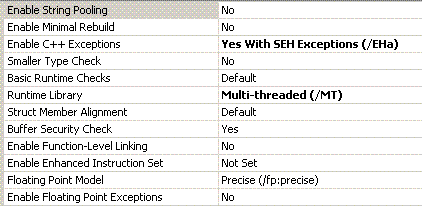
If we run the program without command line parameter and take a manual dump from it we would see 2 threads:
0:000> ~*kL
.  0  Id: 1208.fdc Suspend: 1 Teb: 7efdd000 Unfrozen

ChildEBP RetAddr

0012ff70 00401403 MissingThread!wmain+0x58

0012ffc0 7d4e7d2a MissingThread!__tmainCRTStartup+0x15e

0012fff0 00000000 kernel32!BaseProcessStart+0x28
   1  Id: 1208.102c Suspend: 1 Teb: 7efda000 Unfrozen

ChildEBP RetAddr

005dff7c 004010ef MissingThread!thread_request

005dffb4 00401188 MissingThread!_callthreadstart+0x1b

005dffb8 7d4dfe21 MissingThread!_threadstart+0x73

005dffec 00000000 kernel32!BaseThreadStart+0x34
0:000> ~

.  0  Id: 1208.fdc Suspend: 1 Teb: 7efdd000 Unfrozen

   1  Id: 1208.102c Suspend: 1 Teb: 7efda000 Unfrozen
0:000> dd 7efdd000 l4

7efdd000  0012ff64 00130000 0012e000 00000000
I also dumped TEB of the main thread. However if we run the program with any command line parameter and look at its manual dump we would see only one thread with the main thread missing:
0:000> ~*kL
.  0  Id: 1004.12e8 Suspend: 1 Teb: 7efda000 Unfrozen

ChildEBP RetAddr

005dff7c 004010ef MissingThread!thread_request

005dffb4 00401188 MissingThread!_callthreadstart+0x1b

005dffb8 7d4dfe21 MissingThread!_threadstart+0x73

005dffec 00000000 kernel32!BaseThreadStart+0x34
0:000> ~

.  0  Id: 1004.12e8 Suspend: 1 Teb: 7efda000 Unfrozen
If we try to dump TEB address and stack data from the missing main thread we would see that the memory was already decommitted:
0:000> dd 7efdd000 l4

7efdd000  ???????? ???????? ???????? ????????
0:000> dds 0012e000  00130000

0012e000  ????????

0012e004  ????????

0012e008  ????????

0012e00c  ????????

0012e010  ????????

0012e014  ????????

0012e018  ????????

0012e01c  ????????

0012e020  ????????

0012e024  ????????
The same effect can be achieved in the similar program that exits the thread in the custom unhandled exception filter:
#include "stdafx.h"

#include <process.h>

#include <windows.h>
LONG WINAPI CustomUnhandledExceptionFilter(struct _EXCEPTION_POINTERS* ExceptionInfo)

{

    ExitThread(-1);

}
void thread_request(void *param)

{

    while (true);

}
int _tmain(int argc, _TCHAR* argv[])

{

    _beginthread(thread_request, 0, NULL);

    SetUnhandledExceptionFilter(CustomUnhandledExceptionFilter);
*(int *)NULL = 0;
while (true);
    return 0;

}
The solution to catch an exception that results in a thread termination would be to run the program under WinDbg or any other debugger:
CommandLine: C:\MissingThread\MissingThread.exe 1

Symbol search path is: SRV*c:\websymbols*http://msdl.microsoft.com/download/symbols

Executable search path is:

ModLoad: 00400000 0040f000   MissingThread.exe

ModLoad: 7d4c0000 7d5f0000   NOT_AN_IMAGE

ModLoad: 7d600000 7d6f0000   C:\W2K3\SysWOW64\ntdll32.dll

ModLoad: 7d4c0000 7d5f0000   C:\W2K3\syswow64\kernel32.dll

(df0.12f0): Break instruction exception - code 80000003 (first chance)

eax=7d600000 ebx=7efde000 ecx=00000005 edx=00000020 esi=7d6a01f4 edi=00221f38

eip=7d61002d esp=0012fb4c ebp=0012fcac iopl=0 nv up ei pl nz na po nc

cs=0023 ss=002b ds=002b es=002b fs=0053 gs=002b efl=00000202

ntdll32!DbgBreakPoint:

7d61002d cc              int     3
0:000> g

ModLoad: 71c20000 71c32000   C:\W2K3\SysWOW64\tsappcmp.dll

ModLoad: 77ba0000 77bfa000   C:\W2K3\syswow64\msvcrt.dll

ModLoad: 00410000 004ab000   C:\W2K3\syswow64\ADVAPI32.dll

ModLoad: 7da20000 7db00000   C:\W2K3\syswow64\RPCRT4.dll

ModLoad: 7d8d0000 7d920000   C:\W2K3\syswow64\Secur32.dll

(df0.12f0): Access violation - code c0000005 (first chance)

First chance exceptions are reported before any exception handling.

This exception may be expected and handled.

eax=000007a0 ebx=7d4d8df9 ecx=78b842d9 edx=00000000 esi=00000002 edi=00000ece

eip=00401057 esp=0012ff50 ebp=0012ff70 iopl=0 nv up ei pl zr na pe nc

cs=0023 ss=002b ds=002b es=002b fs=0053 gs=002b efl=00010246

MissingThread!wmain+0x47:

00401057 c7050000000000000000 mov dword ptr ds:[0],0  ds:002b:00000000=????????
0:000> kL

ChildEBP RetAddr

0012ff70 00401403 MissingThread!wmain+0x47

0012ffc0 7d4e7d2a MissingThread!__tmainCRTStartup+0x15e

0012fff0 00000000 kernel32!BaseProcessStart+0x28
If live debugging is not possible and you are interested in crash dumps saved upon a first chance exception before it is processed in an exception handler you can also use MS userdump after you install it and enable All Exceptions in the Process Monitoring Rules dialog box. Another tool can be used is ADPlus in crash mode from Debugging Tools for Windows.
- Dmitry Vostokov @ DumpAnalysis.org -
October 30th, 2008 at 11:43 am
The thread might also be missing when it exists and leaves some synchronization objects in non-signalled state:
0:088> !locks
CritSec DLL!MyFunctionEx+178 at 67caf998
WaiterWoken No
LockCount 71
RecursionCount 17
OwningThread 1910
EntryCount 0
ContentionCount 47
*** Locked
Thread 1910 is not present in the dump. Also !analyze -v -hang reports that the critical section is orphaned:
PRIMARY_PROBLEM_CLASS: APPLICATION_HANG_Orphaned_CriticalSection
June 8th, 2009 at 5:36 pm
[…] error code suggests that some DLL was missing. We see that the process just started indeed and only a few DLL were […]
November 20th, 2009 at 10:03 am
[…] this service had at least a dozen waiting threads. If we switch to the process we see many threads missing and the process itself is in the process of exiting (three “process” nouns in one […]
November 24th, 2009 at 12:30 am
[…] process is present we should check if it is exited but references to it exist or there are any missing threads or components inside it, any suspended threads and special processes like a postmortem […]
May 14th, 2010 at 2:51 pm
[…] we introduce an icon for Missing Thread […]
August 17th, 2010 at 9:59 am
[…] the latter having a queue of 201 messages. Threads that were supposed to process some messages didn’t exist. ServiceC process had a thread that was waiting for ServiceA.exe as well. But there was no any […]
September 14th, 2024 at 1:51 pm
The analysis pattern name has been renamed to Missing Thread (User Space) since we also add one for kernel space.