Crash Dump Analysis Patterns (Part 244)

October 10th, 2016

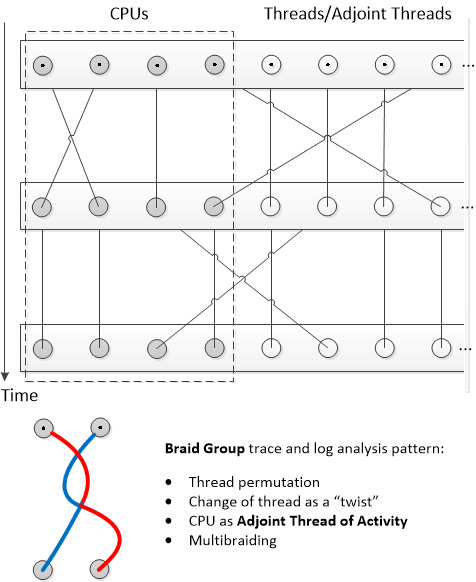
Long time go we introduced the notion of Collapsed Stack Trace (Volume 3, page 381) when all functions are removed from Stack Trace (for example, kc WinDbg command) and remaining repeated modules are removed similar to Quotient Trace analysis pattern. It is similar to Stack Trace Signature with frame count set to 1. We originally planned to call this pattern Compact Stack (Trace) and it was on our list of possible future analysis patterns. This came to our attention again while preparing “Theoretical Software Diagnostics” book and we decided to publish it under the name Quotient Stack Trace as a specialization of the more general trace and log analysis pattern.

Such a pattern may be useful for the analysis of module Wait Chains.

- Dmitry Vostokov @ DumpAnalysis.org + TraceAnalysis.org -

Trace Analysis Patterns (Part 133)

September 30th, 2016

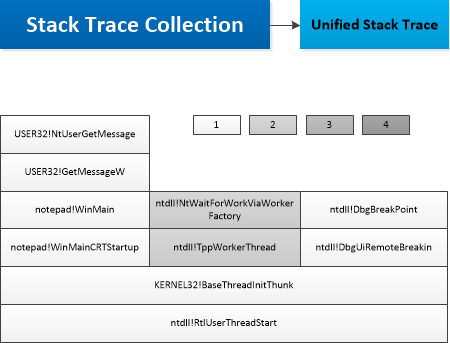
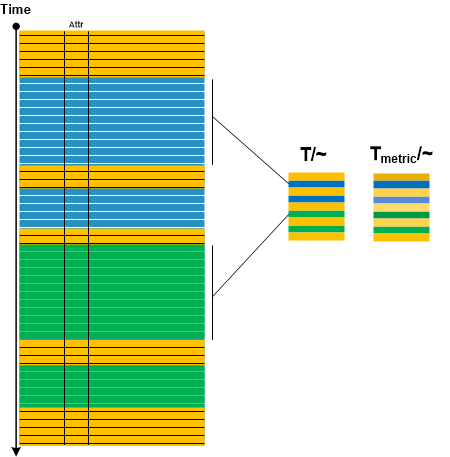
In Adjoint Message analysis pattern description we mentioned compressing message sequences having the same message attribute into one message. Considering the trace as “topological” space and message attribute as “equivalence” relation we introduce Quotient Trace analysis pattern by analogy with quotient space in topology. By endowing message sequences having the same attribute with some “metric” such as cardinality of Message Set we can also visually distinguish resulted quotient messages if they have the same attribute but from different sequences at different times. All this is illustrated in the following diagram:

- Dmitry Vostokov @ DumpAnalysis.org + TraceAnalysis.org -

Crash Dump Analysis Patterns (Part 42n)

September 23rd, 2016

This is C++ condition variable Wait Chain pattern variant. When we have a waiting Blocked Thread stack trace that shows conditional variable implementation functions we are interested in the owner thread:

0:012> kL
# ChildEBP RetAddr
00 03a6f684 748d8ee9 ntdll!NtWaitForSingleObject+0xc
01 03a6f6f8 5f5fcba5 KERNELBASE!WaitForSingleObjectEx+0x99
02 03a6f70c 5f5fb506 msvcr120!Concurrency::details::ExternalContextBase::Block+0×37
03 03a6f778 639cea79 msvcr120!Concurrency::details::_Condition_variable::wait+0xab
04 03a6f7ac 639ceb58 msvcp120!do_wait+0×42
05 03a6f7c0 5c8c5a43 msvcp120!_Cnd_wait+0×10

WARNING: Stack unwind information not available. Following frames may be wrong.
06 03a6f7d0 5c8c4ee6 AppA!foo+0×48883
07 03a6f804 5c8c4bde AppA!foo+0×47d26
08 03a6f834 5c8c4b9c AppA!foo+0×47a1e
09 03a6f848 5c8c4a27 AppA!foo+0×479dc
0a 03a6f854 00dcc4e9 AppA!foo+0×47867
0b 03a6f86c 75823744 AppA+0×1c4e9
0c 03a6f880 76ef9e54 kernel32!BaseThreadInitThunk+0×24
0d 03a6f8c8 76ef9e1f ntdll!__RtlUserThreadStart+0×2f
0e 03a6f8d8 00000000 ntdll!_RtlUserThreadStart+0×1b

We see the thread is waiting for an event 4ac:

0:012> kv 2
# ChildEBP RetAddr Args to Child
00 03a6f684 748d8ee9 000004ac 00000000 00000000 ntdll!NtWaitForSingleObject+0xc (FPO: [3,0,0])
01 03a6f6f8 5f5fcba5 000004ac ffffffff 00000000 KERNELBASE!WaitForSingleObjectEx+0×99 (FPO: [SEH])

0:012> !handle 4ac
Handle 000004ac
Type Event

Instead of digging into implementation internals we show a different approach. We can use Constant Subtrace analysis pattern to find out possible owner thread candidates, and we can also check raw stack region Execution Residue of different threads for Place Trace of synchronization primitives and associated symbolic references (beware of Coincidental Symbolic Information though), and, if possible, Past Stack Traces involving synchronization.

If we look at Stack Trace Collection we can match the following thread that has the same Constant Subtrace as our original waiting thread above:

14 Id: 17a0.39d0 Suspend: 1 Teb: fee4f000 Unfrozen
# ChildEBP RetAddr
00 0679f9f0 748d9edc ntdll!NtReadFile+0xc
01 0679fa54 5c8f38f2 KERNELBASE!ReadFile+0xec
WARNING: Stack unwind information not available. Following frames may be wrong.
02 0679fa84 5c8f3853 AppA!foo+0x76732
03 0679fac8 5c8f37cd AppA!foo+0x76693
04 0679fae0 5c8c4a27 AppA!foo+0x7660d
05 0679faec 00dcc4e9 AppA!foo+0×47867
06 0679fb04 75823744 AppA+0×1c4e9
07 0679fb18 76ef9e54 kernel32!BaseThreadInitThunk+0×24
08 0679fb60 76ef9e1f ntdll!__RtlUserThreadStart+0×2f
09 0679fb70 00000000 ntdll!_RtlUserThreadStart+0×1b

When we dump raw stack data from all threads using this WinDbg script and search for 000004ac we find its occurrences in the raw stack that corresponds to thread #14 we already found:


[...]
TEB at fee4f000
ExceptionList: 0679fa44
StackBase: 067a0000
StackLimit: 0679e000

[…]
0679f90c 0679f918
0679f910 5f5a4894 msvcr120!Concurrency::details::SchedulerBase::CurrentContext+0×1e
0679f914 00000033
0679f918 0679f950
0679f91c 5f5a48ca msvcr120!Concurrency::details::LockQueueNode::LockQueueNode+0×2a
0679f920 0679f998
0679f924 071cf9ac
0679f928 0679f94c
0679f92c 5f5ff57e msvcr120!Concurrency::critical_section::_Acquire_lock+0×2e
0679f930 071cf9ac
0679f934 0679f994
0679f938 0679f998
0679f93c 00000001
0679f940 070f4bfc
0679f944 0679f970
0679f948 5f5ff41f msvcr120!Concurrency::critical_section::lock+0×31
0679f94c 0679f980
0679f950 5f5ff6dc msvcr120!Concurrency::critical_section::scoped_lock::scoped_lock+0×3b
0679f954 0679f998
0679f958 76f08bcc ntdll!NtSetEvent+0xc
0679f95c 748e30b0 KERNELBASE!SetEvent+0×10
0679f960 000004ac
0679f964 00000000
0679f968 0679f984
0679f96c 5f5fcbe6 msvcr120!Concurrency::details::ExternalContextBase::Unblock+0×3f
0679f970 000004ac
0679f974 03a6f750
0679f978 03a6f750
0679f97c 0679f9b4
0679f980 5f5fb70d msvcr120!Concurrency::details::_Condition_variable::notify_all+0×3f
0679f984 0679f9b4
0679f988 5f5fb722 msvcr120!Concurrency::details::_Condition_variable::notify_all+0×54
0679f98c 07481380
0679f990 05ba6f60
0679f994 071cf9ac
[…]

Both methods point to the same possible owner thread which is also blocked in reading a file.

- Dmitry Vostokov @ DumpAnalysis.org + TraceAnalysis.org -

Crash Dump Analysis Patterns (Part 84b)

September 20th, 2016

JIT compiling is not restricted to .NET in Windows and we decided to add Java variant of JIT Code (.NET) analysis pattern. Here’s one thread example from java.exe process memory dump:

0:071> k
# ChildEBP RetAddr
00 536cf424 770c15ce ntdll!NtWaitForSingleObject+0×15
01 536cf490 76f31194 KERNELBASE!WaitForSingleObjectEx+0×98
02 536cf4a8 76f31148 kernel32!WaitForSingleObjectExImplementation+0×75
03 536cf4bc 59207cb3 kernel32!WaitForSingleObject+0×12
WARNING: Stack unwind information not available. Following frames may be wrong.
04 536cf4e4 5918dbb1 jvm!JVM_FindSignal+0×5833
05 536cf558 03b6db25 jvm!JVM_Clone+0×30161
06 536cf588 03c4b0f4 0×3b6db25
07 536cf690 0348339a 0×3c4b0f4
08 536cf7d8 034803d7 0×348339a
09 536cf7e4 591a0732 0×34803d7
0a 536cf870 75bb9cde jvm!JVM_Clone+0×42ce2
0b 536cf87c 5926529e msvcrt!_VEC_memzero+0×82
0c 536cf8c4 591a1035 jvm!JVM_FindSignal+0×62e1e
0d 536cf908 591a1097 jvm!JVM_Clone+0×435e5
0e 536cf978 5914c49f jvm!JVM_Clone+0×43647
0f 536cf9d4 591c22dc jvm!jio_printf+0xaf
10 536cfa20 591c2d37 jvm!JVM_Clone+0×6488c
11 536cfa58 592071e9 jvm!JVM_Clone+0×652e7
12 536cfc98 5d34c556 jvm!JVM_FindSignal+0×4d69
13 536cfcd0 5d34c600 msvcr100!_endthreadex+0×3f
14 536cfcdc 76f3338a msvcr100!_endthreadex+0xce
15 536cfce8 77829902 kernel32!BaseThreadInitThunk+0xe
16 536cfd28 778298d5 ntdll!__RtlUserThreadStart+0×70
17 536cfd40 00000000 ntdll!_RtlUserThreadStart+0×1b

We see that the return addresses are indeed return addresses saved on stack with the preceding call instruction:

0:071> ub 03b6db25
03b6db03 50              push    eax
03b6db04 57              push    edi
03b6db05 e876586455      call    jvm!JVM_Clone+0x55930 (591b3380)
03b6db0a 83c408          add     esp,8
03b6db0d 8d9730010000    lea     edx,[edi+130h]
03b6db13 891424          mov     dword ptr [esp],edx
03b6db16 c7876c01000004000000 mov dword ptr [edi+16Ch],4
03b6db20 e8dbff6155      call    jvm!JVM_Clone+0×300b0 (5918db00)

0:071> ub 03c4b0f4
03c4b0cd 891c24          mov     dword ptr [esp],ebx
03c4b0d0 894c2404        mov     dword ptr [esp+4],ecx
03c4b0d4 899c2480000000  mov     dword ptr [esp+80h],ebx
03c4b0db 898c2484000000  mov     dword ptr [esp+84h],ecx
03c4b0e2 b928b0b91a      mov     ecx,1AB9B028h
03c4b0e7 89bc248c000000  mov     dword ptr [esp+8Ch],edi
03c4b0ee 90              nop
03c4b0ef e8ac29f2ff      call    03b6daa0

0:071> ub 034803d7
034803c6 89049c          mov     dword ptr [esp+ebx*4],eax
034803c9 43              inc     ebx
034803ca 49              dec     ecx
034803cb 75f5            jne     034803c2
034803cd 8b5d14          mov     ebx,dword ptr [ebp+14h]
034803d0 8b4518          mov     eax,dword ptr [ebp+18h]
034803d3 8bf4            mov     esi,esp
034803d5 ffd0            call    eax

0:071> ub 591a0732
jvm!JVM_Clone+0x42ccc:
591a071c 57              push    edi
591a071d 89461c          mov     dword ptr [esi+1Ch],eax
591a0720 e8ab110000      call    jvm!JVM_Clone+0x43e80 (591a18d0)
591a0725 6a08            push    8
591a0727 6a06            push    6
591a0729 57              push    edi
591a072a 894514          mov     dword ptr [ebp+14h],eax
591a072d e86e9af2ff      call    jvm+0×6a1a0 (590ca1a0)

- Dmitry Vostokov @ DumpAnalysis.org + TraceAnalysis.org -

Crash Dump Analysis Patterns (Part 243)

September 15th, 2016

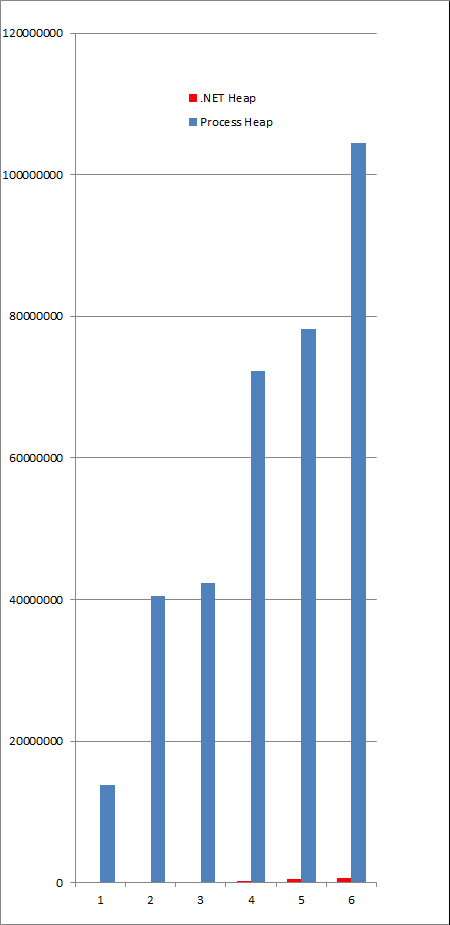
In case of parallel memory leak for process heap and .NET heap (or generally with several dynamic memory allocators) we are interested in relative growth to see whether they are interdependent, i.e. managed heap objects have pointers to process heap entries. When we have a set of consecutive memory dumps we can construct a table of heap sizes and plot the graph where the axes represents memory snapshot numbers and total heap size in bytes:

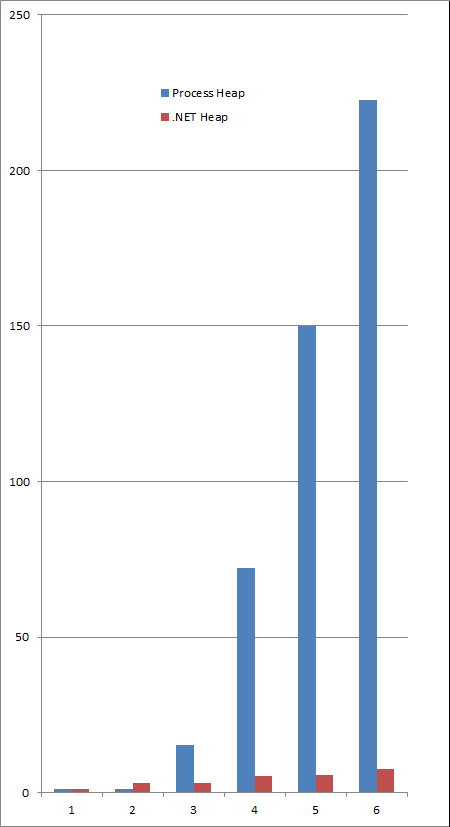
Unfortunately, the relative growth sizes can be disproportionate as the picture above shows. To overcome this, we can normalize size by the lowest corresponding heap size, i.e. Sn/S1:

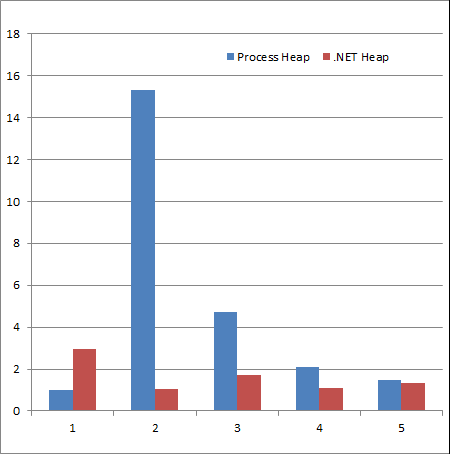
Still this doesn’t show the absence of correlation if there is no such. We can plot the relative growth, i.e. Sn/Sn-1, n > 1:

The graph shows that there is no obvious correlation between Relative Heap Leaks. Similar graphs can be constructed for relative object distributions.

- Dmitry Vostokov @ DumpAnalysis.org + TraceAnalysis.org -

Crash Dump Analysis Patterns (Part 242)

September 13th, 2016

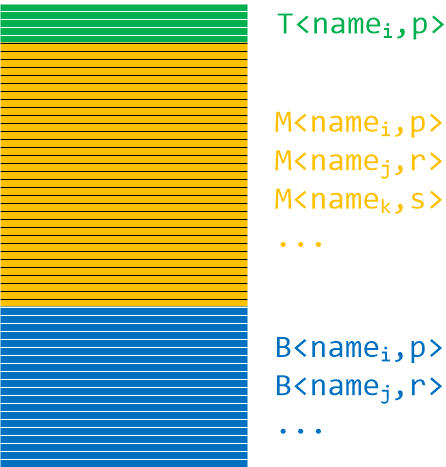
Stack traces resemble functions: they have prolog, body, and epilog. Frame trace is also similar to trace Partition analysis pattern. Bottom stack subtrace plays the role of prolog, for example, thread initialization and RPC call stub dispatch. Middle stack subtrace plays the role of body or core, for example, application specific function calls invoked by RPC. Top stack subtrace plays the role of epilogue, for example, system calls. Such stack trace partition is useful for stack trace matching, especially when symbols are not available. In such a case Stack Trace Signature of module names and their frame counts may help (together with Crash Signature where appropriate):

The following stack trace may be split into TMB (pronounced Tomb):

0:001> kc
# Call Site
00 ntdll!RtlEnterCriticalSection
01 ModuleA
02 ModuleA
03 ModuleA
04 ModuleA
05 ModuleA
06 ModuleA
07 ModuleA
08 ModuleA
09 ModuleA
0a ModuleA
0b ModuleA
0c ModuleA
0d ModuleA
0e ModuleA
0f ModuleA
10 rpcrt4!Invoke
11 rpcrt4!NdrStubCall2
12 rpcrt4!NdrServerCall2
13 rpcrt4!DispatchToStubInCNoAvrf
14 rpcrt4!RPC_INTERFACE::DispatchToStubWorker
15 rpcrt4!RPC_INTERFACE::DispatchToStub
16 rpcrt4!RPC_INTERFACE::DispatchToStubWithObject
17 rpcrt4!LRPC_SCALL::DispatchRequest
18 rpcrt4!LRPC_SCALL::HandleRequest
19 rpcrt4!LRPC_SASSOCIATION::HandleRequest
1a rpcrt4!LRPC_ADDRESS::HandleRequest
1b rpcrt4!LRPC_ADDRESS::ProcessIO
1c rpcrt4!LrpcIoComplete
1d ntdll!TppAlpcpExecuteCallback
1e ntdll!TppWorkerThread
1f kernel32!BaseThreadInitThunk
20 ntdll!RtlUserThreadStart

It has the following signature:

T<ntdll,1>M<ModuleA,15>B<rpcrt4,13>B<ntdll,2>B<kernel32,1>B<ntdll,1>

- Dmitry Vostokov @ DumpAnalysis.org + TraceAnalysis.org -

Crash Dump Analysis Patterns (Part 1d)

September 8th, 2016

We do not write a special pattern for individual stowed exceptions (0xC000027B, an application-internal exception) because we consider them examples of Mixed Exceptions (for example, as Managed Code Exceptions enveloped by unmanaged code Software Exception, see stowed exception examples here). However, we introduce a variant of Multiple Exceptions analysis patterns for them because the default analysis WinDbg command (!analyze -v) only shows the first exception or error message stored in the array of stowed exception information structures. The following example shows 3 exceptions. When we load the dump we get this indication of the stowed exceptions:

This dump file has an exception of interest stored in it.
The stored exception information can be accessed via .ecxr.
(2784.2068): Unknown exception - code c000027b (first/second chance not available)
eax=059be538 ebx=00000000 ecx=00000000 edx=00000000 esi=059be898 edi=059be538
eip=750510c0 esp=059be81c ebp=059be940 iopl=0 nv up ei pl nz ac po nc
cs=0023 ss=002b ds=002b es=002b fs=0053 gs=002b efl=00000212
combase!RoFailFastWithErrorContextInternal2+0×109 [inlined in combase!RoFailFastWithErrorContextInternal+0×240]:
750510c0 6a03 push 3

0:008> !error c000027b
Error code: (NTSTATUS) 0xc000027b (3221226107) - An application-internal exception has occurred.

We check Stored Exception:

0:008> .exr -1
ExceptionAddress: 66fc2408 (Windows_UI_Xaml!DirectUI::ErrorHelper::ProcessUnhandledError+0x00432e07)
ExceptionCode: c000027b
ExceptionFlags: 00000001
NumberParameters: 2
Parameter[0]: 08d9bfa8
Parameter[1]: 00000003

We see it has 3 stowed exceptions pointed to by array elements:

0:008> dp 08d9bfa8 L3
08d9bfa8 08d8e084 08d928a8 08d928d0

We check what kind of stowed information structures they point to:

0:008> dt -a3 08d9bfa8 _STOWED_EXCEPTION_INFORMATION_HEADER*
[0] @ 08d9bfa8
———————————————
0×08d8e084
+0×000 Size : 0×28
+0×004 Signature : 0×53453032

[1] @ 08d9bfac
---------------------------------------------
0x08d928a8
+0x000 Size : 0x28
+0×004 Signature : 0×53453032

[2] @ 08d9bfb0
---------------------------------------------
0x08d928d0
+0x000 Size : 0x28
+0×004 Signature : 0×53453032

0:008> .formats 0x53453032
Evaluate expression:
Hex: 53453032
Decimal: 1397043250
Octal: 12321230062
Binary: 01010011 01000101 00110000 00110010
Chars: SE02
Time: Wed Apr 09 12:34:10 2014
Float: low 8.46917e+011 high 0
Double: 6.90231e-315

Since these are version 2 stowed information structures we use this command:

0:008> dt -a3 08d9bfa8 _STOWED_EXCEPTION_INFORMATION_V2*
[0] @ 08d9bfa8
———————————————
0×08d8e084
+0×000 Header : _STOWED_EXCEPTION_INFORMATION_HEADER
+0×008 ResultCode : 802b000a
+0×00c ExceptionForm : 0y01
+0×00c ThreadId : 0y000000000000000000100000011010 (0×81a)
+0×010 ExceptionAddress : 0×74f562f2 Void
+0×014 StackTraceWordSize : 4
+0×018 StackTraceWords : 0×3c
+0×01c StackTrace : 0×07731c08 Void

+0×010 ErrorText : 0×74f562f2 “趍ﯰ???”
+0×020 NestedExceptionType : 0
+0×024 NestedException : (null)

[1] @ 08d9bfac
---------------------------------------------
0x08d928a8
+0x000 Header : _STOWED_EXCEPTION_INFORMATION_HEADER
+0×008 ResultCode : 80004001
+0×00c ExceptionForm : 0y01
+0×00c ThreadId : 0y000000000000000000000000000000 (0)
+0×010 ExceptionAddress : (null)
+0×014 StackTraceWordSize : 4
+0×018 StackTraceWords : 0×3c
+0×01c StackTrace : 0×077d5d4c Void

+0×010 ErrorText : (null)
+0×020 NestedExceptionType : 0
+0×024 NestedException : (null)

[2] @ 08d9bfb0
---------------------------------------------
0x08d928d0
+0x000 Header : _STOWED_EXCEPTION_INFORMATION_HEADER
+0×008 ResultCode : 80004005
+0×00c ExceptionForm : 0y01
+0×00c ThreadId : 0y000000000000000000000000000000 (0)
+0×010 ExceptionAddress : (null)
+0×014 StackTraceWordSize : 4
+0×018 StackTraceWords : 0×19
+0×01c StackTrace : 0×0772df74 Void

+0×010 ErrorText : (null)
+0×020 NestedExceptionType : 0
+0×024 NestedException : (null)

Now we check Stack Traces for individual entries and their error codes:

0:008> !error 802b000a
Error code: (HRESULT) 0×802b000a (2150301706) - <Unable to get error code text>

0:008> .lines -d
Line number information will not be loaded

0:008> dps 0×07731c08 L3c
07731c08  74fba2be combase!RoOriginateErrorW+0×3e
07731c0c  66b900d7 Windows_UI_Xaml!DirectUI::ErrorHelper::OriginateError+0×8d
07731c10  66b8fe5f Windows_UI_Xaml!CJupiterErrorServiceListener::NotifyErrorAdded+0xaf
07731c14  66b8fd60 Windows_UI_Xaml!CErrorService::AddError+0×130
07731c18  66b8f0f8 Windows_UI_Xaml!CErrorService::ReportParserError+0×88
07731c1c  66b8f000 Windows_UI_Xaml!ParserErrorService::ReportError+0xd0
07731c20  670f9654 Windows_UI_Xaml!ParserErrorReporter::SetError+0×61
07731c24  670fbe70 Windows_UI_Xaml!XamlBinaryMetadataReader2::LogError+0×6c
07731c28  670fbd37 Windows_UI_Xaml!<lambda_1d4791754290213f1bf5bc456a504cc5>::operator()+0×41
07731c2c  67032601 Windows_UI_Xaml!XamlBinaryMetadataReader2::LoadProperty+0×1f7e82
07731c30  66cab9d9 Windows_UI_Xaml!XamlBinaryMetadataReader2::GetProperty+0×5c
07731c34  66d528e0 Windows_UI_Xaml!XamlBinaryFormatSubReader2::ReadXamlProperty+0×1d0
07731c38  66d520cc Windows_UI_Xaml!XamlBinaryFormatSubReader2::ReadSetValueConstantNode+0×3c
07731c3c  66d53b55 Windows_UI_Xaml!XamlBinaryFormatSubReader2::TryRead+0×135
07731c40  66d539ec Windows_UI_Xaml!XamlBinaryFormatSubReader2::TryReadHRESULT+0×3c
07731c44  66ca329e Windows_UI_Xaml!CParser::LoadXamlCore+0×5ae
07731c48  66da83d2 Windows_UI_Xaml!CCoreServices::ParseXamlWithExistingFrameworkRoot+0×100
07731c4c  66da8131 Windows_UI_Xaml!CApplication::LoadComponent+0×261
07731c50  66da7e56 Windows_UI_Xaml!Application_LoadComponent+0xaa
07731c54  66da7cfc Windows_UI_Xaml!DirectUI::FrameworkApplication::LoadComponent+0xc2
07731c58  66dab49d Windows_UI_Xaml!DirectUI::FrameworkApplicationFactory::LoadComponentWithResourceLocationImpl+0×6a
07731c5c  66dab418 Windows_UI_Xaml!DirectUI::FrameworkApplicationFactory::LoadComponentWithResourceLocation+0×28
07731c60  6c186b95*** WARNING: Unable to verify checksum for Microsoft.Msn.Weather.dll
*** ERROR: Symbol file could not be found.  Defaulted to export symbols for Microsoft.Msn.Weather.dll -
Microsoft_Msn_Weather_6bb10000!RHBinder__ShimExeMain+0×1b2515
07731c64  6c186af1 Microsoft_Msn_Weather_6bb10000!RHBinder__ShimExeMain+0×1b2471
07731c68  6c199d37 Microsoft_Msn_Weather_6bb10000!RHBinder__ShimExeMain+0×1c56b7
07731c6c  6c366cd8 Microsoft_Msn_Weather_6bb10000!DllGetActivationFactory+0xaf038
07731c70  6c366c8d Microsoft_Msn_Weather_6bb10000!DllGetActivationFactory+0xaefed
07731c74  6c366b4d Microsoft_Msn_Weather_6bb10000!DllGetActivationFactory+0xaeead
07731c78  6c365b50 Microsoft_Msn_Weather_6bb10000!DllGetActivationFactory+0xadeb0
07731c7c  6c3cc1d7 Microsoft_Msn_Weather_6bb10000!DllGetActivationFactory+0×114537
07731c80  6c3cbb9a Microsoft_Msn_Weather_6bb10000!DllGetActivationFactory+0×113efa
07731c84  6c3cb9c0 Microsoft_Msn_Weather_6bb10000!DllGetActivationFactory+0×113d20
07731c88  6c35a658 Microsoft_Msn_Weather_6bb10000!DllGetActivationFactory+0xa29b8
07731c8c  6c0fd56e Microsoft_Msn_Weather_6bb10000!RHBinder__ShimExeMain+0×128eee
07731c90  6c21e3d5 Microsoft_Msn_Weather_6bb10000!RHBinder__ShimExeMain+0×249d55
07731c94  66e50d37 Windows_UI_Xaml!DirectUI::FrameworkApplicationGenerated::OnLaunchedProtected+0×47
07731c98  66e509d0 Windows_UI_Xaml!DirectUI::FrameworkView::OnActivated+0×240
07731c9c  66cf4b28 Windows_UI_Xaml!`Microsoft::WRL::Callback< Windows::Foundation::ITypedEventHandler< Windows::UI::Core::CoreWindow *,IInspectable *>,DirectUI::Page,Windows::UI::Core::ICoreWindow *,IInspectable *>’::`2′::ComObject::Invoke+0×28
07731ca0  7035361e twinapi_appcore!Microsoft::WRL::InvokeTraits<-2>::InvokeDelegates< <lambda_45dc3980e5a5ff53a9eb289d8a61b7e3>, Windows::Foundation::ITypedEventHandler< Windows::ApplicationModel::Core::CoreApplicationView *,Windows::ApplicationModel::Activation::IActivatedEventArgs *> >+0×4f
07731ca4  70353493 twinapi_appcore!Microsoft::WRL::EventSource< Windows::Foundation::ITypedEventHandler< Windows::ApplicationModel::Core::CoreApplicationView *,Windows::ApplicationModel::Activation::IActivatedEventArgs *>,Microsoft::WRL::InvokeModeOptions<-2> >::DoInvoke< <lambda_45dc3980e5a5ff53a9eb289d8a61b7e3> >+0×42
07731ca8  70342a06 twinapi_appcore!Windows::ApplicationModel::Core::CoreApplicationView::Activate+0×296
07731cac  77425ebc rpcrt4!Invoke+0×34
07731cb0  773f37e3 rpcrt4!NdrStubCall2+0×2e3
07731cb4  74efc1ce combase!CStdStubBuffer_Invoke+0xde
07731cb8  7742364c rpcrt4!CStdStubBuffer_Invoke+0×2c
07731cbc  74fb659b combase!ObjectMethodExceptionHandlingAction< <lambda_adf5d6ba83bff890864fd80ca2bbf1eb> >+0×7b
07731cc0  74f83091 combase!DefaultStubInvoke+0×211
07731cc4  74f8d59e combase!ServerCall::ContextInvoke+0×38e
07731cc8  74f8ecc5 combase!AppInvoke+0xb75
07731ccc  74f81c8c combase!ComInvokeWithLockAndIPID+0×62c
07731cd0  74f66d72 combase!CComApartment::ASTAHandleMessage+0×2c2
07731cd4  74f65bfa combase!ASTAWaitContext::Wait+0×47a
07731cd8  74fbb1b4 combase!ASTAWaitInNewContext+0×81
07731cdc  74fbb0ee combase!ASTAThreadWaitForHandles+0×4e
07731ce0  74fbaf1a combase!CoWaitForMultipleHandles+0xaa
07731ce4  7035772d twinapi_appcore!CTSimpleArray<COSTaskCompletion::TaskContext *,4294967294, CTPolicyCoTaskMem<COSTaskCompletion::TaskContext *>,CSimpleArrayStandardCompareHelper<COSTaskCompletion::TaskContext *>,CSimpleArrayStandardMergeHelper<COSTaskCompletion::TaskContext *> >::RemoveAt+0×9f
07731ce8  747d3bea SHCore!CTSimpleArray<Microsoft::WRL::ComPtr< IWindowMonitorChangeListener>,4294967294, CTPolicyCoTaskMem<Microsoft::WRL::ComPtr< IWindowMonitorChangeListener> >,CSimpleArrayStandardCompareHelper<Microsoft::WRL::ComPtr< IWindowMonitorChangeListener> >,CSimpleArrayStandardMergeHelper<Microsoft::WRL::ComPtr< IWindowMonitorChangeListener> > >::_Add<Microsoft::WRL::ComPtr< IWindowMonitorChangeListener> const &>+0×120
07731cec  75423744 kernel32!BaseThreadInitThunk+0×24
07731cf0  776d9e54 ntdll!__RtlUserThreadStart+0×2f
07731cf4  776d9e1f ntdll!_RtlUserThreadStart+0×1b

0:008> !error 80004001
Error code: (HRESULT) 0×80004001 (2147500033) - Not implemented

0:008> dps 0×077d5d4c L3c
077d5d4c  66f42bbe Windows_UI_Xaml!DirectUI::MetadataAPI::ImportClassInfo+0×2ed89e
077d5d50  66e451ce Windows_UI_Xaml!DirectUI::MetadataAPI::ImportClassInfoFromMetadataProvider+0×86
077d5d54  66c87bf9 Windows_UI_Xaml!DirectUI::MetadataAPI::GetClassInfoByTypeName+0×219
077d5d58  66c55ea0 Windows_UI_Xaml!DirectUI::MetadataAPI::GetClassInfoByXamlType+0×50
077d5d5c  66c5365d Windows_UI_Xaml!DirectUI::MetadataAPI::ImportPropertyInfo+0×8a
077d5d60  66c542a0 Windows_UI_Xaml!DirectUI::MetadataAPI::TryImportPropertyInfoFromMetadataProvider+0×9f
077d5d64  66c53f94 Windows_UI_Xaml!DirectUI::MetadataAPI::TryGetPropertyByName+0xde
077d5d68  66c564e7 Windows_UI_Xaml!XamlManagedTypeInfoProvider::ResolvePropertyName+0×47
077d5d6c  66c930c2 Windows_UI_Xaml!XamlType::GetProperty+0×1a2
077d5d70  66e3a830 Windows_UI_Xaml!XamlBinaryMetadataReader2::LoadProperty+0xb1
077d5d74  66cab9d9 Windows_UI_Xaml!XamlBinaryMetadataReader2::GetProperty+0×5c
077d5d78  66d528e0 Windows_UI_Xaml!XamlBinaryFormatSubReader2::ReadXamlProperty+0×1d0
077d5d7c  66d520cc Windows_UI_Xaml!XamlBinaryFormatSubReader2::ReadSetValueConstantNode+0×3c
077d5d80  66d53b55 Windows_UI_Xaml!XamlBinaryFormatSubReader2::TryRead+0×135
077d5d84  66d539ec Windows_UI_Xaml!XamlBinaryFormatSubReader2::TryReadHRESULT+0×3c
077d5d88  66ca329e Windows_UI_Xaml!CParser::LoadXamlCore+0×5ae
077d5d8c  66da83d2 Windows_UI_Xaml!CCoreServices::ParseXamlWithExistingFrameworkRoot+0×100
077d5d90  66da8131 Windows_UI_Xaml!CApplication::LoadComponent+0×261
077d5d94  66da7e56 Windows_UI_Xaml!Application_LoadComponent+0xaa
077d5d98  66da7cfc Windows_UI_Xaml!DirectUI::FrameworkApplication::LoadComponent+0xc2
077d5d9c  66dab49d Windows_UI_Xaml!DirectUI::FrameworkApplicationFactory::LoadComponentWithResourceLocationImpl+0×6a
077d5da0  66dab418 Windows_UI_Xaml!DirectUI::FrameworkApplicationFactory::LoadComponentWithResourceLocation+0×28
077d5da4  6c186b95 Microsoft_Msn_Weather_6bb10000!RHBinder__ShimExeMain+0×1b2515
077d5da8  6c186af1 Microsoft_Msn_Weather_6bb10000!RHBinder__ShimExeMain+0×1b2471
077d5dac  6c199d37 Microsoft_Msn_Weather_6bb10000!RHBinder__ShimExeMain+0×1c56b7
077d5db0  6c366cd8 Microsoft_Msn_Weather_6bb10000!DllGetActivationFactory+0xaf038
077d5db4  6c366c8d Microsoft_Msn_Weather_6bb10000!DllGetActivationFactory+0xaefed
077d5db8  6c366b4d Microsoft_Msn_Weather_6bb10000!DllGetActivationFactory+0xaeead
077d5dbc  6c365b50 Microsoft_Msn_Weather_6bb10000!DllGetActivationFactory+0xadeb0
077d5dc0  6c3cc1d7 Microsoft_Msn_Weather_6bb10000!DllGetActivationFactory+0×114537
077d5dc4  6c3cbb9a Microsoft_Msn_Weather_6bb10000!DllGetActivationFactory+0×113efa
077d5dc8  6c3cb9c0 Microsoft_Msn_Weather_6bb10000!DllGetActivationFactory+0×113d20
077d5dcc  6c35a658 Microsoft_Msn_Weather_6bb10000!DllGetActivationFactory+0xa29b8
077d5dd0  6c0fd56e Microsoft_Msn_Weather_6bb10000!RHBinder__ShimExeMain+0×128eee
077d5dd4  6c21e3d5 Microsoft_Msn_Weather_6bb10000!RHBinder__ShimExeMain+0×249d55
077d5dd8  66e50d37 Windows_UI_Xaml!DirectUI::FrameworkApplicationGenerated::OnLaunchedProtected+0×47
077d5ddc  66e509d0 Windows_UI_Xaml!DirectUI::FrameworkView::OnActivated+0×240
077d5de0  66cf4b28 Windows_UI_Xaml!`Microsoft::WRL::Callback< Windows::Foundation::ITypedEventHandler< Windows::UI::Core::CoreWindow *,IInspectable *>,DirectUI::Page,Windows::UI::Core::ICoreWindow *,IInspectable *>’::`2′::ComObject::Invoke+0×28
077d5de4  7035361e twinapi_appcore!Microsoft::WRL::InvokeTraits<-2>::InvokeDelegates< <lambda_45dc3980e5a5ff53a9eb289d8a61b7e3>, Windows::Foundation::ITypedEventHandler< Windows::ApplicationModel::Core::CoreApplicationView *,Windows::ApplicationModel::Activation::IActivatedEventArgs *> >+0×4f
077d5de8  70353493 twinapi_appcore!Microsoft::WRL::EventSource< Windows::Foundation::ITypedEventHandler< Windows::ApplicationModel::Core::CoreApplicationView *,Windows::ApplicationModel::Activation::IActivatedEventArgs *>,Microsoft::WRL::InvokeModeOptions<-2> >::DoInvoke< <lambda_45dc3980e5a5ff53a9eb289d8a61b7e3> >+0×42
077d5dec  70342a06 twinapi_appcore!Windows::ApplicationModel::Core::CoreApplicationView::Activate+0×296
077d5df0  77425ebc rpcrt4!Invoke+0×34
077d5df4  773f37e3 rpcrt4!NdrStubCall2+0×2e3
077d5df8  74efc1ce combase!CStdStubBuffer_Invoke+0xde
077d5dfc  7742364c rpcrt4!CStdStubBuffer_Invoke+0×2c
077d5e00  74fb659b combase!ObjectMethodExceptionHandlingAction< <lambda_adf5d6ba83bff890864fd80ca2bbf1eb> >+0×7b
077d5e04  74f83091 combase!DefaultStubInvoke+0×211
077d5e08  74f8d59e combase!ServerCall::ContextInvoke+0×38e
077d5e0c  74f8ecc5 combase!AppInvoke+0xb75
077d5e10  74f81c8c combase!ComInvokeWithLockAndIPID+0×62c
077d5e14  74f66d72 combase!CComApartment::ASTAHandleMessage+0×2c2
077d5e18  74f65bfa combase!ASTAWaitContext::Wait+0×47a
077d5e1c  74fbb1b4 combase!ASTAWaitInNewContext+0×81
077d5e20  74fbb0ee combase!ASTAThreadWaitForHandles+0×4e
077d5e24  74fbaf1a combase!CoWaitForMultipleHandles+0xaa
077d5e28  7035772d twinapi_appcore!CTSimpleArray<COSTaskCompletion::TaskContext *,4294967294, CTPolicyCoTaskMem<COSTaskCompletion::TaskContext *>,CSimpleArrayStandardCompareHelper<COSTaskCompletion::TaskContext *>,CSimpleArrayStandardMergeHelper<COSTaskCompletion::TaskContext *> >::RemoveAt+0×9f
077d5e2c  747d3bea SHCore!CTSimpleArray<Microsoft::WRL::ComPtr< IWindowMonitorChangeListener>,4294967294, CTPolicyCoTaskMem<Microsoft::WRL::ComPtr< IWindowMonitorChangeListener> >,CSimpleArrayStandardCompareHelper<Microsoft::WRL::ComPtr< IWindowMonitorChangeListener> >,CSimpleArrayStandardMergeHelper<Microsoft::WRL::ComPtr< IWindowMonitorChangeListener> > >::_Add<Microsoft::WRL::ComPtr< IWindowMonitorChangeListener> const &>+0×120
077d5e30  75423744 kernel32!BaseThreadInitThunk+0×24
077d5e34  776d9e54 ntdll!__RtlUserThreadStart+0×2f
077d5e38  776d9e1f ntdll!_RtlUserThreadStart+0×1b

0:008> ub 66f42bbe
Windows_UI_Xaml!DirectUI::MetadataAPI::ImportClassInfo+0×2ed87f:
66f42b9f 8bce            mov     ecx,esi
66f42ba1 e8b96ecfff      call    Windows_UI_Xaml!OnFailure<1354> (66c39a5f)
66f42ba6 e92d2bd1ff      jmp     Windows_UI_Xaml!DirectUI::MetadataAPI::ImportClassInfo+0×3b8 (66c556d8)
66f42bab 8bce            mov     ecx,esi
66f42bad e8ad6ecfff      call    Windows_UI_Xaml!OnFailure<1354> (66c39a5f)
66f42bb2 e9212bd1ff      jmp     Windows_UI_Xaml!DirectUI::MetadataAPI::ImportClassInfo+0×3b8 (66c556d8)
66f42bb7 8bce            mov     ecx,esi
66f42bb9 e8a16ecfff      call    Windows_UI_Xaml!OnFailure<1354> (66c39a5f)

0:008> !error 80004005
Error code: (HRESULT) 0×80004005 (2147500037) - Unspecified error

0:008> dps 0×0772df74 L19
0772df74  66bc3963 Windows_UI_Xaml!CWindowsServices::CreatePalAppChromeProxy+0×23
0772df78  66bc3912 Windows_UI_Xaml!AppChromeProxy::EnsureAppChromeProxy+0×44
0772df7c  66bc38b6 Windows_UI_Xaml!AppChromeProxy::SetThemeOverride+0xf
0772df80  66e51074 Windows_UI_Xaml!DirectUI::DXamlCore::ConfigureCoreWindow+0×95
0772df84  66e50e6f Windows_UI_Xaml!DirectUI::FrameworkView::SetWindow+0×1f
0772df88  70342def twinapi_appcore!Windows::ApplicationModel::Core::CoreApplicationView::SetWindowAndGetDispatcher + 0×20f
0772df8c  77425ebc rpcrt4!Invoke+0×34
0772df90  773f37e3 rpcrt4!NdrStubCall2+0×2e3
0772df94  74efc1ce combase!CStdStubBuffer_Invoke+0xde
0772df98  7742364c rpcrt4!CStdStubBuffer_Invoke+0×2c
0772df9c  74fb659b combase!ObjectMethodExceptionHandlingAction<
<lambda_adf5d6ba83bff890864fd80ca2bbf1eb> >+0×7b
0772dfa0 74f83091 combase!DefaultStubInvoke+0×211
0772dfa4 74f8d59e combase!ServerCall::ContextInvoke+0×38e
0772dfa8 74f8ecc5 combase!AppInvoke+0xb75
0772dfac 74f81c8c combase!ComInvokeWithLockAndIPID+0×62c
0772dfb0 74f66d72 combase!CComApartment::ASTAHandleMessage+0×2c2
0772dfb4 74f65bfa combase!ASTAWaitContext::Wait+0×47a
0772dfb8 74fbb1b4 combase!ASTAWaitInNewContext+0×81
0772dfbc 74fbb0ee combase!ASTAThreadWaitForHandles+0×4e
0772dfc0 74fbaf1a combase!CoWaitForMultipleHandles+0xaa
0772dfc4 7035772d twinapi_appcore!CTSimpleArray<COSTaskCompletion::TaskContext *,4294967294, CTPolicyCoTaskMem<COSTaskCompletion::TaskContext *>,CSimpleArrayStandardCompareHelper<COSTaskCompletion::TaskContext *>,CSimpleArrayStandardMergeHelper<COSTaskCompletion::TaskContext *> >::RemoveAt+0×9f
0772dfc8 747d3bea SHCore!CTSimpleArray<Microsoft::WRL::ComPtr< IWindowMonitorChangeListener>,4294967294, CTPolicyCoTaskMem<Microsoft::WRL::ComPtr< IWindowMonitorChangeListener> >,CSimpleArrayStandardCompareHelper<Microsoft::WRL::ComPtr< IWindowMonitorChangeListener> >,CSimpleArrayStandardMergeHelper<Microsoft::WRL::ComPtr< IWindowMonitorChangeListener> > >::_Add<Microsoft::WRL::ComPtr< IWindowMonitorChangeListener> const &>+0×120
0772dfcc 75423744 kernel32!BaseThreadInitThunk+0×24
0772dfd0 776d9e54 ntdll!__RtlUserThreadStart+0×2f
0772dfd4 776d9e1f ntdll!_RtlUserThreadStart+0×1b

0:008> ub 66bc3963
Windows_UI_Xaml!CWindowsServices::CreatePalAppChromeProxy+0×5:
66bc3945 56              push    esi
66bc3946 8b7508          mov     esi,dword ptr [ebp+8]
66bc3949 832600          and     dword ptr [esi],0
66bc394c e83ebd2d00      call    Windows_UI_Xaml!IsConfigureStatusBarDefaultsPresent (66e9f68f)
66bc3951 84c0            test    al,al
66bc3953 0f856c1a4100    jne     Windows_UI_Xaml!CWindowsServices::CreatePalAppChromeProxy+0×411a85 (66fd53c5)
66bc3959 be05400080      mov     esi,80004005h
66bc395e e80c000000      call    Windows_UI_Xaml!OnFailure<91> (66bc396f)

- Dmitry Vostokov @ DumpAnalysis.org + TraceAnalysis.org -
Trace Analysis Patterns (Part 132)

September 4th, 2016

Sometimes log messages are formatted with mistakes, buffers are not cleared before copying, copied strings are truncated, tracing implementation and presentation contains coding defects. There can be internal corruption when messages are formed or “corruption” during presentation, for example, default field conversion rules (like in Excel). We call this pattern Corrupt Message. Such messages may affect trace and log analysis where data search may not show full relevant results. We then recommend to double check findings by using Data Flow of a different Message Invariant.

- Dmitry Vostokov @ DumpAnalysis.org + TraceAnalysis.org -
Trace Analysis Patterns (Part 131)

September 3rd, 2016

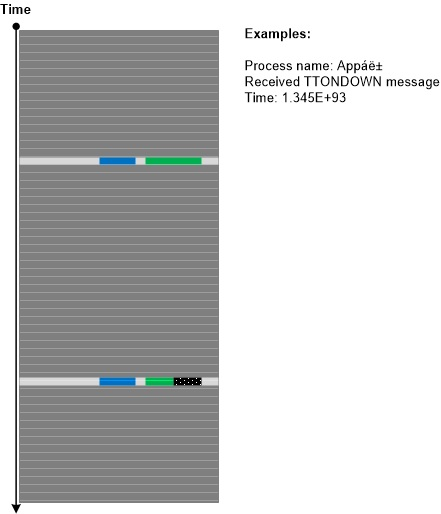
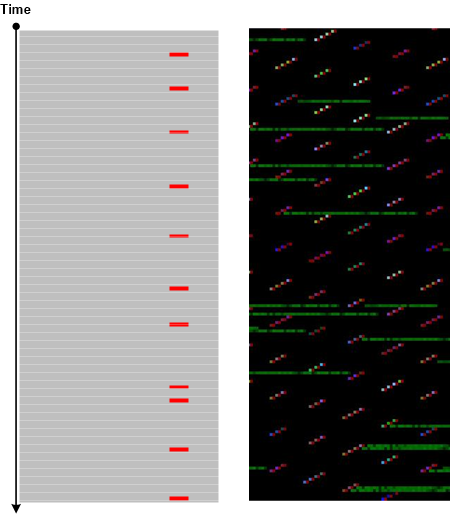
Sometimes, the presence of some messages in a trace or log shows that some other tracing or logging tool was running or that some process was also doing tracing. We call this analysis pattern Surveyor. Such discovered tracing may not be related to the trace we are looking at (compare to Trace Extension) but may help with finding additional traces in the system as illustrated in the following diagram:

- Dmitry Vostokov @ DumpAnalysis.org + TraceAnalysis.org -
Trace Analysis Patterns (Part 130)

August 15th, 2016

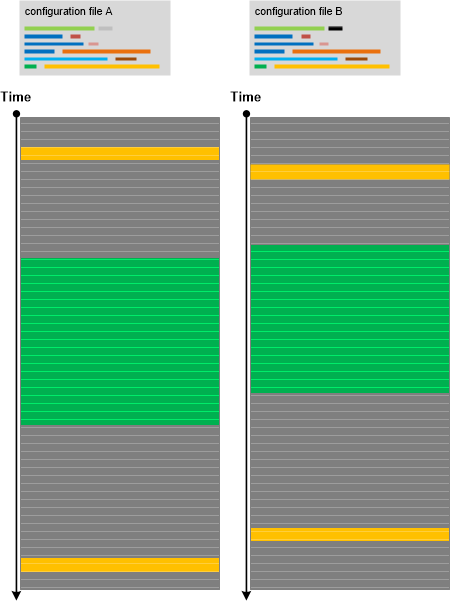
Recently we performed the diagnostic analysis of a software incident where certain functionality was not available to users and provided the report based on analysis patterns such as Focus of Tracing and Opposition Messages. We also conjectured some hypotheses explaining the observed abnormal behaviour. However, at the end, the problem was solved not by the analysis of a lengthy software execution log but by looking at the small configuration INI file where not working functionality was simply disabled in one line:

EnableFunctionality = 0

Even before that analysis we were thinking about the importance of Small DA+TA such as configuration files and registry details that can be considered as general software traces. Here DA+TA means Dump Artefact + Trace Artefact and Big DA+TA refers to software execution memory dump artefacts and trace artefacts that can be really huge. The analysis pattern is illustrated in the following diagram where we see no difference between working and non-working scenarios due to insufficient trace coverage (Sparse Trace):

- Dmitry Vostokov @ DumpAnalysis.org + TraceAnalysis.org -
Trace Analysis Patterns (Part 129)

August 13th, 2016

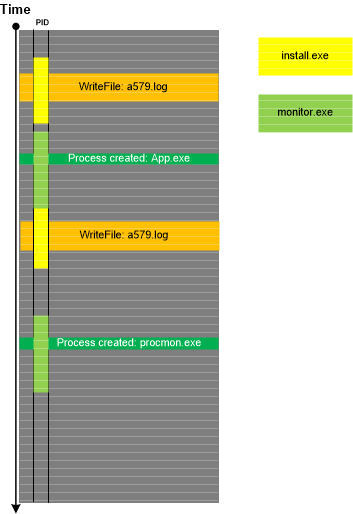
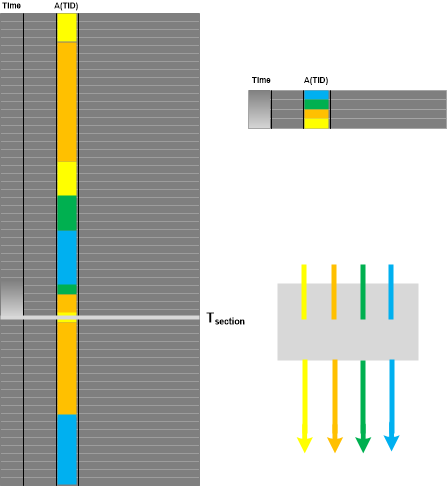
In addition to Message Patterns there are higher level patterns of specific activities and Motives. Such activities may or may not coincide with specific components (modules) because they may be grouped based on implementation messages, software internals semantics and not on architectural and design entities (as in Use Case Trail analysis pattern). Moreover, he same components may “play” different activity roles. Once assigned, Activity Theatre “scripts” can be compared with “scripts” from other traces and logs (Inter-Correlation) or different parts of the same log (Intra-Correlation). This pattern is illustrated in the following diagram:

- Dmitry Vostokov @ DumpAnalysis.org + TraceAnalysis.org -
Trace Analysis Patterns (Part 128)

August 9th, 2016

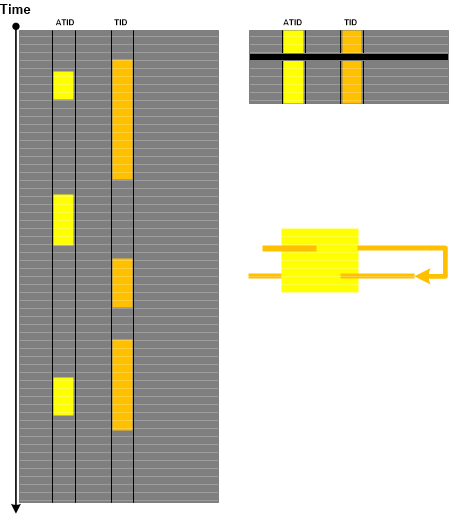
Now we come to the trace and log analysis pattern that we call Message Pattern. It is an ordered set of messages from Thread of Activity or Adjoint Thread of Activity having Message Invariants that can be used for matching another ordered set of messages in another (Inter-Correlation) or the same trace or log (Intra-Correlation). A typical Message Pattern from one of our own trace and log analysis sessions is depicted in the following diagram:

- Dmitry Vostokov @ DumpAnalysis.org + TraceAnalysis.org -
Structural Memory Patterns (Part 8)

August 8th, 2016

After almost a 6-year break we resume extending the catalog of structural memory patterns as a foundation of pattern-oriented memory forensics, root cause analysis, and software internals. The next pattern we add is borrowed from archaeology and is called Region Strata. When we have several memory snapshots we can analyze Memory Regions for their changes at different times:

For example, we got two memory dumps of the same process saved by WER with approx. one minute difference. We saved the raw stack region of the current thread using .writemem WinDbg command in text files (Strata1.txt and Strata2.txt) and then combined them into one Excel table (Strata.xlsx). In that table we can see memory region changes as shown in this picture (click to expand):

- Dmitry Vostokov @ DumpAnalysis.org + TraceAnalysis.org -
Trace Analysis Patterns (Part 127)

July 13th, 2016

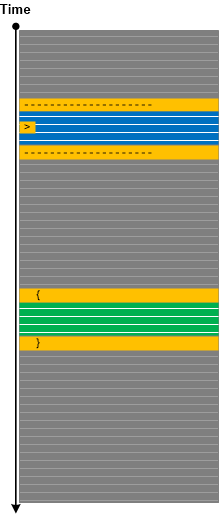
Some tracing architectures, especially the ones that intercept API calls by filtering or hooking, may log synchronous requests by remembering to write done return result in the same trace message later on when the response is available after the wait. If such data is still not available in the log or trace it may point to some blocked request for which other software execution artifact analysis (such as memory dump analysis) is necessary. In some cases, the analysis of the corresponding Fiber Bundle stack trace may point to Blocking Module or the involvement of file system filters. This analysis pattern that we call Missing Data is illustrated in the following diagram:

- Dmitry Vostokov @ DumpAnalysis.org + TraceAnalysis.org -
Trace Analysis Patterns (Part 126)

June 29th, 2016

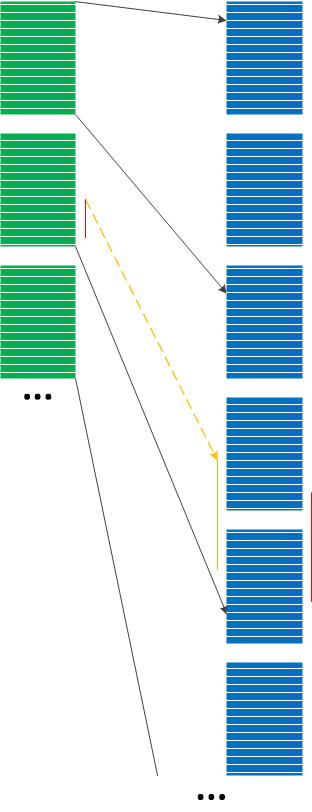
When using complex trace and log analysis patterns such as Fourier Activity we may be first interested in selecting all instances of a particular message type from specific Thread of Activity and then look for Time Deltas, Discontinuities, Data Flow, and other patterns. We call this analysis pattern Fiber of Activity by analogy of fibers (lightweight threads) since the individual thread execution flow is “co-operative” inside, whereas threads themselves are preempted outside. The following diagram from Fourier Analysis example illustrates the concept by showing three fibers:

This analysis pattern is different from trace-wide Sheaf of Activities where the latter is about selecting messages as Adjoint Threads of Activity which may span several processes and threads.

- Dmitry Vostokov @ DumpAnalysis.org + TraceAnalysis.org -
Trace Analysis Patterns (Part 125)

June 27th, 2016

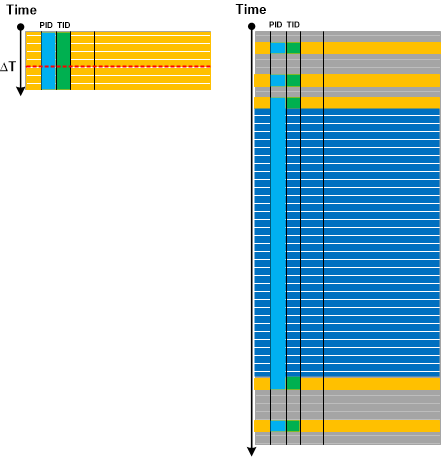
Sometimes we have trace and log messages that appear with certain time frequency throughout all log or specific Thread of Activity. Such frequencies may fluctuate reflecting varying system or process performance. Analyzing trace areas where such messages have different Time Deltas may point to additional diagnostic log messages useful for root cause analysis. The following minimal trace graph depicts the recent log analysis for proprietary file copy operation where the frequency of internal communication channel entry/exit Opposition Messages was decreasing from time to time. Such periods were correlating with increased time intervals between “entry” and “exit” messages. Analysis of messages between them revealed additional diagnostic statements missing in periods of higher frequency and corresponding Timeouts adding up to overall performance degradation and slowness of copy operation.

Additional analysis of Data Association in a different message type between available communication buffers and the total number of such buffers revealed significant frequency drop during constant Data Flow of zero available communication buffers:

We call this analysis pattern Fourier Activity by analogy with Fourier series in mathematics. This pattern is for individual message types and can also be considered a fine-grained example of Statement Current and Trace Acceleration analysis patterns which can be used to detect areas of different frequencies in individual Fibers (Adjoint Threads of Activities formed from the same Thread of Activity).

- Dmitry Vostokov @ DumpAnalysis.org + TraceAnalysis.org -
Crash Dump Analysis Patterns (Part 58b)

June 5th, 2016

Windows imposes a restriction for the number of GDI handles per process and by default it is approx. 10,000. If this number is reached we can have abnormal software behaviour symptoms such as hangs, glitches in visual appearance, and out-of-memory exceptions resulted in error messages and crashes. We already documented this analysis pattern for kernel and complete memory dumps that we called Handle Limit (GDI). However, one of Software Diagnostics Services’ training customers reported an out-of-memory exception with trace analysis diagnostics pointing to 10,000 leaked GDI objects. The process memory dump was saved and the customer asked whether it was possible to analyze it or similar memory dumps to find out from the dump itself whether we have GDI leak and what GDI objects were involved.

We recreated one of the applications from the kernel pattern variant (the one that leaks fonts) with one modification that it just stops after 10,000 font creation attempts. After launch we tried to open About dialog box but the whole application became unresponsive and no dialog box was visible. We save the process memory dump ad found out that its Main Thread was inside Dialog Box processing:

0:000> kc
# Call Site
00 user32!NtUserWaitMessage
01 user32!DialogBox2
02 user32!InternalDialogBox
03 user32!DialogBoxIndirectParamAorW
04 user32!DialogBoxParamW

05 GUIHandleLeak!WndProc
06 user32!UserCallWinProcCheckWow
07 user32!DispatchMessageWorker
08 GUIHandleLeak!wWinMain
09 GUIHandleLeak!invoke_main
0a GUIHandleLeak!__scrt_common_main_seh
0b kernel32!BaseThreadInitThunk
0c ntdll!RtlUserThreadStart

In order to look at GDI handle table we studied the relevant chapters in Feng Yuan’s book “Windows Graphics Programming” and this post which has all necessary structure definitions: http://stackoverflow.com/questions/13905661/how-to-get-list-of-gdi-handles

We get the current process GDI table address from the disassembly:

0:000> .asm no_code_bytes
Assembly options: no_code_bytes

0:000> uf gdi32!GdiQueryTable
gdi32!GdiQueryTable:
00007ffc`7f172610 sub     rsp,38h
00007ffc`7f172614 or      qword ptr [rsp+20h],0FFFFFFFFFFFFFFFFh
00007ffc`7f17261a lea     rdx,[rsp+20h]
00007ffc`7f17261f mov     ecx,0Eh
00007ffc`7f172624 mov     byte ptr [rsp+28h],0
00007ffc`7f172629 call    qword ptr [gdi32!_imp_NtVdmControl (00007ffc`7f1ba5a8)]
00007ffc`7f17262f test    eax,eax
00007ffc`7f172631 js      gdi32!GdiQueryTable+0x33 (00007ffc`7f172643)  Branch

gdi32!GdiQueryTable+0x23:
00007ffc`7f172633 cmp     byte ptr [rsp+28h],0
00007ffc`7f172638 je      gdi32!GdiQueryTable+0x33 (00007ffc`7f172643)  Branch

gdi32!GdiQueryTable+0x2a:
00007ffc`7f17263a mov     rax,qword ptr [gdi32!pGdiSharedHandleTable (00007ffc`7f2541b8)]
00007ffc`7f172641 jmp     gdi32!GdiQueryTable+0×35 (00007ffc`7f172645)  Branch

gdi32!GdiQueryTable+0x33:
00007ffc`7f172643 xor     eax,eax

gdi32!GdiQueryTable+0x35:
00007ffc`7f172645 add     rsp,38h
00007ffc`7f172649 ret

0:000> dp 00007ffc`7f2541b8 L1
00007ffc`7f2541b8  000000db`56a50000

We dump the first 0×1000 qword values:

0:000> dq 000000db`56a50000 L1000
000000db`56a50000  00000000`00000000 40000000`00000000
000000db`56a50010  00000000`00000000 00000000`00000000
000000db`56a50020  40000000`00000000 00000000`00000000
000000db`56a50030  00000000`00000000 00000000`00000000
000000db`56a50040  00000000`00000000 00000000`00000000
000000db`56a50050  00000000`00000000 00000000`00000000
000000db`56a50060  00000000`00000000 00000000`00000000
000000db`56a50070  00000000`00000000 00000000`00000000
000000db`56a50080  00000000`00000000 00000000`00000000
000000db`56a50090  00000000`00000000 00000000`00000000
000000db`56a500a0  00000000`00000000 00000000`00000000
000000db`56a500b0  00000000`00000000 00000000`00000000
000000db`56a500c0  00000000`00000000 00000000`00000000
000000db`56a500d0  00000000`00000000 00000000`00000000
000000db`56a500e0  00000000`00000000 00000000`00000000
000000db`56a500f0  fffff901`40000e60 40040104`00000000
000000db`56a50100  00000000`00000000 fffff901`40000d60
000000db`56a50110  40080188`00000000 00000000`00000000
000000db`56a50120  fffff901`400008b0 40080108`00000000
000000db`56a50130  00000000`00000000 fffff901`400007c0
000000db`56a50140  40080108`00000000 00000000`00000000
000000db`56a50150  fffff901`400006d0 40080108`00000000
[…]
000000db`56a57ce0 fffff901`429d24f0 400aee0a`00002c30
000000db`56a57cf0 000000db`564f3b20 fffff901`42910570
000000db`56a57d00 400a360a`00002c30 000000db`564e57b0
000000db`56a57d10 fffff901`40700420 40105310`000002b4
000000db`56a57d20 00000089`39410fc0 fffff901`407ec4a0
000000db`56a57d30 400a010a`000002b4 00000089`3900ae70
000000db`56a57d40 fffff901`407036d0 400a010a`000002b4
000000db`56a57d50 00000089`3900ae60 fffff901`440b56e0
000000db`56a57d60 400a030a`00002c30 000000db`564f0e90
000000db`56a57d70 fffff901`43e7fd50 40040104`00000000
000000db`56a57d80 00000000`00000000 fffff901`42c0f010
000000db`56a57d90 400a4b0a`00003190 0000003a`1a30b670
000000db`56a57da0 fffff901`440deaf0 400a6d0a`00002c30
000000db`56a57db0 000000db`564f3b00 fffff901`407f2010
000000db`56a57dc0 40100510`00001704 000000d8`d6230f60
000000db`56a57dd0 fffff901`40714180 40100210`00001704
000000db`56a57de0 000000d8`d6230f48 fffff901`4009d840
000000db`56a57df0 40100210`00001704 000000d8`d6230f78
000000db`56a57e00 fffff901`43e50950 40100230`00001704
000000db`56a57e10 00000000`00000000 fffff901`43e30010
000000db`56a57e20 40100230`00001704 00000000`00000000
000000db`56a57e30 fffff901`44f1d010 4005a105`0000168c
000000db`56a57e40 00000000`00000000 fffff901`440ded80
000000db`56a57e50 400a2e0a`00002c30 000000db`564f3b10
000000db`56a57e60 fffff901`4070b3b0 40050405`00000000
000000db`56a57e70 00000000`00000000 fffff901`42a0a010
000000db`56a57e80 400a870a`00002c30 000000db`564e7160
000000db`56a57e90 fffff901`407a7450 4008cd08`00000000
000000db`56a57ea0 00000000`00000000 fffff901`400c49c0
000000db`56a57eb0 40046904`000002b4 00000089`39410f90
000000db`56a57ec0 fffff901`41fb8010 4005c705`00000000
000000db`56a57ed0 00000000`00000000 fffff901`423dc790
000000db`56a57ee0 40086708`00000000 00000000`00000000
000000db`56a57ef0 fffff901`40699620 40010301`0000168c
000000db`56a57f00 00000000`01100000 fffff901`43e54510
000000db`56a57f10 40050305`0000168c 00000000`00000000
000000db`56a57f20 fffff901`407164c0 40100610`00001448
000000db`56a57f30 000000fe`4d8d0cf0 fffff901`407eee50
000000db`56a57f40 40100410`00001448 000000fe`4d8d0cd8
000000db`56a57f50 fffff901`43e2abb0 40080508`00000000
000000db`56a57f60 00000000`00000000 fffff901`40715010
000000db`56a57f70 40050305`0000168c 00000000`00000000
000000db`56a57f80 fffff901`42872b80 40084e08`00000000
000000db`56a57f90 00000000`00000000 fffff901`407175a0
000000db`56a57fa0 410f080f`00000000 00000000`00000000
000000db`56a57fb0 fffff901`407f4000 40050605`00000000
000000db`56a57fc0 00000000`00000000 fffff901`406d6bb0
000000db`56a57fd0 40080508`00000000 00000000`00000000
000000db`56a57fe0 fffff901`43e3a4c0 40120812`00000000
000000db`56a57ff0 00000000`00000000 fffff901`44fe1010

We see that typical cell value has 3 qwords (8-byte or 4-word sized values for both x64 and Virtualized Process). The non-zeroed data starts from 000000db`56a500f0 address. Clearly some entries have wProcessId equal to the PID from our dump:

0:000> ~
.  0  Id: 2c30.292c Suspend: 0 Teb: 00007ff7`1bf3e000 Unfrozen

Let’s look at one of such entries (the first and the last qword values are pointers):

0:000> dq 000000db`56a57da0 L3
000000db`56a57da0  fffff901`440deaf0 400a6d0a`00002c30
000000db`56a57db0  000000db`564f3b00

0:000> dw 000000db`56a57da0 L3*4
000000db`56a57da0  eaf0 440d f901 ffff 2c30 0000 6d0a 400a
000000db`56a57db0  3b00 564f 00db 0000

Applying 7f to wType word 400a gives us 0xa or 10 which is a font handle:

0:000> ? 400a & 7f
Evaluate expression: 10 = 00000000`0000000a

Since there are entries from other processes from the same session in this table assessing the handle leak visually is difficult so we wrote a WinDbg script that goes from the first non-zero pKernelAddress ($t0) to the first zero entry and for the given wProcessId ($tpid) counts the number of entries ($t1) and the number of entries ($t3) for the given wType ($t2). The script also counts the total entries till the first zero one ($t4):

.while (qwo(@$t0)) { .if (wo(@$t0+8) == @$tpid) {r $t1 = @$t1+1; .if (((qwo(@$t0+8) >> 0n48) & 7f) == @$t2) {r $t3 = @$t3+1} }; r $t0 = @$t0+3*8; r $t4 = @$t4+1}

To execute it we prepare the variables:

0:000> r $t0=000000db`56a500f0

0:000> r $t1=0

0:000> r $t2=a

0:000> r $t3=0

0:000> r $t4=0

0:000> .while (qwo(@$t0)) { .if (wo(@$t0+8) == @$tpid) {r $t1 = @$t1+1; .if (((qwo(@$t0+8) >> 0n48) & 7f) == @$t2) {r $t3 = @$t3+1} }; r $t0 = @$t0+3*8; r $t4 = @$t4+1}

After execution we get the modified variables that show us that the total consecutive non-zero handle table entries is 21464, the total number of entries for the current process is 9990, and the total number of fonts is 9982:

0:000> ? $t0
Evaluate expression: 942052007216 = 000000db`56acdd30

0:000> ? $t1
Evaluate expression: 9990 = 00000000`00002706

0:000> ? $t2
Evaluate expression: 10 = 00000000`0000000a

0:000> ? $t3
Evaluate expression: 9982 = 00000000`000026fe

0:000> ? $t4
Evaluate expression: 21464 = 00000000`000053d8

If we repeat the same script for device contexts (wType is 1) we get only 2 entries for our PID:

0:000> r $t0=000000db`56a500f0

0:000> r $t1=0

0:000> r $t2=1

0:000> r $t3=0

0:000> r $t4=0

0:000> .while (qwo(@$t0)) { .if (wo(@$t0+8) == @$tpid) {r $t1 = @$t1+1; .if (((qwo(@$t0+8) >> 0n48)  & 7f) == @$t2) {r $t3 = @$t3+1} }; r $t0 = @$t0+3*8; r $t4 = @$t4+1}

0:000> ? $t3
Evaluate expression: 2 = 00000000`00000002

Of course, this script may be further improved, for example, to process all possible wType values and print their statistics. It can also be made as a textual WinDbg script procedure with arguments.

We rename the original pattern variant to Handle Limit (GDI, kernel space) and name this pattern variant as Handle Limit (GDI, user space).

- Dmitry Vostokov @ DumpAnalysis.org + TraceAnalysis.org -
Crash Dump Analysis Patterns (Part 241)

May 29th, 2016

Most Execution Residue traces in memory dumps are not explicitly temporal (see Special and General Trace and Log Analysis) but may be ordered by some space coordinate, such as memory addresses or page frame numbers. Furthermore, virtual space can be further subdivided into places such as modules and physical space may be restructured into places such as processes. Simple space trace of some data value can be constructed using Value References analysis pattern. These and higher structural space trace constructs can be named as a general Place Trace analysis pattern illustrated in this diagram:

Memory attributes, such as page protection, or derived attributes from memory contents can also be considered as Place Trace data. Sometimes, time ordering can be reconstructed by looking at time information for place containers, for example, elapsed process time or ordering in the process list, or thread order and times for stack region thread owners.

- Dmitry Vostokov @ DumpAnalysis.org + TraceAnalysis.org -
Crash Dump Analysis Patterns (Part 240)

May 29th, 2016

Windows processes may contain Execution Residue such as ASCII window class names in mapped memory regions pointing to other running processes (perhaps as a result of Hooksware). For example, calc.exe process memory dump saved on my Windows 10 notebook “knows” about Visio and WinDbg windows that were opened at that time:

0:000> s-a 0 L?FFFFFFFFFFFFFFFF "VISIOA"
00000015`42c6bdd0 56 49 53 49 4f 41 00 00-00 00 00 00 00 00 00 00 VISIOA.............

0:000> s-a 0 L?FFFFFFFFFFFFFFFF "WinDbg"
00000015`42d19720 57 69 6e 44 62 67 46 72-61 6d 65 43 6c 61 73 73 WinDbgFrameClass

This may be useful for some troubleshooting scenarios, for example, pointing to processes which are known for their problematic behavior or Special Processes. Of course, we assume that those windows or classes were genuine, not faked. We call this analysis pattern Window Hint similar to Environment Hint and Module Hint analysis patterns.

Going deeper, we can dump strings from the whole region limiting the output to the strings with length more than 5:

0:000> !address 00000015`42d19720

Usage:                  <unknown>
Base Address:           00000015`42b20000
End Address:            00000015`42d3a000

Region Size:            00000000`0021a000 (   2.102 MB)
State:                  00001000          MEM_COMMIT
Protect:                00000002          PAGE_READONLY
Type:                   00040000          MEM_MAPPED
Allocation Base:        00000015`42b20000
Allocation Protect:     00000002          PAGE_READONLY

Content source: 1 (target), length: 208e0

0:000> s-[l5]sa 00000015`42b20000 00000015`42d3a000
00000015`42b20a60  “#32769″
00000015`42b20cc0  “Message”
00000015`42b20f40  “#32774″
00000015`42b21060  “#32772″
00000015`42b21510  “Ghost”
00000015`42b215e0  “LivePreview”
00000015`42b216f0  “UserAdapterWindowClass”
00000015`42b21ce0  “MSCTFIME Composition”
00000015`42b222a0  “#32772″
00000015`42b22390  “#32772″
00000015`42b22460  “RichEdit20W”
00000015`42b22530  “RichEdit20A”
00000015`42b22600  “ToolbarWindow32″
00000015`42b226e0  “tooltips_class32″
00000015`42b227c0  “msctls_statusbar32″
00000015`42b228a0  “SysListView32″
00000015`42b22980  “SysHeader32″
00000015`42b22a50  “SysTabControl32″
00000015`42b22b30  “SysTreeView32″
00000015`42b22c10  “msctls_trackbar32″
00000015`42b22cf0  “msctls_updown32″
00000015`42b22dd0  “msctls_progress32″
00000015`42b22eb0  “msctls_hotkey32″
00000015`42b22f8f  “‘SysAnimate32″
00000015`42b230f0  “SysIPAddress32″
00000015`42b231d0  “ReBarWindow32″
00000015`42b232b0  “ComboBoxEx32″
00000015`42b23390  “SysMonthCal32″
00000015`42b23470  “SysDateTimePick32″
00000015`42b23550  “DropDown”
00000015`42b23620  “SysLink”
00000015`42b236f0  “SysPager”
00000015`42b23960  “msctls_netaddress”

[...]

00000015`42d175e0  "OutlookFbThreadWnd"
00000015`42d19720  "WinDbgFrameClass"
00000015`42d19750  "DockClass"
00000015`42d19770  "GhostClass"
00000015`42d19a30  "ATL:00007FF60D792730"
00000015`42d1a0f0  "MSCTFIME Composition"
00000015`42d1a4af  "%OleMainThreadWndClass"
00000015`42d1be10  "CicMarshalWndClass"
00000015`42d1c0e0  "VSyncHelper-00000040EC4CA5F0-1f8"
00000015`42d1c100  "8855daf"
00000015`42d1c190  "URL Moniker Notification Window"
00000015`42d1c390  "UserAdapterWindowClass"
00000015`42d1d080  "@>zG#"
00000015`42d1dcaf  "!VSyncHelper-00000040D60C5850-1e"
00000015`42d1dccf  "ef0477df"
00000015`42d20d50  "VSyncHelper-00000040F39C5650-1f0"
00000015`42d20d70  "313c5a0"
00000015`42d250d0  "#32770"
00000015`42d250f0  "URL Moniker Notification Window"
00000015`42d29270  "VSyncHelper-00000079321C32E0-1f2"
00000015`42d29290  "fb11f8c"
00000015`42d2a1d0  "MSCTFIME Composition"
00000015`42d2a480  "CicMarshalWndClass"
00000015`42d2ac80  "MSCTFIME Composition"
00000015`42d2b8d0  "ShockwaveFlashFullScreen"
00000015`42d2bbb8  "P?U!\"
00000015`42d2c690  "Xaml_WindowedPopupClass"
00000015`42d30a10  "ShockwaveFlashFullScreen"
00000015`42d30b50  "MSCTFIME UI"
00000015`42d30b90  "WinBaseClass"
00000015`42d3441f  "!Alternate Owner"
00000015`42d34460  "ShockwaveFlashFullScreen"
00000015`42d344a0  "ATL:00007FF60D792530"
00000015`42d34a50  "SysAnimate32"
00000015`42d34a7f  "'ComboBoxEx32"
00000015`42d34ed0  "tooltips_class32"
00000015`42d34f00  "msctls_statusbar32"
00000015`42d35e70  "RawInputClass"
00000015`42d36a10  "SysTabControl32"
00000015`42d38650  "CicMarshalWndClass"
00000015`42d38eb0  "#32772"
00000015`42d3951f  "!VSyncHelper-000000C9DA06CD10-1f"
00000015`42d3953f  "110e8d16"

- Dmitry Vostokov @ DumpAnalysis.org + TraceAnalysis.org -
Crash Dump Analysis Patterns (Part 239)

May 2nd, 2016

We found out that in Windows 10 (at least on our working system) Notepad is no longer a single threaded application even without opening any common dialogs (like in Evental Dumps analysis pattern example). It has at least 3 additional threads (and other modeling applications we use for our training also have additional threads):

0:000> ~*k

0 Id: 3a64.3b38 Suspend: 1 Teb: 00007ff6`a914d000 Unfrozen
# Child-SP RetAddr Call Site
00 000000e5`6298f938 00007ffa`e57cf8e5 USER32!NtUserGetMessage+0xa
01 000000e5`6298f940 00007ff6`a9603470 USER32!GetMessageW+0x25
02 000000e5`6298f970 00007ff6`a96141f5 notepad!WinMain+0x178
03 000000e5`6298f9f0 00007ffa`e3b42d92 notepad!WinMainCRTStartup+0x1c5
04 000000e5`6298fab0 00007ffa`e5bc9f64 KERNEL32!BaseThreadInitThunk+0x22
05 000000e5`6298fae0 00000000`00000000 ntdll!RtlUserThreadStart+0x34

1 Id: 3a64.38b0 Suspend: 1 Teb: 00007ff6`a914b000 Unfrozen
# Child-SP RetAddr Call Site
00 000000e5`62bffa58 00007ffa`e5bf93a5 ntdll!NtWaitForWorkViaWorkerFactory+0xa
01 000000e5`62bffa60 00007ffa`e3b42d92 ntdll!TppWorkerThread+0x295
02 000000e5`62bffe60 00007ffa`e5bc9f64 KERNEL32!BaseThreadInitThunk+0x22
03 000000e5`62bffe90 00000000`00000000 ntdll!RtlUserThreadStart+0x34

2 Id: 3a64.3940 Suspend: 1 Teb: 00007ff6`a9149000 Unfrozen
# Child-SP RetAddr Call Site
00 000000e5`62c7f718 00007ffa`e5bf93a5 ntdll!NtWaitForWorkViaWorkerFactory+0xa
01 000000e5`62c7f720 00007ffa`e3b42d92 ntdll!TppWorkerThread+0x295
02 000000e5`62c7fb20 00007ffa`e5bc9f64 KERNEL32!BaseThreadInitThunk+0x22
03 000000e5`62c7fb50 00000000`00000000 ntdll!RtlUserThreadStart+0x34

3 Id: 3a64.1030 Suspend: 1 Teb: 00007ff6`a9147000 Unfrozen
# Child-SP RetAddr Call Site
00 000000e5`62d1f878 00007ffa`e5bf93a5 ntdll!NtWaitForWorkViaWorkerFactory+0xa
01 000000e5`62d1f880 00007ffa`e3b42d92 ntdll!TppWorkerThread+0x295
02 000000e5`62d1fc80 00007ffa`e5bc9f64 KERNEL32!BaseThreadInitThunk+0x22
03 000000e5`62d1fcb0 00000000`00000000 ntdll!RtlUserThreadStart+0x34

This gave us an idea for the analysis pattern we call Not My Thread since additional threads can be started by any other process DLLs, for example, by Hooksware. However, we need to distinguish between unexpectedly added threads, threads with Special Stack Traces and Special Threads, for example, from .NET support.

- Dmitry Vostokov @ DumpAnalysis.org + TraceAnalysis.org -