Archive for the ‘Crash Dump Patterns’ Category

Crash Dump Analysis Patterns (Part 46)

Thursday, January 31st, 2008

Similar to No Process Dumps pattern there is corresponding No System Dumps pattern where the system bluescreens either on demand or because of a bug check condition but no kernel or complete dumps are saved. In such cases I would advise to check free space on a drive where memory dumps are supposed to be saved. This is because crash dumps are saved to a page file first and then copied to a separate file during boot time, by default to memory.dmp file. Please see related Microsoft links in my old post. In case you have enough free space but not enough page file space you might get an instance of Truncated Dump or Corrupt Dump pattern.   

Yesterday I experienced No System Dump pattern on Windows Server 2003 SP2 running on VMWare workstation when I was trying to get a complete memory dump using SystemDump. I set up page file correctly as sizeof(PhysicalMemory) + 100Mb but I didn’t check free space on drive C: and no dump was saved, not even kernel minidump. System event log entry was blank too. 

- Dmitry Vostokov @ DumpAnalysis.org -

Crash Dump Analysis Patterns (Part 45)

Wednesday, January 30th, 2008

The absence of crash dumps when we expect them can be considered as a pattern on its own and I call it No Process Dumps. This can happen due to variety of reasons and troubleshooting should be based on the distinction between crashes and hangs. We have 3 combinations here:

  1. A process is visible in Task Manager and is functioning normally

  2. A process is visible in Task Manager and has stopped functioning normally

  3. A process is not visible in Task Manager

If a process is visible in task list and is functioning normally then the following reasons should be considered:

  • - Exceptions haven’t happened yet due to different code execution paths or the time has not come yet and we need to wait more

  • - Exceptions haven’t happened yet due to a different memory layout. This can be the instance of Changed Environment pattern.

If a process is visible in Task Manager and has stopped functioning normally then it might be hanging and waiting for some input. In such cases it is better to get  process dumps proactively

If a process is not visible in Task Manager then the following reasons should be considered:

  • - Debugger value for AeDebug key is invalid, missing or points to a wrong path or a command line has wrong arguments. For examples see Custom Postmortem Debuggers on Vista or NTSD on x64 Windows 2003.

  • - Something is wrong with exception handling mechanism or WER settings. Use Process Monitor to see what processes are launched and modules are loaded when an exception happens. Check WER settings in Control panel.

  • - Try LocalDumps registry key for Vista SP1 and Windows Server 2008 (this one I haven’t tried yet)

  • - Use live debugging techniques like attaching to a process or running a process under a debugger to monitor exceptions and saving first chance exception crash dumps.

This is very important pattern for technical support environments that rely on post-mortem analysis and I’m going to revisit it later to add more information and recommendations if necessary. 

- Dmitry Vostokov @ DumpAnalysis.org -

Crash Dump Analysis Patterns (Part 44)

Friday, January 25th, 2008

Spiking Thread pattern includes normal threads running at PASSIVE_LEVEL or APC_LEVEL IRQL that can be preempted by any other higher priority thread. Therefore, spiking threads are not necessarily ones that were in RUNNING state when the memory dump was saved. They consumed much CPU and this is reflected in their User and Kernel time values. The pattern also includes threads running at DISPATCH_LEVEL and higher IRQL. These threads cannot be preempted by another thread so they usually remain in RUNNING state all the time unless they lower their IRQL. Some of them I’ve seen were trying to acquire a spinlock and I decided to create another more specialized pattern and call it Dispatch Level Spin. We would see it when a spinlock for some data structure wasn’t released or was corrupt and some thread tries to acquire it and enters endless spinning loop unless interrupted by higher IRQL interrupt. These infinite loops can also happen due to software defects in code running at dispatch level or higher IRQL.

Let’s look at one example. The following running thread was interrupted by keyboard interrupt apparently to save Manual Dump. We see that it spent almost 11 minutes in kernel:

0: kd> !thread
THREAD 830c07c0  Cid 0588.0528  Teb: 7ffa3000 Win32Thread: e29546a8 RUNNING on processor 0
IRP List:
    86163008: (0006,01d8) Flags: 00000900  Mdl: 84f156c0
Not impersonating
DeviceMap                 e257b7c8
Owning Process            831ec608       Image:         MyApp.EXE
Wait Start TickCount      122850         Ticks: 40796 (0:00:10:37.437)
Context Switch Count      191                 LargeStack
UserTime                  00:00:00.000
KernelTime                00:10:37.406
Win32 Start Address MyApp!ThreadImpersonation (0×35f76821)
Start Address kernel32!BaseThreadStartThunk (0×7c810659)
Stack Init a07bf000 Current a07beca0 Base a07bf000 Limit a07bb000 Call 0
Priority 11 BasePriority 8 PriorityDecrement 2 DecrementCount 16
ChildEBP RetAddr
a07be0f8 f77777fa nt!KeBugCheckEx+0×1b
a07be114 f7777032 i8042prt!I8xProcessCrashDump+0×237
a07be15c 805448e5 i8042prt!I8042KeyboardInterruptService+0×21c
a07be15c 806e4a37 nt!KiInterruptDispatch+0×45 (FPO: [0,2] TrapFrame @ a07be180)

a07be220 a1342755 hal!KeAcquireInStackQueuedSpinLock+0×47
a07be220 a1342755 MyDriver!RcvData+0×98


To see the code and context we switch to the trap frame and disassemble the interrupted function:

1: kd> .trap a07be180
ErrCode = 00000000
eax=a07be200 ebx=a07be228 ecx=831dabf5 edx=a07beb94 esi=831d02a8 edi=831dabd8
eip=806e4a37 esp=a07be1f4 ebp=a07be220 iopl=0 nv up ei pl nz na po nc
cs=0008 ss=0010 ds=0000 es=0000 fs=0000 gs=0000 efl=00000202
hal!KeAcquireInStackQueuedSpinLock+0x47:
806e4a37 ebf3            jmp     hal!KeAcquireInStackQueuedSpinLock+0×3c (806e4a2c)

1: kd> uf hal!KeAcquireInStackQueuedSpinLock
hal!KeAcquireInStackQueuedSpinLock:
806e49f0 mov     eax,dword ptr ds:[FFFE0080h]
806e49f5 shr     eax,4
806e49f8 mov     al,byte ptr hal!HalpVectorToIRQL (806ef218)[eax]
806e49fe mov     dword ptr ds:[0FFFE0080h],41h
806e4a08 mov     byte ptr [edx+8],al
806e4a0b mov     dword ptr [edx+4],ecx
806e4a0e mov     dword ptr [edx],0
806e4a14 mov     eax,edx
806e4a16 xchg    edx,dword ptr [ecx]
806e4a18 cmp     edx,0
806e4a1b jne     hal!KeAcquireInStackQueuedSpinLock+0x34 (806e4a24)

hal!KeAcquireInStackQueuedSpinLock+0x2d:
806e4a1d or      ecx,2
806e4a20 mov     dword ptr [eax+4],ecx

hal!KeAcquireInStackQueuedSpinLock+0x33:
806e4a23 ret

hal!KeAcquireInStackQueuedSpinLock+0x34:
806e4a24 or      ecx,1
806e4a27 mov     dword ptr [eax+4],ecx
806e4a2a mov     dword ptr [edx],eax

hal!KeAcquireInStackQueuedSpinLock+0x3c:
806e4a2c test    dword ptr [eax+4],1
806e4a33 je      hal!KeAcquireInStackQueuedSpinLock+0×33 (806e4a23)

hal!KeAcquireInStackQueuedSpinLock+0x45:
806e4a35 pause
806e4a37 jmp     hal!KeAcquireInStackQueuedSpinLock+0×3c (806e4a2c)

JMP instruction transfers execution to the code that tests the first bit at [EAX+4] address. If it isn’t set it falls through to the same JMP instruction. We know the value of EAX from the trap frame so we can dereference that address:

1: kd> dyd eax+4 l1
           3          2          1          0
          10987654 32109876 54321098 76543210
          -------- -------- -------- --------
a07be204  10000011 00011101 10101011 11110101  831dabf5

The value is odd: the first leftmost bit is set. Therefore the code will loop indefinitely unless a different thread running on another processor clears that bit. However the second processor is idle:

0: kd> ~0s

0: kd> k
ChildEBP RetAddr
f794cd54 00000000 nt!KiIdleLoop+0x14

Seems we have a problem. We need to examine MyDriver.sys code to understand how it uses queued spinlocks.

Note: In addition to user-defined there are internal system queued spinlocks you can check by using !qlocks WinDbg command. 

- Dmitry Vostokov @ DumpAnalysis.org -

Crash Dump Analysis Patterns (Part 43)

Thursday, January 24th, 2008

Corrupt Dump pattern was on my writing list for a long time. It is quite frequent and usually the consequence of Truncated Dump pattern. When we open such crash dumps we usually notice immediate errors in WinDbg output. I distinguish between 2 classes of corrupt memory dumps: totally corrupt and partially corrupt. Total corruption is less frequent, results from invalid file header and manifests itself in an error message box with the following Win32 error:

Loading Dump File [C:\Documents and Settings\All Users\Application Data\Microsoft\Dr Watson\user_corrupted.dmp]
ERROR: Directory not present in dump (RVA 0x20202020)
Could not open dump file [C:\Documents and Settings\All Users\Application Data\Microsoft\Dr Watson\user_corrupted.dmp], Win32 error 1392
    “The file or directory is corrupted and unreadable.”

Partially corrupt files can be loaded but some critical information is missing like the list of loaded modules and context for all or some processors. We can see lots of messages in WinDbg output like:

GetContextState failed, 0x80070026
Unable to get current machine context, Win32 error 0n38

or

GetContextState failed, 0x80004005

or

GetContextState failed, 0xD0000147

which mean:

?: kd> !error 0x80070026
Error code: (HRESULT) 0x80070026 (2147942438) - Reached the end of the file.

?: kd> !error 0x80004005
Error code: (HRESULT) 0x80004005 (2147500037) - Unspecified error

?: kd> !error 0xD0000147
Error code: (NTSTATUS) 0xd0000147 (3489661255) - {No Paging File Specified}  No paging file was specified in the system configuration.

However, in many such cases we can still see system information and bugcheck parameters:

************************************
THIS DUMP FILE IS PARTIALLY CORRUPT.
KdDebuggerDataBlock is not present or unreadable.
************************************
Unable to read PsLoadedModuleList
KdDebuggerData.KernBase < SystemRangeStart
Windows Server 2003 Kernel Version 3790 MP (4 procs) Free x86 compatible
Product: Server, suite: TerminalServer

Kernel base = 0×00000000 PsLoadedModuleList = 0×808af9c8
Debug session time: Wed Nov 21 20:29:31.373 2007 (GMT+0)
System Uptime: 0 days 0:45:02.312

Unable to read PsLoadedModuleList
KdDebuggerData.KernBase < SystemRangeStart
Loading Kernel Symbols
Unable to read PsLoadedModuleList
GetContextState failed, 0×80070026
CS descriptor lookup failed
GetContextState failed, 0×80070026
Unable to get program counter
GetContextState failed, 0×80070026
Unable to get current machine context, Win32 error 0n38
GetContextState failed, 0×80070026

Use !analyze -v to get detailed debugging information.

BugCheck 20, {0, ffff, 0, 1}

***** Debugger could not find nt in module list, module list might be corrupt, error 0x80070057.

GetContextState failed, 0x80070026
Unable to read selector for PCR for processor 0
GetContextState failed, 0x80070026
Unable to read selector for PCR for processor 0
GetContextState failed, 0x80070026
Unable to read selector for PCR for processor 0
GetContextState failed, 0x80070026
Unable to get current machine context, Win32 error 0n38
GetContextState failed, 0x80070026
Unable to get current machine context, Win32 error 0n38
GetContextState failed, 0x80070026

Looking at bugcheck number and parameters we can form some signature and check in our crash database (if it exists). We can also request a kernel minidump corresponding to debug session time. 

- Dmitry Vostokov @ DumpAnalysis.org -

Crash Dump Analysis Patterns (Part 42c)

Tuesday, January 22nd, 2008

The most common and easily detectable example of Wait Chain pattern in kernel and complete memory dumps is when objects are executive resources. In some complex cases we can even have multiple wait chains. For example, in the output of !locks WinDbg command below we can find at least 3 wait chains marked in red, blue and magenta:

883db310 -> 8967d020 -> 889fa230
89a74228 -> 883ad4e0 -> 88d7a3e0
88e13990 -> 899da538 -> 8805fac8

Try to figure other chains there. The manual procedure is simple. Pick up a thread marked with <*>. This is one that currently holds the resource. See what threads are waiting on exclusive access to that resource. Then search for other occurrences of <*> thread to see whether it is waiting exclusively for another resource blocked by some other thread and so on.

1: kd> !locks
**** DUMP OF ALL RESOURCE OBJECTS ****

Resource @ 0x8b4425c8    Shared 1 owning threads
    Contention Count = 45
    NumberOfSharedWaiters = 43
    NumberOfExclusiveWaiters = 2
     Threads: 8967d020-01<*> 88748b10-01    88b8b020-01    8b779ca0-01   
              88673248-01    8b7797c0-01    889c8358-01    8b777b40-01   
              8b7763f0-01    8b776b40-01    8b778b40-01    8841b020-01   
              8b7788d0-01    88cc7b00-01    8b776020-01    8b775020-01   
              87f6d6c8-01    8816b020-01    8b7773f0-01    89125db0-01   
              8b775db0-01    8846a020-01    87af2238-01    8b7792e0-01   
              8b777020-01    87f803b8-01    8b7783f0-01    8b7768d0-01   
              8b778020-01    8b779a30-01    8b778660-01    8943a020-01   
              88758020-01    8b777db0-01    88ee3590-01    896f3020-01   
              89fc4b98-01    89317938-01    8867f1e0-01    89414118-01   
              88e989a8-01    88de5b70-01    88c4b588-01    8907dd48-01   
     Threads Waiting On Exclusive Access:
              883db310       8907d280

Resource @ 0x899e27ac    Exclusively owned
    Contention Count = 1
    NumberOfExclusiveWaiters = 1
     Threads: 889fa230-01<*>
     Threads Waiting On Exclusive Access:
              8967d020

Resource @ 0x881a38f8    Exclusively owned
    Contention Count = 915554
    NumberOfExclusiveWaiters = 18
     Threads: 883ad4e0-01<*>
     Threads Waiting On Exclusive Access:
              89a74228       8844c630       8955e020       891aa440      
              8946a270       898b7ab0       89470d20       881e5760      
              8b594af8       88dce020       899df328       8aa86900      
              897ff020       8920adb0       8972b1c0       89657c70      
              88bcc868       88cb0cb0

Resource @ 0x88a8d5b0    Exclusively owned
    Contention Count = 39614
    NumberOfExclusiveWaiters = 3
     Threads: 88d7a3e0-01<*>
     Threads Waiting On Exclusive Access:
              883ad4e0       89a5f020       87d00020

Resource @ 0x89523658    Exclusively owned
    Contention Count = 799193
    NumberOfExclusiveWaiters = 18
     Threads: 899da538-01<*>
     Threads Waiting On Exclusive Access:
              88e13990       89a11cc0       88f4b2f8       898faab8      
              8b3200c0       88758468       88b289f0       89fa4a58      
              88bf2510       8911a020       87feb548       8b030db0      
              887ad2c8       8872e758       89665020       89129810      
              886be480       898a6020

Resource @ 0x897274b0    Exclusively owned
    Contention Count = 37652
    NumberOfExclusiveWaiters = 2
     Threads: 8805fac8-01<*>
     Threads Waiting On Exclusive Access:
              899da538       88210db0

Resource @ 0x8903db88    Exclusively owned
    Contention Count = 1127998
    NumberOfExclusiveWaiters = 17
     Threads: 882c9b68-01<*>
     Threads Waiting On Exclusive Access:
              8926fdb0       8918fd18       88036430       89bc2c18      
              88fca478       8856d710       882778f0       887c3240      
              88ee15e0       889d3640       89324c68       8887b020      
              88d826a0       8912ca08       894edb10       87e518f0      
              89896688

Resource @ 0x89351430    Exclusively owned
    Contention Count = 51202
    NumberOfExclusiveWaiters = 1
     Threads: 882c9b68-01<*>
     Threads Waiting On Exclusive Access:
              88d01378

Resource @ 0x87d6b220    Exclusively owned
    Contention Count = 303813
    NumberOfExclusiveWaiters = 14
     Threads: 8835d020-01<*>
     Threads Waiting On Exclusive Access:
              8b4c52a0       891e2ae0       89416888       897968e0      
              886e58a0       89b327d8       894ba4c0       8868d648      
              88a10968       89a1da88       8985a1d0       88f58a30      
              89499020       89661220

Resource @ 0x88332cc8    Exclusively owned
    Contention Count = 21214
    NumberOfExclusiveWaiters = 3
     Threads: 88d15b50-01<*>
     Threads Waiting On Exclusive Access:
              88648020       8835d020       88a20ab8
    

Resource @ 0x8986ab80    Exclusively owned
    Contention Count = 753246
    NumberOfExclusiveWaiters = 13
     Threads: 88e6ea60-01<*>
     Threads Waiting On Exclusive Access:
              89249020       87e01d50       889fb6c8       89742cd0      
              8803b6a8       888015e0       88a89ba0       88c09020      
              8874d470       88d97db0       8919a2d0       882732c0      
              89a9eb28

Resource @ 0x88c331c0    Exclusively owned
    Contention Count = 16940
    NumberOfExclusiveWaiters = 2
     Threads: 8b31c748-01<*>
     Threads Waiting On Exclusive Access:
              896b3390       88e6ea60

33816 total locks, 20 locks currently held

Now we can dump the top thread from selected wait chain to see its call stack and why it is stuck holding other threads. For example,

883db310 -> 8967d020 -> 889fa230

1: kd> !thread 889fa230
THREAD 889fa230  Cid 01e8.4054  Teb: 7ffac000 Win32Thread: 00000000 RUNNING on processor 3
IRP List:
    889fc008: (0006,0094) Flags: 00000a00  Mdl: 00000000
Impersonation token:  e29c1630 (Level Impersonation)
DeviceMap                 d7030620
Owning Process            89bcb480       Image:         MyService.exe
Wait Start TickCount      113612852      Ticks: 6 (0:00:00:00.093)
Context Switch Count      19326191            
UserTime                  00:00:11.0765
KernelTime                18:52:35.0750
Win32 Start Address 0×0818f190
LPC Server thread working on message Id 818f190
Start Address 0×77e6b5f3
Stack Init 8ca60000 Current 8ca5fb04 Base 8ca60000 Limit 8ca5d000 Call 0
Priority 8 BasePriority 8 PriorityDecrement 0
ChildEBP RetAddr  Args to Child             
8ca5fbb8 b86c1c93 c00a0006 00000003 8ca5fbfc driver!foo5+0×67
8ca5fbdc b86bdb8a 8b4742e0 00000003 8ca5fbfc driver!foo4+0×71
8ca5fc34 b86bf682 8b4742e0 889fc008 889fc078 driver!foo3+0xd8
8ca5fc50 b86bfc74 889fc008 889fc078 889fc008 driver!foo2+0×40
8ca5fc68 8081dcdf 8b45a3c8 889fc008 889fa438 driver!foo+0xd0
8ca5fc7c 808f47b7 889fc078 00000001 889fc008 nt!IofCallDriver+0×45
8ca5fc90 808f24ee 8b45a3c8 889fc008 89507e90 nt!IopSynchronousServiceTail+0×10b
8ca5fd38 80888c7c 0000025c 0000029d 00000000 nt!NtWriteFile+0×65a
8ca5fd38 7c82ed54 0000025c 0000029d 00000000 nt!KiFastCallEntry+0xfc

Because of huge kernel time, contention count and RUNNING status it is most probably the instance of Spiking Thread pattern involving driver.sys called in the context of MyService.exe process.

- Dmitry Vostokov @ DumpAnalysis.org -
Crash Dump Analysis AntiPatterns (Part 8)

Thursday, January 10th, 2008

This is sometime very funny one. It is called Fooled by Abbreviation. When someone is so presupposed or engaged in identifying Alien Components due to limited time and complexity of issues. For example, “Ctx” abbreviation in function names will most likely mean “Context” in general but can also be a function and data structure prefix used by a company with a similar sounding name. Opposite cases happen too when general is presupposed instead of particular, for example, ”Mms” prefix is read as “Memory Management Subsystem” but belongs to a multimedia system vendor. 

- Dmitry Vostokov @ DumpAnalysis.org -
How to distinguish between 1st and 2nd chances

Wednesday, January 2nd, 2008

Sometimes we look for Early Crash Dump pattern but information about whether an exception was first-chance or second-chance is missing from a crash dump file name or in a crash dump itself, for example:

This dump file has an exception of interest stored in it.
The stored exception information can be accessed via .ecxr.
(1254.1124): Access violation - code c0000005 (first/second chance not available)
TestDefaultDebugger64!CTestDefaultDebuggerDlg::OnBnClickedButton1:
00000000`00401570 c704250000000000000000 mov dword ptr [0],0 ds:00000000`00000000=????????

If we recall that first-chance exceptions don’t leave any traces on user space thread stacks (see Interrupts and Exceptions Explained, Part 6 for details) then we won’t see any exception codes on thread raw stack:

0:000> !teb
TEB at 000007fffffde000
    ExceptionList:        0000000000000000
    StackBase:            0000000000130000
    StackLimit:           000000000012b000

    SubSystemTib:         0000000000000000
    FiberData:            0000000000001e00
    ArbitraryUserPointer: 0000000000000000
    Self:                 000007fffffde000
    EnvironmentPointer:   0000000000000000
    ClientId:             0000000000001254 . 0000000000001124
    RpcHandle:            0000000000000000
    Tls Storage:          000007fffffde058
    PEB Address:          000007fffffd5000
    LastErrorValue:       0
    LastStatusValue:      c0000034
    Count Owned Locks:    0
    HardErrorMode:        0

0:000> s -d 000000000012b000 0000000000130000 c0000005

However, we would definitely see it on raw stack in second-chance exception crash dump: 

0:000> s -d 000000000012b000 0000000000130000 c0000005 
00000000`0012f000  c0000005 00000000 00000000 00000000  .

Using raw stack observations we can even tell when a crash dump was saved from a debugger handling a second-chance exception or saved by some postmortem debugger afterwards. For example, on my Vista x64 I see the following difference:

raw stack from a crash dump saved from WinDbg after receiving second-chance exception:

00000000`0012e278  00000000`00000000
00000000`0012e280  00000000`00000000
00000000`0012e288  00000000`7790032c kernel32!IsDebugPortPresent+0×2c
00000000`0012e290  00000000`00000000
00000000`0012e298  00000000`00000000
00000000`0012e2a0  00000000`00000000
00000000`0012e2a8  00000000`7790032c kernel32!IsDebugPortPresent+0×2c
00000000`0012e2b0  00000001`00010000
00000000`0012e2b8  00000000`00000000
00000000`0012e2c0  00000000`00000000
00000000`0012e2c8  00000000`77b63c94 ntdll! ?? ::FNODOBFM::`string’+0xbd14
00000000`0012e2d0  00000000`00000000
00000000`0012e2d8  00000000`0012e420
00000000`0012e2e0  00000000`77b63cb0 ntdll! ?? ::FNODOBFM::`string’+0xbd30
00000000`0012e2e8  00000000`7793cf47 kernel32!UnhandledExceptionFilter+0xb7
00000000`0012e2f0  ffffffff`ffffffff
00000000`0012e2f8  00000000`00000000
00000000`0012e300  00000000`00000000
00000000`0012e308  00000000`00000000
00000000`0012e310  00000000`00318718
00000000`0012e318  00000000`7799eb89 user32!ImeWndProcWorker+0×331
00000000`0012e320  00000000`00000000
00000000`0012e328  00000000`00000000
00000000`0012e330  00000000`00000000
00000000`0012e338  00000000`004189b0 TestDefaultDebugger64!_getptd_noexit+0×80
00000000`0012e340  00000000`01fb4b90
00000000`0012e348  00000000`0012e928
00000000`0012e350  00000000`00000000
00000000`0012e358  00000000`00418a50 TestDefaultDebugger64!_getptd+0×80
00000000`0012e360  00000000`01fb4b90
00000000`0012e368  00000000`0041776d TestDefaultDebugger64!_XcptFilter+0×1d
00000000`0012e370  00000000`0012e4f0
00000000`0012e378  00000000`77aa3cfa ntdll!RtlDecodePointer+0×2a
00000000`0012e380  00000000`00436fc4 TestDefaultDebugger64!__rtc_tzz+0×1f8c
00000000`0012e388  00000000`00000001
00000000`0012e390  00000000`0012f000
00000000`0012e398  00000000`77a60000 ntdll!`string’ <PERF> (ntdll+0×0)
00000000`0012e3a0  00000000`0004c6e1
00000000`0012e3a8  00000000`00000001
00000000`0012e3b0  00000000`0012ff90
00000000`0012e3b8  00000000`77afb1b5 ntdll!RtlUserThreadStart+0×95
00000000`0012e3c0  00000000`0012e420
00000000`0012e3c8  00000000`d4b99e6f
00000000`0012e3d0  00000000`00000000
00000000`0012e3d8  00000000`00000001
00000000`0012e3e0  00000000`0012e4f0
00000000`0012e3e8  00000000`77a8ae4b ntdll!_C_specific_handler+0×8c

raw stack from a crash dump saved by CDB installed as a default postmortem debugger (WER was used to launch it):

0:000> dqs 00000000`0012e278 00000000`0012e3e8
00000000`0012e278  00000000`00000000
00000000`0012e280  00000000`00000000
00000000`0012e288  00000000`00000000
00000000`0012e290  ffffffff`ffffffff
00000000`0012e298  00000000`779257ef kernel32!WerpReportExceptionInProcessContext+0×9f
00000000`0012e2a0  00000000`00000000
00000000`0012e2a8  00000000`0012ff90
00000000`0012e2b0  00000000`0012e420
00000000`0012e2b8  00000000`0041f4dc TestDefaultDebugger64!__CxxUnhandledExceptionFilter+0×5c
00000000`0012e2c0  00000000`00000000
00000000`0012e2c8  00000000`7a8b477b
00000000`0012e2d0  00000000`00000000
00000000`0012e2d8  fffff980`01000000
00000000`0012e2e0  00000000`00000001
00000000`0012e2e8  00000000`7793d07e kernel32!UnhandledExceptionFilter+0×1ee
00000000`0012e2f0  00000000`77b63cb0 ntdll! ?? ::FNODOBFM::`string’+0xbd30
00000000`0012e2f8  000007fe`00000000
00000000`0012e300  00000000`00000000
00000000`0012e308  00000000`00000001
00000000`0012e310  00000000`00000000
00000000`0012e318  00000000`00000000
00000000`0012e320  000007ff`00000000
00000000`0012e328  00000000`00000000
00000000`0012e330  00000000`00000000
00000000`0012e338  00000000`004189b0 TestDefaultDebugger64!_getptd_noexit+0×80
00000000`0012e340  00000000`023f4b90
00000000`0012e348  00000000`77ab8cf8 ntdll!RtlpFindNextActivationContextSection+0xaa
00000000`0012e350  00000000`00000000
00000000`0012e358  00000000`00418a50 TestDefaultDebugger64!_getptd+0×80
00000000`0012e360  00000000`023f4b90
00000000`0012e368  00000000`0041776d TestDefaultDebugger64!_XcptFilter+0×1d
00000000`0012e370  00000000`0012e4f0
00000000`0012e378  00000000`77aa3cfa ntdll!RtlDecodePointer+0×2a
00000000`0012e380  00000000`00436fc4 TestDefaultDebugger64!__rtc_tzz+0×1f8c
00000000`0012e388  00000000`00000001
00000000`0012e390  00000000`0012f000
00000000`0012e398  00000000`77a60000 ntdll!`string’ <PERF> (ntdll+0×0)
00000000`0012e3a0  00000000`0004c6e1
00000000`0012e3a8  00000000`00000001
00000000`0012e3b0  00000000`0012ff90
00000000`0012e3b8  00000000`77afb1b5 ntdll!RtlUserThreadStart+0×95
00000000`0012e3c0  00000000`0012e420
00000000`0012e3c8  00000000`7a8b477b
00000000`0012e3d0  00000000`00000000
00000000`0012e3d8  00000000`00000001
00000000`0012e3e0  00000000`0012e4f0
00000000`0012e3e8  00000000`77a8ae4b ntdll!_C_specific_handler+0×8c

- Dmitry Vostokov @ DumpAnalysis.org -
Crash Dump Analysis Patterns (Part 42b)

Wednesday, December 19th, 2007

Here is another example of Wait Chain pattern where objects are critical sections. 

WinDbg can detect them if we use !analyze -v -hang command but it detects only one and not necessarily the longest or widest chain in cases with multiple wait chains:

DERIVED_WAIT_CHAIN:

Dl Eid Cid     WaitType
-- --- ------- --------------------------
   2   8d8.90c Critical Section       -->
   4   8d8.914 Critical Section       -->
   66  8d8.f9c Unknown

Looking at threads we see this chain and we also see that the final thread is blocked waiting for socket. 

 0:167> ~~[90c]kvL
ChildEBP RetAddr  Args to Child             
00bbfd9c 7c942124 7c95970f 00000ea0 00000000 ntdll!KiFastSystemCallRet
00bbfda0 7c95970f 00000ea0 00000000 00000000 ntdll!NtWaitForSingleObject+0xc
00bbfddc 7c959620 00000000 00000004 00000000 ntdll!RtlpWaitOnCriticalSection+0x19c
00bbfdfc 6748d2f9 06018b50 00000000 00000000 ntdll!RtlEnterCriticalSection+0xa8


00bbffb8 7c82608b 00315218 00000000 00000000 msvcrt!_endthreadex+0xa3
00bbffec 00000000 77b9b4bc 00315218 00000000 kernel32!BaseThreadStart+0×34

0:167> ~~[914]kvL 100
ChildEBP RetAddr  Args to Child             
00dbf1cc 7c942124 7c95970f 000004b0 00000000 ntdll!KiFastSystemCallRet
00dbf1d0 7c95970f 000004b0 00000000 00000000 ntdll!NtWaitForSingleObject+0xc
00dbf20c 7c959620 00000000 00000004 0031abcc ntdll!RtlpWaitOnCriticalSection+0x19c
00dbf22c 6748d244 0031abd8 003174e0 00dbf254 ntdll!RtlEnterCriticalSection+0xa8


00dbffb8 7c82608b 00315218 00000000 00000000 msvcrt!_endthreadex+0xa3
00dbffec 00000000 77b9b4bc 00315218 00000000 kernel32!BaseThreadStart+0×34

0:167> ~~[f9c]kvL 100
ChildEBP RetAddr  Args to Child             
0fe2a09c 7c942124 71933a09 00000b50 00000001 ntdll!KiFastSystemCallRet
0fe2a0a0 71933a09 00000b50 00000001 0fe2a0c8 ntdll!NtWaitForSingleObject+0xc
0fe2a0dc 7194576e 00000b50 00000234 00000000 mswsock!SockWaitForSingleObject+0x19d
0fe2a154 71a12679 00000234 0fe2a1b4 00000001 mswsock!WSPRecv+0x203
0fe2a190 62985408 00000234 0fe2a1b4 00000001 WS2_32!WSARecv+0x77
0fe2a1d0 6298326b 00000234 0274ebc6 00000810 component!wait+0x338
...
...
...
0fe2ffb8 7c82608b 060cfc70 00000000 00000000 msvcrt!_endthreadex+0xa3
0fe2ffec 00000000 77b9b4bc 060cfc70 00000000 kernel32!BaseThreadStart+0x34

If we look at all held critical sections we would see another thread that blocked +125 other threads:

0:167> !locks

CritSec +31abd8 at 0031abd8
WaiterWoken        No
LockCount          6
RecursionCount     1
OwningThread       f9c
EntryCount         0
ContentionCount    17
*** Locked

CritSec +51e4bd8 at 051e4bd8
WaiterWoken        No
LockCount          125
RecursionCount     1
OwningThread       830
EntryCount         0
ContentionCount    7d
*** Locked

CritSec +5f40620 at 05f40620
WaiterWoken        No
LockCount          0
RecursionCount     1
OwningThread       920
EntryCount         0
ContentionCount    0
*** Locked

CritSec +60b6320 at 060b6320
WaiterWoken        No
LockCount          1
RecursionCount     1
OwningThread       8a8
EntryCount         0
ContentionCount    1
*** Locked

CritSec +6017c60 at 06017c60
WaiterWoken        No
LockCount          0
RecursionCount     1
OwningThread       914
EntryCount         0
ContentionCount    0
*** Locked

CritSec +6018b50 at 06018b50
WaiterWoken        No
LockCount          3
RecursionCount     1
OwningThread       914
EntryCount         0
ContentionCount    3
*** Locked

CritSec +6014658 at 06014658
WaiterWoken        No
LockCount          2
RecursionCount     1
OwningThread       928
EntryCount         0
ContentionCount    2
*** Locked

0:167> ~~[830]kvL 100
ChildEBP RetAddr  Args to Child             
0ff2f300 7c942124 7c95970f 000004b0 00000000 ntdll!KiFastSystemCallRet
0ff2f304 7c95970f 000004b0 00000000 00000000 ntdll!NtWaitForSingleObject+0xc
0ff2f340 7c959620 00000000 00000004 0031abcc ntdll!RtlpWaitOnCriticalSection+0x19c
0ff2f360 6748d244 0031abd8 003174e0 0ff2f388 ntdll!RtlEnterCriticalSection+0xa8


0ff2ffb8 7c82608b 060cf9a0 00000000 00000000 msvcrt!_endthreadex+0xa3
0ff2ffec 00000000 77b9b4bc 060cf9a0 00000000 kernel32!BaseThreadStart+0×34

Searching for any thread waiting for critical section 051e4bd8 gives us:

   8  Id: 8d8.924 Suspend: 1 Teb: 7ffd5000 Unfrozen
ChildEBP RetAddr  Args to Child             
011ef8e0 7c942124 7c95970f 00000770 00000000 ntdll!KiFastSystemCallRet
011ef8e4 7c95970f 00000770 00000000 00000000 ntdll!NtWaitForSingleObject+0xc
011ef920 7c959620 00000000 00000004 00000000 ntdll!RtlpWaitOnCriticalSection+0x19c
011ef940 677b209d 051e4bd8 011efa0c 057bd36c ntdll!RtlEnterCriticalSection+0xa8


011effb8 7c82608b 00315510 00000000 00000000 msvcrt!_endthreadex+0xa3
011effec 00000000 77b9b4bc 00315510 00000000 kernel32!BaseThreadStart+0×34

and we can construct yet another wait chain:

   8   8d8.924 Critical Section       -->
   67  8d8.830 Critical Section       -->
   66  8d8.f9c Unknown

- Dmitry Vostokov @ DumpAnalysis.org -
Crash Dump Analysis Patterns (Part 41b)

Monday, December 17th, 2007

Now Manual Dump pattern as seen from process memory dumps. It is not possible to reliably identify manual dumps here because a debugger or another process dumper might have been attached to a process noninvasively and not leaving traces of intervention so we can only rely on the following information:

Comment field

Loading Dump File [C:\kktools\userdump8.1\x64\notepad.dmp]
User Mini Dump File with Full Memory: Only application data is available

Comment: 'Userdump generated complete user-mode minidump with Standalone function on COMPUTER-NAME'

Absence of exceptions

Loading Dump File [C:\UserDumps\notepad.dmp]
User Mini Dump File with Full Memory: Only application data is available

Symbol search path is: srv*c:\mss*http://msdl.microsoft.com/download/symbols
Executable search path is:
Windows Vista Version 6000 MP (2 procs) Free x64
Product: WinNt, suite: SingleUserTS
Debug session time: Mon Dec 17 16:31:31.000 2007 (GMT+0)
System Uptime: 0 days 0:45:11.148
Process Uptime: 0 days 0:00:36.000
....................
user32!ZwUserGetMessage+0xa:
00000000`76c8e6aa c3              ret
0:000> ~*kL

.  0  Id: 1b8.ed4 Suspend: 1 Teb: 000007ff`fffdc000 Unfrozen
Child-SP          RetAddr           Call Site
00000000`0029f618 00000000`76c8e6ea user32!ZwUserGetMessage+0xa
00000000`0029f620 00000000`ff2b6eca user32!GetMessageW+0x34
00000000`0029f650 00000000`ff2bcf8b notepad!WinMain+0x176
00000000`0029f6d0 00000000`76d7cdcd notepad!IsTextUTF8+0x24f
00000000`0029f790 00000000`76ecc6e1 kernel32!BaseThreadInitThunk+0xd
00000000`0029f7c0 00000000`00000000 ntdll!RtlUserThreadStart+0x1d

Wake debugger exception

Loading Dump File [C:\UserDumps\notepad2.dmp]
User Mini Dump File with Full Memory: Only application data is available

Symbol search path is: srv*c:\mss*http://msdl.microsoft.com/download/symbols
Executable search path is:
Windows Vista Version 6000 MP (2 procs) Free x64
Product: WinNt, suite: SingleUserTS
Debug session time: Mon Dec 17 16:35:37.000 2007 (GMT+0)
System Uptime: 0 days 0:49:13.806
Process Uptime: 0 days 0:02:54.000
....................
This dump file has an exception of interest stored in it.
The stored exception information can be accessed via .ecxr.
(314.1b4): Wake debugger - code 80000007 (first/second chance not available)”

user32!ZwUserGetMessage+0xa:
00000000`76c8e6aa c3              ret

Break instruction exception

Loading Dump File [C:\UserDumps\notepad3.dmp]
User Mini Dump File with Full Memory: Only application data is available

Symbol search path is: srv*c:\mss*http://msdl.microsoft.com/download/symbols
Executable search path is:
Windows Vista Version 6000 MP (2 procs) Free x64
Product: WinNt, suite: SingleUserTS
Debug session time: Mon Dec 17 16:45:15.000 2007 (GMT+0)
System Uptime: 0 days 0:58:52.699
Process Uptime: 0 days 0:14:20.000
....................
This dump file has an exception of interest stored in it.
The stored exception information can be accessed via .ecxr.
ntdll!DbgBreakPoint:
00000000`76ecfdf0 cc              int     3

0:001> ~*kL

   0  Id: 1b8.ed4 Suspend: 1 Teb: 000007ff`fffdc000 Unfrozen
Child-SP          RetAddr           Call Site
00000000`0029f618 00000000`76c8e6ea user32!ZwUserGetMessage+0xa
00000000`0029f620 00000000`ff2b6eca user32!GetMessageW+0x34
00000000`0029f650 00000000`ff2bcf8b notepad!WinMain+0x176
00000000`0029f6d0 00000000`76d7cdcd notepad!IsTextUTF8+0x24f
00000000`0029f790 00000000`76ecc6e1 kernel32!BaseThreadInitThunk+0xd
00000000`0029f7c0 00000000`00000000 ntdll!RtlUserThreadStart+0x1d

#  1  Id: 1b8.ec4 Suspend: 1 Teb: 000007ff`fffda000 Unfrozen
Child-SP          RetAddr           Call Site
00000000`030df798 00000000`76f633e8 ntdll!DbgBreakPoint
00000000`030df7a0 00000000`76d7cdcd ntdll!DbgUiRemoteBreakin+0×38

00000000`030df7d0 00000000`76ecc6e1 kernel32!BaseThreadInitThunk+0xd
00000000`030df800 00000000`00000000 ntdll!RtlUserThreadStart+0×1d

The latter might also be some assertion statement in the code leading to a process crash like in the following instance of Dynamic Memory Corruption pattern (heap corruption):  

FAULTING_IP:
ntdll!DbgBreakPoint+0
77f813b1 cc int 3

EXCEPTION_RECORD: ffffffff -- (.exr ffffffffffffffff)
ExceptionAddress: 77f813b1 (ntdll!DbgBreakPoint)
ExceptionCode: 80000003 (Break instruction exception)
ExceptionFlags: 00000000
NumberParameters: 3
Parameter[0]: 00000000
Parameter[1]: 09aef2ac
Parameter[2]: 09aeeee8

STACK_TEXT:
09aef0bc 77fb76aa ntdll!DbgBreakPoint
09aef0c4 77fa65c2 ntdll!RtlpBreakPointHeap+0×26
09aef2bc 77fb5367 ntdll!RtlAllocateHeapSlowly+0×212
09aef340 77fa64f6 ntdll!RtlDebugAllocateHeap+0xcb
09aef540 77fcc9e3 ntdll!RtlAllocateHeapSlowly+0×5a
09aef720 786f3f11 ntdll!RtlAllocateHeap+0×954
09aef730 786fd10e rpcrt4!operator new+0×12

09aef748 786fc042 rpcrt4!OSF_CCONNECTION::OSF_CCONNECTION+0×174
09aef79c 786fbe0d rpcrt4!OSF_CASSOCIATION::AllocateCCall+0xfa
09aef808 786fbd53 rpcrt4!OSF_BINDING_HANDLE::AllocateCCall+0×1cd
09aef83c 786f1f2f rpcrt4!OSF_BINDING_HANDLE::GetBuffer+0×28
09aef854 786f1ee4 rpcrt4!I_RpcGetBufferWithObject+0×6e
09aef860 786f1ea4 rpcrt4!I_RpcGetBuffer+0xb
09aef86c 78754762 rpcrt4!NdrGetBuffer+0×2b
09aefab8 796d78b5 rpcrt4!NdrClientCall2+0×3f9
09aefac8 796d7821 advapi32!LsarOpenPolicy2+0×14
09aefb1c 796d8b04 advapi32!LsaOpenPolicy+0xaf
09aefb84 796d8aa9 advapi32!LookupAccountSidInternal+0×63
09aefbac 0aaf5d8b advapi32!LookupAccountSidW+0×1f
WARNING: Stack unwind information not available. Following frames may be wrong.
09aeff40 0aad1665 ComponentDLL+0×35d8b
09aeff5c 3f69264c ComponentDLL+0×11665
09aeff7c 780085bc ComponentDLL+0×264c
09aeffb4 77e5438b msvcrt!_endthreadex+0xc1
09aeffec 00000000 kernel32!BaseThreadStart+0×52

- Dmitry Vostokov @ DumpAnalysis.org -
Crash Dump Analysis Patterns (Part 42a)

Friday, December 14th, 2007

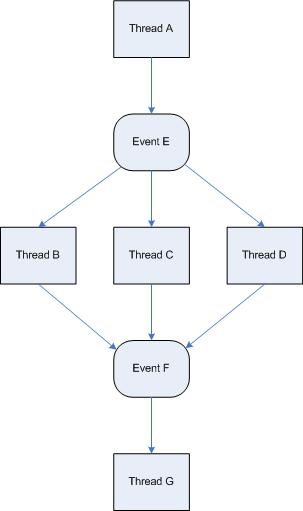
Wait Chain is another pattern and it is simply a sequence of causal relations between events: thread A is waiting for event E to happen that threads B, C or D are supposed to signal at some time in the future but they are all waiting for event F to happen that thread G is about to signal as soon as it finishes processing some critical task:

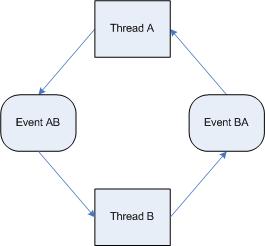
That subsumes various deadlock patterns too which are causal loops where thread A is waiting for event AB that thread B will signal as soon as thread A signals event BA thread B is waiting for:

In this context “Event” means any type of synchronization object, critical section, LPC/RPC reply or data arrival through some IPC channel and not only Win32 event object or kernel _KEVENT.

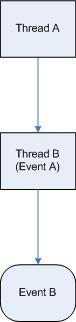
As the first example of Wait Chain pattern I show a process being terminated and waiting for the other thread to finish or in other words, considering thread termination as an event itself, the main process thread is waiting for the second thread object to be signaled. The second thread tries to cancel previous I/O request directed to some device. However that IRP is not cancellable and process hangs. This can be depicted on the following diagram:

where Thread A is our main thread waiting for Event A which is thread B itself waiting for I/O cancellation (Event B). Their stack traces are:

THREAD 8a3178d0  Cid 04bc.01cc  Teb: 7ffdf000 Win32Thread: bc1b6e70 WAIT: (Unknown) KernelMode Non-Alertable
    8af2c920  Thread
Not impersonating
DeviceMap                 e1032530
Owning Process            89ff8d88       Image:         processA.exe
Wait Start TickCount      80444          Ticks: 873 (0:00:00:13.640)
Context Switch Count      122                 LargeStack
UserTime                  00:00:00.015
KernelTime                00:00:00.156
Win32 Start Address 0x010148a4
Start Address 0x77e617f8
Stack Init f3f29000 Current f3f28be8 Base f3f29000 Limit f3f25000 Call 0
Priority 15 BasePriority 13 PriorityDecrement 0
ChildEBP RetAddr 
f3f28c00 80833465 nt!KiSwapContext+0x26
f3f28c2c 80829a62 nt!KiSwapThread+0x2e5
f3f28c74 8094c0ea nt!KeWaitForSingleObject+0x346 ; stack trace with arguments shows the first parameter as 8af2c920 
f3f28d0c 8094c63f nt!PspExitThread+0×1f0
f3f28d24 8094c839 nt!PspTerminateThreadByPointer+0×4b
f3f28d54 8088978c nt!NtTerminateProcess+0×125
f3f28d54 7c8285ec nt!KiFastCallEntry+0xfc

THREAD 8af2c920  Cid 04bc.079c  Teb: 7ffd7000 Win32Thread: 00000000 WAIT: (Unknown) KernelMode Non-Alertable
    8af2c998  NotificationTimer
IRP List:
    8ad26260
: (0006,0220) Flags: 00000000  Mdl: 00000000
Not impersonating
DeviceMap                 e1032530
Owning Process            89ff8d88       Image:         processA.exe
Wait Start TickCount      81312          Ticks: 5 (0:00:00:00.078)
Context Switch Count      169                 LargeStack
UserTime                  00:00:00.000
KernelTime                00:00:00.000
Win32 Start Address 0×77da3ea5
Start Address 0×77e617ec
Stack Init f3e09000 Current f3e08bac Base f3e09000 Limit f3e05000 Call 0
Priority 13 BasePriority 13 PriorityDecrement 0
ChildEBP RetAddr 
f3e08bc4 80833465 nt!KiSwapContext+0×26
f3e08bf0 80828f0b nt!KiSwapThread+0×2e5
f3e08c38 808ea7a4 nt!KeDelayExecutionThread+0×2ab
f3e08c68 8094c360 nt!IoCancelThreadIo+0×62
f3e08cf0 8094c569 nt!PspExitThread+0×466
f3e08cfc 8082e0b6 nt!PsExitSpecialApc+0×1d
f3e08d4c 80889837 nt!KiDeliverApc+0×1ae
f3e08d4c 7c8285ec nt!KiServiceExit+0×56

By inspecting IRP we can see a device it was directed to, see that it has cancel bit but doesn’t have a cancel routine:

0: kd> !irp 8ad26260  1
Irp is active with 5 stacks 4 is current (= 0x8ad2633c)
 No Mdl: No System Buffer: Thread 8af2c920:  Irp stack trace. 
Flags = 00000000
ThreadListEntry.Flink = 8af2cb28
ThreadListEntry.Blink = 8af2cb28
IoStatus.Status = 00000000
IoStatus.Information = 00000000
RequestorMode = 00000001
Cancel = 01
CancelIrql = 0
ApcEnvironment = 00
UserIosb = 77ecb700
UserEvent = 00000000
Overlay.AsynchronousParameters.UserApcRoutine = 00000000
Overlay.AsynchronousParameters.UserApcContext = 00000000
Overlay.AllocationSize = 00000000 - 00000000
CancelRoutine = 00000000  
UserBuffer = 77ecb720
&Tail.Overlay.DeviceQueueEntry = 8ad262a0
Tail.Overlay.Thread = 8af2c920
Tail.Overlay.AuxiliaryBuffer = 00000000
Tail.Overlay.ListEntry.Flink = 00000000
Tail.Overlay.ListEntry.Blink = 00000000
Tail.Overlay.CurrentStackLocation = 8ad2633c
Tail.Overlay.OriginalFileObject = 89ff8920
Tail.Apc = 00000000
Tail.CompletionKey = 00000000
     cmd  flg cl Device   File     Completion-Context
 [  0, 0]   0  0 00000000 00000000 00000000-00000000
   

   Args: 00000000 00000000 00000000 00000000
 [  0, 0]   0  0 00000000 00000000 00000000-00000000

   Args: 00000000 00000000 00000000 00000000
 [  0, 0]   0  0 00000000 00000000 00000000-00000000

   Args: 00000000 00000000 00000000 00000000
>[  c, 2]   0  1 8ab20388 89ff8920 00000000-00000000    pending
        \Device\DeviceA

   Args: 00000020 00000017 00000000 00000000
 [  c, 2]   0  0 8affa4b8 89ff8920 00000000-00000000   
        \Device\DeviceB
   Args: 00000020 00000017 00000000 00000000

- Dmitry Vostokov @ DumpAnalysis.org -

Crash Dump Analysis Patterns (Part 41a)

Wednesday, December 12th, 2007

Some memory dumps are generated on purpose to troubleshoot process and system hangs. They are usually called Manual Dumps, manual crash dumps or manual memory dumps. Kernel, complete and kernel mini dumps can be generated using the famous keyboard method described in the following Microsoft article which has been recently updated and contains the fix for USB keyboards:

http://support.microsoft.com/kb/244139

The crash dump will show E2 bugcheck:

MANUALLY_INITIATED_CRASH (e2)
The user manually initiated this crash dump.
Arguments:
Arg1: 00000000
Arg2: 00000000
Arg3: 00000000
Arg4: 00000000

Various tools including Citrix SystemDump reuse E2 bug check code and its arguments.  There are many other 3rd-party tools used to bugcheck Windows OS such as BANG! from OSR or NotMyFault from Sysinternals. The old one is crash.exe that loads crashdrv.sys and uses the following bugcheck:

Unknown bugcheck code (69696969)
Unknown bugcheck description
Arguments:
Arg1: 00000000
Arg2: 00000000
Arg3: 00000000
Arg4: 00000000

In a memory dump you would see its characteristic stack trace pointing to crashdrv module: 

STACK_TEXT:
b5b3ebe0 f615888d nt!KeBugCheck+0xf
WARNING: Stack unwind information not available. Following frames may be wrong.
b5b3ebec f61584e3 crashdrv+0x88d
b5b3ec00 8041eec9 crashdrv+0x4e3
b5b3ec14 804b328a nt!IopfCallDriver+0x35
b5b3ec28 804b40de nt!IopSynchronousServiceTail+0x60
b5b3ed00 804abd0a nt!IopXxxControlFile+0x5d6
b5b3ed34 80468379 nt!NtDeviceIoControlFile+0x28
b5b3ed34 77f82ca0 nt!KiSystemService+0xc9
0006fed4 7c5794f4 ntdll!NtDeviceIoControlFile+0xb
0006ff38 01001a74 KERNEL32!DeviceIoControl+0xf8
0006ff70 01001981 crash+0x1a74
0006ff80 01001f93 crash+0x1981
0006ffc0 7c5989a5 crash+0x1f93
0006fff0 00000000 KERNEL32!BaseProcessStart+0x3d

Sometimes various hardware buttons are used to trigger NMI and generate a crash dump when keyboard is not available. The bugcheck will be:

NMI_HARDWARE_FAILURE (80)
This is typically due to a hardware malfunction. The hardware supplier should be called.
Arguments:
Arg1: 004f4454
Arg2: 00000000
Arg3: 00000000
Arg4: 00000000

Critical process termination such as session 0 csrss.exe is used to force a memory dump:

CRITICAL_OBJECT_TERMINATION (f4)
A process or thread crucial to system operation has unexpectedly exited or been terminated.
Several processes and threads are necessary for the operation of the system; when they are terminated (for any reason), the system can no longer function.
Arguments:
Arg1: 00000003, Process
Arg2: 8a090d88, Terminating object
Arg3: 8a090eec, Process image file name
Arg4: 80967b74, Explanatory message (ascii)

- Dmitry Vostokov @ DumpAnalysis.org -

Crash Dump Analysis Patterns (Part 40a)

Monday, December 10th, 2007

In Advanced Windows Debugging book I encountered some thread stacks related to debugger events like Exit a Process, Load or Unload a Module and realized that I’ve seen process crash dumps with such stacks traces. These thread stacks are not normally encountered in healthy process dumps and, statistically speaking, when a process terminates or unloads a library the chances to save a memory dump manually using process dumpers like userdump.exe or Task Manager in Vista are very low unless an interactive debugger was attached or breakpoints were set in advance. Therefore the presence of such threads in a captured crash dump usually indicates some problem or at least focuses attention to the procedure used to save a dump. Such pattern merits its own name: Special Stack Trace.

For example, one process dump had the following stack trace showing process termination initiated from .NET runtime:

STACK_TEXT:
0012fc2c 7c827c1b ntdll!KiFastSystemCallRet
0012fc30 77e668c3 ntdll!NtTerminateProcess+0xc
0012fd24 77e66905 KERNEL32!_ExitProcess+0x63
0012fd38 01256d9b KERNEL32!ExitProcess+0x14
0012ff60 01256dc7 mscorwks!SafeExitProcess+0x11a
0012ff6c 011c5fa4 mscorwks!DisableRuntime+0xd0
0012ffb0 79181b5f mscorwks!_CorExeMain+0x8c
0012ffc0 77e6f23b mscoree!_CorExeMain+0x2c
0012fff0 00000000 KERNEL32!BaseProcessStart+0x23

The original problem was an error message box and the application disappeared when a user dismissed the message. How the dump was saved? Someone advised to attach NTSD to that process, hit ‘g’ and then save the memory dump when the process breaks into the debugger again. So the problem was already gone by that time and the better way would have been to create the manual user dump of that process when it was displaying the error message.

- Dmitry Vostokov @ DumpAnalysis.org -

Crash Dump Analysis AntiPatterns (Part 7)

Monday, December 3rd, 2007

Be language - excessive use of “is”. This anti-pattern was inspired by Alfred Korzybski notion of how “is” affects our understanding of the world. In the context of technical support the use of certain verbs sometimes leads to wrong troubleshooting and debugging paths. For example, the following phrase:

It is our pool tag. It is effected by driver A, driver B and driver C.  

Surely driver A, driver B and driver C were not developed by the same company that introduced the problem pool tag (smells Alien Component here). Unless supported by solid evidence the better phrase shall be:

It is our pool tag. It might have been effected by driver A, driver B or driver C.  

I’m not advocating to completely eradicate “be” verbs as was done in E-Prime language but to be conscious in their use. Thanks to Simple*ology in pointing me to the right direction.

- Dmitry Vostokov @ DumpAnalysis.org -

Crash Dump Analysis Patterns (Part 9d)

Thursday, November 29th, 2007

Finally I got a good example of Deadlock pattern involving LPC. In the stack trace below svchost.exe thread (we call it thread A) receives an LPC call and dispatches it to componentA module which makes another LPC call (MessageId 000135b8) and waiting for a reply: 

THREAD 89143020  Cid 09b4.10dc  Teb: 7ff91000 Win32Thread: 00000000 WAIT: (Unknown) UserMode Non-Alertable
    8914320c  Semaphore Limit 0x1
Waiting for reply to LPC MessageId 000135b8:
Current LPC port d64a5328
Not impersonating
DeviceMap                 d64028f0
Owning Process            891b8b80       Image:         svchost.exe
Wait Start TickCount      237408         Ticks: 1890 (0:00:00:29.531)
Context Switch Count      866            
UserTime                  00:00:00.031
KernelTime                00:00:00.015
Win32 Start Address 0×000135b2
LPC Server thread working on message Id 135b2
Start Address kernel32!BaseThreadStartThunk (0×7c82b5f3)
Stack Init b91f9000 Current b91f8c08 Base b91f9000 Limit b91f6000 Call 0
Priority 9 BasePriority 8 PriorityDecrement 0
ChildEBP RetAddr 
b91f8c20 8083e6a2 nt!KiSwapContext+0×26
b91f8c4c 8083f164 nt!KiSwapThread+0×284
b91f8c94 8093983f nt!KeWaitForSingleObject+0×346
b91f8d50 80834d3f nt!NtRequestWaitReplyPort+0×776
b91f8d50 7c94ed54 nt!KiFastCallEntry+0xfc
02bae928 7c941c94 ntdll!KiFastSystemCallRet
02bae92c 77c42700 ntdll!NtRequestWaitReplyPort+0xc
02bae984 77c413ba RPCRT4!LRPC_CCALL::SendReceive+0×230
02bae990 77c42c7f RPCRT4!I_RpcSendReceive+0×24
02bae9a4 77cb5d63 RPCRT4!NdrSendReceive+0×2b
02baec48 674825b6 RPCRT4!NdrClientCall+0×334

02baec5c 67486776 componentA!bar+0×16


02baf8d4 77c40f3b componentA!foo+0×157
02baf8f8 77cb23f7 RPCRT4!Invoke+0×30
02bafcf8 77cb26ed RPCRT4!NdrStubCall2+0×299
02bafd14 77c409be RPCRT4!NdrServerCall2+0×19
02bafd48 77c4093f RPCRT4!DispatchToStubInCNoAvrf+0×38
02bafd9c 77c40865 RPCRT4!RPC_INTERFACE::DispatchToStubWorker+0×117
02bafdc0 77c434b1 RPCRT4!RPC_INTERFACE::DispatchToStub+0xa3
02bafdfc 77c41bb3 RPCRT4!LRPC_SCALL::DealWithRequestMessage+0×42c
02bafe20 77c45458 RPCRT4!LRPC_ADDRESS::DealWithLRPCRequest+0×127
02baff84 77c2778f RPCRT4!LRPC_ADDRESS::ReceiveLotsaCalls+0×430
02baff8c 77c2f7dd RPCRT4!RecvLotsaCallsWrapper+0xd
02baffac 77c2de88 RPCRT4!BaseCachedThreadRoutine+0×9d
02baffb8 7c82608b RPCRT4!ThreadStartRoutine+0×1b
02baffec 00000000 kernel32!BaseThreadStart+0×34

We search for that LPC message to find the server thread:

1: kd> !lpc message 000135b8
Searching message 135b8 in threads ...
    Server thread 89115db0 is working on message 135b8
Client thread 89143020 waiting a reply from 135b8  


It belongs to Process.exe (we call it thread B):

1: kd> !thread 89115db0 0x16
THREAD 89115db0  Cid 098c.0384  Teb: 7ff79000 Win32Thread: 00000000 WAIT: (Unknown) UserMode Non-Alertable
    8a114628  SynchronizationEvent
Not impersonating
DeviceMap                 d64028f0
Owning Process            8a2c9d88       Image:         Process.exe
Wait Start TickCount      237408         Ticks: 1890 (0:00:00:29.531)
Context Switch Count      1590            
UserTime                  00:00:03.265
KernelTime                00:00:01.671
Win32 Start Address 0x000135b8
LPC Server thread working on message Id 135b8
Start Address kernel32!BaseThreadStartThunk (0x7c82b5f3)
Stack Init b952d000 Current b952cc60 Base b952d000 Limit b952a000 Call 0
Priority 9 BasePriority 8 PriorityDecrement 0
ChildEBP RetAddr  Args to Child             
b952cc78 8083e6a2 89115e28 89115db0 89115e58 nt!KiSwapContext+0x26
b952cca4 8083f164 00000000 00000000 00000000 nt!KiSwapThread+0x284
b952ccec 8092db70 8a114628 00000006 ffffff01 nt!KeWaitForSingleObject+0x346
b952cd50 80834d3f 00000a7c 00000000 00000000 nt!NtWaitForSingleObject+0x9a
b952cd50 7c94ed54 00000a7c 00000000 00000000 nt!KiFastCallEntry+0xfc
22aceb48 7c942124 7c95970f 00000a7c 00000000 ntdll!KiFastSystemCallRet
22aceb4c 7c95970f 00000a7c 00000000 00000000 ntdll!NtWaitForSingleObject+0xc
22aceb88 7c959620 00000000 00000004 00002000 ntdll!RtlpWaitOnCriticalSection+0x19c
22aceba8 1b005744 06d30940 1b05ea80 06d30940 ntdll!RtlEnterCriticalSection+0xa8
22acebb0 1b05ea80 06d30940 feffffff 0cd410c0 componentB!bar+0xb


22acf8b0 77c40f3b 00080002 000800e2 00000001 componentB!foo+0xeb
22acf8e0 77cb23f7 0de110dc 22acfac8 00000007 RPCRT4!Invoke+0×30
22acfce0 77cb26ed 00000000 00000000 19f38f94 RPCRT4!NdrStubCall2+0×299
22acfcfc 77c409be 19f38f94 17316ef0 19f38f94 RPCRT4!NdrServerCall2+0×19
22acfd30 77c75e41 0de1dc58 19f38f94 22acfdec RPCRT4!DispatchToStubInCNoAvrf+0×38
22acfd48 77c4093f 0de1dc58 19f38f94 22acfdec RPCRT4!DispatchToStubInCAvrf+0×14
22acfd9c 77c40865 00000041 00000000 0de2b398 RPCRT4!RPC_INTERFACE::DispatchToStubWorker+0×117
22acfdc0 77c434b1 19f38f94 00000000 0de2b398 RPCRT4!RPC_INTERFACE::DispatchToStub+0xa3
22acfdfc 77c41bb3 1beeaec8 16b96f50 1baeef00 RPCRT4!LRPC_SCALL::DealWithRequestMessage+0×42c
22acfe20 77c45458 16b96f88 22acfe38 1beeaec8 RPCRT4!LRPC_ADDRESS::DealWithLRPCRequest+0×127

0×16 flags for !thread extension command are used to temporarily set the process context to the owning process and show the first three function call parameters. We see that the thread B is waiting for the critical section 06d30940 and we use user space !locks extension command to find who owns it after switching process context:

1: kd> .process /r /p 8a2c9d88
Implicit process is now 8a2c9d88
Loading User Symbols

1: kd> !ntsdexts.locks

CritSec +6d30940 at 06d30940
WaiterWoken        No
LockCount          1
RecursionCount     1
OwningThread       d6c
EntryCount         0
ContentionCount    1
*** Locked

Now we try to find a thread with TID d6c (thread C):

1: kd> !thread -t d6c
Looking for thread Cid = d6c ...
THREAD 890d8bb8  Cid 098c.0d6c  Teb: 7ff71000 Win32Thread: bc23cc20 WAIT: (Unknown) UserMode Non-Alertable
    890d8da4  Semaphore Limit 0x1
Waiting for reply to LPC MessageId 000135ea:
Current LPC port d649a678
Not impersonating
DeviceMap                 d64028f0
Owning Process            8a2c9d88       Image:         Process.exe
Wait Start TickCount      237641         Ticks: 1657 (0:00:00:25.890)
Context Switch Count      2102                 LargeStack
UserTime                  00:00:00.734
KernelTime                00:00:00.234
Win32 Start Address msvcrt!_endthreadex (0×77b9b4bc)
Start Address kernel32!BaseThreadStartThunk (0×7c82b5f3)
Stack Init ba91d000 Current ba91cc08 Base ba91d000 Limit ba919000 Call 0
Priority 13 BasePriority 8 PriorityDecrement 0
ChildEBP RetAddr  Args to Child             
ba91cc20 8083e6a2 890d8c30 890d8bb8 890d8c60 nt!KiSwapContext+0×26
ba91cc4c 8083f164 890d8da4 890d8d78 890d8bb8 nt!KiSwapThread+0×284
ba91cc94 8093983f 890d8da4 00000011 8a2c9d01 nt!KeWaitForSingleObject+0×346
ba91cd50 80834d3f 000008bc 19c94f00 19c94f00 nt!NtRequestWaitReplyPort+0×776
ba91cd50 7c94ed54 000008bc 19c94f00 19c94f00 nt!KiFastCallEntry+0xfc
2709ebf4 7c941c94 77c42700 000008bc 19c94f00 ntdll!KiFastSystemCallRet
2709ebf8 77c42700 000008bc 19c94f00 19c94f00 ntdll!NtRequestWaitReplyPort+0xc
2709ec44 77c413ba 2709ec80 2709ec64 77c42c7f RPCRT4!LRPC_CCALL::SendReceive+0×230
2709ec50 77c42c7f 2709ec80 779b2770 2709f06c RPCRT4!I_RpcSendReceive+0×24
2709ec64 77cb219b 2709ecac 1957cfe4 1957ab38 RPCRT4!NdrSendReceive+0×2b
2709f04c 779b43a3 779b2770 779b1398 2709f06c RPCRT4!NdrClientCall2+0×22e


2709ff84 77b9b530 26658fb0 00000000 00000000 ComponentC!foo+0×18d
2709ffb8 7c82608b 26d9af70 00000000 00000000 msvcrt!_endthreadex+0xa3
2709ffec 00000000 77b9b4bc 26d9af70 00000000 kernel32!BaseThreadStart+0×34

We see that thread C makes another LPC call (MessageId 000135e) and waiting for a reply. Let’s find the server thread processing the message (thread D):

1: kd> !lpc message 000135ea
Searching message 135ea in threads ...
Client thread 890d8bb8 waiting a reply from 135ea                         
    Server thread 89010020 is working on message 135ea


1: kd> !thread 89010020 16
THREAD 89010020  Cid 09b4.1530  Teb: 7ff93000 Win32Thread: 00000000 WAIT: (Unknown) UserMode Non-Alertable
    8903ba28  Mutant - owning thread 89143020
Not impersonating
DeviceMap                 d64028f0
Owning Process            891b8b80       Image:         svchost.exe
Wait Start TickCount      237641         Ticks: 1657 (0:00:00:25.890)
Context Switch Count      8            
UserTime                  00:00:00.000
KernelTime                00:00:00.000
Win32 Start Address 0×000135ea
LPC Server thread working on message Id 135ea
Start Address kernel32!BaseThreadStartThunk (0×7c82b5f3)
Stack Init b9455000 Current b9454c60 Base b9455000 Limit b9452000 Call 0
Priority 9 BasePriority 8 PriorityDecrement 0
ChildEBP RetAddr  Args to Child             
b9454c78 8083e6a2 89010098 89010020 890100c8 nt!KiSwapContext+0×26
b9454ca4 8083f164 00000000 00000000 00000000 nt!KiSwapThread+0×284
b9454cec 8092db70 8903ba28 00000006 00000001 nt!KeWaitForSingleObject+0×346
b9454d50 80834d3f 00000514 00000000 00000000 nt!NtWaitForSingleObject+0×9a
b9454d50 7c94ed54 00000514 00000000 00000000 nt!KiFastCallEntry+0xfc
02b5f720 7c942124 75fdbe44 00000514 00000000 ntdll!KiFastSystemCallRet
02b5f724 75fdbe44 00000514 00000000 00000000 ntdll!NtWaitForSingleObject+0xc
02b5f744 75fdc57f 000e6014 000da62c 02b5fca0 ComponentD!bar+0×42


02b5f8c8 77c40f3b 000d0a48 02b5fc90 00000001 ComponentD!foo+0×49
02b5f8f8 77cb23f7 75fdf8f2 02b5fae0 00000007 RPCRT4!Invoke+0×30
02b5fcf8 77cb26ed 00000000 00000000 000d4f24 RPCRT4!NdrStubCall2+0×299
02b5fd14 77c409be 000d4f24 000b5d70 000d4f24 RPCRT4!NdrServerCall2+0×19
02b5fd48 77c4093f 75fff834 000d4f24 02b5fdec RPCRT4!DispatchToStubInCNoAvrf+0×38
02b5fd9c 77c40865 00000005 00000000 7600589c RPCRT4!RPC_INTERFACE::DispatchToStubWorker+0×117
02b5fdc0 77c434b1 000d4f24 00000000 7600589c RPCRT4!RPC_INTERFACE::DispatchToStub+0xa3
02b5fdfc 77c41bb3 000d3550 000a78d0 001054b8 RPCRT4!LRPC_SCALL::DealWithRequestMessage+0×42c
02b5fe20 77c45458 000a7908 02b5fe38 000d3550 RPCRT4!LRPC_ADDRESS::DealWithLRPCRequest+0×127
02b5ff84 77c2778f 02b5ffac 77c2f7dd 000a78d0 RPCRT4!LRPC_ADDRESS::ReceiveLotsaCalls+0×430
02b5ff8c 77c2f7dd 000a78d0 00000000 00000000 RPCRT4!RecvLotsaCallsWrapper+0xd
02b5ffac 77c2de88 0008ae00 02b5ffec 7c82608b RPCRT4!BaseCachedThreadRoutine+0×9d
02b5ffb8 7c82608b 000d5c20 00000000 00000000 RPCRT4!ThreadStartRoutine+0×1b
02b5ffec 00000000 77c2de6d 000d5c20 00000000 kernel32!BaseThreadStart+0×34

We see that thread D is waiting for the mutant object owned by thread A (89143020). Therefore we have a deadlock spanning 2 process boundaries via RPC/LPC calls with the following dependency graph:

A (svchost.exe) LPC-> B (Process.exe) CritSec-> C (Process.exe) LPC-> D (svchost.exe) Obj-> A (svchost.exe)

- Dmitry Vostokov @ DumpAnalysis.org -

Understanding I/O Completion Ports

Tuesday, November 27th, 2007

Many articles and books explain Windows I/O completion ports from high level design considerations arising when building high-performance server software. But it is hard to recall them later when someone asks to explain and not everyone writes that software. Looking at complete memory dumps has an advantage of a bottom-up or reverse engineering approach where we see internals of server software and can immediately grasp the implementation of certain architectural and design decisions.

Consider this thread stack trace we can find almost inside any service or network application process:

THREAD 86cf09c0  Cid 05cc.2030  Teb: 7ffd7000 Win32Thread: 00000000 WAIT: (Unknown) UserMode Non-Alertable
    8a3bb970  QueueObject
    86cf0a38  NotificationTimer
Not impersonating
DeviceMap                 e15af5a8
Owning Process            8a3803d8       Image:         svchost.exe
Wait Start TickCount      2131621        Ticks: 1264 (0:00:00:19.750)
Context Switch Count      6            
UserTime                  00:00:00.000
KernelTime                00:00:00.000
Win32 Start Address RPCRT4!ThreadStartRoutine (0×77c5de6d)
Start Address kernel32!BaseThreadStartThunk (0×77e6b5f3)
Stack Init ba276000 Current ba275c38 Base ba276000 Limit ba273000 Call 0
Priority 8 BasePriority 8 PriorityDecrement 0
ChildEBP RetAddr 
ba275c50 8083d3b1 nt!KiSwapContext+0×26
ba275c7c 8083dea2 nt!KiSwapThread+0×2e5
ba275cc4 8092b205 nt!KeRemoveQueue+0×417
ba275d48 80833a6f nt!NtRemoveIoCompletion+0xdc

ba275d48 7c82ed54 nt!KiFastCallEntry+0xfc
0093feac 7c821bf4 ntdll!KiFastSystemCallRet
0093feb0 77e66142 ntdll!NtRemoveIoCompletion+0xc
0093fedc 77c604c3 kernel32!GetQueuedCompletionStatus+0×29

0093ff18 77c60655 RPCRT4!COMMON_ProcessCalls+0xa1
0093ff84 77c5f9f1 RPCRT4!LOADABLE_TRANSPORT::ProcessIOEvents+0×117
0093ff8c 77c5f7dd RPCRT4!ProcessIOEventsWrapper+0xd
0093ffac 77c5de88 RPCRT4!BaseCachedThreadRoutine+0×9d
0093ffb8 77e6608b RPCRT4!ThreadStartRoutine+0×1b
0093ffec 00000000 kernel32!BaseThreadStart+0×34

We see that I/O completion port is implemented via kernel queue object so requests (work items, completion notifications, etc) are stored in that queue for further processing by threads. The number of active threads processing requests is bound to some maximum value that usually corresponds to the number of processors:

0: kd> dt _KQUEUE 8a3bb970
ntdll!_KQUEUE
   +0x000 Header           : _DISPATCHER_HEADER
   +0x010 EntryListHead    : _LIST_ENTRY [ 0x8a3bb980 - 0x8a3bb980 ]
   +0x018 CurrentCount     : 0
   +0×01c MaximumCount     : 2
   +0×020 ThreadListHead   : _LIST_ENTRY [ 0×86cf0ac8 - 0×89ff9520 ]

0: kd> !smt
SMT Summary:
------------
   KeActiveProcessors: **------------------------------ (00000003)
        KiIdleSummary: **------------------------------ (00000003)
No PRCB     Set Master SMT Set                                     IAID
 0 ffdff120 Master     **—————————— (00000003)  00
 1 f772f120 ffdff120   **—————————— (00000003)  01

Kernel work queues are also implemented via the same queue object as we might have guessed already:

THREAD 8a777660  Cid 0004.00d0  Teb: 00000000 Win32Thread: 00000000 WAIT: (Unknown) UserMode Non-Alertable
    808b707c  QueueObject
Not impersonating
DeviceMap                 e1000928
Owning Process            8a780818       Image:         System
Wait Start TickCount      2615           Ticks: 2130270 (0:09:14:45.468)
Context Switch Count      301            
UserTime                  00:00:00.000
KernelTime                00:00:00.000
Start Address nt!ExpWorkerThread (0×8082d92b)
Stack Init f71e0000 Current f71dfcec Base f71e0000 Limit f71dd000 Call 0
Priority 12 BasePriority 12 PriorityDecrement 0
Kernel stack not resident.
ChildEBP RetAddr 
f71dfd04 8083d3b1 nt!KiSwapContext+0×26
f71dfd30 8083dea2 nt!KiSwapThread+0×2e5
f71dfd78 8082d9c1 nt!KeRemoveQueue+0×417
f71dfdac 809208fc nt!ExpWorkerThread+0xc8
f71dfddc 8083fc9f nt!PspSystemThreadStartup+0×2e
00000000 00000000 nt!KiThreadStartup+0×16

0: kd> dt _KQUEUE 808b707c
ntdll!_KQUEUE
   +0x000 Header           : _DISPATCHER_HEADER
   +0x010 EntryListHead    : _LIST_ENTRY [ 0x808b708c - 0x808b708c ]
   +0x018 CurrentCount     : 0
   +0×01c MaximumCount     : 2
   +0×020 ThreadListHead   : _LIST_ENTRY [ 0×8a77a128 - 0×8a777768 ]

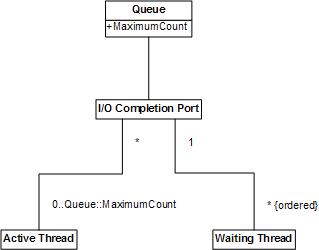
I’ve created the simple UML diagram showing high-level relationship between various objects seen from crash dumps. Note that Active Thread object can process items from more than one completion port if its wait was satisfied for one port and then for another but I have never seen this. Obviously Waiting thread can wait only for one completion port. 

- Dmitry Vostokov @ DumpAnalysis.org -

Stack traces on the Web

Monday, November 26th, 2007

How many WinDbg stack traces on the web are available for mining? Google gave the answer when I searched for typical stack trace text fragments:

"ChildEBP RetAddr" - about 40,200

"ChildEBP RetAddr  Args to Child" - about 30,000

"Frame IP not in any known module" - about 10,800

- Dmitry Vostokov @ DumpAnalysis.org -

Crash Dump Analysis Patterns (Part 39)

Friday, November 23rd, 2007

As mentioned in Early Crash Dump pattern saving crash dumps on first-chance exceptions helps to diagnose components that might have caused corruption and later crashes, hangs or CPU spikes by ignoring abnormal exceptions like access violation. In such cases we need to know whether an application installs its own Custom Exception Handler or several of them. If it uses only default handlers provided by runtime or windows subsystem then most likely a first-chance access violation exception will result in a last-chance exception and a postmortem dump. To check a chain of exception handlers we can use WinDbg !exchain extention command. For example:

0:000> !exchain
0017f9d8: TestDefaultDebugger!AfxWinMain+3f5 (00420aa9)
0017fa60: TestDefaultDebugger!AfxWinMain+34c (00420a00)
0017fb20: user32!_except_handler4+0 (770780eb)
0017fcc0: user32!_except_handler4+0 (770780eb)
0017fd24: user32!_except_handler4+0 (770780eb)
0017fe40: TestDefaultDebugger!AfxWinMain+16e (00420822)
0017feec: TestDefaultDebugger!AfxWinMain+797 (00420e4b)
0017ff90: TestDefaultDebugger!_except_handler4+0 (00410e00)
0017ffdc: ntdll!_except_handler4+0 (77961c78)

We see that TestDefaultDebugger doesn’t have its own exception handlers except ones provided by MFC and C/C++ runtime libraries which were linked statically. Here is another example. It was reported that a 3rd-party application was hanging and spiking CPU (Spiking Thread pattern) so a user dump was saved using command line userdump.exe:

0:000> vertarget
Windows Server 2003 Version 3790 (Service Pack 2) MP (4 procs) Free x86 compatible
Product: Server, suite: TerminalServer
kernel32.dll version: 5.2.3790.4062 (srv03_sp2_gdr.070417-0203)
Debug session time: Thu Nov 22 12:45:59.000 2007 (GMT+0)
System Uptime: 0 days 10:43:07.667
Process Uptime: 0 days 4:51:32.000 
Kernel time: 0 days 0:08:04.000 
User time: 0 days 0:23:09.000

0:000> !runaway 3 
User Mode Time 
Thread Time  
0:1c1c      0 days 0:08:04.218  
1:2e04      0 days 0:00:00.015
Kernel Mode Time 
Thread Time  
0:1c1c      0 days 0:23:09.156  
1:2e04      0 days 0:00:00.031

0:000> kL
ChildEBP RetAddr 
0012fb80 7739bf53 ntdll!KiFastSystemCallRet
0012fbb4 05ca73b0 user32!NtUserWaitMessage+0xc
WARNING: Stack unwind information not available. Following frames may be wrong.
0012fd20 05c8be3f 3rdPartyDLL+0x573b0
0012fd50 05c9e9ea 3rdPartyDLL+0x3be3f
0012fd68 7739b6e3 3rdPartyDLL+0x4e9ea
0012fd94 7739b874 user32!InternalCallWinProc+0x28
0012fe0c 7739c8b8 user32!UserCallWinProcCheckWow+0x151
0012fe68 7739c9c6 user32!DispatchClientMessage+0xd9
0012fe90 7c828536 user32!__fnDWORD+0x24
0012febc 7739d1ec ntdll!KiUserCallbackDispatcher+0x2e
0012fef8 7738cee9 user32!NtUserMessageCall+0xc
0012ff18 0050aea9 user32!SendMessageA+0x7f
0012ff70 00452ae4 3rdPartyApp+0x10aea9
0012ffac 00511941 3rdPartyApp+0x52ae4
0012ffc0 77e6f23b 3rdPartyApp+0x111941
0012fff0 00000000 kernel32!BaseProcessStart+0x23

Exception chain showed custom exception handlers:

0:000> !exchain
0012fb8c: 3rdPartyDLL+57acb (05ca7acb)
0012fd28: 3rdPartyDLL+3be57 (05c8be57)
0012fd34: 3rdPartyDLL+3be68 (05c8be68)

0012fdfc: user32!_except_handler3+0 (773aaf18)
  CRT scope  0, func:   user32!UserCallWinProcCheckWow+156 (773ba9ad)
0012fe58: user32!_except_handler3+0 (773aaf18)
0012fea0: ntdll!KiUserCallbackExceptionHandler+0 (7c8284e8)
0012ff3c: 3rdPartyApp+53310 (00453310)
0012ff48: 3rdPartyApp+5334b (0045334b)
0012ff9c: 3rdPartyApp+52d06 (00452d06)
0012ffb4: 3rdPartyApp+38d4 (004038d4)

0012ffe0: kernel32!_except_handler3+0 (77e61a60)
  CRT scope  0, filter: kernel32!BaseProcessStart+29 (77e76a10)
                func:   kernel32!BaseProcessStart+3a (77e81469)

The customer then enabled MS Exception Monitor and selected only Access violation exception code (c0000005) to avoid False Positive Dumps. During application execution various 1st-chance exception crash dumps were saved pointing to numerous access violations including function calls into unloaded modules, for example:

0:000> kL 100
ChildEBP RetAddr 
WARNING: Frame IP not in any known module. Following frames may be wrong.
0012f910 7739b6e3 <Unloaded_Another3rdParty.dll>+0x4ce58
0012f93c 7739b874 user32!InternalCallWinProc+0x28
0012f9b4 7739c8b8 user32!UserCallWinProcCheckWow+0x151
0012fa10 7739c9c6 user32!DispatchClientMessage+0xd9
0012fa38 7c828536 user32!__fnDWORD+0x24
0012fa64 7739d1ec ntdll!KiUserCallbackDispatcher+0x2e
0012faa0 7738cee9 user32!NtUserMessageCall+0xc
0012fac0 0a0f2e01 user32!SendMessageA+0x7f
0012fae4 0a0f2ac7 3rdPartyDLL+0x52e01
0012fb60 7c81a352 3rdPartyDLL+0x52ac7
0012fb80 7c839dee ntdll!LdrpCallInitRoutine+0x14
0012fc94 77e6b1bb ntdll!LdrUnloadDll+0x41a
0012fca8 0050c9c1 kernel32!FreeLibrary+0x41
0012fdf4 004374af 3rdPartyApp+0x10c9c1
0012fe24 0044a076 3rdPartyApp+0x374af
0012fe3c 7739b6e3 3rdPartyApp+0x4a076
0012fe68 7739b874 user32!InternalCallWinProc+0x28
0012fee0 7739ba92 user32!UserCallWinProcCheckWow+0x151
0012ff48 773a16e5 user32!DispatchMessageWorker+0x327
0012ff58 00452aa0 user32!DispatchMessageA+0xf
0012ffac 00511941 3rdPartyApp+0x52aa0
0012ffc0 77e6f23b 3rdPartyApp+0x111941
0012fff0 00000000 kernel32!BaseProcessStart+0x23

- Dmitry Vostokov @ DumpAnalysis.org -

Crash Dump Analysis Patterns (Part 38)

Thursday, November 22nd, 2007

Hooking functions using trampoline method is so common on Windows and sometimes we need to check Hooked Functions in specific modules and determine which module hooked them for troubleshooting or memory forensic analysis needs. If original unhooked modules are available (via symbol server, for example) this can be done by using !chkimg WinDbg extension command:

0:002> !chkimg -lo 50 -d !kernel32 -v
Searching for module with expression: !kernel32
Will apply relocation fixups to file used for comparison
Will ignore NOP/LOCK errors
Will ignore patched instructions
Image specific ignores will be applied
Comparison image path: c:\mss\kernel32.dll\44C60F39102000\kernel32.dll
No range specified

Scanning section:    .text
Size: 564445
Range to scan: 77e41000-77ecacdd
    77e44004-77e44008  5 bytes - kernel32!GetDateFormatA
 [ 8b ff 55 8b ec:e9 f7 bf 08 c0 ]
    77e4412e-77e44132  5 bytes - kernel32!GetTimeFormatA (+0×12a)
 [ 8b ff 55 8b ec:e9 cd be 06 c0 ]
    77e4e857-77e4e85b  5 bytes - kernel32!FileTimeToLocalFileTime (+0xa729)
 [ 8b ff 55 8b ec:e9 a4 17 00 c0 ]
    77e56b5f-77e56b63  5 bytes - kernel32!GetTimeZoneInformation (+0×8308)
 [ 8b ff 55 8b ec:e9 9c 94 00 c0 ]
    77e579a9-77e579ad  5 bytes - kernel32!GetTimeFormatW (+0xe4a)
 [ 8b ff 55 8b ec:e9 52 86 06 c0 ]
    77e57fc8-77e57fcc  5 bytes - kernel32!GetDateFormatW (+0×61f)
 [ 8b ff 55 8b ec:e9 33 80 08 c0 ]
    77e6f32b-77e6f32f  5 bytes - kernel32!GetLocalTime (+0×17363)
 [ 8b ff 55 8b ec:e9 d0 0c 00 c0 ]
    77e6f891-77e6f895  5 bytes - kernel32!LocalFileTimeToFileTime (+0×566)
 [ 8b ff 55 8b ec:e9 6a 07 01 c0 ]
    77e83499-77e8349d  5 bytes - kernel32!SetLocalTime (+0×13c08)
 [ 8b ff 55 8b ec:e9 62 cb 00 c0 ]
    77e88c32-77e88c36  5 bytes - kernel32!SetTimeZoneInformation (+0×5799)
 [ 8b ff 55 8b ec:e9 c9 73 01 c0 ]
Total bytes compared: 564445(100%)
Number of errors: 50
50 errors : !kernel32 (77e44004-77e88c36)

0:002> u 77e44004
kernel32!GetDateFormatA:
77e44004 e9f7bf08c0      jmp     37ed0000
77e44009 81ec18020000    sub     esp,218h
77e4400f a148d1ec77      mov     eax,dword ptr [kernel32!__security_cookie (77ecd148)]
77e44014 53              push    ebx
77e44015 8b5d14          mov     ebx,dword ptr [ebp+14h]
77e44018 56              push    esi
77e44019 8b7518          mov     esi,dword ptr [ebp+18h]
77e4401c 57              push    edi

0:002> u 37ed0000
*** ERROR: Symbol file could not be found.  Defaulted to export symbols for MyDateTimeHooks.dll -
37ed0000 e99b262f2d      jmp     MyDateTimeHooks+0×26a0 (651c26a0)
37ed0005 8bff            mov     edi,edi
37ed0007 55              push    ebp
37ed0008 8bec            mov     ebp,esp
37ed000a e9fa3ff73f      jmp     kernel32!GetDateFormatA+0×5 (77e44009)
37ed000f 0000            add     byte ptr [eax],al
37ed0011 0000            add     byte ptr [eax],al
37ed0013 0000            add     byte ptr [eax],al

- Dmitry Vostokov @ DumpAnalysis.org -

Crash Dump Analysis AntiPatterns (Part 6)

Thursday, November 22nd, 2007

Need the crash dump. Period. This might be the first thought when an engineer gets a stack trace fragment without symbolic information. It is usually based on the following presupposition:

We need an actual dump file to suggest further troubleshooting steps.

This is not actually true unless it is the first time you have the problem and get stack trace for it. Consider the following fragment from bugcheck kernel dump when no symbols were applied because the customer didn’t have them:

b90529f8 8085eced nt!KeBugCheckEx+0x1b
b9052a70 8088c798 nt!MmAccessFault+0xb25
b9052a70 bfabd940 nt!_KiTrap0E+0xdc
WARNING: Stack unwind information not available. Following frames may be wrong.
b9052b14 bfabe452 MyDriver+0x27940

We can convert module+offset information into module!function+offset2 using MAP files or using DIA SDK (Debug Interface Access SDK) to query PDB files if we know module timestamp. This might be seen as a tedious exercise but we don’t need to do it if we keep raw stack trace signatures in some database when doing crash dump analysis. If we use our own symbol servers we might want to remove references to them and reload symbols. Then redo previous stack trace commands.

In my case it happened that I already analyzed similar previous bugcheck crash dumps months ago and saved stack trace prior to applying symbols. This helped me to point to solution without requesting the crash dump corresponding to that stack trace.

- Dmitry Vostokov @ DumpAnalysis.org -

Crash Dump Analysis Patterns (Part 37)

Wednesday, November 21st, 2007

Some bugs are fixed using brute-force approach via putting an exception handler to catch access violations and other exceptions. Long time ago I saw one such “incredible fix” when the image processing application was crashing after approximately Nth heap free runtime call. To ignore crashes a SEH handler was put in place but the application started to crash in different places. Therefore the additional fix was to skip free calls when approaching N and resume afterwards. The application started to crash less frequently.

Here getting Early Crash Dump when a first-chance exception happens can help in component identification before corruption starts spreading across data. Recall that when an access violation happens in a process thread in user mode the system generates the first-chance exception which can be caught by an attached debugger and if there is no such debugger the system tries to find an exception handler and if that exception handler catches and dismisses the exception the thread resumes its normal execution path. If there are no such handlers found the system generates the so called second-chance exception with the same exception context to notify the attached debugger and if it is not attached a default thread exception handler usually saves a postmortem user dump.

You can get first-chance exception memory dumps with:

Here is an example configuration rule for crashes in Debug Diagnostic tool for TestDefaultDebugger process (Unconfigured First Chance Exceptions option is set to Full Userdump):


When we push the big crash button in TestDefaultDebugger dialog box two crash dumps are saved, with first and second-chance exceptions pointing to the same code:

Loading Dump File [C:\Program Files (x86)\DebugDiag\Logs\Crash rule for all instances of TestDefaultDebugger.exe\TestDefaultDebugger__PID__4316__ Date__11_21_2007__Time_04_28_27PM__2__First chance exception 0XC0000005.dmp]
User Mini Dump File with Full Memory: Only application data is available

Comment: 'Dump created by DbgHost. First chance exception 0XC0000005′
Symbol search path is: srv*c:\mss*http://msdl.microsoft.com/download/symbols
Executable search path is:
Windows Vista Version 6000 MP (2 procs) Free x86 compatible
Product: WinNt, suite: SingleUserTS
Debug session time: Wed Nov 21 16:28:27.000 2007 (GMT+0)
System Uptime: 0 days 23:45:34.711
Process Uptime: 0 days 0:01:09.000

This dump file has an exception of interest stored in it.
The stored exception information can be accessed via .ecxr.
(10dc.590): Access violation - code c0000005 (first/second chance not available)
eax=00000000 ebx=00000001 ecx=0017fe70 edx=00000000 esi=00425ae8 edi=0017fe70
eip=004014f0 esp=0017f898 ebp=0017f8a4 iopl=0 nv up ei ng nz ac pe cy
cs=0023 ss=002b ds=002b es=002b fs=0053 gs=002b efl=00010297
TestDefaultDebugger!CTestDefaultDebuggerDlg::OnBnClickedButton1:
004014f0 c7050000000000000000 mov dword ptr ds:[0],0  ds:002b:00000000=????????

Loading Dump File [C:\Program Files (x86)\DebugDiag\Logs\Crash rule for all instances of TestDefaultDebugger.exe\TestDefaultDebugger__PID__4316__ Date__11_21_2007__Time_04_28_34PM__693__ Second_Chance_Exception_C0000005.dmp]
User Mini Dump File with Full Memory: Only application data is available

Comment: 'Dump created by DbgHost. Second_Chance_Exception_C0000005
Symbol search path is: srv*c:\mss*http://msdl.microsoft.com/download/symbols
Executable search path is:
Windows Vista Version 6000 MP (2 procs) Free x86 compatible
Product: WinNt, suite: SingleUserTS
Debug session time: Wed Nov 21 16:28:34.000 2007 (GMT+0)
System Uptime: 0 days 23:45:39.313
Process Uptime: 0 days 0:01:16.000

This dump file has an exception of interest stored in it.
The stored exception information can be accessed via .ecxr.
(10dc.590): Access violation - code c0000005 (first/second chance not available)
eax=00000000 ebx=00000001 ecx=0017fe70 edx=00000000 esi=00425ae8 edi=0017fe70
eip=004014f0 esp=0017f898 ebp=0017f8a4 iopl=0 nv up ei ng nz ac pe cy
cs=0023 ss=002b ds=002b es=002b fs=0053 gs=002b efl=00010297
TestDefaultDebugger!CTestDefaultDebuggerDlg::OnBnClickedButton1:
004014f0 c7050000000000000000 mov dword ptr ds:[0],0  ds:002b:00000000=????????

- Dmitry Vostokov @ DumpAnalysis.org -