New SystemDump tool
Not really new as it was previously called CtxBSOD v2.1 but was renamed to better show its purpose. In addition to renaming I added a command line option to dump a system remotely or from a command line locally without using its GUI interface. The main motivation for me to write this tool was the absence of similar tools for 64-bit Windows. SystemDump can dump a 64-bit server too!
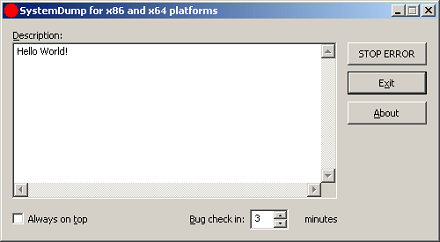
You can download it form Citrix support web site (requires free registration):
http://support.citrix.com/article/CTX111072
Main features:
- The tool has both GUI and command line interfaces.
- You can type a message/text (or copy it from clipboard) before forcing a memory dump. This message is saved in a dump and a support engineer can read it after loading the dump in WinDbg.exe. This is implemented to encourage writing the symptoms and conditions explaining why the dump has to be forced.
- The tool can stay on top of any window (if you need this to quickly dump the server after a reproduction or during the process of an activity).
- It is supplied with Program Database (PDB) symbols for the driver (32-bit and 64-bit) which is useful when you want to have all symbols present on the bugcheck thread.
- The bugcheck clearly shows that the dump is manually generated.
- The tool can force a memory dump on both 32-bit and 64-bit platforms.
- Before forcing a fatal error on a server, the tool warns about potential damaging consequences: Users are disconnected and all the data which is not saved will be lost. It asks for a confirmation.
- You can specify a period of time (in minutes) when to force a memory dump.
The latter feature is implemented entirely in kernel. Additional command that not covered in the article is
>SystemDump.exe abort
allows you to abort the action if you ran the tool using command line options.
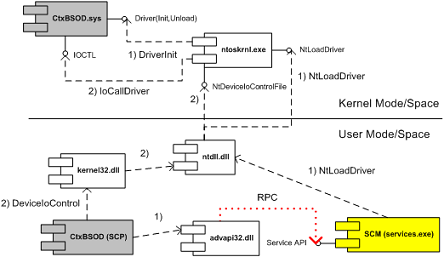
I attached the UML component diagram showing the architecture of this tool. I recently developed a presentation about device drivers architecture and Citrix kernel drivers where I used this tool as one of examples.
- Dmitry Vostokov -
April 21st, 2009 at 4:22 pm
[…] memory dump files: NMI button, keyboard method and various software bugcheck-triggers like Citrix SystemDump. Now coming back to debuggers. One of their essential feature is to save a debugging session log, […]
July 20th, 2009 at 5:05 pm
[…] highlight lower virtual addresses. Here is one example, UML component diagram for SystemDump tool: http://www.dumpanalysis.org/blog/index.php/2006/09/12/new-systemdump-tool/. More examples are in the forthcoming book Windows Device Drivers: Practical […]