Archive for the ‘Crash Dump Patterns’ Category

Crash Dump Analysis Patterns (Part 73)

Tuesday, July 29th, 2008

Opposite to Overaged System sometimes we can see Young System pattern. This means that the system didn’t have time to initialize and subsequently mature or reach the state when the problem could surface. Usual signs are less than a minute system uptime (or larger, depends on a problem context) and the low number of processes and services running (also, sometimes the problem description mentions a terminal services session but there is only one console session in the dump, or two as in Vista and Windows Server 2008):

System Uptime: 0 days 0:00:18.562

3: kd> !vm
[...]
         0248 lsass.exe         1503 (      6012 Kb)
         020c winlogon.exe      1468 (      5872 Kb)
         03b8 svchost.exe        655 (      2620 Kb)
         023c services.exe       416 (      1664 Kb)
         01f0 csrss.exe          356 (      1424 Kb)
         0338 svchost.exe        298 (      1192 Kb)
         02dc svchost.exe        259 (      1036 Kb)
         0374 svchost.exe        240 (       960 Kb)
         039c svchost.exe        224 (       896 Kb)
         01bc smss.exe            37 (       148 Kb)
         0004 System               8 (        32 Kb)

3: kd> !session
Sessions on machine: 1
Valid Sessions: 0

In the case of the fully initialized system the manual dump might have been taken after reboot when the bugcheck already happened or any other reason stemming from the usual confusion between crashes and hangs.

Similar considerations apply to a young process as well, where Process Uptime value from user dumps or ElapsedTime value from kernel or complete memory dumps is too small unless we have obvious crash or hang signs inside, for example, exceptions, deadlock, wait chain or blocked thread waiting for another coupled process:

Process Uptime: 0 days 0:00:10.000

3: kd> !process 8a389d88
PROCESS 8a389d88  SessionId: 0  Cid: 020c    Peb: 7ffdf000  ParentCid: 01bc
    DirBase: 7fbe6080  ObjectTable: e1721008  HandleCount: 455.
    Image: winlogon.exe
    VadRoot 8a65d070 Vads 194 Clone 0 Private 1166. Modified 45. Locked 0.
    DeviceMap e10030f8
    Token                             e139bde0
    ElapsedTime                       00:00:01.062
    UserTime                          00:00:00.046
    KernelTime                        00:00:00.015
    QuotaPoolUsage[PagedPool]         71228
    QuotaPoolUsage[NonPagedPool]      72232
    Working Set Sizes (now,min,max)  (2265, 50, 345) (9060KB, 200KB, 1380KB)
    PeakWorkingSetSize                2267
    VirtualSize                       41 Mb
    PeakVirtualSize                   42 Mb
    PageFaultCount                    2605
    MemoryPriority                    BACKGROUND
    BasePriority                      13
    CommitCharge                      1468

- Dmitry Vostokov @ DumpAnalysis.org

Crash Dump Analysis Patterns (Part 72)

Saturday, July 26th, 2008

It is important to save crash dumps at the right time, for example, when an error message box is shown as discussed in one of my previous posts:

Crash Dumps for Dummies (Part 7) 

However, sometimes crash dumps are saved after a visual indicator of the problem disappeared and the opportunity to see the stack trace was gone. This pattern is called Lost Opportunity. Here is one example of a service memory dump saved manually after it became unresponsive. In the dump file there was only one thread left excluding the thread created by a debugger:

0:001> ~*kv

   0  Id: a3c.700 Suspend: 1 Teb: 7ff59000 Unfrozen
ChildEBP RetAddr  Args to Child             
1178fd60 7c822124 77e6bad8 00000574 00000000 ntdll!KiFastSystemCallRet
1178fd64 77e6bad8 00000574 00000000 00000000 ntdll!NtWaitForSingleObject+0xc
1178fdd4 77e6ba42 00000574 ffffffff 00000000 kernel32!WaitForSingleObjectEx+0xac
1178fde8 67e223dd 00000574 ffffffff 1178fe10 kernel32!WaitForSingleObject+0x12
1178fdfc 7c82257a 67e20000 00000000 00000001 componentA!DllInitialize+0xed
1178fe1c 7c8118b0 67e222f0 67e20000 00000000 ntdll!LdrpCallInitRoutine+0x14
1178feb8 77e53002 00000000 00000000 00000000 ntdll!LdrShutdownProcess+0x130
1178ffa4 77e53065 c0000005 77e8f3b0 ffffffff kernel32!_ExitProcess+0×43
1178ffb8 77e84277 c0000005 00000000 00000000 kernel32!ExitProcess+0×14
1178ffec 00000000 77c5de6d 0a078138 00000000 kernel32!BaseThreadStart+0×5f

#  1  Id: a3c.18bc Suspend: 1 Teb: 7ffde000 Unfrozen
ChildEBP RetAddr  Args to Child             
0a6cffc8 7c845ea0 00000005 00000004 00000001 ntdll!DbgBreakPoint
0a6cfff4 00000000 00000000 00905a4d 00000003 ntdll!DbgUiRemoteBreakin+0x36

We also see exception code 0xc0000005 as ExitProcess parameter. The raw stack reveals the call to NtRaiseHardError function that definitely resulted in some error message box:

0:001> ~0s
[...]

0:000> !teb
TEB at 7ff59000
    ExceptionList:        1178fdc4
    StackBase:            11790000
    StackLimit:           11789000
    SubSystemTib:         00000000
    FiberData:            00001e00
    ArbitraryUserPointer: 00000000
    Self:                 7ff59000
    EnvironmentPointer:   00000000
    ClientId:             00000a3c . 00000700
    RpcHandle:            00000000
    Tls Storage:          00000000
    PEB Address:          7ffdf000
    LastErrorValue:       0
    LastStatusValue:      c0000008
    Count Owned Locks:    0
    HardErrorMode:        0

0:000> dds 11789000  11790000
11789000  00000000
11789004  00000000
11789008  00000000
1178900c  00000000
11789010  00000000
[...]
1178f058  0a4016f4
1178f05c  1178efe0
1178f060  695040c4 <Unloaded_faultrep.dll>+0x40c4
1178f064  7ffdf000
1178f068  00000000
1178f06c  0a4016f4
1178f070  0a4016f4
1178f074  00000000
1178f078  1178f06c
1178f07c  0a4016b8
1178f080  0a4016b8
1178f084  1178efa0
1178f088  7c821b74 ntdll!NtRaiseHardError+0xc
1178f08c  77e99af9 kernel32!UnhandledExceptionFilter+0×54b
1178f090  d0000144
1178f094  00000004
1178f098  00000000
1178f09c  1178f164
1178f0a0  00000001
1178f0a4  77e996a7 kernel32!UnhandledExceptionFilter+0×873
1178f0a8  00000000
1178f0ac  00000000
1178f0b0  00000000
1178f0b4  02f049f0
1178f0b8  1178f13c
1178f0bc  00000000
[…]

It was that time when the dump should have been saved. See also Process crash - getting the dump manually post for another example and full explanation.

- Dmitry Vostokov @ DumpAnalysis.org -

Heap and spike: pattern cooperation

Saturday, July 26th, 2008

This is another case study showing how different patterns interact. It was reported that the service was spiking CPU (see Spiking Thread pattern) and other processes couldn’t communicate with it (see Coupled Processes pattern). The dump was saved using userdump.exe and !runaway command showed that the thread #18 was consuming CPU mostly in user mode:

0:018> !runaway 0y11
 User Mode Time
  Thread       Time
  18:6080      0 days 20:46:57.156
   3:2838      0 days 0:00:00.203
   5:53a0      0 days 0:00:00.093
  16:44a8      0 days 0:00:00.078
  17:2ad8      0 days 0:00:00.046
  19:5834      0 days 0:00:00.015
[…]
   0:57d4      0 days 0:00:00.000
 Kernel Mode Time
  Thread       Time
   5:53a0      0 days 0:00:03.328
   3:2838      0 days 0:00:01.046
  16:44a8      0 days 0:00:00.937
  18:6080      0 days 0:00:00.765
  17:2ad8      0 days 0:00:00.531
  19:5834      0 days 0:00:00.171
  20:3174      0 days 0:00:00.140
[…]

Its thread stack revealed runtime heap manipulation function on top of it:

0:018> ~18kL
ChildEBP RetAddr 
0207f748 77e673ca ntdll!RtlFreeHeap+0×4a5
0207f7b0 77e67690 kernel32!BasepComputeProcessPath+0×395
0207f7b0 77e67690 kernel32!BaseComputeProcessDllPath+0xe3
0207f7f0 77e41b95 kernel32!BaseComputeProcessDllPath+0xe3
0207f850 710f43d9 kernel32!LoadLibraryExW+0×14e
[…]

The parameters to RtlFreeHeap call are described in the following MSDN article:

http://msdn.microsoft.com/en-us/library/ms796710.aspx

We see that the code was freeing the heap block with the address 0×02f88278 and it was located in the first heap 0×00090000:

0:018> ~18kv
ChildEBP RetAddr  Args to Child             
0207f748 77e673ca 00090000 00000000 02f88278 ntdll!RtlFreeHeap+0×4a5
[…]

0:018> !heap
Index   Address  Name      Debugging options enabled
  1:   00090000               
  2:   00190000               
  3:   003b0000               
  4:   00340000               
  5:   00380000               
  6:   007d0000               
  7:   008e0000               
  8:   00a40000               
  9:   00ae0000               
 10:   00c60000               
 11:   00cf0000               
 12:   00d30000               
 13:   00d40000               
 14:   00ed0000               
 15:   01010000               
 16:   01090000               
 17:   00a20000               
 18:   00c90000               
 19:   00fd0000               
 20:   01690000               
 21:   01b30000               
 22:   01b50000               
 23:   01c20000               
 24:   01e50000               
 25:   01f20000               
 26:   01f30000               
 27:   01f40000
               

Could it be the case that the heap was corrupt? We can validate it:

0:018> !heap -s 00090000
Walking the heap 00090000 .HEAP 00090000 (Seg 00090640) At 00184998 Error: invalid block size

.List corrupted: (Blink->Flink = 00000000) != (Block = 02f88278)
HEAP 00090000 (Seg 02f80000) At 02f88270 Error: block list entry corrupted

[...]

The output shows our block 0×02f88278 too but this could also be the effect of False Positive Corruption, the fact that the heap control structures had not been updated yet: the thread is inside heap manipulation function. 

When looking at critical sections and other threads we also see several wait chains (see Wait Chain pattern): 

0:000> !locks

CritSec ntdll!LdrpLoaderLock+0 at 7c889d94
WaiterWoken        No
LockCount          18
RecursionCount     1
OwningThread       2300
EntryCount         0
ContentionCount    141
*** Locked

CritSec ntdll!FastPebLock+0 at 7c889d40
WaiterWoken        No
LockCount          1
RecursionCount     1
OwningThread       2904
EntryCount         0
ContentionCount    2
*** Locked

CritSec +90608 at 00090608
WaiterWoken        No
LockCount          7
RecursionCount     1
OwningThread       6080
EntryCount         0
ContentionCount    7
*** Locked

CritSec serviceA!ServiceSection+0 at 7617c340
WaiterWoken        No
LockCount          5
RecursionCount     1
OwningThread       2838
EntryCount         0
ContentionCount    1e3
*** Locked

0:000> ~*kv

[...]

3 Id: da4.2838 Suspend: 1 Teb: 7ffdc000 Unfrozen
ChildEBP RetAddr Args to Child
00c4f164 7c822124 7c83970f 00000688 00000000 ntdll!KiFastSystemCallRet
00c4f168 7c83970f 00000688 00000000 00000000 ntdll!NtWaitForSingleObject+0xc
00c4f1a4 7c839620 00000000 00000004 00090000 ntdll!RtlpWaitOnCriticalSection+0x19c
00c4f1c4 7c82fe72 00090608 000995b8 00000008 ntdll!RtlEnterCriticalSection+0xa8
00c4f3ec 7c81f4d5 00090000 00800000 000000f8 ntdll!RtlAllocateHeap+0×313
00c4f434 7c81f073 000995b8 00000000 00090000 ntdll!RtlpAllocateUserBlock+0×91
00c4f4f8 7c81ff83 00000bbe 00000000 00000001 ntdll!RtlpLowFragHeapAlloc+0×862
00c4f71c 7c820b23 00090000 00000000 0000000c ntdll!RtlAllocateHeap+0×80
00c4f734 77f6599e 00c4f7b8 00000001 00000002 ntdll!RtlAllocateAndInitializeSid+0×35
00c4f768 74062bfd 00c4f7b8 00000001 00000002 advapi32!AllocateAndInitializeSid+0×2c
[…]

[...]

18 Id: da4.6080 Suspend: 1 Teb: 7ffa8000 Unfrozen
[This is our spiking thread]
[...]

[...]

32 Id: da4.2904 Suspend: 1 Teb: 7ff9a000 Unfrozen
ChildEBP RetAddr Args to Child
0356fbfc 7c822124 7c83970f 00000688 00000000 ntdll!KiFastSystemCallRet
0356fc00 7c83970f 00000688 00000000 00000000 ntdll!NtWaitForSingleObject+0xc
0356fc3c 7c839620 00000000 00000004 00090000 ntdll!RtlpWaitOnCriticalSection+0x19c
0356fc5c 7c82fe72 00090608 7c8329a4 0000008e ntdll!RtlEnterCriticalSection+0xa8
0356fe84 77e67319 00090000 00000000 0000056a ntdll!RtlAllocateHeap+0×313
0356fee8 77e67690 77e676bc 00020a50 00000000 kernel32!BasepComputeProcessPath+0xc2
0356ff28 77e41b95 00000000 00000000 7c82f337 kernel32!BaseComputeProcessDllPath+0xe3
0356ff88 77e67b77 74066908 00000000 00000000 kernel32!LoadLibraryExW+0×14e
0356ff9c 74071b74 74066908 74075320 74071c1c kernel32!LoadLibraryW+0×11
[…]

  33  Id: da4.2300 Suspend: 1 Teb: 7ff99000 Unfrozen
ChildEBP RetAddr  Args to Child             
035afb40 7c822124 7c83970f 00000164 00000000 ntdll!KiFastSystemCallRet
035afb44 7c83970f 00000164 00000000 00000000 ntdll!NtWaitForSingleObject+0xc
035afb80 7c839620 00000000 00000004 00000000 ntdll!RtlpWaitOnCriticalSection+0x19c
035afba0 7c83288c 7c889d40 77e630b8 00000000 ntdll!RtlEnterCriticalSection+0xa8
035afba8 77e630b8 00000000 007e5860 00000001 ntdll!RtlAcquirePebLock+0×11
[…]

[...]

18 threads -> TID#2300 -> TID#2904 -> TID#6080

5 threads -> TID#2838 -> TID#6080

So it looks like our spiking thread was the main problem and preventing other threads from running.

- Dmitry Vostokov @ DumpAnalysis.org -

Exception and deadlock: pattern cooperation

Tuesday, July 22nd, 2008

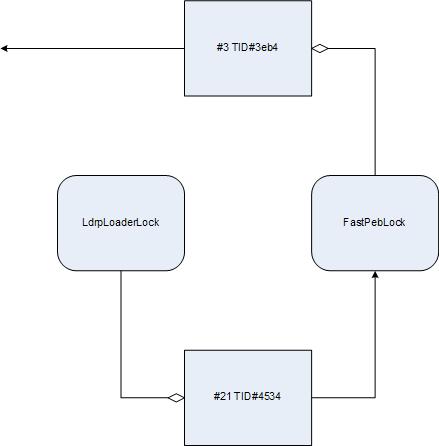
When a process experienced an unhandled exception what were the possible reasons for a postmortem debugger not saving a crash dump? One of them will be illustrated in this post. The process AppA was hanging and causing another process AppB to hang too (see Coupled Processes pattern). If we look at AppA locked critical sections we would see a loader deadlock:

0:000> !locks

CritSec ntdll!LdrpLoaderLock+0 at 7c889d94
WaiterWoken        No
LockCount          8
RecursionCount     2
OwningThread       4534
EntryCount         0
ContentionCount    a3e
*** Locked

CritSec ntdll!FastPebLock+0 at 7c889d40
WaiterWoken        No
LockCount          2
RecursionCount     1
OwningThread       3eb4
EntryCount         0
ContentionCount    15
*** Locked

   3  Id: 30b0.3eb4 Suspend: 1 Teb: 7ffdb000 Unfrozen
ChildEBP RetAddr  Args to Child             
00b3e11c 7c822124 7c83970f 0000004c 00000000 ntdll!KiFastSystemCallRet
00b3e120 7c83970f 0000004c 00000000 00000000 ntdll!NtWaitForSingleObject+0xc
00b3e15c 7c839620 00000000 00000004 00000001 ntdll!RtlpWaitOnCriticalSection+0×19c
00b3e17c 7c832ad0 7c889d94 09150000 7c889e0c ntdll!RtlEnterCriticalSection+0xa8
00b3e1b0 77e68de4 00000001 00000000 00b3e1ec ntdll!LdrLockLoaderLock+0xe4
00b3e210 77e98fae 09150000 00b3e5b0 00000104 kernel32!GetModuleFileNameW+0×77
00b3e24c 77e76d5f 091518b8 00b3e5a4 00000000 kernel32!FillUEFInfo+0×51
00b3e8d4 77e84269 00b3e8fc 77e6b831 00b3e904 kernel32!UnhandledExceptionFilter+0xec
00b3e8dc 77e6b831 00b3e904 00000000 00b3e904 kernel32!BaseThreadStart+0×4a
00b3e904 7c82eeb2 00b3e9e8 00b3ffdc 00b3ea04 kernel32!_except_handler3+0×61
00b3e928 7c82ee84 00b3e9e8 00b3ffdc 00b3ea04 ntdll!ExecuteHandler2+0×26
00b3e9d0 7c82ecc6 00b38000 00b3ea04 00b3e9e8 ntdll!ExecuteHandler+0×24
00b3e9d0 7c832335 00b38000 00b3ea04 00b3e9e8 ntdll!KiUserExceptionDispatcher+0xe (CONTEXT @ 00b3ea04)
00b3eeec 77e67319 00090000 00000000 0000056a ntdll!RtlAllocateHeap+0×9e3
00b3ef50 77e67690 77e676bc 00020a50 00000000 kernel32!BasepComputeProcessPath+0xc2
00b3ef90 77e41b95 00000000 00000000 00b3f05c kernel32!BaseComputeProcessDllPath+0xe3
00b3eff0 77e67b77 74065a30 00000000 00000000 kernel32!LoadLibraryExW+0×14e
00b3f004 7406615c 74065a30 007e1ab0 00000000 kernel32!LoadLibraryW+0×11
00b3f020 74066263 007e1ab0 00000000 534c4354 AppA!ProcessItem+0×2d
[…]

  21  Id: 30b0.4534 Suspend: 1 Teb: 7ffa3000 Unfrozen
ChildEBP RetAddr  Args to Child             
031eeef8 7c822124 7c83970f 00000350 00000000 ntdll!KiFastSystemCallRet
031eeefc 7c83970f 00000350 00000000 00000000 ntdll!NtWaitForSingleObject+0xc
031eef38 7c839620 00000000 00000004 031ef278 ntdll!RtlpWaitOnCriticalSection+0×19c
031eef58 7c830c25 7c889d40 031ef328 00000000 ntdll!RtlEnterCriticalSection+0xa8
031ef200 7c831016 00000001 031ef2ac 031ef288 ntdll!RtlpDosPathNameToRelativeNtPathName_Ustr+0×97
031ef21c 7c830f85 031ef2ac 031ef288 00000000 ntdll!RtlDosPathNameToRelativeNtPathName_Ustr+0×18
031ef290 7c833ce9 031ef2ac 00000001 031ef414 ntdll!RtlDoesFileExists_UstrEx+0×1c
031ef2c0 7c83350e 031ef328 031ef434 031ef33c ntdll!LdrpSearchPath+0×76
031ef3c4 7c833637 0325fc78 031ef414 00000000 ntdll!LdrpCheckForLoadedDll+0xdc
031ef668 7c833ee5 00000000 0325fc78 031ef968 ntdll!LdrpLoadDll+0×1b3
031ef8e4 77e41bcc 0325fc78 031ef968 031ef948 ntdll!LdrLoadDll+0×198
031ef984 5e00b8d7 00115b00 00000000 00000008 kernel32!LoadLibraryExW+0×1b2
031ef9b0 5dff64aa 000cee40 7406275b 0000059c AppA!LoadPluginModule+0×42
[…]

Looking at TID#3eb4 we see that the cause for deadlock was an exception while loading a DLL. Applying exception context WinDbg command .cxr reveals heap corruption pattern:

0:003> .cxr 00b3ea04
eax=0325f1f0 ebx=00000051 ecx=00090000 edx=00090400 esi=0008019d edi=0325f1e8
eip=7c832335 esp=00b3ecd0 ebp=00b3eeec iopl=0  nv up ei ng nz na po cy
cs=001b  ss=0023  ds=0023  es=0023  fs=003b  gs=0000  efl=00010283
ntdll!RtlAllocateHeap+0×9e3:
7c832335 8906            mov     dword ptr [esi],eax  ds:0023:0008019d={(AppA+0×2) (01000002)}

0:003> kL
  *** Stack trace for last set context - .thread/.cxr resets it
ChildEBP RetAddr 
00b3eeec 77e67319 ntdll!RtlAllocateHeap+0×9e3
00b3ef50 77e67690 kernel32!BasepComputeProcessPath+0xc2
00b3ef90 77e41b95 kernel32!BaseComputeProcessDllPath+0xe3
00b3eff0 77e67b77 kernel32!LoadLibraryExW+0×14e
00b3f004 7406615c kernel32!LoadLibraryW+0×11
00b3f020 74066263 AppA!ProcessItem+0×2d
[…]

Seems the address pointed by ESI is valid: [0008019d] = 01000002. However this is write MOV instruction but the accessed memory page is read-only:

0:003> !address 01000002
    01000000 : 01000000 - 00001000
                    Type     01000000 MEM_IMAGE
                    Protect  00000002 PAGE_READONLY
                    State    00001000 MEM_COMMIT
                    Usage    RegionUsageImage
                    FullPath […]AppA.exe

Without heap corruption the normal course of action can be depicted on the following diagram (Wait Chain pattern applied to critical sections):

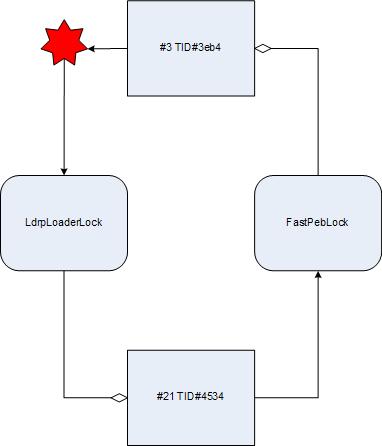
However the exception changes the picture. The course of execution is deflected to the loader again and the loop is closed. We have a classical deadlock:

- Dmitry Vostokov @ DumpAnalysis.org -

CDA Pattern Classification (Memory dump type)

Monday, July 21st, 2008

The following table provides correspondence between memory dump types (user, kernel and complete) and pattern names. For ALL, where appropriate, I also list the most common dump types where a pattern can be encountered.

Table: CDA Pattern Classification (Memory dump type)

- Dmitry Vostokov @ DumpAnalysis.org -

CDA Pattern Classification (Space/Mode)

Monday, July 21st, 2008

The following table provides correspondence between kernel / user mode and space and pattern names. ALL means that a pattern is observable in both modes / spaces.

Table: CDA Pattern Classification (Space/Mode)

- Dmitry Vostokov @ DumpAnalysis.org -

CDA Pattern Classification (Overview)

Sunday, July 20th, 2008

Thinking for a while I realized that it is not possible to create one classification scheme because one pattern can belong to several categories. Therefore I came up with the following draft list of them:

  • - Space / Mode
  • - Memory dump type
  • - Dynamical (Activity) / Structural (State)
  • - Architecture / Design / Implementation
  • - Entity-dependence
  • - System / Subsystem / Component / Object
  • - Cosmogony (How?)
  • - Management (Why?)
  • - Error class 
  • - Observable behaviour

Next two posts will present classification based on Space/Mode and Memory dump type.

- Dmitry Vostokov @ DumpAnalysis.org -

Multiple patterns in a dump: case study

Thursday, July 17th, 2008

Let’s now apply the knowledge of crash dump analysis patterns to the real memory dump coming from the hanging system. !locks WinDbg command is the most frequently used start command for such symptoms according to my observation which might be biased. It reveals deep Wait Chain pattern for executive resources:

1: kd> !locks
[...]
Resource @ 0x8b10c168    Exclusively owned
    Contention Count = 1950624
    NumberOfSharedWaiters = 2
    NumberOfExclusiveWaiters = 154
     Threads: 88256430-01<*> 882aedb0-01    8a348580-01   
     Threads Waiting On Exclusive Access:
              891fd368       894fd240       88382280       8921b9c0      
              8aa18db0       89790328       882b8818       88a70bf8      
              884a2780       88999818       8a13b020       8846a7a0      
              8a0b3020       8812e568       897b6db0       88a16440      
              8922c5f8       88bfe3b8       88264ac0       89ff2b40      
              8a9da020       881cf020       8807adb0       89d64598      
              887811d0       8822a850       88264820       88194738      
              8801f7a8       88284020       88628db0       8a071db0      
              884a84b0       88be46c0       89755b18       89700020      
              89ca4580       881cddb0       882f7020       88bcf9a0      
              8921b020       8826fdb0       88a73db0       88211020      
              8868a1c8       89121280       89e01020       895cedb0      
              88d03790       883941f8       8910f820       891ebc80      
              89862db0       88154af8       8821e7d0       881cedb0      
              8822b020       88094818       8a00b020       89e69020      
              880bbdb0       8945f690       8954c1c0       88d2cb90      
              881cd020       8921c448       89550540       8a5a5870      
              8a159228       893976c0       882847b8       89306578      
              880eb9a8       8978e020       882f72c0       8966c380      
              8a12f4b8       8815adb0       881a5020       897c7db0      
              8873ebf8       88674530       8831b468       88e999a0      
              88287020       8966e600       88541db0       8826d7a0      
              88119b10       8a226338       882f7810       888ba348      
              884b89a8       88d03db0       8826db00       8910adb0      
              881d8368       89288238       8a00adb0       89125db0      
              88eb50a0       88dbbdb0       880ed020       895cd5b0      
              881d4b00       88565db0       886e7780       884b86d8      
              8a603598       89383020       8826f370       886d2248      
              88cd1360       881d1888       88bef670       88117db0      
              890d63f0       894d0368       8826f850       89123020      
              88209020       8826fac0       88f9bdb0       89027478      
              894b8d18       882a7338       899b9020       897c3db0      
              8a13fc50       88b33d50       88b54b68       88652360      
              8a199020       8910dc98       8833a020       8a194a70      
              8a5af640       89b717a0       89464db0       8a152878      
              884773d8       88afe020       88debaf8       88bef2a0      
              88bd6948       89abddb0       8a133db0       88e0ebe8      
              88287398       889622e0       8836aab8       88daec80      
              88c5c450       88225718

[...]

Resource @ 0x8a316c98    Exclusively owned
    Contention Count = 40315
    NumberOfExclusiveWaiters = 2
     Threads: 893bd498-01<*>
     Threads Waiting On Exclusive Access:
              8846f9a8       88256430

[...]

Resource @ 0x8a2b3800    Exclusively owned
    Contention Count = 17735
    NumberOfExclusiveWaiters = 1
     Threads: 8a30ec80-01<*>
     Threads Waiting On Exclusive Access:
              893bd498

[...]

14606 total locks, 14 locks currently held

We have this chain: 154 threads -> 88256430 -> 893bd498 -> 8a30ec80

The same conclusion comes from !analyze -v -hang  command:

1: kd> !analyze -v -hang

[...]

Scanning for threads blocked on locks ...

CURRENT_IRQL:  2

BLOCKING_THREAD:  8a30ec80

LOCK_ADDRESS:  8a2b3800 -- (!locks 8a2b3800)

Resource @ 0x8a2b3800    Exclusively owned
    Contention Count = 17735
    NumberOfExclusiveWaiters = 1
     Threads: 8a30ec80-01<*>
     Threads Waiting On Exclusive Access:
              893bd498

BUGCHECK_STR:  LOCK_HELD

[...]

Let’s examine the thread 8a30ec80 that holds so many others:

1: kd> !thread 8a30ec80 1f
THREAD 8a30ec80  Cid 3ca0.20f0  Teb: 00000000 Win32Thread: 00000000 RUNNING on processor 2
Not impersonating
DeviceMap                 e1000930
Owning Process            8a254128       Image:         processA.exe
Wait Start TickCount      2024978        Ticks: 2291 (0:00:00:35.796)
Context Switch Count      339739            
UserTime                  00:00:00.000
KernelTime                01:08:29.484
Start Address driverA!WorkerRoutine (0xbfa4b850)
Stack Init b7409000 Current b7407e74 Base b7409000 Limit b7406000 Call 0
Priority 13 BasePriority 13 PriorityDecrement 0
ChildEBP RetAddr 
f77353a0 bfa4b880 driverA!DoProcessing+0×256
f77353a4 ff180010 driverA!WorkerRoutine+0×30
[…]

We see that this thread is running on processor 2 and the time spent in kernel is more than one hour. Seems we have the case of Spiking Thread pattern here. Also the thread is not waiting and seems to be moving some data:

1: kd> .thread 8a30ec80
Implicit thread is now 8a30ec80

1: kd> r
Last set context:
eax=baec2950 ebx=00000000 ecx=00001b4a edx=00002275 esi=bae8c010 edi=ba01a018
eip=bfa3b68c esp=f77353a4 ebp=b7407f44 iopl=0 nv up ei pl nz na po nc
cs=0008 ss=0010 ds=0023 es=0023 fs=0030 gs=0000 efl=00000202
driverA!DoProcessing+0×256:
bfa3b68c f3a5 rep movs dword ptr es:[edi],dword ptr [esi]

This driver was also known to have pool allocation problems resulting in various strange system behaviour so let’s inspect the output of !vm command to see whether we have an instance of Insufficient Memory pattern:

1: kd> !vm

*** Virtual Memory Usage ***
 Physical Memory:     1048242 (   4192968 Kb)
 Page File: \??\C:\pagefile.sys
   Current:   4456448 Kb  Free Space:   3483860 Kb
   Minimum:   4456448 Kb  Maximum:      4456448 Kb
 Available Pages:      409879 (   1639516 Kb)
 ResAvail Pages:       942398 (   3769592 Kb)
 Locked IO Pages:         124 (       496 Kb)
 Free System PTEs:     182782 (    731128 Kb)
 Free NP PTEs:          32766 (    131064 Kb)
 Free Special NP:           0 (         0 Kb)
 Modified Pages:           29 (       116 Kb)
 Modified PF Pages:        29 (       116 Kb)
 NonPagedPool Usage:    13567 (     54268 Kb)
 NonPagedPool Max:      65279 (    261116 Kb)
 PagedPool 0 Usage:     12350 (     49400 Kb)
 PagedPool 1 Usage:      2442 (      9768 Kb)
 PagedPool 2 Usage:      2457 (      9828 Kb)
 PagedPool 3 Usage:      2395 (      9580 Kb)
 PagedPool 4 Usage:      2465 (      9860 Kb)
 PagedPool Usage:       22109 (     88436 Kb)
 PagedPool Maximum:     64512 (    258048 Kb)

 ********** 3 pool allocations have failed **********

 Shared Commit:        133470 (    533880 Kb)
 Special Pool:              0 (         0 Kb)
 Shared Process:        24993 (     99972 Kb)
 PagedPool Commit:      22173 (     88692 Kb)
 Driver Commit:          2056 (      8224 Kb)
 Committed pages:      938909 (   3755636 Kb)
 Commit limit:        2119027 (   8476108 Kb)

[...]

We have signs here but the current size of paged pool and nonpaged pool seems to be very far from their maximum. Perhaps there were failures in session pool allocations? Let’s look at session pool:

1: kd> !vm 4
[...]
 Session ID 5 @ f79f3000:
 Paged Pool Usage:       35640K

 *** 6 Pool Allocation Failures ***

 Commit Usage:           36900K

We see the problem in session 5 and let’s see in which session our processA.exe was running:

1: kd> !process 8a254128 0
PROCESS 8a254128  SessionId: 15  Cid: 3ca0    Peb: 7ffd7000  ParentCid: 01ac
    DirBase: bff47800  ObjectTable: e779f5c8  HandleCount: 161.
    Image: processA.exe

It was session 15 and therefore we might conclude that previous problems with driverA are not connected to this new one. The identified problem is CPU spike. Perhaps the code contains a bug that causes this driver to loop indefinitely.

- Dmitry Vostokov @ DumpAnalysis.org -

In Search of Lost CID

Friday, July 11th, 2008

Paraphrasing the title of Marcel Proust’s “In Search of Lost Time” 6-volume classic we can say there is timeless empirical knowledge. One is target CID (Client ID, PID:TID) for RPC calls. We just need to search for even 16-bit numbers and compare them with the list of available PIDs. The example can be found on ntdebugging blog:

Tracking Down a Multi-Process Deadlock

Actually the second dword after PID can contain even 16-bit TID number as can be seen from another example:

1: kd> kv
ChildEBP RetAddr  Args to Child             
[...]
00faf828 7778c38b 00faf8f0 00faf9f0 06413b54 ole32!CRpcChannelBuffer::SwitchAptAndDispatchCall+0x112
00faf908 776c0565 06413b54 00fafa00 00faf9f0 ole32!CRpcChannelBuffer::SendReceive2+0xd3
00faf974 776c04fa 06413b54 00fafa00 00faf9f0 ole32!CAptRpcChnl::SendReceive+0xab
00faf9c8 77ce247f 06413b54 00fafa00 00faf9f0 ole32!CCtxComChnl::SendReceive+0×1a9
00faf9e4 77ce252f 03213bdc 00fafa2c 0600016e RPCRT4!NdrProxySendReceive+0×43
00fafdcc 77ce25a6 763050e8 76306bba 00fafe04 RPCRT4!NdrClientCall2+0×206
00fafdec 77c64f87 0000000c 00000005 00fafe3c RPCRT4!ObjectStublessClient+0×8b
00fafdfc 7784ba75 03213bdc 03235858 03235850 RPCRT4!ObjectStubless+0xf
[…]

1: kd> dpp 06413b54 l8
06413b54  77672418 7778bcdf ole32!CRpcChannelBuffer::QueryInterface
06413b58  776723e8 777267f5 ole32!CRpcChannelBuffer::QueryInterface
06413b5c  00000003
06413b60  00000002
06413b64  0743fde8 0316f080
06413b68  07676528 031d5ad0
06413b6c  064c9c80 064c9d00
06413b70  078843c0 00000000

1: kd> dd 064c9c80 l4
064c9c80  064c9d00 064c9c00 00003108 00001dac ; PID TID

I have been using this technique for a long time and only now see it documented.

- Dmitry Vostokov @ DumpAnalysis.org -

Crash Dump Analysis Patterns (Part 71)

Friday, July 11th, 2008

Dynamic memory corruption patterns in user and kernel spaces are specializations of one big parent pattern called Corrupt Structure because crashes there happen due to corrupt or overwritten heap or pool control structures (for the latter see Double Free pattern). Another frequently seen specialization is called Critical Section Corruption which is the subject of this post. Critical sections are linked together through statically pre-allocated or heap-allocated helper structure (shown in magenta) although themselves they can be stored anywhere from static and stack area to heap:

0:001> dt -r1 ntdll!_RTL_CRITICAL_SECTION 77795240
   +0×000 DebugInfo        : 0×00175d28 _RTL_CRITICAL_SECTION_DEBUG
      +0×000 Type             : 0
      +0×002 CreatorBackTraceIndex : 0
      +0×004 CriticalSection  : 0×77795240 _RTL_CRITICAL_SECTION
      +0×008 ProcessLocksList : _LIST_ENTRY [ 0×173a08 - 0×173298 ]
      +0×010 EntryCount       : 0
      +0×014 ContentionCount  : 0
      +0×018 Spare            : [2] 0

   +0×004 LockCount        : -1
   +0×008 RecursionCount   : 0
   +0×00c OwningThread     : (null)
   +0×010 LockSemaphore    : (null)
   +0×014 SpinCount        : 0

0:001> !address 77795240
    77670000 : 77792000 - 00005000
                    Type     01000000 MEM_IMAGE
                    Protect  00000004 PAGE_READWRITE
                    State    00001000 MEM_COMMIT
                  Usage    RegionUsageImage
                    FullPath C:\WINDOWS\system32\ole32.dll

0:001> !address 0×00175d28
    00140000 : 00173000 - 0000d000
                    Type     00020000 MEM_PRIVATE
                    Protect  00000004 PAGE_READWRITE
                    State    00001000 MEM_COMMIT
                    Usage    RegionUsageHeap
                    Handle   00140000

0:000> !locks

CritSec ntdll!LdrpLoaderLock+0 at 7c8877a0
WaiterWoken        No
LockCount          0
RecursionCount     1
OwningThread       1184
EntryCount         0
ContentionCount    b04707
*** Locked

0:000> dt -r1 _RTL_CRITICAL_SECTION 7c8877a0
   +0×000 DebugInfo        : 0×7c8877c0 _RTL_CRITICAL_SECTION_DEBUG
      +0×000 Type             : 0
      +0×002 CreatorBackTraceIndex : 0
      +0×004 CriticalSection  : 0×7c8877a0 _RTL_CRITICAL_SECTION
      +0×008 ProcessLocksList : _LIST_ENTRY [ 0×7c887be8 - 0×7c887bc8 ]
      +0×010 EntryCount       : 0
      +0×014 ContentionCount  : 0xb04707
      +0×018 Spare            : [2] 0

   +0×004 LockCount        : -2
   +0×008 RecursionCount   : 1
   +0×00c OwningThread     : 0×00001184
   +0×010 LockSemaphore    : 0×0000013c
   +0×014 SpinCount        : 0

0:000> !address 7c8877a0
    7c800000 : 7c887000 - 00003000
                    Type     01000000 MEM_IMAGE
                    Protect  00000004 PAGE_READWRITE
                    State    00001000 MEM_COMMIT
                    Usage    RegionUsageImage
                    FullPath C:\WINDOWS\system32\ntdll.dll

0:000> !address 0×7c8877c0
    7c800000 : 7c887000 - 00003000
                    Type     01000000 MEM_IMAGE
                    Protect  00000004 PAGE_READWRITE
                    State    00001000 MEM_COMMIT
                    Usage    RegionUsageImage
                    FullPath C:\WINDOWS\system32\ntdll.dll

Consider the case when CRITICAL_SECTION is defined on a stack and there was Local Buffer Overflow overwriting DebugInfo pointer. Then we have an example of Wild Pointer pattern and traversing the list of critical sections from this point will diverge into completely unrelated memory area or stop there. Consider another example of heap corruption or race condition overwriting ProcessLocksList or CriticalSection pointer. Then we have an instance of Wild Pointer pattern illustrated below:

0:000> !locks

CritSec ntdll!LdrpLoaderLock+0 at 7c8877a0
WaiterWoken        No
LockCount          0
RecursionCount     1
OwningThread       1184
EntryCount         0
ContentionCount    b04707
*** Locked

CritSec +1018de08 at 1018de08
WaiterWoken        Yes
LockCount          -49153
RecursionCount     5046347
OwningThread       460050
EntryCount         0
ContentionCount    0
*** Locked

CritSec +1018ddd8 at 1018ddd8
WaiterWoken        Yes
LockCount          -1
RecursionCount     0
OwningThread       0
*** Locked

CritSec +1018de28 at 1018de28
WaiterWoken        Yes
LockCount          -1
RecursionCount     0
OwningThread       0
*** Locked

CritSec +1018de08 at 1018de08
WaiterWoken        Yes
LockCount          -49153
RecursionCount     5046347
OwningThread       460050
EntryCount         0
ContentionCount    0
*** Locked

CritSec +1018de28 at 1018de28
WaiterWoken        Yes
LockCount          -1
RecursionCount     0
OwningThread       0
*** Locked

CritSec +1018ddd8 at 1018ddd8
WaiterWoken        Yes
LockCount          -1
RecursionCount     0
OwningThread       0
*** Locked

Scanned 841 critical sections

We see the signs of corruption at 1018de08 address which is interpreted as pointing to a locked critical section. To see where the corruption started we need to look at the list of all critical sections either locked or not locked:

0:000> !locks -v

CritSec ntdll!RtlCriticalSectionLock+0 at 7c887780
LockCount          NOT LOCKED
RecursionCount     0
OwningThread       0
EntryCount         0
ContentionCount    28

CritSec ntdll!LdrpLoaderLock+0 at 7c8877a0
WaiterWoken        No
LockCount          0
RecursionCount     1
OwningThread       1184
EntryCount         0
ContentionCount    b04707
*** Locked

CritSec ntdll!FastPebLock+0 at 7c887740
LockCount          NOT LOCKED
RecursionCount     0
OwningThread       0
EntryCount         0
ContentionCount    42c9

CritSec ntdll!RtlpCalloutEntryLock+0 at 7c888ea0
LockCount          NOT LOCKED
RecursionCount     0
OwningThread       0
EntryCount         0
ContentionCount    0

CritSec ntdll!PMCritSect+0 at 7c8883c0
LockCount          NOT LOCKED
RecursionCount     0
OwningThread       0
EntryCount         0
ContentionCount    0

CritSec ntdll!UMLogCritSect+0 at 7c888400
LockCount          NOT LOCKED
RecursionCount     0
OwningThread       0
EntryCount         0
ContentionCount    0

CritSec ntdll!RtlpProcessHeapsListLock+0 at 7c887960
LockCount          NOT LOCKED
RecursionCount     0
OwningThread       0
EntryCount         0
ContentionCount    0

CritSec +80608 at 00080608
LockCount          NOT LOCKED
RecursionCount     0
OwningThread       0
EntryCount         0
ContentionCount    22

[...]

CritSec cabinet!_adbgmsg+13c at 74fb4658
LockCount          NOT LOCKED
RecursionCount     0
OwningThread       0
EntryCount         0
ContentionCount    0

CritSec +c6c17c at 00c6c17c
LockCount          NOT LOCKED
RecursionCount     0
OwningThread       0
EntryCount         0
ContentionCount    0

CritSec +c6c0e4 at 00c6c0e4
LockCount          NOT LOCKED
RecursionCount     0
OwningThread       0
EntryCount         0
ContentionCount    0

CritSec at 1018de08 does not point back to the debug info at 00136a40
Perhaps the memory that held the critical section has been reused without calling DeleteCriticalSection() ?

CritSec +1018de08 at 1018de08
WaiterWoken        Yes
LockCount          -49153
RecursionCount     5046347
OwningThread       460050
EntryCount         0
ContentionCount    0
*** Locked

CritSec at 1018ddd8 does not point back to the debug info at 00136a68
Perhaps the memory that held the critical section has been reused without calling DeleteCriticalSection() ?

CritSec +1018ddd8 at 1018ddd8
WaiterWoken        Yes
LockCount          -1
RecursionCount     0
OwningThread       0
*** Locked

[...]

We see that the problem appears when the heap-allocated critical section at 00c6c0e4 address is linked to an inconsistent critical section at 0×1018de08 address where memory contains UNICODE string fragment:

0:000> !address 00c6c0e4
    00c60000 : 00c60000 - 00010000
                    Type     00020000 MEM_PRIVATE
                    Protect  00000004 PAGE_READWRITE
                    State    00001000 MEM_COMMIT
                    Usage    RegionUsageHeap
                    Handle   00c60000

0:000> dt -r1 _RTL_CRITICAL_SECTION 00c6c0e4
   +0x000 DebugInfo        : 0x00161140 _RTL_CRITICAL_SECTION_DEBUG
      +0x000 Type             : 0
      +0x002 CreatorBackTraceIndex : 0
      +0x004 CriticalSection  : 0x00c6c0e4 _RTL_CRITICAL_SECTION
      +0×008 ProcessLocksList : _LIST_ENTRY [ 0×136a48 - 0×119f58 ]
      +0×010 EntryCount       : 0
      +0×014 ContentionCount  : 0
      +0×018 Spare            : [2] 0
   +0×004 LockCount        : -1
   +0×008 RecursionCount   : 0
   +0×00c OwningThread     : (null)
   +0×010 LockSemaphore    : (null)
   +0×014 SpinCount        : 0

0:000> dt -r _RTL_CRITICAL_SECTION_DEBUG 0×00136a48-0×008
   +0×000 Type             : 0
   +0×002 CreatorBackTraceIndex : 0
   +0×004 CriticalSection  : 0×1018de08 _RTL_CRITICAL_SECTION
      +0×000 DebugInfo        : 0×000d001b _RTL_CRITICAL_SECTION_DEBUG
         +0×000 Type             : 0
         +0×002 CreatorBackTraceIndex : 0
         +0×004 CriticalSection  : (null)
         +0×008 ProcessLocksList : _LIST_ENTRY [ 0×0 - 0×0 ]
         +0×010 EntryCount       : 0
         +0×014 ContentionCount  : 0×37e3c700
         +0×018 Spare            : [2] 0×8000025
      +0×004 LockCount        : 196609
      +0×008 RecursionCount   : 5046347
      +0×00c OwningThread     : 0×00460050
      +0×010 LockSemaphore    : 0×00310033
      +0×014 SpinCount        : 0×520044
   +0×008 ProcessLocksList : _LIST_ENTRY [ 0×136a70 - 0×161148 ]
      +0×000 Flink            : 0×00136a70 _LIST_ENTRY [ 0×136a98 - 0×136a48 ]
         +0×000 Flink            : 0×00136a98 _LIST_ENTRY [ 0×136ae8 - 0×136a70 ]
         +0×004 Blink            : 0×00136a48 _LIST_ENTRY [ 0×136a70 - 0×161148 ]
      +0×004 Blink            : 0×00161148 _LIST_ENTRY [ 0×136a48 - 0×119f58 ]
         +0×000 Flink            : 0×00136a48 _LIST_ENTRY [ 0×136a70 - 0×161148 ]
         +0×004 Blink            : 0×00119f58 _LIST_ENTRY [ 0×161148 - 0×16cc3c0 ]
   +0×010 EntryCount       : 0
   +0×014 ContentionCount  : 0
   +0×018 Spare            : [2] 0×2e760000

0:000> !address 0x1018de08
    10120000 : 10120000 - 00100000
                    Type     00020000 MEM_PRIVATE
                    Protect  00000004 PAGE_READWRITE
                    State    00001000 MEM_COMMIT
                    Usage    RegionUsageIsVAD

The address points miraculously to some DLL: 

0:000> du 1018de08
1018de08  "....componentA.dll"

We might suggest that componentA.dll played some role there.

There are other messages from verbose version of !locks WinDbg command pointing to critical section problems:  

CritSec componentB!Section+0 at 74004008
LockCount          NOT LOCKED
RecursionCount     0
OwningThread       0
EntryCount         0
ContentionCount    0

The CritSec componentC!Info+c at 72455074 has been RE-INITIALIZED.
The critical section points to DebugInfo at 00107cc8 instead of 000f4788

CritSec componentC!Info+c at 72455074
LockCount          NOT LOCKED
RecursionCount     0
OwningThread       0
EntryCount         0
ContentionCount    0

CritSec componentD!foo+8ec0 at 0101add0
LockCount          NOT LOCKED
RecursionCount     0
OwningThread       0
EntryCount         0
ContentionCount    0

- Dmitry Vostokov @ DumpAnalysis.org -
Crash Dump Analysis Patterns (Part 70)

Thursday, July 10th, 2008

Sometimes compilers optimize code by replacing function calls with their bodies. This procedure is called function inlining and functions themselves are called inline. On one platform we can see the real function call on the stack trace but on another platform or product version we only see the same problem instruction. Fortunately the rest of stack trace should be the same. Therefore when comparing Stack Traces we shouldn’t pay attention only to the top function call. This pattern is called Inline Function Optimization.

It is frequently seen when threads crash while copying or moving memory. Consider this stack trace:

0: kd> kL
ChildEBP RetAddr 
f22efaf4 f279ec3d driver!QueueValue+0x26b
f22efb30 8081dcdf driver!BufferAppendData+0x35f
f22efc7c 808f47b7 nt!IofCallDriver+0x45
f22efc90 808f24ee nt!IopSynchronousServiceTail+0x10b
f22efd38 80888c7c nt!NtWriteFile+0x65a
f22efd38 7c82ed54 nt!KiFastCallEntry+0xfc

When looking at rep movs instruction we might suspect that QueueValue was copying memory:

0: kd> r
eax=00000640 ebx=89b23000 ecx=00000190 edx=89b3c828 esi=02124220 edi=e2108f58
eip=f279c797 esp=f22efadc ebp=f22efaf4 iopl=0 nv up ei pl nz na pe nc
cs=0008 ss=0010 ds=0023 es=0023 fs=0030 gs=0000 efl=00010206
driver!QueueValue+0x26b:
f279c797 f3a5 rep movs dword ptr es:[edi],dword ptr [esi] es:0023:e2108f58=dfefbecf ds:0023:02124220=????????

On x64 bit platform the same driver had the similar stack trace but with memcpy at its top:

fffffadf`8955f4a8 fffffadf`8d1bef46 driver!memcpy+0x1c0
fffffadf`8955f4b0 fffffadf`8d1c15c9 driver!QueueValue+0x2fe
fffffadf`8955f550 fffff800`01273ed9 driver!BufferAppendData+0x481
[...]

We also see how QueueValue+0×2fe and QueueValue+0×26b are close. In fact the source code for the driver calls RtlCopyMemory function only once and it is defined as memcpy in wdm.h. The latter function is also exported from nt:

0: kd> x nt!
[...]
80881780 nt!memcpy = <no type information>
[...]

but usually can be found in any driver that links it from C runtime library, for example, on my x64 Windows:

1: kd> x nt!memcpy
fffff800`01c464e0 nt!memcpy = <no type information>

1: kd> x srv!memcpy
fffff980`0eafdf20 srv!memcpy = <no type information>

1: kd> x win32k!memcpy
fffff960`000c1b40 win32k!memcpy = <no type information>

Therefore we see that when compiling for x86 platform Visual C++ compiler decided to inline memcpy code but AMD compiler on x64 platform didn’t inline it. The overall stack trace without offsets is very similar and we can suppose that the problem was identical.

- Dmitry Vostokov @ DumpAnalysis.org -
Crash Dump Analysis Patterns (Part 19b)

Thursday, July 10th, 2008

Previously I wrote about how to calculate thread waiting time in kernel and complete memory dumps (Waiting Thread Time pattern). Now I show how to do it for user dumps. Unfortunately this information is not available in user space and therefore this can be done only approximately by calculating average or maximum waiting time.

The key is to take advantage of !runaway WinDbg command. Modern versions of postmortem debuggers and process dumpers usually save thread time information additionally. For example, /ma switch for .dump command does it. The later versions of userdump.exe also do it. When !runaway is invoked with 0y111 (7) flag it shows each thread user and kernel times and also the time elapsed since each thread was created. Therefore for threads that didn’t do much CPU intensive computation their average waiting time will almost correspond to their elapsed time. Unfortunately we cannot say when that computation took place. It could be the case that the thread in question was waiting 98.9% of the time, then did some computation for 0.01% and was waiting again 1% of the time or it could be the case that it was doing computation 0.01% of the time initially and then waiting the rest of the time (99.9%) until the dump was saved.

Consider this example of a sleeping thread:

0:000> ~32kL 100
ChildEBP RetAddr 
0a18f03c 7c826f4b ntdll!KiFastSystemCallRet
0a18f040 77e41ed1 ntdll!NtDelayExecution+0xc
0a18f0a8 77e424ed kernel32!SleepEx+0x68
0a18f0b8 1b0ac343 kernel32!Sleep+0xf
0a18f100 1b00ba49 msjet40!System::AllocatePages+0x15e
0a18f11c 1b00ba08 msjet40!PageDesc::WireCurrentPage+0x2f
0a18f13c 1b00b8dd msjet40!PageDesc::ReadPage+0x119
0a18f164 1b01b567 msjet40!Database::ReadPage+0x7a
0a18f190 1b00e309 msjet40!TableMover::GetNextRow+0xc9
0a18f1a8 1b015de9 msjet40!TableMover::Move+0xc4
0a18f1d8 1b015d9c msjet40!ErrIsamMove+0x6c
0a18f1f0 1b038aa4 msjet40!ErrDispMove+0x43
0a18f43c 1b015d9c msjet40!ErrJPMoveRange+0x350
0a18f454 1b0200b3 msjet40!ErrDispMove+0x43
0a18f6a0 1b021e4d msjet40!ErrMaterializeRows+0x1fd
0a18f6f0 1b021c0d msjet40!ErrJPSetColumnSort+0x191
0a18f718 1b0210a4 msjet40!ErrJPOpenSort+0x105
0a18f750 1b020de5 msjet40!ErrJPOpenRvt+0x171
0a18f9f0 1b039b82 msjet40!ErrExecuteQuery+0x548
0a18fa3c 1b05548b msjet40!ErrExecuteTempQuery+0x13d
0a18fa6c 4c23b01e msjet40!JetExecuteTempQuery+0xc9
0a18fa94 4c23a8d1 odbcjt32!DoJetCloseTable+0x64
0a18fd10 4c23a6b6 odbcjt32!SQLInternalExecute+0x217
0a18fd20 4c23a694 odbcjt32!SQLExecuteCover+0x1f
0a18fd28 488b3fc1 odbcjt32!SQLExecute+0x9
0a18fd44 0c4898b5 odbc32!SQLExecute+0xd3
[...]

The process uptime can be seen from vertarget WinDbg command:

0:000> vertarget
[...]
Process Uptime: 0 days 1:17:22.000
[...]

Then we dump thread times (only information for our 32nd thread is shown here):

0:000> !runaway 0y111
 User Mode Time
  Thread       Time
  32:cfc       0 days 0:00:00.109
[...]
 Kernel Mode Time
  Thread       Time
  32:cfc       0 days 0:00:00.062
[...]
 Elapsed Time
  Thread       Time
[...]
  32:cfc       0 days 1:17:20.703
[...]

We see that 1 hour, 17 minutes and almost 21 seconds  passed since the thread was created. By subtracting this time from process uptime we see that it was created in the first 2 seconds and it was consuming less than one second of CPU time. Therefore, most of the time this thread was waiting. Unfortunately we cannot say when it was waiting most of the time, in the beginning before it started sleeping or after. Fortunately we might continue guessing by looking at Sleep argument:

0:032> kv
ChildEBP RetAddr  Args to Child             
0a18f03c 7c826f4b 77e41ed1 00000000 0a18f080 ntdll!KiFastSystemCallRet
0a18f040 77e41ed1 00000000 0a18f080 00000000 ntdll!NtDelayExecution+0xc
0a18f0a8 77e424ed 00000032 00000000 04390000 kernel32!SleepEx+0x68
0a18f0b8 1b0ac343 00000032 042a34b4 0a18f1c8 kernel32!Sleep+0xf
[…]

We see that it had been sleeping for at most 32 milliseconds and perhaps this is a retry / sleep loop. We might guess that the thread was recently spinning in that loop and therefore waiting all the time before that. Alternatively we might guess that the retry portion is very small and fast and 32 milliseconds are spread over all elapsed time and the thread was in this loop the significant proportion of time. What we can surely say that the last waiting time was no more than 32 milliseconds. in the case of waiting for an event, for example, I don’t see any reliable way of calculating this time. If anyone knows please post a comment.

- Dmitry Vostokov @ DumpAnalysis.org -
Crash Dump Analysis AntiPatterns (Part 10)

Wednesday, July 9th, 2008

Often engineers spend 10 minutes pursuing a certain investigation path and then prematurely closing it and switching to another. This is what I call Myopic Troubleshooting and Debugging.

This anti-pattern name was inspired by Daniel Dennett’s discussion of insufficiently patient scientists doing computer simulations:

“mistaking a failure of imagination for an insight into necessity” (Darwin’s Dangerous Idea, page 175).

Paraphrasing we can say that engineers think of impossibility where their imagination fails.

- Dmitry Vostokov @ DumpAnalysis.org -
Crash Dump Analysis Patterns (Part 69)

Wednesday, July 9th, 2008

Sometimes patterns like Message Box and / or Stack Trace semantics reveal another pattern that I call Self-Diagnosis which may or may not result in Self-Dump. The diagnostic message may reveal the problem internally detected by runtime environment.

Consider the following stack trace:

0:000> kv
ChildEBP RetAddr  Args to Child             
0012e8c0 77f4bf53 77f4610a 00000000 00000000 ntdll!KiFastSystemCallRet
0012e8f8 77f3965e 000101a2 00000000 00000001 user32!NtUserWaitMessage+0xc
0012e920 77f4f762 77f30000 00151768 00000000 user32!InternalDialogBox+0xd0
0012ebe0 77f4f047 0012ed3c 00000000 ffffffff user32!SoftModalMessageBox+0x94b
0012ed30 77f4eec9 0012ed3c 00000028 00000000 user32!MessageBoxWorker+0x2ba
0012ed88 77f87d0d 00000000 001511a8 0014ef50 user32!MessageBoxTimeoutW+0x7a
0012edbc 77f742c8 00000000 0012ee70 1001d7d4 user32!MessageBoxTimeoutA+0x9c
0012eddc 77f742a4 00000000 0012ee70 1001d7d4 user32!MessageBoxExA+0x1b
0012edf8 10014c9a 00000000 0012ee70 1001d7d4 user32!MessageBoxA+0×45
WARNING: Stack unwind information not available. Following frames may be wrong.
0012ee2c 10010221 0012ee70 1001d7d4 00012010 component!Error+0×7e4a
[…]

Dumping the message box message and its title shows that Visual C++ runtime detected a buffer overflow condition:

0:000> da 0012ee70
0012ee70  "Buffer overrun detected!..Progra”
0012ee90  “m: E:\W\program.exe..A buffer ov”
0012eeb0  “errun has been detected which ha”
0012eed0  “s corrupted the program’s.intern”
0012eef0  “al state.  The program cannot sa”
0012ef10  “fely continue execution and must”
0012ef30  “.now be terminated..”

0:000> da 1001d7d4
1001d7d4  "Microsoft Visual C++ Runtime Lib"
1001d7f4  "rary"

- Dmitry Vostokov @ DumpAnalysis.org -

Crash Dump Analysis Patterns (Part 68)

Friday, June 27th, 2008

Setting a thread affinity mask to a specific processor or core makes that thread running in a single processor environment from that thread point of view. It is always scheduled to run on that processor. This potentially creates a problem found on real single processor environments if the processor runs another higher priority thread (Thread Starvation pattern) or loops at dispatch level IRQL (Dispatch Level Spin pattern). Therefore I call this pattern Affine Thread.

Here is one example. Dual core laptop was hanging and kernel memory dump showed the following Wait Chain pattern:

Resource @ nt!PopPolicyLock (0x80563080)    Exclusively owned
    Contention Count = 32
    NumberOfExclusiveWaiters = 9
     Threads: 8b3b08b8-01<*>
     Threads Waiting On Exclusive Access:
              872935f0       8744cb30       87535da8       8755a6b0      
              8588dba8       8a446c10       85891c50       87250020      
              8a6e7da8

The thread 8b3b08b8 blocked other 9 threads and had the following stack trace:

0: kd> !thread 8b3b08b8 1f
THREAD 8b3b08b8  Cid 0004.002c  Teb: 00000000 Win32Thread: 00000000 READY
Not impersonating
DeviceMap                 e1009248
Owning Process            8b3b2830       Image:         System
Wait Start TickCount      44419          Ticks: 8744 (0:00:02:16.625)
Context Switch Count      4579            
UserTime                  00:00:00.000
KernelTime                00:00:01.109
Start Address nt!ExpWorkerThread (0x8053867e)
Stack Init bad00000 Current bacffcb0 Base bad00000 Limit bacfd000 Call 0
Priority 15 BasePriority 12 PriorityDecrement 3 DecrementCount 16
ChildEBP RetAddr 
bacffcc8 804fd2c9 nt!KiUnlockDispatcherDatabase+0x9e
bacffcdc 8052a16f nt!KeSetSystemAffinityThread+0×5b
bacffd04 805caf03 nt!PopCompositeBatteryUpdateThrottleLimit+0×2d
bacffd24 805ca767 nt!PopCompositeBatteryDeviceHandler+0×1c5
bacffd3c 80529d3b nt!PopPolicyWorkerMain+0×25
bacffd7c 8053876d nt!PopPolicyWorkerThread+0xbf
bacffdac 805cff64 nt!ExpWorkerThread+0xef
bacffddc 805460de nt!PspSystemThreadStartup+0×34
00000000 00000000 nt!KiThreadStartup+0×16

Note this function and its first parameter: 

0: kd> !thread 8b3b08b8
[...]
bacffcdc 8052a16f 00000002 8a5b8cd8 00000030 nt!KeSetSystemAffinityThread+0×5b
[…]

The first parameter is KAFFINITY mask and 0×2 is 0y10 (binary) which is the second core. This thread had been already set to run on that core only:

0: kd> dt _KTHREAD 8b3b08b8
nt!_KTHREAD
   +0x000 Header           : _DISPATCHER_HEADER
[...]
   +0×124 Affinity         : 2
[…]
 

Let’s look at our second core:

0: kd> ~1s

1: kd> kL 100
ChildEBP RetAddr 
a8f00618 acd21947 hal!KeAcquireInStackQueuedSpinLock+0x43
a8f00618 acd21947 tcpip!IndicateData+0x98
a8f00684 acd173e5 tcpip!IndicateData+0x98
a8f0070c acd14ef5 tcpip!TCPRcv+0xbb0
a8f0076c acd14b19 tcpip!DeliverToUser+0x18e
a8f007e8 acd14836 tcpip!DeliverToUserEx+0x95e
a8f008a0 acd13928 tcpip!IPRcvPacket+0x6cb
a8f008e0 acd13853 tcpip!ARPRcvIndicationNew+0x149
a8f0091c ba56be45 tcpip!ARPRcvPacket+0x68
a8f00970 b635801d NDIS!ethFilterDprIndicateReceivePacket+0x307
a8f00984 b63581b4 psched!PsFlushReceiveQueue+0x15
a8f009a8 b63585f9 psched!PsEnqueueReceivePacket+0xda
a8f009c0 ba56c8ed psched!ClReceiveComplete+0x13
a8f009d8 b7defdb5 NDIS!EthFilterDprIndicateReceiveComplete+0x7c
a8f00a08 b7df0f78 driverA+0x17db5
a8f00a64 ba55ec2c driverA+0x18f78
a8f00a88 b6b0962c NDIS!ndisMSendCompleteX+0x8d
a8f00a9c b6b0a36d driverB+0x62c
a8f00ab8 ba55e88f driverB+0x136d
a8f00ae0 b7de003c NDIS!NdisReturnPackets+0xe9
a8f00af0 ba55e88f driverA+0x803c
a8f00b18 b6358061 NDIS!NdisReturnPackets+0xe9
a8f00b30 ba55e88f psched!MpReturnPacket+0x3b
a8f00b58 acc877cc NDIS!NdisReturnPackets+0xe9
87749da0 00000000 afd!AfdReturnBuffer+0xe1

1: kd> r
eax=a8f005f8 ebx=a8f00624 ecx=8a9862ed edx=a8f00b94 esi=874e2ed0 edi=8a9862d0
eip=806e6a33 esp=a8f005ec ebp=a8f00618 iopl=0         nv up ei pl nz na po nc
cs=0008  ss=0010  ds=0023  es=0023  fs=0030  gs=0000             efl=00000202
hal!KeAcquireInStackQueuedSpinLock+0x43:
806e6a33 74ee            je      hal!KeAcquireInStackQueuedSpinLock+0x33 (806e6a23) [br=0]

1: kd> !running

System Processors 3 (affinity mask)
  Idle Processors 1

     Prcb      Current   Next   
  1  bab38120  8a0c8ae8  8b3a7318  …………….

We see the thread 8a0c8ae8 had been spinning on the second core for more than 2 minutes:

1: kd> !thread 8a0c8ae8 1f
THREAD 8a0c8ae8  Cid 0660.0124  Teb: 7ffd7000 Win32Thread: e338c498 RUNNING on processor 1
IRP List:
    8a960008: (0006,01b4) Flags: 00000900  Mdl: 87535908
Not impersonating
DeviceMap                 e2f155b8
Owning Process            87373020       Image:         APPLICATION.EXE
Wait Start TickCount      43918          Ticks: 9245 (0:00:02:24.453)
Context Switch Count      690                 LargeStack
UserTime                  00:00:00.000
KernelTime                00:02:24.453
[…]

Its kernel time looks consistent with the starved thread waiting time:

0: kd> !thread 8b3b08b8 1f
THREAD 8b3b08b8  Cid 0004.002c  Teb: 00000000 Win32Thread: 00000000 READY
Not impersonating
DeviceMap                 e1009248
Owning Process            8b3b2830       Image:         System
Wait Start TickCount      44419          Ticks: 8744 (0:00:02:16.625)
[…]

For comparison, the spinning thread has affinity mask 0y11 (0×3) which means that it can be scheduled to run on both cores:

0: kd> dt _KTHREAD 8a0c8ae8
nt!_KTHREAD
   +0x000 Header           : _DISPATCHER_HEADER
[...]
   +0×124 Affinity         : 3
[…]

- Dmitry Vostokov @ DumpAnalysis.org -

Crash Dump Analysis Patterns (Part 67b)

Wednesday, June 25th, 2008

Nested exception analysis is much simpler in managed code than in unmanaged. Exception object references the inner exception if any and so on:

Exception.InnerException

WinDbg does a good job traversing all nested exceptions when executing !analyze -v command. In the following example of a Windows forms application crash ObjectDisposedException (shown in red) was re-thrown as Exception object with “Critical error” message (shown in magenta) which was re-thrown several times as Exception object with “Critical program error” message (shown in blue) that finally resulted in the process termination request in the top level exception handler:

MANAGED_STACK:
(TransitionMU)
001374B0 0B313757 System!System.Diagnostics.Process.Kill()+0x37
001374E4 0B3129C7 Component!Foo.HandleUnhandledException(System.Exception)+0x137
001374F4 07C0A7D3 Component!Foo+FooBarProcessMenuCommand(System.String)+0x33
(TransitionUM)
(TransitionMU)
[...]

EXCEPTION_OBJECT: !pe 3398614
Exception object: 03398614
Exception type: System.Exception
Message: Critical program error
InnerException: System.Exception, use !PrintException 03398560 to see more StackTrace (generated):

    SP       IP       Function
    001371A8 07C0CDD8 Foo.BarUserInteraction.Process(System.String)
    00137258 07C0CCA6 Foo.BarUserInteraction.ProcessUserInteraction(Sub, BarStepType)
    00137268 07C0A9BA Foo.BarMenu.Process(CMD)
    00137544 07C0A8D8 Foo.BarMenu.ProcessCMD(CMD)
    0013756C 07C0A7BE Foo+FooBar.ProcessBarMenuCommand(System.String)

StackTraceString: <none>
HResult: 80131500

EXCEPTION_OBJECT: !pe 3398560
Exception object: 03398560
Exception type: System.Exception
Message: Critical program error
InnerException: System.Exception, use !PrintException 033984ac to see more StackTrace (generated):

    SP       IP       Function
    00137154 07C0D4CA Foo.BarThreads+ProcessOpenQuery.Execute()
    00137218 07C0D3B3 Foo.BarMenu.ProcessQuery()
    00137220 07C0CCF3 Foo.BarUserInteraction.Process(System.String)

StackTraceString: <none>
HResult: 80131500

EXCEPTION_OBJECT: !pe 33984ac
Exception object: 033984ac
Exception type: System.Exception
Message: Critical program error
InnerException: System.Exception, use !PrintException 033983ec to see more StackTrace (generated):

    SP       IP       Function
    0013704C 0A6149DD Foo.Bar.OpenQueryThreaded(Foo.BarParameter)
    00137154 0A6140D0 Foo.BarThreads+ProcessParameter.Execute()
[…]

StackTraceString: <none>
HResult: 80131500

EXCEPTION_OBJECT: !pe 33983ec
Exception object: 033983ec
Exception type: System.Exception
Message: Critical program error
InnerException: System.Exception, use !PrintException 033982fc to see more StackTrace (generated):

    SP       IP       Function
    00137008 0ACA59F1 Foo.BarApplication.Refresh(Boolean, Boolean)
    001370C4 0A6144E0 Foo.Bar.OpenQueryThreaded(Foo.BarParameter)

StackTraceString: <none>
HResult: 80131500

EXCEPTION_OBJECT: !pe 33982fc
Exception object: 033982fc
Exception type: System.Exception
Message: Critical program error
InnerException: System.Exception, use !PrintException 03398260 to see more StackTrace (generated):

    SP       IP       Function
    00136F3C 0AE24983 Foo.BarDisplay.ShowVariableScreen(Foo.variables.BarVariables)
    00136FDC 0AE204F6 Foo.variables.BarVariables.ShowVariableScreen()
    00137070 0ACAFE1D Foo.BarApplication.ShowVariableScreen(Boolean)
    00137080 0ACA5977 Foo.BarApplication.Refresh(Boolean, Boolean)

StackTraceString: <none>
HResult: 80131500

EXCEPTION_OBJECT: !pe 3398260
Exception object: 03398260
Exception type: System.Exception
Message: Critical error
InnerException: System.ObjectDisposedException, use !PrintException 03397db8 to see more StackTrace (generated):

    SP       IP       Function
    00136FB4 0AE24905 Foo.BarDisplay.ShowVariableScreen(Foo.variables.BarVariables)

StackTraceString: <none>
HResult: 80131500

EXCEPTION_OBJECT: !pe 3397db8
Exception object: 03397db8
Exception type: System.ObjectDisposedException
Message: Cannot access a disposed object.
InnerException: <none>

StackTrace (generated):
    SP       IP       Function
    00136258 06D36158 System.Windows.Forms.Control.CreateHandle()
    001362B8 06D38F96 System.Windows.Forms.Control.get_Handle()
    001362C4 0B0C8C68 System.Windows.Forms.Control.PointToScreen(System.Drawing.Point)
    001362F0 0B0CECB4 System.Windows.Forms.Button.OnMouseUp(System.Windows.Forms.MouseEventArgs)
    00136314 0B0C8BB7 System.Windows.Forms.Control.WmMouseUp(System.Windows.Forms.Message ByRef, System.Windows.Forms.MouseButtons, Int32)
    00136384 06D385A0 System.Windows.Forms.Control.WndProc(System.Windows.Forms.Message ByRef)
    001363E8 0A69C73E System.Windows.Forms.ButtonBase.WndProc(System.Windows.Forms.Message ByRef)
    00136424 0A69C54D System.Windows.Forms.Button.WndProc(System.Windows.Forms.Message ByRef)
    0013642C 06D37FAD System.Windows.Forms.Control+ControlNativeWindow.OnMessage(System.Windows.Forms.Message ByRef)
    00136430 06D37F87 System.Windows.Forms.Control+ControlNativeWindow.WndProc(System.Windows.Forms.Message ByRef)
    00136440 06D37D9F System.Windows.Forms.NativeWindow.Callback(IntPtr, Int32, IntPtr, IntPtr)

StackTraceString: <none>
HResult: 80131622

[…]

EXCEPTION_MESSAGE:  Cannot access a disposed object.

STACK_TEXT: 
00137448 7c827c1b ntdll!KiFastSystemCallRet
0013744c 77e4201b ntdll!NtTerminateProcess+0xc
0013745c 05d78202 kernel32!TerminateProcess+0x20
[...]

- Dmitry Vostokov @ DumpAnalysis.org -

Forthcoming CDAP Encyclopedia

Wednesday, June 25th, 2008

I’m thinking big for a full-color book to celebrate the forthcoming anniversary of Memory Dump Analysis Anthology. Preliminary details:

  • Title: Encyclopedia of Crash Dump Analysis Patterns
  • Author: Dmitry Vostokov
  • Publisher: Opentask (15 April 2009)
  • Language: English
  • Product Dimensions: 21.6 x 14.0
  • ISBN-13: 978-1-906717-21-6
  • Paperback: 400 pages

- Dmitry Vostokov @ DumpAnalysis.org -

Forthcoming CDA pattern classification

Wednesday, June 25th, 2008

There are currently 86 patterns in 67 groups and more are coming. I’m working the first two weeks in July to classify them. The classification scheme(s) should appear around 15th of July.

- Dmitry Vostokov @ DumpAnalysis.org -

Crash Dump Analysis Patterns (Part 67)

Tuesday, June 24th, 2008

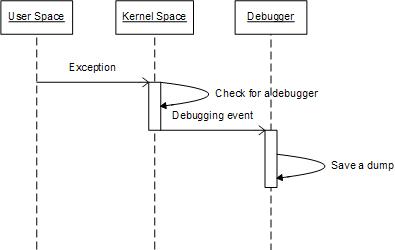
In one of my previous posts I wrote that in the case of a first-chance exception it is not possible to see it in a process crash dump because the entire exception processing was done in the kernel space (see the post How to distinguish between 1st and 2nd chances):

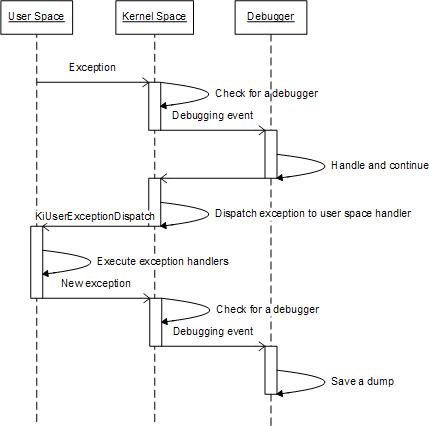
However the picture changes if we have Nested Exceptions pattern. In this case we should expect traces of inner exception processing like exception dispatcher code or exception handlers to be present on a raw stack dump:

Consider the following C++ code with two exception handlers:

 __try
 {
   __try
   {
     *(int *)NULL = 0;  // Exception 1
                        // Dump1 1st chance

   }
   __except (EXCEPTION_EXECUTE_HANDLER)
   {
     std::cout << “Inner” << std::endl;
     *(int *)NULL = 0;  // Exception 2
                        // Dump2 1st chance

   }
 }
 __except (EXCEPTION_EXECUTE_HANDLER)
 {
   std::cout << “Outer” << std::endl;
   *(int *)NULL = 0;    // Exception 3
                        // Dump3 1st chance
                        // Dump4 2nd chance

 }

If we run the actual program and we have set a default postmortem debugger we get a second-chance exception dump (Dump4). The program first outputs “Inner” and then “Outer” on a console and then crashes. When we look at the dump we see second-chance exception processing code where the exception record for NtRaiseException is the same and points to Exception 3 context (shown in red color): 

This dump file has an exception of interest stored in it.
The stored exception information can be accessed via .ecxr.
(11dc.f94): Access violation - code c0000005 (first/second chance not available)
*** ERROR: Module load completed but symbols could not be loaded for NestedException.exe
NestedException+0x1a72:
00000001`40001a72 c704250000000000000000 mov dword ptr [0],0 ds:00000000`00000000=????????

0:000> !teb
TEB at 000007fffffde000
    ExceptionList:        0000000000000000
    StackBase:            0000000000130000
    StackLimit:           000000000012d000
    SubSystemTib:         0000000000000000
    FiberData:            0000000000001e00
    ArbitraryUserPointer: 0000000000000000
    Self:                 000007fffffde000
    EnvironmentPointer:   0000000000000000
    ClientId:             00000000000011dc . 0000000000000f94
    RpcHandle:            0000000000000000
    Tls Storage:          000007fffffde058
    PEB Address:          000007fffffd5000
    LastErrorValue:       0
    LastStatusValue:      c000000d
    Count Owned Locks:    0
    HardErrorMode:        0

0:000> dqs 000000000012d000 0000000000130000
[...]
00000000`0012f918  00000000`00000006
00000000`0012f920  00000000`00000000
00000000`0012f928  00000000`775a208d ntdll!KiUserExceptionDispatch+0×53
00000000`0012f930  00000000`00000000
00000000`0012f938  00000000`0012f930 ; exception context
00000000`0012f940  01c8d5f0`00000000
00000000`0012f948  00000000`00000000
[…]

0:000> ub ntdll!KiUserExceptionDispatch+0x53
ntdll!KiUserExceptionDispatch+0x35:
00000000`775a206f xor     edx,edx
00000000`775a2071 call    ntdll!RtlRestoreContext (00000000`775a2255)
00000000`775a2076 jmp     ntdll!KiUserExceptionDispatch+0x53 (00000000`775a208d)
00000000`775a2078 mov     rcx,rsp
00000000`775a207b add     rcx,4D0h
00000000`775a2082 mov     rdx,rsp
00000000`775a2085 xor     r8b,r8b
00000000`775a2088 call    ntdll!NtRaiseException (00000000`775a1550)

0:000> .cxr 00000000`0012f930
rax=00000001400223d0 rbx=0000000000000000 rcx=0000000140022128
rdx=0000000000000001 rsi=0000000000000006 rdi=0000000140022120
rip=0000000140001a72 rsp=000000000012fed0 rbp=0000000000000000
 r8=000007fffffde000  r9=0000000000000001 r10=0000000000000000
r11=0000000000000246 r12=0000000000000000 r13=0000000000000002
r14=0000000000000000 r15=0000000000000000
iopl=0         nv up ei pl zr ac po nc
cs=0033  ss=002b  ds=002b  es=002b  fs=0053  gs=002b             efl=00010256
NestedException+0x1a72:
00000001`40001a72 c704250000000000000000 mov dword ptr [0],0 ds:00000000`00000000=????????

However if we have first-chance exception Dump3 from some exception monitoring program we see that NtRaiseException parameter points to ”Inner” Exception 2 context (a different and earlier address, shown in magenta color):

This dump file has an exception of interest stored in it.
The stored exception information can be accessed via .ecxr.
(11dc.f94): Access violation - code c0000005 (first/second chance not available)
*** ERROR: Module load completed but symbols could not be loaded for NestedException.exe
NestedException+0x1a72:
00000001`40001a72 c704250000000000000000 mov dword ptr [0],0 ds:00000000`00000000=????????

0:000> dqs 000000000012d000 0000000000130000
[...]
00000000`0012f918  00000000`00000006
00000000`0012f920  00000000`00000000
00000000`0012f928  00000000`775a2068 ntdll!KiUserExceptionDispatch+0×2e
00000000`0012f930  00000000`00000000
00000000`0012f938  00000000`0012f930 ; exception context
00000000`0012f940  01c8d5f0`00000000
[…]

0:000>  .cxr 00000000`0012f930
rax=00000001400223d0 rbx=0000000000000000 rcx=0000000140022128
rdx=0000000000000001 rsi=0000000000000006 rdi=0000000140022120
rip=00000001400019fa rsp=000000000012fed0 rbp=0000000000000000
 r8=000007fffffde000  r9=0000000000000001 r10=0000000000000000
r11=0000000000000246 r12=0000000000000000 r13=0000000000000002
r14=0000000000000000 r15=0000000000000000
iopl=0         nv up ei pl zr ac po nc
cs=0033  ss=002b  ds=002b  es=002b  fs=0053  gs=002b             efl=00010256
NestedException+0x19fa:
00000001`400019fa c704250000000000000000 mov dword ptr [0],0 ds:00000000`00000000=????????

Similar can be said about Dump2 where NtRaiseException parameter points to Exception 1 context. But Dump1 doesn’t have any traces of exception processing as expected.

All 4 dump files can be downloaded from FTP to play with:

ftp://dumpanalysis.org/pub/CDAPatternNestedExceptions.zip 

- Dmitry Vostokov @ DumpAnalysis.org -

Crash Dump Analysis Patterns (Part 66)

Friday, June 20th, 2008

Data Contents Locality is a comparative pattern that helps not only in identifying the class of the problem but increases our confidence and degree of belief in the specific hypothesis. Suppose we have a database of notes of previous problems. If we see the same or similar data accessed in the new memory dump we might suppose that the issue is similar. If Data Contents Locality is complemented by Code Path Locality (similar partial stack traces and code residues) it even  greater boosts our confidence in suggesting specific troubleshooting steps, recommending fixes and service packs or routing the problem to the next support or development service supply chain (like escalating the issue).

Suppose we got a new kernel memory dump with IRQL_NOT_LESS_OR_EQUAL  (A) bugcheck pointing to our module and we notice the write access to a structure in a nonpaged pool having specific pool tag:

3: kd> .trap 9ee8d9b0
ErrCode = 00000002
eax=85407650 ebx=858f6650 ecx=ffffffff edx=85407648 esi=858f65a8 edi=858f6620
eip=8083df4c esp=9ee8da24 ebp=9ee8da64 iopl=0 nv up ei pl zr na pe nc
cs=0008  ss=0010  ds=0023  es=0023  fs=0030  gs=0000 efl=00010246
nt!KeWaitForSingleObject+0x24f:
8083df4c 8919            mov     dword ptr [ecx],ebx  ds:0023:ffffffff=????????

STACK_TEXT: 
9ee8d9b0 8083df4c badb0d00 85407648 00000000 nt!KiTrap0E+0x2a7
9ee8da64 80853f3f 85407648 0000001d 00000000 nt!KeWaitForSingleObject+0×24f
9ee8da7c 8081d45f 865b18d8 854076b0 f4b9e53b nt!KiAcquireFastMutex+0×13
9ee8da88 f4b9e53b 00000004 86940110 85407638 nt!ExAcquireFastMutex+0×20
9ee8daa8 f4b9ed98 85407638 00000000 86940110 driver!Query+0×143
[…]

3: kd> !pool 85407648
Pool page 85407648 region is Nonpaged pool
 85407000 size:   80 previous size:    0  (Allocated)  Mdl
 85407080 size:   30 previous size:   80  (Allocated)  Even (Protected)
 854070b0 size:   28 previous size:   30  (Allocated)  Ntfn
 854070d8 size:   28 previous size:   28  (Allocated)  NtFs
 85407100 size:   28 previous size:   28  (Allocated)  Ntfn
[...]
 85407570 size:   28 previous size:   70  (Allocated)  Ntfn
 85407598 size:   98 previous size:   28  (Allocated)  File (Protected)
*85407630 size:   b0 previous size:   98  (Free ) *DrvA

Dumping the memory address passed to KeWaitForSingleObject shows simple but peculiar pattern:

3: kd> dd 85407648
85407648  ffffffff ffffffff ffffffff ffffffff
85407658  ffffffff ffffffff ffffffff ffffffff
85407668  ffffffff ffffffff ffffffff ffffffff
85407678  ffffffff ffffffff ffffffff ffffffff
85407688  ffffffff ffffffff ffffffff ffffffff
85407698  ffffffff ffffffff ffffffff ffffffff
854076a8  ffffffff ffffffff ffffffff ffffffff
854076b8  ffffffff ffffffff ffffffff ffffffff

We find several similar cases in our database but with different overall call stacks except the topmost wait call. Then we notice that in previous cases there were mutants associated with thread structure and we have the same now:

0: kd> !thread
THREAD 858f65a8 Cid 474c.4530 Teb: 7ffdf000 Win32Thread: bc012410 RUNNING on processor 0
[…]

3: kd> dt /r _KTHREAD 858f65a8 MutantListHead
nt!_KTHREAD
   +0×010 MutantListHead : _LIST_ENTRY [ 0×86773040 - 0×86773040 ]

3: kd> !pool 86773040
Pool page 86773040 region is Nonpaged pool
*86773000 size:   50 previous size:    0  (Allocated) *Muta (Protected)
  Pooltag Muta : Mutant objects
[…]

This narrows the issue to only a few previous cases. In one previous case WaitBlockList associated with a thread structure had 0xffffffff in its pointers. Our block shows the same pattern:

0: kd> dt -r _KTHREAD 858f65a8  WaitBlockList
nt!_KTHREAD
   +0×054 WaitBlockList : 0×858f6650 _KWAIT_BLOCK

0: kd> dt _KWAIT_BLOCK 0x858f6650
nt!_KWAIT_BLOCK
   +0x000 WaitListEntry    : _LIST_ENTRY [ 0x85407650 - 0xffffffff ]
   +0×008 Thread           : 0×858f65a8 _KTHREAD
   +0×00c Object           : 0×85407648
   +0×010 NextWaitBlock    : 0×858f6650 _KWAIT_BLOCK
   +0×014 WaitKey          : 0
   +0×016 WaitType         : 0×1 ”
   +0×017 SpareByte        : 0 ”

We have probably narrowed down the issue to a specific case. Although this doesn’t work always and mostly based on intuition there are spectacular cases where it really helps in troubleshooting. Here is another example where the contents of EDI register from exception context provided specific recommendation hints. When looking at the crash point we see an instance of Wild Code pattern:

0:000> kv
ChildEBP RetAddr  Args to Child             
WARNING: Frame IP not in any known module. Following frames may be wrong.
49ab5bba 00000000 00000000 00000000 00000000 0x60f1011a

0:000> r
eax=38084ff0 ebx=52303340 ecx=963f1416 edx=0000063d esi=baaff395 edi=678c5804
eip=60f1011a esp=5a9d0f48 ebp=49ab5bba iopl=0  nv up ei pl nz na pe nc
cs=001b  ss=0023  ds=0023  es=0023  fs=003b  gs=0000  efl=00210206
60f1011a cd01            int     1

0:000> u
60f1011a cd01            int     1
60f1011c cc              int     3
60f1011d 8d              ???
60f1011e c0eb02          shr     bl,2
60f10121 0f840f31cd01    je      62be3236
60f10127 8d              ???
60f10128 c0cc0f          ror     ah,0Fh
60f1012b 0bce            or      ecx,esi

Looking at raw stack data we notice the presence of a specific component that is known to patch the process import table. Applying techniques outlined in Hooked Functions pattern we notice two different 3rd-party components that patched two different modules (kernel32 and user32):

0:000> !chkimg -lo 50 -d !kernel32 -v
Searching for module with expression: !kernel32
Will apply relocation fixups to file used for comparison
Will ignore NOP/LOCK errors
Will ignore patched instructions
Image specific ignores will be applied
Comparison image path: c:\mss\kernel32.dll\4626487F102000\kernel32.dll
No range specified

Scanning section:    .text
Size: 564709
Range to scan: 77e41000-77ecade5
    77e41ae5-77e41ae9  5 bytes - kernel32!LoadLibraryExW
 [ 6a 34 68 48 7b:e9 16 e5 f4 07 ]
    77e44a8a-77e44a8e  5 bytes - kernel32!WaitNamedPipeW (+0×2fa5)
 [ 8b ff 55 8b ec:e9 71 b5 f9 07 ]
    77e5106a-77e5106e  5 bytes - kernel32!CreateProcessInternalW (+0xc5e0)
[…]
Total bytes compared: 564709(100%)
Number of errors: 49
49 errors : !kernel32 (77e41ae5-77e9aa16)

0:000> u 77e41ae5
kernel32!LoadLibraryExW:
77e41ae5 jmp     7fd90000
77e41aea out     77h,al
77e41aec call    kernel32!_SEH_prolog (77e6b779)
77e41af1 xor     edi,edi
77e41af3 mov     dword ptr [ebp-28h],edi
77e41af6 mov     dword ptr [ebp-2Ch],edi
77e41af9 mov     dword ptr [ebp-20h],edi
77e41afc cmp     dword ptr [ebp+8],edi

0:000> u 7fd90000
*** ERROR: Symbol file could not be found.  Defaulted to export symbols for ComponentA.dll -
7fd90000 jmp     ComponentA!DllUnregisterServer+0×2700 (678c4280)
7fd90005 push    34h
7fd90007 push    offset kernel32!`string’+0xc (77e67b48)
7fd9000c jmp     kernel32!LoadLibraryExW+0×7 (77e41aec)
7fd90011 add     byte ptr [eax],al
7fd90013 add     byte ptr [eax],al
7fd90015 add     byte ptr [eax],al
7fd90017 add     byte ptr [eax],al

0:000> !chkimg -lo 50 -d !user32 -v
Searching for module with expression: !user32
Will apply relocation fixups to file used for comparison
Will ignore NOP/LOCK errors
Will ignore patched instructions
Image specific ignores will be applied
Comparison image path: c:\mss\user32.dll\45E7BFD692000\user32.dll
No range specified

Scanning section:    .text
Size: 396943
Range to scan: 77381000-773e1e8f
    77383f38-77383f3c  5 bytes - user32!EnumDisplayDevicesW
 [ 8b ff 55 8b ec:e9 c3 c0 82 08 ]
    77384406-7738440a  5 bytes - user32!EnumDisplaySettingsExW (+0×4ce)
 [ 8b ff 55 8b ec:e9 f5 bb 7e 08 ]
    773844d9-773844dd  5 bytes - user32!EnumDisplaySettingsW (+0xd3)
 [ 8b ff 55 8b ec:e9 22 bb 80 08 ]
    7738619b-7738619f  5 bytes - user32!EnumDisplayDevicesA (+0×1cc2)
 [ 8b ff 55 8b ec:e9 60 9e 83 08 ]
    7738e985-7738e989  5 bytes - user32!CreateWindowExA (+0×87ea)
 [ 8b ff 55 8b ec:e9 76 16 8c 08 ]
[…]
Total bytes compared: 396943(100%)
Number of errors: 119
119 errors : !user32 (77383f38-773c960c)

0:000> u 77383f38
user32!EnumDisplayDevicesW:
77383f38 e9c3c08208      jmp     7fbb0000
77383f3d 81ec58030000    sub     esp,358h
77383f43 a1ac243e77      mov     eax,dword ptr [user32!__security_cookie (773e24ac)]
77383f48 8b5508          mov     edx,dword ptr [ebp+8]
77383f4b 83a5acfcffff00  and     dword ptr [ebp-354h],0
77383f52 53              push    ebx
77383f53 56              push    esi
77383f54 8b7510          mov     esi,dword ptr [ebp+10h]

0:000> u 7fbb0000
*** ERROR: Symbol file could not be found.  Defaulted to export symbols for ComponentB.dll -
7fbb0000 e91b43d5e5      jmp     ComponentB+0×4320 (65904320)
7fbb0005 8bff            mov     edi,edi
7fbb0007 55              push    ebp
7fbb0008 8bec            mov     ebp,esp
7fbb000a e92e3f7df7      jmp     user32!EnumDisplayDevicesW+0×5 (77383f3d)
7fbb000f 0000            add     byte ptr [eax],al
7fbb0011 0000            add     byte ptr [eax],al
7fbb0013 0000            add     byte ptr [eax],al

Which one should we try to eliminate first to test our assumption that they somehow resulted in application faults? Looking at register context again we see that one specific register (EDI) has a value that lies in ComponentA address range:

0:000> r
eax=38084ff0 ebx=52303340 ecx=963f1416 edx=0000063d esi=baaff395 edi=678c5804
eip=60f1011a esp=5a9d0f48 ebp=49ab5bba iopl=0  nv up ei pl nz na pe nc
cs=001b  ss=0023  ds=0023  es=0023  fs=003b  gs=0000 efl=00210206
60f1011a cd01            int     1

0:000> lm
start    end        module name
00400000 01901000   Application
[...]
678c0000 6791d000   ComponentA   ComponentA.DLL
[…]

- Dmitry Vostokov @ DumpAnalysis.org -