Archive for the ‘Crash Dump Patterns’ Category

Bugtation No.51

Wednesday, October 15th, 2008

The following bugtation is quite wise and dedicated to beginners learning WinDbg (see Common Mistakes and Coincidental Symbolic Information for some examples).

“You rule the” debugger, “not the” debugger “you”.

John Dryden, The Hind and the Panther

- Dmitry Vostokov @ DumpAnalysis.org -

Crash Dump Analysis Patterns (Part 1b)

Wednesday, October 15th, 2008

Almost 2 years have passed since I wrote the first post about crash dump analysis patterns: Multiple Exceptions. Today I write about multiple exceptions or faults in kernel mode. Here I distinguish multiple exceptions from nested exceptions. The latter ones in kernel result in double faults, see for example, Stack Overflow pattern. At the first glance it looked like the dump was saved manually:

0: kd> !analyze -v
[...]
MANUALLY_INITIATED_CRASH (e2)
The user manually initiated this crash dump.
Arguments:
Arg1: 00000000
Arg2: 00000000
Arg3: 00000000
Arg4: 00000000
[...]

However further down in analysis report there was the presence of page fault:

TRAP_FRAME:  a38df520 -- (.trap 0xffffffffa38df520)
ErrCode = 00000002
eax=b6d9220f ebx=b6ab4ffb ecx=00000304 edx=eaf2fdea esi=b6d9214c edi=b6ab8189
eip=bfa10e6e esp=a38df594 ebp=a38df5ac iopl=0  nv up ei ng nz ac po cy
cs=0008  ss=0010  ds=0023  es=0023  fs=0030  gs=0000  efl=00010293
driver+0x2ae6e:
bfa10e6e 895304   mov     dword ptr [ebx+4],edx ds:0023:b6ab4fff=????????
Resetting default scope

STACK_TEXT: 
a38df410 b48aa532 000000e2 00000000 00000000 nt!KeBugCheckEx+0x1b
a38df440 b48a9d2c 000eba28 9282c8c6 00000000 i8042prt!I8xProcessCrashDump+0x256
a38df488 80839595 89d0c008 8a0eb970 0001000a i8042prt!I8042KeyboardInterruptService+0x225
a38df488 80836bfa 89d0c008 8a0eb970 0001000a nt!KiInterruptDispatch+0x49
a38df520 bfa10e6e badb0d00 eaf2fdea 8867cbe8 nt!KiTrap0E+0xbc
WARNING: Stack unwind information not available. Following frames may be wrong.
a38df5ac bfa22461 b6ab423b 000003dc 00000007 driver+0×2ae6e
[…]

Looking at b6ab4fff address shows that it crosses page boundary, see Data Alignment pattern.

We also see that this thread was running and consumed too much kernel time, see Spiking Thread pattern:

0: kd> !thread
THREAD 88e686d8  Cid 1e48.1f7c  Teb: 7ffdf000 Win32Thread: b669de70 RUNNING on processor 0
Not impersonating
DeviceMap                 dc971120
Owning Process            889e0d88       Image:         ProcessA.EXE
Wait Start TickCount      9231345        Ticks: 0
Context Switch Count      2196221                 LargeStack
UserTime                  00:00:35.562
KernelTime                04:51:23.656
[…]

Intrigued, we see another running thread on the second processor:

0: kd> !running
     Prcb      Current   Next   
  0  ffdff120  88e686d8            ................
  1  f7727120  88bd33f8            …………….

0: kd> !thread 88bd33f8
THREAD 88bd33f8  Cid 2fdc.27f0  Teb: 7ffdf000 Win32Thread: b6640ab8 RUNNING on processor 1
Not impersonating
DeviceMap                 d7a13b40
Owning Process            89e45200       Image:         ProcessA.EXE
Wait Start TickCount      9231345        Ticks: 0
Context Switch Count      2324364                 LargeStack
UserTime                  00:00:21.171
KernelTime                05:02:09.500
Win32 Start Address ProcessA (0×30001e28)
Start Address kernel32!BaseProcessStartThunk (0×77e617f8)
Stack Init ac5e7bd0 Current ac5e7078 Base ac5e8000 Limit ac5e1000 Call ac5e7bd8
Priority 6 BasePriority 6 PriorityDecrement 0
ChildEBP RetAddr  Args to Child             
ac5e7150 bfa10e6e badb0d00 dbeaffdb 89a793d8 nt!KiTrap0E+0xbc (FPO: [0,0] TrapFrame @ ac5e7150)
WARNING: Stack unwind information not available. Following frames may be wrong.
ac5e71dc bfa22461 b701f15f ffffff24 00000007 driver+0×2ae6e
[…]

We see it is spiking CPU too and we detect a possible loop in page fault handler:

0: kd> .thread 88bd33f8
Implicit thread is now 88bd33f8

0: kd> ~1s

1: kd> r
eax=fffff81c ebx=ac5e71dc ecx=88bd33f8 edx=dbeaffdb esi=b6f81168 edi=b701fffe
eip=80836bfa esp=ac5e7150 ebp=ac5e7150 iopl=0 nv up ei pl nz na pe nc
cs=0008  ss=0010  ds=0023  es=0023  fs=0030  gs=0000  efl=00000206
nt!KiTrap0E+0xbc:
80836bfa 0f84e5010000  je  nt!KiTrap0E+0×2a7 (80836de5) [br=0]

When looking at raw stack we see that the loop happened after processing this exception:

1: kd> .trap ac5e7150
ErrCode = 00000002
eax=b6f8122b ebx=b701fffa ecx=fffffe4c edx=dbeaffdb esi=b6f81168 edi=b70201a0
eip=bfa10e6e esp=ac5e71c4 ebp=ac5e71dc iopl=0 nv up ei ng nz ac po cy
cs=0008 ss=0010 ds=0023 es=0023 fs=0030 gs=0000 efl=00010293
driver+0×2ae6e:
bfa10e6e 895304 mov dword ptr [ebx+4],edx ds:0023:b701fffe=????????

The address crosses page boundary too:

1: kd> !pte b701fffe
               VA b701fffe
PDE at   C0300B70        PTE at C02DC07C
contains 642CF863      contains 2F336863
pfn 642cf ---DA--KWEV    pfn 2f336 ---DA--KWEV

1: kd> !pte b701fffe+3
               VA b7020001
PDE at   C0300B70        PTE at C02DC080
contains 642CF863      contains 00000080
pfn 642cf ---DA--KWEV                           not valid
                       DemandZero
                       Protect: 4 - ReadWrite

 
This is because trap processing code is found below the current ESP value and also 3rd-party virtual block drivers which I guess were trying to satisfy page fault (the latter not shown in the raw stack fragment here):

1: kd> dds esp-1000 esp
[...]
ac5e6f78  00000002
ac5e6f7c  899c05b0
ac5e6f80  88bd33f8
ac5e6f84  00000010
ac5e6f88  ac5e702c
ac5e6f8c  808457ff nt!KeContextFromKframes+0x9b
ac5e6f90  00000023
ac5e6f94  f7727120
ac5e6f98  00000000
ac5e6f9c  808458fd nt!KeContextFromKframes+0x2bc
ac5e6fa0  ac5e70dc
ac5e6fa4  1f840a42
ac5e6fa8  00000000
ac5e6fac  f7727000
ac5e6fb0  00000000
ac5e6fb4  f7727a7c
ac5e6fb8  ac5e6fd4
ac5e6fbc  808398d4 nt!KiDispatchInterrupt+0xd8
ac5e6fc0  00000000
ac5e6fc4  80a801ae hal!HalpDispatchSoftwareInterrupt+0x5e
ac5e6fc8  ac5e700c
ac5e6fcc  ac5e7001
ac5e6fd0  00000002
ac5e6fd4  ac5e6ff0
ac5e6fd8  80a80397 hal!HalpCheckForSoftwareInterrupt+0x3f
ac5e6fdc  00000002
ac5e6fe0  ac5e700c
ac5e6fe4  ac5e700c
ac5e6fe8  ac5e70b0
ac5e6fec  00000001
ac5e6ff0  f772f120
ac5e6ff4  88bd33f8
ac5e6ff8  00000002
ac5e6ffc  ac5e700c
ac5e7000  8a0a88a0
ac5e7004  88bd33f8
ac5e7008  f7727002
ac5e700c  80a8057e hal!HalEndSystemInterrupt+0x6e
ac5e7010  88bd33f8
ac5e7014  f7727002
ac5e7018  00000002
ac5e701c  ac5e702c
ac5e7020  80a80456 hal!KfLowerIrql+0x62
ac5e7024  f7727000
ac5e7028  0000bb40
ac5e702c  ac5e70ac
ac5e7030  808093eb nt!KiSaveProcessorState+0x20
ac5e7034  ac5e70dc
ac5e7038  00000000
ac5e703c  808093f0 nt!KiSaveProcessorState+0x25
ac5e7040  f772713c
ac5e7044  8087dcbd nt!KiFreezeTargetExecution+0x6a
ac5e7048  ac5e70dc
ac5e704c  00000000
ac5e7050  f7727120
ac5e7054  00000000
ac5e7058  80a7e501 hal!KeAcquireQueuedSpinLockRaiseToSynch+0x21
ac5e705c  88bd3401
ac5e7060  ac5e7070
ac5e7064  80a80456 hal!KfLowerIrql+0x62
ac5e7068  80a7e530 hal!KeReleaseInStackQueuedSpinLock
ac5e706c  88bd3401
ac5e7070  ac5e70b0
ac5e7074  80a7e56d hal!KeReleaseQueuedSpinLock+0x2d
ac5e7078  80823822 nt!KiDeliverApc+0x1cc
ac5e707c  00000000
ac5e7080  ac806e00
ac5e7084  00000200
ac5e7088  00000000
ac5e708c  88bd343c
ac5e7090  00000001
ac5e7094  ac5e7934
ac5e7098  89e45200
ac5e709c  809282c8 nt!CmpPostApc
ac5e70a0  00000000
ac5e70a4  0000010c
ac5e70a8  1d01f008
ac5e70ac  ac5e70dc
ac5e70b0  80837c86 nt!KiIpiServiceRoutine+0x8b
ac5e70b4  ac5e70dc
ac5e70b8  00000000
ac5e70bc  80836bfa nt!KiTrap0E+0xbc
ac5e70c0  b6f81168
ac5e70c4  ac5e7150
ac5e70c8  80a7d8fc hal!HalpIpiHandler+0xcc
ac5e70cc  ac5e70dc
ac5e70d0  00000000
ac5e70d4  80a80300 hal!HalpLowerIrqlHardwareInterrupts+0x10c
ac5e70d8  000000e1
ac5e70dc  ac5e7150
ac5e70e0  80836bfa nt!KiTrap0E+0xbc
ac5e70e4  badb0d00
ac5e70e8  dbeaffdb
ac5e70ec  ac5e70fc
ac5e70f0  80a80456 hal!KfLowerIrql+0x62
ac5e70f4  2f336801
ac5e70f8  ac806e00
ac5e70fc  ac5e7138
ac5e7100  8081a2bf nt!MmAccessFault+0x558
ac5e7104  b701fffe
ac5e7108  00000000
ac5e710c  00000000
ac5e7110  00000023
ac5e7114  00000023
ac5e7118  dbeaffdb
ac5e711c  88bd33f8
ac5e7120  fffff81c
ac5e7124  00000000
ac5e7128  ac5e72b0
ac5e712c  00000030
ac5e7130  b701fffe
ac5e7134  b6f81168
ac5e7138  ac5e71dc
ac5e713c  ac5e7150
ac5e7140  00000000
ac5e7144  80836bfa nt!KiTrap0E+0xbc
ac5e7148  00000008
ac5e714c  00000206
ac5e7150  ac5e71dc

What we may guess here is the fact that two page faults happened simultaneously or nearly at the same time and one of them possibly during the attempt to satisfy it and this resulted in two processors looping. The whole system was hang and the usual keyboard method via Scroll Lock was used to generate the manual dump.

- Dmitry Vostokov @ DumpAnalysis.org -
Early crash dump, blocked thread, not my version and lost opportunity: pattern cooperation

Thursday, October 9th, 2008

It was reported that one important Windows service stops responding from time to time. The customer was proactive in gathering memory dumps and we got several early crash dumps. Most of them were false positive showing normal error handling via throwing an exception:

0:042> kL
ChildEBP RetAddr 
0f7bec6c 77c31e37 kernel32!RaiseException+0×53
0f7bec84 77c32042 rpcrt4!RpcpRaiseException+0×24
0f7bec94 77cb30e4 rpcrt4!NdrGetBuffer+0×46
0f7bf080 09a554a6 rpcrt4!NdrClientCall2+0×197
[…]

However one such dump also had a clearly blocked thread which was blocking 10 different threads:

0:042> !locks

CritSec MyService!MainCriticalSection+0 at 0041b9a0
WaiterWoken        No
LockCount          0
RecursionCount     1
OwningThread       ad0
EntryCount         0
ContentionCount    0
*** Locked

CritSec +339fb8 at 00339fb8
WaiterWoken        No
LockCount          10
RecursionCount     1
OwningThread       ad0
EntryCount         0
ContentionCount    31
*** Locked

0:042> ~~[ad0]kL
ChildEBP RetAddr 
008dc1e0 7c94734b ntdll!KiFastSystemCallRet
008dc1e4 77d96c61 ntdll!NtOpenKey+0xc
008dc244 77d8e15f advapi32!LocalBaseRegOpenKey+0xd0
008dc278 6064fe47 advapi32!RegOpenKeyExA+0×11c
WARNING: Stack unwind information not available. Following frames may be wrong.
008dc8b8 6064fa00 NotMyDLL!getvar+0×4e7
[…]

Checking NotMyDLL module time stamp we identified Not My Version pattern because we expected much later version:

0:042> lmt m NotMyDLL
start    end        module name
60600000 60686000   NotMyDLL  Mon Oct 30 10:14:07 1999

We know this component often had problems in the past and although being stuck in registry access could be a coincidence, registry corruption or system-wide problem we immediately advised to upgrade the component to the latest stable version. We also got a manual dump of the service when the customer tried to restart it and it showed the signs of Lost Opportunity pattern:

0:000> kv
ChildEBP RetAddr Args to Child
1744fd44 7c947d0b 7c821d1e 00001b58 00000000 ntdll!KiFastSystemCallRet
1744fd48 7c821d1e 00001b58 00000000 00000000 ntdll!NtWaitForSingleObject+0xc
1744fdb8 7c821c8d 00001b58 ffffffff 00000000 kernel32!WaitForSingleObjectEx+0xac
1744fdcc 67e223dd 00001b58 ffffffff 1744fdf4 kernel32!WaitForSingleObject+0x12
1744fde0 7c93a352 67e20000 00000000 00000001 MyDLL!DllInitialize+0xed
1744fe00 7c950e70 67e222f0 67e20000 00000000 ntdll!LdrpCallInitRoutine+0x14
1744feb8 7c8268a3 00000000 00000000 00000000 ntdll!LdrShutdownProcess+0x182
1744ffa4 7c826905 c0000005 77e8f3b0 ffffffff kernel32!_ExitProcess+0x43
1744ffb8 7c8392c1 c0000005 00000000 00000000 kernel32!ExitProcess+0×14
1744ffec 00000000 77c4b0f5 0b644720 00000000 kernel32!BaseThreadStart+0×5f

0:000> !teb
TEB at 7ff4b000
    ExceptionList:        1744fda8
    StackBase:            17450000
    StackLimit:           17449000
    SubSystemTib:         00000000
    FiberData:            00001e00
    ArbitraryUserPointer: 00000000
    Self:                 7ff4b000
    EnvironmentPointer:   00000000
    ClientId:             00001e90 . 00001168
    RpcHandle:            00000000
    Tls Storage:          00000000
    PEB Address:          7ffdd000
    LastErrorValue:       0
    LastStatusValue:      103
    Count Owned Locks:    0
    HardErrorMode:        0

0:000> dds 17449000 17450000
[...]
1744f4b0  7c94775b ntdll!NtRaiseHardError+0xc
1744f4b4  7c842610 kernel32!UnhandledExceptionFilter+0×51a
1744f4b8  d0000144
1744f4bc  00000000
[…]

0:000> !error d0000144
Error code: (NTSTATUS) 0xd0000144 (3489661252) - {Application Error} The exception %s (0x%08lx) occurred in the application at location 0x%08lx.

Therefore we additionally advised to dump the process manually using userdump.exe when an error message box appears on the console session. We hope that getting right dump files at the right time via the right method would prove or disprove our hypothesis about NotMyDLL component.

- Dmitry Vostokov @ DumpAnalysis.org -

Crash Dump Analysis Patterns (Part 76)

Monday, October 6th, 2008

Most of the time Data Alignment manifests itself on Intel platforms from performance perspective and GP faults for some instructions that require natural boundary for their qword operands. There are no exceptions generally if we move a dword value from or to an odd memory location address when the whole operand fits into one page. However we need to take the possibility of page boundary spans into account when checking memory addresses for their validity. Consider this exception:

0: kd> .trap 0xffffffffa38df520
ErrCode = 00000002
eax=b6d9220f ebx=b6ab4ffb ecx=00000304 edx=eaf2fdea esi=b6d9214c edi=b6ab8189
eip=bfa10e6e esp=a38df594 ebp=a38df5ac iopl=0 nv up ei ng nz ac po cy
cs=0008  ss=0010  ds=0023  es=0023  fs=0030  gs=0000  efl=00010293
driver+0x2ae6e:
bfa10e6e 895304  mov    dword ptr [ebx+4],edx ds:0023:b6ab4fff=????????

The address seems to be valid:

0: kd> !pte b6ab4fff
               VA b6ab4fff
PDE at   C0300B68        PTE at C02DAAD0
contains 7F0DD863      contains 426B0863
pfn 7f0dd —DA–KWEV    pfn 426b0 —DA–KWEV

But careful examination of the instruction reveals that it writes 32 bit value so we need to inspect the next byte too because it is on another page:

0: kd> !pte b6ab4fff+1
               VA b6ab5000
PDE at   C0300B68        PTE at C02DAAD4
contains 7F0DD863      contains 00000080
pfn 7f0dd —DA–KWEV                           not valid
                       DemandZero
                       Protect: 4 - ReadWrite

Although the page is demand zero and this should have been satisfied by creating a new page filled with zeroes, my point here that the page could have been completely invalid or paged out in the case of IRQL >= 2. 

- Dmitry Vostokov @ DumpAnalysis.org -

Memory Dump Analysis Anthology, Volume 2

Friday, October 3rd, 2008

“Everything is memory dump.”

I’m very excited to announce that Volume 2 is available in paperback, hardcover and digital editions:

Memory Dump Analysis Anthology, Volume 2

In one or two weeks paperback edition should also appear on Amazon and other bookstores. Amazon hardcover edition is planned to be available by the end of October.

I’m often asked when Volume 3 is available and I currently plan to release it in October - November, 2009. In the mean time I’m planning to concentrate on other publishing projects. 

- Dmitry Vostokov @ DumpAnalysis.org -

MDAA Volume 2: Table of Contents

Wednesday, October 1st, 2008

The book is nearly finished and here is the final TOC:

Memory Dump Analysis Anthology, Volume 2: Table of Contents

- Dmitry Vostokov @ DumpAnalysis.org -

Translated CDA Patterns (Korean)

Friday, September 19th, 2008

CDA Patterns translated by Heejune Kim also appear on the new MSDN blog called !analyze -v (Korean version).

- Dmitry Vostokov @ DumpAnalysis.org -

Hooked Modules (Crash Dump Analysis Patterns, Part 38c)

Friday, September 19th, 2008

Previously I introduced Hooked Functions pattern where I used !chkimg WinDbg command and today after accidentally discovering yet another patched DLL module in one process I created this simple command to check all modules:

!for_each_module !chkimg -lo 50 -d !${@#ModuleName} -v

0:000:x86> !for_each_module !chkimg -lo 50 -d !${@#ModuleName} -v
[...]
Scanning section:    .text
Size: 74627
Range to scan: 71c01000-71c13383
71c02430-71c02434  5 bytes - WS2_32!WSASend
[ 8b ff 55 8b ec:e9 cb db 1c 0d ]
71c0279b-71c0279f  5 bytes - WS2_32!select (+0x36b)
[ 6a 14 68 58 28:e9 60 d8 15 0d ]
71c0290e-71c02912  5 bytes - WS2_32!WSASendTo (+0x173)
[ 8b ff 55 8b ec:e9 ed d6 1b 0d ]
71c02cb2-71c02cb6  5 bytes - WS2_32!closesocket (+0x3a4)
[ 8b ff 55 8b ec:e9 49 d3 19 0d ]
71c02e12-71c02e16  5 bytes - WS2_32!WSAIoctl (+0x160)
[ 8b ff 55 8b ec:e9 e9 d1 1e 0d ]
71c02ec2-71c02ec6  5 bytes - WS2_32!send (+0xb0)
[ 8b ff 55 8b ec:e9 39 d1 14 0d ]
71c02f7f-71c02f83  5 bytes - WS2_32!recv (+0xbd)
[ 8b ff 55 8b ec:e9 7c d0 17 0d ]
71c03c04-71c03c08  5 bytes - WS2_32!WSAGetOverlappedResult (+0xc85)
[ 8b ff 55 8b ec:e9 f7 c3 1f 0d ]
71c03c75-71c03c79  5 bytes - WS2_32!recvfrom (+0x71)
[ 8b ff 55 8b ec:e9 86 c3 16 0d ]
71c03d14-71c03d18  5 bytes - WS2_32!sendto (+0x9f)
[ 8b ff 55 8b ec:e9 e7 c2 13 0d ]
71c03da8-71c03dac  5 bytes - WS2_32!WSACleanup (+0x94)
[ 8b ff 55 8b ec:e9 53 c2 25 0d ]
71c03f38-71c03f3c  5 bytes - WS2_32!WSASocketW (+0x190)
[ 6a 20 68 08 40:e9 c3 c0 11 0d ]
71c0446a-71c0446e  5 bytes - WS2_32!connect (+0x532)
[ 8b ff 55 8b ec:e9 91 bb 18 0d ]
71c04f3b-71c04f3f  5 bytes - WS2_32!WSAStartup (+0xad1)
[ 6a 14 68 60 50:e9 c0 b0 29 0d ]
71c06162-71c06166  5 bytes - WS2_32!shutdown (+0x1227)
[ 8b ff 55 8b ec:e9 99 9e 12 0d ]
71c069e9-71c069ed  5 bytes - WS2_32!WSALookupServiceBeginW (+0x887)
[ 8b ff 55 8b ec:e9 12 96 0f 0d ]
71c06c91-71c06c95  5 bytes - WS2_32!WSALookupServiceNextW (+0x2a8)
[ 8b ff 55 8b ec:e9 6a 93 10 0d ]
71c06ecd-71c06ed1  5 bytes - WS2_32!WSALookupServiceEnd (+0x23c)
[ 8b ff 55 8b ec:e9 2e 91 0e 0d ]
71c090be-71c090c2  5 bytes - WS2_32!WSAEventSelect (+0x21f1)
[ 8b ff 55 8b ec:e9 3d 6f 20 0d ]
71c09129-71c0912d  5 bytes - WS2_32!WSACreateEvent (+0x6b)
[ 33 c0 50 50 6a:e9 d2 6e 22 0d ]
71c0938e-71c09392  5 bytes - WS2_32!WSACloseEvent (+0x265)
[ 6a 0c 68 c8 93:e9 6d 6c 24 0d ]
71c093d9-71c093dd  5 bytes - WS2_32!WSAWaitForMultipleEvents (+0x4b)
[ 8b ff 55 8b ec:e9 22 6c 1a 0d ]
71c093ea-71c093ee  5 bytes - WS2_32!WSAEnumNetworkEvents (+0x11)
[ 8b ff 55 8b ec:e9 11 6c 21 0d ]
71c09480-71c09484  5 bytes - WS2_32!WSARecv (+0x96)
[ 8b ff 55 8b ec:e9 7b 6b 1d 0d ]
71c0eecb-71c0eecf  5 bytes - WS2_32!WSACancelAsyncRequest (+0x5a4b)
[ 8b ff 55 8b ec:e9 30 11 26 0d ]
71c10d39-71c10d3d  5 bytes - WS2_32!WSAAsyncSelect (+0x1e6e)
[ 8b ff 55 8b ec:e9 c2 f2 26 0d ]
71c10ee3-71c10ee7  5 bytes - WS2_32!WSAConnect (+0x1aa)
[ 8b ff 55 8b ec:e9 18 f1 22 0d ]
71c10f9f-71c10fa3  5 bytes - WS2_32!WSAAccept (+0xbc)
[ 8b ff 55 8b ec:e9 5c f0 27 0d ]
Total bytes compared: 74627(100%)
Number of errors: 140
140 errors : !WS2_32 (71c02430-71c10fa3)
[...]

CMDTREE.TXT was also updated with this command.

- Dmitry Vostokov @ DumpAnalysis.org -

Bugtation No.28

Thursday, September 18th, 2008

“Some” processes “are very busy, and yet do nothing.”

Thomas Fuller, Gnomologia: Adagies and Proverbs

- Dmitry Vostokov @ DumpAnalysis.org -

First-order and second-order memory leaks

Thursday, September 11th, 2008

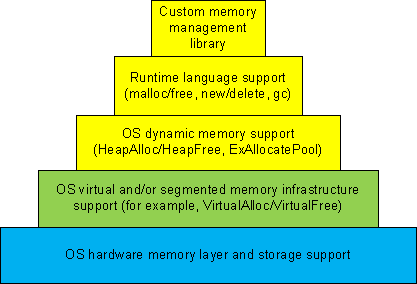
Dynamic memory allocation architecture usually consists of different layers where the lower layers provide support for the upper ones and some general layers can be combined or omitted like in TCP/IP implementation of OSI reference model:

  • 1a. Custom memory management library.

  • 1b. Runtime language support (malloc/free, new/delete, gc).

  • 1c. OS dynamic memory support (HeapAlloc/HeapFree, ExAllocatePool/ExFreePool).

  • 2. OS virtual and/or segmented memory infrastructure support (VirtualAlloc/VirtualFree).

  • 3. OS hardware memory layer and storage support.

We can call it DMI (Dynamic Memory Infrastructure) and this can be summarized on the following diagram:

First-order memory leaks happen when an application uses layers 1a, 1b or 1c and doesn’t free allocated memory. Typical pattern examples include:

What we cover here are second-order leaks in layers 2 an 3. These include cases when an application frees memory but the underlying supporting layer doesn’t due to its design or factors like fragmentation. Consider an example of a Windows service that undergone committed memory increase from 600Mb to almost 1.2Gb during peak hours and then remained at that size even when no activity happened afterwards. We can examine virtual memory statistics using !address WinDbg command from 3 sampled memory dumps:

Before peak hours:

-------------------- Usage SUMMARY --------------------------
    TotSize (      KB)   Pct(Tots) Pct(Busy)   Usage
    734d000 (  118068) : 05.63%    07.50%    : RegionUsageIsVAD
   1ff11000 (  523332) : 24.96%    00.00%    : RegionUsageFree
    4352000 (   68936) : 03.29%    04.38%    : RegionUsageImage
    5a00000 (   92160) : 04.39%    05.86%    : RegionUsageStack
      5a000 (     360) : 00.02%    00.02%    : RegionUsageTeb
   4efe3000 ( 1294220) : 61.72%    82.24%    : RegionUsageHeap
          0 (       0) : 00.00%    00.00%    : RegionUsagePageHeap
       1000 (       4) : 00.00%    00.00%    : RegionUsagePeb
       1000 (       4) : 00.00%    00.00%    : RegionUsageProcessParametrs
       1000 (       4) : 00.00%    00.00%    : RegionUsageEnvironmentBlock
       Tot: 7fff0000 (2097088 KB) Busy: 600df000 (1573756 KB)

-------------------- Type SUMMARY --------------------------
    TotSize (      KB)   Pct(Tots)  Usage
   1ff11000 (  523332) : 24.96%   : <free>
    4352000 (   68936) : 03.29%   : MEM_IMAGE
     b78000 (   11744) : 00.56%   : MEM_MAPPED
   5b215000 ( 1493076) : 71.20%   : MEM_PRIVATE

-------------------- State SUMMARY --------------------------
    TotSize (      KB)   Pct(Tots)  Usage
   25e50000 (  620864) : 29.61%   : MEM_COMMIT
   1ff11000 (  523332) : 24.96%   : MEM_FREE
   3a28f000 (  952892) : 45.44%   : MEM_RESERVE

During peak hours:

-------------------- Usage SUMMARY --------------------------
  TotSize ( KB) Pct(Tots) Pct(Busy) Usage
  734d000 ( 118068) : 05.63% 07.49% : RegionUsageIsVAD
  1fd0f000 ( 521276) : 24.86% 00.00% : RegionUsageFree
  4352000 ( 68936) : 03.29% 04.37% : RegionUsageImage
  5c00000 ( 94208) : 04.49% 05.98% : RegionUsageStack
  5c000 ( 368) : 00.02% 00.02% : RegionUsageTeb
4efe3000 ( 1294220) : 61.72% 82.13% : RegionUsageHeap
  0 ( 0) : 00.00% 00.00% : RegionUsagePageHeap
  1000 ( 4) : 00.00% 00.00% : RegionUsagePeb
  1000 ( 4) : 00.00% 00.00% : RegionUsageProcessParametrs
  1000 ( 4) : 00.00% 00.00% : RegionUsageEnvironmentBlock
  Tot: 7fff0000 (2097088 KB) Busy: 602e1000 (1575812 KB)

-------------------- Type SUMMARY --------------------------
  TotSize ( KB) Pct(Tots) Usage
  1fd0f000 ( 521276) : 24.86% :
  4352000 ( 68936) : 03.29% : MEM_IMAGE
  b78000 ( 11744) : 00.56% : MEM_MAPPED
  5b417000 ( 1495132) : 71.30% : MEM_PRIVATE

-------------------- State SUMMARY --------------------------
  TotSize ( KB) Pct(Tots) Usage
41498000 ( 1069664) : 51.01% : MEM_COMMIT
  1fd0f000 ( 521276) : 24.86% : MEM_FREE
  1ee49000 ( 506148) : 24.14% : MEM_RESERVE

After peak hours:

-------------------- Usage SUMMARY --------------------------
    TotSize (      KB)   Pct(Tots) Pct(Busy)   Usage
    734d000 (  118068) : 05.63%    07.49%    : RegionUsageIsVAD
   1fd0f000 (  521276) : 24.86%    00.00%    : RegionUsageFree
    4352000 (   68936) : 03.29%    04.37%    : RegionUsageImage
    5c00000 (   94208) : 04.49%    05.98%    : RegionUsageStack
      5c000 (     368) : 00.02%    00.02%    : RegionUsageTeb
   4efe3000 ( 1294220) : 61.72%    82.13%    : RegionUsageHeap
          0 (       0) : 00.00%    00.00%    : RegionUsagePageHeap
       1000 (       4) : 00.00%    00.00%    : RegionUsagePeb
       1000 (       4) : 00.00%    00.00%    : RegionUsageProcessParametrs
       1000 (       4) : 00.00%    00.00%    : RegionUsageEnvironmentBlock
       Tot: 7fff0000 (2097088 KB) Busy: 602e1000 (1575812 KB)

-------------------- Type SUMMARY --------------------------
    TotSize (      KB)   Pct(Tots)  Usage
   1fd0f000 (  521276) : 24.86%   : <free>
    4352000 (   68936) : 03.29%   : MEM_IMAGE
     b78000 (   11744) : 00.56%   : MEM_MAPPED
   5b417000 ( 1495132) : 71.30%   : MEM_PRIVATE

-------------------- State SUMMARY --------------------------
    TotSize (      KB)   Pct(Tots)  Usage
   4505d000 ( 1130868) : 53.93%   : MEM_COMMIT
   1fd0f000 (  521276) : 24.86%   : MEM_FREE
   1b284000 (  444944) : 21.22%   : MEM_RESERVE

We see that in every memory dump the amount of process heap is the same 1.2Gb but during peak hours the amount of committed memory increased by 20% and remained the same even after. At the same time if we look at process heap statistics we would see the increase of free heap KB and blocks and this means that allocated memory was freed after peak hours but underlying virtual memory ranges were not decommitted and fragmentation increased by 25%.

Before peak hours:

0:000> !heap -s
LFH Key : 0x07262959
  Heap     Flags   Reserv  Commit  Virt   Free  List   UCR  Virt  Lock  Fast
                    (k)     (k)    (k)     (k) length      blocks cont. heap
[...]
00310000 00001002 1255320 512712 1177236 260583 45362 41898 2 3751a5 L
  External fragmentation 50 % (45362 free blocks)
  Virtual address fragmentation 56 % (41898 uncommited ranges)
  Lock contention 3625381
[…]

During peak hours:

0:000> !heap -s
LFH Key : 0x07262959
  Heap     Flags   Reserv  Commit  Virt   Free  List   UCR  Virt  Lock  Fast
                    (k)     (k)    (k)     (k) length      blocks cont. heap
[...]
00310000 00001002 1255320 961480 1249548 105378 0 16830 2 453093 L
  Virtual address fragmentation 23 % (16830 uncommited ranges)
  Lock contention 4534419
[…]

After peak hours:

0:000> !heap -s
LFH Key : 0x07262959
  Heap     Flags   Reserv  Commit  Virt   Free  List   UCR  Virt  Lock  Fast
                    (k)     (k)    (k)     (k) length      blocks cont. heap
[...]
00310000 00001002 1255320 1022648 1224344 772682 264787 17512 2 580634 L
  External fragmentation 75 % (264787 free blocks)
  Virtual address fragmentation 16 % (17512 uncommited ranges)
  Lock contention 5768756
[…]

Another example would be custom memory management library that by design never releases virtual memory allocated to accommodate the increased number of allocation requests after all of them are freed.

- Dmitry Vostokov @ DumpAnalysis.org -

Crash Dump Analysis Patterns (Part 29b)

Wednesday, September 10th, 2008

Previously we discussed High Contention pattern in kernel mode involving executive resources. The same pattern can be observed in user space involving critical sections guarding shared regions like serialized process heap or a memory database, for example, in one Windows service process during increased workload:

0:000> !locks

CritSec +310608 at 00310608
WaiterWoken        No
LockCount          6
RecursionCount     1
OwningThread       d9c
EntryCount         0
ContentionCount    453093
*** Locked

CritSec +8f60f78 at 08f60f78
WaiterWoken        No
LockCount          8
RecursionCount     1
OwningThread       d9c
EntryCount         0
ContentionCount    af7f0
*** Locked

CritSec +53bf8f10 at 53bf8f10
WaiterWoken        No
LockCount          0
RecursionCount     1
OwningThread       1a9c
EntryCount         0
ContentionCount    e
*** Locked

Scanned 7099 critical sections

Looking at the owning thread we see that contention involves process heap: 

0:000> ~~[d9c]kL
ChildEBP RetAddr 
0e2ff9d4 7c81e845 ntdll!RtlpFindAndCommitPages+0×14e
0e2ffa0c 7c81e4ef ntdll!RtlpExtendHeap+0xa6
0e2ffc38 7c3416b3 ntdll!RtlAllocateHeap+0×645
0e2ffc78 7c3416db msvcr71!_heap_alloc+0xe0
0e2ffc80 7c3416f8 msvcr71!_nh_malloc+0×10
0e2ffc8c 672e14fd msvcr71!malloc+0xf

0e2ffc98 0040bc28 dll!MemAlloc+0xd
[…]
0e2fff84 7c349565 dll!WorkItemThread+0×152
0e2fffb8 77e6608b msvcr71!_endthreadex+0xa0
0e2fffec 00000000 kernel32!BaseThreadStart+0×34

However two critical section addresses belong to the same heap: 

0:000> !address 00310608
    00310000 : 00310000 - 00010000
                    Type     00020000 MEM_PRIVATE
                    Protect  00000004 PAGE_READWRITE
                    State    00001000 MEM_COMMIT
                    Usage    RegionUsageHeap
                    Handle   00310000

0:000> !address 08f60f78
    08f30000 : 08f30000 - 00200000
                    Type     00020000 MEM_PRIVATE
                    Protect  00000004 PAGE_READWRITE
                    State    00001000 MEM_COMMIT
                    Usage    RegionUsageHeap
                    Handle   00310000

Lock contention is confirmed in heap statistics as well: 

0:000> !heap -s
LFH Key                   : 0x07262959
  Heap     Flags   Reserv  Commit  Virt   Free  List   UCR  Virt  Lock  Fast
                    (k)     (k)    (k)     (k) length      blocks cont. heap
00140000 00000002    8192   2876   3664    631   140    46    0     1e   L 
    External fragmentation  21 % (140 free blocks)
00240000 00008000      64     12     12     10     1     1    0      0     
Virtual block: 0ea20000 - 0ea20000 (size 00000000)
Virtual block: 0fa30000 - 0fa30000 (size 00000000)
00310000 00001002 1255320 961480 1249548 105378     0 16830    2 453093   L 
    Virtual address fragmentation  23 % (16830 uncommited ranges)
    Lock contention  4534419
003f0000 00001002      64     36     36      0     0     1    0      0   L 
00610000 00001002      64     16     16      4     2     1    0      0   L
[…]

- Dmitry Vostokov @ DumpAnalysis.org -

Bugtation No.13

Thursday, September 4th, 2008

Shakespeare on transitive nature of software defects, where one bug causes another, and so on, until the final effect or when memory corruption causes crash effects.

“… and now remains
That we find out the cause of this effect,
Or rather say, the cause of this defect,
For this effect defective comes by cause.”

William Shakespeare, Hamlet

- Dmitry Vostokov @ DumpAnalysis.org -

Heap and early crash dump: pattern cooperation

Tuesday, September 2nd, 2008

The following error was reported when launching an application and no configured default postmortem debugger was able to save a crash dump:

The application failed to initialize properly (0x06d007e). Click on OK to terminate the application.

The process memory dump captured manually using userdump.exe when the error message box was displayed didn’t show anything helpful on stack traces:

0:000> ~*kL

.  0  Id: 310.1ab8 Suspend: 1 Teb: 7ffdf000 Unfrozen
ChildEBP RetAddr 
0012fd14 7c8284c5 ntdll!_LdrpInitialize+0x184
00000000 00000000 ntdll!KiUserApcDispatcher+0x25

   1  Id: 310.1ec0 Suspend: 1 Teb: 7ffde000 Unfrozen
ChildEBP RetAddr 
0820fcb0 7c826f4b ntdll!KiFastSystemCallRet
0820fcb4 7c813b90 ntdll!NtDelayExecution+0xc
0820fd14 7c8284c5 ntdll!_LdrpInitialize+0x19b
00000000 00000000 ntdll!KiUserApcDispatcher+0x25

However, one of last error values was access violation (Last Error Collection pattern):

0:000> !gle -all
Last error for thread 0:
LastErrorValue: (Win32) 0x3e6 (998) - Invalid access to memory location.
LastStatusValue: (NTSTATUS) 0xc0000005 - The instruction at "0x%08lx" referenced memory at "0x%08lx". The memory could not be "%s".

Last error for thread 1:
LastErrorValue: (Win32) 0 (0) - The operation completed successfully.
LastStatusValue: (NTSTATUS) 0 - STATUS_WAIT_0

It was suspected that access violation errors were handled by application exception handlers (Custom Exception Handler pattern) and it was recommended to catch first-chance exception crash dumps (Early Crash Dump  pattern) and indeed there was one such exception:

0:000> r
eax=00000000 ebx=00000000 ecx=00000000 edx=00157554 esi=00000080 edi=00000000
eip=7c829ffa esp=0012ed48 ebp=0012ef64 iopl=0 nv up ei pl zr na pe nc
cs=001b  ss=0023  ds=0023  es=0023  fs=003b  gs=0000  efl=00010246
ntdll!RtlAllocateHeap+0x24:
7c829ffa 0b4310          or      eax,dword ptr [ebx+10h] ds:0023:00000010=????????

0:000> kL
ChildEBP RetAddr 
0012ef64 7c3416b3 ntdll!RtlAllocateHeap+0x24
0012efa4 7c3416db msvcr71!_heap_alloc+0xe0
0012efac 7c3416f8 msvcr71!_nh_malloc+0x10
0012efb8 67741c01 msvcr71!malloc+0xf
[...]

- Dmitry Vostokov @ DumpAnalysis.org -

Bugtation No.11

Tuesday, September 2nd, 2008

The crash dump “is the message”.

Marshall McLuhan, The medium is the message

- Dmitry Vostokov @ DumpAnalysis.org -

MDAA Volume 2 is coming out soon

Tuesday, August 12th, 2008

Yesterday I sent to print the first draft version with finalized covers for editing in situ. I usually do editing on the real book. Then error corrections and layout improvements can be done in real WYSIWYG hardcopy book mode. What’s new in Volume 2:

- 45 new crash dump analysis patterns
- Pattern interaction and case studies
- Updated checklist
- Fully cross-referenced with Volume 1
- New appendixes

I aim to publish paperback and digital versions on the 3st of October and hardcover version on the 1st of November. Table of Contents will be announced in soon.

Here’s the book cover:

Back cover features visualized virtual process memory generated from a memory dump of colorimetric computer memory dating sample using Dump2Picture.

- Dmitry Vostokov @ DumpAnalysis.org -

Hooksware

Sunday, August 10th, 2008

This is a new word I’ve just coined to describe applications heavily dependent on various hooks that are either injected by normal Windows hooking mechanism, registry or via more elaborate tricks like remote threads or patching code. Originally I thought of hookware but found that this term is already in use for completely different purpose.

Now I list various patterns in memory dumps that help in detection, troubleshooting and debugging of hooksware:

- Hooked Functions (user space)

- Hooked Functions (kernel space)

- Hooking Level

This is the primary detection mechanism for hooks that patch code.

See also Raw Pointer and Out-of-Module Pointer patterns.

Hooked Modules

The WinDbg script to run when you don’t know which module was patched.

- Changed Environment

Loaded hooks shift other DLLs by changing their load address and therefore might expose dormant bugs.

- Insufficient Memory (module fragmentation)

Hooks loaded in the middle of address space limit the maximum amount of memory that can be allocated at once. For example, various virtual machines, like Java, reserve the big chunk of memory at the start up.

- No Component Symbols

We can get an approximate picture of what a 3rd-party hook module does by looking at its import table or in the case of patching by looking at the list of deviations returned by .chkimg command.

- Unknown Component

Might give an idea about the author of the hook.

- Coincidental Symbolic Information

Sometimes hooks are loaded at round addresses like 0×10000000 and these values are very frequently used as flags or constants too.

- Wild Code

When hooking goes wrong the execution path goes into the wild territory.

- Execution Residue

Here we can find various hooks that use normal Windows hooking mechanism. Sometimes the search for “hook” word in symbolic raw stack output of dds command reveals them but beware of Coincidental Symbolic Information. See also Raw Stack Analysis Scripts page.

Message Hooks - Modeling Example

Windows message hooking pattern example.

- Hidden Module

Some hooks may hide themselves.

- Dmitry Vostokov @ DumpAnalysis.org + TraceAnalysis.org -

Can computers debug?

Saturday, August 9th, 2008

Consider an application randomly crashing at different addresses or hanging sometimes. One day we are lucky to get this process postmortem memory dump:

This dump file has an exception of interest stored in it.
The stored exception information can be accessed via .ecxr.
(f34.c6c): Access violation - code c0000005 (first/second chance not available)
eax=73726946 ebx=00403378 ecx=656c2070 edx=656c2074 esi=00403374 edi=00000004
eip=7d64d233 esp=0012ff24 ebp=0012ff4c iopl=0 nv up ei pl nz ac pe cy
cs=0023  ss=002b  ds=002b  es=002b  fs=0053  gs=002b  efl=00010217
ntdll!RtlpWaitOnCriticalSection+0xdf:
7d64d233 ff4014          inc     dword ptr [eax+14h]  ds:002b:7372695a=????????
  

Aha! It involves critical sections! Let’s see whether we have an instance of Critical Section Corruption pattern. The first disappointment comes when !locks command takes ages to finish so we break it:

0:000> !locks

Stopped scanning because of control-C

Scanned 154686373 critical sections

Next we try to list all of them but without any success:

0:000> !locks -v

CritSec at 00000000 could not be read
Perhaps the critical section was a global variable in a dll that was unloaded?

CritSec at 00000000 could not be read
Perhaps the critical section was a global variable in a dll that was unloaded?

CritSec at 00000000 could not be read
Perhaps the critical section was a global variable in a dll that was unloaded?

CritSec at 00000000 could not be read
Perhaps the critical section was a global variable in a dll that was unloaded?

[...]

Next we look at stack trace to find critical section address:

0:000> kv
ChildEBP RetAddr  Args to Child             
0012ff4c 7d628576 64726f77 00000004 00000000 ntdll!RtlpWaitOnCriticalSection+0xdf
0012ff6c 00401074 00403374 00403394 00000001 ntdll!RtlEnterCriticalSection+0xa8
0012ff7c 004011e9 00000001 004d2fc0 004d3030 application!wmain+0×74
0012ffc0 7d4e7d2a 00000000 00000000 7efde000 application!__tmainCRTStartup+0×10f
0012fff0 00000000 00401332 00000000 00000000 kernel32!BaseProcessStart+0×28

0:000> dt CRITICAL_SECTION 00403374
application!CRITICAL_SECTION
   +0×000 DebugInfo        : 0×73726946 _RTL_CRITICAL_SECTION_DEBUG
   +0×004 LockCount        : 1701585008
   +0×008 RecursionCount   : 1919251571
   +0×00c OwningThread     : 0×20666f20
   +0×010 LockSemaphore    : 0×64726f77
   +0×014 SpinCount        : 0×73

It looks corrupt indeed so let’s see if it has ASCII fragments:

0:000> db 00403374
00403374  46 69 72 73 70 20 6c 65-73 74 65 72 20 6f 66 20  Firsp lester of
00403384  77 6f 72 64 73 00 00 00-00 00 00 00 02 00 00 00  words………..
[…]

0:000> da 00403374
00403374 “Firsp lester of words”

Looks like garbled sentence “First letter of words”. Who wrote this? Sherlock would say: “Elementary, my dear Watson”, take the first letters, literally: “First letter of words”. Flow component or a component with similar name causes corruption at random addresses! We can’t believe this, run lm WinDbg command and to our astonishment we see Flows module:

0:000> lm
start    end        module name
00400000 00405000   application
00410000 004ab000   advapi32     
71c20000 71c32000   tsappcmp   
75490000 754f5000   usp10      
77ba0000 77bfa000   msvcrt     
78130000 781cb000   msvcr80    
7d4c0000 7d5f0000   kernel32  
7d600000 7d6f0000   ntdll     
7d800000 7d890000   gdi32      
7d8d0000 7d920000   secur32    
7d930000 7da00000   user32     
7da20000 7db00000   rpcrt4     
7dbc0000 7dbc9000   Flows
7dee0000 7df40000   imm32

Unloaded modules:
77b90000 77b98000   VERSION.dll
76920000 769e2000   USERENV.dll
71c40000 71c97000   NETAPI32.dll
771f0000 77201000   WINSTA.dll
770e0000 771e8000   SETUPAPI.dll
004e0000 00532000   SHLWAPI.dll
69500000 69517000   faultrep.dll

Checking the module information we see that it is the part of some unstable 3rd-party hookware and removing it solves the problem of elusive crashes. The problem solving power of Mind! The example is a bit contrived but my point here is that there are problems computers would never debug and troubleshoot. Answering the question of Dreyfus’ book “What computers still can’t do”: they still can’t debug…

- Dmitry Vostokov @ DumpAnalysis.org -

Crash Dump Analysis Patterns (Part 75)

Thursday, August 7th, 2008

Sometimes we look for modules that were loaded and unloaded at some time. lm command lists unloaded modules but some of them could be mapped to address space without using runtime loader. The latter case is common for drm-type protection tools, rootkits, malware or crimeware which can influence a process execution. In such cases we can hope that they still remain in virtual memory and search for them. WinDbg .imgscan command greatly helps in identifying MZ/PE module headers. The following example just illustrates this command without implying that the found module did any harm:

0:000> .imgscan
MZ at 000d0000, prot 00000002, type 01000000 - size 6000
  Name: usrxcptn.dll

MZ at 00350000, prot 00000002, type 01000000 - size 9b000
  Name: ADVAPI32.dll
MZ at 00400000, prot 00000002, type 01000000 - size 23000
  Name: javaw.exe
MZ at 01df0000, prot 00000002, type 01000000 - size 8b000
  Name: OLEAUT32.dll
MZ at 01e80000, prot 00000002, type 01000000 - size 52000
  Name: SHLWAPI.dll
[…]

We don’t see usrxcptn in either loaded or unloaded module lists:

0:002> lm
start    end        module name
00350000 003eb000   advapi32  
00400000 00423000   javaw    
01df0000 01e7b000   oleaut32 
01e80000 01ed2000   shlwapi 
[...]

Unloaded modules:

This is why I call this pattern Hidden Module. We can use Unknown Component pattern to see the module resources if present in memory:

0:002> !dh 000d0000

[...]

SECTION HEADER #4
   .rsrc name
     418 virtual size
    4000 virtual address

     600 size of raw data
    1600 file pointer to raw data
       0 file pointer to relocation table
       0 file pointer to line numbers
       0 number of relocations
       0 number of line numbers
40000040 flags
         Initialized Data
         (no align specified)
         Read Only

[...]

0:002> dc 000d0000+4000 L418
[…]
000d4140  […] n…z.)…F.i.l.
000d4150  […] e.D.e.s.c.r.i.p.
000d4160  […] t.i.o.n…..U.s.
000d4170  […]   e.r. .D.u.m.p. .
000d4180  […] U.s.e.r. .M.o.d.
000d4190  […] e. .E.x.c.e.p.t.
000d41a0  […] i.o.n. .D.i.s.p.
000d41b0  […] a.t.c.h.e.r…..

0:002> du 000d416C
000d416c  "User Dump User Mode Exception Di"
000d41ac  "spatcher"

This component seems to be loaded or mapped only if userdump package was fully installed where usrxcptn.dll is a part of its redistribution. Although from the memory dump comment we also see that the dump was taken manually using command line userdump.exe we see that the full userdump package was additionally installed which was probably not necessary (see Correcting Microsoft article about userdump.exe):

Loading Dump File [javaw.dmp]
User Mini Dump File with Full Memory: Only application data is available

Comment: 'Userdump generated complete user-mode minidump with Standalone function on COMPUTER-NAME'

- Dmitry Vostokov @ DumpAnalysis.org -

Crash Dump Analysis Patterns (Part 74)

Tuesday, August 5th, 2008

Sometimes a dump file looks normal inside and at least we don’t see any suspicious past activity. However, as it often happens, the dump was saved manually as a response to some failure. Here Last Error Collection might help in finding further troubleshooting suggestions. If we have a process memory dump we can get all errors and NTSTATUS values at once using !gle command with -all parameter:

0:000> !gle -all
Last error for thread 0:
LastErrorValue: (Win32) 0x3e5 (997) - Overlapped I/O operation is in progress.
LastStatusValue: (NTSTATUS) 0x103 - The operation that was requested is pending completion.

Last error for thread 1:
LastErrorValue: (Win32) 0 (0) - The operation completed successfully.
LastStatusValue: (NTSTATUS) 0 - STATUS_WAIT_0

Last error for thread 2:
LastErrorValue: (Win32) 0 (0) - The operation completed successfully.
LastStatusValue: (NTSTATUS) 0 - STATUS_WAIT_0

Last error for thread 3:
LastErrorValue: (Win32) 0 (0) - The operation completed successfully.
LastStatusValue: (NTSTATUS) 0 - STATUS_WAIT_0

[...]

Last error for thread 28:
LastErrorValue: (Win32) 0 (0) - The operation completed successfully.
LastStatusValue: (NTSTATUS) 0 - STATUS_WAIT_0

Last error for thread 29:
LastErrorValue: (Win32) 0×6ba (1722) - The RPC server is unavailable.
LastStatusValue: (NTSTATUS) 0 - STATUS_WAIT_0

Last error for thread 2a:
LastErrorValue: (Win32) 0 (0) - The operation completed successfully.
LastStatusValue: (NTSTATUS) 0 - STATUS_WAIT_0

Last error for thread 2b:
LastErrorValue: (Win32) 0 (0) - The operation completed successfully.
LastStatusValue: (NTSTATUS) 0 - STATUS_WAIT_0

[...]

For complete memory dumps we can employ the following command or similar to it:

!for_each_thread ".thread /r /p @#Thread; .if (@$teb != 0) { !teb; !gle; }"

0: kd> !for_each_thread ".thread /r /p @#Thread; .if (@$teb != 0) { !teb; !gle; }"

[...]

Implicit thread is now 8941eb40
Implicit process is now 8a4ac498
Loading User Symbols
TEB at 7ff3e000
    ExceptionList:        0280ffa8
    StackBase:            02810000
    StackLimit:           0280b000
    SubSystemTib:         00000000
    FiberData:            00001e00
    ArbitraryUserPointer: 00000000
    Self:                 7ff3e000
    EnvironmentPointer:   00000000
    ClientId:             00001034 . 000012b0
    RpcHandle:            00000000
    Tls Storage:          00000000
    PEB Address:          7ffde000
    LastErrorValue:       0
    LastStatusValue:      c00000a3
    Count Owned Locks:    0
    HardErrorMode:        0
LastErrorValue: (Win32) 0 (0) - The operation completed successfully.
LastStatusValue: (NTSTATUS) 0xc00000a3 - {Drive Not Ready}  The drive is not ready for use; its door may be open.  Please check drive %hs and make sure that a disk is inserted and that the drive door is closed.

[...]

 - Dmitry Vostokov @ DumpAnalysis.org -

The Standard Model of Debugging

Friday, August 1st, 2008

This model was inspired by Large Hadron Collider (LHC) and NV’s Debugon. It is a simply-symmetrical model consisting of Bugluon - Debugluon pair of particles where one is a particle and the other is the corresponding antiparticle. The interaction between them is completely of non-gravitational nature. When they annihilate we get the light at the end of a long debugging tunnel, called Large Hard-debugging Collider (LHC). A bugluon particle moving in memory space usually leaves traces and various defects. A photographic picture of tracks left by bugluons is called a memory space dump. The analysis of various track patterns is called memory dump analysis :-)

- Dmitry Vostokov @ DumpAnalysis.org -