Bugtation No.4
August 16th, 2008“O” engineers, “throw light on this error.”
Leonardo da Vinci, The Notebooks
- Dmitry Vostokov @ DumpAnalysis.org -
“O” engineers, “throw light on this error.”
Leonardo da Vinci, The Notebooks
- Dmitry Vostokov @ DumpAnalysis.org -
“If you find the” crash dump, “perhaps others may find the explanation.”
Sherlock Holmes, The Problem of Thor Bridge
- Dmitry Vostokov @ DumpAnalysis.org -
In the previous post about resolving security issues with crash dumps I mentioned the solution to use logs generated from memory dump files. In the case of process dumps the obvious step is to save logs by a postmortem debugger at the moment of the crash. Here WinDbg scripts come to the rescue. Suppose that CDB is set as a postmortem debugger (see Custom postmortem debuggers on Vista) and AeDebug \ Debugger registry key value is set to:
"C:\Program Files\Debugging Tools for Windows\cdb.exe" -p %ld -e %ld -g -y SRV*c:\mss*http://msdl.microsoft.com/download/symbols -c "$$><c:\WinDbgScripts\LogsAndDumps.txt;q"
Here we specify MS symbols server and the script file. The symbol path is absolutely necessary to have correct stack traces. The script file has the following contents:
.logopen /t c:\UserDumps\process.log
.kframes 100
!analyze -v
~*kv
lmv
.logclose
.dump /m /u c:\UserDumps\mini_process
.dump /ma /u c:\UserDumps\full_process
.dump /mrR /u c:\UserDumps\secure_mini_process
.dump /marR /u c:\UserDumps\secure_full_process
.kframes WinDbg meta-command is necessary to avoid the common pitfall of looking at cut off stack traces (see Mistake #1). In addition to logging the output of any command we want, the script writes 4 memory dumps of the same process:
- mini dump
- full dump
- secure mini dump
- secure full dump
My previous post WinDbg is privacy-aware explains secure dumps in detail. If you need to tailor dump file names and logs to include real process name might need to try the following or similar technique explained here:
Generating file name for .dump command
- Dmitry Vostokov @ DumpAnalysis.org -
“It requires a very unusual mind to undertake the analysis of the obvious” crash.
Alfred North Whitehead, Science and the Modern World
- Dmitry Vostokov @ DumpAnalysis.org -
First, a definition for a new word that I coined today:
Bugtation
noun
Date: 21st century
1. a modified quotation showing relation to debugging and troubleshooting
This is the first bugtation I would like to introduce and it is related to heisenbugs:
“There’s no such thing as” heisenbug;
“And what to us seems merest accident
Springs from the deepest source of” computation.Friedrich Schiller, Early Dramas
Deviations from original quotations are highlighted in blue. Welcome to the new literary art!
Note: if you notice any bugs in bugtations please let me know…
- Dmitry Vostokov @ DumpAnalysis.org -
.dump WinDbg command doesn’t have an option to include the process name although we can specify PID, date and time using /u option. This question came to me ages ago but only yesterday one of the visitors (Thomas B.) provided a hint to use aliases:
as /c CrashApp [get a module name here]
.dump /ma /u c:\UserDumps\${CrashApp}.dmp
Unfortunately an attempt to use lm command fails due to a line break in the output:
0:001> lmM *.exe 1m
notepad
0:001> as /c CrashApp lmM *.exe 1m
0:001> .dump /ma /u c:\UserDumps\${CrashApp}.dmp
Unable to create file 'c:\UserDumps\notepad
_06ec_2008-08-13_14-39-30-218_06cc.dmp‘ - Win32 error 0n123
“The filename, directory name, or volume label syntax is incorrect.”
After some thinking I recalled that .printf command doesn’t output line breaks. Also the module name can be extracted from _PEB structure if it is accessible. $peb pseudo-register can be used to get PEB address automatically. Therefore I came up with the following alias:
as /c CrashFirstModule .printf "%mu", @@c++((*(ntdll!_LDR_DATA_TABLE_ENTRY**)&@$peb->Ldr->InLoadOrderModuleList.Flink)->BaseDllName.Buffer)
0:001> as /c CrashFirstModule .printf "%mu", @@c++((*(ntdll!_LDR_DATA_TABLE_ENTRY**)&@$peb->Ldr->InLoadOrderModuleList.Flink)->BaseDllName.Buffer)
0:001> .dump /ma /u c:\UserDumps\${CrashFirstModule}.dmp
Creating c:\UserDumps\notepad.exe_06ec_2008-08-13_14-44-51-702_06cc.dmp - mini user dump
Dump successfully written
These commands can be included in a script for a postmortem debugger, for example, CDB.
- Dmitry Vostokov @ DumpAnalysis.org -
Yesterday I sent to print the first draft version with finalized covers for editing in situ. I usually do editing on the real book. Then error corrections and layout improvements can be done in real WYSIWYG hardcopy book mode. What’s new in Volume 2:
- 45 new crash dump analysis patterns
- Pattern interaction and case studies
- Updated checklist
- Fully cross-referenced with Volume 1
- New appendixes
I aim to publish paperback and digital versions on the 3st of October and hardcover version on the 1st of November. Table of Contents will be announced in soon.
Here’s the book cover:

Back cover features visualized virtual process memory generated from a memory dump of colorimetric computer memory dating sample using Dump2Picture.
- Dmitry Vostokov @ DumpAnalysis.org -
New cartoon from Narasimha Vedala provides insight into the new ideology (click on it to enlarge):
Dawn of Debugism
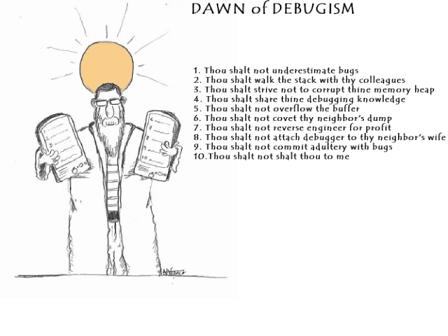
Here I repeat 10 debugging commandments in scripture:
1. Thou shalt not underestimate bugs
2. Thou shalt walk the stack with thy colleagues
3. Thou shalt strive not to corrupt thine memory heap
4. Thou shalt share thine debugging knowledge
5. Thou shalt not overflow the buffer
6. Thou shalt not covet thy neighbour’s dump
7. Thou shalt not reverse engineer for profit
8. Thou shalt not attach debugger to thy neighbor’s wife
9. Thou shalt not commit adultery with bugs
10. Thou shalt not shalt thou to me
- Dmitry Vostokov @ DumpAnalysis.org -
This is already written application (10 years ago by me) that I’m adapting as a high-level interface to WinDbg (can be any GUI debugger actually). The basic idea revolves around floating buttons (listbox and task bar icons, optionally) that dynamically change with every new window or application. The number of buttons can be unlimited, they have tooltips and can be repositioned to any corner of the screen, they can play sounds, show video and pictures. On click they execute elaborated macro commands, including keystrokes and mouse movements, written in a special scripting language. For example, we can create buttons for CDA checklist.
I’ve created 2 buttons for WinDbg window:
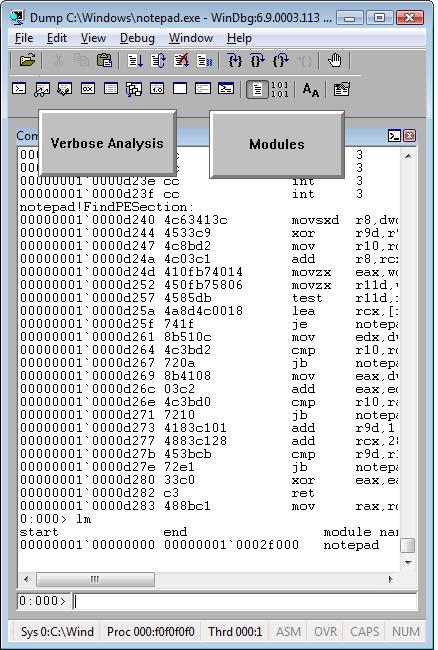
When we switch from WinDbg to another application they disappear:
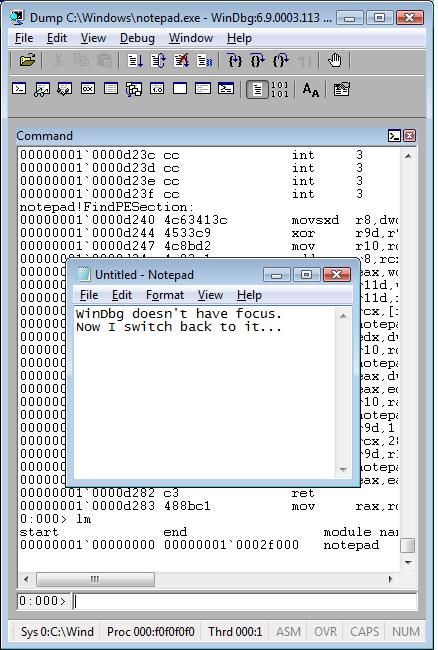
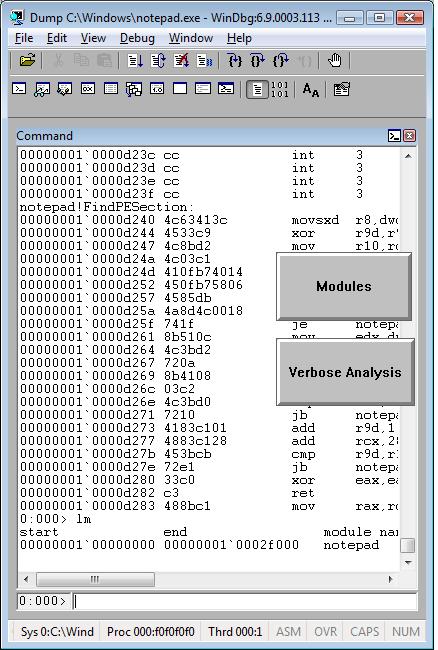
We switch back to WinDbg and they reappear. We can move them around the screen:
We can edit them by right click:

and change their shape:
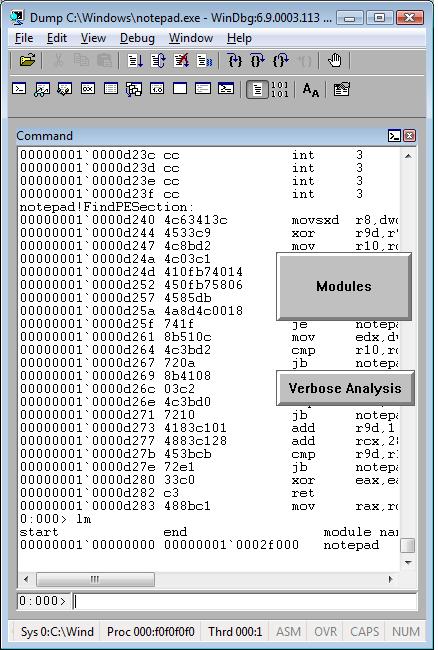
The set of buttons can be saved as an executable file. When we run it on another PC it recreates all buttons when WinDbg window appears.
Written in C and using only Win32 API EasyDbg process consumes minimum resources. It sits on task bar for easy access:

- Dmitry Vostokov @ DumpAnalysis.org -
I needed to quickly check preferred load address for one DLL and recalled that I once used WinDbg as a binary editor. So I loaded that DLL as a crash dump:
Loading Dump File [C:\kktools\userdump8.1\x64\usrxcptn.dll]
Symbol search path is: srv*c:\mss*http://msdl.microsoft.com/download/symbols
Executable search path is:
ModLoad: 00000000`00400000 00000000`00406000 C:\kktools\userdump8.1\x64\usrxcptn.dll
usrxcptn!DllMainCRTStartupForGS:
00000000`00401200 4883ec28 sub rsp,28h
0:000> lm
start end module name
00000000`00400000 00000000`00406000 usrxcptn (pdb symbols) c:\mss\usrxcptn.pdb\[…]\usrxcptn.pdb
lm command already shows that but we can also check formatted PE headers as well:
0:000> !dh 00000000`00400000
File Type: DLL
FILE HEADER VALUES
8664 machine (X64)
5 number of sections
45825DE6 time date stamp Fri Dec 15 08:33:42 2006
0 file pointer to symbol table
0 number of symbols
F0 size of optional header
2022 characteristics
Executable
App can handle >2gb addresses
DLL
OPTIONAL HEADER VALUES
20B magic #
8.00 linker version
E00 size of code
1200 size of initialized data
0 size of uninitialized data
1200 address of entry point
1000 base of code
----- new -----
0000000000400000 image base
1000 section alignment
200 file alignment
3 subsystem (Windows CUI)
5.02 operating system version
5.02 image version
5.02 subsystem version
6000 size of image
400 size of headers
DA18 checksum
0000000000040000 size of stack reserve
0000000000001000 size of stack commit
0000000000100000 size of heap reserve
0000000000001000 size of heap commit
1AB0 [ 213] address [size] of Export Directory
18B4 [ 3C] address [size] of Import Directory
4000 [ 418] address [size] of Resource Directory
3000 [ 48] address [size] of Exception Directory
1E00 [ 2580] address [size] of Security Directory
5000 [ 10] address [size] of Base Relocation Directory
1080 [ 1C] address [size] of Debug Directory
0 [ 0] address [size] of Description Directory
0 [ 0] address [size] of Special Directory
0 [ 0] address [size] of Thread Storage Directory
0 [ 0] address [size] of Load Configuration Directory
0 [ 0] address [size] of Bound Import Directory
1000 [ 78] address [size] of Import Address Table Directory
0 [ 0] address [size] of Delay Import Directory
0 [ 0] address [size] of COR20 Header Directory
0 [ 0] address [size] of Reserved Directory
SECTION HEADER #1
.text name
CC3 virtual size
1000 virtual address
E00 size of raw data
400 file pointer to raw data
0 file pointer to relocation table
0 file pointer to line numbers
0 number of relocations
0 number of line numbers
60000020 flags
Code
(no align specified)
Execute Read
Debug Directories(1)
Type Size Address Pointer
cv 25 10b0 4b0 Format: RSDS, guid, 1, usrxcptn.pdb
SECTION HEADER #2
.data name
744 virtual size
2000 virtual address
200 size of raw data
1200 file pointer to raw data
0 file pointer to relocation table
0 file pointer to line numbers
0 number of relocations
0 number of line numbers
C0000040 flags
Initialized Data
(no align specified)
Read Write
SECTION HEADER #3
.pdata name
48 virtual size
3000 virtual address
200 size of raw data
1400 file pointer to raw data
0 file pointer to relocation table
0 file pointer to line numbers
0 number of relocations
0 number of line numbers
40000040 flags
Initialized Data
(no align specified)
Read Only
SECTION HEADER #4
.rsrc name
418 virtual size
4000 virtual address
600 size of raw data
1600 file pointer to raw data
0 file pointer to relocation table
0 file pointer to line numbers
0 number of relocations
0 number of line numbers
40000040 flags
Initialized Data
(no align specified)
Read Only
SECTION HEADER #5
.reloc name
34 virtual size
5000 virtual address
200 size of raw data
1C00 file pointer to raw data
0 file pointer to relocation table
0 file pointer to line numbers
0 number of relocations
0 number of line numbers
42000040 flags
Initialized Data
Discardable
(no align specified)
Read Only
- Dmitry Vostokov @ DumpAnalysis.org -
New cartoon from Narasimha Vedala based on Dr. Page idea (click on it to enlarge):
Unconventional Debugging: introduce a hot lady bug
- Dmitry Vostokov @ DumpAnalysis.org -
Good troubleshooting tools usually have two interfaces: one is graphical (GUI) and the other is command line (CLI). The latter is very useful when GUI console is not available or there is a need to automate the tool. Both interfaces can be implemented in one component:

or there could be a separate GUI wrapper for complex CUI interface or when CUI interface was developed earlier and we don’t want to touch tool code (see Tool Façade pattern). Therefore this common pattern is called Dual Interface. Some tool examples:
- Dmitry Vostokov @ DumpAnalysis.org -
This is a new word I’ve just coined to describe applications heavily dependent on various hooks that are either injected by normal Windows hooking mechanism, registry or via more elaborate tricks like remote threads or patching code. Originally I thought of hookware but found that this term is already in use for completely different purpose.
Now I list various patterns in memory dumps that help in detection, troubleshooting and debugging of hooksware:
- Hooked Functions (user space)
- Hooked Functions (kernel space)
This is the primary detection mechanism for hooks that patch code.
See also Raw Pointer and Out-of-Module Pointer patterns.
The WinDbg script to run when you don’t know which module was patched.
Loaded hooks shift other DLLs by changing their load address and therefore might expose dormant bugs.
- Insufficient Memory (module fragmentation)
Hooks loaded in the middle of address space limit the maximum amount of memory that can be allocated at once. For example, various virtual machines, like Java, reserve the big chunk of memory at the start up.
We can get an approximate picture of what a 3rd-party hook module does by looking at its import table or in the case of patching by looking at the list of deviations returned by .chkimg command.
Might give an idea about the author of the hook.
- Coincidental Symbolic Information
Sometimes hooks are loaded at round addresses like 0×10000000 and these values are very frequently used as flags or constants too.
When hooking goes wrong the execution path goes into the wild territory.
Here we can find various hooks that use normal Windows hooking mechanism. Sometimes the search for “hook” word in symbolic raw stack output of dds command reveals them but beware of Coincidental Symbolic Information. See also Raw Stack Analysis Scripts page.
- Message Hooks - Modeling Example
Windows message hooking pattern example.
Some hooks may hide themselves.
- Dmitry Vostokov @ DumpAnalysis.org + TraceAnalysis.org -
Consider an application randomly crashing at different addresses or hanging sometimes. One day we are lucky to get this process postmortem memory dump:
This dump file has an exception of interest stored in it.
The stored exception information can be accessed via .ecxr.
(f34.c6c): Access violation - code c0000005 (first/second chance not available)
eax=73726946 ebx=00403378 ecx=656c2070 edx=656c2074 esi=00403374 edi=00000004
eip=7d64d233 esp=0012ff24 ebp=0012ff4c iopl=0 nv up ei pl nz ac pe cy
cs=0023 ss=002b ds=002b es=002b fs=0053 gs=002b efl=00010217
ntdll!RtlpWaitOnCriticalSection+0xdf:
7d64d233 ff4014 inc dword ptr [eax+14h] ds:002b:7372695a=????????
Aha! It involves critical sections! Let’s see whether we have an instance of Critical Section Corruption pattern. The first disappointment comes when !locks command takes ages to finish so we break it:
0:000> !locks
Stopped scanning because of control-C
Scanned 154686373 critical sections
Next we try to list all of them but without any success:
0:000> !locks -v
CritSec at 00000000 could not be read
Perhaps the critical section was a global variable in a dll that was unloaded?
CritSec at 00000000 could not be read
Perhaps the critical section was a global variable in a dll that was unloaded?
CritSec at 00000000 could not be read
Perhaps the critical section was a global variable in a dll that was unloaded?
CritSec at 00000000 could not be read
Perhaps the critical section was a global variable in a dll that was unloaded?
[...]
Next we look at stack trace to find critical section address:
0:000> kv
ChildEBP RetAddr Args to Child
0012ff4c 7d628576 64726f77 00000004 00000000 ntdll!RtlpWaitOnCriticalSection+0xdf
0012ff6c 00401074 00403374 00403394 00000001 ntdll!RtlEnterCriticalSection+0xa8
0012ff7c 004011e9 00000001 004d2fc0 004d3030 application!wmain+0×74
0012ffc0 7d4e7d2a 00000000 00000000 7efde000 application!__tmainCRTStartup+0×10f
0012fff0 00000000 00401332 00000000 00000000 kernel32!BaseProcessStart+0×28
0:000> dt CRITICAL_SECTION 00403374
application!CRITICAL_SECTION
+0×000 DebugInfo : 0×73726946 _RTL_CRITICAL_SECTION_DEBUG
+0×004 LockCount : 1701585008
+0×008 RecursionCount : 1919251571
+0×00c OwningThread : 0×20666f20
+0×010 LockSemaphore : 0×64726f77
+0×014 SpinCount : 0×73
It looks corrupt indeed so let’s see if it has ASCII fragments:
0:000> db 00403374
00403374 46 69 72 73 70 20 6c 65-73 74 65 72 20 6f 66 20 Firsp lester of
00403384 77 6f 72 64 73 00 00 00-00 00 00 00 02 00 00 00 words………..
[…]
0:000> da 00403374
00403374 “Firsp lester of words”
Looks like garbled sentence “First letter of words”. Who wrote this? Sherlock would say: “Elementary, my dear Watson”, take the first letters, literally: “First letter of words”. Flow component or a component with similar name causes corruption at random addresses! We can’t believe this, run lm WinDbg command and to our astonishment we see Flows module:
0:000> lm
start end module name
00400000 00405000 application
00410000 004ab000 advapi32
71c20000 71c32000 tsappcmp
75490000 754f5000 usp10
77ba0000 77bfa000 msvcrt
78130000 781cb000 msvcr80
7d4c0000 7d5f0000 kernel32
7d600000 7d6f0000 ntdll
7d800000 7d890000 gdi32
7d8d0000 7d920000 secur32
7d930000 7da00000 user32
7da20000 7db00000 rpcrt4
7dbc0000 7dbc9000 Flows
7dee0000 7df40000 imm32
Unloaded modules:
77b90000 77b98000 VERSION.dll
76920000 769e2000 USERENV.dll
71c40000 71c97000 NETAPI32.dll
771f0000 77201000 WINSTA.dll
770e0000 771e8000 SETUPAPI.dll
004e0000 00532000 SHLWAPI.dll
69500000 69517000 faultrep.dll
Checking the module information we see that it is the part of some unstable 3rd-party hookware and removing it solves the problem of elusive crashes. The problem solving power of Mind! The example is a bit contrived but my point here is that there are problems computers would never debug and troubleshoot. Answering the question of Dreyfus’ book “What computers still can’t do”: they still can’t debug…
- Dmitry Vostokov @ DumpAnalysis.org -
New cartoon from Narasimha Vedala provides great insight into hardware-induced boundary system conditions (the idea comes from Dr. L. Prasad a.k.a Dr. Page from Georgia Tech):
Bugs flogging Intel

- Dmitry Vostokov @ DumpAnalysis.org -
Sometimes the question arises about which postmortem debugger saved a crash dump resulted from an unhandled exception. For example, for pre-Vista systems the customer may believe that they used NTSD and but we know that properly configured NTSD as a default debugger never saves mini-dumps. However the WinDbg shows this:
Loading Dump File [application.mdmp]
User Mini Dump File: Only registers, stack and portions of memory are available
In the post Who calls the postmortem debugger? I showed that the default unhandled exception filter launches a default postmortem debugger. Because CreateProcess call needs a path and it is taken from AeDebug registry key the value is stored on a stack. So it is easy to dump the stack data, find UNICODE pattern and dump the string, This can be done using raw stack data or from the full exception processing stack trace where unhandled exception filter is present:
STACK_TEXT:
0dadc884 7c827cfb ntdll!KiFastSystemCallRet
0dadc888 77e76792 ntdll!NtWaitForMultipleObjects+0xc
0dadcb78 77e792a3 kernel32!UnhandledExceptionFilter+0×7c0
0dadcb80 77e61ac1 kernel32!BaseThreadStart+0×4a
0dadcba8 7c828752 kernel32!_except_handler3+0×61
0dadcbcc 7c828723 ntdll!ExecuteHandler2+0×26
0dadcc74 7c82855e ntdll!ExecuteHandler+0×24
0dadcc74 7c35042b ntdll!KiUserExceptionDispatcher+0xe
0dadcf70 0964a32a msvcr71!wcscpy+0xb
[…]
0:086> dds 0dadc884
0dadc884 7c828270 ntdll!_except_handler3
0dadc888 7c827cfb ntdll!NtWaitForMultipleObjects+0xc
0dadc88c 77e76792 kernel32!UnhandledExceptionFilter+0×7c0
0dadc890 00000002
0dadc894 0dadc9e8
0dadc898 00000001
0dadc89c 00000001
0dadc8a0 00000000
0dadc8a4 003a0043
0dadc8a8 0057005c
0dadc8ac 004e0049
0dadc8b0 004f0044
0dadc8b4 00530057
0dadc8b8 0073005c
0dadc8bc 00730079
0dadc8c0 00650074
0dadc8c4 0033006d
0dadc8c8 005c0032
0dadc8cc 00720064
0dadc8d0 00740077
0dadc8d4 006e0073
0dadc8d8 00320033
0dadc8dc 002d0020
0dadc8e0 00200070
0dadc8e4 00390032
0dadc8e8 00320035
0dadc8ec 002d0020
0dadc8f0 00200065
0dadc8f4 00300031
0dadc8f8 00380038
0dadc8fc 002d0020
0dadc900 00000067
0:086> du 0dadc8a4
0dadc8a4 "C:\WINDOWS\system32\drwtsn32 -p ”
0dadc8e4 “2952 -e 1088 -g”
- Dmitry Vostokov @ DumpAnalysis.org -
I recently started reading a book written by Peter Watson “Ideas: A History of Thought and Invention, from Fire to Freud” where he points to common tripartite view of intellectual history. Reflecting on it, I also came up with my own view about the history of debugging. The main three ideas are:
- Forward debugging
Conventional debugging where an engineer starts with initial conditions and during debugging tries to reproduce the problem or see the anomalies on the way to it. Delta debugging also falls into this category.
- Memory dump analysis
Taking memory slices for remote or postmortem analysis. Helps in problem identification, effective and efficient troubleshooting and also in debugging hard to reproduce or non-reproducible bugs.
- Backward debugging
Also called time travel debugging. Although mostly in its early stages of development this debugging method is the future. In the most simple way, but technologically infeasible at the moment, it can be implemented as recording memory dumps in succession with every tick. Currently, to avoid saving redundant information and conserve storage the code is altered to save context dependent information for every processor instruction or high-level programming language statement. Another approach that comes with virtualization is coarse-grained backward debugging where memory and execution state is saved at certain important points or after specified time intervals.
- Dmitry Vostokov @ DumpAnalysis.org -
Hmm, I was looking at Google Analytics stats for dumpanalysis.org and here is the list of 154 visitor countries sorted by the decreasing number of visits (data for March - August, 2008):
United States
United Kingdom
India
Canada
Germany
China
Russia
France
Japan
South Korea
Ireland
Australia
Taiwan
Netherlands
Israel
Sweden
Italy
Brazil
Spain
Singapore
Romania
Norway
Ukraine
Belgium
Czech Republic
Switzerland
Poland
Denmark
Malaysia
Finland
Turkey
Austria
New Zealand
Hong Kong
Portugal
Argentina
South Africa
Belarus
Greece
(not set)
Philippines
Hungary
Bulgaria
Mexico
Slovakia
Malta
Serbia
Thailand
Croatia
Estonia
Vietnam
Lithuania
Slovenia
Bolivia
United Arab Emirates
Iran
Latvia
Indonesia
Pakistan
Iceland
Saudi Arabia
Egypt
Serbia and Montenegro
Chile
Colombia
Uruguay
Luxembourg
Peru
Morocco
Kazakhstan
Costa Rica
Jordan
Venezuela
Moldova
Cyprus
Jamaica
Algeria
Ecuador
Panama
Bangladesh
Puerto Rico
Sri Lanka
Bosnia and Herzegovina
Lebanon
Guatemala
Qatar
Kuwait
Tunisia
Mongolia
Syria
Guinea
Dominican Republic
Macedonia
Uzbekistan
Nepal
Bahrain
El Salvador
Palestinian Territory
Mauritius
Armenia
Barbados
Trinidad and Tobago
Georgia
Oman
Brunei
Nigeria
Kenya
Bermuda
Yemen
Cuba
Uganda
Bahamas
Netherlands Antilles
Iraq
Reunion
Maldives
Ghana
Ivory Coast
U.S. Virgin Islands
Guyana
Ethiopia
Andorra
Liechtenstein
Sudan
Namibia
Dominica
Saint Lucia
Seychelles
Angola
Guadeloupe
Libya
Paraguay
Cayman Islands
Gibraltar
Aruba
Laos
Somalia
New Caledonia
Zambia
Saint Vincent and the Grenadines
Montenegro
Congo - Kinshasa
Tanzania
Fiji
Azerbaijan
Faroe Islands
Botswana
Antigua and Barbuda
French Guiana
Myanmar
Grenada
Cambodia
Kyrgyzstan
Greenland
Here is the relative graph:

Another possible reason why North Korea is not on the list could be the total absence of Internet even in government and military institutions. Also note the presence of (not set) territory on the list. I suspect these are spies and other security and forensics professionals hiding their true location.
Other countries where people don’t know about memory dumps are:
Nicaragua
Honduras
Senegal
Western Sahara
Guinea-Bissau
Mauritania
Sierra Leone
Liberia
Mali
Burkina Faso
Benin
Niger
Chad
Cameroon
Gabon
Congo - Brazzaville
Central African Republic
Zimbabwe
Mozambique
Malawi
Madagascar
Afghanistan
Turkmenistan
Tajikistan
Papua New Guinea
They are depicted in red:

I’m thinking now about Memory Dump Awareness Index (MDAI) to assign to each country :-)
- Dmitry Vostokov @ DumpAnalysis.org -
Sometimes we look for modules that were loaded and unloaded at some time. lm command lists unloaded modules but some of them could be mapped to address space without using runtime loader. The latter case is common for drm-type protection tools, rootkits, malware or crimeware which can influence a process execution. In such cases we can hope that they still remain in virtual memory and search for them. WinDbg .imgscan command greatly helps in identifying MZ/PE module headers. The following example just illustrates this command without implying that the found module did any harm:
0:000> .imgscan
MZ at 000d0000, prot 00000002, type 01000000 - size 6000
Name: usrxcptn.dll
MZ at 00350000, prot 00000002, type 01000000 - size 9b000
Name: ADVAPI32.dll
MZ at 00400000, prot 00000002, type 01000000 - size 23000
Name: javaw.exe
MZ at 01df0000, prot 00000002, type 01000000 - size 8b000
Name: OLEAUT32.dll
MZ at 01e80000, prot 00000002, type 01000000 - size 52000
Name: SHLWAPI.dll
[…]
We don’t see usrxcptn in either loaded or unloaded module lists:
0:002> lm
start end module name
00350000 003eb000 advapi32
00400000 00423000 javaw
01df0000 01e7b000 oleaut32
01e80000 01ed2000 shlwapi
[...]
Unloaded modules:
This is why I call this pattern Hidden Module. We can use Unknown Component pattern to see the module resources if present in memory:
0:002> !dh 000d0000
[...]
SECTION HEADER #4
.rsrc name
418 virtual size
4000 virtual address
600 size of raw data
1600 file pointer to raw data
0 file pointer to relocation table
0 file pointer to line numbers
0 number of relocations
0 number of line numbers
40000040 flags
Initialized Data
(no align specified)
Read Only
[...]
0:002> dc 000d0000+4000 L418
[…]
000d4140 […] n…z.)…F.i.l.
000d4150 […] e.D.e.s.c.r.i.p.
000d4160 […] t.i.o.n…..U.s.
000d4170 […] e.r. .D.u.m.p. .
000d4180 […] U.s.e.r. .M.o.d.
000d4190 […] e. .E.x.c.e.p.t.
000d41a0 […] i.o.n. .D.i.s.p.
000d41b0 […] a.t.c.h.e.r…..
0:002> du 000d416C
000d416c "User Dump User Mode Exception Di"
000d41ac "spatcher"
This component seems to be loaded or mapped only if userdump package was fully installed where usrxcptn.dll is a part of its redistribution. Although from the memory dump comment we also see that the dump was taken manually using command line userdump.exe we see that the full userdump package was additionally installed which was probably not necessary (see Correcting Microsoft article about userdump.exe):
Loading Dump File [javaw.dmp]
User Mini Dump File with Full Memory: Only application data is available
Comment: 'Userdump generated complete user-mode minidump with Standalone function on COMPUTER-NAME'
- Dmitry Vostokov @ DumpAnalysis.org -