Asmpedia

January 6th, 2007

As a part of my Master’s thesis I founded Wintel assembly language encyclopedia: www.asmpedia.org.

It is based on MediaWiki and I will start populating it from the end of January onwards. Information will be presented from dump analysis and reverse engineering perspective.

Currently I created some entries to test and collect comments, for example:

MOV instruction (x64 opcodes will be added later)

Instruction description will include:

  • definition and examples
  • x86 and x64 differences
  • C-style pseudo-code
  • annotated WinDbg disassembly
  • C/C++ compiler translation examples

Opcodes and mnemonics are cross-referenced, for example:

0xBB

I use Intel and AMD manuals and disassembly output from WinDbg as reference.

Finally I can fulfill my desire to learn all x86 instructions :-)

Further plans are to start with ARM assembly language as soon as I finish most of Wintel part because I do development for Windows Mobile and I’m interested in low level stuff there.

- Dmitry Vostokov -

WindowHistory Mobile update (version 2.2)

January 4th, 2007

Code changes and bug fixes from the latest WindowHistory 3.0 have been integrated. Also users reported that mobile version doesn’t track parent window handle and this has been fixed too.

- Dmitry Vostokov -

Tracing Win32 API while debugging a process

January 3rd, 2007

Load an executable or attach WinDbg to an existing process and use logexts debugging extension (in output below all API parameters and return values are omitted for visual clarity):

0:001> !logexts.loge
0:001> !logc e *
All categories enabled.
0:001> !logo e d
  Debugger            Enabled
  Text file           Disabled
  Verbose log         Enabled
0:001> g
Thrd 7c0 77555B59 BeginPaint( 0x001103AA) ...
Thrd 7c0 77555B65 GetClientRect( 0x001103AA) ...
Thrd 7c0 77555B96 DrawEdge( 0x01010072 ...) ...
Thrd 7c0 77555C8A DrawFrameControl( 0x01010072 ...) ...
Thrd 7c0 77555CE1 EndPaint( 0x001103AA ... ) ...
Thrd 7c0 004165F2 TlsGetValue( 0x00000006) ...
Thrd 7c0 4B8D54B5 CallNextHookEx( ... ) ...
Thrd 7c0 0040D7CC GetMessageW( ... ) ...

You can break in and put a breakpoint at a return address:

0:001> bp 0040D7CC
0:001> g
Thrd 7c0 0040D7CC GetMessageW( ... ) ...
Breakpoint 0 hit
ProcessHistory+0xd7cc:
0040d7cc 85c0            test    eax,eax
0:000> u 0040D7C0 0040D7CC
ProcessHistory+0xd7c0:
0040d7c0 50              push    eax
0040d7c1 50              push    eax
0040d7c2 8d7730          lea     esi,[edi+30h]
0040d7c5 56              push    esi
0040d7c6 ff15f8434300    call    dword ptr
[ProcessHistory+0x343f8 (004343f8)]
0:000> dd 004343f8
004343f8  3c001950 3c0018c4 3c00193c 3c0014dc
0:000> u 3c001950
3c001950 b889020000      mov     eax,289h
3c001955 e98e410014      jmp     logexts!LogHook
(50005ae8)
3c00195a b88a020000      mov     eax,28Ah
3c00195f e984410014      jmp     logexts!LogHook
(50005ae8)
3c001964 b88b020000      mov     eax,28Bh
3c001969 e97a410014      jmp     logexts!LogHook
(50005ae8)
3c00196e b88c020000      mov     eax,28Ch
3c001973 e970410014      jmp     logexts!LogHook
(50005ae8)

Here we can see that logexts patches import table.

And you can trace different API categories:

0:001> !logexts.logc
Categories:
  1 AdvApi32                        Enabled
  2 AtomFunctions                   Enabled
  3 AVIFileExports                  Enabled
  4 Clipboard                       Enabled
  5 ComponentObjectModel            Enabled
  6 DebuggingAndErrorHandling       Enabled
  7 DeviceFunctions                 Enabled
  8 Direct3D                        Enabled
  9 DirectDraw                      Enabled
 10 DirectPlay                      Enabled
 11 DirectSound                     Enabled
 12 GDI                             Enabled
 13 HandleAndObjectFunctions        Enabled
 14 HookingFunctions                Enabled
 15 IOFunctions                     Enabled
 16 MemoryManagementFunctions       Enabled
 17 Multimedia                      Enabled
 18 Printing                        Enabled
 19 ProcessesAndThreads             Enabled
 20 RegistryFunctions               Enabled
 21 Shell                           Enabled
 22 StringManipulation              Enabled
 23 ThreadLocalStorage              Enabled
 24 User32                          Enabled
 25 User32StringExports             Enabled
 26 Version                         Enabled
 27 WinSock2                        Enabled

- Dmitry Vostokov -

WindowHistory 3.0

January 1st, 2007

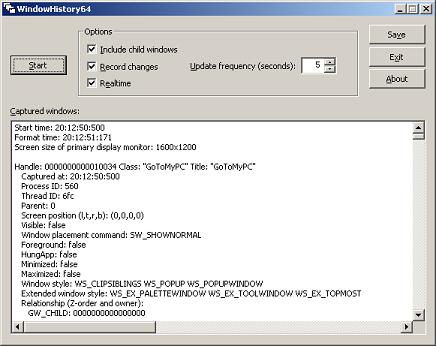
WindowHistory tool has been significantly rewritten and improved to make it better for troubleshooting and debugging GUI. What’s new in this version:

  • Real-time support: windows are tracked as they are created and destroyed, their position and size are changed, etc.
  • Dramatically improved speed, no matter how many windows you have in your session WindowHistory is fast and has minimum impact on the system (O(log(n)))
  • Better formatted output
  • Fixed bugs found in previous version
  • Easter egg (hold <Shift> key and click on About button)


It is a native Windows application written in C++/STL/MFC/Win32.

There are two packages: WindowHistory32 and WindowHistory64. Both can be downloaded from Citrix support web site:

To use download, unpack and run WindowHistory(64).exe.

To uninstall just remove files.

Note: although 32-bit version will run on x64 Windows too, real-time support for 64-bit application windows will not be available. For x64 Windows please use WindowHistory64 which correctly handles both 64-bit and 32-bit application windows.

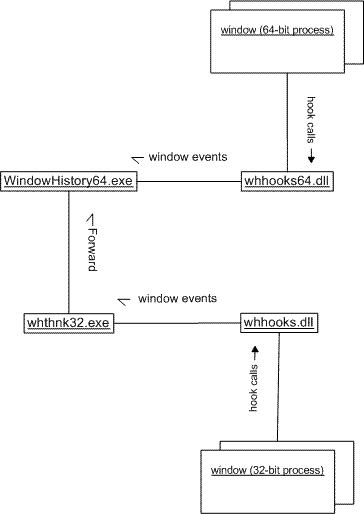
The following UML collaboration diagram depicts schematically how WindowHistory64 gets notifications from 32-bit windows:

If you want to track window messages and processes simultaneously run it with MessageHistory and ProcessHistory tools.

 - Dmitry Vostokov -

Using scripts to process hundreds of user dumps

December 28th, 2006

Suppose you have 100 - 200 user dumps from various user processes in the system and you want to quickly check their thread stacks, locks, etc. to see something suspicious related to your product or its environment your customers complaining about. It is much easier to collect such information into text files and browse them quickly than open every dump in WinDbg. I used shell script (VBScript) to automate loading dumps into WinDbg and used WinDbg scripts to run complex commands against loaded user dumps. For example, I used the following shell script:

'
' UDumps2Txt.vbs
'
Set fso = CreateObject("Scripting.FileSystemObject")
Set Folder = fso.GetFolder(".")
Set Files = Folder.Files
Set WshShell = CreateObject("WScript.Shell")
For Each File In Files
  Set oExec = WshShell.Exec("C:\Program Files\Debugging Tools for Windows\WinDbg.exe -y ""srv*c:\mss*http://msdl.microsoft.com/download/symbols"" -z " + File.Name + " -c ""$$><c:\scripts\UDmp2Txt.txt;q"" -Q -QS -QY –QSY")
  Do While oExec.Status = 0
     WScript.Sleep 1000
  Loop
Next
'
' UDumps2Txt.vbs: End of File
'

and the following WinDbg script:

$$
$$ UDmp2Txt: Dump information from user dump into log
$$
.logopen /d
!analyze -v
!locks
~*kv
lmv
.logclose
$$
$$ UDmp2Txt: End of File
$$

The following command launches multiple Dmp2Txt conversions:

C:\UserDumps>cscript /nologo c:\scripts\UDumps2Txt.vbs

You can also use CDB from Debugging Tools for Windows (console debugger) instead of WinDbg. I just use WinDbg uniformly instead of using separately CDB for user process dumps and KD for kernel and complete memory dumps. 

Now when you have text files you can search for patterns using regular expressions. I will write more about applying them later. There is a very good book about them from practical point of view I read 6 years ago when I needed to understand them beyond wildcards and question marks. Since that time the book has undergone another two editions:

Mastering Regular Expressions, 3rd edition

Buy from Amazon

Or you can process text files further and feed them into your database - part of automated crash dump analysis system.

- Dmitry Vostokov -

Automated Crash Dump Analysis (Part 1)

December 26th, 2006

I’ve been doing some research in this direction and found so many patents filed, to name a few:

Method and expert system for analysis of crash dumps

System for performing dump analysis

Some companies have their own systems. For example, Microsoft has its own Online Crash Analysis system (OCA) and even promotes its Corporate Error Reporting (CER) tool. CER architecture is described in the following document:

CER_Implementation_Plan

In the next parts I will try to outline different implementation choices for building automated crash dump analysis system and discuss their advantages and disadvantages from expert systems perspective.

- Dmitry Vostokov -

Unhandled exception handling changes in Vista

December 26th, 2006

Microsoft describes the reason behind these changes: silent process death if thread stack is corrupt. In Vista such crashes will be reported to MS via Windows Error Reporting mechanism.

Presentation, Reliability and Recovery, slide 42

- Dmitry Vostokov -

Added e-mail subscription

December 25th, 2006

Several readers asked me for possibility to be notified by e-mail when I publish a new post and after trying a few e-mail notification plugins for WordPress I finally put Subscribe2 plugin (had to fix its problems with WordPress 2.0.5). If you would like to be notified by e-mail please use Users \ Subscribe link on a side bar.

- Dmitry Vostokov -

New blog header

December 25th, 2006

I wasn’t satisfied with default Kubrick header and designed my own based on famous BSOD theme. After seeing so many blue screens they became aesthetically pleasant to me :-) If you do crash dump analysis, read, analyze or write assembly language code then you probably like fixed fonts too. I tried many other Wordpress themes but they didn’t look great with my content which was originally tailored for default Wordpress theme and I’m so used to it. Perhaps I need to create a complete brand new BSOD theme for my blog.

- Dmitry Vostokov -

Crash Dump Analysis card

December 24th, 2006

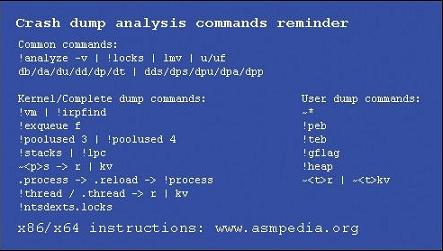
I have been thinking for a while what kind of a marketing card www.dumpanalysis.org should have (which should be useful to its users) and finally came up with the following design which is being printed now:

Front

Backside

I put most used commands (at least by me) and hope the backside of this card will be useful. If you see me in person you have a chance to get this card in hardcopy :-) If after reading this post you got an idea that we need a crash dump analysis and debugging poster (WinDbg related or a general one) then don’t worry and this is being designed now and details will be announced shortly… All suggestions are welcome anyway and if they are genuine and original then full credit will be given.

- Dmitry Vostokov -

Notes about NMI_HARDWARE_FAILURE

December 23rd, 2006

WinDbg help states that NMI_HARDWARE_FAILURE (0×80) bugcheck 80 indicates a hardware fault. This description can easily lead to a conclusion that a kernel or complete crash dump you just got from your customer doesn’t worth examining. But hardware malfunction is not always the case especially if your customer mentions that their system was hanging and they forced a manual dump. Here I would advise to check whether they have a special hardware for debugging purposes, for example, a card or an integrated iLO chip (Integrated Lights-Out) for remote server administration. Both can generate NMI (Non Maskable Interrupt) on demand and therefore bugcheck the system. If this is the case then it is worth examining their dump to see why the system was hanging.

- Dmitry Vostokov -

Crash Dump Analysis Blog

December 23rd, 2006

Welcome to the new blog location at dumpanalysis.org/blog/ 

Its feed address is

http://feeds.feedburner.com/CrashDumpAnalysis

The blog has been moved from its original location at

citrite.org/blogs/dmitryv/ 

in order to bring all crash dump analysis and debugging information to one place including www.dumpanalysis.org/forum and the forthcoming online encyclopedia about assembly languages:

www.asmpedia.org

Thank you and sorry for any inconvenience this might have caused.

Merry Christmas and Happy Debugging in New Year!

- Dmitry Vostokov -

Crash Dump Analysis Patterns (Part 6)

December 18th, 2006

Now it’s time to ”introduce” Invalid Pointer pattern. It’s just a number saved in a register or in a memory location and when we try to interpret it as a memory address itself and follow it (dereference) to fetch memory contents (value) it points to, OS with the help of hardware tells us that the address doesn’t exist or inaccessible due to security restrictions. The following two slides from my old presentation depict the concept of a pointer:

Pointer definition
Pointers depicted

In Windows you have your process memory partitioned into two big regions: kernel space and process space. Space partition is a different concept than execution mode (kernel or user, ring 0 or ring 3) which is a processor state. Code executing in kernel mode (a driver or OS, for example) can access memory that belongs to user space.

Based on this we can make distinction between invalid pointers containing kernel space addresses (start from 0×80000000 on x86, no /3Gb switch) and invalid pointers containing user space addresses (below 0×7FFFFFFF).

On Windows x64 user space addresses are below 0×0000070000000000 and kernel space addresses start from 0xFFFF080000000000.

When you dereference invalid kernel space address you get bugcheck immediately:

UNEXPECTED_KERNEL_MODE_TRAP (7f)

PAGE_FAULT_IN_NONPAGED_AREA (50)

There is no way you can catch it in your code (by using SEH).

However when you dereference user space address the course of action depends on whether your processor is in kernel mode (ring 0) or in user mode (ring 3). In any mode you can catch the exception (by using appropriate SEH handler) or leave this to the operating system or debugger. If there was no component willing to process the exception when it happened in user mode you get your process crash and in kernel mode you get bugchecks:

SYSTEM_THREAD_EXCEPTION_NOT_HANDLED (7e) 

KERNEL_MODE_EXCEPTION_NOT_HANDLED (8e)

I summarized all of this on the following diagram: 

NULL pointer is a special class of user space pointers. Usually its value is in the range of 0×00000000 - 0×0000FFFF. You can see them used in instructions like

mov   esi, dword ptr [ecx+0×10] 

and ecx value is 0×00000000 so you try to access the value located at 0×00000010 memory address.

When you get a crash dump and you see an invalid pointer pattern the next step is to interpret the pointer value which should help in understanding possible steps that led to the crash. Pointer value interpretation is the subject of the next part.

- Dmitry Vostokov @ DumpAnalysis.org -

Real Programmers - no impossible code

December 16th, 2006

I consider programmers as real programmers only if they attempted to write something like an editor or a word processor. My favorite interview question is “Did you write a word processor?” This probably explains why my team is small :-)

Why? Because writing a word processor shows your determination, persistence and if you are successful - understanding of OO principles. Even Gang of Four in their seminal book

Design Patterns: Elements of Reusable Object-Oriented Software

Buy from Amazon

used word processor as a unified example. I was very satisfied when I read their book - I designed and implemented at least 2 word processors: one in pure C meant to be better than MS Write 3.x and one in Java with syntax highlighting. And I implemented design patterns without knowing they were design patterns. The Java one was better and here is the screen shot showing my editor with C/C++ syntax highlighting implemented in Java 1.0 without any 3rd-party class libraries:

e1.jpg

The earlier one (with Windows 3.x look and feel) was written in C and has MDI interface, floating embedded objects and printing support:

e2.jpg

- Dmitry Vostokov -

Crash Dump Analysis Patterns (Part 5)

December 15th, 2006

The next pattern I would like to talk about is Optimized Code. If you have such cases you should not trust your crash dump analysis tools like WinDbg. Always suspect that compiler generated code might have been optimized if you see any suspicious or strange behaviour of your tool. Let’s consider this fragment of stack:

Args to Child
77e44c24 000001ac 00000000 ntdll!KiFastSystemCallRet
000001ac 00000000 00000000 ntdll!NtFsControlFile+0xc
00000034 00000bb8 0013e3f4 kernel32!WaitNamedPipeW+0x2c3
0016fc60 00000000 67c14804 MyModule!PipeCreate+0x48

3rd-party function PipeCreate from MyModule opens a named pipe and its first parameter (0016fc60) points to a pipe name L”\\.\pipe\MyPipe”. Inside the source code it calls Win32 API function WaitNamedPipeW (to wait for the pipe to be available for connection) and passes the same pipe name. But we see that  the first parameter to WaitNamedPipeW is 00000034 which cannot be the pointer to a valid Unicode string. And the program should have been crashed if 00000034 were a pointer value.

Everything becomes clear if we look at WaitNamedPipeW disassembly (comments are mine):

0:000> uf kernel32!WaitNamedPipeW
mov     edi,edi
push    ebp
mov     ebp,esp
sub     esp,50h
push    dword ptr [ebp+8]  ; Use pipe name
lea     eax,[ebp-18h]
push    eax
call    dword ptr [kernel32!_imp__RtlCreateUnicodeString (77e411c8)]


call    dword ptr [kernel32!_imp__NtOpenFile (77e41014)]
cmp     dword ptr [ebp-4],edi
mov     esi,eax
jne     kernel32!WaitNamedPipeW+0×1d5 (77e93316)
cmp     esi,edi
jl      kernel32!WaitNamedPipeW+0×1ef (77e93331)
movzx   eax,word ptr [ebp-10h]
mov     ecx,dword ptr fs:[18h]
add     eax,0Eh
push    eax
push    dword ptr [kernel32!BaseDllTag (77ecd14c)]
mov     dword ptr [ebp+8],eax  ; reuse parameter slot

As we know [ebp+8] is the first function parameter in non-FPO calls:

Parameters and Local Variables

And we see it is reused because after we convert LPWSTR to UNICODE_STRING and call NtOpenFile to get a handle we no longer need our parameter slot and the compiler can reuse it to store other information.

There is another compiler optimization we should be aware of and it is called OMAP. It moves the code inside the code section and puts the most frequently accessed code fragments together. In that case if you type in WinDbg, for example, 

0:000> uf nt!someFunction

you get different code than if you type (assuming f4794100 is the address of the function you obtained from stack or disassembly)

0:000> uf f4794100

In conclusion the advice is to be alert and conscious during crash dump analysis and inspect any inconsistencies closer.

Happy debugging!

- Dmitry Vostokov @ DumpAnalysis.org -

Clipboard Issues Explained

December 9th, 2006

I believe every Citrix user experienced clipboard breaks at least once. I remember my frustration when I coudn’t copy between Outlook and Vantive sessions and so 2.5 years ago I wrote RepairCBDChain tool to help to temporary restore clipboard functionality. Recently this feature was incorporated into ICA client. You can read about it in the client readme file (1. … [From 9.100][#112636]). However it is not enabled by default and if you experience clipboard breaks on the server side or you want to restore clipboard functionality immediately on your client without closing your session to apply changes to appsrv.ini or simply you are still using an old client then you can still benefit from this tool.

A month ago I promised to explain how my tool works. You all know that primary method for notifying windows about various events is window message mechanism. One of these notification events is clipboard notification message: WM_DRAWCLIPBOARD. Usually applications do not know whether clipboard content has changed if another program copied new data. Generally if you open Edit menu you see Paste enabled if there is data in the clipboard. This is done by application code itself by checking if clipboard is non-empty. If the application finds that clipboard is non-empty indeed it enables Paste menu item or disables it otherwise. In case of ICA client (wfica32.exe) it needs to know whether clipboard contains new data in order to send it down via ICA channel to a server session.

Windows has a mechanism to notify applications about clipboard changes. An application interested in such notifications has to register itself in the so called clipboard chain. Windows inserts it on top of that chain and that application is responsible to propagate changes down the chain:

rc1.jpg

If a 3rd-party application forgets to forward notifications down then we have a broken clipboard chain and clipboard changes are not sent via ICA protocol:

rc2.jpg

If you run RepairCBDChain.exe it tries to find the window of wfica32.exe and registers it for clipboard notifications again:

rc3.jpg 

However if it finds the second instance of wfica32.exe (as on the picture above) the first instance will be still cut off from notifications and this explains why RepairCBDChain.exe doesn’t work sometimes.

On the server session side the picture is similar (the registered application is wfshell.exe):

rc4.jpg

rc5.jpg

rc6.jpg

You can see WM_DRAWCLIPBOARD messages in MessageHistory logs for wfica32.exe process:

PID.TID: c20.c0c

HWND: 0x002501D4
Class: "wMFService006600CA004"
Title: "Microsoft Outlook7718 - MetaFrame Presentation Server Client [SpeedScreen On]"

HWND: 0x003F08DC
Class: "Transparent Windows Client"
Title: "^P ^b24 of 24 - Clipboard^b^SItem collected. - \\Remote"

HWND: 0x004E0332
Class: "WFClip"
Title: "WFClip"
17:58:53:484 S WM_DRAWCLIPBOARD (0×308) wParam: 0xd0aa0 lParam: 0×0

HWND: 0x0094036E
Class: "TWI Link"
Title: ""

Hope this little excursion explained clipboard chain, how it becomes broken and how it is repaired.

- Dmitry Vostokov -

Dmp2Txt: Solving Security Problem

December 9th, 2006

This is a follow up to my previous Q&A about crash dumps and security issues like exposing confidential information stored in memory: Crash Dumps and Security. It seems a solution exists which allows to do some sort of crash dump analysis or at least identify problem components without sending complete or kernel memory dumps.

This solution takes advantage of WinDbg ability to execute scripts of arbitrary complexity. Couple of months ago I wrote about scripts and they really help me in pulling out various information from complete memory dumps:

WinDbg scripts
Yet another Windbg script
Critical sections

Now I created the bigger script that combines together all frequent commands used for identification of potential problems in memory dumps:

  • !analyze -v
  • !vm 4
  • lmv
  • !locks
  • !poolused 3
  • !poolused 4
  • !exqueue f
  • !irpfind
  • !stacks
  • List of all processes’ thread stacks, loaded modues and critical sections (for complete memory dump)

Other commands can be added if necessary.

How does all this work? A customer has to install Debugging Tools for Windows from Microsoft. This can be done on any workstation and not necessarily in a production environment. Then the customer has to run WinDbg.exe with some parameters including path(s) to symbols (-y), a path to memory dump (-z) and a path to script (-c):

C:\Program Files\Debugging Tools for Windows>WinDbg.exe -y "srv*c:\mss*http://msdl.microsoft.com/download/symbols" -z MEMORY.DMP -c "$$><c:\WinDbgScripts\Dmp2Txt.txt;q" -Q -QS -QY –QSY

Once WinDbg.exe finishes (it can run for couple of hours if you have many processes in your complete memory dump) you can copy the .log file created in “C:\Program Files\Debugging Tools for Windows” folder, archive it and send it to support for analysis. Kernel and process data and cached files are not exposed in the log! And because this is a text file the customer can inspect it before sending.

Here are the contents of Dmp2Txt.txt file:

$$
$$ Dmp2Txt: Dump all necessary information from complete full memory dump into log
$$
.logopen /d
!analyze -v
!vm 4
lmv
!locks
!poolused 3
!poolused 4
!exqueue f
!irpfind
!stacks
r $t0 = nt!PsActiveProcessHead
.for (r $t1 = poi(@$t0); (@$t1 != 0) & (@$t1 != @$t0); r $t1 = poi(@$t1))
{
    r? $t2 = #CONTAINING_RECORD(@$t1, nt!_EPROCESS, ActiveProcessLinks);
    .process @$t2
    .reload
    !process @$t2
    !ntsdexts.locks
    lmv
}
.logclose
$$
$$ Dmp2Txt: End of File
$$

For kernel dumps the script is simpler: 

$$
$$ KeDmp2Txt: Dump all necessary information from kernel dump into log
$$
.logopen /d
!analyze -v
!vm 4
lmv
!locks
!poolused 3
!poolused 4
!exqueue f
!irpfind
!stacks
!process 0 7
.logclose
$$
$$ KeDmp2Txt: End of File
$$

Note: if the dump is LiveKd.exe generated then due to inconsistency scripts may run forever 

- Dmitry Vostokov -

New TestDefaultDebugger Tool

December 6th, 2006

It often happens that Citrix support advises customers to change their default postmortem debugger to NTSD. But there is no way to test new settings unless some application crashes again. And some customers come back saying dumps are not saved despite new settings and we don’t know whether dumps were not saved because a crash hadn’t yet happened or default debugger hadn’t been configured properly or something else happened.

In addition the arrival of 64-bit Windows brings another problem: there are 2 default postmortem debuggers on 64-bit Windows (for 32-bit and 64-bit applications respectively):

NTSD on x64 Windows

The new tool TestDefaultDebugger forces a crash on itself to test the presence and configuration of default postmortem debugger (Dr. Watson, NTSD or other). Then if the default postmortem debugger is configured properly OS will launch it to save a dump of TestDefaultDebugger.exe process.


If you enabled NTSD as a default postmortem debugger (CTX105888) the following console window will briefly appear:

Postmortem debuggers are explained here:

Dumps for Dummies (Part 3)

On 64-bit Windows you can run both 32-bit TestDefaultDebugger.exe and 64-bit TestDefaultDebugger64.exe applications and then open crash dumps to see whether both postmortem debuggers have been configured properly. The tool has also command line interface so you can use it remotely:

c:\>TestDefaultDebugger.exe now

You can download the tool from Citrix support web site:

TestDefaultDebugger v1.0 for 32-bit and 64-bit platforms

- Dmitry Vostokov @ DumpAnalysis.org -

Dumps and Systems Theory

November 24th, 2006

The environment where Citrix software operates is so complex that some education in Systems Theory and basic understanding of “cause and effect” and impossibility of “action at a distance” is needed. In forthcoming mini-series I would try to highlight some notions of that.

- Dmitry Vostokov -

Inside Citrix - November 2006

November 22nd, 2006

Welcome to Inside Citrix. This monthly column gives a glimpse of different aspects of Citrix through our people. Our guests have different areas of responsibility and expertise to give you an idea of what is happening behind the scenes. We discuss items of interest with people from Product Readiness, Escalation, Technical Support, and Engineering just to name a few.

In this installment of Inside Citrix, we discuss the meaning of life with Dmitry Vostokov, EMEA Development Analysis Team Lead.

Q: Hello Dmitry, how are you? I am very happy to conduct this interview as you are a creative and prolific worker. I wonder…has fame caught up to you yet, due to your creativity?

A: I’m fine, thank you! I believe there is a synergistic effect going on here. I make the company famous and the company makes me famous.

Q: So, before I get too far ahead of myself, please tell everyone a bit of your history. Where are you from? What did you do before Citrix? How long have you been with us? What kinds of things have you been doing at Citrix during your tenure?

A: I’m from Russia. I was born near Moscow and I spent 14 years there after enrolling at Moscow State University to study chemistry. In that university, I saw a computer and immediately started programming. My first program was written in FORTRAN and had almost 200 lines. My second program had commercial success: I ported 800 FORTRAN lines to about 2000 PDP-11 assembler lines and achieved a 25 percent increase in speed (the program calculated rocket fuel properties for weeks). Since then I’d been working from home for some U.S. and Russian ISV companies (mostly in speech and image processing domains) until 1999, when I went to work in an office to see a large software factory from the inside out.

In 2001 I went to Ireland to learn English. My first job in Ireland was with Ericsson in a small town as a Senior Software Designer. The title sounded great to me, but I heard rumors that the only engineers in Ericsson were hardware engineers. So that job didn’t last long because I was headhunted by a company called Programming Research and I relocated to Dublin. I spent 1.5 years there and after working briefly for a security company (that company is extinct now) I was hired by Citrix. I’ve already spent 3.16 years here. For Citrix I analyze crash dumps and provide recommendations. It’s like being a computer psychologist assessing brain damage. I also do a bit of escalation work when I have time. I like to provide full escalation and software maintenance cycles whenever I have sufficient resources to analyze the problem, contact the customer, and provide the resolution. I also have an opportunity here to apply my software design and programming skills by writing various troubleshooting tools.

Q: Most people probably didn’t know all of that. I guarantee you that Escalation knows you well. How is the blogging going? How can readers get to your blog?

A: I love blogging. I didn’t even think about blogging until I suddenly realized its potential in information sharing. When I joined the company there was no sufficient information available about crash dump analysis, so I had to learn on my own. Now I’m happy to share what I have learnt to everyone.

One topic I like to write about in my blog at the moment is crash dump analysis patterns and anti-patterns, where I summarize general solutions you can apply or should not apply in specific contexts to common recurrent dump analysis problems.

More will come…

Q: And the tools that you create, very useful! Can you take a moment to talk about each of the ones you have created? Which ones have you gotten the best feedback about? Which ones have been the most useful?

A: Thanks! I use them too. The tool I got the most complaints about is RepairCBDChain; the tool with the fewest complaints is SystemDump. I got the best feedback about PDBFinder.

All of them are useful in certain troubleshooting scenarios. I’m preparing a presentation about all these tools and I will present it to the EMEA TRM team in December. I’ll definitely publish it as soon as I get feedback about that training.

Here are brief descriptions of these tools (most of them have different versions for various platforms, and some were even ported to Windows Mobile):

• RepairCBDChain: Repairs clipboard functionality and magically you are able to copy/paste again (not always actually – I promise to write a blog post explaining why).

• ADSCleaner: Cleans Windows NT File System (NTFS) file streams created by Citrix memory optimization code if you no longer need this feature (it also frees disk space, by the way).

• ProcessHistory: Tracks processes, threads, and modules on 32-bit and 64-bit platforms. I’m going to release a Windows Mobile version soon.

• MessageHistory: Tracks window messages. It’s similar to Spy++ but much easier to use for troubleshooting and it works on 64-bit platforms too.

• WindowHistory: Tracks windows as they change their appearance, are created, and are destroyed and saves a log file. This is what Spy++ lacks and it was the primary motivation to write this tool.

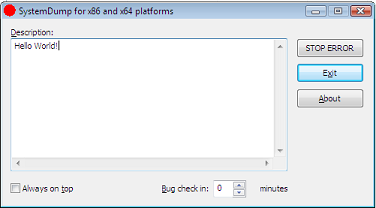
• SystemDump: Forces a dump immediately or after a specified period of time. This can be done remotely too. It works on both 32-bit and 64-bit Windows! My primary motivation was that the OSR “bang” tool doesn’t work on 64-bit Windows.

• PDBFinder: Helps to find symbol files if you have zillions of them.

• DumpCheck: Verifies that you have a valid dump and even provides recommendations to avoid common mistakes before sending dumps to support.

• CtxHidEx32: Can hide any annoying windows or message boxes and reduce unnecessary support calls. It also has a peculiar feature: you can specify an action to do before hiding the window. When the Media Player window appears it can send a message to your boss.

• Dump2Wave: My most controversial tool that allows you to hear the sound of memory corruption. Some people say it’s useless but I would say it is entertaining.

Some other upcoming tools I’m working days and nights on (when I have free time) are:

• DumpDepends: Helps to automate repetitive dumping.

• DumpAlerts: Provides notification whenever new dump is saved.

• SessionHistory: Tracks session information.

• HistoryToolbar: Organizes “History” tools into one coherent super tool.

• DumpPlayer: Plays musical dumps in real-time and provides visual images based on crash dump memory contents. I coined a term—Dump Tomography—for this.

Q: They must take some upkeep, as we see a lot of improvements, updates, and so on. I also see you provide a lot of training information on escalation techniques, debugging, analysis, and more. What do you believe is the most important characteristic of a successful escalation engineer?

A: As Winston Churchill said: “Never, never, never give up!”?

Q: Any advice for Citrix administrators who might be reading this on how to avoid trouble or have their environment best situated to speed resolution, should an issue occur?

A: If you are asked to generate and/or collect crash dumps, please tell support personnel how you got that dump. And ensure that you are sending the right dump for the right issue.

I started writing Dumps for Dummies blog posts to explain dumps and I promise to continue and expand them.

Q: What do you find most challenging about your job?

A: To work with enormous amounts of information and make quick decisions at the same time.

Q: Is there anything you can share with us about new Citrix products or technologies (not giving away confidential information) that you are excited about?

A: I would tell you that with whatever new technology comes along, crash dumps will be the same! And this gives me some optimism. Whether there will be more or less crash dumps in the future is pretty confidential though…

Q: Any plans to visit Citrix headquarters in Fort Lauderdale, Florida?

A: I’m actually visiting Citrix headquarters at the end of this month! See you there.

Q: Not so much a question, make us laugh!

A: One day we got a fax from a customer where all of the blue screen information was written down by hand—hundreds of digits… How long it took to copy all that from the screen and whether or not he made any mistakes, we will never know. The copy from that fax is still hanging on my desk wall.

Q: What do you do in your free time besides analyzing dumps, debugging and programming?

A: Read books. I read lots of them and about quite diverse subjects. However, my favorite subject for the last four years has been math—the more abstract the better.

It really helps in improving the critical thinking skills required for my job.

Thanks, Dmitry. People will know to look you up online…