WindowHistory Mobile (new release)

November 22nd, 2006

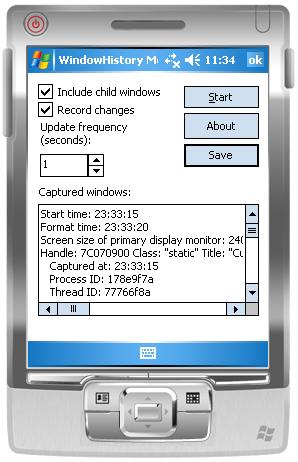
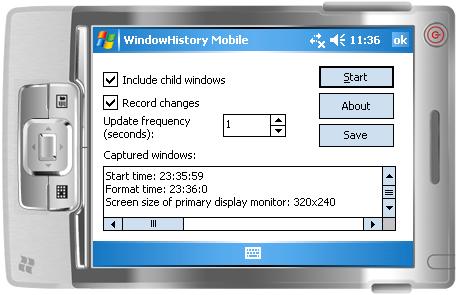
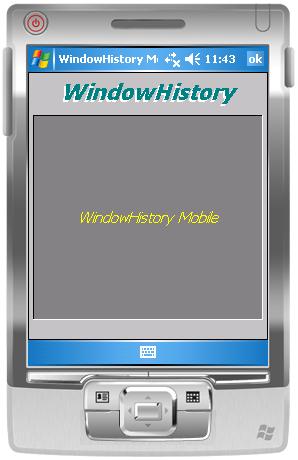
WindowHistory Mobile edition has been updated. It replaces the previous version of WindowHistory CE/Mobile 2.1 and now available in two separate executables: for Windows Mobile 5.0 (ARMV4I) and Windows Pocket PC 2003 (ARMV4). It has been tested under emulators, Acer n300 (480×640 screen) and mobile phone Mio A701 (240×320 screen). Here are screenshots from Windows Mobile 5.0 emulator:

whm50.jpg

whm50w.jpg

The tool also includes Easter Egg (activate soft keyboard, click on and then click on About button. The following window appears with scrolling text of contributors and special thanks):

whm50a.jpg

- Dmitry Vostokov -

Voices from Process Space

November 19th, 2006

Following the release of Dump2Wave tool some members of Citrix community have been asking me to provide some interesting sound fragments from dump files. I was also particularly interested in catching voices from the past: embedded fragments of human voice. So I recorded my “Hello” message, played it by Media Player and then saved a process dump. Then I converted the dump to CD-quality wave file and saved interesting sound fragments from it (to conserve space - the original wave file was 76Mb).

To listen to these fragments you can download wave files from the following location:

DumpSounds.zip (8Mb)

Here is the description of what I heard in these wave files:

- dump1.wav

  • violin
  • aliens
  • train sound
  • Hello

- dump2.wav

  • electric guitar
  • signals from cosmos

- dump3.wav

  • Morse code alphabet

- dump4.wav

  • helicopter

- dump5.wav

  • horn
  • some interesting noise and fragments of electronic music

 Enjoy :-)

Of course, you can convert kernel memory dumps to wave files and hear voices from kernel space too…

- Dmitry Vostokov -

Preview of DumpAlerts tool

November 19th, 2006

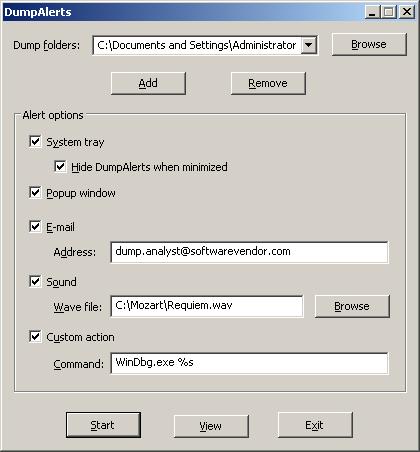
The tool monitors folders where dumps can be saved including Dr. Watson, a folder specified when NTSD is set as a default debugger, etc. It then alerts a user, an administrator or a software vendor whenever a new dump is saved:

  • Icon in System Tray changes its color from green to red
  • Popup window appears until dismissed
  • E-mail is sent to a specified address
  • Sound is played
  • Custom action is executed, for example, automatically launching WinDbg.exe with the latest dump or copying it to an ftp server

All actions are fully configurable and can be enabled/disabled. Here is the screenshot of the main window:

I’m planning to incluide TAPI support and alerts from hung applications in the next version(s).

Later this tool will included in Dump Monitor Suite

Any comments and suggestions are welcome.

- Dmitry Vostokov -

Crash Dumps for Dummies (Part 4)

November 19th, 2006

In the previous Dumps for Dummies (Part 3) I tried to explain the nature of crashes. Another category of problems happens very often and we also need a dump for analysis: hangs. There is some confusion exists in understanding the difference between these two categories: crash and hang. Although sometimes a hang is a direct consequence of a crash most of the time hangs happen independently. They also manifest themselves differently. Let’s look at application (process) crashes and hangs first. When a crash happens an application (process) often disappears. When hang happens an application (process) is still in memory: you can see it in Task Manager, for example, but it doesn’t respond to user commands or to any other requests like pinging a TCP/IP port. If we have a crash in OS then the most visible manifestation is blue screen and/or reboot. If we have a hang then everything freezes.

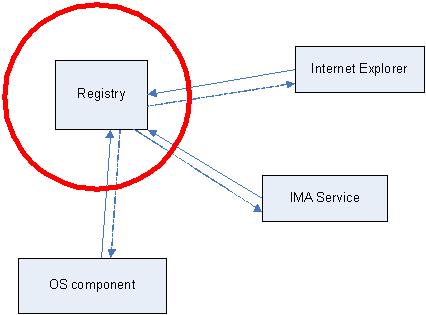
Application or system hang happens because from high level view of the interaction between application or OS components (modules) is done via messages. One component sends a message to another and waits for a response. Some components are critical, for example, registry. The following hand-made picture depicts very common system hang situations when the register component stops responding. Then every running application (process) stops responding if its execution path depends on registry access.

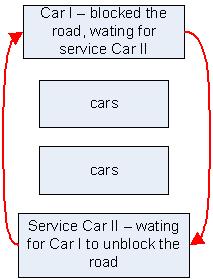
The very common reason for hang is so called deadlock when two running applications (their execution paths, threads) are waiting for each other. Here is the analogy with a blocked road:

In order to see what’s inside the process or OS which caused a hang we need a dump. Usually this dump is called a crash dump too because in order to get it the usual method is to make some sort of a trap which causes an application or OS to crash and to save the dump. I personally prefer to call these dumps just memory dumps to avoid confusion.  

How can you get a memory dump if your application or service hangs?

How can you get a memory dump if your system hangs?

For most system hangs choosing Kernel memory dump option in Control Panel\System\Advanced\Startup and Recovery applet is sufficient. Kernel memory dumps are smaller and less susceptible to corruption or truncation due to small page file size. If you discover that you need to peer inside running user applications then you can always ask for another Complete memory dump when the problem happens again.

- Dmitry Vostokov @ DumpAnalysis.org -

Crash Dumps and Security

November 17th, 2006

Suppose you work in a banking industry or for any company that has sensitive information. Is it secure to send a crash dump outside for analysis? One semi-anonymous person asked this question on www.dumpanalysis.org and here is my unedited answer based on my experience in crash dump analysis and kernel level development:

"It depends on credit card transactions software design and architecture and what type of dump is configured in Control Panel\System\Advanced\Startup and Recovery applet: Small, Kernel or Complete.

Software usually encrypts data before sending it down TCP/IP stack or other network protocol. If your credit card transactions software doesn't have any kernel space encryption drivers and doesn't rely on any MS or other 3rd-party encryption API that might send data to kernel, communicate to KSECDD or to user-space component like LSASS via LPC/RPC you can safely assume that kernel memory dumps will not have unencrypted data. If encryption is done entirely in user space Small memory dump and Kernel memory dump will only have encrypted fragments. Otherwise there is a probability that BSOD happens just before encryption or after decryption or when secure protocol is being handled. This exposure can even happen in Small memory dumps if BSOD happens in the thread that handles sensitive information in kernel mode.

The same applies if your software stores credit data on any medium. If it stores only encrypted data and decrypts entirely in user space without any transition to kernel it should be safe to enable kernel memory dump.

If your goal is ultimate security then even Small memory dump (64Kb) should not be allowed. But in reality as we consider probabilities sending small memory dump is equivalent to no more than exposing just one credit card number or one password.

What you must avoid at any cost is to enable complete memory dump option in control panel. In this case all your credit card transactions software code and data including file system cache will be exposed.

Contrary to complete memory dump kernel memory dump will not have much data even if some potion of it is being communicated during crash time. I would also be interested in hearing what other experts say. This is very interesting topic."

If you are interested too you can participate in that discussion (registration is needed to avoid spammers):

http://www.dumpanalysis.org/forum/viewtopic.php?t=56

- Dmitry Vostokov -

How WINE can help in Crash Dump Analysis

November 16th, 2006

You probably already know or have heard about the project WINE: Windows API on top of X and Unix

winehq.com 

I first heard about it more than 10 years ago when it started. Today I rediscovered it again and was really surprised. I was looking for one NT status code I couldn’t find in MS official documentation and found it here:

dlls/ntdll/error.c

In order to run Win32 programs WINE emulates all API calls including OLE32, USER32, GDI32, KERNEL32, ADVAPI32 and of course, NTDLL:

dlls/ntdll
dlls/ole32
dlls/user32
dlls/kernel32
dlls/gdi32
dlls/advapi32

Plus hundreds of other components. All source code is located here:

http://cvs.winehq.com/cvsweb/wine/

So if want to see how particular function or protocol might have been implemented hypothetically by Windows OS designers it is a good place to start.

- Dmitry Vostokov -

Horrors of debugging legacy code

November 8th, 2006

We all know that macro definitions in C and C++ are evil. They cause maintenance nightmares by introducing subtle bugs. I never took that seriously until last weekend I was debugging my old code written 10 years ago which uses macros written 15 years ago :-) 

My Windows Mobile 5.0 application was crashing when I was using POOM COM interfaces (Pocket Outlook Object Model). The crash never pointed to my code. It always happened after pimstore.dll and other MS modules were loaded and COM interfaces started to return errors. I first suspected that I was using POOM incorrectly and rewrote all code several times and in different ways. No luck. Then I tried PoomMaster sample from Windows Mobile 5.0 SDK and it worked well. So I rewrote my code in exactly the same way as in that sample. No luck. My last hope was that moving code from my DLL to EXE (as in sample SDK project) would eliminate crashes but it didn’t help too. Then I slowly started to realize that the problem might have been in my old code and I also noticed that one old piece of code had never been used before. So I started debugging by elimination (commenting out less and less code) until I found a macro. I had to stare at it for couple of minutes until I realized that one pair of brackets was missing and that caused allocating less memory and worse: the returned pointer to allocated memory was multiplied by 2! So the net result was the pointer pointing to other modules and subsequent string copy was effectively overwriting their memory and eventually causing crashes inside MS dlls.  

Here is that legacy macro:

#define ALLOC(t, p, s)
((p)=(t)GlobalLock(GlobalAlloc(GHND, (s))))

It allocates memory and returns a pointer. It should have been called like this (size parameter is highlighted in blue):

if (ALLOC(LPWSTR,lpm->lpszEvents,
(lstrlen(lpszMacro)+1)*sizeof(WCHAR)))
{
lstrcpy(lpm->lpszEvents, lpszMacro);
    lpm->nEvents=lstrlen(lpm->lpszEvents)+1;
}

What I found is the missing bracket before lstrlen and last enclosing bracket (size parameter is highlighted in red):

if (ALLOC(LPWSTR,lpm->lpszEvents,
lstrlen(lpszMacro)+1)*sizeof(WCHAR))
{
lstrcpy(lpm->lpszEvents, lpszMacro);
    lpm->nEvents=lstrlen(lpm->lpszEvents)+1;
}

The resulted code after macro expansion looks like this

if (lpm->lpszEvents=(LPWSTR)GlobalLock(GlobalAlloc(GHND,
lstrlen(lpszMacro)+1))*sizeof(WCHAR))

You see that the pointer to allocated memory is multiplied by two and string copy is performed to a random place in the address space of other loaded dlls corrupting their data and causing the process to crash later.

- Dmitry Vostokov -

Crash Dump Analysis Patterns (Part 4)

November 3rd, 2006

After looking at one dump today where all thread environment blocks were zeroed, import table corrupt and recalling some similar cases I encountered previously I came up with the next pattern: Lateral Damage.

When this problem happens you don’t have much choice and your first temptation is to apply Alien Component anti-pattern unless your module list is corrupt and you have manifestation of another common problem I will talk about next time: Corrupt Dump.

Anti-pattern is not always bad solution if complemented by subsequent verification and backed by experience. If you get damaged process and thread structures you can point to a suspicious component (supported by some evidence like raw stack analysis and educated guess) and request additional dumps in hope to get less damaged process space or see that component again. At the very end if removing it stabilizes the customer environment it proves you were right.

- Dmitry Vostokov @ DumpAnalysis.org -

Crash Dump Analysis AntiPatterns (Part 1)

November 1st, 2006

In any domain of activity where patterns exist we can find anti-patterns too. They are bad solutions for recurrent problems in specific contexts. One of them I would like to introduce briefly is Alien Component. In essence, when every technique fails or you run out of WinDbg commands look at some innocent component you have never seen before or don’t have symbols for: be it some driver or hook. Of course, this component cannot be the component developed by the company you are working for. :-)

- Dmitry Vostokov -

Crash Dump Analysis Patterns (Part 3)

November 1st, 2006

Another pattern I observe frequently is False Positive Dump. We get dumps pointing in a wrong direction or not useful for analysis and this usually happens when wrong tool was selected or right one was not properly configured for capturing crash dumps. Here is one example I investigated in detail.

The customer experienced frequent spooler crashes. The dump was sent for investigation to find an offending component: usually it is a printer driver. WinDbg revealed the following exception thread stack (parameters are not shown here for readability):

KERNEL32!RaiseException+0x56
KERNEL32!OutputDebugStringA+0x55
KERNEL32!OutputDebugStringW+0x39
HPZUI041!ConvertTicket+0x3c90
HPZUI041!DllGetClassObject+0x5d9b
HPZUI041!DllGetClassObject+0x11bb

The immediate response is to point to HPZUI041.DLL but if we look at parameters to KERNEL32!OutputDebugStringA we would see that the string passed to it is a valid NULL-terminated string:

0:010> da 000d0040
000d0040  ".Lower DWORD of elapsed time = 3"
000d0060  "750000."

If we disassemble OutputDebugStringA up to RaiseException call we would see:

0:010> u KERNEL32!OutputDebugStringA
KERNEL32!OutputDebugStringA+0x55
KERNEL32!OutputDebugStringA:
push    ebp
mov     ebp,esp
push    0FFFFFFFFh
push    offset KERNEL32!'string'+0x10
push    offset KERNEL32!_except_handler3
mov     eax,dword ptr fs:[00000000h]
push    eax
mov     dword ptr fs:[0],esp
push    ecx
push    ecx
sub     esp,228h
push    ebx
push    esi
push    edi
mov     dword ptr [ebp-18h],esp
and     dword ptr [ebp-4],0
mov     edx,dword ptr [ebp+8]
mov     edi,edx
or      ecx,0FFFFFFFFh
xor     eax,eax
repne scas byte ptr es:[edi]
not     ecx
mov     dword ptr [ebp-20h],ecx
mov     dword ptr [ebp-1Ch],edx
lea     eax,[ebp-20h]
push    eax
push    2
push    0
push    40010006h
call    KERNEL32!RaiseException

There is no jumps in the code prior to KERNEL32!RaiseException call and this means that raising exception was expected. Also MSDN documentation says:

“If the application has no debugger, the system debugger displays the string. If the application has no debugger and the system debugger is not active, OutputDebugString does nothing.”

So spoolsv.exe might have been monitored by a debugger which caught that exception and instead of dismissing it dumped the spooler process.

If we look at ‘analyze -v’ output we could see the following:

Comment: 'Userdump generated complete user-mode minidump
with Exception Monitor function on WS002E0O-01-MFP'
ERROR_CODE: (NTSTATUS) 0x40010006 -
Debugger printed exception on control C.

Now we see that debugger was User Mode Process Dumper you can download from Microsoft web site:

How to use the Userdump.exe tool to create a dump file 

If we download it, install it and write a small console program in Visual C++ to reproduce this crash:

#include "stdafx.h"
#include
int _tmain(int argc, _TCHAR* argv[])
{
    OutputDebugString(_T("Sample string"));
    return 0;
}

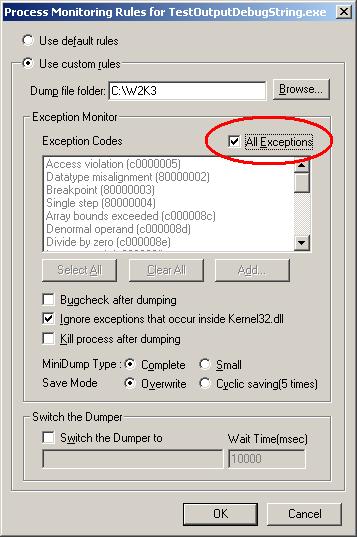
and if we compile it in Release mode and configure Process Dumper applet in Control Panel to include TestOutputDebugString.exe with the following properties:

and then run our program we would see Process Dumper catching KERNEL32!RaiseException and saving the dump.

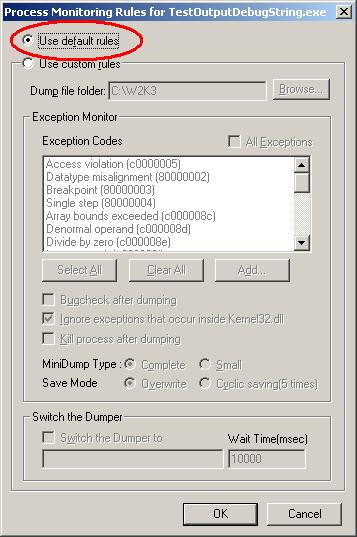
Even if we select to ignore exceptions that occur inside kernel32.dll this tool still dumps our process. Now we can see that the customer most probably enabled ‘All Exceptions’ check box too. What the customer should have done is to use default rules like on the picture below:

Or select exception codes manually. In this case no dump is generated even if we manually select all of them. Just to check that the latter configuration still catches access violations we can add a line of code dereferencing NULL pointer and Process Dumper will catch it and save the dump.

Conclusion: the customer should have used NTSD as a default postmortem debugger from the start. Then if crash happened we would have seen the real offending component or could have applied other patterns and requested additional dumps.

- Dmitry Vostokov @ DumpAnalysis.org -

Crash Dump Analysis Patterns (Part 2)

October 31st, 2006

Another pattern I would like to discuss is Dynamic Memory Corruption (and its user and kernel variants called Heap Corruption and Pool Corruption). You might have already guessed it :-) It is so ubiquitous. And its manifestations are random and usually crashes happen far away from the original corruption point. In your user mode and space part of exception threads (don’t forget about Multiple Exceptions pattern) you would see something like this:

ntdll!RtlpCoalesceFreeBlocks+0x10c
ntdll!RtlFreeHeap+0x142
MSVCRT!free+0xda
componentA!xxx

or this

ntdll!RtlpCoalesceFreeBlocks+0x10c
ntdll!RtlpExtendHeap+0x1c1
ntdll!RtlAllocateHeap+0x3b6
componentA!xxx

or any similar variants and you need to know exact component that corrupted application heap (which usually is not the same as componentA.dll you see in crashed thread stack).

For this common recurrent problem we have a general solution: enable heap checking. This general solution has many variants applied in a specific context:

  • parameter value checking for heap functions

  • user space software heap checks before or after certain checkpoints (like “malloc”/”new” and/or “free”/”delete” calls): usually implemented by checking various fill patterns, etc.

  • hardware/OS supported heap checks (like using guard and nonaccessible pages to trap buffer overruns)

The latter variant is the mostly used according to my experience and mainly due to the fact that most heap corruptions originate from buffer overflows. And it is easier to rely on instant MMU support than on checking fill patterns. Here is the article from Citrix support web site describing how you can enable full page heap. It uses specific process as an example: Citrix Independent Management Architecture (IMA) service but you can substitute any application name you are interested in debugging:

How to enable full page heap

and another article:

How to check in a user dump that full page heap was enabled

The following Microsoft article discusses various heap related checks:

How to use Pageheap.exe in Windows XP and Windows 2000

The Windows kernel analog to user mode and space heap corruption is called page and nonpaged pool corruption. If we consider Windows kernel pools as variants of heap then exactly the same techniques are applicable there, for example, the so called special pool enabled by Driver Verifier is implemented by nonaccessible pages. Refer to the following Microsoft article for further details:

How to use the special pool feature to isolate pool damage

- Dmitry Vostokov @ DumpAnalysis.org -

Crash Dump Analysis Patterns (Part 1)

October 30th, 2006

After doing crash dump analysis exclusively for more than 3 years I decided to organize my knowledge into a set of patterns (so to speak in a dump analysis pattern language and therefore try to facilitate its common vocabulary).

What is a pattern? It is a general solution you can apply in a specific context to a common recurrent problem.

There are many pattern and pattern languages in software engineering, for example, look at the following almanac that lists +700 patterns:

The Pattern Almanac 2000

and the following link is very useful:

Patterns Library

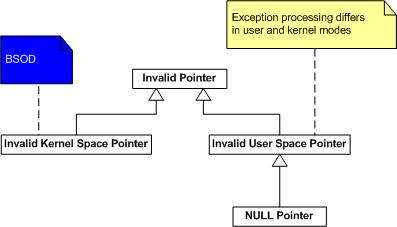
The first pattern I’m going to introduce today is Multiple Exceptions. This pattern captures the known fact that there could be as many exceptions (”crashes”) as many threads in a process. The following UML diagram depicts the relationship between Process, Thread and Exception entities:

Every process in Windows has at least one execution thread so there could be at least one exception per thread (like invalid memory reference) if things go wrong. There could be second exception in that thread if exception handling code experiences another exception or the first exception was handled and you have another one and so on.

So what is the general solution to that common problem when an application or service crashes and you have a crash dump file (common recurrent problem) from a customer (specific context)? The general solution is to look at all threads and their stacks and do not rely on what tools say.

Here is a concrete example from one of the dumps I got today:

Internet Explorer crashed and I opened it in WinDbg and ran ‘!analyze -v’ command. This is what I got in my WinDbg output:

ExceptionAddress: 7c822583 (ntdll!DbgBreakPoint)
   ExceptionCode: 80000003 (Break instruction exception)
  ExceptionFlags: 00000000
NumberParameters: 3
   Parameter[0]: 00000000
   Parameter[1]: 8fb834b8
   Parameter[2]: 00000003

Break instruction, you might think, shows that the dump was taken manually from the running application and there was no crash - the customer sent the wrong dump or misunderstood instructions. However I looked at all threads and noticed the following two stacks (threads 15 and 16):

0:016>~*kL
...
15  Id: 1734.8f4 Suspend: 1 Teb: 7ffab000 Unfrozen
ntdll!KiFastSystemCallRet
ntdll!NtRaiseHardError+0xc
kernel32!UnhandledExceptionFilter+0x54b
kernel32!BaseThreadStart+0x4a
kernel32!_except_handler3+0x61
ntdll!ExecuteHandler2+0x26
ntdll!ExecuteHandler+0x24
ntdll!KiUserExceptionDispatcher+0xe
componentA!xxx
componentB!xxx
mshtml!xxx
kernel32!BaseThreadStart+0x34

# 16  Id: 1734.11a4 Suspend: 1 Teb: 7ffaa000 Unfrozen
ntdll!DbgBreakPoint
ntdll!DbgUiRemoteBreakin+0x36

So we see here that the real crash happened in componentA.dll and componentB.dll or mshtml.dll might have influenced that. Why this happened? The customer might have dumped Internet Explorer manually while it was displaying an exception message box. The following reference says that ZwRaiseHardError displays a message box containing an error message:

Windows NT/2000 Native API Reference

Buy from Amazon

Or perhaps something else happened. Many cases where we see multiple thread exceptions in one process dump happened because crashed threads displayed message boxes like Visual C++ debug message box and preventing that process from termination. In our dump under discussion WinDbg automatic analysis command recognized only the last breakpoint exception (shown as # 16). In conclusion we shouldn’t rely on ”automatic analysis” often anyway and probably should write our own extension to list possible multiple exceptions (based on some heuristics I will talk about later).

- Dmitry Vostokov @ DumpAnalysis.org -

Applying API Wrapper Pattern

October 30th, 2006

Recently I had been porting my old Win32 legacy project (more than 100,000 lines) to Windows Mobile. Here I summarize the approach I used and I can say now that it was very successful (no single crash since I finished my porting - the original Win32 program was very stable indeed but we all know that hidden bugs surface or introduced when project is ported to another platform). The project was written in Windows 3.x 16-bit era and then it was already ported to Win32 in Windows 95 era. Win32 interface is huge and it contains many legacy Win16 functions (mainly for easy portability and compatibility with existing Win16 code base). The following UML component diagram depicts application dependencies on many Win32 API and runtime libraries from build perspective:

Windows Mobile (in essence Windows CE) has smaller interface and many functions available in Win32 API (especially legacy Win16) and many C runtime functions are absent. My project uses many such functions (due to its history) so the interface becomes broken. The following UML component diagram depicts this dependency:

First I ported my project to use UNICODE strings and UNICODE function equivalents throughout. This was a huge task already. Then instead of further rewriting my code which uses many absent functions and therefore quite possibly to introduce new bugs due to changed semantics I decided to apply a variant of Adapter or Wrapper pattern (for non-object-oriented API). My application now still uses old functions but links to a set of libraries translating these calls into existing Windows CE API. The following UML component depicts the final component infrastructure from build perspective:

Here is the list of functions I had to translate:

- RegEmu.lib: translates INI file calls into registry

  • GetProfileString
  • GetProfileInt
  • GetPrivateProfileString
  • GetPrivateProfileInt
  • WriteProfileString
  • WritePrivateProfileString

- FileEmu.lib: various file system related calls

  • _lcreatW
  • _lopenW
  • OpenFileW
  • WinExecW
  • _wsplitpath
  • _wsplitpathparam
  • _waccess
  • _wmkdir
  • _wrename
  • _wfindfirst
  • _wfindnext
  • _findclose
  • _wunlink
  • _wrmdir
  • _llseek
  • _lclose
  • _hread
  • _hwrite
  • _lread
  • _lwrite
  • _wstat
  • _wgetcwd
  • _wmakepath
  • _chdrive
  • _wchdir
  • ShellExecute
  • GetWindowsDirectory
  • GetSystemDirectory

- GdiEmu.lib: various graphics functions

  • SetMapMode
  • CreateFont
  • CreateDIBitmap

- UserEmu.lib: various UI related functions

  • GetKeyNameText
  • GetScrollPos
  • GetScrollRange
  • GetLastActivePopup
  • IsIconic
  • IsZoomed
  • IsBadStringPtr
  • IsMenu
  • VkKeyScan
  • GetKeyboardState
  • SetKeyboardState
  • ToAscii
  • MulDiv

PS. If you are interested in applying patterns to your C++ projects or simply in using them to describe your design and architecture these books are good place to start:

Design Patterns: Elements of Reusable Object-Oriented Software

Buy from Amazon

Pattern-Oriented Software Architecture, Volume 1: A System of Patterns

Buy from Amazon

Pattern-Oriented Software Architecture, Volume 2, Patterns for Concurrent and Networked Objects

Buy from Amazon

- Dmitry Vostokov -

Hide and seek in a Citrix farm

October 29th, 2006

Just want to mention this tool I wrote some time ago: CtxHideEx32. It has nothing to do with CtxHide.exe which is executed during every ICA logon. I simply borrowed the prefix. The purpose of CtxHideEx32 is to hide messages or windows you don’t want your users to see. Or perhaps you want to execute certain actions if some window appears like logging off the poor user who launched Media Player or sending a message to his boss :-).  Policy reinforcement… Read the following article and try (requires free registration on Citrix support web site):

http://support.citrix.com/article/CTX110341 

- Dmitry Vostokov @ DumpAnalysis.org -

Dump2Wave update

October 29th, 2006

Dump2Wave has been updated and can be downloaded from the same link as before:

Download Dump2Wave version 1.2.1

What’s new and corrections list:

  • Dumps with file size not divisible by the product of bytes-per-sample and channels (sample alignment) are converted into correct wave files now
  • Sample alignment is calculated correctly for non-CD quality wave
  • File paths with spaces are allowed now (you need to include them in double quotes)
  • Added diagnostic and error messages

- Dmitry Vostokov -

Preview of DumpDepends tool

October 28th, 2006

There are many cases where we need to dump several processes simultaneously and complete memory dump is not an option.
DumpDepends tool will dump processes and optionally package them into a CAB file. There are several options:

  • Dump all processes
  • Dump important services (Terminal, IMA, CTXXMLSS, Printing, Spooler, SVCHOST)
  • Dump all processes from the given session ID (additionally including children and important services if needed)
  • Dump an individual process (optionally including children and important services) 

The tool will use external process dumpers in noninvasive manner (NTSD by default or any other specified, like userdump.exe)
On x64 it will distinguish between 32-bit and 64-bit processes and dump them accordingly.
Command line option will also be available.

Later this tool will included in Dump Monitor Suite

Any comments and suggestions are welcome.

- Dmitry Vostokov-

Dumping processes without breaking them

October 28th, 2006

You can do it on any Windows system without installing any additional tools like Userdump or WinDbg. And your process won’t be interrupted while the dump is being saved and will continue to work. Use the following command:

ntsd -pvr -p 'PID' -c ".dump /ma /u process.dmp; q"

PID is a decimal process ID you can get from Task Manager, for example. 

Note: on x64 system to dump a 32-bit process (shown as *32 in Task Manager) you need to use NTSD from \Windows\SysWOW64 folder.

- Dmitry Vostokov -

ProcessHistory for 32-bit and 64-bit platforms

October 27th, 2006

This tool was announced previously New Tool: ProcessHistory and after testing was finally released.

The new version is under development and will include:

  • CDV output format
  • various sorting and filtering options
  • command line interface
  • real-time tracing

- Dmitry Vostokov -

userdump.exe on x64

October 25th, 2006

If you install the latest Microsoft user mode process dumper on x64 Windows you would see both x86 and x64 folders. 

Advice: do not dump 32-bit applications and services (shown as *32 in Task Manager) using userdump.exe from x64 folder: use userdump.exe from x86 folder. 32-bit application runs in WOW64 emulation layer on x64 Windows and that emulation layer is itself native 64-bit process so x64 userdump.exe saves that emulation layer not your original 32-bit application. If you open that dump in WinDbg you would see WOW64 thread stacks not thread stacks from your original 32-bit application. 

In summary, on x64 Windows

to save a dump of 64-bit application use:

  • x64\userdump.exe
  • \Windows\System32\ntsd.exe
  • 64-bit version of WinDbg.exe

to save a dump of 32-bit application use:

  • x86\userdump.exe
  • \Windows\SysWOW64\ntsd.exe
  • 32-bit WinDbg.exe  

- Dmitry Vostokov -

Crash Dumps for Dummies (Part 3)

October 25th, 2006

This part follows Dumps for Dummies (Part 2) and here I’ll try to explain crashes, dumps and postmortem debuggers. 

Sometimes a computer (CPU, Central Processing Unit) cannot perform its job because the instruction it gets to do some calculations, read or write data is wrong. Imagine a situation when you get an address to deliver a message to and you find that it doesn’t exist…  The following idealized picture shows this situation (if memory locations/addresses are indexed from 0 then -1 is obviously wrong address):

When referencing invalid address CPU executes special sequence of actions (called trap) that ultimately leads to saving memory so you could later examine its contents and find out which instruction was invalid. If crash happens inside Windows operating system then you see blue screen and then a kernel memory or full computer physical memory is saved in a file (called either kernel or complete memory dump respectively). If you have a crash in a running application or service then its memory contents are saved in a file (called user dump). The latter file is also called a postmortem dump and we call a program which saves it a postmortem debugger. There can be several such programs and the one which is specified in the registry to execute whenever a crash happens in a running application or service is called a default postmortem debugger. The following picture illustrates this (here spooler service, spoolsv.exe, crashed by faulty printer driver):

By default it is Dr. Watson (drwtsn32.exe) but sometimes it doesn’t work in terminal services environment and has limitations so we always recommend setting NTSD (ntsd.exe) as a default postmortem debugger:

How to Set NTSD as a Default Windows Postmortem Debugger

I prefer to call both user and kernel/complete memory dumps postmortem (not only user dumps) because they are saved after application, service or system is dead already (crash or fatal error already happened). This distinguishes them from live memory dumps saved manually whenever we want them. This brings us to dump classification that I show you in forthcoming parts. 

- Dmitry Vostokov @ DumpAnalysis.org -