WindowHistory 3.0
WindowHistory tool has been significantly rewritten and improved to make it better for troubleshooting and debugging GUI. What’s new in this version:
- Real-time support: windows are tracked as they are created and destroyed, their position and size are changed, etc.
- Dramatically improved speed, no matter how many windows you have in your session WindowHistory is fast and has minimum impact on the system (O(log(n)))
- Better formatted output
- Fixed bugs found in previous version
- Easter egg (hold <Shift> key and click on About button)
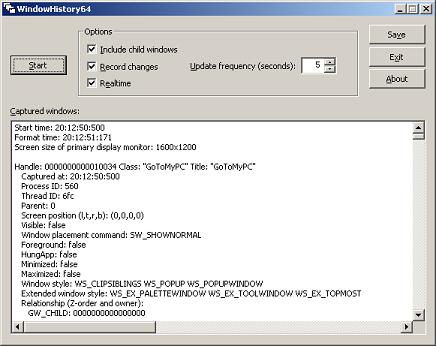
It is a native Windows application written in C++/STL/MFC/Win32.
There are two packages: WindowHistory32 and WindowHistory64. Both can be downloaded from Citrix support web site:
To use download, unpack and run WindowHistory(64).exe.
To uninstall just remove files.
Note: although 32-bit version will run on x64 Windows too, real-time support for 64-bit application windows will not be available. For x64 Windows please use WindowHistory64 which correctly handles both 64-bit and 32-bit application windows.
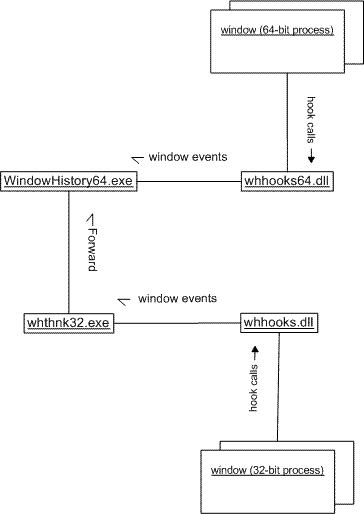
The following UML collaboration diagram depicts schematically how WindowHistory64 gets notifications from 32-bit windows:
If you want to track window messages and processes simultaneously run it with MessageHistory and ProcessHistory tools.
- Dmitry Vostokov -
January 5th, 2007 at 10:19 pm
Oddity: on Citrix site, the link to MessageHistory points to WindowHistory12.zip … but files inside the archive are indeed MessageHistory !
http://support.citrix.com/kb/entry.jspa?externalID=CTX111068
January 5th, 2007 at 10:56 pm
That was my fault when I submitted the tool. I’d been working on both at the same time Thanks for noticing this! I’ll fix it when I submit a new version soon.