Archive for the ‘Crash Dump Patterns’ Category

Crash Dump Analysis Patterns (Part 12)

Friday, April 20th, 2007

Another pattern that happens so often in crash dumps: No Component Symbols. In this case we can guess what a component does by looking at its name, overall thread stack where it is called and also its import table. Here is an example. We have component.sys driver visible on some thread stack in a kernel dump but we don’t know what that component can potentially do. Because we don’t have symbols we cannot see its imported functions:

kd> x component!*
kd>

We use !dh command to dump its image headers:

kd> lmv m component
start             end                 module name
fffffadf`e0eb5000 fffffadf`e0ebc000   component   (no symbols)
    Loaded symbol image file: component.sys
    Image path: \??\C:\Component\x64\component.sys
    Image name: component.sys
    Timestamp:        Sat Jul 01 19:06:16 2006 (44A6B998)
    CheckSum:         000074EF
    ImageSize:        00007000
    Translations:     0000.04b0 0000.04e0 0409.04b0 0409.04e0
kd> !dh fffffadf`e0eb5000
File Type: EXECUTABLE IMAGE
FILE HEADER VALUES
    8664 machine (X64)
       6 number of sections
44A6B998 time date stamp Sat Jul 01 19:06:16 2006
       0 file pointer to symbol table
       0 number of symbols
      F0 size of optional header
      22 characteristics
            Executable
            App can handle >2gb addresses
OPTIONAL HEADER VALUES
     20B magic #
    8.00 linker version
     C00 size of code
     A00 size of initialized data
       0 size of uninitialized data
    5100 address of entry point
    1000 base of code
         ----- new -----
0000000000010000 image base
    1000 section alignment
     200 file alignment
       1 subsystem (Native)
    5.02 operating system version
    5.02 image version
    5.02 subsystem version
    7000 size of image
     400 size of headers
    74EF checksum
0000000000040000 size of stack reserve
0000000000001000 size of stack commit
0000000000100000 size of heap reserve
0000000000001000 size of heap commit
       0 [       0] address [size] of Export Directory
    51B0 [      28] address [size] of Import Directory
    6000 [     3B8] address [size] of Resource Directory
    4000 [      6C] address [size] of Exception Directory
       0 [       0] address [size] of Security Directory
       0 [       0] address [size] of Base Relocation Directory
    2090 [      1C] address [size] of Debug Directory
       0 [       0] address [size] of Description Directory
       0 [       0] address [size] of Special Directory
       0 [       0] address [size] of Thread Storage Directory
       0 [       0] address [size] of Load Configuration Directory
       0 [       0] address [size] of Bound Import Directory
    2000 [      88] address [size] of Import Address Table Directory
       0 [       0] address [size] of Delay Import Directory
       0 [       0] address [size] of COR20 Header Directory
       0 [       0] address [size] of Reserved Directory


Then we display the contents of Import Address Table Directory using dps command:

kd> dps fffffadf`e0eb5000+2000 fffffadf`e0eb5000+2000+88
fffffadf`e0eb7000  fffff800`01044370 nt!IoCompleteRequest
fffffadf`e0eb7008  fffff800`01019700 nt!IoDeleteDevice
fffffadf`e0eb7010  fffff800`012551a0 nt!IoDeleteSymbolicLink
fffffadf`e0eb7018  fffff800`01056a90 nt!MiResolveTransitionFault+0x7c2
fffffadf`e0eb7020  fffff800`0103a380 nt!ObDereferenceObject
fffffadf`e0eb7028  fffff800`0103ace0 nt!KeWaitForSingleObject
fffffadf`e0eb7030  fffff800`0103c570 nt!KeSetTimer
fffffadf`e0eb7038  fffff800`0102d070 nt!IoBuildPartialMdl+0x3
fffffadf`e0eb7040  fffff800`012d4480 nt!PsTerminateSystemThread
fffffadf`e0eb7048  fffff800`01041690 nt!KeBugCheckEx
fffffadf`e0eb7050  fffff800`010381b0 nt!KeInitializeTimer
fffffadf`e0eb7058  fffff800`0103ceb0 nt!ZwClose
fffffadf`e0eb7060  fffff800`012b39f0 nt!ObReferenceObjectByHandle
fffffadf`e0eb7068  fffff800`012b7380 nt!PsCreateSystemThread
fffffadf`e0eb7070  fffff800`01251f90 nt!FsRtlpIsDfsEnabled+0x114
fffffadf`e0eb7078  fffff800`01275160 nt!IoCreateDevice
fffffadf`e0eb7080  00000000`00000000
fffffadf`e0eb7088  00000000`00000000

We see that this driver under certain circumstances could bugcheck the system using KeBugCheckEx, it creates system thread(s) (PsCreateSystemThread) and uses timer(s) (KeInitializeTimer, KeSetTimer).

If you see name+offset in import table (I think this is an effect of OMAP code optimization) you can get the function by using ln command (list nearest symbols):

kd> ln fffff800`01056a90
(fffff800`01056760)   nt!MiResolveTransitionFault+0x7c2   |  (fffff800`01056a92)   nt!RtlInitUnicodeString
kd> ln fffff800`01251f90
(fffff800`01251e90)   nt!FsRtlpIsDfsEnabled+0×114   |  (fffff800`01251f92)   nt!IoCreateSymbolicLink

This technique is useful if you have a bugcheck that happens when a driver calls certain functions or must call certain function in pairs, like bugcheck 0×20:

kd> !analyze -show 0x20
KERNEL_APC_PENDING_DURING_EXIT (20)
The key data item is the thread's APC disable count. If this is non-zero, then this is the source of the problem. The APC disable count is decremented each time a driver calls KeEnterCriticalRegion, KeInitializeMutex, or FsRtlEnterFileSystem. The APC disable count is incremented each time a driver calls KeLeaveCriticalRegion, KeReleaseMutex, or FsRtlExitFileSystem.  Since these calls should always be in pairs, this value should be zero when a thread exits. A negative value indicates that a driver has disabled APC calls without re-enabling them. A positive value indicates that the reverse is true. If you ever see this error, be very suspicious of all drivers installed on the machine — especially unusual or non-standard drivers. Third party file system redirectors are especially suspicious since they do not generally receive the heavy duty testing that NTFS, FAT, RDR, etc receive. This current IRQL should also be 0.  If it is not, that a driver’s cancelation routine can cause this bugcheck by returning at an elevated IRQL.  Always attempt to note what you were doing/closing at the time of the crash, and note all of the installed drivers at the time of the crash.  This symptom is usually a severe bug in a third party driver.

Then you can see at least whether the suspicious driver could have potentially used those functions and if it imports one of them you can see whether it imports the corresponding counterpart function. 

- Dmitry Vostokov @ DumpAnalysis.org -
Crash Dump Analysis Patterns (Part 5b)

Friday, April 20th, 2007

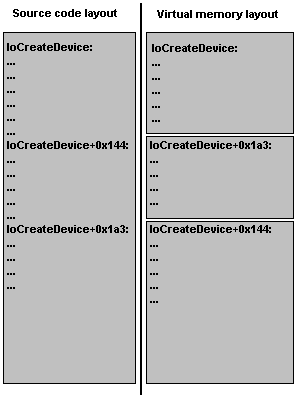
This is a follow up to Optimized Code pattern written previously. Now I discuss the following feature that often bewilders beginners. It is called OMAP code optimization. It is used to make code that needs to be present in memory smaller. So instead of flat address space for compiled function you have pieces of it scattered here and there. This leads to an ambiguity when you try to disassemble OMAP code at its address because WinDbg doesn’t know whether it should treat address range as a function offset (starting from the beginning of the function source code) or just a memory layout offset (starting from the address of that function). Let me illustrate this on IoCreateDevice function code.

Let’s first evaluate a random address starting from the first address of the function (memory layout offset):

kd> ? nt!IoCreateDevice
Evaluate expression: -8796073668256 = fffff800`01275160
kd> ? nt!IoCreateDevice+0×144
Evaluate expression: -8796073667932 = fffff800`012752a4
kd> ? fffff800`012752a4-fffff800`01275160
Evaluate expression: 324 = 00000000`00000144

If we try to disassemble code at the same address the expression will also be evaluated as the memory layout offset:

kd> u nt!IoCreateDevice+0×144
nt!IoCreateDevice+0×1a3:
fffff800`012752a4 83c810          or      eax,10h
fffff800`012752a7 898424b0000000  mov     dword ptr [rsp+0B0h],eax
fffff800`012752ae 85ed            test    ebp,ebp
fffff800`012752b0 8bdd            mov     ebx,ebp
fffff800`012752b2 0f858123feff    jne     nt!IoCreateDevice+0×1b3
fffff800`012752b8 035c2454        add     ebx,dword ptr [rsp+54h]
fffff800`012752bc 488b1585dcf2ff  mov     rdx,qword ptr [nt!IoDeviceObjectType]
fffff800`012752c3 488d8c2488000000 lea     rcx,[rsp+88h]

You see the difference: we give +0×144 offset but the code is shown from +0×1a3! This is because OMAP optimization moved the code from the function offset +0×1a3 to memory locations starting from +0×144. The following picture illustrates this:

If you see this when disassembling a function name+offset address from a thread stack trace you can use raw address instead:

kd> k
Child-SP          RetAddr           Call Site
fffffadf`e3a18d30 fffff800`012b331e component!function+0×72
fffffadf`e3a18d70 fffff800`01044196 nt!PspSystemThreadStartup+0×3e
fffffadf`e3a18dd0 00000000`00000000 nt!KxStartSystemThread+0×16
kd> u fffff800`012b331e
nt!PspSystemThreadStartup+0×3e:
fffff800`012b331e 90              nop
fffff800`012b331f f683fc03000040  test    byte ptr [rbx+3FCh],40h
fffff800`012b3326 0f8515d30600    jne     nt!PspSystemThreadStartup+0×4c
fffff800`012b332c 65488b042588010000 mov   rax,qword ptr gs:[188h]
fffff800`012b3335 483bd8          cmp     rbx,rax
fffff800`012b3338 0f85a6d30600    jne     nt!PspSystemThreadStartup+0×10c
fffff800`012b333e 838bfc03000001  or      dword ptr [rbx+3FCh],1
fffff800`012b3345 33c9            xor     ecx,ecx

You also see OMAP in action also when you try to disassemble the function body using uf command:

kd> uf nt!IoCreateDevice
nt!IoCreateDevice+0×34d:
fffff800`0123907d 834f3008        or      dword ptr [rdi+30h],8
fffff800`01239081 e955c30300      jmp     nt!IoCreateDevice+0×351


nt!IoCreateDevice+0×14c:
fffff800`0126f320 6641be0002      mov     r14w,200h
fffff800`0126f325 e92f5f0000      jmp     nt!IoCreateDevice+0×158
nt!IoCreateDevice+0×3cc:
fffff800`01270bd0 488d4750        lea     rax,[rdi+50h]
fffff800`01270bd4 48894008        mov     qword ptr [rax+8],rax
fffff800`01270bd8 488900          mov     qword ptr [rax],rax
fffff800`01270bdb e95b480000      jmp     nt!IoCreateDevice+0×3d7
nt!IoCreateDevice+0xa4:
fffff800`01273eb9 41b801000000    mov     r8d,1
fffff800`01273ebf 488d154a010700  lea     rdx,[nt!`string’]
fffff800`01273ec6 488d8c24d8000000 lea     rcx,[rsp+0D8h]
fffff800`01273ece 440fc10522f0f2ff xadd    dword ptr [nt!IopUniqueDeviceObjectNumber],r8d
fffff800`01273ed6 41ffc0          inc     r8d
fffff800`01273ed9 e8d236deff      call    nt!swprintf
fffff800`01273ede 4584ed          test    r13b,r13b
fffff800`01273ee1 0f85c1a70800    jne     nt!IoCreateDevice+0xce


- Dmitry Vostokov @ DumpAnalysis.org -
Crash Dump Analysis Patterns (Part 11)

Tuesday, April 3rd, 2007

One of mistakes beginners make is trusting WinDbg !analyze or kv commands displaying stack trace. WinDbg is only a tool, sometimes information necessary to get correct stack trace is missing and therefore some critical thought is required to distinguish between correct and incorrect stack traces. I call this pattern Incorrect Stack Trace. Incorrect stack traces usually

  • Have WinDbg warning: “Following frames may be wrong”

  • Don’t have the correct bottom frame like kernel32!BaseThreadStart (in user-mode)

  • Have function calls that don’t make any sense

  • Have strange looking disassembled function code or code that doesn’t make any sense from compiler perspective

  • Have ChildEBP and RetAddr addresses that don’t make any sense

Consider the following stack trace:

0:011> k
ChildEBP RetAddr
WARNING: Frame IP not in any known module. Following frames may be wrong.
0184e434 7c830b10 0×184e5bf
0184e51c 7c81f832 ntdll!RtlGetFullPathName_Ustr+0×15b
0184e5f8 7c83b1dd ntdll!RtlpLowFragHeapAlloc+0xc6a
00099d30 00000000 ntdll!RtlpLowFragHeapFree+0xa7

Here we have almost all attributes of the wrong stack trace. At the first glance it looks like some heap corruption happened (runtime heap alloc and free functions are present) but if you give it second thought you would see that low fragmentation heap Free function shouldn’t call low fragmentation heap Alloc function and the latter shoudn’t query full path name. That doesn’t make any sense.  

What we should do here? Look at raw stack and try to build the correct stack trace ourselves. In our case this is very easy. We need to traverse stack frames from BaseThreadStart+0×34 until we don’t find any function call or reach the top. When functions are called (no optimization, most compilers) EBP registers are linked together as explained on slide 13 here:

Practical Foundations of Debugging (6.1)

0:011> !teb
TEB at 7ffd8000
    ExceptionList:        0184ebdc
    StackBase:            01850000
    StackLimit:           01841000
    SubSystemTib:         00000000
    FiberData:            00001e00
    ArbitraryUserPointer: 00000000
    Self:                 7ffd8000
    EnvironmentPointer:   00000000
    ClientId:             0000061c . 00001b60
    RpcHandle:            00000000
    Tls Storage:          00000000
    PEB Address:          7ffdf000
    LastErrorValue:       0
    LastStatusValue:      c0000034
    Count Owned Locks:    0
    HardErrorMode:        0

0:011> dds 01841000 01850000
01841000  00000000


0184eef0  0184ef0c
0184eef4  7615dff2 localspl!SplDriverEvent+0×21
0184eef8  00bc3e08
0184eefc  00000003
0184ef00  00000001
0184ef04  00000000
0184ef08  0184efb0
0184ef0c  0184ef30
0184ef10  7615f9d0 localspl!PrinterDriverEvent+0×46
0184ef14  00bc3e08
0184ef18  00000003
0184ef1c  00000000
0184ef20  0184efb0
0184ef24  00b852a8
0184ef28  00c3ec58
0184ef2c  00bafcc0
0184ef30  0184f3f8
0184ef34  7614a9b4 localspl!SplAddPrinter+0×5f3
0184ef38  00c3ec58
0184ef3c  00000003
0184ef40  00000000
0184ef44  0184efb0
0184ef48  00c117f8


0184ff28  00000000
0184ff2c  00000000
0184ff30  0184ff84
0184ff34  77c75286 RPCRT4!LRPC_ADDRESS::ReceiveLotsaCalls+0×3a
0184ff38  0184ff4c
0184ff3c  77c75296 RPCRT4!LRPC_ADDRESS::ReceiveLotsaCalls+0×4a
0184ff40  7c82f2fc ntdll!RtlLeaveCriticalSection
0184ff44  000de378
0184ff48  00097df0
0184ff4c  4d2fa200
0184ff50  ffffffff
0184ff54  ca5b1700
0184ff58  ffffffff
0184ff5c  8082d821
0184ff60  0184fe38
0184ff64  00097df0
0184ff68  000000aa
0184ff6c  80020000
0184ff70  0184ff54
0184ff74  80020000
0184ff78  000b0c78
0184ff7c  00a50180
0184ff80  0184fe38
0184ff84  0184ff8c
0184ff88  77c5778f RPCRT4!RecvLotsaCallsWrapper+0xd
0184ff8c  0184ffac
0184ff90  77c5f7dd RPCRT4!BaseCachedThreadRoutine+0×9d
0184ff94  0009c410
0184ff98  00000000
0184ff9c  00000000
0184ffa0  00097df0
0184ffa4  00097df0
0184ffa8  00015f90
0184ffac  0184ffb8
0184ffb0  77c5de88 RPCRT4!ThreadStartRoutine+0×1b
0184ffb4  00088258
0184ffb8  0184ffec
0184ffbc  77e6608b kernel32!BaseThreadStart+0×34
0184ffc0  00097df0
0184ffc4  00000000
0184ffc8  00000000
0184ffcc  00097df0
0184ffd0  8ad84818
0184ffd4  0184ffc4
0184ffd8  8980a700
0184ffdc  ffffffff
0184ffe0  77e6b7d0 kernel32!_except_handler3
0184ffe4  77e66098 kernel32!`string’+0×98
0184ffe8  00000000
0184ffec  00000000
0184fff0  00000000
77c5de6d  RPCRT4!ThreadStartRoutine
0184fff8  00097df0
0184fffc  00000000
01850000  00000008

Next we need to use custom k command and specify base pointer. In our case the last found stack address that links EBP pointers is 0184eef0:

0:011> k L=0184eef0
ChildEBP RetAddr
WARNING: Frame IP not in any known module. Following frames may be wrong.
0184eef0 7615dff2 0×184e5bf
0184ef0c 7615f9d0 localspl!SplDriverEvent+0×21
0184ef30 7614a9b4 localspl!PrinterDriverEvent+0×46
0184f3f8 761482de localspl!SplAddPrinter+0×5f3
0184f424 74067c8f localspl!LocalAddPrinterEx+0×2e
0184f874 74067b76 SPOOLSS!AddPrinterExW+0×151
0184f890 01007e29 SPOOLSS!AddPrinterW+0×17
0184f8ac 01006ec3 spoolsv!YAddPrinter+0×75
0184f8d0 77c70f3b spoolsv!RpcAddPrinter+0×37
0184f8f8 77ce23f7 RPCRT4!Invoke+0×30
0184fcf8 77ce26ed RPCRT4!NdrStubCall2+0×299
0184fd14 77c709be RPCRT4!NdrServerCall2+0×19
0184fd48 77c7093f RPCRT4!DispatchToStubInCNoAvrf+0×38
0184fd9c 77c70865 RPCRT4!RPC_INTERFACE::DispatchToStubWorker+0×117
0184fdc0 77c734b1 RPCRT4!RPC_INTERFACE::DispatchToStub+0xa3
0184fdfc 77c71bb3 RPCRT4!LRPC_SCALL::DealWithRequestMessage+0×42c
0184fe20 77c75458 RPCRT4!LRPC_ADDRESS::DealWithLRPCRequest+0×127
0184ff84 77c5778f RPCRT4!LRPC_ADDRESS::ReceiveLotsaCalls+0×430
0184ff8c 77c5f7dd RPCRT4!RecvLotsaCallsWrapper+0xd

Stack traces make more sense now but we don’t see BaseThreadStart+0×34. By default WinDbg displays only certain amount of function calls (stack frames) so we need to specify stack frame count, for example, 100:

0:011> k L=0184eef0 100
ChildEBP RetAddr
WARNING: Frame IP not in any known module. Following frames may be wrong.
0184eef0 7615dff2 0×184e5bf
0184ef0c 7615f9d0 localspl!SplDriverEvent+0×21
0184ef30 7614a9b4 localspl!PrinterDriverEvent+0×46
0184f3f8 761482de localspl!SplAddPrinter+0×5f3
0184f424 74067c8f localspl!LocalAddPrinterEx+0×2e
0184f874 74067b76 SPOOLSS!AddPrinterExW+0×151
0184f890 01007e29 SPOOLSS!AddPrinterW+0×17
0184f8ac 01006ec3 spoolsv!YAddPrinter+0×75
0184f8d0 77c70f3b spoolsv!RpcAddPrinter+0×37
0184f8f8 77ce23f7 RPCRT4!Invoke+0×30
0184fcf8 77ce26ed RPCRT4!NdrStubCall2+0×299
0184fd14 77c709be RPCRT4!NdrServerCall2+0×19
0184fd48 77c7093f RPCRT4!DispatchToStubInCNoAvrf+0×38
0184fd9c 77c70865 RPCRT4!RPC_INTERFACE::DispatchToStubWorker+0×117
0184fdc0 77c734b1 RPCRT4!RPC_INTERFACE::DispatchToStub+0xa3
0184fdfc 77c71bb3 RPCRT4!LRPC_SCALL::DealWithRequestMessage+0×42c
0184fe20 77c75458 RPCRT4!LRPC_ADDRESS::DealWithLRPCRequest+0×127
0184ff84 77c5778f RPCRT4!LRPC_ADDRESS::ReceiveLotsaCalls+0×430
0184ff8c 77c5f7dd RPCRT4!RecvLotsaCallsWrapper+0xd
0184ffac 77c5de88 RPCRT4!BaseCachedThreadRoutine+0×9d
0184ffb8 77e6608b RPCRT4!ThreadStartRoutine+0×1b
0184ffec 00000000 kernel32!BaseThreadStart+0×34

Now stack trace looks much better. 

- Dmitry Vostokov @ DumpAnalysis.org -
Crash Dump Analysis Patterns (Part 10)

Monday, March 19th, 2007

Sometimes the change of operating system version or installing an intrusive product reveals hidden bugs in software that was working perfectly before that.

What have happened after installing the new software? If you look at the process dump you would see many DLLs loaded at their specific virtual addresses. Here is the output from lm WinDbg command after attaching to iexplore.exe process running on my Windows XP SP2 workstation:

0:000> lm
start    end      module name
00400000 00419000 iexplore
01c80000 01d08000 shdoclc
01d10000 01fd5000 xpsp2res
022b0000 022cd000 xpsp3res
02680000 02946000 msi
031f0000 031fd000 LvHook
03520000 03578000 PortableDeviceApi
037e0000 037f7000 odbcint
0ffd0000 0fff8000 rsaenh
20000000 20012000 browselc
30000000 302ee000 Flash9b
325c0000 325d2000 msohev
4d4f0000 4d548000 WINHTTP
5ad70000 5ada8000 UxTheme
5b860000 5b8b4000 NETAPI32
5d090000 5d12a000 comctl32_5d090000
5e310000 5e31c000 pngfilt
63000000 63014000 SynTPFcs
662b0000 66308000 hnetcfg
66880000 6688c000 ImgUtil
6bdd0000 6be06000 dxtrans
6be10000 6be6a000 dxtmsft
6d430000 6d43a000 ddrawex
71a50000 71a8f000 mswsock
71a90000 71a98000 wshtcpip
71aa0000 71aa8000 WS2HELP
71ab0000 71ac7000 WS2_32
71ad0000 71ad9000 wsock32
71b20000 71b32000 MPR
71bf0000 71c03000 SAMLIB
71c10000 71c1e000 ntlanman
71c80000 71c87000 NETRAP
71c90000 71cd0000 NETUI1
71cd0000 71ce7000 NETUI0
71d40000 71d5c000 actxprxy
722b0000 722b5000 sensapi
72d10000 72d18000 msacm32
72d20000 72d29000 wdmaud
73300000 73367000 vbscript
73760000 737a9000 DDRAW
73bc0000 73bc6000 DCIMAN32
73dd0000 73ece000 MFC42
74320000 7435d000 ODBC32
746c0000 746e7000 msls31
746f0000 7471a000 msimtf
74720000 7476b000 MSCTF
754d0000 75550000 CRYPTUI
75970000 75a67000 MSGINA
75c50000 75cbe000 jscript
75cf0000 75d81000 mlang
75e90000 75f40000 SXS
75f60000 75f67000 drprov
75f70000 75f79000 davclnt
75f80000 7607d000 BROWSEUI
76200000 76271000 mshtmled
76360000 76370000 WINSTA
76390000 763ad000 IMM32
763b0000 763f9000 comdlg32
76600000 7661d000 CSCDLL
767f0000 76817000 schannel
769c0000 76a73000 USERENV
76b20000 76b31000 ATL
76b40000 76b6d000 WINMM
76bf0000 76bfb000 PSAPI
76c30000 76c5e000 WINTRUST
76c90000 76cb8000 IMAGEHLP
76d60000 76d79000 iphlpapi
76e80000 76e8e000 rtutils
76e90000 76ea2000 rasman
76eb0000 76edf000 TAPI32
76ee0000 76f1c000 RASAPI32
76f20000 76f47000 DNSAPI
76f60000 76f8c000 WLDAP32
76fc0000 76fc6000 rasadhlp
76fd0000 7704f000 CLBCATQ
77050000 77115000 COMRes
77120000 771ac000 OLEAUT32
771b0000 77256000 WININET
773d0000 774d3000 comctl32
774e0000 7761d000 ole32
77920000 77a13000 SETUPAPI
77a20000 77a74000 cscui
77a80000 77b14000 CRYPT32
77b20000 77b32000 MSASN1
77b40000 77b62000 appHelp
77bd0000 77bd7000 midimap
77be0000 77bf5000 MSACM32_77be0000
77c00000 77c08000 VERSION
77c10000 77c68000 msvcrt
77c70000 77c93000 msv1_0
77d40000 77dd0000 USER32
77dd0000 77e6b000 ADVAPI32
77e70000 77f01000 RPCRT4
77f10000 77f57000 GDI32
77f60000 77fd6000 SHLWAPI
77fe0000 77ff1000 Secur32
7c800000 7c8f4000 kernel32
7c900000 7c9b0000 ntdll
7c9c0000 7d1d5000 SHELL32
7dc30000 7df20000 mshtml
7e1e0000 7e280000 urlmon
7e290000 7e3ff000 SHDOCVW

Installing or upgrading software can change the distribution of loaded DLLs and their addresses. This also happens when you install some monitoring software which usually injects their DLLs into every process. As a result some DLLs might be relocated or even the new ones appear loaded. And this might influence 3rd-party program behavior therefore exposing its hidden bugs being dormant when executing the process in old environment. I call this pattern Changed Environment.

Let’s look at some hypothetical example. Suppose your program has the following code fragment

if (*p)
{
// do something useful
}

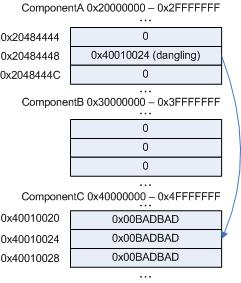
Suppose the pointer p is invalid, dangling, its value has been overwritten and this happened because of some bug. Being invalid that pointer can point to a valid memory location nevertheless and the value it points to most likely is non-zero. Therefore the body of the “if” statement will be executed. Suppose it always happens when you run the program and every time you execute it the value of the pointer happens to be the same. Here is the picture illustrating the point:

The pointer value 0×40010024 due to some reason always points to the value 0×00BADBAD. Although in the correct program the pointer itself should have had a completely different value and pointed to 0×1, for example, we see that dereferencing its current invalid value doesn’t crash the process.

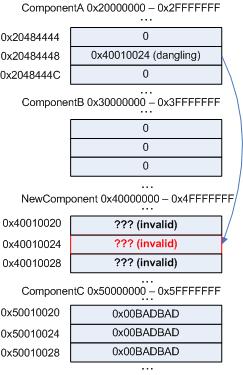
After installing the new software, NewComponent DLL is loaded at the address range previously occupied by ComponentC:

Now the address 0×40010024 happens to be completely invalid and we have access violation and the crash dump.

- Dmitry Vostokov @ DumpAnalysis.org -

Crash Dump Analysis Patterns (Part 9a)

Friday, February 9th, 2007

Next pattern is Deadlock. If you don’t know what “deadlock” is read Dumps for Dummes (Part 4). Deadlocks do not only happen with synchronization primitives like mutexes, events or more complex objects (built upon primitives) like critical sections or executive resources (ERESOURCE). They can happen from high level or systems perspective in inter-process or inter-component communication, for example, mutually waiting on messages: GUI window messages, LPC messages, RPC calls. This is a big pattern and I’m going to split it into several parts.

How can we see deadlocks in dumps? Let’s start with user dumps and critical sections.

First I would recommend to read the following excellent MSDN article to understand various members of CRITICAL_SECTION structure:

Break Free of Code Deadlocks in Critical Sections Under Windows

WinDbg !locks command will examine process critical section list and display all locked critical sections, lock count and thread id of current critical section owner. This is the output from a dump of hanging Windows print spooler process (spoolsv.exe):

0:000> !locks
CritSec NTDLL!LoaderLock+0 at 784B0348
LockCount          4
RecursionCount     1
OwningThread       624
EntryCount         6c3
ContentionCount    6c3
*** Locked

CritSec LOCALSPL!SpoolerSection+0 at 76AB8070
LockCount          3
RecursionCount     1
OwningThread       1c48
EntryCount         646
ContentionCount    646
*** Locked

If we look at threads #624 and #1c48 we could see them mutually waiting for each other:

  • TID#624 owns CritSec 784B0348 and is waiting for CritSec 76AB8070

  • TID#1c48 owns CritSec 76AB8070 and is waiting for CritSec 784B0348

0:000>~*kv

. 12 Id: bc0.624 Suspend: 1 Teb: 7ffd3000 Unfrozen
0000024c 00000000 00000000 NTDLL!ZwWaitForSingleObject+0xb
76ab8000 76a815ef 76ab8070 NTDLL!RtlpWaitForCriticalSection+0×9e
76ab8070 76a844f8 00cd1f38 NTDLL!RtlEnterCriticalSection+0×46
00cd1f38 76a8a1d7 00000000 LOCALSPL!EnterSplSem+0xb
00000000 00000000 00cd1f38 LOCALSPL!FindSpoolerByNameIncRef+0×1f
00000000 777f19bc 00000001 LOCALSPL!LocalGetPrinterDriverDirectory+0xe
00000000 777f19bc 00000001 spoolss!GetPrinterDriverDirectoryW+0×59
00000000 777f19bc 00000001 spoolsv!YGetPrinterDriverDirectory+0×27
00000000 777f19bc 00000001 WINSPOOL!GetPrinterDriverDirectoryW+0×7b
50000000 00000001 00000000 BRHLUI04+0×14ea
50002ea0 50000000 00000001 BRHLUI04!DllGetClassObject+0×1705
00000000 00000000 000cb570 NTDLL!LdrpRunInitializeRoutines+0×1df
000cc8f8 0288ea30 0288ea38 NTDLL!LdrpLoadDll+0×2e6
000cc8f8 0288ea30 0288ea38 NTDLL!LdrLoadDll+0×17)
000c1258 00000000 00000008 KERNEL32!LoadLibraryExW+0×231
000c150c 0288efd8 00000000 UNIDRVUI!PLoadCommonInfo+0×17e
000c150c 0288efd8 00000007 UNIDRVUI!DwDeviceCapabilities+0×1a
00070000 00071378 00000045 UNIDRVUI!DrvDeviceCapabilities+0×19

. 13 Id: bc0.1c48 Suspend: 1 Teb: 7ffd2000 Unfrozen
0000010c 00000000 00000000 NTDLL!ZwWaitForSingleObject+0xb
784b0301 78468d38 784b0348 NTDLL!RtlpWaitForCriticalSection+0×9e
784b0348 74fb4344 00000000 NTDLL!RtlEnterCriticalSection+0×46
74fb0000 02c0f2a8 00000000 NTDLL!LdrpGetProcedureAddress+0×122
74fb0000 02c0f2a8 00000000 NTDLL!LdrGetProcedureAddress+0×17
74fb0000 74fb4344 02c0f449 KERNEL32!GetProcAddress+0×41
017924b0 00000000 00000001 ws2_32!CheckForHookersOrChainers+0×1f
00000101 02c0f344 017924b0 ws2_32!WSAStartup+0×10f
00cdf79c 02c0f4f4 76a8c9bc LOCALSPL!GetDNSMachineName+0×1e
00000000 76a8c9bc 780276a2 LOCALSPL!GetPrinterUrl+0×2c
0176f570 ffffffff 01000000 LOCALSPL!UpdateDsSpoolerKey+0×322
0176f570 76a8c9bc 01792b90 LOCALSPL!RecreateDsKey+0×50
00000000 00000002 01792b90 LOCALSPL!SplAddPrinter+0×521
01791faa 0176a684 76a5cd34 WIN32SPL!InternalAddPrinterConnection+0×1b4
01791faa 02c0fa00 02c0fabc WIN32SPL!AddPrinterConnectionW+0×15
00076f1c 02c0fabc 01006873 spoolss!AddPrinterConnectionW+0×49
00076f1c 00000001 77107fb0 spoolsv!YAddPrinterConnection+0×17
00076f1c 02020202 00000001 spoolsv!RpcAddPrinterConnection+0xb
01006868 02c0fac0 00000001 rpcrt4!Invoke+0×30
00000000 00000000 000d22c8 rpcrt4!NdrStubCall2+0×655
000d22c8 00076fe0 000d22c8 rpcrt4!NdrServerCall2+0×17
010045fc 000d22c8 02c0fe0c rpcrt4!DispatchToStubInC+0×32
0000002b 00000000 02c0fe0c rpcrt4!RPC_INTERFACE::DispatchToStubWorker+0×100
000d22c8 00000000 02c0fe0c rpcrt4!RPC_INTERFACE::DispatchToStub+0×5e
000d3210 00076608 813b0013 rpcrt4!LRPC_SCALL::DealWithRequestMessage+0×1dd
000d21d0 02c0fe50 000d3210 rpcrt4!LRPC_ADDRESS::DealWithLRPCRequest+0×10c
770c9ad0 00076608 770cb6d8 rpcrt4!LRPC_ADDRESS::ReceiveLotsaCalls+0×229
00076608 770cb6d8 0288f9a8 rpcrt4!RecvLotsaCallsWrapper+0×9
00074a50 02c0ffec 77e7438b rpcrt4!BaseCachedThreadRoutine+0×11f
00076e68 770cb6d8 0288f9a8 rpcrt4!ThreadStartRoutine+0×18
770d1c54 00076e68 00000000 KERNEL32!BaseThreadStart+0×52

This analysis looks pretty simple and easy. What about kernel and complete memory dumps? Of course we cannot see user space critical sections in kernel memory dumps but we can see them in complete memory dumps after switching to appropriate process context and using !ntsdexts.locks. This can be done via simple script adapted from debugger.chm: Deadlocks and Critical Sections

Why it is so easy to see deadlocks when critical sections are involved? Because their structures have a member that records their owner. So it is very easy to map them to corresponding threads. The same is with kernel ERESOURCE synchronization objects (we will see them in the next part). Other objects do not have an owner, for example, in case of events it is not so easy to find an owner just by looking at an event object. You need to examine thread call stacks, other structures or have access to source code.

- Dmitry Vostokov @ DumpAnalysis.org -
Crash Dump Analysis Patterns (Part 8)

Friday, February 2nd, 2007

Today I will talk about another pattern occurring frequently and I call it Hidden Exception. You run !analyze -v command and you don’t see an exception or you see only a breakpoint hit. In this case manual analysis is required. This happens sometimes because of another pattern: Multiple Exceptions. In other cases an exception happens and it is handled by an exception handler dismissing it and a process continues execution slowly accumulating corruption inside its data leading to a new crash or hang. Sometimes you see a process hanging during its termination like the case I present here.

We have a process dump with only one thread:

0:000> kv
ChildEBP RetAddr
0096fcdc 7c822124 ntdll!KiFastSystemCallRet
0096fce0 77e6baa8 ntdll!NtWaitForSingleObject+0xc
0096fd50 77e6ba12 kernel32!WaitForSingleObjectEx+0xac
0096fd64 67f016ce kernel32!WaitForSingleObject+0x12
0096fd78 7c82257a component!DllInitialize+0xc2
0096fd98 7c8118b0 ntdll!LdrpCallInitRoutine+0x14
0096fe34 77e52fea ntdll!LdrShutdownProcess+0x130
0096ff20 77e5304d kernel32!_ExitProcess+0x43
0096ff34 77bcade4 kernel32!ExitProcess+0x14
0096ff40 77bcaefb msvcrt!__crtExitProcess+0x32
0096ff70 77bcaf6d msvcrt!_cinit+0xd2
0096ff84 77bcb555 msvcrt!_exit+0x11
0096ffb8 77e66063 msvcrt!_endthreadex+0xc8
0096ffec 00000000 kernel32!BaseThreadStart+0x34

We can look at its raw stack and try to find the following address:

KiUserExceptionDispatcher

This function calls RtlDispatchException:

0:000> !teb
TEB at 7ffdc000
    ExceptionList:        0096fd40
    StackBase:            00970000
    StackLimit:           0096a000
    SubSystemTib:         00000000
    FiberData:            00001e00
    ArbitraryUserPointer: 00000000
    Self:                 7ffdc000
    EnvironmentPointer:   00000000
    ClientId:             00000858 . 000008c0
    RpcHandle:            00000000
    Tls Storage:          00000000
    PEB Address:          7ffdd000
    LastErrorValue:       0
    LastStatusValue:      c0000135
    Count Owned Locks:    0
    HardErrorMode:        0

0:000>dds 0096a000 00970000
...
...
...
0096c770  7c8140cc ntdll!RtlDispatchException+0x91
0096c774  0096c808
0096c778  0096ffa8
0096c77c  0096c824
0096c780  0096c7e4
0096c784  77bc6c74 msvcrt!_except_handler3
0096c788  00000000
0096c78c  0096c808
0096c790  01030064
0096c794  00000000
0096c798  00000000
0096c79c  00000000
0096c7a0  00000000
0096c7a4  00000000
0096c7a8  00000000
0096c7ac  00000000
0096c7b0  00000000
0096c7b4  00000000
0096c7b8  00000000
0096c7bc  00000000
0096c7c0  00000000
0096c7c4  00000000
0096c7c8  00000000
0096c7cc  00000000
0096c7d0  00000000
0096c7d4  00000000
0096c7d8  00000000
0096c7dc  00000000
0096c7e0  00000000
0096c7e4  00000000
0096c7e8  00970000
0096c7ec  00000000
0096c7f0  0096caf0
0096c7f4  7c82ecc6 ntdll!KiUserExceptionDispatcher+0xe
0096c7f8  0096c000
0096c7fc  0096c824 ; a pointer to an exception context
0096c800  0096c808
0096c804  0096c824
0096c808  c0000005
0096c80c  00000000
0096c810  00000000
0096c814  77bd8df3 msvcrt!wcschr+0×15
0096c818  00000002
0096c81c  00000000
0096c820  01031000
0096c824  0001003f
0096c828  00000000
0096c82c  00000000
0096c830  00000000
0096c834  00000000
0096c838  00000000
0096c83c  00000000

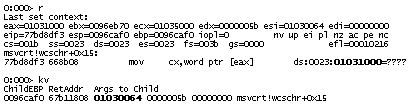
A second parameter to both functions is a pointer to a so called exception context (processor state when an exception occurred). We can use .cxr command to change thread execution context to what it was at the time of exception:

After changing the context we can see thread stack prior to that exception:

0:000> kL
ChildEBP RetAddr
0096caf0 67b11808 msvcrt!wcschr+0×15
0096cb10 67b1194d component2!function1+0×50
0096cb24 67b11afb component2!function2+0×1a
0096eb5c 67b11e10 component2!function3+0×39
0096ed94 67b14426 component2!function4+0×155
0096fdc0 67b164b7 component2!function5+0×3b
0096fdcc 00402831 component2!function6+0×5b
0096feec 0096ff14 program!function+0×1d1
0096ffec 00000000 kernel32!BaseThreadStart+0×34

We see that the exception happened when component2 was searching a Unicode string for a character (wcschr). Most likely the string was not zero terminated:

To summarize and show you the common exception handling path in user space here is another thread stack taken from a different dump:

ntdll!KiFastSystemCallRet
ntdll!NtWaitForMultipleObjects+0xc
kernel32!UnhandledExceptionFilter+0×746
kernel32!_except_handler3+0×61
ntdll!ExecuteHandler2+0×26
ntdll!ExecuteHandler+0×24
ntdll!RtlDispatchException+0×91
ntdll!KiUserExceptionDispatcher+0xe
ntdll!RtlpCoalesceFreeBlocks+0×36e ; crash is here
ntdll!RtlFreeHeap+0×38e
msvcrt!free+0xc3
msvcrt!_freefls+0×124
msvcrt!_freeptd+0×27
msvcrt!__CRTDLL_INIT+0×1da
ntdll!LdrpCallInitRoutine+0×14
ntdll!LdrShutdownThread+0xd2
kernel32!ExitThread+0×2f
kernel32!BaseThreadStart+0×39

When RtlpCoalesceFreeBlocks (this function compacts heap and it is called from RtlFreeHeap) does an illegal memory access then this exception is first processed in kernel and because it happened in user space and mode the execution is transferred to RtlDispatchException which searches for exception handler and in this case there is a default one installed: UnhandledExceptionFilter.

If you see this function on call stack you can also manually get an exception context and a thread stack leading to it like in this example below taken from other dump:

The most likely reason of this crash is an instance of Dynamic Memory Corruption pattern - heap corruption.

- Dmitry Vostokov -

Crash Dump Analysis Patterns (Part 7)

Wednesday, January 24th, 2007

We have to live with tools that produce inconsistent dumps. For example, LiveKd.exe from sysinternals.com which is widely used by Microsoft and Citrix technical support to save complete memory dumps without server reboot. I even wrote an article for Citrix customers:

Using LiveKD to Save a Complete Memory Dump for Session or System Hangs

If you read it you will find an important note which is reproduced here:

LiveKd.exe-generated dumps are always inconsistent and cannot be a reliable source for certain types of dump analysis, for example, looking at resource contention. This is because it takes a considerable amount of time to save a dump on a live system and the system is being changed during that process. The instantaneous traditional CrashOnCtrlScroll method or SystemDump tool always save a reliable and consistent dump because the system is frozen first (any process or kernel activity is disabled), then a dump is saved to a page file.

If you look at such inconsistent dump you will find that many useful kernel structures such as ERESOURCE list (!locks) are broken and even circular referenced and therefore WinDbg commands display “strange” output.

Easy and painless (for customers) dump generation using such “Live” tools means that it is widely used and we have to analyze dumps saved by these tools and sent from customers. This brings us to the next crash dump analysis pattern called “Inconsistent Dump”.

If you have such dump you should look at it in order to extract maximum useful information that helps in identifying the root cause or give you further directions. Not all information is inconsistent in such dumps. For example, drivers, processes, thread stacks and IRP lists can give you some clues about activities. Even some information not visible in consistent dump can surface in inconsistent dump (subject to commands used).

For example, I had a LiveKd dump where I looked at process stacks by running the script I created earlier:

Yet another WinDbg script

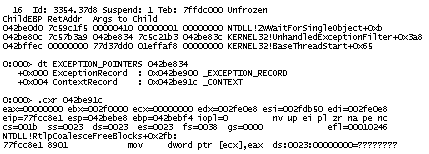
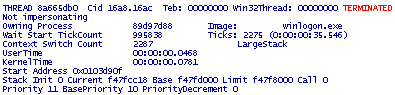
and I found that for some processes in addition to their own threads the script lists additional terminated threads that belong to a completely different process (have never seen it in consistent dump):

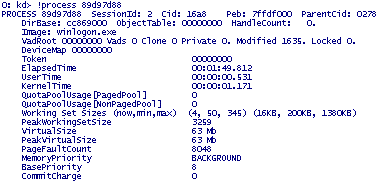
Process 89d97d88 is not visible in the active process list (script mentioned above or !process 0 0 command). However, if we feed this memory address to !process command (or explore it as _EPROCESS structure, dt command) we get its contents:


What might have happened there: terminated process 89d97d88 was excluded from active processes list but its structure was left in memory and due to inconsistency thread lists were also broken and therefore terminated threads surfaced when listing other processes and their threads. 

I suspected here that winlogon.exe died in session 2 and left empty desktop window which a customer saw and complained about. The only left and visible process from session 2 was csrss.exe. The conclusion was to enable NTSD as a default postmortem debugger to catch winlogon.exe crash when it happens next time.

- Dmitry Vostokov @ DumpAnalysis.org -
Crash Dump Analysis Patterns (Part 6)

Monday, December 18th, 2006

Now it’s time to ”introduce” Invalid Pointer pattern. It’s just a number saved in a register or in a memory location and when we try to interpret it as a memory address itself and follow it (dereference) to fetch memory contents (value) it points to, OS with the help of hardware tells us that the address doesn’t exist or inaccessible due to security restrictions. The following two slides from my old presentation depict the concept of a pointer:

Pointer definition
Pointers depicted

In Windows you have your process memory partitioned into two big regions: kernel space and process space. Space partition is a different concept than execution mode (kernel or user, ring 0 or ring 3) which is a processor state. Code executing in kernel mode (a driver or OS, for example) can access memory that belongs to user space.

Based on this we can make distinction between invalid pointers containing kernel space addresses (start from 0×80000000 on x86, no /3Gb switch) and invalid pointers containing user space addresses (below 0×7FFFFFFF).

On Windows x64 user space addresses are below 0×0000070000000000 and kernel space addresses start from 0xFFFF080000000000.

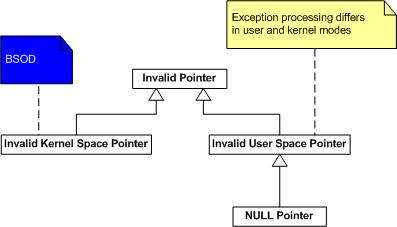
When you dereference invalid kernel space address you get bugcheck immediately:

UNEXPECTED_KERNEL_MODE_TRAP (7f)

PAGE_FAULT_IN_NONPAGED_AREA (50)

There is no way you can catch it in your code (by using SEH).

However when you dereference user space address the course of action depends on whether your processor is in kernel mode (ring 0) or in user mode (ring 3). In any mode you can catch the exception (by using appropriate SEH handler) or leave this to the operating system or debugger. If there was no component willing to process the exception when it happened in user mode you get your process crash and in kernel mode you get bugchecks:

SYSTEM_THREAD_EXCEPTION_NOT_HANDLED (7e) 

KERNEL_MODE_EXCEPTION_NOT_HANDLED (8e)

I summarized all of this on the following diagram: 

NULL pointer is a special class of user space pointers. Usually its value is in the range of 0×00000000 - 0×0000FFFF. You can see them used in instructions like

mov   esi, dword ptr [ecx+0×10] 

and ecx value is 0×00000000 so you try to access the value located at 0×00000010 memory address.

When you get a crash dump and you see an invalid pointer pattern the next step is to interpret the pointer value which should help in understanding possible steps that led to the crash. Pointer value interpretation is the subject of the next part.

- Dmitry Vostokov @ DumpAnalysis.org -
Crash Dump Analysis Patterns (Part 5)

Friday, December 15th, 2006

The next pattern I would like to talk about is Optimized Code. If you have such cases you should not trust your crash dump analysis tools like WinDbg. Always suspect that compiler generated code might have been optimized if you see any suspicious or strange behaviour of your tool. Let’s consider this fragment of stack:

Args to Child
77e44c24 000001ac 00000000 ntdll!KiFastSystemCallRet
000001ac 00000000 00000000 ntdll!NtFsControlFile+0xc
00000034 00000bb8 0013e3f4 kernel32!WaitNamedPipeW+0x2c3
0016fc60 00000000 67c14804 MyModule!PipeCreate+0x48

3rd-party function PipeCreate from MyModule opens a named pipe and its first parameter (0016fc60) points to a pipe name L”\\.\pipe\MyPipe”. Inside the source code it calls Win32 API function WaitNamedPipeW (to wait for the pipe to be available for connection) and passes the same pipe name. But we see that  the first parameter to WaitNamedPipeW is 00000034 which cannot be the pointer to a valid Unicode string. And the program should have been crashed if 00000034 were a pointer value.

Everything becomes clear if we look at WaitNamedPipeW disassembly (comments are mine):

0:000> uf kernel32!WaitNamedPipeW
mov     edi,edi
push    ebp
mov     ebp,esp
sub     esp,50h
push    dword ptr [ebp+8]  ; Use pipe name
lea     eax,[ebp-18h]
push    eax
call    dword ptr [kernel32!_imp__RtlCreateUnicodeString (77e411c8)]


call    dword ptr [kernel32!_imp__NtOpenFile (77e41014)]
cmp     dword ptr [ebp-4],edi
mov     esi,eax
jne     kernel32!WaitNamedPipeW+0×1d5 (77e93316)
cmp     esi,edi
jl      kernel32!WaitNamedPipeW+0×1ef (77e93331)
movzx   eax,word ptr [ebp-10h]
mov     ecx,dword ptr fs:[18h]
add     eax,0Eh
push    eax
push    dword ptr [kernel32!BaseDllTag (77ecd14c)]
mov     dword ptr [ebp+8],eax  ; reuse parameter slot

As we know [ebp+8] is the first function parameter in non-FPO calls:

Parameters and Local Variables

And we see it is reused because after we convert LPWSTR to UNICODE_STRING and call NtOpenFile to get a handle we no longer need our parameter slot and the compiler can reuse it to store other information.

There is another compiler optimization we should be aware of and it is called OMAP. It moves the code inside the code section and puts the most frequently accessed code fragments together. In that case if you type in WinDbg, for example, 

0:000> uf nt!someFunction

you get different code than if you type (assuming f4794100 is the address of the function you obtained from stack or disassembly)

0:000> uf f4794100

In conclusion the advice is to be alert and conscious during crash dump analysis and inspect any inconsistencies closer.

Happy debugging!

- Dmitry Vostokov @ DumpAnalysis.org -
Crash Dump Analysis Patterns (Part 4)

Friday, November 3rd, 2006

After looking at one dump today where all thread environment blocks were zeroed, import table corrupt and recalling some similar cases I encountered previously I came up with the next pattern: Lateral Damage.

When this problem happens you don’t have much choice and your first temptation is to apply Alien Component anti-pattern unless your module list is corrupt and you have manifestation of another common problem I will talk about next time: Corrupt Dump.

Anti-pattern is not always bad solution if complemented by subsequent verification and backed by experience. If you get damaged process and thread structures you can point to a suspicious component (supported by some evidence like raw stack analysis and educated guess) and request additional dumps in hope to get less damaged process space or see that component again. At the very end if removing it stabilizes the customer environment it proves you were right.

- Dmitry Vostokov @ DumpAnalysis.org -
Crash Dump Analysis Patterns (Part 3)

Wednesday, November 1st, 2006

Another pattern I observe frequently is False Positive Dump. We get dumps pointing in a wrong direction or not useful for analysis and this usually happens when wrong tool was selected or right one was not properly configured for capturing crash dumps. Here is one example I investigated in detail.

The customer experienced frequent spooler crashes. The dump was sent for investigation to find an offending component: usually it is a printer driver. WinDbg revealed the following exception thread stack (parameters are not shown here for readability):

KERNEL32!RaiseException+0x56
KERNEL32!OutputDebugStringA+0x55
KERNEL32!OutputDebugStringW+0x39
HPZUI041!ConvertTicket+0x3c90
HPZUI041!DllGetClassObject+0x5d9b
HPZUI041!DllGetClassObject+0x11bb

The immediate response is to point to HPZUI041.DLL but if we look at parameters to KERNEL32!OutputDebugStringA we would see that the string passed to it is a valid NULL-terminated string:

0:010> da 000d0040
000d0040  ".Lower DWORD of elapsed time = 3"
000d0060  "750000."

If we disassemble OutputDebugStringA up to RaiseException call we would see:

0:010> u KERNEL32!OutputDebugStringA
KERNEL32!OutputDebugStringA+0x55
KERNEL32!OutputDebugStringA:
push    ebp
mov     ebp,esp
push    0FFFFFFFFh
push    offset KERNEL32!'string'+0x10
push    offset KERNEL32!_except_handler3
mov     eax,dword ptr fs:[00000000h]
push    eax
mov     dword ptr fs:[0],esp
push    ecx
push    ecx
sub     esp,228h
push    ebx
push    esi
push    edi
mov     dword ptr [ebp-18h],esp
and     dword ptr [ebp-4],0
mov     edx,dword ptr [ebp+8]
mov     edi,edx
or      ecx,0FFFFFFFFh
xor     eax,eax
repne scas byte ptr es:[edi]
not     ecx
mov     dword ptr [ebp-20h],ecx
mov     dword ptr [ebp-1Ch],edx
lea     eax,[ebp-20h]
push    eax
push    2
push    0
push    40010006h
call    KERNEL32!RaiseException

There is no jumps in the code prior to KERNEL32!RaiseException call and this means that raising exception was expected. Also MSDN documentation says:

“If the application has no debugger, the system debugger displays the string. If the application has no debugger and the system debugger is not active, OutputDebugString does nothing.”

So spoolsv.exe might have been monitored by a debugger which caught that exception and instead of dismissing it dumped the spooler process.

If we look at ‘analyze -v’ output we could see the following:

Comment: 'Userdump generated complete user-mode minidump
with Exception Monitor function on WS002E0O-01-MFP'
ERROR_CODE: (NTSTATUS) 0x40010006 -
Debugger printed exception on control C.

Now we see that debugger was User Mode Process Dumper you can download from Microsoft web site:

How to use the Userdump.exe tool to create a dump file 

If we download it, install it and write a small console program in Visual C++ to reproduce this crash:

#include "stdafx.h"
#include
int _tmain(int argc, _TCHAR* argv[])
{
    OutputDebugString(_T("Sample string"));
    return 0;
}

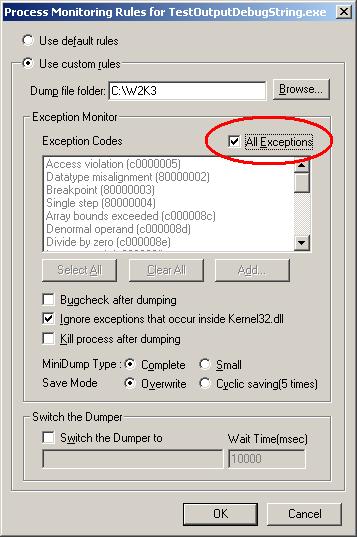
and if we compile it in Release mode and configure Process Dumper applet in Control Panel to include TestOutputDebugString.exe with the following properties:

and then run our program we would see Process Dumper catching KERNEL32!RaiseException and saving the dump.

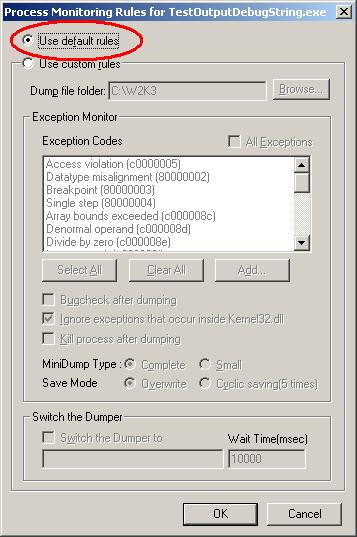
Even if we select to ignore exceptions that occur inside kernel32.dll this tool still dumps our process. Now we can see that the customer most probably enabled ‘All Exceptions’ check box too. What the customer should have done is to use default rules like on the picture below:

Or select exception codes manually. In this case no dump is generated even if we manually select all of them. Just to check that the latter configuration still catches access violations we can add a line of code dereferencing NULL pointer and Process Dumper will catch it and save the dump.

Conclusion: the customer should have used NTSD as a default postmortem debugger from the start. Then if crash happened we would have seen the real offending component or could have applied other patterns and requested additional dumps.

- Dmitry Vostokov @ DumpAnalysis.org -
Crash Dump Analysis Patterns (Part 2)

Tuesday, October 31st, 2006

Another pattern I would like to discuss is Dynamic Memory Corruption (and its user and kernel variants called Heap Corruption and Pool Corruption). You might have already guessed it :-) It is so ubiquitous. And its manifestations are random and usually crashes happen far away from the original corruption point. In your user mode and space part of exception threads (don’t forget about Multiple Exceptions pattern) you would see something like this:

ntdll!RtlpCoalesceFreeBlocks+0x10c
ntdll!RtlFreeHeap+0x142
MSVCRT!free+0xda
componentA!xxx

or this

ntdll!RtlpCoalesceFreeBlocks+0x10c
ntdll!RtlpExtendHeap+0x1c1
ntdll!RtlAllocateHeap+0x3b6
componentA!xxx

or any similar variants and you need to know exact component that corrupted application heap (which usually is not the same as componentA.dll you see in crashed thread stack).

For this common recurrent problem we have a general solution: enable heap checking. This general solution has many variants applied in a specific context:

  • parameter value checking for heap functions

  • user space software heap checks before or after certain checkpoints (like “malloc”/”new” and/or “free”/”delete” calls): usually implemented by checking various fill patterns, etc.

  • hardware/OS supported heap checks (like using guard and nonaccessible pages to trap buffer overruns)

The latter variant is the mostly used according to my experience and mainly due to the fact that most heap corruptions originate from buffer overflows. And it is easier to rely on instant MMU support than on checking fill patterns. Here is the article from Citrix support web site describing how you can enable full page heap. It uses specific process as an example: Citrix Independent Management Architecture (IMA) service but you can substitute any application name you are interested in debugging:

How to enable full page heap

and another article:

How to check in a user dump that full page heap was enabled

The following Microsoft article discusses various heap related checks:

How to use Pageheap.exe in Windows XP and Windows 2000

The Windows kernel analog to user mode and space heap corruption is called page and nonpaged pool corruption. If we consider Windows kernel pools as variants of heap then exactly the same techniques are applicable there, for example, the so called special pool enabled by Driver Verifier is implemented by nonaccessible pages. Refer to the following Microsoft article for further details:

How to use the special pool feature to isolate pool damage

- Dmitry Vostokov @ DumpAnalysis.org -
Crash Dump Analysis Patterns (Part 1)

Monday, October 30th, 2006

After doing crash dump analysis exclusively for more than 3 years I decided to organize my knowledge into a set of patterns (so to speak in a dump analysis pattern language and therefore try to facilitate its common vocabulary).

What is a pattern? It is a general solution you can apply in a specific context to a common recurrent problem.

There are many pattern and pattern languages in software engineering, for example, look at the following almanac that lists +700 patterns:

The Pattern Almanac 2000

and the following link is very useful:

Patterns Library

The first pattern I’m going to introduce today is Multiple Exceptions. This pattern captures the known fact that there could be as many exceptions (”crashes”) as many threads in a process. The following UML diagram depicts the relationship between Process, Thread and Exception entities:

Every process in Windows has at least one execution thread so there could be at least one exception per thread (like invalid memory reference) if things go wrong. There could be second exception in that thread if exception handling code experiences another exception or the first exception was handled and you have another one and so on.

So what is the general solution to that common problem when an application or service crashes and you have a crash dump file (common recurrent problem) from a customer (specific context)? The general solution is to look at all threads and their stacks and do not rely on what tools say.

Here is a concrete example from one of the dumps I got today:

Internet Explorer crashed and I opened it in WinDbg and ran ‘!analyze -v’ command. This is what I got in my WinDbg output:

ExceptionAddress: 7c822583 (ntdll!DbgBreakPoint)
   ExceptionCode: 80000003 (Break instruction exception)
  ExceptionFlags: 00000000
NumberParameters: 3
   Parameter[0]: 00000000
   Parameter[1]: 8fb834b8
   Parameter[2]: 00000003

Break instruction, you might think, shows that the dump was taken manually from the running application and there was no crash - the customer sent the wrong dump or misunderstood instructions. However I looked at all threads and noticed the following two stacks (threads 15 and 16):

0:016>~*kL
...
15  Id: 1734.8f4 Suspend: 1 Teb: 7ffab000 Unfrozen
ntdll!KiFastSystemCallRet
ntdll!NtRaiseHardError+0xc
kernel32!UnhandledExceptionFilter+0x54b
kernel32!BaseThreadStart+0x4a
kernel32!_except_handler3+0x61
ntdll!ExecuteHandler2+0x26
ntdll!ExecuteHandler+0x24
ntdll!KiUserExceptionDispatcher+0xe
componentA!xxx
componentB!xxx
mshtml!xxx
kernel32!BaseThreadStart+0x34

# 16  Id: 1734.11a4 Suspend: 1 Teb: 7ffaa000 Unfrozen
ntdll!DbgBreakPoint
ntdll!DbgUiRemoteBreakin+0x36

So we see here that the real crash happened in componentA.dll and componentB.dll or mshtml.dll might have influenced that. Why this happened? The customer might have dumped Internet Explorer manually while it was displaying an exception message box. The following reference says that ZwRaiseHardError displays a message box containing an error message:

Windows NT/2000 Native API Reference

Buy from Amazon

Or perhaps something else happened. Many cases where we see multiple thread exceptions in one process dump happened because crashed threads displayed message boxes like Visual C++ debug message box and preventing that process from termination. In our dump under discussion WinDbg automatic analysis command recognized only the last breakpoint exception (shown as # 16). In conclusion we shouldn’t rely on ”automatic analysis” often anyway and probably should write our own extension to list possible multiple exceptions (based on some heuristics I will talk about later).

- Dmitry Vostokov @ DumpAnalysis.org -