Crash Dumps for Dummies (Part 4)
In the previous Dumps for Dummies (Part 3) I tried to explain the nature of crashes. Another category of problems happens very often and we also need a dump for analysis: hangs. There is some confusion exists in understanding the difference between these two categories: crash and hang. Although sometimes a hang is a direct consequence of a crash most of the time hangs happen independently. They also manifest themselves differently. Let’s look at application (process) crashes and hangs first. When a crash happens an application (process) often disappears. When hang happens an application (process) is still in memory: you can see it in Task Manager, for example, but it doesn’t respond to user commands or to any other requests like pinging a TCP/IP port. If we have a crash in OS then the most visible manifestation is blue screen and/or reboot. If we have a hang then everything freezes.
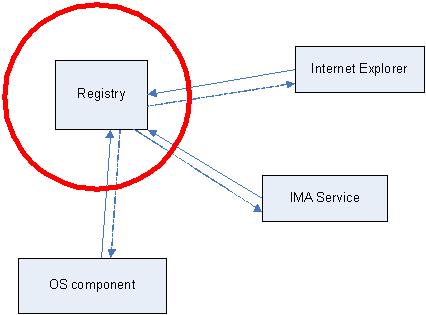
Application or system hang happens because from high level view of the interaction between application or OS components (modules) is done via messages. One component sends a message to another and waits for a response. Some components are critical, for example, registry. The following hand-made picture depicts very common system hang situations when the register component stops responding. Then every running application (process) stops responding if its execution path depends on registry access.
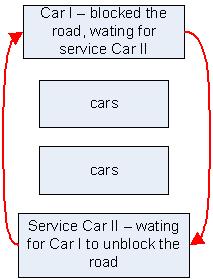
The very common reason for hang is so called deadlock when two running applications (their execution paths, threads) are waiting for each other. Here is the analogy with a blocked road:
In order to see what’s inside the process or OS which caused a hang we need a dump. Usually this dump is called a crash dump too because in order to get it the usual method is to make some sort of a trap which causes an application or OS to crash and to save the dump. I personally prefer to call these dumps just memory dumps to avoid confusion.
How can you get a memory dump if your application or service hangs?
How can you get a memory dump if your system hangs?
For most system hangs choosing Kernel memory dump option in Control Panel\System\Advanced\Startup and Recovery applet is sufficient. Kernel memory dumps are smaller and less susceptible to corruption or truncation due to small page file size. If you discover that you need to peer inside running user applications then you can always ask for another Complete memory dump when the problem happens again.
- Dmitry Vostokov @ DumpAnalysis.org -
June 23rd, 2009 at 4:39 pm
[…] Hangs explained, The difference between crashes and hangs […]
June 24th, 2010 at 11:28 am
[…] Dictionary of Debugging: Crash - posts that explain the difference between crashes and hangs: http://www.dumpanalysis.org/blog/index.php/2006/11/19/dumps-for-dummies-part-4/ and […]