Archive for the ‘Crash Dump Patterns’ Category

Crash Dump Analysis Patterns (Part 25)

Monday, September 10th, 2007

The most important pattern that is used for problem identification and resolution is Stack Trace. Consider the following fragment of !analyze -v output from w3wp.exe crash dump:

STACK_TEXT:
WARNING: Frame IP not in any known module. Following frames may be wrong.
1824f90c 5a39f97e 01057b48 01057bd0 5a3215b4 0x0
1824fa50 5a32cf7c 01057b48 00000000 79e651c0 w3core!ISAPI_REQUEST::SendResponseHeaders+0x5d
1824fa78 5a3218ad 01057bd0 79e651c0 79e64d9c w3isapi!SSFSendResponseHeader+0xe0
1824fae8 79e76127 01057bd0 00000003 79e651c0 w3isapi!ServerSupportFunction+0x351
1824fb0c 79e763a3 80000411 00000000 00000000 aspnet_isapi!HttpCompletion::ReportHttpError+0x3a
1824fd50 79e761c3 34df6cf8 79e8e42f 79e8e442 aspnet_isapi!HttpCompletion::ProcessRequestInManagedCode+0x1d1
1824fd5c 79e8e442 34df6cf8 00000000 00000000 aspnet_isapi!HttpCompletion::ProcessCompletion+0x24
1824fd70 791d6211 34df6cf8 18e60110 793ee0d8 aspnet_isapi!CorThreadPoolWorkitemCallback+0x13
1824fd84 791d616a 18e60110 00000000 791d60fa mscorsvr!ThreadpoolMgr::ExecuteWorkRequest+0x19
1824fda4 791fe95c 00000000 8083d5c7 00000000 mscorsvr!ThreadpoolMgr::WorkerThreadStart+0x129
1824ffb8 77e64829 17bb9c18 00000000 00000000 mscorsvr!ThreadpoolMgr::intermediateThreadProc+0x44
1824ffec 00000000 791fe91b 17bb9c18 00000000 kernel32!BaseThreadStart+0x34

Ignoring the first 5 numeric columns gives us the following trace:

0x0
w3core!ISAPI_REQUEST::SendResponseHeaders+0x5d
w3isapi!SSFSendResponseHeader+0xe0
w3isapi!ServerSupportFunction+0x351
aspnet_isapi!HttpCompletion::ReportHttpError+0x3a
aspnet_isapi!HttpCompletion::ProcessRequestInManagedCode+0x1d1
aspnet_isapi!HttpCompletion::ProcessCompletion+0x24
aspnet_isapi!CorThreadPoolWorkitemCallback+0x13
mscorsvr!ThreadpoolMgr::ExecuteWorkRequest+0x19
mscorsvr!ThreadpoolMgr::WorkerThreadStart+0x129
mscorsvr!ThreadpoolMgr::intermediateThreadProc+0x44
kernel32!BaseThreadStart+0x34

or in general we have something like this:

moduleA!functionX+offsetN
moduleB!functionY+offsetM
...
...
...

Sometimes function names are not available or offsets are very big like 0×2380. If this is the case then we probably don’t have symbol files for moduleA and moduleB:

moduleA+offsetN
moduleB+offsetM
...
...
...

Usually there is some kind of a database of previous issues we can use to match moduleA!functionX+offsetN against. If there is no such match we can try functionX+offsetN, moduleA!functionX or just functionX. If there is no such match again we can try the next signature, moduleB!functionY+offsetM, and moduleB!functionY, etc. Usually, the further down the trace the less useful the signature is for problem resolution. For example, mscorsvr!ThreadpoolMgr::WorkerThreadStart+0x129 will probably match many issues because this signature is common for many ASP.NET applications.

If there is no match in internal databases we can try Google. For our example, Google search for SendResponseHeaders+0x5d gives the following search results:

Browsing search results reveals the following discussion:

http://groups.google.com/group/microsoft.public.inetserver.iis/ browse_frm/thread/34bc2be635b26531?tvc=1 

which can be found directly by searching Google groups:


Another example from BSOD complete memory dump. Analysis command has the following output (stripped for clarity):

MODE_EXCEPTION_NOT_HANDLED (1e)
This is a very common bugcheck. Usually the exception address pinpoints the driver/function that caused the problem. Always note this address as well as the link date of the driver/image that contains this address.
Arguments:
Arg1: c0000005, The exception code that was not handled
Arg2: bff90ca3, The address that the exception occurred at
Arg3: 00000000, Parameter 0 of the exception
Arg4: 00000000, Parameter 1 of the exception

TRAP_FRAME: bdf80834 -- (.trap ffffffffbdf80834)
ErrCode = 00000000
eax=00000000 ebx=bdf80c34 ecx=89031870 edx=88096928 esi=88096928 edi=8905e7f0
eip=bff90ca3 esp=bdf808a8 ebp=bdf80a44 iopl=0 nv up ei ng nz na po nc
cs=0008 ss=0010 ds=0023 es=0023 fs=0030 gs=0000 efl=00010282
tsmlvsa+0xfca3:
bff90ca3 8b08 mov ecx,dword ptr [eax] ds:0023:00000000=????????
Resetting default scope

STACK_TEXT:
bdf807c4 80467a15 bdf807e0 00000000 bdf80834 nt!KiDispatchException+0x30e
bdf8082c 804679c6 00000000 bdf80860 804d9f69 nt!CommonDispatchException+0x4d
bdf80838 804d9f69 00000000 00000005 e56c6946 nt!KiUnexpectedInterruptTail+0x207
00000000 00000000 00000000 00000000 00000000 nt!ObpAllocateObject+0xe1

Because the crash point tsmlvsa+0xfca3 is not on the stack trace we use .trap command:

1: kd> .trap ffffffffbdf80834
ErrCode = 00000000
eax=00000000 ebx=bdf80c34 ecx=89031870 edx=88096928 esi=88096928 edi=8905e7f0
eip=bff90ca3 esp=bdf808a8 ebp=bdf80a44 iopl=0 nv up ei ng nz na po nc
cs=0008 ss=0010 ds=0023 es=0023 fs=0030 gs=0000 efl=00010282
tsmlvsa+0xfca3:
bff90ca3 8b08 mov ecx,dword ptr [eax] ds:0023:00000000=????????

1: kd> k
*** Stack trace for last set context - .thread/.cxr resets it
ChildEBP RetAddr
WARNING: Stack unwind information not available. Following frames may be wrong.
00000000 bdf80afc tsmlvsa+0xfca3
89080c00 00000040 nt!ObpLookupObjectName+0x504
00000000 00000001 nt!ObOpenObjectByName+0xc5
c0100080 0012b8d8 nt!IopCreateFile+0x407
c0100080 0012b8d8 nt!IoCreateFile+0x36
c0100080 0012b8d8 nt!NtCreateFile+0x2e
c0100080 0012b8d8 nt!KiSystemService+0xc9
c0100080 0012b8d8 ntdll!NtCreateFile+0xb
c0000000 00000000 KERNEL32!CreateFileW+0x343

1: kd> lmv m tsmlvsa
bff81000 bff987c0 tsmlvsa (no symbols)
Loaded symbol image file: tsmlvsa.sys
Image path: tsmlvsa.sys
Image name: tsmlvsa.sys
Timestamp: Thu Mar 18 06:18:51 2004 (40593F4B)
CheckSum: 0002D102
ImageSize: 000177C0
Translations: 0000.04b0 0000.04e0 0409.04b0 0409.04e0

Google search for tsmlvsa+0xfca3 fails but if we search just for tsmlvsa we get the first link towards problem resolution:

http://www-1.ibm.com/support/docview.wss?uid=swg1IC40964

- Dmitry Vostokov @ DumpAnalysis.org -

Crash Dump Analysis Patterns (Part 24)

Thursday, August 30th, 2007

Raw stack dumps can be useful for finding any suspicious modules that might have caused the problem. For example, it is common for some programs to install hooks to monitor GUI changes, intercept window messages to provide value added services on top of the existing applications. These hooks are implemented as DLLs. Another use would be to examine raw stack data for printer drivers that caused problems before. The fact that these modules had been loaded doesn’t mean that they were used. If we find references to their code it would mean that they might have been used.

However when looking at raw stack dump with symbol information we should be aware of Coincidental Symbolic Information pattern. Here is the first example. Loading the crash dump and displaying the problem thread stack shows the following reference:

...
...
...
00b1ed00  0063006f
00b1ed04  006d0075
00b1ed08  006e0065
00b1ed0c  00200074
00b1ed10  006f004c
00b1ed14  00640061
00b1ed18  00720065
00b1ed1c  005b0020
00b1ed20  00500055
00b1ed24  003a0044
00b1ed28  00430050 Application!Array::operator=+0x2f035
00b1ed2c  0035004c
00b1ed30  005d0063
00b1ed34  00630000
00b1ed38  0000005d
...
...
...

Applying symbols gives us more meaningful name:

...
...
...
00b1ed00  0063006f
00b1ed04  006d0075
00b1ed08  006e0065
00b1ed0c  00200074
00b1ed10  006f004c
00b1ed14  00640061
00b1ed18  00720065
00b1ed1c  005b0020
00b1ed20  00500055
00b1ed24  003a0044
00b1ed28  00430050 Application!Print::DocumentLoad+0x5f
00b1ed2c  0035004c
00b1ed30  005d0063
00b1ed34  00630000
...
...
...

However this is the pure coincidence. The data pattern 00NN00NN clearly belongs to a Unicode string:

0:020> du 00b1ed00
00b1ed00  "ocument Loader [UPD:PCL5c]"

It just happens that 00430050 value can be interpreted as an address that falls into Application module address range and its code section:

0:020> lm
start    end        module name
00400000 0044d000   Application

In the second example, the crash dump is from some 3rd-party application called AppSql for which we don’t have PDB files. Also we know that myhook.dll is installed as a system wide hook and had some problems in the past. It is loaded into any address space but is not necessarily used. We want to see if there are traces of it on the problem thread stack. Dumping stack contents shows us the only one reference:

...
...
...
00118cb0  37302f38
00118cb4  00000000
00118cb8  10008e00 myhook!notify_me+0×22c
00118cbc  01400000
00118cc0  00118abc
00118cc4  06a129f0
00118cc8  00118d04
00118ccc  02bc57d0
00118cd0  04ba5d74
00118cd4  00118d30
00118cd8  0000001c
00118cdc  00000010
00118ce0  075922bc
00118ce4  04a732e0
00118ce8  075922bc
00118cec  04a732e0
00118cf0  0066a831 AppSql+0×26a831
00118cf4  04a732d0
00118cf8  02c43190
00118cfc  00000001
00118d00  0000001c
00118d04  00118d14
00118d08  0049e180 AppSql+0×9e180
00118d0c  02c43190
00118d10  0000001c
00118d14  00118d34


0:020> lm
start    end        module name
00400000 00ba8000   AppSql
...
...
...
10000000 100e0000   myhook

The address 10008e00 looks very “round” and it might be the set of bit flags and also, if we disassemble the code at this address backwards, we don’t see the usual call instruction that saved that address on the stack:

0:000> ub 10008e00
myhook!notify_me+0x211
10008de5 81c180000000    add     ecx,80h
10008deb 899578ffffff    mov     dword ptr [ebp-88h],edx
10008df1 89458c          mov     dword ptr [ebp-74h],eax
10008df4 894d98          mov     dword ptr [ebp-68h],ecx
10008df7 6a01            push    1
10008df9 8d45ec          lea     eax,[ebp-14h]
10008dfc 50              push    eax
10008dfd ff75e0          push    dword ptr [ebp-20h]

In contrast, the other two addresses are return addresses saved on the stack:

0:000> ub 0066a831
AppSql+0x26a81e:
0066a81e 8bfb            mov     edi,ebx
0066a820 f3a5            rep movs dword ptr es:[edi],dword ptr [esi]
0066a822 8bca            mov     ecx,edx
0066a824 83e103          and     ecx,3
0066a827 f3a4            rep movs byte ptr es:[edi],byte ptr [esi]
0066a829 8b00            mov     eax,dword ptr [eax]
0066a82b 50              push    eax
0066a82c e8affeffff      call    AppSql+0×26a6e0 (0066a6e0)

0:000> ub 0049e180
AppSql+0x9e16f:
0049e16f cc              int     3
0049e170 55              push    ebp
0049e171 8bec            mov     ebp,esp
0049e173 8b4510          mov     eax,dword ptr [ebp+10h]
0049e176 8b4d0c          mov     ecx,dword ptr [ebp+0Ch]
0049e179 50              push    eax
0049e17a 51              push    ecx
0049e17b e840c61c00      call    AppSql+0×26a7c0 (0066a7c0)

Therefore the appearance of myhook!notify_me+0×22c could be a coincidence unless it was a pointer to a function. However, if it was the function pointer address then it wouldn’t have pointed to the middle of the function call sequence that pushes arguments:

0:000> ub 10008e00
myhook!notify_me+0x211
10008de5 81c180000000    add     ecx,80h
10008deb 899578ffffff    mov     dword ptr [ebp-88h],edx
10008df1 89458c          mov     dword ptr [ebp-74h],eax
10008df4 894d98          mov     dword ptr [ebp-68h],ecx
10008df7 6a01            push    1
10008df9 8d45ec          lea     eax,[ebp-14h]
10008dfc 50              push    eax
10008dfd ff75e0          push    dword ptr [ebp-20h]
0:000> u 10008e00
myhook!notify_me+0×22c
10008e00 e82ff1ffff      call    myhook!copy_data (10007f34)
10008e05 8b8578ffffff    mov     eax,dword ptr [ebp-88h]
10008e0b 3945ac          cmp     dword ptr [ebp-54h],eax
10008e0e 731f            jae     myhook!notify_me+0×25b (10008e2f)
10008e10 8b4598          mov     eax,dword ptr [ebp-68h]
10008e13 0fbf00          movsx   eax,word ptr [eax]
10008e16 8945a8          mov     dword ptr [ebp-58h],eax
10008e19 8b45e0          mov     eax,dword ptr [ebp-20h]

Also, because we have source code and private symbols, we know that if it was a function pointer then it would have been myhook!notify_me address and not notify_me+0×22c address.

All this evidence supports the hypothesis that myhook occurrence on the problem stack is just the coincidence and should be ignored.

- Dmitry Vostokov @ DumpAnalysis.org -

Crash Dump Analysis Patterns (Part 23b)

Saturday, August 25th, 2007

In contrast to Double Free pattern in a user mode process heap double free in a kernel mode pool results in immediate bugcheck in order to identify the driver causing the problem (BAD_POOL_CALLER bugcheck with Arg1 == 7):

2: kd> !analyze -v
...
...
...
BAD_POOL_CALLER (c2)
The current thread is making a bad pool request. Typically this is at a bad IRQL level or double freeing the same allocation, etc.
Arguments:
Arg1: 00000007, Attempt to free pool which was already freed
Arg2: 0000121a, (reserved)
Arg3: 02140001, Memory contents of the pool block
Arg4: 89ba74f0, Address of the block of pool being deallocated

If we look at the block being deallocated we would see that it was marked as “Free” block: 

2: kd> !pool 89ba74f0
Pool page 89ba74f0 region is Nonpaged pool
 89ba7000 size:  270 previous size:    0  (Allocated)  Thre (Protected)
 89ba7270 size:    8 previous size:  270  (Free)       ....
 89ba7278 size:   18 previous size:    8  (Allocated)  ReEv
 89ba7290 size:   80 previous size:   18  (Allocated)  Mdl
 89ba7310 size:   80 previous size:   80  (Allocated)  Mdl
 89ba7390 size:   30 previous size:   80  (Allocated)  Vad
 89ba73c0 size:   98 previous size:   30  (Allocated)  File (Protected)
 89ba7458 size:    8 previous size:   98  (Free)       Wait
 89ba7460 size:   28 previous size:    8  (Allocated)  FSfm
 89ba74a0 size:   40 previous size:   18  (Allocated)  Ntfr
 89ba74e0 size:    8 previous size:   40  (Free)       File
*89ba74e8 size:   a0 previous size:    8  (Free )     *ABCD
  Owning component : Unknown (update pooltag.txt)
 89ba7588 size:   38 previous size:   a0  (Allocated)  Sema (Protected)
 89ba75c0 size:   38 previous size:   38  (Allocated)  Sema (Protected)
 89ba75f8 size:   10 previous size:   38  (Free)       Nbtl
 89ba7608 size:   98 previous size:   10  (Allocated)  File (Protected)
 89ba76a0 size:   28 previous size:   98  (Allocated)  Ntfn
 89ba76c8 size:   40 previous size:   28  (Allocated)  Ntfr
 89ba7708 size:   28 previous size:   40  (Allocated)  NtFs
 89ba7730 size:   40 previous size:   28  (Allocated)  Ntfr
 89ba7770 size:   40 previous size:   40  (Allocated)  Ntfr
 89ba7a10 size:  270 previous size:  260  (Allocated)  Thre (Protected)
 89ba7c80 size:   20 previous size:  270  (Allocated)  VadS
 89ba7ca0 size:   40 previous size:   20  (Allocated)  Ntfr
 89ba7ce0 size:   b0 previous size:   40  (Allocated)  Ussy
 89ba7d90 size:  270 previous size:   b0  (Free)       Thre

The pool tag is a 4 byte character sequence used to associate drivers with pool blocks and is useful to identify a driver allocated or freed a block. In our case the pool tag is ABCD and it is associated with the driver which previously freed the block. All known pool tags corresponding to kernel components can be found in pooltag.txt located in triage subfolder where you installed WinDbg. However our ABCD tag is not listed there. We can try to find the driver corresponding to ABCD tag using findstr CMD command:

C:\Windows\System32\drivers>findstr /m /l hABCD *.sys

The results of the search will help us to identify the driver which freed the block first. The driver which double freed the same block can be found from the call stack and it might be the same driver or a different driver:

2: kd> k
ChildEBP RetAddr
f78be910 8089c8f4 nt!KeBugCheckEx+0x1b
f78be978 8089c622 nt!ExFreePoolWithTag+0x477
f78be988 f503968b nt!ExFreePool+0xf
WARNING: Stack unwind information not available. Following frames may be wrong.
f78be990 f5024a6e driver+0×1768b
f78be9a0 f50249e7 driver+0×2a6e
f78be9a4 84b430e0 driver+0×29e7

Because we don’t have symbol files for driver.sys WinDbg warns us that it was unable to identify the correct stack trace and driver.sys might not have called ExFreePool or ExFreePoolWithTag. To verify that driver.sys called ExFreePool indeed we disassemble backwards the return address of ExFreePool: 

2: kd> ub f503968b
driver+0×1767b:
f503967b 90              nop
f503967c 90              nop
f503967d 90              nop
f503967e 90              nop
f503967f 90              nop
f5039680 8b442404        mov     eax,dword ptr [esp+4]
f5039684 50              push    eax
f5039685 ff15202302f5    call    dword ptr [driver+0×320 (f5022320)]

Finally we can get some info from the driver: 

2: kd> lmv m driver
start    end        module name
f5022000 f503e400   driver   (no symbols)
    Loaded symbol image file: driver.sys
    Image path: \SystemRoot\System32\drivers\driver.sys
    Image name: driver.sys
    Timestamp:  Tue Aug 12 11:32:16 2007

If the company name developed the driver is absent we can try techniques outlined in Unknown Component pattern.

If we have symbols it is very easy to identify the code as can be seen from this 64-bit dump:

BAD_POOL_CALLER (c2)
The current thread is making a bad pool request. Typically this is at a bad IRQL level or double freeing the same allocation, etc.
Arguments:
Arg1: 0000000000000007, Attempt to free pool which was already freed
Arg2: 000000000000121a, (reserved)
Arg3: 0000000000000080, Memory contents of the pool block
Arg4: fffffade6d54e270, Address of the block of pool being deallocated

0: kd> kL
fffffade`45517b08 fffff800`011ad905 nt!KeBugCheckEx
fffffade`45517b10 fffffade`5f5991ac nt!ExFreePoolWithTag+0x401
fffffade`45517bd0 fffffade`5f59a0b0 driver64!ProcessDataItem+0×198
fffffade`45517c70 fffffade`5f5885a6 driver64!OnDataArrival+0×2b4
fffffade`45517cd0 fffff800`01299cae driver64!ReaderThread+0×15a
fffffade`45517d70 fffff800`0102bbe6 nt!PspSystemThreadStartup+0×3e
fffffade`45517dd0 00000000`00000000 nt!KiStartSystemThread+0×16

- Dmitry Vostokov @ DumpAnalysis.org -

Crash Dump Analysis Patterns (Part 23a)

Sunday, August 19th, 2007

Double-free bugs lead to Dynamic Memory Corruption. The reason why Double Free deserves its own pattern name is the fact that either debug runtime libraries or even OS itself detect such bugs and save crash dumps immediately.

For some heap implementations double free doesn’t lead to an immediate heap corruption and subsequent crash. For example, if you allocate 3 blocks in a row and then free the middle one twice there will be no crash as the second free call is able to detect that the block was already freed and does nothing. The following program loops forever and never crashes:

#include "stdafx.h"
#include <windows.h>

int _tmain(int argc, _TCHAR* argv[])
{
  while (true)
  {
    puts("Allocate: p1");
    void *p1 = malloc(100);
    puts("Allocate: p2");
    void *p2 = malloc(100);
    puts("Allocate: p3");
    void *p3 = malloc(100);

    puts("Free: p2");
    free(p2);
    puts(”Double-Free: p2″);
    free(p2);

    puts(”Free: p1″);
    free(p1);
    puts(”Free: p3″);
    free(p3);

    Sleep(100);
  }

  return 0;
}

The output of the program: 

...
...
...
Allocate: p1
Allocate: p2
Allocate: p3
Free: p2
Double-Free: p2
Free: p1
Free: p3
Allocate: p1
Allocate: p2
Allocate: p3
Free: p2
Double-Free: p2
Free: p1
Free: p3
Allocate: p1
Allocate: p2
Allocate: p3
Free: p2
Double-Free: p2
...
...
...

However if a free call triggered heap coalescence (adjacent free blocks form the bigger free block) then we have a heap corruption crash on the next double-free call because the coalescence triggered by the previous free call erased free block information:

#include "stdafx.h"
#include <windows.h>

int _tmain(int argc, _TCHAR* argv[])
{
  while (true)
  {
    puts("Allocate: p1");
    void *p1 = malloc(100);
    puts("Allocate: p2");
    void *p2 = malloc(100);
    puts("Allocate: p3");
    void *p3 = malloc(100);

    puts("Free: p3");
    free(p3);
    puts("Free: p1");
    free(p1);
    puts("Free: p2");
    free(p2);
    puts(”Double-Free: p2″);
    free(p2);

    Sleep(100);
  }

  return 0;
}

The output of the program:

Allocate: p1
Allocate: p2
Allocate: p3
Free: p3
Free: p1
Free: p2
Double-Free: p2
Crash!

If we open a crash dump we would see the following stack trace:

0:000> r
eax=00922130 ebx=00920000 ecx=10101010 edx=10101010 esi=00922128 edi=00921fc8
eip=76ee1ad5 esp=0012fd6c ebp=0012fd94 iopl=0 nv up ei pl zr na pe nc
cs=001b ss=0023 ds=0023 es=0023 fs=003b gs=0000 efl=00010246
ntdll!RtlpCoalesceFreeBlocks+0x6ef:
76ee1ad5 8b4904          mov     ecx,dword ptr [ecx+4] ds:0023:10101014=????????

0:000> kL
ChildEBP RetAddr
0012fd94 76ee1d37 ntdll!RtlpCoalesceFreeBlocks+0x6ef
0012fe8c 76ee1c21 ntdll!RtlpFreeHeap+0x1e2
0012fea8 758d7a7e ntdll!RtlFreeHeap+0x14e
0012febc 6cff4c39 kernel32!HeapFree+0x14
0012ff08 0040107b msvcr80!free+0xcd
0012ff5c 004011f1 DoubleFree!wmain+0x7b
0012ffa0 758d3833 DoubleFree!__tmainCRTStartup+0x10f
0012ffac 76eba9bd kernel32!BaseThreadInitThunk+0xe
0012ffec 00000000 ntdll!_RtlUserThreadStart+0x23

This is illustrated on the following picture where free calls result in heap coalescence and the subsequent double-free call corrupts the heap:

The problem here is that heap coalescence can be triggered some time after the double free so we need some solution to diagnose double-free bugs earlier, ideally at the first double-free call. For example, the following program crashes during the normal free operation long after the first double-free happened:

#include "stdafx.h"
#include <windows.h>

int _tmain(int argc, _TCHAR* argv[])
{
  while (true)
  {
    puts("Allocate: p1");
    void *p1 = malloc(100);
    puts("Allocate: p2");
    void *p2 = malloc(100);
    puts("Allocate: p3");
    void *p3 = malloc(100);

    puts("Free: p1");
    free(p1);
    puts("Free: p2");
    free(p2);
    puts(”Double-Free: p2″);
    free(p2);

    puts(”Double-Free: p3″);
    free(p3);

    Sleep(100);
  }

  return 0;
}

The output of the program:

Allocate: p1
Allocate: p2
Allocate: p3
Free: p1
Free: p2
Double-Free: p2
Free: p3
Allocate: p1
Allocate: p2
Allocate: p3
Free: p1
Free: p2
Double-Free: p2
Free: p3
Allocate: p1
Allocate: p2
Allocate: p3
Free: p1
Free: p2
Double-Free: p2
Free: p3
Allocate: p1
Allocate: p2
Allocate: p3
Free: p1
Free: p2
Double-Free: p2
Free: p3
Crash!

If we enable full page heap using gflags.exe from Debugging Tools for Windows the program crashes immediately on the double free call:

Allocate: p1
Allocate: p2
Allocate: p3
Free: p1
Free: p2
Double-Free: p2
Crash!

The crash dump shows the following stack trace:

0:000> kL
ChildEBP RetAddr
0012f810 71aa4ced ntdll!DbgBreakPoint+0x1
0012f834 71aa9fc2 verifier!VerifierStopMessage+0x1fd
0012f890 71aaa4da verifier!AVrfpDphReportCorruptedBlock+0x102
0012f8a4 71ab2c98 verifier!AVrfpDphCheckNormalHeapBlock+0x18a
0012f8b8 71ab2a0e verifier!_EH4_CallFilterFunc+0x12
0012f8e0 76ee1039 verifier!_except_handler4+0x8e
0012f904 76ee100b ntdll!ExecuteHandler2+0x26
0012f9ac 76ee0e97 ntdll!ExecuteHandler+0x24
0012f9ac 71aaa3ad ntdll!KiUserExceptionDispatcher+0xf
0012fcf0 71aaa920 verifier!AVrfpDphCheckNormalHeapBlock+0x5d
0012fd0c 71aa879b verifier!AVrfpDphNormalHeapFree+0x20
0012fd60 76f31c8f verifier!AVrfDebugPageHeapFree+0x1cb
0012fda8 76efd9fa ntdll!RtlDebugFreeHeap+0x2f
0012fe9c 76ee1c21 ntdll!RtlpFreeHeap+0x5f
0012feb8 758d7a7e ntdll!RtlFreeHeap+0x14e
0012fecc 6cff4c39 kernel32!HeapFree+0x14
0012ff18 0040105f msvcr80!free+0xcd
0012ff5c 004011f1 DoubleFree!wmain+0x5f
0012ffa0 758d3833 DoubleFree!__tmainCRTStartup+0x10f
0012ffac 76eba9bd kernel32!BaseThreadInitThunk+0xe

0:000> !gflag
Current NtGlobalFlag contents: 0x02000000
    hpa - Place heap allocations at ends of pages

If we enable heap free checking instead of page heap we get our crash on the first double free call immediately too:

Allocate: p1
Allocate: p2
Allocate: p3
Free: p1
Free: p2
Double-Free: p2
Crash!

The crash dump shows the following stack trace:

0:000> r
eax=feeefeee ebx=001b2040 ecx=001b0000 edx=001b2040 esi=d4476047 edi=001b2038
eip=76ee2086 esp=0012fe68 ebp=0012fe9c iopl=0 nv up ei ng nz na pe nc
cs=001b ss=0023 ds=0023 es=0023 fs=003b gs=0000 efl=00010286
ntdll!RtlpLowFragHeapFree+0x31:
76ee2086 8b4604          mov     eax,dword ptr [esi+4] ds:0023:d447604b=????????

0:000> kL
ChildEBP RetAddr
0012fe9c 76ee18c3 ntdll!RtlpLowFragHeapFree+0x31
0012feb0 758d7a7e ntdll!RtlFreeHeap+0x101
0012fec4 6cff4c39 kernel32!HeapFree+0x14
0012ff10 0040106d msvcr80!free+0xcd
0012ff5c 004011f1 DoubleFree!wmain+0x6d
0012ffa0 758d3833 DoubleFree!__tmainCRTStartup+0x10f
0012ffac 76eba9bd kernel32!BaseThreadInitThunk+0xe
0012ffec 00000000 ntdll!_RtlUserThreadStart+0x23

0:000> !gflag
Current NtGlobalFlag contents: 0x00000020
    hfc - Enable heap free checking

- Dmitry Vostokov @ DumpAnalysis.org -

Crash Dump Analysis Patterns (Part 20b)

Sunday, August 19th, 2007

Sometimes the process size constantly grows but there is no difference in the process heap size. In such cases we need to check whether the process uses Microsoft .NET runtime (CLR). If one of the loaded modules is mscorwks.dll or mscorsvr.dll then it is most likely. Then we should check CLR heap statistics.

In .NET world dynamically allocated objects are garbage collected (GC) and therefore simple allocate-and-forget memory leaks are not possible. To simulate that I created the following C# program:

using System;

namespace CLRHeapLeak
{
    class Leak
    {
        private byte[] m_data;


        public Leak()
        {
            m_data = new byte[1024];
        }
    }

    class Program
    {
        static void Main(string[] args)
        {
            Leak leak = new Leak();

            while (true)
            {
                leak = new Leak();
                System.Threading.Thread.Sleep(100);
            }
        }
    }
}

If we run it the process size will never grow. GC thread will collect and free unreferenced Leak classes. This can be seen from inspecting memory dumps taken with userdump.exe after the start, 2, 6 and 12 minutes. The GC heap never grows higher than 1Mb and the number of CLRHeapLeak.Leak and System.Byte[] objects always fluctuates between 100 and 500. For example, on 12th minute we have the following statistics:

0:000> .loadby sos mscorwks

0:000> !eeheap -gc
Number of GC Heaps: 1
generation 0 starts at 0x0147160c
generation 1 starts at 0x0147100c
generation 2 starts at 0x01471000
ephemeral segment allocation context: (0x014dc53c, 0x014dd618)
 segment    begin allocated     size
004aedb8 790d7ae4  790f7064 0x0001f580(128384)
01470000 01471000  014dd618 0x0006c618(443928)
Large object heap starts at 0x02471000
 segment    begin allocated     size
02470000 02471000  02473250 0x00002250(8784)
Total Size   0x8dde8(581096)
------------------------------
GC Heap Size   0×8dde8(581096)

0:000> !dumpheap -stat
total 2901 objects
Statistics:
Count    TotalSize Class Name
    1           12 System.Security.Permissions.SecurityPermission
    1           24 System.OperatingSystem
    1           24 System.Version
    1           24 System.Reflection.Assembly
    1           28 System.SharedStatics
    1           36 System.Int64[]
    1           40 System.AppDomainSetup
    3           60 System.RuntimeType
    5           60 System.Object
    2           72 System.Security.PermissionSet
    1           72 System.ExecutionEngineException
    1           72 System.StackOverflowException
    1           72 System.OutOfMemoryException
    1          100 System.AppDomain
    7          100      Free
    2          144 System.Threading.ThreadAbortException
    4          328 System.Char[]
  418         5016 CLRHeapLeak.Leak
    5         8816 System.Object[]
 2026       128632 System.String
  418       433048 System.Byte[]
Total 2901 objects

However, if we make Leak objects always referenced by introducing the following changes into the program:

using System;

namespace CLRHeapLeak
{
    class Leak
    {
        private byte[] m_data;
        private Leak m_prevLeak;

        public Leak()
        {
            m_data = new byte[1024];
        }

        public Leak(Leak prevLeak)
        {
            m_prevLeak = prevLeak;
            m_data = new byte[1024];
        }
    }

    class Program
    {
        static void Main(string[] args)
        {
            Leak leak = new Leak();

            while (true)
            {
                leak = new Leak(leak);
                System.Threading.Thread.Sleep(100);
            }
        }
    }
}

then if we run the program we would see in Task Manager that it grows over time. Taking consecutive memory dumps after the start, 10 and 16 minutes, shows that Win32 heap segments have always the same size:

0:000> !heap 0 0
Index   Address  Name      Debugging options enabled
  1:   00530000
    Segment at 00530000 to 00630000 (0003d000 bytes committed)
  2:   00010000
    Segment at 00010000 to 00020000 (00003000 bytes committed)
  3:   00520000
    Segment at 00520000 to 00530000 (00003000 bytes committed)
  4:   00b10000
    Segment at 00b10000 to 00b50000 (00001000 bytes committed)
  5:   001a0000
    Segment at 001a0000 to 001b0000 (00003000 bytes committed)
  6:   00170000
    Segment at 00170000 to 00180000 (00008000 bytes committed)
  7:   013b0000
    Segment at 013b0000 to 013c0000 (00003000 bytes committed)

but GC heap and the number of Leak and System.Byte[] objects in it were growing significantly: 

Process Uptime: 0 days 0:00:04.000

0:000> !eeheap -gc
Number of GC Heaps: 1
generation 0 starts at 0x013c1018
generation 1 starts at 0x013c100c
generation 2 starts at 0x013c1000
ephemeral segment allocation context: (0x013cd804, 0x013cdff4)
 segment    begin allocated     size
0055ee08 790d7ae4  790f7064 0x0001f580(128384)
013c0000 013c1000  013cdff4 0x0000cff4(53236)
Large object heap starts at 0x023c1000
 segment    begin allocated     size
023c0000 023c1000  023c3250 0x00002250(8784)
Total Size   0x2e7c4(190404)
------------------------------
GC Heap Size   0×2e7c4(190404)

0:000> !dumpheap -stat
total 2176 objects
Statistics:
Count    TotalSize Class Name
...
...
...
   46          736 CLRHeapLeak.Leak
    5         8816 System.Object[]
   46        47656 System.Byte[]
 2035       129604 System.String
Total 2176 objects

Process Uptime: 0 days 0:09:56.000

0:000> !eeheap -gc
Number of GC Heaps: 1
generation 0 starts at 0x018cddbc
generation 1 starts at 0x01541ec4
generation 2 starts at 0x013c1000
ephemeral segment allocation context: (0x0192d668, 0x0192ddc8)
 segment    begin allocated     size
0055ee08 790d7ae4  790f7064 0x0001f580(128384)
013c0000 013c1000  0192ddc8 0x0056cdc8(5688776)
Large object heap starts at 0x023c1000
 segment    begin allocated     size
023c0000 023c1000  023c3240 0x00002240(8768)
Total Size  0x58e588(5825928)
------------------------------
GC Heap Size  0×58e588(5825928)

0:000> !dumpheap -stat
total 12887 objects
Statistics:
Count    TotalSize Class Name
...
...
...
    5         8816 System.Object[]
 5403        86448 CLRHeapLeak.Leak
 2026       128632 System.String
 5403      5597508 System.Byte[]
Total 12887 objects

Process Uptime: 0 days 0:16:33.000

0:000> !eeheap -gc
Number of GC Heaps: 1
generation 0 starts at 0x01c59cb4
generation 1 starts at 0x0194fd20
generation 2 starts at 0x013c1000
ephemeral segment allocation context: (0x01cd3050, 0x01cd3cc0)
 segment    begin allocated     size
0055ee08 790d7ae4  790f7064 0x0001f580(128384)
013c0000 013c1000  01cd3cc0 0x00912cc0(9514176)
Large object heap starts at 0x023c1000
 segment    begin allocated     size
023c0000 023c1000  023c3240 0x00002240(8768)
Total Size  0x934480(9651328)
------------------------------
GC Heap Size  0×934480(9651328)

0:000> !dumpheap -stat
total 20164 objects
Statistics:
Count    TotalSize Class Name
    5         8816 System.Object[]
 2026       128632 System.String
 9038       144608 CLRHeapLeak.Leak
 9038      9363368 System.Byte[]
Total 20164 objects

This is not the traditional memory leak because we have the reference chain. However, uncontrolled memory growth can be considered as a memory leak too, caused by poor application design, bad input validation or error handling, etc.

There are situations when customers think there is a memory leak but it is not. One of them is unusually big size of a process when running it on a multi-processor server. If dllhost.exe hosting typical .NET assembly DLL occupies less than 100Mb on a local workstation starts consuming more than 300Mb on a 4 processor server than it can be the case that the server version of CLR uses per processor GC heaps:

0:000> .loadby sos mscorsvr

0:000> !EEHeap -gc
generation 0 starts at 0×05c80154
generation 1 starts at 0×05c7720c
generation 2 starts at 0×102d0030

generation 0 starts at 0×179a0444
generation 1 starts at 0×1799b7a4
generation 2 starts at 0×142d0030

generation 0 starts at 0×0999ac88
generation 1 starts at 0×09990cc4
generation 2 starts at 0×182d0030

generation 0 starts at 0×242eccb0
generation 1 starts at 0×242d0030
generation 2 starts at 0×1c2d0030


GC Heap Size  0×109702ec(278332140)

or if this is CLR 1.x the old extension will tell you the same too: 

0:000> !.\clr10\sos.eeheap -gc
Loaded Son of Strike data table version 5 from "C:\WINDOWS\Microsoft.NET\Framework\v1.1.4322\mscorsvr.dll"
Number of GC Heaps: 4
------------------------------
Heap 0 (0x000f9af0)
generation 0 starts at 0x05c80154
generation 1 starts at 0x05c7720c
generation 2 starts at 0x102d0030
...
...
...
Heap Size  0x515ed60(85,323,104)
------------------------------
Heap 1 (0x000fa070)
generation 0 starts at 0x179a0444
generation 1 starts at 0x1799b7a4
generation 2 starts at 0x142d0030
...
...
...
Heap Size  0x37c7bf0(58,489,840)
------------------------------
Heap 2 (0x000fab80)
generation 0 starts at 0x0999ac88
generation 1 starts at 0x09990cc4
generation 2 starts at 0x182d0030
...
...
...
Heap Size  0x485de34(75,882,036)
------------------------------
Heap 3 (0x000fb448)
generation 0 starts at 0x242eccb0
generation 1 starts at 0x242d0030
generation 2 starts at 0x1c2d0030
...
...
...
Heap Size  0x41ea570(69,117,296)
------------------------------
Reserved segments:
------------------------------
GC Heap Size  0x1136ecf4(288,812,276)

The more processors you have the more heaps are contributing to the overall VM size. Although the process occupies almost 400Mb if it doesn’t grow constantly over time beyond that value then it is normal.

- Dmitry Vostokov @ DumpAnalysis.org -

Crash Dump Analysis Patterns (Part 22)

Thursday, August 16th, 2007

Sometimes we suspect that a problem was caused by some module but WinDbg lmv command doesn’t show the company name and other verbose information for it and Google search has no results for the file name. I call this pattern Unknown Component.

In such cases additional information can be obtained by dumping the module resource section or the whole module address range and looking for ASCII and UNICODE strings. For example (byte values in db output are omitted for clarity):

2: kd> lmv m driver
start    end        module name
f5022000 f503e400   driver   (deferred)
    Image path: \SystemRoot\System32\drivers\driver.sys
    Image name: driver.sys
    Timestamp:        Tue Jun 12 11:33:16 2007 (466E766C)
    CheckSum:         00021A2C
    ImageSize:        0001C400
    Translations:     0000.04b0 0000.04e0 0409.04b0 0409.04e0

2: kd> db f5022000 f503e400
f5022000  MZ..............
f5022010  ........@.......
f5022020  ................
f5022030  ................
f5022040  ........!..L.!Th
f5022050  is program canno
f5022060  t be run in DOS
f5022070  mode....$.......
f5022080  .g,._.B._.B._.B.
f5022090  _.C.=.B..%Q.X.B.
f50220a0  _.B.].B.Y%H.|.B.
f50220b0  ..D.^.B.Rich_.B.
f50220c0  ........PE..L...
f50220d0  lvnF............
...
...
...
f503ce30  ................
f503ce40  ................
f503ce50  ................
f503ce60  ............0...
f503ce70  ................
f503ce80  ....H...........
f503ce90  ..........4...V.
f503cea0  S._.V.E.R.S.I.O.
f503ceb0  N._.I.N.F.O.....
f503cec0  ................
f503ced0  ........?.......
f503cee0  ................
f503cef0  ....P.....S.t.r.
f503cf00  i.n.g.F.i.l.e.I.
f503cf10  n.f.o...,.....0.
f503cf20  4.0.9.0.4.b.0...
f503cf30  4.....C.o.m.p.a.
f503cf40  n.y.N.a.m.e.....
f503cf50  M.y.C.o.m.p. .A.
f503cf60  G...p.$...F.i.l.
f503cf70  e.D.e.s.c.r.i.p.
f503cf80  t.i.o.n.....M.y.
f503cf90  .B.i.g. .P.r.o.
f503cfa0  d.u.c.t. .H.o.o.
f503cfb0  k...............
f503cfc0  ................
f503cfd0  ....4.....F.i.l.
f503cfe0  e.V.e.r.s.i.o.n.
f503cff0  ....5...1...0...
f503d000  ????????????????
f503d010  ????????????????
f503d020  ????????????????
f503d030  ????????????????
...
...
...

We see that CompanyName is MyComp AG, FileDescription is My Big Product Hook and FileVersion is 5.0.1.

In our example the same information can be retrieved by dumping the image file header and then finding and dumping the resource section:

2: kd> lmv m driver
start    end        module name
f5022000 f503e400   driver   (deferred)
    Image path: \SystemRoot\System32\drivers\driver.sys
    Image name: driver.sys
    Timestamp:        Tue Jun 12 11:33:16 2007 (466E766C)
    CheckSum:         00021A2C
    ImageSize:        0001C400
    Translations:     0000.04b0 0000.04e0 0409.04b0 0409.04e0

2: kd> !dh f5022000 -f

File Type: EXECUTABLE IMAGE
FILE HEADER VALUES
     14C machine (i386)
       6 number of sections
466E766C time date stamp Tue Jun 12 11:33:16 2007

       0 file pointer to symbol table
       0 number of symbols
      E0 size of optional header
     10E characteristics
            Executable
            Line numbers stripped
            Symbols stripped
            32 bit word machine

OPTIONAL HEADER VALUES
     10B magic #
    6.00 linker version
   190A0 size of code
    30A0 size of initialized data
       0 size of uninitialized data
   1A340 address of entry point
     2C0 base of code
         ----- new -----
00010000 image base
      20 section alignment
      20 file alignment
       1 subsystem (Native)
    4.00 operating system version
    0.00 image version
    4.00 subsystem version
   1C400 size of image
     2C0 size of headers
   21A2C checksum
00100000 size of stack reserve
00001000 size of stack commit
00100000 size of heap reserve
00001000 size of heap commit
       0 [       0] address [size] of Export Directory
   1A580 [      50] address [size] of Import Directory
   1AE40 [     348] address [size] of Resource Directory
       0 [       0] address [size] of Exception Directory
       0 [       0] address [size] of Security Directory
   1B1A0 [    1084] address [size] of Base Relocation Directory
     420 [      1C] address [size] of Debug Directory
       0 [       0] address [size] of Description Directory
       0 [       0] address [size] of Special Directory
       0 [       0] address [size] of Thread Storage Directory
       0 [       0] address [size] of Load Configuration Directory
       0 [       0] address [size] of Bound Import Directory
     2C0 [     15C] address [size] of Import Address Table Directory
       0 [       0] address [size] of Delay Import Directory
       0 [       0] address [size] of COR20 Header Directory
       0 [       0] address [size] of Reserved Directory

2: kd> db f5022000+1AE40 f5022000+1AE40+348
f503ce40  ................
f503ce50  ................
f503ce60  ............0...
f503ce70  ................
f503ce80  ....H...........
f503ce90  ..........4...V.
f503cea0  S._.V.E.R.S.I.O.
f503ceb0  N._.I.N.F.O.....
f503cec0  ................
f503ced0  ........?.......
f503cee0  ................
f503cef0  ....P.....S.t.r.
f503cf00  i.n.g.F.i.l.e.I.
f503cf10  n.f.o...,.....0.
f503cf20  4.0.9.0.4.b.0...
f503cf30  4.....C.o.m.p.a.
f503cf40  n.y.N.a.m.e.....
f503cf50  M.y.C.o.m.p. .A.
f503cf60  G...p.$...F.i.l.
f503cf70  e.D.e.s.c.r.i.p.
f503cf80  t.i.o.n.....M.y.
f503cf90  .B.i.g. .P.r.o.
f503cfa0  d.u.c.t. .H.o.o.
f503cfb0  k...............
f503cfc0  ................
f503cfd0  ....4.....F.i.l.
f503cfe0  e.V.e.r.s.i.o.n.
f503cff0  ....5...1...0...
f503d000  ????????????????
f503d010  ????????????????
...
...
...

- Dmitry Vostokov @ DumpAnalysis.org -

Crash Dump Analysis Patterns (Part 21)

Sunday, August 12th, 2007

Sometimes it is possible that a process crash dump doesn’t have all usual threads inside. For example, you expect at least 4 threads including the main process thread but in the dump you see only 3. If you know that some access violations were reported in the event log before (not necessarily for the same PID) you might suspect that one of threads had been terminated due to some reason. I call this pattern Missing Thread.

In order to simulate this problem I created a small multithreaded program in Visual C++:

#include "stdafx.h"
#include <process.h>

void thread_request(void *param)
{
    while (true);
}

int _tmain(int argc, _TCHAR* argv[])
{
    _beginthread(thread_request, 0, NULL);

    try
    {
        if (argc == 2)
        {
            *(int *)NULL = 0;
        }
    }
    catch (...)
    {
        _endthread();
    }

    while (true);

    return 0;
}

If there is a command line argument then the main thread simulates access violation and finishes in the exception handler. In order to use SEH exceptions with C++ try/catch blocks you have to enable /EHa option in C++ Code Generation properties:

If we run the program without command line parameter and take a manual dump from it we would see 2 threads:

0:000> ~*kL

.  0  Id: 1208.fdc Suspend: 1 Teb: 7efdd000 Unfrozen
ChildEBP RetAddr
0012ff70 00401403 MissingThread!wmain+0x58
0012ffc0 7d4e7d2a MissingThread!__tmainCRTStartup+0x15e
0012fff0 00000000 kernel32!BaseProcessStart+0x28

   1  Id: 1208.102c Suspend: 1 Teb: 7efda000 Unfrozen
ChildEBP RetAddr
005dff7c 004010ef MissingThread!thread_request
005dffb4 00401188 MissingThread!_callthreadstart+0x1b
005dffb8 7d4dfe21 MissingThread!_threadstart+0x73
005dffec 00000000 kernel32!BaseThreadStart+0x34

0:000> ~
.  0  Id: 1208.fdc Suspend: 1 Teb: 7efdd000 Unfrozen
   1  Id: 1208.102c Suspend: 1 Teb: 7efda000 Unfrozen

0:000> dd 7efdd000 l4
7efdd000  0012ff64 00130000 0012e000 00000000

I also dumped TEB of the main thread. However if we run the program with any command line parameter and look at its manual dump we would see only one thread with the main thread missing:

0:000> ~*kL

.  0  Id: 1004.12e8 Suspend: 1 Teb: 7efda000 Unfrozen
ChildEBP RetAddr
005dff7c 004010ef MissingThread!thread_request
005dffb4 00401188 MissingThread!_callthreadstart+0x1b
005dffb8 7d4dfe21 MissingThread!_threadstart+0x73
005dffec 00000000 kernel32!BaseThreadStart+0x34

0:000> ~
.  0  Id: 1004.12e8 Suspend: 1 Teb: 7efda000 Unfrozen

If we try to dump TEB address and stack data from the missing main thread we would see that the memory was already decommitted:

0:000> dd 7efdd000 l4
7efdd000  ???????? ???????? ???????? ????????

0:000> dds 0012e000  00130000
0012e000  ????????
0012e004  ????????
0012e008  ????????
0012e00c  ????????
0012e010  ????????
0012e014  ????????
0012e018  ????????
0012e01c  ????????
0012e020  ????????
0012e024  ????????

The same effect can be achieved in the similar program that exits the thread in the custom unhandled exception filter:

#include "stdafx.h"
#include <process.h>
#include <windows.h>

LONG WINAPI CustomUnhandledExceptionFilter(struct _EXCEPTION_POINTERS* ExceptionInfo)
{
    ExitThread(-1);
}

void thread_request(void *param)
{
    while (true);
}

int _tmain(int argc, _TCHAR* argv[])
{
    _beginthread(thread_request, 0, NULL);
    SetUnhandledExceptionFilter(CustomUnhandledExceptionFilter);

    *(int *)NULL = 0;

    while (true);

    return 0;
}

The solution to catch an exception that results in a thread termination would be to run the program under WinDbg or any other debugger:

CommandLine: C:\MissingThread\MissingThread.exe 1
Symbol search path is: SRV*c:\websymbols*http://msdl.microsoft.com/download/symbols
Executable search path is:
ModLoad: 00400000 0040f000   MissingThread.exe
ModLoad: 7d4c0000 7d5f0000   NOT_AN_IMAGE
ModLoad: 7d600000 7d6f0000   C:\W2K3\SysWOW64\ntdll32.dll
ModLoad: 7d4c0000 7d5f0000   C:\W2K3\syswow64\kernel32.dll
(df0.12f0): Break instruction exception - code 80000003 (first chance)
eax=7d600000 ebx=7efde000 ecx=00000005 edx=00000020 esi=7d6a01f4 edi=00221f38
eip=7d61002d esp=0012fb4c ebp=0012fcac iopl=0 nv up ei pl nz na po nc
cs=0023 ss=002b ds=002b es=002b fs=0053 gs=002b efl=00000202
ntdll32!DbgBreakPoint:
7d61002d cc              int     3

0:000> g
ModLoad: 71c20000 71c32000   C:\W2K3\SysWOW64\tsappcmp.dll
ModLoad: 77ba0000 77bfa000   C:\W2K3\syswow64\msvcrt.dll
ModLoad: 00410000 004ab000   C:\W2K3\syswow64\ADVAPI32.dll
ModLoad: 7da20000 7db00000   C:\W2K3\syswow64\RPCRT4.dll
ModLoad: 7d8d0000 7d920000   C:\W2K3\syswow64\Secur32.dll
(df0.12f0): Access violation - code c0000005 (first chance)
First chance exceptions are reported before any exception handling.
This exception may be expected and handled.
eax=000007a0 ebx=7d4d8df9 ecx=78b842d9 edx=00000000 esi=00000002 edi=00000ece
eip=00401057 esp=0012ff50 ebp=0012ff70 iopl=0 nv up ei pl zr na pe nc
cs=0023 ss=002b ds=002b es=002b fs=0053 gs=002b efl=00010246
MissingThread!wmain+0x47:
00401057 c7050000000000000000 mov dword ptr ds:[0],0  ds:002b:00000000=????????

0:000> kL
ChildEBP RetAddr
0012ff70 00401403 MissingThread!wmain+0x47
0012ffc0 7d4e7d2a MissingThread!__tmainCRTStartup+0x15e
0012fff0 00000000 kernel32!BaseProcessStart+0x28

If live debugging is not possible and you are interested in crash dumps saved upon a first chance exception before it is processed in an exception handler you can also use MS userdump after you install it and enable All Exceptions in the Process Monitoring Rules dialog box. Another tool can be used is ADPlus in crash mode from Debugging Tools for Windows.

- Dmitry Vostokov @ DumpAnalysis.org -

Memory Dump Analysis Patterns

Monday, August 6th, 2007

Because the number of crash dump analysis patterns is growing I created a page that lists them and new will be added to it as soon as I write them. Some patterns are not really related to crashes, for example, memory leaks or CPU spikes so it would be better to call all of them memory dump analysis patterns instead. 

Memory Dump Analysis Patterns

- Dmitry Vostokov @ DumpAnalysis.org -

Crash Dump Analysis Patterns (Part 20a)

Monday, August 6th, 2007

Memory Leak is another pattern that may be finally manifested as Insufficient Memory pattern in a crash dump. In this part I’ll cover process heap memory leaks. They are usually identified when the process virtual memory size grows over time. It starts with 80Mb and instead of fluctuating normally below 100Mb it suddenly starts growing to 150Mb after some time and then to 300Mb next day and then grows to 600Mb and so on.

Usually a process heap is under suspicion here. To confirm this we need to sample 2-3 consecutive user memory dumps at process sizes 100Mb, 200Mb and 300Mb, for example. This can be done by using Microsoft userdump.exe command line tool. Then we can see whether there is any heap growth by using !heap -s WinDbg command:

1st dump

0:000> !heap -s
  Heap     Flags   Reserv  Commit  Virt
                    (k)     (k)    (k)
---------------------------------------
00140000 00000002    2048   1048   1112
00240000 00008000      64     12     12
00310000 00001002    7232   4308   4600
00420000 00001002    1024    520    520
00340000 00001002     256     40     40
00720000 00001002      64     32     32
00760000 00001002      64     48     48
01020000 00001002     256     24     24
02060000 00001002      64     16     16
02070000 00001003     256    120    120
020b0000 00001003     256      4      4
020f0000 00001003     256      4      4
02130000 00001003     256      4      4
02170000 00001003     256      4      4
021f0000 00001002    1088     76     76
021e0000 00001002      64     16     16
02330000 00001002    1088    428    428
02340000 00011002     256     12     12
02380000 00001002      64     12     12
024c0000 00001003      64      8      8
028d0000 00001002    7232   3756   6188
02ce0000 00001003      64      8      8
07710000 00001002      64     20     20
07b20000 00001002      64     16     16
07f30000 00001002      64     16     16
09050000 00001002     256     12     12
09c80000 00001002  130304 102340 102684
007d0000 00001003     256    192    192
00810000 00001003     256      4      4
0bdd0000 00001003     256      4      4
0be10000 00001003     256      4      4
0be50000 00001003     256      4      4
0be90000 00001003     256     56     56
0bed0000 00001003     256      4      4
0bf10000 00001003     256      4      4
0bf50000 00001003     256      4      4
0bf90000 00001003     256      4      4
00860000 00001002      64     20     20
00870000 00001002      64     20     20
0d760000 00001002     256     12     12
0dc60000 00001002    1088    220    220
0c3a0000 00001002      64     12     12
0c3d0000 00001002    1088    160    364
08420000 00001002      64     64     64

2nd dump

0:000> !heap -s
  Heap     Flags   Reserv  Commit  Virt
                    (k)     (k)    (k)
---------------------------------------
00140000 00000002    8192   4600   4600
00240000 00008000      64     12     12
00310000 00001002    7232   4516   4600
00420000 00001002    1024    520    520
00340000 00001002     256     44     44
00720000 00001002      64     32     32
00760000 00001002      64     48     48
01020000 00001002     256     24     24
02060000 00001002      64     16     16
02070000 00001003     256    124    124
020b0000 00001003     256      4      4
020f0000 00001003     256      4      4
02130000 00001003     256      4      4
02170000 00001003     256      4      4
021f0000 00001002    1088     76     76
021e0000 00001002      64     16     16
02330000 00001002    1088    428    428
02340000 00011002     256     12     12
02380000 00001002      64     12     12
024c0000 00001003      64      8      8
028d0000 00001002    7232   3796   6768
02ce0000 00001003      64      8      8
07710000 00001002      64     20     20
07b20000 00001002      64     16     16
07f30000 00001002      64     16     16
09050000 00001002     256     12     12
09c80000 00001002  261376 221152 221928
007d0000 00001003     256    192    192
00810000 00001003     256      4      4
0bdd0000 00001003     256      4      4
0be10000 00001003     256      4      4
0be50000 00001003     256      4      4
0be90000 00001003     256     60     60
0bed0000 00001003     256      4      4
0bf10000 00001003     256      4      4
0bf50000 00001003     256      4      4
0bf90000 00001003     256      4      4
00860000 00001002      64     20     20
00870000 00001002      64     20     20
0d760000 00001002     256     12     12
0dc60000 00001002    1088    228    228
0c3a0000 00001002      64     12     12
0c3d0000 00001002    1088    168    224
08450000 00001002      64     64     64

We see that the only significant heap growth is at 09c80000 address, from 130Mb to 260Mb. However this doesn’t say which code uses it. In order to find the code we need to enable the so called user mode stack trace database. Please refer to the following Citrix article:

http://support.citrix.com/article/CTX106970

The example in the article is for Citrix IMA service but you can replace ImaSrv.exe with any other executable name.

Suppose that after enabling user mode stack trace database and restarting the program or service we see the growth and we get memory dumps with the following suspicious heap highlighted in red:

0:000> !gflag
Current NtGlobalFlag contents: 0x00001000
ust - Create user mode stack trace database

0:000> !heap -s
NtGlobalFlag enables following debugging aids for new heaps:
  stack back traces
LFH Key: 0x2687ed29
  Heap     Flags   Reserv  Commit  Virt
                    (k)     (k)    (k)
---------------------------------------
00140000 58000062    4096    488    676
00240000 58008060      64     12     12
00360000 58001062    3136   1152   1216
003b0000 58001062      64     32     32
01690000 58001062     256     32     32
016d0000 58001062    1024    520    520
003e0000 58001062      64     48     48
02310000 58001062     256     24     24
02b30000 58001062      64     16     16
02b40000 58001063     256     64     64
02b80000 58001063     256      4      4
02bc0000 58001063     256      4      4
02c00000 58001063     256      4      4
02c40000 58001063     256      4      4
02c80000 58001063     256      4      4
02cc0000 58001063     256      4      4
02d30000 58001063      64      4      4
03140000 58001062    7232   4160   4896
03550000 58001063      64      4      4
07f70000 58001062      64     12     12
08380000 58001062      64     12     12
08790000 58001062      64     12     12
091d0000 58011062     256     12     12
09210000 58001062      64     16     16
09220000 58001062      64     12     12
092a0000 58001062      64     12     12
09740000 58001062     256     12     12
0b1a0000 58001062      64     12     12
0b670000 58001062   64768  39508  39700
0b7b0000 58001062      64     12     12
0c650000 58001062    1088    192    192

Every heap is subdivided into several segments and to see which segments have grown the most we can use !heap -m <heap address> command:

0:000> !heap -m 0b670000
Index   Address  Name      Debugging options enabled
29:   0b670000
    Segment at 0b670000 to 0b6b0000 (00040000 bytes committed)
    Segment at 0c760000 to 0c860000 (00100000 bytes committed)
    Segment at 0c980000 to 0cb80000 (001fe000 bytes committed)
    Segment at 0cb80000 to 0cf80000 (003cc000 bytes committed)
    Segment at 0dc30000 to 0e430000 (00800000 bytes committed)
    Segment at 12330000 to 13330000 (01000000 bytes committed)
    Segment at 13330000 to 15330000 (0078b000 bytes committed)


If we use !heap -a <heap address> command then in addition to the list of heap segments individual heap allocation entries will be dumped as well. This could be very big output and we should open the log file in advance by using .logopen <file name> command.

The output can be like this (taken from another dump):

0:000> !heap -a 000a0000
...
...
...
    Segment00 at 000a0000:
        Flags:           00000000
        Base:            000a0000
        First Entry:     000a0580
        Last Entry:      000b0000
        Total Pages:     00000010
        Total UnCommit:  00000002
        Largest UnCommit:00000000
        UnCommitted Ranges: (1)

    Heap entries for Segment00 in Heap 000a0000
        000a0000: 00000 . 00580 [101] - busy (57f)
        000a0580: 00580 . 00240 [101] - busy (23f)
        000a07c0: 00240 . 00248 [101] - busy (22c)
        000a0a08: 00248 . 00218 [101] - busy (200)
        000a0c20: 00218 . 00ce0 [100]
        000a1900: 00ce0 . 00f88 [101] - busy (f6a)
        000a2888: 00f88 . 04418 [101] - busy (4400)
        000a6ca0: 04418 . 05958 [101] - busy (5940)
        000ac5f8: 05958 . 00928 [101] - busy (90c)
        000acf20: 00928 . 010c0 [100]
        000adfe0: 010c0 . 00020 [111] - busy (1d)
        000ae000:      00002000      - uncommitted bytes.

Then we can inspect individual entries to see stack traces that allocated them by using !heap -p -a <heap entry address> command:

0:000> !heap -p -a 000a6ca0
    address 000a6ca0 found in
    _HEAP @ a0000
      HEAP_ENTRY Size Prev Flags    UserPtr UserSize - state
        000a6ca0 0b2b 0000  [00]   000a6cb8    05940 - (busy)
        Trace: 2156ac
        7704dab4 ntdll!RtlAllocateHeap+0x0000021d
        75c59b12 USP10!UspAllocCache+0x0000002b
        75c62381 USP10!AllocSizeCache+0x00000048
        75c61c74 USP10!FindOrCreateSizeCacheWithoutRealizationID+0x00000124
        75c61bc0 USP10!FindOrCreateSizeCacheUsingRealizationID+0x00000070
        75c59a97 USP10!UpdateCache+0x0000002b
        75c59a61 USP10!ScriptCheckCache+0x0000005c
        75c59d04 USP10!ScriptStringAnalyse+0x0000012a
        7711140f LPK!LpkStringAnalyse+0x00000114
        7711159e LPK!LpkCharsetDraw+0x00000302
        77111488 LPK!LpkDrawTextEx+0x00000044
        76a4beb3 USER32!DT_DrawStr+0x0000013a
        76a4be45 USER32!DT_DrawJustifiedLine+0x0000005f
        76a49d68 USER32!AddEllipsisAndDrawLine+0x00000186
        76a4bc31 USER32!DrawTextExWorker+0x000001b1
        76a4bedc USER32!DrawTextExW+0x0000001e
        746051d8 uxtheme!CTextDraw::GetTextExtent+0x000000be
        7460515a uxtheme!GetThemeTextExtent+0x00000065
        74611ed4 uxtheme!CThemeMenuBar::MeasureItem+0x00000124
        746119c1 uxtheme!CThemeMenu::OnMeasureItem+0x0000003f
        74611978 uxtheme!CThemeWnd::_PreDefWindowProc+0x00000117
        74601ea5 uxtheme!_ThemeDefWindowProc+0x00000090
        74601f61 uxtheme!ThemeDefWindowProcW+0x00000018
        76a4a09e USER32!DefWindowProcW+0x00000068
        931406 notepad!NPWndProc+0x00000084
        76a51a10 USER32!InternalCallWinProc+0x00000023
        76a51ae8 USER32!UserCallWinProcCheckWow+0x0000014b
        76a51c03 USER32!DispatchClientMessage+0x000000da
        76a3bc24 USER32!__fnINOUTLPUAHMEASUREMENUITEM+0x00000027
        77040e6e ntdll!KiUserCallbackDispatcher+0x0000002e
        76a51d87 USER32!RealDefWindowProcW+0x00000047
        74601f2f uxtheme!_ThemeDefWindowProc+0x000001b8

If we want to dump all heap entries with their corresponding stack traces we can use !heap -k -h <heap address> command.

Note: sometimes all these commands don’t work. In such cases we can use old Windows 2000 extension.

Some prefer to use umdh.exe and get text file logs but the advantage of embedding heap allocation stack traces in a dump is that we are not concerned with sending and configuring symbol files at a customer side.

- Dmitry Vostokov @ DumpAnalysis.org -

Crash Dump Analysis Patterns (Part 9c)

Saturday, July 28th, 2007

This is another variant of Deadlock pattern when we have mixed synchronization objects, for example, events and critical sections. An event may be used to signal the availability of some work item for processing it, the fact that the queue is not empty and a critical section may be used to protect some shared data. 

The typical deadlock scenario here is when one thread resets an event by calling WaitForSingleObject and tries to acquire a critical section. In the mean time the second thread has already acquired that critical section and now is waiting for the event to be set:

Thread A     |  Thread B
..           |  ..
reset Event  |  ..
..           |  acquire CS
wait for CS  |  ..
             |  wait for Event

The classical fix to this bug is to acquire the critical section and wait for the event in the same order in both threads.

In our example crash dump we can easily identify the second thread that acquied the critical section and is waiting for the event 0×480:

0:000> !locks

CritSec ntdll!LdrpLoaderLock+0 at 7c889d94
WaiterWoken        No
LockCount          9
RecursionCount     1
OwningThread       2038
EntryCount         0
ContentionCount    164
*** Locked

  13  Id: 590.2038 Suspend: 1 Teb: 7ffaa000 Unfrozen
ChildEBP RetAddr  Args to Child
0483fd5c 7c822124 77e6bad8 00000480 00000000 ntdll!KiFastSystemCallRet
0483fd60 77e6bad8 00000480 00000000 00000000 ntdll!NtWaitForSingleObject+0xc
0483fdd0 77e6ba42 00000480 ffffffff 00000000 kernel32!WaitForSingleObjectEx+0xac
0483fde4 776cfb30 00000480 ffffffff 777904f8 kernel32!WaitForSingleObject+0×12
0483fe00 776adfaa 00000480 00000000 00000080 ole32!CDllHost::ClientCleanupFinish+0×2a
0483fe2c 776adf1a 00000000 0483fe7c 77790828 ole32!DllHostProcessUninitialize+0×80
0483fe4c 776b063f 00000000 00000000 0c9ecee0 ole32!ApartmentUninitialize+0xf8
0483fe64 776b06e3 0483fe7c 00000000 00000001 ole32!wCoUninitialize+0×48
0483fe80 776e43f5 00000001 77670000 776afef0 ole32!CoUninitialize+0×65
0483fe8c 776afef0 0483feb4 776b5cb8 77670000 ole32!DoThreadSpecificCleanup+0×63
0483fe94 776b5cb8 77670000 00000003 00000000 ole32!ThreadNotification+0×37
0483feb4 776b5c1b 77670000 00000003 00000000 ole32!DllMain+0×176
0483fed4 7c82257a 77670000 00000003 00000000 ole32!_DllMainCRTStartup+0×52
0483fef4 7c83c195 776b5bd3 77670000 00000003 ntdll!LdrpCallInitRoutine+0×14
0483ffa8 77e661d6 00000000 00000000 0483ffec ntdll!LdrShutdownThread+0xd2
0483ffb8 77e66090 00000000 00000000 00000000 kernel32!ExitThread+0×2f
0483ffec 00000000 77c5de6d 0ab24f68 00000000 kernel32!BaseThreadStart+0×39

0:000> !handle 480 ff
Handle 00000480
  Type          Event
  Attributes    0
  GrantedAccess 0×1f0003:
         Delete,ReadControl,WriteDac,WriteOwner,Synch
         QueryState,ModifyState
  HandleCount   2
  PointerCount  4
  Name          <none>
  No object specific information available

It is difficult to find the first thread, the one which has reset the event and is waiting for the critical section. In our dump we have 9 such threads from !locks command output:

LockCount          9

Event as a synchronization primitive doesn’t have an owner. Despite this we can try to find 0×480 and WaitForSingleObject address near on some other thread raw stack if that information wasn’t overwritten. Let’s do a memory search:

0:000> s -d 0 L4000000 00000480
000726ec 00000480 00000022 000004a4 00000056
008512a0 00000480 00000480 00000000 00000000
008512a4 00000480 00000000 00000000 01014220
0085ab68 00000480 00000480 00000092 00000000
0085ab6c 00000480 00000092 00000000 01014234
00eb12a0 00000480 00000480 00000000 00000000
00eb12a4 00000480 00000000 00000000 0101e614
00ebeb68 00000480 00000480 00000323 00000000
00ebeb6c 00000480 00000323 00000000 0101e644
03ffb4fc 00000480 d772c13b ce753966 00fa840f
040212a0 00000480 00000480 00000000 00000000
040212a4 00000480 00000000 00000000 01063afc
0402ab68 00000480 00000480 00000fb6 00000000
0402ab6c 00000480 00000fb6 00000000 01063b5c
041312a0 00000480 00000480 00000000 00000000
041312a4 00000480 00000000 00000000 01065b28
0413eb68 00000480 00000480 00001007 00000000
0413eb6c 00000480 00001007 00000000 01065b7c
043412a0 00000480 00000480 00000000 00000000
043412a4 00000480 00000000 00000000 01066b44
0434ab68 00000480 00000480 00001033 00000000
0434ab6c 00000480 00001033 00000000 01066b9c
0483fd68 00000480 00000000 00000000 00000000
0483fdd8 00000480 ffffffff 00000000 0483fe00
0483fdec 00000480 ffffffff 777904f8 77790738
0483fe08 00000480 00000000 00000080 776b0070
0483fe20 00000480 00000000 00000000 0483fe4c

05296f58 00000480 ffffffff ffffffff ffffffff
05297eb0 00000480 00000494 000004a4 000004c0
0557cf9c 00000480 00000000 00000000 00000000
05580adc 00000480 00000000 00000000 00000000
0558715c 00000480 00000000 00000000 00000000
0558d3cc 00000480 00000000 00000000 00000000
0559363c 00000480 00000000 00000000 00000000
0559ee0c 00000480 00000000 00000000 00000000
055a507c 00000480 00000000 00000000 00000000
056768ec 00000480 00000000 00000000 00000000
0568ef14 00000480 00000000 00000000 00000000
0581ff88 00000480 07ca7ee0 0581ff98 776cf2a3
05ed1260 00000480 00000480 00000000 00000000
05ed1264 00000480 00000000 00000000 01276efc
05ed8b68 00000480 00000480 00005c18 00000000
05ed8b6c 00000480 00005c18 00000000 01276f74
08f112a0 00000480 00000480 00000000 00000000
08f112a4 00000480 00000000 00000000 00000000
08f1ab68 00000480 00000480 00007732 00000000
08f1ab6c 00000480 00007732 00000000 01352db0

In blue color I highlighted the thread #13 raw stack occurrences and in red color I highlighted memory locations that belong to another thread raw stack. In fact, these are the only memory locations from search results that make any sense from code perspective. The only meaningful stack traces can be found in memory locations highlighted in blue and red above.

This can be seen if we feed search results to WinDbg dds command (not all output is shown for clarity):

0:000> .foreach (place { s-[1]d 0 L4000000 00000480 }) { dds place -30; .printf "\n" }
000726bc  00000390
000726c0  00000022
000726c4  000003b4
000726c8  00000056
000726cc  00000004
000726d0  6dc3f6fd
000726d4  0000040c
000726d8  0000001e
000726dc  0000042c
000726e0  00000052
000726e4  00000004
000726e8  eacb0f6d
000726ec  00000480
000726f0  00000022
000726f4  000004a4
000726f8  00000056
000726fc  00000004
00072700  62b796d2
00072704  000004fc
00072708  0000001e
0007270c  0000051c
00072710  00000052
00072714  00000004
00072718  2a615cff
0007271c  00000570
00072720  00000024
00072724  00000598
00072728  00000058
0007272c  00000004
00072730  51913e59
00072734  000005f0
00072738  00000016
...
...
...
0568eee4  05680008 xpsp2res+0x1b0008
0568eee8  01200000
0568eeec  00001010
0568eef0  00200001
0568eef4  00000468
0568eef8  00000121
0568eefc  00000000
0568ef00  00000028
0568ef04  00000030
0568ef08  00000060
0568ef0c  00040001
0568ef10  00000000
0568ef14  00000480
0568ef18  00000000
0568ef1c  00000000
0568ef20  00000000
0568ef24  00000000
0568ef28  00000000
0568ef2c  00800000
0568ef30  00008000
0568ef34  00808000
0568ef38  00000080
0568ef3c  00800080
0568ef40  00008080
0568ef44  00808080
0568ef48  00c0c0c0
0568ef4c  00ff0000
0568ef50  0000ff00
0568ef54  00ffff00
0568ef58  000000ff
0568ef5c  00ff00ff
0568ef60  0000ffff

0581ff58  0581ff70
0581ff5c  776b063f ole32!wCoUninitialize+0x48
0581ff60  00000001
0581ff64  00007530
0581ff68  77790438 ole32!gATHost
0581ff6c  00000000
0581ff70  0581ff90
0581ff74  776cf370 ole32!CDllHost::WorkerThread+0xdd
0581ff78  0581ff8c
0581ff7c  00000001
0581ff80  77e6ba50 kernel32!WaitForSingleObjectEx
0581ff84  0657cfe8
0581ff88  00000480

0581ff8c  07ca7ee0
0581ff90  0581ff98
0581ff94  776cf2a3 ole32!DLLHostThreadEntry+0xd
0581ff98  0581ffb8
0581ff9c  776b2307 ole32!CRpcThread::WorkerLoop+0×1e
0581ffa0  77790438 ole32!gATHost
0581ffa4  00000000
0581ffa8  0657cfe8
0581ffac  77670000 ole32!_imp__InstallApplication <PERF> (ole32+0×0)
0581ffb0  776b2374 ole32!CRpcThreadCache::RpcWorkerThreadEntry+0×20
0581ffb4  00000000
0581ffb8  0581ffec
0581ffbc  77e6608b kernel32!BaseThreadStart+0×34
0581ffc0  0657cfe8
0581ffc4  00000000
0581ffc8  00000000
0581ffcc  0657cfe8
0581ffd0  3cfb5963
0581ffd4  0581ffc4

05ed1230  0101f070
05ed1234  05ed1274
05ed1238  05ed1174
05ed123c  05ed0000
05ed1240  05ed1280
05ed1244  00000000
05ed1248  00000000
05ed124c  00000000
05ed1250  05ed8b80
05ed1254  05ed8000
05ed1258  00002000
05ed125c  00001000
05ed1260  00000480
05ed1264  00000480
05ed1268  00000000
05ed126c  00000000
05ed1270  01276efc
05ed1274  05ed12b4
05ed1278  05ed1234
05ed127c  05ed0000
05ed1280  05ed2d00
05ed1284  05ed1240
05ed1288  05ed1400
05ed128c  00000000
05ed1290  05edade0
05ed1294  05eda000
05ed1298  00002000
05ed129c  00001000
05ed12a0  00000220
05ed12a4  00000220
05ed12a8  00000000
05ed12ac  00000000
...
...
...
08f1ab3c  00000000
08f1ab40  00000000
08f1ab44  00000000
08f1ab48  00000000
08f1ab4c  00000000
08f1ab50  00000000
08f1ab54  00000000
08f1ab58  00000000
08f1ab5c  00000000
08f1ab60  abcdbbbb
08f1ab64  08f11000
08f1ab68  00000480
08f1ab6c  00000480
08f1ab70  00007732
08f1ab74  00000000
08f1ab78  01352db0
08f1ab7c  dcbabbbb
08f1ab80  ffffffff
08f1ab84  c0c00ac1
08f1ab88  00000000
08f1ab8c  c0c0c0c0
08f1ab90  c0c0c0c0
08f1ab94  c0c0c0c0
08f1ab98  c0c0c0c0
08f1ab9c  c0c0c0c0
08f1aba0  c0c0c0c0
08f1aba4  ffffffff
08f1aba8  c0c00ac1
08f1abac  00000000
08f1abb0  c0c0c0c0
08f1abb4  c0c0c0c0
08f1abb8  c0c0c0c0

We see that address 0581ff88 is the most meaningful and it also has WaitForSingleObjectEx nearby. This address belongs to the raw stack of the following thread #16:

  16  Id: 590.1a00 Suspend: 1 Teb: 7ffa9000 Unfrozen
ChildEBP RetAddr
0581fc98 7c822124 ntdll!KiFastSystemCallRet
0581fc9c 7c83970f ntdll!NtWaitForSingleObject+0xc
0581fcd8 7c839620 ntdll!RtlpWaitOnCriticalSection+0x19c
0581fcf8 7c83a023 ntdll!RtlEnterCriticalSection+0xa8
0581fe00 77e67bcd ntdll!LdrUnloadDll+0x35
0581fe14 776b46fb kernel32!FreeLibrary+0x41
0581fe20 776b470f ole32!CClassCache::CDllPathEntry::CFinishObject::Finish+0x2f
0581fe34 776b44a0 ole32!CClassCache::CFinishComposite::Finish+0x1d
0581ff0c 776b0bfd ole32!CClassCache::CleanUpDllsForApartment+0x1d0
0581ff38 776b0b1f ole32!FinishShutdown+0xd7
0581ff58 776b063f ole32!ApartmentUninitialize+0x94
0581ff70 776cf370 ole32!wCoUninitialize+0x48
0581ff90 776cf2a3 ole32!CDllHost::WorkerThread+0xdd
0581ff98 776b2307 ole32!DLLHostThreadEntry+0xd
0581ffac 776b2374 ole32!CRpcThread::WorkerLoop+0×1e
0581ffb8 77e6608b ole32!CRpcThreadCache::RpcWorkerThreadEntry+0×20
0581ffec 00000000 kernel32!BaseThreadStart+0×34

And if we disassemble ole32!CRpcThread::WorkerLoop function which is found below WaitForSingleObjectEx on both stack trace and raw stack data from search results we would see that the former function calls the latter function indeed:

0:000> uf ole32!CRpcThread::WorkerLoop
ole32!CRpcThread::WorkerLoop:
776b22e9 mov     edi,edi
776b22eb push    esi
776b22ec mov     esi,ecx
776b22ee cmp     dword ptr [esi+4],0
776b22f2 jne     ole32!CRpcThread::WorkerLoop+0x67 (776b234d)

ole32!CRpcThread::WorkerLoop+0xb:
776b22f4 push    ebx
776b22f5 push    edi
776b22f6 mov     edi,dword ptr [ole32!_imp__WaitForSingleObjectEx (77671304)]
776b22fc mov     ebx,7530h

ole32!CRpcThread::WorkerLoop+0x18:
776b2301 push    dword ptr [esi+0Ch]
776b2304 call    dword ptr [esi+8]
776b2307 call    dword ptr [ole32!_imp__GetCurrentThread (7767130c)]
776b230d push    eax
776b230e call    dword ptr [ole32!_imp__RtlCheckForOrphanedCriticalSections (77671564)]
776b2314 xor     eax,eax
776b2316 cmp     dword ptr [esi],eax
776b2318 mov     dword ptr [esi+8],eax
776b231b mov     dword ptr [esi+0Ch],eax
776b231e je      ole32!CRpcThread::WorkerLoop+0x65 (776b234b)

ole32!CRpcThread::WorkerLoop+0x37:
776b2320 push    esi
776b2321 mov     ecx,offset ole32!gRpcThreadCache (7778fc28)
776b2326 call    ole32!CRpcThreadCache::AddToFreeList (776de78d)

ole32!CRpcThread::WorkerLoop+0x55:
776b232b push    0
776b232d push    ebx
776b232e push    dword ptr [esi]
776b2330 call    edi

776b2332 test    eax,eax
776b2334 je      ole32!CRpcThread::WorkerLoop+0×60 (776cf3be)

ole32!CRpcThread::WorkerLoop+0x44:
776b233a push    esi
776b233b mov     ecx,offset ole32!gRpcThreadCache (7778fc28)
776b2340 call    ole32!CRpcThreadCache::RemoveFromFreeList (776e42de)
776b2345 cmp     dword ptr [esi+4],0
776b2349 je      ole32!CRpcThread::WorkerLoop+0x55 (776b232b)

ole32!CRpcThread::WorkerLoop+0x65:
776b234b pop     edi
776b234c pop     ebx

ole32!CRpcThread::WorkerLoop+0x67:
776b234d pop     esi
776b234e ret

ole32!CRpcThread::WorkerLoop+0x60:
776cf3be cmp     dword ptr [esi+4],eax
776cf3c1 je      ole32!CRpcThread::WorkerLoop+0x18 (776b2301)

ole32!CRpcThread::WorkerLoop+0x69:
776cf3c7 jmp     ole32!CRpcThread::WorkerLoop+0x65 (776b234b)

Therefore we have possibly identified the thread #16 that resets the event by calling WaitForSingleObjectEx and tries to acquire the critical section. We also know the second thread #13 that has already acquired that critical section and now is waiting for the event to be signaled.

- Dmitry Vostokov @ DumpAnalysis.org -

Crash Dump Analysis Patterns (Part 19)

Sunday, July 22nd, 2007

Almost all threads in any system are waiting for resources or waiting in a ready-to-run queues to be scheduled. At any moment of time the number of running threads is equal to the number of processors. The rest, hundreds and thousands of threads, are waiting. Looking at their waiting times in kernel and complete memory dumps provides some interesting observations that worth their own pattern name: Waiting Thread Time.

When a thread starts waiting that time is recorded in WaitTime field of _KTHREAD structure:

1: kd> dt _KTHREAD 8728a020
   +0x000 Header           : _DISPATCHER_HEADER
   +0x010 MutantListHead   : _LIST_ENTRY [ 0x8728a030 - 0x8728a030 ]
   +0x018 InitialStack     : 0xa3a1f000
   +0x01c StackLimit       : 0xa3a1a000
   +0x020 KernelStack      : 0xa3a1ec08
   +0x024 ThreadLock       : 0
   +0x028 ApcState         : _KAPC_STATE
   +0x028 ApcStateFill     : [23]  "H???"
   +0x03f ApcQueueable     : 0x1 ''
   +0x040 NextProcessor    : 0x3 ''
   +0x041 DeferredProcessor : 0x3 ''
   +0x042 AdjustReason     : 0 ''
   +0x043 AdjustIncrement  : 1 ''
   +0x044 ApcQueueLock     : 0
   +0x048 ContextSwitches  : 0x6b7
   +0x04c State            : 0x5 ''
   +0x04d NpxState         : 0xa ''
   +0x04e WaitIrql         : 0 ''
   +0x04f WaitMode         : 1 ''
   +0x050 WaitStatus       : 0
   +0x054 WaitBlockList    : 0x8728a0c8 _KWAIT_BLOCK
   +0x054 GateObject       : 0x8728a0c8 _KGATE
   +0x058 Alertable        : 0 ''
   +0x059 WaitNext         : 0 ''
   +0x05a WaitReason       : 0x11 ''
   +0x05b Priority         : 12 ''
   +0x05c EnableStackSwap  : 0x1 ''
   +0x05d SwapBusy         : 0 ''
   +0x05e Alerted          : [2]  ""
   +0x060 WaitListEntry    : _LIST_ENTRY [ 0x88091e10 - 0x88029ce0 ]
   +0x060 SwapListEntry    : _SINGLE_LIST_ENTRY
   +0x068 Queue            : (null)
   +0×06c WaitTime         : 0×82de9b
   +0×070 KernelApcDisable : 0


This value is also displayed in decimal format as Wait Start TickCount when you list threads or use !thread command:

0: kd> ? 0x82de9b
Evaluate expression: 8576667 = 0082de9b

1: kd> !thread 8728a020
THREAD 8728a020  Cid 4c9c.59a4  Teb: 7ffdf000 Win32Thread: bc012008 WAIT: (Unknown) UserMode Non-Alertable
    8728a20c  Semaphore Limit 0x1
Waiting for reply to LPC MessageId 017db413:
Current LPC port e5fcff68
Impersonation token:  e2b07028 (Level Impersonation)
DeviceMap                 e1da6518
Owning Process            89d20740       Image:         winlogon.exe
Wait Start TickCount      8576667        Ticks: 7256 (0:00:01:53.375)
Context Switch Count      1719                 LargeStack
UserTime                  00:00:00.0359
KernelTime                00:00:00.0375

Tick is a system unit of time and KeTimeIncrement double word value contains its equivalent as the number of 100-nanosecond units:

0: kd> dd KeTimeIncrement l1
808a6304  0002625a

0: kd> ? 0002625a
Evaluate expression: 156250 = 0002625a

0: kd> ?? 156250.0/10000000.0
double 0.015625

Therefore on that system one tick is 0.015625 of a second.

The current tick count is available via KeTickCount variable:

0: kd> dd KeTickCount l1
8089c180  0082faf3

If we subtract the recorded start wait time from the current tick count we get the number of ticks passed since the thread began waiting:

0: kd> ? 0082faf3-82de9b
Evaluate expression: 7256 = 00001c58

Using our previously calculated constant of the number of seconds per tick (0.015625) we get the number of seconds passed:

0: kd> ?? 7256.0 * 0.015625
double 113.37499999999999

113.375 seconds is 1 minute 53 seconds and 375 milliseconds:

0: kd> ?? 113.375-60.0
double 53.374999999999986

We can see that this value corresponds to Ticks value that WinDbg shows for the thread:

Wait Start TickCount 8576667 Ticks: 7256 (0:00:01:53.375)

Why do we need to concern ourselves with these ticks? If we know that some activity was frozen for 15 minutes we can filter out threads from our search space because threads with significantly less number of ticks were running at some time and were not waiting for 15 minutes.

Threads with low number of ticks were running recently:

THREAD 86ced020  Cid 0004.3908  Teb: 00000000 Win32Thread: 00000000 WAIT: (Unknown) KernelMode Non-Alertable
    b99cb7d0  QueueObject
    86ced098  NotificationTimer
Not impersonating
DeviceMap                 e10038e0
Owning Process            8ad842a8       Image:         System
Wait Start TickCount      8583871        Ticks: 52 (0:00:00:00.812)
Context Switch Count      208
UserTime                  00:00:00.0000
KernelTime                00:00:00.0000
Start Address rdbss!RxWorkerThreadDispatcher (0xb99cdc2e)
Stack Init ad21d000 Current ad21ccd8 Base ad21d000 Limit ad21a000 Call 0
Priority 8 BasePriority 8 PriorityDecrement
ChildEBP RetAddr
ad21ccf0 808330c6 nt!KiSwapContext+0×26
ad21cd1c 8082af7f nt!KiSwapThread+0×284
ad21cd64 b99c00e9 nt!KeRemoveQueue+0×417
ad21cd9c b99cdc48 rdbss!RxpWorkerThreadDispatcher+0×4b
ad21cdac 80948e74 rdbss!RxWorkerThreadDispatcher+0×1a
ad21cddc 8088d632 nt!PspSystemThreadStartup+0×2e
00000000 00000000 nt!KiThreadStartup+0×16

Another application would be to find all threads from different processes whose wait time roughly corresponds to 15 minutes and therefore they might be related to the same frozen activity. For example, these RPC threads below from different processes are most likely related because one is the RPC client thread, the other is the RPC server thread waiting for some object and their common Ticks value is the same: 15131.

THREAD 89cc9750  Cid 0f1c.0f60  Teb: 7ffd6000 Win32Thread: 00000000 WAIT: (Unknown) UserMode Non-Alertable
    89cc993c  Semaphore Limit 0x1
Waiting for reply to LPC MessageId 0000a7e7:
Current LPC port e18fcae8
Not impersonating
DeviceMap                 e10018a8
Owning Process            88d3b938       Image:         svchost.exe
Wait Start TickCount      29614          Ticks: 15131 (0:00:03:56.421)
Context Switch Count      45
UserTime                  00:00:00.0000
KernelTime                00:00:00.0000
Win32 Start Address 0×0000a7e6
LPC Server thread working on message Id a7e6
Start Address kernel32!BaseThreadStartThunk (0×7c82b5bb)
Stack Init f29a6000 Current f29a5c08 Base f29a6000 Limit f29a3000 Call 0
Priority 11 BasePriority 10 PriorityDecrement 0
Kernel stack not resident.
ChildEBP RetAddr
f29a5c20 80832f7a nt!KiSwapContext+0×26
f29a5c4c 8082927a nt!KiSwapThread+0×284
f29a5c94 8091df86 nt!KeWaitForSingleObject+0×346
f29a5d50 80888c6c nt!NtRequestWaitReplyPort+0×776
f29a5d50 7c94ed54 nt!KiFastCallEntry+0xfc
0090f6b8 7c941c94 ntdll!KiFastSystemCallRet
0090f6bc 77c42700 ntdll!NtRequestWaitReplyPort+0xc
0090f708 77c413ba RPCRT4!LRPC_CCALL::SendReceive+0×230
0090f714 77c42c7f RPCRT4!I_RpcSendReceive+0×24
0090f728 77cb5d63 RPCRT4!NdrSendReceive+0×2b
0090f9cc 67b610ca RPCRT4!NdrClientCall+0×334
0090f9dc 67b61c07 component!NotifyOfEvent+0×14


0090ffec 00000000 kernel32!BaseThreadStart+0×34

THREAD 89b49590  Cid 098c.01dc  Teb: 7ff92000 Win32Thread: 00000000 WAIT: (Unknown) UserMode Non-Alertable
    88c4e020  Thread
    89b49608  NotificationTimer
Not impersonating
DeviceMap                 e10018a8
Owning Process            89d399c0       Image:         MyService.exe
Wait Start TickCount      29614          Ticks: 15131 (0:00:03:56.421)
Context Switch Count      310
UserTime                  00:00:00.0015
KernelTime                00:00:00.0000
Win32 Start Address 0×0000a7e7
LPC Server thread working on message Id a7e7
Start Address kernel32!BaseThreadStartThunk (0×7c82b5bb)
Stack Init f2862000 Current f2861c60 Base f2862000 Limit f285f000 Call 0
Priority 11 BasePriority 10 PriorityDecrement 0
Kernel stack not resident.
ChildEBP RetAddr
f2861c78 80832f7a nt!KiSwapContext+0×26
f2861ca4 8082927a nt!KiSwapThread+0×284
f2861cec 80937e4c nt!KeWaitForSingleObject+0×346
f2861d50 80888c6c nt!NtWaitForSingleObject+0×9a
f2861d50 7c94ed54 nt!KiFastCallEntry+0xfc
0a6cf590 7c942124 ntdll!KiFastSystemCallRet
0a6cf594 7c82baa8 ntdll!NtWaitForSingleObject+0xc
0a6cf604 7c82ba12 kernel32!WaitForSingleObjectEx+0xac
0a6cf618 3f691c11 kernel32!WaitForSingleObject+0×12
0a6cf658 09734436 component2!WaitForResponse+0×75


0a6cf8b4 77cb23f7 RPCRT4!Invoke+0×30
0a6cfcb4 77cb26ed RPCRT4!NdrStubCall2+0×299
0a6cfcd0 77c409be RPCRT4!NdrServerCall2+0×19
0a6cfd04 77c4093f RPCRT4!DispatchToStubInCNoAvrf+0×38
0a6cfd58 77c40865 RPCRT4!RPC_INTERFACE::DispatchToStubWorker+0×117
0a6cfd7c 77c357eb RPCRT4!RPC_INTERFACE::DispatchToStub+0xa3
0a6cfdbc 77c41e26 RPCRT4!RPC_INTERFACE::DispatchToStubWithObject+0xc0
0a6cfdfc 77c41bb3 RPCRT4!LRPC_SCALL::DealWithRequestMessage+0×42c
0a6cfe20 77c45458 RPCRT4!LRPC_ADDRESS::DealWithLRPCRequest+0×127
0a6cff84 77c2778f RPCRT4!LRPC_ADDRESS::ReceiveLotsaCalls+0×430
0a6cff8c 77c2f7dd RPCRT4!RecvLotsaCallsWrapper+0xd
0a6cffac 77c2de88 RPCRT4!BaseCachedThreadRoutine+0×9d
0a6cffb8 7c826063 RPCRT4!ThreadStartRoutine+0×1b
0a6cffec 00000000 kernel32!BaseThreadStart+0×34

- Dmitry Vostokov @ DumpAnalysis.org -

Crash Dump Analysis Patterns (Part 18)

Friday, July 20th, 2007

Sometimes the page file size is less than the amount of physical memory. If this is the case and we have configured “Complete memory dump” in Startup and Recovery settings in Control Panel we get truncated dumps. Therefore we can call our next pattern “Truncated Dump”. WinDbg prints a warning when we open such dump:

************************************************************
WARNING: Dump file has been truncated.  Data may be missing.
************************************************************

We can double check this with !vm command:

kd> !vm

*** Virtual Memory Usage ***
       Physical Memory:      511859 (   2047436 Kb)
       Paging File Name paged out
         Current:   1536000 Kb  Free Space:   1522732 Kb
         Minimum:   1536000 Kb  Maximum:      1536000 Kb

We see that the page file size is 1.5Gb but the amount of physical memory is 2Gb. When BSOD happens the physical memory contents will be saved to the page file and the dump file size will be no more than 1.5Gb effectively truncating data needed for crash dump analysis.

Sometimes you can still access some data in truncated dumps but pay attention to what WinDbg says. For example, in the truncated dump shown above the stack and driver code are not available:

kd> kv
ChildEBP RetAddr  Args to Child
WARNING: Stack unwind information not available. Following frames may be wrong.
f408b004 00000000 00000000 00000000 00000000 driver+0x19237

kd> r
Last set context:
eax=89d55230 ebx=89d21130 ecx=89d21130 edx=89c8cc20 esi=89e24ac0 edi=89c8cc20
eip=f7242237 esp=f408afec ebp=f408b004 iopl=0 nv up ei ng nz ac po nc
cs=0008 ss=0010 ds=0023 es=0023 fs=0030 gs=0000 efl=00010292
driver+0x19237:
f7242237 ??              ???

kd> dds esp
f408afec  ????????
f408aff0  ????????
f408aff4  ????????
f408aff8  ????????
f408affc  ????????
f408b000  ????????
f408b004  ????????
f408b008  ????????
f408b00c  ????????
f408b010  ????????
f408b014  ????????
f408b018  ????????
f408b01c  ????????
f408b020  ????????
f408b024  ????????
f408b028  ????????
f408b02c  ????????
f408b030  ????????
f408b034  ????????
f408b038  ????????
f408b03c  ????????
f408b040  ????????
f408b044  ????????
f408b048  ????????
f408b04c  ????????
f408b050  ????????
f408b054  ????????
f408b058  ????????
f408b05c  ????????
f408b060  ????????
f408b064  ????????
f408b068  ????????

kd> lmv m driver
start    end        module name
f7229000 f725f000   driver     T (no symbols)
    Loaded symbol image file: driver.sys
    Image path: driver.sys
    Image name: driver.sys
    Timestamp:        unavailable (FFFFFFFE)
    CheckSum:         missing
    ImageSize:        00036000

kd> dd f7229000
f7229000  ???????? ???????? ???????? ????????
f7229010  ???????? ???????? ???????? ????????
f7229020  ???????? ???????? ???????? ????????
f7229030  ???????? ???????? ???????? ????????
f7229040  ???????? ???????? ???????? ????????
f7229050  ???????? ???????? ???????? ????????
f7229060  ???????? ???????? ???????? ????????
f7229070  ???????? ???????? ???????? ????????

If due to some reasons you cannot increase the size of your page file then just configure “Kernel memory dump” in Startup and Recovery. For most all bugchecks kernel memory dump is sufficient except manual crash dumps when you need to inspect user process space.

- Dmitry Vostokov @ DumpAnalysis.org -

Crash Dump Analysis Patterns (Part 17)

Friday, July 20th, 2007

.NET programs also crash either from defects in .NET runtime (Common Language Runtime, CLR) or from non-handled runtime exceptions in managed code executed by .NET virtual machine. The latter exceptions are re-thrown from .NET runtime to be handled by operating system and intercepted by native debuggers. Therefore our next crash dump analysis pattern is called Managed Code Exception

When you get a dump from .NET application it is the dump from a native process. !analyze -v output can usually tell you that exception is actually CLR exception and give you other hints to look at managed code stack (CLR stack):

FAULTING_IP:
kernel32!RaiseException+53
77e4bee7 5e              pop     esi

EXCEPTION_RECORD:  ffffffff -- (.exr 0xffffffffffffffff)
ExceptionAddress: 77e4bee7 (kernel32!RaiseException+0x00000053)
   ExceptionCode: e0434f4d (CLR exception)
   ExceptionFlags: 00000001
NumberParameters: 1
   Parameter[0]: 80131604

DEFAULT_BUCKET_ID:  CLR_EXCEPTION

PROCESS_NAME:  mmc.exe

ERROR_CODE: (NTSTATUS) 0xe0434f4d - <Unable to get error code text>

MANAGED_STACK: !dumpstack -EE
No export dumpstack found

STACK_TEXT:
05faf3d8 79f97065 e0434f4d 00000001 00000001 kernel32!RaiseException+0x53
WARNING: Stack unwind information not available. Following frames may be wrong.
05faf438 7a0945a4 023f31e0 00000000 00000000 mscorwks!DllCanUnloadNowInternal+0×37a9
05faf4fc 00f2f00a 02066be4 02085ee8 023d0df0 mscorwks!CorLaunchApplication+0×12005
05faf500 02066be4 02085ee8 023d0df0 023d0e2c 0xf2f00a
05faf504 02085ee8 023d0df0 023d0e2c 05e00dfa 0×2066be4
05faf508 023d0df0 023d0e2c 05e00dfa 023d0e10 0×2085ee8
05faf50c 023d0e2c 05e00dfa 023d0e10 05351d30 0×23d0df0
05faf510 05e00dfa 023d0e10 05351d30 023d0e10 0×23d0e2c

FOLLOWUP_IP:
mscorwks!DllCanUnloadNowInternal+37a9
79f97065 c745fcfeffffff  mov     dword ptr [ebp-4],0FFFFFFFEh

SYMBOL_NAME:  mscorwks!DllCanUnloadNowInternal+37a9

MODULE_NAME: mscorwks

IMAGE_NAME:  mscorwks.dll

PRIMARY_PROBLEM_CLASS:  CLR_EXCEPTION

BUGCHECK_STR:  APPLICATION_FAULT_CLR_EXCEPTION

Sometimes you can see mscorwks.dll on raw stack or see it loaded and find it on other thread stacks than the current one.

When you get such hints you might want to get managed code stack as well. First you need to load the appropriate WinDbg SOS extension (Son of Strike) corresponding to .NET runtime version. This can be done by the following command:

0:015> .loadby sos mscorwks

You can check which SOS extension version was loaded this by using .chain command:

0:015> .chain
Extension DLL search Path:
...
...
...
Extension DLL chain:
    C:\WINDOWS\Microsoft.NET\Framework\v2.0.50727\sos: image 2.0.50727.42, API 1.0.0, built Fri Sep 23 08:27:26 2005
        [path: C:\WINDOWS\Microsoft.NET\Framework\v2.0.50727\sos.dll]

    dbghelp: image 6.6.0007.5, API 6.0.6, built Sat Jul 08 21:11:32 2006
        [path: C:\Program Files\Debugging Tools for Windows\dbghelp.dll]
    ext: image 6.6.0007.5, API 1.0.0, built Sat Jul 08 21:10:52 2006
        [path: C:\Program Files\Debugging Tools for Windows\winext\ext.dll]
    exts: image 6.6.0007.5, API 1.0.0, built Sat Jul 08 21:10:48 2006
        [path: C:\Program Files\Debugging Tools for Windows\WINXP\exts.dll]
    uext: image 6.6.0007.5, API 1.0.0, built Sat Jul 08 21:11:02 2006
        [path: C:\Program Files\Debugging Tools for Windows\winext\uext.dll]
    ntsdexts: image 6.0.5457.0, API 1.0.0, built Sat Jul 08 21:29:38 2006
        [path: C:\Program Files\Debugging Tools for Windows\WINXP\ntsdexts.dll]

Then you can use !dumpstack to dump the current stack or !EEStack command to dump all thread stacks. The native stack trace would be mixed with managed stack trace:

0:015> !dumpstack
OS Thread Id: 0x16e8 (15)
Current frame: kernel32!RaiseException+0x53
ChildEBP RetAddr Caller,Callee
05faf390 77e4bee7 kernel32!RaiseException+0x53, calling ntdll!RtlRaiseException
05faf3a8 79e814da mscorwks!Binder::RawGetClass+0x23, calling mscorwks!Module::LookupTypeDef
05faf3bc 79e87ff4 mscorwks!Binder::IsClass+0x21, calling mscorwks!Binder::RawGetClass
05faf3c8 79f958b8 mscorwks!Binder::IsException+0x13, calling mscorwks!Binder::IsClass
05faf3d8 79f97065 mscorwks!RaiseTheExceptionInternalOnly+0x226, calling kernel32!RaiseException
05faf438 7a0945a4 mscorwks!JIT_Throw+0xd0, calling mscorwks!RaiseTheExceptionInternalOnly
05faf4ac 7a0944ea mscorwks!JIT_Throw+0x1e, calling mscorwks!LazyMachStateCaptureState
05faf4c8 793d424e (MethodDesc 0x7924ad68 +0x2e System.Threading.WaitHandle.WaitOne(Int64, Boolean)), calling mscorwks!WaitHandleNative::CorWaitOneNative
05faf4fc 00f2f00a (MethodDesc 0x4f97500 +0x9a Ironring.Management.MMC.SnapinBase+MmcWindow.Invoke(System.Delegate, System.Object[])), calling mscorwks!JIT_Throw
05faf510 05e00dfa (MethodDesc 0×4f98fd8 +0xca MyNamespace.MyClass.MyMethod(Boolean)), calling 05fc7124
05faf55c 00f62fbc (MethodDesc 0×4f95f90 +0×16f4 MyNamespace.MyClass.MyMethod.Initialise(System.Object))

05faf740 793d912f (MethodDesc 0×7925fc70 +0×2f System.Threading._ThreadPoolWaitCallback.WaitCallback_Context(System.Object))
05faf748 793683dd (MethodDesc 0×7913f3d0 +0×81 System.Threading.ExecutionContext.Run(System.Threading.ExecutionContext, System.Threading.ContextCallback, System.Object))
05faf75c 793d9218 (MethodDesc 0×7925fc80 +0×6c System.Threading._ThreadPoolWaitCallback.PerformWaitCallback(System.Object)), calling (MethodDesc 0×7913f3d0 +0 System.Threading.ExecutionContext.Run(System.Threading.ExecutionContext, System.Threading.ContextCallback, System.Object))
05faf774 79e88f63 mscorwks!CallDescrWorker+0×33
05faf784 79e88ee4 mscorwks!CallDescrWorkerWithHandler+0xa3, calling mscorwks!CallDescrWorker
05faf804 79f20212 mscorwks!DispatchCallBody+0×1e, calling mscorwks!CallDescrWorkerWithHandler
05faf824 79f201bc mscorwks!DispatchCallDebuggerWrapper+0×3d, calling mscorwks!DispatchCallBody
05faf888 79f2024b mscorwks!DispatchCallNoEH+0×51, calling mscorwks!DispatchCallDebuggerWrapper
05faf8bc 7a07bdf0 mscorwks!Holder,2>::~Holder,2>+0xbb, calling mscorwks!DispatchCallNoEH
05faf90c 77e61d1e kernel32!WaitForSingleObjectEx+0xac, calling ntdll!ZwWaitForSingleObject
05faf91c 79ecb4a4 mscorwks!Thread::UserResumeThread+0xfb
05faf92c 79ecb442 mscorwks!Thread::DoADCallBack+0×355, calling mscorwks!Thread::UserResumeThread+0xae
05faf950 79e74afe mscorwks!Thread::EnterRuntimeNoThrow+0×9b, calling mscorwks!_EH_epilog3
05faf988 79e77fe8 mscorwks!PEImage::LoadImage+0×1e1, calling mscorwks!_SEH_epilog4
05faf9c0 79ecb364 mscorwks!Thread::DoADCallBack+0×541, calling mscorwks!Thread::DoADCallBack+0×2a5
05faf9fc 7a0e1b7e mscorwks!Thread::DoADCallBack+0×575, calling mscorwks!Thread::DoADCallBack+0×4d4
05fafa24 7a0e1bab mscorwks!ManagedThreadBase::ThreadPool+0×13, calling mscorwks!Thread::DoADCallBack+0×550
05fafa38 7a07cae8 mscorwks!QueueUserWorkItemCallback+0×9d, calling mscorwks!ManagedThreadBase::ThreadPool
05fafa54 7a07ca48 mscorwks!QueueUserWorkItemCallback, calling mscorwks!UnwindAndContinueRethrowHelperAfterCatch
05fafa90 7a110f08 mscorwks!ThreadpoolMgr::ExecuteWorkRequest+0×40
05fafaa8 7a112328 mscorwks!ThreadpoolMgr::WorkerThreadStart+0×1f2, calling mscorwks!ThreadpoolMgr::ExecuteWorkRequest
05fafad0 79e7839d mscorwks!EEHeapFreeInProcessHeap+0×21, calling mscorwks!EEHeapFree
05fafae0 79e782dc mscorwks!operator delete[]+0×30, calling mscorwks!EEHeapFreeInProcessHeap
05fafb14 79ecb00b mscorwks!Thread::intermediateThreadProc+0×49
05fafb48 77e65512 kernel32!FlsSetValue+0xc7, calling kernel32!_SEH_epilog
05fafb6c 75da14d0 sxs!_calloc_crt+0×19, calling sxs!calloc
05fafb80 77e65512 kernel32!FlsSetValue+0xc7, calling kernel32!_SEH_epilog
05fafb88 75da1401 sxs!_CRT_INIT+0×17e, calling sxs!_initptd
05fafb8c 75da1408 sxs!_CRT_INIT+0×185, calling kernel32!GetCurrentThreadId
05fafb9c 30403805 MMCFormsShim!DllMain+0×15, calling MMCFormsShim!PrxDllMain
05fafbb0 30418b69 MMCFormsShim!__DllMainCRTStartup+0×7a, calling MMCFormsShim!DllMain
05fafbdc 75de0e4c sxs!_SxsDllMain+0×87, calling sxs!DllStartup_CrtInit
05fafbf0 30418bf9 MMCFormsShim!__DllMainCRTStartup+0×10a, calling MMCFormsShim!__SEH_epilog4
05fafbf4 30418c22 MMCFormsShim!_DllMainCRTStartup+0×1d, calling MMCFormsShim!__DllMainCRTStartup
05fafbfc 7c81a352 ntdll!LdrpCallInitRoutine+0×14
05fafc24 7c82ee8b ntdll!LdrpInitializeThread+0×1a5, calling ntdll!RtlLeaveCriticalSection
05fafc2c 7c82edec ntdll!LdrpInitializeThread+0×18f, calling ntdll!_SEH_epilog
05fafc7c 7c82ed71 ntdll!LdrpInitializeThread+0xd8, calling ntdll!RtlActivateActivationContextUnsafeFast
05fafc80 7c82ed35 ntdll!LdrpInitializeThread+0×12c, calling ntdll!RtlDeactivateActivationContextUnsafeFast
05fafcb4 7c82edec ntdll!LdrpInitializeThread+0×18f, calling ntdll!_SEH_epilog
05fafcb8 7c827c3b ntdll!NtTestAlert+0xc
05fafcbc 7c82ecb1 ntdll!_LdrpInitialize+0×1de, calling ntdll!_SEH_epilog
05fafd10 7c82ecb1 ntdll!_LdrpInitialize+0×1de, calling ntdll!_SEH_epilog
05fafd14 7c826d9b ntdll!NtContinue+0xc
05fafd18 7c8284da ntdll!KiUserApcDispatcher+0×3a, calling ntdll!NtContinue
05faffa4 79ecaff9 mscorwks!Thread::intermediateThreadProc+0×37, calling mscorwks!_alloca_probe_16
05faffb8 77e64829 kernel32!BaseThreadStart+0×34

.NET language symbolic names are usually reconstructed from .NET assembly metadata. 

You can examine a CLR exception and get managed stack trace by using !PrintException and !CLRStack commands, for example:

0:014> !PrintException
Exception object: 02320314
Exception type: System.Reflection.TargetInvocationException
Message: Exception has been thrown by the target of an invocation.
InnerException: System.Runtime.InteropServices.COMException, use !PrintException 023201a8 to see more
StackTrace (generated):
    SP       IP       Function
    075AF4FC 016BFD9A Ironring.Management.MMC.SnapinBase+MmcWindow.Invoke(System.Delegate, System.Object[])
    ...
    ...
    ...
    075AF740 793D87AF System.Threading._ThreadPoolWaitCallback.WaitCallback_Context(System.Object)
    075AF748 793608FD System.Threading.ExecutionContext.Run(System.Threading.ExecutionContext, System.Threading.ContextCallback, System.Object)
    075AF760 793D8898 System.Threading._ThreadPoolWaitCallback.PerformWaitCallback(System.Object)

StackTraceString: <none>
HResult: 80131604

0:014> !PrintException 023201a8
Exception object: 023201a8
Exception type: System.Runtime.InteropServices.COMException
Message: Error HRESULT E_FAIL has been returned from a call to a COM component.
InnerException: <none>
StackTrace (generated):
    SP       IP       Function
    00000000 00000001 Ironring.Management.MMC.IMMCFormsShim.HostUserControl3(System.Object, System.Object, System.String, System.String, Int32, Int32)
    0007F724 073875B9 Ironring.Management.MMC.FormNode.SetShimControl(System.Object)
    0007F738 053D9DDE Ironring.Management.MMC.FormNode.set_ControlType(System.Type)
    ...
    ...
    ...

StackTraceString: <none>
HResult: 80004005

0:014> !CLRStack
OS Thread Id: 0x11ec (14)
ESP       EIP
075af4fc 016bfd9a Ironring.Management.MMC.SnapinBase+MmcWindow.Invoke(System.Delegate, System.Object[])
...
...
...
075af740 793d87af System.Threading._ThreadPoolWaitCallback.WaitCallback_Context(System.Object)
075af748 793608fd System.Threading.ExecutionContext.Run(System.Threading.ExecutionContext, System.Threading.ContextCallback, System.Object)
075af760 793d8898 System.Threading._ThreadPoolWaitCallback.PerformWaitCallback(System.Object)
075af8f0 79e7be1b [GCFrame: 075af8f0]

!help command gives the list of other available SOS extension commands:

0:014> !help

Object Inspection

DumpObj (do)
DumpArray (da)
DumpStackObjects (dso)
DumpHeap
DumpVC
GCRoot
ObjSize
FinalizeQueue
PrintException (pe)
TraverseHeap

Examining code and stacks

Threads
CLRStack
IP2MD
U
DumpStack
EEStack
GCInfo
EHInfo
COMState
BPMD

Examining CLR data structures

DumpDomain
EEHeap
Name2EE
SyncBlk
DumpMT
DumpClass
DumpMD
Token2EE
EEVersion
DumpModule
ThreadPool
DumpAssembly
DumpMethodSig
DumpRuntimeTypes
DumpSig
RCWCleanupList
DumpIL

Diagnostic Utilities

VerifyHeap
DumpLog
FindAppDomain
SaveModule
GCHandles
GCHandleLeaks
VMMap
VMStat
ProcInfo
StopOnException (soe)
MinidumpMode

Other

FAQ

If you are new to .NET and interested in .NET debugging I would recommend 3 books:

Essential .NET, Volume I: The Common Language Runtime

Buy from Amazon

Debugging Microsoft .NET 2.0 Applications

Buy from Amazon

Advanced .NET Debugging

Buy from Amazon

Expert .NET 2.0 IL Assembler

Buy from Amazon

- Dmitry Vostokov @ DumpAnalysis.org -

Crash Dump Analysis Patterns (Part 13b)

Sunday, July 15th, 2007

Sometimes handle leaks also result in insufficient memory especially if handles point to structures allocated by OS. Here is the typical example of the handle leak resulted in freezing several servers. The complete memory dump shows exhausted non-paged pool:

0: kd> !vm

*** Virtual Memory Usage ***
 Physical Memory:     1048352 (   4193408 Kb)
 Page File: \??\C:\pagefile.sys
   Current:   4190208 Kb  Free Space:   3749732 Kb
   Minimum:   4190208 Kb  Maximum:      4190208 Kb
 Available Pages:      697734 (   2790936 Kb)
 ResAvail Pages:       958085 (   3832340 Kb)
 Locked IO Pages:          95 (       380 Kb)
 Free System PTEs:     199971 (    799884 Kb)
 Free NP PTEs:            105 (       420 Kb)
 Free Special NP:           0 (         0 Kb)
 Modified Pages:          195 (       780 Kb)
 Modified PF Pages:       195 (       780 Kb)
 NonPagedPool Usage:    65244 (    260976 Kb)
 NonPagedPool Max:      65503 (    262012 Kb)
 ********** Excessive NonPaged Pool Usage *****

 PagedPool 0 Usage:      6576 (     26304 Kb)
 PagedPool 1 Usage:       629 (      2516 Kb)
 PagedPool 2 Usage:       624 (      2496 Kb)
 PagedPool 3 Usage:       608 (      2432 Kb)
 PagedPool 4 Usage:       625 (      2500 Kb)
 PagedPool Usage:        9062 (     36248 Kb)
 PagedPool Maximum:     66560 (    266240 Kb)

********** 184 pool allocations have failed **********

 Shared Commit:          7711 (     30844 Kb)
 Special Pool:              0 (         0 Kb)
 Shared Process:        10625 (     42500 Kb)
 PagedPool Commit:       9102 (     36408 Kb)
 Driver Commit:          1759 (      7036 Kb)
 Committed pages:      425816 (   1703264 Kb)
 Commit limit:        2052560 (   8210240 Kb)

Looking at non-paged pool consumption reveals excessive number of thread objects:

0: kd> !poolused 3
   Sorting by  NonPaged Pool Consumed

  Pool Used:
            NonPaged
 Tag    Allocs    Frees     Diff     Used
 Thre   772672   463590   309082 192867168  Thread objects , Binary: nt!ps
 MmCm       42        9       33 12153104   Calls made to MmAllocateContiguousMemory , Binary: nt!mm


The next logical step would be to list processes and find their handle usage. Indeed there is such a process:

0: kd> !process 0 0


PROCESS 88b75020  SessionId: 7  Cid: 172e4    Peb: 7ffdf000  ParentCid: 17238
    DirBase: c7fb6bc0  ObjectTable: e17f50a0  HandleCount: 143428.
    Image: iexplore.exe


Making the process current and listing its handles shows contiguously allocated handles to thread objects:

0: kd> .process 88b75020
Implicit process is now 88b75020
0: kd> .reload /user

0: kd> !handle


0d94: Object: 88a6b020  GrantedAccess: 001f03ff Entry: e35e1b28
Object: 88a6b020  Type: (8b780c68) Thread
    ObjectHeader: 88a6b008
        HandleCount: 1  PointerCount: 1

0d98: Object: 88a97320  GrantedAccess: 001f03ff Entry: e35e1b30
Object: 88a97320  Type: (8b780c68) Thread
    ObjectHeader: 88a97308
        HandleCount: 1  PointerCount: 1

0d9c: Object: 88b2b020  GrantedAccess: 001f03ff Entry: e35e1b38
Object: 88b2b020  Type: (8b780c68) Thread
    ObjectHeader: 88b2b008
        HandleCount: 1  PointerCount: 1

0da0: Object: 88b2a730  GrantedAccess: 001f03ff Entry: e35e1b40
Object: 88b2a730  Type: (8b780c68) Thread
    ObjectHeader: 88b2a718
        HandleCount: 1  PointerCount: 1

0da4: Object: 88b929a0  GrantedAccess: 001f03ff Entry: e35e1b48
Object: 88b929a0  Type: (8b780c68) Thread
    ObjectHeader: 88b92988
        HandleCount: 1  PointerCount: 1

0da8: Object: 88a57db0  GrantedAccess: 001f03ff Entry: e35e1b50
Object: 88a57db0  Type: (8b780c68) Thread
    ObjectHeader: 88a57d98
        HandleCount: 1  PointerCount: 1

0dac: Object: 88b92db0  GrantedAccess: 001f03ff Entry: e35e1b58
Object: 88b92db0  Type: (8b780c68) Thread
    ObjectHeader: 88b92d98
        HandleCount: 1  PointerCount: 1

0db0: Object: 88b4a730  GrantedAccess: 001f03ff Entry: e35e1b60
Object: 88b4a730  Type: (8b780c68) Thread
    ObjectHeader: 88b4a718
        HandleCount: 1  PointerCount: 1

0db4: Object: 88a7e730  GrantedAccess: 001f03ff Entry: e35e1b68
Object: 88a7e730  Type: (8b780c68) Thread
    ObjectHeader: 88a7e718
        HandleCount: 1  PointerCount: 1

0db8: Object: 88a349a0  GrantedAccess: 001f03ff Entry: e35e1b70
Object: 88a349a0  Type: (8b780c68) Thread
    ObjectHeader: 88a34988
        HandleCount: 1  PointerCount: 1

0dbc: Object: 88a554c0  GrantedAccess: 001f03ff Entry: e35e1b78
Object: 88a554c0  Type: (8b780c68) Thread
    ObjectHeader: 88a554a8
        HandleCount: 1  PointerCount: 1


Examination of these threads shows their stack traces and start address:

0: kd> !thread 88b4a730
THREAD 88b4a730  Cid 0004.1885c  Teb: 00000000 Win32Thread: 00000000 TERMINATED
Not impersonating
DeviceMap                 e1000930
Owning Process            8b7807a8       Image:         System
Wait Start TickCount      975361         Ticks: 980987 (0:04:15:27.921)
Context Switch Count      1
UserTime                  00:00:00.0000
KernelTime                00:00:00.0000
Start Address mydriver!StatusWaitThread (0xf5c5d128)
Stack Init 0 Current f3c4cc98 Base f3c4d000 Limit f3c4a000 Call 0
Priority 8 BasePriority 8 PriorityDecrement 0
ChildEBP RetAddr  Args to Child
f3c4ccac 8083129e ffdff5f0 8697ba00 a674c913 hal!KfLowerIrql+0×62
f3c4ccc8 00000000 808ae498 8697ba00 00000000 nt!KiExitDispatcher+0×130

0: kd> !thread 88a554c0
THREAD 88a554c0  Cid 0004.1888c  Teb: 00000000 Win32Thread: 00000000 TERMINATED
Not impersonating
DeviceMap                 e1000930
Owning Process            8b7807a8       Image:         System
Wait Start TickCount      975380         Ticks: 980968 (0:04:15:27.625)
Context Switch Count      1
UserTime                  00:00:00.0000
KernelTime                00:00:00.0000
Start Address mydriver!StatusWaitThread (0xf5c5d128)
Stack Init 0 Current f3c4cc98 Base f3c4d000 Limit f3c4a000 Call 0
Priority 8 BasePriority 8 PriorityDecrement 0
ChildEBP RetAddr  Args to Child
f3c4ccac 8083129e ffdff5f0 8697ba00 a674c913 hal!KfLowerIrql+0×62
f3c4ccc8 00000000 808ae498 8697ba00 00000000 nt!KiExitDispatcher+0×130

We can see that they have been terminated and their start address belongs to mydriver.sys. Therefore we can say that mydriver code has to be examined to find the source of the handle leak.

- Dmitry Vostokov @ DumpAnalysis.org -
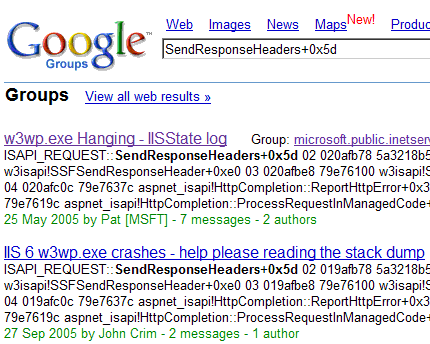
Crash Dump Analysis Patterns (Part 9b)

Tuesday, July 3rd, 2007

This is a follow up to the previous Deadlock pattern post. In this part I’m going to show an example of ERESOURCE deadlock in the Windows kernel.

ERESOURCE (executive resource) is a Windows synchronization object that has ownership semantics. 

An executive resource can be owned exclusively or can have a shared ownership. This is similar to the following file sharing analogy: when a file is opened for writing others can’t write or read it; if you have that file opened for reading others can read from it but can’t write to it.

ERESOURCE structure is linked into a list and have threads as owners which allows us to quickly find deadlocks using !locks command in kernel and complete memory dumps. Here is the definition of _ERESOURCE from x86 and x64 Windows:

0: kd> dt -r1 _ERESOURCE
   +0x000 SystemResourcesList : _LIST_ENTRY
      +0x000 Flink            : Ptr32 _LIST_ENTRY
      +0x004 Blink            : Ptr32 _LIST_ENTRY
   +0x008 OwnerTable       : Ptr32 _OWNER_ENTRY
      +0x000 OwnerThread      : Uint4B
      +0x004 OwnerCount       : Int4B
      +0x004 TableSize        : Uint4B
   +0x00c ActiveCount      : Int2B
   +0x00e Flag             : Uint2B
   +0x010 SharedWaiters    : Ptr32 _KSEMAPHORE
      +0x000 Header           : _DISPATCHER_HEADER
      +0x010 Limit            : Int4B
   +0x014 ExclusiveWaiters : Ptr32 _KEVENT
      +0x000 Header           : _DISPATCHER_HEADER
   +0x018 OwnerThreads     : [2] _OWNER_ENTRY
      +0x000 OwnerThread      : Uint4B
      +0x004 OwnerCount       : Int4B
      +0x004 TableSize        : Uint4B
   +0x028 ContentionCount  : Uint4B
   +0x02c NumberOfSharedWaiters : Uint2B
   +0x02e NumberOfExclusiveWaiters : Uint2B
   +0x030 Address          : Ptr32 Void
   +0x030 CreatorBackTraceIndex : Uint4B
   +0x034 SpinLock         : Uint4B

0: kd> dt -r1  _ERESOURCE
nt!_ERESOURCE
   +0x000 SystemResourcesList : _LIST_ENTRY
      +0x000 Flink            : Ptr64 _LIST_ENTRY
      +0x008 Blink            : Ptr64 _LIST_ENTRY
   +0x010 OwnerTable       : Ptr64 _OWNER_ENTRY
      +0x000 OwnerThread      : Uint8B
      +0x008 OwnerCount       : Int4B
      +0x008 TableSize        : Uint4B
   +0x018 ActiveCount      : Int2B
   +0x01a Flag             : Uint2B
   +0x020 SharedWaiters    : Ptr64 _KSEMAPHORE
      +0x000 Header           : _DISPATCHER_HEADER
      +0x018 Limit            : Int4B
   +0x028 ExclusiveWaiters : Ptr64 _KEVENT
      +0x000 Header           : _DISPATCHER_HEADER
   +0x030 OwnerThreads     : [2] _OWNER_ENTRY
      +0x000 OwnerThread      : Uint8B
      +0x008 OwnerCount       : Int4B
      +0x008 TableSize        : Uint4B
   +0x050 ContentionCount  : Uint4B
   +0x054 NumberOfSharedWaiters : Uint2B
   +0x056 NumberOfExclusiveWaiters : Uint2B
   +0x058 Address          : Ptr64 Void
   +0x058 CreatorBackTraceIndex : Uint8B
   +0x060 SpinLock         : Uint8B

If we have a list of resources from !locks output we can start following threads that own these resources. Owner threads are marked with a star character (*):

0: kd> !locks
**** DUMP OF ALL RESOURCE OBJECTS ****
KD: Scanning for held locks......

Resource @ 0x8815b928    Exclusively owned
    Contention Count = 6234751
    NumberOfExclusiveWaiters = 53
     Threads: 89ab8db0-01<*>
     Threads Waiting On Exclusive Access:
        8810fa08       880f5b40       88831020       87e33020
        880353f0       88115020       88131678       880f5db0
        89295420       88255378       880f8b40       8940d020
        880f58d0       893ee500       880edac8       880f8db0
        89172938       879b3020       88091510       88038020
        880407b8       88051020       89511db0       8921f020
        880e9db0       87c33020       88064cc0       88044730
        8803f020       87a2a020       89529380       8802d330
        89a53020       89231b28       880285b8       88106b90
        8803cbc8       88aa3020       88093400       8809aab0
        880ea540       87d46948       88036020       8806e198
        8802d020       88038b40       8826b020       88231020
        890a2020       8807f5d0
     

We see that 53 threads are waiting for _KTHREAD 89ab8db0 to release _ERESOURCE 8815b928. Searching for this thread address reveals the following: 

Resource @ 0x88159560    Exclusively owned
    Contention Count = 166896
    NumberOfExclusiveWaiters = 1
     Threads: 8802a790-01<*>
     Threads Waiting On Exclusive Access:
              89ab8db0
  

We see that thread 89ab8db0 is waiting for 8802a790 to release resource 88159560. We continue searching for thread 8802a790 waiting for another thread but we skip occurences when this thread is not waiting:

Resource @ 0x881f7b60    Exclusively owned
     Threads: 8802a790-01<*>

Resource @ 0x8824b418    Exclusively owned
    Contention Count = 34
     Threads: 8802a790-01<*>
 

Resource @ 0x8825e5a0    Exclusively owned
     Threads: 8802a790-01<*>

Resource @ 0x88172428    Exclusively owned
    Contention Count = 5
    NumberOfExclusiveWaiters = 1
     Threads: 8802a790-01<*>
     Threads Waiting On Exclusive Access:
              880f5020

Searching further we see that thread 8802a790 is waiting for thread 880f5020 to release resource 89bd7bf0:

Resource @ 0x89bd7bf0    Exclusively owned
    Contention Count = 1
    NumberOfExclusiveWaiters = 1
     Threads: 880f5020-01<*>
     Threads Waiting On Exclusive Access:
              8802a790

If we look carefully we would see that we have already seen thread 880f5020 above and I repeat the fragment (with appropriate colors now):

Resource @ 0x88172428    Exclusively owned
    Contention Count = 5
    NumberOfExclusiveWaiters = 1
     Threads: 8802a790-01<*>
     Threads Waiting On Exclusive Access:
              880f5020

We see that thread 880f5020 is waiting for thread 8802a790 and thread 8802a790 is waiting for thread 880f5020.

Therefore we have identified the classical deadlock. What we have to do now is to look at stack traces of these threads to see involved components.

- Dmitry Vostokov @ DumpAnalysis.org -
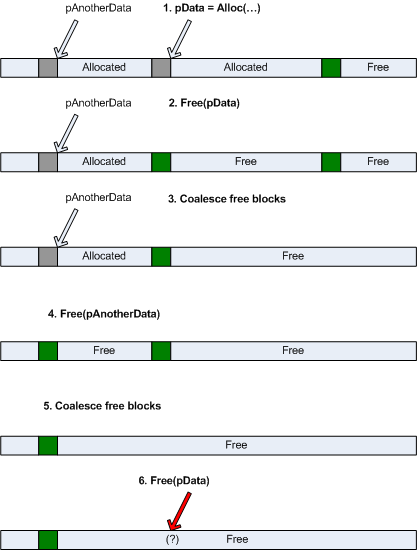
Crash Dump Analysis Patterns (Part 16a)

Thursday, June 21st, 2007

In this part I will show one example of Stack Overflow pattern in x86 Windows kernel. When it happens in kernel mode we usually have bugcheck 7F with the first argument being EXCEPTION_DOUBLE_FAULT (8):

UNEXPECTED_KERNEL_MODE_TRAP (7f)
This means a trap occurred in kernel mode, and it’s a trap of a kind that the kernel isn’t allowed to have/catch (bound trap) or that is always instant death (double fault). The first number in the bugcheck params is the number of the trap (8 = double fault, etc). Consult an Intel x86 family manual to learn more about what these traps are. Here is a *portion* of those codes:
If kv shows a taskGate
  use .tss on the part before the colon, then kv.
Else if kv shows a trapframe
  use .trap on that value
Else
  .trap on the appropriate frame will show where the trap was taken (on x86, this will be the ebp that goes with the procedure KiTrap)
Endif
kb will then show the corrected stack.
Arguments:
Arg1: 00000008, EXCEPTION_DOUBLE_FAULT
Arg2: f7747fe0
Arg3: 00000000
Arg4: 00000000

The kernel stack size for a thread is limited to 12Kb and is guarded by an invalid page. Therefore when you hit an invalid address on that page the processor generates a page fault, tries to push registers and gets a second page fault. This is what “double fault” means. In this scenario the processor switches to another stack via TSS (task state segment) task switching mechanism because IDT entry for trap 8 contains not an interrupt handler address but a so called TSS segment selector. This selector points to a memory segment that contains a new kernel stack pointer. The difference between normal IDT entry and double fault entry can be seen by inspecting IDT:

5: kd> !pcr 5
KPCR for Processor 5 at f7747000:
    Major 1 Minor 1
 NtTib.ExceptionList: b044e0b8
     NtTib.StackBase: 00000000
    NtTib.StackLimit: 00000000
  NtTib.SubSystemTib: f7747fe0
       NtTib.Version: 00ae1064
   NtTib.UserPointer: 00000020
       NtTib.SelfTib: 7ffdf000
             SelfPcr: f7747000
                Prcb: f7747120
                Irql: 00000000
                 IRR: 00000000
                 IDR: ffffffff
       InterruptMode: 00000000
                 IDT: f774d800
                 GDT: f774d400
                 TSS: f774a2e0
       CurrentThread: 8834c020
          NextThread: 00000000
          IdleThread: f774a090

5: kd> dt _KIDTENTRY f774d800
   +0x000 Offset           : 0x97e8
   +0x002 Selector         : 8
   +0x004 Access           : 0x8e00
   +0x006 ExtendedOffset   : 0x8088

5: kd> ln 0x808897e8
(808897e8)   nt!KiTrap00   |  (808898c0)   nt!Dr_kit1_a
Exact matches:
    nt!KiTrap00

5: kd> dt _KIDTENTRY f774d800+7*8
   +0x000 Offset           : 0xa880
   +0x002 Selector         : 8
   +0x004 Access           : 0x8e00
   +0x006 ExtendedOffset   : 0x8088

5: kd> ln 8088a880
(8088a880)   nt!KiTrap07   |  (8088ab72)   nt!KiTrap08
Exact matches:
    nt!KiTrap07

5: kd> dt _KIDTENTRY f774d800+8*8
   +0×000 Offset           : 0×1238
   +0×002 Selector         : 0×50
   +0×004 Access           : 0×8500
   +0×006 ExtendedOffset   : 0

5: kd> dt _KIDTENTRY f774d800+9*8
  +0x000 Offset : 0xac94
  +0x002 Selector : 8
  +0x004 Access : 0x8e00
  +0x006 ExtendedOffset : 0x8088

5: kd> ln 8088ac94
(8088ac94) nt!KiTrap09 | (8088ad10) nt!Dr_kita_a
Exact matches:
  nt!KiTrap09

If we switch to selector 50 explicitly we will see nt!KiTrap08 function which does bugcheck and saves the dump in KeBugCheck2 function:

5: kd> .tss 50
eax=00000000 ebx=00000000 ecx=00000000 edx=00000000 esi=00000000 edi=00000000
eip=8088ab72 esp=f774d3c0 ebp=00000000 iopl=0 nv up di pl nz na po nc
cs=0008 ss=0010 ds=0023 es=0023 fs=0030 gs=0000 efl=00000000
nt!KiTrap08:
8088ab72 fa              cli

5: kd> .asm no_code_bytes
Assembly options: no_code_bytes

5: kd> uf nt!KiTrap08
nt!KiTrap08:
8088ab72 cli
8088ab73 mov     eax,dword ptr fs:[00000040h]
8088ab79 mov     ecx,dword ptr fs:[124h]
8088ab80 mov     edi,dword ptr [ecx+38h]
8088ab83 mov     ecx,dword ptr [edi+18h]
8088ab86 mov     dword ptr [eax+1Ch],ecx
8088ab89 mov     cx,word ptr [edi+30h]
8088ab8d mov     word ptr [eax+66h],cx
8088ab91 mov     ecx,dword ptr [edi+20h]
8088ab94 test    ecx,ecx
8088ab96 je      nt!KiTrap08+0x2a (8088ab9c)

nt!KiTrap08+0x26:
8088ab98 mov     cx,48h

nt!KiTrap08+0x2a:
8088ab9c mov     word ptr [eax+60h],cx
8088aba0 mov     ecx,dword ptr fs:[3Ch]
8088aba7 lea     eax,[ecx+50h]
8088abaa mov     byte ptr [eax+5],89h
8088abae pushfd
8088abaf and     dword ptr [esp],0FFFFBFFFh
8088abb6 popfd
8088abb7 mov     eax,dword ptr fs:[0000003Ch]
8088abbd mov     ch,byte ptr [eax+57h]
8088abc0 mov     cl,byte ptr [eax+54h]
8088abc3 shl     ecx,10h
8088abc6 mov     cx,word ptr [eax+52h]
8088abca mov     eax,dword ptr fs:[00000040h]
8088abd0 mov     dword ptr fs:[40h],ecx

nt!KiTrap08+0x65:
8088abd7 push    0
8088abd9 push    0
8088abdb push    0
8088abdd push    eax
8088abde push    8
8088abe0 push    7Fh
8088abe2 call    nt!KeBugCheck2 (80826a92)
8088abe7 jmp     nt!KiTrap08+0x65 (8088abd7)

We can inspect the TSS address shown in the !pcr command output above:

5: kd> dt _KTSS f774a2e0
   +0×000 Backlink         : 0×28
   +0×002 Reserved0        : 0
   +0×004 Esp0             : 0xf774d3c0
   +0×008 Ss0              : 0×10
   +0×00a Reserved1        : 0
   +0×00c NotUsed1         : [4] 0
   +0×01c CR3              : 0×646000
   +0×020 Eip              : 0×8088ab72
   +0×024 EFlags           : 0
   +0×028 Eax              : 0
   +0×02c Ecx              : 0
   +0×030 Edx              : 0
   +0×034 Ebx              : 0
   +0×038 Esp              : 0xf774d3c0
   +0×03c Ebp              : 0
   +0×040 Esi              : 0
   +0×044 Edi              : 0
   +0×048 Es               : 0×23
   +0×04a Reserved2        : 0
   +0×04c Cs               : 8
   +0×04e Reserved3        : 0
   +0×050 Ss               : 0×10
   +0×052 Reserved4        : 0
   +0×054 Ds               : 0×23
   +0×056 Reserved5        : 0
   +0×058 Fs               : 0×30
   +0×05a Reserved6        : 0
   +0×05c Gs               : 0
   +0×05e Reserved7        : 0
   +0×060 LDT              : 0
   +0×062 Reserved8        : 0
   +0×064 Flags            : 0
   +0×066 IoMapBase        : 0×20ac
   +0×068 IoMaps           : [1] _KiIoAccessMap
   +0×208c IntDirectionMap  : [32]  “???”

We see that EIP points to nt!KiTrap08 and we see that Backlink value is 28 which is the previous TSS selector value that was before the double fault trap:

5: kd> .tss 28
eax=00000020 ebx=8bef5100 ecx=01404800 edx=8bee4aa8 esi=01404400 edi=00000000
eip=80882e4b esp=b044e000 ebp=b044e034 iopl=0 nv up ei ng nz na po nc
cs=0008 ss=0010 ds=0023 es=0023 fs=0030 gs=0000 efl=00010282
nt!_SEH_prolog+0x1b:
80882e4b push    esi

5: kd> k 100
ChildEBP RetAddr
b044e034 f7b840ac nt!_SEH_prolog+0x1b
b044e054 f7b846e6 Ntfs!NtfsMapStream+0x4b
b044e0c8 f7b84045 Ntfs!NtfsReadMftRecord+0x86
b044e100 f7b840f4 Ntfs!NtfsReadFileRecord+0x7a
b044e138 f7b7cdb5 Ntfs!NtfsLookupInFileRecord+0x37
b044e210 f7b6efef Ntfs!NtfsWriteFileSizes+0x76
b044e260 f7b6eead Ntfs!NtfsFlushAndPurgeScb+0xd4
b044e464 f7b7e302 Ntfs!NtfsCommonCleanup+0x1ca8
b044e5d4 8081dce5 Ntfs!NtfsFsdCleanup+0xcf
b044e5e8 f70fac53 nt!IofCallDriver+0x45
b044e610 8081dce5 fltMgr!FltpDispatch+0x6f
b044e624 f420576a nt!IofCallDriver+0x45
b044e634 f4202621 component2!DispatchEx+0xa4
b044e640 8081dce5 component2!Dispatch+0x53
b044e654 f4e998c7 nt!IofCallDriver+0x45
b044e67c f4e9997c component!PassThrough+0xbb
b044e688 8081dce5 component!Dispatch+0x78
b044e69c f41e72ff nt!IofCallDriver+0x45
WARNING: Stack unwind information not available. Following frames may be wrong.
b044e6c0 f41e71ed ofant+0xc2ff
00000000 00000000 ofant+0xc1ed

This is what !analyze -v does for this dump:

STACK_COMMAND:  .tss 0x28 ; kb

In our case NTFS tries to process an exception and SEH exception handler causes double fault when trying to save registers on the stack. Let’s look at the stack trace and crash point. We see that ESP points to the beginning of the valid stack page but the push decrements ESP before memory access and the previous page is clearly invalid:

TSS:  00000028 -- (.tss 28)
eax=00000020 ebx=8bef5100 ecx=01404800 edx=8bee4aa8 esi=01404400 edi=00000000
eip=80882e4b esp=b044e000 ebp=b044e034 iopl=0  nv up ei ng nz na po nc
cs=0008 ss=0010 ds=0023 es=0023 fs=0030 gs=0000 efl=00010282
nt!_SEH_prolog+0×1b:
80882e4b 56              push    esi

5: kd> dd b044e000-4
b044dffc  ???????? 8bef5100 00000000 00000000
b044e00c  00000000 00000000 00000000 00000000
b044e01c  00000000 00000000 b044e0b8 80880c80
b044e02c  808b6426 80801300 b044e054 f7b840ac
b044e03c  8bece5e0 b044e064 00000400 00000001
b044e04c  b044e134 b044e164 b044e0c8 f7b846e6
b044e05c  b044e480 8bee4aa8 01404400 00000000
b044e06c  00000400 b044e134 b044e164 e143db08

5: kd> !pte b044e000-4
               VA b044dffc
PDE at 00000000C0602C10    PTE at 00000000C0582268
contains 000000010AA3C863  contains 0000000000000000
pfn 10aa3c —DA–KWEV
 

WinDbg was unable to get all stack frames and we don’t see big frame values (”Memory” column below):

5: kd> knf 100
  *** Stack trace for last set context - .thread/.cxr resets it
 #   Memory  ChildEBP RetAddr
00           b044e034 f7b840ac nt!_SEH_prolog+0x1b
01        20 b044e054 f7b846e6 Ntfs!NtfsMapStream+0x4b
02        74 b044e0c8 f7b84045 Ntfs!NtfsReadMftRecord+0x86
03        38 b044e100 f7b840f4 Ntfs!NtfsReadFileRecord+0x7a
04        38 b044e138 f7b7cdb5 Ntfs!NtfsLookupInFileRecord+0x37
05        d8 b044e210 f7b6efef Ntfs!NtfsWriteFileSizes+0x76
06        50 b044e260 f7b6eead Ntfs!NtfsFlushAndPurgeScb+0xd4
07       204 b044e464 f7b7e302 Ntfs!NtfsCommonCleanup+0x1ca8
08       170 b044e5d4 8081dce5 Ntfs!NtfsFsdCleanup+0xcf
09        14 b044e5e8 f70fac53 nt!IofCallDriver+0x45
0a        28 b044e610 8081dce5 fltMgr!FltpDispatch+0x6f
0b        14 b044e624 f420576a nt!IofCallDriver+0x45
0c        10 b044e634 f4202621 component2!DispatchEx+0xa4
0d         c b044e640 8081dce5 component2!Dispatch+0x53
0e        14 b044e654 f4e998c7 nt!IofCallDriver+0x45
0f        28 b044e67c f4e9997c component!PassThrough+0xbb
10         c b044e688 8081dce5 component!Dispatch+0x78
11        14 b044e69c f41e72ff nt!IofCallDriver+0x45
WARNING: Stack unwind information not available. Following frames may be wrong.
12        24 b044e6c0 f41e71ed ofant+0xc2ff
13           00000000 00000000 ofant+0xc1ed

To see all components involved we need to dump raw stack data (12Kb is 0×3000). There we can also see some software exceptions processed and get some partial stack traces for them. Some caution is required because stack traces might be incomplete and misleading due to overwritten stack data.

5: kd> dds b044e000 b044e000+3000


b044ebc4  b044ec74
b044ebc8  b044ec50
b044ebcc  f41f9458 ofant+0x1e458
b044ebd0  b044f140
b044ebd4  b044ef44
b044ebd8  b044f138
b044ebdc  80877290 nt!RtlDispatchException+0x8c
b044ebe0  b044ef44
b044ebe4  b044f138
b044ebe8  b044ec74
b044ebec  b044ec50
b044ebf0  f41f9458 ofant+0x1e458
b044ebf4  8a7668c0
b044ebf8  e16c2e80
b044ebfc  00000000
b044ec00  00000000
b044ec04  00000002
b044ec08  01000000
b044ec0c  00000000
b044ec10  00000000
...
...
...
b044ec60  00000000
b044ec64  b044ef94
b044ec68  8088e13f nt!RtlRaiseStatus+0x47
b044ec6c  b044ef44
b044ec70  b044ec74

b044ec74  00010007


b0450fe8  00000000
b0450fec  00000000
b0450ff0  00000000
b0450ff4  00000000
b0450ff8  00000000
b0450ffc  00000000
b0451000  ????????

5: kd> .exr b044ef44
ExceptionAddress: f41dde6d (ofant+0x00002e6d)
   ExceptionCode: c0000043
  ExceptionFlags: 00000001
NumberParameters: 0

5: kd> .cxr b044ec74
eax=c0000043 ebx=00000000 ecx=89fe1bc0 edx=b044f084 esi=e16c2e80 edi=8a7668c0
eip=f41dde6d esp=b044efa0 ebp=b044f010 iopl=0 nv up ei pl zr na pe nc
cs=0008 ss=0010 ds=0023 es=0023 fs=0030 gs=0000 efl=00000246
ofant+0x2e6d:
f41dde6d e92f010000      jmp     ofant+0x2fa1 (f41ddfa1)

5: kd> knf
  *** Stack trace for last set context - .thread/.cxr resets it
 #   Memory  ChildEBP RetAddr
WARNING: Stack unwind information not available. Following frames may be wrong.
00           b044f010 f41ddce6 ofant+0x2e6d
01        b0 b044f0c0 f41dd930 ofant+0x2ce6
02        38 b044f0f8 f41e88eb ofant+0x2930
03        2c b044f124 f6598eba ofant+0xd8eb
04        24 b044f148 f41dcd40 SYMEVENT!SYMEvent_AllocVMData+0x84da
05        18 b044f160 8081dce5 ofant+0x1d40
06        14 b044f174 f6596741 nt!IofCallDriver+0x45
07        28 b044f19c f659dd70 SYMEVENT!SYMEvent_AllocVMData+0x5d61
08        1c b044f1b8 f65967b9 SYMEVENT!EventObjectCreate+0xa60
09        40 b044f1f8 8081dce5 SYMEVENT!SYMEvent_AllocVMData+0x5dd9
0a        14 b044f20c 808f8255 nt!IofCallDriver+0x45
0b        e8 b044f2f4 80936af5 nt!IopParseDevice+0xa35
0c        80 b044f374 80932de6 nt!ObpLookupObjectName+0x5a9
0d        54 b044f3c8 808ea211 nt!ObOpenObjectByName+0xea
0e        7c b044f444 808eb4ab nt!IopCreateFile+0x447
0f        5c b044f4a0 808edf2a nt!IoCreateFile+0xa3
10        40 b044f4e0 80888c6c nt!NtCreateFile+0x30
11         0 b044f4e0 8082e105 nt!KiFastCallEntry+0xfc
12        a4 b044f584 f657f20d nt!ZwCreateFile+0x11
13        54 b044f5d8 f65570f6 NAVAP+0x2e20d

Therefore, the following components found on raw stack look suspicious:

ofant.sys, SYMEVENT.SYS and NAVAP.sys.

We should check their timestamps using lmv command and contact their vendors for any existing updates. The workaround would be to remove those products. The rest are Microsoft modules and drivers component.sys and component2.sys.

For the latter two we don’t have significant local variable usage in their functions.

OSR NT Insider article provides another example:

http://www.osronline.com/article.cfm?article=254

The following Citrix article provides an example of stack overflow in ICA protocol stack:

http://support.citrix.com/article/CTX106209 

- Dmitry Vostokov @ DumpAnalysis.org -
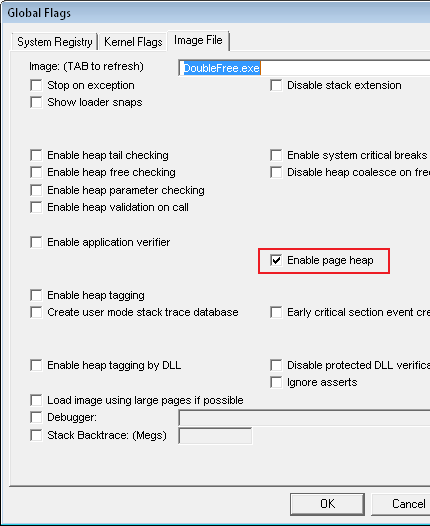
Crash Dump Analysis Checklist

Wednesday, June 20th, 2007

Sometimes the root cause of a problem is not obvious from a memory dump. Here is the first version of crash dump analysis checklist to help experienced engineers not to miss any important information. The check list doesn’t prescribe any specific steps, just lists all possible points to double check when looking at a memory dump. Of course, it is not complete at the moment and any suggestions are welcome.

General:

  • Symbol servers (.symfix)
  • Internal database(s) search
  • Google or Microsoft search for suspected components as this could be a known issue. Sometimes a simple search immediately points to the fix on a vendor’s site
  • The tool used to save a dump (to flag false positive, incomplete or inconsistent dumps)
  • OS/SP version (version)
  • Language
  • Debug time
  • System uptime
  • Computer name (dS srv!srvcomputername or !envvar COMPUTERNAME)
  • List of loaded and unloaded modules (lmv or !dlls)
  • Hardware configuration (!sysinfo)
  • .kframes 1000

Application or service:

  • Default analysis (!analyze -v or !analyze -v -hang for hangs)
  • Critical sections (!cs -s -l -o, !locks) for both crashes and hangs
  • Component timestamps, duplication and paths. DLL Hell? (lmv and !dlls)
  • Do any newer components exist?
  • Process threads (~*kv or !uniqstack) for multiple exceptions and blocking functions
  • Process uptime
  • Your components on the full raw stack of the problem thread
  • Your components on the full raw stack of the main application thread
  • Process size
  • Number of threads
  • Gflags value (!gflag)
  • Time consumed by threads (!runaway)
  • Environment (!peb)
  • Import table (!dh)
  • Hooked functions (!chkimg)
  • Exception handlers (!exchain)
  • Computer name (!envvar COMPUTERNAME)
  • Process heap stats and validation (!heap -s, !heap -s -v)
  • CLR threads? (mscorwks or clr modules on stack traces) Yes: use .NET checklist below
  • Hidden (unhandled and handled) exceptions on thread raw stacks

System hang:

  • Default analysis (!analyze -v -hang)
  • ERESOURCE contention (!locks)
  • Processes and virtual memory including session space (!vm 4)
  • Important services are present and not hanging
  • Pools (!poolused)
  • Waiting threads (!stacks)
  • Critical system queues (!exqueue f)
  • I/O (!irpfind)
  • The list of all thread stack traces (!process 0 3f)
  • LPC/ALPC chain for suspected threads (!lpc message or !alpc /m after search for “Waiting for reply to LPC” or “Waiting for reply to ALPC” in !process 0 3f output)
  • RPC threads (search for “RPCRT4!OSF” in !process 0 3f output)
  • Mutants (search for “Mutants - owning thread” in !process 0 3f output)
  • Critical sections for suspected processes (!cs -l -o -s)
  • Sessions, session processes (!session, !sprocess)
  • Processes (size, handle table size) (!process 0 0)
  • Running threads (!running)
  • Ready threads (!ready)
  • DPC queues (!dpcs)
  • The list of APCs (!apc)
  • Internal queued spinlocks (!qlocks)
  • Computer name (dS srv!srvcomputername)
  • File cache, VACB (!filecache)
  • File objects for blocked thread IRPs (!irp -> !fileobj)
  • Network (!ndiskd.miniports and !ndiskd.pktpools)
  • Disk (!scsikd.classext -> !scsikd.classext class_device 2)
  • Modules rdbss, mrxdav, mup, mrxsmb in stack traces
  • Functions Ntfs!Ntfs*, nt!Fs* and fltmgr!Flt* in stack traces

BSOD:

  • Default analysis (!analyze -v)
  • Pool address (!pool)
  • Component timestamps (lmv)
  • Processes and virtual memory (!vm 4)
  • Current threads on other processors
  • Raw stack
  • Bugcheck description (including ln exception address for corrupt or truncated dumps)
  • Bugcheck callback data (!bugdump for systems prior to Windows XP SP1)
  • Bugcheck secondary callback data (.enumtag)
  • Computer name (dS srv!srvcomputername)
  • Hardware configuration (!sysinfo)

.NET application or service:

  • CLR module and SOS extension versions (lmv and .chain)
  • Managed exceptions (~*e !pe)
  • Nested managed exceptions (!pe -nested)
  • Managed threads (!Threads -special)
  • Managed stack traces (~*e !CLRStack)
  • Managed execution residue (~*e !DumpStackObjects and !DumpRuntimeTypes)
  • Managed heap (!VerifyHeap, !DumpHeap -stat and !eeheap -gc)
  • GC handles (!GCHandles, !GCHandleLeaks)
  • Finalizer queue (!FinalizeQueue)
  • Sync blocks (!syncblk)

- Dmitry Vostokov @ DumpAnalysis.org + TraceAnalysis.org -

Crash Dump Analysis Patterns (Part 15)

Thursday, May 24th, 2007

Sometimes when we look at the list of loaded modules in a process address space we see an instance of the pattern that I call Module Variety. It means, literally, that there are so many different loaded modules that we start thinking that their coexistence created the problem. We can also call this pattern Component Variety or DLL Variety but I prefer the former because WinDbg refers to loaded executables, dlls, drivers, ActiveX controls, etc. as modules.

Modules can be roughly classified into 4 broad categories:

  • Application modules - components that were developed specifically for this application, one of them is the main application module

  • 3rd-party modules - you can easily identify them if the company name is the same in the output of lmv WinDbg command

  • Common system modules - Windows dlls supplied by OS implementing native OS calls, Windows API and also C/C++ runtime functions, for example, ntdll.dll, kernel32.dll, user32.dll, gdi32.dll, advapi32.dll, msvcrt.dll, etc.

  • Specific system modules - optional Windows dlls supplied by Microsoft that are specific to the application functionality and implementation, like MFC dlls, .NET runtime or tapi32.dll

Although lmv is verbose for quick check of component timestamps you can use lmt WinDbg command. Here is an example of the great module variety:

Loading Dump File [application.dmp] ... ... ... Windows Server 2003 Version 3790 (Service Pack 1) ... ... ... 0:001> lmt start end module name 00400000 030ba000 app_main Mon Dec 04 21:22:42 2006 04120000 04193000 Dformd Mon Jan 31 02:27:58 2000 041a0000 04382000 sqllib2 Mon May 29 22:50:11 2006 04490000 044d3000 udNet Mon May 29 23:22:43 2006 04e30000 04f10000 abchook Wed Aug 01 20:47:17 2006 05e10000 05e15000 token_manager Fri Mar 12 11:54:17 1999 06030000 06044000 ODBCINT Thu Mar 24 22:59:58 2005 06150000 0618d000 sgl5NET Mon May 29 23:25:22 2006 06190000 0622f000 OPENGL32 Mon Nov 06 21:30:52 2006 06230000 06240000 pwrpc32 Thu Oct 22 16:22:40 1998 06240000 07411000 app_dll_1 Tue Aug 08 12:14:39 2006 07420000 07633000 app_dll_2 Mon Dec 04 22:11:59 2006 07640000 07652000 zlib Fri Aug 30 08:12:24 2002 07660000 07f23000 app_dll_3 Wed Oct 19 11:43:34 2005 0dec0000 0dedc000 app_dll_4 Mon Dec 04 22:11:36 2006 10000000 110be000 des Tue Jul 18 20:42:02 2006 129c0000 12f1b000 xpsp2res Fri Mar 25 00:26:47 2005 1b000000 1b170000 msjet40 Tue Jul 06 19:16:05 2004 1b2c0000 1b2cd000 msjter40 Thu May 09 19:09:53 2002 1b2d0000 1b2ea000 msjint40 Thu May 09 19:09:53 2002 1b570000 1b5c5000 msjetoledb40 Thu Nov 13 23:40:06 2003 1b5d0000 1b665000 mswstr10 Thu May 09 19:09:56 2002 1e000000 1e0f0000 python23 Fri Jan 30 13:03:24 2004 4b070000 4b0c1000 MSCTF Fri Mar 25 02:10:36 2005 4b610000 4b64d000 ODBC32 Fri Mar 25 02:09:33 2005 4b9e0000 4ba59000 OLEDB32 Fri Mar 25 02:09:56 2005 4c310000 4c31d000 OLEDB32R Fri Mar 25 02:09:57 2005 4c3b0000 4c3de000 MSCTFIME Fri Mar 25 02:10:37 2005 5f400000 5f4f2000 mfc42 Wed Oct 27 22:35:22 1999 62130000 6213d000 mfc42loc Wed Mar 26 03:35:58 2003 62460000 6246e000 msadrh15 Fri Mar 25 02:10:29 2005 63050000 63059000 lpk Fri Mar 25 02:09:21 2005 63270000 632c7000 hnetcfg Fri Mar 25 02:09:11 2005 65340000 653d2000 OLEAUT32 Wed Sep 01 00:15:11 1999 68000000 6802f000 rsaenh Fri Mar 25 00:30:55 2005 68a50000 68a70000 glu32 Fri Mar 25 02:09:03 2005 71990000 71998000 wshtcpip Wed Mar 26 03:34:24 2003 719d0000 71a11000 mswsock Fri Mar 25 02:12:06 2005 71a60000 71a6b000 wsock32 Wed Mar 26 03:34:24 2003 71a80000 71a91000 mpr Wed Mar 26 03:34:24 2003 71aa0000 71aa8000 ws2help Fri Mar 25 02:10:19 2005 71ab0000 71ac7000 ws2_32 Fri Mar 25 02:10:18 2005 71ad0000 71ae2000 tsappcmp Fri Mar 25 02:09:56 2005 71af0000 71b48000 netapi32 Fri Aug 11 11:00:07 2006 72ec0000 72ee7000 winspool Fri Mar 25 02:09:48 2005 73290000 73295000 riched32 Wed Mar 26 03:34:14 2003 73ee0000 73ee5000 icmp Wed Mar 26 03:34:09 2003 74920000 7493a000 msdart Fri Mar 25 02:10:48 2005 74b10000 74b80000 riched20 Fri Mar 25 02:09:36 2005 75220000 75281000 usp10 Fri Mar 25 02:09:51 2005 75810000 758d0000 userenv Fri Mar 25 02:09:50 2005 75d00000 75d27000 apphelp Fri Mar 25 02:09:21 2005 76120000 7613d000 imm32 Fri Mar 25 02:09:37 2005 76140000 76188000 comdlg32 Fri Mar 25 02:10:11 2005 76810000 76949000 comsvcs Fri Aug 26 23:19:45 2005 76a60000 76a6b000 psapi Fri Mar 25 02:09:57 2005 76c00000 76c1a000 iphlpapi Fri May 19 04:21:07 2006 76de0000 76e0f000 dnsapi Wed Jul 12 20:02:12 2006 76e20000 76e4e000 wldap32 Fri Mar 25 02:09:59 2005 76e60000 76e73000 secur32 Fri Mar 25 02:10:01 2005 76e80000 76e87000 winrnr Fri Mar 25 02:09:45 2005 76e90000 76e98000 rasadhlp Wed Jul 12 20:02:15 2006 76f20000 77087000 comres Wed Mar 26 03:33:48 2003 77330000 773c7000 comctl32 Mon Aug 28 09:26:02 2006 77470000 775a4000 ole32 Thu Jul 21 04:25:12 2005 77640000 776c3000 clbcatq Thu Jul 21 04:25:13 2005 77b30000 77b38000 version Fri Mar 25 02:09:50 2005 77b40000 77b9a000 msvcrt Fri Mar 25 02:11:59 2005 77ba0000 77be8000 gdi32 Tue Mar 07 03:55:05 2006 77bf0000 77c8f000 rpcrt4 Fri Mar 25 02:09:42 2005 77ca0000 77da3000 comctl32_77ca0000 Mon Aug 28 09:25:59 2006 77db0000 77dc1000 winsta Fri Mar 25 02:09:51 2005 77de0000 77e71000 user32 Fri Mar 25 02:09:49 2005 77e80000 77ed2000 shlwapi Wed Sep 20 01:33:12 2006 77ee0000 77ef1000 regapi Fri Mar 25 02:09:51 2005 77f20000 77fcb000 advapi32 Fri Mar 25 02:09:06 2005 780a0000 780b2000 MSVCIRT Wed Jun 17 19:45:46 1998 780c0000 78121000 MSVCP60 Wed Jun 17 19:52:10 1998 79040000 79085000 fusion Fri Feb 18 20:57:41 2005 79170000 79198000 mscoree Fri Feb 18 20:57:48 2005 791b0000 79417000 mscorwks Fri Feb 18 20:59:56 2005 79510000 79523000 mscorsn Fri Feb 18 20:30:38 2005 79780000 7998c000 mscorlib Fri Feb 18 20:48:36 2005 79990000 79cce000 mscorlib_79990000 Thu Nov 02 04:53:27 2006 7c340000 7c396000 msvcr71 Fri Feb 21 12:42:20 2003 7c800000 7c93e000 kernel32 Tue Jul 25 13:37:16 2006 7c940000 7ca19000 ntdll Fri Mar 25 02:09:53 2005 7ca20000 7d20a000 shell32 Thu Jul 13 13:58:56 2006

Note: you can use lmtD command to take the advantage of WinDbg hypertext commands. In that case you can quickly click on a module name to view its detailed information.

We see that some components are very old, 1998-1999, and some are from 2006. We also see 3rd-party libraries: OpenGL, Visual Fortran RTL, Python language runtime. Common system modules include two versions of C/C++ runtime library, 6.0 and 7.0. Specific system modules include MFC and .NET, MSJET, ODBC and OLE DB support. There is a sign of DLL Hell here too. OLE Automation DLL in system32 folder seems to be very old and doesn’t correspond to Windows 2003 SP1 which should have file version 5.2.3790.1830:

0:001> lmv m OLEAUT32 start end module name 65340000 653d2000 OLEAUT32 (deferred) Image path: C:\WINDOWS\system32\OLEAUT32.DLL Image name: OLEAUT32.DLL Timestamp: Wed Sep 01 00:15:11 1999 (37CC61FF) CheckSum: 0009475A ImageSize: 00092000 File version: 2.40.4277.1 Product version: 2.40.4277.1 File flags: 2 (Mask 3F) Pre-release File OS: 40004 NT Win32 File type: 2.0 Dll File date: 00000000.00000000 Translations: 0409.04e4 CompanyName: Microsoft Corporation ProductName: Microsoft OLE 2.40 for Windows NT(TM) and Windows 95(TM) Operating Systems InternalName: OLEAUT32.DLL ProductVersion: 2.40.4277 FileVersion: 2.40.4277 FileDescription: Microsoft OLE 2.40 for Windows NT(TM) and Windows 95(TM) Operating Systems LegalCopyright: Copyright © Microsoft Corp. 1993-1998. LegalTrademarks: Microsoft® is a registered trademark of Microsoft Corporation. Windows NT(TM) and Windows 95(TM) are trademarks of Microsoft Corporation. Comments: Microsoft OLE 2.40 for Windows NT(TM) and Windows 95(TM) Operating Systems

- Dmitry Vostokov @ DumpAnalysis.org -
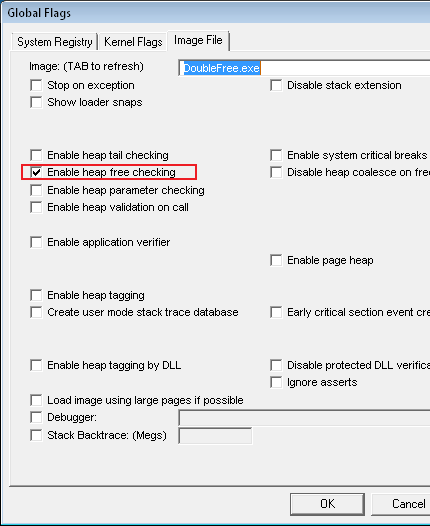
Crash Dump Analysis Patterns (Part 14)

Friday, May 11th, 2007

The next pattern is Spiking Thread. If you have a process dump with many threads from a customer it is sometimes difficult to see which thread there was spiking CPU, that’s why it is always good to have some screenshots or notes from QSlice or Process Explorer showing spiking thread ID and process ID. The latter ID is to make sure that the process dump was from the correct process. New process dumpers and tools from Microsoft (userdump.exe, for example) save thread time information so you can open the dump and see the time spent in kernel and user mode for any thread by entering !runaway command. However if that command shows many threads with similar CPU consumption it will not highlight the particular thread that was spiking at the time the crash dump was saved so screenshots are still useful in some cases.

What to do if you don’t have spiking thread ID? Look at all threads and find those that are not waiting. Almost all threads are waiting most of the time. So the chances to dump the normal process and see some active threads are very low. If the thread is waiting the top function on its stack usually is (for XP/W2K3/Vista):

ntdll!KiFastSystemCallRet

and below it you could see some blocking calls waiting for some synchronization object, Sleep API call, IO completion or for LPC reply:

0:085> ~*kv
...
...
...
64 Id: 1b0.120c Suspend: -1 Teb: 7ff69000 Unfrozen
ChildEBP RetAddr Args to Child
02defe18 7c90e399 ntdll!KiFastSystemCallRet
02defe1c 77e76703 ntdll!NtReplyWaitReceivePortEx+0xc
02deff80 77e76c22 rpcrt4!LRPC_ADDRESS::ReceiveLotsaCalls+0xf4
02deff88 77e76a3b rpcrt4!RecvLotsaCallsWrapper+0xd
02deffa8 77e76c0a rpcrt4!BaseCachedThreadRoutine+0×79
02deffb4 7c80b683 rpcrt4!ThreadStartRoutine+0×1a
02deffec 00000000 kernel32!BaseThreadStart+0×37

65 Id: 1b0.740 Suspend: -1 Teb: 7ff67000 Unfrozen
ChildEBP RetAddr Args to Child
02edff44 7c90d85c ntdll!KiFastSystemCallRet
02edff48 7c8023ed ntdll!NtDelayExecution+0xc
02edffa0 57cde2dd kernel32!SleepEx+0×61

02edffb4 7c80b683 component!foo+0×35
02edffec 00000000 kernel32!BaseThreadStart+0×37

66 Id: 1b0.131c Suspend: -1 Teb: 7ff66000 Unfrozen
ChildEBP RetAddr Args to Child
02f4ff38 7c90e9c0 ntdll!KiFastSystemCallRet
02f4ff3c 7c8025cb ntdll!ZwWaitForSingleObject+0xc
02f4ffa0 72001f65 kernel32!WaitForSingleObjectEx+0xa8

02f4ffb4 7c80b683 component!WorkerThread+0×15
02f4ffec 00000000 kernel32!BaseThreadStart+0×37

67 Id: 1b0.1320 Suspend: -1 Teb: 7ff65000 Unfrozen
ChildEBP RetAddr Args to Child
02f8fe1c 7c90e9ab ntdll!KiFastSystemCallRet
02f8fe20 7c8094e2 ntdll!ZwWaitForMultipleObjects+0xc
02f8febc 7e4195f9 kernel32!WaitForMultipleObjectsEx+0×12c
02f8ff18 7e4196a8 user32!RealMsgWaitForMultipleObjectsEx+0×13e
02f8ff34 720019f6 user32!MsgWaitForMultipleObjects+0×1f

02f8ffa0 72001a29 component!bar+0xd9
02f8ffb4 7c80b683 component!MonitorWorkerThread+0×11
02f8ffec 00000000 kernel32!BaseThreadStart+0×37

68 Id: 1b0.1340 Suspend: -1 Teb: 7ff63000 Unfrozen
ChildEBP RetAddr Args to Child
0301ff1c 7c90e31b ntdll!KiFastSystemCallRet
0301ff20 7c80a746 ntdll!ZwRemoveIoCompletion+0xc
0301ff4c 57d46e65 kernel32!GetQueuedCompletionStatus+0×29

0301ffb4 7c80b683 component!AsyncEventsThread+0×91
0301ffec 00000000 kernel32!BaseThreadStart+0×37


# 85 Id: 1b0.17b4 Suspend: -1 Teb: 7ffd4000 Unfrozen
ChildEBP RetAddr Args to Child
00daffc8 7c9507a8 ntdll!DbgBreakPoint
00dafff4 00000000 ntdll!DbgUiRemoteBreakin+0×2d

Therefore if you have a different thread like this one below the chances that it was spiking are big:

58 Id: 1b0.9f4 Suspend: -1 Teb: 7ff75000 Unfrozen
ChildEBP RetAddr Args to Child
0280f64c 500af723 componentB!DoSomething+32
0280f85c 500b5391 componentB!CheckSomething+231
0280f884 500b7a3f componentB!ProcessWorkIteme+9f
0301ffec 00000000 kernel32!BaseThreadStart+0x37

There is no KiFastSystemCallRet on top and if we look at the currently executing instruction it indeed does some copy operation:

0:085> ~58r
eax=00000000 ebx=0280fdd4 ecx=0000005f edx=00000000 esi=03d30444 edi=0280f6dc
eip=500a4024 esp=0280f644 ebp=0280f64c iopl=0 nv up ei pl nz na po nc
cs=001b ss=0023 ds=0023 es=0023 fs=003b gs=0000 efl=00010202
componentB!DoSomething+32:
500a4024 f3a5 rep movs dword ptr es:[edi],dword ptr [esi] es:0023:0280f6dc=00000409 ds:0023:03d30444=00000409

In a kernel or a complete memory dump you can see spikes by checking KernelTime and UserTime:

0: kd> !thread 88b66768
THREAD 88b66768 Cid 01fc.1550 Teb: 7ffad000 Win32Thread: bc18f240 RUNNING on processor 1
IRP List:
89716008: (0006,0094) Flags: 00000a00 Mdl: 00000000
Impersonation token: e423a030 (Level Impersonation)
DeviceMap e3712480
Owning Process 8a0a56a0 Image: SomeSvc.exe
Wait Start TickCount 1782229 Ticks: 0
Context Switch Count 877610 LargeStack
UserTime 00:00:01.0078
KernelTime 02:23:21.0718

- Dmitry Vostokov @ DumpAnalysis.org -
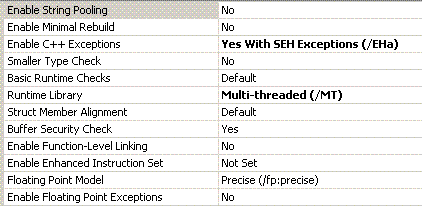
Crash Dump Analysis Patterns (Part 13a)

Wednesday, May 9th, 2007

Insufficient Memory pattern can be seen in many complete and kernel memory dumps. This condition could cause the system to crash, become slow, hang or refuse to provide the expected functionality, for example, refuse new terminal server connections. There are many types of memory resources and we can classify them initially into the following categories:

  • Committed memory
  • Virtual memory
    • Kernel space
      • Paged pool
      • Non-paged pool
      • Session pool
      • PTE limits
      • Desktop heap
      • GDI limits
    • User space
      • Virtual regions
      • Process heap

We will talk about all of them in separate parts. What I outline in this part is committed memory exhaustion. Committed memory is an allocated memory backed up by some physical memory or by a reserved space in the page file. Reserving the space needs to be done in case OS wants to swap out that memory’s data to disk if it is not currently used and there is no physical memory available for other processes. If that data is needed again OS brings it back to physical memory. If there is no space in the page file then physical memory is filled up. If committed memory is exhausted most likely the system will hang or result in a bugcheck soon so checking memory statistics shall always be done when you get a kernel or a complete memory dump. Even access violation bugchecks could result from insufficient memory when some memory allocation operation failed but a kernel mode component didn’t check the return value for NULL. Here is an example:

BugCheck 8E, {c0000005, 809203af, aa647c0c, 0}

0: kd> !analyze -v
...
...
...
TRAP_FRAME: aa647c0c -- (.trap ffffffffaa647c0c)
...
...
...

0: kd> .trap ffffffffaa647c0c
ErrCode = 00000000
eax=00000000 ebx=bc1f3cfc ecx=89589250 edx=000018c1 esi=bc1f3ce0 edi=aa647d14
eip=809203af esp=aa647c80 ebp=aa647c80 iopl=0 nv up ei pl zr na pe nc
cs=0008 ss=0010 ds=0023 es=0023 fs=0030 gs=0000 efl=00010246
nt!SeTokenType+0x8:
809203af 8b8080000000 mov eax,dword ptr [eax+80h] ds:0023:00000080=????????

0: kd> k
ChildEBP RetAddr
aa647c80 bf8173c5 nt!SeTokenType+0x8
aa647cdc bf81713b win32k!GreGetSpoolMessage+0xb0
aa647d4c 80834d3f win32k!NtGdiGetSpoolMessage+0x96
aa647d4c 7c82ed54 nt!KiFastCallEntry+0xfc

If we enter !vm command to display memory statistics we would see that all committed memory is filled up:

0: kd> !vm
*** Virtual Memory Usage ***
 Physical Memory:      999294 (   3997176 Kb)
 Page File: \??\C:\pagefile.sys
   Current:   4193280 Kb  Free Space:    533744 Kb
   Minimum:   4193280 Kb  Maximum:      4193280 Kb
 Available Pages:       18698 (     74792 Kb)
 ResAvail Pages:       865019 (   3460076 Kb)
 Locked IO Pages:         290 (      1160 Kb)
 Free System PTEs:     155265 (    621060 Kb)
 Free NP PTEs:          32766 (    131064 Kb)
 Free Special NP:           0 (         0 Kb)
 Modified Pages:          113 (       452 Kb)
 Modified PF Pages:        61 (       244 Kb)
 NonPagedPool Usage:    12380 (     49520 Kb)
 NonPagedPool Max:      64799 (    259196 Kb)
 PagedPool 0 Usage:     40291 (    161164 Kb)
 PagedPool 1 Usage:      2463 (      9852 Kb)
 PagedPool 2 Usage:      2455 (      9820 Kb)
 PagedPool 3 Usage:      2453 (      9812 Kb)
 PagedPool 4 Usage:      2488 (      9952 Kb)
 PagedPool Usage:       50150 (    200600 Kb)
 PagedPool Maximum:     67584 (    270336 Kb)

 ********** 18 pool allocations have failed **********

 Shared Commit:         87304 (    349216 Kb)
 Special Pool:              0 (         0 Kb)
 Shared Process:        56241 (    224964 Kb)
 PagedPool Commit:      50198 (    200792 Kb)
 Driver Commit:          1892 (      7568 Kb)
 Committed pages:     2006945 (   8027780 Kb)
 Commit limit:        2008205 (   8032820 Kb)

 ********** 1216024 commit requests have failed  **********

There might have been a memory leak or too many terminal sessions with fat applications to fit in physical memory and the page file. Actually for that particular case there were both.

- Dmitry Vostokov @ DumpAnalysis.org -