Race conditions on a uniprocessor machine

April 14th, 2007

It is a known fact that hidden race conditions in code are manifested more frequently on a multiprocessor machine than on a uniprocessor machine. I was trying to create an example to illustrate this and wrote the following code which was motivated by the similar kernel level code and the discussion on Russian Software Development Network forum:

volatile bool b;
void thread_true(void *)
{
 while(true)
 {
  b = true;
 }
}
void thread_false(void *)
{
 while(true)
 {
  b = false;
 }
}
int _tmain(int argc, _TCHAR* argv[])
{
 _beginthread(thread_true, 0, NULL);
 _beginthread(thread_false, 0, NULL);
 while(true)
 {
  assert (b == false || b == true);
 }
 return 0;
}

The program has three threads. Two of them are trying to set the same boolean variable b to different values and the main thread checks that its value is either true or false. The assertion should fail in the following scenario: the first thread (thread_true) sets b variable to true value so the first comparison in assertion fails and we expect the second comparison to succeed but the main thread is preempted by the second thread (thread_false) that sets that value to false and therefore the second comparison fails too. We get an assertion dialog in debug build showing that boolean variable b is neither true nor false!

I compiled and ran that program and it wasn’t failing for hours on my uniprocessor laptop. On a multiprocessor machine it was failing in a couple of minutes. If we look at assertion assembly language code we would see that it is very short so statistically speaking the chances that our main thread is preempted in the middle of the assertion are very low. This is because on a uniprocessor machine two threads are running not in parallel but until their quantum is expired. So we should make the assertion code longer to exceed the quantum. To simulate this I added a call to SwitchToThread API. When the assertion code yields execution to another thread then perhaps that thread would be thread_false and as soon as it is preempted by main thread again we get the assertion failure:

volatile bool b;
bool SlowOp()
{
 SwitchToThread();
 return false;
}
void thread_true(void *)
{
 while(true)
 {
  b = true;
 }
}
void thread_false(void *)
{
 while(true)
 {
  b = false;
 }
}
int _tmain(int argc, _TCHAR* argv[])
{
 _beginthread(thread_true, 0, NULL);
 _beginthread(thread_false, 0, NULL);
 while(true)
 {
  assert (b == false || SlowOp() || b == true);
 }
 return 0;
}

I compiled and ran the program again and I couldn’t see any failure for a long time. It looks like thread_false is always running before the main thread and when the main thread is running then due to short-circuit operator || evaluation rule we don’t have a chance to execute SlowOp(). Then I added a fourth thread called thread_true_2 to make the number of threads setting b variable to true value as twice as many as the number of threads setting b variable to false value (2 to 1) so we could have more chances to set b variable to true value before executing the assertion:

volatile bool b;
bool SlowOp()
{
 SwitchToThread();
 return false;
}
void thread_true(void *)
{
 while(true)
 {
  b = true;
 }
}
void thread_true_2(void *)
{
 while(true)
 {
  b = true;
 }
}
void thread_false(void *)
{
 while(true)
 {
  b = false;
 }
}
int _tmain(int argc, _TCHAR* argv[])
{
 _beginthread(thread_true, 0, NULL);
 _beginthread(thread_false, 0, NULL);
 _beginthread(thread_true_2, 0, NULL);
 while(true)
 {
  assert (b == false || SlowOp() || b == true);
 }
 return 0;
}

Now when I ran the new program I got the assertion failure in a couple of minutes! It is hard to make race conditions manifest themselves on a uniprocessor machine.

- Dmitry Vostokov -

Yet another look at Zw* and Nt* functions

April 10th, 2007

While reading the new book “Professional Rootkits” by Ric Vieler I encountered the following macro definition to get function index in system service table:

#define HOOK_INDEX(function2hook) *(PULONG)((PUCHAR)function2hook+1)

Couldn’t understand the code until looked at disassembly of a typical ntdll!Zw and nt!Zw function (x86 W2K3):

lkd> u ntdll!ZwCreateProcess
ntdll!NtCreateProcess:
7c821298 b831000000      mov     eax,31h
7c82129d ba0003fe7f      mov     edx,offset SharedUserData!SystemCallStub (7ffe0300)
7c8212a2 ff12            call    dword ptr [edx]
7c8212a4 c22000          ret     20h
7c8212a7 90              nop
ntdll!ZwCreateProcessEx:
7c8212a8 b832000000      mov     eax,32h
7c8212ad ba0003fe7f      mov     edx,offset SharedUserData!SystemCallStub (7ffe0300)
7c8212b2 ff12            call    dword ptr [edx]

lkd> u nt!ZwCreateProcess
nt!ZwCreateProcess:
8083c2a3 b831000000      mov     eax,31h
8083c2a8 8d542404        lea     edx,[esp+4]
8083c2ac 9c              pushfd
8083c2ad 6a08            push    8
8083c2af e8c688ffff      call    nt!KiSystemService (80834b7a)
8083c2b4 c22000          ret     20h
nt!ZwCreateProcessEx:
8083c2b7 b832000000      mov     eax,32h
8083c2bc 8d542404        lea     edx,[esp+4]

You can notice that user space ntdll!Nt and ntdll!Zw variants are the same. This is not the case in kernel space:

lkd> u nt!NtCreateProcess
nt!NtCreateProcess:
808f80ea 8bff            mov     edi,edi
808f80ec 55              push    ebp
808f80ed 8bec            mov     ebp,esp
808f80ef 33c0            xor     eax,eax
808f80f1 f6451c01        test    byte ptr [ebp+1Ch],1
808f80f5 0f8549d10600    jne     nt!NtCreateProcess+0xd (80965244)
808f80fb f6452001        test    byte ptr [ebp+20h],1
808f80ff 0f8545d10600    jne     nt!NtCreateProcess+0×14 (8096524a)

nt!Zw functions are dispatched through service table. nt!Nt functions are actual code. 

For completeness let’s look at AMD x64 W2K3. User space x64 call:

0:001> u ntdll!ZwCreateProcess
ntdll!NtCreateProcess:
00000000`78ef1ab0 4c8bd1          mov     r10,rcx
00000000`78ef1ab3 b882000000      mov     eax,82h
00000000`78ef1ab8 0f05            syscall
00000000`78ef1aba c3              ret
00000000`78ef1abb 666690          xchg    ax,ax
00000000`78ef1abe 6690            xchg    ax,ax
ntdll!NtCreateProfile:
00000000`78ef1ac0 4c8bd1          mov     r10,rcx
00000000`78ef1ac3 b883000000      mov     eax,83h

User space x86 call in x64 W2K3:

0:001> u ntdll!ZwCreateProcess
ntdll!ZwCreateProcess:
7d61d428 b882000000      mov     eax,82h
7d61d42d 33c9            xor     ecx,ecx
7d61d42f 8d542404        lea     edx,[esp+4]
7d61d433 64ff15c0000000  call    dword ptr fs:[0C0h]
7d61d43a c22000          ret     20h
7d61d43d 8d4900          lea     ecx,[ecx]
ntdll!ZwCreateProfile:
7d61d440 b883000000      mov     eax,83h
7d61d445 33c9            xor     ecx,ecx

Kernel space call in x64 W2K3:

kd> u nt!ZwCreateProcess nt!ZwCreateProcess+20
nt!ZwCreateProcess:
fffff800`0103dd70 488bc4          mov     rax,rsp
fffff800`0103dd73 fa              cli
fffff800`0103dd74 4883ec10        sub     rsp,10h
fffff800`0103dd78 50              push    rax
fffff800`0103dd79 9c              pushfq
fffff800`0103dd7a 6a10            push    10h
fffff800`0103dd7c 488d057d380000  lea     rax,[nt!KiServiceLinkage (fffff800`01041600)]
fffff800`0103dd83 50              push    rax
fffff800`0103dd84 b882000000      mov     eax,82h
fffff800`0103dd89 e972310000      jmp     nt!KiServiceInternal (fffff800`01040f00)
fffff800`0103dd8e 6690            xchg    ax,ax

kd> u nt!NtCreateProcess
nt!NtCreateProcess:
fffff800`01245832 53               push    rbx
fffff800`01245833 4883ec50         sub     rsp,50h
fffff800`01245837 4c8b9c2488000000 mov     r11,qword ptr [rsp+88h]
fffff800`0124583f b801000000       mov     eax,1
fffff800`01245844 488bd9           mov     rbx,rcx
fffff800`01245847 488b8c2490000000 mov     rcx,qword ptr [rsp+90h]
fffff800`0124584f 41f6c301         test    r11b,1
fffff800`01245853 41ba00000000     mov     r10d,0

Here is the same as in kernel x86: Zw functions are dispatched but Nt functions are actual code. If you want to remember which function variant is dispatched and which is actual code I propose the mnemonic “Z-dispatch”.

- Dmitry Vostokov -
Programmer Universalis

April 9th, 2007

Just a short observation: it’s very good to be able to understand and even write everything from GUI down to machine language instructions or up. Certainly understanding how software works at every level is very helpful in memory dump analysis. Seeing thread stacks in memory dumps helps in understanding software. The more you know the better you are at dump analysis and debugging. Debugging is not about stepping through the code. This is a very narrow view of a specialist programmer. Programmer Universalis can do debugging at every possible level and therefore can write any possible software layer.

- Dmitry Vostokov @ DumpAnalysis.org

Analyzing Dr. Watson logs

April 8th, 2007

The main problem with Dr. Watson logs is lack of symbol information but this can be alleviated by using WinDbg if you have the same binary that crashed and produced the log entry. I’m going to illustrate this by using TestDefaultDebugger tool. Its main purpose is to crash. I use this tool here just to show you how to reconstruct stack trace.

If you run it and Dr. Watson is your default postmortem debugger you will get this event recoded in your Dr. Watson log:

*** ERROR: Module load completed but symbols could not be loaded for C:\Work\TestDefaultDebugger.exe
function: TestDefaultDebugger
        004014e6 cc              int     3
        004014e7 cc              int     3
        004014e8 cc              int     3
        004014e9 cc              int     3
        004014ea cc              int     3
        004014eb cc              int     3
        004014ec cc              int     3
        004014ed cc              int     3
        004014ee cc              int     3
        004014ef cc              int     3
FAULT ->004014f0 c7050000000000000000 mov dword ptr ds:[0],0  ds:0023:00000000=????????
        004014fa c3              ret
        004014fb cc              int     3
        004014fc cc              int     3
        004014fd cc              int     3
        004014fe cc              int     3
        004014ff cc              int     3
        00401500 0fb7542404      movzx   edx,word ptr [esp+4]
        00401505 89542404        mov     dword ptr [esp+4],edx
        00401509 e98e1c0000      jmp     TestDefaultDebugger+0×319c (0040319c)
        0040150e cc              int     3
*—-> Stack Back Trace <----*
*** ERROR: Symbol file could not be found.  Defaulted to export symbols for C:\WINDOWS\system32\ntdll.dll -
ChildEBP RetAddr  Args to Child
WARNING: Stack unwind information not available. Following frames may be wrong.
TestDefaultDebugger+0x14f0
TestDefaultDebugger+0x3470
TestDefaultDebugger+0x2a27
TestDefaultDebugger+0x8e69
TestDefaultDebugger+0x98d9
TestDefaultDebugger+0x6258
TestDefaultDebugger+0x836d

You see that when the log entry was saved there were no symbols available and this is the most common case. If you have such a log and no corresponding user dump (perhaps it was overwritten) then you can still reconstruct stack trace. To do this run WinDbg, set path to your application symbol files and load your application as a crash dump:

Microsoft (R) Windows Debugger  Version 6.6.0007.5
Copyright (c) Microsoft Corporation. All rights reserved.
Loading Dump File [C:\Work\TestDefaultDebugger.exe]
Symbol search path is: SRV*c:\websymbols*http://msdl.microsoft.com/download/symbols;c:\work
Executable search path is:
ModLoad: 00400000 00435000   C:\Work\TestDefaultDebugger.exe
eax=00000000 ebx=00000000 ecx=00000000 edx=00000000 esi=00000000 edi=00000000
eip=0040e8bb esp=00000000 ebp=00000000 iopl=0         nv up di pl nz na po nc
cs=0000  ss=0000  ds=0000  es=0000  fs=0000  gs=0000             efl=00000000
TestDefaultDebugger!wWinMainCRTStartup:
0040e8bb e876440000      call    TestDefaultDebugger!__security_init_cookie (00412d36)

Now use ln command to find the nearest symbol:

0:000> ln TestDefaultDebugger+0×14f0
c:\testdefaultdebugger\testdefaultdebuggerdlg.cpp(155)
(004014f0)   TestDefaultDebugger!CTestDefaultDebuggerDlg::OnBnClickedButton1   |  (00401500)   TestDefaultDebugger!CDialog::Create
Exact matches:
    TestDefaultDebugger!CTestDefaultDebuggerDlg::OnBnClickedButton1 (void)
0:000> ln TestDefaultDebugger+0×3470
f:\rtm\vctools\vc7libs\ship\atlmfc\src\mfc\cmdtarg.cpp(381)+0×18
(00403358)   TestDefaultDebugger!CCmdTarget::OnCmdMsg+0×118   |  (00403472)   TestDefaultDebugger!CCmdTarget::IsInvokeAllowed
0:000> ln TestDefaultDebugger+0×2a27
f:\rtm\vctools\vc7libs\ship\atlmfc\src\mfc\dlgcore.cpp(85)+0×17
(00402a0c)   TestDefaultDebugger!CDialog::OnCmdMsg+0×1b   |  (00402a91)   TestDefaultDebugger!CDialog::`scalar deleting destructor’
0:000> ln TestDefaultDebugger+0×8e69
f:\rtm\vctools\vc7libs\ship\atlmfc\src\mfc\wincore.cpp(2299)+0xd
(00408dd9)   TestDefaultDebugger!CWnd::OnCommand+0×90   |  (00408e70)   TestDefaultDebugger!CWnd::OnNotify
0:000> ln TestDefaultDebugger+0×98d9
f:\rtm\vctools\vc7libs\ship\atlmfc\src\mfc\wincore.cpp(1755)+0xe
(004098a3)   TestDefaultDebugger!CWnd::OnWndMsg+0×36   |  (00409ecf)   TestDefaultDebugger!CWnd::ReflectChildNotify
0:000> ln TestDefaultDebugger+0×6258
f:\rtm\vctools\vc7libs\ship\atlmfc\src\mfc\wincore.cpp(1741)+0×17
(00406236)   TestDefaultDebugger!CWnd::WindowProc+0×22   |  (0040627a)   TestDefaultDebugger!CTestCmdUI::CTestCmdUI
0:000> ln TestDefaultDebugger+0×836d
f:\rtm\vctools\vc7libs\ship\atlmfc\src\mfc\wincore.cpp(243)
(004082d3)   TestDefaultDebugger!AfxCallWndProc+0×9a   |  (004083c0)   TestDefaultDebugger!AfxWndProc

So we reconstructed the stack trace:

TestDefaultDebugger!CTestDefaultDebuggerDlg::OnBnClickedButton1
TestDefaultDebugger!CCmdTarget::OnCmdMsg+0×118
TestDefaultDebugger!CDialog::OnCmdMsg+0×1b
TestDefaultDebugger!CWnd::OnCommand+0×90
TestDefaultDebugger!CWnd::OnWndMsg+0×36
TestDefaultDebugger!CWnd::WindowProc+0×22
TestDefaultDebugger!AfxCallWndProc+0×9a

To check it we disassemble the top and see that it corresponds to our crash point from Dr. Watson log:

0:000> u TestDefaultDebugger!CTestDefaultDebuggerDlg::OnBnClickedButton1
TestDefaultDebugger!CTestDefaultDebuggerDlg::OnBnClickedButton1 [c:\testdefaultdebugger\testdefaultdebuggerdlg.cpp @ 155]:
004014f0 c7050000000000000000 mov dword ptr ds:[0],0
004014fa c3              ret
004014fb cc              int     3
004014fc cc              int     3
004014fd cc              int     3
004014fe cc              int     3
004014ff cc              int     3

Although I haven’t tried it yet I believe you can also apply this technique to old Windows 98 or Windows Me Dr. Watson logs.

- Dmitry Vostokov -

ScreenHistory 1.0

April 8th, 2007

After working with many customer issues where I needed good screenshots I decided to write a screen or window capture tool to make troubleshooting and reading other logs/traces easier. Here is ScreenHistory tool with familiar History-like GUI interface if you have seen WindowHistory, MessageHistory and ProcessHistory tools.

The tool captures the whole screen (currently the primary monitor) after specified interval (default is 1 second) or the contents of a current foreground window (multi-monitor independent) and saves its screenshot in JPEG, GIF (default) or PNG file. Additionally an HTML file is generated with links to screenshots. New forthcoming versions of WindowHistory and MessageHistory will reference these screenshots. Windows Mobile version will be released soon too.

Instead of forming a mental picture about screen when you look at messages or relating them to arbitrary screenshots sent by your customers you can easily check real-time screenshots when you look at message traces, for example, MessageHistory trace:

13:12:24:944 S WM_ACTIVATEAPP (0x1c) wParam: 0x0 lParam: 0x12ec Deactivated / TID of activated window: 0x12ec

[Screen]
13:12:47:268 S WM_ACTIVATEAPP (0×1c) wParam: 0×1 lParam: 0×0 Activated / TID of deactivated window: 0×0

[Screen]

or WindowHistory trace

Handle: 000300E4 Class: "MyClass" Title: "My Application"
Captured at: 13:11:47:983
Process ID: 6c4
Thread ID: 1054
Parent: 0
Screen position (l,t,r,b): (264,161,1032,691)
Visible: true
Window placement command: SW_SHOWNORMAL
Foreground: false
Foreground changed at 13:12:20:626 to true
[Screen]
Foreground changed at 13:12:24:959 to false
[Screen]
Foreground changed at 13:12:47:284 to true
[Screen]
Foreground changed at 13:12:51:852 to false
[Screen]

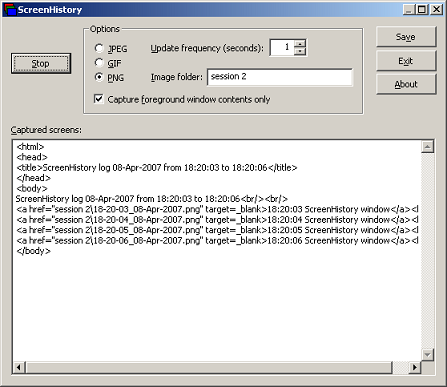
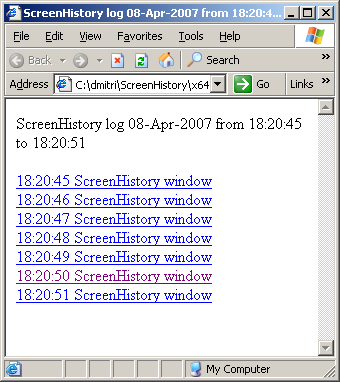
The following ScreenHistory screenshot was saved by the tool itself:

If you save an HTML file and load it in IE you would see formatted screen log (screenshot was saved by ScreenHistory):

- Dmitry Vostokov @ DumpAnalysis.org -

Upgrading Dr. Watson

April 7th, 2007

I’ve been using NTSD as a default debugger on my laptop for a while and decided to revert it to Dr. Watson to get a couple of logs. Unfortunately Dr. Watson itself crashed in dbghelp.dll. Loading drwtsn32.exe dump reveals that it depends on both dbghelp.dll and dbgeng.dll. I tried to replace these DLLs with newer versions from the latest Debugging Tools for Windows and found that this change in system32 folder is immediately reverted back to original file versions. Instead of battling against Windows I decided to create a completely separate Dr. Watson folder and copy drwtsn32.exe, the latest dbghelp.dll and dbgeng.dll from Debugging Tools for Windows there. Then I altered “Debugger” value under the following key to include the full path to drwtsn32.exe:

HKEY_LOCAL_MACHINE\SOFTWARE\Microsoft\Windows NT\CurrentVersion\AeDebug
Debugger=c:\drwatson\drwtsn32 -p %ld -e %ld -g
 

This solved the problem. Dr. Watson now uses the latest debugging engine to save dumps and logs.

- Dmitry Vostokov -

Post-debugging complications

April 3rd, 2007

Real story: suddenly an application being developed started to leak memory very rapidly and in huge amounts, 100Mb per second. That application used a DLL that was known for memory leaks but those leaks were much smaller before. After spending the whole day debugging this problem a developer renamed the application just to keep its current version and launched it again. The same executable file but under a different name started to consume much less memory as before the problem. After renaming it back the application started to consume huge amounts of memory again. Scratching his head the developer recalled that he enabled full page heap (placing allocations at the end of full pages) 3 weeks ago…

The moral of this story is always to revert changes made for debugging purposes back as soon as debugging session is finished or to use fresh and separate debugging environment every time. The latter is much easier nowadays if you use VMWare or Virtual PC.

- Dmitry Vostokov -

Crash Dump Analysis Patterns (Part 11)

April 3rd, 2007

One of mistakes beginners make is trusting WinDbg !analyze or kv commands displaying stack trace. WinDbg is only a tool, sometimes information necessary to get correct stack trace is missing and therefore some critical thought is required to distinguish between correct and incorrect stack traces. I call this pattern Incorrect Stack Trace. Incorrect stack traces usually

  • Have WinDbg warning: “Following frames may be wrong”

  • Don’t have the correct bottom frame like kernel32!BaseThreadStart (in user-mode)

  • Have function calls that don’t make any sense

  • Have strange looking disassembled function code or code that doesn’t make any sense from compiler perspective

  • Have ChildEBP and RetAddr addresses that don’t make any sense

Consider the following stack trace:

0:011> k
ChildEBP RetAddr
WARNING: Frame IP not in any known module. Following frames may be wrong.
0184e434 7c830b10 0×184e5bf
0184e51c 7c81f832 ntdll!RtlGetFullPathName_Ustr+0×15b
0184e5f8 7c83b1dd ntdll!RtlpLowFragHeapAlloc+0xc6a
00099d30 00000000 ntdll!RtlpLowFragHeapFree+0xa7

Here we have almost all attributes of the wrong stack trace. At the first glance it looks like some heap corruption happened (runtime heap alloc and free functions are present) but if you give it second thought you would see that low fragmentation heap Free function shouldn’t call low fragmentation heap Alloc function and the latter shoudn’t query full path name. That doesn’t make any sense.  

What we should do here? Look at raw stack and try to build the correct stack trace ourselves. In our case this is very easy. We need to traverse stack frames from BaseThreadStart+0×34 until we don’t find any function call or reach the top. When functions are called (no optimization, most compilers) EBP registers are linked together as explained on slide 13 here:

Practical Foundations of Debugging (6.1)

0:011> !teb
TEB at 7ffd8000
    ExceptionList:        0184ebdc
    StackBase:            01850000
    StackLimit:           01841000
    SubSystemTib:         00000000
    FiberData:            00001e00
    ArbitraryUserPointer: 00000000
    Self:                 7ffd8000
    EnvironmentPointer:   00000000
    ClientId:             0000061c . 00001b60
    RpcHandle:            00000000
    Tls Storage:          00000000
    PEB Address:          7ffdf000
    LastErrorValue:       0
    LastStatusValue:      c0000034
    Count Owned Locks:    0
    HardErrorMode:        0

0:011> dds 01841000 01850000
01841000  00000000


0184eef0  0184ef0c
0184eef4  7615dff2 localspl!SplDriverEvent+0×21
0184eef8  00bc3e08
0184eefc  00000003
0184ef00  00000001
0184ef04  00000000
0184ef08  0184efb0
0184ef0c  0184ef30
0184ef10  7615f9d0 localspl!PrinterDriverEvent+0×46
0184ef14  00bc3e08
0184ef18  00000003
0184ef1c  00000000
0184ef20  0184efb0
0184ef24  00b852a8
0184ef28  00c3ec58
0184ef2c  00bafcc0
0184ef30  0184f3f8
0184ef34  7614a9b4 localspl!SplAddPrinter+0×5f3
0184ef38  00c3ec58
0184ef3c  00000003
0184ef40  00000000
0184ef44  0184efb0
0184ef48  00c117f8


0184ff28  00000000
0184ff2c  00000000
0184ff30  0184ff84
0184ff34  77c75286 RPCRT4!LRPC_ADDRESS::ReceiveLotsaCalls+0×3a
0184ff38  0184ff4c
0184ff3c  77c75296 RPCRT4!LRPC_ADDRESS::ReceiveLotsaCalls+0×4a
0184ff40  7c82f2fc ntdll!RtlLeaveCriticalSection
0184ff44  000de378
0184ff48  00097df0
0184ff4c  4d2fa200
0184ff50  ffffffff
0184ff54  ca5b1700
0184ff58  ffffffff
0184ff5c  8082d821
0184ff60  0184fe38
0184ff64  00097df0
0184ff68  000000aa
0184ff6c  80020000
0184ff70  0184ff54
0184ff74  80020000
0184ff78  000b0c78
0184ff7c  00a50180
0184ff80  0184fe38
0184ff84  0184ff8c
0184ff88  77c5778f RPCRT4!RecvLotsaCallsWrapper+0xd
0184ff8c  0184ffac
0184ff90  77c5f7dd RPCRT4!BaseCachedThreadRoutine+0×9d
0184ff94  0009c410
0184ff98  00000000
0184ff9c  00000000
0184ffa0  00097df0
0184ffa4  00097df0
0184ffa8  00015f90
0184ffac  0184ffb8
0184ffb0  77c5de88 RPCRT4!ThreadStartRoutine+0×1b
0184ffb4  00088258
0184ffb8  0184ffec
0184ffbc  77e6608b kernel32!BaseThreadStart+0×34
0184ffc0  00097df0
0184ffc4  00000000
0184ffc8  00000000
0184ffcc  00097df0
0184ffd0  8ad84818
0184ffd4  0184ffc4
0184ffd8  8980a700
0184ffdc  ffffffff
0184ffe0  77e6b7d0 kernel32!_except_handler3
0184ffe4  77e66098 kernel32!`string’+0×98
0184ffe8  00000000
0184ffec  00000000
0184fff0  00000000
77c5de6d  RPCRT4!ThreadStartRoutine
0184fff8  00097df0
0184fffc  00000000
01850000  00000008

Next we need to use custom k command and specify base pointer. In our case the last found stack address that links EBP pointers is 0184eef0:

0:011> k L=0184eef0
ChildEBP RetAddr
WARNING: Frame IP not in any known module. Following frames may be wrong.
0184eef0 7615dff2 0×184e5bf
0184ef0c 7615f9d0 localspl!SplDriverEvent+0×21
0184ef30 7614a9b4 localspl!PrinterDriverEvent+0×46
0184f3f8 761482de localspl!SplAddPrinter+0×5f3
0184f424 74067c8f localspl!LocalAddPrinterEx+0×2e
0184f874 74067b76 SPOOLSS!AddPrinterExW+0×151
0184f890 01007e29 SPOOLSS!AddPrinterW+0×17
0184f8ac 01006ec3 spoolsv!YAddPrinter+0×75
0184f8d0 77c70f3b spoolsv!RpcAddPrinter+0×37
0184f8f8 77ce23f7 RPCRT4!Invoke+0×30
0184fcf8 77ce26ed RPCRT4!NdrStubCall2+0×299
0184fd14 77c709be RPCRT4!NdrServerCall2+0×19
0184fd48 77c7093f RPCRT4!DispatchToStubInCNoAvrf+0×38
0184fd9c 77c70865 RPCRT4!RPC_INTERFACE::DispatchToStubWorker+0×117
0184fdc0 77c734b1 RPCRT4!RPC_INTERFACE::DispatchToStub+0xa3
0184fdfc 77c71bb3 RPCRT4!LRPC_SCALL::DealWithRequestMessage+0×42c
0184fe20 77c75458 RPCRT4!LRPC_ADDRESS::DealWithLRPCRequest+0×127
0184ff84 77c5778f RPCRT4!LRPC_ADDRESS::ReceiveLotsaCalls+0×430
0184ff8c 77c5f7dd RPCRT4!RecvLotsaCallsWrapper+0xd

Stack traces make more sense now but we don’t see BaseThreadStart+0×34. By default WinDbg displays only certain amount of function calls (stack frames) so we need to specify stack frame count, for example, 100:

0:011> k L=0184eef0 100
ChildEBP RetAddr
WARNING: Frame IP not in any known module. Following frames may be wrong.
0184eef0 7615dff2 0×184e5bf
0184ef0c 7615f9d0 localspl!SplDriverEvent+0×21
0184ef30 7614a9b4 localspl!PrinterDriverEvent+0×46
0184f3f8 761482de localspl!SplAddPrinter+0×5f3
0184f424 74067c8f localspl!LocalAddPrinterEx+0×2e
0184f874 74067b76 SPOOLSS!AddPrinterExW+0×151
0184f890 01007e29 SPOOLSS!AddPrinterW+0×17
0184f8ac 01006ec3 spoolsv!YAddPrinter+0×75
0184f8d0 77c70f3b spoolsv!RpcAddPrinter+0×37
0184f8f8 77ce23f7 RPCRT4!Invoke+0×30
0184fcf8 77ce26ed RPCRT4!NdrStubCall2+0×299
0184fd14 77c709be RPCRT4!NdrServerCall2+0×19
0184fd48 77c7093f RPCRT4!DispatchToStubInCNoAvrf+0×38
0184fd9c 77c70865 RPCRT4!RPC_INTERFACE::DispatchToStubWorker+0×117
0184fdc0 77c734b1 RPCRT4!RPC_INTERFACE::DispatchToStub+0xa3
0184fdfc 77c71bb3 RPCRT4!LRPC_SCALL::DealWithRequestMessage+0×42c
0184fe20 77c75458 RPCRT4!LRPC_ADDRESS::DealWithLRPCRequest+0×127
0184ff84 77c5778f RPCRT4!LRPC_ADDRESS::ReceiveLotsaCalls+0×430
0184ff8c 77c5f7dd RPCRT4!RecvLotsaCallsWrapper+0xd
0184ffac 77c5de88 RPCRT4!BaseCachedThreadRoutine+0×9d
0184ffb8 77e6608b RPCRT4!ThreadStartRoutine+0×1b
0184ffec 00000000 kernel32!BaseThreadStart+0×34

Now stack trace looks much better. 

- Dmitry Vostokov @ DumpAnalysis.org -

StressPrinters: Stressing Printer Autocreation

April 3rd, 2007

Printer drivers are great source of crash dumps especially in Citrix and Microsoft terminal services environments. Bad printer drivers crash or hang spooler service (spoolsv.exe) when multiple users connect to a server.

Most of bad drivers were designed and implemented for use in a single user environment without considering multithreading in mind. Some bad drivers display a dialog box every time the printer is created and because this is done on a server side users cannot dismiss it unless spooler service is configured to interact with the desktop and an administrator sees the dialog box. Some drivers are linked to a debug run-time library and every exception brings up a dialog effectively hanging the thread and sometimes the whole spooler service if there was heap corruption, for example.

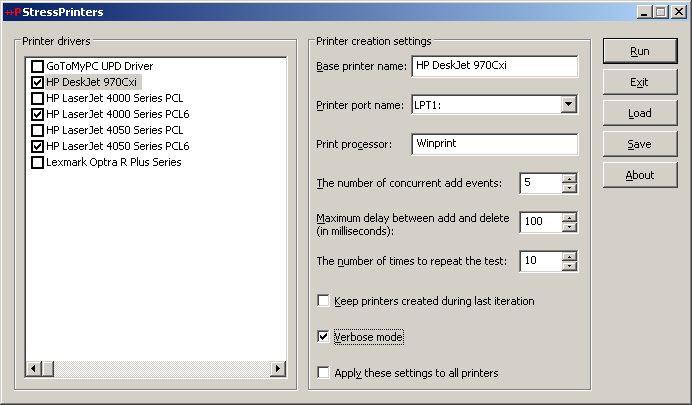
Therefore before allowing terminal services users to use certain printers it is good to simulate multiple users trying to create particular printers to determine bad drivers and other printer components. Originally Citrix had very popular command line AddPrinter tool for this purpose and it has been replaced by StressPrinters tool where I designed and implemented GUI to set parameters, orchestration of multiple AddPrinter command line tools launched simultaneously with different parameters and overall log file management. You can even export your settings to a file and import it on another server. The tool also has 64-bit executables to test printer autocreation on x64 Windows.

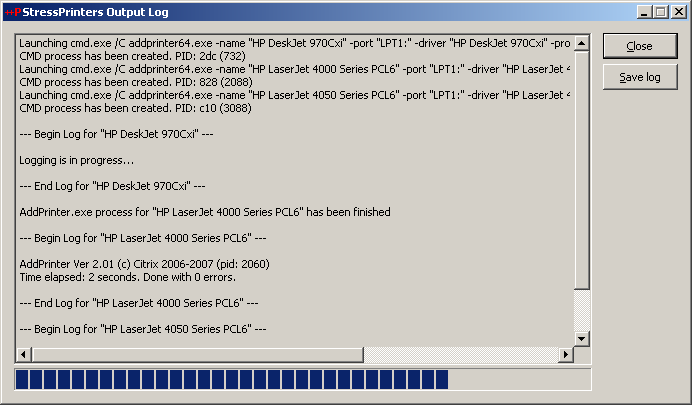
Here are some screenshots:

The tool detects spooler crashes (if spoolsv.exe suddenly disappears from a process list) so you can check for crash dumps saved if you set up a default postmortem debugger (Dr. Watson or NTSD). If you see the progress bar hanging for a long time then you can dump the spooler service using MS userdump.exe to check for any stuck threads and resource contention.

You can register for free to read documentation and download this tool from Citrix support web site:

StressPrinters 1.2 for 32-bit and 64-bit platforms

- Dmitry Vostokov -

Crash Dump Analysis Patterns (Part 10)

March 19th, 2007

Sometimes the change of operating system version or installing an intrusive product reveals hidden bugs in software that was working perfectly before that.

What have happened after installing the new software? If you look at the process dump you would see many DLLs loaded at their specific virtual addresses. Here is the output from lm WinDbg command after attaching to iexplore.exe process running on my Windows XP SP2 workstation:

0:000> lm
start    end      module name
00400000 00419000 iexplore
01c80000 01d08000 shdoclc
01d10000 01fd5000 xpsp2res
022b0000 022cd000 xpsp3res
02680000 02946000 msi
031f0000 031fd000 LvHook
03520000 03578000 PortableDeviceApi
037e0000 037f7000 odbcint
0ffd0000 0fff8000 rsaenh
20000000 20012000 browselc
30000000 302ee000 Flash9b
325c0000 325d2000 msohev
4d4f0000 4d548000 WINHTTP
5ad70000 5ada8000 UxTheme
5b860000 5b8b4000 NETAPI32
5d090000 5d12a000 comctl32_5d090000
5e310000 5e31c000 pngfilt
63000000 63014000 SynTPFcs
662b0000 66308000 hnetcfg
66880000 6688c000 ImgUtil
6bdd0000 6be06000 dxtrans
6be10000 6be6a000 dxtmsft
6d430000 6d43a000 ddrawex
71a50000 71a8f000 mswsock
71a90000 71a98000 wshtcpip
71aa0000 71aa8000 WS2HELP
71ab0000 71ac7000 WS2_32
71ad0000 71ad9000 wsock32
71b20000 71b32000 MPR
71bf0000 71c03000 SAMLIB
71c10000 71c1e000 ntlanman
71c80000 71c87000 NETRAP
71c90000 71cd0000 NETUI1
71cd0000 71ce7000 NETUI0
71d40000 71d5c000 actxprxy
722b0000 722b5000 sensapi
72d10000 72d18000 msacm32
72d20000 72d29000 wdmaud
73300000 73367000 vbscript
73760000 737a9000 DDRAW
73bc0000 73bc6000 DCIMAN32
73dd0000 73ece000 MFC42
74320000 7435d000 ODBC32
746c0000 746e7000 msls31
746f0000 7471a000 msimtf
74720000 7476b000 MSCTF
754d0000 75550000 CRYPTUI
75970000 75a67000 MSGINA
75c50000 75cbe000 jscript
75cf0000 75d81000 mlang
75e90000 75f40000 SXS
75f60000 75f67000 drprov
75f70000 75f79000 davclnt
75f80000 7607d000 BROWSEUI
76200000 76271000 mshtmled
76360000 76370000 WINSTA
76390000 763ad000 IMM32
763b0000 763f9000 comdlg32
76600000 7661d000 CSCDLL
767f0000 76817000 schannel
769c0000 76a73000 USERENV
76b20000 76b31000 ATL
76b40000 76b6d000 WINMM
76bf0000 76bfb000 PSAPI
76c30000 76c5e000 WINTRUST
76c90000 76cb8000 IMAGEHLP
76d60000 76d79000 iphlpapi
76e80000 76e8e000 rtutils
76e90000 76ea2000 rasman
76eb0000 76edf000 TAPI32
76ee0000 76f1c000 RASAPI32
76f20000 76f47000 DNSAPI
76f60000 76f8c000 WLDAP32
76fc0000 76fc6000 rasadhlp
76fd0000 7704f000 CLBCATQ
77050000 77115000 COMRes
77120000 771ac000 OLEAUT32
771b0000 77256000 WININET
773d0000 774d3000 comctl32
774e0000 7761d000 ole32
77920000 77a13000 SETUPAPI
77a20000 77a74000 cscui
77a80000 77b14000 CRYPT32
77b20000 77b32000 MSASN1
77b40000 77b62000 appHelp
77bd0000 77bd7000 midimap
77be0000 77bf5000 MSACM32_77be0000
77c00000 77c08000 VERSION
77c10000 77c68000 msvcrt
77c70000 77c93000 msv1_0
77d40000 77dd0000 USER32
77dd0000 77e6b000 ADVAPI32
77e70000 77f01000 RPCRT4
77f10000 77f57000 GDI32
77f60000 77fd6000 SHLWAPI
77fe0000 77ff1000 Secur32
7c800000 7c8f4000 kernel32
7c900000 7c9b0000 ntdll
7c9c0000 7d1d5000 SHELL32
7dc30000 7df20000 mshtml
7e1e0000 7e280000 urlmon
7e290000 7e3ff000 SHDOCVW

Installing or upgrading software can change the distribution of loaded DLLs and their addresses. This also happens when you install some monitoring software which usually injects their DLLs into every process. As a result some DLLs might be relocated or even the new ones appear loaded. And this might influence 3rd-party program behavior therefore exposing its hidden bugs being dormant when executing the process in old environment. I call this pattern Changed Environment.

Let’s look at some hypothetical example. Suppose your program has the following code fragment

if (*p)
{
// do something useful
}

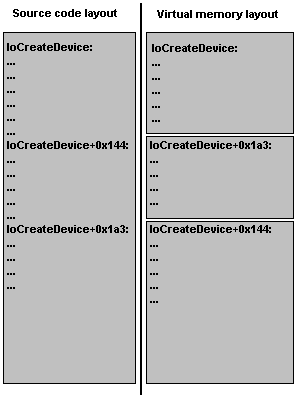
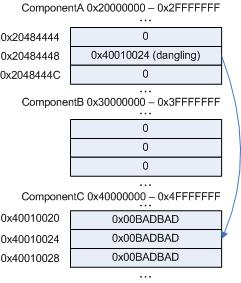
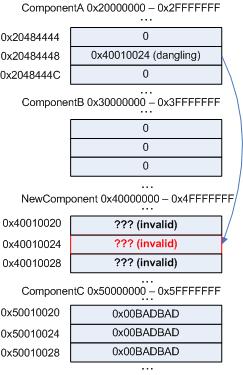
Suppose the pointer p is invalid, dangling, its value has been overwritten and this happened because of some bug. Being invalid that pointer can point to a valid memory location nevertheless and the value it points to most likely is non-zero. Therefore the body of the “if” statement will be executed. Suppose it always happens when you run the program and every time you execute it the value of the pointer happens to be the same. Here is the picture illustrating the point:

The pointer value 0×40010024 due to some reason always points to the value 0×00BADBAD. Although in the correct program the pointer itself should have had a completely different value and pointed to 0×1, for example, we see that dereferencing its current invalid value doesn’t crash the process.

After installing the new software, NewComponent DLL is loaded at the address range previously occupied by ComponentC:

Now the address 0×40010024 happens to be completely invalid and we have access violation and the crash dump.

- Dmitry Vostokov @ DumpAnalysis.org -

lvalues, rvalues and pointers

March 19th, 2007

I’ve just published stripped down HTML version of my old Code Reading lectures explaining lvalues and rvalues terminology (used in C and C++ standard documents) and pointers. It also explains how to read complex pointer declarations, const pointers and relationship between pointers and arrays. Understanding pointers is a must in low-level debugging. Can be found here:

lvalues, rvalues and pointers

- Dmitry Vostokov -

Practical Foundations of Debugging (x64)

March 19th, 2007

I’ve just published HTML slides for the first two original lectures on debugging on x64 platform written last year. Basically they are an improved version of my old lectures on debugging on x86 platforms developed in 2004. Now I put more emphasis on using WinDbg as a debugging tool and as previously no assembly language background is assumed. New lectures use x64 assembly language throughout. I’m planning to adapt them to ILP 32-32-64 Windows x64 model (integer-long-pointer) and port more old lectures this year.

- Dmitry Vostokov -

WinDbg tips and tricks: triple dereference

March 13th, 2007

WinDbg commands like dpp allow you to do double dereference in the following format

pointer *pointer **pointer

for example:

0:000> dpp 004015a2
004015a2  00405068 7c80929c kernel32!GetTickCount

I had a couple of cases where I needed triple dereference (or even quadruple dereference) done on a range of memory. Finally after some thinking I tried to use WinDbg scripts and it worked. The key is to use $p pseudo-register which shows the last value of d* commands (dd, dps, etc):

.for (r $t0=00000000`004015a2, $t1=4; @$t1 >= 0; r $t1=$t1-1, $t0=$t0+$ptrsize) { dps @$t0 l1; dps $p l1; dps $p l1; .printf "\n" }

where $t0 and $t1 are pseudo-registers used to hold the starting address of a memory block (I use 64-bit format) and the number of objects to be triple dereferenced and displayed. $ptrsize is a pointer size. The script is platform independent (can be used on both 32-bit and 64-bit target). On my 32-bit target it produces what I originally wanted (triple dereferenced memory), for example:

004015a2  00405068 component!_imp__GetTickCount
00405068  7c80929c kernel32!GetTickCount
7c80929c  fe0000ba

004015a6  458df033
458df033  ????????
458df033  ????????

004015aa  15ff50f0
15ff50f0  ????????
15ff50f0  ????????

004015ae  00405064 component!_imp__QueryPerformanceCounter
00405064  7c80a427 kernel32!QueryPerformanceCounter
7c80a427  8b55ff8b

004015b2  33f4458b
33f4458b  ????????
33f4458b  ????????

If you want quadruple dereferenced memory you just need to add the additional dps @$t0 l1; to .for loop body. With this script even double dereference looks much better because it shows symbol information for the first dereference too whereas dpp command shows symbol name only for the second dereference. 

Another less “elegant” variation without $p pseudo-register uses poi operator but you need a .catch block to prevent the script termination on invalid memory access:

0:000> .for (r $t0=00000000`004015a2, $t1=4; @$t1 >= 0; r $t1=$t1-1, $t0=$t0+$ptrsize) { .catch { dds $t0 l1; dds poi($t0) l1; dds poi(poi($t0)) l1; }; .printf "\n" }

004015a2  00405068 component!_imp__GetTickCount
00405068  7c80929c kernel32!GetTickCount
7c80929c  fe0000ba

004015a6  458df033
458df033  ????????
Memory access error at ') '

004015aa  15ff50f0
15ff50f0  ????????
Memory access error at ') '

004015ae  00405064 component!_imp__QueryPerformanceCounter
00405064  7c80a427 kernel32!QueryPerformanceCounter
7c80a427  8b55ff8b

004015b2  33f4458b
33f4458b  ????????
Memory access error at ') '

You can also use !list extension but more formatting is necessary:

0:000> .for (r $t0=00000000`004015a2, $t1=4; @$t1 >= 0; r $t1=$t1-1, $t0=$t0+$ptrsize) { .printf "%p:\n--------\n\n", $t0; !list -x "dds @$extret l1" $t0; .printf "\n" }
004015a2:
---------
004015a2  00405068 component!_imp__GetTickCount
00405068  7c80929c kernel32!GetTickCount
7c80929c  fe0000ba
fe0000ba  ????????
Cannot read next element at fe0000ba
004015a6:
---------
004015a6  458df033
458df033  ????????
Cannot read next element at 458df033
004015aa:
---------
004015aa  15ff50f0
15ff50f0  ????????
Cannot read next element at 15ff50f0
004015ae:
---------
004015ae  00405064 component!_imp__QueryPerformanceCounter
00405064  7c80a427 kernel32!QueryPerformanceCounter
7c80a427  8b55ff8b
8b55ff8b  ????????
Cannot read next element at 8b55ff8b
004015b2:
---------
004015b2  33f4458b
33f4458b  ????????
Cannot read next element at 33f4458b

The advantage of !list is in unlimited number of pointer dereferences until invalid address is reached. 

- Dmitry Vostokov -

Internet Based Crash Dump Analysis Service

March 9th, 2007

I’m planning to launch a pilot version of free research online service IBCDAS (Internet Based Crash Dump Analysis Service) which is under development and will be integrated with Crash Dump Analysis Portal (www.dumpanalysis.org). The idea is to use Google API to search for crash signatures and stack traces on Internet and mine that information for a potential solution (a fix, a service pack, actual component vendor responsible for a bug, an article, etc.). Information from internet will be fed to a database in a structured form for further analysis and to help with similar or related problems.

- Dmitry Vostokov -

Crash Dump Analysis and Debugging Portal

March 9th, 2007

I’ve decided that content management system is more suitable for organizing links, blog feeds, books and book reviews, articles, etc. Last year I set up crash dump analysis forum mainly to keep all that information in one place. Then later I started my own blog. The amount of information I’m trying to organize is growing and I want it to be more structured than it is now so I installed Drupal CMS on www.dumpanalysis.org and the portal is currently under development. Updates will be posted regularly. The crash dump analysis forum that was parked there has been moved to www.dumpanalysis.org/forum and I made great efforts to preserve links to its topics.

- Dmitry Vostokov -

Bugchecks depicted: IRQL_NOT_LESS_OR_EQUAL

March 6th, 2007

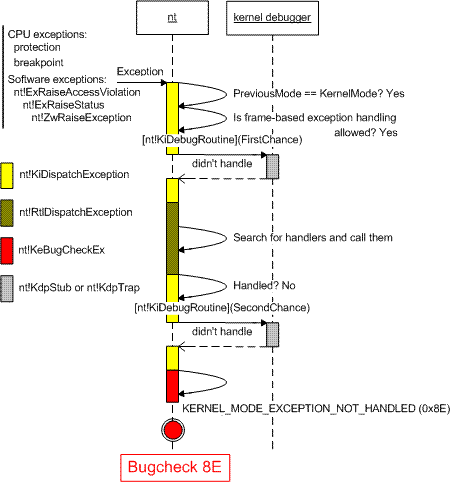
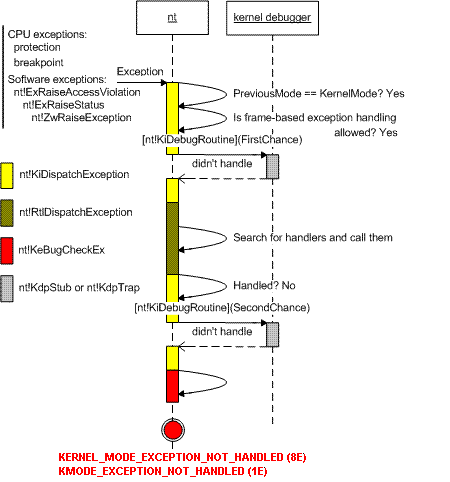
During kernel debugging training I’m providing I came up to the idea to use UML sequence diagrams to depict various Windows kernel behavior including bugchecks. Today I start with bugcheck A. To understand why this bugcheck is needed you need to understand the difference between thread scheduling and IRQL and I use the following diagram to illustrate it:

Then I explain interrupt masking:

Next I explain thread scheduling (thread dispatcher):

And finally here is the diagram showing when bugcheck A happens and what would happen if it doesn’t exist:

This bugcheck happens in the trap handler and IRQL checking before bugcheck happens in memory manager as you can see from the dump example below. There is no IRQL checking in disassembled handler so it must be in one of Mm functions:

BugCheck A, {3, 1c, 1, 8042d8f9}
0: kd> k
nt!KiTrap0E+0×210
driver!foo+0×209
0: kd> u nt!KiTrap0E nt!KiTrap0E+0×210
nt!KiTrap0E:

8046b05e call    nt!MmAccessFault (8044bfba)

8046b189 call    dword ptr [nt!_imp__KeGetCurrentIrql (8040063c)]
8046b18f lock    inc dword ptr [nt!KiHardwareTrigger (80470cc0)]
8046b196 mov     ecx,[ebp+0×64]
8046b199 and     ecx,0×2
8046b19c shr     ecx,1
8046b19e mov     esi,[ebp+0×68]
8046b1a1 push    esi
8046b1a2 push    ecx
8046b1a3 push    eax
8046b1a4 push    edi
8046b1a5 push    0xa
8046b1a7 call    nt!KeBugCheckEx (8042c1e2)

- Dmitry Vostokov -

WinDbg tips and tricks: analyzing hangs faster

March 4th, 2007

I’ve just found (by using Google) that the additional parameter (-hang) to the venerable !analyze -v command is rarely used… Here is the command I use if I get a manually generated dump and there is no exception in it reported by !analyze -v and subsequent visual inspection of ~*kv output doesn’t show anything suspicious, leading to hidden exception(s):

!analyze -hang -v

Then I always double check with !locks command because there could be multiple hang conditions in a dump.

The same parameter can be used in kernel memory dumps too. But double checking ERESOURCE locks (!locks), kernel threads (!stacks) and DPC queues (!dpcs) manually is highly recommended.

- Dmitry Vostokov -

WinDbg tips and tricks: hypertext commands

March 3rd, 2007

You may know that the recent versions of WinDbg have RichEdit command output window that allows to do syntax highlighting and simulate hyperlinks.

Tooltip from WindowHistory shows window class:

However you may not know there is Debugger Markup Language (DML) and there are new commands that take advantage of it. For documentation please look at dml.doc located in your Debugging Tools for Windows folder.

Here is the output of some commands:

!dml_proc

Here we can click on a process link and get the list of threads:

We can click either on “Full details” link or on an individual thread link to see its call stack. If we select “user-mode state” link we get automatic switch to process context (useful for complete memory dumps):

kd> .process /p /r 0x8342c128
Implicit process is now 8342c128
Loading User Symbols

You can also navigate frames and local variables very easily:

If you click on a thread name (No name here) you get its context:

Clicking on a number sets the scope and shows local variables (if you have full PDB files):


Similar command is kM:

Another useful command is lmD where you can easily inspect modules:

- Dmitry Vostokov -

Crash Dump Analysis AntiPatterns (Part 4)

March 1st, 2007

A customer reports application.exe crashes and you ask for a dump file. You get a dump, open it and see the dump is not from your application.exe. You ask for print spooler crash dump and you get mplayer.exe crash dump. I originally thought to call it Wrong Dump pattern and place it into patterns category but after writing about Zippocricy I clearly see it as anti-pattern. It is not a rocket science to check process name in a dump file before sending it for analysis:

  • Load the user process dump in WinDbg
  • Type command .symfix; .reload; !analyze -v and wait


until WinDbg is not busy analyzing

  • Find PROCESS_NAME: in the output. You get something like:

PROCESS_NAME: spoolsv.exe

You can also use dumpchk.exe from Debugging Tools for Windows.

I’m also writing a new version of Citrix DumpCheck Explorer extension that will include process name in its output.  

Another example is when you ask for a complete memory dump but you get a kernel dump or you get various mini-dumps. Fortunately DumpCheck extension can  warn users before they submit a dump.

- Dmitry Vostokov -

Crash Dump Analysis AntiPatterns (Part 3)

February 28th, 2007

I have heard engineers saying, “I didn’t know about this debugging command, let’s use it!” after training session or reading other people’s analysis of crash dumps. A year later I hear the same phrase from them about another debugging command. In the mean time they continue to use the same set of commands they know about until they hear the old new one.

This is a manifestation of Word of Mouth anti-pattern.

General solution: Know your tools. Study them proactively. RTFM.

Example solution: periodically read and re-read WinDbg help.

More refined solution: debugger.chm on Windows Mobile PC.

- Dmitry Vostokov -