Crash Dumps for Dummies (Part 5)

May 5th, 2007

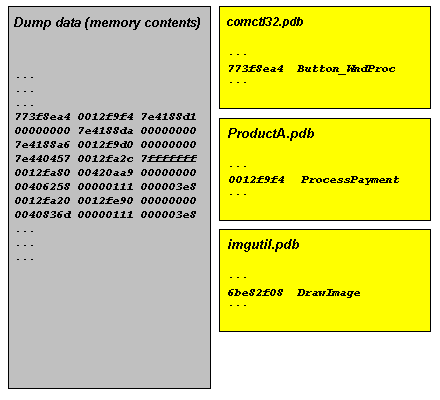
In this part, I try to explain symbol files. They are usually called PDB files because they have .PDB extension although the older ones can have .DBG extension. PDB files are needed to read dump files properly. Without PDB files the dump file data is just a collection of numbers, the contents of memory, without any meaning. PDB files help tools like WinDbg to interpret the data and present it in a human-readable format. Roughly speaking, PDB files contain associations between numbers and their meanings expressed in short text strings:

Because these associations are changed when you have a fix or a service pack on a computer and you have a dump from it you need newer PDB files that correspond to updated components such as DLLs or drivers. 

Long time ago you had to download symbol files manually from Microsoft or get them from CDs. Now Microsoft has its dedicated internet symbol server and WinDbg can download PDB files automatically. However you need to specify Microsoft symbol server location in File\Symbol File Path… dialog and check Reload. The location is usually:

SRV*c:\websymbols*http://msdl.microsoft.com/download/symbols

If you don’t remember the location when you run WinDbg for the first time or on a new computer you can enter .symfix command to set Microsoft symbol server path automatically and specify the location where to download symbol files. You can check your current symbol search path by using .sympath command and don’t forget to reload symbols by entering .reload command:

0:000> .symfix
No downstream store given, using C:\Program Files\Debugging Tools for Windows\sym
0:000> .sympath
Symbol search path is: SRV**http://msdl.microsoft.com/download/symbols
0:000> .symfix c:\websymbols
0:000> .sympath
Symbol search path is: SRV*c:\websymbols*http://msdl.microsoft.com/download/symbols
0:000> .reload

- Dmitry Vostokov @ DumpAnalysis.org -

Reading Korean

May 5th, 2007

I’m very pleased that Heejune Kim and Taehwa Lee translated and posted the first crash dump analysis pattern article on www.driveronline.org

Heejune also has a blog insidekernel.net, mainly about WDF.

I’ve just looked at my blog idea notes and found that I have plans to write about 15 more crash dump analysis patterns. I will try to write most of them in forthcoming months and later reorganize and classify them in retrospection. 

As you might have guessed already I have books about Korean language too. First I’d like to mention 2 volumes written by Ross King, Jae-Hoon Yeon and Insun Lee:

Elementary Korean

Continuing Korean 

Korean writing system, Hankul, is usually described as the most scientific writing system in the world and as the world’s best alphabet.

If you are interested in Writing Systems in general (capitalized to avoid confusion with writing systems in C++) I would recommend two books that I browse sometimes:

Writing Systems: A Linguistic Approach

Writing Systems: A Linguistic Introduction

Both books use IPA (International Phonetic Alphabet) to illustrate mapping of writing to sounds so if you have never used IPA and you want to know about it, vowels, consonants and sounds of languages, basics of speech recognition and synthesis I would greatly recommend this amazing book with CD (I read the first edition but seems there is the second one):

Vowels and Consonants

- Dmitry Vostokov -

PDBFinder (public version 3.0.1)

May 4th, 2007

Finally I’ve managed to create a slimmer version 3.0.1 with many resource consumption improvements:

  • Built database occupies 3.7 times less disk space
  • 2 times faster load
  • 5 times less memory consumption

Additional improvements:

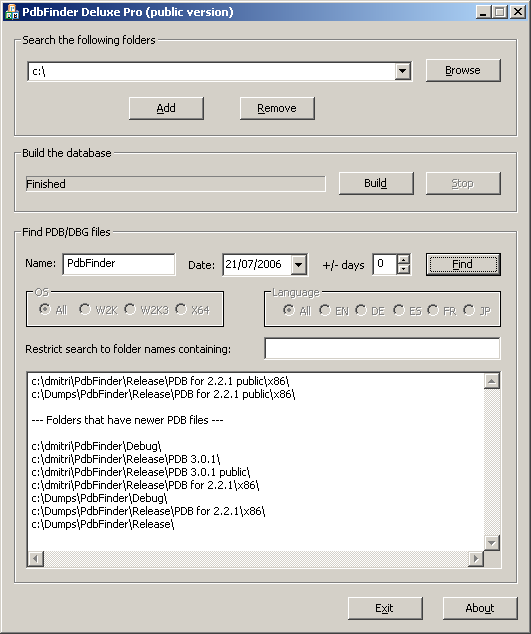
  • “FIXFinder” feature: shows folders where you can find newer modules
  • Search can be restricted to folder names containing sub-string (for example, “release” or “full” symbols only)
  • Ready to copy and paste folder names (for WinDbg Symbol File Path dialog) – exe/dll/sys subfolders are stripped off
  • Additional minor interface improvements (larger screen, ellipsis in paths during build, better keyboard focus handling)

Screenshot:

The tool has been tested with more than 1,000,000 PDB files.

PDBFinder Deluxe Pro 3.0.1 and its documentation can be downloaded from Citrix support web site (requires free registration).

The motivation behind the tool is explained in my previous post: Cons of Symbol Server.

- Dmitry Vostokov -

Moving to UML 2.x

May 4th, 2007

As a part of improving my UML diagrams and moving towards UML 2.x I’m evaluating free community editors and found the one that seems to be good: Visual Paradigm for UML 6.0 Community Edition.
Here are some diagram screenshots:

http://www.visual-paradigm.com/product/vpuml/vpumlscreenshots.jsp

If you don’t know you can be certified in UML 2:

http://www.omg.org/uml-certification/index.htm

In 2003 I was one of beta-testers of UML Fundamentals exam and passed it. I guess from my certificate number (B100031) I was the 31st person who passed the exam, the highest bit offset in a double word. Now I’m aiming to be certified in the next Intermediate level. This exam is a pure UML language exam. It is not about applying UML in your domain. The only one book for this certification is this and which I found very good for exam preparation:

UML 2 Certification Guide: Fundamental & Intermediate Exams

Buy from Amazon

- Dmitry Vostokov -

Cons of Symbol Server

May 3rd, 2007

Symbol servers are great. However I found that in crash dump analysis the absence of automatically loaded symbols sometimes helps to identify a problem or at least gives some directions for further research. It also helps to see which hot fixes or service packs for your product were installed on a problem computer. The scenario I use sometimes when I analyze crash dumps from product A is the following:

  1. Set up WinDbg to point to Microsoft Symbol Server
  2. Load a crash dump and enter various commands based on the issue. Some OS or product A components become visible and their symbols are unresolved.
  3. From unresolved OS symbols I’m aware of the latest fixes or privates from MS
  4. From unresolved symbols of the product A and PDBFinder I determine the base product level and this already gives me some directions.
  5. I add the base product A symbols to symbol file path and continue my analysis.
  6. If unresolved symbols of the product A continue to come up I use PDBFinder again to find corresponding symbols and add them to symbol file path. By doing that I’m aware of the product A hot fix and/or service pack level.
  7. Also from the latest version of PDBFinder (3.0.1) I know whether there are any updates to the component in question.

Of course, all this works only if you store all PDB files from all your fixes and service packs in some location(s) with easily identified names, for example, PRODUCTA\VER20\SP31\FIX01. Adding symbols manually helps to be focused on components, gives attention to some threads where they appear. You might think it is a waste of time but it only takes very small percentage of time especially if you look at the dump for a couple of hours.

What is PDBFinder? This is a program I developed to be able to find right symbol files (especially for minidumps). It scans all locations for PDB or DBG files and adds them to a text database. Next time you run PDBFinder it loads that database and you can find PDB or DBG file location by specifying module name and its date. You can also do a fuzzy search by specifying some date interval. If you run it with -update command line option it will build the database automatically, useful for scheduling weekly updates.  

The public version of PDBFinder Deluxe 2.2.1 can be downloaded from Citrix support web site. The new version 3.0.1 on the way with major improvements and will be announced tomorrow.

- Dmitry Vostokov -

The new version of WinDbg has been released

May 1st, 2007

Version 6.7.5 of Debugging Tools for Windows was released last week:

I haven’t found so far significant additions for crash dump analysis. What I noticed today is that when I open a user dump and enter
!analyze -v command the new field appears in the output:

NTGLOBALFLAG:  400

I ran gflags.exe and enabled page heap for notepad.exe. Then I launched notepad.exe, attached WinDbg, entered the command and NTGLOBALFLAG field reflected the change:

NTGLOBALFLAG:  2000000

So I don’t need to type !gflag command anymore. 

- Dmitry Vostokov -

Who calls the postmortem debugger?

April 30th, 2007

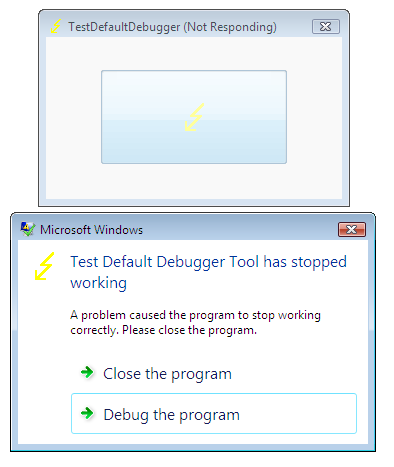
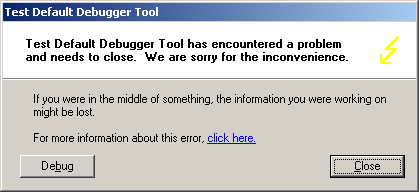
I was trying to understand who calls dwwin.exe, the part of Windows Error Reporting on my Windows XP system when the crash happens. To find an answer I launched TestDefaultDebugger application and after pushing its crash button the following familiar WER dialog box appeared:

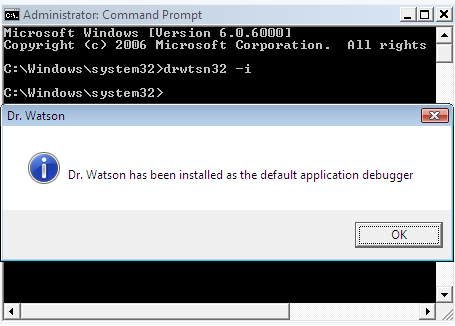
I repeated the same when running ProcessHistory in the background and looking at its log I found that the parent process for dwwin.exe and postmortem debugger (if we click on Debug button) was TestDefaultDebugger.exe. In my case the default postmortem debugger was drwtsn32.exe. To look inside I attached WinDbg to TestDefaultDebugger process when WER dialog box above was displayed and got the following stack trace:

0:000> k
ChildEBP RetAddr
0012d318 7c90e9ab ntdll!KiFastSystemCallRet
0012d31c 7c8094e2 ntdll!ZwWaitForMultipleObjects+0xc
0012d3b8 7c80a075 kernel32!WaitForMultipleObjectsEx+0x12c
0012d3d4 6945763c kernel32!WaitForMultipleObjects+0x18
0012dd68 694582b1 faultrep!StartDWException+0×5df
0012eddc 7c8633e9 faultrep!ReportFault+0×533
0012f47c 00411eaa kernel32!UnhandledExceptionFilter+0×587
0012f49c 0040e879 TestDefaultDebugger+0×11eaa
0012ffc0 7c816fd7 TestDefaultDebugger+0xe879
0012fff0 00000000 kernel32!BaseProcessStart+0×23

The combination of StartDWException and WaitForMultipleObjects suggests that dwwin.exe process is started there. Indeed, when I disassembled StartDWException function I saw CreateProcess call just before the wait call:

0:000> uf faultrep!StartDWException
...
...
...
69457585 8d8568f7ffff    lea     eax,[ebp-898h]
6945758b 50              push    eax
6945758c 8d8524f7ffff    lea     eax,[ebp-8DCh]
69457592 50              push    eax
69457593 8d85d4fbffff    lea     eax,[ebp-42Ch]
69457599 50              push    eax
6945759a 33c0            xor     eax,eax
6945759c 50              push    eax
6945759d 6820000004      push    4000020h
694575a2 6a01            push    1
694575a4 50              push    eax
694575a5 50              push    eax
694575a6 ffb5a4f7ffff    push    dword ptr [ebp-85Ch]
694575ac 50              push    eax
694575ad ff1558114569    call    dword ptr [faultrep!_imp__CreateProcessW (69451158)]


The second parameter of CreateProcess, [ebp-85Ch], is the address of the process command line and we know EBP value from the call stack above, 0012dd68. Just to remind that parameters for Win32 API functions are pushed from right to left. So we get the command line straight away:

0:000> dpu 0012dd68-85Ch l1
0012d50c  0012d3ec "C:\WINDOWS\system32\dwwin.exe -x -s 208"

If we dismiss WER dialog by clicking on Debug button then the postmortem debugger starts. Also it starts without WER dialog displayed if we rename faultrep.dll beforehand. So it looks like the obvious place to look for postmortem debugger launch is UnhandledExceptionFilter. Indeed, we see it there:

0:000> uf kernel32!UnhandledExceptionFilter
...
...
...
7c8636a8 8d850cfaffff    lea     eax,[ebp-5F4h]
7c8636ae 50              push    eax
7c8636af 8d857cf9ffff    lea     eax,[ebp-684h]
7c8636b5 50              push    eax
7c8636b6 33c0            xor     eax,eax
7c8636b8 50              push    eax
7c8636b9 50              push    eax
7c8636ba 50              push    eax
7c8636bb 6a01            push    1
7c8636bd 50              push    eax
7c8636be 50              push    eax
7c8636bf 53              push    ebx
7c8636c0 50              push    eax
7c8636c1 e86cecf9ff      call    kernel32!CreateProcessW (7c802332)


Because this is the code that yet to be executed we need to put a breakpoint at 7c8636c1, continue execution, and when the breakpoint is hit dump the second parameter to CreateProcess that is the memory EBX points to:

0:000> bp 7c8636c1
0:000> g
Breakpoint 0 hit
eax=00000000 ebx=0012ed78 ecx=0012ec70 edx=7c90eb94 esi=0000003a edi=00000000
eip=7c8636c1 esp=0012ed50 ebp=0012f47c iopl=0 nv up ei pl zr na pe nc
cs=001b  ss=0023  ds=0023  es=0023  fs=003b  gs=0000 efl=00000246
kernel32!UnhandledExceptionFilter+0x84b:
7c8636c1 e86cecf9ff      call    kernel32!CreateProcessW (7c802332)
0:000> du @ebx
0012ed78  “c:\drwatson\drwtsn32 -p 656 -e 1″
0012edb8  “72 -g”

You see that UnhandledExceptionFilter is about to launch my custom Dr. Watson postmortem debugger.  

If you look further at UnhandledExceptionFilter disassembled code you would see that after creating postmortem debugger process and waiting for it to finish saving the process dump the function calls NtTerminateProcess.

Therefore all error reporting, calling the postmortem debugger and final process termination are done in the same process that had the exception. The latter two parts are also described in Matt Pietrek’s article as I found afterwards.

One addition to that article written in 1997: starting from Windows XP UnhandledExceptionFilter locates and loads faultrep.dll which launches dwwin.exe to report an error:

kernel32!UnhandledExceptionFilter+0x4f7:
7c863359 8d85acfaffff    lea     eax,[ebp-554h]
7c86335f 50              push    eax
7c863360 8d8570faffff    lea     eax,[ebp-590h]
7c863366 50              push    eax
7c863367 56              push    esi
7c863368 56              push    esi
7c863369 e8fbacfaff      call    kernel32!LdrLoadDll (7c80e069)
0:000> dt _UNICODE_STRING 0012f47c-590
 "C:\WINDOWS\system32\faultrep.dll"
   +0x000 Length           : 0x40
   +0x002 MaximumLength    : 0x100
   +0x004 Buffer           : 0x0012f360  "C:\WINDOWS\system32\faultrep.dll"

You can also see that all processing is done using the same thread stack. So if something is wrong with that stack then you have silent process termination and no error is reported. In Vista there are some improvements that I’m going to cover in detail in a separate post.

- Dmitry Vostokov -

Spammers got my attention

April 29th, 2007

I got an email this morning whose subject begins with “We can define a private “stack pointer”…”. It got my attention because of the phrase “stack pointer”. The full subject was even more intriguing:

“We can define a private “stack pointer” that keeps track of which stack level we’re at, and addresses the corresponding register.”

When I opened that email I was utterly disappointed: the same spam advertisement that we get with less clever subjects. However I was curious to understand whether the spammer knew about low-level stuff or built the subject sentence automatically from keywords found on my blog. The latter assumption looked less plausible because it seemed to me that the first part of the sentence was written by a human or AI caught the wave again while I was immersed in crash dump analysis. On the other hand, the sentence as the whole was confusing to me because pointers do not address registers on Intel architecture, it is the way around. Finally I found that the sentence was written in 1988 by a human indeed. I googled it and it was the exact sentence from “LET’S BUILD A COMPILER!” article series:

http://compilers.iecc.com/crenshaw/tutor2.txt

I don’t know whether there was an engine behind the spam that picks subject text from sentences found on web sites based on keywords found on a target audience site or that was just a coincidence and everyone got the same e-mail. :-)

- Dmitry Vostokov -

Interrupts and exceptions explained (Part 1)

April 28th, 2007

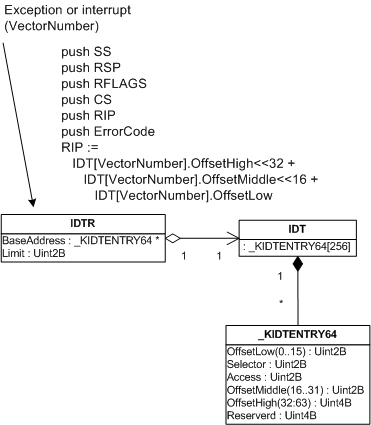
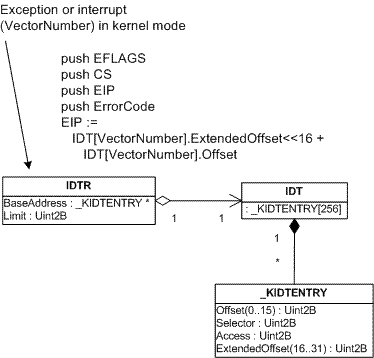
So far we have seen various bugchecks depicted. What I left there is the explanation of how exceptions happen in the first place and how the execution flow reaches KiDispatchException. When some abnormal condition happens such as breakpoint, division by zero or memory protection violation then normal CPU execution flow (code stream) is interrupted (therefore I use the terms “interrupt” and “exception” interchangeably here). The type of interrupt is specified by a number called interrupt vector number. Obviously CPU has to transfer execution to some procedure in memory to handle that interrupt. CPU has to find that procedure, theoretically either having one procedure for all interrupts and specifying interrupt vector number as a parameter or having a table containing pointers to various procedures that correspond to different interrupt vectors. Intel x86 and x64 CPUs use the latter approach which is depicted on the following diagram:


When an exception happens (divide by zero, for example) CPU gets the address of the procedure table from IDTR (Interrupt Descriptor Table Register). This IDT (Interrupt Descriptor Table) is a zero-based array of 8-byte descriptors (x86) or 16-byte descriptors (x64). CPU calculates the location of the necessary procedure to call and does some necessary steps like saving appropriate registers before calling it.

The same happens when some external I/O device interrupts. We will talk about external interrupts later. For I/O devices the term “interrupt” is more appropriate.  On the picture above I/O hardware interrupt vector numbers were taken from some dump. These are OS and user-defined numbers. The first 32 vectors are reserved by Intel. 

Before Windows switches CPU to protected mode during boot process it creates IDT table in memory and sets IDTR to point to it by using SIDT instruction.

Let me now illustrate this by using a UML class diagram annotated by pseudo-code that shows what CPU does before calling the appropriate procedure. The pseudo-code on the diagram below is valid for interrupts and exceptions happening when the current CPU execution mode is kernel. For interrupts and exceptions generated when CPU executes code in user mode the picture is a little more complicated because the processor has to switch the current user-mode stack to kernel mode stack.

The following diagram is for 32-bit x86 processor (x64 will be illustrated later):

Let’s see all this in some dump. The address of IDT can be found by using !pcr [processor number] command. Every processor on a multiprocessor machine has its own IDT:

0: kd> !pcr 0
KPCR for Processor 0 at ffdff000:
    Major 1 Minor 1
 NtTib.ExceptionList: f2178b8c
     NtTib.StackBase: 00000000
    NtTib.StackLimit: 00000000
  NtTib.SubSystemTib: 80042000
       NtTib.Version: 0005c645
   NtTib.UserPointer: 00000001
       NtTib.SelfTib: 7ffdf000
             SelfPcr: ffdff000
                Prcb: ffdff120
                Irql: 0000001f
                 IRR: 00000000
                 IDR: ffffffff
       InterruptMode: 00000000
                 IDT: 8003f400
                 GDT: 8003f000
                 TSS: 80042000
       CurrentThread: 88c1d3c0
          NextThread: 00000000
          IdleThread: 808a68c0
           DpcQueue:

Every entry in IDT has the type _KIDTENTRY and we can get the first entry for divide by zero exception which has vector number 0:

0: kd> dt _KIDTENTRY 8003f400
   +0x000 Offset           : 0x47ca
   +0x002 Selector         : 8
   +0x004 Access           : 0x8e00
   +0x006 ExtendedOffset   : 0x8083

By gluing together ExtendedOffset and Offset fields we get the address of the interrupt handling procedure (0×808347ca) which is KiTrap00:

0: kd> ln 0x808347ca
(808347ca)   nt!KiTrap00   |  (808348a5)   nt!Dr_kit1_a
Exact matches:
    nt!KiTrap00

We can also see the interrupt trace in raw stack. For example, we can open the kernel dump and see the following stack trace and registers in the output of !analyze -v command:

ErrCode = 00000000
eax=00001b00 ebx=00001b00 ecx=00000000 edx=00000000 esi=f2178cb4 edi=bc15a838
eip=bf972586 esp=f2178c1c ebp=f2178c90 iopl=0 nv up ei ng nz ac po cy
cs=0008 ss=0010 ds=0023 es=0023 fs=0030 gs=0000 efl=00010293
driver!foo+0xf9:
bf972586 f77d10 idiv eax,dword ptr [ebp+10h] ss:0010:f2178ca0=00000000
STACK_TEXT:
f2178b44 809989be nt!KeBugCheck+0×14
f2178b9c 8083484f nt!Ki386CheckDivideByZeroTrap+0×41
f2178b9c bf972586 nt!KiTrap00+0×88
f2178c90 bf94c23c driver!foo+0xf9
f2178d54 80833bdf driver!bar+0×11c

The dumping memory around ESP value (f2178c1c) shows the values processor pushes when divide by zero exception happens:

0: kd> dds f2178c1c-100 f2178c1c+100
...
...
...
f2178b80  00000000
f2178b84  f2178b50
f2178b88  00000000
f2178b8c  f2178d44
f2178b90  8083a8cc nt!_except_handler3
f2178b94  80870828 nt!`string'+0xa4
f2178b98  ffffffff
f2178b9c  f2178ba8
f2178ba0  8083484f nt!KiTrap00+0x88
f2178ba4  f2178ba8
f2178ba8  f2178c90
f2178bac  bf972586 driver!foo+0xf9
f2178bb0  badb0d00
f2178bb4  00000000
f2178bb8  0000006d
f2178bbc  bf842315
f2178bc0  f2178c6c
f2178bc4  f2178bec
f2178bc8  bf844154
f2178bcc  f2178c88
f2178bd0  f2178c88
f2178bd4  00000000
f2178bd8  bc150000
f2178bdc  f2170023
f2178be0  f2170023
f2178be4  00000000
f2178be8  00000000
f2178bec  00001b00
f2178bf0  f2178c0c
f2178bf4  f2178d44
f2178bf8  f2170030
f2178bfc  bc15a838
f2178c00  f2178cb4
f2178c04  00001b00
f2178c08  f2178c90
f2178c0c  00000000 ; ErrorCode
f2178c10  bf972586 driver!foo+0xf9 ; EIP
f2178c14  00000008 ; CS
f2178c18  00010293 ; EFLAGS

f2178c1c  00000000 ; <- ESP before interrupt
f2178c20  0013c220
f2178c24  00000000
f2178c28  60000000
f2178c2c  00000001
f2178c30  00000000
f2178c34  00000000


ErrorCode is not the same as interrupt vector number although it is the same number here (0). I won’t cover interrupt error codes here. If you are interested please consult Intel Architecture Software Developer’s Manual.

If we try to execute !idt extension command it will show you only user-defined hardware interrupt vectors:

0: kd> !idt
Dumping IDT:
37: 80a7d1ac hal!PicSpuriousService37
50: 80a7d284 hal!HalpApicRebootService
51: 89495044 serial!SerialCIsrSw (KINTERRUPT 89495008)
52: 89496044 i8042prt!I8042MouseInterruptService (KINTERRUPT 89496008)
53: 894ea044 USBPORT!USBPORT_InterruptService (KINTERRUPT 894ea008)
63: 894f2044 USBPORT!USBPORT_InterruptService (KINTERRUPT 894f2008)
72: 89f59044 atapi!IdePortInterrupt (KINTERRUPT 89f59008)
73: 89580044 NDIS!ndisMIsr (KINTERRUPT 89580008)
83: 899e7824 NDIS!ndisMIsr (KINTERRUPT 899e77e8)
92: 89f56044 atapi!IdePortInterrupt (KINTERRUPT 89f56008)
93: 89f1e044 SCSIPORT!ScsiPortInterrupt (KINTERRUPT 89f1e008)
a3: 894fa044 USBPORT!USBPORT_InterruptService (KINTERRUPT 894fa008)
a4: 894a3044 cpqcidrv+0×22AE (KINTERRUPT 894a3008)
b1: 89f697dc ACPI!ACPIInterruptServiceRoutine (KINTERRUPT 89f697a0)
b3: 89498824 i8042prt!I8042KeyboardInterruptService (KINTERRUPT 894987e8)
b4: 894a2044 cpqasm2+0×5B99 (KINTERRUPT 894a2008)
c1: 80a7d410 hal!HalpBroadcastCallService
d1: 80a7c754 hal!HalpClockInterrupt
e1: 80a7d830 hal!HalpIpiHandler
e3: 80a7d654 hal!HalpLocalApicErrorService
fd: 80a7e11c hal!HalpProfileInterrupt

In the next part I’m going to cover x64 specifics. 

- Dmitry Vostokov -

Bugchecks: SYSTEM_THREAD_EXCEPTION_NOT_HANDLED

April 25th, 2007

Another bugcheck that is similar to KMODE_EXCEPTION_NOT_HANDLED and KERNEL_MODE_EXCEPTION_NOT_HANDLED is SYSTEM_THREAD_EXCEPTION_NOT_HANDLED (0×7E).

This bugcheck happens when you have an exception in a system thread and there is no exception handler to catch it, i.e. no __try/__except. System threads are created by calling PsCreateSystemThread function. Here is its description from DDK:

The PsCreateSystemThread routine creates a system thread that executes in kernel mode and returns a handle for the thread.

By default PspUnhandledExceptionInSystemThread function is set as a default exception handler and its purpose is to call KeBugCheckEx.

The typical call stack in dumps with 7E bugcheck is:

1: kd> k
ChildEBP RetAddr
f70703cc 809a1eb2 nt!KeBugCheckEx+0x1b (FPO: [Non-Fpo])
f70703e8 80964a94 nt!PspUnhandledExceptionInSystemThread+0x1a
f7070ddc 80841a96 nt!PspSystemThreadStartup+0x56
00000000 00000000 nt!KiThreadStartup+0x16

To see how this bugcheck is generated from processor trap we need to look at raw stack. Let’s look at some example. !analyze -v command gives us the following output:

SYSTEM_THREAD_EXCEPTION_NOT_HANDLED (7e)
This is a very common bugcheck. Usually the exception address pinpoints the driver/function that caused the problem. Always note this address as well as the link date of the driver/image that contains this address.
Arguments:
Arg1: 80000003, The exception code that was not handled
Arg2: f69d9dd7, The address that the exception occurred at
Arg3: f70708c0, Exception Record Address
Arg4: f70705bc, Context Record Address
EXCEPTION_RECORD:  f70708c0 -- (.exr fffffffff70708c0)
ExceptionAddress: f69d9dd7 (driver+0x00014dd7)
   ExceptionCode: 80000003 (Break instruction exception)
  ExceptionFlags: 00000000
NumberParameters: 3
   Parameter[0]: 00000000
   Parameter[1]: 8a784020
   Parameter[2]: 00000044
CONTEXT:  f70705bc -- (.cxr fffffffff70705bc)
eax=00000001 ebx=00000032 ecx=8a37c000 edx=00000044 esi=8a37c000 edi=000000c7
eip=f69d9dd7 esp=f7070988 ebp=00004000 iopl=0 nv up ei pl zr na pe nc
cs=0008  ss=0010  ds=0023  es=0023  fs=0030  gs=0000 efl=00000246
driver+0x14dd7:
f69d9dd7 cc              int     3
STACK_TEXT:
WARNING: Stack unwind information not available. Following frames may be wrong.
f7070998 f69dfbd1 80800000 00000000 8a37c000 driver+0x14dd7
00000000 00000000 00000000 00000000 00000000 driver+0x1abd1

We see that the thread encountered the breakpoint instruction and we also see that the call stack that led to breakpoint exception is incomplete. Here we must dump the raw stack data and try to reconstruct the stack manually. System threads are started with the execution of KiThreadStartup function. So let’s dump the stack starting from ESP register and up to some value, find startup function there and try to walk EBP chain:

1: kd> dds esp esp+1000
...
...
...
f7070a04  f7070a40
f7070a08  f71172ec NDIS!ndisMCommonHaltMiniport+0×375
f7070a0c  8a37c000
f7070a10  8a60f5c0
f7070a14  8a610748
f7070a18  8a610748
f7070a1c  00000058
f7070a20  00000005
f7070a24  00000004
f7070a28  f7527000
f7070a2c  00000685
f7070a30  f710943a NDIS!ndisMDummyIndicatePacket
f7070a34  00000000
f7070a38  8a610778
f7070a3c  00010748
f7070a40  f7070b74
f7070a44  f7117640 NDIS!ndisMHaltMiniport+0×21
f7070a48  8a610990

… (intermediate frames are omitted to save space)

f7070d7c  e104a338
f7070d80  f7070dac
f7070d84  8083f72e nt!ExpWorkerThread+0xeb
f7070d88  894d0ed8
f7070d8c  00000000
f7070d90  8a784020
f7070d94  00000000
f7070d98  00000000
f7070d9c  00000000
f7070da0  00000001
f7070da4  00000000
f7070da8  808f0cb7 nt!PiWalkDeviceList
f7070dac  f7070ddc
f7070db0  8092ccff nt!PspSystemThreadStartup+0×2e
f7070db4  894d0ed8
f7070db8  00000000
f7070dbc  00000000
f7070dc0  00000000
f7070dc4  f7070db8
f7070dc8  f7070410
f7070dcc  ffffffff
f7070dd0  8083b9bc nt!_except_handler3
f7070dd4  808408f8 nt!ObWatchHandles+0×5f4
f7070dd8  00000000
f7070ddc  00000000
f7070de0  80841a96 nt!KiThreadStartup+0×16
f7070de4  8083f671 nt!ExpWorkerThread

The last EBP value we are able to get is f7070a04 and we can specify it to the extended version of k command together with ESP and EIP value of crash point:

1: kd> k L=f7070a04 f7070988 f69d9dd7
ChildEBP RetAddr
f7070998 f69dfbd1 driver+0x14dd7
f7070a40 f7117640 NDIS!ndisMCommonHaltMiniport+0x375
f7070a48 f711891a NDIS!ndisMHaltMiniport+0x21
f7070b74 f71196e5 NDIS!ndisPnPRemoveDevice+0x189
f7070ba4 8083f9d0 NDIS!ndisPnPDispatch+0x15d
f7070bb8 808f6a25 nt!IofCallDriver+0x45
f7070be4 808e20b5 nt!IopSynchronousCall+0xbe
f7070c38 8080beae nt!IopRemoveDevice+0x97
f7070c60 808e149b nt!IopRemoveLockedDeviceNode+0x160
f7070c78 808e18cc nt!IopDeleteLockedDeviceNode+0x50
f7070cac 808e1732 nt!IopDeleteLockedDeviceNodes+0x3f
f7070d40 808e19b6 nt!PiProcessQueryRemoveAndEject+0x7ad
f7070d5c 808e7879 nt!PiProcessTargetDeviceEvent+0x2a
f7070d80 8083f72e nt!PiWalkDeviceList+0x1d2
f7070dac 8092ccff nt!ExpWorkerThread+0xeb
f7070ddc 80841a96 nt!PspSystemThreadStartup+0x2e
00000000 00000000 nt!KiThreadStartup+0x16

This was the execution path before the exception. However when int 3 instruction was hit then processor generated a trap with interrupt vector 3 (4th entry in interrupt descriptor table, zero-based) and the corresponding function in IDT, KiTrap03, was called. Therefore we need to find this function on the same raw stack and try to build stack trace for our exception handling code path:

1: kd> dds esp esp+1000
f70703b4  0000007e
f70703b8  80000003
f70703bc  f69d9dd7 driver+0x14dd7
f70703c0  f70708c0
f70703c4  f70705bc
f70703c8  00000000
f70703cc  f70703e8
f70703d0  809a1eb2 nt!PspUnhandledExceptionInSystemThread+0x1a
f70703d4  0000007e
...
...
...
f7070418 f707043c
f707041c 8083b578 nt!ExecuteHandler2+0×26
f7070420 f70708c0
f7070424 f7070dcc
f7070428 f70705bc
f707042c f70704d8
f7070430 f7070894
f7070434 8083b58c nt!ExecuteHandler2+0×3a
f7070438 f7070dcc
f707043c f70704ec
f7070440 8083b54a nt!ExecuteHandler+0×24
f7070444 f70708c0

… (intermediate frames are omitted to save space)

f7070890  f7070410
f7070894  f7070dcc
f7070898  8083b9bc nt!_except_handler3
f707089c  80850c10 nt!`string’+0×10c
f70708a0  ffffffff
f70708a4  f7070914
f70708a8  808357a4 nt!CommonDispatchException+0×4a
f70708ac  f70708c0
f70708b0  00000000
f70708b4  f7070914
f70708b8  00000000
f70708bc  00000001
f70708c0  80000003
f70708c4  00000000
f70708c8  00000000
f70708cc  f69d9dd7 driver+0×14dd7
f70708d0  00000003
f70708d4  00000000
f70708d8  8a784020
f70708dc  00000044
f70708e0  ffffffff
f70708e4  00000001
f70708e8  f7737a7c
f70708ec  f7070934
f70708f0  8083f164 nt!KeWaitForSingleObject+0×346
f70708f4  000000c7
f70708f8  00000000
f70708fc  00000031
f7070900  00000000
f7070904  f707091c
f7070908  80840569 nt!KeSetTimerEx+0×179
f707090c  000000c7
f7070910  80835f39 nt!KiTrap03+0xb0
f7070914  00004000

The last EBP value we are able to get is f7070418 so the following stack trace emerges albeit not accurate as it doesn’t show that KeBugCheckEx was called from PspUnhandledExceptionInSystemThread as can be seen from disassembly. However it does show that the main function that orchestrates stack unwinding is KiDispatchException:

1: kd> k L=f7070418
ChildEBP RetAddr
f7070418 8083b578 nt!KeBugCheckEx+0x1b
f707043c 8083b54a nt!ExecuteHandler2+0x26
f70704ec 80810664 nt!ExecuteHandler+0x24
f70708a4 808357a4 nt!KiDispatchException+0x131
f707090c 80835f39 nt!CommonDispatchException+0x4a
f707090c f69d9dd8 nt!KiTrap03+0xb0
1: kd> uf nt!PspUnhandledExceptionInSystemThread
nt!PspUnhandledExceptionInSystemThread:
809a1e98 8bff            mov     edi,edi
809a1e9a 55              push    ebp
809a1e9b 8bec            mov     ebp,esp
809a1e9d 8b4d08          mov     ecx,dword ptr [ebp+8]
809a1ea0 ff7104          push    dword ptr [ecx+4]
809a1ea3 8b01            mov     eax,dword ptr [ecx]
809a1ea5 50              push    eax
809a1ea6 ff700c          push    dword ptr [eax+0Ch]
809a1ea9 ff30            push    dword ptr [eax]
809a1eab 6a7e            push    7Eh
809a1ead e8f197edff      call    nt!KeBugCheckEx (8087b6a3)

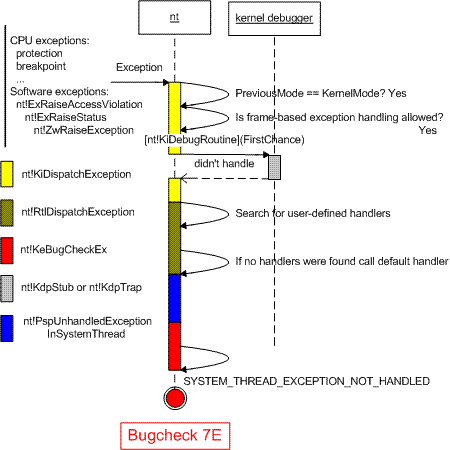
At the end to illustrate this bugcheck I created the following UML sequence diagram (trap processing that leads to KiDispatchException will be depicted in another post):

- Dmitry Vostokov -

Bugchecks: KMODE_EXCEPTION_NOT_HANDLED

April 25th, 2007

This bugcheck (0×1E) is essentially the same as KERNEL_MODE_EXCEPTION_NOT_HANDLED (0×8E) although parameters are different:

KMODE_EXCEPTION_NOT_HANDLED (1e)
This is a very common bugcheck. Usually the exception address pinpoints the driver/function that caused the problem. Always note this address as well as the link date of the driver/image that contains this address.
Arguments:
Arg1: c0000005, The exception code that was not handled
Arg2: 8046ce72, The address that the exception occurred at
Arg3: 00000000, Parameter 0 of the exception
Arg4: 00000000, Parameter 1 of the exception

KERNEL_MODE_EXCEPTION_NOT_HANDLED (8e)
This is a very common bugcheck. Usually the exception address pinpoints the driver/function that caused the problem. Always note this address as well as the link date of the driver/image that contains this address. Some common problems are exception code 0×80000003. This means a hard coded breakpoint or assertion was hit, but this system was booted /NODEBUG. This is not supposed to happen as developers should never have hardcoded breakpoints in retail code, but … If this happens, make sure a debugger gets connected, and the system is booted /DEBUG. This will let us see why this breakpoint is happening.
Arguments:
Arg1: c0000005, The exception code that was not handled
Arg2: 808cbb8d, The address that the exception occurred at
Arg3: f5a84638, Trap Frame
Arg4: 00000000

Bugcheck 0×1E is called from the same routine KiDispatchException on x64 W2K3 and on x86 W2K whereas 0×8E is called on x86 W2K3 and Vista platforms. I haven’t checked this with x64 Vista. Here is the modified UML diagram showing both bugchecks:


- Dmitry Vostokov -

Crash Dump Analysis Poster v1.1 (HTML version)

April 22nd, 2007

Here is an HTML version of Crash Dump Analysis Poster with hyperlinks. Command links launch WinDbg Help for corresponding topic. If you click on !heap, for example, WinDbg Help window for that command will open. In order to have this functionality you need to save source code of the following HTML file below to your disk and launch it locally.

http://www.dumpanalysis.org/CDAPoster.html

Your WinDbg Help file must be in the default installation path, i.e.

C:\Program Files\Debugging Tools for Windows\debugger.chm

If you installed WinDbg to a different folder then you can simply create the default folder and copy debugger.chm there.

I keep this HTML file open locally on a second monitor and found it very easy to jump to an appropriate command help when I need its parameter description.

This HTML poster was created and edited in Notepad.

I’m working on the second version and will announce it as soon as it is ready.

- Dmitry Vostokov -

Bugchecks: KERNEL_MODE_EXCEPTION_NOT_HANDLED

April 22nd, 2007

Here is the next depicted bugcheck: 0×8E. It is very common in kernel crash dumps and it means that:

  1. If access violation exception happened the read or write address was in user space

  2. Frame-based exception handling was allowed, kernel debugger (if any) didn’t handle the exception (first chance), then no exception handlers were willing to process the exception and at last kernel debugger (if any) didn’t handle the exception (second chance)

  3. Frame-based exception handling wasn’t allowed and kernel debugger (if any) didn’t handle the exception

The second option is depicted on the following UML sequence diagram:

Note: if you have an access violation and read or write address is in kernel space you get a different bugcheck as explained in Invalid Pointer Pattern 

I assumed that you know about structured and frame based exception handling (SEH). If you don’t know how it is implemented please read Matt Pietrek’s article: A Crash Course on the Depths of Win32 Structured Exception Handling

References used:

  1. “Windows NT/2000 Native API Reference” book by Gary Nebbett
  2. Local kernel debugging on Windows XP to check that the flow on the diagram above is correct

- Dmitry Vostokov -

BSOD Shortcut Icon

April 21st, 2007

Created the most simple blue screen icon and put it on my site. Now you can observe it when you run your browser:

- Dmitry Vostokov -

More WinDbg Scripts

April 21st, 2007

The good collection of WinDbg scripts was posted this month on Roberto Farah’s blog. Most of his scripts use DML (Debugger Markup Language). I also looked over my previous posts and put my old crash dump analysis scripts into one collection.

Found one problem. I was writing a script yesterday to call some external programs and found that I couldn’t easily pass parameters to the script. I mean something like this would be great:

$$><myscript.txt param1 param2

and I could possibly reference parameters inside the script perhaps by some pseudo-register. The current approach is to set up pseudo-registers before running the script and I don’t like it. I’ll post a better solution if I find it.

- Dmitry Vostokov -

Crash Dump Analysis Patterns (Part 12)

April 20th, 2007

Another pattern that happens so often in crash dumps: No Component Symbols. In this case we can guess what a component does by looking at its name, overall thread stack where it is called and also its import table. Here is an example. We have component.sys driver visible on some thread stack in a kernel dump but we don’t know what that component can potentially do. Because we don’t have symbols we cannot see its imported functions:

kd> x component!*
kd>

We use !dh command to dump its image headers:

kd> lmv m component
start             end                 module name
fffffadf`e0eb5000 fffffadf`e0ebc000   component   (no symbols)
    Loaded symbol image file: component.sys
    Image path: \??\C:\Component\x64\component.sys
    Image name: component.sys
    Timestamp:        Sat Jul 01 19:06:16 2006 (44A6B998)
    CheckSum:         000074EF
    ImageSize:        00007000
    Translations:     0000.04b0 0000.04e0 0409.04b0 0409.04e0
kd> !dh fffffadf`e0eb5000
File Type: EXECUTABLE IMAGE
FILE HEADER VALUES
    8664 machine (X64)
       6 number of sections
44A6B998 time date stamp Sat Jul 01 19:06:16 2006
       0 file pointer to symbol table
       0 number of symbols
      F0 size of optional header
      22 characteristics
            Executable
            App can handle >2gb addresses
OPTIONAL HEADER VALUES
     20B magic #
    8.00 linker version
     C00 size of code
     A00 size of initialized data
       0 size of uninitialized data
    5100 address of entry point
    1000 base of code
         ----- new -----
0000000000010000 image base
    1000 section alignment
     200 file alignment
       1 subsystem (Native)
    5.02 operating system version
    5.02 image version
    5.02 subsystem version
    7000 size of image
     400 size of headers
    74EF checksum
0000000000040000 size of stack reserve
0000000000001000 size of stack commit
0000000000100000 size of heap reserve
0000000000001000 size of heap commit
       0 [       0] address [size] of Export Directory
    51B0 [      28] address [size] of Import Directory
    6000 [     3B8] address [size] of Resource Directory
    4000 [      6C] address [size] of Exception Directory
       0 [       0] address [size] of Security Directory
       0 [       0] address [size] of Base Relocation Directory
    2090 [      1C] address [size] of Debug Directory
       0 [       0] address [size] of Description Directory
       0 [       0] address [size] of Special Directory
       0 [       0] address [size] of Thread Storage Directory
       0 [       0] address [size] of Load Configuration Directory
       0 [       0] address [size] of Bound Import Directory
    2000 [      88] address [size] of Import Address Table Directory
       0 [       0] address [size] of Delay Import Directory
       0 [       0] address [size] of COR20 Header Directory
       0 [       0] address [size] of Reserved Directory


Then we display the contents of Import Address Table Directory using dps command:

kd> dps fffffadf`e0eb5000+2000 fffffadf`e0eb5000+2000+88
fffffadf`e0eb7000  fffff800`01044370 nt!IoCompleteRequest
fffffadf`e0eb7008  fffff800`01019700 nt!IoDeleteDevice
fffffadf`e0eb7010  fffff800`012551a0 nt!IoDeleteSymbolicLink
fffffadf`e0eb7018  fffff800`01056a90 nt!MiResolveTransitionFault+0x7c2
fffffadf`e0eb7020  fffff800`0103a380 nt!ObDereferenceObject
fffffadf`e0eb7028  fffff800`0103ace0 nt!KeWaitForSingleObject
fffffadf`e0eb7030  fffff800`0103c570 nt!KeSetTimer
fffffadf`e0eb7038  fffff800`0102d070 nt!IoBuildPartialMdl+0x3
fffffadf`e0eb7040  fffff800`012d4480 nt!PsTerminateSystemThread
fffffadf`e0eb7048  fffff800`01041690 nt!KeBugCheckEx
fffffadf`e0eb7050  fffff800`010381b0 nt!KeInitializeTimer
fffffadf`e0eb7058  fffff800`0103ceb0 nt!ZwClose
fffffadf`e0eb7060  fffff800`012b39f0 nt!ObReferenceObjectByHandle
fffffadf`e0eb7068  fffff800`012b7380 nt!PsCreateSystemThread
fffffadf`e0eb7070  fffff800`01251f90 nt!FsRtlpIsDfsEnabled+0x114
fffffadf`e0eb7078  fffff800`01275160 nt!IoCreateDevice
fffffadf`e0eb7080  00000000`00000000
fffffadf`e0eb7088  00000000`00000000

We see that this driver under certain circumstances could bugcheck the system using KeBugCheckEx, it creates system thread(s) (PsCreateSystemThread) and uses timer(s) (KeInitializeTimer, KeSetTimer).

If you see name+offset in import table (I think this is an effect of OMAP code optimization) you can get the function by using ln command (list nearest symbols):

kd> ln fffff800`01056a90
(fffff800`01056760)   nt!MiResolveTransitionFault+0x7c2   |  (fffff800`01056a92)   nt!RtlInitUnicodeString
kd> ln fffff800`01251f90
(fffff800`01251e90)   nt!FsRtlpIsDfsEnabled+0×114   |  (fffff800`01251f92)   nt!IoCreateSymbolicLink

This technique is useful if you have a bugcheck that happens when a driver calls certain functions or must call certain function in pairs, like bugcheck 0×20:

kd> !analyze -show 0x20
KERNEL_APC_PENDING_DURING_EXIT (20)
The key data item is the thread's APC disable count. If this is non-zero, then this is the source of the problem. The APC disable count is decremented each time a driver calls KeEnterCriticalRegion, KeInitializeMutex, or FsRtlEnterFileSystem. The APC disable count is incremented each time a driver calls KeLeaveCriticalRegion, KeReleaseMutex, or FsRtlExitFileSystem.  Since these calls should always be in pairs, this value should be zero when a thread exits. A negative value indicates that a driver has disabled APC calls without re-enabling them. A positive value indicates that the reverse is true. If you ever see this error, be very suspicious of all drivers installed on the machine — especially unusual or non-standard drivers. Third party file system redirectors are especially suspicious since they do not generally receive the heavy duty testing that NTFS, FAT, RDR, etc receive. This current IRQL should also be 0.  If it is not, that a driver’s cancelation routine can cause this bugcheck by returning at an elevated IRQL.  Always attempt to note what you were doing/closing at the time of the crash, and note all of the installed drivers at the time of the crash.  This symptom is usually a severe bug in a third party driver.

Then you can see at least whether the suspicious driver could have potentially used those functions and if it imports one of them you can see whether it imports the corresponding counterpart function. 

- Dmitry Vostokov @ DumpAnalysis.org -

Crash Dump Analysis Patterns (Part 5b)

April 20th, 2007

This is a follow up to Optimized Code pattern written previously. Now I discuss the following feature that often bewilders beginners. It is called OMAP code optimization. It is used to make code that needs to be present in memory smaller. So instead of flat address space for compiled function you have pieces of it scattered here and there. This leads to an ambiguity when you try to disassemble OMAP code at its address because WinDbg doesn’t know whether it should treat address range as a function offset (starting from the beginning of the function source code) or just a memory layout offset (starting from the address of that function). Let me illustrate this on IoCreateDevice function code.

Let’s first evaluate a random address starting from the first address of the function (memory layout offset):

kd> ? nt!IoCreateDevice
Evaluate expression: -8796073668256 = fffff800`01275160
kd> ? nt!IoCreateDevice+0×144
Evaluate expression: -8796073667932 = fffff800`012752a4
kd> ? fffff800`012752a4-fffff800`01275160
Evaluate expression: 324 = 00000000`00000144

If we try to disassemble code at the same address the expression will also be evaluated as the memory layout offset:

kd> u nt!IoCreateDevice+0×144
nt!IoCreateDevice+0×1a3:
fffff800`012752a4 83c810          or      eax,10h
fffff800`012752a7 898424b0000000  mov     dword ptr [rsp+0B0h],eax
fffff800`012752ae 85ed            test    ebp,ebp
fffff800`012752b0 8bdd            mov     ebx,ebp
fffff800`012752b2 0f858123feff    jne     nt!IoCreateDevice+0×1b3
fffff800`012752b8 035c2454        add     ebx,dword ptr [rsp+54h]
fffff800`012752bc 488b1585dcf2ff  mov     rdx,qword ptr [nt!IoDeviceObjectType]
fffff800`012752c3 488d8c2488000000 lea     rcx,[rsp+88h]

You see the difference: we give +0×144 offset but the code is shown from +0×1a3! This is because OMAP optimization moved the code from the function offset +0×1a3 to memory locations starting from +0×144. The following picture illustrates this:

If you see this when disassembling a function name+offset address from a thread stack trace you can use raw address instead:

kd> k
Child-SP          RetAddr           Call Site
fffffadf`e3a18d30 fffff800`012b331e component!function+0×72
fffffadf`e3a18d70 fffff800`01044196 nt!PspSystemThreadStartup+0×3e
fffffadf`e3a18dd0 00000000`00000000 nt!KxStartSystemThread+0×16
kd> u fffff800`012b331e
nt!PspSystemThreadStartup+0×3e:
fffff800`012b331e 90              nop
fffff800`012b331f f683fc03000040  test    byte ptr [rbx+3FCh],40h
fffff800`012b3326 0f8515d30600    jne     nt!PspSystemThreadStartup+0×4c
fffff800`012b332c 65488b042588010000 mov   rax,qword ptr gs:[188h]
fffff800`012b3335 483bd8          cmp     rbx,rax
fffff800`012b3338 0f85a6d30600    jne     nt!PspSystemThreadStartup+0×10c
fffff800`012b333e 838bfc03000001  or      dword ptr [rbx+3FCh],1
fffff800`012b3345 33c9            xor     ecx,ecx

You also see OMAP in action also when you try to disassemble the function body using uf command:

kd> uf nt!IoCreateDevice
nt!IoCreateDevice+0×34d:
fffff800`0123907d 834f3008        or      dword ptr [rdi+30h],8
fffff800`01239081 e955c30300      jmp     nt!IoCreateDevice+0×351


nt!IoCreateDevice+0×14c:
fffff800`0126f320 6641be0002      mov     r14w,200h
fffff800`0126f325 e92f5f0000      jmp     nt!IoCreateDevice+0×158
nt!IoCreateDevice+0×3cc:
fffff800`01270bd0 488d4750        lea     rax,[rdi+50h]
fffff800`01270bd4 48894008        mov     qword ptr [rax+8],rax
fffff800`01270bd8 488900          mov     qword ptr [rax],rax
fffff800`01270bdb e95b480000      jmp     nt!IoCreateDevice+0×3d7
nt!IoCreateDevice+0xa4:
fffff800`01273eb9 41b801000000    mov     r8d,1
fffff800`01273ebf 488d154a010700  lea     rdx,[nt!`string’]
fffff800`01273ec6 488d8c24d8000000 lea     rcx,[rsp+0D8h]
fffff800`01273ece 440fc10522f0f2ff xadd    dword ptr [nt!IopUniqueDeviceObjectNumber],r8d
fffff800`01273ed6 41ffc0          inc     r8d
fffff800`01273ed9 e8d236deff      call    nt!swprintf
fffff800`01273ede 4584ed          test    r13b,r13b
fffff800`01273ee1 0f85c1a70800    jne     nt!IoCreateDevice+0xce


- Dmitry Vostokov @ DumpAnalysis.org -

Finding a needle in a hay

April 19th, 2007

Found a good WinDbg command to list unique threads in a process. Some processes have so many threads that it is difficult to find anomalies in the output of ~*kv command especially when most threads are similar like waiting for LPC reply, etc. In this case we can use !uniqstack command to list only threads with unique call stacks and then list duplicate thread numbers.

0:046> !uniqstack
Processing 51 threads, please wait
.  0  Id: 1d50.1dc0 Suspend: 1 Teb: 7fffe000 Unfrozen
      Priority: 0  Priority class: 32
ChildEBP RetAddr
0012fbcc 7c821b84 ntdll!KiFastSystemCallRet
0012fbd0 77e4189f ntdll!NtReadFile+0xc
0012fc38 77f795ab kernel32!ReadFile+0×16c
0012fc64 77f7943c ADVAPI32!ScGetPipeInput+0×2a
0012fcd8 77f796c1 ADVAPI32!ScDispatcherLoop+0×51
0012ff3c 004018fb ADVAPI32!StartServiceCtrlDispatcherW+0xe3


. 26  Id: 1d50.44ec Suspend: 1 Teb: 7ffaf000 Unfrozen
      Priority: 1  Priority class: 32
ChildEBP RetAddr
0752fea0 7c822124 ntdll!KiFastSystemCallRet
0752fea4 77e6bad8 ntdll!NtWaitForSingleObject+0xc
0752ff14 77e6ba42 kernel32!WaitForSingleObjectEx+0xac
0752ff28 1b00999e kernel32!WaitForSingleObject+0×12
0752ff34 1b009966 msjet40!Semaphore::Wait+0xe
0752ff5c 1b00358c msjet40!Queue::GetMessageW+0xc9
0752ffb8 77e6608b msjet40!System::WorkerThread+0×41
0752ffec 00000000 kernel32!BaseThreadStart+0×34


Total threads: 51
Duplicate callstacks: 31 (windbg thread #s follow):
3, 4, 5, 7, 8, 9, 10, 11, 12, 13, 14, 15, 16, 17, 19, 21, 22, 23, 27, 28, 29, 33, 39, 40, 41, 42, 43, 44, 47, 49, 50
0:046> ~49kL
ChildEBP RetAddr
0c58fe18 7c821c54 ntdll!KiFastSystemCallRet
0c58fe1c 77c7538c ntdll!ZwReplyWaitReceivePortEx+0xc
0c58ff84 77c5778f RPCRT4!LRPC_ADDRESS::ReceiveLotsaCalls+0×198
0c58ff8c 77c5f7dd RPCRT4!RecvLotsaCallsWrapper+0xd
0c58ffac 77c5de88 RPCRT4!BaseCachedThreadRoutine+0×9d
0c58ffb8 77e6608b RPCRT4!ThreadStartRoutine+0×1b
0c58ffec 00000000 kernel32!BaseThreadStart+0×34
0:046> ~47kL
ChildEBP RetAddr
0b65fe18 7c821c54 ntdll!KiFastSystemCallRet
0b65fe1c 77c7538c ntdll!ZwReplyWaitReceivePortEx+0xc
0b65ff84 77c5778f RPCRT4!LRPC_ADDRESS::ReceiveLotsaCalls+0×198
0b65ff8c 77c5f7dd RPCRT4!RecvLotsaCallsWrapper+0xd
0b65ffac 77c5de88 RPCRT4!BaseCachedThreadRoutine+0×9d
0b65ffb8 77e6608b RPCRT4!ThreadStartRoutine+0×1b
0b65ffec 00000000 kernel32!BaseThreadStart+0×34

- Dmitry Vostokov -

Reading Chinese

April 18th, 2007

I’m very pleased that Da-Chang Guan started translating Crash Dump Analysis Patterns into Chinese. I’m personally thinking about translating them to Russian too, my native language. 

Please visit his blog http://windriver.polar.tw/blog/ where he also mentions Windows Academic Program I didn’t know about before. Definitely it is good to learn about Windows Internals by studying Windows source code. Now there is an alternative to studying free Linux source code in university operating system courses. 

If you are interested in learning Chinese language I’d like also to recommend some books that will help you to learn to read traditional Chinese. I’m learning it now and here I would recommend the Chinese Reader series (I own and I’m studying the first two at the moment):

My personal opinion and belief is that if you ignore writing and speaking then learning to read Chinese becomes less arduous task. If you like linguistics and languages like me I would also recommend the following two popular books that I read some time ago:

and the more linguistic one I read too: 

I have another book I haven’t read yet but it is on my reading list:

I became interested in English grammar and eventually in other languages and linguistics during my work for Programming Research Ltd., global leader in software quality and coding standards, 4 years ago when I was working on extending and writing new C++ semantics components for their C++ static analysis product. 

- Dmitry Vostokov -

Crash Dump Analysis Poster v1.0

April 15th, 2007

In December when I announced Crash Dump Analysis Card I talked about my plans to make a poster. Here is what I came to in the first version: A4 format poster with the following goals in mind:

  • Have it easy to stick nearby or have it handy
  • Foldable into two halves (user / kernel dumps)
  • Possibility to make it a background image on a PC desktop
  • Have it displayed on a second monitor
  • To facilitate mastering commands and their options
  • Encourage to look in WinDbg Help

You can download large JPEG file (1701×1208) for free (PDF file will be available later):

Download Crash Dump Analysis Poster

In a couple of months I’m going to release the new version after using and playing with the current one and collecting feedback. I have some extension commands missing in the first version of this poster like !list command, various scripting and meta-commands and I will add them in the next version. The current choice of commands is based on my previous Crash Dump Analysis Card and my personal day-to-day crash dump analysis work.

Originally I wanted to call it like something like WinDbg Cheat Sheet or WinDbg Poster but then I realized that I had to omit various live debugging commands and options and there are already several similar cheat sheets for live debugging. 

- Dmitry Vostokov -