Archive for the ‘Software Architecture’ Category
Thursday, February 7th, 2008
It is very easy to become a publisher nowadays. Much easier than I thought. I registered myself as a publisher under the name of OpenTask which is my registered business name in Ireland. I also got the list of ISBN numbers and therefore can announce product details for the first volume of Memory Dump Analysis Anthology series:
Memory Dump Analysis Anthology, Volume 1
- Paperback: 720 pages (*)
- ISBN-13: 978-0-9558328-0-2
- Hardcover: 720 pages (*)
- ISBN-13: 978-0-9558328-1-9
- Author: Dmitry Vostokov
- Publisher: Opentask (15 Apr 2008)
- Language: English
- Product Dimensions: 22.86 x 15.24
(*) subject to change
PDF file will be available for download too.
- Dmitry Vostokov @ DumpAnalysis.org -
Posted in Announcements, Assembly Language, Books, Bugchecks Depicted, Crash Dump Analysis, Crash Dump Patterns, Crash Dumps for Dummies, Debugging, Fun with Crash Dumps, GDB for WinDbg Users, Hardware, Kernel Development, Memory Dump Analysis Jobs, Memory Visualization, Minidump Analysis, Science of Memory Dump Analysis, Security, Software Architecture, Software Technical Support, Stack Trace Collection, Tools, Troubleshooting Methodology, Vista, WinDbg Scripts, WinDbg Tips and Tricks, WinDbg for GDB Users, Windows Server 2008 | 4 Comments »
Sunday, January 20th, 2008
Finally I can pre-order this 1232 page 5th edition! Looking forward to seeing it in the post.
Windows® Internals: Including Windows Server 2008 and Windows Vista, Fifth Edition (PRO-Developer)
I read all previous editions as the part of my knowledge read ahead cache. Here is my short review of the previous 4th edition.
- Dmitry Vostokov @ DumpAnalysis.org -
Posted in Announcements, Books, Debugging, Software Architecture, Software Technical Support, Tools, Vista, Windows Server 2008 | 6 Comments »
Thursday, December 6th, 2007
Faced with the problem to find time to write troubleshooting tools that spring to my mind I devised this process that seems to be a novel way to write software for busy professionals. Its essence is in writing software when presenting it or when presenting software writing topics, for example, software architecture, design and implementation. It has some agile process flavour but magnified by a bigger audience than pair programming has and nicely complements my Reading Windows-based Code series. SIMSIM is an abbreviation for:
Show IMplementation and Subsequent IMprovement
More details will be announced soon.
- Dmitry Vostokov @ DumpAnalysis.org -
Posted in Announcements, Code Reading, Software Architecture, Tools | No Comments »
Tuesday, November 27th, 2007
Many articles and books explain Windows I/O completion ports from high level design considerations arising when building high-performance server software. But it is hard to recall them later when someone asks to explain and not everyone writes that software. Looking at complete memory dumps has an advantage of a bottom-up or reverse engineering approach where we see internals of server software and can immediately grasp the implementation of certain architectural and design decisions.
Consider this thread stack trace we can find almost inside any service or network application process:
THREAD 86cf09c0  Cid 05cc.2030  Teb: 7ffd7000 Win32Thread: 00000000 WAIT: (Unknown) UserMode Non-Alertable

    8a3bb970  QueueObject

    86cf0a38  NotificationTimer

Not impersonating

DeviceMap                 e15af5a8

Owning Process            8a3803d8       Image:         svchost.exe

Wait Start TickCount      2131621        Ticks: 1264 (0:00:00:19.750)

Context Switch Count      6

UserTime                  00:00:00.000

KernelTime                00:00:00.000

Win32 Start Address RPCRT4!ThreadStartRoutine (0×77c5de6d)

Start Address kernel32!BaseThreadStartThunk (0×77e6b5f3)

Stack Init ba276000 Current ba275c38 Base ba276000 Limit ba273000 Call 0

Priority 8 BasePriority 8 PriorityDecrement 0

ChildEBP RetAddr

ba275c50 8083d3b1 nt!KiSwapContext+0×26

ba275c7c 8083dea2 nt!KiSwapThread+0×2e5

ba275cc4 8092b205 nt!KeRemoveQueue+0×417

ba275d48 80833a6f nt!NtRemoveIoCompletion+0xdc

ba275d48 7c82ed54 nt!KiFastCallEntry+0xfc

0093feac 7c821bf4 ntdll!KiFastSystemCallRet

0093feb0 77e66142 ntdll!NtRemoveIoCompletion+0xc

0093fedc 77c604c3 kernel32!GetQueuedCompletionStatus+0×29

0093ff18 77c60655 RPCRT4!COMMON_ProcessCalls+0xa1

0093ff84 77c5f9f1 RPCRT4!LOADABLE_TRANSPORT::ProcessIOEvents+0×117

0093ff8c 77c5f7dd RPCRT4!ProcessIOEventsWrapper+0xd

0093ffac 77c5de88 RPCRT4!BaseCachedThreadRoutine+0×9d

0093ffb8 77e6608b RPCRT4!ThreadStartRoutine+0×1b

0093ffec 00000000 kernel32!BaseThreadStart+0×34
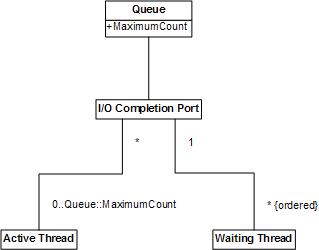
We see that I/O completion port is implemented via kernel queue object so requests (work items, completion notifications, etc) are stored in that queue for further processing by threads. The number of active threads processing requests is bound to some maximum value that usually corresponds to the number of processors:
0: kd> dt _KQUEUE 8a3bb970

ntdll!_KQUEUE

   +0x000 Header           : _DISPATCHER_HEADER

   +0x010 EntryListHead    : _LIST_ENTRY [ 0x8a3bb980 - 0x8a3bb980 ]

   +0x018 CurrentCount     : 0

   +0×01c MaximumCount     : 2

   +0×020 ThreadListHead   : _LIST_ENTRY [ 0×86cf0ac8 - 0×89ff9520 ]
0: kd> !smt

SMT Summary:

------------

   KeActiveProcessors: **------------------------------ (00000003)

        KiIdleSummary: **------------------------------ (00000003)

No PRCB     Set Master SMT Set                                     IAID

 0 ffdff120 Master     **—————————— (00000003)  00

 1 f772f120 ffdff120   **—————————— (00000003)  01
Kernel work queues are also implemented via the same queue object as we might have guessed already:
THREAD 8a777660  Cid 0004.00d0  Teb: 00000000 Win32Thread: 00000000 WAIT: (Unknown) UserMode Non-Alertable

    808b707c  QueueObject

Not impersonating

DeviceMap                 e1000928

Owning Process            8a780818       Image:         System

Wait Start TickCount      2615           Ticks: 2130270 (0:09:14:45.468)

Context Switch Count      301

UserTime                  00:00:00.000

KernelTime                00:00:00.000

Start Address nt!ExpWorkerThread (0×8082d92b)

Stack Init f71e0000 Current f71dfcec Base f71e0000 Limit f71dd000 Call 0

Priority 12 BasePriority 12 PriorityDecrement 0

Kernel stack not resident.

ChildEBP RetAddr

f71dfd04 8083d3b1 nt!KiSwapContext+0×26

f71dfd30 8083dea2 nt!KiSwapThread+0×2e5

f71dfd78 8082d9c1 nt!KeRemoveQueue+0×417

f71dfdac 809208fc nt!ExpWorkerThread+0xc8

f71dfddc 8083fc9f nt!PspSystemThreadStartup+0×2e

00000000 00000000 nt!KiThreadStartup+0×16
0: kd> dt _KQUEUE 808b707c

ntdll!_KQUEUE

   +0x000 Header           : _DISPATCHER_HEADER

   +0x010 EntryListHead    : _LIST_ENTRY [ 0x808b708c - 0x808b708c ]

   +0x018 CurrentCount     : 0

   +0×01c MaximumCount     : 2

   +0×020 ThreadListHead   : _LIST_ENTRY [ 0×8a77a128 - 0×8a777768 ]
I’ve created the simple UML diagram showing high-level relationship between various objects seen from crash dumps. Note that Active Thread object can process items from more than one completion port if its wait was satisfied for one port and then for another but I have never seen this. Obviously Waiting thread can wait only for one completion port.
- Dmitry Vostokov @ DumpAnalysis.org -
Posted in Crash Dump Patterns, Software Architecture | 4 Comments »
Tuesday, November 27th, 2007
I’ve been slowly accumulating blog posts about various troubleshooting tools for my next book in a row with a working title:
DebugWare: The Art and Craft of Writing Troubleshooting and Debugging Tools
Details will be announced later together with supporting website which is under construction. This book will be about architecture, design and implementation of troubleshooting tools for software technical support.
- Dmitry Vostokov @ DumpAnalysis.org -
Posted in Announcements, Books, Software Architecture, Software Technical Support, Tools | No Comments »
Tuesday, November 20th, 2007
Found the following book which is an interesting read to see crash dump analysis from a different operating system architecture perspective but on the same Intel / AMD platform:
http://www.genunix.org/gen/crashdump/book.pdf
- Dmitry Vostokov @ DumpAnalysis.org -
Posted in Assembly Language, Books, Crash Dump Analysis, Software Architecture | No Comments »
Tuesday, October 30th, 2007
This has nothing to do with symbols for debugging. I’ve just found the picture from November 2003 taken in Miami where the sand castle behind me symbolizes the architecture of a modern monolithic operating system. I started doing crash dump analysis a month before.

- Dmitry Vostokov @ DumpAnalysis.org -
Posted in Crash Dump Analysis, Software Architecture | 2 Comments »
Tuesday, October 16th, 2007
Bugtation No. 73:
Crash “must be distinguished from” hang “with which it is often confounded.”
Sydney Smith
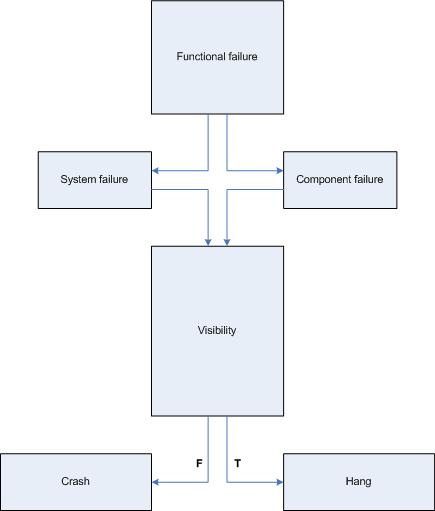
In part 4 I highlighted the difference between crashes and hangs. In this part I will elaborate on this terminology a bit further. First of all, we have to unify them as manifestations of a functional failure. Considering computer as a system of components having certain functions we shall subdivide failures into system and component failures. Of course, systems may be components in some larger hierarchy, like in the case of virtualization. Application and service process failures fall under component failures category. Blue screen and server freezes fall under system failures category. Now it is obvious why most computer users confuse crashes and hangs. They are just failures and often the distinction between them is blurred from user perspective.
Software developers tend to make sharp distinction between crash and hang terms because they consider a situation when a computer accesses wrong memory or gets and executes an invalid instruction as a crash. However, after such situation a computer system may or may not terminate that application or service.
Therefore, I propose to consider crashes as situations when a system or a component is not observed anymore. For example, a running application or service disappears from Task Manager, computer system shows blue screen or reboots. In hang situations we can observe that existence of a failed component in Task Manager or a computer system doesn’t reboot automatically and shows some screen image different from BSOD or panic message. The so called sluggish behavior or long response time can also be considered as hang situations.
Here is a simple rough diagram I devised to illuminate the proposed terminological difference:
Based on the clarification above the task of collecting memory or crash dumps is much simpler and clearer.
In the case of a system crash or hang we need to setup correct crash dump options in Advanced System Settings in Control Panel and check page file size in case of the complete memory dump option. A system crash will save the dump automatically. For system hangs we need to actively trigger crash dump saving procedure using either standard keyboard method, SystemDump tool or live system debugging.
In the case of an application crash we need to set up a postmortem debugger, get WER report or attach a debugger to a component and wait for a failure to happen. In the case of a hang we save a memory dump manually either by using process dumpers like userdump.exe or attaching a debugger.
Links to some dump collection techniques can be found in the previously published part 3 (crashes explained) and part 4 (hangs explained). Forthcoming Windows® Crash Dump Analysis book will discuss all memory dump collection methods thoroughly and in detail.
- Dmitry Vostokov @ DumpAnalysis.org -
Posted in Crash Dump Analysis, Crash Dumps for Dummies, Software Architecture, Tools | 6 Comments »
Wednesday, September 26th, 2007
Sometimes we have a problem that some functionality is not available or it is unresponsive when we request it. We can suppose that the process implementing that functionality has crashed or hangs. If we know the relationship between processes we can request several user dumps at once or a complete memory dump to analyze the dependency between processes by looking at their stack traces. This is an example of the system level crash dump analysis pattern that I call Coupled Processes.
Process relationship can be implemented via different interprocess communication mechanisms (IPC), for example, Remote Procedure Call (RPC) via LPC (Local Procedure Call) which can be easily identified in stack traces.
My favorite example here is when some application tries to print and hangs. Printing API is exported from WINSPOOL.DLL and it forwards via RPC most requests to Windows Print Spooler service. Therefore it is logical to take two dumps, one from that application and one from spoolsv.exe. Similar example is from Citrix Presentation Server environments related to printer autocreation when there are dependencies between Citrix Printing Service CpSvc.exe and spoolsv.exe. Therefore if new user connections hang and restarting both printing services resolves the issue then we might need to analyze dumps from both services together to confirm this Procedure Call Chain and find the problem 3rd-party printing component or driver.
Back to my favorite example. In the hang application we have the following thread:
  18  Id: 2130.6320 Suspend: 1 Teb: 7ffa8000 Unfrozen

ChildEBP RetAddr

01eae170 7c821c94 ntdll!KiFastSystemCallRet

01eae174 77c72700 ntdll!NtRequestWaitReplyPort+0xc

01eae1c8 77c713ba rpcrt4!LRPC_CCALL::SendReceive+0x230

01eae1d4 77c72c7f rpcrt4!I_RpcSendReceive+0x24

01eae1e8 77ce219b rpcrt4!NdrSendReceive+0x2b

01eae5d0 7307c9ef rpcrt4!NdrClientCall2+0x22e

01eae5e8 73082d8d winspool!RpcAddPrinter+0x1c

01eaea70 0040d81a winspool!AddPrinterW+0x102

01eaef58 0040ee7c App!AddNewPrinter+0x816

...

...

...
Notice winspool and rpcrt4 modules. The application is calling spooler service using RPC to add a new printer and waiting for a reply back. Looking at spooler service dump shows several threads displaying message boxes and waiting for user input:
  20  Id: 790.5950 Suspend: 1 Teb: 7ffa2000 Unfrozen

ChildEBP RetAddr  Args to Child

03deea70 7739d02f 77392bf3 00000000 00000000 ntdll!KiFastSystemCallRet

03deeaa8 7738f122 03dd0058 00000000 00000001 user32!NtUserWaitMessage+0xc

03deead0 773a1722 77380000 00123690 00000000 user32!InternalDialogBox+0xd0

03deed90 773a1004 03deeeec 03dae378 03dae160 user32!SoftModalMessageBox+0x94b

03deeee0 773b1a28 03deeeec 00000028 00000000 user32!MessageBoxWorker+0x2ba

03deef38 773b19c4 00000000 03defb9c 03def39c user32!MessageBoxTimeoutW+0x7a

03deef58 773b19a0 00000000 03defb9c 03def39c user32!MessageBoxExW+0x1b

03deef74 021f265b 00000000 03defb9c 03def39c user32!MessageBoxW+0×45

WARNING: Stack unwind information not available. Following frames may be wrong.

03deef88 00000000 03dae160 03deffec 03dae16a PrinterDriver!UninstallerInstall+0×2cb
Dumping the 3rd parameter of MessageBoxW using WinDbg du command shows the message:
“Installation of the software for your printer is now complete. Restart your computer to make the new settings active.”
Another example when one process starts another and is waiting for it to finish:
0 Id: 2a34.24d0 Suspend: 1 Teb: 7ffde000 Unfrozen

ChildEBP RetAddr

0007ec8c 7c822124 ntdll!KiFastSystemCallRet

0007ec90 77e6bad8 ntdll!NtWaitForSingleObject+0xc

0007ed00 77e6ba42 kernel32!WaitForSingleObjectEx+0xac

0007ed14 01002f4c kernel32!WaitForSingleObject+0x12

0007f79c 01003137 userinit!ExecApplication+0x2d3

0007f7dc 0100366b userinit!ExecProcesses+0x1bb

0007fe68 010041fd userinit!StartTheShell+0x132

0007ff1c 010056f1 userinit!WinMain+0x263

0007ffc0 77e523e5 userinit!WinMainCRTStartup+0x186

0007fff0 00000000 kernel32!BaseProcessStart+0x23
- Dmitry Vostokov @ DumpAnalysis.org -
Posted in Crash Dump Analysis, Crash Dump Patterns, Debugging, Software Architecture | 15 Comments »
Thursday, September 13th, 2007
This question came into my mind while reading the fascinating book “Life Itself: A Comprehensive Inquiry into the Nature, Origin, and Fabrication of Life” written by theoretical biologist Robert Rosen and recalling that 13-14 years ago one Unix guru saw a Matt Pietrek’s book “Windows Internals” about Windows 3.x and asked me a rhetorical question: “Is there a life?”. Now we can ask the question again: “Is there any life inside a contemporary computer system?”.
Jokes apart, Rosen’s book about life is the most interesting science book I have ever read. It is a bit mathematical but doesn’t require more mathematical maturity than general science undergraduate level and even covers Category Theory in the context of modeling systems. Most people learnt about sets and their foundational nature at school or university but have never heard about a different approach via categories. Hopefully, this book will provide the right answer to me when I finish reading it.


- Dmitry Vostokov @ DumpAnalysis.org -
Posted in Books, Software Architecture | 3 Comments »
Sunday, August 26th, 2007
If you are developing and debugging user space applications (and/or doing crash dump analysis in user space) and you want to understand Windows kernel dumps and device drivers better (and probably start writing your own kernel tools) here is the reading list I found the most effective over the last 4 years:
0. Read and re-read Windows Internals book in parallel while reading all other books. I read all editions by the way. It will show you the big picture and some useful WinDbg commands and techniques but you need to read device driver books to fill the gaps and be confident in kernel space:
1. Start with “The Windows 2000 Device Driver Book: A Guide for Programmers (2nd Edition)”. This short book will show you the basics and you can start writing your drivers and kernel tools immediately.

2. Next read “Windows NT Device Driver Development” book to consolidate your knowledge. This book has been reprinted by OSR:


3. Don’t stop here. Read “Developing Windows NT Device Drivers:
A Programmer’s Handbook”. This is very good book explaining everything in great detail and good pictures. You will finally understand various buffering methods.

4. Continue with WDM drivers and modern presentation: “Programming the Microsoft Windows Driver Model, Second Edition”. Must read even if your drivers are not WDM.


5. Finally read “Developing Drivers with the Windows Driver Foundation” book as this is the future and it also covers ETW (event tracing for Windows), WinDbg extensions, PREfast and static driver verifier.


Additional reading (not including DDK Help which you will use anyway) can be done in parallel after finishing “Windows NT Device Driver Development” book:
1. OSR NT Insider articles. I have their full printed collection 1996 - 2006
http://www.osronline.com/
2. “Windows NT File System Internals” reprinted by OSR:


3. “Rootkits: Subverting the Windows Kernel” book will show you Windows kernel from hacker perspective. In addition you will find overview of kernel areas not covered in other books.


Of course, you must know C language and its idioms really well. Really know it down to assembly language level! I’ll publish another reading list soon. Stay tuned.
- Dmitry Vostokov @ DumpAnalysis.org -
Posted in Books, Crash Dump Analysis, Debugging, Kernel Development, Software Architecture | 4 Comments »
Sunday, May 6th, 2007
Start, Stop and Send Log (SSSL) principle was applied to design of many tools created in Citrix for troubleshooting customer issues. My favorite examples are WindowHistory, MessageHistory, and ScreenHistory.
In a typical scenario, a customer has a GUI issue, downloads a tool, runs it, clicks on a “Start” button, tries to reproduce the issue, clicks on a “Stop” button and then sends a log either saved in a file or copied from the tool’s dialog. Simple action, no need for customers to become familiar with colored and complex GUI tools especially when an issue is hot and there is no time to play. Upon the arrival of the log file a skilled engineer can analyze it and provide further recommendations. Of course, SSSL tools must record all information that would be necessary to look at during analysis.
SSSL principle promotes agile iterative and incremental development of tools. Because it is difficult to know in advance about all information necessary to record, the first version usually implements logging of essential data only and what is missing in other available tools. The GUI is very simple and this shortens the development time. Later, after support incidents and analysis of their logs, it becomes apparent that more information needs to be recorded and then the second version is born, etc.
SSSL principle also promotes design and implementation reuse. Because GUI and certain operations are the same you can reuse common source code.
Finally after some time when more and more SSSL tools appear you can refactor them into a unified SSSL framework where individual tools become pluggable components. This is what is coming this summer: GUI History Monitor that will combine all separate SSSL “History” tools together.
- Dmitry Vostokov -
Posted in Announcements, Software Architecture, Tools | No Comments »
Friday, May 4th, 2007
As a part of improving my UML diagrams and moving towards UML 2.x I’m evaluating free community editors and found the one that seems to be good: Visual Paradigm for UML 6.0 Community Edition.
Here are some diagram screenshots:
http://www.visual-paradigm.com/product/vpuml/vpumlscreenshots.jsp
If you don’t know you can be certified in UML 2:
http://www.omg.org/uml-certification/index.htm
In 2003 I was one of beta-testers of UML Fundamentals exam and passed it. I guess from my certificate number (B100031) I was the 31st person who passed the exam, the highest bit offset in a double word. Now I’m aiming to be certified in the next Intermediate level. This exam is a pure UML language exam. It is not about applying UML in your domain. The only one book for this certification is this and which I found very good for exam preparation:
UML 2 Certification Guide: Fundamental & Intermediate Exams


- Dmitry Vostokov -
Posted in Books, Software Architecture | 2 Comments »
Saturday, December 16th, 2006
I consider programmers as real programmers only if they attempted to write something like an editor or a word processor. My favorite interview question is “Did you write a word processor?” This probably explains why my team is small 
Why? Because writing a word processor shows your determination, persistence and if you are successful - understanding of OO principles. Even Gang of Four in their seminal book
Design Patterns: Elements of Reusable Object-Oriented Software

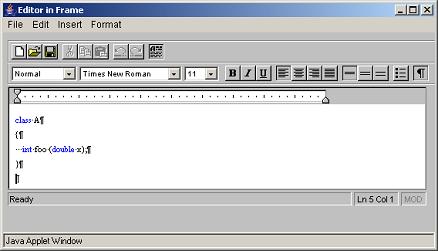
used word processor as a unified example. I was very satisfied when I read their book - I designed and implemented at least 2 word processors: one in pure C meant to be better than MS Write 3.x and one in Java with syntax highlighting. And I implemented design patterns without knowing they were design patterns. The Java one was better and here is the screen shot showing my editor with C/C++ syntax highlighting implemented in Java 1.0 without any 3rd-party class libraries:
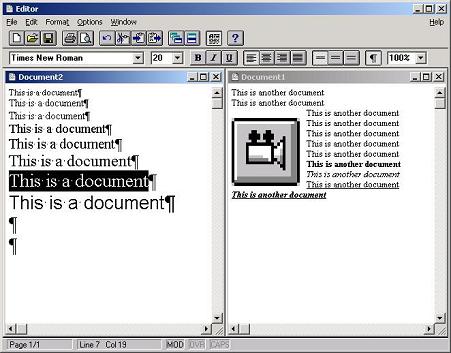
The earlier one (with Windows 3.x look and feel) was written in C and has MDI interface, floating embedded objects and printing support:
- Dmitry Vostokov -
Posted in Books, Software Architecture | 3 Comments »
Thursday, November 16th, 2006
You probably already know or have heard about the project WINE: Windows API on top of X and Unix
winehq.com
I first heard about it more than 10 years ago when it started. Today I rediscovered it again and was really surprised. I was looking for one NT status code I couldn’t find in MS official documentation and found it here:
dlls/ntdll/error.c
In order to run Win32 programs WINE emulates all API calls including OLE32, USER32, GDI32, KERNEL32, ADVAPI32 and of course, NTDLL:
dlls/ntdll
dlls/ole32
dlls/user32
dlls/kernel32
dlls/gdi32
dlls/advapi32
Plus hundreds of other components. All source code is located here:
http://cvs.winehq.com/cvsweb/wine/
So if want to see how particular function or protocol might have been implemented hypothetically by Windows OS designers it is a good place to start.
- Dmitry Vostokov -
Posted in Crash Dump Analysis, Software Architecture, Tools | 2 Comments »
Monday, October 30th, 2006
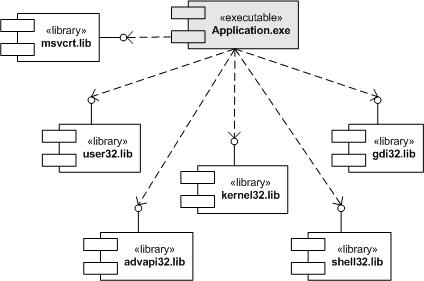
Recently I had been porting my old Win32 legacy project (more than 100,000 lines) to Windows Mobile. Here I summarize the approach I used and I can say now that it was very successful (no single crash since I finished my porting - the original Win32 program was very stable indeed but we all know that hidden bugs surface or introduced when project is ported to another platform). The project was written in Windows 3.x 16-bit era and then it was already ported to Win32 in Windows 95 era. Win32 interface is huge and it contains many legacy Win16 functions (mainly for easy portability and compatibility with existing Win16 code base). The following UML component diagram depicts application dependencies on many Win32 API and runtime libraries from build perspective:
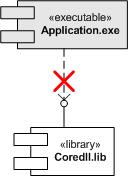
Windows Mobile (in essence Windows CE) has smaller interface and many functions available in Win32 API (especially legacy Win16) and many C runtime functions are absent. My project uses many such functions (due to its history) so the interface becomes broken. The following UML component diagram depicts this dependency:
First I ported my project to use UNICODE strings and UNICODE function equivalents throughout. This was a huge task already. Then instead of further rewriting my code which uses many absent functions and therefore quite possibly to introduce new bugs due to changed semantics I decided to apply a variant of Adapter or Wrapper pattern (for non-object-oriented API). My application now still uses old functions but links to a set of libraries translating these calls into existing Windows CE API. The following UML component depicts the final component infrastructure from build perspective:
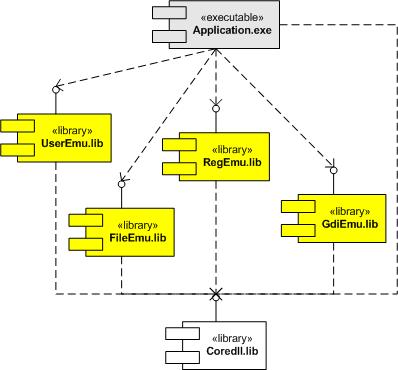
Here is the list of functions I had to translate:
- RegEmu.lib: translates INI file calls into registry
- GetProfileString
- GetProfileInt
- GetPrivateProfileString
- GetPrivateProfileInt
- WriteProfileString
- WritePrivateProfileString
- FileEmu.lib: various file system related calls
- _lcreatW
- _lopenW
- OpenFileW
- WinExecW
- _wsplitpath
- _wsplitpathparam
- _waccess
- _wmkdir
- _wrename
- _wfindfirst
- _wfindnext
- _findclose
- _wunlink
- _wrmdir
- _llseek
- _lclose
- _hread
- _hwrite
- _lread
- _lwrite
- _wstat
- _wgetcwd
- _wmakepath
- _chdrive
- _wchdir
- ShellExecute
- GetWindowsDirectory
- GetSystemDirectory
- GdiEmu.lib: various graphics functions
- SetMapMode
- CreateFont
- CreateDIBitmap
- UserEmu.lib: various UI related functions
- GetKeyNameText
- GetScrollPos
- GetScrollRange
- GetLastActivePopup
- IsIconic
- IsZoomed
- IsBadStringPtr
- IsMenu
- VkKeyScan
- GetKeyboardState
- SetKeyboardState
- ToAscii
- MulDiv
PS. If you are interested in applying patterns to your C++ projects or simply in using them to describe your design and architecture these books are good place to start:
Design Patterns: Elements of Reusable Object-Oriented Software
Pattern-Oriented Software Architecture, Volume 1: A System of Patterns

Pattern-Oriented Software Architecture, Volume 2, Patterns for Concurrent and Networked Objects


- Dmitry Vostokov -
Posted in Books, Software Architecture, Windows Mobile | No Comments »
Tuesday, October 24th, 2006
Crash dumps (and live debugging) can be very useful for reverse engineering component dependencies. Let’s look at MS Video Driver Architecture UML component diagram (synthesized after reading various articles from OSR and DDK):
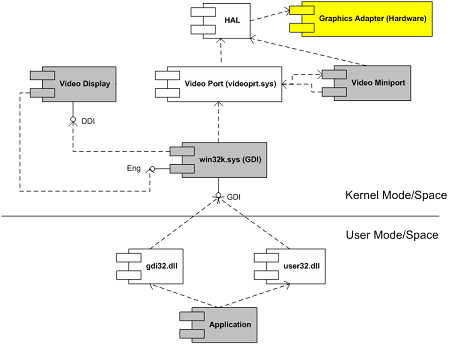
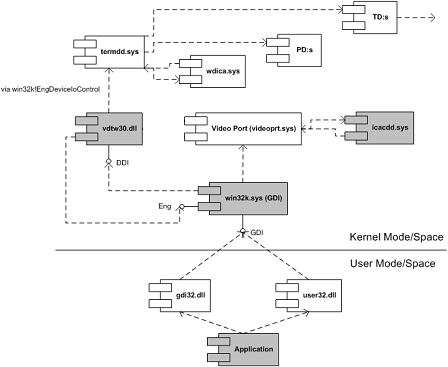
Coupled with this understanding and armed with Citrix symbol files (which are freely downloadable from Citrix support and you don’t really need them to see component dependencies) I was able to transform this thread stack below and other similar stacks into the following UML component diagram (some functions are shown as module!xxx and offsets are removed for clarity):
nt!KiSwapContext

nt!KiSwapThread

nt!KeWaitForSingleObject

tcpip!xxx

tcpip!TCPDispatch

nt!IofCallDriver

nt!xxx

nt!xxx

TDTCP!xxx

TDTCP!xxx

TDTCP!TdIoctl

termdd!_IcaCallSd

termdd!IcaCallNextDriver

pdrframe!xxx

pdrframe!PdIoctl

termdd!_IcaCallSd

termdd!IcaCallNextDriver

pdcrypt1!xxx

pdcrypt1!PdIoctl

termdd!_IcaCallSd

termdd!IcaCallNextDriver

WDICA!xxx

WDICA!xxx

WDICA!xxx

WDICA!xxx

WDICA!xxx

WDICA!xxx

WDICA!WdIoctl

termdd!IcaCallStack

termdd!IcaCallDriver

termdd!IcaDeviceControlChannel

termdd!IcaDeviceControl

termdd!IcaDispatch

win32k!GreDeviceIoControl

win32k!EngDeviceIoControl

vdtw30!xxx

vdtw30!xxx

win32k!vMovePointer

win32k!GreMovePointer

win32k!xxxMoveEventAbsolute

win32k!ProcessMouseInput

win32k!InputApc

nt!KiDeliverApc

nt!KiSwapThread

nt!KeWaitForMultipleObjects

win32k!xxxMsgWaitForMultipleObjects

win32k!xxxDesktopThread

win32k!xxxCreateSystemThreads

win32k!NtUserCallOneParam

nt!KiSystemServiceCopyEnd

nt!KiSwapThread

nt!KeWaitForSingleObject

win32k!EngWaitForSingleObject

vdtw30!xxx

vdtw30!xxx

vdtw30!xxx

vdtw30!DrvTw2SaveScreenBits

win32k!GreSaveScreenBits

win32k!CreateSpb

win32k!zzzChangeStates

win32k!zzzBltValidBits

win32k!xxxEndDeferWindowPosEx

win32k!xxxSetWindowPos

win32k!xxxShowWindow

win32k!NtUserShowWindow

nt!KiSystemService

USER32!NtUserShowWindow

USER32!InternalDialogBox

USER32!DialogBoxIndirectParamAorW

USER32!DialogBoxParamW
We replace MS components with Citrix ones:
- Video Display with vdtw30.dll
- Video Miniport with icacdd.sys
- Hardware and HAL with Terminal Services stack components (MS termdd.sys, Citrix wdica.sys, etc)
- Dmitry Vostokov -
Posted in Citrix, Crash Dump Analysis, Kernel Development, Reverse Engineering, Software Architecture | 6 Comments »
Tuesday, October 17th, 2006
I’ve been thinking about this since my previous DDV post and came up with the following example of general DDV architecture:
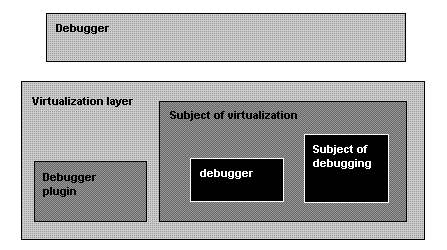
So we need:
- A “Debugger” to debug “Virtualization layer”
- A “Debugger plugin” to help the “Debugger” to understand the “Subject of virtualization”
- Not to mention various virtualized “debuggers” debugging their virtualized subjects
- Dmitry Vostokov -
Posted in Crash Dump Analysis, Software Architecture, Virtualization | No Comments »
Sunday, October 8th, 2006
I got the impression after reading numerous books and articles about device drivers that UML is almost never used in describing kernel and device driver design and architecture. Everything is described either by words or using proprietary notations. If you don’t know about UML (Unified Modeling Language) it is time to learn because it is an industry standard general purpose modeling language with graphical notation. You can find many good tutorials on the Web and I can recommend the book to start:
UML Distilled: A Brief Guide to the Standard Object Modeling Language, Third Edition


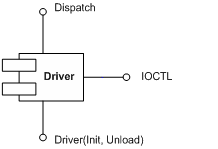
Recently I created some diagrams based on my past experience in using UML to describe and communicate architecture and design:
0. Component diagram depicting major driver interfaces
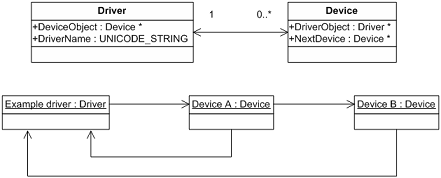
1. Class and object diagram depicting relationship between drivers and devices
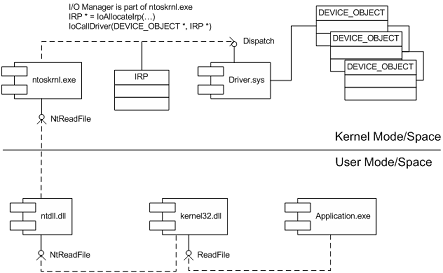
2. Component diagram showing dependencies and interfaces when calling Win32 API function ReadFile
3. Component diagram showing IRP flow in a driver stack (driver-to-driver communication)

Actually I found that some driver books incorrectly depict the ordering of I/O stack locations in IRP stack corresponding to driver or device stack. The correct layout is depicted above. IRP I/O stack locations grow down (to lower addresses) in memory like any other Wintel stack. You can see it from kernel dumps or the following macro from DDK header file wdm.h which shows that next IRP I/O stack location is down in memory (1 is subtracted from current stack location pointer):
#define IoGetNextIrpStackLocation( Irp ) (\

    (Irp)->Tail.Overlay.CurrentStackLocation - 1 )
Dumps (and live debugging) are good in studying component relationships, reconstructing sequence diagrams, etc. For example, this edited fragment below is from crash dump and it shows who calls whom and component dependencies be reconstructed from call stack of Win32 API function GetDriveType: SHELL32 (calls it) -> kernel32 -> ntdll -> nt (ntoskrnl.exe). You can also see various Citrix hooks and filters here (CtxSbxXXX):
kd> kL

CtxSbx!xxx

nt!IovCallDriver

nt!IofCallDriver

CtxAltStr!xxx

nt!IovCallDriver

nt!IofCallDriver

nt!IopParseDevice

nt!ObpLookupObjectName

nt!ObOpenObjectByName

nt!IopCreateFile

nt!IoCreateFile

nt!NtOpenFile

nt!KiSystemService

SharedUserData!SystemCallStub

ntdll!ZwOpenFile

CtxSbxHook!xxx

kernel32!GetDriveTypeW

SHELL32!CMountPoint::_EnumMountPoints
- Dmitry Vostokov -
Posted in Books, Crash Dump Analysis, Kernel Development, Software Architecture | 2 Comments »