Archive for the ‘Software Architecture’ Category

Studying Linux kernel

Thursday, October 5th, 2006

I believe studying Linux kernel and playing with it will broaden your conceptual understanding of kernel development and issues and you can apply it to Wintel stuff too. I’m not a complete Windows guy as you might think after reading my previous posts. I spent 1.5 years (before joining Citrix) under RedHat Linux writing C++ software quality tools in C++ using Emacs editor (working for Programming Research Ltd www.programmingresearch.com). And I did multi platform (Windows - Linux - Solaris) architecture, design and programming for Boeing Commercial Airplanes Group 6 years ago (when working for the biggest Russian outsourcing company Luxoft www.luxoft.com). Coupled with all this prior knowledge about Linux I’m on my journey to study the latest Linux kernel (2.6) and I would recommend 2 wonderful books I’m reading now:

Linux Kernel Development, 2nd Edition
Buy from Amazon

Understanding Linux Kernel, 3rd Edition

Buy from Amazon

and another fantastic book about Unix internals in general:

UNIX Internals

Buy from Amazon

- Dmitry Vostokov -

Moving to kernel space (annotated references)

Thursday, September 28th, 2006

The post was updated and can be found here:

http://www.dumpanalysis.org/blog/index.php/2007/08/26/moving-to-kernel-space-updated-references/

- Dmitry Vostokov -

New SystemDump tool

Tuesday, September 12th, 2006

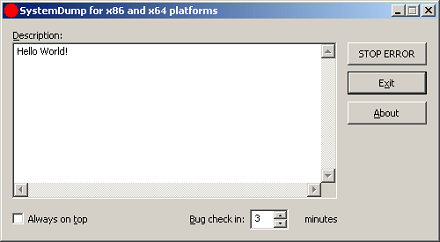
Not really new as it was previously called CtxBSOD v2.1 but was renamed to better show its purpose. In addition to renaming I added a command line option to dump a system remotely or from a command line locally without using its GUI interface. The main motivation for me to write this tool was the absence of similar tools for 64-bit Windows. SystemDump can dump a 64-bit server too! 

You can download it form Citrix support web site (requires free registration):

http://support.citrix.com/article/CTX111072

Main features:

  • The tool has both GUI and command line interfaces.
  • You can type a message/text (or copy it from clipboard) before forcing a memory dump. This message is saved in a dump and a support engineer can read it after loading the dump in WinDbg.exe. This is implemented to encourage writing the symptoms and conditions explaining why the dump has to be forced.
  • The tool can stay on top of any window (if you need this to quickly dump the server after a reproduction or during the process of an activity).
  • It is supplied with Program Database (PDB) symbols for the driver (32-bit and 64-bit) which is useful when you want to have all symbols present on the bugcheck thread.
  • The bugcheck clearly shows that the dump is manually generated.
  • The tool can force a memory dump on both 32-bit and 64-bit platforms.
  • Before forcing a fatal error on a server, the tool warns about potential damaging consequences: Users are disconnected and all the data which is not saved will be lost. It asks for a confirmation.
  • You can specify a period of time (in minutes) when to force a memory dump.

The latter feature is implemented entirely in kernel. Additional command that not covered in the article is

>SystemDump.exe abort

allows you to abort the action if you ran the tool using command line options.

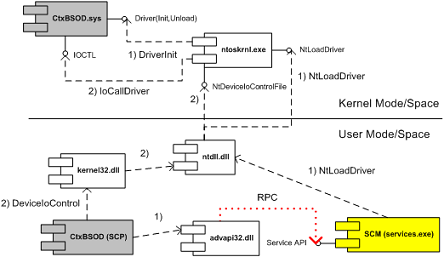
I attached the UML component diagram showing the architecture of this tool. I recently developed a presentation about device drivers architecture and Citrix kernel drivers where I used this tool as one of examples.

systemdumparchitecture.jpg

- Dmitry Vostokov -