ScreenHistory 1.0
After working with many customer issues where I needed good screenshots I decided to write a screen or window capture tool to make troubleshooting and reading other logs/traces easier. Here is ScreenHistory tool with familiar History-like GUI interface if you have seen WindowHistory, MessageHistory and ProcessHistory tools.
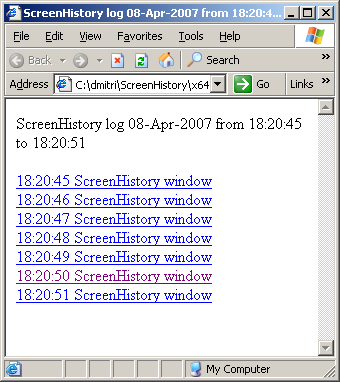
The tool captures the whole screen (currently the primary monitor) after specified interval (default is 1 second) or the contents of a current foreground window (multi-monitor independent) and saves its screenshot in JPEG, GIF (default) or PNG file. Additionally an HTML file is generated with links to screenshots. New forthcoming versions of WindowHistory and MessageHistory will reference these screenshots. Windows Mobile version will be released soon too.
Instead of forming a mental picture about screen when you look at messages or relating them to arbitrary screenshots sent by your customers you can easily check real-time screenshots when you look at message traces, for example, MessageHistory trace:
13:12:24:944 S WM_ACTIVATEAPP (0x1c) wParam: 0x0 lParam: 0x12ec Deactivated / TID of activated window: 0x12ec

…

[Screen]

13:12:47:268 S WM_ACTIVATEAPP (0×1c) wParam: 0×1 lParam: 0×0 Activated / TID of deactivated window: 0×0

…

[Screen]
or WindowHistory trace
Handle: 000300E4 Class: "MyClass" Title: "My Application"

Captured at: 13:11:47:983

Process ID: 6c4

Thread ID: 1054

Parent: 0

Screen position (l,t,r,b): (264,161,1032,691)

Visible: true

Window placement command: SW_SHOWNORMAL

Foreground: false

Foreground changed at 13:12:20:626 to true

[Screen]

Foreground changed at 13:12:24:959 to false

[Screen]

Foreground changed at 13:12:47:284 to true

[Screen]

Foreground changed at 13:12:51:852 to false

[Screen]
The following ScreenHistory screenshot was saved by the tool itself:
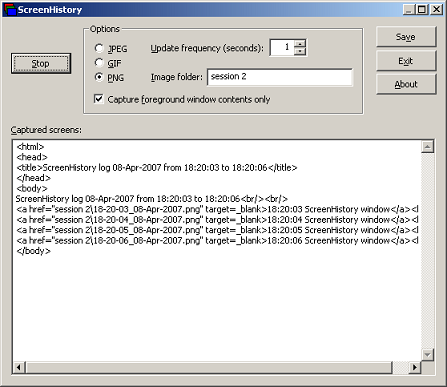
If you save an HTML file and load it in IE you would see formatted screen log (screenshot was saved by ScreenHistory):
- Dmitry Vostokov @ DumpAnalysis.org -