Archive for the ‘Crash Dump Analysis’ Category

Windows Debugging Notebook Cover

Friday, September 19th, 2008

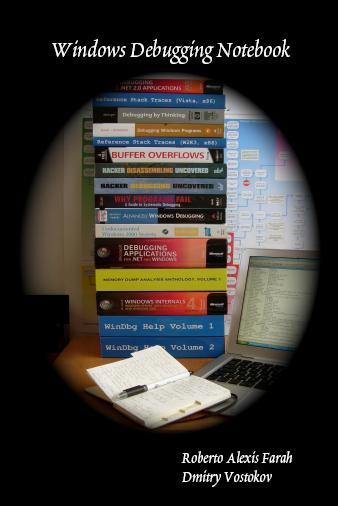
Here is the draft front cover for the forthcoming Windows Debugging Notebook:

It is based on Debugging Book Stack concept.

- Dmitry Vostokov @ DumpAnalysis.org -

Debugging Book Stack

Friday, September 19th, 2008

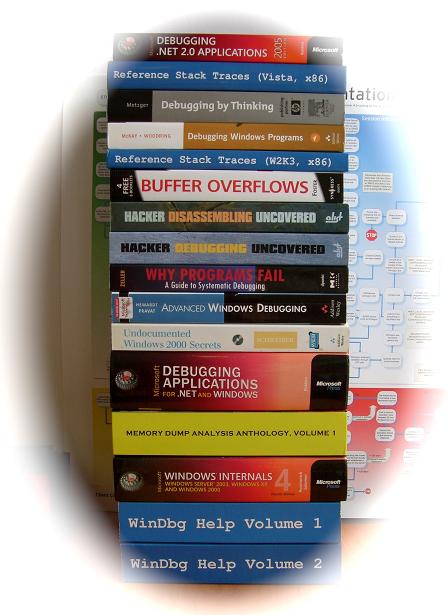
Instead of providing the list of recommended books on debugging topics here is the picture that shows most of them that I own:

Hope you recognize books that you own and/or read too. Some of them were reviewed by me already:

Advanced Windows Debugging

Debugging by Thinking: A Multidisciplinary Approach

Microsoft Windows Internals: Microsoft Windows Server 2003, Windows XP, and Windows 2000

Why Programs Fail: A Guide to Systematic Debugging

and more reviews will come soon.

- Dmitry Vostokov @ DumpAnalysis.org -

Bugtation No.29

Friday, September 19th, 2008

“There are many rare” crashes “in the World, which Fortune never brings to Light” again.

Thomas Fuller, Gnomologia: Adagies and Proverbs

- Dmitry Vostokov @ DumpAnalysis.org -

Hooked Modules (Crash Dump Analysis Patterns, Part 38c)

Friday, September 19th, 2008

Previously I introduced Hooked Functions pattern where I used !chkimg WinDbg command and today after accidentally discovering yet another patched DLL module in one process I created this simple command to check all modules:

!for_each_module !chkimg -lo 50 -d !${@#ModuleName} -v

0:000:x86> !for_each_module !chkimg -lo 50 -d !${@#ModuleName} -v
[...]
Scanning section:    .text
Size: 74627
Range to scan: 71c01000-71c13383
71c02430-71c02434  5 bytes - WS2_32!WSASend
[ 8b ff 55 8b ec:e9 cb db 1c 0d ]
71c0279b-71c0279f  5 bytes - WS2_32!select (+0x36b)
[ 6a 14 68 58 28:e9 60 d8 15 0d ]
71c0290e-71c02912  5 bytes - WS2_32!WSASendTo (+0x173)
[ 8b ff 55 8b ec:e9 ed d6 1b 0d ]
71c02cb2-71c02cb6  5 bytes - WS2_32!closesocket (+0x3a4)
[ 8b ff 55 8b ec:e9 49 d3 19 0d ]
71c02e12-71c02e16  5 bytes - WS2_32!WSAIoctl (+0x160)
[ 8b ff 55 8b ec:e9 e9 d1 1e 0d ]
71c02ec2-71c02ec6  5 bytes - WS2_32!send (+0xb0)
[ 8b ff 55 8b ec:e9 39 d1 14 0d ]
71c02f7f-71c02f83  5 bytes - WS2_32!recv (+0xbd)
[ 8b ff 55 8b ec:e9 7c d0 17 0d ]
71c03c04-71c03c08  5 bytes - WS2_32!WSAGetOverlappedResult (+0xc85)
[ 8b ff 55 8b ec:e9 f7 c3 1f 0d ]
71c03c75-71c03c79  5 bytes - WS2_32!recvfrom (+0x71)
[ 8b ff 55 8b ec:e9 86 c3 16 0d ]
71c03d14-71c03d18  5 bytes - WS2_32!sendto (+0x9f)
[ 8b ff 55 8b ec:e9 e7 c2 13 0d ]
71c03da8-71c03dac  5 bytes - WS2_32!WSACleanup (+0x94)
[ 8b ff 55 8b ec:e9 53 c2 25 0d ]
71c03f38-71c03f3c  5 bytes - WS2_32!WSASocketW (+0x190)
[ 6a 20 68 08 40:e9 c3 c0 11 0d ]
71c0446a-71c0446e  5 bytes - WS2_32!connect (+0x532)
[ 8b ff 55 8b ec:e9 91 bb 18 0d ]
71c04f3b-71c04f3f  5 bytes - WS2_32!WSAStartup (+0xad1)
[ 6a 14 68 60 50:e9 c0 b0 29 0d ]
71c06162-71c06166  5 bytes - WS2_32!shutdown (+0x1227)
[ 8b ff 55 8b ec:e9 99 9e 12 0d ]
71c069e9-71c069ed  5 bytes - WS2_32!WSALookupServiceBeginW (+0x887)
[ 8b ff 55 8b ec:e9 12 96 0f 0d ]
71c06c91-71c06c95  5 bytes - WS2_32!WSALookupServiceNextW (+0x2a8)
[ 8b ff 55 8b ec:e9 6a 93 10 0d ]
71c06ecd-71c06ed1  5 bytes - WS2_32!WSALookupServiceEnd (+0x23c)
[ 8b ff 55 8b ec:e9 2e 91 0e 0d ]
71c090be-71c090c2  5 bytes - WS2_32!WSAEventSelect (+0x21f1)
[ 8b ff 55 8b ec:e9 3d 6f 20 0d ]
71c09129-71c0912d  5 bytes - WS2_32!WSACreateEvent (+0x6b)
[ 33 c0 50 50 6a:e9 d2 6e 22 0d ]
71c0938e-71c09392  5 bytes - WS2_32!WSACloseEvent (+0x265)
[ 6a 0c 68 c8 93:e9 6d 6c 24 0d ]
71c093d9-71c093dd  5 bytes - WS2_32!WSAWaitForMultipleEvents (+0x4b)
[ 8b ff 55 8b ec:e9 22 6c 1a 0d ]
71c093ea-71c093ee  5 bytes - WS2_32!WSAEnumNetworkEvents (+0x11)
[ 8b ff 55 8b ec:e9 11 6c 21 0d ]
71c09480-71c09484  5 bytes - WS2_32!WSARecv (+0x96)
[ 8b ff 55 8b ec:e9 7b 6b 1d 0d ]
71c0eecb-71c0eecf  5 bytes - WS2_32!WSACancelAsyncRequest (+0x5a4b)
[ 8b ff 55 8b ec:e9 30 11 26 0d ]
71c10d39-71c10d3d  5 bytes - WS2_32!WSAAsyncSelect (+0x1e6e)
[ 8b ff 55 8b ec:e9 c2 f2 26 0d ]
71c10ee3-71c10ee7  5 bytes - WS2_32!WSAConnect (+0x1aa)
[ 8b ff 55 8b ec:e9 18 f1 22 0d ]
71c10f9f-71c10fa3  5 bytes - WS2_32!WSAAccept (+0xbc)
[ 8b ff 55 8b ec:e9 5c f0 27 0d ]
Total bytes compared: 74627(100%)
Number of errors: 140
140 errors : !WS2_32 (71c02430-71c10fa3)
[...]

CMDTREE.TXT was also updated with this command.

- Dmitry Vostokov @ DumpAnalysis.org -

Bugtation No.28

Thursday, September 18th, 2008

“Some” processes “are very busy, and yet do nothing.”

Thomas Fuller, Gnomologia: Adagies and Proverbs

- Dmitry Vostokov @ DumpAnalysis.org -

CMDTREE.TXT for CDA Checklist

Thursday, September 18th, 2008

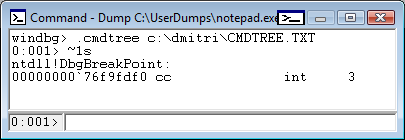
Thanks to Roberto Farah who blogged about .cmdtree command I was able to create the first version of cmdtree.txt for Crash Dump Analysis Checklist to include common commands that I use. It can be found here:

CMDTREE.TXT for .cmdtree WinDbg command

The link to the file was also added to:

http://www.windbg.org/

Here is the screenshot of it:

It is useful for complex commands including command sequences and scripts. You can also include special guidelines and reminders as well. In the latter cases you can specify empty command or output something you prefer with .echo, for example command templates to fill manually.

This seems to be similar to EasyDbg

- Dmitry Vostokov @ DumpAnalysis.org -

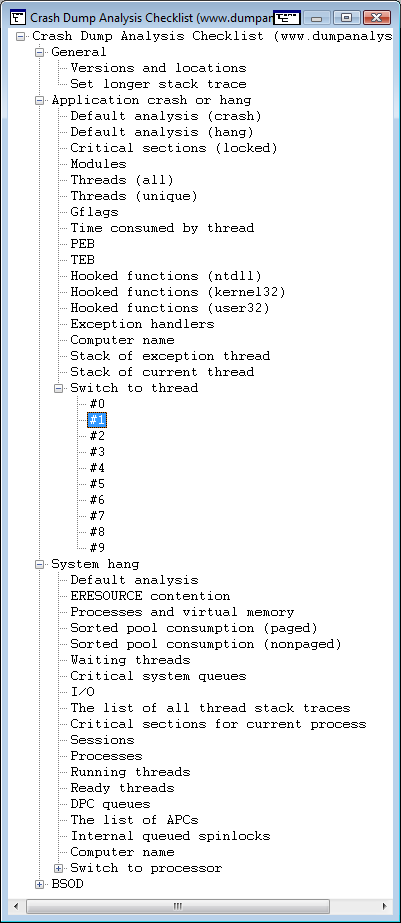
CDA for Sys Admins: Table of Contents

Tuesday, September 16th, 2008

“Crash dumps are fossils” 

Here is the draft TOC for the previously announced book Crash Dump Analysis for System Administrators and Support Engineers (Windows Edition) which I’m co-authoring with Thomas Monahan, a Lead Escalation Engineer at Citrix Systems:

Table of Contents

 - Dmitry Vostokov @ DumpAnalysis.org -

Bugtation No.22

Saturday, September 13th, 2008

“One can best feel in dealing with” systems “how primitive” debugging “still is.”

Albert Einstein, Communication to Leó Szilárd

- Dmitry Vostokov @ DumpAnalysis.org -

ADPlus in 21 seconds and 13 steps

Friday, September 12th, 2008

Dealing with a problem today where NTSD failed to save a dump file either because of improper configuration for a default postmortem debugger or for other reasons I advised to use ADPlus from Debugging Tools for Windows in crash mode but found that I haven’t yet written about it. In the past I didn’t recommend ADPlus because no one wanted to install something extra on production environments. 

I had to show how ADPlus works for crashes because the usual Microsoft article was too big for an immediate grasp:

How to use ADPlus to troubleshoot “hangs” and “crashes”

Here is the quick polished tutorial: 

1. Download and install Debugging Tools for Windows appropriate for your application or service platform. For example, if your service is 32-bit but runs on x64 you need to download 32-bit package. Refer to http://www.windbg.org for quick download links.

2. Get ready for the test and download TesDefaultDebugger package.

3. Open a command prompt elevated as Administrator and cd to Debugging Tools for Windows installation folder.

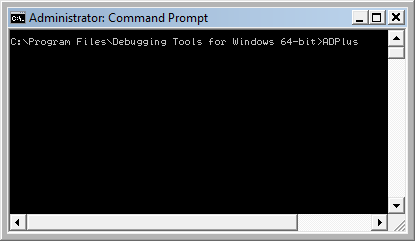
4. Run ADPlus command:

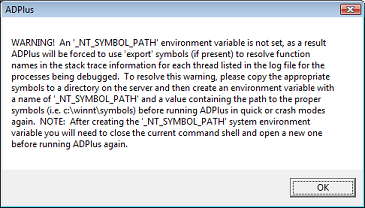
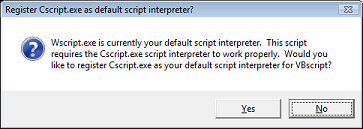
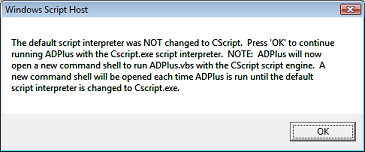
5. Skip any warnings related to script interpreter if any:

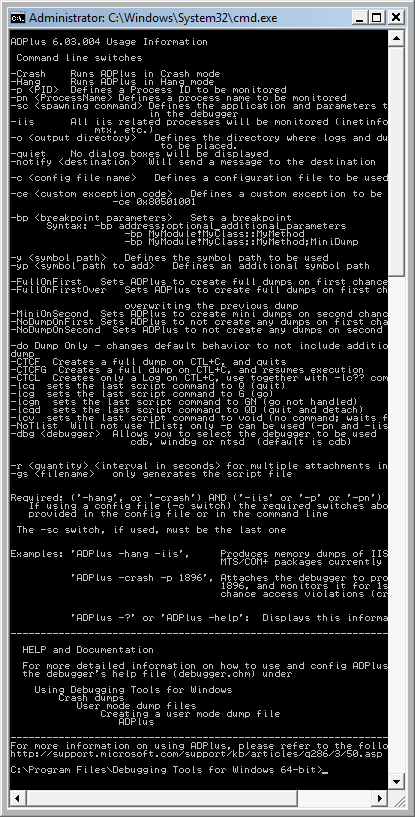
6. Another command line window appears with ADPlus switches:

7. Close it, go back to the first command line window we used to launch-test ADPlus and type this command:

ADPlus -crash -pn TestDefaultDebugger64.exe

8. Skip warnings from step 5 if any and the symbol path warning if it appears too:

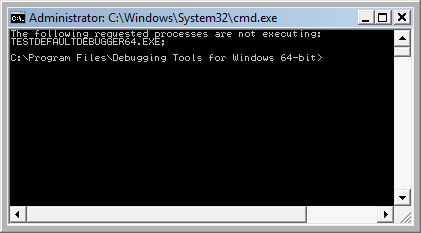
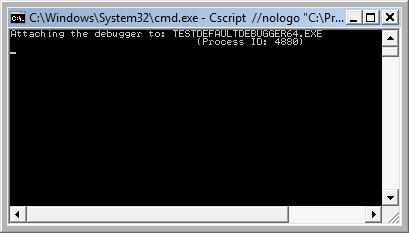
9. The second command line window is opened with the following expected output because we didn’t run TestDefaultDebugger64.exe:

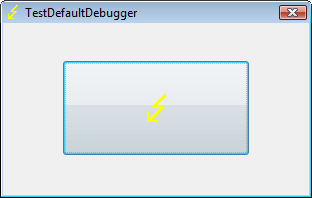
10. Close it and launch TestDefaultDebugger64.exe from the package downloaded in step 2:

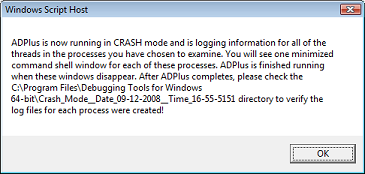
11. Go back to the first command line window and repeat the command from step 7. You can also specify PID by -p <PID> instead of -pn <Name> option. Skip warnings from steps 5 and 8 if any and you would see the following message showing where ADPlus will store logs and memory dumps if any:

There are also 2 additional command line windows appear. One is showing which PID the debugger was attached to:

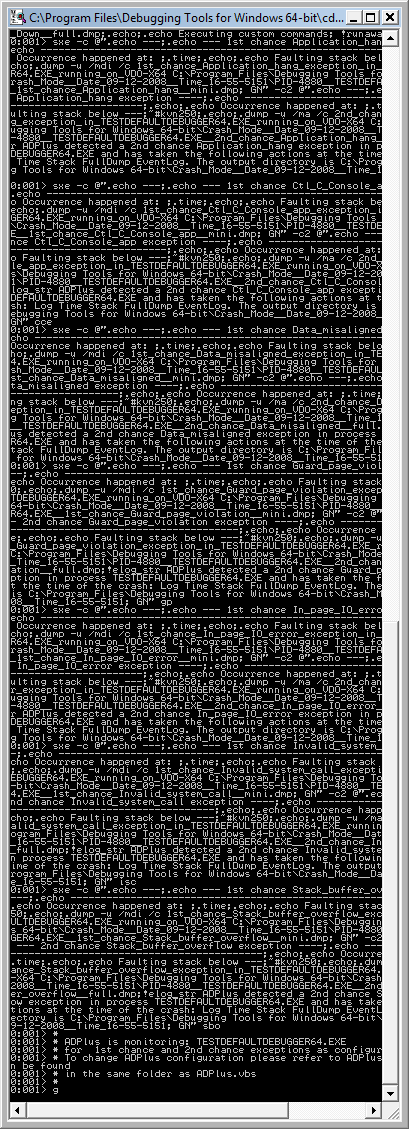
and the other showing the output of attached console debugger, CDB by default:

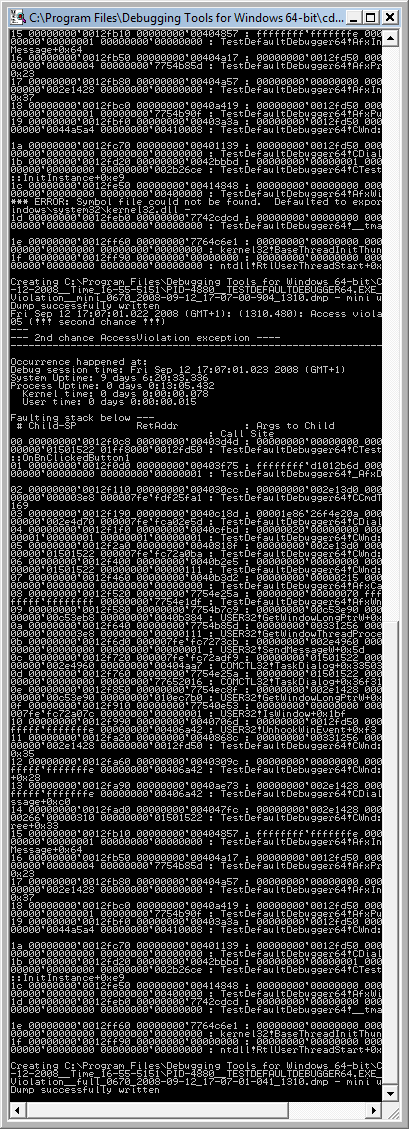
12. We can dismiss the message from the previous step and wait for the crash to occur when we push the big button on TestDefaultDebugger window from step 10. We see the crash instantaneously in debugger console window if it is still running:

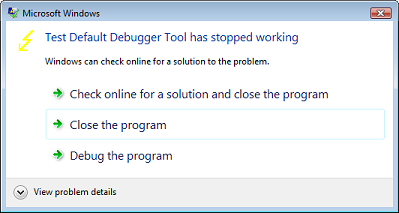
The following message box might appear and that depends on AEDebug registry key and WER settings which are beyond the scope of this post:

In case it appears you can simply choose to close the program.

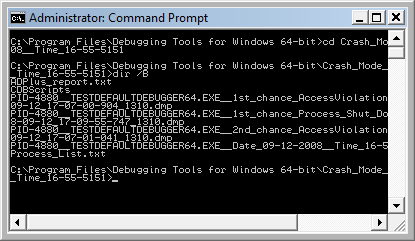
13. That’s it. All files appear in this folder:

C:\Program Files\Debugging Tools for Windows 64-bit\Crash_Mode__Date_09-12-2008__Time_16-55-5151:

- Dmitry Vostokov @ DumpAnalysis.org -

Bugtation No.20

Friday, September 12th, 2008

“Crash dumps are fossils” of computations.

Thomas Monahan and Dmitry Vostokov, Crash Dump Analysis for System Administrators and Support Engineers (Chapter 1: The Origin of Crash Dumps)

- Dmitry Vostokov @ DumpAnalysis.org -

First-order and second-order memory leaks

Thursday, September 11th, 2008

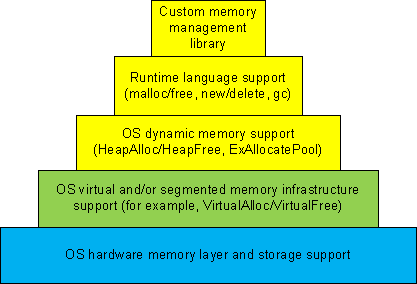
Dynamic memory allocation architecture usually consists of different layers where the lower layers provide support for the upper ones and some general layers can be combined or omitted like in TCP/IP implementation of OSI reference model:

  • 1a. Custom memory management library.

  • 1b. Runtime language support (malloc/free, new/delete, gc).

  • 1c. OS dynamic memory support (HeapAlloc/HeapFree, ExAllocatePool/ExFreePool).

  • 2. OS virtual and/or segmented memory infrastructure support (VirtualAlloc/VirtualFree).

  • 3. OS hardware memory layer and storage support.

We can call it DMI (Dynamic Memory Infrastructure) and this can be summarized on the following diagram:
First-order memory leaks happen when an application uses layers 1a, 1b or 1c and doesn’t free allocated memory. Typical pattern examples include:

What we cover here are second-order leaks in layers 2 an 3. These include cases when an application frees memory but the underlying supporting layer doesn’t due to its design or factors like fragmentation. Consider an example of a Windows service that undergone committed memory increase from 600Mb to almost 1.2Gb during peak hours and then remained at that size even when no activity happened afterwards. We can examine virtual memory statistics using !address WinDbg command from 3 sampled memory dumps:

Before peak hours:

-------------------- Usage SUMMARY --------------------------
    TotSize (      KB)   Pct(Tots) Pct(Busy)   Usage
    734d000 (  118068) : 05.63%    07.50%    : RegionUsageIsVAD
   1ff11000 (  523332) : 24.96%    00.00%    : RegionUsageFree
    4352000 (   68936) : 03.29%    04.38%    : RegionUsageImage
    5a00000 (   92160) : 04.39%    05.86%    : RegionUsageStack
      5a000 (     360) : 00.02%    00.02%    : RegionUsageTeb
   4efe3000 ( 1294220) : 61.72%    82.24%    : RegionUsageHeap
          0 (       0) : 00.00%    00.00%    : RegionUsagePageHeap
       1000 (       4) : 00.00%    00.00%    : RegionUsagePeb
       1000 (       4) : 00.00%    00.00%    : RegionUsageProcessParametrs
       1000 (       4) : 00.00%    00.00%    : RegionUsageEnvironmentBlock
       Tot: 7fff0000 (2097088 KB) Busy: 600df000 (1573756 KB)

-------------------- Type SUMMARY --------------------------
    TotSize (      KB)   Pct(Tots)  Usage
   1ff11000 (  523332) : 24.96%   : <free>
    4352000 (   68936) : 03.29%   : MEM_IMAGE
     b78000 (   11744) : 00.56%   : MEM_MAPPED
   5b215000 ( 1493076) : 71.20%   : MEM_PRIVATE

-------------------- State SUMMARY --------------------------
    TotSize (      KB)   Pct(Tots)  Usage
   25e50000 (  620864) : 29.61%   : MEM_COMMIT
   1ff11000 (  523332) : 24.96%   : MEM_FREE
   3a28f000 (  952892) : 45.44%   : MEM_RESERVE

During peak hours:

-------------------- Usage SUMMARY --------------------------
  TotSize ( KB) Pct(Tots) Pct(Busy) Usage
  734d000 ( 118068) : 05.63% 07.49% : RegionUsageIsVAD
  1fd0f000 ( 521276) : 24.86% 00.00% : RegionUsageFree
  4352000 ( 68936) : 03.29% 04.37% : RegionUsageImage
  5c00000 ( 94208) : 04.49% 05.98% : RegionUsageStack
  5c000 ( 368) : 00.02% 00.02% : RegionUsageTeb
4efe3000 ( 1294220) : 61.72% 82.13% : RegionUsageHeap
  0 ( 0) : 00.00% 00.00% : RegionUsagePageHeap
  1000 ( 4) : 00.00% 00.00% : RegionUsagePeb
  1000 ( 4) : 00.00% 00.00% : RegionUsageProcessParametrs
  1000 ( 4) : 00.00% 00.00% : RegionUsageEnvironmentBlock
  Tot: 7fff0000 (2097088 KB) Busy: 602e1000 (1575812 KB)

-------------------- Type SUMMARY --------------------------
  TotSize ( KB) Pct(Tots) Usage
  1fd0f000 ( 521276) : 24.86% :
  4352000 ( 68936) : 03.29% : MEM_IMAGE
  b78000 ( 11744) : 00.56% : MEM_MAPPED
  5b417000 ( 1495132) : 71.30% : MEM_PRIVATE

-------------------- State SUMMARY --------------------------
  TotSize ( KB) Pct(Tots) Usage
41498000 ( 1069664) : 51.01% : MEM_COMMIT
  1fd0f000 ( 521276) : 24.86% : MEM_FREE
  1ee49000 ( 506148) : 24.14% : MEM_RESERVE

After peak hours:

-------------------- Usage SUMMARY --------------------------
    TotSize (      KB)   Pct(Tots) Pct(Busy)   Usage
    734d000 (  118068) : 05.63%    07.49%    : RegionUsageIsVAD
   1fd0f000 (  521276) : 24.86%    00.00%    : RegionUsageFree
    4352000 (   68936) : 03.29%    04.37%    : RegionUsageImage
    5c00000 (   94208) : 04.49%    05.98%    : RegionUsageStack
      5c000 (     368) : 00.02%    00.02%    : RegionUsageTeb
   4efe3000 ( 1294220) : 61.72%    82.13%    : RegionUsageHeap
          0 (       0) : 00.00%    00.00%    : RegionUsagePageHeap
       1000 (       4) : 00.00%    00.00%    : RegionUsagePeb
       1000 (       4) : 00.00%    00.00%    : RegionUsageProcessParametrs
       1000 (       4) : 00.00%    00.00%    : RegionUsageEnvironmentBlock
       Tot: 7fff0000 (2097088 KB) Busy: 602e1000 (1575812 KB)

-------------------- Type SUMMARY --------------------------
    TotSize (      KB)   Pct(Tots)  Usage
   1fd0f000 (  521276) : 24.86%   : <free>
    4352000 (   68936) : 03.29%   : MEM_IMAGE
     b78000 (   11744) : 00.56%   : MEM_MAPPED
   5b417000 ( 1495132) : 71.30%   : MEM_PRIVATE

-------------------- State SUMMARY --------------------------
    TotSize (      KB)   Pct(Tots)  Usage
   4505d000 ( 1130868) : 53.93%   : MEM_COMMIT
   1fd0f000 (  521276) : 24.86%   : MEM_FREE
   1b284000 (  444944) : 21.22%   : MEM_RESERVE

We see that in every memory dump the amount of process heap is the same 1.2Gb but during peak hours the amount of committed memory increased by 20% and remained the same even after. At the same time if we look at process heap statistics we would see the increase of free heap KB and blocks and this means that allocated memory was freed after peak hours but underlying virtual memory ranges were not decommitted and fragmentation increased by 25%.

Before peak hours:

0:000> !heap -s
LFH Key : 0x07262959
  Heap     Flags   Reserv  Commit  Virt   Free  List   UCR  Virt  Lock  Fast
                    (k)     (k)    (k)     (k) length      blocks cont. heap
[...]
00310000 00001002 1255320 512712 1177236 260583 45362 41898 2 3751a5 L
  External fragmentation 50 % (45362 free blocks)
  Virtual address fragmentation 56 % (41898 uncommited ranges)
  Lock contention 3625381
[…]

During peak hours:

0:000> !heap -s
LFH Key : 0x07262959
  Heap     Flags   Reserv  Commit  Virt   Free  List   UCR  Virt  Lock  Fast
                    (k)     (k)    (k)     (k) length      blocks cont. heap
[...]
00310000 00001002 1255320 961480 1249548 105378 0 16830 2 453093 L
  Virtual address fragmentation 23 % (16830 uncommited ranges)
  Lock contention 4534419
[…]

After peak hours:

0:000> !heap -s
LFH Key : 0x07262959
  Heap     Flags   Reserv  Commit  Virt   Free  List   UCR  Virt  Lock  Fast
                    (k)     (k)    (k)     (k) length      blocks cont. heap
[...]
00310000 00001002 1255320 1022648 1224344 772682 264787 17512 2 580634 L
  External fragmentation 75 % (264787 free blocks)
  Virtual address fragmentation 16 % (17512 uncommited ranges)
  Lock contention 5768756
[…]

Another example would be custom memory management library that by design never releases virtual memory allocated to accommodate the increased number of allocation requests after all of them are freed.

- Dmitry Vostokov @ DumpAnalysis.org -

Crash Dump Analysis Patterns (Part 29b)

Wednesday, September 10th, 2008

Previously we discussed High Contention pattern in kernel mode involving executive resources. The same pattern can be observed in user space involving critical sections guarding shared regions like serialized process heap or a memory database, for example, in one Windows service process during increased workload:

0:000> !locks

CritSec +310608 at 00310608
WaiterWoken        No
LockCount          6
RecursionCount     1
OwningThread       d9c
EntryCount         0
ContentionCount    453093
*** Locked

CritSec +8f60f78 at 08f60f78
WaiterWoken        No
LockCount          8
RecursionCount     1
OwningThread       d9c
EntryCount         0
ContentionCount    af7f0
*** Locked

CritSec +53bf8f10 at 53bf8f10
WaiterWoken        No
LockCount          0
RecursionCount     1
OwningThread       1a9c
EntryCount         0
ContentionCount    e
*** Locked

Scanned 7099 critical sections

Looking at the owning thread we see that contention involves process heap: 

0:000> ~~[d9c]kL
ChildEBP RetAddr 
0e2ff9d4 7c81e845 ntdll!RtlpFindAndCommitPages+0×14e
0e2ffa0c 7c81e4ef ntdll!RtlpExtendHeap+0xa6
0e2ffc38 7c3416b3 ntdll!RtlAllocateHeap+0×645
0e2ffc78 7c3416db msvcr71!_heap_alloc+0xe0
0e2ffc80 7c3416f8 msvcr71!_nh_malloc+0×10
0e2ffc8c 672e14fd msvcr71!malloc+0xf

0e2ffc98 0040bc28 dll!MemAlloc+0xd
[…]
0e2fff84 7c349565 dll!WorkItemThread+0×152
0e2fffb8 77e6608b msvcr71!_endthreadex+0xa0
0e2fffec 00000000 kernel32!BaseThreadStart+0×34

However two critical section addresses belong to the same heap: 

0:000> !address 00310608
    00310000 : 00310000 - 00010000
                    Type     00020000 MEM_PRIVATE
                    Protect  00000004 PAGE_READWRITE
                    State    00001000 MEM_COMMIT
                    Usage    RegionUsageHeap
                    Handle   00310000

0:000> !address 08f60f78
    08f30000 : 08f30000 - 00200000
                    Type     00020000 MEM_PRIVATE
                    Protect  00000004 PAGE_READWRITE
                    State    00001000 MEM_COMMIT
                    Usage    RegionUsageHeap
                    Handle   00310000

Lock contention is confirmed in heap statistics as well: 

0:000> !heap -s
LFH Key                   : 0x07262959
  Heap     Flags   Reserv  Commit  Virt   Free  List   UCR  Virt  Lock  Fast
                    (k)     (k)    (k)     (k) length      blocks cont. heap
00140000 00000002    8192   2876   3664    631   140    46    0     1e   L 
    External fragmentation  21 % (140 free blocks)
00240000 00008000      64     12     12     10     1     1    0      0     
Virtual block: 0ea20000 - 0ea20000 (size 00000000)
Virtual block: 0fa30000 - 0fa30000 (size 00000000)
00310000 00001002 1255320 961480 1249548 105378     0 16830    2 453093   L 
    Virtual address fragmentation  23 % (16830 uncommited ranges)
    Lock contention  4534419
003f0000 00001002      64     36     36      0     0     1    0      0   L 
00610000 00001002      64     16     16      4     2     1    0      0   L
[…]

- Dmitry Vostokov @ DumpAnalysis.org -
Updated process heap UML diagram

Wednesday, September 10th, 2008

After writing about large heap allocations I updated the sample chapter for Windows Debugging Notebook:

Draft Sample Chapter

- Dmitry Vostokov @ DumpAnalysis.org -
Hardening Dump Security: beware of PEB data

Tuesday, September 9th, 2008

Previously I wrote about security options in WinDbg but recently discovered that PEB is included with sensitive data for full user dumps despite stack and page cleaning and removing module paths. Module paths are removed indeed from lmv command output but _PEB.Ldr lists contain full module path information:

0:000> dt _PEB Ldr
ntdll!_PEB
   +0x018 Ldr : Ptr64 _PEB_LDR_DATA

0:000> dt _PEB_LDR_DATA
ntdll!_PEB_LDR_DATA
   +0x000 Length           : Uint4B
   +0x004 Initialized      : UChar
   +0x008 SsHandle         : Ptr64 Void
   +0×010 InLoadOrderModuleList : _LIST_ENTRY
   +0×020 InMemoryOrderModuleList : _LIST_ENTRY
   +0×030 InInitializationOrderModuleList : _LIST_ENTRY

   +0×040 EntryInProgress  : Ptr64 Void

0:000> !peb
PEB at 000007fffffdb000
[...]

You can see this in the dump sample saved with /r and /R options:

ftp://dumpanalysis.org/pub/LargeHeapAllocations.zip 

The only options I see currently are:

  • - Custom minidumps: do not save process dumps containing full user space with /ma or /mf option for .dump command 

  • - Include PEB but erase specific sections and regions pointed to like environment blocks. See the previous Data Hiding in Crash Dumps post.

  • - Erase specific ASCII or UNICODE fragments manually using any binary editor. This was done for the dump file above.

  • Do not send dumps but logs. See All at once: postmortem logs and dump files.

Anyway manual inspection of a dump saved with security options is recommended before sending it. 

- Dmitry Vostokov @ DumpAnalysis.org -
Large Heap Allocations

Monday, September 8th, 2008

I needed to check some data structures and how they change in the case of heap memory leaks and wrote a very small C program that was allocating memory in a loop using malloc function. The VM size was growing very fast and I saved process memory dumps at 200Mb and 500Mb. When checking heap segments I noticed that they had not increased although the process was allocating 0×1000000 chunks of heap memory:

0:000> !heap 0 0
Index   Address  Name      Debugging options enabled
  1:   00260000
    Segment at 0000000000260000 to 0000000000360000 (00008000 bytes committed)
  2:   00360000
    Segment at 0000000000360000 to 0000000000370000 (00004000 bytes committed)
  3:   00440000
    Segment at 0000000000440000 to 0000000000450000 (00010000 bytes committed)
    Segment at 0000000000450000 to 0000000000550000 (00021000 bytes committed)
  4:   00560000
    Segment at 0000000000560000 to 0000000000570000 (00010000 bytes committed)
    Segment at 0000000000570000 to 0000000000670000 (0003a000 bytes committed)

I was puzzled because inspection of virtual memory showed those chunks as belonging to heap regions:

0:000> !address
[...]
    0000000009700000 : 0000000009700000 - 0000000001002000
                    Type     00020000 MEM_PRIVATE
                    Protect  00000004 PAGE_READWRITE
                    State    00001000 MEM_COMMIT
                    Usage    RegionUsageHeap
                    Handle   0000000000560000
    000000000a702000 : 000000000a702000 - 000000000000e000
                    Type     00000000
                    Protect  00000001 PAGE_NOACCESS
                    State    00010000 MEM_FREE
                    Usage    RegionUsageFree
    000000000a710000 : 000000000a710000 - 0000000001002000
                    Type     00020000 MEM_PRIVATE
                    Protect  00000004 PAGE_READWRITE
                    State    00001000 MEM_COMMIT
                    Usage    RegionUsageHeap
                    Handle   0000000000560000
    000000000b712000 : 000000000b712000 - 0000000004aee000
                    Type     00000000
                    Protect  00000001 PAGE_NOACCESS
                    State    00010000 MEM_FREE
                    Usage    RegionUsageFree
[…] 

And then I recalled that large allocations for a process heap go to a separate linked list:

0:000> !peb
PEB at 000007fffffdb000

0:000> dt _PEB 000007fffffdb000
ntdll!_PEB
[...]
   +0x0f0 ProcessHeaps     : 0×00000000`77fa3460  -> 0×00000000`00260000
[..]

0:000> dq 0×00000000`77fa3460
00000000`77fa3460  00000000`00260000 00000000`00360000
00000000`77fa3470  00000000`00440000 00000000`00560000
00000000`77fa3480  00000000`00000000 00000000`00000000
00000000`77fa3490  00000000`00000000 00000000`00000000
00000000`77fa34a0  00000000`00000000 00000000`00000000
00000000`77fa34b0  00000000`00000000 00000000`00000000
00000000`77fa34c0  00000000`00000000 00000000`00000000
00000000`77fa34d0  00000000`00000000 00000000`00000000

0:000> dt _HEAP 00000000`00260000
ntdll!_HEAP
[...]
   +0×090 VirtualAllocdBlocks : _LIST_ENTRY [ 0×00000000`00260090 - 0×260090 ]
[…]

0:000> dl 00000000`00260000+90 10 2
00000000`00260090  00000000`00260090 00000000`00260090

0:000> dl 00000000`00360000+90 10 2
00000000`00360090  00000000`00360090 00000000`00360090

0:000> dl 00000000`00440000+90 10 2
00000000`00440090  00000000`00440090 00000000`00440090

0:000> dl 00000000`00560000+90 10 2
00000000`00560090  00000000`00670000 00000000`0a710000
00000000`00670000  00000000`01680000 00000000`00560090
00000000`01680000  00000000`02690000 00000000`00670000
00000000`02690000  00000000`036a0000 00000000`01680000
00000000`036a0000  00000000`046b0000 00000000`02690000
00000000`046b0000  00000000`056c0000 00000000`036a0000
00000000`056c0000  00000000`066d0000 00000000`046b0000
00000000`066d0000  00000000`076e0000 00000000`056c0000
00000000`076e0000  00000000`086f0000 00000000`066d0000
00000000`086f0000  00000000`09700000 00000000`076e0000
00000000`09700000  00000000`0a710000 00000000`086f0000
00000000`0a710000  00000000`00560090 00000000`09700000

We see that the last process heap has large allocations directly from virtual memory, for example:

0:000> !address 00000000`0a710000
    000000000a710000 : 000000000a710000 - 0000000001002000
                    Type     00020000 MEM_PRIVATE
                    Protect  00000004 PAGE_READWRITE
                    State    00001000 MEM_COMMIT
                    Usage    RegionUsageHeap
                    Handle   0000000000560000

Actually if I used heap statistics option for !heap command I would see these large allocations:

0:000> !heap -s
LFH Key                   : 0x000000a4e8aa078c
          Heap     Flags   Reserv  Commit  Virt   Free  List   UCR  Virt  Lock  Fast
                            (k)     (k)    (k)     (k) length      blocks cont. heap
0000000000260000 00000002    1024     32     32      7     1     1    0      0   L 
0000000000360000 00008000      64     16     16     12     1     1    0      0     
0000000000440000 00001002    1088    196    196      4     1     1    0      0   LFH
Virtual block: 0000000000670000 - 0000000000670000
Virtual block: 0000000001680000 - 0000000001680000
Virtual block: 0000000002690000 - 0000000002690000
Virtual block: 00000000036a0000 - 00000000036a0000
Virtual block: 00000000046b0000 - 00000000046b0000
Virtual block: 00000000056c0000 - 00000000056c0000
Virtual block: 00000000066d0000 - 00000000066d0000
Virtual block: 00000000076e0000 - 00000000076e0000
Virtual block: 00000000086f0000 - 00000000086f0000
Virtual block: 0000000009700000 - 0000000009700000
Virtual block: 000000000a710000 - 000000000a710000

0000000000560000 00001002    1088    296    296     18     3     1   11      0   LFH

The dump file can be downloaded from FTP to play with:

ftp://dumpanalysis.org/pub/LargeHeapAllocations.zip 

- Dmitry Vostokov @ DumpAnalysis.org -
Forthcoming Dumpstatic Album

Monday, September 8th, 2008

Album cover and songs list from Narasimha Vedala:

DUMPSTATIC
Dr. Debugalov Feat.
Assembly Crooks and
E.I.P. Wailers.

1. Mistah Dumpstatic Feat. E.I.P Wailers.
2. Attached to your pros-ass.
3. I put a dump on you.
4. Be my debugger.
5. When push comes to shove, call Debugalov.
6. Pop ECX Feat. Assembly Crooks.
7. You corrupted my memory Feat. E.I.P Wailers.
8. Dark side of the dump.
9. Sweet Dump o’mine.
10. Optimize your soul.
11. Load address blues Feat. Assembly Crooks.
12. Good bye, Kernel.

DBG_DebugAlbum from Narasimha Vedala (click to enlarge)

Some music for this album will be written with the help of Dump2Wave technology :-) Stay statically tuned to further announcements.

- Dmitry Vostokov @ DumpAnalysis.org -
Bugtation No.14

Friday, September 5th, 2008

Crash dump analysis ”is anticipated with” joy, “performed with” eagerness, “and bragged about forever.”

Anonymous

- Dmitry Vostokov @ DumpAnalysis.org -
WDPF cover

Thursday, September 4th, 2008

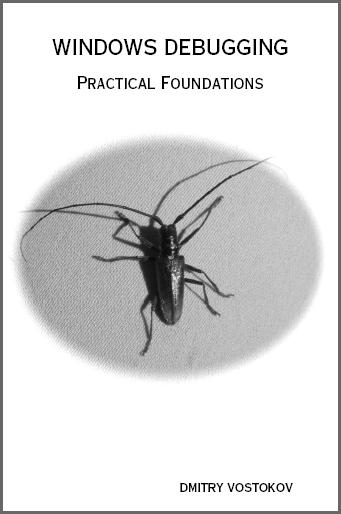
Previously announced  Windows Debugging: Practical Foundations  book has got its front cover done in classic B/W style. A bit frightening, but shouldn’t stop if someone is determined to learn field debugging :-)

Please let me know what do you think. Table of contents to be published next week. 

- Dmitry Vostokov @ DumpAnalysis.org -
Bugtation No.13

Thursday, September 4th, 2008

Shakespeare on transitive nature of software defects, where one bug causes another, and so on, until the final effect or when memory corruption causes crash effects.

“… and now remains
That we find out the cause of this effect,
Or rather say, the cause of this defect,
For this effect defective comes by cause.”

William Shakespeare, Hamlet

- Dmitry Vostokov @ DumpAnalysis.org -
Heap and early crash dump: pattern cooperation

Tuesday, September 2nd, 2008

The following error was reported when launching an application and no configured default postmortem debugger was able to save a crash dump:

The application failed to initialize properly (0x06d007e). Click on OK to terminate the application.

The process memory dump captured manually using userdump.exe when the error message box was displayed didn’t show anything helpful on stack traces:

0:000> ~*kL

.  0  Id: 310.1ab8 Suspend: 1 Teb: 7ffdf000 Unfrozen
ChildEBP RetAddr 
0012fd14 7c8284c5 ntdll!_LdrpInitialize+0x184
00000000 00000000 ntdll!KiUserApcDispatcher+0x25

   1  Id: 310.1ec0 Suspend: 1 Teb: 7ffde000 Unfrozen
ChildEBP RetAddr 
0820fcb0 7c826f4b ntdll!KiFastSystemCallRet
0820fcb4 7c813b90 ntdll!NtDelayExecution+0xc
0820fd14 7c8284c5 ntdll!_LdrpInitialize+0x19b
00000000 00000000 ntdll!KiUserApcDispatcher+0x25

However, one of last error values was access violation (Last Error Collection pattern):

0:000> !gle -all
Last error for thread 0:
LastErrorValue: (Win32) 0x3e6 (998) - Invalid access to memory location.
LastStatusValue: (NTSTATUS) 0xc0000005 - The instruction at "0x%08lx" referenced memory at "0x%08lx". The memory could not be "%s".

Last error for thread 1:
LastErrorValue: (Win32) 0 (0) - The operation completed successfully.
LastStatusValue: (NTSTATUS) 0 - STATUS_WAIT_0

It was suspected that access violation errors were handled by application exception handlers (Custom Exception Handler pattern) and it was recommended to catch first-chance exception crash dumps (Early Crash Dump  pattern) and indeed there was one such exception:

0:000> r
eax=00000000 ebx=00000000 ecx=00000000 edx=00157554 esi=00000080 edi=00000000
eip=7c829ffa esp=0012ed48 ebp=0012ef64 iopl=0 nv up ei pl zr na pe nc
cs=001b  ss=0023  ds=0023  es=0023  fs=003b  gs=0000  efl=00010246
ntdll!RtlAllocateHeap+0x24:
7c829ffa 0b4310          or      eax,dword ptr [ebx+10h] ds:0023:00000010=????????

0:000> kL
ChildEBP RetAddr 
0012ef64 7c3416b3 ntdll!RtlAllocateHeap+0x24
0012efa4 7c3416db msvcr71!_heap_alloc+0xe0
0012efac 7c3416f8 msvcr71!_nh_malloc+0x10
0012efb8 67741c01 msvcr71!malloc+0xf
[...]

- Dmitry Vostokov @ DumpAnalysis.org -