Crash Dump Analysis Patterns (Part 291)

March 14th, 2024

Generative AI LLM models such as GPT-4 are very good at producing Annotated Stack Traces. This is similar to Message Annotations trace and log analysis pattern. Below are two examples from ChatGPT:

Explain this stack trace fragment line by line:
06 ffffa784`8ee7db20 fffff804`0516bbf2 nt!IofCallDriver+0x55
07 ffffa784`8ee7db60 fffff804`0516b9d2 nt!IopSynchronousServiceTail+0x1d2
08 ffffa784`8ee7dc10 fffff804`0516ad36 nt!IopXxxControlFile+0xc82
09 ffffa784`8ee7dd40 fffff804`04e28775 nt!NtDeviceIoControlFile+0x56
0a ffffa784`8ee7ddb0 00007ffe`4d263834 nt!KiSystemServiceCopyEnd+0x25
0b 0000009b`cc0fedd8 00007ffe`4a893ffb ntdll!NtDeviceIoControlFile+0x14
0c 0000009b`cc0fede0 00007ffe`4bb95f91 KERNELBASE!DeviceIoControl+0x6b
0d 0000009b`cc0fee50 00007ff7`6544342f KERNEL32!DeviceIoControlImplementation+0x81

This stack trace appears to be from the Windows operating system, showing a series of function calls related to an I/O operation, specifically a device I/O control operation (DeviceIoControl). The stack trace is displayed in reverse chronological order, meaning the most recent call is shown first. Here’s a line-by-line explanation:

Lines 06 to 09 (nt!…): These lines are part of the Windows kernel (ntoskrnl.exe), which is the core of the Windows operating system. The prefix nt! indicates functions within the kernel.

IofCallDriver (line 06): A kernel function that forwards an I/O request packet (IRP) to a driver. The +0×55 indicates the offset within the function where the call occurred.
IopSynchronousServiceTail (line 07): A function that handles synchronous I/O operations. The +0×1d2 offset shows where in the function the operation occurred, indicating further processing of the IRP.
IopXxxControlFile (line 08): Likely a function that processes control operations (like IOCTL calls) on files. The +0xc82 is the offset where the call happened.
NtDeviceIoControlFile (line 09): A system service function that applications can call to execute device I/O control operations. The +0×56 offset indicates the point of execution within the function.
Line 0a (nt!KiSystemServiceCopyEnd): This is part of the system call dispatch mechanism, which is responsible for transitioning from user mode to kernel mode. +0×25 is the offset within this function.

Line 0b (ntdll!NtDeviceIoControlFile): This represents a call made from a user-mode application into the Windows Native API (NTDLL.dll) to perform a device I/O control operation. The +0×14 offset indicates the execution point within the function.

Line 0c (KERNELBASE!DeviceIoControl): This call originates from the KERNELBASE.dll, a Windows DLL that provides the base-level functionality for high-level APIs. The DeviceIoControl function is a wrapper that applications can use to send control codes to drivers. The +0×6b offset indicates where the function proceeds with the operation.

Line 0d (KERNEL32!DeviceIoControlImplementation): This is the implementation of the DeviceIoControl function in KERNEL32.dll, which is another layer of abstraction that eventually calls into the kernel-mode function to perform the operation. The +0×81 offset indicates the execution point within this implementation.

This stack trace illustrates how a device I/O control operation initiated by an application flows through various layers of the Windows operating system, from high-level APIs down to kernel-mode functions, to interact with a device driver. Each step in the process is crucial for understanding how the operating system processes I/O requests, handles system calls, and communicates with hardware.

Explain this stack trace fragment line by line:
00 msvcrt!vsnwprintf
01 wdscore!StringCchPrintfW
02 wdscore!CLogManager::LogA
03 wdscore!WdsSetupLogMessageA
04 cbscore!CBSWdsLog
05 cbscore!CCbsExecutionObject::AddPackage
06 cbscore!CCbsExecutionObject::AddPackage
07 cbscore!CCbsExecutionObject::AddPackage
08 cbscore!CCbsExecutionObject::RecallOrSupersedLowerVersion
09 cbscore!CCbsExecutionObject::ProcessMumServicing
0a cbscore!CCbsExecutionObject::AddPackage
0b cbscore!CCbsExecutionObject::Plan
0c cbscore!CCbsExecutionObject::GenerateExpressFileList
0d cbscore!CCbsSession::ActionListGenerateMissingFileList
0e cbscore!CCbsPublicSession::WritePackageFileList
0f RPCRT4!Invoke
10 RPCRT4!Ndr64StubWorker
11 RPCRT4!NdrStubCall3
12 combase!CStdStubBuffer_Invoke
13 RPCRT4!CStdStubBuffer_Invoke
14 combase!InvokeStubWithExceptionPolicyAndTracing::__l6::<lambda_ c9f3956a20c9da92a64affc24fdd69ec>::operator()
15 combase!ObjectMethodExceptionHandlingAction<<lambda_ c9f3956a20c9da92a64affc24fdd69ec> >
16 combase!InvokeStubWithExceptionPolicyAndTracing
17 combase!DefaultStubInvoke
18 combase!SyncServerCall::StubInvoke
19 combase!StubInvoke
1a combase!ServerCall::ContextInvoke
1b combase!CServerChannel::ContextInvoke
1c combase!DefaultInvokeInApartment
1d combase!ComInvokeWithLockAndIPID
1e combase!ThreadInvokeReturnHresult
1f combase!ThreadInvoke
20 RPCRT4!DispatchToStubInCNoAvrf
21 RPCRT4!RPC_INTERFACE::DispatchToStubWorker
22 RPCRT4!RPC_INTERFACE::DispatchToStubWithObject
23 RPCRT4!LRPC_SCALL::DispatchRequest
24 RPCRT4!LRPC_SCALL::HandleRequest
25 RPCRT4!LRPC_SASSOCIATION::HandleRequest
26 RPCRT4!LRPC_ADDRESS::HandleRequest
27 RPCRT4!LRPC_ADDRESS::ProcessIO
28 RPCRT4!LrpcIoComplete
29 ntdll!TppAlpcpExecuteCallback
2a ntdll!TppWorkerThread
2b KERNEL32!BaseThreadInitThunk
2c ntdll!RtlUserThreadStart

This stack trace seems to come from a Windows environment, and it illustrates the flow of a specific operation—likely a component-based servicing action (related to Windows Updates or system component management) that involves logging, package addition, and possibly dealing with an RPC (Remote Procedure Call) request. Let’s break down the stack trace line by line:

msvcrt!vsnwprintf: This function is part of the Microsoft Visual C Runtime Library. It’s a variant of snprintf that works with wide (Unicode) strings, used for formatted string operations.

wdscore!StringCchPrintfW: A function likely related to Windows Deployment Services (WDS) for secure string formatting into a buffer. StringCchPrintfW is a safer version of sprintf for wide strings.

wdscore!CLogManager::LogA: A method in the WDS core library for logging messages. This method suggests the operation involves ASCII string logging.

wdscore!WdsSetupLogMessageA: Another logging-related function in WDS, focused on setup log messages.

cbscore!CBSWdsLog: Indicates a function within the Component-Based Servicing (CBS) core library, specifically for logging in the context of WDS.

6-0a. cbscore!CCbsExecutionObject::AddPackage (lines 05 to 0a): Repeated calls to a method that adds a package to the CBS execution object. This could be part of an update or system component management operation.

cbscore!CCbsExecutionObject::RecallOrSupersedLowerVersion: A method that deals with recalling or superseding lower versions of a package or component.

cbscore!CCbsExecutionObject::ProcessMumServicing: A method likely involved in servicing manifest updates (MUM files), which are used in Windows servicing to describe updates.

cbscore!CCbsExecutionObject::Plan: Part of the planning phase in a CBS operation, where the system determines what actions to take with the packages.

cbscore!CCbsExecutionObject::GenerateExpressFileList: Generates a list of files for an express installation, which is a faster update method that only downloads necessary components.

cbscore!CCbsSession::ActionListGenerateMissingFileList: A method to generate a list of missing files based on the planned actions.

cbscore!CCbsPublicSession::WritePackageFileList: Writes out the list of files associated with the packages being serviced.

13-1e. RPCRT4 and combase (lines 0f to 1e): These lines involve the RPC runtime and COM base libraries, indicating that part of the operation was invoked over RPC, a mechanism that allows a program to execute code on another machine or process.

1f-2c. The stack trace concludes with system and thread initialization functions, like TppWorkerThread and BaseThreadInitThunk, which are part of the thread pool and thread startup routines in Windows. These functions are standard for threads executing in the Windows environment.

This trace is a deep dive into how Windows manages system components, specifically around updating or managing packages, and involves various subsystems like WDS, CBS, and RPC communications.

- Dmitry Vostokov @ DumpAnalysis.org + TraceAnalysis.org -
Crash Dump Analysis Patterns (Part 290)

March 13th, 2024

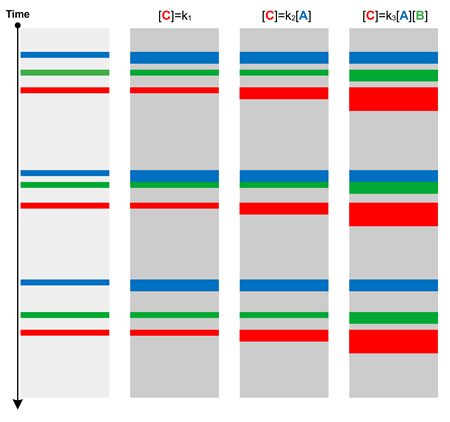
If we look at memory values in a thread stack region we see they are either come from the stack or some other non-stack region, such as heap, pool, or just some static code or data location. What is quite unusual is when such value belongs to another thread stack:

0:004> ~0e !teb
TEB at 00000055ad63d000
ExceptionList: 0000000000000000
StackBase: 00000055ad900000
StackLimit: 00000055ad8fd000
SubSystemTib: 0000000000000000
FiberData: 0000000000001e00
ArbitraryUserPointer: 0000000000000000
Self: 00000055ad63d000
EnvironmentPointer: 0000000000000000
ClientId: 00000000000035c4 . 0000000000005fa4
RpcHandle: 0000000000000000
Tls Storage: 000001c2e6269540
PEB Address: 00000055ad63c000
LastErrorValue: 0
LastStatusValue: c0000034
Count Owned Locks: 0
HardErrorMode: 0

0:004> ~3e !teb
TEB at 00000055ad643000
ExceptionList: 0000000000000000
StackBase: 00000055adc00000
StackLimit: 00000055adbfe000
SubSystemTib: 0000000000000000
FiberData: 0000000000001e00
ArbitraryUserPointer: 0000000000000000
Self: 00000055ad643000
EnvironmentPointer: 0000000000000000
ClientId: 00000000000035c4 . 0000000000005f1c
RpcHandle: 0000000000000000
Tls Storage: 000001c2e62714b0
PEB Address: 00000055ad63c000
LastErrorValue: 187
LastStatusValue: c000000d
Count Owned Locks: 0
HardErrorMode: 0

0:004> dps 00000055adbfe000 00000055adc00000
00000055`adbfe000 00000000`00000000
00000055`adbfe008 00000000`00000000
00000055`adbfe010 00000000`00000000
00000055`adbfe018 00000000`00000000
00000055`adbfe020 00000000`00000000

00000055`adbffa58 00000000`00000008
00000055`adbffa60 00000055`adbffb28
00000055`adbffa68 00007ff7`96e116a3 module!func+0×13
00000055`adbffa70 00000055`ad8ffde0
00000055`adbffa78 00000000`00000000
00000055`adbffa80 00000000`00000000
00000055`adbffa88 00007ffa`28ecc9a8 ucrtbase!`string’
00000055`adbffa90 00000000`00000000
00000055`adbffa98 00007ff7`96e116c3 module!thread_proc+0×13
00000055`adbffaa0 00000055`ad8ffde0
00000055`adbffaa8 00000055`adbffb28
00000055`adbffab0 ffffffff`ffffffff
00000055`adbffab8 00007ffa`28fa0748 KERNELBASE!GetAppModelPolicy+0×18
00000055`adbffac0 00000055`adbffba0
00000055`adbffac8 00007ff7`96e12657 module!std::invoke<void (__cdecl*)(int *),int *>+0×27
00000055`adbffad0 00000055`ad8ffde0
00000055`adbffad8 00000055`adbffb00
00000055`adbffae0 00000055`adbffb18

Such Foreign Stack references in user space may point to possibly questionable use of pointers to local variables in asynchronous scenarios. In kernel space, !findthreads WinDbg command may find values from the kernel stack of the specified thread address on other thread kernel stacks even from different processes. Such references may also reveal deep process and thread relationships in kernel.

- Dmitry Vostokov @ DumpAnalysis.org + TraceAnalysis.org -
Crash Dump Analysis Patterns (Part 289)

March 12th, 2024

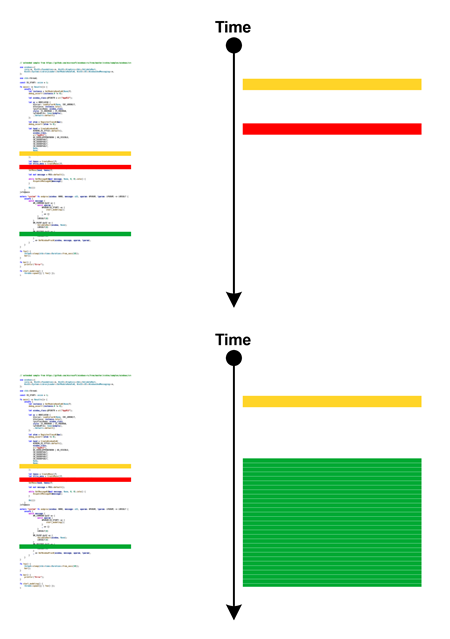
Sometimes, we are interested in Past Processes, processes that ran in the past to suggest troubleshooting hints. Some may still be present as Zombie Processes and information about some may be present as control areas of the the previously mapped files (even if there are no mapped views at the moment):

1: kd> !memusage
...
Control Valid Standby Dirty Shared Locked PageTables name

ffffbe0c8b47f460 0 148 0 0 0 0 mapped_file( WerFault.exe )

1: kd> !ca ffffbe0c8b47f460 4
...
\Windows\System32\WerFault.exe

No mapped views.

This analysis pattern is different from Hidden Process where the process is still running or at least its image is still mapped to memory.

- Dmitry Vostokov @ DumpAnalysis.org + TraceAnalysis.org -
Trace Analysis Patterns (Part 244)

March 1st, 2024

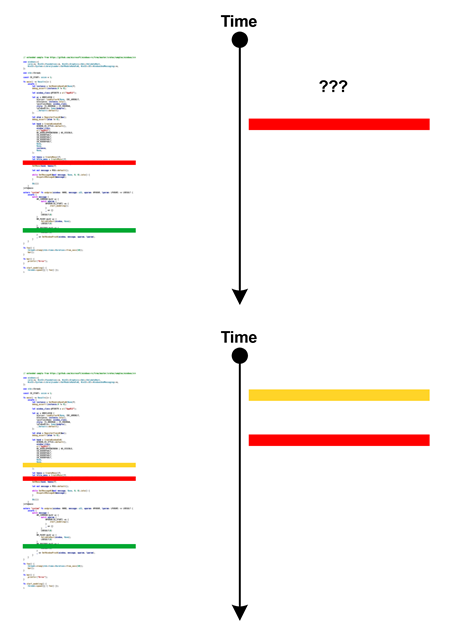
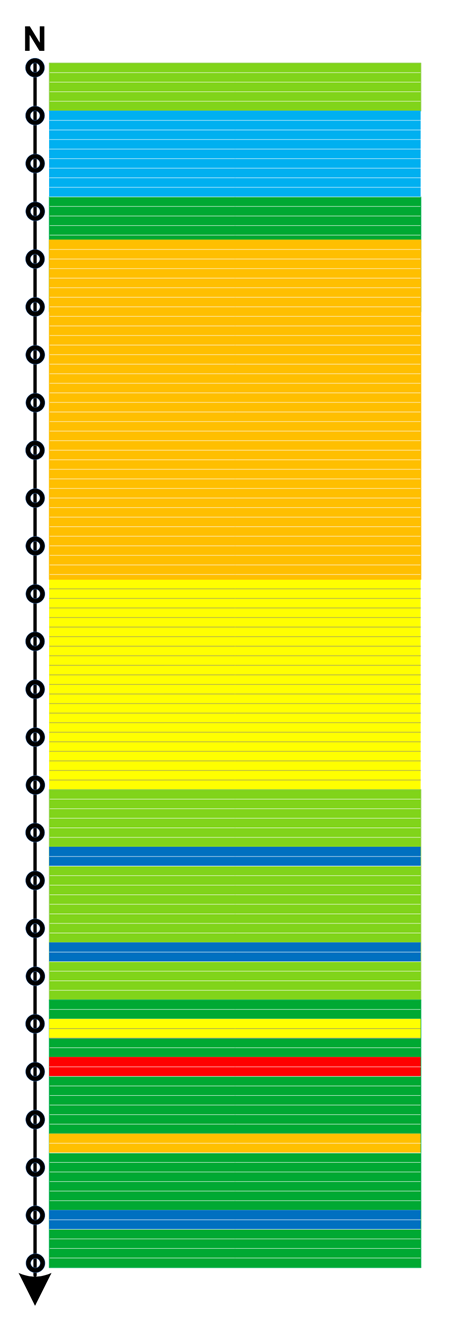
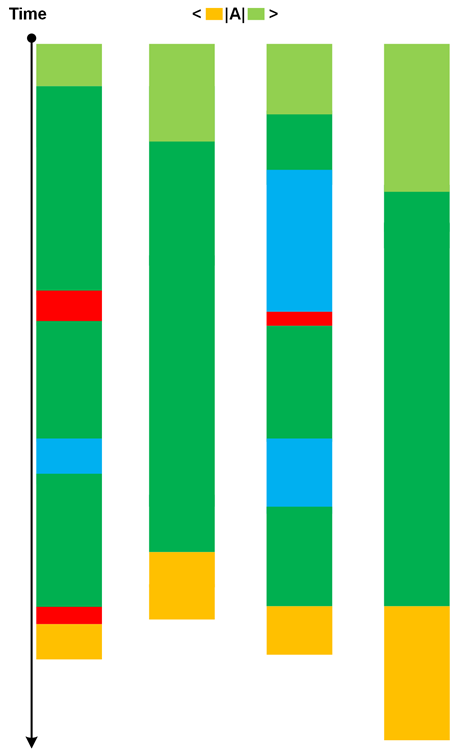
When comparing different traces from the same system we may see different correlations of Statement Densities. For example, when A message density is increased, then C message density is also increased regardless of any changes to B message density. We can borrow concentration notation from chemical kinetics and use [A], [B], and [C] for corresponding Statement Densities, either local in Activity Regions or globally for the whole trace. Observed correlations may point to existing causal mechanisms (like when kinetics points to reaction mechanisms):

This Message Kinetics pattern is more general than Relative Density where a semantic relationship is already known and the comparison is made between working and non-working scenarios. Variations of message densities may occur in normal scenarios, for example, with different amount of input data. There can be several types of Message Kinetics in one trace or log.

- Dmitry Vostokov @ DumpAnalysis.org + TraceAnalysis.org -
Crash Dump Analysis Patterns (Part 288)

February 23rd, 2024

Modern x64 Windows targets may support hardware shadow stacks. In such a case, WinDbg shows this message even if you open a memory dump on computers that do not support it:

This target supports Hardware-enforced Stack Protection. A HW based
"Shadow Stack" may be available to assist in debugging and analysis.
See aka.ms/userhsp for more info.
dps @ssp

The data from shadow stacks may be useful in case of Local Buffer Overflow. In such a case, we can compare the problem Stack Trace with the Shadow Stack Trace that was supposed to be without the stack region corruption.

For example, if see this exception and Incorrect Stack Trace, we can see that the stack trace should have been if the the return address were not modified:

This dump file has an exception of interest stored in it.
The stored exception information can be accessed via .ecxr.
(5a34.4bb8): Security check failure or stack buffer overrun - code c0000409 (first/second chance not available)
Subcode: 0×39 FAST_FAIL_CONTROL_INVALID_RETURN_ADDRESS Shadow stack violation

0:000> k
# Child-SP RetAddr Call Site
00 000000fa`b94ffdf8 000002aa`5d420588 user32!GetMessageW+0×5c
01 000000fa`b94ffe00 000002aa`5d420588 0×000002aa`5d420588
02 000000fa`b94ffe08 00000000`00000000 0×000002aa`5d420588

0:000> r
rax=0000000000000001 rbx=000002aa5d420588 rcx=00007ff9c3d31534
rdx=0000000000000000 rsi=0000000000000000 rdi=000002aa5d420530
rip=00007ff9c3ea538c rsp=000000fab94ffdf8 rbp=000002aa5d420588
r8=000000fab94ffd98 r9=0000000000000000 r10=0000000000000000
r11=0000000000000244 r12=00007ff66b204070 r13=0000000000000000
r14=0000000000000001 r15=00000000ffffffff
iopl=0 nv up ei pl nz na po nc
cs=0033 ss=002b ds=002b es=002b fs=0053 gs=002b efl=00010206
user32!GetMessageW+0x5c:
00007ff9`c3ea538c ret

0:000> dps @rsp L1
000000fa`b94ffdf8 000002aa`5d420588

0:000> dps @ssp
000000fa`b95fefd0 00007ff9`4ae2f877 mfc140u!AfxInternalPumpMessage+0x27
000000fa`b95fefd8 00007ff9`4ae301b1 mfc140u!CWinThread::Run+0x81
000000fa`b95fefe0 00007ff9`4ae63230 mfc140u!AfxWinMain+0xc0
000000fa`b95fefe8 00007ff6`6b135742 mspaint+0xc5742
000000fa`b95feff0 00007ff9`c500257d kernel32!BaseThreadInitThunk+0x1d
000000fa`b95feff8 00007ff9`c618aa58 ntdll!RtlUserThreadStart+0x28
000000fa`b95ff000 ????????`????????
000000fa`b95ff008 ????????`????????
000000fa`b95ff010 ????????`????????
000000fa`b95ff018 ????????`????????
000000fa`b95ff020 ????????`????????
000000fa`b95ff028 ????????`????????
000000fa`b95ff030 ????????`????????
000000fa`b95ff038 ????????`????????
000000fa`b95ff040 ????????`????????
000000fa`b95ff048 ????????`????????

- Dmitry Vostokov @ DumpAnalysis.org + TraceAnalysis.org -
Trace Analysis Patterns (Part 243)

February 18th, 2024

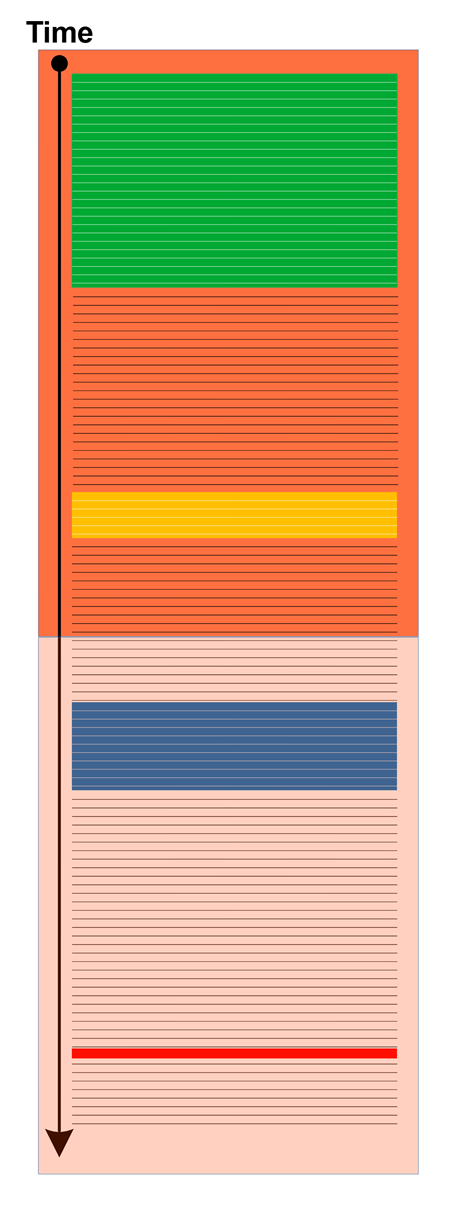
Trace Variance is the measure of variability of traces and logs in different environments. This trace and log analysis pattern metaphor is borrowed from variance in machine learning like Trace Bias. Here, different environments or the same environment at different times are considered as input data.

Other analysis patterns can be used to investigate Trace Variance such as Bifurcation Point, Trace String, and Polytrace.

- Dmitry Vostokov @ DumpAnalysis.org + TraceAnalysis.org -
Trace Analysis Patterns (Part 242)

February 18th, 2024

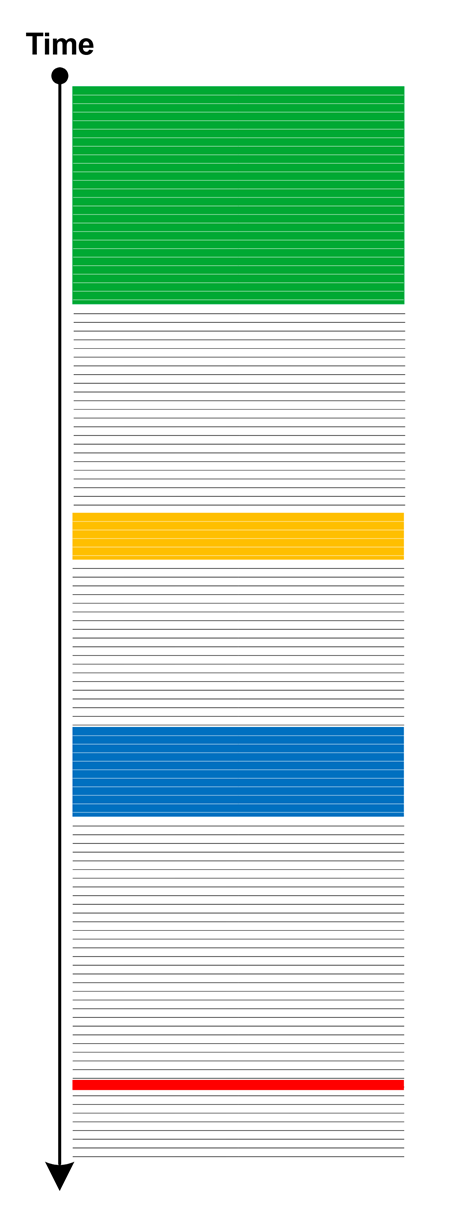
Trace Bias is the measure of how faithfully traces and logs as a models of computation reflect the actual computation. The term bias has many meanings. This trace and log analysis pattern metaphor is borrowed from model bias in machine learning and statistics. Traces, and therefore, their biases range from Empty Traces to Sparse Traces to traces from Time Travel Debugging tools. How we do tracing, for example, via Declarative Traces or Moduli Traces, have direct impact on Trace Bias.

- Dmitry Vostokov @ DumpAnalysis.org + TraceAnalysis.org -
Crash Dump Analysis Patterns (Part 287)

February 11th, 2024

Sometimes, when looking at Stack Traces or disassembly of the currently executing code we may see that continued execution would possibly (and sometimes definitely) generate an exception later on, like these sequences of recursive calls from sequential memory snapshots having the same Constant Subtrace may result in Stack Overflow:

0:000> kL
# ChildEBP RetAddr
00 00efeb60 771706c9 ntdll!NtDelayExecution+0xc
01 00efeb84 75fcd18f ntdll!RtlDelayExecution+0xe9
02 00efebec 75fcd12f KERNELBASE!SleepEx+0x4f
03 00efebfc 0014138e KERNELBASE!Sleep+0xf
04 00efec08 00141338 AppD9!ConnectDB+0xe
05 00efec10 0014121a AppD9!StartModeling+0x8
06 00efec70 75d32e53 AppD9!WndProc+0x7a
07 00efec9c 75d23c26 USER32!_InternalCallWinProc+0x2b
08 00efed94 75d224e5 USER32!UserCallWinProcCheckWow+0x4c6
09 00efee10 75d598f8 USER32!DispatchMessageWorker+0x4a5
0a 00efee58 75d59db3 USER32!DialogBox2+0x143
0b 00efee88 75d7ac60 USER32!InternalDialogBox+0xf3
0c 00efef54 75d799f6 USER32!SoftModalMessageBox+0x6f0
0d 00eff0b0 75d7a4f7 USER32!MessageBoxWorker+0x2fd
0e 00eff138 75d7a565 USER32!MessageBoxTimeoutW+0x187
0f 00eff158 00141371 USER32!MessageBoxW+0x45
10 00eff170 0014121a AppD9!StartModeling+0×41
11 00eff1d0 75d32e53 AppD9!WndProc+0×7a
12 00eff1fc 75d23c26 USER32!_InternalCallWinProc+0×2b
13 00eff2f4 75d224e5 USER32!UserCallWinProcCheckWow+0×4c6
14 00eff370 75d598f8 USER32!DispatchMessageWorker+0×4a5
15 00eff3b8 75d59db3 USER32!DialogBox2+0×143
16 00eff3e8 75d7ac60 USER32!InternalDialogBox+0xf3
17 00eff4b4 75d799f6 USER32!SoftModalMessageBox+0×6f0
18 00eff610 75d7a4f7 USER32!MessageBoxWorker+0×2fd
19 00eff698 75d7a565 USER32!MessageBoxTimeoutW+0×187
1a 00eff6b8 00141371 USER32!MessageBoxW+0×45
1b 00eff6d0 0014121a AppD9!StartModeling+0×41
1c 00eff730 75d32e53 AppD9!WndProc+0×7a
1d 00eff75c 75d23c26 USER32!_InternalCallWinProc+0×2b
1e 00eff854 75d224e5 USER32!UserCallWinProcCheckWow+0×4c6
1f 00eff8d0 75d598f8 USER32!DispatchMessageWorker+0×4a5
20 00eff918 75d59db3 USER32!DialogBox2+0×143
21 00eff948 75d7ac60 USER32!InternalDialogBox+0xf3
22 00effa14 75d799f6 USER32!SoftModalMessageBox+0×6f0
23 00effb70 75d7a4f7 USER32!MessageBoxWorker+0×2fd
24 00effbf8 75d7a565 USER32!MessageBoxTimeoutW+0×187
25 00effc18 00141371 USER32!MessageBoxW+0×45
26 00effc30 0014121a AppD9!StartModeling+0×41
27 00effc90 75d32e53 AppD9!WndProc+0×7a
28 00effcbc 75d23c26 USER32!_InternalCallWinProc+0×2b
29 00effdb4 75d224e5 USER32!UserCallWinProcCheckWow+0×4c6
2a 00effe30 75d22030 USER32!DispatchMessageWorker+0×4a5
2b 00effe3c 0014109d USER32!DispatchMessageW+0×10
2c 00effe68 0014155d AppD9!wWinMain+0×9d
2d (Inline) ——– AppD9!invoke_main+0×1a
2e 00effeb4 769a7ba9 AppD9!__scrt_common_main_seh+0xf8
2f 00effec4 7714bd2b KERNEL32!BaseThreadInitThunk+0×19
30 00efff1c 7714bcaf ntdll!__RtlUserThreadStart+0×2b
31 00efff2c 00000000 ntdll!_RtlUserThreadStart+0×1b

0:000> kL
# ChildEBP RetAddr
00 00efd5e0 771706c9 ntdll!NtDelayExecution+0xc
01 00efd604 75fcd18f ntdll!RtlDelayExecution+0xe9
02 00efd66c 75fcd12f KERNELBASE!SleepEx+0x4f
03 00efd67c 0014138e KERNELBASE!Sleep+0xf
04 00efd688 00141338 AppD9!ConnectDB+0xe
05 00efd690 0014121a AppD9!StartModeling+0x8
06 00efd6f0 75d32e53 AppD9!WndProc+0x7a
07 00efd71c 75d23c26 USER32!_InternalCallWinProc+0x2b
08 00efd814 75d224e5 USER32!UserCallWinProcCheckWow+0x4c6
09 00efd890 75d598f8 USER32!DispatchMessageWorker+0x4a5
0a 00efd8d8 75d59db3 USER32!DialogBox2+0x143
0b 00efd908 75d7ac60 USER32!InternalDialogBox+0xf3
0c 00efd9d4 75d799f6 USER32!SoftModalMessageBox+0x6f0
0d 00efdb30 75d7a4f7 USER32!MessageBoxWorker+0x2fd
0e 00efdbb8 75d7a565 USER32!MessageBoxTimeoutW+0x187
0f 00efdbd8 00141371 USER32!MessageBoxW+0x45
10 00efdbf0 0014121a AppD9!StartModeling+0×41
11 00efdc50 75d32e53 AppD9!WndProc+0×7a
12 00efdc7c 75d23c26 USER32!_InternalCallWinProc+0×2b
13 00efdd74 75d224e5 USER32!UserCallWinProcCheckWow+0×4c6
14 00efddf0 75d598f8 USER32!DispatchMessageWorker+0×4a5
15 00efde38 75d59db3 USER32!DialogBox2+0×143
16 00efde68 75d7ac60 USER32!InternalDialogBox+0xf3
17 00efdf34 75d799f6 USER32!SoftModalMessageBox+0×6f0
18 00efe090 75d7a4f7 USER32!MessageBoxWorker+0×2fd
19 00efe118 75d7a565 USER32!MessageBoxTimeoutW+0×187
1a 00efe138 00141371 USER32!MessageBoxW+0×45
1b 00efe150 0014121a AppD9!StartModeling+0×41
1c 00efe1b0 75d32e53 AppD9!WndProc+0×7a
1d 00efe1dc 75d23c26 USER32!_InternalCallWinProc+0×2b
1e 00efe2d4 75d224e5 USER32!UserCallWinProcCheckWow+0×4c6
1f 00efe350 75d598f8 USER32!DispatchMessageWorker+0×4a5
20 00efe398 75d59db3 USER32!DialogBox2+0×143
21 00efe3c8 75d7ac60 USER32!InternalDialogBox+0xf3
22 00efe494 75d799f6 USER32!SoftModalMessageBox+0×6f0
23 00efe5f0 75d7a4f7 USER32!MessageBoxWorker+0×2fd
24 00efe678 75d7a565 USER32!MessageBoxTimeoutW+0×187
25 00efe698 00141371 USER32!MessageBoxW+0×45
26 00efe6b0 0014121a AppD9!StartModeling+0×41
27 00efe710 75d32e53 AppD9!WndProc+0×7a
28 00efe73c 75d23c26 USER32!_InternalCallWinProc+0×2b
29 00efe834 75d224e5 USER32!UserCallWinProcCheckWow+0×4c6
2a 00efe8b0 75d598f8 USER32!DispatchMessageWorker+0×4a5
2b 00efe8f8 75d59db3 USER32!DialogBox2+0×143
2c 00efe928 75d7ac60 USER32!InternalDialogBox+0xf3
2d 00efe9f4 75d799f6 USER32!SoftModalMessageBox+0×6f0
2e 00efeb50 75d7a4f7 USER32!MessageBoxWorker+0×2fd
2f 00efebd8 75d7a565 USER32!MessageBoxTimeoutW+0×187
30 00efebf8 00141371 USER32!MessageBoxW+0×45
31 00efec10 0014121a AppD9!StartModeling+0×41
32 00efec70 75d32e53 AppD9!WndProc+0×7a
33 00efec9c 75d23c26 USER32!_InternalCallWinProc+0×2b
34 00efed94 75d224e5 USER32!UserCallWinProcCheckWow+0×4c6
35 00efee10 75d598f8 USER32!DispatchMessageWorker+0×4a5
36 00efee58 75d59db3 USER32!DialogBox2+0×143
37 00efee88 75d7ac60 USER32!InternalDialogBox+0xf3
38 00efef54 75d799f6 USER32!SoftModalMessageBox+0×6f0
39 00eff0b0 75d7a4f7 USER32!MessageBoxWorker+0×2fd
3a 00eff138 75d7a565 USER32!MessageBoxTimeoutW+0×187
3b 00eff158 00141371 USER32!MessageBoxW+0×45
3c 00eff170 0014121a AppD9!StartModeling+0×41
3d 00eff1d0 75d32e53 AppD9!WndProc+0×7a
3e 00eff1fc 75d23c26 USER32!_InternalCallWinProc+0×2b
3f 00eff2f4 75d224e5 USER32!UserCallWinProcCheckWow+0×4c6
40 00eff370 75d598f8 USER32!DispatchMessageWorker+0×4a5
41 00eff3b8 75d59db3 USER32!DialogBox2+0×143
42 00eff3e8 75d7ac60 USER32!InternalDialogBox+0xf3
43 00eff4b4 75d799f6 USER32!SoftModalMessageBox+0×6f0
44 00eff610 75d7a4f7 USER32!MessageBoxWorker+0×2fd
45 00eff698 75d7a565 USER32!MessageBoxTimeoutW+0×187
46 00eff6b8 00141371 USER32!MessageBoxW+0×45
47 00eff6d0 0014121a AppD9!StartModeling+0×41
48 00eff730 75d32e53 AppD9!WndProc+0×7a
49 00eff75c 75d23c26 USER32!_InternalCallWinProc+0×2b
4a 00eff854 75d224e5 USER32!UserCallWinProcCheckWow+0×4c6
4b 00eff8d0 75d598f8 USER32!DispatchMessageWorker+0×4a5
4c 00eff918 75d59db3 USER32!DialogBox2+0×143
4d 00eff948 75d7ac60 USER32!InternalDialogBox+0xf3
4e 00effa14 75d799f6 USER32!SoftModalMessageBox+0×6f0
4f 00effb70 75d7a4f7 USER32!MessageBoxWorker+0×2fd
50 00effbf8 75d7a565 USER32!MessageBoxTimeoutW+0×187
51 00effc18 00141371 USER32!MessageBoxW+0×45
52 00effc30 0014121a AppD9!StartModeling+0×41
53 00effc90 75d32e53 AppD9!WndProc+0×7a
54 00effcbc 75d23c26 USER32!_InternalCallWinProc+0×2b
55 00effdb4 75d224e5 USER32!UserCallWinProcCheckWow+0×4c6
56 00effe30 75d22030 USER32!DispatchMessageWorker+0×4a5
57 00effe3c 0014109d USER32!DispatchMessageW+0×10
58 00effe68 0014155d AppD9!wWinMain+0×9d
59 (Inline) ——– AppD9!invoke_main+0×1a
5a 00effeb4 769a7ba9 AppD9!__scrt_common_main_seh+0xf8
5b 00effec4 7714bd2b KERNEL32!BaseThreadInitThunk+0×19
5c 00efff1c 7714bcaf ntdll!__RtlUserThreadStart+0×2b
5d 00efff2c 00000000 ntdll!_RtlUserThreadStart+0×1b

We call such analysis pattern Near Exception.

- Dmitry Vostokov @ DumpAnalysis.org + TraceAnalysis.org -
Crash Dump Analysis Patterns (Part 151b)

January 28th, 2024

This is an unmanaged code analysis pattern variant of the previously published Annotated Disassembly. In modern WinDbg (which was previously called WinDbg Preview), the Disassembly window may annotate local variables in the presence of debugging symbols (this is absent from the output of the uf WinDbg command):

; uf command output
511 00007ff6`6ab22a44 mov dword ptr [rbp+2078h],1
511 00007ff6`6ab22a4e mov dword ptr [rbp+207Ch],2
513 00007ff6`6ab22a58 mov eax,dword ptr [rbp+2078h]
513 00007ff6`6ab22a5e mov dword ptr [rbp+0Ch],eax
514 00007ff6`6ab22a61 mov dword ptr [rbp+0Ch],64h
515 00007ff6`6ab22a68 mov dword ptr [rbp+48h],3
515 00007ff6`6ab22a6f mov dword ptr [rbp+4Ch],4
516 00007ff6`6ab22a76 mov eax,dword ptr [rbp+0Ch]


; Disassembly window
00007ff6`6ab22a4e c7857c20000002000000 mov dword ptr [myDerived.field2 (rbp+207Ch)], 2
00007ff6`6ab22a58 8b8578200000 mov eax, dword ptr [myDerived{.field} (rbp+2078h)]
00007ff6`6ab22a5e 89450c mov dword ptr [myBase{.field} (rbp+Ch)], eax
00007ff6`6ab22a61 c7450c64000000 mov dword ptr [myBase{.field} (rbp+Ch)], 64h
00007ff6`6ab22a68 c7454803000000 mov dword ptr [myDerived2{.field} (rbp+48h)], 3
00007ff6`6ab22a6f c7454c04000000 mov dword ptr [myDerived2.field2 (rbp+4Ch)], 4
00007ff6`6ab22a76 8b450c mov eax, dword ptr [myBase{.field} (rbp+Ch)]

- Dmitry Vostokov @ DumpAnalysis.org + TraceAnalysis.org -
Crash Dump Analysis Patterns (Part 286)

January 28th, 2024

Sometimes, when we have debugging symbols, information about local variables may be helpful in making sense of function disassembly. For example, we have this code fragment from WinDbg uf command:

511 00007ff6`6ab22a44 mov dword ptr [rbp+2078h],1
511 00007ff6`6ab22a4e mov dword ptr [rbp+207Ch],2
513 00007ff6`6ab22a58 mov eax,dword ptr [rbp+2078h]
513 00007ff6`6ab22a5e mov dword ptr [rbp+0Ch],eax
514 00007ff6`6ab22a61 mov dword ptr [rbp+0Ch],64h
515 00007ff6`6ab22a68 mov dword ptr [rbp+48h],3
515 00007ff6`6ab22a6f mov dword ptr [rbp+4Ch],4
516 00007ff6`6ab22a76 mov eax,dword ptr [rbp+0Ch]

Although source code lines are shown, suppose we don’t have source code to match. However, we can match Address Representations, such as [rbp+xxx], from the output of dv /V WinDbg command:

0:000> dv /V
...
000000ab`740fd00c @rbp+0x000c myBase = struct wmain::__l2::Base
...
000000ab`740ff078 @rbp+0x2078 myDerived = struct wmain::__l2::Derived
...
000000ab`740fd048 @rbp+0x0048 myDerived2 = struct wmain::__l2::Derived
...

Another usage is matching values in raw stack data with local variable addresses. Values as addresses and their symbolic representations here have some connection to ADDR Symbolic and Interpreted Pointers.

- Dmitry Vostokov @ DumpAnalysis.org + TraceAnalysis.org -
Crash Dump Analysis Patterns (Part 285)

January 21st, 2024

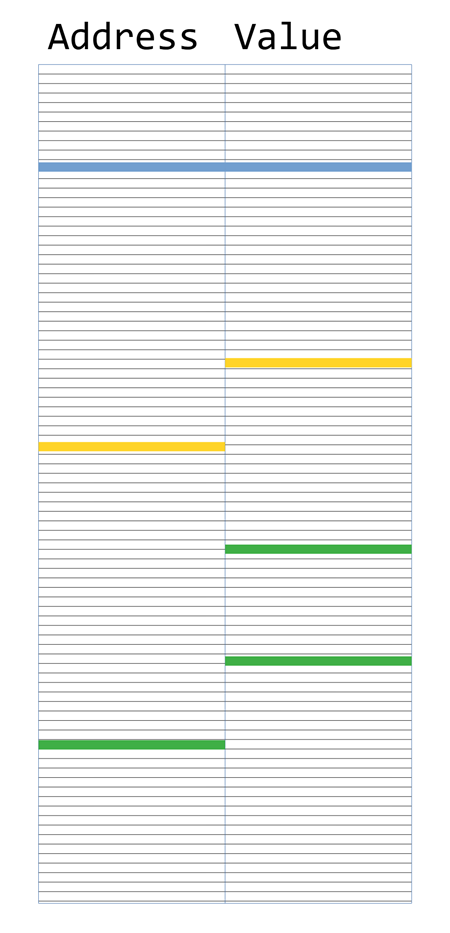
Almost 15 years ago we introduced Dereference Fixpoints when the address value is equal to the value at the address. In doing raw stack data classification and pattern matching we may be interested in more general Dereference Nearpoints (especially in position independent ones) illustrated in the following diagram:

Such Dereference Nearpoints may appear due to exception processing when a stack exception address or exception stack pointer address is propagated during exception processing, and multiple structure references, for example, when a local structure address is propagated during function calls.

- Dmitry Vostokov @ DumpAnalysis.org + TraceAnalysis.org -
Trace Analysis Patterns (Part 241)

January 5th, 2024

Trace Lattice is a selection of messages based on a fixed order distance between them (similar to lattices in geometry, one-dimensional in this case) or some other metric:

This analysis pattern is different from Time Scale where fixed time distance is used with additional analysis transformations.

- Dmitry Vostokov @ DumpAnalysis.org + TraceAnalysis.org -

Trace Analysis Patterns (Part 240)

December 28th, 2023

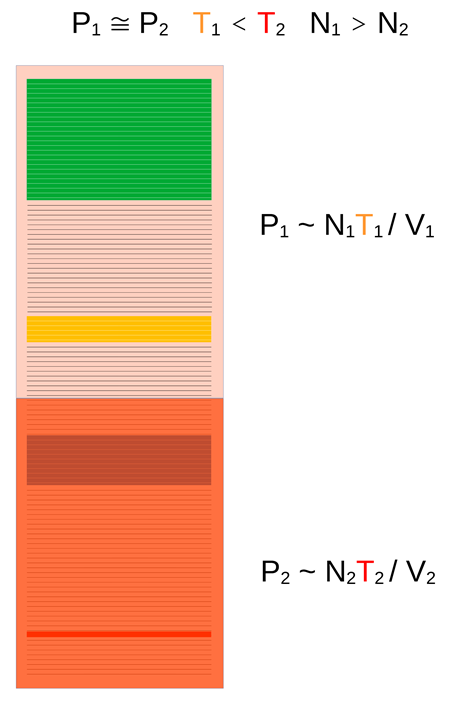
Trace Pressure is a “thermodynamic” variable along with Trace Temperature and Trace Volume. The fourth variable, the number of non-Silent Messages, N, is obvious. In the following diagram, two parts of the trace have approximately the same volume but different “temperature” that result in approx. same “pressure” according to a metaphor of an ideal gas law:

- Dmitry Vostokov @ DumpAnalysis.org + TraceAnalysis.org -
Trace Analysis Patterns (Part 239)

December 26th, 2023

Trace Temperature is an external quantitative (a number) or qualitative (for example, “hot”, “warm”, or “cold”) trace attribute of a trace or log or its fragment such as Activity Region that measures importance of the incident:

It is one example of Trace Field. Being an external attribute, independent from content, the trace with very few or no messages (Sparse Trace) can still have very high “temperature.” However, this analysis pattern is not the same as News Value which is an internal attribute based on trace content that measures its importance.

- Dmitry Vostokov @ DumpAnalysis.org + TraceAnalysis.org -
Trace Analysis Patterns (Part 238)

December 21st, 2023

Trace Volume counts not only messages but also Silent Messages:

The volume metaphor can also be applied to parts of the trace such as Activity Regions, Threads (and Adjoint Threads) of Activity, and various braids.

- Dmitry Vostokov @ DumpAnalysis.org + TraceAnalysis.org -

Trace Analysis Patterns (Part 237)

November 18th, 2023

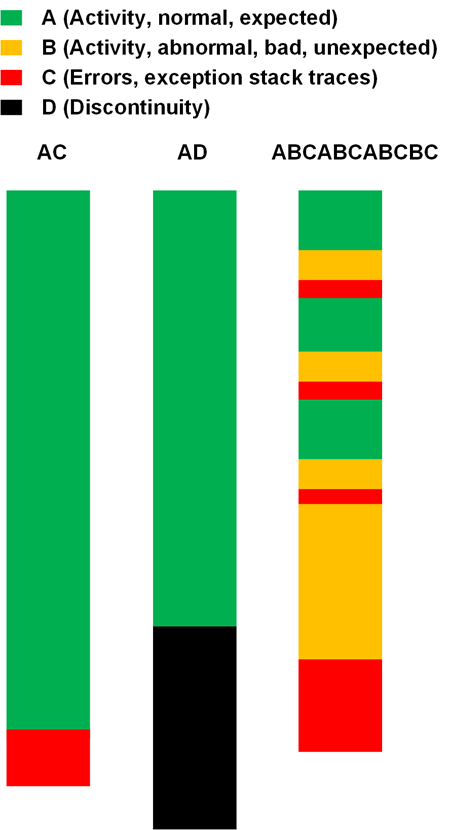
How can we view traces and logs to facilitate there classification? One of the possible avenues is to view traces and logs consisting of the very large conceptual units, bricks, or bases to avoid combinatorial explosion. The natural candidates are Activity Region, Discontinuity, and Error Message or Exception Stack Trace Characteristic Message Block (Crash metaphor). So we have A, C, D, and we add B for Bad Activity Region whatever that means. For example, a typical trace that starts with some activity, then we have an exception stack trace belongs to AC Trace Class. Another trace that starts with some activity, then doesn’t show any messaged till the end can be classified as AD. A more elaborate class is ABCABCABCBC with periodicity of normal and bad activities culminating with error messages and finally with the last bad activity and exception. These three Trace Classes are depicted in the following diagram:

We combine sequences of the same bases into one, for example, AAAAA as just A, thus abstracting from semantic and syntactical differences between normal Activity Regions. The same is with other bases and can be considered as an extreme version of Quotient Trace. This classification can also be applied to individual Threads of Activity and Adjoint Threads of Activity.

This genetic-like description parallels the earlier proposal for DNA and RNA of Ruptured Computation.

- Dmitry Vostokov @ DumpAnalysis.org + TraceAnalysis.org -

Trace Analysis Patterns (Part 236)

November 6th, 2023

If Trace String analysis patterns caters for trace length variations when the sequence of Activity Regions is constant then Trace Amplitude is about different paths between constant regions at both trace ends that may include varying regions in between, as depicted in the following diagram:

Therefore, several different Trace Strings may be embedded in one Trace Amplitude. The idea of this analysis pattern was borrowed from the path integral formulation of QM.

- Dmitry Vostokov @ DumpAnalysis.org + TraceAnalysis.org -

Trace Analysis Patterns (Part 235)

September 24th, 2023

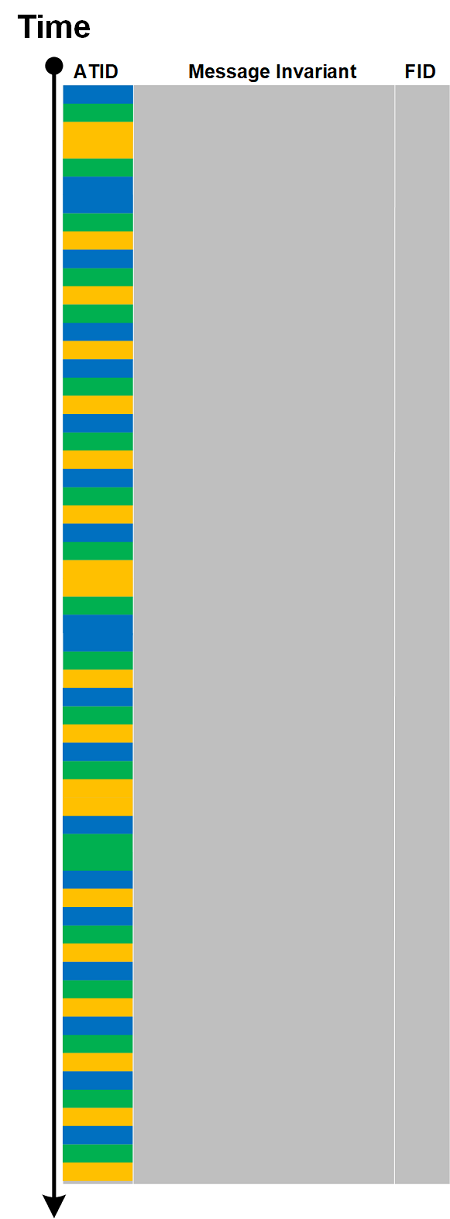
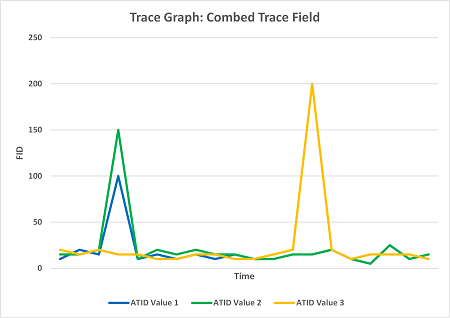
Some Dia|gram language illustrations of trace and log analysis patterns can be easily converted to more usual graphs. For example, Trace Field can be converted to Combed Trace or Adjoint Threads of Activity:


The resulted series can be plotted as a graph:

If time is values are not uniform Time Scale analysis pattern may be involved with the constructed Motivic Trace. We call this analysis pattern Trace Graph.

- Dmitry Vostokov @ DumpAnalysis.org + TraceAnalysis.org -

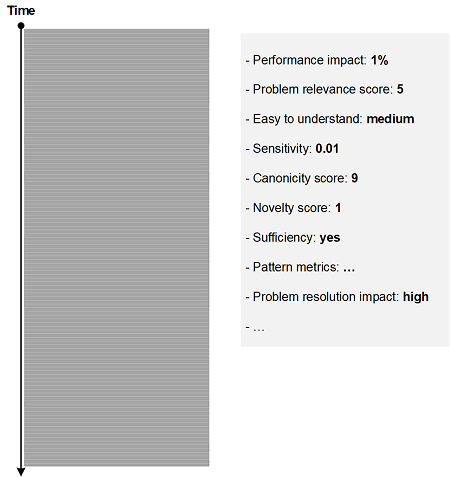
Trace Analysis Patterns (Part 234)

September 17th, 2023

When comparing traces we may be interested in their Trace Benchmarks, for example (not limited to, just a proposal):

  • Performance impact (impact this trace collection has on system performance)
  • Problem relevance score (was it really relevant or missed the problem repro?)
  • Easy to understand (is there any room for improvement for trace messages?)
  • Sensitivity (does it have any sensitive information?)
  • Canonicity score (does it contain all required ATIDs?)
  • Novelty score (any surprises?)
  • Sufficiency (does it require supplemental log from other tools?)
  • Pattern metrics (number of distinct error messages, etc., based on trace and log analysis patterns)
  • Problem resolution impact (was it the trace that provided missing insights?)

This post-analysis pattern may also be useful for problem postmortems and case studies. This pattern is different from Trace Summary which is a pre-analysis information.

- Dmitry Vostokov @ DumpAnalysis.org + TraceAnalysis.org -

Trace Analysis Patterns (Part 233)

September 16th, 2023

When comparing traces, saving them for further processing, or making their Trace Mask, we may transform them into Canonical Trace form with the same Trace Schema:

This analysis pattern is different from Master Trace and Meta Trace, where the former is about an “ideal” archetype trace of a use case to compare to, and the latter is about trace evolution when underlying code changes.

- Dmitry Vostokov @ DumpAnalysis.org + TraceAnalysis.org -