September 9th, 2006
I have two devices with Windows Mobile 5.0:
Acer n300
http://global.acer.com/products/pda/n300.htm
and mobile phone Mio A701
http://www.mio-tech.be/en/gps-navigation-products-a701-overview.htm
I bought them for debugging and testing my forthcoming product OpenTask Mobile 5.0 but found yet another use for Dump Analysis.
I frequently consult WinDbg help for ideas. I printed it to an HTML file and split it into 9 parts less then 1Mb each so Pocket IE on my devices can load them. And now I can read the help file while commuting to work, shopping around, walking or simply when my notebook is not accessible.
- Dmitry Vostokov -
Posted in Crash Dump Analysis | 2 Comments »
September 9th, 2006
The most common scenarios technical support people encounter when facing the need to create a dump are:
http://support.citrix.com/article/CTX104633
the article is applicable to any process, not only to Citrix IMA service
http://support.citrix.com/article/CTX106110
- No user dumps saved by Dr. Watson
http://support.citrix.com/article/CTX105888
http://support.citrix.com/article/CTX106970
the article is applicable to any process, not only to Citrix IMA service
- Need a system dump from remote session? Use SystemDump (to get this tool you need to register on Citrix support web site - this is free)
http://support.citrix.com/article/CTX111072
- Got correct dump? Use Citrix DumpCheck (to get these utilities you need to register on Citrix support web site - this is free)
http://support.citrix.com/article/CTX108825 (Explorer extension)
http://support.citrix.com/article/CTX108890 (Command line version)
- Dmitry Vostokov -
Posted in Crash Dump Analysis | No Comments »
September 9th, 2006
I couldn’t find any forum on Internet dedicated solely for dump analysis topics so I created it some time ago. It is sponsored by me and free for everyone.
Recently I did some file tossing and it is now accessible directrly from www.dumpanalysis.org
- Dmitry Vostokov -
Posted in Crash Dump Analysis | No Comments »
September 7th, 2006
It takes approximately 10 - 30 minutes to process an average 2Gb complete memory dump. After loading couple of dumps I found the following useful features so far:
- You can save analysis tree in a file and open it later for further analysis (but you need to keep dump file too)
- Wait chains might be useful. However the tool reports too many of them (608 in my dump). They are sorted by length so it might be useful in detecting lengthy chains
- It also detects anomalous (corrupt) critical sections in user processes
- It detects deadlocks (you don’t need to enable driver verifier and reboot the system to get a new dump)
I’m currently using this tool with every memory dump I get and will post interesting cases.
- Dmitry Vostokov -
Posted in Crash Dump Analysis, Tools | No Comments »
September 7th, 2006
I got a dump with 30 IE processes running and I want to find the only one waiting for a specific function. I know there is one. The following script lists all processes and their stacks (of course, I already opened a log in WinDbg to save that huge amount of output):
$$

$$ List user processes and stacks

$$

r $t0 = nt!PsActiveProcessHead

.for (r $t1 = poi(@$t0); (@$t1 != 0) & (@$t1 != @$t0); r $t1 = poi(@$t1))

{

    r? $t2 = #CONTAINING_RECORD(@$t1, nt!_EPROCESS, ActiveProcessLinks);

    .process @$t2

    .reload

    !process @$t2

}
- Dmitry Vostokov -
Posted in Crash Dump Analysis, Tools, WinDbg Scripts | 3 Comments »
September 6th, 2006
Microsoft has released this tool to help analyze memory dumps. I’m currently evaluating it and post my opinion later. Seems to be pretty cool tool according to its description and PPT presentation which you can download here:
Kernel Memory Space Analyzer
You need to manually copy x86 folder from kktools to your Debugging Tools for Windows folder and run kanalyze.exe from there. Refer to PPT presentation for details.
- Dmitry Vostokov -
Posted in Crash Dump Analysis, Tools | 1 Comment »
August 25th, 2006
Faced with a dilemma: to write or not to write debugging extensions I looked at the possibility to try scripts.
After spending some hours I wrote the final version of my first script which can enumerate processes in a complete memory dump and output their command line.
You need to save the script below in a text file and use the following command to run it from WinDbg command prompt: $$><script.txt
$$ WinDbg script to get process command line for all processes in complete memory dump

r $t0 = nt!PsActiveProcessHead

.for (r $t1 = poi(@$t0); (@$t1 != 0) & (@$t1 != @$t0);

       r $t1 = poi(@$t1))

{

   r? $t2 = #CONTAINING_RECORD(@$t1,

      nt!_EPROCESS, ActiveProcessLinks);

   .process @$t2

   .if (@$peb != 0)

   {

      .catch

      {

         r $t3 = @@c++(@$peb->ProcessParameters)

         r? $t4 =

              @@c++(&((_RTL_USER_PROCESS_PARAMETERS *)

              @$t3)->CommandLine)

         .printf "_EPROCESS: %N Command Line: %msu\n",

          @$t2, @$t4

      }

   }

}
- Dmitry Vostokov -
Posted in Crash Dump Analysis, Tools, WinDbg Scripts | No Comments »
August 22nd, 2006
The following tool I wrote saves historical logs of events in a session (windows, messages, etc):
WindowHistory for 32-bit platforms
WindowHistory for 64-bit platforms
Also forthcoming tools (already written and soon will be published):
WindowHistory CE/Mobile for ARM/X-Scale processors
MessageHistory for 32-bit and 64-bit platforms
The latter is better than SPY++ because it can spy messages for 64-bit windows and also has been written with support person and customers in mind:
Watch Citrix Tools for updates (requires free registration)
- Dmitry Vostokov -
Posted in Tools | No Comments »
August 22nd, 2006
Everything about crash dump analysis and debugging on Windows platforms
http://www.dumpanalysis.org/forum
My favourite question is about 8-byte atomic write on 32-bit platform
- Dmitry Vostokov -
Posted in Crash Dump Analysis | No Comments »
August 17th, 2006
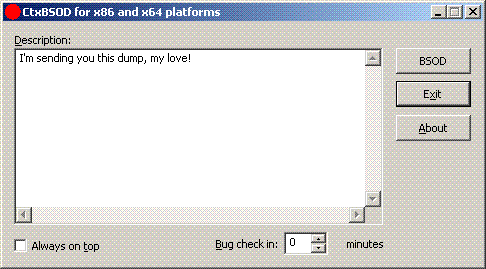
CtxBSOD v2.1 has just been published which allows you to crash your computer and embed a message in a dump. Dumps are becoming a universal medium of discourse between customers and support personnel. New plans are for developing DumpChat which will utilize Live debugging techniques 
http://support.citrix.com/article/CTX111072
- Dmitry Vostokov -
Posted in Crash Dump Analysis | No Comments »
August 14th, 2006
Being so tired of typing endless ‘!analyze -v’ one day an idea came to me about using Voice Recognition.
Taking advantage of spending 7 years in that field starting from 1992 and being the architect and designer/developer of the first pioneer speech recognition systems on Windows platforms (if you remember Covox and Voice Blaster - I was an employee there) VoiceMouse, JustVoice, SpeakingMouse, and recently my own project OpenTask I seriosly consider using this for Dump Analysis.
More later…
- Dmitry Vostokov -
Posted in Crash Dump Analysis | 3 Comments »