Preview of DumpDepends tool

October 28th, 2006

There are many cases where we need to dump several processes simultaneously and complete memory dump is not an option.
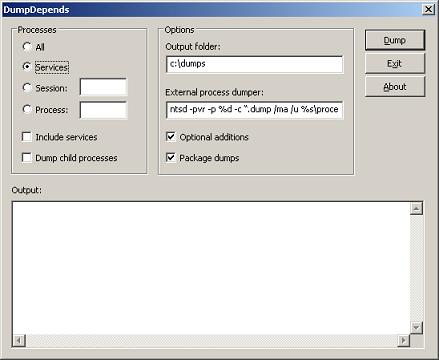
DumpDepends tool will dump processes and optionally package them into a CAB file. There are several options:

  • Dump all processes
  • Dump important services (Terminal, IMA, CTXXMLSS, Printing, Spooler, SVCHOST)
  • Dump all processes from the given session ID (additionally including children and important services if needed)
  • Dump an individual process (optionally including children and important services) 

The tool will use external process dumpers in noninvasive manner (NTSD by default or any other specified, like userdump.exe)
On x64 it will distinguish between 32-bit and 64-bit processes and dump them accordingly.
Command line option will also be available.

Later this tool will included in Dump Monitor Suite

Any comments and suggestions are welcome.

- Dmitry Vostokov-

Dumping processes without breaking them

October 28th, 2006

You can do it on any Windows system without installing any additional tools like Userdump or WinDbg. And your process won’t be interrupted while the dump is being saved and will continue to work. Use the following command:

ntsd -pvr -p 'PID' -c ".dump /ma /u process.dmp; q"

PID is a decimal process ID you can get from Task Manager, for example. 

Note: on x64 system to dump a 32-bit process (shown as *32 in Task Manager) you need to use NTSD from \Windows\SysWOW64 folder.

- Dmitry Vostokov -

ProcessHistory for 32-bit and 64-bit platforms

October 27th, 2006

This tool was announced previously New Tool: ProcessHistory and after testing was finally released.

The new version is under development and will include:

  • CDV output format
  • various sorting and filtering options
  • command line interface
  • real-time tracing

- Dmitry Vostokov -

userdump.exe on x64

October 25th, 2006

If you install the latest Microsoft user mode process dumper on x64 Windows you would see both x86 and x64 folders. 

Advice: do not dump 32-bit applications and services (shown as *32 in Task Manager) using userdump.exe from x64 folder: use userdump.exe from x86 folder. 32-bit application runs in WOW64 emulation layer on x64 Windows and that emulation layer is itself native 64-bit process so x64 userdump.exe saves that emulation layer not your original 32-bit application. If you open that dump in WinDbg you would see WOW64 thread stacks not thread stacks from your original 32-bit application. 

In summary, on x64 Windows

to save a dump of 64-bit application use:

  • x64\userdump.exe
  • \Windows\System32\ntsd.exe
  • 64-bit version of WinDbg.exe

to save a dump of 32-bit application use:

  • x86\userdump.exe
  • \Windows\SysWOW64\ntsd.exe
  • 32-bit WinDbg.exe  

- Dmitry Vostokov -

Crash Dumps for Dummies (Part 3)

October 25th, 2006

This part follows Dumps for Dummies (Part 2) and here I’ll try to explain crashes, dumps and postmortem debuggers. 

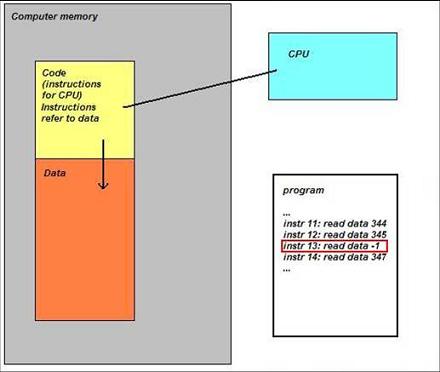
Sometimes a computer (CPU, Central Processing Unit) cannot perform its job because the instruction it gets to do some calculations, read or write data is wrong. Imagine a situation when you get an address to deliver a message to and you find that it doesn’t exist…  The following idealized picture shows this situation (if memory locations/addresses are indexed from 0 then -1 is obviously wrong address):

When referencing invalid address CPU executes special sequence of actions (called trap) that ultimately leads to saving memory so you could later examine its contents and find out which instruction was invalid. If crash happens inside Windows operating system then you see blue screen and then a kernel memory or full computer physical memory is saved in a file (called either kernel or complete memory dump respectively). If you have a crash in a running application or service then its memory contents are saved in a file (called user dump). The latter file is also called a postmortem dump and we call a program which saves it a postmortem debugger. There can be several such programs and the one which is specified in the registry to execute whenever a crash happens in a running application or service is called a default postmortem debugger. The following picture illustrates this (here spooler service, spoolsv.exe, crashed by faulty printer driver):

By default it is Dr. Watson (drwtsn32.exe) but sometimes it doesn’t work in terminal services environment and has limitations so we always recommend setting NTSD (ntsd.exe) as a default postmortem debugger:

How to Set NTSD as a Default Windows Postmortem Debugger

I prefer to call both user and kernel/complete memory dumps postmortem (not only user dumps) because they are saved after application, service or system is dead already (crash or fatal error already happened). This distinguishes them from live memory dumps saved manually whenever we want them. This brings us to dump classification that I show you in forthcoming parts. 

- Dmitry Vostokov @ DumpAnalysis.org -

The Smallest Program

October 25th, 2006

Can the smallest program that crashes be smaller than the smallest program that doesn’t? Depends on a platform and a compiler/linker set. I’ve chosen x64 and MASM64 for my experiments. The smallest working program I came up first was this:

; ml64 /Zi TheSmallestProgram64.asm /link
;   /entry:main /SUBSYSTEM:CONSOLE

_text SEGMENT
main PROC
ret
main ENDP
_text ENDS

END

It compiles and links to an executable with only one byte instruction in its main function:

0:000> u main
TheSmallestProgram64!main:
00000000`00401010 c3              ret
00000000`00401011 cc              int     3
00000000`00401012 cc              int     3
00000000`00401013 cc              int     3
00000000`00401014 cc              int     3
00000000`00401015 cc              int     3
00000000`00401016 cc              int     3
00000000`00401017 cc              int     3

Then I thought about removing ret instruction and supposed that if we compile and link and try to execute the program with 0 bytes we get straight to int 3 instruction and in my case (I have NTSD set as a default postmortem debugger) a dump will be saved. So I did that but I found that unfortunately compiler inserts ret instruction if the procedure body is empty. So I cheated them by putting nop instruction (which is also one byte) and got my dump!

; ml64 /Zi TheSmallestProgramWithBug64.asm /link
;    /entry:main /SUBSYSTEM:CONSOLE

_text SEGMENT
main PROC
nop
main ENDP
_text ENDS

END

Loading Dump File [new_2006-10-25_12-40-06-500_076C.dmp]
…

0:000> kL
TheSmallestProgramWithBug64!main+0×1
kernel32!BaseProcessStart+0×29

0:000> u main
TheSmallestProgramWithBug64!main:
00000000`00401010 90              nop
00000000`00401011 cc              int     3
00000000`00401012 cc              int     3
00000000`00401013 cc              int     3
00000000`00401014 cc              int     3
00000000`00401015 cc              int     3
00000000`00401016 cc              int     3
00000000`00401017 cc              int     3

So one answer to my question: The smallest working program and the smallest crashing program have the same size unless we use some binary editors :-)

Then I tried MS Visual C++ (this time 32-bit project) and came up with the following C or C++ program without any prolog and epilog code:

__declspec(naked) void Main ()
{
}

I changed entry point from standard main function to my own capitalized Main function and compiler/link options:

Compiler:

/Od /GL /D "WIN32" /D "NDEBUG" /D "_CONSOLE"
/D "_UNICODE" /D "UNICODE" /D "_AFXDLL"
/FD /MD /GS- /Fo"Release\"
/Fd"Releasevc80.pdb" /W3 /nologo /c
/Wp64 /Zi /TP /errorReport:prompt

Linker:

/OUT:"SmallestProgram.exe" /INCREMENTAL:NO
/NOLOGO /MANIFEST:NO /NODEFAULTLIB /DEBUG
/PDB:"SmallestProgram.pdb" /SUBSYSTEM:CONSOLE
/OPT:REF /OPT:ICF /LTCG /ENTRY:"Main"
/ERRORREPORT:PROMPT

The program crashes immediately because the body is empty:

Loading Dump File [new_2006-10-25_15-18-03-109_13B0.dmp]

0:000> u Main
SmallestProgram!Main:
00401000 cc              int     3
00401001 0000            add     byte ptr [eax],al
00401003 0000            add     byte ptr [eax],al
00401005 0000            add     byte ptr [eax],al
00401007 0000            add     byte ptr [eax],al
00401009 0000            add     byte ptr [eax],al
0040100b 0000            add     byte ptr [eax],al
0040100d 0000            add     byte ptr [eax],al

0:000> kL
ChildEBP RetAddr
002cfff0 00000000 SmallestProgram!Main

0:000> dds esp
002cffc4  7d4e992a kernel32!BaseProcessStart+0x28
002cffc8  00000000
002cffcc  00000000
002cffd0  7efdf000
002cffd4  80000003
002cffd8  002cffc8
002cffdc  002cfbbc
002cffe0  ffffffff
002cffe4  7d4d8998 kernel32!_except_handler3
002cffe8  7d4e9938 kernel32!`string'+0x28
002cffec  00000000
002cfff0  00000000
002cfff4  00000000
002cfff8  00401000 SmallestProgram!Main
002cfffc  00000000

So another answer to my question: The smallest crashing program can be less than the smallest working program and is actually 0 bytes :-)

- Dmitry Vostokov -

Reverse Engineering Citrix ThinWire

October 24th, 2006

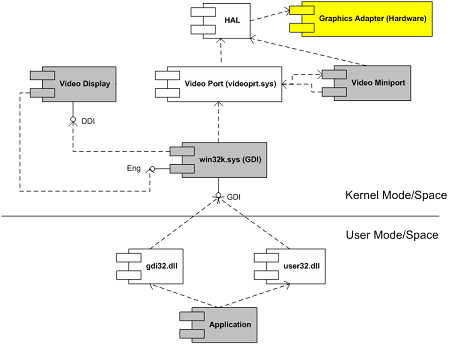
Crash dumps (and live debugging) can be very useful for reverse engineering component dependencies. Let’s look at MS Video Driver Architecture UML component diagram (synthesized after reading various articles from OSR and DDK):

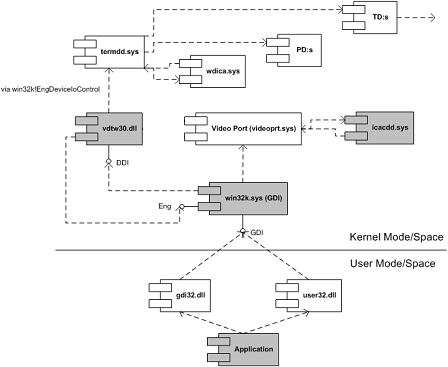
Coupled with this understanding and armed with Citrix symbol files (which are freely downloadable from Citrix support and you don’t really need them to see component dependencies) I was able to transform this thread stack below and other similar stacks into the following UML component diagram (some functions are shown as module!xxx and offsets are removed for clarity):

nt!KiSwapContext
nt!KiSwapThread
nt!KeWaitForSingleObject
tcpip!xxx
tcpip!TCPDispatch
nt!IofCallDriver
nt!xxx
nt!xxx
TDTCP!xxx
TDTCP!xxx
TDTCP!TdIoctl
termdd!_IcaCallSd
termdd!IcaCallNextDriver

pdrframe!xxx
pdrframe!PdIoctl

termdd!_IcaCallSd
termdd!IcaCallNextDriver

pdcrypt1!xxx
pdcrypt1!PdIoctl

termdd!_IcaCallSd
termdd!IcaCallNextDriver

WDICA!xxx
WDICA!xxx
WDICA!xxx
WDICA!xxx
WDICA!xxx
WDICA!xxx
WDICA!WdIoctl

termdd!IcaCallStack
termdd!IcaCallDriver
termdd!IcaDeviceControlChannel
termdd!IcaDeviceControl
termdd!IcaDispatch

win32k!GreDeviceIoControl
win32k!EngDeviceIoControl

vdtw30!xxx
vdtw30!xxx

win32k!vMovePointer
win32k!GreMovePointer
win32k!xxxMoveEventAbsolute
win32k!ProcessMouseInput
win32k!InputApc

nt!KiDeliverApc
nt!KiSwapThread
nt!KeWaitForMultipleObjects
win32k!xxxMsgWaitForMultipleObjects
win32k!xxxDesktopThread
win32k!xxxCreateSystemThreads
win32k!NtUserCallOneParam

nt!KiSystemServiceCopyEnd
nt!KiSwapThread
nt!KeWaitForSingleObject
win32k!EngWaitForSingleObject
vdtw30!xxx
vdtw30!xxx
vdtw30!xxx
vdtw30!DrvTw2SaveScreenBits

win32k!GreSaveScreenBits
win32k!CreateSpb
win32k!zzzChangeStates
win32k!zzzBltValidBits
win32k!xxxEndDeferWindowPosEx
win32k!xxxSetWindowPos
win32k!xxxShowWindow
win32k!NtUserShowWindow

nt!KiSystemService
USER32!NtUserShowWindow
USER32!InternalDialogBox
USER32!DialogBoxIndirectParamAorW
USER32!DialogBoxParamW

We replace MS components with Citrix ones:

  • Video Display with vdtw30.dll
  • Video Miniport with icacdd.sys
  • Hardware and HAL with Terminal Services stack components (MS termdd.sys, Citrix wdica.sys, etc)

twarchitecture.JPG

- Dmitry Vostokov -

Summary of Troubleshooting Tools

October 23rd, 2006

I’ve just found this very good article on Citrix support web site and I see it was recently updated reflecting new tools written at Citrix or discovered since its previous publication a year ago:

Troubleshooting Tools for Citrix Environments

- Dmitry Vostokov -
NTSD on x64 Windows

October 23rd, 2006

If you need to attach NTSD to a process on x64 Windows and to save a dump remember that there are two versions of NTSD: x86 (32-bit) and x64. The former is located in \Windows\SysWOW64 and should be used for attaching to 32-bit applications and services. IMA service, for example, is 32-bit in Citrix Presentation Server for x64, so if it hangs you need 32-bit debugger. For explanation why you need different versions of NTSD please refer to the first picture in my previous post: Dumps, Debuggers and Virtualization 

If you use WinDbg for that purpose install both 32-bit and 64-bit versions.

If you want to install NTSD or WinDbg as a default postmortem debugger use Wow6432Node registry hive:

HKEY_LOCAL_MACHINE\SOFTWARE\Wow6432Node\Microsoft\Windows NT\CurrentVersion\AeDebug

Debugger = ntsd -p %ld -e %ld -g -c ".dump /ma /u c:\TEMP\new.dmp; q"

Refer to the following Citrix support articles explaining and describing in more detail how to set NTSD and WinDbg as default postmortem debuggers:

How to Set NTSD as a Default Windows Postmortem Debugger

How to Set WinDbg as a Default Windows Postmortem Debugger

They will be updated soon to include WOW64 information.

- Dmitry Vostokov -
Easter Egg

October 22nd, 2006

As I promised in the announced Troubleshooting Tool Ideas post you can download from my personal website for free the Demo Tool with an Easter Egg inside:

Demo Tool

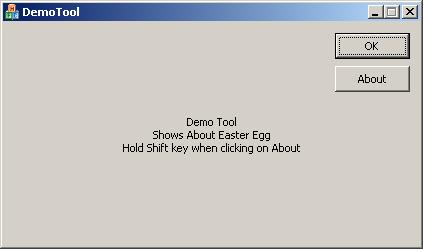
If you run it you will see the tool window:

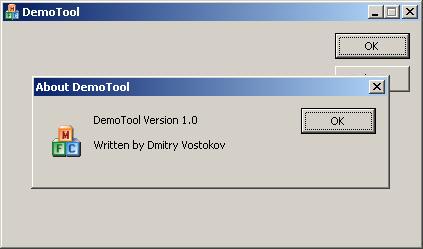
If you click on “About” button the normal “About DemoTool” dialog box appears:

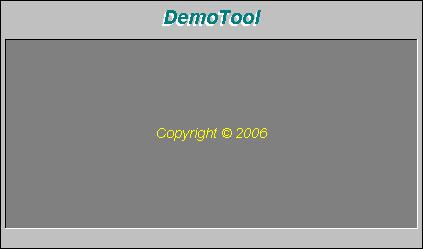
However if you hold “Shift” key when clicking on “About” button an Easter Egg appears: the main tool window transforms into graphical surface where all contributors and developers are shown and scrolled up and the tool name is animated. There is also “Special Thanks” section in the list.

All future and updated tools will include this Easter Egg feature.

Some history: the source code for this Easter Egg was written in 1992 for Windows 3.1 and in 1995 I ported it to Windows 95. It still works on Windows 2000/XP/2003 without any modifications. In 2006 I ported it to Windows Mobile.

- Dmitry Vostokov -
Dump Monitor Suite

October 22nd, 2006

Following the announced Troubleshooting Tool Ideas database Ramzy Mansour from Citrix Technical Support came up with a brilliant idea about Dump Monitor Suite and its two useful components for Citrix administrators:

DumpStats:

- Monitors and displays a graphical chart showing which services and processes crashed or hanged on an individual Citrix server, their crash time and date, dump location, dump type, crash signature, modules where crashes happened, etc.

- Aggregates and displays statistics for the whole Citrix farm

DumpAlerts:

- Sends an e-mail alert and/or an SMS message to a cell phone when any crash or hang happens

- Configures alerts based on severity and specific processes

Additionally Dump Monitor Suite will include the following components (some of them already exist and will be enhanced):

DumpChecks

- Enhanced and improved version of Citrix DumpCheck Explorer extension and its command line version

DumpProperties:

- New Explorer extension (Properties dialog) which shows various data extracted from a dump, like process name, module list, whether heap checking was enabled, module name where crash happened, etc.

DumpDepends:

- Integrated and enhanced version of SystemDump which allows to dump dependent processes

We are currently finalizing functional specs and architecture. More information about this Suite will be posted soon.

- Dmitry Vostokov -
Dump Tomography

October 22nd, 2006

There is an idea to interpret a process or a system dump as a picture (similar to interpreting it as a giant wave file: Dump2Wave). I would like to extend this idea and present it as a Dump Tomography - a combination of images taken from a dump when looking at it from different perspectives - memory, resources, subsystem hierarchy, etc. I’m going to include some simple pictorial interpretations and representations in forthcoming DumpPlayer.

Dump Analysis becomes both Medicine and Art. You can finally hear how corruption sounds and how it looks :-)

- Dmitry Vostokov -

Musical Dumps: Dump2Wave

October 22nd, 2006

Dump2Wave command line tool is available for free download:

Download Dump2Wave

Simply run it from the command prompt and specify full paths to dump file and output WAV file. Dump file will be converted by default into 44.1KHz 16bit stereo WAV file (CD quality). You can specify you own conversion parameters like samples per second (22050, 11025, etc), bits per sample (8 or 16) and the number of channels (1 - mono, 2 - stereo):

For example, I converted sndrec32.dmp to sndrec32.wav:

The dump was taken after sndrec32.exe played “Windows XP Logon Sound.wav” file from \Windows\Media folder and that wave file was originally sampled as 22050Hz 16bits stereo. By listening to sndrec32.dmp I was able to hear a fragment from that logon sound because it was stored in a buffer inside sndrec32.exe process.

Note: Dump2Wave will not convert a dump file which is greater than 4Gb. Forthcoming DumpPlayer will be able to play large complete memory dumps in real-time without conversion and you could graphically choose a region to play.

Just a reminder on how you can save a dump manually (unless you have a dump from application crash or BSOD):

Dumping Processes Without Breaking Them

Microsoft User Mode Process Dumper

How to Attach NTSD to a Process and Save a Dump

How to Attach WinDbg to a Process

- Dmitry Vostokov -

Debugging the Debugger

October 20th, 2006

Have you ever tried to debug a debugger when it debugs a debuggee? Is it possible? Good question. I never asked it to myself until today. And tried. And it works! First I tried to attach WinDbg.exe to an instance of WinDbg.exe executing ‘!analyze -v’ command and got these stacks:

0:002> ~*kL 100
0 Id: 1ff0.104c Suspend: 1 Teb: 7ffdf000 Unfrozen
ChildEBP RetAddr
0006df38 7739d02f ntdll!KiFastSystemCallRet
0006ff7c 01055e36 USER32!NtUserWaitMessage+0xc
0006ffc0 77e523e5 windbg!_initterm_e+0x170
0006fff0 00000000 kernel32!BaseProcessStart+0x23

1 Id: 1ff0.1af8 Suspend: 1 Teb: 7ffde000 Unfrozen
ChildEBP RetAddr
00ac3448 030a5677 dbghelp!CAllPubNameTrav::next+0x1b
00ac345c 0301e16e
dbghelp!CDiaEnumTraversalCSymRow::Next+0x48
00ac44fc 0301e452 dbghelp!diaGetGlobals+0x8fe
00ac4524 0304967a dbghelp!diaGetSymbols+0x42
00ac453c 03045ca3 dbghelp!diaEnumSymbols+0x1a
00ac4554 03031e5a dbghelp!modEnumSymbols+0x43
00ac459c 030338a5 dbghelp!ModLoop+0x10a
00ac6570 030391d8 dbghelp!EnumSymbols+0x155
00ac65a0 0220947b dbghelp!SymEnumSymbolsW+0x48
00ac7600 0220a53d dbgeng!FindTypeInfoInMod+0x18b
00aca5cc 0220caa2 dbgeng!TypeInfoFound+0xced
00acb62c 0220c95f dbgeng!SymbolTypeDumpNew+0xa2
00acb654 0220d36b dbgeng!FastSymbolTypeDump+0xef
00acb700 0213c753 dbgeng!SymbolTypeDump+0xbb
00acc25c 0147d632 dbgeng!ExtIoctl+0x1073
00acc2f4 0150e10e ext!GetFieldData+0xe2
00accc14 014f9f00 ext!UaThread::_Extract_UIThread+0x34e
00accc24 014fa1f9 ext!UaThread::CallExtractors+0x20
00accc34 01511126 ext!UaThread::ExtractAttributes+0x99
00accd78 015212e2
ext!UserAnalyze::ExtractAttributes+0x376
00acd02c 01521467 ext!UeFillAnalysis+0x462
00acd10c 01521650 ext!UeAnalyze+0x147
00acd208 0147c90c ext!AnalyzeUserException+0x1a0
00acd23c 02141299 ext!analyze+0x28c
00acd2c8 021414d9 dbgeng!ExtensionInfo::CallA+0x2e9
00acd458 021415a2 dbgeng!ExtensionInfo::Call+0x129
00acd474 0213feb1 dbgeng!ExtensionInfo::CallAny+0x72
00acd8ec 02181698 dbgeng!ParseBangCmd+0x661
00acd9dc 02182b29 dbgeng!ProcessCommands+0x508
00acda20 020c9049 dbgeng!ProcessCommandsAndCatch+0x49
00acdeb8 020c92aa dbgeng!Execute+0x2b9
00acdee8 010283bf dbgeng!DebugClient::ExecuteWide+0x6a
00acdf88 0102883b windbg!ProcessCommand+0xff
00acffa4 0102aabc windbg!ProcessEngineCommands+0x8b
00acffb8 77e6608b windbg!EngineLoop+0x3dc
00acffec 00000000 kernel32!BaseThreadStart+0x34

# 2 Id: 1ff0.116c Suspend: 1 Teb: 7ffdd000 Unfrozen
ChildEBP RetAddr
00fdffc8 7c845ea0 ntdll!DbgBreakPoint
00fdfff4 00000000 ntdll!DbgUiRemoteBreakin+0x36

Next I thought, wait a moment, we are debugging dump analysis session. Can we debug a debugger debugging a running process? So I attached WinDbg.exe to an instance of WinDbg.exe attached to an instance of notepad.exe and got these stacks:

0:002> ~*kL
0 Id: 11f0.164c Suspend: 1 Teb: 7ffde000 Unfrozen
ChildEBP RetAddr
0006df38 7739d02f ntdll!KiFastSystemCallRet
0006ff7c 01055e36 USER32!NtUserWaitMessage+0xc
0006ffc0 77e523e5 windbg!_initterm_e+0x170
0006fff0 00000000 kernel32!BaseProcessStart+0x23

1 Id: 11f0.1bb0 Suspend: 1 Teb: 7ffdd000 Unfrozen
ChildEBP RetAddr
00adff0c 7c822124 ntdll!KiFastSystemCallRet
00adff10 77e6bad8 ntdll!NtWaitForSingleObject+0xc
00adff80 020bf8aa kernel32!WaitForSingleObjectEx+0xac
00adffa0 0102aa42
dbgeng!DebugClient::DispatchCallbacks+0x4a
00adffb8 77e6608b windbg!EngineLoop+0x362
00adffec 00000000 kernel32!BaseThreadStart+0x34

# 2 Id: 11f0.100c Suspend: 1 Teb: 7ffdc000 Unfrozen
ChildEBP RetAddr
00beffc8 7c845ea0 ntdll!DbgBreakPoint
00befff4 00000000 ntdll!DbgUiRemoteBreakin+0x36

Given that many functions from dbghelp.dll and dbgeng.dll are described in WinDbg help you can quickly reverse engineer WinDbg.exe and its extensions code.

- Dmitry Vostokov -

Citrix Access Thing (back to the future)

October 18th, 2006

I’m writing a presentation about the history of Voice Recognition on Windows platforms and found the following wikipedia article Covox Speech Thing about pioneering work of Covox Inc. where I was a remote employee in Moscow, Russia in 1992-1993 designing and implementing components for their VoiceBlaster speech recognition application (as far as I remember subject to the past war with Creative Labs and their SoundBlaster trademark)

Looking back almost 15 years ago I envisage that 15 years in the future someone might write an article called “Citrix Access Thing” featuring schematics of Citrix hardware and software appliances. Hope this will not happen.

- Dmitry Vostokov -

Musical Dumps

October 18th, 2006

After listening to “An Anthology of Noise and Electronic Music”

Buy from Amazon

Buy from Amazon

Buy from Amazon

Buy from Amazon

and remembering that long time ago I was asked to convert stock charts into sound waves an idea came to me to convert memory dump files into WAV files by appending an appropriate header in front of them. So depending on imposed sampling frequency (Hz), quantization level (bits) and mono/stereo settings you can enjoy listening to dumps. Long time ago I wrote a component for hard-disk recording while working on my voice recognition projects and I’m going to reuse it now.

Forthcoming DumpPlayer will be released this weekend for free download so stay tuned. 

If it goes well I promise to write a WinDbg extension to listen to a given memory range.

- Dmitry Vostokov -

Dumps, Debuggers and Virtualization (…)

October 17th, 2006

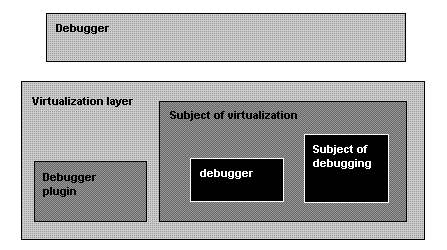
I’ve been thinking about this since my previous DDV post and came up with the following example of general DDV architecture:

So we need:

  • A “Debugger” to debug “Virtualization layer”
  • A “Debugger plugin” to help the “Debugger” to understand the “Subject of virtualization”
  • Not to mention various virtualized “debuggers” debugging their virtualized subjects

- Dmitry Vostokov -

Dumps, Debuggers and Virtualization

October 16th, 2006

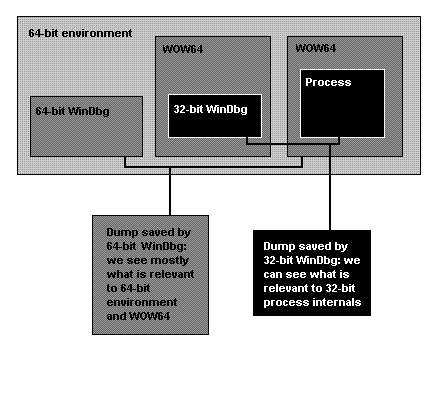
Everyone now speaks about virtualization and its benefit. New horizons. I would like to add my 2 cents from dump analysis and debugging perspective. There will be more complex debugging environment as my recent experience with WOW64 tells me:

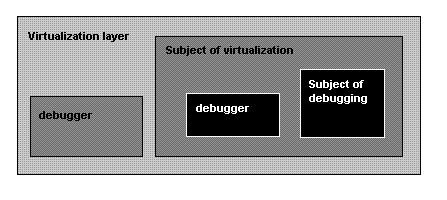
So if we generalize this to virtualization environment we would come up with the following picture:

- Dmitry Vostokov -

Forthcoming new tool: ProcessHistory

October 15th, 2006

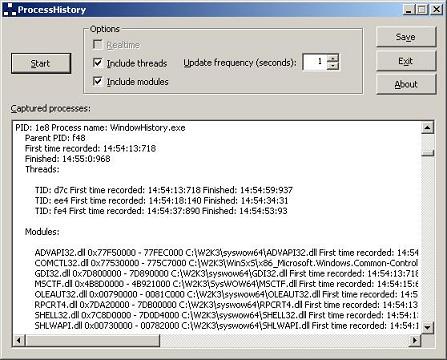
New addition to “History” toolbox: ProcessHistory. It has similar GUI interface as WindowHistory and MessageHistory:

ProcessHistory tracks process creation and exit, thread creation and termination and also modules (DLL, OCX, etc.) and their loading and unloading.

The tool has 2 executables: ProcessHistory.exe for 32-bit platforms and ProcessHistory64.exe for 64-bit platforms. In fact, you need both for your 64-bit platform if you want to track modules: if your application is 32-bit ProcessHistory.exe will correctly show loaded and unloaded 32-bit modules whereas ProcessHistory64.exe will only show WOW64 components.

I’m already working on the next version 2.x which can record changes in real-time and I’m also porting the current version to Windows CE and Windows Mobile.

- Dmitry Vostokov -

Troubleshooting tool ideas

October 14th, 2006

If you have any troubleshooting or debugging tool idea you can post a comment here, write to me (if you know my Citrix e-mail) or simply drop a message to my personal address.

Full credit and thank you note will be given in About dialog box if I implement the idea. I already developed a nice component for that purpose. Demo will be posted soon.

I write most of my tools using C++/STL/MFC/Win32 API and occasionally plain C (for device drivers). Most of them are released in both 32-bit and 64-bit versions and occasionally ported to Windows Mobile. Written tools don’t carry .NET baggage with them although I plan to utilize managed C++ in future MFC-based tools if certain .NET functionality is required.

Thank you!

- Dmitry Vostokov -