Trace Analysis Patterns (Part 129)

August 13th, 2016

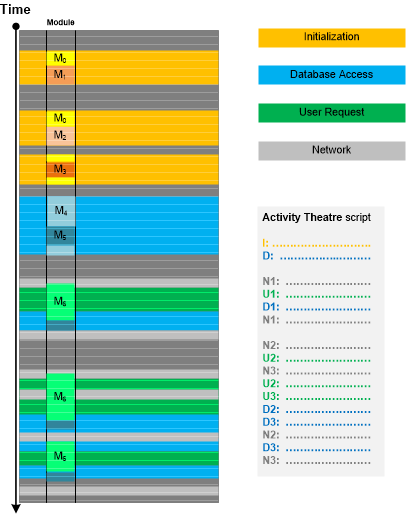
In addition to Message Patterns there are higher level patterns of specific activities and Motives. Such activities may or may not coincide with specific components (modules) because they may be grouped based on implementation messages, software internals semantics and not on architectural and design entities (as in Use Case Trail analysis pattern). Moreover, he same components may “play” different activity roles. Once assigned, Activity Theatre “scripts” can be compared with “scripts” from other traces and logs (Inter-Correlation) or different parts of the same log (Intra-Correlation). This pattern is illustrated in the following diagram:

- Dmitry Vostokov @ DumpAnalysis.org + TraceAnalysis.org -

Trace Analysis Patterns (Part 128)

August 9th, 2016

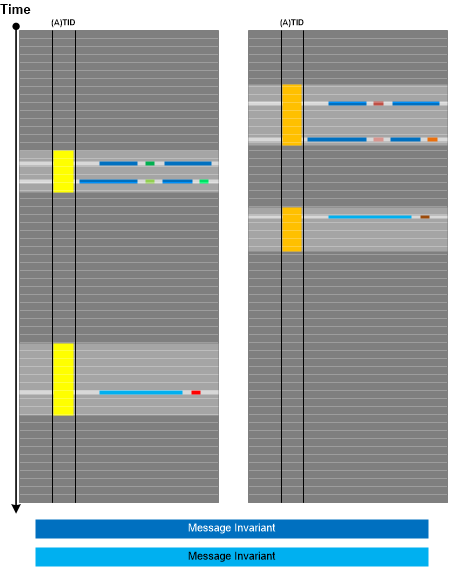
Now we come to the trace and log analysis pattern that we call Message Pattern. It is an ordered set of messages from Thread of Activity or Adjoint Thread of Activity having Message Invariants that can be used for matching another ordered set of messages in another (Inter-Correlation) or the same trace or log (Intra-Correlation). A typical Message Pattern from one of our own trace and log analysis sessions is depicted in the following diagram:

- Dmitry Vostokov @ DumpAnalysis.org + TraceAnalysis.org -

Structural Memory Patterns (Part 8)

August 8th, 2016

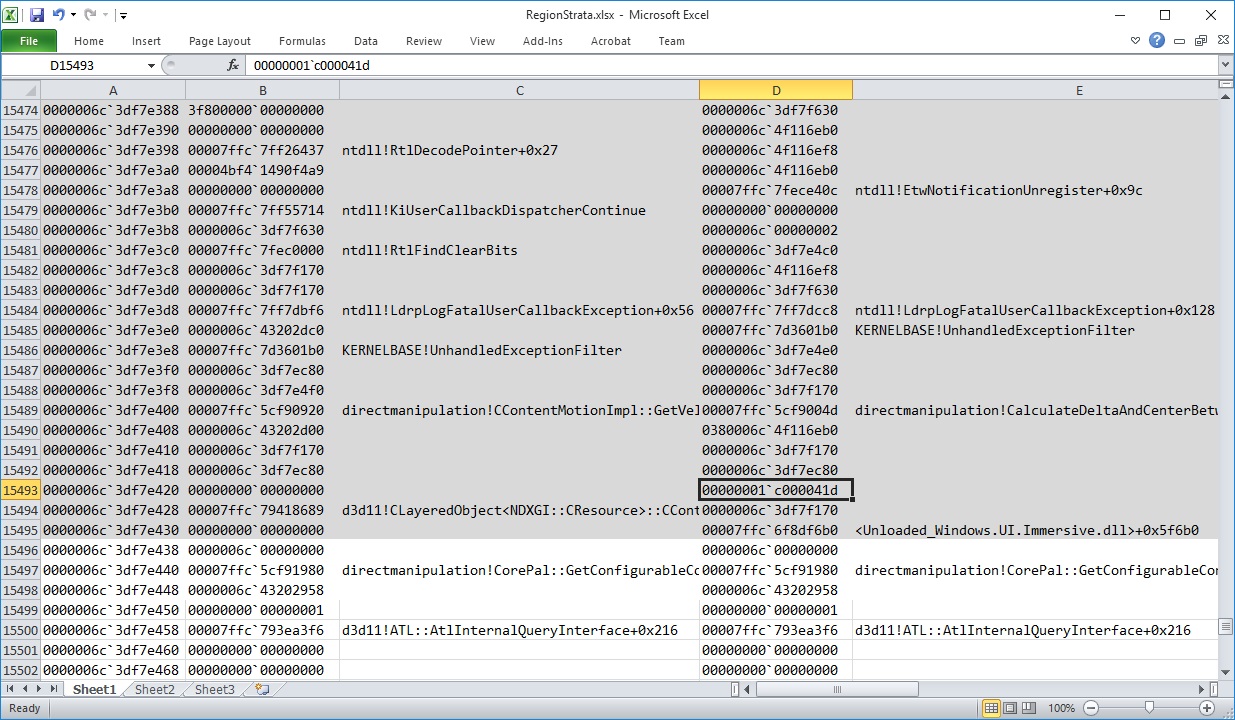
After almost a 6-year break we resume extending the catalog of structural memory patterns as a foundation of pattern-oriented memory forensics, root cause analysis, and software internals. The next pattern we add is borrowed from archaeology and is called Region Strata. When we have several memory snapshots we can analyze Memory Regions for their changes at different times:

For example, we got two memory dumps of the same process saved by WER with approx. one minute difference. We saved the raw stack region of the current thread using .writemem WinDbg command in text files (Strata1.txt and Strata2.txt) and then combined them into one Excel table (Strata.xlsx). In that table we can see memory region changes as shown in this picture (click to expand):

- Dmitry Vostokov @ DumpAnalysis.org + TraceAnalysis.org -

Trace Analysis Patterns (Part 127)

July 13th, 2016

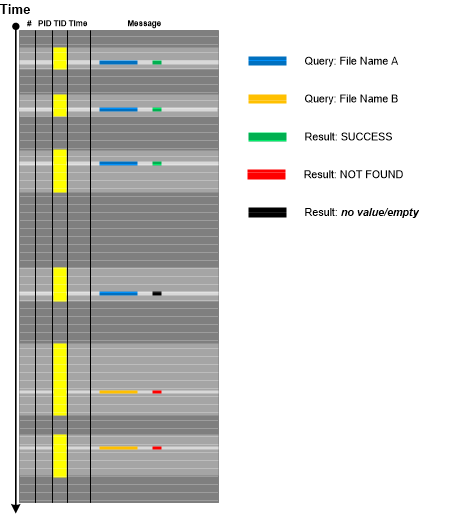
Some tracing architectures, especially the ones that intercept API calls by filtering or hooking, may log synchronous requests by remembering to write done return result in the same trace message later on when the response is available after the wait. If such data is still not available in the log or trace it may point to some blocked request for which other software execution artifact analysis (such as memory dump analysis) is necessary. In some cases, the analysis of the corresponding Fiber Bundle stack trace may point to Blocking Module or the involvement of file system filters. This analysis pattern that we call Missing Data is illustrated in the following diagram:

- Dmitry Vostokov @ DumpAnalysis.org + TraceAnalysis.org -

Trace Analysis Patterns (Part 126)

June 29th, 2016

When using complex trace and log analysis patterns such as Fourier Activity we may be first interested in selecting all instances of a particular message type from specific Thread of Activity and then look for Time Deltas, Discontinuities, Data Flow, and other patterns. We call this analysis pattern Fiber of Activity by analogy of fibers (lightweight threads) since the individual thread execution flow is “co-operative” inside, whereas threads themselves are preempted outside. The following diagram from Fourier Analysis example illustrates the concept by showing three fibers:

This analysis pattern is different from trace-wide Sheaf of Activities where the latter is about selecting messages as Adjoint Threads of Activity which may span several processes and threads.

- Dmitry Vostokov @ DumpAnalysis.org + TraceAnalysis.org -

Trace Analysis Patterns (Part 125)

June 27th, 2016

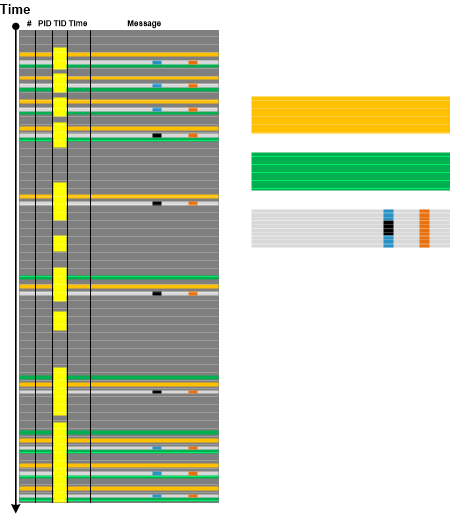
Sometimes we have trace and log messages that appear with certain time frequency throughout all log or specific Thread of Activity. Such frequencies may fluctuate reflecting varying system or process performance. Analyzing trace areas where such messages have different Time Deltas may point to additional diagnostic log messages useful for root cause analysis. The following minimal trace graph depicts the recent log analysis for proprietary file copy operation where the frequency of internal communication channel entry/exit Opposition Messages was decreasing from time to time. Such periods were correlating with increased time intervals between “entry” and “exit” messages. Analysis of messages between them revealed additional diagnostic statements missing in periods of higher frequency and corresponding Timeouts adding up to overall performance degradation and slowness of copy operation.

Additional analysis of Data Association in a different message type between available communication buffers and the total number of such buffers revealed significant frequency drop during constant Data Flow of zero available communication buffers:

We call this analysis pattern Fourier Activity by analogy with Fourier series in mathematics. This pattern is for individual message types and can also be considered a fine-grained example of Statement Current and Trace Acceleration analysis patterns which can be used to detect areas of different frequencies in individual Fibers (Adjoint Threads of Activities formed from the same Thread of Activity).

- Dmitry Vostokov @ DumpAnalysis.org + TraceAnalysis.org -

Crash Dump Analysis Patterns (Part 58b)

June 5th, 2016

Windows imposes a restriction for the number of GDI handles per process and by default it is approx. 10,000. If this number is reached we can have abnormal software behaviour symptoms such as hangs, glitches in visual appearance, and out-of-memory exceptions resulted in error messages and crashes. We already documented this analysis pattern for kernel and complete memory dumps that we called Handle Limit (GDI). However, one of Software Diagnostics Services’ training customers reported an out-of-memory exception with trace analysis diagnostics pointing to 10,000 leaked GDI objects. The process memory dump was saved and the customer asked whether it was possible to analyze it or similar memory dumps to find out from the dump itself whether we have GDI leak and what GDI objects were involved.

We recreated one of the applications from the kernel pattern variant (the one that leaks fonts) with one modification that it just stops after 10,000 font creation attempts. After launch we tried to open About dialog box but the whole application became unresponsive and no dialog box was visible. We save the process memory dump ad found out that its Main Thread was inside Dialog Box processing:

0:000> kc
# Call Site
00 user32!NtUserWaitMessage
01 user32!DialogBox2
02 user32!InternalDialogBox
03 user32!DialogBoxIndirectParamAorW
04 user32!DialogBoxParamW

05 GUIHandleLeak!WndProc
06 user32!UserCallWinProcCheckWow
07 user32!DispatchMessageWorker
08 GUIHandleLeak!wWinMain
09 GUIHandleLeak!invoke_main
0a GUIHandleLeak!__scrt_common_main_seh
0b kernel32!BaseThreadInitThunk
0c ntdll!RtlUserThreadStart

In order to look at GDI handle table we studied the relevant chapters in Feng Yuan’s book “Windows Graphics Programming” and this post which has all necessary structure definitions: http://stackoverflow.com/questions/13905661/how-to-get-list-of-gdi-handles

We get the current process GDI table address from the disassembly:

0:000> .asm no_code_bytes
Assembly options: no_code_bytes

0:000> uf gdi32!GdiQueryTable
gdi32!GdiQueryTable:
00007ffc`7f172610 sub     rsp,38h
00007ffc`7f172614 or      qword ptr [rsp+20h],0FFFFFFFFFFFFFFFFh
00007ffc`7f17261a lea     rdx,[rsp+20h]
00007ffc`7f17261f mov     ecx,0Eh
00007ffc`7f172624 mov     byte ptr [rsp+28h],0
00007ffc`7f172629 call    qword ptr [gdi32!_imp_NtVdmControl (00007ffc`7f1ba5a8)]
00007ffc`7f17262f test    eax,eax
00007ffc`7f172631 js      gdi32!GdiQueryTable+0x33 (00007ffc`7f172643)  Branch

gdi32!GdiQueryTable+0x23:
00007ffc`7f172633 cmp     byte ptr [rsp+28h],0
00007ffc`7f172638 je      gdi32!GdiQueryTable+0x33 (00007ffc`7f172643)  Branch

gdi32!GdiQueryTable+0x2a:
00007ffc`7f17263a mov     rax,qword ptr [gdi32!pGdiSharedHandleTable (00007ffc`7f2541b8)]
00007ffc`7f172641 jmp     gdi32!GdiQueryTable+0×35 (00007ffc`7f172645)  Branch

gdi32!GdiQueryTable+0x33:
00007ffc`7f172643 xor     eax,eax

gdi32!GdiQueryTable+0x35:
00007ffc`7f172645 add     rsp,38h
00007ffc`7f172649 ret

0:000> dp 00007ffc`7f2541b8 L1
00007ffc`7f2541b8  000000db`56a50000

We dump the first 0×1000 qword values:

0:000> dq 000000db`56a50000 L1000
000000db`56a50000  00000000`00000000 40000000`00000000
000000db`56a50010  00000000`00000000 00000000`00000000
000000db`56a50020  40000000`00000000 00000000`00000000
000000db`56a50030  00000000`00000000 00000000`00000000
000000db`56a50040  00000000`00000000 00000000`00000000
000000db`56a50050  00000000`00000000 00000000`00000000
000000db`56a50060  00000000`00000000 00000000`00000000
000000db`56a50070  00000000`00000000 00000000`00000000
000000db`56a50080  00000000`00000000 00000000`00000000
000000db`56a50090  00000000`00000000 00000000`00000000
000000db`56a500a0  00000000`00000000 00000000`00000000
000000db`56a500b0  00000000`00000000 00000000`00000000
000000db`56a500c0  00000000`00000000 00000000`00000000
000000db`56a500d0  00000000`00000000 00000000`00000000
000000db`56a500e0  00000000`00000000 00000000`00000000
000000db`56a500f0  fffff901`40000e60 40040104`00000000
000000db`56a50100  00000000`00000000 fffff901`40000d60
000000db`56a50110  40080188`00000000 00000000`00000000
000000db`56a50120  fffff901`400008b0 40080108`00000000
000000db`56a50130  00000000`00000000 fffff901`400007c0
000000db`56a50140  40080108`00000000 00000000`00000000
000000db`56a50150  fffff901`400006d0 40080108`00000000
[…]
000000db`56a57ce0 fffff901`429d24f0 400aee0a`00002c30
000000db`56a57cf0 000000db`564f3b20 fffff901`42910570
000000db`56a57d00 400a360a`00002c30 000000db`564e57b0
000000db`56a57d10 fffff901`40700420 40105310`000002b4
000000db`56a57d20 00000089`39410fc0 fffff901`407ec4a0
000000db`56a57d30 400a010a`000002b4 00000089`3900ae70
000000db`56a57d40 fffff901`407036d0 400a010a`000002b4
000000db`56a57d50 00000089`3900ae60 fffff901`440b56e0
000000db`56a57d60 400a030a`00002c30 000000db`564f0e90
000000db`56a57d70 fffff901`43e7fd50 40040104`00000000
000000db`56a57d80 00000000`00000000 fffff901`42c0f010
000000db`56a57d90 400a4b0a`00003190 0000003a`1a30b670
000000db`56a57da0 fffff901`440deaf0 400a6d0a`00002c30
000000db`56a57db0 000000db`564f3b00 fffff901`407f2010
000000db`56a57dc0 40100510`00001704 000000d8`d6230f60
000000db`56a57dd0 fffff901`40714180 40100210`00001704
000000db`56a57de0 000000d8`d6230f48 fffff901`4009d840
000000db`56a57df0 40100210`00001704 000000d8`d6230f78
000000db`56a57e00 fffff901`43e50950 40100230`00001704
000000db`56a57e10 00000000`00000000 fffff901`43e30010
000000db`56a57e20 40100230`00001704 00000000`00000000
000000db`56a57e30 fffff901`44f1d010 4005a105`0000168c
000000db`56a57e40 00000000`00000000 fffff901`440ded80
000000db`56a57e50 400a2e0a`00002c30 000000db`564f3b10
000000db`56a57e60 fffff901`4070b3b0 40050405`00000000
000000db`56a57e70 00000000`00000000 fffff901`42a0a010
000000db`56a57e80 400a870a`00002c30 000000db`564e7160
000000db`56a57e90 fffff901`407a7450 4008cd08`00000000
000000db`56a57ea0 00000000`00000000 fffff901`400c49c0
000000db`56a57eb0 40046904`000002b4 00000089`39410f90
000000db`56a57ec0 fffff901`41fb8010 4005c705`00000000
000000db`56a57ed0 00000000`00000000 fffff901`423dc790
000000db`56a57ee0 40086708`00000000 00000000`00000000
000000db`56a57ef0 fffff901`40699620 40010301`0000168c
000000db`56a57f00 00000000`01100000 fffff901`43e54510
000000db`56a57f10 40050305`0000168c 00000000`00000000
000000db`56a57f20 fffff901`407164c0 40100610`00001448
000000db`56a57f30 000000fe`4d8d0cf0 fffff901`407eee50
000000db`56a57f40 40100410`00001448 000000fe`4d8d0cd8
000000db`56a57f50 fffff901`43e2abb0 40080508`00000000
000000db`56a57f60 00000000`00000000 fffff901`40715010
000000db`56a57f70 40050305`0000168c 00000000`00000000
000000db`56a57f80 fffff901`42872b80 40084e08`00000000
000000db`56a57f90 00000000`00000000 fffff901`407175a0
000000db`56a57fa0 410f080f`00000000 00000000`00000000
000000db`56a57fb0 fffff901`407f4000 40050605`00000000
000000db`56a57fc0 00000000`00000000 fffff901`406d6bb0
000000db`56a57fd0 40080508`00000000 00000000`00000000
000000db`56a57fe0 fffff901`43e3a4c0 40120812`00000000
000000db`56a57ff0 00000000`00000000 fffff901`44fe1010

We see that typical cell value has 3 qwords (8-byte or 4-word sized values for both x64 and Virtualized Process). The non-zeroed data starts from 000000db`56a500f0 address. Clearly some entries have wProcessId equal to the PID from our dump:

0:000> ~
.  0  Id: 2c30.292c Suspend: 0 Teb: 00007ff7`1bf3e000 Unfrozen

Let’s look at one of such entries (the first and the last qword values are pointers):

0:000> dq 000000db`56a57da0 L3
000000db`56a57da0  fffff901`440deaf0 400a6d0a`00002c30
000000db`56a57db0  000000db`564f3b00

0:000> dw 000000db`56a57da0 L3*4
000000db`56a57da0  eaf0 440d f901 ffff 2c30 0000 6d0a 400a
000000db`56a57db0  3b00 564f 00db 0000

Applying 7f to wType word 400a gives us 0xa or 10 which is a font handle:

0:000> ? 400a & 7f
Evaluate expression: 10 = 00000000`0000000a

Since there are entries from other processes from the same session in this table assessing the handle leak visually is difficult so we wrote a WinDbg script that goes from the first non-zero pKernelAddress ($t0) to the first zero entry and for the given wProcessId ($tpid) counts the number of entries ($t1) and the number of entries ($t3) for the given wType ($t2). The script also counts the total entries till the first zero one ($t4):

.while (qwo(@$t0)) { .if (wo(@$t0+8) == @$tpid) {r $t1 = @$t1+1; .if (((qwo(@$t0+8) >> 0n48) & 7f) == @$t2) {r $t3 = @$t3+1} }; r $t0 = @$t0+3*8; r $t4 = @$t4+1}

To execute it we prepare the variables:

0:000> r $t0=000000db`56a500f0

0:000> r $t1=0

0:000> r $t2=a

0:000> r $t3=0

0:000> r $t4=0

0:000> .while (qwo(@$t0)) { .if (wo(@$t0+8) == @$tpid) {r $t1 = @$t1+1; .if (((qwo(@$t0+8) >> 0n48) & 7f) == @$t2) {r $t3 = @$t3+1} }; r $t0 = @$t0+3*8; r $t4 = @$t4+1}

After execution we get the modified variables that show us that the total consecutive non-zero handle table entries is 21464, the total number of entries for the current process is 9990, and the total number of fonts is 9982:

0:000> ? $t0
Evaluate expression: 942052007216 = 000000db`56acdd30

0:000> ? $t1
Evaluate expression: 9990 = 00000000`00002706

0:000> ? $t2
Evaluate expression: 10 = 00000000`0000000a

0:000> ? $t3
Evaluate expression: 9982 = 00000000`000026fe

0:000> ? $t4
Evaluate expression: 21464 = 00000000`000053d8

If we repeat the same script for device contexts (wType is 1) we get only 2 entries for our PID:

0:000> r $t0=000000db`56a500f0

0:000> r $t1=0

0:000> r $t2=1

0:000> r $t3=0

0:000> r $t4=0

0:000> .while (qwo(@$t0)) { .if (wo(@$t0+8) == @$tpid) {r $t1 = @$t1+1; .if (((qwo(@$t0+8) >> 0n48)  & 7f) == @$t2) {r $t3 = @$t3+1} }; r $t0 = @$t0+3*8; r $t4 = @$t4+1}

0:000> ? $t3
Evaluate expression: 2 = 00000000`00000002

Of course, this script may be further improved, for example, to process all possible wType values and print their statistics. It can also be made as a textual WinDbg script procedure with arguments.

We rename the original pattern variant to Handle Limit (GDI, kernel space) and name this pattern variant as Handle Limit (GDI, user space).

- Dmitry Vostokov @ DumpAnalysis.org + TraceAnalysis.org -
Crash Dump Analysis Patterns (Part 241)

May 29th, 2016

Most Execution Residue traces in memory dumps are not explicitly temporal (see Special and General Trace and Log Analysis) but may be ordered by some space coordinate, such as memory addresses or page frame numbers. Furthermore, virtual space can be further subdivided into places such as modules and physical space may be restructured into places such as processes. Simple space trace of some data value can be constructed using Value References analysis pattern. These and higher structural space trace constructs can be named as a general Place Trace analysis pattern illustrated in this diagram:

Memory attributes, such as page protection, or derived attributes from memory contents can also be considered as Place Trace data. Sometimes, time ordering can be reconstructed by looking at time information for place containers, for example, elapsed process time or ordering in the process list, or thread order and times for stack region thread owners.

- Dmitry Vostokov @ DumpAnalysis.org + TraceAnalysis.org -
Crash Dump Analysis Patterns (Part 240)

May 29th, 2016

Windows processes may contain Execution Residue such as ASCII window class names in mapped memory regions pointing to other running processes (perhaps as a result of Hooksware). For example, calc.exe process memory dump saved on my Windows 10 notebook “knows” about Visio and WinDbg windows that were opened at that time:

0:000> s-a 0 L?FFFFFFFFFFFFFFFF "VISIOA"
00000015`42c6bdd0 56 49 53 49 4f 41 00 00-00 00 00 00 00 00 00 00 VISIOA.............

0:000> s-a 0 L?FFFFFFFFFFFFFFFF "WinDbg"
00000015`42d19720 57 69 6e 44 62 67 46 72-61 6d 65 43 6c 61 73 73 WinDbgFrameClass

This may be useful for some troubleshooting scenarios, for example, pointing to processes which are known for their problematic behavior or Special Processes. Of course, we assume that those windows or classes were genuine, not faked. We call this analysis pattern Window Hint similar to Environment Hint and Module Hint analysis patterns.

Going deeper, we can dump strings from the whole region limiting the output to the strings with length more than 5:

0:000> !address 00000015`42d19720

Usage:                  <unknown>
Base Address:           00000015`42b20000
End Address:            00000015`42d3a000

Region Size:            00000000`0021a000 (   2.102 MB)
State:                  00001000          MEM_COMMIT
Protect:                00000002          PAGE_READONLY
Type:                   00040000          MEM_MAPPED
Allocation Base:        00000015`42b20000
Allocation Protect:     00000002          PAGE_READONLY

Content source: 1 (target), length: 208e0

0:000> s-[l5]sa 00000015`42b20000 00000015`42d3a000
00000015`42b20a60  “#32769″
00000015`42b20cc0  “Message”
00000015`42b20f40  “#32774″
00000015`42b21060  “#32772″
00000015`42b21510  “Ghost”
00000015`42b215e0  “LivePreview”
00000015`42b216f0  “UserAdapterWindowClass”
00000015`42b21ce0  “MSCTFIME Composition”
00000015`42b222a0  “#32772″
00000015`42b22390  “#32772″
00000015`42b22460  “RichEdit20W”
00000015`42b22530  “RichEdit20A”
00000015`42b22600  “ToolbarWindow32″
00000015`42b226e0  “tooltips_class32″
00000015`42b227c0  “msctls_statusbar32″
00000015`42b228a0  “SysListView32″
00000015`42b22980  “SysHeader32″
00000015`42b22a50  “SysTabControl32″
00000015`42b22b30  “SysTreeView32″
00000015`42b22c10  “msctls_trackbar32″
00000015`42b22cf0  “msctls_updown32″
00000015`42b22dd0  “msctls_progress32″
00000015`42b22eb0  “msctls_hotkey32″
00000015`42b22f8f  “‘SysAnimate32″
00000015`42b230f0  “SysIPAddress32″
00000015`42b231d0  “ReBarWindow32″
00000015`42b232b0  “ComboBoxEx32″
00000015`42b23390  “SysMonthCal32″
00000015`42b23470  “SysDateTimePick32″
00000015`42b23550  “DropDown”
00000015`42b23620  “SysLink”
00000015`42b236f0  “SysPager”
00000015`42b23960  “msctls_netaddress”

[...]

00000015`42d175e0  "OutlookFbThreadWnd"
00000015`42d19720  "WinDbgFrameClass"
00000015`42d19750  "DockClass"
00000015`42d19770  "GhostClass"
00000015`42d19a30  "ATL:00007FF60D792730"
00000015`42d1a0f0  "MSCTFIME Composition"
00000015`42d1a4af  "%OleMainThreadWndClass"
00000015`42d1be10  "CicMarshalWndClass"
00000015`42d1c0e0  "VSyncHelper-00000040EC4CA5F0-1f8"
00000015`42d1c100  "8855daf"
00000015`42d1c190  "URL Moniker Notification Window"
00000015`42d1c390  "UserAdapterWindowClass"
00000015`42d1d080  "@>zG#"
00000015`42d1dcaf  "!VSyncHelper-00000040D60C5850-1e"
00000015`42d1dccf  "ef0477df"
00000015`42d20d50  "VSyncHelper-00000040F39C5650-1f0"
00000015`42d20d70  "313c5a0"
00000015`42d250d0  "#32770"
00000015`42d250f0  "URL Moniker Notification Window"
00000015`42d29270  "VSyncHelper-00000079321C32E0-1f2"
00000015`42d29290  "fb11f8c"
00000015`42d2a1d0  "MSCTFIME Composition"
00000015`42d2a480  "CicMarshalWndClass"
00000015`42d2ac80  "MSCTFIME Composition"
00000015`42d2b8d0  "ShockwaveFlashFullScreen"
00000015`42d2bbb8  "P?U!\"
00000015`42d2c690  "Xaml_WindowedPopupClass"
00000015`42d30a10  "ShockwaveFlashFullScreen"
00000015`42d30b50  "MSCTFIME UI"
00000015`42d30b90  "WinBaseClass"
00000015`42d3441f  "!Alternate Owner"
00000015`42d34460  "ShockwaveFlashFullScreen"
00000015`42d344a0  "ATL:00007FF60D792530"
00000015`42d34a50  "SysAnimate32"
00000015`42d34a7f  "'ComboBoxEx32"
00000015`42d34ed0  "tooltips_class32"
00000015`42d34f00  "msctls_statusbar32"
00000015`42d35e70  "RawInputClass"
00000015`42d36a10  "SysTabControl32"
00000015`42d38650  "CicMarshalWndClass"
00000015`42d38eb0  "#32772"
00000015`42d3951f  "!VSyncHelper-000000C9DA06CD10-1f"
00000015`42d3953f  "110e8d16"

- Dmitry Vostokov @ DumpAnalysis.org + TraceAnalysis.org -

Crash Dump Analysis Patterns (Part 239)

May 2nd, 2016

We found out that in Windows 10 (at least on our working system) Notepad is no longer a single threaded application even without opening any common dialogs (like in Evental Dumps analysis pattern example). It has at least 3 additional threads (and other modeling applications we use for our training also have additional threads):

0:000> ~*k

0 Id: 3a64.3b38 Suspend: 1 Teb: 00007ff6`a914d000 Unfrozen
# Child-SP RetAddr Call Site
00 000000e5`6298f938 00007ffa`e57cf8e5 USER32!NtUserGetMessage+0xa
01 000000e5`6298f940 00007ff6`a9603470 USER32!GetMessageW+0x25
02 000000e5`6298f970 00007ff6`a96141f5 notepad!WinMain+0x178
03 000000e5`6298f9f0 00007ffa`e3b42d92 notepad!WinMainCRTStartup+0x1c5
04 000000e5`6298fab0 00007ffa`e5bc9f64 KERNEL32!BaseThreadInitThunk+0x22
05 000000e5`6298fae0 00000000`00000000 ntdll!RtlUserThreadStart+0x34

1 Id: 3a64.38b0 Suspend: 1 Teb: 00007ff6`a914b000 Unfrozen
# Child-SP RetAddr Call Site
00 000000e5`62bffa58 00007ffa`e5bf93a5 ntdll!NtWaitForWorkViaWorkerFactory+0xa
01 000000e5`62bffa60 00007ffa`e3b42d92 ntdll!TppWorkerThread+0x295
02 000000e5`62bffe60 00007ffa`e5bc9f64 KERNEL32!BaseThreadInitThunk+0x22
03 000000e5`62bffe90 00000000`00000000 ntdll!RtlUserThreadStart+0x34

2 Id: 3a64.3940 Suspend: 1 Teb: 00007ff6`a9149000 Unfrozen
# Child-SP RetAddr Call Site
00 000000e5`62c7f718 00007ffa`e5bf93a5 ntdll!NtWaitForWorkViaWorkerFactory+0xa
01 000000e5`62c7f720 00007ffa`e3b42d92 ntdll!TppWorkerThread+0x295
02 000000e5`62c7fb20 00007ffa`e5bc9f64 KERNEL32!BaseThreadInitThunk+0x22
03 000000e5`62c7fb50 00000000`00000000 ntdll!RtlUserThreadStart+0x34

3 Id: 3a64.1030 Suspend: 1 Teb: 00007ff6`a9147000 Unfrozen
# Child-SP RetAddr Call Site
00 000000e5`62d1f878 00007ffa`e5bf93a5 ntdll!NtWaitForWorkViaWorkerFactory+0xa
01 000000e5`62d1f880 00007ffa`e3b42d92 ntdll!TppWorkerThread+0x295
02 000000e5`62d1fc80 00007ffa`e5bc9f64 KERNEL32!BaseThreadInitThunk+0x22
03 000000e5`62d1fcb0 00000000`00000000 ntdll!RtlUserThreadStart+0x34

This gave us an idea for the analysis pattern we call Not My Thread since additional threads can be started by any other process DLLs, for example, by Hooksware. However, we need to distinguish between unexpectedly added threads, threads with Special Stack Traces and Special Threads, for example, from .NET support.

- Dmitry Vostokov @ DumpAnalysis.org + TraceAnalysis.org -
Trace Analysis Patterns (Part 124)

April 30th, 2016

Trace Extension is an obvious log analysis pattern that is about trace messages that refer to some other trace or log that may or may not exist. Sometimes, there can be instructions to enable additional tracing that is not possible to cover by the current trace source. We have seen this in some trace statements from .NET Exception Stack Traces.

- Dmitry Vostokov @ DumpAnalysis.org + TraceAnalysis.org -
Trace Analysis Patterns (Part 123)

April 27th, 2016

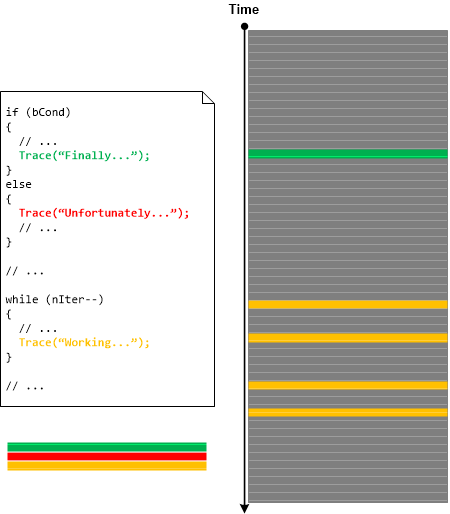
The trace statements in source code can be considered as Declarative Trace by analogy with variable declaration and definition in programming languages such as C and C++. Declaration of the variable doesn’t mean that the variable will be actually used. Some declared variables such as arrays will actually expand in memory when used (as in .bss sections). The same is with trace messages from Declarative Trace. Some of them will not appear in the actual software execution trace and some will be repeated because of loops and multiple code reentrance. However, Declarative Traces are useful for studying the possibilities of tracing and logging design, implementation, and coverage (for example, Sparse Trace). Some trace analysis patterns are also applicable for Declarative Traces such as Message Sets and Bifurcation Points (among different source code versions). This is illustrated in the following picture:

- Dmitry Vostokov @ DumpAnalysis.org + TraceAnalysis.org -
Crash Dump Analysis Patterns (Part 238)

March 17th, 2016

Sometimes developers introduce their own variants of synchronization code instead of using synchronization API provided by language runtime and OS. If we are lucky we can spot it in function and class method names and then use Constant Subtrace analysis pattern:

0: kd> kc
*** Stack trace for last set context - .thread/.cxr resets it
# Call Site
00 nt!KiSwapContext
01 nt!KiCommitThreadWait
02 nt!KeWaitForSingleObject
03 nt!NtWaitForSingleObject
04 nt!KiSystemServiceCopyEnd
05 ntdll!ZwWaitForSingleObject
06 KERNELBASE!WaitForSingleObjectEx
07 wbemcomn!CWbemCriticalSection::Enter
08 wbemcore!EnsureInitialized
09 wbemcore!InitAndWaitForClient
0a wbemcore!CWbemLevel1Login::ConnectorLogin
0b wbemcore!CWbemLevel1Login::NTLMLogin
0c RPCRT4!Invoke
0d RPCRT4!NdrStubCall2
0e ole32!CStdStubBuffer_Invoke
0f ole32!SyncStubInvoke
10 ole32!StubInvoke
11 ole32!CCtxComChnl::ContextInvoke
12 ole32!AppInvoke
13 ole32!ComInvokeWithLockAndIPID
14 ole32!ThreadInvoke
15 RPCRT4!DispatchToStubInCNoAvrf
16 RPCRT4!RPC_INTERFACE::DispatchToStubWorker
17 RPCRT4!RPC_INTERFACE::DispatchToStub
18 RPCRT4!RPC_INTERFACE::DispatchToStubWithObject
19 RPCRT4!LRPC_SCALL::DispatchRequest
1a RPCRT4!LRPC_SCALL::HandleRequest
1b RPCRT4!LRPC_SASSOCIATION::HandleRequest
1c RPCRT4!LRPC_ADDRESS::HandleRequest
1d RPCRT4!LRPC_ADDRESS::ProcessIO
1e RPCRT4!LrpcIoComplete
1f ntdll!TppAlpcpExecuteCallback
20 ntdll!TppWorkerThread
21 kernel32!BaseThreadInitThunk
22 ntdll!RtlUserThreadStart

0: kd> kc
*** Stack trace for last set context - .thread/.cxr resets it
# Call Site
00 repdrvfs!SCachePage::operator=
01 repdrvfs!std::vector<scachepage,wbem_allocator<scachepage> >::erase
02 repdrvfs!CPageCache::Read
03 repdrvfs!CPageFile::GetPage
04 repdrvfs!ValidateBTreeAgainstObjHeap
05 repdrvfs!PerformAllValidations
06 repdrvfs!VerifyRepositoryOnline
07 repdrvfs!VerifyRepository
08 repdrvfs!CPageSource::Startup
09 repdrvfs!CPageSource::Init
0a repdrvfs!CFileCache::InnerInitialize
0b repdrvfs!CFileCache::Initialize
0c repdrvfs!CRepository::Initialize
0d repdrvfs!CRepository::Logon
0e wbemcore!CRepository::Init
0f wbemcore!InitSubsystems
10 wbemcore!ConfigMgr::InitSystem
11 wbemcore!EnsureInitialized
12 wbemcore!InitAndWaitForClient
13 wbemcore!CWbemLevel1Login::ConnectorLogin
14 wbemcore!CWbemLevel1Login::NTLMLogin
15 RPCRT4!Invoke
16 RPCRT4!NdrStubCall2
17 ole32!CStdStubBuffer_Invoke
18 ole32!SyncStubInvoke
19 ole32!StubInvoke
1a ole32!CCtxComChnl::ContextInvoke
1b ole32!AppInvoke
1c ole32!ComInvokeWithLockAndIPID
1d ole32!ThreadInvoke
1e RPCRT4!DispatchToStubInCNoAvrf
1f RPCRT4!RPC_INTERFACE::DispatchToStubWorker
20 RPCRT4!RPC_INTERFACE::DispatchToStub
21 RPCRT4!RPC_INTERFACE::DispatchToStubWithObject
22 RPCRT4!LRPC_SCALL::DispatchRequest
23 RPCRT4!LRPC_SCALL::HandleRequest
24 RPCRT4!LRPC_SASSOCIATION::HandleRequest
25 RPCRT4!LRPC_ADDRESS::HandleRequest
26 RPCRT4!LRPC_ADDRESS::ProcessIO
27 RPCRT4!LrpcIoComplete
28 ntdll!TppAlpcpExecuteCallback
29 ntdll!TppWorkerThread
2a kernel32!BaseThreadInitThunk
2b ntdll!RtlUserThreadStart

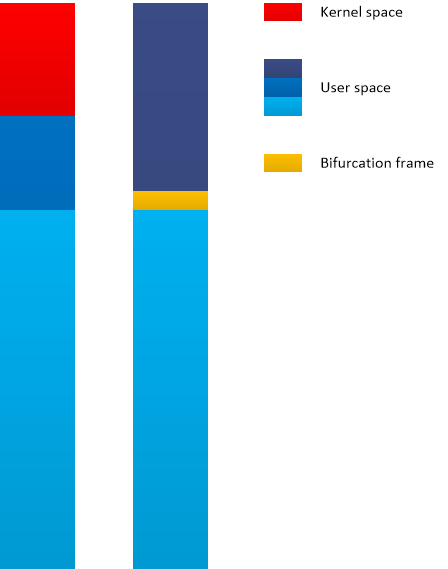
These two thread stack traces were spotted from a complete memory dump Stack Trace Collection as the part of a larger ALPC Wait Chain. We switched to these threads using .thread /r /p WinDbg command to get the stripped stack trace via kc command for better illustration. We see Constant Subtrace until wbemcore!EnsureInitialized function which serves as a bifurcation stack frame. The first stack trace has “CriticalSection::Enter” after the bifurcation stack frame compared to the second stack trace which looks like Spiking Thread in user space.

There is no hidden critical section associated with that process except the one which is probably related to the spiking Variable Subtrace since it doesn’t have any LockCount:

0: kd> !cs -l -o -s
DebugInfo = 0x0000000004a774d0
Critical section = 0x000000000308d690 (+0x308D690)
LOCKED
LockCount = 0×0
WaiterWoken = No
OwningThread = 0×0000000000000928
RecursionCount = 0×1
LockSemaphore = 0×0
SpinCount = 0×0000000000000000
OwningThread = .thread fffffa806ebd8060
ntdll!RtlpStackTraceDataBase is NULL. Probably the stack traces are not enabled

We can also disassemble wbemcomn!CWbemCriticalSection::Enter and find out that it calls WaitForSingleObject once and no other synchronization API indeed:

0: kd> uf wbemcomn!CWbemCriticalSection::Enter
[...]
wbemcomn!CWbemCriticalSection::Enter+0x41:
000007fe`f78ad1c0 mov rcx,qword ptr [rbx+10h]
000007fe`f78ad1c4 mov edx,r12d
000007fe`f78ad1c7 call qword ptr [wbemcomn!_imp_WaitForSingleObject (000007fe`f78ee4f0)]
000007fe`f78ad1cd cmp eax,esi
000007fe`f78ad1cf je wbemcomn!CWbemCriticalSection::Enter+0x52 (000007fe`f78a62a3) Branch

We add this nonstandard synchronization memory analysis pattern to Wait Chain analysis pattern category.

- Dmitry Vostokov @ DumpAnalysis.org + TraceAnalysis.org -
Crash Dump Analysis Patterns (Part 237)

March 17th, 2016

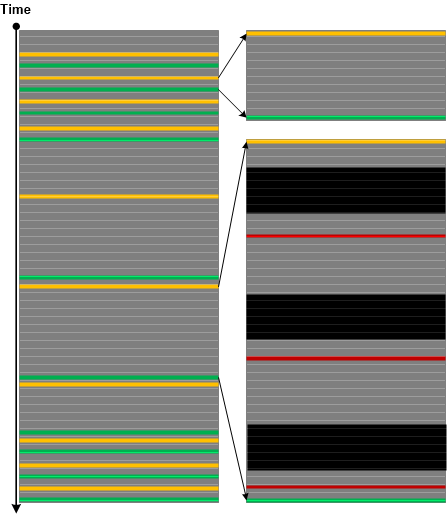
Variable Subtrace analysis pattern was introduced for inter-correlational analysis of CPU spikes across memory snapshots with just one thread involved. In contrast, we found Constant Subtrace pattern useful in Wait Chain analysis involving several threads in just one memory snapshot (intra-correlational analysis). Here a constant subtrace groups stack traces from Stack Trace Collection with a bifurcation stack trace frame (similar to Bifurcation Point trace analysis pattern) providing some wait chain relationship hint. Such subtraces traces may be initially found by the preceding wait chain analysis or by technology-specific subtraces such as ALPC/RPC server thread frames (as seen in an example stack from COM interface invocation). Here is a minimal stack trace diagram (similar to minimal trace graphs introduced in Accelerated Windows Software Trace Analysis training) illustrating the pattern (it also shows Spiking Thread pattern in user space as seen from a complete memory dump):

- Dmitry Vostokov @ DumpAnalysis.org + TraceAnalysis.org -
Trace Analysis Patterns (Part 122)

March 12th, 2016

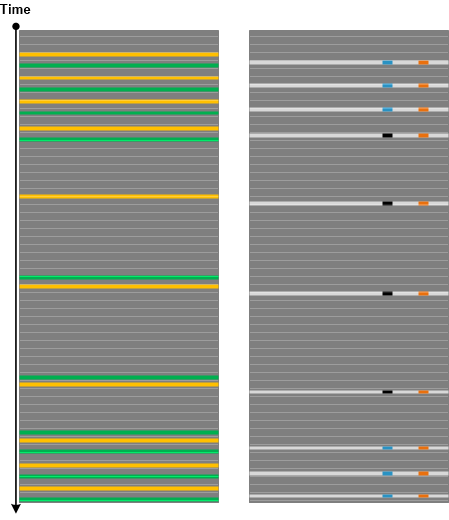
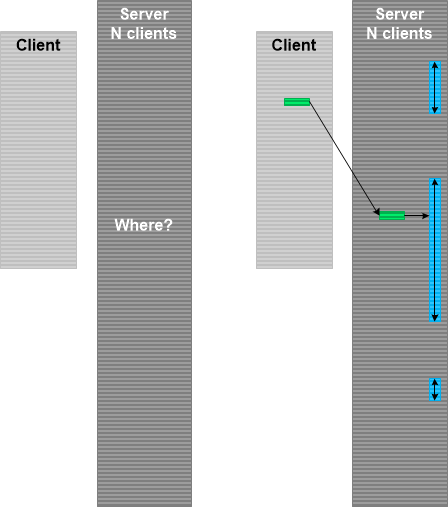
Data Selector is a variant of Inter-Correlation trace analysis pattern where we use data found in one trace to select Message Set or Adjoint Thread of Activity in another trace. This analysis activity is depicted in the following picture where we have a client log and corresponding server log. In the server log we have log entries for many client sessions. To select messages corresponding to our client session we use some data attribute in the client trace, for example, the user name, and Linked Messages analysis pattern to find one of the messages in the server log that contains the same user name. Then we find out which user session it belongs to and form its Adjoint Thread:

This pattern is different from Identification Messages where we don’t even know the object that emitted trace messages. In Data Selector case we know in principle what kind of messages we are looking for. We just need to select among many alternatives.

- Dmitry Vostokov @ DumpAnalysis.org + TraceAnalysis.org -
Crash Dump Analysis Patterns (Part 236)

February 13th, 2016

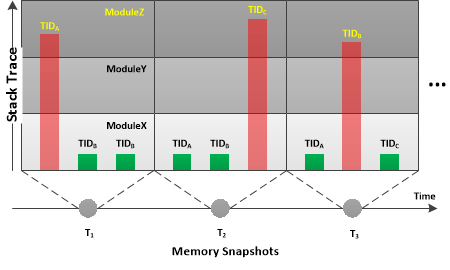
When we have a performance issue we may request a set of consecutive memory dump saved after some interval. In such memory dumps we may see the same thread(s) having similar stack trace(s). In this simple diagnostic scenario we may diagnose several patterns based on the stack traces: Active Threads that can be Spiking Threads with Spike Intervals or stable, not changing, Wait Chains. Here we may easily identify Top active and Blocking modules based on Module Wait Chain.

More complex case arises when we have different Active Threads and/or Wait Chains with different thread IDs at different times. However, if their Top Module is the same we may have found it as a performance root cause component especially in the case of Active Threads since it is statistically probable that such threads were active for considerable time deltas around the snapshot times (since threads are usually waiting). Such hypothesis may also be confirmed by Inter-Correlation analysis with software traces and logs where we can see Thread of Activity Discontinuities and Time Deltas.

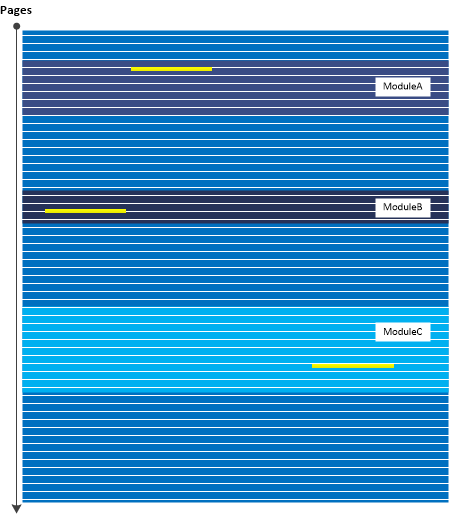
We call this analysis pattern Diachronic Module since we see the module component appears in different thread stack traces diachronically (at different times). The typical simplified scenario is illustrated in this diagram:

This analysis pattern is different from synchronous module case (the module component appears in different thread stack traces at the same time) which was named Ubiquitous Component.

- Dmitry Vostokov @ DumpAnalysis.org + TraceAnalysis.org -
Trace Analysis Patterns (Part 121)

January 30th, 2016

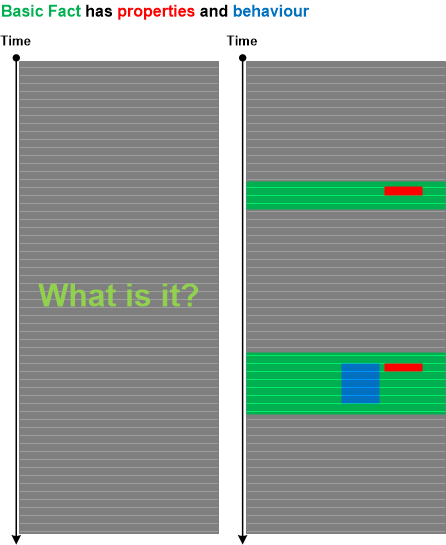
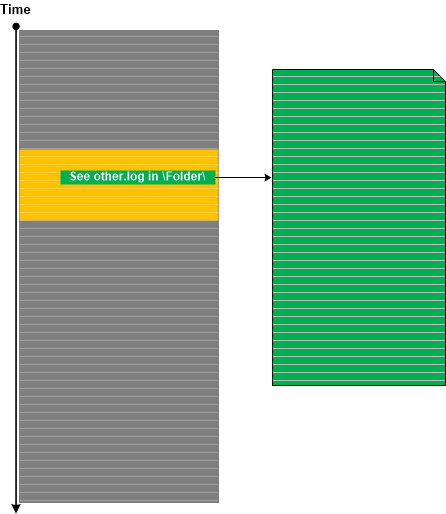
Often, we need to identify the source of messages based on problem object or subsystem description (what question) before we proceed answering where question (where in the trace we can find messages related to the problem). Even when we know where are messages there can be many sources to select from (if we don’t know the where question we can use Indirect Message analysis pattern). To answer what question we propose Identification Messages analysis pattern. Basic Fact problem description may include properties and behavioural description of the problem object or subsystem. Based on that we can map them to the log messages that such an object can produce:

These messages may not be Error Messages or some other type of messages reflecting abnormal behavior. These messages are only used to identify the software object, module or subsystem.

For example, in one case there were problems with the custom status bar. However, the window handle for it or its parent wasn’t specified in the problem report. In the log file we had a lot of messages describing GUI behavior of many windows. To find out the status bar we thought that it should have small height but long width. Indeed we found one such child window. In addition, for this window the log file contained many messages related to frequent window text changes, possibly reflecting the status bar updates. Having identified the window handle, we proceeded to the analysis of another log with thousands of window messages. Because of the known window handle we were able to select only messages pertaining to our problem status bar.

- Dmitry Vostokov @ DumpAnalysis.org + TraceAnalysis.org -
Trace Analysis Patterns (Part 120)

January 16th, 2016

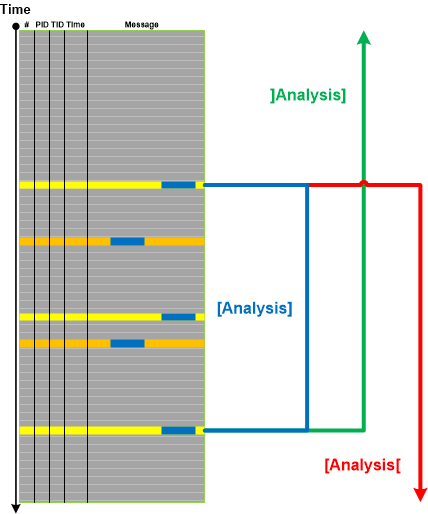
When we have very large traces and Basic Facts containing some data values such as a user name, device name, or registry key value we may use Data Interval analysis pattern to select the trace fragment for the initial log analysis. The first and the last trace messages containing selected data for the closed Data Interval. Depending on the trace size and other considerations we can also choose open Data Intervals. It is illustrated in the following diagram where we use Analysis interval notation borrowed mathematics:

Interval boundary messages may also be used as Trace Mask for another trace.

- Dmitry Vostokov @ DumpAnalysis.org + TraceAnalysis.org -
Crash Dump Analysis Patterns (Part 36, Linux)

December 19th, 2015

This is a Linux variant of Local Buffer Overflow pattern previously described for Mac OS X and Windows platforms. Most of the time simple mistakes in using memory and string manipulation functions are easily detected by runtime. The more sophisticated example which overwrites stack trace without being detected involves overwriting indirectly via a pointer to a local buffer passed to the called function. In such cases we might see incorrect and truncated stack traces:

(gdb) bt
#0  0×0000000000000000 in ?? ()
#1  0×0000000000000000 in ?? ()

(gdb) x/100a $rsp
[...]
0x7fc3dd9dece8: 0x0 0x0
0x7fc3dd9decf8: 0x0 0x0
0x7fc3dd9ded08: 0x0 0x0
0x7fc3dd9ded18: 0x0 0x0
0x7fc3dd9ded28: 0×7fc3dd9ded48 0×4005cc <procA+40>
0×7fc3dd9ded38: 0×422077654e20794d 0×7542207265676769
0×7fc3dd9ded480×72656666 0×0
0×7fc3dd9ded58: 0×0 0×0
0×7fc3dd9ded68: 0×0 0×0
0×7fc3dd9ded78: 0×0 0×0
[…]

- Dmitry Vostokov @ DumpAnalysis.org + TraceAnalysis.org -
Crash Dump Analysis Patterns (Part 16b, Linux)

December 19th, 2015

This is a Linux variant of Stack Overflow (user mode) pattern previously described for Mac OS X and Windows platforms:

(gdb) bt
#0  0x00000000004004fb in procF ()
#1  0x000000000040054b in procF ()
#2  0x000000000040054b in procF ()
#3  0x000000000040054b in procF ()
#4  0x000000000040054b in procF ()
#5  0x000000000040054b in procF ()
#6  0x000000000040054b in procF ()
#7  0x000000000040054b in procF ()
#8  0x000000000040054b in procF ()
#9  0x000000000040054b in procF ()
#10 0x000000000040054b in procF ()
#11 0x000000000040054b in procF ()
#12 0x000000000040054b in procF ()
#13 0x000000000040054b in procF ()
#14 0x000000000040054b in procF ()
#15 0x000000000040054b in procF ()
#16 0x000000000040054b in procF ()
[...]

(gdb) bt -10
#15409 0x000000000040054b in procF ()
#15410 0x000000000040054b in procF ()
#15411 0x000000000040054b in procF ()
#15412 0x000000000040055b in procE ()
#15413 0x0000000000400575 in bar_one ()
#15414 0x0000000000400585 in foo_one ()
#15415 0x000000000040059d in thread_one ()
#15416 0x0000000000401690 in start_thread (arg=<optimized out>)
at pthread_create.c:304
#15417 0x0000000000432549 in clone ()
#15418 0x0000000000000000 in ?? ()

In case of a stack overflow the stack pointer is decremented beyond the stack region boundary into an non-accessible region so any stack memory access triggers an access violation:

(gdb) x $rsp
0×7eff46109ec0: 0×0

(gdb) frame 1
#1  0x000000000040054b in procF ()

(gdb) x $rsp
0×7eff4610a0e0: 0×0

(gdb) maintenance info sections
[...]
Core file:
[...]
0×7eff46109000->0×7eff4610a000 at 0×02034000: load13 ALLOC LOAD READONLY HAS_CONTENTS
0×7eff4610a000->0×7eff4690a000 at 0×02035000: load14 ALLOC LOAD HAS_CONTENTS
[…]

- Dmitry Vostokov @ DumpAnalysis.org + TraceAnalysis.org -