Windows service crash dumps in Vista
October 1st, 2007I was playing with Vista Platform SDK samples to create the minimal native Windows service that crashes to test various postmortem debugger configurations, Windows Error Reporting (WER) options and conditions under which crash dumps are available. Initially I put a NULL pointer dereference into the service control handler processing service stop command and although the service crashed under WinDbg I couldn’t get CDB or NTSD configured as a default postmortem debugger to save the crash dump automatically. I tested under x64 Vista and Windows Server 2003 x64 both 32-bit and 64-bit versions of my service.
Here is the source code and stack trace from WinDbg when we attach it to the running service and then try to stop it:
//

// FUNCTION: service_ctrl

//

// PURPOSE: This function is called by the SCM whenever

// ControlService() is called on this service.

//

// PARAMETERS:

// dwCtrlCode - type of control requested

//

// RETURN VALUE:

// none

//

// COMMENTS:

//

VOID WINAPI service_ctrl(DWORD dwCtrlCode)

{

  // Handle the requested control code.

  //

  switch (dwCtrlCode)

  {

  case SERVICE_CONTROL_STOP:

    *(int *)NULL = 0;

    ReportStatusToSCMgr(SERVICE_STOP_PENDING, NO_ERROR, 0);

    ServiceStop();

    return;
  // Update the service status.

  //

  case SERVICE_CONTROL_INTERROGATE:

    break;
  // invalid control code

  //

  default:

    break;
}
ReportStatusToSCMgr(ssStatus.dwCurrentState, NO_ERROR, 0);

}
0:000> r

rax=0000000000000001 rbx=00000000001e36d0 rcx=0000000000000001

rdx=000000000a9ff32c rsi=0000000000000000 rdi=0000000000401aa0

rip=0000000000401ab9 rsp=000000000012fab0 rbp=00000000001e36d0

 r8=0000000000400000  r9=0000000077b3f990 r10=00000000004000d8

r11=00000000004000d8 r12=0000000000000000 r13=000000000a9ff32c

r14=00000000001e36e8 r15=000000000012fc20

iopl=0 nv up ei pl zr na po nc

cs=0033  ss=002b  ds=002b  es=002b  fs=0053  gs=002b  efl=00010246

simple!service_ctrl+0x19:

00000000`00401ab9 c704250000000000000000 mov dword ptr [0],0 ds:00000000`00000000=????????
0:000> k

Child-SP          RetAddr           Call Site

00000000`0012fab0 000007fe`fe276cee simple!service_ctrl+0x19

00000000`0012faf0 000007fe`fe2cea5d ADVAPI32!ScDispatcherLoop+0x54c

00000000`0012fbf0 00000000`004019f5 ADVAPI32!StartServiceCtrlDispatcherA+0x8d

00000000`0012fe70 00000000`00408b8c simple!main+0x155

00000000`0012fec0 00000000`0040895e simple!__tmainCRTStartup+0x21c

00000000`0012ff30 00000000`7792cdcd simple!mainCRTStartup+0xe

00000000`0012ff60 00000000`77a7c6e1 kernel32!BaseThreadInitThunk+0xd

00000000`0012ff90 00000000`00000000 ntdll!RtlUserThreadStart+0x1d
If we put while(1); code instead of NULL pointer dereference the process will be interrupted via breakpoint and then terminated. There is no postmortem dump saved too. Therefore it looks like any fault inside the service main thread is not allowed to execute the potentially blocking operation of unhandled exception filter perhaps to avoid blocking the service control manager (SCM) communicating with service dispatcher code.
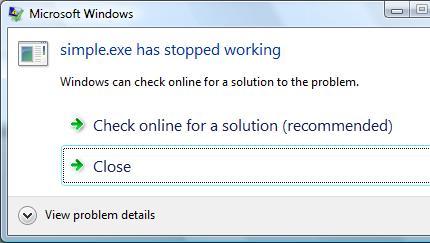
On Vista if Windows Error Reporting service is running and WER is configured in Control Panel to allow a user to choose reporting settings we get the following familiar dialog but without Debug option to attach a postmortem debugger and save a crash dump:
If we choose the recommended option we get the following dialog showing the path where a minidump file was temporarily stored:
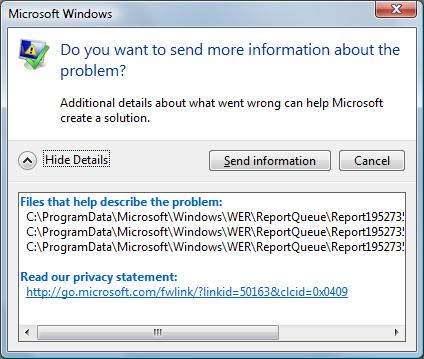
We need to leave this dialog open if we want to open the crash dump or copy it to another location otherwise report files will be removed as soon as we dismiss the dialog box (they may be stored temporarily in another location - check Problem Reports and Solutions\View Problem History in Control Panel). If we open the crash dump using WinDbg we get the same stack trace that we got previously during live debugging:
Loading Dump File [C:\ProgramData\Microsoft\Windows\WER\ReportQueue\Report19527353 \WER7346.tmp.mdmp]

User Mini Dump File: Only registers, stack and portions of memory are available
Symbol search path is: srv*c:\mss*http://msdl.microsoft.com/download/symbols

Executable search path is:

Windows Vista Version 6000 MP (2 procs) Free x64

Product: WinNt, suite: SingleUserTS

Debug session time: Fri Sep 28 16:36:38.000 2007 (GMT+1)

System Uptime: 2 days 1:42:22.810

Process Uptime: 0 days 0:00:10.000

.....

This dump file has an exception of interest stored in it.

The stored exception information can be accessed via .ecxr.

(13b0.d54): Access violation - code c0000005 (first/second chance not available)

*** WARNING: Unable to verify checksum for simple.exe

simple!service_ctrl+0x19:

00000000`00401ab9 c704250000000000000000 mov dword ptr [0],0 ds:00000000`00000000=????????

0:000> k

Child-SP          RetAddr           Call Site

00000000`0012fab0 000007fe`fe276cee simple!service_ctrl+0x19

00000000`0012faf0 000007fe`fe2cea5d advapi32!ScDispatcherLoop+0x54c

00000000`0012fbf0 00000000`004019f5 advapi32!StartServiceCtrlDispatcherA+0x8d

00000000`0012fe70 00000000`00408b8c simple!main+0x155

00000000`0012fec0 00000000`0040895e simple!__tmainCRTStartup+0x21c

00000000`0012ff30 00000000`7792cdcd simple!mainCRTStartup+0xe

00000000`0012ff60 00000000`77a7c6e1 kernel32!BaseThreadInitThunk+0xd

00000000`0012ff90 00000000`00000000 ntdll!RtlUserThreadStart+0x1d
Fault in any other service thread, for example, the one that SCM starts per every SERVICE_TABLE_ENTRY in dispatch table results in a default postmortem debugger saving a crash dump on Windows Server 2003 x64 but not on Vista x64 or Vista x86 (32-bit):
void __cdecl main(int argc, char **argv)

{

  SERVICE_TABLE_ENTRY dispatchTable[] =

  {

  { TEXT(SZSERVICENAME), (LPSERVICE_MAIN_FUNCTION)service_main},

  { NULL, NULL}

  };

  ...

  ...

  ...

  if (!StartServiceCtrlDispatcher(dispatchTable))

    AddToMessageLog(TEXT("StartServiceCtrlDispatcher failed."));

}
void WINAPI service_main(DWORD dwArgc, LPTSTR *lpszArgv)

{

  // register our service control handler:

  //

  sshStatusHandle = RegisterServiceCtrlHandler( TEXT(SZSERVICENAME), service_ctrl);
  if (!sshStatusHandle)

    goto cleanup;
  // SERVICE_STATUS members that don't change in example

  //

  ssStatus.dwServiceType = SERVICE_WIN32_OWN_PROCESS;

  ssStatus.dwServiceSpecificExitCode = 0;
  // report the status to the service control manager.

  //

  if (!ReportStatusToSCMgr(

      SERVICE_START_PENDING, // service state

      NO_ERROR, // exit code

      3000)) // wait hint

    goto cleanup;

  *(int *)NULL = 0;

  …

  …

  …

}
Seems the only way to get a crash mindump for analysis is to copy it from the report data like I explained above:
Loading Dump File [C:\ProgramData\Microsoft\Windows\WER\ReportQueue\Report0fa05f9d \WER5F42.tmp.mdmp]

User Mini Dump File: Only registers, stack and portions of memory are available
Symbol search path is: srv*c:\mss*http://msdl.microsoft.com/download/symbols

Executable search path is:

Windows Vista Version 6000 MP (2 procs) Free x64

Product: WinNt, suite: SingleUserTS

Debug session time: Fri Sep 28 17:50:06.000 2007 (GMT+1)

System Uptime: 0 days 0:30:59.495

Process Uptime: 0 days 0:00:04.000

.....

This dump file has an exception of interest stored in it.

The stored exception information can be accessed via .ecxr.

(d6c.fcc): Access violation - code c0000005 (first/second chance not available)

*** WARNING: Unable to verify checksum for simple.exe

simple!service_main+0x60:

00000000`00401aa0 c704250000000000000000 mov dword ptr [0],0 ds:00000000`00000000=????????

0:001> ~*k
   0  Id: d6c.cf4 Suspend: 0 Teb: 000007ff`fffdd000 Unfrozen

Child-SP          RetAddr           Call Site

00000000`0012f978 00000000`777026da ntdll!NtReadFile+0xa

00000000`0012f980 000007fe`feb265aa kernel32!ReadFile+0x8a

00000000`0012fa10 000007fe`feb262e3 advapi32!ScGetPipeInput+0x4a

00000000`0012faf0 000007fe`feb7ea5d advapi32!ScDispatcherLoop+0x9a

00000000`0012fbf0 00000000`004019f5 advapi32!StartServiceCtrlDispatcherA+0x8d

00000000`0012fe70 00000000`00408bac simple!main+0x155

00000000`0012fec0 00000000`0040897e simple!__tmainCRTStartup+0x21c

00000000`0012ff30 00000000`7770cdcd simple!mainCRTStartup+0xe

00000000`0012ff60 00000000`7792c6e1 kernel32!BaseThreadInitThunk+0xd

00000000`0012ff90 00000000`00000000 ntdll!RtlUserThreadStart+0x1d
#  1  Id: d6c.fcc Suspend: 0 Teb: 000007ff`fffdb000 Unfrozen

Child-SP          RetAddr           Call Site

00000000`008eff00 000007fe`feb24bf5 simple!service_main+0x60

00000000`008eff30 00000000`7770cdcd advapi32!ScSvcctrlThreadW+0x25

00000000`008eff60 00000000`7792c6e1 kernel32!BaseThreadInitThunk+0xd

00000000`008eff90 00000000`00000000 ntdll!RtlUserThreadStart+0x1d
Spawning a custom thread with NULL pointer access violation doesn’t result in a crash dump on my Vista x86 and x64 too. Therefore it appears that there are no automatic postmortem crash dumps saved for native Window services in Vista unless there is some setting that I missed. This might create some problems for traditional 3rd party Technical Support procedures especially if Windows Server 2008 (Longhorn) will have the same behavior.
- Dmitry Vostokov @ DumpAnalysis.org -