Archive for the ‘Software Trace Analysis’ Category
Wednesday, October 20th, 2010
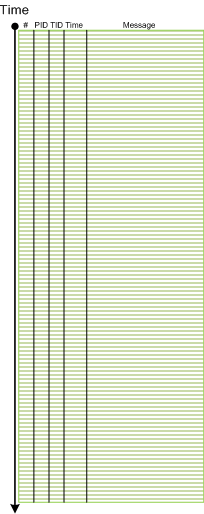
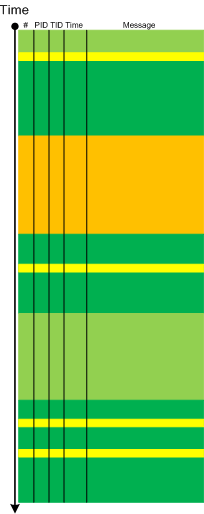
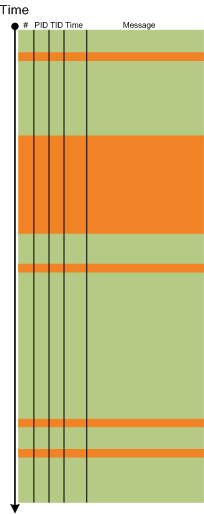
The next pattern with the name borrowed from historiography is Layered Periodization. This periodization of software trace messages includes individual messages, then aggregated messages from threads, then processes as wholes and finally individual computers (in client-server or similar sense). This is best illustrated graphically.
Message layer:
Thread layer (different colors correspond to different TID):
Process layer (different colors correspond to different PID):
Please note that it is also possible to have a periodization based on modules, functions and individual messages but it might be complicated because different threads can enter the same module or function and here other patterns more appropriate like Activity Region, Characteristic Message Block, and Background and Foreground Components.
- Dmitry Vostokov @ DumpAnalysis.org + TraceAnalysis.org -
Posted in CDF Analysis Tips and Tricks, Debugging, Software Trace Analysis, Software Trace Analysis and History, Software Trace Reading, Trace Analysis Patterns | No Comments »
Wednesday, October 13th, 2010
Sometimes, when we find an Anchor Message related to our problem description (for example, a COM port error) we are interested in its evolution throughout a software narrative:
#       PID     TID     Message

[...]

126303  5768    1272    OpenComPort returns Status = 0x0

[...]

231610  3464    1576    OpenComPort returns Status = 0x0

[...]

336535  5768    4292    OpenComPort returns Status = 0×0

[…]

423508  5252    2544    OpenComPort returns Status = 0xc000000f

[…]

531247  5768    5492    OpenComPort returns Status = 0xc000000f

[…]

639039  772     3404    OpenComPort returns Status = 0xc000000f

[…]
Then we can check activity between changes. We call this pattern Message Change.
- Dmitry Vostokov @ DumpAnalysis.org + TraceAnalysis.org -
Posted in CDF Analysis Tips and Tricks, Debugging, Software Trace Analysis, Trace Analysis Patterns | No Comments »
Wednesday, October 13th, 2010
I now transition to 8 similar to 7-to-8 transition from user to kernel space (new dialectical quality):
switch(years_at_citrix)

{

  case 5:

  write_blog_post(”I’ve just passed 5 year mark … “);

  wait_for_certificate();

  write_blog_post(”Shortly after celebrating 5 years … “);

  break;

  case 6:

  write_blog_post(”Threads in my process run very fast. Not long ago … “);

  break;

  case 7:

  write_blog_post(”Transition to kernel mode and space … “);

  break;

  case 8:

  // … TBD
}
I also abandoned monthly counting started earlier because in kernel space time is counted in clock cycles per quantum unit where the latter is 1/3 of a clock tick (Windows Internals, 5th edition, pp. 406 - 408) :-)
- Dmitry Vostokov @ DumpAnalysis.org + TraceAnalysis.org -
Posted in Announcements, Citrix, Crash Dump Analysis, Debugging, Escalation Engineering, History, Software Architecture, Software Engineering, Software Technical Support, Software Trace Analysis, Tools | No Comments »
Thursday, October 7th, 2010
It is time now to introduce a syntactical notation for memory (dump) and software trace analysis pattern languages (in addition to graphical notation proposed earlier). It should be simple and concise: allow easy grammar with plain syntax and obvious reading semantics. We propose to use capitalized letters for major pattern categories, for example, W for wait chains and D for deadlocks. Then use subscripts (or small letters) for pattern subcategories, for example, Wcs and Dlpc. Several categories and subcategories can be combined by using slash (/), for example, Wcs/Dcs/lpc. Slash notation is better viewed using subscripts:
Wcs/Dcs/lpc
Next part will introduce more categories and propose notational adornments for pattern succession, space differentiation and the inclusion of details in notational sentences.
- Dmitry Vostokov @ DumpAnalysis.org + TraceAnalysis.org -
Posted in Analysis Notation, Crash Dump Analysis, Crash Dump Patterns, Debugging, Science of Memory Dump Analysis, Science of Software Tracing, Software Behavior Patterns, Software Trace Analysis, Structural Memory Patterns, Trace Analysis Patterns | No Comments »
Tuesday, October 5th, 2010
The choice of webinars below mostly reflects my personal preferences and long time desire to speak on topics like systems thinking, troubleshooting tool design and development. The other topic about BSOD minidump analysis was requested by participants in an ongoing survey. There will be more topics in 2011. All forthcoming webinars will be hosted by Memory Dump Analysis Services. The planning list includes:
Systems Thinking in Memory Dump and Software Trace Analysis
Software Troubleshooting and Debugging Tools: Objects, Components, Patterns and Frameworks with UML
- UML basics
- DebugWare patterns
- Unified Troubleshooting Framework
- RADII software development process
- Hands-on exercise: designing and building a tool
Blue Screen Of Death Analysis Done Right: Minidump Investigation for System Administrators
- Making sense of !analyze –v output
- Get extra troubleshooting information with additional WinDbg commands
- Guessing culprits with raw stack analysis
- Who’s responsible: hardware or software?
- Checklist and patterns
- Including hands-on exercises: send your own minidumps
More detailed information will be available soon.
- Dmitry Vostokov @ DumpAnalysis.org + TraceAnalysis.org -
Posted in Announcements, CDF Analysis Tips and Tricks, Common Mistakes, Common Questions, Crash Analysis Report Environment (CARE), Crash Dump Analysis, Crash Dump De-analysis, Crash Dump Patterns, Crash Dumps for Dummies, DebugWare Patterns, Debugging, Debugging Industry, Debugging Methodology, Escalation Engineering, General Memory Analysis, Hermeneutics of Memory Dumps and Traces, Memory Systems Language, Minidump Analysis, Software Architecture, Software Behavior Patterns, Software Engineering, Software Technical Support, Software Trace Analysis, Software Tracing for Dummies, Structural Memory Patterns, Systems Thinking, Tools, Trace Analysis Patterns, Training and Seminars, Troubleshooting Methodology, Vista, Webinars, WinDbg Tips and Tricks, Windows 7, Windows Server 2008, Windows System Administration, x64 Windows | No Comments »
Thursday, September 30th, 2010
Another tool that supports adjoint threading in addition to Citrix CDFAnalyzer (see also Debugging Experts magazine article for pictorial description of this concept) is Process Monitor. We can view adjoint threads having common attributes like TID (ordinary threads), PID, operation (function), process name, etc. by using this right click context menu:
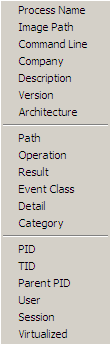
For example, this adjoint thread having RegOpenKey as its ATID (Adjoint Thread ID) where we excluded Path, Result and Detail fields for viewing clarity (together these fields can constitute an analogous Message field in TMF traces):
Time of Day      Process Name PID  TID  Operation

[…]

09:33:25.9545410 Explorer.EXE 1292 1032 RegOpenKey

09:33:25.9548650 Explorer.EXE 1292 1032 RegOpenKey

09:33:25.9550234 Explorer.EXE 1292 1032 RegOpenKey

09:33:25.9551656 Explorer.EXE 1292 1032 RegOpenKey

09:33:25.9692456 WFICA32.EXE  3588 3496 RegOpenKey

09:33:25.9761325 wfcrun32.exe 852  1148 RegOpenKey

09:33:25.9761912 wfcrun32.exe 852  1148 RegOpenKey

09:33:25.9762295 wfcrun32.exe 852  1148 RegOpenKey

09:33:25.9984547 wfcrun32.exe 852  1148 RegOpenKey

09:33:26.0023831 wfcrun32.exe 852  1148 RegOpenKey

09:33:26.0074675 wfcrun32.exe 852  1148 RegOpenKey

09:33:26.0087191 Explorer.EXE 1292 1032 RegOpenKey

09:33:26.1618595 iexplore.exe 1348 2228 RegOpenKey

09:33:26.1625697 iexplore.exe 1348 2228 RegOpenKey

09:33:26.1632745 iexplore.exe 1348 2228 RegOpenKey

09:33:26.1633924 iexplore.exe 1348 2228 RegOpenKey

09:33:26.1639209 iexplore.exe 1348 2228 RegOpenKey

[…]
So if someone writes a converter from TMF to PML format…
- Dmitry Vostokov @ DumpAnalysis.org + TraceAnalysis.org -
Posted in Debugging, Multithreading, New Acronyms, Software Trace Analysis, Software Trace Reading, Tools, Trace Analysis Patterns | No Comments »
Thursday, September 30th, 2010
Inherit a fortune - To get a postmortem artifact like a crash dump.
Examples:
- My program died!
- Did you inherit a fortune?
- Oh, yeah!
- Dmitry Vostokov @ DumpAnalysis.org + TraceAnalysis.org -
Posted in Crash Dump Analysis, Debugging, Debugging Slang, Fun with Crash Dumps, Fun with Debugging, Fun with Software Traces, Software Trace Analysis | No Comments »
Monday, September 27th, 2010
General Memory Analysis is another name for Memoretics, a discipline that studies memory snapshots including their similarities and differences on different system platforms such as Windows, Linus, Mac OS X, embedded and mobile systems, historical architectures, etc. The analysis of memory helps solve problems in various domains such as software troubleshooting and debugging, computer forensic analysis, etc.
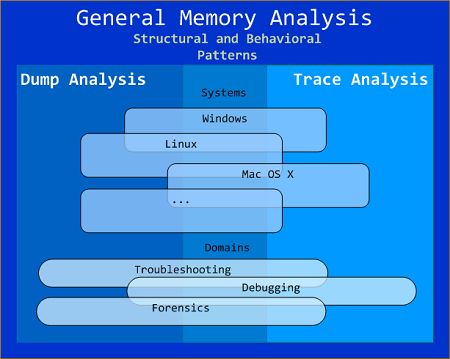
The current focus of interdisciplinary research is to build a unified memory pattern language that covers both behavioral and structural patterns and also to study the possibility of building memory systems from below, not from requirements -> architecture -> design -> implementation -> compilation -> linking -> loading -> execution but from directly modeling and assembling memory systems using memory patterns.
- Dmitry Vostokov @ DumpAnalysis.org + TraceAnalysis.org -
Posted in Announcements, Crash Dump Analysis, Debugging, General Memory Analysis, Memiotics (Memory Semiotics), Memoretics, Memory Analysis Forensics and Intelligence, Memory Systems Language, Security, Software Behavior Patterns, Software Technical Support, Software Trace Analysis, Structural Memory Patterns, Trace Analysis Patterns | No Comments »
Friday, September 24th, 2010
Now it’s time to divide memory analysis patterns discerned so far as mostly abnormal software behavior memory dump and software trace patterns into behavioral and structural catalogues. The goal is to account for normal system-independent structural entities and relationships visible in memory like modules, threads, processes and so on.
The first pattern (and also a super-pattern) we discuss in this part is called Memory Snapshot. It is further subdivided into Structured Memory Snapshot and BLOB Memory Snapshot. Structured sub-pattern includes:
- Contiguous memory dump files with artificially generated headers (for example, physical or process virtual space memory dump)
- Software trace messages with imposed internal structure
BLOB sub-pattern variety includes address range snapshots without any externally imposed structure, for example, saved by .writemem WinDbg command or ReadProcessMemory API and contiguous buffer and raw memory dumps saved by various memory acquisition tools.
Behavioral patterns that relate to Memory Snapshot pattern are:
I strive initially to publish at least one such pattern every day to fill the gap of normal patterns in memory analysis and later add more multi-platform details and examples from other platforms like Linux, Mac OS X, embedded and selected important historical architectures.
- Dmitry Vostokov @ DumpAnalysis.org + TraceAnalysis.org -
Posted in Crash Dump Analysis, Crash Dump Patterns, Debugging, General Memory Analysis, Memiotics (Memory Semiotics), Memoretics, Memory Analysis Forensics and Intelligence, Memory Systems Language, Science of Memory Dump Analysis, Science of Software Tracing, Security, Software Behavior Patterns, Software Trace Analysis, Structural Memory Patterns | 1 Comment »
Monday, September 20th, 2010
Sometimes, when comparing normal, expected (working) and abnormal (non-working) traces we can get a clue for further troubleshooting and debugging by looking at module load events. For example, when we see an unexpected module loaded in our non-working trace, its function (and sometimes even module name) can signify some difference to pay attention to:
#     PID  TID  Time         Message

[...]

14492 6908 6912 11:06:41.953 LoadImageEvent: ImageName(\WINDOWS\system32\3rdPartySso.dll)

[...]
I call this pattern Guest Component and it is a different from Missing Component. Although in the latter pattern a missing component in one trace may appear in another but the component name is known apriori and expected. In the former pattern the component is unexpected. For example, in the trace above, its partial name fragment “Sso” may trigger a suggestion to relate differences in authentication where in a non-working case SSO (single sign-on) was configured.
- Dmitry Vostokov @ DumpAnalysis.org + TraceAnalysis.org -
Posted in CDF Analysis Tips and Tricks, Debugging, Software Trace Analysis, Trace Analysis Patterns | No Comments »
Sunday, September 19th, 2010
Finally, after the delay, the issue is available in print on Amazon and through other sellers:
Debugged! MZ/PE: Multithreading

- Dmitry Vostokov @ DumpAnalysis.org + TraceAnalysis.org -
Posted in .NET Debugging, Announcements, CDF Analysis Tips and Tricks, Citrix, Computer Science, Debugged! MZ/PE, Debugging, Memory Dump Analysis Services, Multithreading, Publishing, Science of Software Tracing, Software Trace Analysis, Software Trace Visualization, Tools, Trace Analysis Patterns, WinDbg Tips and Tricks | No Comments »
Monday, September 13th, 2010
Often we see errors in software traces recorded during deviant software behavior (often called non-working software traces) and when we double check their presence in normal expected software behavior traces (often called working traces) we find them there too. This pattern is called False Positive Error. I already mentioned similar false positives when I introduced the first software trace analysis pattern called Periodic Error. Here is an example from the real trace. In a non-working trace we found this error in an adjoint thread of a foreground component:
OpenProcess error 5
However, we found the same error in the working trace so we continued looking and found several other errors:
Message request report: last error 1168, …

[…]

GetMsg result -2146435043
The last one if converted to a hex status is 8010001D but, unfortunately, the same errors were present in the working trace too in the same activity regions.
After that we started comparing both traces looking for a bifurcation point and we found the error that was only present in a non-working trace with a significant trace differences after that:
Error reading from the named pipe: 800700E9
My favourite tool (WinDbg) to convert error and status values gave this description:
0:000> !error 800700E9

Error code: (HRESULT) 0x800700e9 (2147942633) - No process is on the other end of the pipe.
- Dmitry Vostokov @ DumpAnalysis.org + TraceAnalysis.org -
Posted in CDF Analysis Tips and Tricks, Debugging, Software Trace Analysis, Software Trace Reading, Trace Analysis Patterns, WinDbg Tips and Tricks | No Comments »
Friday, August 27th, 2010
Like in a literature (and in a narratology in general) we have components that trace themselves and components that tell the story of a computation including status updates they query about other components and subsystems. This pattern gets its name Diegetic Messages from diegesis. Here’s the difference between diegetic (in blue bold) and non-diegetic trace messages:
PID    TID    TIME          MESSAGE

11864  11912  06:34:53.598  ModuleA: foo called bar. Status OK.

11620  10372  06:34:59.754  ModuleB: ModuleA integrity check. Status OK.
Some modules may emit messages that tell about their status but from their message text we know the larger computation story like in a process startup sequence example.
- Dmitry Vostokov @ DumpAnalysis.org + TraceAnalysis.org -
Posted in CDF Analysis Tips and Tricks, Debugging, Software Narratology, Software Trace Analysis, Software Trace Reading, Trace Analysis Patterns | 1 Comment »
Saturday, August 14th, 2010
Today I celebrated 4 years of blogging that resulted in more than 2,000 posts across 8 blogs. I would like to thank everyone for their continuing support!
The updated timeline
This blog post belongs to the 5th year of blogging.
- Dmitry Vostokov @ DumpAnalysis.org + TraceAnalysis.org -
Posted in Announcements, Crash Dump Analysis, Debugging, History, Publishing, Software Trace Analysis | 2 Comments »
Tuesday, August 10th, 2010
Sometimes a software trace is truncated when the trace session was stopped prematurely, often when a problem didn’t manifest itself visually. We can diagnose such traces by their short time duration, missing anchor messages or components necessary for analysis. My favourite example is user session initialization in a Citrix terminal services environment when problem effects are visible only after the session is fully initialized and an application is launched but a truncated CDF trace only shows the launch of winlogon.exe despite the presence of a process creation trace provider or other components that record the process launch sequence and the trace itself lasts only a few seconds after that.
- Dmitry Vostokov @ DumpAnalysis.org + TraceAnalysis.org -
Posted in CDF Analysis Tips and Tricks, Debugging, Software Narratology, Software Trace Analysis, Software Trace Reading, Trace Analysis Patterns | 1 Comment »
Thursday, July 29th, 2010
Blog - Binary log.
Examples: This program blogged. I’m reading its blog now.
- Dmitry Vostokov @ DumpAnalysis.org + TraceAnalysis.org -
Posted in Debugging, Debugging Slang, Software Trace Analysis, Software Trace Reading | No Comments »
Sunday, July 11th, 2010
Our future sponsor has been registered in Ireland and has its own independent website and logo: DumpAnalysis.com
More information will be available later this month.
- Dmitry Vostokov @ DumpAnalysis.org + TraceAnalysis.org -
Posted in Announcements, Crash Analysis Report Environment (CARE), Crash Dump Analysis, Crash Dump De-analysis, Debugging, Education and Research, Escalation Engineering, Hardware, Kernel Development, Linux Crash Corner, Mac Crash Corner, Memory Analysis Forensics and Intelligence, Memory Dump Analysis Services, Minidump Analysis, Security, Software Engineering, Software Technical Support, Software Trace Analysis, Testing, Tools, Training and Seminars, Vista, Windows 7, Windows Server 2008, Windows System Administration, x64 Windows | No Comments »
Sunday, July 4th, 2010
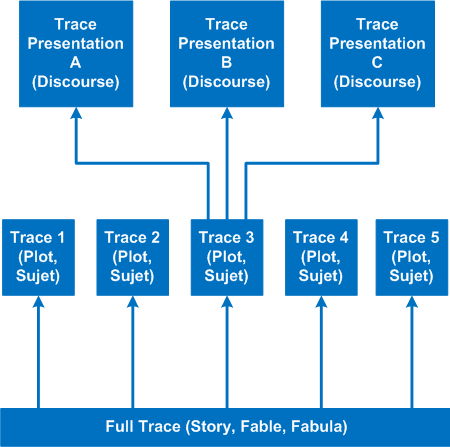
It’s time to introduce a conceptual software narratological framework for viewing software traces (using rich ETW / CDF tracing as our main focus). Here we consider a software story (fabula) as a full trace when every component was selected for tracing and emits debug messages during code execution paths. However, during viewing we can filter on and off certain modules, threads, processes, messages, etc. (adjoint threading) and see a different sub-story or plot (sujet). Every software plot (please do not confuse with PLOT acronym) can be presented differently (using appropriate discourse). Some presentational examples include temporal rearrangement, collapse of repetitive regions, source code hypertext (lexia) and allegorical devices such as message tool-tip comments. Here is a diagram that depicts story (fable, fabula) - plot (sujet) - presentation (discourse):
- Dmitry Vostokov @ DumpAnalysis.org + TraceAnalysis.org -
Posted in CDF Analysis Tips and Tricks, Debugging, Science of Software Tracing, Software Narratology, Software Trace Analysis, Software Trace Reading, Software Trace Visualization | No Comments »
Saturday, July 3rd, 2010
Finally found music appropriate for ETW / CDF trace analysis. It’s Andre Gagnon’s album Escape :
:

Here’s my version of track titles (some of them are also appropriate for crash dump analysis) with my comments in italics:
1. Non Fatal Error
2. Trace Dance (Samba)
3. En Hive
4. Char, The
5. L”Debug”
6. “Memoria”L
7. Process Hearts (cores)
8. Holidays (, but always looking back)
9. WOW (64)
10. DA+TA Master
11. Concert for 4 Threads (“Concertino” doesn’t sound good here)
12. Toc-Cat-ta of Strings
13. Bugville Promenade (along bug clusters?)
14. MOVS
15. The Sea Named Trace (after Solaris movie)
16. Catching The Bottle (it is often difficult to find a relevant problem message in a billion-line trace)
17. Debug Me Tender (DebugLove?)
- Dmitry Vostokov @ DumpAnalysis.org + TraceAnalysis.org -
Posted in Debugging, Fun with Crash Dumps, Fun with Software Traces, Music for Debugging, Software Trace Analysis | No Comments »