Archive for the ‘Crash Dump Analysis’ Category

Crash Dump Analysis Patterns (Part 39)

Friday, November 23rd, 2007

As mentioned in Early Crash Dump pattern saving crash dumps on first-chance exceptions helps to diagnose components that might have caused corruption and later crashes, hangs or CPU spikes by ignoring abnormal exceptions like access violation. In such cases we need to know whether an application installs its own Custom Exception Handler or several of them. If it uses only default handlers provided by runtime or windows subsystem then most likely a first-chance access violation exception will result in a last-chance exception and a postmortem dump. To check a chain of exception handlers we can use WinDbg !exchain extention command. For example:

0:000> !exchain
0017f9d8: TestDefaultDebugger!AfxWinMain+3f5 (00420aa9)
0017fa60: TestDefaultDebugger!AfxWinMain+34c (00420a00)
0017fb20: user32!_except_handler4+0 (770780eb)
0017fcc0: user32!_except_handler4+0 (770780eb)
0017fd24: user32!_except_handler4+0 (770780eb)
0017fe40: TestDefaultDebugger!AfxWinMain+16e (00420822)
0017feec: TestDefaultDebugger!AfxWinMain+797 (00420e4b)
0017ff90: TestDefaultDebugger!_except_handler4+0 (00410e00)
0017ffdc: ntdll!_except_handler4+0 (77961c78)

We see that TestDefaultDebugger doesn’t have its own exception handlers except ones provided by MFC and C/C++ runtime libraries which were linked statically. Here is another example. It was reported that a 3rd-party application was hanging and spiking CPU (Spiking Thread pattern) so a user dump was saved using command line userdump.exe:

0:000> vertarget
Windows Server 2003 Version 3790 (Service Pack 2) MP (4 procs) Free x86 compatible
Product: Server, suite: TerminalServer
kernel32.dll version: 5.2.3790.4062 (srv03_sp2_gdr.070417-0203)
Debug session time: Thu Nov 22 12:45:59.000 2007 (GMT+0)
System Uptime: 0 days 10:43:07.667
Process Uptime: 0 days 4:51:32.000 
Kernel time: 0 days 0:08:04.000 
User time: 0 days 0:23:09.000

0:000> !runaway 3 
User Mode Time 
Thread Time  
0:1c1c      0 days 0:08:04.218  
1:2e04      0 days 0:00:00.015
Kernel Mode Time 
Thread Time  
0:1c1c      0 days 0:23:09.156  
1:2e04      0 days 0:00:00.031

0:000> kL
ChildEBP RetAddr 
0012fb80 7739bf53 ntdll!KiFastSystemCallRet
0012fbb4 05ca73b0 user32!NtUserWaitMessage+0xc
WARNING: Stack unwind information not available. Following frames may be wrong.
0012fd20 05c8be3f 3rdPartyDLL+0x573b0
0012fd50 05c9e9ea 3rdPartyDLL+0x3be3f
0012fd68 7739b6e3 3rdPartyDLL+0x4e9ea
0012fd94 7739b874 user32!InternalCallWinProc+0x28
0012fe0c 7739c8b8 user32!UserCallWinProcCheckWow+0x151
0012fe68 7739c9c6 user32!DispatchClientMessage+0xd9
0012fe90 7c828536 user32!__fnDWORD+0x24
0012febc 7739d1ec ntdll!KiUserCallbackDispatcher+0x2e
0012fef8 7738cee9 user32!NtUserMessageCall+0xc
0012ff18 0050aea9 user32!SendMessageA+0x7f
0012ff70 00452ae4 3rdPartyApp+0x10aea9
0012ffac 00511941 3rdPartyApp+0x52ae4
0012ffc0 77e6f23b 3rdPartyApp+0x111941
0012fff0 00000000 kernel32!BaseProcessStart+0x23

Exception chain showed custom exception handlers:

0:000> !exchain
0012fb8c: 3rdPartyDLL+57acb (05ca7acb)
0012fd28: 3rdPartyDLL+3be57 (05c8be57)
0012fd34: 3rdPartyDLL+3be68 (05c8be68)

0012fdfc: user32!_except_handler3+0 (773aaf18)
  CRT scope  0, func:   user32!UserCallWinProcCheckWow+156 (773ba9ad)
0012fe58: user32!_except_handler3+0 (773aaf18)
0012fea0: ntdll!KiUserCallbackExceptionHandler+0 (7c8284e8)
0012ff3c: 3rdPartyApp+53310 (00453310)
0012ff48: 3rdPartyApp+5334b (0045334b)
0012ff9c: 3rdPartyApp+52d06 (00452d06)
0012ffb4: 3rdPartyApp+38d4 (004038d4)

0012ffe0: kernel32!_except_handler3+0 (77e61a60)
  CRT scope  0, filter: kernel32!BaseProcessStart+29 (77e76a10)
                func:   kernel32!BaseProcessStart+3a (77e81469)

The customer then enabled MS Exception Monitor and selected only Access violation exception code (c0000005) to avoid False Positive Dumps. During application execution various 1st-chance exception crash dumps were saved pointing to numerous access violations including function calls into unloaded modules, for example:

0:000> kL 100
ChildEBP RetAddr 
WARNING: Frame IP not in any known module. Following frames may be wrong.
0012f910 7739b6e3 <Unloaded_Another3rdParty.dll>+0x4ce58
0012f93c 7739b874 user32!InternalCallWinProc+0x28
0012f9b4 7739c8b8 user32!UserCallWinProcCheckWow+0x151
0012fa10 7739c9c6 user32!DispatchClientMessage+0xd9
0012fa38 7c828536 user32!__fnDWORD+0x24
0012fa64 7739d1ec ntdll!KiUserCallbackDispatcher+0x2e
0012faa0 7738cee9 user32!NtUserMessageCall+0xc
0012fac0 0a0f2e01 user32!SendMessageA+0x7f
0012fae4 0a0f2ac7 3rdPartyDLL+0x52e01
0012fb60 7c81a352 3rdPartyDLL+0x52ac7
0012fb80 7c839dee ntdll!LdrpCallInitRoutine+0x14
0012fc94 77e6b1bb ntdll!LdrUnloadDll+0x41a
0012fca8 0050c9c1 kernel32!FreeLibrary+0x41
0012fdf4 004374af 3rdPartyApp+0x10c9c1
0012fe24 0044a076 3rdPartyApp+0x374af
0012fe3c 7739b6e3 3rdPartyApp+0x4a076
0012fe68 7739b874 user32!InternalCallWinProc+0x28
0012fee0 7739ba92 user32!UserCallWinProcCheckWow+0x151
0012ff48 773a16e5 user32!DispatchMessageWorker+0x327
0012ff58 00452aa0 user32!DispatchMessageA+0xf
0012ffac 00511941 3rdPartyApp+0x52aa0
0012ffc0 77e6f23b 3rdPartyApp+0x111941
0012fff0 00000000 kernel32!BaseProcessStart+0x23

- Dmitry Vostokov @ DumpAnalysis.org -
Four causes of crash dumps

Friday, November 23rd, 2007

Obviously the appearance of crash dumps on your computer was caused by something. A bug, fault, defect or something else?

Aristotle suggested 4 types of causation 2 millennia ago and they are:

Material cause - presence of some substance, usually material one (hardware) but can be machine code (software). The distinction between hardware and software is often blurred today because of virtualization.

Formal cause - some form or arrangement (an algorithm)

Efficient cause - an agent (data flow or event caused an algorithm to be executed)

Final cause - the desire of someone (or something, operating system, for example).

We skip material causes because hardware and software are always involved. Obviously final causality should be among of crash dump causes because they were either anticipated or made deliberately. Let’s look at 3 examples with possible causes:

Buffer Overflow

  • Formal cause - a defect in code which might have arisen from incomplete or wrong model

  • Efficient cause - data is too big to fit in a buffer

  • Final cause - operating system and runtime library support decided to save a crash dump

Bugcheck (NMI)

  • Formal cause - NMI handler

  • Efficient cause - a button on a hardware panel or KeBugCheckEx

  • Final cause - “I need a memory dump” desire. Also crash dump saving functions were written before by kernel developers in anticipation of future crash dumps.

Bugcheck (A)

  • Formal cause - a defect in code again or particular disposition of threads

  • Efficient cause - Driver Verifier triggered paging out data

  • Final cause - deliberate OS bugcheck (here we can also say that it was anticipated by OS designers)

Concrete causes depend on the organizational level you use: software/hardware systems/components, modeling act by humans, etc.

- Dmitry Vostokov @ DumpAnalysis.org -
Crash Dump Analysis Patterns (Part 38)

Thursday, November 22nd, 2007

Hooking functions using trampoline method is so common on Windows and sometimes we need to check Hooked Functions in specific modules and determine which module hooked them for troubleshooting or memory forensic analysis needs. If original unhooked modules are available (via symbol server, for example) this can be done by using !chkimg WinDbg extension command:

0:002> !chkimg -lo 50 -d !kernel32 -v
Searching for module with expression: !kernel32
Will apply relocation fixups to file used for comparison
Will ignore NOP/LOCK errors
Will ignore patched instructions
Image specific ignores will be applied
Comparison image path: c:\mss\kernel32.dll\44C60F39102000\kernel32.dll
No range specified

Scanning section:    .text
Size: 564445
Range to scan: 77e41000-77ecacdd
    77e44004-77e44008  5 bytes - kernel32!GetDateFormatA
 [ 8b ff 55 8b ec:e9 f7 bf 08 c0 ]
    77e4412e-77e44132  5 bytes - kernel32!GetTimeFormatA (+0×12a)
 [ 8b ff 55 8b ec:e9 cd be 06 c0 ]
    77e4e857-77e4e85b  5 bytes - kernel32!FileTimeToLocalFileTime (+0xa729)
 [ 8b ff 55 8b ec:e9 a4 17 00 c0 ]
    77e56b5f-77e56b63  5 bytes - kernel32!GetTimeZoneInformation (+0×8308)
 [ 8b ff 55 8b ec:e9 9c 94 00 c0 ]
    77e579a9-77e579ad  5 bytes - kernel32!GetTimeFormatW (+0xe4a)
 [ 8b ff 55 8b ec:e9 52 86 06 c0 ]
    77e57fc8-77e57fcc  5 bytes - kernel32!GetDateFormatW (+0×61f)
 [ 8b ff 55 8b ec:e9 33 80 08 c0 ]
    77e6f32b-77e6f32f  5 bytes - kernel32!GetLocalTime (+0×17363)
 [ 8b ff 55 8b ec:e9 d0 0c 00 c0 ]
    77e6f891-77e6f895  5 bytes - kernel32!LocalFileTimeToFileTime (+0×566)
 [ 8b ff 55 8b ec:e9 6a 07 01 c0 ]
    77e83499-77e8349d  5 bytes - kernel32!SetLocalTime (+0×13c08)
 [ 8b ff 55 8b ec:e9 62 cb 00 c0 ]
    77e88c32-77e88c36  5 bytes - kernel32!SetTimeZoneInformation (+0×5799)
 [ 8b ff 55 8b ec:e9 c9 73 01 c0 ]
Total bytes compared: 564445(100%)
Number of errors: 50
50 errors : !kernel32 (77e44004-77e88c36)

0:002> u 77e44004
kernel32!GetDateFormatA:
77e44004 e9f7bf08c0      jmp     37ed0000
77e44009 81ec18020000    sub     esp,218h
77e4400f a148d1ec77      mov     eax,dword ptr [kernel32!__security_cookie (77ecd148)]
77e44014 53              push    ebx
77e44015 8b5d14          mov     ebx,dword ptr [ebp+14h]
77e44018 56              push    esi
77e44019 8b7518          mov     esi,dword ptr [ebp+18h]
77e4401c 57              push    edi

0:002> u 37ed0000
*** ERROR: Symbol file could not be found.  Defaulted to export symbols for MyDateTimeHooks.dll -
37ed0000 e99b262f2d      jmp     MyDateTimeHooks+0×26a0 (651c26a0)
37ed0005 8bff            mov     edi,edi
37ed0007 55              push    ebp
37ed0008 8bec            mov     ebp,esp
37ed000a e9fa3ff73f      jmp     kernel32!GetDateFormatA+0×5 (77e44009)
37ed000f 0000            add     byte ptr [eax],al
37ed0011 0000            add     byte ptr [eax],al
37ed0013 0000            add     byte ptr [eax],al

- Dmitry Vostokov @ DumpAnalysis.org -

Crash Dump Analysis AntiPatterns (Part 6)

Thursday, November 22nd, 2007

Need the crash dump. Period. This might be the first thought when an engineer gets a stack trace fragment without symbolic information. It is usually based on the following presupposition:

We need an actual dump file to suggest further troubleshooting steps.

This is not actually true unless it is the first time you have the problem and get stack trace for it. Consider the following fragment from bugcheck kernel dump when no symbols were applied because the customer didn’t have them:

b90529f8 8085eced nt!KeBugCheckEx+0x1b
b9052a70 8088c798 nt!MmAccessFault+0xb25
b9052a70 bfabd940 nt!_KiTrap0E+0xdc
WARNING: Stack unwind information not available. Following frames may be wrong.
b9052b14 bfabe452 MyDriver+0x27940

We can convert module+offset information into module!function+offset2 using MAP files or using DIA SDK (Debug Interface Access SDK) to query PDB files if we know module timestamp. This might be seen as a tedious exercise but we don’t need to do it if we keep raw stack trace signatures in some database when doing crash dump analysis. If we use our own symbol servers we might want to remove references to them and reload symbols. Then redo previous stack trace commands.

In my case it happened that I already analyzed similar previous bugcheck crash dumps months ago and saved stack trace prior to applying symbols. This helped me to point to solution without requesting the crash dump corresponding to that stack trace.

- Dmitry Vostokov @ DumpAnalysis.org -

Critical thinking when troubleshooting

Thursday, November 22nd, 2007

Faulty thinking happens all the time in technical support environments partly due to hectic and demanding business realities.

Simple*ology book pointed me to this website:

http://www.fallacyfiles.org/ 

which taxonomically organizes fallacies:

http://www.fallacyfiles.org/taxonomy.html

For example, False Cause. Technical examples might include false causes inferred from trace analysis, customer problem description that includes steps to reproduce the problem, etc. This also applies to debugging and importance of thinking skills has been emphasized in the following book:

Debugging by Thinking: A Multidisciplinary Approach

Surface-level of basic crash dump analysis is less influenced by false cause fallacies because it doesn’t have explicitly recorded sequence of events although some caution should be exercised during detailed analysis of thread waiting times and other historical information.   

Warning: when exercising critical thinking recursively we need to stop at the right time to avoid paralysis of analysis :-) 

- Dmitry Vostokov @ DumpAnalysis.org

Crash Dump Analysis Patterns (Part 37)

Wednesday, November 21st, 2007

Some bugs are fixed using brute-force approach via putting an exception handler to catch access violations and other exceptions. Long time ago I saw one such “incredible fix” when the image processing application was crashing after approximately Nth heap free runtime call. To ignore crashes a SEH handler was put in place but the application started to crash in different places. Therefore the additional fix was to skip free calls when approaching N and resume afterwards. The application started to crash less frequently.

Here getting Early Crash Dump when a first-chance exception happens can help in component identification before corruption starts spreading across data. Recall that when an access violation happens in a process thread in user mode the system generates the first-chance exception which can be caught by an attached debugger and if there is no such debugger the system tries to find an exception handler and if that exception handler catches and dismisses the exception the thread resumes its normal execution path. If there are no such handlers found the system generates the so called second-chance exception with the same exception context to notify the attached debugger and if it is not attached a default thread exception handler usually saves a postmortem user dump.

You can get first-chance exception memory dumps with:

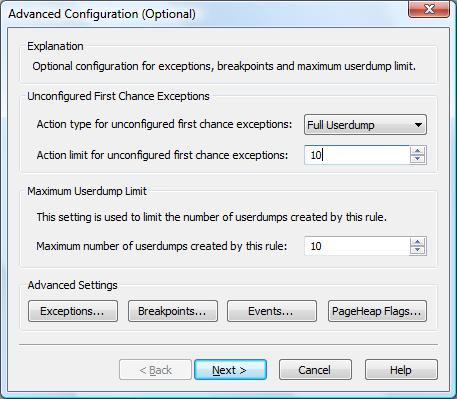
Here is an example configuration rule for crashes in Debug Diagnostic tool for TestDefaultDebugger process (Unconfigured First Chance Exceptions option is set to Full Userdump):


When we push the big crash button in TestDefaultDebugger dialog box two crash dumps are saved, with first and second-chance exceptions pointing to the same code:

Loading Dump File [C:\Program Files (x86)\DebugDiag\Logs\Crash rule for all instances of TestDefaultDebugger.exe\TestDefaultDebugger__PID__4316__ Date__11_21_2007__Time_04_28_27PM__2__First chance exception 0XC0000005.dmp]
User Mini Dump File with Full Memory: Only application data is available

Comment: 'Dump created by DbgHost. First chance exception 0XC0000005′
Symbol search path is: srv*c:\mss*http://msdl.microsoft.com/download/symbols
Executable search path is:
Windows Vista Version 6000 MP (2 procs) Free x86 compatible
Product: WinNt, suite: SingleUserTS
Debug session time: Wed Nov 21 16:28:27.000 2007 (GMT+0)
System Uptime: 0 days 23:45:34.711
Process Uptime: 0 days 0:01:09.000

This dump file has an exception of interest stored in it.
The stored exception information can be accessed via .ecxr.
(10dc.590): Access violation - code c0000005 (first/second chance not available)
eax=00000000 ebx=00000001 ecx=0017fe70 edx=00000000 esi=00425ae8 edi=0017fe70
eip=004014f0 esp=0017f898 ebp=0017f8a4 iopl=0 nv up ei ng nz ac pe cy
cs=0023 ss=002b ds=002b es=002b fs=0053 gs=002b efl=00010297
TestDefaultDebugger!CTestDefaultDebuggerDlg::OnBnClickedButton1:
004014f0 c7050000000000000000 mov dword ptr ds:[0],0  ds:002b:00000000=????????

Loading Dump File [C:\Program Files (x86)\DebugDiag\Logs\Crash rule for all instances of TestDefaultDebugger.exe\TestDefaultDebugger__PID__4316__ Date__11_21_2007__Time_04_28_34PM__693__ Second_Chance_Exception_C0000005.dmp]
User Mini Dump File with Full Memory: Only application data is available

Comment: 'Dump created by DbgHost. Second_Chance_Exception_C0000005
Symbol search path is: srv*c:\mss*http://msdl.microsoft.com/download/symbols
Executable search path is:
Windows Vista Version 6000 MP (2 procs) Free x86 compatible
Product: WinNt, suite: SingleUserTS
Debug session time: Wed Nov 21 16:28:34.000 2007 (GMT+0)
System Uptime: 0 days 23:45:39.313
Process Uptime: 0 days 0:01:16.000

This dump file has an exception of interest stored in it.
The stored exception information can be accessed via .ecxr.
(10dc.590): Access violation - code c0000005 (first/second chance not available)
eax=00000000 ebx=00000001 ecx=0017fe70 edx=00000000 esi=00425ae8 edi=0017fe70
eip=004014f0 esp=0017f898 ebp=0017f8a4 iopl=0 nv up ei ng nz ac pe cy
cs=0023 ss=002b ds=002b es=002b fs=0053 gs=002b efl=00010297
TestDefaultDebugger!CTestDefaultDebuggerDlg::OnBnClickedButton1:
004014f0 c7050000000000000000 mov dword ptr ds:[0],0  ds:002b:00000000=????????

- Dmitry Vostokov @ DumpAnalysis.org -

Crash Dump Analysis on Solaris x86 - AMD64

Tuesday, November 20th, 2007

Found the following book which is an interesting read to see crash dump analysis from a different operating system architecture perspective but on the same Intel / AMD platform:

http://www.genunix.org/gen/crashdump/book.pdf

- Dmitry Vostokov @ DumpAnalysis.org

Crash Dump Analysis Patterns (Part 31a)

Tuesday, November 20th, 2007

I have already discussed Passive Thread pattern in user space. In this part I continue with kernel space and passive system threads that don’t run in any user process context. These threads belong to the so called System process, don’t have any user space stack and their full stack traces can be seen from the output of !process command (if not completely paged out):

1: kd> !process 0 ff System

or from system portion of !stacks 2 command.  

Some system threads from that list belong to core OS functionality and are not passive (function offsets can vary for different OS versions and service packs):

nt!KiSwapContext+0x84
nt!KiSwapThread+0x125
nt!KeWaitForSingleObject+0x5f5
nt!MmZeroPageThread+0×180
nt!Phase1Initialization+0xe
nt!PspSystemThreadStartup+0×5b
nt!KiStartSystemThread+0×16

nt!KiSwapContext+0x84
nt!KiSwapThread+0x125
nt!KeWaitForSingleObject+0x5f5
nt!MiModifiedPageWriter+0×59
nt!PspSystemThreadStartup+0×5b
nt!KiStartSystemThread+0×16

nt!KiSwapContext+0x84
nt!KiSwapThread+0x125
nt!KeWaitForMultipleObjects+0x703
nt!MiMappedPageWriter+0xad
nt!PspSystemThreadStartup+0×5b
nt!KiStartSystemThread+0×16

nt!KiSwapContext+0x84
nt!KiSwapThread+0x125
nt!KeWaitForMultipleObjects+0x703
nt!KeBalanceSetManager+0×101
nt!PspSystemThreadStartup+0×5b
nt!KiStartSystemThread+0×16

nt!KiSwapContext+0x84
nt!KiSwapThread+0x125
nt!KeWaitForSingleObject+0x5f5
nt!KeSwapProcessOrStack+0×44
nt!PspSystemThreadStartup+0×5b
nt!KiStartSystemThread+0×16

nt!KiSwapContext+0x84
nt!KiSwapThread+0x125
nt!KeWaitForSingleObject+0x5f5
nt!EtwpLogger+0xdd
nt!PspSystemThreadStartup+0×5b
nt!KiStartSystemThread+0×16

nt!KiSwapContext+0x84
nt!KiSwapThread+0x125
nt!KeWaitForSingleObject+0x5f5
nt!KiExecuteDpc+0×198
nt!PspSystemThreadStartup+0×5b
nt!KiStartSystemThread+0×16

nt!KiSwapContext+0x84
nt!KiSwapThread+0x125
nt!KeWaitForMultipleObjects+0x703
nt!CcQueueLazyWriteScanThread+0×73
nt!PspSystemThreadStartup+0×5b
nt!KiStartSystemThread+0×16

nt!KiSwapContext+0x84
nt!KiSwapThread+0x125
nt!KeWaitForMultipleObjects+0x703
nt!ExpWorkerThreadBalanceManager+0×85
nt!PspSystemThreadStartup+0×5b
nt!KiStartSystemThread+0×16

Other threads belong to various worker queues (they can also be seen from !exqueue ff command output) and wait for data items to arrive (passive threads):

nt!KiSwapContext+0x84
nt!KiSwapThread+0x125
nt!KeRemoveQueueEx+0x848
nt!ExpWorkerThread+0×104
nt!PspSystemThreadStartup+0×5b
nt!KiStartSystemThread+0×16

or

nt!KiSwapContext+0x26
nt!KiSwapThread+0x2e5
nt!KeRemoveQueue+0x417
nt!ExpWorkerThread+0xc8
nt!PspSystemThreadStartup+0×2e
nt!KiThreadStartup+0×16

Non-Exp system threads having Worker, Logging or Logger substrings in their function names are passive threads and wait for data too, for example:

nt!KiSwapContext+0x84
nt!KiSwapThread+0x125
nt!KeWaitForMultipleObjects+0x703
nt!PfTLoggingWorker+0×81
nt!PspSystemThreadStartup+0×5b
nt!KiStartSystemThread+0×16

nt!KiSwapContext+0x84
nt!KiSwapThread+0x125
nt!KeWaitForSingleObject+0x5f5
nt!EtwpLogger+0xdd
nt!PspSystemThreadStartup+0×5b
nt!KiStartSystemThread+0×16

nt!KiSwapContext+0x84
nt!KiSwapThread+0x125
nt!KeRemoveQueueEx+0x848
nt!KeRemoveQueue+0x21
rdpdr!RxpWorkerThreadDispatcher+0×6f
nt!PspSystemThreadStartup+0×5b
nt!KiStartSystemThread+0×16

nt!KiSwapContext+0x84
nt!KiSwapThread+0x125
nt!KeWaitForSingleObject+0x5f5
HTTP!UlpThreadPoolWorker+0×26c
nt!PspSystemThreadStartup+0×5b
nt!KiStartSystemThread+0×16

nt!KiSwapContext+0x84
nt!KiSwapThread+0x125
nt!KeRemoveQueueEx+0x848
nt!KeRemoveQueue+0x21
srv2!SrvProcWorkerThread+0×74
nt!PspSystemThreadStartup+0×5b
nt!KiStartSystemThread+0×16

nt!KiSwapContext+0x84
nt!KiSwapThread+0x125
nt!KeRemoveQueueEx+0x848
nt!KeRemoveQueue+0x21
srv!WorkerThread+0×90
nt!PspSystemThreadStartup+0×5b
nt!KiStartSystemThread+0×16

Any deviations in memory dump can raise suspicion like in the stack below for driver.sys 

nt!KiSwapContext+0x26
nt!KiSwapThread+0x284
nt!KeWaitForSingleObject+0×346
nt!ExpWaitForResource+0xd5
nt!ExAcquireResourceExclusiveLite+0×8d
nt!ExEnterCriticalRegionAndAcquireResourceExclusive+0×19

driver!ProcessItem+0×2f
driver!DelayedWorker+0×27

nt!ExpWorkerThread+0×104
nt!PspSystemThreadStartup+0×5b
nt!KiStartSystemThread+0×16

- Dmitry Vostokov @ DumpAnalysis.org

NotMyLeak

Monday, November 19th, 2007

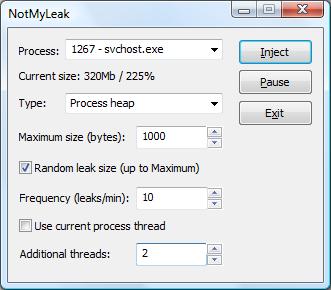
To troubleshoot and study memory leaks the following tool called NotMyLeak will be released soon. It injects different kinds of leaks into specified processes and system:

  • Process heap
  • Runtime library
  • Performance counters
  • Kernel paged pool
  • Kernel nonpaged pool
  • IRP
  • Handles
  • PTE
  • etc…

The idea is to model various real-time leaks, analyze memory dumps and then apply discovered patterns to crash dump analysis of memory dumps coming from real-world systems.   

The draft GUI (subject to change):

Note: the tool name prefix NotMy… was inspired by the name of Mark Russinovich’s tool called NotMyFault.

- Dmitry Vostokov @ DumpAnalysis.org

Windows Internals book

Monday, November 19th, 2007

Scheduled to be updated with Windows Vista and Windows Server 2008 details:

Windows® Internals, Fifth Edition

- Dmitry Vostokov @ DumpAnalysis.org

Filtering processes

Monday, November 19th, 2007

When I analyze memory dumps coming from Microsoft or Citrix terminal service environments I frequently need to find a process hosting terminal service. In Windows 2000 it was the separate process termsrv.exe and now it is termsrv.dll which can be loaded into any of several instances of svchost.exe. The simplest way to narrow down that svchost.exe process if we have a complete memory dump is to use the module option of WinDbg !process command:

!process /m termsrv.dll 0

!process /m wsxica.dll 0

!process /m ctxrdpwsx.dll 0

Note: this option works only with W2K3, XP and later OS

Also to list all processes with user space stacks having the same image name we can use:

!process 0 ff msiexec.exe

or  

!process 0 ff svchost.exe

Note: this command works with W2K too as well as session option (/s)

- Dmitry Vostokov @ DumpAnalysis.org

Exceptions Ab Initio

Friday, November 16th, 2007

Where do native exceptions come from? How do they propagate from hardware and eventually result in crash dumps? I was asking these questions when I started doing crash dump analysis more than four years ago and I tried to find answers using IA-32 Intel® Architecture Software Developer’s Manual, WinDbg and complete memory dumps.

Eventually I wrote some blog posts about my findings. They are buried between many other posts so I dug them out and put on a dedicated page:

Interrupts and Exceptions Explained

- Dmitry Vostokov @ DumpAnalysis.org

Memorillion and Quadrimemorillion

Thursday, November 15th, 2007

What are these? These are names of the number of possible unique complete memory dumps when address space is 32 bit and 64-bit correspondingly:

256232 and 256264

The first of them can be approximated by 101010

This idea came to me after I learnt about the so called “immense number” proposed by Walter Elsasser. This number is so big that its digits cannot be listed because there is not enough particles in observable Universe to write them.

Certainly one memorillion is more than one googol 10100 but it requires only approx. 1010 particles in ideal case to list its digits and therefore not an immense number. It is however far less than one googolplex 1010100.

Consider a complete memory dump with bytes written in hexadecimal notation:

0x50414745554d500f000000ce0e00000090...

This number has more than 8 billion digits… And it is one possible number out of memorillion of them. So one memorillion in hexadecimal notation is just

0xFFFFFFFFFFFFFFFFFFFFF... + 1

where we have 2*232 ‘F’ symbols written sequentially. One quadrimemorillion has 2*264 ‘F’ symbols.

Also the question about the number of possible crash dumps can be considered as Microsoft interview style question when you have possible candidates and you want to assess their ability to think out of the box and handle large numbers. 

- Dmitry Vostokov @ DumpAnalysis.org -

Crash Dump Analysis Patterns (Part 36)

Wednesday, November 14th, 2007

The pattern I should have written as one of the first is called Local Buffer Overflow. It is observed on x86 platforms when a local variable and a function return address and/or saved frame pointer EBP are overwritten with some data. As a result, the instruction pointer EIP becomes Wild Pointer and we have a process crash in user mode or a bugcheck in kernel mode. Sometimes this pattern is diagnosed by looking at mismatched EBP and ESP values and in the case of ASCII or UNICODE buffer overflow EIP register may contain 4-char or 2-wchar_t value and ESP or EBP or both registers might point at some string fragment like in the example below:

0:000> r
eax=000fa101 ebx=0000c026 ecx=01010001 edx=bd43a010 esi=000003e0 edi=00000000
eip=0048004a esp=0012f158 ebp=00510044 iopl=0  nv up ei pl nz na po nc
cs=001b ss=0023 ds=0023 es=0023 fs=0038 gs=0000 efl=00000202
0048004a 0000 add     byte ptr [eax],al  ds:0023:000fa101=??

0:000> kL
ChildEBP RetAddr 
WARNING: Frame IP not in any known module. Following frames may be wrong.
0012f154 00420047 0x48004a
0012f158 00440077 0x420047
0012f15c 00420043 0x440077
0012f160 00510076 0x420043
0012f164 00420049 0x510076
0012f168 00540041 0x420049
0012f16c 00540041 0x540041
...
...
...

Good buffer overflow case studies with complete analysis including assembly language tutorial can be found in Buffer Overflow Attacks book.

Buy from Amazon 

- Dmitry Vostokov @ DumpAnalysis.org -

Crash Dump Analysis Patterns (Part 35)

Monday, November 12th, 2007

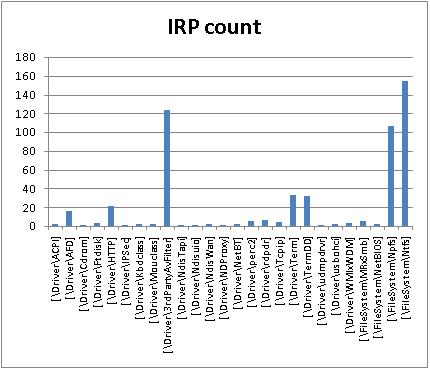
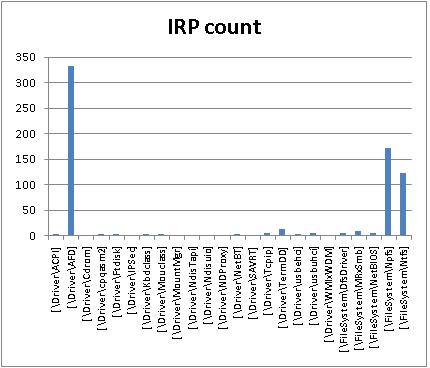
In kernel or complete memory dumps coming from hanging or slow workstations and servers !irpfind WinDbg command may show IRP Distribution Anomaly pattern when certain drivers have excessive count of active IRPs not observed under normal circumstances. I created two IRP distribution graphs from two problem kernel dumps by preprocessing command output using Visual Studio keyboard macros to eliminate completed IRPs and then using Excel. In one case it was a big number of I/O request packets from 3rd-party antivirus filter driver:

\Driver\3rdPartyAvFilter

In the second case it was the huge number of active IRPs targeted to kernel socket ancillary function driver:

\Driver\AFD

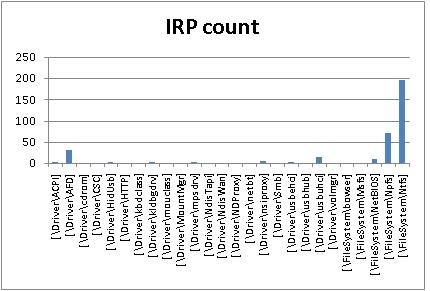
Two other peaks on both graphs are related to NTPS and NTFS, pipes and file system and usually normal. Here is IRP distribution graph from my Vista workstation captured while I was writing this post:

- Dmitry Vostokov @ DumpAnalysis.org -

Memory Dump Analysis using Excel

Friday, November 9th, 2007

Some WinDbg commands output data in tabular format so it is possible to save their output to a text file, import it to Excel and do sorting, filtering, and graph visualization, etc. Some commands from WinDbg include:

!stacks 1

Lists all threads with Ticks column so you can sort and filter threads that had been waiting no more than 100 ticks, for
example.

!irpfind

Here we can create various histograms, for example, IRP distribution based on [Driver] column.

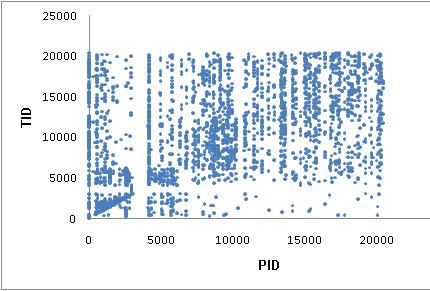
I’ll show more examples later but now the graph depicting thread distribution in PID - TID coordinates on a busy multiprocessor
system with 25 user sessions and more than 3,000 threads:

WinDbg scripts offer possibility to output various tabulated data via .printf:

0:000> .printf "a\tb\tc"
a       b       c

- Dmitry Vostokov @ DumpAnalysis.org -

TestDefaultDebugger.NET

Thursday, November 8th, 2007

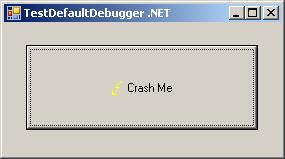
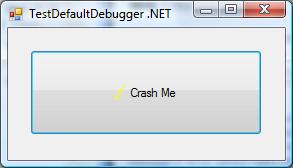
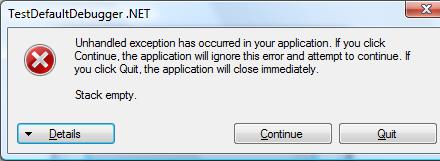
Sometimes there are situations when we need to test exception handling to see whether it works and how to get dumps or logs from it. For example, a customer reports infrequent process crashes but no dumps are saved. Then we can try some application that crashes immediately to see whether it results in error messages and/or saved crash dumps. This was the motivation behind TestDefaultDebugger package. Unfortunately it contains only native applications and today I needed to test .NET CLR exception handling and see what messages it shows in my environment. So I wrote a simple program in C# that creates an empty Stack object and then calls its Pop method which triggers “Stack empty” exception sufficient for my purposes.

The updated package now includes TestDefaultDebugger.NET.exe and can be downloaded from Citrix support web site (requires free registration):

Download TestDefaultDebugger package

- Dmitry Vostokov @ DumpAnalysis.org -

Symbol file warnings in WinDbg 6.8.0004.0

Thursday, November 8th, 2007

I started using new WinDbg 6.8.4.0 and found that it prints the following message twice when I open a process dump or a complete memory dump where the current context is from some user mode process:

0:000> !analyze -v
...
...
...
***
***    Your debugger is not using the correct symbols
***
***    In order for this command to work properly, your symbol path
***    must point to .pdb files that have full type information.
***
***    Certain .pdb files (such as the public OS symbols) do not
***    contain the required information.  Contact the group that
***    provided you with these symbols if you need this command to
***    work.
***
***    Type referenced: kernel32!pNlsUserInfo
***

Fortunately kernel32.dll symbols were loaded correctly despite the warning:

0:000> lmv m kernel32
start    end        module name
77e40000 77f42000   kernel32   (pdb symbols)          c:\mssymbols\kernel32.pdb\DF4F569C743446809ACD3DFD1E9FA2AF2\kernel32.pdb
    Loaded symbol image file: kernel32.dll
    Image path: C:\WINDOWS\system32\kernel32.dll
    Image name: kernel32.dll
    Timestamp:        Tue Jul 25 13:31:53 2006 (44C60F39)
    CheckSum:         001059A9
    ImageSize:        00102000
    File version:     5.2.3790.2756
    Product version:  5.2.3790.2756
    File flags:       0 (Mask 3F)
    File OS:          40004 NT Win32
    File type:        2.0 Dll
    File date:        00000000.00000000
    Translations:     0409.04b0
    CompanyName:      Microsoft Corporation
    ProductName:      Microsoft® Windows® Operating System
    InternalName:     kernel32
    OriginalFilename: kernel32
    ProductVersion:   5.2.3790.2756
    FileVersion:      5.2.3790.2756 (srv03_sp1_gdr.060725-0040)
    FileDescription:  Windows NT BASE API Client DLL
    LegalCopyright:   © Microsoft Corporation. All rights reserved.

Also double checking return addresses on the stack trace shows that symbol mapping was correct (from another dump with the same message):

kd> dpu kernel32!pNlsUserInfo l1
77ecb0a8  77ecb760 "ENU"

kd> kv
ChildEBP RetAddr  Args to Child
f552bbec f79e1743 000000e2 cccccccc 858a0470 nt!KeBugCheckEx+0x1b
WARNING: Stack unwind information not available. Following frames may be wrong.
f552bc38 8081d39d 85699390 8596fe78 860515f8 SystemDump+0x743
f552bc4c 808ec789 8596fee8 860515f8 8596fe78 nt!IofCallDriver+0x45
f552bc60 808ed507 85699390 8596fe78 860515f8 nt!IopSynchronousServiceTail+0x10b
f552bd00 808e60be 00000090 00000000 00000000 nt!IopXxxControlFile+0x5db
f552bd34 80882fa8 00000090 00000000 00000000 nt!NtDeviceIoControlFile+0x2a
f552bd34 7c82ed54 00000090 00000000 00000000 nt!KiFastCallEntry+0xf8
0012efc4 7c8213e4 77e416f1 00000090 00000000 ntdll!KiFastSystemCallRet
0012efc8 77e416f1 00000090 00000000 00000000 ntdll!NtDeviceIoControlFile+0xc
0012f02c 00402208 00000090 9c400004 00947eb8 kernel32!DeviceIoControl+0×137
0012f884 00404f8e 0012fe80 00000001 00000000 SystemDump_400000+0×2208

kd> ub 77e416f1
kernel32!DeviceIoControl+0x11d:
77e416db lea     eax,[ebp-28h]
77e416de push    eax
77e416df push    ebx
77e416e0 push    ebx
77e416e1 push    ebx
77e416e2 push    dword ptr [ebp+8]
77e416e5 je      kernel32!DeviceIoControl+0x131 (77e417f3)
77e416eb call    dword ptr [kernel32!_imp__NtDeviceIoControlFile (77e4103c)]

So everything is allright and messages above shall be ignored. I also got e-mails from other people having the same problem so it seems to be related with this WinDbg release and not with my debugging environment.

- Dmitry Vostokov @ DumpAnalysis.org -

Crash Dumps for Dummies (Part 7)

Thursday, November 8th, 2007

In the previous part I introduced clear separation between crashes and hangs and outlined memory dump capturing methods for each category. However, looking from user point of view we need to tell them what is the best way to capture a dump based on observations they have and their failure level, system or component. The latter failure type usually happens with user applications and services.

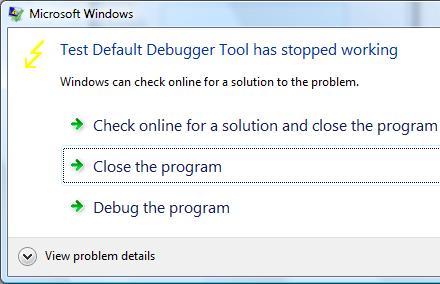
For user applications the best way is to get a memory dump proactively or put in another words, manually, and do not rely on a postmortem debugger that may not be set up correctly on a problem server in 100 server farm. If any error message box appears with a message that an application stopped working or that it has encountered an application error then you can use process dumpers like userdump.exe.

Suppose we have the following error message when TestDefaultDebugger application crashes on Vista x64 (the same technique is applicable to earlier OS too):

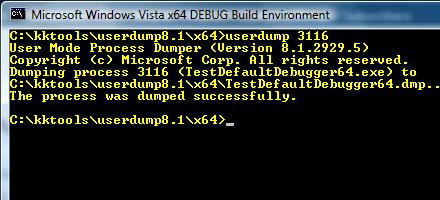
Then we can dump the process while it displays the problem if we know its process ID:

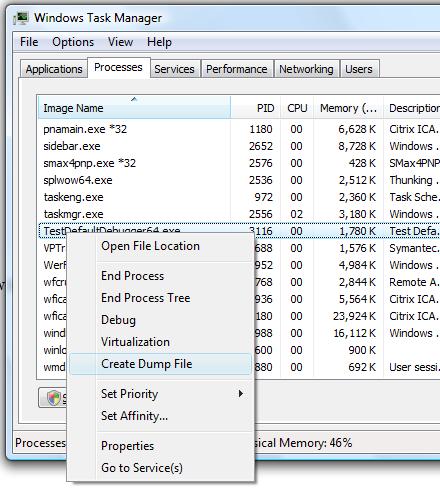
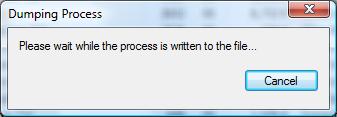
In Vista this can be done even more easily by dumping the process from Task Manager directly:

Choose Create Dump File:

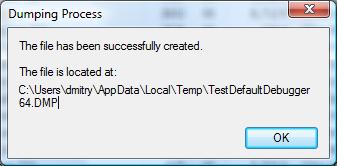
and the process dump is saved in a user location for temporary files:

Although the application above is the native Windows application the same method applies for .NET applications. For example, the forthcoming TestDefaultDebugger.NET application

shows the following dialog:

and we can dump the process manually while it displays the message.

Although both applications will disappear from Task Manager if we choose Close or Quit on their error message boxes and therefore will be considered as crashes under my terminology, at the time when they show their stop messages they are considered as application hangs and this is why we use manual process dumpers.

Other scenarios including system failures will be considered in the next part. 

- Dmitry Vostokov @ DumpAnalysis.org -

WinDbg has been updated to version 6.8.4.0

Wednesday, November 7th, 2007

A bit late notice. I have just found that the new version of WinDbg was released last month:

http://www.microsoft.com/whdc/devtools/debugging/installx86.mspx

http://www.microsoft.com/whdc/devtools/debugging/install64bit.mspx

Seems not so many enhancements in this release according to the link below and relnotes.txt and at least it is not called Beta:

http://www.microsoft.com/whdc/devtools/debugging/whatsnew.mspx

- Dmitry Vostokov @ DumpAnalysis.org -