Archive for the ‘Debugging’ Category

WinDbg is privacy-aware

Sunday, July 8th, 2007

This is a quick follow up to my previous post about privacy issues related to crash dumps. WinDbg has two options for .dump command to remove the potentially sensitive user data (from WinDbg help):

  • r  - Deletes from the minidump those portions of the stack and store memory that are not useful for recreating the stack trace. Local variables and other data type values are deleted as well. This option does not make the minidump smaller (because these memory sections are simply zeroed), but it is useful if you want to protect the privacy of other applications. 

  • R  - Deletes the full module paths from the minidump. Only the module names will be included. This is a useful option if you want to protect the privacy of the user’s directory structure.

Therefore it is possible to configure CDB or WinDbg as default postmortem debuggers and avoid process data to be included. Most of stack is zeroed except frame data pointers and return addresses used to reconstruct stack trace. Therefore string constants like passwords are eliminated. I made the following test with CDB configured as the default post-mortem debugger on my Windows x64 server:

HKEY_LOCAL_MACHINE\SOFTWARE\Wow6432Node\Microsoft\Windows NT\CurrentVersion\AeDebug
Debugger="C:\Program Files (x86)\Debugging Tools for Windows\cdb.exe" -p %ld -e %ld -g -c ".dump /o /mrR /u c:\temp\safedump.dmp; q"

I got the following stack trace from TestDefaultDebugger (module names and function offsets are removed for visual clarity):

0:000> kvL 100
ChildEBP RetAddr  Args to Child
002df868 00403263 00425ae8 00000000 002df8a8 OnBnClickedButton1
002df878 00403470 002dfe90 00000000 00000000 _AfxDispatchCmdMsg
002df8a8 00402a27 00000000 00000000 00000000 OnCmdMsg
002df8cc 00408e69 00000000 00000000 00000000 OnCmdMsg
002df91c 004098d9 00000000 00580a9e 00000000 OnCommand
002df9b8 00406258 00000000 00000000 00580a9e OnWndMsg
002df9d8 0040836d 00000000 00000000 00580a9e WindowProc
002dfa40 004083f4 00000000 00000000 00000000 AfxCallWndProc
002dfa60 7d9472d8 00000000 00000000 00000000 AfxWndProc
002dfa8c 7d9475c3 004083c0 00000000 00000000 InternalCallWinProc
002dfb04 7d948626 00000000 004083c0 00000000 UserCallWinProcCheckWow
002dfb48 7d94868d 00000000 00000000 00000000 SendMessageWorker
002dfb6c 7dbf87b3 00000000 00000000 00000000 SendMessageW
002dfb8c 7dbf8895 00000000 00000000 00000000 Button_NotifyParent
002dfba8 7dbfab9a 00000000 00000000 002dfcb0 Button_ReleaseCapture
002dfc38 7d9472d8 00580a9e 00000000 00000000 Button_WndProc
002dfc64 7d9475c3 7dbfa313 00580a9e 00000000 InternalCallWinProc
002dfcdc 7d9477f6 00000000 7dbfa313 00580a9e UserCallWinProcCheckWow
002dfd54 7d947838 00000000 00000000 002dfd90 DispatchMessageWorker
002dfd64 7d956ca0 00000000 00000000 002dfe90 DispatchMessageW
002dfd90 0040568b 00000000 00000000 002dfe90 IsDialogMessageW
002dfda0 004065d8 00000000 00402a07 00000000 IsDialogMessageW
002dfda8 00402a07 00000000 00000000 00000000 PreTranslateInput
002dfdb8 00408041 00000000 00000000 002dfe90 PreTranslateMessage
002dfdc8 00403ae3 00000000 00000000 00000000 WalkPreTranslateTree
002dfddc 00403c1e 00000000 00403b29 00000000 AfxInternalPreTranslateMessage
002dfde4 00403b29 00000000 00403c68 00000000 PreTranslateMessage
002dfdec 00403c68 00000000 00000000 002dfe90 AfxPreTranslateMessage
002dfdfc 00407920 00000000 002dfe90 002dfe6c AfxInternalPumpMessage
002dfe20 004030a1 00000000 00000000 0042ec18 CWnd::RunModalLoop
002dfe6c 0040110d 00000000 0042ec18 0042ec18 CDialog::DoModal
002dff18 004206fb 00000000 00000000 00000000 InitInstance
002dff28 0040e852 00400000 00000000 00000000 AfxWinMain
002dffc0 7d4e992a 00000000 00000000 00000000 __tmainCRTStartup
002dfff0 00000000 0040e8bb 00000000 00000000 BaseProcessStart

We can see that most arguments are zeroes. Those that are not either do not point to valid data or related to function return addresses and frame pointers. This can be seen from the raw stack data as well:

0:000> dds esp
002df86c  00403263 TestDefaultDebugger!_AfxDispatchCmdMsg+0x43
002df870  00425ae8 TestDefaultDebugger!CTestDefaultDebuggerApp::`vftable'+0x154
002df874  00000000
002df878  002df8a8
002df87c  00403470 TestDefaultDebugger!CCmdTarget::OnCmdMsg+0x118
002df880  002dfe90
002df884  00000000
002df888  00000000
002df88c  004014f0 TestDefaultDebugger!CTestDefaultDebuggerDlg::OnBnClickedButton1
002df890  00000000
002df894  00000000
002df898  00000000
002df89c  002dfe90
002df8a0  00000000
002df8a4  00000000
002df8a8  002df8cc
002df8ac  00402a27 TestDefaultDebugger!CDialog::OnCmdMsg+0x1b
002df8b0  00000000
002df8b4  00000000
002df8b8  00000000
002df8bc  00000000
002df8c0  00000000
002df8c4  002dfe90
002df8c8  00000000
002df8cc  002df91c
002df8d0  00408e69 TestDefaultDebugger!CWnd::OnCommand+0x90
002df8d4  00000000
002df8d8  00000000
002df8dc  00000000
002df8e0  00000000
002df8e4  002dfe90
002df8e8  002dfe90

We can compare it with the normal full or minidump saved with other /m options. The data zeroed when we use /mr option is shown in red color (module names and function offsets are removed for visual clarity):

0:000> kvL 100
ChildEBP RetAddr Args to Child
002df868 00403263 00425ae8 00000111 002df8a8 OnBnClickedButton1
002df878 00403470 002dfe90 000003e8 00000000 _AfxDispatchCmdMsg
002df8a8 00402a27 000003e8 00000000 00000000 OnCmdMsg
002df8cc 00408e69 000003e8 00000000 00000000 OnCmdMsg
002df91c 004098d9 00000000 00271876 d5b6c7f7 OnCommand
002df9b8 00406258 00000111 000003e8 00271876 OnWndMsg
002df9d8 0040836d 00000111 000003e8 00271876 WindowProc
002dfa40 004083f4 00000000 00561878 00000111 AfxCallWndProc
002dfa60 7d9472d8 00561878 00000111 000003e8 AfxWndProc
002dfa8c 7d9475c3 004083c0 00561878 00000111 InternalCallWinProc
002dfb04 7d948626 00000000 004083c0 00561878 UserCallWinProcCheckWow
002dfb48 7d94868d 00aec860 00000000 00000111 SendMessageWorker
002dfb6c 7dbf87b3 00561878 00000111 000003e8 SendMessageW
002dfb8c 7dbf8895 002ec9e0 00000000 0023002c Button_NotifyParent
002dfba8 7dbfab9a 002ec9e0 00000001 002dfcb0 Button_ReleaseCapture
002dfc38 7d9472d8 00271876 00000202 00000000 Button_WndProc
002dfc64 7d9475c3 7dbfa313 00271876 00000202 InternalCallWinProc
002dfcdc 7d9477f6 00000000 7dbfa313 00271876 UserCallWinProcCheckWow
002dfd54 7d947838 002e77f8 00000000 002dfd90 DispatchMessageWorker
002dfd64 7d956ca0 002e77f8 00000000 002dfe90 DispatchMessageW
002dfd90 0040568b 00561878 00000000 002dfe90 IsDialogMessageW
002dfda0 004065d8 002e77f8 00402a07 002e77f8 IsDialogMessageW
002dfda8 00402a07 002e77f8 002e77f8 00561878 PreTranslateInput
002dfdb8 00408041 002e77f8 002e77f8 002dfe90 PreTranslateMessage
002dfdc8 00403ae3 00561878 002e77f8 002e77f8 WalkPreTranslateTree
002dfddc 00403c1e 002e77f8 00403b29 002e77f8 AfxInternalPreTranslateMessage
002dfde4 00403b29 002e77f8 00403c68 002e77f8 PreTranslateMessage
002dfdec 00403c68 002e77f8 00000000 002dfe90 AfxPreTranslateMessage
002dfdfc 00407920 00000004 002dfe90 002dfe6c AfxInternalPumpMessage
002dfe20 004030a1 00000004 d5b6c023 0042ec18 RunModalLoop
002dfe6c 0040110d d5b6c037 0042ec18 0042ec18 DoModal
002dff18 004206fb 00000ece 00000002 00000001 InitInstance
002dff28 0040e852 00400000 00000000 001d083e AfxWinMain
002dffc0 7d4e992a 00000000 00000000 7efdf000 __tmainCRTStartup
002dfff0 00000000 0040e8bb 00000000 000000c8 BaseProcessStart

0:000> dds esp
002df86c 00403263 TestDefaultDebugger!_AfxDispatchCmdMsg+0x43
002df870 00425ae8 TestDefaultDebugger!CTestDefaultDebuggerApp::`vftable'+0x154
002df874 00000111
002df878 002df8a8
002df87c 00403470 TestDefaultDebugger!CCmdTarget::OnCmdMsg+0×118
002df880 002dfe90
002df884 000003e8
002df888 00000000
002df88c 004014f0 TestDefaultDebugger!CTestDefaultDebuggerDlg::OnBnClickedButton1
002df890 00000000
002df894 00000038
002df898 00000000
002df89c 002dfe90
002df8a0 000003e8
002df8a4 00000000
002df8a8 002df8cc
002df8ac 00402a27 TestDefaultDebugger!CDialog::OnCmdMsg+0×1b
002df8b0 000003e8
002df8b4 00000000
002df8b8 00000000
002df8bc 00000000
002df8c0 000003e8
002df8c4 002dfe90
002df8c8 00000000
002df8cc 002df91c
002df8d0 00408e69 TestDefaultDebugger!CWnd::OnCommand+0×90
002df8d4 000003e8
002df8d8 00000000
002df8dc 00000000
002df8e0 00000000
002df8e4 002dfe90
002df8e8 002dfe90

- Dmitry Vostokov @ DumpAnalysis.org -

WinDbg update 6.7.5.1

Sunday, July 8th, 2007

The new WinDbg has been released this week: 6.7.5.1. Contains some enhancements since 6.7.5.0 released earlier in April.

What’s New for Debugging Tools for Windows

One improvement is for handling mini-dumps:

When loading modules from a user-mode minidump provide available misc and CV record info from dump. This can allow symbols to be loaded in some cases when PE image file is not available.

- Dmitry Vostokov @ DumpAnalysis.org -

Resolving security issues with crash dumps

Sunday, July 8th, 2007

It is a well known fact that crash dumps may contain sensitive and private information. Crash reports that contain binary process extracts may contain it too. There is a conflict here between the desire to get full memory contents for debugging purposes and possible security implications. The solution would be to have postmortem debuggers and user mode process dumpers to implement an option to save only the activity data like stack traces in a text form. Some problems on a system level can be corrected just by looking at thread stack traces, critical section list, full module information, thread times and so on. This can help to identify components that cause process crashes, hangs or CPU spikes.

Users or system administrators can review text data before sending it outside their environment. This was already implemented as Dr. Watson logs. However these logs don’t usually have sufficient information required for crash dump analysis compared to information we can extract from a dump using WinDbg, for example. If you need to analyze kernel and all process activities you can use scripts to convert your kernel and complete memory dumps to text files:

Dmp2Txt: Solving Security Problem

The similar scripts can be applied to user dumps:

Using scripts to process hundreds of user dumps

Generating good scripts in a production environment has one problem: the conversion tool or debugger needs to know about symbols. This can be easily done with Microsoft modules because of Microsoft public symbol server.  Other companies like Citrix have the option to download public symbols:

Debug Symbols for Citrix Presentation Server

Alternatively one can write a WinDbg extension that loads a text file with stack traces, appropriate module images, finds the right PDB files and presents stack traces with full symbolic information. This can also be a separate program that uses Visual Studio DIA (Debug Interface Access) SDK to access PDB files later after receiving a text file from a customer.

I’m currently experimenting with some approaches and will write about them later. Text files will also be used in Internet Based Crash Dump Analysis Service because it is much easier to process text files than crash dumps. Although it is feasible to submit small mini dumps for this purpose they don’t contain much information and require writing specialized OS specific code to parse them. Also text files having the same file size can contain much more useful information without exposing private and sensitive information.

I would appreciate any comments and suggestions regarding this problem. 

- Dmitry Vostokov @ DumpAnalysis.org -

Crash Dump Analysis Patterns (Part 9b)

Tuesday, July 3rd, 2007

This is a follow up to the previous Deadlock pattern post. In this part I’m going to show an example of ERESOURCE deadlock in the Windows kernel.

ERESOURCE (executive resource) is a Windows synchronization object that has ownership semantics. 

An executive resource can be owned exclusively or can have a shared ownership. This is similar to the following file sharing analogy: when a file is opened for writing others can’t write or read it; if you have that file opened for reading others can read from it but can’t write to it.

ERESOURCE structure is linked into a list and have threads as owners which allows us to quickly find deadlocks using !locks command in kernel and complete memory dumps. Here is the definition of _ERESOURCE from x86 and x64 Windows:

0: kd> dt -r1 _ERESOURCE
   +0x000 SystemResourcesList : _LIST_ENTRY
      +0x000 Flink            : Ptr32 _LIST_ENTRY
      +0x004 Blink            : Ptr32 _LIST_ENTRY
   +0x008 OwnerTable       : Ptr32 _OWNER_ENTRY
      +0x000 OwnerThread      : Uint4B
      +0x004 OwnerCount       : Int4B
      +0x004 TableSize        : Uint4B
   +0x00c ActiveCount      : Int2B
   +0x00e Flag             : Uint2B
   +0x010 SharedWaiters    : Ptr32 _KSEMAPHORE
      +0x000 Header           : _DISPATCHER_HEADER
      +0x010 Limit            : Int4B
   +0x014 ExclusiveWaiters : Ptr32 _KEVENT
      +0x000 Header           : _DISPATCHER_HEADER
   +0x018 OwnerThreads     : [2] _OWNER_ENTRY
      +0x000 OwnerThread      : Uint4B
      +0x004 OwnerCount       : Int4B
      +0x004 TableSize        : Uint4B
   +0x028 ContentionCount  : Uint4B
   +0x02c NumberOfSharedWaiters : Uint2B
   +0x02e NumberOfExclusiveWaiters : Uint2B
   +0x030 Address          : Ptr32 Void
   +0x030 CreatorBackTraceIndex : Uint4B
   +0x034 SpinLock         : Uint4B

0: kd> dt -r1  _ERESOURCE
nt!_ERESOURCE
   +0x000 SystemResourcesList : _LIST_ENTRY
      +0x000 Flink            : Ptr64 _LIST_ENTRY
      +0x008 Blink            : Ptr64 _LIST_ENTRY
   +0x010 OwnerTable       : Ptr64 _OWNER_ENTRY
      +0x000 OwnerThread      : Uint8B
      +0x008 OwnerCount       : Int4B
      +0x008 TableSize        : Uint4B
   +0x018 ActiveCount      : Int2B
   +0x01a Flag             : Uint2B
   +0x020 SharedWaiters    : Ptr64 _KSEMAPHORE
      +0x000 Header           : _DISPATCHER_HEADER
      +0x018 Limit            : Int4B
   +0x028 ExclusiveWaiters : Ptr64 _KEVENT
      +0x000 Header           : _DISPATCHER_HEADER
   +0x030 OwnerThreads     : [2] _OWNER_ENTRY
      +0x000 OwnerThread      : Uint8B
      +0x008 OwnerCount       : Int4B
      +0x008 TableSize        : Uint4B
   +0x050 ContentionCount  : Uint4B
   +0x054 NumberOfSharedWaiters : Uint2B
   +0x056 NumberOfExclusiveWaiters : Uint2B
   +0x058 Address          : Ptr64 Void
   +0x058 CreatorBackTraceIndex : Uint8B
   +0x060 SpinLock         : Uint8B

If we have a list of resources from !locks output we can start following threads that own these resources. Owner threads are marked with a star character (*):

0: kd> !locks
**** DUMP OF ALL RESOURCE OBJECTS ****
KD: Scanning for held locks......

Resource @ 0x8815b928    Exclusively owned
    Contention Count = 6234751
    NumberOfExclusiveWaiters = 53
     Threads: 89ab8db0-01<*>
     Threads Waiting On Exclusive Access:
        8810fa08       880f5b40       88831020       87e33020
        880353f0       88115020       88131678       880f5db0
        89295420       88255378       880f8b40       8940d020
        880f58d0       893ee500       880edac8       880f8db0
        89172938       879b3020       88091510       88038020
        880407b8       88051020       89511db0       8921f020
        880e9db0       87c33020       88064cc0       88044730
        8803f020       87a2a020       89529380       8802d330
        89a53020       89231b28       880285b8       88106b90
        8803cbc8       88aa3020       88093400       8809aab0
        880ea540       87d46948       88036020       8806e198
        8802d020       88038b40       8826b020       88231020
        890a2020       8807f5d0
     

We see that 53 threads are waiting for _KTHREAD 89ab8db0 to release _ERESOURCE 8815b928. Searching for this thread address reveals the following: 

Resource @ 0x88159560    Exclusively owned
    Contention Count = 166896
    NumberOfExclusiveWaiters = 1
     Threads: 8802a790-01<*>
     Threads Waiting On Exclusive Access:
              89ab8db0
  

We see that thread 89ab8db0 is waiting for 8802a790 to release resource 88159560. We continue searching for thread 8802a790 waiting for another thread but we skip occurences when this thread is not waiting:

Resource @ 0x881f7b60    Exclusively owned
     Threads: 8802a790-01<*>

Resource @ 0x8824b418    Exclusively owned
    Contention Count = 34
     Threads: 8802a790-01<*>
 

Resource @ 0x8825e5a0    Exclusively owned
     Threads: 8802a790-01<*>

Resource @ 0x88172428    Exclusively owned
    Contention Count = 5
    NumberOfExclusiveWaiters = 1
     Threads: 8802a790-01<*>
     Threads Waiting On Exclusive Access:
              880f5020

Searching further we see that thread 8802a790 is waiting for thread 880f5020 to release resource 89bd7bf0:

Resource @ 0x89bd7bf0    Exclusively owned
    Contention Count = 1
    NumberOfExclusiveWaiters = 1
     Threads: 880f5020-01<*>
     Threads Waiting On Exclusive Access:
              8802a790

If we look carefully we would see that we have already seen thread 880f5020 above and I repeat the fragment (with appropriate colors now):

Resource @ 0x88172428    Exclusively owned
    Contention Count = 5
    NumberOfExclusiveWaiters = 1
     Threads: 8802a790-01<*>
     Threads Waiting On Exclusive Access:
              880f5020

We see that thread 880f5020 is waiting for thread 8802a790 and thread 8802a790 is waiting for thread 880f5020.

Therefore we have identified the classical deadlock. What we have to do now is to look at stack traces of these threads to see involved components.

- Dmitry Vostokov @ DumpAnalysis.org -

GDB for WinDbg Users (Part 4)

Sunday, July 1st, 2007

If you are looking for debugging tutorials with a wider scope than just listing various debugger commands then the following books will be useful:

Both use GDB for debugging case studies and will be useful for engineers with any level of debugging experience.

- Dmitry Vostokov @ DumpAnalysis.org -

When a process dies silently

Thursday, June 28th, 2007

There are cases when default postmortem debugger doesn’t save a dump file. This is because the default postmortem debugger is called from the crashed application thread on Windows prior to Vista and if a thread stack is exhausted or critical thread data is corrupt there is no user dump.  On Vista the default postmorten debugger is called from WER (Windows Error Reporting) process WerFault.exe so there is a chance that it can save a user dump. During my experiments today on Windows 2003 (x64) I found that if we have a stack overflow inside a 64-bit process then the process silently dies. This doesn’t happen for 32-bit processes on the same server on a native 32-bit OS. Here is the added code from the modified default Win32 API project created in Visual Studio 2005:

...
volatile DWORD dwSupressOptimization;
...
void SoFunction();
...
LRESULT CALLBACK WndProc(HWND hWnd, UINT message, WPARAM wParam, LPARAM lParam)
{
...
  case WM_PAINT:
     hdc = BeginPaint(hWnd, &ps);
     SoFunction();
     EndPaint(hWnd, &ps);
     break;
...
}
...
void SoFunction()
{
  if (++dwSupressOptimization)
  {
     SoFunction();
     WndProc(0,0,0,0);
  }
}

Adding WndProc call to SoFunction is done to eliminate an optimization in Release build when a recursion call is transformed into a loop:

void SoFunction()
{
  if (++dwSupressOptimization)
  {
     SoFunction();
  }
}

0:001> uf SoFunction
00401300 mov     eax,1
00401305 jmp     StackOverflow!SoFunction+0x10 (00401310)
00401310 add     dword ptr [StackOverflow!dwSupressOptimization (00403374)],eax
00401316 mov     ecx,dword ptr [StackOverflow!dwSupressOptimization (00403374)]
0040131c jne     StackOverflow!SoFunction+0x10 (00401310)
0040131e ret

Therefore without WndProc added or more complicated SoFunction there is no stack overflow but a loop with 4294967295 (0xFFFFFFFF) iterations.

If we compile an x64 project with WndProc call included in SoFunction and run it we would never get a dump from any default postmortem debugger although TestDefaultDebugger64 tool crashes with a dump. I also observed a strange behavior that the application disappears only during the second window repaint although it shall crash immediately when we launch it and the main window is shown. What I have seen is when I launch the application it is running and the main window is visible. When I force it to repaint by minimizing and then maximizing, for example, only then it disappears from the screen and the process list.

If we launch 64-bit WinDbg, load and run our application we would hit the first chance exception:

0:000> g
(159c.fc4): Stack overflow - code c00000fd (first chance)
First chance exceptions are reported before any exception handling.
This exception may be expected and handled.
StackOverflow!SoFunction+0x22:
00000001`40001322 e8d9ffffff call StackOverflow!SoFunction (00000001`40001300)

Stack trace looks like normal stack overflow:

0:000> k
Child-SP          RetAddr           Call Site
00000000`00033fe0 00000001`40001327 StackOverflow!SoFunction+0x22
00000000`00034020 00000001`40001327 StackOverflow!SoFunction+0x27
00000000`00034060 00000001`40001327 StackOverflow!SoFunction+0x27
00000000`000340a0 00000001`40001327 StackOverflow!SoFunction+0x27
00000000`000340e0 00000001`40001327 StackOverflow!SoFunction+0x27
00000000`00034120 00000001`40001327 StackOverflow!SoFunction+0x27
00000000`00034160 00000001`40001327 StackOverflow!SoFunction+0x27
00000000`000341a0 00000001`40001327 StackOverflow!SoFunction+0x27
00000000`000341e0 00000001`40001327 StackOverflow!SoFunction+0x27
00000000`00034220 00000001`40001327 StackOverflow!SoFunction+0x27
00000000`00034260 00000001`40001327 StackOverflow!SoFunction+0x27
00000000`000342a0 00000001`40001327 StackOverflow!SoFunction+0x27
00000000`000342e0 00000001`40001327 StackOverflow!SoFunction+0x27
00000000`00034320 00000001`40001327 StackOverflow!SoFunction+0x27
00000000`00034360 00000001`40001327 StackOverflow!SoFunction+0x27
00000000`000343a0 00000001`40001327 StackOverflow!SoFunction+0x27
00000000`000343e0 00000001`40001327 StackOverflow!SoFunction+0x27
00000000`00034420 00000001`40001327 StackOverflow!SoFunction+0x27
00000000`00034460 00000001`40001327 StackOverflow!SoFunction+0x27
00000000`000344a0 00000001`40001327 StackOverflow!SoFunction+0x27

RSP was inside stack guard page during the CALL instruction.

0:000> r
rax=0000000000003eed rbx=00000000000f26fe rcx=0000000077c4080a
rdx=0000000000000000 rsi=000000000000000f rdi=0000000000000000
rip=0000000140001322 rsp=0000000000033fe0 rbp=00000001400035f0
 r8=000000000012fb18 r9=00000001400035f0 r10=0000000000000000
r11=0000000000000246 r12=000000000012fdd8 r13=000000000012fd50
r14=00000000000f26fe r15=0000000000000000
iopl=0 nv up ei pl nz na po nc
cs=0033 ss=002b ds=002b es=002b fs=0053 gs=002b efl=00010206
StackOverflow!SoFunction+0×22:
00000001`40001322 e8d9ffffff call StackOverflow!SoFunction (00000001`40001300)

0:000> uf StackOverflow!SoFunction
00000001`40001300 sub     rsp,38h
00000001`40001304 mov     rax,qword ptr [StackOverflow!__security_cookie (00000001`40003000)]
00000001`4000130b xor     rax,rsp
00000001`4000130e mov     qword ptr [rsp+20h],rax
00000001`40001313 add     dword ptr [StackOverflow!dwSupressOptimization (00000001`400035e4)],1
00000001`4000131a mov     eax,dword ptr [StackOverflow!dwSupressOptimization (00000001`400035e4)]
00000001`40001320 je      StackOverflow!SoFunction+0×37 (00000001`40001337)
00000001`40001322 call    StackOverflow!SoFunction (00000001`40001300)
00000001`40001327 xor     r9d,r9d
00000001`4000132a xor     r8d,r8d
00000001`4000132d xor     edx,edx
00000001`4000132f xor     ecx,ecx
00000001`40001331 call    qword ptr [StackOverflow!_imp_DefWindowProcW (00000001`40002198)]
00000001`40001337 mov     rcx,qword ptr [rsp+20h]
00000001`4000133c xor     rcx,rsp
00000001`4000133f call    StackOverflow!__security_check_cookie (00000001`40001360)
00000001`40001344 add     rsp,38h
00000001`40001348 ret

However this guard page is not the last stack page as can be seen from TEB and the current RSP address (0×33fe0):

0:000> !teb
TEB at 000007fffffde000
    ExceptionList:        0000000000000000
    StackBase:            0000000000130000
    StackLimit:           0000000000031000
    SubSystemTib:         0000000000000000
    FiberData:            0000000000001e00
    ArbitraryUserPointer: 0000000000000000
    Self:                 000007fffffde000
    EnvironmentPointer:   0000000000000000
    ClientId:             000000000000159c . 0000000000000fc4
    RpcHandle:            0000000000000000
    Tls Storage:          0000000000000000
    PEB Address:          000007fffffd5000
    LastErrorValue:       0
    LastStatusValue:      c0000135
    Count Owned Locks:    0
    HardErrorMode:        0

If we continue execution and force the main application window to invalidate (repaint) itself we get another first chance exception instead of second chance:

0:000> g
(159c.fc4): Access violation - code c0000005 (first chance)
First chance exceptions are reported before any exception handling.
This exception may be expected and handled.
StackOverflow!SoFunction+0x22:
00000001`40001322 call StackOverflow!SoFunction (00000001`40001300)

What we see now is that RSP is outside the valid stack region (stack limit) 0×31000:

0:000> k
Child-SP          RetAddr           Call Site
00000000`00030ff0 00000001`40001327 StackOverflow!SoFunction+0×22
00000000`00031030 00000001`40001327 StackOverflow!SoFunction+0×27
00000000`00031070 00000001`40001327 StackOverflow!SoFunction+0×27
00000000`000310b0 00000001`40001327 StackOverflow!SoFunction+0×27
00000000`000310f0 00000001`40001327 StackOverflow!SoFunction+0×27
00000000`00031130 00000001`40001327 StackOverflow!SoFunction+0×27
00000000`00031170 00000001`40001327 StackOverflow!SoFunction+0×27
00000000`000311b0 00000001`40001327 StackOverflow!SoFunction+0×27
00000000`000311f0 00000001`40001327 StackOverflow!SoFunction+0×27
00000000`00031230 00000001`40001327 StackOverflow!SoFunction+0×27
00000000`00031270 00000001`40001327 StackOverflow!SoFunction+0×27
00000000`000312b0 00000001`40001327 StackOverflow!SoFunction+0×27
00000000`000312f0 00000001`40001327 StackOverflow!SoFunction+0×27
00000000`00031330 00000001`40001327 StackOverflow!SoFunction+0×27
00000000`00031370 00000001`40001327 StackOverflow!SoFunction+0×27
00000000`000313b0 00000001`40001327 StackOverflow!SoFunction+0×27
00000000`000313f0 00000001`40001327 StackOverflow!SoFunction+0×27
00000000`00031430 00000001`40001327 StackOverflow!SoFunction+0×27
00000000`00031470 00000001`40001327 StackOverflow!SoFunction+0×27
00000000`000314b0 00000001`40001327 StackOverflow!SoFunction+0×27
0:000> r
rax=0000000000007e98 rbx=00000000000f26fe rcx=0000000077c4080a
rdx=0000000000000000 rsi=000000000000000f rdi=0000000000000000
rip=0000000140001322 rsp=0000000000030ff0 rbp=00000001400035f0
 r8=000000000012faa8  r9=00000001400035f0 r10=0000000000000000
r11=0000000000000246 r12=000000000012fd68 r13=000000000012fce0
r14=00000000000f26fe r15=0000000000000000
iopl=0 nv up ei pl nz na pe nc
cs=0033 ss=002b ds=002b es=002b fs=0053 gs=002b efl=00010202
StackOverflow!SoFunction+0×22:
00000001`40001322 call    StackOverflow!SoFunction (00000001`40001300)

Therefore we expect the second chance exception at the same address here and we get it indeed when we continue execution:

0:000> g
(159c.fc4): Access violation - code c0000005 (!!! second chance !!!)
StackOverflow!SoFunction+0x22:
00000001`40001322 call    StackOverflow!SoFunction (00000001`40001300)

Now we see why the process died silently. There was no stack space left for exception dispatch handler functions and therefore for the default unhandled exception filter that launches the default postmortem debugger to save a process dump. So it looks like on x64 Windows when our process had first chance stack overflow exception there was no second chance exception afterwards and after handling first chance stack overflow exception process execution resumed and finally hit its thread stack limit. This doesn’t happen with 32-bit processes even on x64 Windows where unhandled first chance stack overflow exception results in immediate second chance stack overflow exception at the same stack address and therefore there is a sufficient room for the local variables for exception handler and filter functions.

This is an example of what happened before exception handling changes in Vista.

- Dmitry Vostokov @ DumpAnalysis.org -

Detecting loops in code

Saturday, June 23rd, 2007

Sometimes when we look at a stack trace and disassembled code we see that a crash couldn’t have happened if the code path was linear. In such cases we need to see if there is any loop that changes some variables. This is greatly simplified if we have source code but in cases where we don’t have access to source code it is still possible to detect loops. We just need to find a direct (JMP) or conditional jump instruction (Jxxx, for example, JE) after the crash point branching to the beginning of the loop before the crash point as shown in the following pseudo code:

set the pointer value

label:

>>> crash when dereferencing the pointer

change the pointer value

jmp label

Let’s look at one example I found very interesting because it also shows __thiscall calling convention for C++ code generated by Visual С++ compiler. Before we look at the dump I quickly remind you about how C++ non-static class methods are called. Let’s first look at non-virtual method call.

class A
{
public:
        int foo() { return i; }
virtual int bar() { return i; }
private:
        int i;
};

Internally class members are accessed via implicit this pointer (passed via ECX):

int A::foo() { return this->i; }

Suppose we have an object instance of class A and we call its foo method:

A obj;
obj.foo();

The compiler has to generate code which calls foo function and the code inside the function has to know which object it is associated with. So internally the compiler passes implicit parameter - a pointer to that object. In pseudo code:

int foo_impl(A *this)
{
return this->i;
}

A obj;
foo_impl(&obj);

In x86 assembly language it should be similar to this code:

lea ecx, obj
call foo_impl

If you have obj declared as a local variable:

lea ecx, [ebp-N]
call foo_impl

If you have a pointer to an obj then the compiler usually generates mov instruction instead of lea instruction:

A *pobj;
pobj->foo();

mov ecx, [ebp-N]
call foo_impl

If you have other function parameters they are pushed on the stack from right to left. This is __thiscall calling convention. For virtual function call we have an indirect call through virtual function table. The pointer to it is the first object layout member and in the latter case where the pointer to obj is declared as the local variable we have the following x86 code:

A *pobj;
pobj->bar();

mov ecx, [ebp-N]
mov eax, [ecx]
call [eax]

Now let’s look at the crash point and stack trace:

0:021> r
eax=020864ee ebx=00000000 ecx=0000005c edx=7518005c esi=020864dc edi=00000000
eip=67dc5dda esp=075de820 ebp=075dea78 iopl=0 nv up ei pl nz na po nc
cs=001b ss=0023 ds=0023 es=0023 fs=003b gs=0000 efl=00010202
component!CDirectory::GetDirectory+0×8a:
67dc5dda 8b03 mov eax,dword ptr [ebx] ds:0023:00000000=????????

0:021> k
ChildEBP RetAddr
075dea78 004074f0 component!CDirectory::GetDirectory+0x8a
075deaac 0040e4fc component!CDirectory::FindFirstFileW+0xd0
075dffb8 77e64829 component!MonitorThread+0x13
075dffec 00000000 kernel32!BaseThreadStart+0x34

If we look at GetDirectory code we would see:

0:021> .asm no_code_bytes
Assembly options: no_code_bytes

0:021> uf component!CDirectory::GetDirectory
component!CDirectory::GetDirectory:
67dc5d50 push    ebp
67dc5d51 mov     ebp,esp
67dc5d53 push    0FFFFFFFFh
67dc5d55 push    offset component!CreateErrorInfo+0x553 (67ded93b)
67dc5d5a mov     eax,dword ptr fs:[00000000h]
67dc5d60 push    eax
67dc5d61 mov     dword ptr fs:[0],esp
67dc5d68 sub     esp,240h
67dc5d6e mov     eax,dword ptr [component!__security_cookie (67e0113c)]
67dc5d73 mov     dword ptr [ebp-10h],eax
67dc5d76 mov     eax,dword ptr [ebp+8]
67dc5d79 test    eax,eax
67dc5d7b push    ebx
67dc5d7c mov     ebx,ecx
67dc5d7e mov     dword ptr [ebp-238h],ebx
67dc5d84 je      component!CDirectory::GetDirectory+0×2a1 (67dc5ff1)

component!CDirectory::GetDirectory+0x3a:
67dc5d8a cmp     word ptr [eax],0
67dc5d8e je      component!CDirectory::GetDirectory+0x2a1 (67dc5ff1)

component!CDirectory::GetDirectory+0x44:
67dc5d94 push    esi
67dc5d95 push    eax
67dc5d96 call    dword ptr [component!_imp__wcsdup (67df050c)]
67dc5d9c add     esp,4
67dc5d9f mov     dword ptr [ebp-244h],eax
67dc5da5 mov     dword ptr [ebp-240h],eax
67dc5dab push    5Ch
67dc5dad lea     ecx,[ebp-244h]
67dc5db3 mov     dword ptr [ebp-4],0
67dc5dba call    component!CStrToken::Next (67dc4f80)
67dc5dbf mov     esi,eax
67dc5dc1 test    esi,esi
67dc5dc3 je      component!CDirectory::GetDirectory+0x28c (67dc5fdc)

component!CDirectory::GetDirectory+0x79:
67dc5dc9 push    edi
67dc5dca lea     ebx,[ebx]

component!CDirectory::GetDirectory+0x80:
67dc5dd0 cmp     word ptr [esi],0
67dc5dd4 je      component!CDirectory::GetDirectory+0x28b (67dc5fdb)

component!CDirectory::GetDirectory+0x8a:
>>> 67dc5dda mov     eax,dword ptr [ebx]
67dc5ddc mov ecx,ebx

If we trace EBX backwards (red) we would see that it comes from ECX (blue) so ECX could be considered as an implicit this pointer according to __thiscall calling convention. Therefore it looks like the caller passed NULL this pointer via ECX.

Let’s look at the caller. To see the code we can either disassemble FindFirstFileW or disassemble backwards at the GetDirectory return address. I’ll do the latter:

0:021> k
ChildEBP RetAddr
075dea78 004074f0 component!CDirectory::GetDirectory+0×8a
075deaac 0040e4fc component!CDirectory::FindFirstFileW+0xd0
075dffb8 77e64829 component!MonitorThread+0×13
075dffec 00000000 kernel32!BaseThreadStart+0×34

0:021> ub 004074f0
component!CDirectory::FindFirstFileW+0xbe:
004074de pop     ebp
004074df clc
004074e0 mov     ecx,dword ptr [esi+8E4h]
004074e6 mov     eax,dword ptr [ecx]
004074e8 push    0
004074ea push    0
004074ec push    edx
004074ed call    dword ptr [eax+10h]

We see that ECX is our this pointer. However the virtual table pointer is taken from the memory it references:

004074e6 mov eax,dword ptr [ecx]


004074ed call dword ptr [eax+10h]

Were ECX a NULL we would have had our crash at this point. However we have our crash in the called function. So it couldn’t be NULL. There is a contradiction here. The only plausible explanation is that in GetDirectory function there is a loop that changes EBX (shown in red in GetDirectory function code above). If we have a second look at the code we would see that EBX is saved in [ebp-238h] local variable before it is used:

0:021> uf component!CDirectory::GetDirectory
component!CDirectory::GetDirectory:
67dc5d50 push    ebp
67dc5d51 mov     ebp,esp
67dc5d53 push    0FFFFFFFFh
67dc5d55 push    offset component!CreateErrorInfo+0x553 (67ded93b)
67dc5d5a mov     eax,dword ptr fs:[00000000h]
67dc5d60 push    eax
67dc5d61 mov     dword ptr fs:[0],esp
67dc5d68 sub     esp,240h
67dc5d6e mov     eax,dword ptr [component!__security_cookie (67e0113c)]
67dc5d73 mov     dword ptr [ebp-10h],eax
67dc5d76 mov     eax,dword ptr [ebp+8]
67dc5d79 test    eax,eax
67dc5d7b push    ebx
67dc5d7c mov     ebx,ecx
67dc5d7e mov     dword ptr [ebp-238h],ebx
67dc5d84 je      component!CDirectory::GetDirectory+0×2a1 (67dc5ff1)

component!CDirectory::GetDirectory+0x3a:
67dc5d8a cmp     word ptr [eax],0
67dc5d8e je      component!CDirectory::GetDirectory+0x2a1 (67dc5ff1)

component!CDirectory::GetDirectory+0x44:
67dc5d94 push    esi
67dc5d95 push    eax
67dc5d96 call    dword ptr [component!_imp__wcsdup (67df050c)]
67dc5d9c add     esp,4
67dc5d9f mov     dword ptr [ebp-244h],eax
67dc5da5 mov     dword ptr [ebp-240h],eax
67dc5dab push    5Ch
67dc5dad lea     ecx,[ebp-244h]
67dc5db3 mov     dword ptr [ebp-4],0
67dc5dba call    component!CStrToken::Next (67dc4f80)
67dc5dbf mov     esi,eax
67dc5dc1 test    esi,esi
67dc5dc3 je      component!CDirectory::GetDirectory+0x28c (67dc5fdc)

component!CDirectory::GetDirectory+0x79:
67dc5dc9 push    edi
67dc5dca lea     ebx,[ebx]

component!CDirectory::GetDirectory+0x80:
67dc5dd0 cmp     word ptr [esi],0
67dc5dd4 je      component!CDirectory::GetDirectory+0x28b (67dc5fdb)

component!CDirectory::GetDirectory+0x8a:
>>> 67dc5dda mov     eax,dword ptr [ebx]
67dc5ddc mov ecx,ebx

If we look further past the crash point we would see that [ebp-238h] value is changed and then used again to change EBX:

component!CDirectory::GetDirectory+0x80:
67dc5dd0 cmp word ptr [esi],0
67dc5dd4 je component!CDirectory::GetDirectory+0×28b (67dc5fdb)

component!CDirectory::GetDirectory+0x8a:
>>> 67dc5dda mov eax,dword ptr [ebx]
67dc5ddc mov ecx,ebx


component!CDirectory::GetDirectory+0×11e:
67dc5e6e mov     eax,dword ptr [ebp-23Ch]
67dc5e74 mov     ecx,dword ptr [eax]
67dc5e76 mov     dword ptr [ebp-238h],ecx
67dc5e7c jmp     component!CDirectory::GetDirectory+0×20e (67dc5f5e)


component!CDirectory::GetDirectory+0×23e:
67dc5f8e cmp     esi,edi
67dc5f90 mov     ebx,dword ptr [ebp-238h]
67dc5f96 jne     component!CDirectory::GetDirectory+0×80 (67dc5dd0)

We see that after changing EBX the code jumps to 67dc5dd0 address and this address is just before our crash point. It looks like a loop. Therefore there is no contradiction. ECX as this pointer was passed as non-NULL and valid pointer. Before the loop started its value was passed to EBX. In the loop body EBX was changed and after some loop iterations the new value became NULL. It could be the case that there were no checks for NULL pointers in the loop code.

- Dmitry Vostokov @ DumpAnalysis.org -

Guessing stack trace

Thursday, June 21st, 2007

Sometimes instead of looking at raw stack data to identify all modules that might have been involved in a problem thread we can use the following old Windows 2000 kdex2×86 WinDbg extension command that can even work with Windows 2003 or XP kernel memory dumps:

4: kd> !w2kfre\kdex2x86.stack -?
!stack - Do stack trace for specified thread
Usage : !stack [-?ha[0|1]] [address]
Arguments :
 -?,-h - display help information.
 -a - specifies display mode. This option is off, in default. If this option is specified, output stack trace in detail.
 -0,-1 - specifies filter level for display. Default filter level is 0. In level 0, display stackframes that are guessed return-adresses for reason of its value and previous mnemonic. In level 1, display stackframes that call other stackframe or is called by other stackframe, besides level 0.
 address - specifies thread address. When address is omitted, do stack trace for the current thread.

For example:

Loading Dump File [MEMORY.DMP]
Kernel Summary Dump File: Only kernel address space is available
Windows Server 2003 Kernel Version 3790 (Service Pack 2) MP (8 procs) Free x86 compatible
Product: Server, suite: Enterprise TerminalServer
Built by: 3790.srv03_sp2_gdr.070304-2240
Kernel base = 0x80800000 PsLoadedModuleList = 0x808a6ea8
Debug session time: Mon Jun 11 14:49:21.541 2007 (GMT+1)
System Uptime: 0 days 2:10:11.877

4: kd> k
ChildEBP RetAddr
b7a24e84 80949b48 nt!KeBugCheckEx+0x1b
b7a24ea0 80949ba4 nt!PspUnhandledExceptionInSystemThread+0x1a
b7a25ddc 8088e062 nt!PspSystemThreadStartup+0x56
00000000 00000000 nt!KiThreadStartup+0x16

4: kd> !w2kfre\kdex2x86.stack
T. Address  RetAddr  Called Procedure
*2 B7A24E68 80827C63 nt!KeBugCheck2(0000007E, C0000005, BFE5FEEA,...);
*2 B7A24E88 80949B48 nt!KeBugCheckEx(0000007E, C0000005, BFE5FEEA,...);
*2 B7A24EA4 80949BA4 nt!PspUnhandledExceptionInSystemThread(B7A24EC8, 80881801, B7A24ED0,...);
*0 B7A24EAC 80881801 dword ptr EAX(B7A24ED0, 00000000, B7A24ED0,...);
*1 B7A24ED4 8088ED4E dword ptr ECX(B7A25378, B7A25DCC, B7A25074,...);
*1 B7A24EF8 8088ED20 nt!ExecuteHandler2(B7A25378, B7A25DCC, B7A25074,...);
*1 B7A24F1C 80877C0C nt!RtlpExecuteHandlerForException(B7A25378, B7A25DCC, B7A25074,...);
*0 B7A24F5C 808914F7 nt!RtlClearBits(893E3BF8, 0000014A, 00000001,...);
*1 B7A24FA8 8082D58F nt!RtlDispatchException(B7A25378, B7A25074, 00000008,...);
*1 B7A2501C 80A5C456 hal!HalpCheckForSoftwareInterrupt(89267D08, 00000000, 89267D00,...);
*1 B7A25030 80A5C456 hal!HalpCheckForSoftwareInterrupt(00000000, 89267D00, B7A25060,...);
*1 B7A25040 80A5A56D hal!KfLowerIrql(8087C9C0, BC910000, 00000018,...);
*1 B7A25044 8087C9C0 hal!KeReleaseInStackQueuedSpinLock(BC910000, 00000018, BFEBC0A0,...);
*1 B7A25064 8087CA95 nt!ExReleaseResourceLite(B7A253CC, B7A25078, B7A25378,...);
*0 B7A250F4 F346C646 termdd!IcaCallNextDriver(88F9E2A4, 00000002, 00000000,...);
*1 B7A25140 F764C20E termdd!_IcaCallSd(88F9E290, 00000002, B7A251EC,...);
*1 B7A25154 F3464959 termdd!IcaCallNextDriver(88F876B4, 00000002, B7A251EC,...);
*1 B7A25174 F346632D component2+00000830(88F4F990, B7A251EC, 88F876B0,...);
*1 B7A25188 F764C1C7 dword ptr EAX(88F4F990, B7A251EC, 88DFB000,...);
*1 B7A251A4 F764C20E termdd!_IcaCallSd(88F876A0, 00000002, B7A251EC,...);
*1 B7A251B8 F36C9928 termdd!IcaCallNextDriver(88EAEC6C, F773F120, F773F120,...);
*0 B7A251D0 80892853 nt!RtlpInterlockedPushEntrySList(00000000, 00000000, 808B4900,...);
*0 B7A251E8 8081C3DA nt!RtlpInterlockedPushEntrySList(89586178, 00000000, 00000000,...);
*0 B7A251FC 80821967 nt!ObDereferenceObjectDeferDelete(8082196C, 894E8648, 898B0020,...);
*0 B7A25200 8082196C nt!_SEH_epilog(894E8648, 898B0020, 80A5A530,...);
*0 B7A25248 8082196C nt!_SEH_epilog(8082DFC3, 894E8648, B7A25294,...);
*1 B7A2524C 8082DFC3 dword ptr [EBP-14](894E8648, B7A25294, B7A25288,...);
*1 B7A2529C 80A5C199 nt!KiDeliverApc(00000000, 00000000, 00000000,...);
*1 B7A252BC 80A5C3D9 hal!HalpDispatchSoftwareInterrupt(898B0001, 00000000, 00000000,...);
*1 B7A252D8 80A5C456 hal!HalpCheckForSoftwareInterrupt(00000001, 898B0000, B7A25300,...);
*1 B7A252E8 8083129E hal!KfLowerIrql(898B0020, 894E8648, 89468504,...);
*1 B7A25304 8082AB7B nt!KiExitDispatcher(894E8648, 894E8608, 00000000,...);
*1 B7A25318 80864E45 nt!MiFindNodeOrParent(893F8E00, 00000000, B7A2532C,...);
*1 B7A25334 8084D308 nt!MiLocateAddress(C0000000, C0600000, 0000BB40,...);
*1 B7A25360 8088A262 nt!KiDispatchException(B7A25378, 00000000, B7A253CC,...);
*0 B7A253A0 F7648BFE termdd!_SEH_epilog(00000000, C0000005, 00000018,...);
*0 B7A253B8 8088C798 nt!MmAccessFault(00000000, 00000008, 00000000,...);
*1 B7A253C8 8088A216 nt!CommonDispatchException(B7A25488, BFE5FEEA, BADB0D00,...);
*1 B7A25450 BFE7B854 component+0003D5D0(BC048FE0, 00000000, 00000003,...);
*1 B7A2548C BFE6C043 component+00021B70(04048FE0, BC912820, BFEBC0A0,...);
*1 B7A254A8 BFE6CCBD component+0002DFD0(BC912820, BC14A2B4, BC14A018,...);
*1 B7A254CC BFE6FCB6 component+0002EBE0(BFEBC0A0, BFEBC038, BFEBBF80,...);
*1 B7A255C8 80A5C456 hal!HalpCheckForSoftwareInterrupt(00000000, 8CE03500, B7A255F8,...);
*1 B7A255D8 80A5A56D hal!KfLowerIrql(8087C9C0, 88F93F24, E1681348,...);
*1 B7A255DC 8087C9C0 hal!KeReleaseInStackQueuedSpinLock(88F93F24, E1681348, 00000000,...);
*1 B7A255FC F7134586 nt!ExReleaseResourceLite(88F93EF8, B7A2561C, F7134640,...);
*1 B7A25608 F7134640 Ntfs!NtfsReleaseFcb(88F93EF8, 88F93EF8, 00000000,...);
*1 B7A2561C F7133091 Ntfs!NtfsFreeSnapshotsForFcb(88F93EF8, 00000014, 88F93EF8,...);
*1 B7A25638 F7133177 Ntfs!NtfsCleanupIrpContext(88F93EF8, 00000001, 00000000,...);
*1 B7A25650 F7174936 Ntfs!NtfsCompleteRequest(88F93EF8, 00000000, F7174943,...);
*0 B7A2565C F7174943 Ntfs!_SEH_epilog(00000000, B7A257A0, 88F103D8,...);
*1 B7A2568C 80A5C456 hal!HalpCheckForSoftwareInterrupt(00000000, 00000001, 00000001,...);
*1 B7A256D4 80A5C456 hal!HalpCheckForSoftwareInterrupt(00000001, 808B4300, B7A256FC,...);
*1 B7A256E4 8083129E hal!KfLowerIrql(00000000, B7A25C90, 00000000,...);
*1 B7A25700 808281D6 nt!KiExitDispatcher(88F103D8, 00000000, 00000000,...);
*1 B7A25714 8081E1E9 nt!KeSetEvent(00A25C90, 00000001, 00000000,...);
*1 B7A2573C F7133177 Ntfs!NtfsCleanupIrpContext(B7A25750, B7A257A4, 00000000,...);
*1 B7A25780 80A5C456 hal!HalpCheckForSoftwareInterrupt(0000026C, 808B4900, B7A25828,...);
*1 B7A25790 80A5A56D hal!KfLowerIrql(8085712D, 00000000, 00180000,...);
*1 B7A25794 8085712D hal!KeReleaseQueuedSpinLock(00000000, 00180000, 00181000,...);
*1 B7A2582C 8085755D nt!MiProcessValidPteList(B7A25844, 00000002, C0000C08,...);
*1 B7A25890 80A5C456 hal!HalpCheckForSoftwareInterrupt(00000001, 808B4300, F7747120,...);
*0 B7A258C4 F724DA0D fltmgr!FltDecodeParameters(88E3BD2C, B7A25924, 88E62020,...);
*0 B7A258E8 8082CD1F nt!KiEspFromTrapFrame(B7A25D64, 894CA9C8, 7FFDA000,...);
*0 B7A258F8 8082CF40 nt!__security_check_cookie(B7A25D64, 01A5C456, 892373F8,...);
*1 B7A25914 80A5C456 hal!HalpCheckForSoftwareInterrupt(8081C585, B7A25944, B7A25948,...);
*1 B7A25918 8081C585 nt!RtlpGetStackLimits(B7A25944, B7A25948, 00000000,...);
*1 B7A25934 F713320E nt!IoGetStackLimits(000015ED, B7A25764, B7A25A78,...);
*1 B7A25970 80A5C456 hal!HalpCheckForSoftwareInterrupt(8CE03598, 00000000, 8CE03500,...);
*0 B7A2598C 808347E4 nt!ProbeForWrite(0032FD14, 000002E4, 808348C6,...);
*0 B7A25998 808348C6 nt!_SEH_epilog(7FFDA000, 894CA9C8, 00000000,...);
*0 B7A259A8 F713435F Ntfs!ExFreeToNPagedLookasideList(F7150420, 88F93EF8, B7A25ACC,...);
*0 B7A259D8 8082CBCF nt!KiEspFromTrapFrame(C0001978, 83F251EC, 00000000,...);
*0 B7A259F0 80865C32 nt!MiInsertPageInFreeList(C0001978, 00000000, 83F251EC,...);
*1 B7A25A30 80A5C456 hal!HalpCheckForSoftwareInterrupt(C0001980, C0600000, 808B4900,...);
*1 B7A25A44 80A5C456 hal!HalpCheckForSoftwareInterrupt(C0600008, 808B4900, B7A25B2C,...);
*1 B7A25A54 80A5A56D hal!KfLowerIrql(808658FB, 0032FFFF, 890D4198,...);
*1 B7A25A58 808658FB hal!KeReleaseQueuedSpinLock(0032FFFF, 890D4198, 8CB0B7B0,...);
*1 B7A25A7C 80A5C456 hal!HalpCheckForSoftwareInterrupt(C0600018, 808B4900, B7A25B44,...);
*1 B7A25A8C 80A5A56D hal!KfLowerIrql(808658FB, 88E62020, 89293DF0,...);
*1 B7A25A90 808658FB hal!KeReleaseQueuedSpinLock(88E62020, 89293DF0, 88F87718,...);
*0 B7A25AC4 80945FEA nt!ObReferenceObjectByHandle(00000000, 00000018, 0032FE64,...);
*0 B7A25AE0 80892853 nt!RtlpInterlockedPushEntrySList(8CB0B890, 890D4198, 8CB0B7B0,...);
*1 B7A25AF4 80A5C1AE nt!KiDispatchInterrupt(00000000, 00000000, 00000202,...);
*1 B7A25B08 80A5C3D9 hal!HalpDispatchSoftwareInterrupt(00000002, 00000000, 80A5C3F4,...);
*0 B7A25B20 8081C3DA nt!RtlpInterlockedPushEntrySList(89586178, 00000000, 00000000,...);
*0 B7A25B34 80821967 nt!ObDereferenceObjectDeferDelete(8082196C, 8C22B848, 898B0020,...);
*0 B7A25B38 8082196C nt!_SEH_epilog(8C22B848, 898B0020, 80A5A530,...);
*0 B7A25B4C 8081C3DA nt!RtlpInterlockedPushEntrySList(00000000, 00000000, 8C22B808,...);
*0 B7A25B80 8082196C nt!_SEH_epilog(8082DFC3, 8C22B848, B7A25BCC,...);
*1 B7A25B84 8082DFC3 dword ptr [EBP-14](8C22B848, B7A25BCC, B7A25BC0,...);
*1 B7A25BD4 80A5C199 nt!KiDeliverApc(00000000, 00000000, 00000000,...);
*1 B7A25BF4 80A5C3D9 hal!HalpDispatchSoftwareInterrupt(898B0001, 00000000, 00000000,...);
*1 B7A25C10 80A5C456 hal!HalpCheckForSoftwareInterrupt(00000001, 898B0000, B7A25C38,...);
*1 B7A25C20 8083129E hal!KfLowerIrql(898B0020, 8C22B848, 00000010,...);
*1 B7A25C54 80A5C456 hal!HalpCheckForSoftwareInterrupt(F7757000, 00000002, 893F8BB0,...);
*1 B7A25C64 8088DBAC hal!KfLowerIrql(B7A25C88, BFE6BA78, 00000000,...);
*1 B7A25C78 80A5C1AE nt!KiDispatchInterrupt(B7A25CC0, B7A25D00, 00000002,...);
*1 B7A25C8C 80A5C3D9 hal!HalpDispatchSoftwareInterrupt(00000002, B7A25CC0, B7A25CC0,...);
*1 B7A25CA8 80A5C57E nt!KiCheckForSListAddress(BC845018, B7A25CC0, 80A59902,...);
*1 B7A25CB4 80A59902 hal!HalEndSystemInterrupt(898B0000, 000000E1, B7A25D40,...);
*1 B7A25CE0 80A5C456 hal!HalpCheckForSoftwareInterrupt(00000001, 894890F0, 894890D8,...);
*0 B7A25CF4 8087CDDC hal!KeReleaseInStackQueuedSpinLock(894890D8, 00000000, 89489100,...);
*1 B7A25D18 80A5A56D hal!KfLowerIrql(00000001, BC14A018, BC5F9003,...);
*1 B7A25D44 BFE708D4 component+000312D0(BFEBBF80, 00000000, 00000000,...);

Another thread:

4: kd> ~1

1: kd> k
ChildEBP RetAddr
f37fe9b4 f57e8407 tcpip!_IPTransmit+0x172c
f37fea24 f57e861a tcpip!TCPSend+0x604
f37fea54 f57e6edd tcpip!TdiSend+0x242
f37fea90 f57e1d13 tcpip!TCPSendData+0xbf
f37feaac 8081df65 tcpip!TCPDispatchInternalDeviceControl+0x19a
f37feac0 f57305dc nt!IofCallDriver+0x45
8cde7030 8c297030 afd!AfdFastConnectionSend+0x238
WARNING: Frame IP not in any known module. Following frames may be wrong.
8cde7044 8cde70d8 0x8c297030
8cde7048 001a001a 0x8cde70d8
8cde70d8 00000000 0x1a001a

1: kd> !w2kfre\kdex2x86.stack
T. Address  RetAddr  Called Procedure
*1 F37FE8D4 80A5C456 hal!HalpCheckForSoftwareInterrupt(00000000, 00000000, F37FE904,...);
*0 F37FE984 F57DE006 NDIS!NdisCopyBuffer(F37FE9AC, F37FE9B0, 00000000,...);
*2 F37FE9B8 F57E8407 tcpip!IPTransmitBeforeSym(F58224D8, 8C396348, 8C3962E0,...);
*0 F37FE9F0 F5815DB6 tcpip!NeedToOffloadConnection(88EBC720, 00000B55, 00000001,...);
*2 F37FEA28 F57E861A tcpip!TCPSend(8AF6F701, 7FEA6000, 001673CE,...);
*2 F37FEA58 F57E6EDD tcpip!TdiSend(00000000, 00000000, 00000B55,...);
*0 F37FEA88 F5722126 dword ptr [ESI+28](F58203C0, F37FEAAC, F57E1D13,...);
*2 F37FEA94 F57E1D13 tcpip!TCPSendData(88FEE99C, 00EE5FA0, 88EE5EB0,...);
*2 F37FEAB0 8081DF65 tcpip!TCPDispatchInternalDeviceControl+0000019A(8C2D7030, 88EE5EE8, 89242378,...);
*2 F37FEAC4 F57305DC nt!IofCallDriver(F37FEBB8, 00000002, F37FEB1C,...);
*2 F37FEB14 F5726191 afd!AfdFastConnectionSend(89315008, 00000000, F5726191,...);
*1 F37FEB20 F5726191 afd!AfdFastConnectionSend(89315008, F37FEBA8, 00000B55,...);
*1 F37FEB68 80A5C456 hal!HalpCheckForSoftwareInterrupt(8908AE01, 808B4301, F37FEB90,...);
*1 F37FEB78 8083129E hal!KfLowerIrql(88F24A58, 00000000, 8908AE01,...);
*1 F37FEB94 8082B96B nt!KiExitDispatcher(00000000, 8908AE30, 00000000,...);
*0 F37FEBF4 8082196C nt!_SEH_epilog(8082DFC3, 8908AE18, F37FEC40,...);
*0 F37FEBF8 8082DFC3 dword ptr [EBP-14](8908AE18, F37FEC40, F37FEC34,...);
*0 F37FEC2C 8098AA4A nt!ExpLookupHandleTableEntry(E18D5E38, 00000B55, 89315008,...);
*2 F37FEC60 808F5E2F afd!AfdFastIoDeviceControl+000003A3(89435340, 00000001, 00ECFDC4,...);
*1 F37FEC9C 80933491 nt!ExUnlockHandleTableEntry(E18D5E38, 00000001, 00000000,...);
*0 F37FECBC 8081C3DA nt!RtlpInterlockedPushEntrySList(0336E6D8, 0336E6EC, 00000000,...);
*1 F37FECD4 808ED600 nt!ObReferenceObjectByHandle(F37FED01, 89435340, 00000000,...);
*2 F37FED04 808EED08 nt!IopXxxControlFile(00000124, 00000000, 00000000,...);
*2 F37FED38 8088978C nt!NtDeviceIoControlFile+0000002A(00000124, 00000000, 00000000,...);

This command is called “heuristic stack walker” in OSR NT Insider article mentioned in the post about Stack Overflow pattern in kernel space.  

- Dmitry Vostokov @ DumpAnalysis.org -
Crash Dump Analysis Checklist

Wednesday, June 20th, 2007

Sometimes the root cause of a problem is not obvious from a memory dump. Here is the first version of crash dump analysis checklist to help experienced engineers not to miss any important information. The check list doesn’t prescribe any specific steps, just lists all possible points to double check when looking at a memory dump. Of course, it is not complete at the moment and any suggestions are welcome.

General:

  • Symbol servers (.symfix)
  • Internal database(s) search
  • Google or Microsoft search for suspected components as this could be a known issue. Sometimes a simple search immediately points to the fix on a vendor’s site
  • The tool used to save a dump (to flag false positive, incomplete or inconsistent dumps)
  • OS/SP version (version)
  • Language
  • Debug time
  • System uptime
  • Computer name (dS srv!srvcomputername or !envvar COMPUTERNAME)
  • List of loaded and unloaded modules (lmv or !dlls)
  • Hardware configuration (!sysinfo)
  • .kframes 1000

Application or service:

  • Default analysis (!analyze -v or !analyze -v -hang for hangs)
  • Critical sections (!cs -s -l -o, !locks) for both crashes and hangs
  • Component timestamps, duplication and paths. DLL Hell? (lmv and !dlls)
  • Do any newer components exist?
  • Process threads (~*kv or !uniqstack) for multiple exceptions and blocking functions
  • Process uptime
  • Your components on the full raw stack of the problem thread
  • Your components on the full raw stack of the main application thread
  • Process size
  • Number of threads
  • Gflags value (!gflag)
  • Time consumed by threads (!runaway)
  • Environment (!peb)
  • Import table (!dh)
  • Hooked functions (!chkimg)
  • Exception handlers (!exchain)
  • Computer name (!envvar COMPUTERNAME)
  • Process heap stats and validation (!heap -s, !heap -s -v)
  • CLR threads? (mscorwks or clr modules on stack traces) Yes: use .NET checklist below
  • Hidden (unhandled and handled) exceptions on thread raw stacks

System hang:

  • Default analysis (!analyze -v -hang)
  • ERESOURCE contention (!locks)
  • Processes and virtual memory including session space (!vm 4)
  • Important services are present and not hanging
  • Pools (!poolused)
  • Waiting threads (!stacks)
  • Critical system queues (!exqueue f)
  • I/O (!irpfind)
  • The list of all thread stack traces (!process 0 3f)
  • LPC/ALPC chain for suspected threads (!lpc message or !alpc /m after search for “Waiting for reply to LPC” or “Waiting for reply to ALPC” in !process 0 3f output)
  • RPC threads (search for “RPCRT4!OSF” in !process 0 3f output)
  • Mutants (search for “Mutants - owning thread” in !process 0 3f output)
  • Critical sections for suspected processes (!cs -l -o -s)
  • Sessions, session processes (!session, !sprocess)
  • Processes (size, handle table size) (!process 0 0)
  • Running threads (!running)
  • Ready threads (!ready)
  • DPC queues (!dpcs)
  • The list of APCs (!apc)
  • Internal queued spinlocks (!qlocks)
  • Computer name (dS srv!srvcomputername)
  • File cache, VACB (!filecache)
  • File objects for blocked thread IRPs (!irp -> !fileobj)
  • Network (!ndiskd.miniports and !ndiskd.pktpools)
  • Disk (!scsikd.classext -> !scsikd.classext class_device 2)
  • Modules rdbss, mrxdav, mup, mrxsmb in stack traces
  • Functions Ntfs!Ntfs*, nt!Fs* and fltmgr!Flt* in stack traces

BSOD:

  • Default analysis (!analyze -v)
  • Pool address (!pool)
  • Component timestamps (lmv)
  • Processes and virtual memory (!vm 4)
  • Current threads on other processors
  • Raw stack
  • Bugcheck description (including ln exception address for corrupt or truncated dumps)
  • Bugcheck callback data (!bugdump for systems prior to Windows XP SP1)
  • Bugcheck secondary callback data (.enumtag)
  • Computer name (dS srv!srvcomputername)
  • Hardware configuration (!sysinfo)

.NET application or service:

  • CLR module and SOS extension versions (lmv and .chain)
  • Managed exceptions (~*e !pe)
  • Nested managed exceptions (!pe -nested)
  • Managed threads (!Threads -special)
  • Managed stack traces (~*e !CLRStack)
  • Managed execution residue (~*e !DumpStackObjects and !DumpRuntimeTypes)
  • Managed heap (!VerifyHeap, !DumpHeap -stat and !eeheap -gc)
  • GC handles (!GCHandles, !GCHandleLeaks)
  • Finalizer queue (!FinalizeQueue)
  • Sync blocks (!syncblk)

- Dmitry Vostokov @ DumpAnalysis.org + TraceAnalysis.org -

Custom postmortem debuggers on Vista

Sunday, May 20th, 2007

Motivated by the previous post I decided to try better alternatives because on new Vista installation you don’t have either drwtsn32.exe or NTSD.

Any application that can attach to a process based on its PID and save its memory state in a dump will do. The first obvious candidate is userdump.exe which actually can setup itself in the registry properly. Here is the detailed instruction. If you already have the latest version of userdump.exe you can skip the first two steps:

1. Download the latest User Mode Process Dumper from Microsoft. At the time of this writing it has version 8.1

2. Run the downloaded executable file and it will prompt to unzip. By default the current version unzips to c:\kktools\userdump8.1. Do not run setup afterwards because it is not needed for our purposes.

3. Create kktools folder in system32 folder

4. Create the folder where userdump will save your dumps; I use c:\UserDumps in my example

5. Copy dbghelp.dll and userdump.exe from x86 or x64 folder depending on the version of Windows you use to system32\kktools folder you created in step 3.

6. Run the elevated command prompt and enter the following command:

C:\Windows\System32\kktools>userdump -I -d c:\UserDumps
User Mode Process Dumper (Version 8.1.2929.5)
Copyright (c) Microsoft Corp. All rights reserved.
Userdump set up Aedebug registry key.

7. Check the following registry key:

HKEY_LOCAL_MACHINE\SOFTWARE\Microsoft\Windows NT\CurrentVersion\AeDebug
Debugger=C:\Windows\system32\kktools\userdump -E %ld %ld -D c:\UserDumps\
Auto=0

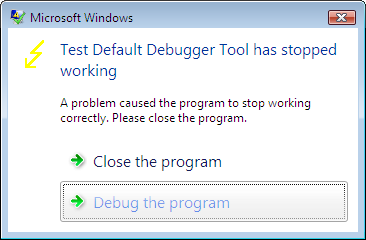
You can set Auto to 1 if you want to see the following dialog every time you have a crash:

8. Test the new settings by using TestDefaultDebugger

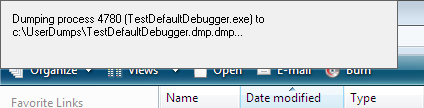
9. When you have a crash userdump.exe will show a window on top of your screen while saving the dump file:

Of course, you can setup userdump.exe as the postmortem debugger on other Windows platforms. The problem with userdump.exe is that it overwrites the previous process dump because it uses the module name for the dump file name, for example, TestDefaultDebugger.dmp, so you need to rename or save the dump if you have multiple crashes for the same application.

Other programs can be setup instead of userdump.exe. One of them is WinDbg. Here is the article I wrote about WinDbg so I won’t repeat its content here, except the registry key I tested on Vista:

HKEY_LOCAL_MACHINE\SOFTWARE\Microsoft\Windows NT\CurrentVersion\AeDebug
Debugger="C:\Program Files\Debugging Tools for Windows\windbg.exe" -p %ld -e %ld -g -c '.dump /o /ma /u c:\UserDumps\new.dmp; q' -Q -QS -QY -QSY

Finally you can use command line CDB user mode debugger from Debugging Tools for Windows. Here is the registry key:

HKEY_LOCAL_MACHINE\SOFTWARE\Microsoft\Windows NT\CurrentVersion\AeDebug
Debugger="C:\Program Files\Debugging Tools for Windows\cdb.exe" -p %ld -e %ld -g -c ".dump /o /ma /u c:\UserDumps\new.dmp; q"

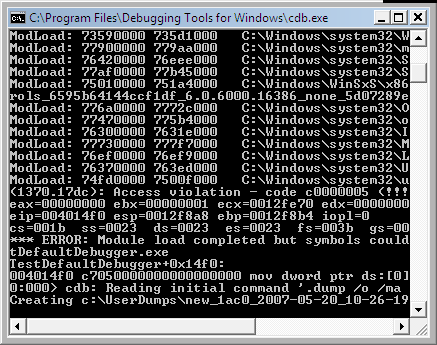
When you have a crash cdb.exe will be launched and the following console window will appear:

The advantage of using CDB or WinDbg is that you can omit q from the -c command line option and leave your debugger window open for further process inspection.

- Dmitry Vostokov -

Inside Vista Error Reporting (Part 1)

Saturday, May 19th, 2007

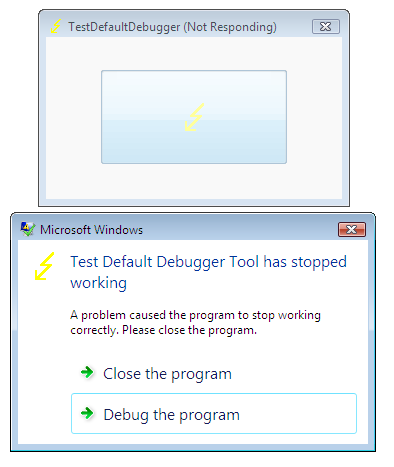
This is a follow up to the post about postmortem debuggers on Windows XP/W2K3. Now we look inside the same mechanism on Vista. After launching TestDefaultDebugger and pushing its crash button we get the following Windows error reporting dialog:

If we attach WinDbg to our TestDefaultDebugger process we would no longer see our default unhandled exception filter waiting for the error reporting process:

Windows XP

0:000> k
ChildEBP RetAddr
0012d318 7c90e9ab ntdll!KiFastSystemCallRet
0012d31c 7c8094e2 ntdll!ZwWaitForMultipleObjects+0xc
0012d3b8 7c80a075 kernel32!WaitForMultipleObjectsEx+0×12c
0012d3d4 6945763c kernel32!WaitForMultipleObjects+0×18
0012dd68 694582b1 faultrep!StartDWException+0×5df

0012eddc 7c8633e9 faultrep!ReportFault+0×533
0012f47c 00411eaa kernel32!UnhandledExceptionFilter+0×587
0012f8a4 00403263 TestDefaultDebugger!CTestDefaultDebuggerDlg::OnBnClickedButton1
0012f8b4 00403470 TestDefaultDebugger!_AfxDispatchCmdMsg+0×43


0012fff0 00000000 kernel32!BaseProcessStart+0×23

Windows Vista

0:001> ~*kL 100
0 Id: 120c.148c Suspend: 1 Teb: 7ffdf000 Unfrozen
ChildEBP RetAddr
0012f8a4 00403263 TestDefaultDebugger!CTestDefaultDebuggerDlg::OnBnClickedButton1
0012f8b4 00403470 TestDefaultDebugger!_AfxDispatchCmdMsg+0×43
0012f8e4 00402a27 TestDefaultDebugger!CCmdTarget::OnCmdMsg+0×118
0012f908 00408e69 TestDefaultDebugger!CDialog::OnCmdMsg+0×1b
0012f958 004098d9 TestDefaultDebugger!CWnd::OnCommand+0×90
0012f9f4 00406258 TestDefaultDebugger!CWnd::OnWndMsg+0×36
0012fa14 0040836d TestDefaultDebugger!CWnd::WindowProc+0×22
0012fa7c 004083f4 TestDefaultDebugger!AfxCallWndProc+0×9a
0012fa9c 77b71a10 TestDefaultDebugger!AfxWndProc+0×34
0012fac8 77b71ae8 USER32!InternalCallWinProc+0×23
0012fb40 77b7286a USER32!UserCallWinProcCheckWow+0×14b
0012fb80 77b72bba USER32!SendMessageWorker+0×4b7
0012fba0 7504e5cc USER32!SendMessageW+0×7c
0012fbc0 7504e583 COMCTL32!Button_NotifyParent+0×3d
0012fbdc 7504e680 COMCTL32!Button_ReleaseCapture+0×112
0012fc34 77b71a10 COMCTL32!Button_WndProc+0xa4b
0012fc60 77b71ae8 USER32!InternalCallWinProc+0×23
0012fcd8 77b72a47 USER32!UserCallWinProcCheckWow+0×14b
0012fd3c 77b72a98 USER32!DispatchMessageWorker+0×322
0012fd4c 77b6120c USER32!DispatchMessageW+0xf
0012fd70 0040568b USER32!IsDialogMessageW+0×586
0012fd80 004065d8 TestDefaultDebugger!CWnd::IsDialogMessageW+0×2e
0012fd88 00402a07 TestDefaultDebugger!CWnd::PreTranslateInput+0×29
0012fd98 00408041 TestDefaultDebugger!CDialog::PreTranslateMessage+0×96
0012fda8 00403ae3 TestDefaultDebugger!CWnd::WalkPreTranslateTree+0×1f
0012fdbc 00403c1e TestDefaultDebugger!AfxInternalPreTranslateMessage+0×3b
0012fdc4 00403b29 TestDefaultDebugger!CWinThread::PreTranslateMessage+0×9
0012fdcc 00403c68 TestDefaultDebugger!AfxPreTranslateMessage+0×15
0012fddc 00407920 TestDefaultDebugger!AfxInternalPumpMessage+0×2b
0012fe00 004030a1 TestDefaultDebugger!CWnd::RunModalLoop+0xca
0012fe4c 0040110d TestDefaultDebugger!CDialog::DoModal+0×12c
0012fef8 004206fb TestDefaultDebugger!CTestDefaultDebuggerApp::InitInstance+0xdd
0012ff08 0040e852 TestDefaultDebugger!AfxWinMain+0×47
0012ffa0 77603833 TestDefaultDebugger!__tmainCRTStartup+0×176
0012ffac 779ea9bd kernel32!BaseThreadInitThunk+0xe
0012ffec 00000000 ntdll!_RtlUserThreadStart+0×23
# 1 Id: 120c.17e4 Suspend: 1 Teb: 7ffde000 Unfrozen
ChildEBP RetAddr
011cff70 77a3f0a9 ntdll!DbgBreakPoint
011cffa0 77603833 ntdll!DbgUiRemoteBreakin+0×3c
011cffac 779ea9bd kernel32!BaseThreadInitThunk+0xe
011cffec 00000000 ntdll!_RtlUserThreadStart+0×23

Let’s look at the faulting thread’s raw stack data:

0:001> ~0 s
eax=00000000 ebx=00000001 ecx=0012fe70 edx=00000000 esi=00425ae8 edi=0012fe70
eip=004014f0 esp=0012f8a8 ebp=0012f8b4 iopl=0 nv up ei ng nz ac pe cy
cs=001b ss=0023 ds=0023 es=0023 fs=003b gs=0000 efl=00010297
TestDefaultDebugger!CTestDefaultDebuggerDlg::OnBnClickedButton1:
004014f0 mov dword ptr ds:[0],0 ds:0023:00000000=????????
0:000> !teb
TEB at 7ffdf000
ExceptionList: 0012f9e8
StackBase: 00130000
StackLimit: 0012d000
SubSystemTib: 00000000
FiberData: 00001e00
ArbitraryUserPointer: 00000000
Self: 7ffdf000
EnvironmentPointer: 00000000
ClientId: 0000120c . 0000148c
RpcHandle: 00000000
Tls Storage: 7ffdf02c
PEB Address: 7ffda000
LastErrorValue: 0
LastStatusValue: c000008a
Count Owned Locks: 0
HardErrorMode: 0
0:000>dds 0012d000 00130000


0012f368 0012f3c0
0012f36c 7760fb01 kernel32!GetApplicationRecoveryCallback+0×33
0012f370 ffffffff
0012f374 0012f380
0012f378 00000001
0012f37c 00000000
0012f380 00000000
0012f384 00000000
0012f388 00000000
0012f38c 00000000
0012f390 00000000
0012f394 00000000
0012f398 00000000
0012f39c 00000000
0012f3a0 00000000
0012f3a4 00000000
0012f3a8 00000000
0012f3ac 00000000
0012f3b0 00000000
0012f3b4 00000000
0012f3b8 00000000
0012f3bc 00000000
0012f3c0 0012f410
0012f3c4 7767aa88 kernel32!WerpReportExceptionInProcessContext+0×82
0012f3c8 ffffffff
0012f3cc 0012f3ec
0012f3d0 00000000
0012f3d4 00000000
0012f3d8 7767aab7 kernel32!WerpReportExceptionInProcessContext+0xa7
0012f3dc 001257b9
0012f3e0 00000001
0012f3e4 00000000
0012f3e8 0012f4c8
0012f3ec 00000000
0012f3f0 00000000
0012f3f4 00000000
0012f3f8 0012f3dc
0012f3fc ffffffff
0012f400 0012f488
0012f404 775d5ac9 kernel32!_except_handler4
0012f408 77670969 kernel32!Internal_NotifyUILanguageChange+0×4a6
0012f40c fffffffe
0012f410 7767aab7 kernel32!WerpReportExceptionInProcessContext+0xa7
0012f414 77655b41 kernel32!UnhandledExceptionFilter+0×1b2
0012f418 77655cbd kernel32!UnhandledExceptionFilter+0×32e
0012f41c 00125731
0012f420 00000000
0012f424 0012f4c8
0012f428 00000000
0012f42c 00000000
0012f430 00000000
0012f434 00000000
0012f438 00000000
0012f43c 00000800
0012f440 00000000
0012f444 00000000
0012f448 00000000
0012f44c 00000000
0012f450 00000000
0012f454 00000005
0012f458 994ac7c4
0012f45c 00000011
0012f460 00000000
0012f464 0012f5c0
0012f468 775d5ac9 kernel32!_except_handler4
0012f46c 00000001
0012f470 00000000
0012f474 77655cbd kernel32!UnhandledExceptionFilter+0×32e
0012f478 00000000
0012f47c 00000000
0012f480 0012f41c
0012f484 00000024
0012f488 0012f4f4
0012f48c 775d5ac9 kernel32!_except_handler4
0012f490 7765ff59 kernel32!PEWriteResource<_IMAGE_NT_HEADERS>+0×50a
0012f494 fffffffe
0012f498 77655cbd kernel32!UnhandledExceptionFilter+0×32e
0012f49c 77a29f8e ntdll!_RtlUserThreadStart+0×6f
0012f4a0 00000000
0012f4a4 779b8dd4 ntdll!_EH4_CallFilterFunc+0×12
0012f4a8 00000000
0012f4ac 0012ffec
0012f4b0 779ff108 ntdll! ?? ::FNODOBFM::`string’+0xb6e
0012f4b4 0012f4dc
0012f4b8 779b40e4 ntdll!_except_handler4+0xcc
0012f4bc 00000000
0012f4c0 00000000
0012f4c4 00000000
0012f4c8 0012f5c0
0012f4cc 0012f5dc
0012f4d0 779ff118 ntdll! ?? ::FNODOBFM::`string’+0xb7e
0012f4d4 00000001
0012f4d8 0112f5c0
0012f4dc 0012f500
0012f4e0 77a11039 ntdll!ExecuteHandler2+0×26
0012f4e4 fffffffe
0012f4e8 0012ffdc
0012f4ec 0012f5dc
0012f4f0 0012f59c
0012f4f4 0012f9e8
0012f4f8 77a1104d ntdll!ExecuteHandler2+0×3a
0012f4fc 0012ffdc
0012f500 0012f5a8
0012f504 77a1100b ntdll!ExecuteHandler+0×24
0012f508 0012f5c0
0012f50c 0012ffdc
0012f510 0012fe70
0012f514 0012f59c
0012f518 779b8bf2 ntdll!_except_handler4
0012f51c 00000000
0012f520 0012f5c0
0012f524 0012f538
0012f528 779b94e3 ntdll!RtlCallVectoredContinueHandlers+0×15
0012f52c 0012f5c0
0012f530 0012f5dc
0012f534 77a754c0 ntdll!RtlpCallbackEntryList
0012f538 0012f5a8
0012f53c 779b94c1 ntdll!RtlDispatchException+0×11f
0012f540 0012f5c0
0012f544 0012f5dc
0012f548 00425ae8 TestDefaultDebugger!CTestDefaultDebuggerApp::`vftable’+0×154
0012f54c 00000000
0012f550 00000502
0012f554 00000000
0012f558 00a460e0
0012f55c 00000000
0012f560 00000000
0012f564 00000070
0012f568 ffffffff
0012f56c ffffffff
0012f570 77b60dba USER32!UserCallDlgProcCheckWow+0×5f
0012f574 77b60e63 USER32!UserCallDlgProcCheckWow+0×16e
0012f578 0000006c
0012f57c 00000000
0012f580 00000000
0012f584 00000000
0012f588 00000000
0012f58c 0000004e
0012f590 00000000
0012f594 0012f634
0012f598 77bb76cc USER32!_except_handler4
0012f59c 0012f634
0012f5a0 00130000
0012f5a4 00000000
0012f5a8 0012f8b4
0012f5ac 77a10060 ntdll!NtRaiseException+0xc
0012f5b0 77a10eb2 ntdll!KiUserExceptionDispatcher+0×2a
0012f5b4 0012f5c0


It shows the presence of kernel32!UnhandledExceptionFilter calls. Let’s open TestDefaultDebugger.exe in WinDbg, put breakpoint on UnhandledExceptionFilter and trace the execution. We have to change the return value of IsDebugPortPresent to simulate the normal fault handling logic when no active debugger is attached:

0:000> bp kernel32!UnhandledExceptionFilter
0:000> g
(fb0.1190): Access violation - code c0000005 (first chance)
First chance exceptions are reported before any exception handling.
This exception may be expected and handled.
eax=00000000 ebx=00000001 ecx=0012fe70 edx=00000000 esi=00425ae8 edi=0012fe70
eip=004014f0 esp=0012f8a8 ebp=0012f8b4 iopl=0 nv up ei ng nz ac pe cy
cs=001b ss=0023 ds=0023 es=0023 fs=003b gs=0000 efl=00010297
TestDefaultDebugger!CTestDefaultDebuggerDlg::OnBnClickedButton1:
004014f0 mov dword ptr ds:[0],0 ds:0023:00000000=????????
0:000> g
Breakpoint 0 hit
eax=0042ae58 ebx=00000000 ecx=0042ae58 edx=0042ae58 esi=003b07d8 edi=c0000005
eip=77655984 esp=0012f478 ebp=0012f494 iopl=0 nv up ei pl zr na pe nc
cs=001b ss=0023 ds=0023 es=0023 fs=003b gs=0000 efl=00000246
kernel32!UnhandledExceptionFilter:
77655984 push 5Ch
0:000> g $$ skip first chance exception
Breakpoint 0 hit
eax=77655984 ebx=00000000 ecx=0012f404 edx=77a10f34 esi=0012f4c8 edi=00000000
eip=77655984 esp=0012f49c ebp=0012ffec iopl=0 nv up ei pl nz na pe nc
cs=001b ss=0023 ds=0023 es=0023 fs=003b gs=0000 efl=00000206
kernel32!UnhandledExceptionFilter:
77655984 push 5Ch
0:000> p
eax=77655984 ebx=00000000 ecx=0012f404 edx=77a10f34 esi=0012f4c8 edi=00000000
eip=77655986 esp=0012f498 ebp=0012ffec iopl=0 nv up ei pl nz na pe nc
cs=001b ss=0023 ds=0023 es=0023 fs=003b gs=0000 efl=00000206
kernel32!UnhandledExceptionFilter+0×2:
77655986 push offset kernel32!strcat_s+0×128d (77655cf0)


0:000> p
eax=00000000 ebx=0012f4c8 ecx=776558e5 edx=77a10f34 esi=00000000 edi=00000000
eip=77655a33 esp=0012f41c ebp=0012f498 iopl=0 nv up ei pl nz ac po cy
cs=001b ss=0023 ds=0023 es=0023 fs=003b gs=0000 efl=00000213
kernel32!UnhandledExceptionFilter+0xa5:
77655a33 call kernel32!IsDebugPortPresent (7765594c)
0:000> p
eax=00000001 ebx=0012f4c8 ecx=0012f3f4 edx=77a10f34 esi=00000000 edi=00000000
eip=77655a38 esp=0012f41c ebp=0012f498 iopl=0 nv up ei pl nz na po nc
cs=001b ss=0023 ds=0023 es=0023 fs=003b gs=0000 efl=00000202
kernel32!UnhandledExceptionFilter+0xaa:
77655a38 test eax,eax
0:000> r eax=0
0:000> p
eax=00000000 ebx=0012f4c8 ecx=0012f3f4 edx=77a10f34 esi=00000000 edi=00000000
eip=77655a3a esp=0012f41c ebp=0012f498 iopl=0 nv up ei pl zr na pe nc
cs=001b ss=0023 ds=0023 es=0023 fs=003b gs=0000 efl=00000246
kernel32!UnhandledExceptionFilter+0xac:
77655a3a jne kernel32!UnhandledExceptionFilter+0×22 (776559a6) [br=0]

Next, we continue to step over using p command until we see WerpReportExceptionInProcessContext function and step into it:

0:000> p
eax=c0000022 ebx=0012f4c8 ecx=0012f400 edx=77a10f34 esi=00000000 edi=00000001
eip=77655b3c esp=0012f418 ebp=0012f498 iopl=0 nv up ei pl nz na po nc
cs=001b ss=0023 ds=0023 es=0023 fs=003b gs=0000 efl=00000202
kernel32!UnhandledExceptionFilter+0×1ad:
77655b3c call kernel32!WerpReportExceptionInProcessContext (7767aa06)
0:000> t
eax=c0000022 ebx=0012f4c8 ecx=0012f400 edx=77a10f34 esi=00000000 edi=00000001
eip=7767aa06 esp=0012f414 ebp=0012f498 iopl=0 nv up ei pl nz na po nc
cs=001b ss=0023 ds=0023 es=0023 fs=003b gs=0000 efl=00000202
kernel32!WerpReportExceptionInProcessContext:
7767aa06 push 14h

At this point if we look at the stack trace we would see:

0:000> kL 100
ChildEBP RetAddr
0012f410 77655b41 kernel32!WerpReportExceptionInProcessContext
0012f498 77a29f8e kernel32!UnhandledExceptionFilter+0×1b2
0012f4a0 779b8dd4 ntdll!_RtlUserThreadStart+0×6f
0012f4b4 779b40f0 ntdll!_EH4_CallFilterFunc+0×12
0012f4dc 77a11039 ntdll!_except_handler4+0×8e
0012f500 77a1100b ntdll!ExecuteHandler2+0×26
0012f5a8 77a10e97 ntdll!ExecuteHandler+0×24
0012f5a8 004014f0 ntdll!KiUserExceptionDispatcher+0xf
0012f8a4 00403263 TestDefaultDebugger!CTestDefaultDebuggerDlg::OnBnClickedButton1
0012f8b4 00403470 TestDefaultDebugger!_AfxDispatchCmdMsg+0×43


After that we step over again and find that the code flow returns from all exception handlers until KiUserExceptionDispatcher raises exception again via ZwRaiseException call.

So it looks that the default unhandled exception filter in Vista only reports the exception and doesn’t launch the error reporting process that displays the error box, WerFault.exe.

If we click on Debug button on the error reporting dialog to launch the postmortem debugger (I have Visual Studio Just-In-Time Debugger configured in AeDebug\Debugger registry key) and look at its parent process by using Process Explorer for example, we would see it is WerFault.exe which in turn has svchost.exe as its parent.

Now we quit WinDbg and launch TestDefaultDebugger again, push its big crash button and when the error reporting dialog appears we attach another instance of WinDbg to svchost.exe process hosting Windows Error Reporting Service (wersvc.dll).
We see the following threads:

0:000> ~*k
. 0 Id: f8c.f90 Suspend: 1 Teb: 7ffdf000 Unfrozen
ChildEBP RetAddr
0008f5b4 77a10080 ntdll!KiFastSystemCallRet
0008f5b8 7760853f ntdll!ZwReadFile+0xc
0008f630 7709ffe2 kernel32!ReadFile+0×20e
0008f65c 7709fdfb ADVAPI32!ScGetPipeInput+0×2a
0008f6c4 7709bdd2 ADVAPI32!ScDispatcherLoop+0×6c
0008f93c 004a241d ADVAPI32!StartServiceCtrlDispatcherW+0xce
0008f944 004a2401 svchost!SvcHostMain+0×12
0008f948 004a2183 svchost!wmain+0×5
0008f98c 77603833 svchost!_initterm_e+0×163
0008f998 779ea9bd kernel32!BaseThreadInitThunk+0xe
0008f9d8 00000000 ntdll!_RtlUserThreadStart+0×23
1 Id: f8c.fa4 Suspend: 1 Teb: 7ffdd000 Unfrozen
ChildEBP RetAddr
0086f6d0 77a10690 ntdll!KiFastSystemCallRet
0086f6d4 779cb65b ntdll!ZwWaitForMultipleObjects+0xc
0086f870 77603833 ntdll!TppWaiterpThread+0×294
0086f87c 779ea9bd kernel32!BaseThreadInitThunk+0xe
0086f8bc 00000000 ntdll!_RtlUserThreadStart+0×23
2 Id: f8c.fa8 Suspend: 1 Teb: 7ffdc000 Unfrozen
ChildEBP RetAddr
0031f81c 77a0f2c0 ntdll!KiFastSystemCallRet
0031f820 71cb1545 ntdll!NtAlpcSendWaitReceivePort+0xc
0031fd3c 71cb63c4 wersvc!CWerService::LpcServerThread+0×9c
0031fd44 77603833 wersvc!CWerService::StaticLpcServerThread+0xd
0031fd50 779ea9bd kernel32!BaseThreadInitThunk+0xe
0031fd90 00000000 ntdll!_RtlUserThreadStart+0×23
3 Id: f8c.2cc Suspend: 1 Teb: 7ffde000 Unfrozen
ChildEBP RetAddr
00f8f768 77a106a0 ntdll!KiFastSystemCallRet
00f8f76c 776077d4 ntdll!NtWaitForSingleObject+0xc
00f8f7dc 77607742 kernel32!WaitForSingleObjectEx+0xbe
00f8f7f0 71cb6f4b kernel32!WaitForSingleObject+0×12
00f8f858 71cb6803 wersvc!CWerService::ReportCrashKernelMsg+0×256
00f8fb7c 71cb6770 wersvc!CWerService::DispatchPortRequestWorkItem+0×70a
00f8fb90 779c1fbb wersvc!CWerService::StaticDispatchPortRequestWorkItem+0×17
00f8fbb4 77a1a2b8 ntdll!TppSimplepExecuteCallback+0×10c
00f8fcdc 77603833 ntdll!TppWorkerThread+0×522
00f8fce8 779ea9bd kernel32!BaseThreadInitThunk+0xe
00f8fd28 00000000 ntdll!_RtlUserThreadStart+0×23
4 Id: f8c.1b38 Suspend: 1 Teb: 7ffdb000 Unfrozen
ChildEBP RetAddr
00d3fe08 77a10850 ntdll!KiFastSystemCallRet
00d3fe0c 77a1a1b4 ntdll!NtWaitForWorkViaWorkerFactory+0xc
00d3ff34 77603833 ntdll!TppWorkerThread+0×1f6
00d3ff40 779ea9bd kernel32!BaseThreadInitThunk+0xe
00d3ff80 00000000 ntdll!_RtlUserThreadStart+0×23

First, it looks like some LPC notification mechanism is present here (CWerService::LpcServerThread).
Next, if we look at CWerService::ReportCrashKernelMsg code we would see it calls CWerService::ReportCrash which in turn loads faultrep.dll

0:000> .asm no_code_bytes
Assembly options: no_code_bytes
0:000> uf wersvc!CWerService::ReportCrashKernelMsg


wersvc!CWerService::ReportCrashKernelMsg+0×226:
71cb6f13 lea  eax,[ebp-20h]
71cb6f16 push eax
71cb6f17 push dword ptr [ebp-34h]
71cb6f1a push dword ptr [ebp-2Ch]
71cb6f1d call dword ptr [wersvc!_imp__GetCurrentProcessId (71cb1120)]
71cb6f23 push eax
71cb6f24 mov  ecx,dword ptr [ebp-38h]
71cb6f27 call wersvc!CWerService::ReportCrash (71cb7008)
71cb6f2c mov  dword ptr [ebp-1Ch],eax
71cb6f2f cmp  eax,ebx
71cb6f31 jl   wersvc!CWerService::ReportCrashKernelMsg+0×279 (71cb6a10)


0:000> uf wersvc!CWerService::ReportCrash


wersvc!CWerService::ReportCrash+0×3d:
71cb7045 mov  dword ptr [ebp-4],edi
71cb7048 push offset wersvc!`string’ (71cb711c)
71cb704d call dword ptr [wersvc!_imp__LoadLibraryW (71cb1144)]

71cb7053 mov  dword ptr [ebp-2Ch],eax
71cb7056 cmp  eax,edi
71cb7058 je   wersvc!CWerService::ReportCrash+0×52 (71cb9b47)

wersvc!CWerService::ReportCrash+0×88:
71cb705e push offset wersvc!`string’ (71cb7100)
71cb7063 push eax
71cb7064 call dword ptr [wersvc!_imp__GetProcAddress (71cb1140)]

71cb706a mov  ebx,eax
71cb706c cmp  ebx,edi
71cb706e je   wersvc!CWerService::ReportCrash+0×9a (71cb9b7d)


0:000> du 71cb711c
71cb711c “faultrep.dll”
0:000> da 71cb7100
71cb7100 “WerpInitiateCrashReporting”

If we attach a new instance of WinDbg to WerFault.exe and inspect its threads we would see:

0:003> ~*k
0 Id: 1bfc.16c4 Suspend: 1 Teb: 7ffdf000 Unfrozen
ChildEBP RetAddr
0015de60 77a10690 ntdll!KiFastSystemCallRet
0015de64 77607e09 ntdll!ZwWaitForMultipleObjects+0xc
0015df00 77b6c4b7 kernel32!WaitForMultipleObjectsEx+0×11d
0015df54 77b68b83 USER32!RealMsgWaitForMultipleObjectsEx+0×13c
0015df70 6d46d90d USER32!MsgWaitForMultipleObjects+0×1f
0015dfc0 6d4acd77 wer!UtilMsgWaitForMultipleObjects+0×8a
0015dff4 6d4a7694 wer!CInitialConsentUI::Show+0×133
0015e040 6d4a9a69 wer!CEventUI::GetInitialDialogSelection+0xc6
0015e104 6d46df18 wer!CEventUI::Start+0×32
0015e39c 6d46b743 wer!CWatson::ReportProblem+0×438
0015e3ac 6d46b708 wer!WatsonReportSend+0×1e
0015e3c8 6d46b682 wer!CDWInstance::WatsonReportStub+0×17
0015e3ec 6d472a7f wer!CDWInstance::SubmitReport+0×21e
0015e410 730b6d0d wer!WerReportSubmit+0×5d
0015f33c 730b73c1 faultrep!CCrashWatson::GenerateCrashReport+0×5c4
0015f5d4 730b4de1 faultrep!CCrashWatson::ReportCrash+0×374
0015fad4 009bd895 faultrep!WerpInitiateCrashReporting+0×304
0015fb0c 009b60cd WerFault!UserCrashMain+0×14e
0015fb30 009b644a WerFault!wmain+0xbf
0015fb74 77603833 WerFault!_initterm_e+0×163
1 Id: 1bfc.894 Suspend: 1 Teb: 7ffde000 Unfrozen
ChildEBP RetAddr
024afbf8 77a10690 ntdll!KiFastSystemCallRet
024afbfc 77607e09 ntdll!ZwWaitForMultipleObjects+0xc
024afc98 77b6c4b7 kernel32!WaitForMultipleObjectsEx+0×11d
024afcec 74fa161a USER32!RealMsgWaitForMultipleObjectsEx+0×13c
024afd0c 74fa2cb6 DUser!CoreSC::Wait+0×59
024afd34 74fa2c55 DUser!CoreSC::WaitMessage+0×54
024afd44 77b615c0 DUser!MphWaitMessageEx+0×22
024afd60 77a10e6e USER32!__ClientWaitMessageExMPH+0×1e
024afd7c 77b6b5bc ntdll!KiUserCallbackDispatcher+0×2e
024afd80 77b61598 USER32!NtUserWaitMessage+0xc
024afdb4 77b61460 USER32!DialogBox2+0×202
024afddc 77b614a2 USER32!InternalDialogBox+0xd0
024afdfc 77b61505 USER32!DialogBoxIndirectParamAorW+0×37
024afe1c 75036c51 USER32!DialogBoxIndirectParamW+0×1b
024afe40 75036beb comctl32!SHFusionDialogBoxIndirectParam+0×2d
024afe74 6d4a65a4 comctl32!CTaskDialog::Show+0×100
024afebc 6d4acb72 wer!IsolationAwareTaskDialogIndirect+0×64
024aff4c 6d4acc39 wer!CInitialConsentUI::InitialDlgThreadRoutine+0×369
024aff54 77603833 wer!CInitialConsentUI::Static_InitialDlgThreadRoutine+0xd
024aff60 779ea9bd kernel32!BaseThreadInitThunk+0xe
2 Id: 1bfc.1a04 Suspend: 1 Teb: 7ffdc000 Unfrozen
ChildEBP RetAddr
012bf998 77a10690 ntdll!KiFastSystemCallRet
012bf99c 77607e09 ntdll!ZwWaitForMultipleObjects+0xc
012bfa38 77b6c4b7 kernel32!WaitForMultipleObjectsEx+0×11d
012bfa8c 74fa161a USER32!RealMsgWaitForMultipleObjectsEx+0×13c
012bfaac 74fa1642 DUser!CoreSC::Wait+0×59
012bfae0 74fac442 DUser!CoreSC::xwProcessNL+0xaa
012bfb00 74fac3a2 DUser!GetMessageExA+0×44
012bfb54 779262b6 DUser!ResourceManager::SharedThreadProc+0xb6
012bfb8c 779263de msvcrt!_endthreadex+0×44
012bfb94 77603833 msvcrt!_endthreadex+0xce
012bfba0 779ea9bd kernel32!BaseThreadInitThunk+0xe
012bfbe0 00000000 ntdll!_RtlUserThreadStart+0×23
# 3 Id: 1bfc.14a4 Suspend: 1 Teb: 7ffdb000 Unfrozen
ChildEBP RetAddr
02a1fc40 77a3f0a9 ntdll!DbgBreakPoint
02a1fc70 77603833 ntdll!DbgUiRemoteBreakin+0×3c
02a1fc7c 779ea9bd kernel32!BaseThreadInitThunk+0xe
02a1fcbc 00000000 ntdll!_RtlUserThreadStart+0×23

Next, we put a breakpoint on CreateProcess, push Debug button on the error reporting dialog and upon the breakpoint hit inspect CreateProcess parameters:

0:003> .asm no_code_bytes
Assembly options: no_code_bytes
0:003> bp kernel32!CreateProcessW
0:003> g
Breakpoint 0 hit
eax=00000000 ebx=00000000 ecx=7ffdf000 edx=0015db30 esi=00000001 edi=00000000
eip=775c1d27 esp=0015dfe0 ebp=0015e408 iopl=0 nv up ei pl nz na po nc
cs=001b ss=0023 ds=0023 es=0023 fs=003b gs=0000 efl=00000202
kernel32!CreateProcessW:
775c1d27 mov edi,edi
0:000> ddu esp+8 l1
0015dfe8 008b0000 “”C:\WINDOWS\system32\vsjitdebugger.exe” -p 8064 -e 312″

ESP points to return address, ESP+4 points to the first CreateProcess parameter and ESP+8 points to the second parameter. The thread stack now involves faultrep.dll:

0:000> k
ChildEBP RetAddr
0020dde0 730bb2b5 kernel32!CreateProcessW
0020e20c 730b6dae faultrep!WerpLaunchAeDebug+0×384
0020f140 730b73c1 faultrep!CCrashWatson::GenerateCrashReport+0×665
0020f3d8 730b4de1 faultrep!CCrashWatson::ReportCrash+0×374
0020f8d8 009bd895 faultrep!WerpInitiateCrashReporting+0×304
0020f910 009b60cd WerFault!UserCrashMain+0×14e
0020f934 009b644a WerFault!wmain+0xbf
0020f978 77603833 WerFault!_initterm_e+0×163
0020f984 779ea9bd kernel32!BaseThreadInitThunk+0xe
0020f9c4 00000000 ntdll!_RtlUserThreadStart+0×23

Therefore it looks like calls to faultrep.dll module to report faults and launch the posmortem debugger were moved from UnhandledExceptionFilter to WerFault.exe in Vista.

Finally, let’s go back to our UnhandledExceptionFilter. If we disassemble it we would see that it can call kernel32!WerpLaunchAeDebug too:

0:000> .asm no_code_bytes
Assembly options: no_code_bytes
0:000> uf kernel32!UnhandledExceptionFilter


kernel32!UnhandledExceptionFilter+0×2d0:
77655c5f push dword ptr [ebp-28h]
77655c62 push dword ptr [ebp-1Ch]
77655c65 push dword ptr [ebx+4]
77655c68 push dword ptr [ebx]
77655c6a push 0FFFFFFFEh
77655c6c call kernel32!GetCurrentProcess (775e9145)
77655c71 push eax
77655c72 call kernel32!WerpLaunchAeDebug (7767baaf)
77655c77 test eax,eax
77655c79 jge  kernel32!UnhandledExceptionFilter+0×2f3 (77655c82)


kernel32!UnhandledExceptionFilter+0×303:
77655c92 mov  eax,dword ptr [ebx]
77655c94 push dword ptr [eax]
77655c96 push 0FFFFFFFFh
77655c98 call dword ptr [kernel32!_imp__NtTerminateProcess (775c14bc)]

If we look at WerpLaunchAeDebug code we would see that it calls CreateProcess too and the code is the same as in faultrep.dll. This could mean that faultrep.dll imports that function from kernel32.dll. So some postmortem debugger launching code is still present in the default unhandled exception filter perhaps for compatibility or in case WER doesn’t work or disabled.

High-level description of the differences between Windows XP and Vista application crash support is present in the recent Mark Russinovich’s article:

Inside the Windows Vista Kernel: Part 3 (Enhanced Crash Support)

- Dmitry Vostokov -

Process and Thread Startup in Vista

Saturday, May 19th, 2007

If you looked at process dumps from Vista or did live debugging you might have noticed that there are no longer kernel32 functions BaseProcessStart on the main thread stack and BaseThreadStart on subsequent thread stacks. In Vista we have ntdll!_RtlUserThreadStart which calls kernel32!BaseThreadInitThunk for both main and secondary threads:

0:002> ~*k
0 Id: 13e8.1348 Suspend: 1 Teb: 7ffdf000 Unfrozen
ChildEBP RetAddr
0009f8d8 77b7199a ntdll!KiFastSystemCallRet
0009f8dc 77b719cd USER32!NtUserGetMessage+0xc
0009f8f8 006b24e8 USER32!GetMessageW+0x33
0009f954 006c2588 calc!WinMain+0x278
0009f9e4 77603833 calc!_initterm_e+0x1a1
0009f9f0 779ea9bd kernel32!BaseThreadInitThunk+0xe
0009fa30 00000000 ntdll!_RtlUserThreadStart+0×23

1 Id: 13e8.534 Suspend: 1 Teb: 7ffde000 Unfrozen
ChildEBP RetAddr
0236f9d8 77a106a0 ntdll!KiFastSystemCallRet
0236f9dc 776077d4 ntdll!NtWaitForSingleObject+0xc
0236fa4c 77607742 kernel32!WaitForSingleObjectEx+0xbe
0236fa60 006b4958 kernel32!WaitForSingleObject+0×12
0236fa78 77603833 calc!WatchDogThread+0×21
0236fa84 779ea9bd kernel32!BaseThreadInitThunk+0xe
0236fac4 00000000 ntdll!_RtlUserThreadStart+0×23

# 2 Id: 13e8.1188 Suspend: 1 Teb: 7ffdd000 Unfrozen
ChildEBP RetAddr
0078fec8 77a3f0a9 ntdll!DbgBreakPoint
0078fef8 77603833 ntdll!DbgUiRemoteBreakin+0×3c
0078ff04 779ea9bd kernel32!BaseThreadInitThunk+0xe
0078ff44 00000000 ntdll!_RtlUserThreadStart+0×23

0:000> .asm no_code_bytes
Assembly options: no_code_bytes
0:000> uf ntdll!_RtlUserThreadStart
...
...
...
ntdll!_RtlUserThreadStart:
779ea996 push 14h
779ea998 push offset ntdll! ?? ::FNODOBFM::`string'+0xb6e (779ff108)
779ea99d call ntdll!_SEH_prolog4 (779f47d8)
779ea9a2 and  dword ptr [ebp-4],0
779ea9a6 mov  eax,dword ptr [ntdll!Kernel32ThreadInitThunkFunction (77a752a0)]
779ea9ab push dword ptr [ebp+0Ch]
779ea9ae test eax,eax
779ea9b0 je   ntdll!_RtlUserThreadStart+0x32 (779c6326)
...
...
...
0:000> dds ntdll!Kernel32ThreadInitThunkFunction l1
77a752a0 77603821 kernel32!BaseThreadInitThunk

- Dmitry Vostokov -

Interrupts and exceptions explained (Part 3)

Tuesday, May 15th, 2007

In Part 1 discussed interrupt processing that happens when an x86 processor executes in privileged protected mode (ring 0). It pushes interrupt frame shown in the following pseudo-code:

push EFLAGS
push CS
push EIP
push ErrorCode
EIP := IDT[VectorNumber].ExtendedOffset<<16 +
   IDT[VectorNumber].Offset

Please note that this is an interrupt frame that is created by CPU and not a trap frame created by a software interrupt handler to save CPU state (_KTRAP_FRAME).

If an x86 processor executes in user mode (ring 3) and an interrupt happens then the stack switch occurs before the processor saves user mode stack pointer SS:ESP and pushes the rest of the interrupt frame. Pushing both SS:RSP always happens on x64 processor regardless of the current execution mode, kernel or user. Therefore the following x86 pseudo-code shows how interrupt frame is pushed on the current stack (to be precise, on the kernel space stack if the interrupt happened in user mode):

push SS
push ESP
push EFLAGS
push CS
push EIP
push ErrorCode
EIP := IDT[VectorNumber].ExtendedOffset<<16 +
   IDT[VectorNumber].Offset

Usually CS is 0×1b and SS is 0×23 for x86 Windows flat memory model so we can easily identify this pattern on raw stack data.

Why should we care about an interrupt frame? This is because in complete full memory dumps we can see exceptions that happened in user space and were being processed at the time the dump was saved.

Let’s look at some example:

PROCESS 89a94800 SessionId: 1 Cid: 1050 Peb: 7ffd7000 ParentCid: 08a4
DirBase: 390f5000 ObjectTable: e36ee0b8 HandleCount: 168.
Image: processA.exe
VadRoot 8981d0a0 Vads 309 Clone 0 Private 222555. Modified 10838. Locked 0.
DeviceMap e37957e0
Token e395b8f8
ElapsedTime 07:44:38.505
UserTime 00:54:52.906
KernelTime 00:00:58.109
QuotaPoolUsage[PagedPool] 550152
QuotaPoolUsage[NonPagedPool] 14200
Working Set Sizes (now,min,max) (213200, 50, 345) (852800KB, 200KB, 1380KB)
PeakWorkingSetSize 227093
VirtualSize 1032 Mb
PeakVirtualSize 1032 Mb
PageFaultCount 232357
MemoryPriority BACKGROUND
BasePriority 8
CommitCharge 233170
DebugPort 899b6a40

We see that the process has a DebugPort and the presence of it usually shows that some exception happened. Therefore if you dump all processes by entering !process 0 1 command you can search for any unhandled exceptions.

Indeed if we switch to this process (you can also use !process 89a94800 ff command for dumps coming from XP and higher systems) we see KiDispatchException on one of the processA’s threads:

0: kd> .process 89a94800
0: kd> .reload
0: kd> !process 89a94800
...
...
...
THREAD 89a93020 Cid 1050.1054 Teb: 7ffdf000 Win32Thread: bc1da760 WAIT: (Unknown) KernelMode Non-Alertable
SuspendCount 1
f44dc3a8 SynchronizationEvent
Not impersonating
DeviceMap e37957e0
Owning Process 89a94800 Image: processA.exe
Wait Start TickCount 4244146 Ticks: 1232980 (0:05:21:05.312)
Context Switch Count 1139234 LargeStack
UserTime 00:54:51.0531
KernelTime 00:00:53.0937
Win32 Start Address processA!WinMainCRTStartup (0x00c534c8)
Start Address kernel32!BaseProcessStartThunk (0x77e617f8)
Stack Init f44dcbd0 Current f44dc2ec Base f44dd000 Limit f44d7000 Call f44dcbd8
Priority 12 BasePriority 8 PriorityDecrement 2
ChildEBP RetAddr
f44dc304 8083d5b1 nt!KiSwapContext+0x26
f44dc330 8083df9e nt!KiSwapThread+0x2e5
f44dc378 809c3cff nt!KeWaitForSingleObject+0x346
f44dc458 809c4f09 nt!DbgkpQueueMessage+0x178
f44dc47c 80977ad9 nt!DbgkpSendApiMessage+0x45
f44dc508 8081a94f nt!DbgkForwardException+0x90
f44dc8c4 808346b4 nt!KiDispatchException+0×1ea
f44dc92c 80834650 nt!CommonDispatchException+0×4a
f44dc9b8 80a801ae nt!Kei386EoiHelper+0×16e
0012f968 0046915d hal!HalpDispatchSoftwareInterrupt+0×5e
0012f998 0047cb72 processA!CalculateClientSizeFromPoint+0×5f
0012f9bc 0047cc1d processA!CalculateFromPoint+0×30
0012fa64 0047de83 processA!DrawUsingMemDC+0×1b9
0012fac0 0099fb43 processA!OnDraw+0×13
0012fb5c 7c17332d processA!OnPaint+0×56
0012fbe8 7c16e0b0 MFC71!CWnd::OnWndMsg+0×340
0012fc08 00c6253a MFC71!CWnd::WindowProc+0×22
0012fc24 0096cf9d processA!WindowProc+0×38
0012fcb8 7c16e1b8 MFC71!AfxCallWndProc+0×91
0012fcd8 7c16e1f6 MFC71!AfxWndProc+0×46
0012fd04 7739b6e3 MFC71!AfxWndProcBase+0×39
0012fd30 7739b874 USER32!InternalCallWinProc+0×28
0012fda8 7739c8b8 USER32!UserCallWinProcCheckWow+0×151
0012fe04 7739c9c6 USER32!DispatchClientMessage+0xd9
0012fe2c 7c828536 USER32!__fnDWORD+0×24
0012fe2c 80832dee ntdll!KiUserCallbackDispatcher+0×2e
f44dcbf0 8092d605 nt!KiCallUserMode+0×4
f44dcc48 bf8a26d3 nt!KeUserModeCallback+0×8f
f44dcccc bf89e985 win32k!SfnDWORD+0xb4
f44dcd0c bf89eb27 win32k!xxxDispatchMessage+0×223
f44dcd58 80833bdf win32k!NtUserDispatchMessage+0×4c
f44dcd58 7c8285ec nt!KiFastCallEntry+0xfc
0012fe2c 7c828536 ntdll!KiFastSystemCallRet
0012fe58 7739c57b ntdll!KiUserCallbackDispatcher+0×2e
0012fea8 773a16e5 USER32!NtUserDispatchMessage+0xc
0012feb8 7c169076 USER32!DispatchMessageA+0xf
0012fec8 7c16913e MFC71!AfxInternalPumpMessage+0×3e
0012fee4 0041cb0b MFC71!CWinThread::Run+0×54
0012ff08 7c172fc5 processA!CMain::Run+0×3b
0012ff18 00c5364d MFC71!AfxWinMain+0×68
0012ffc0 77e6f23b processA!WinMainCRTStartup+0×185
0012fff0 00000000 kernel32!BaseProcessStart+0×23

You might think that exception happened in CalculateClientSizeFromPoint function. However there is no nt!KiTrapXXX call and hal!HalpDispatchSoftwareInterrupt has user space return address and this looks suspicious. So we need to look at raw stack data and find our interrupt frame. We look for KiDispatchException, then for KiTrap substring and finally for 0000001b. If 0000001b and 00000023 are separated by 2 double words then we have found out interrupt frame:

0: kd> .thread 89a93020
Implicit thread is now 89a93020
0: kd> dds esp esp+1000
...
...
...
f44dc2f8 f44dc330
f44dc2fc 89a93098
f44dc300 ffdff120
f44dc304 89a93020
f44dc308 8083d5b1 nt!KiSwapThread+0x2e5
f44dc30c 89a93020
f44dc310 89a930c8
f44dc314 00000000
...
...
...
f44dc4e8 f44dcc38
f44dc4ec 8083a8cc nt!_except_handler3
f44dc4f0 80870868 nt!`string'+0xa4
f44dc4f4 ffffffff
f44dc4f8 80998bfd nt!Ki386CheckDivideByZeroTrap+0x273
f44dc4fc 8083484f nt!KiTrap00+0x88
f44dc500 00000001
f44dc504 0000bb40
f44dc508 f44dc8c4
f44dc50c 8081a94f nt!KiDispatchException+0×1ea
f44dc510 f44dc8e0
f44dc514 00000001
f44dc518 00000000
f44dc51c 00469583 processA!LPtoDP+0×19
f44dc520 16b748f0
f44dc524 00469583 processA!LPtoDP+0×19
f44dc528 00000000
f44dc52c 00000000


f44dc8c0 ffffffff
f44dc8c4 f44dc934
f44dc8c8 808346b4 nt!CommonDispatchException+0×4a
f44dc8cc f44dc8e0
f44dc8d0 00000000
f44dc8d4 f44dc934
f44dc8d8 00000001
f44dc8dc 00000001
f44dc8e0 c0000094
f44dc8e4 00000000
f44dc8e8 00000000
f44dc8ec 00469583 processA!LPtoDP+0×19
f44dc8f0 00000000
f44dc8f4 808a3988 nt!KiAbiosPresent+0×4
f44dc8f8 ffffffff
f44dc8fc 0000a6f2
f44dc900 00469585 processA!LPtoDP+0×1b
f44dc904 00000004
f44dc908 00000000
f44dc90c f9000001
f44dc910 f44dc8dc
f44dc914 ffffffff
f44dc918 f44dcc38
f44dc91c 8083a8cc nt!_except_handler3
f44dc920 80870868 nt!`string’+0xa4
f44dc924 ffffffff
f44dc928 80998bfd nt!Ki386CheckDivideByZeroTrap+0×273
f44dc92c 8083484f nt!KiTrap00+0×88
f44dc930 80834650 nt!Kei386EoiHelper+0×16e
f44dc934 0012f968
f44dc938 00469583 processA!LPtoDP+0×19
f44dc93c badb0d00
f44dc940 00000000
f44dc944 ffffffff
f44dc948 00007fff
f44dc94c 00000000
f44dc950 fffff800
f44dc954 ffffffff
f44dc958 00007fff
f44dc95c 00000000
f44dc960 00000000
f44dc964 80a80000 hal!HalpInitIrqlAuditFlag+0×4e
f44dc968 00000023
f44dc96c 00000023
f44dc970 00000000
f44dc974 00000000
f44dc978 00005334
f44dc97c 00000001
f44dc980 f44dcc38
f44dc984 0000003b
f44dc988 16b748f0
f44dc98c 16b748f0
f44dc990 0012f9fc
f44dc994 0012f968
f44dc998 00000000 ; ErrorCode
f44dc99c 00469583 processA!LPtoDP+0×19 ; EIP
f44dc9a0 0000001b ; CS
f44dc9a4 00010246 ; EFLAGS
f44dc9a8 0012f934 ; ESP
f44dc9ac 00000023 ; SS
f44dc9b0 8982e7e0
f44dc9b4 00000000

Why did we skip the first KiTrap00? Because KiDispatchException is called after KiTrap00 so we should see it before KiTrap00 on raw stack. To see all these calls we can disassemble return addresses:

0: kd> .asm no_code_bytes
Assembly options: no_code_bytes
0: kd> ub nt!KiTrap00+0x88
nt!KiTrap00+0x74:
8083483b test byte ptr [ebp+6Ch],1
8083483f je   nt!KiTrap00+0x81 (80834848)
80834841 cmp  word ptr [ebp+6Ch],1Bh
80834846 jne  nt!KiTrap00+0x9e (80834865)
80834848 sti
80834849 push ebp
8083484a call nt!Ki386CheckDivideByZeroTrap (8099897d)
8083484f mov  ebx,dword ptr [ebp+68h]

nt!KiTrap00+0×88 is not equal to nt!KiTrap00+0×74 so we have OMAP code optimization case here and we have to disassemble raw addresses as seen on the raw stack fragment repeated here:

...
...
...
f44dc8c8 808346b4 nt!CommonDispatchException+0x4a
...
...
...
f44dc924 ffffffff
f44dc928 80998bfd nt!Ki386CheckDivideByZeroTrap+0x273
f44dc92c 8083484f nt!KiTrap00+0×88
f44dc930 80834650 nt!Kei386EoiHelper+0×16e
f44dc934 0012f968


0: kd> u 8083484f
nt!KiTrap00+0×88:
8083484f mov  ebx,dword ptr [ebp+68h]
80834852 jmp  nt!Kei386EoiHelper+0×167 (80834649)
80834857 sti
80834858 mov  ebx,dword ptr [ebp+68h]
8083485b mov  eax,0C0000094h
80834860 jmp  nt!Kei386EoiHelper+0×167 (80834649)
80834865 mov  ebx,dword ptr fs:[124h]
8083486c mov  ebx,dword ptr [ebx+38h]
0: kd> u 80834649
nt!Kei386EoiHelper+0×167:
80834649 xor  ecx,ecx
8083464b call nt!CommonDispatchException (8083466a)
80834650 xor  edx,edx ; nt!Kei386EoiHelper+0×16e
80834652 mov  ecx,1
80834657 call nt!CommonDispatchException (8083466a)
8083465c xor  edx,edx
8083465e mov  ecx,2
80834663 call nt!CommonDispatchException (8083466a)
0: kd> ub 808346b4
nt!CommonDispatchException+0×38:
808346a2 mov  eax,dword ptr [ebp+6Ch]
808346a5 and  eax,1
808346a8 push 1
808346aa push eax
808346ab push ebp
808346ac push 0
808346ae push ecx
808346af call nt!KiDispatchException (80852a53)

So we see that KiTrap00 calls CommonDispatchException which calls KiDispatchException. If we look at our found interrupt frame we see that EIP of the exception was 00469583 and ESP was 0012f934:

...
...
...
f44dc998 00000000 ; ErrorCode
f44dc99c 00469583 processA!LPtoDP+0×19 ; EIP
f44dc9a0 0000001b ; CS
f44dc9a4 00010246 ; EFLAGS
f44dc9a8 0012f934 ; ESP
f44dc9ac 00000023 ; SS


Now we try to reconstruct stack trace by putting the values of ESP and EIP:

0: kd> k L=0012f934 0012f934 00469583 ; EBP ESP EIP format
ChildEBP RetAddr
0012f930 00469a16 processA!LPtoDP+0x19
0012f934 00000000 processA!GetColumnWidth+0x45

Stack trace doesn’t look good, there is neither BaseProcessStart nor BaseThreadStart, perhaps because we specified ESP value twice instead of EBP and ESP. Let’s hope to find EBP value by dumping the memory around ESP:

0: kd> dds 0012f934-10 0012f934+100
0012f924 00000000
0012f928 0012f934 ; the same as ESP
0012f92c 0012f968 ; looks good to us
0012f930 00469572 processA!LPtoDP+0×8
0012f934 00469a16 processA!GetColumnWidth+0×45
0012f938 00005334


0012f964 00005334
0012f968 0012f998
0012f96c 0046915d processA!CalculateClientSizeFromPoint+0×5f
0012f970 00000000
0012f974 0012f9fc
0012f978 16b748f0
0012f97c 0012fa48
0012f980 00000000
0012f984 00000000
0012f988 000003a0
0012f98c 00000237
0012f990 00000014
0012f994 00000000
0012f998 0012f9bc
0012f99c 0047cb72 processA!CalculateFromPoint+0×30
0012f9a0 0012f9fc
0012f9a4 0012f9b4
0012f9a8 0012fa48


So finally we get our stack trace:

0: kd> k L=0012f968 0012f934 00469583 100
ChildEBP RetAddr
0012f930 00469a16 processA!LPtoDP+0x19
0012f968 0046915d processA!GetColumnWidth+0x45
0012f998 0047cb72 processA!CalculateClientSizeFromPoint+0x5f
0012f9bc 0047cc1d processA!CalculateFromPoint+0x30
0012fa64 0047de83 processA!DrawUsingMemDC+0x1b9
0012fac0 0099fb43 processA!OnDraw+0x13
0012fb5c 7c17332d processA!OnPaint+0x56
0012fbe8 7c16e0b0 MFC71!CWnd::OnWndMsg+0x340
0012fc08 00c6253a MFC71!CWnd::WindowProc+0x22
0012fc24 0096cf9d processA!WindowProc+0x38
0012fcb8 7c16e1b8 MFC71!AfxCallWndProc+0x91
0012fcd8 7c16e1f6 MFC71!AfxWndProc+0x46
0012fd04 7739b6e3 MFC71!AfxWndProcBase+0x39
0012fd30 7739b874 USER32!InternalCallWinProc+0x28
0012fda8 7739c8b8 USER32!UserCallWinProcCheckWow+0x151
0012fe04 7739c9c6 USER32!DispatchClientMessage+0xd9
0012fe2c 7c828536 USER32!__fnDWORD+0x24
0012fe2c 80832dee ntdll!KiUserCallbackDispatcher+0x2e
f44dcbf0 8092d605 nt!KiCallUserMode+0x4
f44dcc48 bf8a26d3 nt!KeUserModeCallback+0x8f
f44dcccc bf89e985 win32k!SfnDWORD+0xb4
f44dcd0c bf89eb27 win32k!xxxDispatchMessage+0x223
f44dcd58 80833bdf win32k!NtUserDispatchMessage+0x4c
f44dcd58 7c8285ec nt!KiFastCallEntry+0xfc
0012fe2c 7c828536 ntdll!KiFastSystemCallRet
0012fe58 7739c57b ntdll!KiUserCallbackDispatcher+0x2e
0012fea8 773a16e5 USER32!NtUserDispatchMessage+0xc
0012feb8 7c169076 USER32!DispatchMessageA+0xf
0012fec8 7c16913e MFC71!AfxInternalPumpMessage+0x3e
0012fee4 0041cb0b MFC71!CWinThread::Run+0x54
0012ff08 7c172fc5 processA!CMain::Run+0x3b
0012ff18 00c5364d MFC71!AfxWinMain+0x68
0012ffc0 77e6f23b processA!WinMainCRTStartup+0x185
0012fff0 00000000 kernel32!BaseProcessStart+0x23

- Dmitry Vostokov -

Interrupts and exceptions explained (Part 2)

Saturday, May 5th, 2007

As I promised in Part 1, I describe changes in 64-bit Windows. The size of IDTR is 10 bytes where 8 bytes hold 64-bit address of IDT. The size of IDT entry is 16 bytes and it holds the address of an interrupt procedure corresponding to an interrupt vector. However interrupt procedure names are different in x64 Windows, they do not follow the same pattern like KiTrapXX. 

The following UML class diagram describes the relationship and also shows what registers are saved. In native x64 mode SS and RSP are saved regardless of kernel or user mode.

Let’s dump all architecture-defined interrupt procedure names. This is a good exercise because we will use scripting. !pcr extension reports wrong IDT base so we use dt command:

kd> !pcr 0
KPCR for Processor 0 at fffff80001176000:
    Major 1 Minor 1
 NtTib.ExceptionList: fffff80000124000
     NtTib.StackBase: fffff80000125070
    NtTib.StackLimit: 0000000000000000
  NtTib.SubSystemTib: fffff80001176000
       NtTib.Version: 0000000001176180
   NtTib.UserPointer: fffff800011767f0
       NtTib.SelfTib: 000000007ef95000
             SelfPcr: 0000000000000000
                Prcb: fffff80001176180
                Irql: 0000000000000000
                 IRR: 0000000000000000
                 IDR: 0000000000000000
       InterruptMode: 0000000000000000
                 IDT: 0000000000000000
                 GDT: 0000000000000000
                 TSS: 0000000000000000
       CurrentThread: fffffadfe669f890
          NextThread: 0000000000000000
          IdleThread: fffff8000117a300
           DpcQueue:
kd> dt _KPCR fffff80001176000
nt!_KPCR
   +0×000 NtTib            : _NT_TIB
   +0×000 GdtBase          : 0xfffff800`00124000 _KGDTENTRY64
   +0×008 TssBase          : 0xfffff800`00125070 _KTSS64
   +0×010 PerfGlobalGroupMask : (null)
   +0×018 Self             : 0xfffff800`01176000 _KPCR
   +0×020 CurrentPrcb      : 0xfffff800`01176180 _KPRCB
   +0×028 LockArray        : 0xfffff800`011767f0 _KSPIN_LOCK_QUEUE
   +0×030 Used_Self        : 0×00000000`7ef95000
   +0×038 IdtBase          : 0xfffff800`00124070 _KIDTENTRY64
   +0×040 Unused           : [2] 0
   +0×050 Irql             : 0 ”
   +0×051 SecondLevelCacheAssociativity : 0×10 ”
   +0×052 ObsoleteNumber   : 0 ”
   +0×053 Fill0            : 0 ”
   +0×054 Unused0          : [3] 0
   +0×060 MajorVersion     : 1
   +0×062 MinorVersion     : 1
   +0×064 StallScaleFactor : 0×892
   +0×068 Unused1          : [3] (null)
   +0×080 KernelReserved   : [15] 0
   +0×0bc SecondLevelCacheSize : 0×100000
   +0×0c0 HalReserved      : [16] 0×82c5c880
   +0×100 Unused2          : 0
   +0×108 KdVersionBlock   : 0xfffff800`01174ca0
   +0×110 Unused3          : (null)
   +0×118 PcrAlign1        : [24] 0
   +0×180 Prcb             : _KPRCB

Next we dump the first entry of IDT array and glue together OffsetHigh, OffsetMiddle and OffsetLow fields to form the interrupt procedure address corresponding to the interrupt vector 0, divide by zero exception:

kd> dt _KIDTENTRY64 0xfffff800`00124070
nt!_KIDTENTRY64
   +0x000 OffsetLow        : 0xf240
   +0x002 Selector         : 0x10
   +0x004 IstIndex         : 0y000
   +0x004 Reserved0        : 0y00000 (0)
   +0x004 Type             : 0y01110 (0xe)
   +0x004 Dpl              : 0y00
   +0x004 Present          : 0y1
   +0×006 OffsetMiddle     : 0×103
   +0×008 OffsetHigh       : 0xfffff800
   +0×00c Reserved1        : 0
   +0×000 Alignment        : 0×1038e00`0010f240

kd> u 0xfffff8000103f240
nt!KiDivideErrorFault:
fffff800`0103f240 4883ec08        sub     rsp,8
fffff800`0103f244 55              push    rbp
fffff800`0103f245 4881ec58010000  sub     rsp,158h
fffff800`0103f24c 488dac2480000000 lea     rbp,[rsp+80h]
fffff800`0103f254 c645ab01        mov     byte ptr [rbp-55h],1
fffff800`0103f258 488945b0        mov     qword ptr [rbp-50h],rax
fffff800`0103f25c 48894db8        mov     qword ptr [rbp-48h],rcx
fffff800`0103f260 488955c0        mov     qword ptr [rbp-40h],rdx
kd> ln 0xfffff8000103f240
(fffff800`0103f240)   nt!KiDivideErrorFault   |
(fffff800`0103f300)   nt!KiDebugTrapOrFault
Exact matches:
    nt!KiDivideErrorFault = <no type information>

We see that the name of the procedure is KiDivideErrorFault and not KiTrap00. We can dump the second IDT entry manually by adding a 0×10 offset but in order to automate this I wrote the following WinDbg script to dump the first 20 vectors and get their interrupt procedure names:

r? $t0=(_KIDTENTRY64 *)0xfffff800`00124070; .for (r $t1=0; @$t1 <= 13; r? $t0=(_KIDTENTRY64 *)@$t0+1) { .printf “Interrupt vector %d (0x%x):\n”, @$t1, @$t1; ln @@c++(@$t0->OffsetHigh*0×100000000 + @$t0->OffsetMiddle*0×10000 + @$t0->OffsetLow); r $t1=$t1+1 }

Here is the same script but formatted:

r? $t0=(_KIDTENTRY64 *)0xfffff800`00124070;
.for (r $t1=0; @$t1 <= 13; r? $t0=(_KIDTENTRY64 *)@$t0+1)
{
    .printf "Interrupt vector %d (0x%x):\n", @$t1, @$t1;
    ln @@c++(@$t0->OffsetHigh*0x100000000 +
        @$t0->OffsetMiddle*0x10000 + @$t0->OffsetLow);
    r $t1=$t1+1
}

The output on my system is:

Interrupt vector 0 (0x0):
(fffff800`0103f240) nt!KiDivideErrorFault | (fffff800`0103f300) nt!KiDebugTrapOrFault
Exact matches:
  nt!KiDivideErrorFault = <no type information>
Interrupt vector 1 (0×1):
(fffff800`0103f300) nt!KiDebugTrapOrFault | (fffff800`0103f440) nt!KiNmiInterrupt
Exact matches:
  nt!KiDebugTrapOrFault = <no type information>
Interrupt vector 2 (0×2):
(fffff800`0103f440) nt!KiNmiInterrupt | (fffff800`0103f680) nt!KxNmiInterrupt
Exact matches:
  nt!KiNmiInterrupt = <no type information>
Interrupt vector 3 (0×3):
(fffff800`0103f780) nt!KiBreakpointTrap | (fffff800`0103f840) nt!KiOverflowTrap
Exact matches:
  nt!KiBreakpointTrap = <no type information>
Interrupt vector 4 (0×4):
(fffff800`0103f840) nt!KiOverflowTrap | (fffff800`0103f900) nt!KiBoundFault
Exact matches:
  nt!KiOverflowTrap = <no type information>
Interrupt vector 5 (0×5):
(fffff800`0103f900) nt!KiBoundFault | (fffff800`0103f9c0) nt!KiInvalidOpcodeFault
Exact matches:
  nt!KiBoundFault = <no type information>
Interrupt vector 6 (0×6):
(fffff800`0103f9c0) nt!KiInvalidOpcodeFault | (fffff800`0103fb80) nt!KiNpxNotAvailableFault
Exact matches:
  nt!KiInvalidOpcodeFault = <no type information>
Interrupt vector 7 (0×7):
(fffff800`0103fb80) nt!KiNpxNotAvailableFault | (fffff800`0103fc40) nt!KiDoubleFaultAbort
Exact matches:
  nt!KiNpxNotAvailableFault = <no type information>
Interrupt vector 8 (0×8):
(fffff800`0103fc40) nt!KiDoubleFaultAbort | (fffff800`0103fd00) nt!KiNpxSegmentOverrunAbort
Exact matches:
  nt!KiDoubleFaultAbort = <no type information>
Interrupt vector 9 (0×9):
(fffff800`0103fd00) nt!KiNpxSegmentOverrunAbort | (fffff800`0103fdc0) nt!KiInvalidTssFault
Exact matches:
  nt!KiNpxSegmentOverrunAbort = <no type information>
Interrupt vector 10 (0xa):
(fffff800`0103fdc0) nt!KiInvalidTssFault | (fffff800`0103fe80) nt!KiSegmentNotPresentFault
Exact matches:
  nt!KiInvalidTssFault = <no type information>
Interrupt vector 11 (0xb):
(fffff800`0103fe80) nt!KiSegmentNotPresentFault | (fffff800`0103ff80) nt!KiStackFault
Exact matches:
  nt!KiSegmentNotPresentFault = <no type information>
Interrupt vector 12 (0xc):
(fffff800`0103ff80) nt!KiStackFault | (fffff800`01040080) nt!KiGeneralProtectionFault
Exact matches:
  nt!KiStackFault = <no type information>
Interrupt vector 13 (0xd):
(fffff800`01040080) nt!KiGeneralProtectionFault | (fffff800`01040180) nt!KiPageFault
Exact matches:
  nt!KiGeneralProtectionFault = <no type information>
Interrupt vector 14 (0xe):
(fffff800`01040180) nt!KiPageFault | (fffff800`010404c0) nt!KiFloatingErrorFault
Exact matches:
  nt!KiPageFault = <no type information>
Interrupt vector 15 (0xf):
(fffff800`01179090) nt!KxUnexpectedInterrupt0+0xf0 | (fffff800`0117a0c0) nt!KiNode0
Interrupt vector 16 (0×10):
(fffff800`010404c0) nt!KiFloatingErrorFault | (fffff800`01040600) nt!KiAlignmentFault
Exact matches:
  nt!KiFloatingErrorFault = <no type information>
Interrupt vector 17 (0×11):
(fffff800`01040600) nt!KiAlignmentFault | (fffff800`010406c0) nt!KiMcheckAbort
Exact matches:
  nt!KiAlignmentFault = <no type information>
Interrupt vector 18 (0×12):
(fffff800`010406c0) nt!KiMcheckAbort | (fffff800`01040900) nt!KxMcheckAbort
Exact matches:
  nt!KiMcheckAbort = <no type information>
Interrupt vector 19 (0×13):
(fffff800`01040a00) nt!KiXmmException | (fffff800`01040b80) nt!KiRaiseAssertion
Exact matches:
  nt!KiXmmException = <no type information>

Let’s look at some dump.

BugCheck 1E, {ffffffffc0000005, fffffade5ba2d643, 0, 28}

This is KMODE_EXCEPTION_NOT_HANDLED and obviously it could have been invalid memory access. And indeed the stack WinDbg shows after opening a dump and entering !analyze -v command is:

RSP
fffffade`4e88fe68 nt!KeBugCheckEx
fffffade`4e88fe70 nt!KiDispatchException+0x128
fffffade`4e8905f0 nt!KiPageFault+0x1e1
fffffade`4e890780 driver!foo+0x9b

and the exception context is:

2: kd> r
Last set context:
rax=fffffade4e8907f4 rbx=fffffade6de0c2e0 rcx=fffffa8014412000
rdx=fffffade71e7e2ac rsi=0000000000000000 rdi=fffffadffff03000
rip=fffffade5ba2d643 rsp=fffffade4e890780 rbp=fffffade71e7ffff
 r8=00000000000005b0 r9=fffffade4e890a88 r10=fffffadffd077898
r11=fffffade71e7e260 r12=0000000000000000 r13=0000000000000000
r14=0000000000000000 r15=0000000000000000
iopl=0 nv up ei pl zr na po nc
cs=0010 ss=0018 ds=0950 es=4e89 fs=fade gs=ffff efl=00010246
driver!foo+0×9b:
fffffade`5ba2d643 8b4e28 mov ecx,dword ptr [rsi+28h] ds:0950:0028=????????

We see that KiPageFault was called and from the dumped IDT we see it corresponds to the interrupt vector 14 (0xE) which is called on any memory reference that is not present in physical memory.

Now I’m going to dump the raw stack around fffffade`4e890780 to see our the values the processor saved before calling KiPageFault:

2: kd> dps fffffade`4e890780-50 fffffade`4e890780+50
fffffade`4e890730  fffffade`6de0c2e0
fffffade`4e890738  fffffadf`fff03000
fffffade`4e890740  00000000`00000000
fffffade`4e890748  fffffade`71e7ffff
fffffade`4e890750  00000000`00000000 ; ErrorCode
fffffade`4e890758  fffffade`5ba2d643 driver!foo+0×9b ; RIP
fffffade`4e890760  00000000`00000010 ; CS
fffffade`4e890768  00000000`00010246 ; RFLAGS
fffffade`4e890770  fffffade`4e890780 ; RSP
fffffade`4e890778  00000000`00000018 ; SS

fffffade`4e890780  00000000`00000000 ; RSP before interrupt
fffffade`4e890788  00000000`00000000
fffffade`4e890790  00000000`00000000
fffffade`4e890798  00000000`00000000
fffffade`4e8907a0  00000000`00000000
fffffade`4e8907a8  00000000`00000000
fffffade`4e8907b0  00000000`00000000
fffffade`4e8907b8  00000000`00000000
fffffade`4e8907c0  00000000`00000000
fffffade`4e8907c8  00000000`00000000
fffffade`4e8907d0  00000000`00000000

You see the values are exactly the same as WinDbg shows in the saved context above. Actually if you look at Page-Fault Error Code bits in Intel Architecture Software Developer’s Manual Volume 3A, you would see that for this case, all zeroes, we have:

  • the page was not present in memory
  • the fault was caused by the read access
  • the processor was executing in kernel mode
  • no reserved bits in page directory were set to 1 when 0s were expected
  • it was not caused by instruction fetch

- Dmitry Vostokov -

The new version of WinDbg has been released

Tuesday, May 1st, 2007

Version 6.7.5 of Debugging Tools for Windows was released last week:

I haven’t found so far significant additions for crash dump analysis. What I noticed today is that when I open a user dump and enter
!analyze -v command the new field appears in the output:

NTGLOBALFLAG:  400

I ran gflags.exe and enabled page heap for notepad.exe. Then I launched notepad.exe, attached WinDbg, entered the command and NTGLOBALFLAG field reflected the change:

NTGLOBALFLAG:  2000000

So I don’t need to type !gflag command anymore. 

- Dmitry Vostokov -

Who calls the postmortem debugger?

Monday, April 30th, 2007

I was trying to understand who calls dwwin.exe, the part of Windows Error Reporting on my Windows XP system when the crash happens. To find an answer I launched TestDefaultDebugger application and after pushing its crash button the following familiar WER dialog box appeared:

I repeated the same when running ProcessHistory in the background and looking at its log I found that the parent process for dwwin.exe and postmortem debugger (if we click on Debug button) was TestDefaultDebugger.exe. In my case the default postmortem debugger was drwtsn32.exe. To look inside I attached WinDbg to TestDefaultDebugger process when WER dialog box above was displayed and got the following stack trace:

0:000> k
ChildEBP RetAddr
0012d318 7c90e9ab ntdll!KiFastSystemCallRet
0012d31c 7c8094e2 ntdll!ZwWaitForMultipleObjects+0xc
0012d3b8 7c80a075 kernel32!WaitForMultipleObjectsEx+0x12c
0012d3d4 6945763c kernel32!WaitForMultipleObjects+0x18
0012dd68 694582b1 faultrep!StartDWException+0×5df
0012eddc 7c8633e9 faultrep!ReportFault+0×533
0012f47c 00411eaa kernel32!UnhandledExceptionFilter+0×587
0012f49c 0040e879 TestDefaultDebugger+0×11eaa
0012ffc0 7c816fd7 TestDefaultDebugger+0xe879
0012fff0 00000000 kernel32!BaseProcessStart+0×23

The combination of StartDWException and WaitForMultipleObjects suggests that dwwin.exe process is started there. Indeed, when I disassembled StartDWException function I saw CreateProcess call just before the wait call:

0:000> uf faultrep!StartDWException
...
...
...
69457585 8d8568f7ffff    lea     eax,[ebp-898h]
6945758b 50              push    eax
6945758c 8d8524f7ffff    lea     eax,[ebp-8DCh]
69457592 50              push    eax
69457593 8d85d4fbffff    lea     eax,[ebp-42Ch]
69457599 50              push    eax
6945759a 33c0            xor     eax,eax
6945759c 50              push    eax
6945759d 6820000004      push    4000020h
694575a2 6a01            push    1
694575a4 50              push    eax
694575a5 50              push    eax
694575a6 ffb5a4f7ffff    push    dword ptr [ebp-85Ch]
694575ac 50              push    eax
694575ad ff1558114569    call    dword ptr [faultrep!_imp__CreateProcessW (69451158)]


The second parameter of CreateProcess, [ebp-85Ch], is the address of the process command line and we know EBP value from the call stack above, 0012dd68. Just to remind that parameters for Win32 API functions are pushed from right to left. So we get the command line straight away:

0:000> dpu 0012dd68-85Ch l1
0012d50c  0012d3ec "C:\WINDOWS\system32\dwwin.exe -x -s 208"

If we dismiss WER dialog by clicking on Debug button then the postmortem debugger starts. Also it starts without WER dialog displayed if we rename faultrep.dll beforehand. So it looks like the obvious place to look for postmortem debugger launch is UnhandledExceptionFilter. Indeed, we see it there:

0:000> uf kernel32!UnhandledExceptionFilter
...
...
...
7c8636a8 8d850cfaffff    lea     eax,[ebp-5F4h]
7c8636ae 50              push    eax
7c8636af 8d857cf9ffff    lea     eax,[ebp-684h]
7c8636b5 50              push    eax
7c8636b6 33c0            xor     eax,eax
7c8636b8 50              push    eax
7c8636b9 50              push    eax
7c8636ba 50              push    eax
7c8636bb 6a01            push    1
7c8636bd 50              push    eax
7c8636be 50              push    eax
7c8636bf 53              push    ebx
7c8636c0 50              push    eax
7c8636c1 e86cecf9ff      call    kernel32!CreateProcessW (7c802332)


Because this is the code that yet to be executed we need to put a breakpoint at 7c8636c1, continue execution, and when the breakpoint is hit dump the second parameter to CreateProcess that is the memory EBX points to:

0:000> bp 7c8636c1
0:000> g
Breakpoint 0 hit
eax=00000000 ebx=0012ed78 ecx=0012ec70 edx=7c90eb94 esi=0000003a edi=00000000
eip=7c8636c1 esp=0012ed50 ebp=0012f47c iopl=0 nv up ei pl zr na pe nc
cs=001b  ss=0023  ds=0023  es=0023  fs=003b  gs=0000 efl=00000246
kernel32!UnhandledExceptionFilter+0x84b:
7c8636c1 e86cecf9ff      call    kernel32!CreateProcessW (7c802332)
0:000> du @ebx
0012ed78  “c:\drwatson\drwtsn32 -p 656 -e 1″
0012edb8  “72 -g”

You see that UnhandledExceptionFilter is about to launch my custom Dr. Watson postmortem debugger.  

If you look further at UnhandledExceptionFilter disassembled code you would see that after creating postmortem debugger process and waiting for it to finish saving the process dump the function calls NtTerminateProcess.

Therefore all error reporting, calling the postmortem debugger and final process termination are done in the same process that had the exception. The latter two parts are also described in Matt Pietrek’s article as I found afterwards.

One addition to that article written in 1997: starting from Windows XP UnhandledExceptionFilter locates and loads faultrep.dll which launches dwwin.exe to report an error:

kernel32!UnhandledExceptionFilter+0x4f7:
7c863359 8d85acfaffff    lea     eax,[ebp-554h]
7c86335f 50              push    eax
7c863360 8d8570faffff    lea     eax,[ebp-590h]
7c863366 50              push    eax
7c863367 56              push    esi
7c863368 56              push    esi
7c863369 e8fbacfaff      call    kernel32!LdrLoadDll (7c80e069)
0:000> dt _UNICODE_STRING 0012f47c-590
 "C:\WINDOWS\system32\faultrep.dll"
   +0x000 Length           : 0x40
   +0x002 MaximumLength    : 0x100
   +0x004 Buffer           : 0x0012f360  "C:\WINDOWS\system32\faultrep.dll"

You can also see that all processing is done using the same thread stack. So if something is wrong with that stack then you have silent process termination and no error is reported. In Vista there are some improvements that I’m going to cover in detail in a separate post.

- Dmitry Vostokov -

Interrupts and exceptions explained (Part 1)

Saturday, April 28th, 2007

So far we have seen various bugchecks depicted. What I left there is the explanation of how exceptions happen in the first place and how the execution flow reaches KiDispatchException. When some abnormal condition happens such as breakpoint, division by zero or memory protection violation then normal CPU execution flow (code stream) is interrupted (therefore I use the terms “interrupt” and “exception” interchangeably here). The type of interrupt is specified by a number called interrupt vector number. Obviously CPU has to transfer execution to some procedure in memory to handle that interrupt. CPU has to find that procedure, theoretically either having one procedure for all interrupts and specifying interrupt vector number as a parameter or having a table containing pointers to various procedures that correspond to different interrupt vectors. Intel x86 and x64 CPUs use the latter approach which is depicted on the following diagram:


When an exception happens (divide by zero, for example) CPU gets the address of the procedure table from IDTR (Interrupt Descriptor Table Register). This IDT (Interrupt Descriptor Table) is a zero-based array of 8-byte descriptors (x86) or 16-byte descriptors (x64). CPU calculates the location of the necessary procedure to call and does some necessary steps like saving appropriate registers before calling it.

The same happens when some external I/O device interrupts. We will talk about external interrupts later. For I/O devices the term “interrupt” is more appropriate.  On the picture above I/O hardware interrupt vector numbers were taken from some dump. These are OS and user-defined numbers. The first 32 vectors are reserved by Intel. 

Before Windows switches CPU to protected mode during boot process it creates IDT table in memory and sets IDTR to point to it by using SIDT instruction.

Let me now illustrate this by using a UML class diagram annotated by pseudo-code that shows what CPU does before calling the appropriate procedure. The pseudo-code on the diagram below is valid for interrupts and exceptions happening when the current CPU execution mode is kernel. For interrupts and exceptions generated when CPU executes code in user mode the picture is a little more complicated because the processor has to switch the current user-mode stack to kernel mode stack.

The following diagram is for 32-bit x86 processor (x64 will be illustrated later):

Let’s see all this in some dump. The address of IDT can be found by using !pcr [processor number] command. Every processor on a multiprocessor machine has its own IDT:

0: kd> !pcr 0
KPCR for Processor 0 at ffdff000:
    Major 1 Minor 1
 NtTib.ExceptionList: f2178b8c
     NtTib.StackBase: 00000000
    NtTib.StackLimit: 00000000
  NtTib.SubSystemTib: 80042000
       NtTib.Version: 0005c645
   NtTib.UserPointer: 00000001
       NtTib.SelfTib: 7ffdf000
             SelfPcr: ffdff000
                Prcb: ffdff120
                Irql: 0000001f
                 IRR: 00000000
                 IDR: ffffffff
       InterruptMode: 00000000
                 IDT: 8003f400
                 GDT: 8003f000
                 TSS: 80042000
       CurrentThread: 88c1d3c0
          NextThread: 00000000
          IdleThread: 808a68c0
           DpcQueue:

Every entry in IDT has the type _KIDTENTRY and we can get the first entry for divide by zero exception which has vector number 0:

0: kd> dt _KIDTENTRY 8003f400
   +0x000 Offset           : 0x47ca
   +0x002 Selector         : 8
   +0x004 Access           : 0x8e00
   +0x006 ExtendedOffset   : 0x8083

By gluing together ExtendedOffset and Offset fields we get the address of the interrupt handling procedure (0×808347ca) which is KiTrap00:

0: kd> ln 0x808347ca
(808347ca)   nt!KiTrap00   |  (808348a5)   nt!Dr_kit1_a
Exact matches:
    nt!KiTrap00

We can also see the interrupt trace in raw stack. For example, we can open the kernel dump and see the following stack trace and registers in the output of !analyze -v command:

ErrCode = 00000000
eax=00001b00 ebx=00001b00 ecx=00000000 edx=00000000 esi=f2178cb4 edi=bc15a838
eip=bf972586 esp=f2178c1c ebp=f2178c90 iopl=0 nv up ei ng nz ac po cy
cs=0008 ss=0010 ds=0023 es=0023 fs=0030 gs=0000 efl=00010293
driver!foo+0xf9:
bf972586 f77d10 idiv eax,dword ptr [ebp+10h] ss:0010:f2178ca0=00000000
STACK_TEXT:
f2178b44 809989be nt!KeBugCheck+0×14
f2178b9c 8083484f nt!Ki386CheckDivideByZeroTrap+0×41
f2178b9c bf972586 nt!KiTrap00+0×88
f2178c90 bf94c23c driver!foo+0xf9
f2178d54 80833bdf driver!bar+0×11c

The dumping memory around ESP value (f2178c1c) shows the values processor pushes when divide by zero exception happens:

0: kd> dds f2178c1c-100 f2178c1c+100
...
...
...
f2178b80  00000000
f2178b84  f2178b50
f2178b88  00000000
f2178b8c  f2178d44
f2178b90  8083a8cc nt!_except_handler3
f2178b94  80870828 nt!`string'+0xa4
f2178b98  ffffffff
f2178b9c  f2178ba8
f2178ba0  8083484f nt!KiTrap00+0x88
f2178ba4  f2178ba8
f2178ba8  f2178c90
f2178bac  bf972586 driver!foo+0xf9
f2178bb0  badb0d00
f2178bb4  00000000
f2178bb8  0000006d
f2178bbc  bf842315
f2178bc0  f2178c6c
f2178bc4  f2178bec
f2178bc8  bf844154
f2178bcc  f2178c88
f2178bd0  f2178c88
f2178bd4  00000000
f2178bd8  bc150000
f2178bdc  f2170023
f2178be0  f2170023
f2178be4  00000000
f2178be8  00000000
f2178bec  00001b00
f2178bf0  f2178c0c
f2178bf4  f2178d44
f2178bf8  f2170030
f2178bfc  bc15a838
f2178c00  f2178cb4
f2178c04  00001b00
f2178c08  f2178c90
f2178c0c  00000000 ; ErrorCode
f2178c10  bf972586 driver!foo+0xf9 ; EIP
f2178c14  00000008 ; CS
f2178c18  00010293 ; EFLAGS

f2178c1c  00000000 ; <- ESP before interrupt
f2178c20  0013c220
f2178c24  00000000
f2178c28  60000000
f2178c2c  00000001
f2178c30  00000000
f2178c34  00000000


ErrorCode is not the same as interrupt vector number although it is the same number here (0). I won’t cover interrupt error codes here. If you are interested please consult Intel Architecture Software Developer’s Manual.

If we try to execute !idt extension command it will show you only user-defined hardware interrupt vectors:

0: kd> !idt
Dumping IDT:
37: 80a7d1ac hal!PicSpuriousService37
50: 80a7d284 hal!HalpApicRebootService
51: 89495044 serial!SerialCIsrSw (KINTERRUPT 89495008)
52: 89496044 i8042prt!I8042MouseInterruptService (KINTERRUPT 89496008)
53: 894ea044 USBPORT!USBPORT_InterruptService (KINTERRUPT 894ea008)
63: 894f2044 USBPORT!USBPORT_InterruptService (KINTERRUPT 894f2008)
72: 89f59044 atapi!IdePortInterrupt (KINTERRUPT 89f59008)
73: 89580044 NDIS!ndisMIsr (KINTERRUPT 89580008)
83: 899e7824 NDIS!ndisMIsr (KINTERRUPT 899e77e8)
92: 89f56044 atapi!IdePortInterrupt (KINTERRUPT 89f56008)
93: 89f1e044 SCSIPORT!ScsiPortInterrupt (KINTERRUPT 89f1e008)
a3: 894fa044 USBPORT!USBPORT_InterruptService (KINTERRUPT 894fa008)
a4: 894a3044 cpqcidrv+0×22AE (KINTERRUPT 894a3008)
b1: 89f697dc ACPI!ACPIInterruptServiceRoutine (KINTERRUPT 89f697a0)
b3: 89498824 i8042prt!I8042KeyboardInterruptService (KINTERRUPT 894987e8)
b4: 894a2044 cpqasm2+0×5B99 (KINTERRUPT 894a2008)
c1: 80a7d410 hal!HalpBroadcastCallService
d1: 80a7c754 hal!HalpClockInterrupt
e1: 80a7d830 hal!HalpIpiHandler
e3: 80a7d654 hal!HalpLocalApicErrorService
fd: 80a7e11c hal!HalpProfileInterrupt

In the next part I’m going to cover x64 specifics. 

- Dmitry Vostokov -

Bugchecks: SYSTEM_THREAD_EXCEPTION_NOT_HANDLED

Wednesday, April 25th, 2007

Another bugcheck that is similar to KMODE_EXCEPTION_NOT_HANDLED and KERNEL_MODE_EXCEPTION_NOT_HANDLED is SYSTEM_THREAD_EXCEPTION_NOT_HANDLED (0×7E).

This bugcheck happens when you have an exception in a system thread and there is no exception handler to catch it, i.e. no __try/__except. System threads are created by calling PsCreateSystemThread function. Here is its description from DDK:

The PsCreateSystemThread routine creates a system thread that executes in kernel mode and returns a handle for the thread.

By default PspUnhandledExceptionInSystemThread function is set as a default exception handler and its purpose is to call KeBugCheckEx.

The typical call stack in dumps with 7E bugcheck is:

1: kd> k
ChildEBP RetAddr
f70703cc 809a1eb2 nt!KeBugCheckEx+0x1b (FPO: [Non-Fpo])
f70703e8 80964a94 nt!PspUnhandledExceptionInSystemThread+0x1a
f7070ddc 80841a96 nt!PspSystemThreadStartup+0x56
00000000 00000000 nt!KiThreadStartup+0x16

To see how this bugcheck is generated from processor trap we need to look at raw stack. Let’s look at some example. !analyze -v command gives us the following output:

SYSTEM_THREAD_EXCEPTION_NOT_HANDLED (7e)
This is a very common bugcheck. Usually the exception address pinpoints the driver/function that caused the problem. Always note this address as well as the link date of the driver/image that contains this address.
Arguments:
Arg1: 80000003, The exception code that was not handled
Arg2: f69d9dd7, The address that the exception occurred at
Arg3: f70708c0, Exception Record Address
Arg4: f70705bc, Context Record Address
EXCEPTION_RECORD:  f70708c0 -- (.exr fffffffff70708c0)
ExceptionAddress: f69d9dd7 (driver+0x00014dd7)
   ExceptionCode: 80000003 (Break instruction exception)
  ExceptionFlags: 00000000
NumberParameters: 3
   Parameter[0]: 00000000
   Parameter[1]: 8a784020
   Parameter[2]: 00000044
CONTEXT:  f70705bc -- (.cxr fffffffff70705bc)
eax=00000001 ebx=00000032 ecx=8a37c000 edx=00000044 esi=8a37c000 edi=000000c7
eip=f69d9dd7 esp=f7070988 ebp=00004000 iopl=0 nv up ei pl zr na pe nc
cs=0008  ss=0010  ds=0023  es=0023  fs=0030  gs=0000 efl=00000246
driver+0x14dd7:
f69d9dd7 cc              int     3
STACK_TEXT:
WARNING: Stack unwind information not available. Following frames may be wrong.
f7070998 f69dfbd1 80800000 00000000 8a37c000 driver+0x14dd7
00000000 00000000 00000000 00000000 00000000 driver+0x1abd1

We see that the thread encountered the breakpoint instruction and we also see that the call stack that led to breakpoint exception is incomplete. Here we must dump the raw stack data and try to reconstruct the stack manually. System threads are started with the execution of KiThreadStartup function. So let’s dump the stack starting from ESP register and up to some value, find startup function there and try to walk EBP chain:

1: kd> dds esp esp+1000
...
...
...
f7070a04  f7070a40
f7070a08  f71172ec NDIS!ndisMCommonHaltMiniport+0×375
f7070a0c  8a37c000
f7070a10  8a60f5c0
f7070a14  8a610748
f7070a18  8a610748
f7070a1c  00000058
f7070a20  00000005
f7070a24  00000004
f7070a28  f7527000
f7070a2c  00000685
f7070a30  f710943a NDIS!ndisMDummyIndicatePacket
f7070a34  00000000
f7070a38  8a610778
f7070a3c  00010748
f7070a40  f7070b74
f7070a44  f7117640 NDIS!ndisMHaltMiniport+0×21
f7070a48  8a610990

… (intermediate frames are omitted to save space)

f7070d7c  e104a338
f7070d80  f7070dac
f7070d84  8083f72e nt!ExpWorkerThread+0xeb
f7070d88  894d0ed8
f7070d8c  00000000
f7070d90  8a784020
f7070d94  00000000
f7070d98  00000000
f7070d9c  00000000
f7070da0  00000001
f7070da4  00000000
f7070da8  808f0cb7 nt!PiWalkDeviceList
f7070dac  f7070ddc
f7070db0  8092ccff nt!PspSystemThreadStartup+0×2e
f7070db4  894d0ed8
f7070db8  00000000
f7070dbc  00000000
f7070dc0  00000000
f7070dc4  f7070db8
f7070dc8  f7070410
f7070dcc  ffffffff
f7070dd0  8083b9bc nt!_except_handler3
f7070dd4  808408f8 nt!ObWatchHandles+0×5f4
f7070dd8  00000000
f7070ddc  00000000
f7070de0  80841a96 nt!KiThreadStartup+0×16
f7070de4  8083f671 nt!ExpWorkerThread

The last EBP value we are able to get is f7070a04 and we can specify it to the extended version of k command together with ESP and EIP value of crash point:

1: kd> k L=f7070a04 f7070988 f69d9dd7
ChildEBP RetAddr
f7070998 f69dfbd1 driver+0x14dd7
f7070a40 f7117640 NDIS!ndisMCommonHaltMiniport+0x375
f7070a48 f711891a NDIS!ndisMHaltMiniport+0x21
f7070b74 f71196e5 NDIS!ndisPnPRemoveDevice+0x189
f7070ba4 8083f9d0 NDIS!ndisPnPDispatch+0x15d
f7070bb8 808f6a25 nt!IofCallDriver+0x45
f7070be4 808e20b5 nt!IopSynchronousCall+0xbe
f7070c38 8080beae nt!IopRemoveDevice+0x97
f7070c60 808e149b nt!IopRemoveLockedDeviceNode+0x160
f7070c78 808e18cc nt!IopDeleteLockedDeviceNode+0x50
f7070cac 808e1732 nt!IopDeleteLockedDeviceNodes+0x3f
f7070d40 808e19b6 nt!PiProcessQueryRemoveAndEject+0x7ad
f7070d5c 808e7879 nt!PiProcessTargetDeviceEvent+0x2a
f7070d80 8083f72e nt!PiWalkDeviceList+0x1d2
f7070dac 8092ccff nt!ExpWorkerThread+0xeb
f7070ddc 80841a96 nt!PspSystemThreadStartup+0x2e
00000000 00000000 nt!KiThreadStartup+0x16

This was the execution path before the exception. However when int 3 instruction was hit then processor generated a trap with interrupt vector 3 (4th entry in interrupt descriptor table, zero-based) and the corresponding function in IDT, KiTrap03, was called. Therefore we need to find this function on the same raw stack and try to build stack trace for our exception handling code path:

1: kd> dds esp esp+1000
f70703b4  0000007e
f70703b8  80000003
f70703bc  f69d9dd7 driver+0x14dd7
f70703c0  f70708c0
f70703c4  f70705bc
f70703c8  00000000
f70703cc  f70703e8
f70703d0  809a1eb2 nt!PspUnhandledExceptionInSystemThread+0x1a
f70703d4  0000007e
...
...
...
f7070418 f707043c
f707041c 8083b578 nt!ExecuteHandler2+0×26
f7070420 f70708c0
f7070424 f7070dcc
f7070428 f70705bc
f707042c f70704d8
f7070430 f7070894
f7070434 8083b58c nt!ExecuteHandler2+0×3a
f7070438 f7070dcc
f707043c f70704ec
f7070440 8083b54a nt!ExecuteHandler+0×24
f7070444 f70708c0

… (intermediate frames are omitted to save space)

f7070890  f7070410
f7070894  f7070dcc
f7070898  8083b9bc nt!_except_handler3
f707089c  80850c10 nt!`string’+0×10c
f70708a0  ffffffff
f70708a4  f7070914
f70708a8  808357a4 nt!CommonDispatchException+0×4a
f70708ac  f70708c0
f70708b0  00000000
f70708b4  f7070914
f70708b8  00000000
f70708bc  00000001
f70708c0  80000003
f70708c4  00000000
f70708c8  00000000
f70708cc  f69d9dd7 driver+0×14dd7
f70708d0  00000003
f70708d4  00000000
f70708d8  8a784020
f70708dc  00000044
f70708e0  ffffffff
f70708e4  00000001
f70708e8  f7737a7c
f70708ec  f7070934
f70708f0  8083f164 nt!KeWaitForSingleObject+0×346
f70708f4  000000c7
f70708f8  00000000
f70708fc  00000031
f7070900  00000000
f7070904  f707091c
f7070908  80840569 nt!KeSetTimerEx+0×179
f707090c  000000c7
f7070910  80835f39 nt!KiTrap03+0xb0
f7070914  00004000

The last EBP value we are able to get is f7070418 so the following stack trace emerges albeit not accurate as it doesn’t show that KeBugCheckEx was called from PspUnhandledExceptionInSystemThread as can be seen from disassembly. However it does show that the main function that orchestrates stack unwinding is KiDispatchException:

1: kd> k L=f7070418
ChildEBP RetAddr
f7070418 8083b578 nt!KeBugCheckEx+0x1b
f707043c 8083b54a nt!ExecuteHandler2+0x26
f70704ec 80810664 nt!ExecuteHandler+0x24
f70708a4 808357a4 nt!KiDispatchException+0x131
f707090c 80835f39 nt!CommonDispatchException+0x4a
f707090c f69d9dd8 nt!KiTrap03+0xb0
1: kd> uf nt!PspUnhandledExceptionInSystemThread
nt!PspUnhandledExceptionInSystemThread:
809a1e98 8bff            mov     edi,edi
809a1e9a 55              push    ebp
809a1e9b 8bec            mov     ebp,esp
809a1e9d 8b4d08          mov     ecx,dword ptr [ebp+8]
809a1ea0 ff7104          push    dword ptr [ecx+4]
809a1ea3 8b01            mov     eax,dword ptr [ecx]
809a1ea5 50              push    eax
809a1ea6 ff700c          push    dword ptr [eax+0Ch]
809a1ea9 ff30            push    dword ptr [eax]
809a1eab 6a7e            push    7Eh
809a1ead e8f197edff      call    nt!KeBugCheckEx (8087b6a3)

At the end to illustrate this bugcheck I created the following UML sequence diagram (trap processing that leads to KiDispatchException will be depicted in another post):

- Dmitry Vostokov -

Bugchecks: KMODE_EXCEPTION_NOT_HANDLED

Wednesday, April 25th, 2007

This bugcheck (0×1E) is essentially the same as KERNEL_MODE_EXCEPTION_NOT_HANDLED (0×8E) although parameters are different:

KMODE_EXCEPTION_NOT_HANDLED (1e)
This is a very common bugcheck. Usually the exception address pinpoints the driver/function that caused the problem. Always note this address as well as the link date of the driver/image that contains this address.
Arguments:
Arg1: c0000005, The exception code that was not handled
Arg2: 8046ce72, The address that the exception occurred at
Arg3: 00000000, Parameter 0 of the exception
Arg4: 00000000, Parameter 1 of the exception

KERNEL_MODE_EXCEPTION_NOT_HANDLED (8e)
This is a very common bugcheck. Usually the exception address pinpoints the driver/function that caused the problem. Always note this address as well as the link date of the driver/image that contains this address. Some common problems are exception code 0×80000003. This means a hard coded breakpoint or assertion was hit, but this system was booted /NODEBUG. This is not supposed to happen as developers should never have hardcoded breakpoints in retail code, but … If this happens, make sure a debugger gets connected, and the system is booted /DEBUG. This will let us see why this breakpoint is happening.
Arguments:
Arg1: c0000005, The exception code that was not handled
Arg2: 808cbb8d, The address that the exception occurred at
Arg3: f5a84638, Trap Frame
Arg4: 00000000

Bugcheck 0×1E is called from the same routine KiDispatchException on x64 W2K3 and on x86 W2K whereas 0×8E is called on x86 W2K3 and Vista platforms. I haven’t checked this with x64 Vista. Here is the modified UML diagram showing both bugchecks:


- Dmitry Vostokov -

Bugchecks: KERNEL_MODE_EXCEPTION_NOT_HANDLED

Sunday, April 22nd, 2007

Here is the next depicted bugcheck: 0×8E. It is very common in kernel crash dumps and it means that:

  1. If access violation exception happened the read or write address was in user space

  2. Frame-based exception handling was allowed, kernel debugger (if any) didn’t handle the exception (first chance), then no exception handlers were willing to process the exception and at last kernel debugger (if any) didn’t handle the exception (second chance)

  3. Frame-based exception handling wasn’t allowed and kernel debugger (if any) didn’t handle the exception

The second option is depicted on the following UML sequence diagram:

Note: if you have an access violation and read or write address is in kernel space you get a different bugcheck as explained in Invalid Pointer Pattern 

I assumed that you know about structured and frame based exception handling (SEH). If you don’t know how it is implemented please read Matt Pietrek’s article: A Crash Course on the Depths of Win32 Structured Exception Handling

References used:

  1. “Windows NT/2000 Native API Reference” book by Gary Nebbett
  2. Local kernel debugging on Windows XP to check that the flow on the diagram above is correct

- Dmitry Vostokov -