Archive for the ‘Debugging’ Category

Finding a needle in a hay

Thursday, April 19th, 2007

Found a good WinDbg command to list unique threads in a process. Some processes have so many threads that it is difficult to find anomalies in the output of ~*kv command especially when most threads are similar like waiting for LPC reply, etc. In this case we can use !uniqstack command to list only threads with unique call stacks and then list duplicate thread numbers.

0:046> !uniqstack
Processing 51 threads, please wait
.  0  Id: 1d50.1dc0 Suspend: 1 Teb: 7fffe000 Unfrozen
      Priority: 0  Priority class: 32
ChildEBP RetAddr
0012fbcc 7c821b84 ntdll!KiFastSystemCallRet
0012fbd0 77e4189f ntdll!NtReadFile+0xc
0012fc38 77f795ab kernel32!ReadFile+0×16c
0012fc64 77f7943c ADVAPI32!ScGetPipeInput+0×2a
0012fcd8 77f796c1 ADVAPI32!ScDispatcherLoop+0×51
0012ff3c 004018fb ADVAPI32!StartServiceCtrlDispatcherW+0xe3


. 26  Id: 1d50.44ec Suspend: 1 Teb: 7ffaf000 Unfrozen
      Priority: 1  Priority class: 32
ChildEBP RetAddr
0752fea0 7c822124 ntdll!KiFastSystemCallRet
0752fea4 77e6bad8 ntdll!NtWaitForSingleObject+0xc
0752ff14 77e6ba42 kernel32!WaitForSingleObjectEx+0xac
0752ff28 1b00999e kernel32!WaitForSingleObject+0×12
0752ff34 1b009966 msjet40!Semaphore::Wait+0xe
0752ff5c 1b00358c msjet40!Queue::GetMessageW+0xc9
0752ffb8 77e6608b msjet40!System::WorkerThread+0×41
0752ffec 00000000 kernel32!BaseThreadStart+0×34


Total threads: 51
Duplicate callstacks: 31 (windbg thread #s follow):
3, 4, 5, 7, 8, 9, 10, 11, 12, 13, 14, 15, 16, 17, 19, 21, 22, 23, 27, 28, 29, 33, 39, 40, 41, 42, 43, 44, 47, 49, 50
0:046> ~49kL
ChildEBP RetAddr
0c58fe18 7c821c54 ntdll!KiFastSystemCallRet
0c58fe1c 77c7538c ntdll!ZwReplyWaitReceivePortEx+0xc
0c58ff84 77c5778f RPCRT4!LRPC_ADDRESS::ReceiveLotsaCalls+0×198
0c58ff8c 77c5f7dd RPCRT4!RecvLotsaCallsWrapper+0xd
0c58ffac 77c5de88 RPCRT4!BaseCachedThreadRoutine+0×9d
0c58ffb8 77e6608b RPCRT4!ThreadStartRoutine+0×1b
0c58ffec 00000000 kernel32!BaseThreadStart+0×34
0:046> ~47kL
ChildEBP RetAddr
0b65fe18 7c821c54 ntdll!KiFastSystemCallRet
0b65fe1c 77c7538c ntdll!ZwReplyWaitReceivePortEx+0xc
0b65ff84 77c5778f RPCRT4!LRPC_ADDRESS::ReceiveLotsaCalls+0×198
0b65ff8c 77c5f7dd RPCRT4!RecvLotsaCallsWrapper+0xd
0b65ffac 77c5de88 RPCRT4!BaseCachedThreadRoutine+0×9d
0b65ffb8 77e6608b RPCRT4!ThreadStartRoutine+0×1b
0b65ffec 00000000 kernel32!BaseThreadStart+0×34

- Dmitry Vostokov -

Race conditions on a uniprocessor machine

Saturday, April 14th, 2007

It is a known fact that hidden race conditions in code are manifested more frequently on a multiprocessor machine than on a uniprocessor machine. I was trying to create an example to illustrate this and wrote the following code which was motivated by the similar kernel level code and the discussion on Russian Software Development Network forum:

volatile bool b;
void thread_true(void *)
{
 while(true)
 {
  b = true;
 }
}
void thread_false(void *)
{
 while(true)
 {
  b = false;
 }
}
int _tmain(int argc, _TCHAR* argv[])
{
 _beginthread(thread_true, 0, NULL);
 _beginthread(thread_false, 0, NULL);
 while(true)
 {
  assert (b == false || b == true);
 }
 return 0;
}

The program has three threads. Two of them are trying to set the same boolean variable b to different values and the main thread checks that its value is either true or false. The assertion should fail in the following scenario: the first thread (thread_true) sets b variable to true value so the first comparison in assertion fails and we expect the second comparison to succeed but the main thread is preempted by the second thread (thread_false) that sets that value to false and therefore the second comparison fails too. We get an assertion dialog in debug build showing that boolean variable b is neither true nor false!

I compiled and ran that program and it wasn’t failing for hours on my uniprocessor laptop. On a multiprocessor machine it was failing in a couple of minutes. If we look at assertion assembly language code we would see that it is very short so statistically speaking the chances that our main thread is preempted in the middle of the assertion are very low. This is because on a uniprocessor machine two threads are running not in parallel but until their quantum is expired. So we should make the assertion code longer to exceed the quantum. To simulate this I added a call to SwitchToThread API. When the assertion code yields execution to another thread then perhaps that thread would be thread_false and as soon as it is preempted by main thread again we get the assertion failure:

volatile bool b;
bool SlowOp()
{
 SwitchToThread();
 return false;
}
void thread_true(void *)
{
 while(true)
 {
  b = true;
 }
}
void thread_false(void *)
{
 while(true)
 {
  b = false;
 }
}
int _tmain(int argc, _TCHAR* argv[])
{
 _beginthread(thread_true, 0, NULL);
 _beginthread(thread_false, 0, NULL);
 while(true)
 {
  assert (b == false || SlowOp() || b == true);
 }
 return 0;
}

I compiled and ran the program again and I couldn’t see any failure for a long time. It looks like thread_false is always running before the main thread and when the main thread is running then due to short-circuit operator || evaluation rule we don’t have a chance to execute SlowOp(). Then I added a fourth thread called thread_true_2 to make the number of threads setting b variable to true value as twice as many as the number of threads setting b variable to false value (2 to 1) so we could have more chances to set b variable to true value before executing the assertion:

volatile bool b;
bool SlowOp()
{
 SwitchToThread();
 return false;
}
void thread_true(void *)
{
 while(true)
 {
  b = true;
 }
}
void thread_true_2(void *)
{
 while(true)
 {
  b = true;
 }
}
void thread_false(void *)
{
 while(true)
 {
  b = false;
 }
}
int _tmain(int argc, _TCHAR* argv[])
{
 _beginthread(thread_true, 0, NULL);
 _beginthread(thread_false, 0, NULL);
 _beginthread(thread_true_2, 0, NULL);
 while(true)
 {
  assert (b == false || SlowOp() || b == true);
 }
 return 0;
}

Now when I ran the new program I got the assertion failure in a couple of minutes! It is hard to make race conditions manifest themselves on a uniprocessor machine.

- Dmitry Vostokov -

Programmer Universalis

Monday, April 9th, 2007

Just a short observation: it’s very good to be able to understand and even write everything from GUI down to machine language instructions or up. Certainly understanding how software works at every level is very helpful in memory dump analysis. Seeing thread stacks in memory dumps helps in understanding software. The more you know the better you are at dump analysis and debugging. Debugging is not about stepping through the code. This is a very narrow view of a specialist programmer. Programmer Universalis can do debugging at every possible level and therefore can write any possible software layer.

- Dmitry Vostokov @ DumpAnalysis.org

ScreenHistory 1.0

Sunday, April 8th, 2007

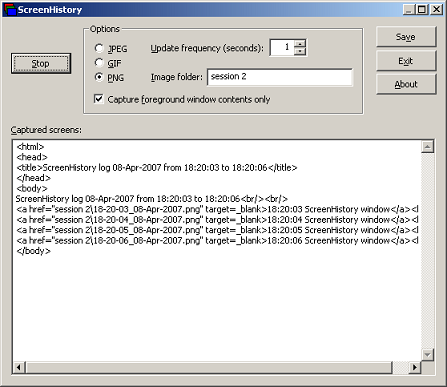
After working with many customer issues where I needed good screenshots I decided to write a screen or window capture tool to make troubleshooting and reading other logs/traces easier. Here is ScreenHistory tool with familiar History-like GUI interface if you have seen WindowHistory, MessageHistory and ProcessHistory tools.

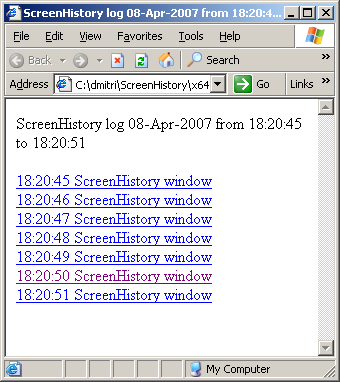
The tool captures the whole screen (currently the primary monitor) after specified interval (default is 1 second) or the contents of a current foreground window (multi-monitor independent) and saves its screenshot in JPEG, GIF (default) or PNG file. Additionally an HTML file is generated with links to screenshots. New forthcoming versions of WindowHistory and MessageHistory will reference these screenshots. Windows Mobile version will be released soon too.

Instead of forming a mental picture about screen when you look at messages or relating them to arbitrary screenshots sent by your customers you can easily check real-time screenshots when you look at message traces, for example, MessageHistory trace:

13:12:24:944 S WM_ACTIVATEAPP (0x1c) wParam: 0x0 lParam: 0x12ec Deactivated / TID of activated window: 0x12ec

[Screen]
13:12:47:268 S WM_ACTIVATEAPP (0×1c) wParam: 0×1 lParam: 0×0 Activated / TID of deactivated window: 0×0

[Screen]

or WindowHistory trace

Handle: 000300E4 Class: "MyClass" Title: "My Application"
Captured at: 13:11:47:983
Process ID: 6c4
Thread ID: 1054
Parent: 0
Screen position (l,t,r,b): (264,161,1032,691)
Visible: true
Window placement command: SW_SHOWNORMAL
Foreground: false
Foreground changed at 13:12:20:626 to true
[Screen]
Foreground changed at 13:12:24:959 to false
[Screen]
Foreground changed at 13:12:47:284 to true
[Screen]
Foreground changed at 13:12:51:852 to false
[Screen]

The following ScreenHistory screenshot was saved by the tool itself:

If you save an HTML file and load it in IE you would see formatted screen log (screenshot was saved by ScreenHistory):

- Dmitry Vostokov @ DumpAnalysis.org -

Post-debugging complications

Tuesday, April 3rd, 2007

Real story: suddenly an application being developed started to leak memory very rapidly and in huge amounts, 100Mb per second. That application used a DLL that was known for memory leaks but those leaks were much smaller before. After spending the whole day debugging this problem a developer renamed the application just to keep its current version and launched it again. The same executable file but under a different name started to consume much less memory as before the problem. After renaming it back the application started to consume huge amounts of memory again. Scratching his head the developer recalled that he enabled full page heap (placing allocations at the end of full pages) 3 weeks ago…

The moral of this story is always to revert changes made for debugging purposes back as soon as debugging session is finished or to use fresh and separate debugging environment every time. The latter is much easier nowadays if you use VMWare or Virtual PC.

- Dmitry Vostokov -

lvalues, rvalues and pointers

Monday, March 19th, 2007

I’ve just published stripped down HTML version of my old Code Reading lectures explaining lvalues and rvalues terminology (used in C and C++ standard documents) and pointers. It also explains how to read complex pointer declarations, const pointers and relationship between pointers and arrays. Understanding pointers is a must in low-level debugging. Can be found here:

lvalues, rvalues and pointers

- Dmitry Vostokov -

Practical Foundations of Debugging (x64)

Monday, March 19th, 2007

I’ve just published HTML slides for the first two original lectures on debugging on x64 platform written last year. Basically they are an improved version of my old lectures on debugging on x86 platforms developed in 2004. Now I put more emphasis on using WinDbg as a debugging tool and as previously no assembly language background is assumed. New lectures use x64 assembly language throughout. I’m planning to adapt them to ILP 32-32-64 Windows x64 model (integer-long-pointer) and port more old lectures this year.

- Dmitry Vostokov -

Crash Dump Analysis and Debugging Portal

Friday, March 9th, 2007

I’ve decided that content management system is more suitable for organizing links, blog feeds, books and book reviews, articles, etc. Last year I set up crash dump analysis forum mainly to keep all that information in one place. Then later I started my own blog. The amount of information I’m trying to organize is growing and I want it to be more structured than it is now so I installed Drupal CMS on www.dumpanalysis.org and the portal is currently under development. Updates will be posted regularly. The crash dump analysis forum that was parked there has been moved to www.dumpanalysis.org/forum and I made great efforts to preserve links to its topics.

- Dmitry Vostokov -

Bugchecks depicted: IRQL_NOT_LESS_OR_EQUAL

Tuesday, March 6th, 2007

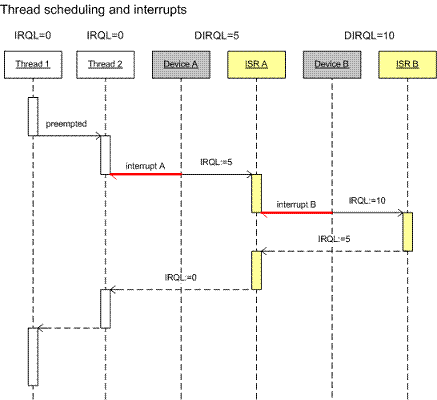
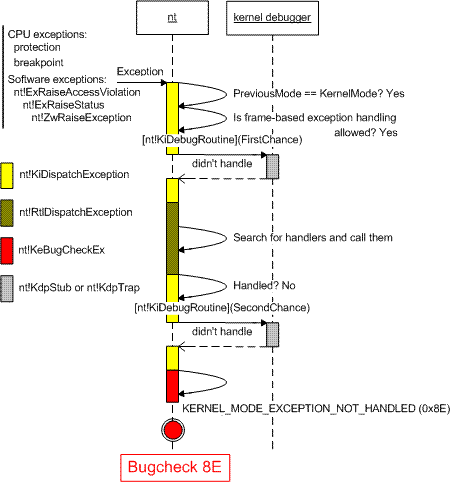
During kernel debugging training I’m providing I came up to the idea to use UML sequence diagrams to depict various Windows kernel behavior including bugchecks. Today I start with bugcheck A. To understand why this bugcheck is needed you need to understand the difference between thread scheduling and IRQL and I use the following diagram to illustrate it:

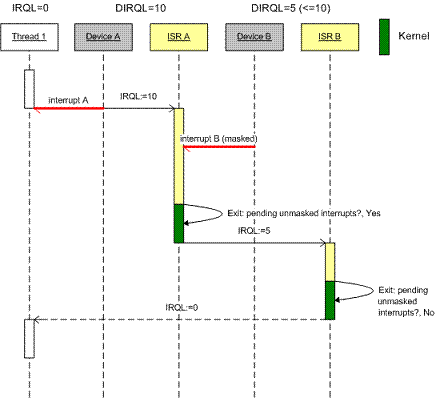
Then I explain interrupt masking:

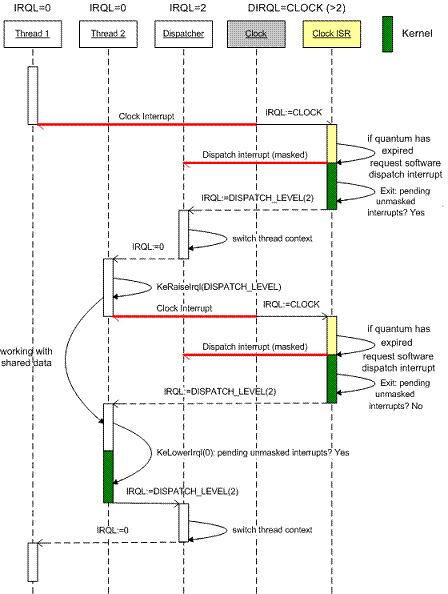
Next I explain thread scheduling (thread dispatcher):

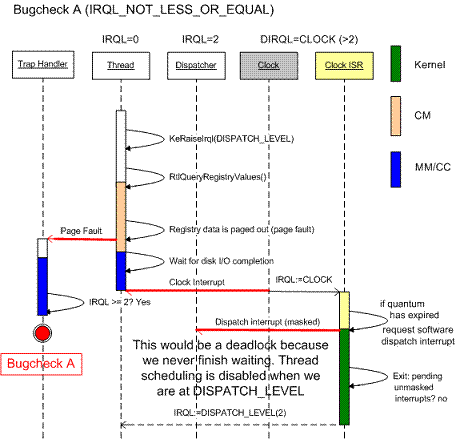
And finally here is the diagram showing when bugcheck A happens and what would happen if it doesn’t exist:

This bugcheck happens in the trap handler and IRQL checking before bugcheck happens in memory manager as you can see from the dump example below. There is no IRQL checking in disassembled handler so it must be in one of Mm functions:

BugCheck A, {3, 1c, 1, 8042d8f9}
0: kd> k
nt!KiTrap0E+0×210
driver!foo+0×209
0: kd> u nt!KiTrap0E nt!KiTrap0E+0×210
nt!KiTrap0E:

8046b05e call    nt!MmAccessFault (8044bfba)

8046b189 call    dword ptr [nt!_imp__KeGetCurrentIrql (8040063c)]
8046b18f lock    inc dword ptr [nt!KiHardwareTrigger (80470cc0)]
8046b196 mov     ecx,[ebp+0×64]
8046b199 and     ecx,0×2
8046b19c shr     ecx,1
8046b19e mov     esi,[ebp+0×68]
8046b1a1 push    esi
8046b1a2 push    ecx
8046b1a3 push    eax
8046b1a4 push    edi
8046b1a5 push    0xa
8046b1a7 call    nt!KeBugCheckEx (8042c1e2)

- Dmitry Vostokov -

WinDbg tips and tricks: hypertext commands

Saturday, March 3rd, 2007

You may know that the recent versions of WinDbg have RichEdit command output window that allows to do syntax highlighting and simulate hyperlinks.

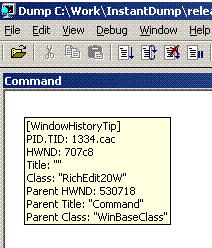
Tooltip from WindowHistory shows window class:

However you may not know there is Debugger Markup Language (DML) and there are new commands that take advantage of it. For documentation please look at dml.doc located in your Debugging Tools for Windows folder.

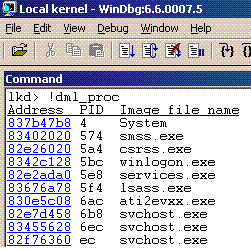
Here is the output of some commands:

!dml_proc

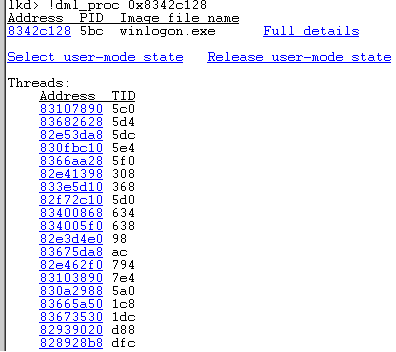
Here we can click on a process link and get the list of threads:

We can click either on “Full details” link or on an individual thread link to see its call stack. If we select “user-mode state” link we get automatic switch to process context (useful for complete memory dumps):

kd> .process /p /r 0x8342c128
Implicit process is now 8342c128
Loading User Symbols

You can also navigate frames and local variables very easily:

If you click on a thread name (No name here) you get its context:

Clicking on a number sets the scope and shows local variables (if you have full PDB files):


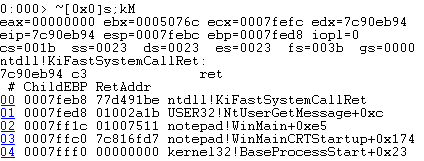
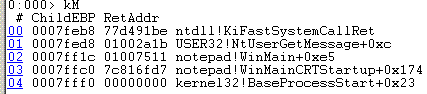
Similar command is kM:

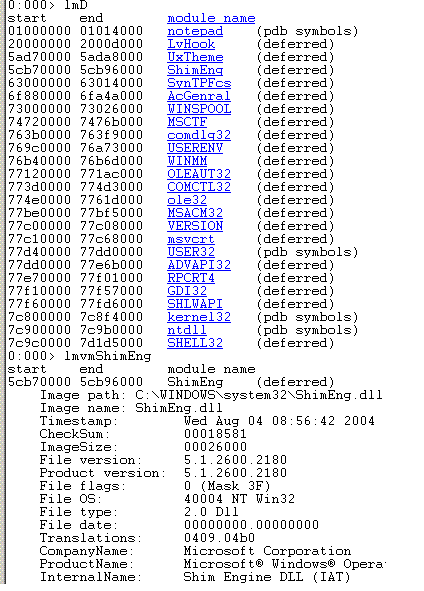
Another useful command is lmD where you can easily inspect modules:

- Dmitry Vostokov -

Crash Dump Analysis AntiPatterns (Part 3)

Wednesday, February 28th, 2007

I have heard engineers saying, “I didn’t know about this debugging command, let’s use it!” after training session or reading other people’s analysis of crash dumps. A year later I hear the same phrase from them about another debugging command. In the mean time they continue to use the same set of commands they know about until they hear the old new one.

This is a manifestation of Word of Mouth anti-pattern.

General solution: Know your tools. Study them proactively. RTFM.

Example solution: periodically read and re-read WinDbg help.

More refined solution: debugger.chm on Windows Mobile PC.

- Dmitry Vostokov -

Heap stack traces from W2K3/XP user dump

Saturday, February 24th, 2007

If you have user mode stack trace DB enabled on Windows 2003 for some service or application (here is an example for Citrix IMA service) and if you get a dump and try to get saved stack traces using !heap extension command you get these errors:

0:000> !heap -k -h 000a0000
    Heap entries for Segment00 in Heap 000a0000
        000a0c50: 00c50 . 00040 [01] - busy (40)
        000a0c90: 00040 . 01818 [07] - busy (1800), tail fill - unable to read heap entry extra at 000a24a0
        000a24a8: 01818 . 00030 [07] - busy (18), tail fill - unable to read heap entry extra at 000a24d0
        000a24d8: 00030 . 005a0 [07] - busy (588), tail fill - unable to read heap entry extra at 000a2a70

The solution is to use Windows 2000 extension ntsdexts.dll:

0:000> !.\w2kfre\ntsdexts.heap -k -h 000a0000
Stack trace (12) at 1021bfc:
   7c85fc22: ntdll!RtlAllocateHeapSlowly+0×00000041
   7c81d4df: ntdll!RtlAllocateHeap+0×00000E9F
   7c83467a: ntdll!LdrpAllocateUnicodeString+0×00000035
   7c8354f4: ntdll!LdrpCopyUnicodeString+0×00000031
   7c83517b: ntdll!LdrpResolveDllName+0×00000195
   7c834b2a: ntdll!LdrpMapDll+0×0000014F
   7c837474: ntdll!LdrpLoadImportModule+0×0000017C
   7c837368: ntdll!LdrpHandleOneNewFormatImportDescriptor+0×0000004D
   7c837317: ntdll!LdrpHandleNewFormatImportDescriptors+0×0000001D
   7c837441: ntdll!LdrpWalkImportDescriptor+0×00000195
   7c80f560: ntdll!LdrpInitializeProcess+0×00000E3E
   7c80ea0b: ntdll!_LdrpInitialize+0×000000D0
   7c82ec2d: ntdll!KiUserApcDispatcher+0×00000025

- Dmitry Vostokov @ DumpAnalysis.org -

Crash dump analysis case study (1)

Wednesday, February 21st, 2007

Consider the following legacy C++/Win32 code fragment highlighted in WinDbg after opening a crash dump:

1: HANDLE hFile = CreateFile(str.GetBuffer(), GENERIC_READ, FILE_SHARE_READ, NULL, OPEN_EXISTING, FILE_ATTRIBUTE_NORMAL, NULL);
2: if (hFile != INVALID_HANDLE_VALUE)
3: {
4:    DWORD dwSize = GetFileSize(hFile, NULL);
5:    DWORD dwRead = 0;
6:    CHAR *bufferA = new CHAR[dwSize+2];
7:    memset(bufferA, 0, dwSize+2);
8:    if (ReadFile(hFile, bufferA, dwSize, &dwRead, NULL))
9:    {
10:      DWORD i = 0, j = 0;
11:      for (; i < dwSize+2-7; ++i)
12:      {
13:         if (bufferA[i] == 0xD && bufferA[i+1] != 0xA)

At the first glance the code seems to be right: we open a file, get its size, allocate a buffer to read, etc. All loop indexes are within array bounds too. Let’s look at disassembly and crash point:

0:000> uf component!CMyDlg::OnTimer


004021bc push    0
004021be push    esi
004021bf call    dword ptr [component!_imp__GetFileSize (0042e26c)]
004021c5 mov     edi,eax ; dwSize
004021c7 lea     ebx,[edi+2] ; dwSize+2
004021ca push    ebx
004021cb mov     dword ptr [esp+34h],0
004021d3 call    component!operator new[] (00408e35)
004021d8 push    ebx
004021d9 mov     ebp,eax ; bufferA
004021db push    0
004021dd push    ebp
004021de call    component!memset (00418500)
004021e3 add     esp,10h
004021e6 push    0
004021e8 lea     edx,[esp+34h]
004021ec push    edx
004021ed push    edi
004021ee push    ebp
004021ef push    esi
004021f0 call    dword ptr [component!_imp__ReadFile (0042e264)]
004021f6 test    eax,eax
004021f8 jne     component!CMyDlg::OnTimer+0×3b1 (00402331)


00402331 xor     esi,esi ; i
00402333 add     edi,0FFFFFFFBh ; +2-7 (edi contains dwSize)
00402336 cmp     edi,esi ; loop condition
00402338 mov     dword ptr [esp+24h],esi
0040233c jbe     component!CMyDlg::OnTimer+0×43e (004023be)
00402342 mov     al,byte ptr [esi+ebp] ; bufferA[i]

0:000> r
eax=00002b00 ebx=00000002 ecx=00431000 edx=00000000 esi=00002b28 edi=fffffffb
eip=00402342 esp=0012efd4 ebp=0095b4d8 iopl=0 nv up ei pl nz ac pe cy
cs=001b ss=0023 ds=0023 es=0023 fs=003b gs=0000 efl=00000217
component!CMyDlg::OnTimer+0×3c2:
00402342 8a042e mov al,byte ptr [esi+ebp] ds:0023:0095e000=??

If we look at ebx (dwSize+2) and edi registers (array upper bound, dwSize+2-7) we can easily see that dwSize was zero. Clearly we had buffer overrun because upper array bound was calculated as 0+2-7 = FFFFFFFB (the loop index was unsigned integer, DWORD). Were the index signed integer variable (int) we wouldn’t have had any problem because the condition 0 < 0+2-7 is always false and the loop body would have never been executed.

Based on that the following fix was proposed:

1: HANDLE hFile = CreateFile(str.GetBuffer(), GENERIC_READ, FILE_SHARE_READ, NULL, OPEN_EXISTING, FILE_ATTRIBUTE_NORMAL, NULL);
2: if (hFile != INVALID_HANDLE_VALUE)
3: {
4:    DWORD dwSize = GetFileSize(hFile, NULL);
5:    DWORD dwRead = 0;
6:    CHAR *bufferA = new CHAR[dwSize+2];
7:    memset(bufferA, 0, dwSize+2);
8:    if (ReadFile(hFile, bufferA, dwSize, &dwRead, NULL))
9:    {
10:      DWORD i = 0, j = 0;
10:      int i = 0, j = 0;
11:      for (; i < dwSize+2-7; ++i)
11:      for (; i < (int)dwSize+2-7; ++i)
12:      {

GetFileSize can return INVALID_FILE_SIZE (0xFFFFFFFF) and operator new can fail theoretically (if the size is too big) so we can correct the code even further:

1: HANDLE hFile = CreateFile(str.GetBuffer(), GENERIC_READ, FILE_SHARE_READ, NULL, OPEN_EXISTING, FILE_ATTRIBUTE_NORMAL, NULL);
2: if (hFile != INVALID_HANDLE_VALUE)
3: {
4:    DWORD dwSize = GetFileSize(hFile, NULL);
4a:   if (dwSize != INVALID_FILE_SIZE)
4b:   {
5:       DWORD dwRead = 0;
6:       CHAR *bufferA = new CHAR[dwSize+2];
6a:      if (bufferA)
6b:      {
7:          memset(bufferA, 0, dwSize+2);
8:          if (ReadFile(hFile, bufferA, dwSize, &dwRead, NULL))
9:          {
10:            int i = 0, j = 0;
11:            for (; i < (int)dwSize+2-7; ++i)
12:            {

- Dmitry Vostokov @ DumpAnalysis.org -
Suspending threads (live kernel debugging)

Tuesday, February 20th, 2007

I couldn’t find any WinDbg command to suspend threads during live kernel debugging session even if you debug a process. This can be useful for debugging or reproducing race condition issues. ~n (suspend) and ~f (freeze) are for user mode live debugging only.

For example, you have one thread that depends on another thread finishing its work earlier. Sometimes, very rarely the latter thread finishes after the moment  the first thread would expect it. In order to model this race condition you can simply patch the prologue code of the second thread worker function with ret instruction. This has the same effect as suspending the thread so it cannot produce required data. 

- Dmitry Vostokov -

InstantDump (JIT Process Dumper)

Monday, February 19th, 2007

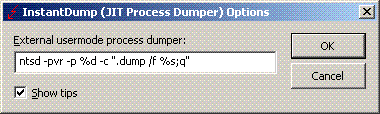
Techniques utilizing user mode process dumpers and debuggers like Microsoft userdump.exe, NTSD or WinDbg and CDB from Debugging Tools for Windows are too slow to pick up a process and dump it. You need either to attach a debugger manually, run the command line prompt or switch to Task Manager. This deficiency was the primary motivation for me to use JIT (just-in-time) technology for process dumpers. The new tool, InstantDump, will dump a process instantly and non-invasively in a moment when you need it. How does it work? You point to any window and press hot key.

InstantDump could be useful to study hang GUI processes or to get several dumps of the same process during some period of time (CPU spiking case or memory leak, for example) or just dump the process for the sake of dumping it (for curiosity). The tool uses the same tooltip technology introduced in WindowHistory 4.0 to dynamically display window information.

Short user guide:

1. The program will run only on XP/W2K3/Vista (in fact it will not load on W2K).

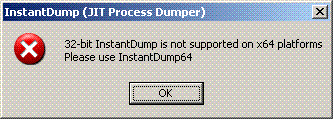
2. Run InstantDump.exe on 32-bit system or InstantDump64.exe on x64 Windows. If you attempt to run InstantDump.exe on x64 Windows it will show this message box and quit:


3. InstantDump puts itself into task bar icon notification area:

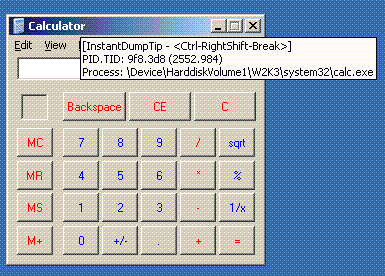
4. By default when you move the mouse pointer over windows the tooltip follows the cursor describing the process and thread id and process image path (you can disable tips in Options dialog box):

5. If you hold Ctrl-RightShift-Break for less than a second then the process (which window is under the cursor) will be dumped according to the settings for external process dumper in options dialog (accessible via task bar icon right mouse click):


The saved dump name will be (in our Calculator window case): calc.exe_9f8(2552)_22-17-56_18-Feb-2007.dmp

Looks like there is no NTSD in Vista so you have to use another user mode dumper, for example, install MS userdump.exe and specify the following command line in Options dialog:

userdump.exe %d %s

or resort to WinDbg or CDB command line.

The tool can be downloaded from here.

The new version of this tool is under development that will automatically pick up a process name from Task Manager, Process Explorer or Process Monitor (in fact, from any tool that displays the list of processes) and then instantly dump it.

- Dmitry Vostokov -

WindowHistory 4.0

Thursday, February 15th, 2007

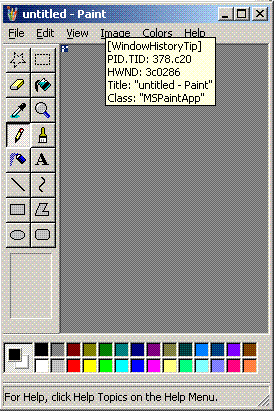
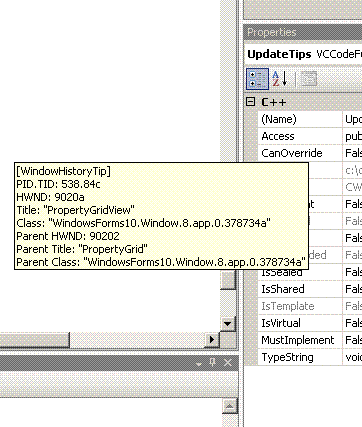
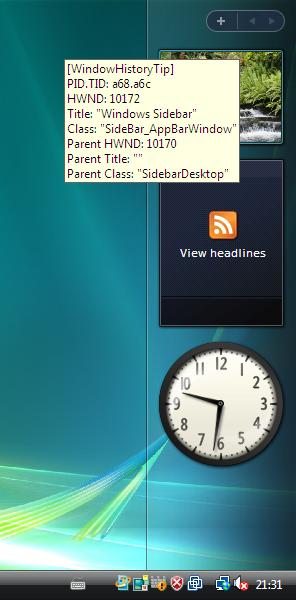
I’ve added tool tips showing window information when pointing at any window. Here are some screenshots:

This works inside Citrix seamless ICA sessions too. Additionally the new version tracks client window rectangle and its changes (this was missing in the previous versions).

It works on Vista (doesn’t require elevation):

32-bit version can be downloaded from Citrix support web site.

64-bit version, which tracks changes for both 32-bit and 64-bit windows on x64 Windows platform, can also be downloaded from Citrix support web site.

- Dmitry Vostokov @ DumpAnalysis.org -
Easy list traversing (dt vs. !list)

Sunday, February 11th, 2007

I recently discovered in WinDbg help that dt command can be used for traversing linked lists. Most structures I work with have LIST_ENTRY as their first member and it is much easier to use dt command than !list (less typing) For example:

0:000> dt _MYBIGSTRUCTURE
   +0x000 Links : _LIST_ENTRY
    ...
   +0x080 SomeName : [33] Uint2B

0:000> dd component!MyBigStructureListHead l1
01022cd0  0007fe58

0:000> .enable_unicode 1

The following command outputs the whole list of structures:

0:000> dt _MYBIGSTRUCTURE -l Links.Flink 0007fe58

And the following command outputs the list of SomeName members:

0:000> dt _MYBIGSTRUCTURE -l Links.Flink -y SomeName 0007fe58
Links.Flink at 0×7fe58
   +0×000 Links :  [ 0×8e090 - 0×1022cd0 ]
   +0×080 SomeName : [33]  “Foo”
Links.Flink at 0×8e090
   +0×000 Links :  [ 0×913f8 - 0×7fe58 ]
   +0×080 SomeName : [33]  “Bar”

If you don’t remember exact member name you can specify the partial name and any member that matches will be shown:

0:000> dt _MYBIGSTRUCTURE -l Links.Flink -y S 0007fe58

However it your structure doesn’t have LIST_ENTRY as its first member then you need to subtract its offset, for example:

kd> dd nt!PsActiveProcessHead l1
808af068  85fa48b0

kd> dt _EPROCESS
   +0x000 Pcb              : _KPROCESS
   +0x078 ProcessLock      : _EX_PUSH_LOCK
   +0x080 CreateTime       : _LARGE_INTEGER
   +0x088 ExitTime         : _LARGE_INTEGER
   +0x090 RundownProtect   : _EX_RUNDOWN_REF
   +0x094 UniqueProcessId  : Ptr32 Void
   +0×098 ActiveProcessLinks : _LIST_ENTRY

kd> dt _EPROCESS -l ActiveProcessLinks.Flink -y ImageFileName 85fa48b0-0×98
ActiveProcessLinks.Flink at 0×85fa4818
   +0×098 ActiveProcessLinks :  [ 0×85d1ce20 - 0×808af068 ]
   +0×164 ImageFileName : [16]  “System”
ActiveProcessLinks.Flink at 0×85d1cd88
   +0×098 ActiveProcessLinks :  [ 0×85dba6b8 - 0×85fa48b0 ]
   +0×164 ImageFileName : [16]  “smss.exe”
ActiveProcessLinks.Flink at 0×85dba620
   +0×098 ActiveProcessLinks :  [ 0×858d20b8 - 0×85d1ce20 ]
   +0×164 ImageFileName : [16]  “csrss.exe”
ActiveProcessLinks.Flink at 0×858d2020
   +0×098 ActiveProcessLinks :  [ 0×858c20b8 - 0×85dba6b8 ]
   +0×164 ImageFileName : [16]  “winlogon.exe”
ActiveProcessLinks.Flink at 0×858c2020
   +0×098 ActiveProcessLinks :  [ 0×8589f0b8 - 0×858d20b8 ]
   +0×164 ImageFileName : [16]  “services.exe”

Here is another example, not involving LIST_ENTRY but rather a classic single list forward pointer: 

0:000> !teb
TEB at 7FFDE000
    ExceptionList:    6fc54
    Stack Base:       70000
    Stack Limit:      6d000
    SubSystemTib:     0
    FiberData:        1e00
    ArbitraryUser:    0
    Self:             7ffde000
    EnvironmentPtr:   0
    ClientId:         22c.228
    Real ClientId:    22c.228
    RpcHandle:        0
    Tls Storage:      742b8
    PEB Address:      7ffdf000
    LastErrorValue:   997
    LastStatusValue:  103
    Count Owned Locks:0
    HardErrorsMode:   0

0:000> dt -r _TEB
   +0x000 NtTib : _NT_TIB
      +0x000 ExceptionList : Ptr32 _EXCEPTION_REGISTRATION_RECORD
         +0×000 Next : Ptr32 _EXCEPTION_REGISTRATION_RECORD
         +0×004 Handler : Ptr32
      +0×004 StackBase : Ptr32 Void
      +0×008 StackLimit : Ptr32 Void
      +0×00c SubSystemTib : Ptr32 Void
      +0×010 FiberData : Ptr32 Void
      +0×010 Version : Uint4B
      +0×014 ArbitraryUserPointer : Ptr32 Void
      +0×018 Self : Ptr32 _NT_TIB

0:000> dt _EXCEPTION_REGISTRATION_RECORD -l Next 7FFDE000
Next at 0x7ffde000
   +0x000 Next : 0x0006fc54 _EXCEPTION_REGISTRATION_RECORD
   +0x004 Handler : 0x00070000 +70000
Next at 0x6fc54
   +0x000 Next : 0x0006fcfc _EXCEPTION_REGISTRATION_RECORD
   +0x004 Handler : 0x7c5c1f44 KERNEL32!_except_handler3+0
Next at 0x6fcfc
   +0x000 Next : 0x0006ff5c _EXCEPTION_REGISTRATION_RECORD
   +0x004 Handler : 0x7c2e5649 ADVAPI32!_except_handler3+0
Next at 0x6ff5c
   +0x000 Next : 0x0006ffb0 _EXCEPTION_REGISTRATION_RECORD
   +0x004 Handler : 0x7c2e5649 ADVAPI32!_except_handler3+0
Next at 0x6ffb0
   +0x000 Next : 0x0006ffe0 _EXCEPTION_REGISTRATION_RECORD
   +0x004 Handler : 0x01015878 component!_except_handler3+0
Next at 0x6ffe0
   +0x000 Next : 0xffffffff _EXCEPTION_REGISTRATION_RECORD
   +0x004 Handler : 0x7c5c1f44 KERNEL32!_except_handler3+0

- Dmitry Vostokov -

Exported NTDLL and kernel structures

Saturday, February 10th, 2007

It happens sometimes that during crash dump analysis or debugging session I forget exact structure name when I want to use it in dt WinDbg command. In this case wildcards help me: dt module!*, for example,

0:000> dt ntdll!*
          ntdll!LIST_ENTRY64
          ntdll!LIST_ENTRY32
          ntdll!_ULARGE_INTEGER
          ntdll!_LIST_ENTRY
          ntdll!_IMAGE_NT_HEADERS
          ntdll!_IMAGE_FILE_HEADER
          ntdll!_IMAGE_OPTIONAL_HEADER
          ntdll!_IMAGE_NT_HEADERS
          ntdll!_LARGE_INTEGER
          ntdll!_LUID
          ntdll!_KPRCB
          ntdll!_KTHREAD
          ntdll!_KPROCESSOR_STATE
          ntdll!_KSPIN_LOCK_QUEUE
          ntdll!_KNODE
          ntdll!_PP_LOOKASIDE_LIST
          ntdll!_KPRCB
          ntdll!_KDPC_DATA
          ntdll!_KEVENT
          ntdll!_KDPC
          ntdll!_SINGLE_LIST_ENTRY
          ntdll!_FX_SAVE_AREA
          ntdll!_PROCESSOR_POWER_STATE
          ntdll!_KPRCB
          ntdll!_KPCR
          ntdll!_NT_TIB
          ntdll!_EXCEPTION_REGISTRATION_RECORD
          ntdll!_KIDTENTRY
          ntdll!_KGDTENTRY
          ntdll!_KTSS
          ntdll!_KPCR
          ntdll!_KAPC
          ntdll!_SINGLE_LIST_ENTRY
          ntdll!_KDPC_IMPORTANCE
          ntdll!_KDPC
          ntdll!_DISPATCHER_HEADER
          ntdll!_KAPC_STATE
          ntdll!_KWAIT_BLOCK
          ntdll!_KGATE
          ntdll!_KQUEUE
          ntdll!_KTIMER
          ntdll!_KTRAP_FRAME
          ntdll!_KPROCESS
          ntdll!_KSEMAPHORE
          ntdll!_KTHREAD
          ntdll!_KSPIN_LOCK_QUEUE_NUMBER
          ntdll!_FAST_MUTEX
          ntdll!_SLIST_HEADER
          ntdll!_NPAGED_LOOKASIDE_LIST
          ntdll!_GENERAL_LOOKASIDE
          ntdll!_NPAGED_LOOKASIDE_LIST
          ntdll!_PAGED_LOOKASIDE_LIST
          ntdll!_PP_NPAGED_LOOKASIDE_NUMBER
          ntdll!_POOL_TYPE
          ntdll!_GENERAL_LOOKASIDE
          ntdll!_EX_RUNDOWN_REF
          ntdll!_EX_FAST_REF
          ntdll!_EX_PUSH_LOCK
          ntdll!_EX_PUSH_LOCK_WAIT_BLOCK
          ntdll!_EX_PUSH_LOCK_CACHE_AWARE
          ntdll!_ETHREAD
          ntdll!_TERMINATION_PORT
          ntdll!_CLIENT_ID
          ntdll!_PS_IMPERSONATION_INFORMATION
          ntdll!_DEVICE_OBJECT
          ntdll!_EPROCESS
          ntdll!_ETHREAD
          ntdll!_HANDLE_TABLE
          ntdll!_KGUARDED_MUTEX
          ntdll!_MM_AVL_TABLE
          ntdll!_EJOB
          ntdll!_EPROCESS_QUOTA_BLOCK
          ntdll!_PAGEFAULT_HISTORY
          ntdll!_HARDWARE_PTE_X86
          ntdll!_PEB
          ntdll!_SE_AUDIT_PROCESS_CREATION_INFO
          ntdll!_MMSUPPORT
          ntdll!_EPROCESS
          ntdll!_OBJECT_HEADER
          ntdll!_OBJECT_TYPE
          ntdll!_OBJECT_CREATE_INFORMATION
          ntdll!_QUAD
          ntdll!_OBJECT_HEADER
          ntdll!_OBJECT_HEADER_QUOTA_INFO
          ntdll!_OBJECT_HEADER_HANDLE_INFO
          ntdll!_OBJECT_HANDLE_COUNT_DATABASE
          ntdll!_OBJECT_HANDLE_COUNT_ENTRY
          ntdll!_OBJECT_HEADER_HANDLE_INFO
          ntdll!_OBJECT_HEADER_NAME_INFO
          ntdll!_OBJECT_DIRECTORY
          ntdll!_UNICODE_STRING
          ntdll!_OBJECT_HEADER_NAME_INFO
          ntdll!_OBJECT_HEADER_CREATOR_INFO
          ntdll!_OBJECT_ATTRIBUTES
          ntdll!_ERESOURCE
          ntdll!_OBJECT_TYPE_INITIALIZER
          ntdll!_OBJECT_TYPE
          ntdll!_OBJECT_HANDLE_INFORMATION
          ntdll!_PERFINFO_GROUPMASK
          ntdll!_KGUARDED_MUTEX
          ntdll!_DISPATCHER_HEADER
          ntdll!_PF_SCENARIO_TYPE
          ntdll!_HANDLE_TRACE_DEBUG_INFO
          ntdll!_HANDLE_TABLE
          ntdll!_KWAIT_BLOCK
          ntdll!_MMSUPPORT_FLAGS
          ntdll!_MMWSL
          ntdll!_MMSUPPORT
          ntdll!_EPROCESS_QUOTA_ENTRY
          ntdll!_EPROCESS_QUOTA_BLOCK
          ntdll!_UNICODE_STRING
          ntdll!_NT_TIB
          ntdll!_PS_JOB_TOKEN_FILTER
          ntdll!_IO_COUNTERS
          ntdll!_EJOB
          ntdll!_PEB_LDR_DATA
          ntdll!_RTL_USER_PROCESS_PARAMETERS
          ntdll!_RTL_CRITICAL_SECTION
          ntdll!_PEB_FREE_BLOCK
          ntdll!_ACTIVATION_CONTEXT_DATA
          ntdll!_ASSEMBLY_STORAGE_MAP
          ntdll!_PEB
          ntdll!_KGATE
          ntdll!_IMAGE_FILE_HEADER
          ntdll!_RTL_STACK_TRACE_ENTRY
          ntdll!_PEB_FREE_BLOCK
          ntdll!_KSPIN_LOCK_QUEUE
          ntdll!_PP_LOOKASIDE_LIST
          ntdll!_KEXECUTE_OPTIONS
          ntdll!_KPROCESS
          ntdll!_PEB_LDR_DATA
          ntdll!_DPH_BLOCK_INFORMATION
          ntdll!_SECURITY_IMPERSONATION_LEVEL
          ntdll!_PS_IMPERSONATION_INFORMATION
          ntdll!_EPROCESS_QUOTA_ENTRY
          ntdll!_FNSAVE_FORMAT
          ntdll!_FX_SAVE_AREA
          ntdll!PROCESSOR_IDLE_TIMES
          ntdll!PROCESSOR_PERF_STATE
          ntdll!_PROCESSOR_POWER_STATE
          ntdll!_IO_COUNTERS
          ntdll!_KiIoAccessMap
          ntdll!_KTSS
          ntdll!_KIDTENTRY
          ntdll!_MMSUPPORT_FLAGS
          ntdll!_HEAP
          ntdll!_HEAP_ENTRY
          ntdll!_HEAP_TAG_ENTRY
          ntdll!_HEAP_UCR_SEGMENT
          ntdll!_HEAP_UNCOMMMTTED_RANGE
          ntdll!_HEAP_SEGMENT
          ntdll!_HEAP_PSEUDO_TAG_ENTRY
          ntdll!_HEAP_LOCK
          ntdll!_HEAP
          ntdll!_TERMINATION_PORT
          ntdll!LSA_FOREST_TRUST_RECORD_TYPE
          ntdll!_HEAP_UNCOMMMTTED_RANGE
          ntdll!_OBJECT_HANDLE_COUNT_DATABASE
          ntdll!_FNSAVE_FORMAT
          ntdll!PROCESSOR_PERF_STATE
          ntdll!PROCESSOR_IDLE_TIMES
          ntdll!_HANDLE_TRACE_DB_ENTRY
          ntdll!_HANDLE_TRACE_DEBUG_INFO
          ntdll!_PROCESS_WS_WATCH_INFORMATION
          ntdll!_PAGEFAULT_HISTORY
          ntdll!_SECURITY_QUALITY_OF_SERVICE
          ntdll!_OBJECT_CREATE_INFORMATION
          ntdll!_MMADDRESS_NODE
          ntdll!_MM_AVL_TABLE
          ntdll!_HARDWARE_PTE_X86
          ntdll!_HEAP_ENTRY
          ntdll!_GENERIC_MAPPING
          ntdll!_OBJECT_DUMP_CONTROL
          ntdll!_OB_OPEN_REASON
          ntdll!_ACCESS_STATE
          ntdll!_SECURITY_OPERATION_CODE
          ntdll!_OBJECT_NAME_INFORMATION
          ntdll!_OBJECT_TYPE_INITIALIZER
          ntdll!_LARGE_INTEGER
          ntdll!_RTL_TRACE_BLOCK
          ntdll!_HEAP_UCR_SEGMENT
          ntdll!_KEXECUTE_OPTIONS
          ntdll!_OWNER_ENTRY
          ntdll!_ERESOURCE
          ntdll!_GENERIC_MAPPING
          ntdll!_SID_AND_ATTRIBUTES
          ntdll!_LUID_AND_ATTRIBUTES
          ntdll!_PS_JOB_TOKEN_FILTER
          ntdll!_MEMORY_CACHING_TYPE_ORIG
          ntdll!_KiIoAccessMap
          ntdll!_EXCEPTION_DISPOSITION
          ntdll!_EXCEPTION_RECORD
          ntdll!_CONTEXT
          ntdll!_EXCEPTION_REGISTRATION_RECORD
          ntdll!_DRIVER_OBJECT
          ntdll!_IRP
          ntdll!_IO_TIMER
          ntdll!_VPB
          ntdll!_WAIT_CONTEXT_BLOCK
          ntdll!_KDEVICE_QUEUE
          ntdll!_DEVOBJ_EXTENSION
          ntdll!_DEVICE_OBJECT
          ntdll!_PROCESS_WS_WATCH_INFORMATION
          ntdll!_SECURITY_QUALITY_OF_SERVICE
          ntdll!_FLOATING_SAVE_AREA
          ntdll!_CONTEXT
          ntdll!_IMAGE_DATA_DIRECTORY
          ntdll!_IMAGE_OPTIONAL_HEADER
          ntdll!_KUSER_SHARED_DATA
          ntdll!_KSYSTEM_TIME
          ntdll!_NT_PRODUCT_TYPE
          ntdll!_ALTERNATIVE_ARCHITECTURE_TYPE
          ntdll!_KUSER_SHARED_DATA
          ntdll!_QUAD
          ntdll!_KAPC_STATE
          ntdll!_MODE
          ntdll!_HEAP_PSEUDO_TAG_ENTRY
          ntdll!_RTL_CRITICAL_SECTION_DEBUG
          ntdll!_RTL_CRITICAL_SECTION
          ntdll!_HEAP_SEGMENT
          ntdll!_KTRAP_FRAME
          ntdll!_KGDTENTRY
          ntdll!_KDEVICE_QUEUE_ENTRY
          ntdll!_IO_ALLOCATION_ACTION
          ntdll!_WAIT_CONTEXT_BLOCK
          ntdll!_KTIMER
          ntdll!_MDL
          ntdll!_IO_STATUS_BLOCK
          ntdll!_IO_STACK_LOCATION
          ntdll!_FILE_OBJECT
          ntdll!_IRP
          ntdll!_VPB
          ntdll!_KOBJECTS
          ntdll!_KSEMAPHORE
          ntdll!_MMADDRESS_NODE
          ntdll!_CURDIR
          ntdll!_RTL_DRIVE_LETTER_CURDIR
          ntdll!_RTL_USER_PROCESS_PARAMETERS
          ntdll!_OWNER_ENTRY
          ntdll!_SE_AUDIT_PROCESS_CREATION_INFO
          ntdll!_OBJECT_HANDLE_COUNT_ENTRY
          ntdll!_CLIENT_ID
          ntdll!_RTL_TRACE_DATABASE
          ntdll!_RTL_TRACE_SEGMENT
          ntdll!_RTL_TRACE_DATABASE
          ntdll!_HEAP_LOCK
          ntdll!_HANDLE_TRACE_DB_ENTRY
          ntdll!ReplacesCorHdrNumericDefines
          ntdll!_MEMORY_TYPE
          ntdll!_IO_TIMER
          ntdll!_FXSAVE_FORMAT
          ntdll!_OBJECT_DIRECTORY_ENTRY
          ntdll!_DEVICE_MAP
          ntdll!_OBJECT_DIRECTORY
          ntdll!_STACK_TRACE_DATABASE
          ntdll!_KDPC_DATA
          ntdll!_STRING
          ntdll!_RTL_DRIVE_LETTER_CURDIR
          ntdll!_SID_AND_ATTRIBUTES
          ntdll!_DPH_HEAP_ROOT
          ntdll!_DPH_HEAP_BLOCK
          ntdll!_RTL_AVL_TABLE
          ntdll!_DPH_HEAP_ROOT
          ntdll!_DEVICE_OBJECT_POWER_EXTENSION
          ntdll!_DEVOBJ_EXTENSION
          ntdll!_FLOATING_SAVE_AREA
          ntdll!_KSYSTEM_TIME
          ntdll!_KQUEUE
          ntdll!_RTL_BALANCED_LINKS
          ntdll!_RTL_GENERIC_COMPARE_RESULTS
          ntdll!_RTL_AVL_TABLE
          ntdll!_HEAP_TAG_ENTRY
          ntdll!_RTL_CRITICAL_SECTION_DEBUG
          ntdll!_MDL
          ntdll!_DPH_HEAP_BLOCK
          ntdll!_PS_QUOTA_TYPE
          ntdll!_flags
          ntdll!_KNODE
          ntdll!_LDR_DATA_TABLE_ENTRY
          ntdll!_ACTIVATION_CONTEXT
          ntdll!_LDR_DATA_TABLE_ENTRY
          ntdll!_TEB
          ntdll!_ACTIVATION_CONTEXT_STACK
          ntdll!_GDI_TEB_BATCH
          ntdll!_TEB_ACTIVE_FRAME
          ntdll!_TEB
          ntdll!_KEVENT
          ntdll!_IO_STATUS_BLOCK
          ntdll!_RTL_TRACE_SEGMENT
          ntdll!_SECURITY_SUBJECT_CONTEXT
          ntdll!_INITIAL_PRIVILEGE_SET
          ntdll!_PRIVILEGE_SET
          ntdll!_ACCESS_STATE
          ntdll!_KSPECIAL_REGISTERS
          ntdll!_KPROCESSOR_STATE
          ntdll!_STRING
          ntdll!_flags
          ntdll!_REG_NOTIFY_CLASS
          ntdll!_OBJECT_DUMP_CONTROL
          ntdll!_SECURITY_SUBJECT_CONTEXT
          ntdll!_RTL_ACTIVATION_CONTEXT_STACK_FRAME
          ntdll!_ACTIVATION_CONTEXT_STACK
          ntdll!_MMSYSTEM_PTE_POOL_TYPE
          ntdll!_KDEVICE_QUEUE
          ntdll!_LUID_AND_ATTRIBUTES
          ntdll!_EXCEPTION_RECORD
          ntdll!_INITIAL_PRIVILEGE_SET
          ntdll!_TEB_ACTIVE_FRAME_CONTEXT
          ntdll!_TEB_ACTIVE_FRAME
          ntdll!_OBJECT_NAME_INFORMATION
          ntdll!_SECTION_OBJECT_POINTERS
          ntdll!_IO_COMPLETION_CONTEXT
          ntdll!_FILE_OBJECT
          ntdll!_IO_COMPLETION_CONTEXT
          ntdll!_DRIVER_EXTENSION
          ntdll!_FAST_IO_DISPATCH
          ntdll!_DRIVER_OBJECT
          ntdll!_IO_CLIENT_EXTENSION
          ntdll!_FS_FILTER_CALLBACKS
          ntdll!_DRIVER_EXTENSION
          ntdll!_TEB_ACTIVE_FRAME_CONTEXT
          ntdll!_IMAGE_DATA_DIRECTORY
          ntdll!_CURDIR
          ntdll!_GDI_TEB_BATCH
          ntdll!_RTL_BALANCED_LINKS
          ntdll!_KDEVICE_QUEUE_ENTRY
          ntdll!_SECTION_OBJECT_POINTERS
          ntdll!_IO_CLIENT_EXTENSION
          ntdll!_IO_SECURITY_CONTEXT
          ntdll!_NAMED_PIPE_CREATE_PARAMETERS
          ntdll!_MAILSLOT_CREATE_PARAMETERS
          ntdll!_FILE_INFORMATION_CLASS
          ntdll!_FSINFOCLASS
          ntdll!_SCSI_REQUEST_BLOCK
          ntdll!_FILE_GET_QUOTA_INFORMATION
          ntdll!_DEVICE_RELATION_TYPE
          ntdll!_GUID
          ntdll!_INTERFACE
          ntdll!_DEVICE_CAPABILITIES
          ntdll!_IO_RESOURCE_REQUIREMENTS_LIST
          ntdll!BUS_QUERY_ID_TYPE
          ntdll!DEVICE_TEXT_TYPE
          ntdll!_DEVICE_USAGE_NOTIFICATION_TYPE
          ntdll!_SYSTEM_POWER_STATE
          ntdll!_POWER_SEQUENCE
          ntdll!_POWER_STATE_TYPE
          ntdll!_POWER_STATE
          ntdll!POWER_ACTION
          ntdll!_CM_RESOURCE_LIST
          ntdll!_IO_STACK_LOCATION
          ntdll!_INTERFACE
          ntdll!_DEVICE_POWER_STATE
          ntdll!_POWER_STATE
          ntdll!_FS_FILTER_CALLBACK_DATA
          ntdll!_FS_FILTER_CALLBACKS
          ntdll!_DEVICE_MAP
          ntdll!_INTERFACE_TYPE
          ntdll!_IO_RESOURCE_LIST
          ntdll!_IO_RESOURCE_REQUIREMENTS_LIST
          ntdll!_SID
          ntdll!_FILE_GET_QUOTA_INFORMATION
          ntdll!_FS_FILTER_PARAMETERS
          ntdll!_FS_FILTER_CALLBACK_DATA
          ntdll!_FILE_BASIC_INFORMATION
          ntdll!_FILE_STANDARD_INFORMATION
          ntdll!_FILE_NETWORK_OPEN_INFORMATION
          ntdll!_COMPRESSED_DATA_INFO
          ntdll!_FAST_IO_DISPATCH
          ntdll!_OBJECT_DIRECTORY_ENTRY
          ntdll!_FILE_BASIC_INFORMATION
          ntdll!_PRIVILEGE_SET
          ntdll!_IO_SECURITY_CONTEXT
          ntdll!_DESCRIPTOR
          ntdll!_KSPECIAL_REGISTERS
          ntdll!_RTL_ACTIVATION_CONTEXT_STACK_FRAME
          ntdll!_MAILSLOT_CREATE_PARAMETERS
          ntdll!_NAMED_PIPE_CREATE_PARAMETERS
          ntdll!_IO_RESOURCE_DESCRIPTOR
          ntdll!_IO_RESOURCE_LIST
          ntdll!_FILE_NETWORK_OPEN_INFORMATION
          ntdll!_CM_FULL_RESOURCE_DESCRIPTOR
          ntdll!_CM_RESOURCE_LIST
          ntdll!_POWER_SEQUENCE
          ntdll!_IO_RESOURCE_DESCRIPTOR
          ntdll!_FS_FILTER_SECTION_SYNC_TYPE
          ntdll!_FS_FILTER_PARAMETERS
          ntdll!_COMPRESSED_DATA_INFO
          ntdll!_FILE_STANDARD_INFORMATION
          ntdll!_DESCRIPTOR
          ntdll!_GUID
          ntdll!_SID_IDENTIFIER_AUTHORITY
          ntdll!_SID
          ntdll!_SID_IDENTIFIER_AUTHORITY
          ntdll!_CM_PARTIAL_RESOURCE_LIST
          ntdll!_CM_FULL_RESOURCE_DESCRIPTOR
          ntdll!_DEVICE_CAPABILITIES
          ntdll!_CM_PARTIAL_RESOURCE_DESCRIPTOR
          ntdll!_CM_PARTIAL_RESOURCE_LIST
          ntdll!_CM_PARTIAL_RESOURCE_DESCRIPTOR
          ntdll!__unnamed

You might have noticed that many structures are listed twice in the output. Actually all of them appear twice and there are many __unnamed (I edited the output before posting to save space). I was wondering why they are listed twice and after some research I found that Visual Studio contains DIA SDK (Debug Interface Access SDK) and you can build DIA2Dump sample to dump PDB files. Unfortunately this tool displays them twice too without any hints:

UDT            : LIST_ENTRY32
Data           :   this+0×0, Member, Type: unsigned long, Flink
Data           :   this+0×4, Member, Type: unsigned long, Blink
UDT            : LIST_ENTRY32
Data           :   this+0×0, Member, Type: unsigned long, Flink
Data           :   this+0×4, Member, Type: unsigned long, Blink

__unnamed datatype is for unions, for example:

0:000> dt -r _ULARGE_INTEGER
   +0x000 LowPart          : Uint4B
   +0x004 HighPart         : Uint4B
   +0x000 u                : __unnamed
      +0×000 LowPart          : Uint4B
      +0×004 HighPart         : Uint4B
   +0×000 QuadPart         : Uint8B

Here’s the definition taken from winnt.h:

typedef union _ULARGE_INTEGER
{
   struct
   {
      DWORD LowPart;
      DWORD HighPart;
   };
   struct
   {
      DWORD LowPart;
      DWORD HighPart;
   } u;
   ULONGLONG QuadPart;
} ULARGE_INTEGER, *PULARGE_INTEGER;

- Dmitry Vostokov -

Crash Dump Analysis Patterns (Part 9a)

Friday, February 9th, 2007

Next pattern is Deadlock. If you don’t know what “deadlock” is read Dumps for Dummes (Part 4). Deadlocks do not only happen with synchronization primitives like mutexes, events or more complex objects (built upon primitives) like critical sections or executive resources (ERESOURCE). They can happen from high level or systems perspective in inter-process or inter-component communication, for example, mutually waiting on messages: GUI window messages, LPC messages, RPC calls. This is a big pattern and I’m going to split it into several parts.

How can we see deadlocks in dumps? Let’s start with user dumps and critical sections.

First I would recommend to read the following excellent MSDN article to understand various members of CRITICAL_SECTION structure:

Break Free of Code Deadlocks in Critical Sections Under Windows

WinDbg !locks command will examine process critical section list and display all locked critical sections, lock count and thread id of current critical section owner. This is the output from a dump of hanging Windows print spooler process (spoolsv.exe):

0:000> !locks
CritSec NTDLL!LoaderLock+0 at 784B0348
LockCount          4
RecursionCount     1
OwningThread       624
EntryCount         6c3
ContentionCount    6c3
*** Locked

CritSec LOCALSPL!SpoolerSection+0 at 76AB8070
LockCount          3
RecursionCount     1
OwningThread       1c48
EntryCount         646
ContentionCount    646
*** Locked

If we look at threads #624 and #1c48 we could see them mutually waiting for each other:

  • TID#624 owns CritSec 784B0348 and is waiting for CritSec 76AB8070

  • TID#1c48 owns CritSec 76AB8070 and is waiting for CritSec 784B0348

0:000>~*kv

. 12 Id: bc0.624 Suspend: 1 Teb: 7ffd3000 Unfrozen
0000024c 00000000 00000000 NTDLL!ZwWaitForSingleObject+0xb
76ab8000 76a815ef 76ab8070 NTDLL!RtlpWaitForCriticalSection+0×9e
76ab8070 76a844f8 00cd1f38 NTDLL!RtlEnterCriticalSection+0×46
00cd1f38 76a8a1d7 00000000 LOCALSPL!EnterSplSem+0xb
00000000 00000000 00cd1f38 LOCALSPL!FindSpoolerByNameIncRef+0×1f
00000000 777f19bc 00000001 LOCALSPL!LocalGetPrinterDriverDirectory+0xe
00000000 777f19bc 00000001 spoolss!GetPrinterDriverDirectoryW+0×59
00000000 777f19bc 00000001 spoolsv!YGetPrinterDriverDirectory+0×27
00000000 777f19bc 00000001 WINSPOOL!GetPrinterDriverDirectoryW+0×7b
50000000 00000001 00000000 BRHLUI04+0×14ea
50002ea0 50000000 00000001 BRHLUI04!DllGetClassObject+0×1705
00000000 00000000 000cb570 NTDLL!LdrpRunInitializeRoutines+0×1df
000cc8f8 0288ea30 0288ea38 NTDLL!LdrpLoadDll+0×2e6
000cc8f8 0288ea30 0288ea38 NTDLL!LdrLoadDll+0×17)
000c1258 00000000 00000008 KERNEL32!LoadLibraryExW+0×231
000c150c 0288efd8 00000000 UNIDRVUI!PLoadCommonInfo+0×17e
000c150c 0288efd8 00000007 UNIDRVUI!DwDeviceCapabilities+0×1a
00070000 00071378 00000045 UNIDRVUI!DrvDeviceCapabilities+0×19

. 13 Id: bc0.1c48 Suspend: 1 Teb: 7ffd2000 Unfrozen
0000010c 00000000 00000000 NTDLL!ZwWaitForSingleObject+0xb
784b0301 78468d38 784b0348 NTDLL!RtlpWaitForCriticalSection+0×9e
784b0348 74fb4344 00000000 NTDLL!RtlEnterCriticalSection+0×46
74fb0000 02c0f2a8 00000000 NTDLL!LdrpGetProcedureAddress+0×122
74fb0000 02c0f2a8 00000000 NTDLL!LdrGetProcedureAddress+0×17
74fb0000 74fb4344 02c0f449 KERNEL32!GetProcAddress+0×41
017924b0 00000000 00000001 ws2_32!CheckForHookersOrChainers+0×1f
00000101 02c0f344 017924b0 ws2_32!WSAStartup+0×10f
00cdf79c 02c0f4f4 76a8c9bc LOCALSPL!GetDNSMachineName+0×1e
00000000 76a8c9bc 780276a2 LOCALSPL!GetPrinterUrl+0×2c
0176f570 ffffffff 01000000 LOCALSPL!UpdateDsSpoolerKey+0×322
0176f570 76a8c9bc 01792b90 LOCALSPL!RecreateDsKey+0×50
00000000 00000002 01792b90 LOCALSPL!SplAddPrinter+0×521
01791faa 0176a684 76a5cd34 WIN32SPL!InternalAddPrinterConnection+0×1b4
01791faa 02c0fa00 02c0fabc WIN32SPL!AddPrinterConnectionW+0×15
00076f1c 02c0fabc 01006873 spoolss!AddPrinterConnectionW+0×49
00076f1c 00000001 77107fb0 spoolsv!YAddPrinterConnection+0×17
00076f1c 02020202 00000001 spoolsv!RpcAddPrinterConnection+0xb
01006868 02c0fac0 00000001 rpcrt4!Invoke+0×30
00000000 00000000 000d22c8 rpcrt4!NdrStubCall2+0×655
000d22c8 00076fe0 000d22c8 rpcrt4!NdrServerCall2+0×17
010045fc 000d22c8 02c0fe0c rpcrt4!DispatchToStubInC+0×32
0000002b 00000000 02c0fe0c rpcrt4!RPC_INTERFACE::DispatchToStubWorker+0×100
000d22c8 00000000 02c0fe0c rpcrt4!RPC_INTERFACE::DispatchToStub+0×5e
000d3210 00076608 813b0013 rpcrt4!LRPC_SCALL::DealWithRequestMessage+0×1dd
000d21d0 02c0fe50 000d3210 rpcrt4!LRPC_ADDRESS::DealWithLRPCRequest+0×10c
770c9ad0 00076608 770cb6d8 rpcrt4!LRPC_ADDRESS::ReceiveLotsaCalls+0×229
00076608 770cb6d8 0288f9a8 rpcrt4!RecvLotsaCallsWrapper+0×9
00074a50 02c0ffec 77e7438b rpcrt4!BaseCachedThreadRoutine+0×11f
00076e68 770cb6d8 0288f9a8 rpcrt4!ThreadStartRoutine+0×18
770d1c54 00076e68 00000000 KERNEL32!BaseThreadStart+0×52

This analysis looks pretty simple and easy. What about kernel and complete memory dumps? Of course we cannot see user space critical sections in kernel memory dumps but we can see them in complete memory dumps after switching to appropriate process context and using !ntsdexts.locks. This can be done via simple script adapted from debugger.chm: Deadlocks and Critical Sections

Why it is so easy to see deadlocks when critical sections are involved? Because their structures have a member that records their owner. So it is very easy to map them to corresponding threads. The same is with kernel ERESOURCE synchronization objects (we will see them in the next part). Other objects do not have an owner, for example, in case of events it is not so easy to find an owner just by looking at an event object. You need to examine thread call stacks, other structures or have access to source code.

- Dmitry Vostokov @ DumpAnalysis.org -
MessageHistory 2.0

Wednesday, January 17th, 2007

MessageHistory for 32-bit and 64-bit platforms has been extended and improved to make it better for troubleshooting and debugging GUI. What’s new in this version:

  • Added more filtering to reduce log size for default options
  • Shows names for messages sent to the following controls:
    • edit
    • static
    • button
    • listbox
    • combobox
    • scrollbar  
  • Added Spy++-style log for bulk messages sorted by time
  • Easter egg (hold <Shift> key and click on About button) 

It can be downloaded from Citrix support web site.

The picture from my recent presentation shows schematically the difference between sent and posted messages:  

and the following diagram depicts relationship between processes, threads and windows:


- Dmitry Vostokov -