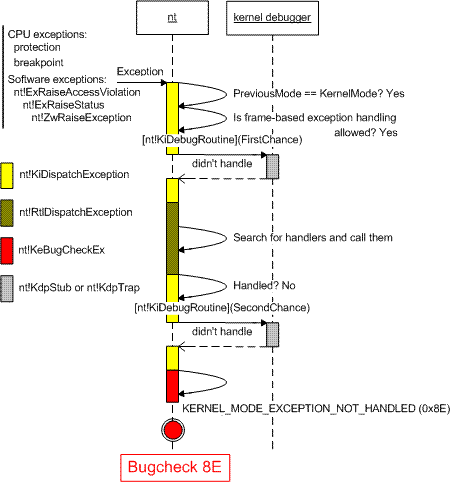
Archive for the ‘Bugchecks Depicted’ Category

Memory Dump Analysis Anthology, Volume 1

Thursday, February 7th, 2008

It is very easy to become a publisher nowadays. Much easier than I thought. I registered myself as a publisher under the name of OpenTask which is my registered business name in Ireland. I also got the list of ISBN numbers and therefore can announce product details for the first volume of Memory Dump Analysis Anthology series:

Memory Dump Analysis Anthology, Volume 1

  • Paperback: 720 pages (*)
  • ISBN-13: 978-0-9558328-0-2
  • Hardcover: 720 pages (*)
  • ISBN-13: 978-0-9558328-1-9
  • Author: Dmitry Vostokov
  • Publisher: Opentask (15 Apr 2008)
  • Language: English
  • Product Dimensions: 22.86 x 15.24

(*) subject to change 

PDF file will be available for download too.

- Dmitry Vostokov @ DumpAnalysis.org -

Bugchecks: CF

Friday, December 21st, 2007

Bugcheck CF name is the second longest one (doesn’t fit in this post title):     

TERMINAL_SERVER_DRIVER_MADE_INCORRECT_MEMORY_REFERENCE (cf)
Arguments:
Arg1: a020b1d4, memory referenced
Arg2: 00000000, value 0 = read operation, 1 = write operation
Arg3: a020b1d4, If non-zero, the instruction address which referenced the bad memory
 address.
Arg4: 00000000, Mm internal code.
 A driver has been incorrectly ported to Terminal Server. It is referencing session space addresses from the system process context.  Probably from queueing an item to a system worker thread. The broken driver's name is displayed on the screen.

Although bugcheck explanation mentions only system process context it can also happen in an arbitrary process context. Recall that kernel space address mapping is usually considered as persistent where virtual-to-physical mapping doesn’t change between switching threads that belong to different processes. However there is so called session space in multi-user terminal services environments where different users can use different display drivers, for example:

  • MS RDP users - RDPDD.DLL
  • Citrix ICA users - VDTW30.DLL
  • Vista users - TSDDD.DLL
  • Console user - Some H/W related video driver like ATI or NVIDIA

These drivers are not committed at the same time persistently since OS boot although their module addresses might remain fixed. Therefore when a new user session is created the appropriate display driver corresponding to terminal services protocol is loaded and mapped to the so called session space starting from A0000000 (x86) or FFFFF90000000000 (x64) after win32k.sys address range (on first usage) and then committed to physical memory by proper PTE entries in process page tables. During thread switch, if the new process context belongs to a different session with a different display driver, the current display driver is decommitted by clearing its PTEs and the new driver is committed by setting its proper PTE entries.

Therefore in the system process context like worker threads virtual addresses corresponding to display driver code and data might be unknown. This can also happen in an arbitrary process context if we access the code that belongs to a display driver that doesn’t correspond to the current session protocol. This can be illustrated with the following example where TSDD can be either RDP or ICA display driver.

In the list of loaded modules we can see that ATI and TSDD drivers are loaded: 

0: kd> lm
start    end        module name
...
...
...
77d30000 77d9f000   RPCRT4     (deferred)            
77e10000 77e6f000   USER32     (deferred)            
77f40000 77f7c000   GDI32      (deferred)            
77f80000 77ffc000   ntdll      (pdb symbols)
78000000 78045000   MSVCRT     (deferred)            
7c2d0000 7c335000   ADVAPI32   (deferred)            
7c340000 7c34f000   Secur32    (deferred)            
7c570000 7c624000   KERNEL32   (deferred)            
7cc30000 7cc70000   winsrv     (deferred)            
80062000 80076f80   hal        (deferred)            
80400000 805a2940   nt         (pdb symbols)
a0000000 a0190ce0   win32k     (pdb symbols)
a0191000 a01e8000   ati2drad   (deferred)            
a01f0000 a0296000   tsdd       (no symbols)
          
b4a60000 b4a72320   naveng     (deferred)            
b4a73000 b4b44c40   navex15    (deferred)    


The bugcheck happens in 3rd-partyApp process context running inside some terminal session:

PROCESS_NAME:  3rd-partyApp.exe

TRAP_FRAME:  b475f84c -- (.trap 0xffffffffb475f84c)
ErrCode = 00000000
eax=a020b1d4 ebx=00000000 ecx=04e0443b edx=ffffffff esi=a21b6778 edi=a201b018
eip=a020b1d4 esp=b475f8c0 ebp=b475f900 iopl=3 nv up ei pl zr na pe nc
cs=0008 ss=0010 ds=0023 es=0023 fs=0030 gs=0000 efl=00013246
TSDD+0×1b1d4:
a020b1d4 ??              ???

Examining display driver virtual address shows that it is unknown (PTE is NULL): 

0: kd> !pte a020b1d4
A020B1D4  - PDE at C0300A00        PTE at C028082C
          contains 14AB6863      contains 00000000
        pfn 14ab6 –DA–KWV       not valid

ATI display driver address is unknown too: 

0: kd> !pte a0191000
A0191000  - PDE at C0300A00        PTE at C0280644
          contains 3E301863      contains 00000000
        pfn 3e301 –DA–KWV       not valid

Let’s switch to another terminal session : 

PROCESS 87540a60  SessionId: 45  Cid: 3954    Peb: 7ffdf000  ParentCid: 0164
    DirBase: 2473d000  ObjectTable: 889b2c48  TableSize: 182.
    Image: csrss.exe

0: kd> .process /r /p 87540a60
Implicit process is now 87540a60
Loading User Symbols
................

Now TSDD display driver address is valid:

0: kd> !pte a020b1d4
A020B1D4  - PDE at C0300A00        PTE at C028082C
          contains 5D2C2863      contains 20985863
        pfn 5d2c2 –DA–KWV    pfn 20985 –DA–KWV

but ATI driver address is not. It is unknown and this is expected because no real display hardware is used: 

0: kd> !pte a0191000
A0191000  - PDE at C0300A00        PTE at C0280644
          contains 5D2C2863      contains 00000000
        pfn 5d2c2 –DA–KWV       not valid

Let’s switch to session 0 where display is “physical”: 

PROCESS 8898a5e0  SessionId: 0  Cid: 0180    Peb: 7ffdf000  ParentCid: 0164
    DirBase: 14c58000  ObjectTable: 8898b948  TableSize: 1322.
    Image: csrss.exe

0: kd> .process /r /p 8898a5e0
Implicit process is now 8898a5e0
Loading User Symbols
..............

TSDD driver address is unknown and this is expected too because we no longer use terminal services protocol: 

0: kd> !pte a020b1d4
A020B1D4  - PDE at C0300A00        PTE at C028082C
          contains 14AB6863      contains 00000000
        pfn 14ab6 –DA–KWV       not valid

However ATI display driver addresses are not unknown (not NULL) and their 2 selected pages are either in transition or in a page file:  

0: kd> !pte a0191000
A0191000  - PDE at C0300A00        PTE at C0280644
          contains 14AB6863      contains 156DD882
        pfn 14ab6 –DA–KWV       not valid
                               Transition:  156dd
                               Protect:  4

0: kd> !pte a0198000
A0198000  - PDE at C0300A00        PTE at C0280660
          contains 14AB6863      contains 000B9060
        pfn 14ab6 –DA–KWV       not valid
                               PageFile    0
                               Offset b9
                               Protect:  3

- Dmitry Vostokov @ DumpAnalysis.org -

Crash Dump Analysis Patterns (Part 41a)

Wednesday, December 12th, 2007

Some memory dumps are generated on purpose to troubleshoot process and system hangs. They are usually called Manual Dumps, manual crash dumps or manual memory dumps. Kernel, complete and kernel mini dumps can be generated using the famous keyboard method described in the following Microsoft article which has been recently updated and contains the fix for USB keyboards:

http://support.microsoft.com/kb/244139

The crash dump will show E2 bugcheck:

MANUALLY_INITIATED_CRASH (e2)
The user manually initiated this crash dump.
Arguments:
Arg1: 00000000
Arg2: 00000000
Arg3: 00000000
Arg4: 00000000

Various tools including Citrix SystemDump reuse E2 bug check code and its arguments.  There are many other 3rd-party tools used to bugcheck Windows OS such as BANG! from OSR or NotMyFault from Sysinternals. The old one is crash.exe that loads crashdrv.sys and uses the following bugcheck:

Unknown bugcheck code (69696969)
Unknown bugcheck description
Arguments:
Arg1: 00000000
Arg2: 00000000
Arg3: 00000000
Arg4: 00000000

In a memory dump you would see its characteristic stack trace pointing to crashdrv module: 

STACK_TEXT:
b5b3ebe0 f615888d nt!KeBugCheck+0xf
WARNING: Stack unwind information not available. Following frames may be wrong.
b5b3ebec f61584e3 crashdrv+0x88d
b5b3ec00 8041eec9 crashdrv+0x4e3
b5b3ec14 804b328a nt!IopfCallDriver+0x35
b5b3ec28 804b40de nt!IopSynchronousServiceTail+0x60
b5b3ed00 804abd0a nt!IopXxxControlFile+0x5d6
b5b3ed34 80468379 nt!NtDeviceIoControlFile+0x28
b5b3ed34 77f82ca0 nt!KiSystemService+0xc9
0006fed4 7c5794f4 ntdll!NtDeviceIoControlFile+0xb
0006ff38 01001a74 KERNEL32!DeviceIoControl+0xf8
0006ff70 01001981 crash+0x1a74
0006ff80 01001f93 crash+0x1981
0006ffc0 7c5989a5 crash+0x1f93
0006fff0 00000000 KERNEL32!BaseProcessStart+0x3d

Sometimes various hardware buttons are used to trigger NMI and generate a crash dump when keyboard is not available. The bugcheck will be:

NMI_HARDWARE_FAILURE (80)
This is typically due to a hardware malfunction. The hardware supplier should be called.
Arguments:
Arg1: 004f4454
Arg2: 00000000
Arg3: 00000000
Arg4: 00000000

Critical process termination such as session 0 csrss.exe is used to force a memory dump:

CRITICAL_OBJECT_TERMINATION (f4)
A process or thread crucial to system operation has unexpectedly exited or been terminated.
Several processes and threads are necessary for the operation of the system; when they are terminated (for any reason), the system can no longer function.
Arguments:
Arg1: 00000003, Process
Arg2: 8a090d88, Terminating object
Arg3: 8a090eec, Process image file name
Arg4: 80967b74, Explanatory message (ascii)

- Dmitry Vostokov @ DumpAnalysis.org -

CAFF BugCheck

Tuesday, December 4th, 2007

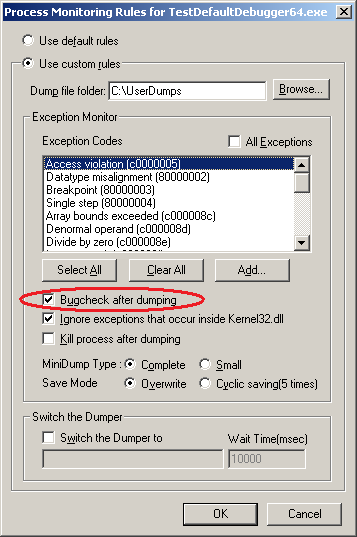
Recently observed it in a kernel dump and found that userdump.sys generates it from userdump.exe request when process monitoring rules in Process Dumper from Microsoft userdump package are set to “Bugcheck after dumping”:

BUGCHECK_STR:  0xCAFF

PROCESS_NAME:  userdump.exe

kd> kL
Child-SP          RetAddr           Call Site
fffffadf`dfcf19b8 fffffadf`dfee38c4 nt!KeBugCheck
fffffadf`dfcf19c0 fffff800`012ce9cf userdump!UdIoctl+0x104
fffffadf`dfcf1a70 fffff800`012df026 nt!IopXxxControlFile+0xa5a
fffffadf`dfcf1b90 fffff800`010410fd nt!NtDeviceIoControlFile+0x56
fffffadf`dfcf1c00 00000000`77ef0a5a nt!KiSystemServiceCopyEnd+0x3
00000000`01eadd58 00000001`0000a755 ntdll!NtDeviceIoControlFile+0xa
00000000`01eadd60 00000000`77ef30a5 userdump_100000000!UdServiceWorkerAPC+0x1005
00000000`01eaf970 00000000`77ef0a2a ntdll!KiUserApcDispatcher+0x15
00000000`01eafe68 00000001`00007fe2 ntdll!NtWaitForSingleObject+0xa
00000000`01eafe70 00000001`00008a39 userdump_100000000!UdServiceWorker+0xb2
00000000`01eaff20 000007ff`7fee4db6 userdump_100000000!UdServiceStart+0x139
00000000`01eaff50 00000000`77d6b6da ADVAPI32!ScSvcctrlThreadW+0x25
00000000`01eaff80 00000000`00000000 kernel32!BaseThreadStart+0x3a

This might be useful if you want to see kernel data that happened to be at exception time. In this case you can avoid requesting complete memory dump of physical memory and ask for kernel memory dump only (if it was configured in Control Panel) together with a user dump.

Note: do not set this option if you are unsure. It can have your production servers bluescreen in the case of false positive dumps.

- Dmitry Vostokov @ DumpAnalysis.org -

Exceptions Ab Initio

Friday, November 16th, 2007

Where do native exceptions come from? How do they propagate from hardware and eventually result in crash dumps? I was asking these questions when I started doing crash dump analysis more than four years ago and I tried to find answers using IA-32 Intel® Architecture Software Developer’s Manual, WinDbg and complete memory dumps.

Eventually I wrote some blog posts about my findings. They are buried between many other posts so I dug them out and put on a dedicated page:

Interrupts and Exceptions Explained

- Dmitry Vostokov @ DumpAnalysis.org

Crash Dump Analysis Patterns (Part 23b)

Saturday, August 25th, 2007

In contrast to Double Free pattern in a user mode process heap double free in a kernel mode pool results in immediate bugcheck in order to identify the driver causing the problem (BAD_POOL_CALLER bugcheck with Arg1 == 7):

2: kd> !analyze -v
...
...
...
BAD_POOL_CALLER (c2)
The current thread is making a bad pool request. Typically this is at a bad IRQL level or double freeing the same allocation, etc.
Arguments:
Arg1: 00000007, Attempt to free pool which was already freed
Arg2: 0000121a, (reserved)
Arg3: 02140001, Memory contents of the pool block
Arg4: 89ba74f0, Address of the block of pool being deallocated

If we look at the block being deallocated we would see that it was marked as “Free” block: 

2: kd> !pool 89ba74f0
Pool page 89ba74f0 region is Nonpaged pool
 89ba7000 size:  270 previous size:    0  (Allocated)  Thre (Protected)
 89ba7270 size:    8 previous size:  270  (Free)       ....
 89ba7278 size:   18 previous size:    8  (Allocated)  ReEv
 89ba7290 size:   80 previous size:   18  (Allocated)  Mdl
 89ba7310 size:   80 previous size:   80  (Allocated)  Mdl
 89ba7390 size:   30 previous size:   80  (Allocated)  Vad
 89ba73c0 size:   98 previous size:   30  (Allocated)  File (Protected)
 89ba7458 size:    8 previous size:   98  (Free)       Wait
 89ba7460 size:   28 previous size:    8  (Allocated)  FSfm
 89ba74a0 size:   40 previous size:   18  (Allocated)  Ntfr
 89ba74e0 size:    8 previous size:   40  (Free)       File
*89ba74e8 size:   a0 previous size:    8  (Free )     *ABCD
  Owning component : Unknown (update pooltag.txt)
 89ba7588 size:   38 previous size:   a0  (Allocated)  Sema (Protected)
 89ba75c0 size:   38 previous size:   38  (Allocated)  Sema (Protected)
 89ba75f8 size:   10 previous size:   38  (Free)       Nbtl
 89ba7608 size:   98 previous size:   10  (Allocated)  File (Protected)
 89ba76a0 size:   28 previous size:   98  (Allocated)  Ntfn
 89ba76c8 size:   40 previous size:   28  (Allocated)  Ntfr
 89ba7708 size:   28 previous size:   40  (Allocated)  NtFs
 89ba7730 size:   40 previous size:   28  (Allocated)  Ntfr
 89ba7770 size:   40 previous size:   40  (Allocated)  Ntfr
 89ba7a10 size:  270 previous size:  260  (Allocated)  Thre (Protected)
 89ba7c80 size:   20 previous size:  270  (Allocated)  VadS
 89ba7ca0 size:   40 previous size:   20  (Allocated)  Ntfr
 89ba7ce0 size:   b0 previous size:   40  (Allocated)  Ussy
 89ba7d90 size:  270 previous size:   b0  (Free)       Thre

The pool tag is a 4 byte character sequence used to associate drivers with pool blocks and is useful to identify a driver allocated or freed a block. In our case the pool tag is ABCD and it is associated with the driver which previously freed the block. All known pool tags corresponding to kernel components can be found in pooltag.txt located in triage subfolder where you installed WinDbg. However our ABCD tag is not listed there. We can try to find the driver corresponding to ABCD tag using findstr CMD command:

C:\Windows\System32\drivers>findstr /m /l hABCD *.sys

The results of the search will help us to identify the driver which freed the block first. The driver which double freed the same block can be found from the call stack and it might be the same driver or a different driver:

2: kd> k
ChildEBP RetAddr
f78be910 8089c8f4 nt!KeBugCheckEx+0x1b
f78be978 8089c622 nt!ExFreePoolWithTag+0x477
f78be988 f503968b nt!ExFreePool+0xf
WARNING: Stack unwind information not available. Following frames may be wrong.
f78be990 f5024a6e driver+0×1768b
f78be9a0 f50249e7 driver+0×2a6e
f78be9a4 84b430e0 driver+0×29e7

Because we don’t have symbol files for driver.sys WinDbg warns us that it was unable to identify the correct stack trace and driver.sys might not have called ExFreePool or ExFreePoolWithTag. To verify that driver.sys called ExFreePool indeed we disassemble backwards the return address of ExFreePool: 

2: kd> ub f503968b
driver+0×1767b:
f503967b 90              nop
f503967c 90              nop
f503967d 90              nop
f503967e 90              nop
f503967f 90              nop
f5039680 8b442404        mov     eax,dword ptr [esp+4]
f5039684 50              push    eax
f5039685 ff15202302f5    call    dword ptr [driver+0×320 (f5022320)]

Finally we can get some info from the driver: 

2: kd> lmv m driver
start    end        module name
f5022000 f503e400   driver   (no symbols)
    Loaded symbol image file: driver.sys
    Image path: \SystemRoot\System32\drivers\driver.sys
    Image name: driver.sys
    Timestamp:  Tue Aug 12 11:32:16 2007

If the company name developed the driver is absent we can try techniques outlined in Unknown Component pattern.

If we have symbols it is very easy to identify the code as can be seen from this 64-bit dump:

BAD_POOL_CALLER (c2)
The current thread is making a bad pool request. Typically this is at a bad IRQL level or double freeing the same allocation, etc.
Arguments:
Arg1: 0000000000000007, Attempt to free pool which was already freed
Arg2: 000000000000121a, (reserved)
Arg3: 0000000000000080, Memory contents of the pool block
Arg4: fffffade6d54e270, Address of the block of pool being deallocated

0: kd> kL
fffffade`45517b08 fffff800`011ad905 nt!KeBugCheckEx
fffffade`45517b10 fffffade`5f5991ac nt!ExFreePoolWithTag+0x401
fffffade`45517bd0 fffffade`5f59a0b0 driver64!ProcessDataItem+0×198
fffffade`45517c70 fffffade`5f5885a6 driver64!OnDataArrival+0×2b4
fffffade`45517cd0 fffff800`01299cae driver64!ReaderThread+0×15a
fffffade`45517d70 fffff800`0102bbe6 nt!PspSystemThreadStartup+0×3e
fffffade`45517dd0 00000000`00000000 nt!KiStartSystemThread+0×16

- Dmitry Vostokov @ DumpAnalysis.org -

Another look at page faults

Thursday, August 9th, 2007

Recently observed this bugcheck with reported “valid” address (in blue):

DRIVER_IRQL_NOT_LESS_OR_EQUAL (d1)
An attempt was made to access a pageable (or completely invalid) address at an
interrupt request level (IRQL) that is too high.  This is usually
caused by drivers using improper addresses.
If kernel debugger is available get stack backtrace.
Arguments:
Arg1: e16623fc, memory referenced
Arg2: 00000002, IRQL
Arg3: 00000000, value 0 = read operation, 1 = write operation
Arg4: ae2b222e, address which referenced memory

TRAP_FRAME:  a54a4a40 -- (.trap 0xffffffffa54a4a40)
ErrCode = 00000000
eax=00000000 ebx=00000000 ecx=e16623f0 edx=00000000 esi=ae2ce428 edi=a54a4b4c
eip=ae2b222e esp=a54a4ab4 ebp=a54a4ac4 iopl=0 nv up ei pl nz ac po nc
cs=0008 ss=0010 ds=0023 es=0023 fs=0030 gs=0000 efl=00010212
driver!ProcessCommand+0x44:
ae2b222e 39590c cmp dword ptr [ecx+0Ch],ebx ds:0023:e16623fc=00000000

1: kd> dd e16623fc l4
e16623fc 00000000 00790000 004c4c44 00010204

The address belongs to a paged pool:

1: kd> !pool e16623fc
Pool page e16623fc region is Paged pool
 e1662000 size:  3a8 previous size:    0  (Allocated)  NtfF
 e16623a8 size:   10 previous size:  3a8  (Free)       ….
 e16623b8 size:   28 previous size:   10  (Allocated)  Ntfo
 e16623e0 size:    8 previous size:   28  (Free)       CMDa
*e16623e8 size:   20 previous size:    8  (Allocated) *DRV

So why do we have the bugcheck here if the memory wasn’t paged out? This is because page faults occur when pages are marked as invalid in page tables and not only when they are paged out to a disk. We can check whether an address belongs to an invalid page by using !pte command:

1: kd> !pte e16623fc
               VA e16623fc
PDE at 00000000C0603858    PTE at 00000000C070B310
contains 00000000F5434863  contains 00000000E817A8C2
pfn f5434 ---DA--KWEV                           not valid
                       Transition: e817a
                       Protect: 6 - ReadWriteExecute

Let’s check our PTE (page table entry):

1: kd> .formats 00000000E817A8C2
Evaluate expression:
  Hex: e817a8c2
  Decimal: -401102654
  Octal: 35005724302
  Binary: 11101000 00010111 10101000 11000010

We see that 0th (Valid) bit is cleared and this means that PTE marks the page as invalid and also 11th bit (Transition) is set which marks that page as on standby or modified lists. When referenced and IRQL is less than 2 the page will be made valid and added to a process working set. We see the address as “valid” in WinDbg  because that page was not paged out and present in a crash dump. But it is marked as invalid and therefore triggers the page fault. Page fault handler sees that IRQL == 2 and generates D1 bugcheck.

- Dmitry Vostokov @ DumpAnalysis.org -

Interrupts and exceptions explained (Part 5)

Friday, July 20th, 2007

In this part I’ll show how to simulate .trap WinDbg command when you have x64 Windows kernel and complete memory dumps. 

When you have a fault an x64 processor saves some registers on the current thread stack as explained previously in Part 2. Then an interrupt handler saves _KTRAP_FRAME on the stack:

6: kd> uf nt!KiPageFault
nt!KiPageFault:
fffff800`0102d400 push    rbp
fffff800`0102d401 sub     rsp,158h
fffff800`0102d408 lea     rbp,[rsp+80h]
fffff800`0102d410 mov     byte ptr [rbp-55h],1
fffff800`0102d414 mov     qword ptr [rbp-50h],rax
fffff800`0102d418 mov     qword ptr [rbp-48h],rcx
fffff800`0102d41c mov     qword ptr [rbp-40h],rdx
fffff800`0102d420 mov     qword ptr [rbp-38h],r8
fffff800`0102d424 mov     qword ptr [rbp-30h],r9
fffff800`0102d428 mov     qword ptr [rbp-28h],r10
fffff800`0102d42c mov     qword ptr [rbp-20h],r11
...
...
...

6: kd> dt _KTRAP_FRAME
   +0x000 P1Home           : Uint8B
   +0x008 P2Home           : Uint8B
   +0x010 P3Home           : Uint8B
   +0x018 P4Home           : Uint8B
   +0x020 P5               : Uint8B
   +0x028 PreviousMode     : Char
   +0x029 PreviousIrql     : UChar
   +0x02a FaultIndicator   : UChar
   +0x02b ExceptionActive  : UChar
   +0x02c MxCsr            : Uint4B
   +0x030 Rax              : Uint8B
   +0x038 Rcx              : Uint8B
   +0x040 Rdx              : Uint8B
   +0x048 R8               : Uint8B
   +0x050 R9               : Uint8B
   +0x058 R10              : Uint8B
   +0x060 R11              : Uint8B
   +0x068 GsBase           : Uint8B
   +0x068 GsSwap           : Uint8B
   +0x070 Xmm0             : _M128A
   +0x080 Xmm1             : _M128A
   +0x090 Xmm2             : _M128A
   +0x0a0 Xmm3             : _M128A
   +0x0b0 Xmm4             : _M128A
   +0x0c0 Xmm5             : _M128A
   +0x0d0 FaultAddress     : Uint8B
   +0x0d0 ContextRecord    : Uint8B
   +0x0d0 TimeStamp        : Uint8B
   +0x0d8 Dr0              : Uint8B
   +0x0e0 Dr1              : Uint8B
   +0x0e8 Dr2              : Uint8B
   +0x0f0 Dr3              : Uint8B
   +0x0f8 Dr6              : Uint8B
   +0x100 Dr7              : Uint8B
   +0x108 DebugControl     : Uint8B
   +0x110 LastBranchToRip  : Uint8B
   +0x118 LastBranchFromRip : Uint8B
   +0x120 LastExceptionToRip : Uint8B
   +0x128 LastExceptionFromRip : Uint8B
   +0x108 LastBranchControl : Uint8B
   +0x110 LastBranchMSR    : Uint4B
   +0x130 SegDs            : Uint2B
   +0x132 SegEs            : Uint2B
   +0x134 SegFs            : Uint2B
   +0x136 SegGs            : Uint2B
   +0x138 TrapFrame        : Uint8B
   +0x140 Rbx              : Uint8B
   +0x148 Rdi              : Uint8B
   +0x150 Rsi              : Uint8B
   +0x158 Rbp              : Uint8B
   +0×160 ErrorCode        : Uint8B
   +0×160 ExceptionFrame   : Uint8B
   +0×168 Rip              : Uint8B
   +0×170 SegCs            : Uint2B
   +0×172 Fill1            : [3] Uint2B
   +0×178 EFlags           : Uint4B
   +0×17c Fill2            : Uint4B
   +0×180 Rsp              : Uint8B
   +0×188 SegSs            : Uint2B
   +0×18a Fill3            : [1] Uint2B
   +0×18c CodePatchCycle   : Int4B

Unfortunately the technique to use DS and ES pair to find the trap frame in x86 Windows crash dump doesn’t work here because KiPageFault interrupt handler doesn’t save them as can be found by inspecting its disassembly. Fortunately the registers that an x64 processor pushes upon an interrupt are part of _KTRAP_FRAME shown in blue above. Fill1, Fill2, Fill3 and CodePatchCycle are just dummy values to fill 64-bit slots because CS and SS are 16-bit registers and in 64-bit RFLAGS only the first 32-bit EFLAGS part is currently used. Remember that a processor in 64-bit mode pushes 64-bit values even if values occupy only 16 or 32-bit. Therefore we can try to find CS and SS on the stack because they have the following constant values:

6: kd> r cs
cs=0010
6: kd> r ss
ss=0018

6: kd> k
Child-SP          RetAddr           Call Site
fffffadc`6e02b9e8 fffff800`013731b1 nt!KeBugCheckEx


fffffadc`6e02cd70 fffff800`010202d6 nt!PspSystemThreadStartup+0×3e
fffffadc`6e02cdd0 00000000`00000000 nt!KxStartSystemThread+0×16

6: kd> dqs fffffadc`6e02b9e8 fffffadc`6e02cd70
...
...
...
fffffadc`6e02c938 fffff800`0102d5e1 nt!KiPageFault+0x1e1
...
...
...
fffffadc`6e02ca70  fffff97f`f3937a8c
fffffadc`6e02ca78  fffff97f`ff57d28b driver+0x3028b
fffffadc`6e02ca80  00000000`00000000
fffffadc`6e02ca88  fffff97f`f3937030
fffffadc`6e02ca90  fffff97f`ff5c2990 driver+0x75990
fffffadc`6e02ca98  00000000`00000000
fffffadc`6e02caa0  00000000`00000000 ; ErrorCode
fffffadc`6e02caa8  fffff97f`ff591ed3 driver+0x44ed3 ; RIP
fffffadc`6e02cab0  00000000`00000010 ; CS
fffffadc`6e02cab8  00000000`00010282 ; RFLAGS
fffffadc`6e02cac0  fffffadc`6e02cad0 ; RSP
fffffadc`6e02cac8  00000000`00000018 ; SS
fffffadc`6e02cad0  fffff97f`f382b0e0
fffffadc`6e02cad8  fffffadc`6e02cbd0
fffffadc`6e02cae0  fffff97f`f3937a8c
fffffadc`6e02cae8  fffff97f`f3937030
fffffadc`6e02caf0  00000000`00000000
fffffadc`6e02caf8  00000000`00000001


Now we can calculate the trap frame address by subtracting SegSs offset in _KTRAP_FRAME structure (0×188) from fffffadc`6e02cac8 address:

6: kd> ? fffffadc`6e02cac8-188
Evaluate expression: -5650331285184 = fffffadc`6e02c940

6: kd> .trap fffffadc`6e02c940
NOTE: The trap frame does not contain all registers.
Some register values may be zeroed.
rax=fffffadcdac27298 rbx=0000000000000000 rcx=fffffadcdb45a4c0
rdx=0000000000000555 rsi=fffff97fff5c2990 rdi=fffff97ff3937030
rip=fffff97fff591ed3 rsp=fffffadc6e02cad0 rbp=0000000000000000
 r8=fffffadcdac27250  r9=fffff97ff3824030 r10=0000000000000020
r11=fffffadcdac27250 r12=0000000000000000 r13=0000000000000000
r14=0000000000000000 r15=0000000000000000
iopl=0 nv up ei ng nz na pe nc
driver+0x44ed3:
fffff97f`ff591ed3 0fb74514  movzx eax,word ptr [rbp+14h] ss:0018:00000000`00000014=????

6: kd> k
Child-SP          RetAddr           Call Site
fffffadc`6e02cad0 fffff97f`ff5935f7 driver+0x44ed3
fffffadc`6e02cc40 fffff800`0124b972 driver+0x465f7
fffffadc`6e02cd70 fffff800`010202d6 nt!PspSystemThreadStartup+0x3e
fffffadc`6e02cdd0 00000000`00000000 nt!KxStartSystemThread+0x16

Our example shows how to find a trap frame manually in x64 kernel or complete memory dump. Usually WinDbg finds trap frames automatically (call arguments are removed from the verbose stack trace for clarity):

6: kd> kv
Child-SP          RetAddr           Call Site
fffffadc`6e02b9e8 fffff800`013731b1 nt!KeBugCheckEx
fffffadc`6e02b9f0 fffff800`010556ab nt!PspSystemThreadStartup+0x270
fffffadc`6e02ba40 fffff800`010549fd nt!_C_specific_handler+0x9b
fffffadc`6e02bad0 fffff800`01054f93 nt!RtlpExecuteHandlerForException+0xd
fffffadc`6e02bb00 fffff800`0100b901 nt!RtlDispatchException+0x2c0
fffffadc`6e02c1c0 fffff800`0102e76f nt!KiDispatchException+0xd9
fffffadc`6e02c7c0 fffff800`0102d5e1 nt!KiExceptionExit
fffffadc`6e02c940 fffff97f`ff591ed3 nt!KiPageFault+0x1e1 (TrapFrame @ fffffadc`6e02c940)
fffffadc`6e02cad0 fffff97f`ff5935f7 driver+0×44ed3
fffffadc`6e02cc40 fffff800`0124b972 driver+0×465f7
fffffadc`6e02cd70 fffff800`010202d6 nt!PspSystemThreadStartup+0×3e
fffffadc`6e02cdd0 00000000`00000000 nt!KxStartSystemThread+0×16

- Dmitry Vostokov @ DumpAnalysis.org -

Interrupts and exceptions explained (Part 4)

Sunday, July 15th, 2007

The previous part discussed processor interrupts in user mode. In this part I will explain WinDbg .trap command and show how to simulate it manually.

Upon an interrupt a processor saves the current instruction pointer and transfers execution to an interrupt handler as explained in the first part of these series. This interrupt handler has to save a full thread context before calling other functions to do complex interrupt processing. For example, if we disassemble KiTrap0E handler from x86 Windows 2003 crash dump we would see that it saves a lot of registers including segment registers:

3: kd> uf nt!KiTrap0E
...
...
...
nt!KiTrap0E:
e088bb2c mov     word ptr [esp+2],0
e088bb33 push    ebp
e088bb34 push    ebx
e088bb35 push    esi
e088bb36 push    edi
e088bb37 push    fs
e088bb39 mov     ebx,30h
e088bb3e mov     fs,bx
e088bb41 mov     ebx,dword ptr fs:[0]
e088bb48 push    ebx
e088bb49 sub     esp,4
e088bb4c push    eax
e088bb4d push    ecx
e088bb4e push    edx
e088bb4f push    ds
e088bb50 push    es
e088bb51 push    gs
e088bb53 mov     ax,23h
e088bb57 sub     esp,30h
e088bb5a mov     ds,ax
e088bb5d mov     es,ax
e088bb60 mov     ebp,esp
e088bb62 test    dword ptr [esp+70h],20000h
e088bb6a jne     nt!V86_kite_a (e088bb04)
...
...
...

The saved processor state information (context) forms the so called Windows kernel trap frame:

3: kd> dt _KTRAP_FRAME
+0x000 DbgEbp           : Uint4B
+0x004 DbgEip           : Uint4B
+0x008 DbgArgMark       : Uint4B
+0x00c DbgArgPointer    : Uint4B
+0x010 TempSegCs        : Uint4B
+0x014 TempEsp          : Uint4B
+0x018 Dr0              : Uint4B
+0x01c Dr1              : Uint4B
+0x020 Dr2              : Uint4B
+0x024 Dr3              : Uint4B
+0x028 Dr6              : Uint4B
+0x02c Dr7              : Uint4B
+0x030 SegGs            : Uint4B
+0x034 SegEs            : Uint4B
+0x038 SegDs            : Uint4B
+0x03c Edx              : Uint4B
+0x040 Ecx              : Uint4B
+0x044 Eax              : Uint4B
+0x048 PreviousPreviousMode : Uint4B
+0x04c ExceptionList    : Ptr32 _EXCEPTION_REGISTRATION_RECORD
+0x050 SegFs            : Uint4B
+0x054 Edi              : Uint4B
+0x058 Esi              : Uint4B
+0x05c Ebx              : Uint4B
+0x060 Ebp              : Uint4B
+0x064 ErrCode          : Uint4B
+0x068 Eip              : Uint4B
+0x06c SegCs            : Uint4B
+0x070 EFlags           : Uint4B
+0x074 HardwareEsp      : Uint4B
+0x078 HardwareSegSs    : Uint4B
+0x07c V86Es            : Uint4B
+0x080 V86Ds            : Uint4B
+0x084 V86Fs            : Uint4B
+0x088 V86Gs            : Uint4B

This Windows trap frame is not the same as an interrupt frame a processor saves on a current thread stack when an interrupt occurs in kernel mode. The latter frame is very small and consists only of EIP, CS, EFLAGS and ErrorCode. When an interrupt occurs in user mode an x86 processor additionally saves the current stack pointer SS:ESP.

The .trap command finds the trap frame on a current thread stack and sets the current thread register context using the values from that saved structure. You can see that command in action for certain bugchecks when you use !analyze -v:

3: kd> !analyze -v
KERNEL_MODE_EXCEPTION_NOT_HANDLED (8e)
...
...
...
Arguments:
Arg1: c0000005, The exception code that was not handled
Arg2: de65190c, The address that the exception occurred at
Arg3: f24f8a74, Trap Frame
Arg4: 00000000


TRAP_FRAME:  f24f8a74 — (.trap fffffffff24f8a74)
.trap fffffffff24f8a74
ErrCode = 00000000
eax=dbc128c0 ebx=dbe4a010 ecx=f24f8ac4 edx=00000001 esi=46525356 edi=00000000
eip=de65190c esp=f24f8ae8 ebp=f24f8b18 iopl=0 nv up ei pl nz na pe nc
cs=0008 ss=0010 ds=0023 es=0023 fs=0030 gs=0000 efl=00010206
driver!foo+0×16:
de65190c 837e1c00         cmp     dword ptr [esi+1Ch],0 ds:0023:46525372=????????


If we look at the trap frame we would see the same register values that WinDbg reports above:

3: kd> dt _KTRAP_FRAME f24f8a74
+0x000 DbgEbp           : 0xf24f8b18
+0x004 DbgEip           : 0xde65190c
+0x008 DbgArgMark       : 0xbadb0d00
+0x00c DbgArgPointer    : 1
+0x010 TempSegCs        : 0xb0501cd
+0x014 TempEsp          : 0xdcc01cd0
+0x018 Dr0              : 0xf24f8aa8
+0x01c Dr1              : 0xde46c90a
+0x020 Dr2              : 0
+0x024 Dr3              : 0
+0x028 Dr6              : 0xdbe4a000
+0x02c Dr7              : 0
+0x030 SegGs            : 0
+0x034 SegEs            : 0x23
+0x038 SegDs            : 0x23
+0x03c Edx              : 1
+0x040 Ecx              : 0xf24f8ac4
+0x044 Eax              : 0xdbc128c0
+0x048 PreviousPreviousMode : 0xdbe4a010
+0x04c ExceptionList    : 0xffffffff _EXCEPTION_REGISTRATION_RECORD
+0x050 SegFs            : 0x30
+0x054 Edi              : 0
+0x058 Esi              : 0x46525356
+0x05c Ebx              : 0xdbe4a010
+0x060 Ebp              : 0xf24f8b18
+0x064 ErrCode          : 0
+0x068 Eip              : 0xde65190c ; driver!foo+0x16
+0x06c SegCs            : 8
+0x070 EFlags           : 0x10206
+0x074 HardwareEsp      : 0xdbc171b0
+0x078 HardwareSegSs    : 0xde667677
+0x07c V86Es            : 0xdbc128c0
+0x080 V86Ds            : 0xdbc171c4
+0x084 V86Fs            : 0xf24f8bc4
+0x088 V86Gs            : 0

It is good to know how to find a trap frame manually in the case the stack is corrupt or WinDbg cannot find a trap frame automatically. In this case we can take the advantage of the fact that DS and ES segment registers have the same value in the Windows flat memory model:

   +0x034 SegEs            : 0x23
+0x038 SegDs            : 0x23

We need to find 2 consecutive 0×23 values on the stack. There may be several such places but usually the correct one comes between KiTrapXX address on the stack and the initial processor trap frame shown below in red. This is because KiTrapXX obviously calls other functions to further process an interrupt so its return address is saved on the stack.

3: kd> r
eax=f535713c ebx=de65190c ecx=00000000 edx=e088e1d2 esi=f5357120 edi=00000000
eip=e0827451 esp=f24f8628 ebp=f24f8640 iopl=0 nv up ei ng nz na pe nc
cs=0008 ss=0010 ds=0023 es=0023 fs=0030 gs=0000 efl=00000286
nt!KeBugCheckEx+0×1b:
e0827451 5d              pop     ebp

3: kd> dds f24f8628 f24f8628+1000
...
...
...
f24f8784  de4b2995 win32k!NtUserQueryWindow
f24f8788  00000000
f24f878c  fe76a324
f24f8790  f24f8d64
f24f8794  0006e43c
f24f8798  e087c041 nt!ExReleaseResourceAndLeaveCriticalRegion+0x5
f24f879c  83f3b801
f24f87a0  f24f8a58
f24f87a4  0000003b
f24f87a8  00000000
f24f87ac  00000030
f24f87b0  00000023
f24f87b4  00000023

f24f87b8  00000000


f24f8a58  00000111
f24f8a5c  f24f8a74
f24f8a60  e088bc08 nt!KiTrap0E+0xdc
f24f8a64  00000000
f24f8a68  46525372
f24f8a6c  00000000
f24f8a70  e0889686 nt!Kei386EoiHelper+0×186
f24f8a74  f24f8b18
f24f8a78  de65190c driver!foo+0×16
f24f8a7c  badb0d00
f24f8a80  00000001
f24f8a84  0b0501cd
f24f8a88  dcc01cd0
f24f8a8c  f24f8aa8
f24f8a90  de46c90a win32k!HANDLELOCK::vLockHandle+0×80
f24f8a94  00000000
f24f8a98  00000000
f24f8a9c  dbe4a000
f24f8aa0  00000000
f24f8aa4  00000000
f24f8aa8  00000023
f24f8aac  00000023

f24f8ab0  00000001
f24f8ab4  f24f8ac4
f24f8ab8  dbc128c0
f24f8abc  dbe4a010
f24f8ac0  ffffffff
f24f8ac4  00000030
f24f8ac8  00000000
f24f8acc  46525356
f24f8ad0  dbe4a010
f24f8ad4  f24f8b18
f24f8ad8  00000000
f24f8adc  de65190c driver!foo+0×16
f24f8ae0  00000008
f24f8ae4  00010206

f24f8ae8  dbc171b0
f24f8aec  de667677 driver!bar+0×173
f24f8af0  dbc128c0
f24f8af4  dbc171c4
f24f8af8  f24f8bc4
f24f8afc  00000000


Subtracting the offset 0×38 from the address of the 00000023 value (f24f8aac) and using dt command we can check _KTRAP_FRAME structure and apply .trap command afterwards:

3: kd> dt _KTRAP_FRAME f24f8aac-38
+0x000 DbgEbp           : 0xf24f8b18
+0x004 DbgEip           : 0xde65190c
+0x008 DbgArgMark       : 0xbadb0d00
+0x00c DbgArgPointer    : 1
+0x010 TempSegCs        : 0xb0501cd
+0x014 TempEsp          : 0xdcc01cd0
+0x018 Dr0              : 0xf24f8aa8
+0x01c Dr1              : 0xde46c90a
+0x020 Dr2              : 0
+0x024 Dr3              : 0
+0x028 Dr6              : 0xdbe4a000
+0x02c Dr7              : 0
+0x030 SegGs            : 0
+0x034 SegEs            : 0x23
+0x038 SegDs            : 0x23
+0x03c Edx              : 1
+0x040 Ecx              : 0xf24f8ac4
+0x044 Eax              : 0xdbc128c0
+0x048 PreviousPreviousMode : 0xdbe4a010
+0x04c ExceptionList    : 0xffffffff _EXCEPTION_REGISTRATION_RECORD
+0x050 SegFs            : 0x30
+0x054 Edi              : 0
+0x058 Esi              : 0x46525356
+0x05c Ebx              : 0xdbe4a010
+0x060 Ebp              : 0xf24f8b18
+0x064 ErrCode          : 0
+0x068 Eip              : 0xde65190c
+0x06c SegCs            : 8
+0x070 EFlags           : 0x10206
+0x074 HardwareEsp      : 0xdbc171b0
+0x078 HardwareSegSs    : 0xde667677
+0x07c V86Es            : 0xdbc128c0
+0x080 V86Ds            : 0xdbc171c4
+0x084 V86Fs            : 0xf24f8bc4
+0x088 V86Gs            : 0

3: kd> ? f24f8aac-38
Evaluate expression: -229668236 = f24f8a74

3: kd> .trap f24f8a74
ErrCode = 00000000
eax=dbc128c0 ebx=dbe4a010 ecx=f24f8ac4 edx=00000001 esi=46525356 edi=00000000
eip=de65190c esp=f24f8ae8 ebp=f24f8b18 iopl=0 nv up ei pl nz na pe nc
cs=0008 ss=0010 ds=0023 es=0023 fs=0030 gs=0000 efl=00010206
driver!foo+0x16:
de65190c 837e1c00        cmp     dword ptr [esi+1Ch],0 ds:0023:46525372=????????

In complete memory dumps we can see that _KTRAP_FRAME is saved when calling system services too:

3: kd> kL
ChildEBP RetAddr
f24f8ae8 de667677 driver!foo+0x16
f24f8b18 de667799 driver!bar+0x173
f24f8b90 de4a853e win32k!GreSaveScreenBits+0x69
f24f8bd8 de4922bd win32k!CreateSpb+0x167
f24f8c40 de490bb8 win32k!zzzChangeStates+0x448
f24f8c88 de4912de win32k!zzzBltValidBits+0xe2
f24f8ce0 de4926c6 win32k!xxxEndDeferWindowPosEx+0x13a
f24f8cfc de49aa8f win32k!xxxSetWindowPos+0xb1
f24f8d34 de4acf4d win32k!xxxShowWindow+0x201
f24f8d54 e0888c6c win32k!NtUserShowWindow+0x79
f24f8d54 7c94ed54 nt!KiFastCallEntry+0xfc (TrapFrame @ f24f8d64)
0006e48c 77e34f1d ntdll!KiFastSystemCallRet
0006e53c 77e2f12f USER32!NtUserShowWindow+0xc
0006e570 77e2b0fe USER32!InternalDialogBox+0xa9
0006e590 77e29005 USER32!DialogBoxIndirectParamAorW+0×37
0006e5b4 0103d569 USER32!DialogBoxParamW+0×3f
0006e5d8 0102d2f5 winlogon!Fusion_DialogBoxParam+0×24

and we can get the current thread context before its transition to kernel mode:

3: kd> .trap f24f8d64
ErrCode = 00000000
eax=7ffff000 ebx=00000000 ecx=00000000 edx=7c94ed54 esi=00532e68 edi=0002002c
eip=7c94ed54 esp=0006e490 ebp=0006e53c iopl=0 nv up ei pl zr na pe nc
cs=001b ss=0023 ds=0023 es=0023 fs=003b gs=0000 efl=00000246
ntdll!KiFastSystemCallRet:
001b:7c94ed54 c3              ret

3: kd> kL
ChildEBP RetAddr
0006e48c 77e34f1d ntdll!KiFastSystemCallRet
0006e53c 77e2f12f USER32!NtUserShowWindow+0xc
0006e570 77e2b0fe USER32!InternalDialogBox+0xa9
0006e590 77e29005 USER32!DialogBoxIndirectParamAorW+0x37
0006e5b4 0103d569 USER32!DialogBoxParamW+0x3f
0006e5d8 0102d2f5 winlogon!Fusion_DialogBoxParam+0x24

In the next part I’ll show an example from an x64 crash dump.

- Dmitry Vostokov @ DumpAnalysis.org -

Crash Dump Analysis Patterns (Part 16a)

Thursday, June 21st, 2007

In this part I will show one example of Stack Overflow pattern in x86 Windows kernel. When it happens in kernel mode we usually have bugcheck 7F with the first argument being EXCEPTION_DOUBLE_FAULT (8):

UNEXPECTED_KERNEL_MODE_TRAP (7f)
This means a trap occurred in kernel mode, and it’s a trap of a kind that the kernel isn’t allowed to have/catch (bound trap) or that is always instant death (double fault). The first number in the bugcheck params is the number of the trap (8 = double fault, etc). Consult an Intel x86 family manual to learn more about what these traps are. Here is a *portion* of those codes:
If kv shows a taskGate
  use .tss on the part before the colon, then kv.
Else if kv shows a trapframe
  use .trap on that value
Else
  .trap on the appropriate frame will show where the trap was taken (on x86, this will be the ebp that goes with the procedure KiTrap)
Endif
kb will then show the corrected stack.
Arguments:
Arg1: 00000008, EXCEPTION_DOUBLE_FAULT
Arg2: f7747fe0
Arg3: 00000000
Arg4: 00000000

The kernel stack size for a thread is limited to 12Kb and is guarded by an invalid page. Therefore when you hit an invalid address on that page the processor generates a page fault, tries to push registers and gets a second page fault. This is what “double fault” means. In this scenario the processor switches to another stack via TSS (task state segment) task switching mechanism because IDT entry for trap 8 contains not an interrupt handler address but a so called TSS segment selector. This selector points to a memory segment that contains a new kernel stack pointer. The difference between normal IDT entry and double fault entry can be seen by inspecting IDT:

5: kd> !pcr 5
KPCR for Processor 5 at f7747000:
    Major 1 Minor 1
 NtTib.ExceptionList: b044e0b8
     NtTib.StackBase: 00000000
    NtTib.StackLimit: 00000000
  NtTib.SubSystemTib: f7747fe0
       NtTib.Version: 00ae1064
   NtTib.UserPointer: 00000020
       NtTib.SelfTib: 7ffdf000
             SelfPcr: f7747000
                Prcb: f7747120
                Irql: 00000000
                 IRR: 00000000
                 IDR: ffffffff
       InterruptMode: 00000000
                 IDT: f774d800
                 GDT: f774d400
                 TSS: f774a2e0
       CurrentThread: 8834c020
          NextThread: 00000000
          IdleThread: f774a090

5: kd> dt _KIDTENTRY f774d800
   +0x000 Offset           : 0x97e8
   +0x002 Selector         : 8
   +0x004 Access           : 0x8e00
   +0x006 ExtendedOffset   : 0x8088

5: kd> ln 0x808897e8
(808897e8)   nt!KiTrap00   |  (808898c0)   nt!Dr_kit1_a
Exact matches:
    nt!KiTrap00

5: kd> dt _KIDTENTRY f774d800+7*8
   +0x000 Offset           : 0xa880
   +0x002 Selector         : 8
   +0x004 Access           : 0x8e00
   +0x006 ExtendedOffset   : 0x8088

5: kd> ln 8088a880
(8088a880)   nt!KiTrap07   |  (8088ab72)   nt!KiTrap08
Exact matches:
    nt!KiTrap07

5: kd> dt _KIDTENTRY f774d800+8*8
   +0×000 Offset           : 0×1238
   +0×002 Selector         : 0×50
   +0×004 Access           : 0×8500
   +0×006 ExtendedOffset   : 0

5: kd> dt _KIDTENTRY f774d800+9*8
  +0x000 Offset : 0xac94
  +0x002 Selector : 8
  +0x004 Access : 0x8e00
  +0x006 ExtendedOffset : 0x8088

5: kd> ln 8088ac94
(8088ac94) nt!KiTrap09 | (8088ad10) nt!Dr_kita_a
Exact matches:
  nt!KiTrap09

If we switch to selector 50 explicitly we will see nt!KiTrap08 function which does bugcheck and saves the dump in KeBugCheck2 function:

5: kd> .tss 50
eax=00000000 ebx=00000000 ecx=00000000 edx=00000000 esi=00000000 edi=00000000
eip=8088ab72 esp=f774d3c0 ebp=00000000 iopl=0 nv up di pl nz na po nc
cs=0008 ss=0010 ds=0023 es=0023 fs=0030 gs=0000 efl=00000000
nt!KiTrap08:
8088ab72 fa              cli

5: kd> .asm no_code_bytes
Assembly options: no_code_bytes

5: kd> uf nt!KiTrap08
nt!KiTrap08:
8088ab72 cli
8088ab73 mov     eax,dword ptr fs:[00000040h]
8088ab79 mov     ecx,dword ptr fs:[124h]
8088ab80 mov     edi,dword ptr [ecx+38h]
8088ab83 mov     ecx,dword ptr [edi+18h]
8088ab86 mov     dword ptr [eax+1Ch],ecx
8088ab89 mov     cx,word ptr [edi+30h]
8088ab8d mov     word ptr [eax+66h],cx
8088ab91 mov     ecx,dword ptr [edi+20h]
8088ab94 test    ecx,ecx
8088ab96 je      nt!KiTrap08+0x2a (8088ab9c)

nt!KiTrap08+0x26:
8088ab98 mov     cx,48h

nt!KiTrap08+0x2a:
8088ab9c mov     word ptr [eax+60h],cx
8088aba0 mov     ecx,dword ptr fs:[3Ch]
8088aba7 lea     eax,[ecx+50h]
8088abaa mov     byte ptr [eax+5],89h
8088abae pushfd
8088abaf and     dword ptr [esp],0FFFFBFFFh
8088abb6 popfd
8088abb7 mov     eax,dword ptr fs:[0000003Ch]
8088abbd mov     ch,byte ptr [eax+57h]
8088abc0 mov     cl,byte ptr [eax+54h]
8088abc3 shl     ecx,10h
8088abc6 mov     cx,word ptr [eax+52h]
8088abca mov     eax,dword ptr fs:[00000040h]
8088abd0 mov     dword ptr fs:[40h],ecx

nt!KiTrap08+0x65:
8088abd7 push    0
8088abd9 push    0
8088abdb push    0
8088abdd push    eax
8088abde push    8
8088abe0 push    7Fh
8088abe2 call    nt!KeBugCheck2 (80826a92)
8088abe7 jmp     nt!KiTrap08+0x65 (8088abd7)

We can inspect the TSS address shown in the !pcr command output above:

5: kd> dt _KTSS f774a2e0
   +0×000 Backlink         : 0×28
   +0×002 Reserved0        : 0
   +0×004 Esp0             : 0xf774d3c0
   +0×008 Ss0              : 0×10
   +0×00a Reserved1        : 0
   +0×00c NotUsed1         : [4] 0
   +0×01c CR3              : 0×646000
   +0×020 Eip              : 0×8088ab72
   +0×024 EFlags           : 0
   +0×028 Eax              : 0
   +0×02c Ecx              : 0
   +0×030 Edx              : 0
   +0×034 Ebx              : 0
   +0×038 Esp              : 0xf774d3c0
   +0×03c Ebp              : 0
   +0×040 Esi              : 0
   +0×044 Edi              : 0
   +0×048 Es               : 0×23
   +0×04a Reserved2        : 0
   +0×04c Cs               : 8
   +0×04e Reserved3        : 0
   +0×050 Ss               : 0×10
   +0×052 Reserved4        : 0
   +0×054 Ds               : 0×23
   +0×056 Reserved5        : 0
   +0×058 Fs               : 0×30
   +0×05a Reserved6        : 0
   +0×05c Gs               : 0
   +0×05e Reserved7        : 0
   +0×060 LDT              : 0
   +0×062 Reserved8        : 0
   +0×064 Flags            : 0
   +0×066 IoMapBase        : 0×20ac
   +0×068 IoMaps           : [1] _KiIoAccessMap
   +0×208c IntDirectionMap  : [32]  “???”

We see that EIP points to nt!KiTrap08 and we see that Backlink value is 28 which is the previous TSS selector value that was before the double fault trap:

5: kd> .tss 28
eax=00000020 ebx=8bef5100 ecx=01404800 edx=8bee4aa8 esi=01404400 edi=00000000
eip=80882e4b esp=b044e000 ebp=b044e034 iopl=0 nv up ei ng nz na po nc
cs=0008 ss=0010 ds=0023 es=0023 fs=0030 gs=0000 efl=00010282
nt!_SEH_prolog+0x1b:
80882e4b push    esi

5: kd> k 100
ChildEBP RetAddr
b044e034 f7b840ac nt!_SEH_prolog+0x1b
b044e054 f7b846e6 Ntfs!NtfsMapStream+0x4b
b044e0c8 f7b84045 Ntfs!NtfsReadMftRecord+0x86
b044e100 f7b840f4 Ntfs!NtfsReadFileRecord+0x7a
b044e138 f7b7cdb5 Ntfs!NtfsLookupInFileRecord+0x37
b044e210 f7b6efef Ntfs!NtfsWriteFileSizes+0x76
b044e260 f7b6eead Ntfs!NtfsFlushAndPurgeScb+0xd4
b044e464 f7b7e302 Ntfs!NtfsCommonCleanup+0x1ca8
b044e5d4 8081dce5 Ntfs!NtfsFsdCleanup+0xcf
b044e5e8 f70fac53 nt!IofCallDriver+0x45
b044e610 8081dce5 fltMgr!FltpDispatch+0x6f
b044e624 f420576a nt!IofCallDriver+0x45
b044e634 f4202621 component2!DispatchEx+0xa4
b044e640 8081dce5 component2!Dispatch+0x53
b044e654 f4e998c7 nt!IofCallDriver+0x45
b044e67c f4e9997c component!PassThrough+0xbb
b044e688 8081dce5 component!Dispatch+0x78
b044e69c f41e72ff nt!IofCallDriver+0x45
WARNING: Stack unwind information not available. Following frames may be wrong.
b044e6c0 f41e71ed ofant+0xc2ff
00000000 00000000 ofant+0xc1ed

This is what !analyze -v does for this dump:

STACK_COMMAND:  .tss 0x28 ; kb

In our case NTFS tries to process an exception and SEH exception handler causes double fault when trying to save registers on the stack. Let’s look at the stack trace and crash point. We see that ESP points to the beginning of the valid stack page but the push decrements ESP before memory access and the previous page is clearly invalid:

TSS:  00000028 -- (.tss 28)
eax=00000020 ebx=8bef5100 ecx=01404800 edx=8bee4aa8 esi=01404400 edi=00000000
eip=80882e4b esp=b044e000 ebp=b044e034 iopl=0  nv up ei ng nz na po nc
cs=0008 ss=0010 ds=0023 es=0023 fs=0030 gs=0000 efl=00010282
nt!_SEH_prolog+0×1b:
80882e4b 56              push    esi

5: kd> dd b044e000-4
b044dffc  ???????? 8bef5100 00000000 00000000
b044e00c  00000000 00000000 00000000 00000000
b044e01c  00000000 00000000 b044e0b8 80880c80
b044e02c  808b6426 80801300 b044e054 f7b840ac
b044e03c  8bece5e0 b044e064 00000400 00000001
b044e04c  b044e134 b044e164 b044e0c8 f7b846e6
b044e05c  b044e480 8bee4aa8 01404400 00000000
b044e06c  00000400 b044e134 b044e164 e143db08

5: kd> !pte b044e000-4
               VA b044dffc
PDE at 00000000C0602C10    PTE at 00000000C0582268
contains 000000010AA3C863  contains 0000000000000000
pfn 10aa3c —DA–KWEV
 

WinDbg was unable to get all stack frames and we don’t see big frame values (”Memory” column below):

5: kd> knf 100
  *** Stack trace for last set context - .thread/.cxr resets it
 #   Memory  ChildEBP RetAddr
00           b044e034 f7b840ac nt!_SEH_prolog+0x1b
01        20 b044e054 f7b846e6 Ntfs!NtfsMapStream+0x4b
02        74 b044e0c8 f7b84045 Ntfs!NtfsReadMftRecord+0x86
03        38 b044e100 f7b840f4 Ntfs!NtfsReadFileRecord+0x7a
04        38 b044e138 f7b7cdb5 Ntfs!NtfsLookupInFileRecord+0x37
05        d8 b044e210 f7b6efef Ntfs!NtfsWriteFileSizes+0x76
06        50 b044e260 f7b6eead Ntfs!NtfsFlushAndPurgeScb+0xd4
07       204 b044e464 f7b7e302 Ntfs!NtfsCommonCleanup+0x1ca8
08       170 b044e5d4 8081dce5 Ntfs!NtfsFsdCleanup+0xcf
09        14 b044e5e8 f70fac53 nt!IofCallDriver+0x45
0a        28 b044e610 8081dce5 fltMgr!FltpDispatch+0x6f
0b        14 b044e624 f420576a nt!IofCallDriver+0x45
0c        10 b044e634 f4202621 component2!DispatchEx+0xa4
0d         c b044e640 8081dce5 component2!Dispatch+0x53
0e        14 b044e654 f4e998c7 nt!IofCallDriver+0x45
0f        28 b044e67c f4e9997c component!PassThrough+0xbb
10         c b044e688 8081dce5 component!Dispatch+0x78
11        14 b044e69c f41e72ff nt!IofCallDriver+0x45
WARNING: Stack unwind information not available. Following frames may be wrong.
12        24 b044e6c0 f41e71ed ofant+0xc2ff
13           00000000 00000000 ofant+0xc1ed

To see all components involved we need to dump raw stack data (12Kb is 0×3000). There we can also see some software exceptions processed and get some partial stack traces for them. Some caution is required because stack traces might be incomplete and misleading due to overwritten stack data.

5: kd> dds b044e000 b044e000+3000


b044ebc4  b044ec74
b044ebc8  b044ec50
b044ebcc  f41f9458 ofant+0x1e458
b044ebd0  b044f140
b044ebd4  b044ef44
b044ebd8  b044f138
b044ebdc  80877290 nt!RtlDispatchException+0x8c
b044ebe0  b044ef44
b044ebe4  b044f138
b044ebe8  b044ec74
b044ebec  b044ec50
b044ebf0  f41f9458 ofant+0x1e458
b044ebf4  8a7668c0
b044ebf8  e16c2e80
b044ebfc  00000000
b044ec00  00000000
b044ec04  00000002
b044ec08  01000000
b044ec0c  00000000
b044ec10  00000000
...
...
...
b044ec60  00000000
b044ec64  b044ef94
b044ec68  8088e13f nt!RtlRaiseStatus+0x47
b044ec6c  b044ef44
b044ec70  b044ec74

b044ec74  00010007


b0450fe8  00000000
b0450fec  00000000
b0450ff0  00000000
b0450ff4  00000000
b0450ff8  00000000
b0450ffc  00000000
b0451000  ????????

5: kd> .exr b044ef44
ExceptionAddress: f41dde6d (ofant+0x00002e6d)
   ExceptionCode: c0000043
  ExceptionFlags: 00000001
NumberParameters: 0

5: kd> .cxr b044ec74
eax=c0000043 ebx=00000000 ecx=89fe1bc0 edx=b044f084 esi=e16c2e80 edi=8a7668c0
eip=f41dde6d esp=b044efa0 ebp=b044f010 iopl=0 nv up ei pl zr na pe nc
cs=0008 ss=0010 ds=0023 es=0023 fs=0030 gs=0000 efl=00000246
ofant+0x2e6d:
f41dde6d e92f010000      jmp     ofant+0x2fa1 (f41ddfa1)

5: kd> knf
  *** Stack trace for last set context - .thread/.cxr resets it
 #   Memory  ChildEBP RetAddr
WARNING: Stack unwind information not available. Following frames may be wrong.
00           b044f010 f41ddce6 ofant+0x2e6d
01        b0 b044f0c0 f41dd930 ofant+0x2ce6
02        38 b044f0f8 f41e88eb ofant+0x2930
03        2c b044f124 f6598eba ofant+0xd8eb
04        24 b044f148 f41dcd40 SYMEVENT!SYMEvent_AllocVMData+0x84da
05        18 b044f160 8081dce5 ofant+0x1d40
06        14 b044f174 f6596741 nt!IofCallDriver+0x45
07        28 b044f19c f659dd70 SYMEVENT!SYMEvent_AllocVMData+0x5d61
08        1c b044f1b8 f65967b9 SYMEVENT!EventObjectCreate+0xa60
09        40 b044f1f8 8081dce5 SYMEVENT!SYMEvent_AllocVMData+0x5dd9
0a        14 b044f20c 808f8255 nt!IofCallDriver+0x45
0b        e8 b044f2f4 80936af5 nt!IopParseDevice+0xa35
0c        80 b044f374 80932de6 nt!ObpLookupObjectName+0x5a9
0d        54 b044f3c8 808ea211 nt!ObOpenObjectByName+0xea
0e        7c b044f444 808eb4ab nt!IopCreateFile+0x447
0f        5c b044f4a0 808edf2a nt!IoCreateFile+0xa3
10        40 b044f4e0 80888c6c nt!NtCreateFile+0x30
11         0 b044f4e0 8082e105 nt!KiFastCallEntry+0xfc
12        a4 b044f584 f657f20d nt!ZwCreateFile+0x11
13        54 b044f5d8 f65570f6 NAVAP+0x2e20d

Therefore, the following components found on raw stack look suspicious:

ofant.sys, SYMEVENT.SYS and NAVAP.sys.

We should check their timestamps using lmv command and contact their vendors for any existing updates. The workaround would be to remove those products. The rest are Microsoft modules and drivers component.sys and component2.sys.

For the latter two we don’t have significant local variable usage in their functions.

OSR NT Insider article provides another example:

http://www.osronline.com/article.cfm?article=254

The following Citrix article provides an example of stack overflow in ICA protocol stack:

http://support.citrix.com/article/CTX106209 

- Dmitry Vostokov @ DumpAnalysis.org -
Interrupts and exceptions explained (Part 2)

Saturday, May 5th, 2007

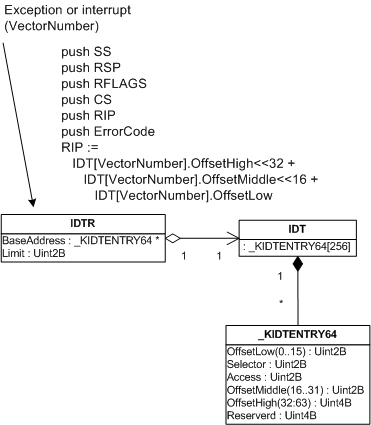
As I promised in Part 1, I describe changes in 64-bit Windows. The size of IDTR is 10 bytes where 8 bytes hold 64-bit address of IDT. The size of IDT entry is 16 bytes and it holds the address of an interrupt procedure corresponding to an interrupt vector. However interrupt procedure names are different in x64 Windows, they do not follow the same pattern like KiTrapXX. 

The following UML class diagram describes the relationship and also shows what registers are saved. In native x64 mode SS and RSP are saved regardless of kernel or user mode.

Let’s dump all architecture-defined interrupt procedure names. This is a good exercise because we will use scripting. !pcr extension reports wrong IDT base so we use dt command:

kd> !pcr 0
KPCR for Processor 0 at fffff80001176000:
    Major 1 Minor 1
 NtTib.ExceptionList: fffff80000124000
     NtTib.StackBase: fffff80000125070
    NtTib.StackLimit: 0000000000000000
  NtTib.SubSystemTib: fffff80001176000
       NtTib.Version: 0000000001176180
   NtTib.UserPointer: fffff800011767f0
       NtTib.SelfTib: 000000007ef95000
             SelfPcr: 0000000000000000
                Prcb: fffff80001176180
                Irql: 0000000000000000
                 IRR: 0000000000000000
                 IDR: 0000000000000000
       InterruptMode: 0000000000000000
                 IDT: 0000000000000000
                 GDT: 0000000000000000
                 TSS: 0000000000000000
       CurrentThread: fffffadfe669f890
          NextThread: 0000000000000000
          IdleThread: fffff8000117a300
           DpcQueue:
kd> dt _KPCR fffff80001176000
nt!_KPCR
   +0×000 NtTib            : _NT_TIB
   +0×000 GdtBase          : 0xfffff800`00124000 _KGDTENTRY64
   +0×008 TssBase          : 0xfffff800`00125070 _KTSS64
   +0×010 PerfGlobalGroupMask : (null)
   +0×018 Self             : 0xfffff800`01176000 _KPCR
   +0×020 CurrentPrcb      : 0xfffff800`01176180 _KPRCB
   +0×028 LockArray        : 0xfffff800`011767f0 _KSPIN_LOCK_QUEUE
   +0×030 Used_Self        : 0×00000000`7ef95000
   +0×038 IdtBase          : 0xfffff800`00124070 _KIDTENTRY64
   +0×040 Unused           : [2] 0
   +0×050 Irql             : 0 ”
   +0×051 SecondLevelCacheAssociativity : 0×10 ”
   +0×052 ObsoleteNumber   : 0 ”
   +0×053 Fill0            : 0 ”
   +0×054 Unused0          : [3] 0
   +0×060 MajorVersion     : 1
   +0×062 MinorVersion     : 1
   +0×064 StallScaleFactor : 0×892
   +0×068 Unused1          : [3] (null)
   +0×080 KernelReserved   : [15] 0
   +0×0bc SecondLevelCacheSize : 0×100000
   +0×0c0 HalReserved      : [16] 0×82c5c880
   +0×100 Unused2          : 0
   +0×108 KdVersionBlock   : 0xfffff800`01174ca0
   +0×110 Unused3          : (null)
   +0×118 PcrAlign1        : [24] 0
   +0×180 Prcb             : _KPRCB

Next we dump the first entry of IDT array and glue together OffsetHigh, OffsetMiddle and OffsetLow fields to form the interrupt procedure address corresponding to the interrupt vector 0, divide by zero exception:

kd> dt _KIDTENTRY64 0xfffff800`00124070
nt!_KIDTENTRY64
   +0x000 OffsetLow        : 0xf240
   +0x002 Selector         : 0x10
   +0x004 IstIndex         : 0y000
   +0x004 Reserved0        : 0y00000 (0)
   +0x004 Type             : 0y01110 (0xe)
   +0x004 Dpl              : 0y00
   +0x004 Present          : 0y1
   +0×006 OffsetMiddle     : 0×103
   +0×008 OffsetHigh       : 0xfffff800
   +0×00c Reserved1        : 0
   +0×000 Alignment        : 0×1038e00`0010f240

kd> u 0xfffff8000103f240
nt!KiDivideErrorFault:
fffff800`0103f240 4883ec08        sub     rsp,8
fffff800`0103f244 55              push    rbp
fffff800`0103f245 4881ec58010000  sub     rsp,158h
fffff800`0103f24c 488dac2480000000 lea     rbp,[rsp+80h]
fffff800`0103f254 c645ab01        mov     byte ptr [rbp-55h],1
fffff800`0103f258 488945b0        mov     qword ptr [rbp-50h],rax
fffff800`0103f25c 48894db8        mov     qword ptr [rbp-48h],rcx
fffff800`0103f260 488955c0        mov     qword ptr [rbp-40h],rdx
kd> ln 0xfffff8000103f240
(fffff800`0103f240)   nt!KiDivideErrorFault   |
(fffff800`0103f300)   nt!KiDebugTrapOrFault
Exact matches:
    nt!KiDivideErrorFault = <no type information>

We see that the name of the procedure is KiDivideErrorFault and not KiTrap00. We can dump the second IDT entry manually by adding a 0×10 offset but in order to automate this I wrote the following WinDbg script to dump the first 20 vectors and get their interrupt procedure names:

r? $t0=(_KIDTENTRY64 *)0xfffff800`00124070; .for (r $t1=0; @$t1 <= 13; r? $t0=(_KIDTENTRY64 *)@$t0+1) { .printf “Interrupt vector %d (0x%x):\n”, @$t1, @$t1; ln @@c++(@$t0->OffsetHigh*0×100000000 + @$t0->OffsetMiddle*0×10000 + @$t0->OffsetLow); r $t1=$t1+1 }

Here is the same script but formatted:

r? $t0=(_KIDTENTRY64 *)0xfffff800`00124070;
.for (r $t1=0; @$t1 <= 13; r? $t0=(_KIDTENTRY64 *)@$t0+1)
{
    .printf "Interrupt vector %d (0x%x):\n", @$t1, @$t1;
    ln @@c++(@$t0->OffsetHigh*0x100000000 +
        @$t0->OffsetMiddle*0x10000 + @$t0->OffsetLow);
    r $t1=$t1+1
}

The output on my system is:

Interrupt vector 0 (0x0):
(fffff800`0103f240) nt!KiDivideErrorFault | (fffff800`0103f300) nt!KiDebugTrapOrFault
Exact matches:
  nt!KiDivideErrorFault = <no type information>
Interrupt vector 1 (0×1):
(fffff800`0103f300) nt!KiDebugTrapOrFault | (fffff800`0103f440) nt!KiNmiInterrupt
Exact matches:
  nt!KiDebugTrapOrFault = <no type information>
Interrupt vector 2 (0×2):
(fffff800`0103f440) nt!KiNmiInterrupt | (fffff800`0103f680) nt!KxNmiInterrupt
Exact matches:
  nt!KiNmiInterrupt = <no type information>
Interrupt vector 3 (0×3):
(fffff800`0103f780) nt!KiBreakpointTrap | (fffff800`0103f840) nt!KiOverflowTrap
Exact matches:
  nt!KiBreakpointTrap = <no type information>
Interrupt vector 4 (0×4):
(fffff800`0103f840) nt!KiOverflowTrap | (fffff800`0103f900) nt!KiBoundFault
Exact matches:
  nt!KiOverflowTrap = <no type information>
Interrupt vector 5 (0×5):
(fffff800`0103f900) nt!KiBoundFault | (fffff800`0103f9c0) nt!KiInvalidOpcodeFault
Exact matches:
  nt!KiBoundFault = <no type information>
Interrupt vector 6 (0×6):
(fffff800`0103f9c0) nt!KiInvalidOpcodeFault | (fffff800`0103fb80) nt!KiNpxNotAvailableFault
Exact matches:
  nt!KiInvalidOpcodeFault = <no type information>
Interrupt vector 7 (0×7):
(fffff800`0103fb80) nt!KiNpxNotAvailableFault | (fffff800`0103fc40) nt!KiDoubleFaultAbort
Exact matches:
  nt!KiNpxNotAvailableFault = <no type information>
Interrupt vector 8 (0×8):
(fffff800`0103fc40) nt!KiDoubleFaultAbort | (fffff800`0103fd00) nt!KiNpxSegmentOverrunAbort
Exact matches:
  nt!KiDoubleFaultAbort = <no type information>
Interrupt vector 9 (0×9):
(fffff800`0103fd00) nt!KiNpxSegmentOverrunAbort | (fffff800`0103fdc0) nt!KiInvalidTssFault
Exact matches:
  nt!KiNpxSegmentOverrunAbort = <no type information>
Interrupt vector 10 (0xa):
(fffff800`0103fdc0) nt!KiInvalidTssFault | (fffff800`0103fe80) nt!KiSegmentNotPresentFault
Exact matches:
  nt!KiInvalidTssFault = <no type information>
Interrupt vector 11 (0xb):
(fffff800`0103fe80) nt!KiSegmentNotPresentFault | (fffff800`0103ff80) nt!KiStackFault
Exact matches:
  nt!KiSegmentNotPresentFault = <no type information>
Interrupt vector 12 (0xc):
(fffff800`0103ff80) nt!KiStackFault | (fffff800`01040080) nt!KiGeneralProtectionFault
Exact matches:
  nt!KiStackFault = <no type information>
Interrupt vector 13 (0xd):
(fffff800`01040080) nt!KiGeneralProtectionFault | (fffff800`01040180) nt!KiPageFault
Exact matches:
  nt!KiGeneralProtectionFault = <no type information>
Interrupt vector 14 (0xe):
(fffff800`01040180) nt!KiPageFault | (fffff800`010404c0) nt!KiFloatingErrorFault
Exact matches:
  nt!KiPageFault = <no type information>
Interrupt vector 15 (0xf):
(fffff800`01179090) nt!KxUnexpectedInterrupt0+0xf0 | (fffff800`0117a0c0) nt!KiNode0
Interrupt vector 16 (0×10):
(fffff800`010404c0) nt!KiFloatingErrorFault | (fffff800`01040600) nt!KiAlignmentFault
Exact matches:
  nt!KiFloatingErrorFault = <no type information>
Interrupt vector 17 (0×11):
(fffff800`01040600) nt!KiAlignmentFault | (fffff800`010406c0) nt!KiMcheckAbort
Exact matches:
  nt!KiAlignmentFault = <no type information>
Interrupt vector 18 (0×12):
(fffff800`010406c0) nt!KiMcheckAbort | (fffff800`01040900) nt!KxMcheckAbort
Exact matches:
  nt!KiMcheckAbort = <no type information>
Interrupt vector 19 (0×13):
(fffff800`01040a00) nt!KiXmmException | (fffff800`01040b80) nt!KiRaiseAssertion
Exact matches:
  nt!KiXmmException = <no type information>

Let’s look at some dump.

BugCheck 1E, {ffffffffc0000005, fffffade5ba2d643, 0, 28}

This is KMODE_EXCEPTION_NOT_HANDLED and obviously it could have been invalid memory access. And indeed the stack WinDbg shows after opening a dump and entering !analyze -v command is:

RSP
fffffade`4e88fe68 nt!KeBugCheckEx
fffffade`4e88fe70 nt!KiDispatchException+0x128
fffffade`4e8905f0 nt!KiPageFault+0x1e1
fffffade`4e890780 driver!foo+0x9b

and the exception context is:

2: kd> r
Last set context:
rax=fffffade4e8907f4 rbx=fffffade6de0c2e0 rcx=fffffa8014412000
rdx=fffffade71e7e2ac rsi=0000000000000000 rdi=fffffadffff03000
rip=fffffade5ba2d643 rsp=fffffade4e890780 rbp=fffffade71e7ffff
 r8=00000000000005b0 r9=fffffade4e890a88 r10=fffffadffd077898
r11=fffffade71e7e260 r12=0000000000000000 r13=0000000000000000
r14=0000000000000000 r15=0000000000000000
iopl=0 nv up ei pl zr na po nc
cs=0010 ss=0018 ds=0950 es=4e89 fs=fade gs=ffff efl=00010246
driver!foo+0×9b:
fffffade`5ba2d643 8b4e28 mov ecx,dword ptr [rsi+28h] ds:0950:0028=????????

We see that KiPageFault was called and from the dumped IDT we see it corresponds to the interrupt vector 14 (0xE) which is called on any memory reference that is not present in physical memory.

Now I’m going to dump the raw stack around fffffade`4e890780 to see our the values the processor saved before calling KiPageFault:

2: kd> dps fffffade`4e890780-50 fffffade`4e890780+50
fffffade`4e890730  fffffade`6de0c2e0
fffffade`4e890738  fffffadf`fff03000
fffffade`4e890740  00000000`00000000
fffffade`4e890748  fffffade`71e7ffff
fffffade`4e890750  00000000`00000000 ; ErrorCode
fffffade`4e890758  fffffade`5ba2d643 driver!foo+0×9b ; RIP
fffffade`4e890760  00000000`00000010 ; CS
fffffade`4e890768  00000000`00010246 ; RFLAGS
fffffade`4e890770  fffffade`4e890780 ; RSP
fffffade`4e890778  00000000`00000018 ; SS

fffffade`4e890780  00000000`00000000 ; RSP before interrupt
fffffade`4e890788  00000000`00000000
fffffade`4e890790  00000000`00000000
fffffade`4e890798  00000000`00000000
fffffade`4e8907a0  00000000`00000000
fffffade`4e8907a8  00000000`00000000
fffffade`4e8907b0  00000000`00000000
fffffade`4e8907b8  00000000`00000000
fffffade`4e8907c0  00000000`00000000
fffffade`4e8907c8  00000000`00000000
fffffade`4e8907d0  00000000`00000000

You see the values are exactly the same as WinDbg shows in the saved context above. Actually if you look at Page-Fault Error Code bits in Intel Architecture Software Developer’s Manual Volume 3A, you would see that for this case, all zeroes, we have:

  • the page was not present in memory
  • the fault was caused by the read access
  • the processor was executing in kernel mode
  • no reserved bits in page directory were set to 1 when 0s were expected
  • it was not caused by instruction fetch

- Dmitry Vostokov -

Interrupts and exceptions explained (Part 1)

Saturday, April 28th, 2007

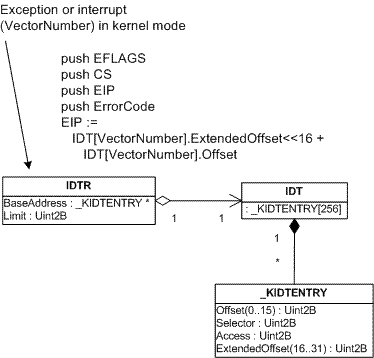
So far we have seen various bugchecks depicted. What I left there is the explanation of how exceptions happen in the first place and how the execution flow reaches KiDispatchException. When some abnormal condition happens such as breakpoint, division by zero or memory protection violation then normal CPU execution flow (code stream) is interrupted (therefore I use the terms “interrupt” and “exception” interchangeably here). The type of interrupt is specified by a number called interrupt vector number. Obviously CPU has to transfer execution to some procedure in memory to handle that interrupt. CPU has to find that procedure, theoretically either having one procedure for all interrupts and specifying interrupt vector number as a parameter or having a table containing pointers to various procedures that correspond to different interrupt vectors. Intel x86 and x64 CPUs use the latter approach which is depicted on the following diagram:


When an exception happens (divide by zero, for example) CPU gets the address of the procedure table from IDTR (Interrupt Descriptor Table Register). This IDT (Interrupt Descriptor Table) is a zero-based array of 8-byte descriptors (x86) or 16-byte descriptors (x64). CPU calculates the location of the necessary procedure to call and does some necessary steps like saving appropriate registers before calling it.

The same happens when some external I/O device interrupts. We will talk about external interrupts later. For I/O devices the term “interrupt” is more appropriate.  On the picture above I/O hardware interrupt vector numbers were taken from some dump. These are OS and user-defined numbers. The first 32 vectors are reserved by Intel. 

Before Windows switches CPU to protected mode during boot process it creates IDT table in memory and sets IDTR to point to it by using SIDT instruction.

Let me now illustrate this by using a UML class diagram annotated by pseudo-code that shows what CPU does before calling the appropriate procedure. The pseudo-code on the diagram below is valid for interrupts and exceptions happening when the current CPU execution mode is kernel. For interrupts and exceptions generated when CPU executes code in user mode the picture is a little more complicated because the processor has to switch the current user-mode stack to kernel mode stack.

The following diagram is for 32-bit x86 processor (x64 will be illustrated later):

Let’s see all this in some dump. The address of IDT can be found by using !pcr [processor number] command. Every processor on a multiprocessor machine has its own IDT:

0: kd> !pcr 0
KPCR for Processor 0 at ffdff000:
    Major 1 Minor 1
 NtTib.ExceptionList: f2178b8c
     NtTib.StackBase: 00000000
    NtTib.StackLimit: 00000000
  NtTib.SubSystemTib: 80042000
       NtTib.Version: 0005c645
   NtTib.UserPointer: 00000001
       NtTib.SelfTib: 7ffdf000
             SelfPcr: ffdff000
                Prcb: ffdff120
                Irql: 0000001f
                 IRR: 00000000
                 IDR: ffffffff
       InterruptMode: 00000000
                 IDT: 8003f400
                 GDT: 8003f000
                 TSS: 80042000
       CurrentThread: 88c1d3c0
          NextThread: 00000000
          IdleThread: 808a68c0
           DpcQueue:

Every entry in IDT has the type _KIDTENTRY and we can get the first entry for divide by zero exception which has vector number 0:

0: kd> dt _KIDTENTRY 8003f400
   +0x000 Offset           : 0x47ca
   +0x002 Selector         : 8
   +0x004 Access           : 0x8e00
   +0x006 ExtendedOffset   : 0x8083

By gluing together ExtendedOffset and Offset fields we get the address of the interrupt handling procedure (0×808347ca) which is KiTrap00:

0: kd> ln 0x808347ca
(808347ca)   nt!KiTrap00   |  (808348a5)   nt!Dr_kit1_a
Exact matches:
    nt!KiTrap00

We can also see the interrupt trace in raw stack. For example, we can open the kernel dump and see the following stack trace and registers in the output of !analyze -v command:

ErrCode = 00000000
eax=00001b00 ebx=00001b00 ecx=00000000 edx=00000000 esi=f2178cb4 edi=bc15a838
eip=bf972586 esp=f2178c1c ebp=f2178c90 iopl=0 nv up ei ng nz ac po cy
cs=0008 ss=0010 ds=0023 es=0023 fs=0030 gs=0000 efl=00010293
driver!foo+0xf9:
bf972586 f77d10 idiv eax,dword ptr [ebp+10h] ss:0010:f2178ca0=00000000
STACK_TEXT:
f2178b44 809989be nt!KeBugCheck+0×14
f2178b9c 8083484f nt!Ki386CheckDivideByZeroTrap+0×41
f2178b9c bf972586 nt!KiTrap00+0×88
f2178c90 bf94c23c driver!foo+0xf9
f2178d54 80833bdf driver!bar+0×11c

The dumping memory around ESP value (f2178c1c) shows the values processor pushes when divide by zero exception happens:

0: kd> dds f2178c1c-100 f2178c1c+100
...
...
...
f2178b80  00000000
f2178b84  f2178b50
f2178b88  00000000
f2178b8c  f2178d44
f2178b90  8083a8cc nt!_except_handler3
f2178b94  80870828 nt!`string'+0xa4
f2178b98  ffffffff
f2178b9c  f2178ba8
f2178ba0  8083484f nt!KiTrap00+0x88
f2178ba4  f2178ba8
f2178ba8  f2178c90
f2178bac  bf972586 driver!foo+0xf9
f2178bb0  badb0d00
f2178bb4  00000000
f2178bb8  0000006d
f2178bbc  bf842315
f2178bc0  f2178c6c
f2178bc4  f2178bec
f2178bc8  bf844154
f2178bcc  f2178c88
f2178bd0  f2178c88
f2178bd4  00000000
f2178bd8  bc150000
f2178bdc  f2170023
f2178be0  f2170023
f2178be4  00000000
f2178be8  00000000
f2178bec  00001b00
f2178bf0  f2178c0c
f2178bf4  f2178d44
f2178bf8  f2170030
f2178bfc  bc15a838
f2178c00  f2178cb4
f2178c04  00001b00
f2178c08  f2178c90
f2178c0c  00000000 ; ErrorCode
f2178c10  bf972586 driver!foo+0xf9 ; EIP
f2178c14  00000008 ; CS
f2178c18  00010293 ; EFLAGS

f2178c1c  00000000 ; <- ESP before interrupt
f2178c20  0013c220
f2178c24  00000000
f2178c28  60000000
f2178c2c  00000001
f2178c30  00000000
f2178c34  00000000


ErrorCode is not the same as interrupt vector number although it is the same number here (0). I won’t cover interrupt error codes here. If you are interested please consult Intel Architecture Software Developer’s Manual.

If we try to execute !idt extension command it will show you only user-defined hardware interrupt vectors:

0: kd> !idt
Dumping IDT:
37: 80a7d1ac hal!PicSpuriousService37
50: 80a7d284 hal!HalpApicRebootService
51: 89495044 serial!SerialCIsrSw (KINTERRUPT 89495008)
52: 89496044 i8042prt!I8042MouseInterruptService (KINTERRUPT 89496008)
53: 894ea044 USBPORT!USBPORT_InterruptService (KINTERRUPT 894ea008)
63: 894f2044 USBPORT!USBPORT_InterruptService (KINTERRUPT 894f2008)
72: 89f59044 atapi!IdePortInterrupt (KINTERRUPT 89f59008)
73: 89580044 NDIS!ndisMIsr (KINTERRUPT 89580008)
83: 899e7824 NDIS!ndisMIsr (KINTERRUPT 899e77e8)
92: 89f56044 atapi!IdePortInterrupt (KINTERRUPT 89f56008)
93: 89f1e044 SCSIPORT!ScsiPortInterrupt (KINTERRUPT 89f1e008)
a3: 894fa044 USBPORT!USBPORT_InterruptService (KINTERRUPT 894fa008)
a4: 894a3044 cpqcidrv+0×22AE (KINTERRUPT 894a3008)
b1: 89f697dc ACPI!ACPIInterruptServiceRoutine (KINTERRUPT 89f697a0)
b3: 89498824 i8042prt!I8042KeyboardInterruptService (KINTERRUPT 894987e8)
b4: 894a2044 cpqasm2+0×5B99 (KINTERRUPT 894a2008)
c1: 80a7d410 hal!HalpBroadcastCallService
d1: 80a7c754 hal!HalpClockInterrupt
e1: 80a7d830 hal!HalpIpiHandler
e3: 80a7d654 hal!HalpLocalApicErrorService
fd: 80a7e11c hal!HalpProfileInterrupt

In the next part I’m going to cover x64 specifics. 

- Dmitry Vostokov -

Bugchecks: SYSTEM_THREAD_EXCEPTION_NOT_HANDLED

Wednesday, April 25th, 2007

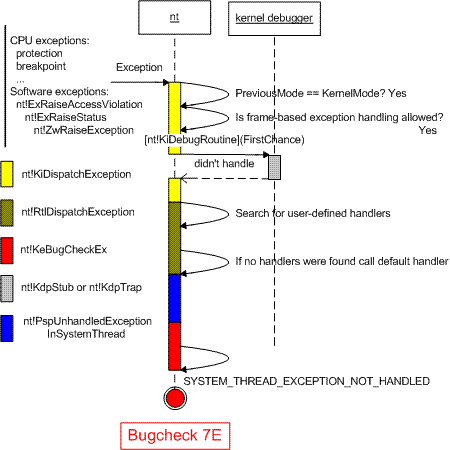
Another bugcheck that is similar to KMODE_EXCEPTION_NOT_HANDLED and KERNEL_MODE_EXCEPTION_NOT_HANDLED is SYSTEM_THREAD_EXCEPTION_NOT_HANDLED (0×7E).

This bugcheck happens when you have an exception in a system thread and there is no exception handler to catch it, i.e. no __try/__except. System threads are created by calling PsCreateSystemThread function. Here is its description from DDK:

The PsCreateSystemThread routine creates a system thread that executes in kernel mode and returns a handle for the thread.

By default PspUnhandledExceptionInSystemThread function is set as a default exception handler and its purpose is to call KeBugCheckEx.

The typical call stack in dumps with 7E bugcheck is:

1: kd> k
ChildEBP RetAddr
f70703cc 809a1eb2 nt!KeBugCheckEx+0x1b (FPO: [Non-Fpo])
f70703e8 80964a94 nt!PspUnhandledExceptionInSystemThread+0x1a
f7070ddc 80841a96 nt!PspSystemThreadStartup+0x56
00000000 00000000 nt!KiThreadStartup+0x16

To see how this bugcheck is generated from processor trap we need to look at raw stack. Let’s look at some example. !analyze -v command gives us the following output:

SYSTEM_THREAD_EXCEPTION_NOT_HANDLED (7e)
This is a very common bugcheck. Usually the exception address pinpoints the driver/function that caused the problem. Always note this address as well as the link date of the driver/image that contains this address.
Arguments:
Arg1: 80000003, The exception code that was not handled
Arg2: f69d9dd7, The address that the exception occurred at
Arg3: f70708c0, Exception Record Address
Arg4: f70705bc, Context Record Address
EXCEPTION_RECORD:  f70708c0 -- (.exr fffffffff70708c0)
ExceptionAddress: f69d9dd7 (driver+0x00014dd7)
   ExceptionCode: 80000003 (Break instruction exception)
  ExceptionFlags: 00000000
NumberParameters: 3
   Parameter[0]: 00000000
   Parameter[1]: 8a784020
   Parameter[2]: 00000044
CONTEXT:  f70705bc -- (.cxr fffffffff70705bc)
eax=00000001 ebx=00000032 ecx=8a37c000 edx=00000044 esi=8a37c000 edi=000000c7
eip=f69d9dd7 esp=f7070988 ebp=00004000 iopl=0 nv up ei pl zr na pe nc
cs=0008  ss=0010  ds=0023  es=0023  fs=0030  gs=0000 efl=00000246
driver+0x14dd7:
f69d9dd7 cc              int     3
STACK_TEXT:
WARNING: Stack unwind information not available. Following frames may be wrong.
f7070998 f69dfbd1 80800000 00000000 8a37c000 driver+0x14dd7
00000000 00000000 00000000 00000000 00000000 driver+0x1abd1

We see that the thread encountered the breakpoint instruction and we also see that the call stack that led to breakpoint exception is incomplete. Here we must dump the raw stack data and try to reconstruct the stack manually. System threads are started with the execution of KiThreadStartup function. So let’s dump the stack starting from ESP register and up to some value, find startup function there and try to walk EBP chain:

1: kd> dds esp esp+1000
...
...
...
f7070a04  f7070a40
f7070a08  f71172ec NDIS!ndisMCommonHaltMiniport+0×375
f7070a0c  8a37c000
f7070a10  8a60f5c0
f7070a14  8a610748
f7070a18  8a610748
f7070a1c  00000058
f7070a20  00000005
f7070a24  00000004
f7070a28  f7527000
f7070a2c  00000685
f7070a30  f710943a NDIS!ndisMDummyIndicatePacket
f7070a34  00000000
f7070a38  8a610778
f7070a3c  00010748
f7070a40  f7070b74
f7070a44  f7117640 NDIS!ndisMHaltMiniport+0×21
f7070a48  8a610990

… (intermediate frames are omitted to save space)

f7070d7c  e104a338
f7070d80  f7070dac
f7070d84  8083f72e nt!ExpWorkerThread+0xeb
f7070d88  894d0ed8
f7070d8c  00000000
f7070d90  8a784020
f7070d94  00000000
f7070d98  00000000
f7070d9c  00000000
f7070da0  00000001
f7070da4  00000000
f7070da8  808f0cb7 nt!PiWalkDeviceList
f7070dac  f7070ddc
f7070db0  8092ccff nt!PspSystemThreadStartup+0×2e
f7070db4  894d0ed8
f7070db8  00000000
f7070dbc  00000000
f7070dc0  00000000
f7070dc4  f7070db8
f7070dc8  f7070410
f7070dcc  ffffffff
f7070dd0  8083b9bc nt!_except_handler3
f7070dd4  808408f8 nt!ObWatchHandles+0×5f4
f7070dd8  00000000
f7070ddc  00000000
f7070de0  80841a96 nt!KiThreadStartup+0×16
f7070de4  8083f671 nt!ExpWorkerThread

The last EBP value we are able to get is f7070a04 and we can specify it to the extended version of k command together with ESP and EIP value of crash point:

1: kd> k L=f7070a04 f7070988 f69d9dd7
ChildEBP RetAddr
f7070998 f69dfbd1 driver+0x14dd7
f7070a40 f7117640 NDIS!ndisMCommonHaltMiniport+0x375
f7070a48 f711891a NDIS!ndisMHaltMiniport+0x21
f7070b74 f71196e5 NDIS!ndisPnPRemoveDevice+0x189
f7070ba4 8083f9d0 NDIS!ndisPnPDispatch+0x15d
f7070bb8 808f6a25 nt!IofCallDriver+0x45
f7070be4 808e20b5 nt!IopSynchronousCall+0xbe
f7070c38 8080beae nt!IopRemoveDevice+0x97
f7070c60 808e149b nt!IopRemoveLockedDeviceNode+0x160
f7070c78 808e18cc nt!IopDeleteLockedDeviceNode+0x50
f7070cac 808e1732 nt!IopDeleteLockedDeviceNodes+0x3f
f7070d40 808e19b6 nt!PiProcessQueryRemoveAndEject+0x7ad
f7070d5c 808e7879 nt!PiProcessTargetDeviceEvent+0x2a
f7070d80 8083f72e nt!PiWalkDeviceList+0x1d2
f7070dac 8092ccff nt!ExpWorkerThread+0xeb
f7070ddc 80841a96 nt!PspSystemThreadStartup+0x2e
00000000 00000000 nt!KiThreadStartup+0x16

This was the execution path before the exception. However when int 3 instruction was hit then processor generated a trap with interrupt vector 3 (4th entry in interrupt descriptor table, zero-based) and the corresponding function in IDT, KiTrap03, was called. Therefore we need to find this function on the same raw stack and try to build stack trace for our exception handling code path:

1: kd> dds esp esp+1000
f70703b4  0000007e
f70703b8  80000003
f70703bc  f69d9dd7 driver+0x14dd7
f70703c0  f70708c0
f70703c4  f70705bc
f70703c8  00000000
f70703cc  f70703e8
f70703d0  809a1eb2 nt!PspUnhandledExceptionInSystemThread+0x1a
f70703d4  0000007e
...
...
...
f7070418 f707043c
f707041c 8083b578 nt!ExecuteHandler2+0×26
f7070420 f70708c0
f7070424 f7070dcc
f7070428 f70705bc
f707042c f70704d8
f7070430 f7070894
f7070434 8083b58c nt!ExecuteHandler2+0×3a
f7070438 f7070dcc
f707043c f70704ec
f7070440 8083b54a nt!ExecuteHandler+0×24
f7070444 f70708c0

… (intermediate frames are omitted to save space)

f7070890  f7070410
f7070894  f7070dcc
f7070898  8083b9bc nt!_except_handler3
f707089c  80850c10 nt!`string’+0×10c
f70708a0  ffffffff
f70708a4  f7070914
f70708a8  808357a4 nt!CommonDispatchException+0×4a
f70708ac  f70708c0
f70708b0  00000000
f70708b4  f7070914
f70708b8  00000000
f70708bc  00000001
f70708c0  80000003
f70708c4  00000000
f70708c8  00000000
f70708cc  f69d9dd7 driver+0×14dd7
f70708d0  00000003
f70708d4  00000000
f70708d8  8a784020
f70708dc  00000044
f70708e0  ffffffff
f70708e4  00000001
f70708e8  f7737a7c
f70708ec  f7070934
f70708f0  8083f164 nt!KeWaitForSingleObject+0×346
f70708f4  000000c7
f70708f8  00000000
f70708fc  00000031
f7070900  00000000
f7070904  f707091c
f7070908  80840569 nt!KeSetTimerEx+0×179
f707090c  000000c7
f7070910  80835f39 nt!KiTrap03+0xb0
f7070914  00004000

The last EBP value we are able to get is f7070418 so the following stack trace emerges albeit not accurate as it doesn’t show that KeBugCheckEx was called from PspUnhandledExceptionInSystemThread as can be seen from disassembly. However it does show that the main function that orchestrates stack unwinding is KiDispatchException:

1: kd> k L=f7070418
ChildEBP RetAddr
f7070418 8083b578 nt!KeBugCheckEx+0x1b
f707043c 8083b54a nt!ExecuteHandler2+0x26
f70704ec 80810664 nt!ExecuteHandler+0x24
f70708a4 808357a4 nt!KiDispatchException+0x131
f707090c 80835f39 nt!CommonDispatchException+0x4a
f707090c f69d9dd8 nt!KiTrap03+0xb0
1: kd> uf nt!PspUnhandledExceptionInSystemThread
nt!PspUnhandledExceptionInSystemThread:
809a1e98 8bff            mov     edi,edi
809a1e9a 55              push    ebp
809a1e9b 8bec            mov     ebp,esp
809a1e9d 8b4d08          mov     ecx,dword ptr [ebp+8]
809a1ea0 ff7104          push    dword ptr [ecx+4]
809a1ea3 8b01            mov     eax,dword ptr [ecx]
809a1ea5 50              push    eax
809a1ea6 ff700c          push    dword ptr [eax+0Ch]
809a1ea9 ff30            push    dword ptr [eax]
809a1eab 6a7e            push    7Eh
809a1ead e8f197edff      call    nt!KeBugCheckEx (8087b6a3)

At the end to illustrate this bugcheck I created the following UML sequence diagram (trap processing that leads to KiDispatchException will be depicted in another post):

- Dmitry Vostokov -

Bugchecks: KMODE_EXCEPTION_NOT_HANDLED

Wednesday, April 25th, 2007

This bugcheck (0×1E) is essentially the same as KERNEL_MODE_EXCEPTION_NOT_HANDLED (0×8E) although parameters are different:

KMODE_EXCEPTION_NOT_HANDLED (1e)
This is a very common bugcheck. Usually the exception address pinpoints the driver/function that caused the problem. Always note this address as well as the link date of the driver/image that contains this address.
Arguments:
Arg1: c0000005, The exception code that was not handled
Arg2: 8046ce72, The address that the exception occurred at
Arg3: 00000000, Parameter 0 of the exception
Arg4: 00000000, Parameter 1 of the exception

KERNEL_MODE_EXCEPTION_NOT_HANDLED (8e)
This is a very common bugcheck. Usually the exception address pinpoints the driver/function that caused the problem. Always note this address as well as the link date of the driver/image that contains this address. Some common problems are exception code 0×80000003. This means a hard coded breakpoint or assertion was hit, but this system was booted /NODEBUG. This is not supposed to happen as developers should never have hardcoded breakpoints in retail code, but … If this happens, make sure a debugger gets connected, and the system is booted /DEBUG. This will let us see why this breakpoint is happening.
Arguments:
Arg1: c0000005, The exception code that was not handled
Arg2: 808cbb8d, The address that the exception occurred at
Arg3: f5a84638, Trap Frame
Arg4: 00000000

Bugcheck 0×1E is called from the same routine KiDispatchException on x64 W2K3 and on x86 W2K whereas 0×8E is called on x86 W2K3 and Vista platforms. I haven’t checked this with x64 Vista. Here is the modified UML diagram showing both bugchecks:


- Dmitry Vostokov -

Bugchecks: KERNEL_MODE_EXCEPTION_NOT_HANDLED

Sunday, April 22nd, 2007

Here is the next depicted bugcheck: 0×8E. It is very common in kernel crash dumps and it means that:

  1. If access violation exception happened the read or write address was in user space

  2. Frame-based exception handling was allowed, kernel debugger (if any) didn’t handle the exception (first chance), then no exception handlers were willing to process the exception and at last kernel debugger (if any) didn’t handle the exception (second chance)

  3. Frame-based exception handling wasn’t allowed and kernel debugger (if any) didn’t handle the exception

The second option is depicted on the following UML sequence diagram:

Note: if you have an access violation and read or write address is in kernel space you get a different bugcheck as explained in Invalid Pointer Pattern 

I assumed that you know about structured and frame based exception handling (SEH). If you don’t know how it is implemented please read Matt Pietrek’s article: A Crash Course on the Depths of Win32 Structured Exception Handling

References used:

  1. “Windows NT/2000 Native API Reference” book by Gary Nebbett
  2. Local kernel debugging on Windows XP to check that the flow on the diagram above is correct

- Dmitry Vostokov -

Bugchecks depicted: IRQL_NOT_LESS_OR_EQUAL

Tuesday, March 6th, 2007

During kernel debugging training I’m providing I came up to the idea to use UML sequence diagrams to depict various Windows kernel behavior including bugchecks. Today I start with bugcheck A. To understand why this bugcheck is needed you need to understand the difference between thread scheduling and IRQL and I use the following diagram to illustrate it:

Then I explain interrupt masking:

Next I explain thread scheduling (thread dispatcher):

And finally here is the diagram showing when bugcheck A happens and what would happen if it doesn’t exist:

This bugcheck happens in the trap handler and IRQL checking before bugcheck happens in memory manager as you can see from the dump example below. There is no IRQL checking in disassembled handler so it must be in one of Mm functions:

BugCheck A, {3, 1c, 1, 8042d8f9}
0: kd> k
nt!KiTrap0E+0×210
driver!foo+0×209
0: kd> u nt!KiTrap0E nt!KiTrap0E+0×210
nt!KiTrap0E:

8046b05e call    nt!MmAccessFault (8044bfba)

8046b189 call    dword ptr [nt!_imp__KeGetCurrentIrql (8040063c)]
8046b18f lock    inc dword ptr [nt!KiHardwareTrigger (80470cc0)]
8046b196 mov     ecx,[ebp+0×64]
8046b199 and     ecx,0×2
8046b19c shr     ecx,1
8046b19e mov     esi,[ebp+0×68]
8046b1a1 push    esi
8046b1a2 push    ecx
8046b1a3 push    eax
8046b1a4 push    edi
8046b1a5 push    0xa
8046b1a7 call    nt!KeBugCheckEx (8042c1e2)

- Dmitry Vostokov -