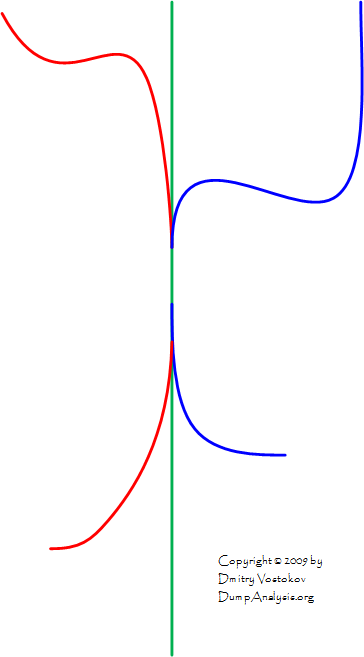
Memory Space Road
December 4th, 2009Some impressions after a day of memory dump analysis.
Memory Space Road to The Ultimate Fix (click to enlarge)

- Dmitry Vostokov @ DumpAnalysis.org -
Some impressions after a day of memory dump analysis.
Memory Space Road to The Ultimate Fix (click to enlarge)
- Dmitry Vostokov @ DumpAnalysis.org -
Manifold Memory Space
A multiple virtual memory space view taking into account code and data sharing:
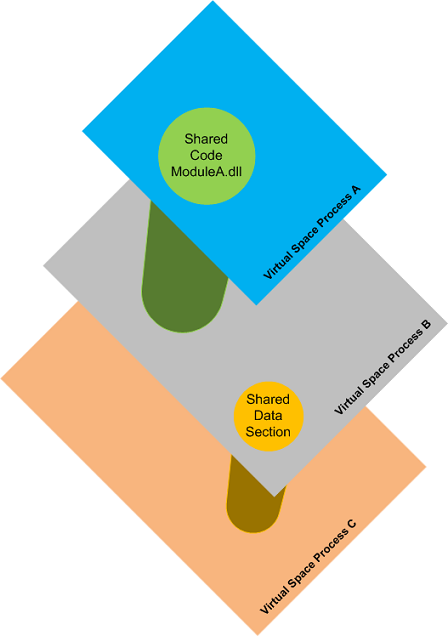
The same physical memory region can be mapped to different virtual memory regions. Here is another example of a sample manifold memory space where a physical memory region is mapped to the same virtual memory address range [N, M] of 3 OS processes:
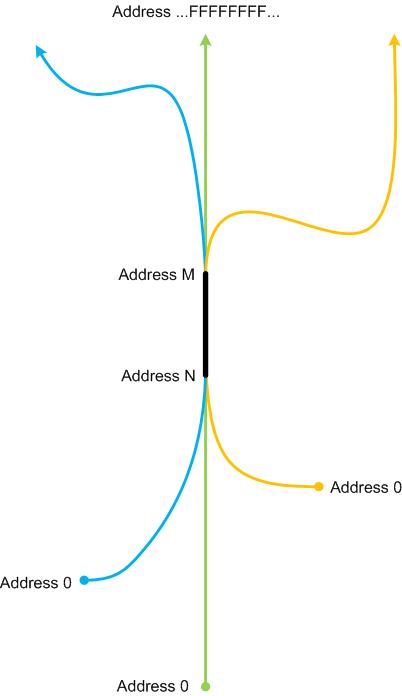
Synonyms:
Antonyms:
Also: memory space, memory region, physical memory, virtual memory, memory mapping, orbifold memory space.
- Dmitry Vostokov @ DumpAnalysis.org -
Memory dump analysis is all about deviations and of them is Value Deviation (a super pattern), be it a number of open handles, a heap size, a number of contended locks, time spent in kernel, and so on. Every system or process property has its average and mean values and large deviations are noticable as the so called anomalies. In this post we provide an example of a stack trace size (depth) deviation. The average number of frames for most stack traces is dependent on the type of a memory dump: user, kernel and complete but considerably longer or shorter stack traces are clearly visible in stack trace collections. I originally planned to call this pattern a Black Swan but after a moment of thought dismissed that idea because such deviations are not really rare after all. Here is an example of a stack trace collection from a CPU spiking process with a number of identical stack traces with just only 3 frames:
0:000> ~*kL
[...]
  19  Id: 1054.1430 Suspend: 1 Teb: 7ff9c000 Unfrozen

ChildEBP RetAddr

1ac6ff50 7739bf53 ntdll!KiFastSystemCallRet

1ac6ffb8 77e6482f user32!NtUserWaitMessage+0xc

1ac6ffec 00000000 kernel32!BaseThreadStart+0x34
  20  Id: 1054.c90 Suspend: 1 Teb: 7ffaf000 Unfrozen

ChildEBP RetAddr

1b30ff50 7739bf53 ntdll!KiFastSystemCallRet

1b30ffb8 77e6482f user32!NtUserWaitMessage+0xc

1b30ffec 00000000 kernel32!BaseThreadStart+0x34
  21  Id: 1054.a34 Suspend: 1 Teb: 7ff9a000 Unfrozen

ChildEBP RetAddr

1b63ff50 7739bf53 ntdll!KiFastSystemCallRet

1b63ffb8 77e6482f user32!NtUserWaitMessage+0xc

1b63ffec 00000000 kernel32!BaseThreadStart+0×34
  22  Id: 1054.1584 Suspend: 1 Teb: 7ff99000 Unfrozen

ChildEBP RetAddr

1ba9ff50 7739bf53 ntdll!KiFastSystemCallRet

1ba9ffb8 77e6482f user32!NtUserWaitMessage+0xc

1ba9ffec 00000000 kernel32!BaseThreadStart+0x34
[...]
These stack traces are correct from RetAddr analysis perspective:
0:000> ub 7739bf53

user32!PeekMessageW+0×11e:

7739bf42 nop

7739bf43 nop

7739bf44 nop

7739bf45 nop

7739bf46 nop

user32!NtUserWaitMessage:

7739bf47 mov     eax,124Ah

7739bf4c mov     edx,offset SharedUserData!SystemCallStub (7ffe0300)

7739bf51 call    dword ptr [edx]
0:000> ub 77e6482f

kernel32!BaseThreadStart+0×10:

77e6480b mov     eax,dword ptr fs:[00000018h]

77e64811 cmp     dword ptr [eax+10h],1E00h

77e64818 jne     kernel32!BaseThreadStart+0×2e (77e64829)

77e6481a cmp     byte ptr [kernel32!BaseRunningInServerProcess (77ecb008)],0

77e64821 jne     kernel32!BaseThreadStart+0×2e (77e64829)

77e64823 call    dword ptr [kernel32!_imp__CsrNewThread (77e4132c)]

77e64829 push    dword ptr [ebp+0Ch]

77e6482c call    dword ptr [ebp+8]
Looking at their thread times reveals that they were the most spikers:
0:000> !runaway

 User Mode Time

  Thread       Time

  19:1430      0 days 0:01:34.109

  22:1584      0 days 0:01:28.140

  21:a34       0 days 0:01:26.765

  20:c90       0 days 0:01:24.218

   0:e78       0 days 0:00:01.687

  10:398       0 days 0:00:01.062

   7:14e8      0 days 0:00:00.250

   4:1258      0 days 0:00:00.093

   6:2e8       0 days 0:00:00.015

   1:11c0      0 days 0:00:00.015

  26:1328      0 days 0:00:00.000

  25:7ec       0 days 0:00:00.000

[…]
In order to hypothesize about a possible culptit component we look at execution residue left on their raw stack data. Indeed, we see lots of non-coincidental symbolic references to 3rdPartyExtension module:
0:000> ~22s

eax=00000000 ebx=00000000 ecx=1ba9f488 edx=00000001 esi=1952bd40 edi=00000000

eip=7c82860c esp=1ba9ff54 ebp=1ba9ffb8 iopl=0         nv up ei pl zr na pe nc

cs=001b  ss=0023  ds=0023  es=0023  fs=003b  gs=0000             efl=00240246

ntdll!KiFastSystemCallRet:

7c82860c ret
0:022> !teb

TEB at 7ff99000

    ExceptionList:        1ba9ffdc

    StackBase:            1baa0000

    StackLimit:           1ba8f000

    SubSystemTib:         00000000

    FiberData:            00001e00

    ArbitraryUserPointer: 00000000

    Self:                 7ff99000

    EnvironmentPointer:   00000000

    ClientId:             00001054 . 00001584

    RpcHandle:            00000000

    Tls Storage:          00000000

    PEB Address:          7ffd5000

    LastErrorValue:       0

    LastStatusValue:      c0000034

    Count Owned Locks:    0

    HardErrorMode:        0
0:022> dds 1ba8f000 1baa0000

1ba8f000  00000000

1ba8f004  00000000

[...]

1ba939e8  00000000

1ba939ec  00000000

1ba939f0  00000037

1ba939f4  1906e6c0

1ba939f8  064e1112 3rdPartyExtension!DllUnregisterServer+0xe1f1f

1ba939fc  1a042678

1ba93a00  034d2918

1ba93a04  00000000

1ba93a08  1a042660

1ba93a0c  00000008

1ba93a10  064e18ea 3rdPartyExtension!DllUnregisterServer+0xe26f7

1ba93a14  1a042678

1ba93a18  00000001

1ba93a1c  034d2870

1ba93a20  034d2b78

1ba93a24  0000001f

1ba93a28  00000007

1ba93a2c  034d2870

1ba93a30  1a01fc68

1ba93a34  00000001

1ba93a38  1ba93a54

1ba93a3c  064e1b45 3rdPartyExtension!DllUnregisterServer+0xe2952

1ba93a40  034d2b78

1ba93a44  00000000

1ba93a48  00000000

1ba93a4c  06e7b498

1ba93a50  00000212

1ba93a54  1ba93c00

1ba93a58  064e3bce 3rdPartyExtension!DllUnregisterServer+0xe49db

1ba93a5c  00000001

1ba93a60  00000001

1ba93a64  00000000

1ba93a68  115d7fbc

1ba93a6c  06e7b498

1ba93a70  062de91d 3rdPartyExtension+0xe91d

1ba93a74  0000020c

1ba93a78  1ba93b78

1ba93a7c  06363797 3rdPartyExtension+0×93797

1ba93a80  00000024

1ba93a84  00000000

1ba93a88  00000000

1ba93a8c  1ba93ee0

[…]
0:022> ub 064e1112

3rdPartyExtension!DllUnregisterServer+0xe1f0d:

064e1100 jge     3rdPartyExtension!DllUnregisterServer+0xe1f16 (064e1109)

064e1102 mov     ecx,dword ptr [ecx+10h]

064e1105 cmp     ecx,eax

064e1107 jne     3rdPartyExtension!DllUnregisterServer+0xe1f0a (064e10fd)

064e1109 push    ecx

064e110a push    ebx

064e110b mov     ecx,edi

064e110d call    3rdPartyExtension!DllUnregisterServer+0xe1d17 (064e0f0a)
- Dmitry Vostokov @ DumpAnalysis.org -
Highly recommended to listen during analysis of a complete memory dump from an isolated dead system to build tension resulting in a problem resolution in 21 minutes:
Rachmaninov: Symphonic Dances & the Isle of the Dead

- Dmitry Vostokov @ DumpAnalysis.org -
Analysis of .NET managed code requires processor architectural platform specific SOS extension. For example, x64 WinDbg is not able to analyze the managed stack for a managed code exception in 32-bit process:
0:010> !analyze -v
[...]
FAULTING_IP:

kernel32!RaiseException+53

77e4bee7 5e              pop     esi
EXCEPTION_RECORD:  ffffffff -- (.exr 0xffffffffffffffff)

ExceptionAddress: 77e4bee7 (kernel32!RaiseException+0x00000053)

   ExceptionCode: e0434f4d (CLR exception)

  ExceptionFlags: 00000001

NumberParameters: 1

   Parameter[0]: 80131509
[...]
MANAGED_STACK: !dumpstack -EE

No export dumpstack found
MANAGED_BITNESS_MISMATCH:

Managed code needs matching platform of sos.dll for proper analysis. Use ‘x86′ debugger.
[...]
0:010> kL 100

ChildEBP RetAddr

0573f0a4 79f071ac kernel32!RaiseException+0x53

0573f104 79f0a780 mscorwks!RaiseTheExceptionInternalOnly+0x2a8

0573f1a8 058ed3b3 mscorwks!JIT_Rethrow+0xbf

WARNING: Frame IP not in any known module. Following frames may be wrong.

0573f33c 793b0d1f <Unloaded_DllA.dll>+0x58ed3b2

0573f344 79373ecd mscorlib_ni+0x2f0d1f

0573f358 793b0c68 mscorlib_ni+0x2b3ecd

0573f370 79e7c74b mscorlib_ni+0x2f0c68

0573f380 79e7c6cc mscorwks!CallDescrWorker+0x33

0573f400 79e7c8e1 mscorwks!CallDescrWorkerWithHandler+0xa3

0573f53c 79e7c783 mscorwks!MethodDesc::CallDescr+0x19c

0573f558 79e7c90d mscorwks!MethodDesc::CallTargetWorker+0x1f

0573f56c 79fc58cd mscorwks!MethodDescCallSite::Call_RetArgSlot+0x18

0573f754 79ef3207 mscorwks!ThreadNative::KickOffThread_Worker+0x190

0573f768 79ef31a3 mscorwks!Thread::DoADCallBack+0x32a

0573f7fc 79ef30c3 mscorwks!Thread::ShouldChangeAbortToUnload+0xe3

0573f838 79ef4826 mscorwks!Thread::ShouldChangeAbortToUnload+0x30a

0573f860 79fc57b1 mscorwks!Thread::ShouldChangeAbortToUnload+0x33e

0573f878 79fc56ac mscorwks!ManagedThreadBase::KickOff+0x13

0573f914 79f95a2e mscorwks!ThreadNative::KickOffThread+0x269

0573ffb8 77e64829 mscorwks!Thread::intermediateThreadProc+0x49

0573ffec 00000000 kernel32!BaseThreadStart+0x34
So we dutifully run x86 WinDbg and get the better picture of nested exceptions:
0:010> !analyze -v
[...]
MANAGED_STACK: !dumpstack -EE

OS Thread Id: 0xc68 (15)

Current frame:

ChildEBP RetAddr  Caller,Callee
EXCEPTION_OBJECT: !pe 16584f0

Exception object: 016584f0

Exception type: System.InvalidOperationException

Message: There is an error in XML document (12, 12182).

InnerException: System.IO.IOException, use !PrintException 0164f6dc to see more

[…]
StackTraceString: <none>

HResult: 80131509

There are nested exceptions on this thread. Run with -nested for details
EXCEPTION_OBJECT: !pe 164f6dc

Exception object: 0164f6dc

Exception type: System.IO.IOException

Message: Unable to read data from the transport connection: The connection was closed.

InnerException: <none>

[…]
StackTraceString: <none>

HResult: 80131620

There are nested exceptions on this thread. Run with -nested for details
MANAGED_OBJECT: !dumpobj 1655a38

Name: System.String

MethodTable: 790fd8c4

EEClass: 790fd824

Size: 270(0x10e) bytes

 (C:\WINDOWS\assembly\GAC_32\mscorlib\2.0.0.0__[...]\mscorlib.dll)

String: Unable to read data from the transport connection: The connection was closed.
[...]
EXCEPTION_MESSAGE: Unable to read data from the transport connection: The connection was closed.
MANAGED_OBJECT_NAME: System.IO.IOException
[...]
There are other pattern instances of this kind when we need a Platform-Specific Debugger, for example, to do live debugging of an x86 process on x64 machine (needed x64 debugger) or we need to load an old 32-bit DLL extension (needed x86 debugger) for a postmortem analysis.
- Dmitry Vostokov @ DumpAnalysis.org -
Finally you can run my moniker process (just born version doesn’t consume CPU time) and if I come across the dump of your system I would be very pleased to see Vostokov.exe in the list of running processes (!vm or !process 0 0 WinDbg commands).
lkd> !vm

[...]

0780 svchost.exe        354 (      1416 Kb)

0720 svchost.exe        330 (      1320 Kb)

0768 svchost.exe        322 (      1288 Kb)

07d4 svchost.exe        296 (      1184 Kb)

0dc8 Vostokov.exe       134 (       536 Kb)

019c smss.exe           128 (       512 Kb)

0ec4 wmplayer.exe         0 (         0 Kb)

0288 wmplayer.exe         0 (         0 Kb)

01ac wmplayer.exe         0 (         0 Kb)
lkd> !process 0 0

**** NT ACTIVE PROCESS DUMP ****

PROCESS fffffa8003bf1040

    SessionId: none  Cid: 0004    Peb: 00000000  ParentCid: 0000

    DirBase: 00124000  ObjectTable: fffff88000000080  HandleCount: 570.

    Image: System
[...]
PROCESS fffffa8005eeac10

    SessionId: 2  Cid: 0888    Peb: 7fffffd5000  ParentCid: 0458

    DirBase: 1c64e000  ObjectTable: fffff8800cab5b50  HandleCount: 312.

    Image: windbg.exe
PROCESS fffffa8005e87620

    SessionId: 2  Cid: 09d4    Peb: 7efdf000  ParentCid: 0f64

    DirBase: 112938000  ObjectTable: fffff8800c8b2980  HandleCount:  28.

    Image: cmd.exe
PROCESS fffffa800579cb50

    SessionId: 2  Cid: 0dc8    Peb: 7efdf000  ParentCid: 09d4

    DirBase: 092aa000  ObjectTable: fffff880105df610  HandleCount:   9.

    Image: Vostokov.exe
PROCESS fffffa8005e3e7a0

    SessionId: 2  Cid: 09c8    Peb: 7efdf000  ParentCid: 0b24

    DirBase: 78baf000  ObjectTable: fffff8800cfe0a30  HandleCount: 433.

    Image: iexplore.exe
PROCESS fffffa8005f53040

    SessionId: 2  Cid: 0db8    Peb: 7fffffd9000  ParentCid: 0458

    DirBase: 11856e000  ObjectTable: fffff8800c460710  HandleCount:  45.

    Image: notepad.exe
lkd> .process /r /p fffffa800579cb50

Implicit process is now fffffa80`0579cb50
lkd> lmv m Vostokov

start             end                 module name

00000000`001f0000 00000000`001fe000   Vostokov   (deferred)

    Image path: c:\Users\[...]\Vostokov.exe

    Image name: Vostokov.exe

    Timestamp:        Tue Nov 24 11:19:31 2009 (4B0BC143)

    CheckSum:         000156E1

    ImageSize:        0000E000

    File version:     1.0.0.0

    Product version:  1.0.0.0

    File flags:       0 (Mask 17)

    File OS:          4 Unknown Win32

    File type:        1.0 App

    File date:        00000000.00000000

    Translations:     1809.04b0

    CompanyName:      DumpAnalysis.org

    ProductName:      Vostokov Application

    InternalName:     Vostokov

    OriginalFilename: Vostokov.exe

    ProductVersion:   Just born

    FileVersion:      Just born

    FileDescription:  Just born Vostokov Application

    LegalCopyright:   Copyright (C) 2009 Dmitry Vostokov

    Comments:         Written by Dmitry Vostokov
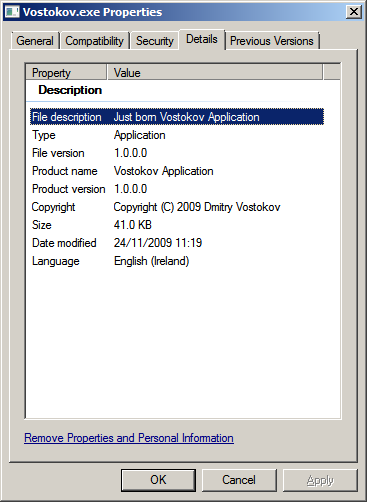
You can inspect its memory if you attach WinDbg to a running instance or from a complete memory or a user process dump (symbols are supplied):
0:001> da /c 90 Vostokov!szCopyright

00000000`001fac40 "Vostokov.exe, Just born version 1.0.0.0, Copyright (c) 2009 by Dmitry Vostokov, DumpAnalysis.org"
You can download my moniker together with .cpp and .pdb files from here (named in a classic 8.3 format):
Now I’m going to teach it something useful and release the next aged version soon.
- Dmitry Vostokov @ DumpAnalysis.org -
Sometimes the functionality of a system depends upon a specific application or service process. For example, in a database server environment it might be a database process, in printing environment it is a print spooler process or in a terminal services environment it is a terminal services process (termsvc, hosted by svchost.exe). In system failure scenarios we should check these processes for their presence (and also the presence of any coupled processes), hence the name of this pattern: Missing Process. However, if the vital process is present we should check if it is exited but references to it exist or there are any missing threads or components inside it, any suspended threads and special processes like a postmortem debugger. We shouldn’t also forget about service dependencies and their relevant process startup order. For example, we know that our service is hosted by svchost.exe and we see one such process exited but its object still referenced somewhere:
0: kd> !vm
*** Virtual Memory Usage ***

[...]

         0ed8 svchost.exe          0 (         0 Kb)

[…]
However, another command shows that it could be a different service hosted by the same image, svchost.exe, if we know that ServiceA depends on our service:
0: kd> !process 0 0

**** NT ACTIVE PROCESS DUMP ****

PROCESS 8b581818  SessionId: none  Cid: 0004    Peb: 00000000  ParentCid: 0000

    DirBase: bff4d020  ObjectTable: e1001e18  HandleCount: 1601.

    Image: System
PROCESS 8b06d778  SessionId: none  Cid: 01a8    Peb: 7ffde000  ParentCid: 0004

    DirBase: bff4d040  ObjectTable: e13eae40  HandleCount:  22.

    Image: smss.exe
[...]
PROCESS 8aabed88  SessionId: 0  Cid: 0854    Peb: 7ffd6000  ParentCid: 0220

    DirBase: bff4d4a0  ObjectTable: e1c867a8  HandleCount: 778.

    Image: ServiceA.exe
[...]
PROCESS 8aaa6510  SessionId: 0  Cid: 0ed8    Peb: 7ffd4000  ParentCid: 0220

    DirBase: bff4d580  ObjectTable: 00000000  HandleCount:   0.

    Image: svchost.exe
[...]
Another alternative is that our service was restarted but then exited. If our process is not visible it could be possible that it was either stopped or simply crashed before.
- Dmitry Vostokov @ DumpAnalysis.org -
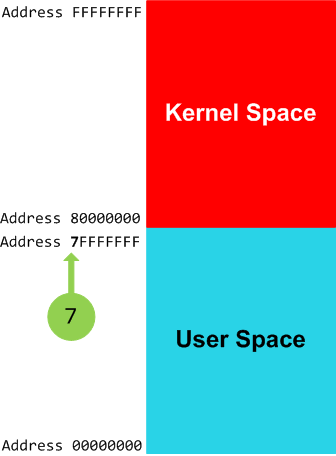
7
A separating digit of user space and kernel space in equi-bipartitional 32-bit virtual memory, for example, on x86 Windows systems:
RetAddr

80833491 nt!KiSwapContext+0×26

80828f2b nt!KiSwapThread+0×2e5

8099490a nt!KeDelayExecutionThread+0×2ab

808897cc nt!NtDelayExecution+0×84

7c82860c nt!KiFastCallEntry+0xfc

7c826f69 ntdll!KiFastSystemCallRet

7c83d454 ntdll!NtDelayExecution+0xc

77e6482f ntdll!RtlpTimerThread+0×47

00000000 kernel32!BaseThreadStart+0×34
lkd> lm

start    end        module name

[…]

77bd0000 77c19000   GDI32

77c20000 77cbf000   RPCRT4

77cd0000 77d5b000   OLEAUT32

77e20000 77eb2000   USER32

77ec0000 77f12000   SHLWAPI

77f30000 77fdc000   ADVAPI32

7c800000 7c915000   kernel32

7c920000 7c9e8000   ntdll

7c9f0000 7d1f9000   SHELL32

7e020000 7e02f000   SAMLIB

80800000 80a5d000   nt

80a5d000 80a89000   hal

bf800000 bf9d0000   win32k

[…]
This number continues to be used on x64 Windows systems, for example:
RetAddr           Call Site

fffff800`0167e082 nt!KiSwapContext+0×7a

fffff800`0167a34b nt!KiCommitThreadWait+0×1d2

fffff800`01973def nt!KeWaitForMultipleObjects+0×271

fffff800`019746f6 nt!ObpWaitForMultipleObjects+0×294

fffff800`01675ed3 nt!NtWaitForMultipleObjects+0xe5

00000000`77ca030a nt!KiSystemServiceCopyEnd+0×13
lkd> lm

start             end               module name

00000000`774a0000 00000000`7756d000 USER32

00000000`77570000 00000000`7769d000 kernel32

00000000`776a0000 00000000`77826000 ntdll

00000000`ffe60000 00000000`ffec0000 services

000007fe`fca90000 000007fe`fca97000 wshtcpip

000007fe`fcae0000 000007fe`fcb0c000 NTMARTA

000007fe`fcbe0000 000007fe`fcc34000 schannel

000007fe`fce10000 000007fe`fce5f000 mswsock

000007fe`fcf60000 000007fe`fcf69000 credssp

000007fe`fcf90000 000007fe`fcf97000 wship6

000007fe`fd0d0000 000007fe`fd207000 CRYPT32

000007fe`fd260000 000007fe`fd279000 MSASN1

000007fe`fd5a0000 000007fe`fd5b6000 NCObjAPI

000007fe`fd5c0000 000007fe`fd625000 SCESRV

000007fe`fd630000 000007fe`fd665000 apphelp

000007fe`fd680000 000007fe`fd6a6000 AUTHZ

000007fe`fd950000 000007fe`fd96c000 Secur32

000007fe`fd970000 000007fe`fd996000 USERENV

000007fe`fd9a0000 000007fe`fd9bc000 SAMLIB

000007fe`fdc80000 000007fe`fdce4000 GDI32

000007fe`fdd10000 000007fe`fdd1d000 LPK

000007fe`fdd20000 000007fe`fde28000 ADVAPI32

000007fe`fde30000 000007fe`fdecc000 msvcrt

000007fe`fded0000 000007fe`fdefd000 IMM32

000007fe`fdf00000 000007fe`fe0d8000 ole32

000007fe`fe0e0000 000007fe`fe0e7000 NSI

000007fe`fe190000 000007fe`fe22a000 USP10

000007fe`fe230000 000007fe`fe373000 RPCRT4

000007fe`ff340000 000007fe`ff395000 WLDAP32

000007fe`ff540000 000007fe`ff584000 WS2_32

000007fe`ff7d0000 000007fe`ff8d2000 MSCTF

fffff800`01802000 fffff800`01848000 hal

fffff800`01848000 fffff800`01d60000 nt

fffff960`000f0000 fffff960`003a1000 win32k

[…]
Synonyms:
Antonyms:
Also: virtual memory, user space, kernel space, x86, x64, 8
- Dmitry Vostokov @ DumpAnalysis.org -
By analogy with a security researcher profession I propose the new title of a software defect researcher as a unified profession combining relevant fields of security research, testing, debugging, memory dump analysis, software reverse engineering, construction and maintenance. At least I consider myself a software defect researcher. If you think you consider yourself too please write a comment to this post. Thank you in advance.
- Dmitry Vostokov @ DumpAnalysis.org -
Windows shutdown couldn’t progress and a complete memory dump was saved for later postmortem analysis. !stacks command showed reduced number of waiting threads in one important system service:
0: kd> !stacks

[...]

                            [89d6d8e8 ServiceA.exe]

1454.0014b0  89d36b60 0000163 Blocked    DriverA!Check+0x177

[...]
Normally this service had at least a dozen waiting threads. If we switch to the process we see many threads missing and the process itself is in the process of exiting (three “process” nouns in one sentence):
0: kd> !process 89d6d8e8

PROCESS 89d6d8e8  SessionId: 0  Cid: 1454    Peb: 7ffd8000  ParentCid: 0234

    DirBase: afa06000  ObjectTable: e5491278  HandleCount: 444.

    Image: ServiceA.exe

    VadRoot 89db18d8 Vads 213 Clone 0 Private 827. Modified 15. Locked 0.

    DeviceMap e10028c8

    Token                             e5556710

    ElapsedTime                       2 Days 02:59:39.285

    UserTime                          00:00:08.375

    KernelTime                        00:00:20.046

    QuotaPoolUsage[PagedPool]         50660

    QuotaPoolUsage[NonPagedPool]      9704

    Working Set Sizes (now,min,max)  (2523, 50, 345) (10092KB, 200KB, 1380KB)

    PeakWorkingSetSize                2953

    VirtualSize                       76 Mb

    PeakVirtualSize                   78 Mb

    PageFaultCount                    19259

    MemoryPriority                    BACKGROUND

    BasePriority                      8

    CommitCharge                      1522
THREAD 89d36b60  Cid 1454.14b0  Teb: 00000000 Win32Thread: 00000000 WAIT: (Unknown) KernelMode Alertable

    8a8d7438  NotificationEvent

    89d36bd8  NotificationTimer

Not impersonating

DeviceMap                 e10028c8

Owning Process            89d6d8e8       Image:         ServiceA.exe

Attached Process          N/A            Image:         N/A

Wait Start TickCount      11760358       Ticks: 355 (0:00:00:05.546)

Context Switch Count      4591

UserTime                  00:00:00.000

KernelTime                00:00:00.000

Start Address DriverA!CheckProtocolStackThread (0xf762cfa0)

Stack Init f3e7b000 Current f3e7acc0 Base f3e7b000 Limit f3e78000 Call 0

Priority 8 BasePriority 8 PriorityDecrement 0

ChildEBP RetAddr

f3e7acd8 8083d5b1 nt!KiSwapContext+0x26

f3e7ad04 8083df9e nt!KiSwapThread+0x2e5

f3e7ad4c f762cf8d nt!KeWaitForSingleObject+0x346

[...]

f3e7adac 8092083b DriverA!CheckProtocolStackThread+0x5

f3e7addc 8083fe9f nt!PspSystemThreadStartup+0x2e

00000000 00000000 nt!KiThreadStartup+0x16
THREAD 89ce9580  Cid 1454.1630  Teb: 7ff9e000 Win32Thread: bc1e71f8 WAIT: (Unknown) UserMode Non-Alertable

     893fae40  SynchronizationEvent

Not impersonating

DeviceMap                 e10028c8

Owning Process            89d6d8e8       Image:         ServiceA.exe

Attached Process          N/A            Image:         N/A

Wait Start TickCount      11048203       Ticks: 712510 (0:03:05:32.968)

Context Switch Count      1103                 LargeStack

UserTime                  00:00:00.281

KernelTime                00:00:01.484

Win32 Start Address DllA!OperationThread (0x1003b37e)

Start Address kernel32!BaseThreadStartThunk (0x77e617ec)

Stack Init f65a3000 Current f65a2c60 Base f65a3000 Limit f65a0000 Call 0

Priority 8 BasePriority 8 PriorityDecrement 0

Kernel stack not resident.

ChildEBP RetAddr

f65a2c78 8083d5b1 nt!KiSwapContext+0x26

f65a2ca4 8083df9e nt!KiSwapThread+0x2e5

f65a2cec 8092ae67 nt!KeWaitForSingleObject+0x346

f65a2d50 80833bef nt!NtWaitForSingleObject+0x9a

f65a2d50 7c82860c nt!KiFastCallEntry+0xfc (TrapFrame @ f65a2d64)

0293fd18 7c827d29 ntdll!KiFastSystemCallRet

0293fd1c 77e61d1e ntdll!ZwWaitForSingleObject+0xc

0293fd8c 77e61c8d kernel32!WaitForSingleObjectEx+0xac

0293fda0 724c705b kernel32!WaitForSingleObject+0x12

0293fdb4 724c6745 DllB!Cleanup+0x3b

[...]

0293fde0 7c81a352 DllB!DLLEntry+0x62

0293fe00 7c830e90 ntdll!LdrpCallInitRoutine+0x14

0293feb8 77e668ab ntdll!LdrShutdownProcess+0x182

0293ffa4 77e6690d kernel32!_ExitProcess+0×43

0293ffb8 77e792c1 kernel32!ExitProcess+0×14

0293ffec 00000000 kernel32!BaseThreadStart+0×5f
However, the brief scan of all other processes and threads from !process 0 ff command output shows that another important service ServiceB has critical section wait chains:
THREAD 89e1f890  Cid 09f4.1018  Teb: 7ff96000 Win32Thread: bc279160 WAIT: (Unknown) UserMode Non-Alertable

    89d96c30  SynchronizationEvent

Not impersonating

DeviceMap                 e10028c8

Owning Process            8a453b18       Image:         ServiceB.exe

Attached Process          N/A            Image:         N/A

Wait Start TickCount      11750950       Ticks: 9763 (0:00:02:32.546)

Context Switch Count      327                 LargeStack

UserTime                  00:00:00.000

KernelTime                00:00:00.000

Win32 Start Address msvcrt!_endthreadex (0×77bcb4bc)

Start Address kernel32!BaseThreadStartThunk (0×77e617ec)

Stack Init f6113000 Current f6112c60 Base f6113000 Limit f6110000 Call 0

Priority 9 BasePriority 8 PriorityDecrement 1

Kernel stack not resident.

ChildEBP RetAddr

f6112c78 8083d5b1 nt!KiSwapContext+0×26

f6112ca4 8083df9e nt!KiSwapThread+0×2e5

f6112cec 8092ae67 nt!KeWaitForSingleObject+0×346

f6112d50 80833bef nt!NtWaitForSingleObject+0×9a

f6112d50 7c82860c nt!KiFastCallEntry+0xfc

09eafd98 7c827d29 ntdll!KiFastSystemCallRet

09eafd9c 7c83d266 ntdll!ZwWaitForSingleObject+0xc

09eafdd8 7c83d2b1 ntdll!RtlpWaitOnCriticalSection+0×1a3

09eafdf8 6738d489 ntdll!RtlEnterCriticalSection+0xa8

[…]

09eaffb8 77e6482f msvcrt!_endthreadex+0xa3

09eaffec 00000000 kernel32!BaseThreadStart+0×34
We switch to this process and find the owner of a critical section that blocks other threads:
0: kd> .process /r /p 8a453b18

Implicit process is now 8a453b18
0: kd> !cs -l -o -s

[...]

DebugInfo          = 0x0a199ea0

Critical section   = 0x0998ac80 (+0x998AC80)

LOCKED

LockCount          = 0x5

WaiterWoken        = No

OwningThread       = 0x00001680

RecursionCount     = 0x1

LockSemaphore      = 0xE08

SpinCount          = 0x00000000

OwningThread       = .thread 89bfc4d8

[…]
0: kd> !thread 89bfc4d8 1f

THREAD 89bfc4d8  Cid 09f4.1680  Teb: 7ff70000 Win32Thread: bc1e79d8 WAIT: (Unknown) UserMode Non-Alertable

    89bfc6c4  Semaphore Limit 0x1

Waiting for reply to LPC MessageId 00fbbc86:

Current LPC port e544f108

Not impersonating

DeviceMap                 e10028c8

Owning Process            8a453b18       Image:         ServiceB.exe

Attached Process          N/A            Image:         N/A

Wait Start TickCount      11049035       Ticks: 711678 (0:03:05:19.968)

Context Switch Count      455269                 LargeStack

UserTime                  00:00:45.312

KernelTime                00:00:10.531

Win32 Start Address msvcrt!_endthreadex (0×77bcb4bc)

Start Address kernel32!BaseThreadStartThunk (0×77e617ec)

Stack Init f3b8b000 Current f3b8ac08 Base f3b8b000 Limit f3b88000 Call 0

Priority 13 BasePriority 8 PriorityDecrement 0

Kernel stack not resident.

ChildEBP RetAddr

f3b8ac20 8083d5b1 nt!KiSwapContext+0×26

f3b8ac4c 8083df9e nt!KiSwapThread+0×2e5

f3b8ac94 8093edb1 nt!KeWaitForSingleObject+0×346

f3b8ad50 80833bef nt!NtRequestWaitReplyPort+0×776

f3b8ad50 7c82860c nt!KiFastCallEntry+0xfc (TrapFrame @ f3b8ad64)

0f13ebe8 7c827899 ntdll!KiFastSystemCallRet

0f13ebec 77c80a6e ntdll!ZwRequestWaitReplyPort+0xc

0f13ec38 77c7fcf0 RPCRT4!LRPC_CCALL::SendReceive+0×230

0f13ec44 77c80673 RPCRT4!I_RpcSendReceive+0×24

0f13ec58 77ce315a RPCRT4!NdrSendReceive+0×2b

0f13f040 771f40c4 RPCRT4!NdrClientCall2+0×22e

[…]

0f13ffb8 77e6482f msvcrt!_endthreadex+0xa3

0f13ffec 00000000 kernel32!BaseThreadStart+0×34
Following LPC chain we find that the blocking thread in ServiceB was waiting for a response from ServiceA:
0: kd> !lpc message 00fbbc86

[...]

    Server process  : 89d6d8e8 (ServiceA.exe)

[…]
Now the question arises: who was freezing first, ServiceA or ServiceB? We can compare waiting times to answer. We see that waiting time for ServiceB request thread is 3:05:19 and for ServiceA shutdown thread is 03:05:32 (from !thread and !process output above):
Owning Process            8a453b18       Image:         ServiceB.exe

[...]

Wait Start TickCount      11049035       Ticks: 711678 (0:03:05:19.968)
Owning Process            89d6d8e8       Image:         ServiceA.exe

[...]

Wait Start TickCount      11048203       Ticks: 712510 (0:03:05:32.968)
Therefore, we conclude that ServiceB was blocked after ServiceA was blocked. Such questions often arise in multivendor troubleshooting scenarious.
- Dmitry Vostokov @ DumpAnalysis.org -
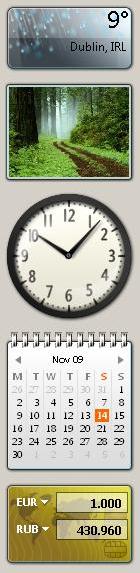
A few days ago I noticed that one euro became 10 times more than its usual conversion value to Russian rouble (ruble). As shown on the picture below it was 1:430.96 instead of expected 1:43.096. At first, I thought of a sudden devaluation and rushed to financial websites for confirmation but they didn’t show any signs of it. I then wanted to announce my findings and cause panic on Wall Street (computers crash there too) but other battles with bugs set this problem aside.
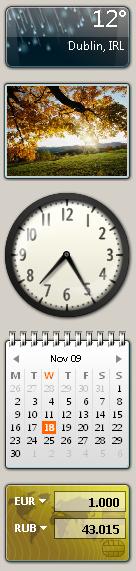
This evening I noticed that it was fixed (remotely, I suppose, on a distant server):
- Dmitry Vostokov @ DumpAnalysis.org -
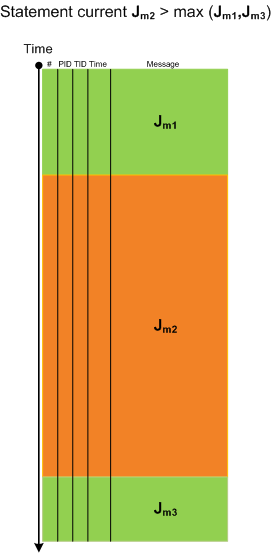
When looking at lengthy traces with thousands and millions of messages (trace statements) we can see regions of activity where statement current (Jm, msg/s) is much higher than in surrounding temporal regions. Hence the name of this pattern, Activity Region. Here is an illustration for a typical ETW/CDF trace where a middle region of activity (Jm2) signifies a system performing some response function like a user session initialization and application launch:
- Dmitry Vostokov @ TraceAnalysis.org -
Here is the reading system I devised to read all books that I review on this blog:
Mod N Reading System
- Dmitry Vostokov @ LiterateScientist.com -
This is a hardware counterpart of Not My Version pattern. Some problems manifest themselves on different hardware not used at the time of the product testing. In such cases we can look at kernel and complete memory dumps, extract hardware information using !sysinfo command and compare differences. This is similar to Virtualized System pattern and might provide troubleshooting hints. One example, I have seen in the past, involved a graphics intensive application that relied heavily upon hardware acceleration features. It was tested with certain processors and chipsets but after a few years failed to work on one computer despite the same OS image and drivers. !sysinfo command revealed significant hardware differences: the failing client computer was newer faster multiprocessor machine.
- Dmitry Vostokov @ DumpAnalysis.org -
This weekend noticed that it is in stock and this means that I soon get it in the post:
Advanced .NET Debugging (Addison-Wesley Microsoft Technology Series)

I plan to start reading it as soon as it arrives and put notes on my Software Generalist blog.
- Dmitry Vostokov @ DumpAnalysis.org -
I have created Book Errata page at this address:
http://www.dumpanalysis.org/MDAA-Volume2-Errata
The link to it has also been added to the main book ad page:
Memory Dump Analysis Anthology, Volume 2
- Dmitry Vostokov @ DumpAnalysis.org -
Sometimes we can observe rare events when abnormal conditions that usually result in a system crash result in a milder problem, for example, a service is unavailable and not affecting other services and users. It was reported that an application was freezing during user session logoff. A complete memory dump was saved at that time and its stack trace collection (!stacks command) shows the following suspicious thread in a user process (all other threads were normally waiting):
0: kd> !stacks

Proc.Thread  .Thread  Ticks   ThreadState Blocker

[...]

                                    [89cfa960 Application.exe]

ea0.001c4c  89a11db0 0499cd1 Blocked    DriverA+0×69db

[…]
0: kd> !thread 89a11db0 16

THREAD 89a11db0  Cid 0ea0.1c4c  Teb: 7ffdf000 Win32Thread: bc347a48 WAIT: (Unknown) KernelMode Non-Alertable

    89b87770  Unknown

    b97004ac  NotificationEvent

IRP List:

    899e2668: (0006,0244) Flags: 00000884  Mdl: 00000000

Not impersonating

DeviceMap                 daf62b28

Owning Process            89cfa960       Image:         Application.exe

Attached Process          N/A            Image:         N/A

Wait Start TickCount      909331         Ticks: 4824273 (0:20:56:19.265)

Context Switch Count      186                 LargeStack

UserTime                  00:00:00.015

KernelTime                00:00:00.093

*** ERROR: Module load completed but symbols could not be loaded for Application.exe

Win32 Start Address Application (0×00406b2a)

Start Address kernel32!BaseProcessStartThunk (0×77e617f8)

Stack Init b60ceb30 Current b60cdf10 Base b60cf000 Limit b60cb000 Call b60ceb34

Priority 10 BasePriority 10 PriorityDecrement 0

ChildEBP RetAddr  Args to Child

b60cdf28 80833485 89a11db0 00000002 00000000 nt!KiSwapContext+0×26

b60cdf54 808294b9 dc399008 89b87748 b60ce01c nt!KiSwapThread+0×2e5

b60cdf88 b96d69db 00000002 b60cdfbc 00000001 nt!KeWaitForMultipleObjects+0×3d7

WARNING: Stack unwind information not available. Following frames may be wrong.

b60cdfe8 b96d719e 89b87748 dc399008 b60ce01c DriverA+0×69db

[…]
We notice “89b87770 Unknown” and double check what object the thread is waiting for:
0: kd> dp b60cdfbc L00000002

b60cdfbc  89b87770 b97004ac
These are exactly the same objects that are listed in !thread command output. We see that the second one is normal and resides in a nonpaged area:
0: kd> dt _DISPATCHER_HEADER b97004ac

ntdll!_DISPATCHER_HEADER

   +0x000 Type             : 0 ''

   +0x001 Absolute         : 0 ''

   +0x001 NpxIrql          : 0 ''

   +0x002 Size             : 0x4 ''

   +0x002 Hand             : 0x4 ''

   +0x003 Inserted         : 0 ''

   +0x003 DebugActive      : 0 ''

   +0x000 Lock             : 262144

   +0x004 SignalState      : 0

   +0x008 WaitListHead     : _LIST_ENTRY [ 0x89a11e70 - 0x89a11e70 ]
0: kd> !address b97004ac

  a71e3000 - 13e1d000

          Usage       KernelSpaceUsageNonPagedSystem
The other looks like an invalid Random Object from the free nonpaged pool entry (it even says about itself that it is bad) that used to belong in the past to Configuration Manager:
0: kd> !pool 89b87770

Pool page 89b87770 region is Nonpaged pool

[...]

 89b87540 size:   98 previous size:   40  (Allocated)  File (Protected)

*89b875d8 size:  260 previous size:   98  (Free)      *CMpa

  Pooltag CMpa : registry post apcs, Binary : nt!cm

 89b87838 size:   28 previous size:  260  (Allocated)  FSfm

[…]
0: kd> dd 89b87770

89b87770  bad0b0b0 00000000 00000000 00000000

89b87780  8a04be01 00000000 89b87788 89b87788

89b87790  00150006 e56c6946 8993e208 89ab96b8

89b877a0  00000000 00000000 bad0b0b0 c0000800

89b877b0  02110004 63426343 88ebbf80 00001000

89b877c0  00199000 00000000 8993e238 88d0d248

89b877d0  0019a000 00000000 00000000 00000000

89b877e0  00000000 00000000 00000000 00000000
0: kd> dt _DISPATCHER_HEADER 89b87770

ntdll!_DISPATCHER_HEADER

   +0×000 Type             : 0xb0 ”

   +0×001 Absolute         : 0xb0 ”

   +0×001 NpxIrql          : 0xb0 ”

   +0×002 Size             : 0xd0 ”

   +0×002 Hand             : 0xd0 ”

   +0×003 Inserted         : 0xba ”

   +0×003 DebugActive      : 0xba ”

   +0×000 Lock             : -1160728400

   +0×004 SignalState      : 0

   +0×008 WaitListHead     : _LIST_ENTRY [ 0×0 - 0×0 ]
Now some counterfactual thinking. One possible scenario after KeWaitForMultipleObjects was called to wait for both objects to become signalled (3rd WAIT_TYPE parameter) the free pool slot was allocated or coalesced with SignalState becoming nonzero by coincidence and other members becoming random values and then the second normal object becomes signalled when another thread sets the notification event…
- Dmitry Vostokov @ DumpAnalysis.org -
a bobo address - an address a system will definitely crash at, given an opportunity
Examples: bad0b0b0, 00000000
- Dmitry Vostokov @ DumpAnalysis.org -
The system crashes at it (Google search shows 164,000 hits). Notice the second part “b0b0″ after “bad”. For my eyes (I wear glasses) it is “bobo” – that was my mother telling me when I was a child and I was about to touch a hot or sharp object.
Bad! Bo-bo!
Was the address value designed intentionally or it is just a coincidence?
- Dmitry Vostokov @ DumpAnalysis.org -