Archive for the ‘Debugging’ Category

Crash Dump Analysis Patterns (Part 54)

Thursday, February 28th, 2008

Sometimes when listing processes we see the so called Zombie Processes. They are better visible in the output of !vm command as processes with zero private memory:

0: kd> !vm

*** Virtual Memory Usage ***
 Physical Memory:      999294 (   3997176 Kb)
 Page File: \??\C:\pagefile.sys
   Current:   5995520 Kb  Free Space:   5324040 Kb
   Minimum:   5995520 Kb  Maximum:      5995520 Kb
 Available Pages:      626415 (   2505660 Kb)
 ResAvail Pages:       902639 (   3610556 Kb)
 Locked IO Pages:         121 (       484 Kb)
 Free System PTEs:     201508 (    806032 Kb)
 Free NP PTEs:          32766 (    131064 Kb)
 Free Special NP:           0 (         0 Kb)
 Modified Pages:          256 (      1024 Kb)
 Modified PF Pages:       256 (      1024 Kb)
 NonPagedPool Usage:    12304 (     49216 Kb)
 NonPagedPool Max:      65359 (    261436 Kb)
 PagedPool 0 Usage:     18737 (     74948 Kb)
 PagedPool 1 Usage:      2131 (      8524 Kb)
 PagedPool 2 Usage:      2104 (      8416 Kb)
 PagedPool 3 Usage:      2140 (      8560 Kb)
 PagedPool 4 Usage:      2134 (      8536 Kb)
 PagedPool Usage:       27246 (    108984 Kb)
 PagedPool Maximum:     67072 (    268288 Kb)
 Shared Commit:         60867 (    243468 Kb)
 Special Pool:              0 (         0 Kb)
 Shared Process:        14359 (     57436 Kb)
 PagedPool Commit:      27300 (    109200 Kb)
 Driver Commit:          1662 (      6648 Kb)
 Committed pages:      501592 (   2006368 Kb)
 Commit limit:        2456879 (   9827516 Kb)

 Total Private:        368810 (   1475240 Kb)
...
...
...
         3654 explorer.exe      2083 (      8332 Kb)
         037c MyService.exe     2082 (      8328 Kb)
         315c explorer.exe      2045 (      8180 Kb)


         0588 svchost.exe        360 (      1440 Kb)
         3f94 csrss.exe          288 (      1152 Kb)
         0acc svchost.exe        245 (       980 Kb)
         0380 smss.exe            38 (       152 Kb)
         0004 System               7 (        28 Kb)
         6ee8 cmd.exe              0 (         0 Kb)
         6d7c cmd.exe              0 (         0 Kb)
         6ca8 cmd.exe              0 (         0 Kb)
         6b48 IEXPLORE.EXE         0 (         0 Kb)
         6ac4 cmd.exe              0 (         0 Kb)
         69e8 cmd.exe              0 (         0 Kb)
         69dc cmd.exe              0 (         0 Kb)
         68dc AcroRd32.exe         0 (         0 Kb)
         6860 cmd.exe              0 (         0 Kb)
         6858 cmd.exe              0 (         0 Kb)
         67d8 cmd.exe              0 (         0 Kb)
         6684 AcroRd32.exe         0 (         0 Kb)
         6484 cmd.exe              0 (         0 Kb)
         6464 cmd.exe              0 (         0 Kb)
         6288 cmd.exe              0 (         0 Kb)
         626c cmd.exe              0 (         0 Kb)
         6260 cmd.exe              0 (         0 Kb)
         6258 cmd.exe              0 (         0 Kb)
         620c IEXPLORE.EXE         0 (         0 Kb)
         60f0 cmd.exe              0 (         0 Kb)
         5fa4 cmd.exe              0 (         0 Kb)
         5f60 cmd.exe              0 (         0 Kb)
         5eec cmd.exe              0 (         0 Kb)
         5d24 IEXPLORE.EXE         0 (         0 Kb)
         5bd4 cmd.exe              0 (         0 Kb)
         5b9c cmd.exe              0 (         0 Kb)
         5b10 cmd.exe              0 (         0 Kb)
         5b08 cmd.exe              0 (         0 Kb)
         5a4c cmd.exe              0 (         0 Kb)
         5a08 cmd.exe              0 (         0 Kb)
         5934 cmd.exe              0 (         0 Kb)
         58b8 cmd.exe              0 (         0 Kb)
         56dc cmd.exe              0 (         0 Kb)
         558c cmd.exe              0 (         0 Kb)
         5588 cmd.exe              0 (         0 Kb)
         5574 cmd.exe              0 (         0 Kb)
         5430 cmd.exe              0 (         0 Kb)
         5424 cmd.exe              0 (         0 Kb)
         53b0 cmd.exe              0 (         0 Kb)
         5174 explorer.exe         0 (         0 Kb)
         5068 cmd.exe              0 (         0 Kb)
         5028 IEXPLORE.EXE         0 (         0 Kb)
         5004 cmd.exe              0 (         0 Kb)
         4f3c javaw.exe            0 (         0 Kb)
         4de4 cmd.exe              0 (         0 Kb)
         4dd8 cmd.exe              0 (         0 Kb)
         4c50 cmd.exe              0 (         0 Kb)
         4c48 cmd.exe              0 (         0 Kb)
         4c08 cmd.exe              0 (         0 Kb)
         4a8c cmd.exe              0 (         0 Kb)
         49ac cmd.exe              0 (         0 Kb)
         4938 cmd.exe              0 (         0 Kb)
         4928 cmd.exe              0 (         0 Kb)
         491c cmd.exe              0 (         0 Kb)
         4868 POWERPNT.EXE         0 (         0 Kb)
         4724 cmd.exe              0 (         0 Kb)
         46cc cmd.exe              0 (         0 Kb)
         44a8 cmd.exe              0 (         0 Kb)
         43cc cmd.exe              0 (         0 Kb)
         4350 cmd.exe              0 (         0 Kb)
         4208 cmd.exe              0 (         0 Kb)
         41f4 cmd.exe              0 (         0 Kb)
         41ec cmd.exe              0 (         0 Kb)
         4170 cmd.exe              0 (         0 Kb)
         40bc cmd.exe              0 (         0 Kb)
         3ddc cmd.exe              0 (         0 Kb)
         3dcc cmd.exe              0 (         0 Kb)
         3db8 cmd.exe              0 (         0 Kb)
         3d88 cmd.exe              0 (         0 Kb)
         3d10 cmd.exe              0 (         0 Kb)
         3cac cmd.exe              0 (         0 Kb)
         3ca4 cmd.exe              0 (         0 Kb)
         3c88 cmd.exe              0 (         0 Kb)
         337c cmd.exe              0 (         0 Kb)
         3310 cmd.exe              0 (         0 Kb)
         3308 cmd.exe              0 (         0 Kb)
         32f0 cmd.exe              0 (         0 Kb)
         32b8 cmd.exe              0 (         0 Kb)
         2ed0 cmd.exe              0 (         0 Kb)
         2eb8 cmd.exe              0 (         0 Kb)
         2e28 cmd.exe              0 (         0 Kb)
         2d44 AcroRd32.exe         0 (         0 Kb)
         2d24 cmd.exe              0 (         0 Kb)
         2c94 cmd.exe              0 (         0 Kb)
         2c54 IEXPLORE.EXE         0 (         0 Kb)
         2a28 cmd.exe              0 (         0 Kb)
         29e4 cmd.exe              0 (         0 Kb)
         2990 cmd.exe              0 (         0 Kb)
         28c0 cmd.exe              0 (         0 Kb)
         25a0 cmd.exe              0 (         0 Kb)
         2558 cmd.exe              0 (         0 Kb)
         2478 cmd.exe              0 (         0 Kb)
         244c cmd.exe              0 (         0 Kb)
         23dc cmd.exe              0 (         0 Kb)
         2320 cmd.exe              0 (         0 Kb)
         2280 cmd.exe              0 (         0 Kb)
         2130 cmd.exe              0 (         0 Kb)
         205c cmd.exe              0 (         0 Kb)
         2014 cmd.exe              0 (         0 Kb)
         1fd8 cmd.exe              0 (         0 Kb)
         1fa0 cmd.exe              0 (         0 Kb)
         1eb8 cmd.exe              0 (         0 Kb)
         1d68 IEXPLORE.EXE         0 (         0 Kb)
         1cb8 cmd.exe              0 (         0 Kb)
         1c9c cmd.exe              0 (         0 Kb)
         1c50 cmd.exe              0 (         0 Kb)
         1a74 cmd.exe              0 (         0 Kb)
         1954 cmd.exe              0 (         0 Kb)
         1948 cmd.exe              0 (         0 Kb)
         06e4 cmd.exe              0 (         0 Kb)
         0650 cmd.exe              0 (         0 Kb)

We see lots of cmd.exe processes. Let’s examine a few of them:

0: kd> !process 0650
Searching for Process with Cid == 650
PROCESS 89237d88  SessionId: 0  Cid: 0650    Peb: 7ffde000  ParentCid: 037c
    DirBase: f3b31940  ObjectTable: 00000000  HandleCount:   0.
    Image: cmd.exe
    VadRoot 00000000 Vads 0 Clone 0 Private 0. Modified 2. Locked 0.
    DeviceMap e10038a8
    Token                             e4eb5b98
    ElapsedTime                       1 Day 00:16:11.706
    UserTime                          00:00:00.015
    KernelTime                        00:00:00.015
    QuotaPoolUsage[PagedPool]         0
    QuotaPoolUsage[NonPagedPool]      0
    Working Set Sizes (now,min,max)  (7, 50, 345) (28KB, 200KB, 1380KB)
    PeakWorkingSetSize                588
    VirtualSize                       11 Mb
    PeakVirtualSize                   14 Mb
    PageFaultCount                    663
    MemoryPriority                    BACKGROUND
    BasePriority                      8
    CommitCharge                      0

No active threads

0: kd> !process 2130
Searching for Process with Cid == 2130
PROCESS 89648020  SessionId: 0  Cid: 2130    Peb: 7ffdc000  ParentCid: 037c
    DirBase: f3b31060  ObjectTable: 00000000  HandleCount:   0.
    Image: cmd.exe
    VadRoot 00000000 Vads 0 Clone 0 Private 0. Modified 2. Locked 0.
    DeviceMap e10038a8
    Token                             e5167bb8
    ElapsedTime                       15:40:17.643
    UserTime                          00:00:00.015
    KernelTime                        00:00:00.000
    QuotaPoolUsage[PagedPool]         0
    QuotaPoolUsage[NonPagedPool]      0
    Working Set Sizes (now,min,max)  (7, 50, 345) (28KB, 200KB, 1380KB)
    PeakWorkingSetSize                545
    VirtualSize                       11 Mb
    PeakVirtualSize                   14 Mb
    PageFaultCount                    621
    MemoryPriority                    BACKGROUND
    BasePriority                      8
    CommitCharge                      0

No active threads

We see that most of them have Parent PID as 037c which is MyService.exe. Let’s peek inside its handle table:

0: kd> !kdexts.handle 0 3 037c
processor number 0, process 0000037c
Searching for Process with Cid == 37c
PROCESS 8a8fa8c0  SessionId: 0  Cid: 037c    Peb: 7ffd8000  ParentCid: 04ac
    DirBase: f3b10360  ObjectTable: e1c276b8  HandleCount: 500.
    Image: MyService.exe

Handle table at e272d000 with 500 Entries in use
0004: Object: e1000638  GrantedAccess: 00000003 Entry: e1caf008
Object: e1000638  Type: (8ad79ad0) KeyedEvent
    ObjectHeader: e1000620 (old version)
        HandleCount: 151  PointerCount: 152
        Directory Object: e1001898  Name: CritSecOutOfMemoryEvent

0008: Object: 8a8cfdf8  GrantedAccess: 001f0003 Entry: e1caf010
Object: 8a8cfdf8  Type: (8ad7a990) Event
    ObjectHeader: 8a8cfde0 (old version)
        HandleCount: 1  PointerCount: 1

000c: Object: e186d690  GrantedAccess: 00000003 Entry: e1caf018
Object: e186d690  Type: (8ad84e70) Directory
    ObjectHeader: e186d678 (old version)
        HandleCount: 150  PointerCount: 181
        Directory Object: e1003b28  Name: KnownDlls

0010: Object: 8a8d1328  GrantedAccess: 00100020 (Inherit) Entry: e1caf020
Object: 8a8d1328  Type: (8ad74900) File
    ObjectHeader: 8a8d1310 (old version)
        HandleCount: 1  PointerCount: 1
        Directory Object: 00000000  Name: \WINDOWS\system32 {HarddiskVolume1}
...
...
...
0484: Object: 89648020  GrantedAccess: 001f0fff Entry: e1caf908
Object: 89648020  Type: (8ad84900) Process
    ObjectHeader: 89648008 (old version)
        HandleCount: 1  PointerCount: 2


0510: Object: 89237d88  GrantedAccess: 001f0fff Entry: e1cafa20
Object: 89237d88  Type: (8ad84900) Process
    ObjectHeader: 89237d70 (old version)
        HandleCount: 1  PointerCount: 2


Therefore we may guess that MyService.exe probably forgot to close process handles either after launching cmd.exe or after waiting for their exit when process objects become signaled:

0510: Object: 89237d88  GrantedAccess: 001f0fff Entry: e1cafa20
Object: 89237d88  Type: (8ad84900) Process
    ObjectHeader: 89237d70 (old version)
        HandleCount: 1  PointerCount: 2 

0: kd> dt _DISPATCHER_HEADER 89237d88
ntdll!_DISPATCHER_HEADER
   +0x000 Type             : 0x3 '' ; PROCESS OBJECT
   +0x001 Absolute         : 0 ''
   +0x001 NpxIrql          : 0 ''
   +0x002 Size             : 0x1e ''
   +0x002 Hand             : 0x1e ''
   +0x003 Inserted         : 0 ''
   +0x003 DebugActive      : 0 ''
   +0x000 Lock             : 1966083
   +0×004 SignalState      : 1
   +0×008 WaitListHead     : _LIST_ENTRY [ 0×89237d90 - 0×89237d90 ]

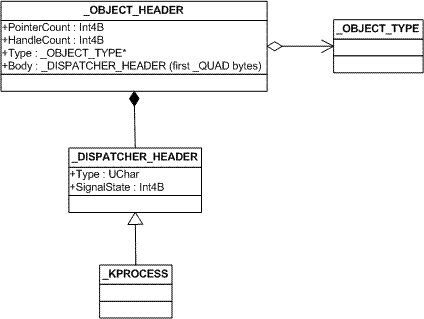
This pattern can also be seen a specialization of a more general Handle Leak pattern.

- Dmitry Vostokov @ DumpAnalysis.org -

Crash Dump Analysis Patterns (Part 53)

Wednesday, February 27th, 2008

We often say that a particular thread is blocked and/or it blocks other threads. At the same time we know that almost all threads are “blocked” to some degree except those currently running on processors. They are either preempted and in the ready lists, voluntary yielded their execution or they are waiting for some synchronization object. Therefore the notion of Blocked Thread is highly context and problem dependent and usually we notice them when comparing current thread stack traces with their expected normal stack traces. Here reference guides are indispensible especially those created for troubleshooting concrete products. Forthcoming Debugger Log Analyzer was partially incepted to address this problem.  

To show the diversity of “blocked” threads I propose the following thread classification:

Running threads

Their EIP (RIP) points to some function different from KiSwapContext:

3: kd> !running

System Processors f (affinity mask)
  Idle Processors 0

     Prcb      Current   Next   
  0  ffdff120  a30a9350            ................
  1  f7727120  a3186448            ................
  2  f772f120  a59a1b40            ................
  3  f7737120  a3085888            ................

3: kd> !thread a59a1b40
THREAD a59a1b40  Cid 0004.00b8  Teb: 00000000 Win32Thread: 00000000 RUNNING on processor 2
Not impersonating
DeviceMap                 e10028b0
Owning Process            a59aa648       Image:         System
Wait Start TickCount      1450446        Ticks: 1 (0:00:00:00.015)
Context Switch Count      308765            
UserTime                  00:00:00.000
KernelTime                00:00:01.250
Start Address nt!ExpWorkerThread (0×80880356)
Stack Init f7055000 Current f7054cec Base f7055000 Limit f7052000 Call 0
Priority 12 BasePriority 12 PriorityDecrement 0
ChildEBP RetAddr
f7054bc4 8093c55c nt!ObfReferenceObject+0×1c
f7054ca0 8093d2ae nt!ObpQueryNameString+0×2ba
f7054cbc 808f7d0f nt!ObQueryNameString+0×18
f7054d80 80880441 nt!IopErrorLogThread+0×197
f7054dac 80949b7c nt!ExpWorkerThread+0xeb
f7054ddc 8088e062 nt!PspSystemThreadStartup+0×2e
00000000 00000000 nt!KiThreadStartup+0×16

3: kd> .thread a59a1b40
Implicit thread is now a59a1b40

3: kd> r
Last set context:
eax=00000028 ebx=e1000228 ecx=e1002b30 edx=e1000234 esi=e1002b18 edi=0000001a
eip=8086c73e esp=f7054bc4 ebp=f7054ca0 iopl=0 nv up ei pl nz na po nc
cs=0008 ss=0010 ds=0023 es=0023 fs=0030 gs=0000 efl=00000202
nt!ObfReferenceObject+0×1c:
8086c73e 40              inc     eax

 
These threads can also be identified by RUNNING attribute in the output of !process 0 ff command applied for complete and kernel memory dumps.

Ready threads  

These threads can be seen in the output of !ready command or identified by READY attribute in the output of !process 0 ff command:

3: kd> !ready
Processor 0: No threads in READY state
Processor 1: Ready Threads at priority 11
    THREAD a3790790  Cid 0234.1108  Teb: 7ffab000 Win32Thread: 00000000 READY
    THREAD a32799a8  Cid 0234.061c  Teb: 7ff83000 Win32Thread: 00000000 READY
    THREAD a3961798  Cid 0c04.0c68  Teb: 7ffab000 Win32Thread: bc204ea8 READY
Processor 1: Ready Threads at priority 10
    THREAD a32bedb0  Cid 1fc8.1a30  Teb: 7ffad000 Win32Thread: bc804468 READY
Processor 1: Ready Threads at priority 9
    THREAD a52dcd48  Cid 0004.04d4  Teb: 00000000 Win32Thread: 00000000 READY
Processor 2: Ready Threads at priority 11
    THREAD a37fedb0  Cid 0c04.11f8  Teb: 7ff8e000 Win32Thread: 00000000 READY
Processor 3: Ready Threads at priority 11
    THREAD a5683db0  Cid 0234.0274  Teb: 7ffd6000 Win32Thread: 00000000 READY
    THREAD a3151b48  Cid 0234.2088  Teb: 7ff88000 Win32Thread: 00000000 READY
    THREAD a5099d80  Cid 0ecc.0d60  Teb: 7ffd4000 Win32Thread: 00000000 READY
    THREAD a3039498  Cid 0c04.275c  Teb: 7ff7d000 Win32Thread: 00000000 READY

If we look at these threads we would see that they were either scheduled to run because of a signaled object they were waiting for:

3: kd> !thread a3039498
THREAD a3039498  Cid 0c04.275c  Teb: 7ff7d000 Win32Thread: 00000000 READY
IRP List:
    a2feb008: (0006,0094) Flags: 00000870  Mdl: 00000000
Not impersonating
DeviceMap                 e10028b0
Owning Process            a399a770       Image:         svchost.exe
Wait Start TickCount      1450447        Ticks: 0
Context Switch Count      1069            
UserTime                  00:00:00.000
KernelTime                00:00:00.000
Win32 Start Address 0x001e4f22
LPC Server thread working on message Id 1e4f22
Start Address KERNEL32!BaseThreadStartThunk (0x77e617ec)
Stack Init f171b000 Current f171ac60 Base f171b000 Limit f1718000 Call 0
Priority 11 BasePriority 10 PriorityDecrement 0
ChildEBP RetAddr  Args to Child             
f171ac78 80833465 a3039498 a3039540 e7561930 nt!KiSwapContext+0x26
f171aca4 80829a62 00000000 00000000 00000000 nt!KiSwapThread+0x2e5
f171acec 80938d0c a301cad8 00000006 f171ad01 nt!KeWaitForSingleObject+0×346
f171ad50 8088978c 00000c99 00000000 00000000 nt!NtWaitForSingleObject+0×9a
f171ad50 7c8285ec 00000c99 00000000 00000000 nt!KiFastCallEntry+0xfc
03d9efa8 00000000 00000000 00000000 00000000 ntdll!KiFastSystemCallRet

3: kd> !object a301cad8
Object: a301cad8  Type: (a59a0720) Event
    ObjectHeader: a301cac0 (old version)
    HandleCount: 1  PointerCount: 3

Or they were boosted in priority:

3: kd> !thread a3790790
THREAD a3790790  Cid 0234.1108  Teb: 7ffab000 Win32Thread: 00000000 READY
IRP List:
    a2f8b7f8: (0006,0094) Flags: 00000900  Mdl: 00000000
Not impersonating
DeviceMap                 e10028b0
Owning Process            a554bcc8       Image:         lsass.exe
Wait Start TickCount      1450447        Ticks: 0
Context Switch Count      384            
UserTime                  00:00:00.000
KernelTime                00:00:00.000
Win32 Start Address RPCRT4!ThreadStartRoutine (0x77c7b0f5)
Start Address KERNEL32!BaseThreadStartThunk (0x77e617ec)
Stack Init f3ac1000 Current f3ac0ce8 Base f3ac1000 Limit f3abe000 Call 0
Priority 11 BasePriority 10 PriorityDecrement 0
ChildEBP RetAddr  Args to Child             
f3ac0d00 80831266 a3790790 a50f1870 a3186448 nt!KiSwapContext+0x26
f3ac0d20 8082833a 00000000 a50f1870 8098b56c nt!KiExitDispatcher+0xf8
f3ac0d3c 8098b5b9 a50f1870 00000000 00f5f8d0 nt!KeSetEventBoostPriority+0×156
f3ac0d58 8088978c a50f1870 00f5f8d4 7c8285ec nt!NtSetEventBoostPriority+0×4d
f3ac0d58 7c8285ec a50f1870 00f5f8d4 7c8285ec nt!KiFastCallEntry+0xfc
00f5f8d4 00000000 00000000 00000000 00000000 ntdll!KiFastSystemCallRet

3: kd> !object a50f1870
Object: a50f1870  Type: (a59a0720) Event
    ObjectHeader: a50f1858 (old version)
    HandleCount: 1  PointerCount: 15

Or were interrupted and queued to be run again:

3: kd> !thread a5683db0
THREAD a5683db0 Cid 0234.0274 Teb: 7ffd6000 Win32Thread: 00000000 READY
IRP List:
  a324d498: (0006,0094) Flags: 00000900 Mdl: 00000000
  a2f97a20: (0006,0094) Flags: 00000900 Mdl: 00000000
  a50c3e70: (0006,0190) Flags: 00000000 Mdl: a50a22d0
  a5167750: (0006,0094) Flags: 00000800 Mdl: 00000000
Not impersonating
DeviceMap e10028b0
Owning Process a554bcc8 Image: lsass.exe
Wait Start TickCount 1450447 Ticks: 0
Context Switch Count 9619
UserTime 00:00:00.156
KernelTime 00:00:00.234
Win32 Start Address RPCRT4!ThreadStartRoutine (0x77c7b0f5)
Start Address KERNEL32!BaseThreadStartThunk (0x77e617ec)
Stack Init f59f3000 Current f59f2d00 Base f59f3000 Limit f59f0000 Call 0
Priority 11 BasePriority 10 PriorityDecrement 0
ChildEBP RetAddr
f59f2d18 80a5c1ae nt!KiDispatchInterrupt+0xb1
f59f2d48 80a5c577 hal!HalpDispatchSoftwareInterrupt+0x5e
f59f2d54 80a59902 hal!HalEndSystemInterrupt+0x67
f59f2d54 77c6928d hal!HalpIpiHandler+0xd2 (TrapFrame @ f59f2d64)
00c5f908 00000000 RPCRT4!OSF_SCALL::GetBuffer+0×37

3: kd> .thread a5683db0
Implicit thread is now a5683db0

3: kd> r
Last set context:
eax=00000000 ebx=00000000 ecx=00000000 edx=00000000 esi=00000000 edi=00000000
eip=8088dba1 esp=f59f2d0c ebp=f59f2d2c iopl=0 nv up di pl nz na po nc
cs=0008 ss=0010 ds=0000 es=0000 fs=0000 gs=0000 efl=00000000
nt!KiDispatchInterrupt+0xb1:
8088dba1 b902000000 mov ecx,2

3: kd> ub
nt!KiDispatchInterrupt+0x8f:
8088db7f mov dword ptr [ebx+124h],esi
8088db85 mov byte ptr [esi+4Ch],2
8088db89 mov byte ptr [edi+5Ah],1Fh
8088db8d mov ecx,edi
8088db8f lea edx,[ebx+120h]
8088db95 call nt!KiQueueReadyThread (80833490)
8088db9a mov cl,1
8088db9c call nt!SwapContext (8088dbd0)

3: kd> u
nt!KiDispatchInterrupt+0xb1:
8088dba1 mov ecx,2
8088dba6 call dword ptr [nt!_imp_KfLowerIrql (80801108)]
8088dbac mov ebp,dword ptr [esp]
8088dbaf mov edi,dword ptr [esp+4]
8088dbb3 mov esi,dword ptr [esp+8]
8088dbb7 add esp,0Ch
8088dbba pop ebx
8088dbbb ret

We can get user space thread stack by using .trap command but we need to switch to its process context first:

3: kd> .process /r /p a554bcc8
Implicit process is now a554bcc8
Loading User Symbols

3: kd> kL
  *** Stack trace for last set context - .thread/.cxr resets it
ChildEBP RetAddr
00c5f908 77c7ed60 RPCRT4!OSF_SCALL::GetBuffer+0x37
00c5f924 77c7ed14 RPCRT4!I_RpcGetBufferWithObject+0x7f
00c5f934 77c7f464 RPCRT4!I_RpcGetBuffer+0xf
00c5f944 77ce3470 RPCRT4!NdrGetBuffer+0x2e
00c5fd44 77ce35c4 RPCRT4!NdrStubCall2+0x35c
00c5fd60 77c7ff7a RPCRT4!NdrServerCall2+0x19
00c5fd94 77c8042d RPCRT4!DispatchToStubInCNoAvrf+0x38
00c5fde8 77c80353 RPCRT4!RPC_INTERFACE::DispatchToStubWorker+0x11f
00c5fe0c 77c68e0d RPCRT4!RPC_INTERFACE::DispatchToStub+0xa3
00c5fe40 77c68cb3 RPCRT4!OSF_SCALL::DispatchHelper+0x149
00c5fe54 77c68c2b RPCRT4!OSF_SCALL::DispatchRPCCall+0x10d
00c5fe84 77c68b5e RPCRT4!OSF_SCALL::ProcessReceivedPDU+0x57f
00c5fea4 77c6e8db RPCRT4!OSF_SCALL::BeginRpcCall+0x194
00c5ff04 77c6e7b4 RPCRT4!OSF_SCONNECTION::ProcessReceiveComplete+0x435
00c5ff18 77c7b799 RPCRT4!ProcessConnectionServerReceivedEvent+0x21
00c5ff84 77c7b9b5 RPCRT4!LOADABLE_TRANSPORT::ProcessIOEvents+0x1b8
00c5ff8c 77c8872d RPCRT4!ProcessIOEventsWrapper+0xd
00c5ffac 77c7b110 RPCRT4!BaseCachedThreadRoutine+0x9d
00c5ffb8 77e64829 RPCRT4!ThreadStartRoutine+0x1b
00c5ffec 00000000 kernel32!BaseThreadStart+0x34

Waiting threads (wait originated from user space)

THREAD a34369d0  Cid 1fc8.1e88  Teb: 7ffae000 Win32Thread: bc6d5818 WAIT: (Unknown) UserMode Non-Alertable
    a34d9940  SynchronizationEvent
    a3436a48  NotificationTimer
Not impersonating
DeviceMap                 e12256a0
Owning Process            a3340a10       Image:         IEXPLORE.EXE
Wait Start TickCount      1450409        Ticks: 38 (0:00:00:00.593)
Context Switch Count      7091                 LargeStack
UserTime                  00:00:01.015
KernelTime                00:00:02.250
Win32 Start Address mshtml!CExecFT::StaticThreadProc (0x7fab1061)
Start Address kernel32!BaseThreadStartThunk (0x77e617ec)
Stack Init f252b000 Current f252ac60 Base f252b000 Limit f2528000 Call 0
Priority 11 BasePriority 10 PriorityDecrement 0
ChildEBP RetAddr 
f252ac78 80833465 nt!KiSwapContext+0x26
f252aca4 80829a62 nt!KiSwapThread+0x2e5
f252acec 80938d0c nt!KeWaitForSingleObject+0x346
f252ad50 8088978c nt!NtWaitForSingleObject+0x9a
f252ad50 7c8285ec nt!KiFastCallEntry+0xfc (TrapFrame @ f252ad64)
030dff08 7c827d0b ntdll!KiFastSystemCallRet
030dff0c 77e61d1e ntdll!NtWaitForSingleObject+0xc
030dff7c 77e61c8d kernel32!WaitForSingleObjectEx+0xac
030dff90 7fab08a3 kernel32!WaitForSingleObject+0×12
030dffa8 7fab109c mshtml!CDwnTaskExec::ThreadExec+0xae
030dffb0 7fab106e mshtml!CExecFT::ThreadProc+0×28
030dffb8 77e64829 mshtml!CExecFT::StaticThreadProc+0xd
030dffec 00000000 kernel32!BaseThreadStart+0×34

If we had taken user dump of iexplore.exe we would have seen the following stack trace there:

030dff08 7c827d0b ntdll!KiFastSystemCallRet
030dff0c 77e61d1e ntdll!NtWaitForSingleObject+0xc
030dff7c 77e61c8d kernel32!WaitForSingleObjectEx+0xac
030dff90 7fab08a3 kernel32!WaitForSingleObject+0×12
030dffa8 7fab109c mshtml!CDwnTaskExec::ThreadExec+0xae
030dffb0 7fab106e mshtml!CExecFT::ThreadProc+0×28
030dffb8 77e64829 mshtml!CExecFT::StaticThreadProc+0xd
030dffec 00000000 kernel32!BaseThreadStart+0×34

Another example:

THREAD a31f2438  Cid 1fc8.181c  Teb: 7ffaa000 Win32Thread: 00000000 WAIT: (Unknown) UserMode Non-Alertable
    a30f8c20  NotificationEvent
    a5146720  NotificationEvent
    a376fbb0  NotificationEvent
Not impersonating
DeviceMap                 e12256a0
Owning Process            a3340a10       Image:         IEXPLORE.EXE
Wait Start TickCount      1419690        Ticks: 30757 (0:00:08:00.578)
Context Switch Count      2            
UserTime                  00:00:00.000
KernelTime                00:00:00.000
Win32 Start Address USERENV!NotificationThread (0x76929dd9)
Start Address kernel32!BaseThreadStartThunk (0x77e617ec)
Stack Init f5538000 Current f5537900 Base f5538000 Limit f5535000 Call 0
Priority 10 BasePriority 10 PriorityDecrement 0
Kernel stack not resident.
ChildEBP RetAddr 
f5537918 80833465 nt!KiSwapContext+0x26
f5537944 80829499 nt!KiSwapThread+0x2e5
f5537978 80938f68 nt!KeWaitForMultipleObjects+0x3d7
f5537bf4 809390ca nt!ObpWaitForMultipleObjects+0x202
f5537d48 8088978c nt!NtWaitForMultipleObjects+0xc8
f5537d48 7c8285ec nt!KiFastCallEntry+0xfc (TrapFrame @ f5537d64)
0851fec0 7c827cfb ntdll!KiFastSystemCallRet
0851fec4 77e6202c ntdll!NtWaitForMultipleObjects+0xc
0851ff6c 77e62fbe kernel32!WaitForMultipleObjectsEx+0x11a
0851ff88 76929e35 kernel32!WaitForMultipleObjects+0×18
0851ffb8 77e64829 USERENV!NotificationThread+0×5f
0851ffec 00000000 kernel32!BaseThreadStart+0×34

Waiting threads (wait originated from kernel space)

Examples include explicit wait as a result from calling potentially blocking API:

THREAD a33a9740  Cid 1980.1960  Teb: 7ffde000 Win32Thread: bc283ea8 WAIT: (Unknown) UserMode Non-Alertable
    a35e3168  SynchronizationEvent
Not impersonating
DeviceMap                 e689f298
Owning Process            a342d3a0       Image:         explorer.exe
Wait Start TickCount      1369801        Ticks: 80646 (0:00:21:00.093)
Context Switch Count      1667                 LargeStack
UserTime                  00:00:00.015
KernelTime                00:00:00.093
Win32 Start Address Explorer!ModuleEntry (0x010148a4)
Start Address kernel32!BaseProcessStartThunk (0x77e617f8)
Stack Init f258b000 Current f258ac50 Base f258b000 Limit f2585000 Call 0
Priority 13 BasePriority 10 PriorityDecrement 1
Kernel stack not resident.
ChildEBP RetAddr 
f258ac68 80833465 nt!KiSwapContext+0x26
f258ac94 80829a62 nt!KiSwapThread+0x2e5
f258acdc bf89abd3 nt!KeWaitForSingleObject+0×346
f258ad38 bf89da43 win32k!xxxSleepThread+0×1be
f258ad4c bf89e401 win32k!xxxRealWaitMessageEx+0×12
f258ad5c 8088978c win32k!NtUserWaitMessage+0×14
f258ad5c 7c8285ec nt!KiFastCallEntry+0xfc (TrapFrame @ f258ad64)
0007feec 7739bf53 ntdll!KiFastSystemCallRet
0007ff08 7c8fadbd USER32!NtUserWaitMessage+0xc
0007ff14 0100fff1 SHELL32!SHDesktopMessageLoop+0×24
0007ff5c 0101490c Explorer!ExplorerWinMain+0×2c4
0007ffc0 77e6f23b Explorer!ModuleEntry+0×6d
0007fff0 00000000 kernel32!BaseProcessStart+0×23

and implicit wait when a thread yields execution to another thread voluntarily via explicit context swap:

THREAD a3072b68  Cid 1fc8.1d94  Teb: 7ffaf000 Win32Thread: bc1e3c20 WAIT: (Unknown) UserMode Non-Alertable
    a37004d8  QueueObject
    a3072be0  NotificationTimer
IRP List:
    a322be00: (0006,01fc) Flags: 00000000  Mdl: a30b8e30
    a30bcc38: (0006,01fc) Flags: 00000000  Mdl: a35bf530
Not impersonating
DeviceMap                 e12256a0
Owning Process            a3340a10       Image:         IEXPLORE.EXE
Wait Start TickCount      1447963        Ticks: 2484 (0:00:00:38.812)
Context Switch Count      3972                 LargeStack
UserTime                  00:00:00.140
KernelTime                00:00:00.250
Win32 Start Address ntdll!RtlpWorkerThread (0x7c839efb)
Start Address kernel32!BaseThreadStartThunk (0x77e617ec)
Stack Init f1cc3000 Current f1cc2c38 Base f1cc3000 Limit f1cbf000 Call 0
Priority 10 BasePriority 10 PriorityDecrement 0
ChildEBP RetAddr 
f1cc2c50 80833465 nt!KiSwapContext+0x26
f1cc2c7c 8082b60f nt!KiSwapThread+0x2e5
f1cc2cc4 808ed620 nt!KeRemoveQueue+0×417
f1cc2d48 8088978c nt!NtRemoveIoCompletion+0xdc
f1cc2d48 7c8285ec nt!KiFastCallEntry+0xfc (TrapFrame @ f1cc2d64)
06ceff70 7c8277db ntdll!KiFastSystemCallRet
06ceff74 7c839f38 ntdll!ZwRemoveIoCompletion+0xc
06ceffb8 77e64829 ntdll!RtlpWorkerThread+0×3d
06ceffec 00000000 kernel32!BaseThreadStart+0×34

THREAD a3612020  Cid 1980.1a48  Teb: 7ffd9000 Win32Thread: 00000000 WAIT: (Unknown) UserMode Alertable
    a3612098  NotificationTimer
Not impersonating
DeviceMap                 e689f298
Owning Process            a342d3a0       Image:         explorer.exe
Wait Start TickCount      1346718        Ticks: 103729 (0:00:27:00.765)
Context Switch Count      4            
UserTime                  00:00:00.000
KernelTime                00:00:00.000
Win32 Start Address ntdll!RtlpTimerThread (0x7c83d3dd)
Start Address kernel32!BaseThreadStartThunk (0x77e617ec)
Stack Init f2453000 Current f2452c80 Base f2453000 Limit f2450000 Call 0
Priority 10 BasePriority 10 PriorityDecrement 0
Kernel stack not resident.
ChildEBP RetAddr 
f2452c98 80833465 nt!KiSwapContext+0x26
f2452cc4 80828f0b nt!KiSwapThread+0x2e5
f2452d0c 80994812 nt!KeDelayExecutionThread+0×2ab
f2452d54 8088978c nt!NtDelayExecution+0×84
f2452d54 7c8285ec nt!KiFastCallEntry+0xfc (TrapFrame @ f2452d64)
0149ff9c 7c826f4b ntdll!KiFastSystemCallRet
0149ffa0 7c83d424 ntdll!NtDelayExecution+0xc
0149ffb8 77e64829 ntdll!RtlpTimerThread+0×47
0149ffec 00000000 kernel32!BaseThreadStart+0×34

Explicit waits in kernel can be originated from GUI threads and their message loops, for example, Main Thread. Blocked GUI Thread pattern can be seen as an example of a genuine Blocked Thread. Some “blocked” threads are just really Passive Threads.

- Dmitry Vostokov @ DumpAnalysis.org -

New Forthcoming Titles from OpenTask

Tuesday, February 26th, 2008

Finally release dates are set for the following two books:

DebugWare: The Art and Craft of Writing Troubleshooting and Debugging Tools

  • Author: Kapildev Ramlal, Dmitry Vostokov
  • Paperback: 256 pages (*)
  • ISBN-13: 978-0-9558328-3-3
  • Publisher: Opentask (15 Nov 2008)
  • Language: English
  • Product Dimensions: 22.86 x 15.24

Windows® Crash Dump Analysis

  • Author: Dmitry Vostokov
  • Paperback: 512 pages (*)
  • ISBN-13: 978-0-9558328-2-6
  • Publisher: Opentask (01 Dec 2008)
  • Language: English
  • Product Dimensions: 22.86 x 15.24

The latter book will be shorter than planned initially and will contain references to Memory Dump Analysis Anthology, Volume I and Volume II.

(*) subject to change

- Dmitry Vostokov @ DumpAnalysis.org -

Debugger Log Analyzer: Inception

Monday, February 18th, 2008

Comparing reference stack traces with the output of !process 0 ff command or just visually inspecting the long log and trying to spot anomalies is very difficult and largely based on personal experience with prior problem cases. A tool is needed and I’m currently writing the one. It will compare logs from problem memory dumps with reference stack traces and other information and automatically pinpoint any anomalies and highlight areas for more detailed manual inspection. This is similar to Kernel Memory Space Analyzer original intent but far more useful. Originally I thought about calling it WinDbg Log Analyzer but later decided to make it more general and extendable to other types of logs from different debuggers like GDB. Some people asked me the question: won’t a WinDbg debugger extension suffice? My answer was no - some companies cannot send complete, kernel and process memory dumps due to security considerations but they can send logs free from sensitive data as explained in my previous article:

Resolving security issues with crash dumps

Additionally I want it to be debugger independent at least in the second version and I want it to be web-based too and free from the choice of the hosting platform.  

Stay tuned because the working prototype will be soon as a command line tool first. I personally need it for my day-to-day job. The latter always was my primary motivation to create various tools to automate or semi-automate data gathering and improve customer problem analysis.

The next version will have front-end GUI and I still haven’t decided yet whether to employ embedded HTML control like IE, RichEdit or revive my old text processor project. I’m inclined to choose the former due to endless possibilities with HTML and its platform independence. The choice of command line tool written in C++/STL will help to port it to FreeBSD/Linux/Solaris and adapt to other debuggers like GDB/ADB. The latter is my “wild fantasy” at the moment but its good to think towards other platforms that slowly increase their presence in my professional life :-)

Any suggestions are very welcome especially if you have dealt with large debugger logs including not only backtraces but also various synchronization objects, module information, timing and I/O packet distribution.

- Dmitry Vostokov @ DumpAnalysis.org -

Yet another great WinDbg resource

Saturday, February 16th, 2008

Just found this wonderful WinDbg command reference thematically grouped with examples written by Robert Kuster:

Common WinDbg Commands (Thematically Grouped)

and booklet

WinDbg. From A to Z!

I’m adding this to windbg.org

- Dmitry Vostokov @ DumpAnalysis.org -

Crash Dump Analysis Patterns (Part 50)

Friday, February 15th, 2008

Beginner users of WinDbg sometimes confuse the first 3 parameters (or 4 for x64) displayed by kb or kv commands with real function parameters: 

0:000> kbnL
 # ChildEBP RetAddr  Args to Child
00 002df5f4 0041167b 002df97c 00000000 7efdf000 ntdll!DbgBreakPoint
01 002df6d4 004115c9 00000000 40000000 00000001 CallingConventions!A::thiscallFunction+0×2b
02 002df97c 004114f9 00000001 40001000 00000002 CallingConventions!fastcallFunction+0×69
03 002dfbf8 0041142b 00000000 40000000 00000001 CallingConventions!cdeclFunction+0×59
04 002dfe7c 004116e8 00000000 40000000 00000001 CallingConventions!stdcallFunction+0×5b
05 002dff68 00411c76 00000001 005a2820 005a28c8 CallingConventions!wmain+0×38
06 002dffb8 00411abd 002dfff0 7d4e7d2a 00000000 CallingConventions!__tmainCRTStartup+0×1a6
07 002dffc0 7d4e7d2a 00000000 00000000 7efdf000 CallingConventions!wmainCRTStartup+0xd
08 002dfff0 00000000 00411082 00000000 000000c8 kernel32!BaseProcessStart+0×28

The calling sequence for it is:

stdcallFunction(0, 0x40000000, 1, 0x40001000, 2, 0x40002000) ->
cdeclFunction(0, 0x40000000, 1, 0x40001000, 2, 0x40002000) ->
fastcallFunction(0, 0x40000000, 1, 0x40001000, 2, 0x40002000) ->
A::thiscallFunction(0, 0x40000000, 1, 0x40001000, 2, 0x40002000)

and we see that only in the case of fastcall calling convention we have discrepancy due to the fact that the first 2 parameters are passed not via stack but through ECX and EDX:

0:000> ub 004114f9
CallingConventions!cdeclFunction+0x45
004114e5 push    ecx
004114e6 mov     edx,dword ptr [ebp+14h]
004114e9 push    edx
004114ea mov     eax,dword ptr [ebp+10h]
004114ed push    eax
004114ee mov     edx,dword ptr [ebp+0Ch]
004114f1 mov     ecx,dword ptr [ebp+8]
004114f4 call    CallingConventions!ILT+475(?fastcallFunctionYIXHHHHHHZ) (004111e0)

However if we have full symbols we can see all parameters:

0:000> .frame 2
02 002df97c 004114f9 CallingConventions!fastcallFunction+0x69

0:000> dv /i /V
prv param  002df974 @ebp-0x08               a = 0
prv param  002df968 @ebp-0x14               b = 1073741824
prv param  002df984 @ebp+0x08               c = 1
prv param  002df988 @ebp+0x0c               d = 1073745920
prv param  002df98c @ebp+0x10               e = 2
prv param  002df990 @ebp+0x14               f = 1073750016
prv local  002df7c7 @ebp-0x1b5             obj = class A
prv local  002df7d0 @ebp-0x1ac           dummy = int [100]

How does dv command know about values in ECX and EDX which were definitely overwritten by later code? This is because the called function prolog saved them as local variables which you can notice as negative offsets for EBP register in dv output above:

0:000> uf CallingConventions!fastcallFunction
CallingConventions!fastcallFunction
   32 00411560 push    ebp
   32 00411561 mov     ebp,esp
   32 00411563 sub     esp,27Ch
   32 00411569 push    ebx
   32 0041156a push    esi
   32 0041156b push    edi
   32 0041156c push    ecx
   32 0041156d lea     edi,[ebp-27Ch]
   32 00411573 mov     ecx,9Fh
   32 00411578 mov     eax,0CCCCCCCCh
   32 0041157d rep stos dword ptr es:[edi]
   32 0041157f pop     ecx
   32 00411580 mov     dword ptr [ebp-14h],edx
   32 00411583 mov     dword ptr [ebp-8],ecx


I call this pattern as False Function Parameters where double checks and knowledge of calling conventions are required. Sometimes this pattern is a consequence of another pattern that I previously called Optimized Code.

x64 stack traces don’t show any discrepancies except the fact that thiscall function parameters are shifted to the right:

0:000> kbL
RetAddr           : Args to Child                                                           : Call Site
00000001`40001397 : cccccccc`cccccccc cccccccc`cccccccc cccccccc`cccccccc cccccccc`cccccccc : ntdll!DbgBreakPoint
00000001`40001233 : 00000000`0012fa94 cccccccc`00000000 cccccccc`40000000 cccccccc`00000001 : CallingConventions!A::thiscallFunction+0×37
00000001`40001177 : cccccccc`00000000 cccccccc`40000000 cccccccc`00000001 cccccccc`40001000 : CallingConventions!fastcallFunction+0×93
00000001`400010c7 : cccccccc`00000000 cccccccc`40000000 cccccccc`00000001 cccccccc`40001000 : CallingConventions!cdeclFunction+0×87
00000001`400012ae : cccccccc`00000000 cccccccc`40000000 cccccccc`00000001 cccccccc`40001000 : CallingConventions!stdcallFunction+0×87
00000001`400018ec : 00000001`00000001 00000000`00481a80 00000000`00000000 00000001`400026ee : CallingConventions!wmain+0×4e
00000001`4000173e : 00000000`00000000 00000000`00000000 00000000`00000000 00000000`00000000 : CallingConventions!__tmainCRTStartup+0×19c
00000000`77d5964c : 00000000`77d59620 00000000`00000000 00000000`00000000 00000000`0012ffa8 : CallingConventions!wmainCRTStartup+0xe
00000000`00000000 : 00000001`40001730 00000000`00000000 00000000`00000000 00000000`00000000 : kernel32!BaseProcessStart+0×29

How this can happen if the standard x64 calling convention passes the first 4 parameters via ECX, EDX, R8 and R9? This is because the called function prolog saved them on stack (this might not be true in the case of optimized code):

0:000> uf CallingConventions!fastcallFunction
CallingConventions!fastcallFunction
   32 00000001`400011a0 44894c2420      mov     dword ptr [rsp+20h],r9d
   32 00000001`400011a5 4489442418      mov     dword ptr [rsp+18h],r8d
   32 00000001`400011aa 89542410        mov     dword ptr [rsp+10h],edx
   32 00000001`400011ae 894c2408        mov     dword ptr [rsp+8],ecx
...
...
...

A::thiscallFunction function passes this pointer via ECX too and this explains the right shift of parameters.

Here is the C++ code I used for experimentation:

#include "stdafx.h"
#include <windows.h>

void __stdcall stdcallFunction (int, int, int, int, int, int);
void __cdecl cdeclFunction (int, int, int, int, int, int);
void __fastcall fastcallFunction (int, int, int, int, int, int);

class A
{
public:
 void thiscallFunction (int, int, int, int, int, int) { DebugBreak(); };
};

void __stdcall stdcallFunction (int a, int b, int c, int d, int e, int f)
{
 int dummy[100] = {0};

 cdeclFunction (a, b, c, d, e, f);
}

void __cdecl cdeclFunction (int a, int b, int c, int d, int e, int f)
{
 int dummy[100] = {0};

 fastcallFunction (a, b, c, d, e, f);
}

void __fastcall fastcallFunction (int a, int b, int c, int d, int e, int f)
{
 int dummy[100] = {0};

 A obj;

 obj.thiscallFunction (a, b, c, d, e, f);
}

int _tmain(int argc, _TCHAR* argv[])
{
 stdcallFunction (0, 0x40000000, 1, 0x40001000, 2, 0x40002000);

 return 0;
}

- Dmitry Vostokov @ DumpAnalysis.org -

Crash Dump Analysis Patterns (Part 49)

Wednesday, February 13th, 2008

Frame Pointer Omission pattern is the most visible compiler optimization technique and you can notice it in verbose stack traces:

0:000> kv
ChildEBP RetAddr
0012ee10 004737a7 application!MemCopy+0x17 (FPO: [3,0,2])
0012ef0c 35878c5b application!ProcessData+0×97 (FPO: [Uses EBP] [3,59,4])
WARNING: Frame IP not in any known module. Following frames may be wrong.
0012ef1c 72a0015b 0×35878c5b
0012ef20 a625e1b0 0×72a0015b
0012ef24 d938bcfe 0xa625e1b0
0012ef28 d4f91bb4 0xd938bcfe
0012ef2c c1c035ce 0xd4f91bb4


To recall FPO is a compiler optimization where ESP register is used to address local variables and parameters instead of EBP. EBP may or may not be used for other purposes. When it is used you will notice

FPO: [Uses EBP]

as in the trace above. For description of other FPO number triplets please see Debugging Tools for Windows help section “k, kb, kd, kp, kP, kv (Display Stack Backtrace)”

Running analysis command points to possible stack corruption:

PRIMARY_PROBLEM_CLASS:  STACK_CORRUPTION

BUGCHECK_STR:  APPLICATION_FAULT_STACK_CORRUPTION

FAULTING_IP:
application!MemCopy+17
00438637 f3a5 rep movs dword ptr es:[edi],dword ptr [esi]

Looking at EBP and ESP shows that they are mismatched:

0:000> r
eax=00000100 ebx=00a027f3 ecx=00000040 edx=0012ee58 esi=d938bcfe edi=0012ee58
eip=00438637 esp=0012ee0c ebp=00a02910 iopl=0 nv up ei pl nz na po nc
cs=001b ss=0023 ds=0023 es=0023 fs=003b gs=0000 efl=00000202
application!MemCopy+0×17:
00438637 f3a5 rep movs dword ptr es:[edi],dword ptr [esi] es:0023:0012ee58=00000010 ds:0023:d938bcfe=????????

We might think about Local Buffer Overflow pattern here but two top stack trace lines are in accordance with each other:

0:000> ub 004737a7
application!ProcessData+0x80:
00473790 cmp     eax,edi
00473792 jb      application!ProcessData+0x72 (00473782)
00473794 mov     ecx,dword ptr [esp+104h]
0047379b push    esi
0047379c lea     edx,[esp+38h]
004737a0 push    ecx
004737a1 push    edx
004737a2 call    application!MemCopy (00438620)

So perhaps EBP value differs greatly from ESP due to its usage as general purpose register and in fact there was no any stack corruption. Despite using public symbols we have the instance of Incorrect Stack Trace pattern and we might want to reconstruct it manually. Let’s search for EBP value on raw stack below the crash point:

0:000> !teb
TEB at 7ffdf000
    ExceptionList:        0012ffb0
    StackBase:            00130000
    StackLimit:           00126000
    SubSystemTib:         00000000
    FiberData:            00001e00
    ArbitraryUserPointer: 00000000
    Self:                 7ffdf000
    EnvironmentPointer:   00000000
    ClientId:             0000660c . 00005890
    RpcHandle:            00000000
    Tls Storage:          00000000
    PEB Address:          7ffd9000
    LastErrorValue:       0
    LastStatusValue:      0
    Count Owned Locks:    0
    HardErrorMode:        0

0:000> dds  00126000 00130000
00126000  00000000
00126004  00000000
00126008  00000000
...
...
...
0012eb0c  00a02910
0012eb10  7c90e25e ntdll!NtRaiseException+0xc
0012eb14  7c90eb15 ntdll!KiUserExceptionDispatcher+0x29
0012eb18  0012eb24
0012eb1c  0012eb40
0012eb20  00000000
0012eb24  c0000005
0012eb28  00000000
0012eb2c  00000000
0012eb30  00438637 application!MemCopy+0x17
0012eb34  00000002
0012eb38  00000000
0012eb3c  d938bcfe
...
...
...
0012ebf4  00a02910
0012ebf8  00438637 application!MemCopy+0×17
0012ebfc  0000001b


0012f134  00436323 application!ConstructInfo+0×113
0012f138  00a02910
0012f13c  0000011c


Let’s see what functions ConstructInfo calls:

0:000> ub 00436323
application!ConstructInfo+0x103
00436313 lea     edx,[esp+10h]
00436317 push    edx
00436318 push    eax
00436319 push    30h
0043631b push    ecx
0043631c push    ebx
0043631d push    ebp
0043631e call    application!EnvelopeData (00438bf0)

We notice EBP was pushed prior to calling EnvelopeData. If we disassemble this function we would see that it calls ProcessData from our partial stack trace: 

0:000> uf 00438bf0
application!EnvelopeData:
00438bf0 sub     esp,1F4h
00438bf6 push    ebx
00438bf7 mov     ebx,dword ptr [esp+20Ch]
00438bfe test    ebx,ebx
00438c00 push    ebp
...
...
...
00438c76 rep stos byte ptr es:[edi]
00438c78 lea     eax,[esp+14h]
00438c7c push    eax
00438c7d push    ebp
00438c7e call    application!ProcessData (00473710)
00438c83 pop     edi
00438c84 pop     esi

Let’s try elaborate form of k command and supply it with custom ESP and EBP values pointing to

0012f134  00436323 application!ConstructInfo+0×113

and also EIP of the fault:

0:000> k L=0012f134 0012f134 00438637
ChildEBP RetAddr 
0012f1cc 00435a65 application!MemCopy+0×17
0012f28c 0043532e application!ClientHandleServerRequest+0×395
0012f344 00434fcd application!Accept+0×23
0012f374 0042e4f3 application!DataArrival+0×17d
0012f43c 0041aea9 application!ProcessInput+0×98
0012ff0c 0045b278 application!AppMain+0xda
0012ff24 0041900e application!WinMain+0×78
0012ffc0 7c816fd7 application!WinMainCRTStartup+0×134
0012fff0 00000000 kernel32!BaseProcessStart+0×23

We see that although it misses some initial frames after MemCopy we aided WinDbg to walk to the bottom of the stack and reconstruct the plausible stack trace for us.

- Dmitry Vostokov @ DumpAnalysis.org -

Crash Dump Analysis Patterns (Part 48)

Tuesday, February 12th, 2008

Special Stack Trace pattern is about stack traces not present in normal crash dumps. The similar pattern is called Special Process which is about processes not running during normal operation or highly domain specific processes that are the sign of certain software environment, for example, OS running inside VMWare or VirtualPC. Here I’ll show one example when identifying specific process led to successful problem identification inside a complete memory dump.

Inspection of running processes shows the presence of Dr. Watson:

5: kd> !process 0 0
**** NT ACTIVE PROCESS DUMP ****
PROCESS 89d9b648  SessionId: none  Cid: 0004    Peb: 00000000  ParentCid: 0000
    DirBase: 54d5d020  ObjectTable: e1000e20  HandleCount: 1711.
    Image: System

PROCESS 8979b758  SessionId: none  Cid: 01b0    Peb: 7ffdd000  ParentCid: 0004
    DirBase: 54d5d040  ObjectTable: e181d8b0  HandleCount:  29.
    Image: smss.exe

PROCESS 89793cf0  SessionId: 0  Cid: 01e0    Peb: 7ffde000  ParentCid: 01b0
    DirBase: 54d5d060  ObjectTable: e13eea10  HandleCount: 1090.
    Image: csrss.exe

...
...
...

PROCESS 8797a600  SessionId: 1  Cid: 17d0    Peb: 7ffdc000  ParentCid: 1720
    DirBase: 54d5d8c0  ObjectTable: e2870af8  HandleCount: 243.
    Image: explorer.exe

PROCESS 87966d88  SessionId: 2  Cid: 0df0    Peb: 7ffd4000  ParentCid: 01b0
    DirBase: 54d5d860  ObjectTable: e284cd48  HandleCount:  53.
    Image: csrss.exe

PROCESS 879767c8  SessionId: 0  Cid: 0578    Peb: 7ffde000  ParentCid: 0ca8
    DirBase: 54d5d8a0  ObjectTable: e2c05268  HandleCount: 180.
    Image: drwtsn32.exe

Inspecting stack traces shows that drwtsn32.exe is waiting for a debugger event so there must be some debugging target (debuggee):

5: kd> .process /r /p 879767c8
Implicit process is now 879767c8
Loading User Symbols

5: kd> !process 879767c8
PROCESS 879767c8  SessionId: 0  Cid: 0578    Peb: 7ffde000  ParentCid: 0ca8
    DirBase: 54d5d8a0  ObjectTable: e2c05268  HandleCount: 180.
    Image: drwtsn32.exe
    VadRoot 88a33cd0 Vads 59 Clone 0 Private 1737. Modified 10792. Locked 0.
    DeviceMap e10028e8
    Token                             e2ee2330
    ElapsedTime                       00:01:12.703
    UserTime                          00:00:00.203
    KernelTime                        00:00:00.031
    QuotaPoolUsage[PagedPool]         52092
    QuotaPoolUsage[NonPagedPool]      2360
    Working Set Sizes (now,min,max)  (2488, 50, 345) (9952KB, 200KB, 1380KB)
    PeakWorkingSetSize                2534
    VirtualSize                       34 Mb
    PeakVirtualSize                   38 Mb
    PageFaultCount                    13685
    MemoryPriority                    BACKGROUND
    BasePriority                      6
    CommitCharge                      1927

THREAD 87976250  Cid 0578.04bc  Teb: 7ffdd000 Win32Thread: bc14a008 WAIT: (Unknown) UserMode Non-Alertable
    87976558  Thread
Not impersonating
DeviceMap                 e10028e8
Owning Process            879767c8       Image:         drwtsn32.exe
Wait Start TickCount      13460          Ticks: 4651 (0:00:01:12.671)
Context Switch Count      15                 LargeStack
UserTime                  00:00:00.000
KernelTime                00:00:00.000
Win32 Start Address drwtsn32!mainCRTStartup (0x01007c1d)
Start Address kernel32!BaseProcessStartThunk (0x7c8217f8)
Stack Init f433b000 Current f433ac60 Base f433b000 Limit f4337000 Call 0
Priority 6 BasePriority 6 PriorityDecrement 0
ChildEBP RetAddr 
f433ac78 80833465 nt!KiSwapContext+0x26
f433aca4 80829a62 nt!KiSwapThread+0x2e5
f433acec 80938d0c nt!KeWaitForSingleObject+0x346
f433ad50 8088978c nt!NtWaitForSingleObject+0x9a
f433ad50 7c9485ec nt!KiFastCallEntry+0xfc
0007fe98 7c821c8d ntdll!KiFastSystemCallRet
0007feac 01005557 kernel32!WaitForSingleObject+0x12
0007ff0c 01003ff8 drwtsn32!NotifyWinMain+0x1ba
0007ff44 01007d4c drwtsn32!main+0x31
0007ffc0 7c82f23b drwtsn32!mainCRTStartup+0x12f
0007fff0 00000000 kernel32!BaseProcessStart+0x23

THREAD 87976558  Cid 0578.0454  Teb: 7ffdc000 Win32Thread: 00000000 WAIT: (Unknown) UserMode Non-Alertable
    89de2e50  NotificationEvent
    879765d0  NotificationTimer
Not impersonating
DeviceMap                 e10028e8
Owning Process            879767c8       Image:         drwtsn32.exe
Wait Start TickCount      18102          Ticks: 9 (0:00:00:00.140)
Context Switch Count      1163            
UserTime                  00:00:00.203
KernelTime                00:00:00.031
Win32 Start Address drwtsn32!DispatchDebugEventThread (0x01003d6d)
Start Address kernel32!BaseThreadStartThunk (0x7c8217ec)
Stack Init f4e26000 Current f4e25be8 Base f4e26000 Limit f4e23000 Call 0
Priority 6 BasePriority 6 PriorityDecrement 0
ChildEBP RetAddr 
f4e25c00 80833465 nt!KiSwapContext+0x26
f4e25c2c 80829a62 nt!KiSwapThread+0x2e5
f4e25c74 809a06ab nt!KeWaitForSingleObject+0x346
f4e25d4c 8088978c nt!NtWaitForDebugEvent+0xd5
f4e25d4c 7c9485ec nt!KiFastCallEntry+0xfc
0095ed20 60846f8f ntdll!KiFastSystemCallRet
0095ee6c 60816ecf dbgeng!LiveUserTargetInfo::WaitForEvent+0x1fa
0095ee88 608170d3 dbgeng!WaitForAnyTarget+0x45
0095eecc 60817270 dbgeng!RawWaitForEvent+0x15f
0095eee4 01003f8d dbgeng!DebugClient::WaitForEvent+0×80
0095ffb8 7c824829 drwtsn32!DispatchDebugEventThread+0×220
0095ffec 00000000 kernel32!BaseThreadStart+0×34

Knowing that a debugger suspends threads in a debuggee (Suspended Thread pattern) we see the problem process indeed:

5: kd> !process 0 2
**** NT ACTIVE PROCESS DUMP ****

...
...
...

PROCESS 898285b0  SessionId: 0  Cid: 0ca8    Peb: 7ffda000  ParentCid: 022c
    DirBase: 54d5d500  ObjectTable: e2776880  HandleCount:   2.
    Image: svchost.exe

THREAD 888b8668  Cid 0ca8.1448  Teb: 00000000 Win32Thread: 00000000 WAIT: (Unknown) KernelMode Non-Alertable
SuspendCount 2
  888b87f8  Semaphore Limit 0×2

Dumping its thread stacks shows only one system thread where we normally expect plenty of them originated from user space. There is also the presence of a debug port:

5: kd> .process /r /p 898285b0
Implicit process is now 898285b0
Loading User Symbols

5: kd> !process 898285b0
PROCESS 898285b0  SessionId: 0  Cid: 0ca8    Peb: 7ffda000  ParentCid: 022c
    DirBase: 54d5d500  ObjectTable: e2776880  HandleCount:   2.
    Image: svchost.exe
    VadRoot 88953220 Vads 209 Clone 0 Private 901. Modified 3. Locked 0.
    DeviceMap e10028e8
    Token                             e27395b8
    ElapsedTime                       00:03:25.640
    UserTime                          00:00:00.156
    KernelTime                        00:00:00.234
    QuotaPoolUsage[PagedPool]         82988
    QuotaPoolUsage[NonPagedPool]      8824
    Working Set Sizes (now,min,max)  (2745, 50, 345) (10980KB, 200KB, 1380KB)
    PeakWorkingSetSize                2819
    VirtualSize                       82 Mb
    PeakVirtualSize                   83 Mb
    PageFaultCount                    4519
    MemoryPriority                    BACKGROUND
    BasePriority                      6
    CommitCharge                      1380
    DebugPort                         89de2e50

THREAD 888b8668  Cid 0ca8.1448  Teb: 00000000 Win32Thread: 00000000 WAIT: (Unknown) KernelMode Non-Alertable
SuspendCount 2
    888b87f8  Semaphore Limit 0x2
Not impersonating
DeviceMap                 e10028e8
Owning Process            898285b0       Image:         svchost.exe
Wait Start TickCount      13456          Ticks: 4655 (0:00:01:12.734)
Context Switch Count      408            
UserTime                  00:00:00.000
KernelTime                00:00:00.000
Start Address driverA!DriverThread (0xf6fb8218)
Stack Init f455b000 Current f455a3ac Base f455b000 Limit f4558000 Call 0
Priority 6 BasePriority 6 PriorityDecrement 0
ChildEBP RetAddr 
f455a3c4 80833465 nt!KiSwapContext+0x26
f455a3f0 80829a62 nt!KiSwapThread+0x2e5
f455a438 80833178 nt!KeWaitForSingleObject+0x346
f455a450 8082e01f nt!KiSuspendThread+0x18
f455a498 80833480 nt!KiDeliverApc+0x117
f455a4d0 80829a62 nt!KiSwapThread+0x300
f455a518 f6fb7f13 nt!KeWaitForSingleObject+0x346
f455a548 f4edd457 driverA!WaitForSingleObject+0x75
f455a55c f4edcdd8 driverB!DeviceWaitForRead+0x19
f455ad90 f6fb8265 driverB!InputThread+0x17e
f455adac 80949b7c driverA!DriverThread+0x4d
f455addc 8088e062 nt!PspSystemThreadStartup+0x2e
00000000 00000000 nt!KiThreadStartup+0x16

The most likely scenario was that svchost.exe experienced an unhandled exception that triggered the launch of a postmortem debugger such as Dr. Watson.

Other similar examples this pattern might include the presence of WerFault.exe on Vista, NTSD and other JIT debuggers running.

- Dmitry Vostokov @ DumpAnalysis.org -

WinDbg.Org: WinDbg Quick Links

Monday, February 11th, 2008

Sometimes I need a quick link to install Debugging Tools for Windows and for other related information such as standard symbol server path, common commands, etc. For this purpose I’ve setup windbg.org domain and hope it will be handy. Currently its main page has the following links:

  • Download links to 32-bit and 64-bit versions
  • My favourite standard symbol path
  • Link to HTML version of Crash Dump Analysis Poster
  • Link to Crash Dump Analysis Checklist

Help menu on dumpanalysis.org used to point to CDA Poster now points to this page too.

I’ll add more useful information there soon. Any suggestions are welcome!

- Dmitry Vostokov @ DumpAnalysis.org -

WinDbg

Friday, February 8th, 2008

Google shows different cheat sheets for WinDbg and I want to remind about my own version that is geared towards postmortem dump analysis of native code:

Memory Dump Analysis Checklist

This post was motivated by WinDbg blog post written by Volker von Einem :-)

- Dmitry Vostokov @ DumpAnalysis.org -

Memory Dump Analysis Anthology, Volume 1

Thursday, February 7th, 2008

It is very easy to become a publisher nowadays. Much easier than I thought. I registered myself as a publisher under the name of OpenTask which is my registered business name in Ireland. I also got the list of ISBN numbers and therefore can announce product details for the first volume of Memory Dump Analysis Anthology series:

Memory Dump Analysis Anthology, Volume 1

  • Paperback: 720 pages (*)
  • ISBN-13: 978-0-9558328-0-2
  • Hardcover: 720 pages (*)
  • ISBN-13: 978-0-9558328-1-9
  • Author: Dmitry Vostokov
  • Publisher: Opentask (15 Apr 2008)
  • Language: English
  • Product Dimensions: 22.86 x 15.24

(*) subject to change 

PDF file will be available for download too.

- Dmitry Vostokov @ DumpAnalysis.org -

Crash Dump Analysis Patterns (Part 47)

Wednesday, February 6th, 2008

Most of the time threads are not suspended explicitly. If you look at active and waiting threads in kernel and complete memory dumps their SuspendCount member is 0:

THREAD 88951bc8  Cid 03a4.0d24  Teb: 7ffaa000 Win32Thread: 00000000 WAIT: (Unknown) UserMode Non-Alertable
    889d6a78  Semaphore Limit 0x7fffffff
    88951c40  NotificationTimer
Not impersonating
DeviceMap                 e1b80b98
Owning Process            888a9d88       Image:         svchost.exe
Wait Start TickCount      12669          Ticks: 5442 (0:00:01:25.031)
Context Switch Count      3            
UserTime                  00:00:00.000
KernelTime                00:00:00.000
Win32 Start Address RPCRT4!ThreadStartRoutine (0x77c4b0f5)
Start Address kernel32!BaseThreadStartThunk (0x7c8217ec)
Stack Init f482f000 Current f482ec0c Base f482f000 Limit f482c000 Call 0
Priority 10 BasePriority 10 PriorityDecrement 0
ChildEBP RetAddr 
f482ec24 80833465 nt!KiSwapContext+0x26
f482ec50 80829a62 nt!KiSwapThread+0x2e5
f482ec98 809226bd nt!KeWaitForSingleObject+0x346
f482ed48 8088978c nt!NtReplyWaitReceivePortEx+0x521
f482ed48 7c9485ec nt!KiFastCallEntry+0xfc (TrapFrame @ f482ed64)
00efff84 77c58792 ntdll!KiFastSystemCallRet
00efff8c 77c5872d RPCRT4!RecvLotsaCallsWrapper+0xd
00efffac 77c4b110 RPCRT4!BaseCachedThreadRoutine+0x9d
00efffb8 7c824829 RPCRT4!ThreadStartRoutine+0x1b
00efffec 00000000 kernel32!BaseThreadStart+0x34

5: kd> dt _KTHREAD 88951bc8
ntdll!_KTHREAD
   +0x000 Header           : _DISPATCHER_HEADER
   +0x010 MutantListHead   : _LIST_ENTRY [ 0x88951bd8 - 0x88951bd8 ]
   +0x018 InitialStack     : 0xf482f000
   +0x01c StackLimit       : 0xf482c000
   +0x020 KernelStack      : 0xf482ec0c
   +0x024 ThreadLock       : 0
   +0x028 ApcState         : _KAPC_STATE
...
...
...
   +0x14f FreezeCount      : 0 ''
   +0×150 SuspendCount     : 0 ”


You won’t find SuspendCount in reference stack traces. Only when some other thread explicitly suspends another thread the latter has non-zero suspend count. Suspended threads are excluded from thread scheduling and therefore can be considered as blocked. This might be the sign of a debugger present, for example, all threads in a process are suspended when a user debugger is processing a debugger event like a breakpoint or access violation exception. In this case !process 0 ff command output shows SuspendCount value:

THREAD 888b8668  Cid 0ca8.1448  Teb: 00000000 Win32Thread: 00000000 WAIT: (Unknown) KernelMode Non-Alertable
SuspendCount 2
    888b87f8  Semaphore Limit 0×2
Not impersonating
DeviceMap                 e10028e8
Owning Process            898285b0       Image:         processA.exe
Wait Start TickCount      13456          Ticks: 4655 (0:00:01:12.734)
Context Switch Count      408            
UserTime                  00:00:00.000
KernelTime                00:00:00.000
Start Address driver!DriverThread (0xf6fb8218)
Stack Init f455b000 Current f455a3ac Base f455b000 Limit f4558000 Call 0
Priority 6 BasePriority 6 PriorityDecrement 0
ChildEBP RetAddr 
f455a3c4 80833465 nt!KiSwapContext+0×26
f455a3f0 80829a62 nt!KiSwapThread+0×2e5
f455a438 80833178 nt!KeWaitForSingleObject+0×346
f455a450 8082e01f nt!KiSuspendThread+0×18
f455a498 80833480 nt!KiDeliverApc+0×117
f455a4d0 80829a62 nt!KiSwapThread+0×300
f455a518 f6fb7f13 nt!KeWaitForSingleObject+0×346
f455a548 f4edd457 driver!WaitForSingleObject+0×75
f455a55c f4edcdd8 driver!DeviceWaitForRead+0×19
f455ad90 f6fb8265 driver!InputThread+0×17e
f455adac 80949b7c driver!DriverThread+0×4d
f455addc 8088e062 nt!PspSystemThreadStartup+0×2e
00000000 00000000 nt!KiThreadStartup+0×16

5: kd> dt _KTHREAD 888b8668
ntdll!_KTHREAD
   +0x000 Header           : _DISPATCHER_HEADER
   +0x010 MutantListHead   : _LIST_ENTRY [ 0x888b8678 - 0x888b8678 ]
   +0x018 InitialStack     : 0xf455b000
   +0x01c StackLimit       : 0xf4558000
   +0x020 KernelStack      : 0xf455a3ac
   +0x024 ThreadLock       : 0
...
...
...
   +0x14f FreezeCount      : 0 ''
   +0×150 SuspendCount     : 2 ”


I call this pattern Suspended Thread. It should rise suspicion bar and in some cases coupled with Special Process pattern can lead to immediate problem identification.

- Dmitry Vostokov @ DumpAnalysis.org -

Memoretics

Monday, February 4th, 2008

I’ve been trying to put memory dump analysis on relevant scientific grounds for some time and now this branch of science needs its own name. After considering different alternative names I finally chose the word Memoretics. Here is the brief definition:

Computer Memoretics studies computer memory snapshots and their evolution in time.

Obviously this domain of research has many links with application and system debugging. However its scope is wider than debugging because it doesn’t necessarily study memory snapshots from systems and applications experiencing faulty behaviour.

Initially I was thinking about Memogenics word but its suffix is heavily associated with genes metaphor which I’m currently trying to avoid although I personally re-discovered software genes approach to software disorders when thinking about Memoretics vs. Memogenics. Later I found some research efforts going on but seems they are based on constructing software genes artificially. On the contrary I would try to discover genes in computer memories first.

genic

Also Memoretics has longer prefix almost resembling Memory word. This had the final influence on my decision.

PS. I was also thinking about Memorology word but it has negative connotations with Astrology or Numerology and was coined already by someone like Memology and Memorics

- Dmitry Vostokov @ DumpAnalysis.org -

Crash Dump Analysis Patterns (Part 46)

Thursday, January 31st, 2008

Similar to No Process Dumps pattern there is corresponding No System Dumps pattern where the system bluescreens either on demand or because of a bug check condition but no kernel or complete dumps are saved. In such cases I would advise to check free space on a drive where memory dumps are supposed to be saved. This is because crash dumps are saved to a page file first and then copied to a separate file during boot time, by default to memory.dmp file. Please see related Microsoft links in my old post. In case you have enough free space but not enough page file space you might get an instance of Truncated Dump or Corrupt Dump pattern.   

Yesterday I experienced No System Dump pattern on Windows Server 2003 SP2 running on VMWare workstation when I was trying to get a complete memory dump using SystemDump. I set up page file correctly as sizeof(PhysicalMemory) + 100Mb but I didn’t check free space on drive C: and no dump was saved, not even kernel minidump. System event log entry was blank too. 

- Dmitry Vostokov @ DumpAnalysis.org -

Domain-Driven Debugging and Troubleshooting

Thursday, January 31st, 2008

SDT (Structured Debugging and Troubleshooting) is procedural (action-based). Once we get the description of the problem we jump to actions:

  1. Ask this
  2. Ask that
  3. Do this
  4. Do that

Whereas OODT is centered around objects (systems and customers are also objects):

  1. Get objects from the problem description and problem environment

  2. Interrogate them sending messages (could be an email at high levels :-)) like changing a registry key is a message to configuration management subsystem

OODT depends on troubleshooting domain and therefore finally we finally come to DDDT.

- Dmitry Vostokov @ DumpAnalysis.org -

Component-Based Debugging and Troubleshooting

Thursday, January 31st, 2008

Component identification is one of the main goals of post-mortem memory dump analysis and troubleshooting process in general. Using the definition of components as units of deployment and 3rd-party composition taken from Clemens Szyperski’s seminal book discussing component software in general and COM, CORBA, Java and .NET in particular (highly recommended book)

Component Software: Beyond Object-Oriented Programming (2nd Edition)

Buy from Amazon

I would say that CBDT is centered around component isolation and replacement.

- Dmitry Vostokov @ DumpAnalysis.org -

Object-Oriented Debugging and Troubleshooting

Thursday, January 31st, 2008

OODT pronounced ”Oddity” is not a paradigm shift for support and software maintenance environments but a recognized way to solve problems using object-oriented techniques. In contrast to Structured Debugging and Troubleshooting methods (SDT) where engineers have sequence of questions and structure troubleshooting plans around them OODT is based on targeting specific objects, subsystems and systems (sending “messages” to them) and evaluating response and changes in their behaviour. I have to say more about it later after introducing CBDT (no easy pronunciation for it but any suggestions are welcome :-)).

Note: OODT doesn’t mean troubleshooting OO systems - it means applying OO techniques to troubleshooting

- Dmitry Vostokov @ DumpAnalysis.org -

Crash Dump Analysis Patterns (Part 45)

Wednesday, January 30th, 2008

The absence of crash dumps when we expect them can be considered as a pattern on its own and I call it No Process Dumps. This can happen due to variety of reasons and troubleshooting should be based on the distinction between crashes and hangs. We have 3 combinations here:

  1. A process is visible in Task Manager and is functioning normally

  2. A process is visible in Task Manager and has stopped functioning normally

  3. A process is not visible in Task Manager

If a process is visible in task list and is functioning normally then the following reasons should be considered:

  • - Exceptions haven’t happened yet due to different code execution paths or the time has not come yet and we need to wait more

  • - Exceptions haven’t happened yet due to a different memory layout. This can be the instance of Changed Environment pattern.

If a process is visible in Task Manager and has stopped functioning normally then it might be hanging and waiting for some input. In such cases it is better to get  process dumps proactively

If a process is not visible in Task Manager then the following reasons should be considered:

  • - Debugger value for AeDebug key is invalid, missing or points to a wrong path or a command line has wrong arguments. For examples see Custom Postmortem Debuggers on Vista or NTSD on x64 Windows 2003.

  • - Something is wrong with exception handling mechanism or WER settings. Use Process Monitor to see what processes are launched and modules are loaded when an exception happens. Check WER settings in Control panel.

  • - Try LocalDumps registry key for Vista SP1 and Windows Server 2008 (this one I haven’t tried yet)

  • - Use live debugging techniques like attaching to a process or running a process under a debugger to monitor exceptions and saving first chance exception crash dumps.

This is very important pattern for technical support environments that rely on post-mortem analysis and I’m going to revisit it later to add more information and recommendations if necessary. 

- Dmitry Vostokov @ DumpAnalysis.org -

Crash Dump Analysis Patterns (Part 44)

Friday, January 25th, 2008

Spiking Thread pattern includes normal threads running at PASSIVE_LEVEL or APC_LEVEL IRQL that can be preempted by any other higher priority thread. Therefore, spiking threads are not necessarily ones that were in RUNNING state when the memory dump was saved. They consumed much CPU and this is reflected in their User and Kernel time values. The pattern also includes threads running at DISPATCH_LEVEL and higher IRQL. These threads cannot be preempted by another thread so they usually remain in RUNNING state all the time unless they lower their IRQL. Some of them I’ve seen were trying to acquire a spinlock and I decided to create another more specialized pattern and call it Dispatch Level Spin. We would see it when a spinlock for some data structure wasn’t released or was corrupt and some thread tries to acquire it and enters endless spinning loop unless interrupted by higher IRQL interrupt. These infinite loops can also happen due to software defects in code running at dispatch level or higher IRQL.

Let’s look at one example. The following running thread was interrupted by keyboard interrupt apparently to save Manual Dump. We see that it spent almost 11 minutes in kernel:

0: kd> !thread
THREAD 830c07c0  Cid 0588.0528  Teb: 7ffa3000 Win32Thread: e29546a8 RUNNING on processor 0
IRP List:
    86163008: (0006,01d8) Flags: 00000900  Mdl: 84f156c0
Not impersonating
DeviceMap                 e257b7c8
Owning Process            831ec608       Image:         MyApp.EXE
Wait Start TickCount      122850         Ticks: 40796 (0:00:10:37.437)
Context Switch Count      191                 LargeStack
UserTime                  00:00:00.000
KernelTime                00:10:37.406
Win32 Start Address MyApp!ThreadImpersonation (0×35f76821)
Start Address kernel32!BaseThreadStartThunk (0×7c810659)
Stack Init a07bf000 Current a07beca0 Base a07bf000 Limit a07bb000 Call 0
Priority 11 BasePriority 8 PriorityDecrement 2 DecrementCount 16
ChildEBP RetAddr
a07be0f8 f77777fa nt!KeBugCheckEx+0×1b
a07be114 f7777032 i8042prt!I8xProcessCrashDump+0×237
a07be15c 805448e5 i8042prt!I8042KeyboardInterruptService+0×21c
a07be15c 806e4a37 nt!KiInterruptDispatch+0×45 (FPO: [0,2] TrapFrame @ a07be180)

a07be220 a1342755 hal!KeAcquireInStackQueuedSpinLock+0×47
a07be220 a1342755 MyDriver!RcvData+0×98


To see the code and context we switch to the trap frame and disassemble the interrupted function:

1: kd> .trap a07be180
ErrCode = 00000000
eax=a07be200 ebx=a07be228 ecx=831dabf5 edx=a07beb94 esi=831d02a8 edi=831dabd8
eip=806e4a37 esp=a07be1f4 ebp=a07be220 iopl=0 nv up ei pl nz na po nc
cs=0008 ss=0010 ds=0000 es=0000 fs=0000 gs=0000 efl=00000202
hal!KeAcquireInStackQueuedSpinLock+0x47:
806e4a37 ebf3            jmp     hal!KeAcquireInStackQueuedSpinLock+0×3c (806e4a2c)

1: kd> uf hal!KeAcquireInStackQueuedSpinLock
hal!KeAcquireInStackQueuedSpinLock:
806e49f0 mov     eax,dword ptr ds:[FFFE0080h]
806e49f5 shr     eax,4
806e49f8 mov     al,byte ptr hal!HalpVectorToIRQL (806ef218)[eax]
806e49fe mov     dword ptr ds:[0FFFE0080h],41h
806e4a08 mov     byte ptr [edx+8],al
806e4a0b mov     dword ptr [edx+4],ecx
806e4a0e mov     dword ptr [edx],0
806e4a14 mov     eax,edx
806e4a16 xchg    edx,dword ptr [ecx]
806e4a18 cmp     edx,0
806e4a1b jne     hal!KeAcquireInStackQueuedSpinLock+0x34 (806e4a24)

hal!KeAcquireInStackQueuedSpinLock+0x2d:
806e4a1d or      ecx,2
806e4a20 mov     dword ptr [eax+4],ecx

hal!KeAcquireInStackQueuedSpinLock+0x33:
806e4a23 ret

hal!KeAcquireInStackQueuedSpinLock+0x34:
806e4a24 or      ecx,1
806e4a27 mov     dword ptr [eax+4],ecx
806e4a2a mov     dword ptr [edx],eax

hal!KeAcquireInStackQueuedSpinLock+0x3c:
806e4a2c test    dword ptr [eax+4],1
806e4a33 je      hal!KeAcquireInStackQueuedSpinLock+0×33 (806e4a23)

hal!KeAcquireInStackQueuedSpinLock+0x45:
806e4a35 pause
806e4a37 jmp     hal!KeAcquireInStackQueuedSpinLock+0×3c (806e4a2c)

JMP instruction transfers execution to the code that tests the first bit at [EAX+4] address. If it isn’t set it falls through to the same JMP instruction. We know the value of EAX from the trap frame so we can dereference that address:

1: kd> dyd eax+4 l1
           3          2          1          0
          10987654 32109876 54321098 76543210
          -------- -------- -------- --------
a07be204  10000011 00011101 10101011 11110101  831dabf5

The value is odd: the first leftmost bit is set. Therefore the code will loop indefinitely unless a different thread running on another processor clears that bit. However the second processor is idle:

0: kd> ~0s

0: kd> k
ChildEBP RetAddr
f794cd54 00000000 nt!KiIdleLoop+0x14

Seems we have a problem. We need to examine MyDriver.sys code to understand how it uses queued spinlocks.

Note: In addition to user-defined there are internal system queued spinlocks you can check by using !qlocks WinDbg command. 

- Dmitry Vostokov @ DumpAnalysis.org -

Crash Dump Analysis Patterns (Part 42c)

Tuesday, January 22nd, 2008

The most common and easily detectable example of Wait Chain pattern in kernel and complete memory dumps is when objects are executive resources. In some complex cases we can even have multiple wait chains. For example, in the output of !locks WinDbg command below we can find at least 3 wait chains marked in red, blue and magenta:

883db310 -> 8967d020 -> 889fa230
89a74228 -> 883ad4e0 -> 88d7a3e0
88e13990 -> 899da538 -> 8805fac8

Try to figure other chains there. The manual procedure is simple. Pick up a thread marked with <*>. This is one that currently holds the resource. See what threads are waiting on exclusive access to that resource. Then search for other occurrences of <*> thread to see whether it is waiting exclusively for another resource blocked by some other thread and so on.

1: kd> !locks
**** DUMP OF ALL RESOURCE OBJECTS ****

Resource @ 0x8b4425c8    Shared 1 owning threads
    Contention Count = 45
    NumberOfSharedWaiters = 43
    NumberOfExclusiveWaiters = 2
     Threads: 8967d020-01<*> 88748b10-01    88b8b020-01    8b779ca0-01   
              88673248-01    8b7797c0-01    889c8358-01    8b777b40-01   
              8b7763f0-01    8b776b40-01    8b778b40-01    8841b020-01   
              8b7788d0-01    88cc7b00-01    8b776020-01    8b775020-01   
              87f6d6c8-01    8816b020-01    8b7773f0-01    89125db0-01   
              8b775db0-01    8846a020-01    87af2238-01    8b7792e0-01   
              8b777020-01    87f803b8-01    8b7783f0-01    8b7768d0-01   
              8b778020-01    8b779a30-01    8b778660-01    8943a020-01   
              88758020-01    8b777db0-01    88ee3590-01    896f3020-01   
              89fc4b98-01    89317938-01    8867f1e0-01    89414118-01   
              88e989a8-01    88de5b70-01    88c4b588-01    8907dd48-01   
     Threads Waiting On Exclusive Access:
              883db310       8907d280

Resource @ 0x899e27ac    Exclusively owned
    Contention Count = 1
    NumberOfExclusiveWaiters = 1
     Threads: 889fa230-01<*>
     Threads Waiting On Exclusive Access:
              8967d020

Resource @ 0x881a38f8    Exclusively owned
    Contention Count = 915554
    NumberOfExclusiveWaiters = 18
     Threads: 883ad4e0-01<*>
     Threads Waiting On Exclusive Access:
              89a74228       8844c630       8955e020       891aa440      
              8946a270       898b7ab0       89470d20       881e5760      
              8b594af8       88dce020       899df328       8aa86900      
              897ff020       8920adb0       8972b1c0       89657c70      
              88bcc868       88cb0cb0

Resource @ 0x88a8d5b0    Exclusively owned
    Contention Count = 39614
    NumberOfExclusiveWaiters = 3
     Threads: 88d7a3e0-01<*>
     Threads Waiting On Exclusive Access:
              883ad4e0       89a5f020       87d00020

Resource @ 0x89523658    Exclusively owned
    Contention Count = 799193
    NumberOfExclusiveWaiters = 18
     Threads: 899da538-01<*>
     Threads Waiting On Exclusive Access:
              88e13990       89a11cc0       88f4b2f8       898faab8      
              8b3200c0       88758468       88b289f0       89fa4a58      
              88bf2510       8911a020       87feb548       8b030db0      
              887ad2c8       8872e758       89665020       89129810      
              886be480       898a6020

Resource @ 0x897274b0    Exclusively owned
    Contention Count = 37652
    NumberOfExclusiveWaiters = 2
     Threads: 8805fac8-01<*>
     Threads Waiting On Exclusive Access:
              899da538       88210db0

Resource @ 0x8903db88    Exclusively owned
    Contention Count = 1127998
    NumberOfExclusiveWaiters = 17
     Threads: 882c9b68-01<*>
     Threads Waiting On Exclusive Access:
              8926fdb0       8918fd18       88036430       89bc2c18      
              88fca478       8856d710       882778f0       887c3240      
              88ee15e0       889d3640       89324c68       8887b020      
              88d826a0       8912ca08       894edb10       87e518f0      
              89896688

Resource @ 0x89351430    Exclusively owned
    Contention Count = 51202
    NumberOfExclusiveWaiters = 1
     Threads: 882c9b68-01<*>
     Threads Waiting On Exclusive Access:
              88d01378

Resource @ 0x87d6b220    Exclusively owned
    Contention Count = 303813
    NumberOfExclusiveWaiters = 14
     Threads: 8835d020-01<*>
     Threads Waiting On Exclusive Access:
              8b4c52a0       891e2ae0       89416888       897968e0      
              886e58a0       89b327d8       894ba4c0       8868d648      
              88a10968       89a1da88       8985a1d0       88f58a30      
              89499020       89661220

Resource @ 0x88332cc8    Exclusively owned
    Contention Count = 21214
    NumberOfExclusiveWaiters = 3
     Threads: 88d15b50-01<*>
     Threads Waiting On Exclusive Access:
              88648020       8835d020       88a20ab8
    

Resource @ 0x8986ab80    Exclusively owned
    Contention Count = 753246
    NumberOfExclusiveWaiters = 13
     Threads: 88e6ea60-01<*>
     Threads Waiting On Exclusive Access:
              89249020       87e01d50       889fb6c8       89742cd0      
              8803b6a8       888015e0       88a89ba0       88c09020      
              8874d470       88d97db0       8919a2d0       882732c0      
              89a9eb28

Resource @ 0x88c331c0    Exclusively owned
    Contention Count = 16940
    NumberOfExclusiveWaiters = 2
     Threads: 8b31c748-01<*>
     Threads Waiting On Exclusive Access:
              896b3390       88e6ea60

33816 total locks, 20 locks currently held

Now we can dump the top thread from selected wait chain to see its call stack and why it is stuck holding other threads. For example,

883db310 -> 8967d020 -> 889fa230

1: kd> !thread 889fa230
THREAD 889fa230  Cid 01e8.4054  Teb: 7ffac000 Win32Thread: 00000000 RUNNING on processor 3
IRP List:
    889fc008: (0006,0094) Flags: 00000a00  Mdl: 00000000
Impersonation token:  e29c1630 (Level Impersonation)
DeviceMap                 d7030620
Owning Process            89bcb480       Image:         MyService.exe
Wait Start TickCount      113612852      Ticks: 6 (0:00:00:00.093)
Context Switch Count      19326191            
UserTime                  00:00:11.0765
KernelTime                18:52:35.0750
Win32 Start Address 0×0818f190
LPC Server thread working on message Id 818f190
Start Address 0×77e6b5f3
Stack Init 8ca60000 Current 8ca5fb04 Base 8ca60000 Limit 8ca5d000 Call 0
Priority 8 BasePriority 8 PriorityDecrement 0
ChildEBP RetAddr  Args to Child             
8ca5fbb8 b86c1c93 c00a0006 00000003 8ca5fbfc driver!foo5+0×67
8ca5fbdc b86bdb8a 8b4742e0 00000003 8ca5fbfc driver!foo4+0×71
8ca5fc34 b86bf682 8b4742e0 889fc008 889fc078 driver!foo3+0xd8
8ca5fc50 b86bfc74 889fc008 889fc078 889fc008 driver!foo2+0×40
8ca5fc68 8081dcdf 8b45a3c8 889fc008 889fa438 driver!foo+0xd0
8ca5fc7c 808f47b7 889fc078 00000001 889fc008 nt!IofCallDriver+0×45
8ca5fc90 808f24ee 8b45a3c8 889fc008 89507e90 nt!IopSynchronousServiceTail+0×10b
8ca5fd38 80888c7c 0000025c 0000029d 00000000 nt!NtWriteFile+0×65a
8ca5fd38 7c82ed54 0000025c 0000029d 00000000 nt!KiFastCallEntry+0xfc

Because of huge kernel time, contention count and RUNNING status it is most probably the instance of Spiking Thread pattern involving driver.sys called in the context of MyService.exe process.

- Dmitry Vostokov @ DumpAnalysis.org -