Archive for February, 2010

Reading Notebook: 09-February-10

Tuesday, February 9th, 2010

Comments in italics are mine and express my own views, thoughts and opinions

Windows Internals by M. Russinovich, D. Solomon and A. Ionescu:

CreateProcess and Increase Scheduling Priority privilege (p. 351)

MS-DOS apps share the same VDM (p. 353)

HKLM\S\CCS\C\WOW\DefaultSeparateVDM (p. 353)

IMAGE_FILE_UP_SYSTEM_ONLY PE characteristic to run on a single CPU (p. 358)

Upon creation initial thread starts in kernel mode in KiThreadStartup (p. 360)

Dr. Watson’s Observational Patterns (Part 2)

Tuesday, February 9th, 2010

His [Sherlock Holmes] hands were invariably blotted with ink and stained with chemicals, […]

A Study in Scarlet, Part 1, 2: The Science of Deduction, page 19

Before I started memory dump analysis:

[…] how objectless was my [Dr. Watson] life, and how little there was to engage my attention.

A Study in Scarlet, Part 1, 2: The Science of Deduction, page 19

Most problem solvers are not polymaths:

His [Sherlock Holmes] ignorance was as remarkable as his knowledge. Of contemporary literature, philosophy and politics he appeared to know next to nothing.

A Study in Scarlet, Part 1, 2: The Science of Deduction, page 19

Sherlock Holmes - his limits [numbered list]

A Study in Scarlet, Part 1, 2: The Science of Deduction, page 20

- Dmitry Vostokov @ DumpAnalysis.org + TraceAnalysis.org -

10 Common Mistakes in Memory Analysis (Part 7)

Monday, February 8th, 2010

Another common mistake I observe is relying on what debuggers report without double-checking. Present day debuggers, like WinDbg or GDB, are symbol-driven, they do not possess much of that semantic knowledge that a human debugger has. Also, it is better to report more than less: what is irrelevant can be skipped over by a skilled memory analyst but what looks suspicious to the problem at hand shall be double-checked to see if it is not coincidental. One example we consider here is Coincidental Symbolic Information

An application is frequently crashing. The process memory dump file shows only one thread left inside without any exception handling frames. In order to hypothesize about the probable cause the thread raw stack data is analyzed. It shows a few C++ STL calls with a custom smart pointer class and memory allocator like this:

app!std::vector<SmartPtr<ClassA>, std::allocator<SmartPtr<ClassA> > >::operator[]+

WinDbg !analyze-v command output points to this code:

FOLLOWUP_IP:
app!std::bad_alloc::~bad_alloc <PERF> (app+0x0)+0
00400000 4d  dec     ebp

Raw stack data contains a few symbolic references to bad_alloc destructor too:

[...]
0012f9c0  00000100
0012f9c4  00400100 app!std::bad_alloc::~bad_alloc <PERF> (app+0x100)
0012f9c8  00000000
0012f9cc  0012f9b4
0012f9d0  00484488 app!_NULL_IMPORT_DESCRIPTOR+0x1984
0012f9d4  0012fa8c
0012f9d8  7c828290 ntdll!_except_handler3
0012f9dc  0012fa3c
0012f9e0  7c82b04a ntdll!RtlImageNtHeaderEx+0xee
0012f9e4  00482f08 app!_NULL_IMPORT_DESCRIPTOR+0x404
0012f9e8  00151ed0
0012f9ec  00484c1e app!_NULL_IMPORT_DESCRIPTOR+0x211a
0012f9f0  00000100
0012f9f4  00400100 app!std::bad_alloc::~bad_alloc <PERF> (app+0x100)
[...]

By linking all these three pieces together an engineer hypothesized that the cause of failure is memory allocation. However, careful analysis reveals all of them as a coincidental symbolic information and renders hypothesis much less plausible:

1.  The address of app!std::bad_alloc::~bad_alloc is 00400000 which coincides with the start of the main application module:

0:000> lm a 00400000
start    end        module name
00400000 004c4000   app    (no symbols)

As a consequence, its assembly language code makes no sense:

0:000> u 00400000
app:
00400000 4d              dec     ebp
00400001 5a              pop     edx
00400002 90              nop
00400003 0003            add     byte ptr [ebx],al
00400005 0000            add     byte ptr [eax],al
00400007 000400          add     byte ptr [eax+eax],al
0040000a 0000            add     byte ptr [eax],al
0040000c ff              ???

2. All std::vector references are in fact fragments of a UNICODE string that can be dumped using du command:

[...]
0012ef14  00430056 app!std::vector<SmartPtr<ClassA>, std::allocator<SmartPtr<ClassA> > >::operator[]+0x16
0012ef18  00300038
0012ef1c  0043002e app!std::vector<SmartPtr<ClassA>, std::allocator<SmartPtr<ClassA> > >::size+0x1
[...]

0:000> du 0012ef14 l6
0012ef14  "VC80.C"

3. Raw stack data references to bad_alloc destructor are still module addresses in disguise, 00400100 or app+0×100, with nonsense assembly code:

0:000> u 00400100
app+0x100:
00400100 50              push    eax
00400101 45              inc     ebp
00400102 0000            add     byte ptr [eax],al
00400104 4c              dec     esp
00400105 010500571aac    add     dword ptr ds:[0AC1A5700h],eax
0040010b 4a              dec     edx
0040010c 0000            add     byte ptr [eax],al
0040010e 0000            add     byte ptr [eax],al

- Dmitry Vostokov @ DumpAnalysis.org + TraceAnalysis.org -

Dr. Watson’s Observational Patterns (Part 1)

Sunday, February 7th, 2010

Today I started reading complete stories of Sherlock Holmes using the nice hardcover illustrated edition I bought in a local bookshop for just 12 euro (I give an Amazon link here though):

Buy from Amazon

I plan to read 1,408 pages of this book during my lunch time. The aim is to learn from Dr. Watson. Here is a pattern he discovered:

‘Very interesting reading it might be made, too,’ remarked Sherlock Holmes, sticking a small piece of plaster over the prick on his finger. ‘I have to be careful,’ he continued, turning to me with a smile, ‘for I dabble with poisons a good deal.’ He held out his hand as he spoke, and I [Dr. Watson] noticed that it was all mottled over with similar pieces of plaster, and discoloured with strong acids.

A Study in Scarlet, Part 1, 1: Mr. Sherlock Holmes, page 17 

I also noticed that Holmes analyzes dumps not too often but keeps his mouth shut like me for some time after seeing things there: 

I [Sherlock Holmes] get in the dumps at times, and don’t open my mouth for days on end.

A Study in Scarlet, Part 1, 1: Mr. Sherlock Holmes, page 17

Important trait of a memory dump analyst:

I [Dr. Watson] am extremely lazy.

A Study in Scarlet, Part 1, 1: Mr. Sherlock Holmes, page 17

- Dmitry Vostokov @ DumpAnalysis.org + TraceAnalysis.org -

Bugtation No.112

Friday, February 5th, 2010

Debugging “with a purpose.”

Unknown Debugger

- Dmitry Vostokov @ DumpAnalysis.org + TraceAnalysis.org -
STUPID (Debugging Slang, Part 7)

Friday, February 5th, 2010

STUPID - Software Tracing Under Pressure Is Dumb

Examples: STUPID! STUPID! I told you to enable all modules! You included all but the one I need…

- Dmitry Vostokov @ DumpAnalysis.org + TraceAnalysis.org -
Demystifying first-chance exceptions (Part 2)

Thursday, February 4th, 2010

Sometimes we are not interested in first-chance exceptions as in the previous part but are interested in only second-chance exceptions to be sure that they were not handled as a part of an implementation design. Some tools like ADPlus can save dump files for both debugger events but I was asked to explain the difference between the first- and second-chance exceptions on W2K3 system where NTSD debugger was used to attach to a service process and save a dump. Initially the following command was used:

C:\> ntsd -psn ServiceA -noio -g -c ".dump /ma /u C:\UserDumps\ServiceA; q"

The dump was saved and analyzed. An engineer then decided that a second-chance exception dump file was needed for confirmation of an unhandled exception (because it was perceived that a postmortem debugger wasn’t saving any crash dumps) and requested to use the same command but with an -x switch that disables first-chance exception break in a debugger:

C:\> ntsd -psn ServiceA -noio -g -x -c “.dump /ma /u C:\UserDumps\ServiceA; q”

Note that q command terminates the debuggee so it was also advised to use qd to detach NTSD and let the service die naturally.  

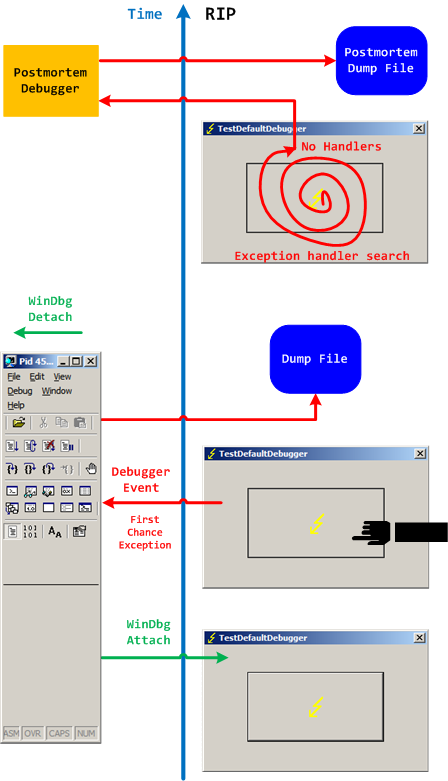
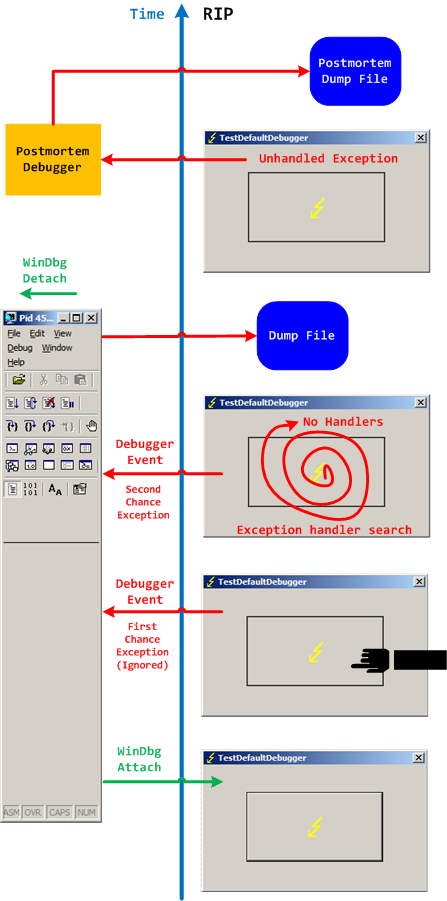
Two different possible exception memory dumps and the third possibility of a postmortem memory dump already complicates the picture not counting possible process-dumper-in-the-middle memory dumps that can be saved by userdump.exe if there is any exception dialog between the first- and second-chance exception processing. So I created two “Time Arrow” diagrams aiming to depict two exception scenarios using TestDefaultDebugger tool and the following simplified commands on x64 W2K3 system:

C:\> ntsd -pn TestDefaultDebugger64.exe -g -c ".dump /ma /u C:\UserDumps\TDD; qd"

and 

C:\> ntsd -pn TestDefaultDebugger64.exe -g -x -c “.dump /ma /u C:\UserDumps\TDD; qd”

Also drwtsn32.exe was set as a default postmortem debugger (but we could also use CDB, WinDbg or any other process dumper as shown in Vista example). 

The first diagram shows that an attached debugger (a screenshot of WinDbg is used in place of NTSD for both diagrams) receives a first-chance debugger event and saves a process memory dump, then detaches and the previous debuggee process continues looking for exception handlers and not finding anyone launches a postmortem debugger and, as a result, another dump is saved too:

We can double check the first-chance exception dump file to see if it is the right one. Indeed, there are no signs of exception processing on thread raw stack:

This dump file has an exception of interest stored in it.
The stored exception information can be accessed via .ecxr.
(e50.e54): Access violation - code c0000005 (first/second chance not available)
*** ERROR: Module load completed but symbols could not be loaded for TestDefaultDebugger64.exe
TestDefaultDebugger64+0×1570:
00000000`00401570 c704250000000000000000 mov dword ptr [0],0 ds:00000000`00000000=????????

0:000> !teb
TEB at 000007fffffde000
    ExceptionList:        0000000000000000
    StackBase:            0000000000130000
    StackLimit:           000000000012c000
    SubSystemTib:         0000000000000000
    FiberData:            0000000000001e00
    ArbitraryUserPointer: 0000000000000000
    Self:                 000007fffffde000
    EnvironmentPointer:   0000000000000000
    ClientId:             0000000000000e50 . 0000000000000e54
    RpcHandle:            0000000000000000
    Tls Storage:          0000000000000000
    PEB Address:          000007fffffda000
    LastErrorValue:       0
    LastStatusValue:      c0000023
    Count Owned Locks:    0
    HardErrorMode:        0

0:000> dqs 000000000012c000 0000000000130000
00000000`0012c000  00000000`00000000
00000000`0012c008  00000000`00000000
00000000`0012c010  00000000`00000000
00000000`0012c018  00000000`00000000

[... no c0000005 ...]

00000000`0012ff60  00000000`00000000
00000000`0012ff68  00000000`00000000
00000000`0012ff70  00000000`00000000
00000000`0012ff78  00000000`77d596ac kernel32!BaseProcessStart+0x29
00000000`0012ff80  00000000`00000000
00000000`0012ff88  00000000`00000000
00000000`0012ff90  00000000`00000000
00000000`0012ff98  00000000`00000000
00000000`0012ffa0  00000000`00000000
00000000`0012ffa8  00000000`00000000
00000000`0012ffb0  00000000`004148d0 TestDefaultDebugger64+0x148d0
00000000`0012ffb8  00000000`00000000
00000000`0012ffc0  00000000`00000000
00000000`0012ffc8  00000000`00000000
00000000`0012ffd0  00000000`00000000
00000000`0012ffd8  00000000`00000000
00000000`0012ffe0  00000000`00000000
00000000`0012ffe8  00000000`00000000
00000000`0012fff0  00000000`00000000
00000000`0012fff8  00000000`00000000
00000000`00130000  00000020`78746341

The second diagram shows that an attached debugger ignores a first-chance debugger event but saves  a process memory dump upon a second-chance exception event after the debugee can’t find any handlers, then detaches and the previous debuggee process launches a postmortem debugger to save another postmortem memory dump:

In both second-chance and postmortem process memory dump files we can find c0000005 exception code on thread raw stack.

- Dmitry Vostokov @ DumpAnalysis.org + TraceAnalysis.org -
Native Script Debugging

Monday, February 1st, 2010

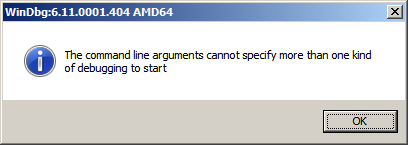
While testing a WinDbg script for the CARE system (the script enumerates files on a Windows PC and processes memory dumps to generate a log file with the output of debugger commands) I found that after successful processing of many files the next launched WinDbg instance suddenly showed this message box:

To find out, I attached another WinDbg instance to its process in order to examine the real command line. In this small case study instead of using kb WinDbg command to show a stack trace and its arguments I employ kn, .frame and kb <lines> commands for visual clarity and to illustrate strack trace frame navigation. In the failed WinDbg instance that had just started we see only one thread showing Message Box pattern:

0:000> ~*kn

.  0  Id: dc8.fb4 Suspend: 1 Teb: 000007ff`fffdc000 Unfrozen
 # Child-SP          RetAddr           Call Site
00 00000000`0025d4b8 00000000`76fc5118 USER32!NtUserWaitMessage+0xa
01 00000000`0025d4c0 00000000`76fc5770 USER32!DialogBox2+0x261
02 00000000`0025d540 00000000`7701000d USER32!InternalDialogBox+0x134
03 00000000`0025d5a0 00000000`7700f2b8 USER32!SoftModalMessageBox+0x9fb
04 00000000`0025d6d0 00000000`7700eb17 USER32!MessageBoxWorker+0x314
05 00000000`0025d890 00000000`7700ea10 USER32!MessageBoxTimeoutW+0xb3
06 00000000`0025d950 00000001`3f9016a6 USER32!MessageBoxW+0x4c
07 00000000`0025d990 00000001`3f90175c WinDbg!TextMsgBox+0x96
08 00000000`0025d9d0 00000001`3f9017d7 WinDbg!FormatMsgBoxV+0x9c
09 00000000`0025dbe0 00000001`3f9075c7 WinDbg!InfoBox+0x37
0a 00000000`0025dc20 00000001`3f9084f7 WinDbg!ParseCommandLine+0x1a57
0b 00000000`0025dcc0 00000001`3f913739 WinDbg!wmain+0×287
0c 00000000`0025fd80 00000000`7708be3d WinDbg!_CxxFrameHandler3+0×291
0d 00000000`0025fdc0 00000000`771c6a51 kernel32!BaseThreadInitThunk+0xd
0e 00000000`0025fdf0 00000000`00000000 ntdll!RtlUserThreadStart+0×1d

We see the frame # 0b contains the return address of wmain function (starting point of execution of UNICODE C/C++ programs) that has this prototype:

int wmain(int argc, wchar_t *argv[], wchar_t *envp[]);

We switch to that frame to examine its first 3 parameters and use kb command that shows stack traces starting from the current frame (we are interested in the top stack trace line only):

0:000> .frame b
0b 00000000`0025dcc0 00000001`3f913739 WinDbg!wmain+0×287

0:000> kb 1
RetAddr           : Args to Child                                                           : Call Site
00000001`3f913739 : 00000000`0000000c 00000000`00278b60 00000000`00279e10 000007de`a4ecc920 : WinDbg!wmain+0×287

Because the function prototype shows the second function parameter as an array of wide character null-terminated strings we use dpu command to dump them. We also note that we have only 0xc array members and use this as the length argument for dpu:

0:000> dpu 00000000`00278b60 Lc
00000000`00278b60  00000000`00278bc8 “C:\Program Files\Debugging Tools for Windows (x64)\WinD”
00000000`00278b68  00000000`00278c44 “-y”
00000000`00278b70  00000000`00278c4a “srv*c:\ms*http://msdl.microsoft.com/download/symbols;sr”
00000000`00278b78  00000000`00278d0c “-z”
00000000`00278b80  00000000`00278d12 “C:\MemoryDumps\CST\ColorimetricTracing”
00000000`00278b88  00000000`00278d60 “(4).DMP”

00000000`00278b90  00000000`00278d70 “-c”
00000000`00278b98  00000000`00278d76 “$$>a<DebuggerLogs.txt;q”
00000000`00278ba0  00000000`00278da6 “-Q”
00000000`00278ba8  00000000`00278dac “-QS”
00000000`00278bb0  00000000`00278db4 “-QY”
00000000`00278bb8  00000000`00278dbc “-QSY”

We see in the output above that “C:\MemoryDumps\CST\ColorimetricTracing” and “(4).DMP” strings were probably split from one file name “C:\MemoryDumps\CST\ColorimetricTracing (4).DMP” and this means that we forgot to enclose the file name parameter in double quotation marks when passing it from VB script to WinDbg.

- Dmitry Vostokov @ DumpAnalysis.org + TraceAnalysis.org -