Trace Analysis Patterns (Part 177)

July 30th, 2019

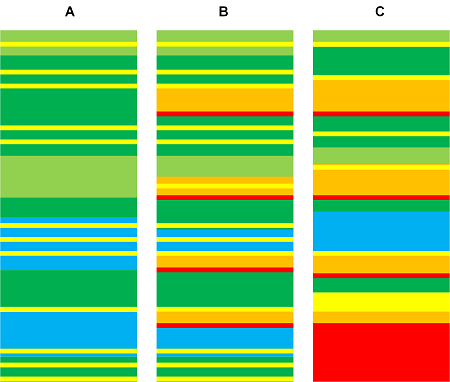
Trace Similarity analysis pattern uses various similarity measures to assess the closeness of one trace or log to another. Here we provide an illustrative example using Jaccard index. Consider three simple logs where sample sets consist from Activity Regions:

The following table shows calculation of similarity between A and B, A and C, and B and C:

It’s possible to use sample sets consisting of messages instead. For our toy example we get similar index numbers:

We get different indexes though for individual regions and messages, for example:

- Dmitry Vostokov @ DumpAnalysis.org + TraceAnalysis.org -

Trace Analysis Patterns (Part 176)

July 27th, 2019

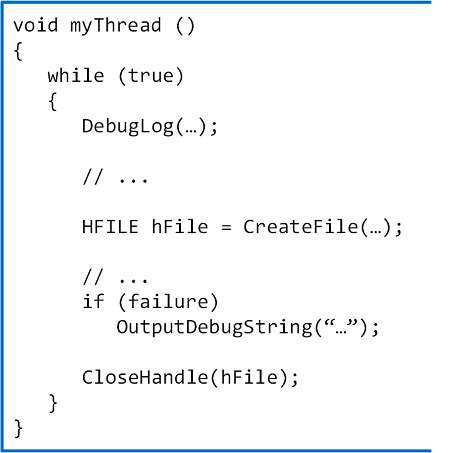
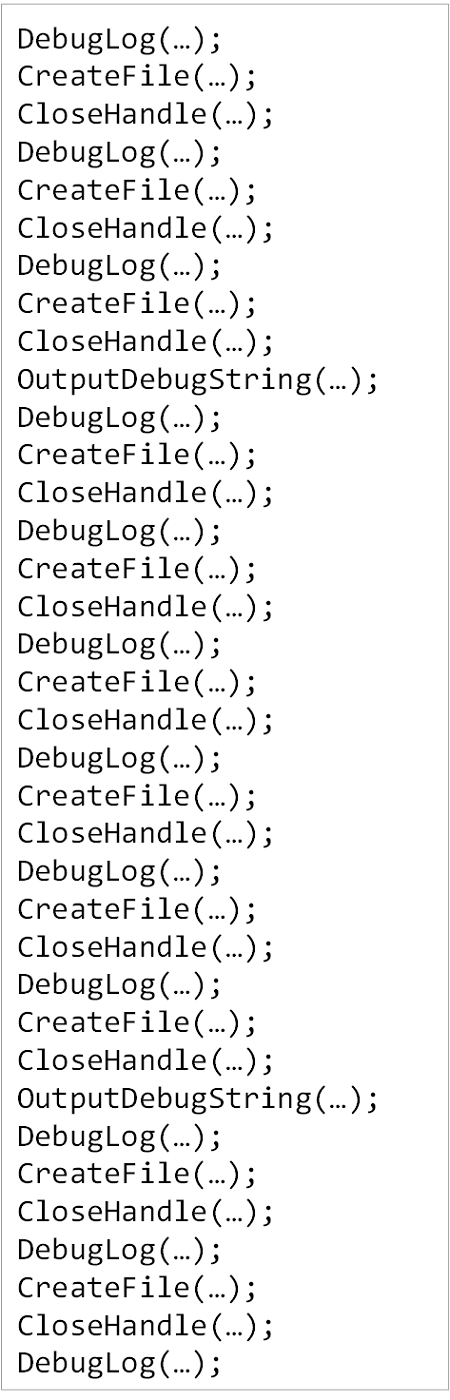
In addition to Declarative Trace we have code statements that may be intercepted by external API tracing tools (CreateFile, CloseHandle):

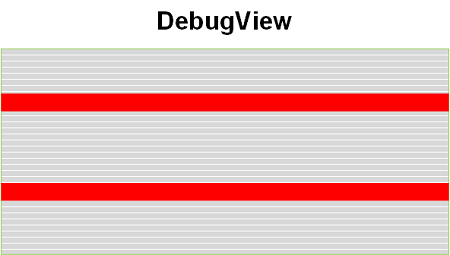
In the sample code above we have different logs resulted from Declarative Trace (DebugLog, OutputDebugString):


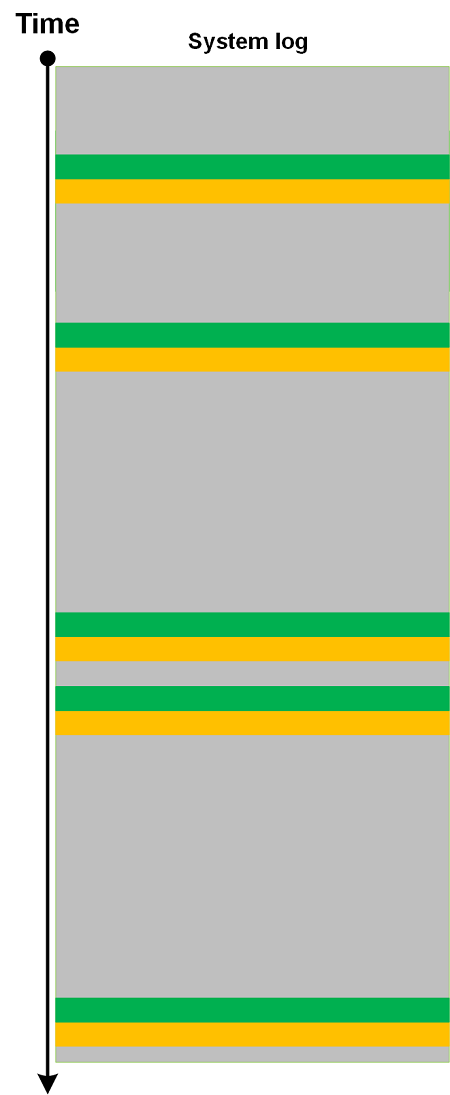
In addition, we have a log saved by an external tracing tool (for example, Process Monitor) that includes our API calls:

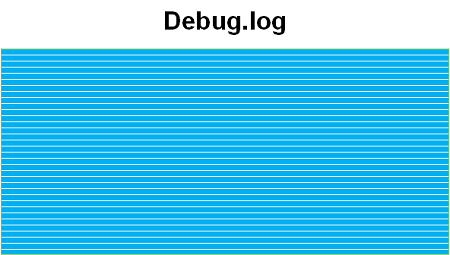
All such trace-generating source code statements form Moduli Trace as soon as they are executed:

Such a trace can also be analyzed using trace and log analysis patterns like other trace types. We took the idea of this analysis pattern from moduli spaces in mathematics that parametrize other spaces.

- Dmitry Vostokov @ DumpAnalysis.org + TraceAnalysis.org -

Trace Analysis Patterns (Part 175)

July 21st, 2019

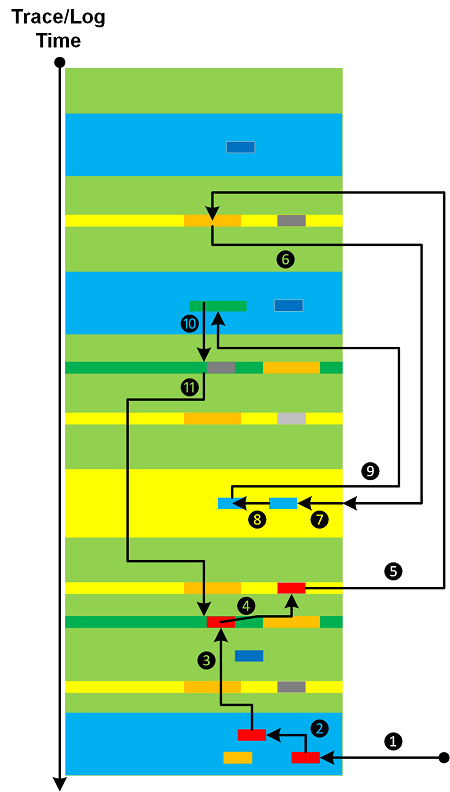
When we do trace and log analysis (and software data in general) we look at specific messages found from search (Message Patterns), Error Messages, Significant Events, visit Activity Regions, filter Message Sets, walk through (Adjoint) Threads of Activity, and do other actions necessitated by trace and log analysis patterns. All these can be done in random order (starting from some analysis point), not necessarily representing the flow of Time or some other metric:

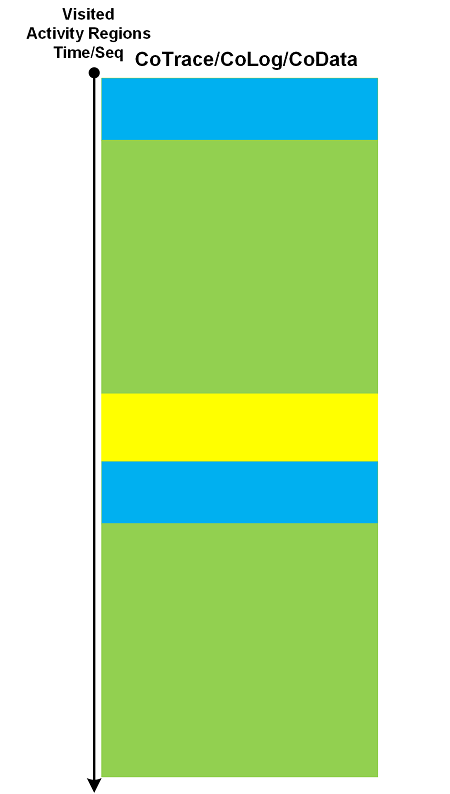
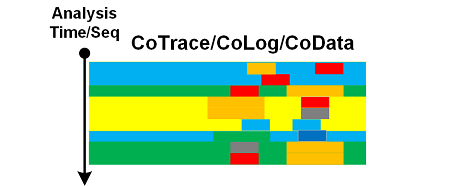
Analyzed messages form their own analysis trace that we call CoTrace (CoLog, CoData) where the prefix Co- denotes a space dual to trace (log, data) space:

Instead of messages (or in addition to) we can also form CoTraces consisting of visited Activity Regions or some other areas:

We can apply trace analysis patterns to CoTraces as well. The latter can also be used in creation of higher-order pattern narratives.

- Dmitry Vostokov @ DumpAnalysis.org + TraceAnalysis.org -

Trace Analysis Patterns (Part 174)

July 20th, 2019

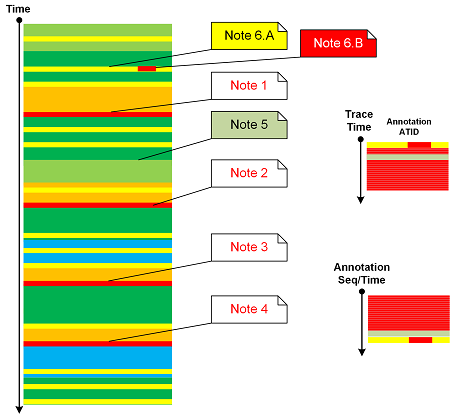
Message Annotations analysis pattern was on our list for years so it’s time to add it to trace and log analysis pattern catalog. We also allow several annotations per trace message done at different times and annotating different parts depending on the analysis flow (the topic of the next analysis pattern). Attached to log messages annotations form their own Adjoint Thread of Activity. However, sorted by their annotation time or sequence we get a different trace that we call Annotation Trace (an example of analysis narrative). We can apply all relevant analysis patterns to both traces. A sketch of this pattern is depicted in the following diagram:

- Dmitry Vostokov @ DumpAnalysis.org + TraceAnalysis.org -

Trace Analysis Patterns (Part 173)

July 16th, 2019

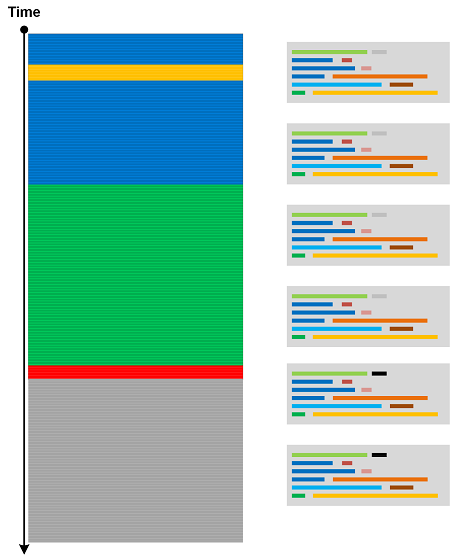
Cartesian Trace analysis pattern has its analogical roots in Cartesian product. It covers a case where we have a long trace and a few Small DA+TA configuration traces (files). The former trace messages are associated with the latter messages (content or content changes) as depicted in the following diagram:

Think about a rectangle as a product of two line fragments or a cylinder as a product of a circle and a line fragment. Both traces are completely independent in comparison to Fiber Bundle, Trace Presheaf, or Trace Extension.

- Dmitry Vostokov @ DumpAnalysis.org + TraceAnalysis.org -

Trace Analysis Patterns (Part 172)

July 14th, 2019

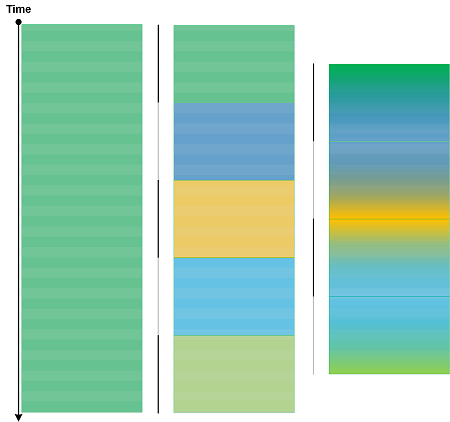
Some trace and log messages may have different grammatical structure and content but similar semantics. Therefore, we can create a table listing equivalent messages (using some equivalence relation) and use it to construct simpler traces and logs as depicted in this picture:

One trivial example of Equivalent Messages analysis pattern is Quotient Trace. Another example is Inter-Correlational analysis of logs that have different structure and format. In such a case Equivalent Messages simplify the analysis of higher Trace Dimensions.

- Dmitry Vostokov @ DumpAnalysis.org + TraceAnalysis.org -

Trace Analysis Patterns (Part 171)

July 10th, 2019

Log message “frequencies” in time domain (Statement Current part) are addressed by Fourier Activity analysis pattern. However, we may have varying message density (Statement Density part) across different trace runs (space domain, irrespective of time irregularities):

According to OED, in computing and mathematics a string means “a linear sequence of records or data” and “a sequence of symbols or linguistic elements in a definite order”. So we propose to name this pattern that analyzes densities of messages or Activity Regions as Trace String. Such longitudinal “vibrations” can be compared and analyzed for anomalies across different log runs (Inter-Correlation) or across similar regions in the same log (Intra-Correlation). Here we consider message density change as a one-dimensional displacement. The analogy for this pattern came from one-dimensional vibrating strings (dual resonance model from 1969-70 by Nambu, Nielsen, and Leonard Susskind).

- Dmitry Vostokov @ DumpAnalysis.org + TraceAnalysis.org -

Trace Analysis Patterns (Part 170)

May 27th, 2019

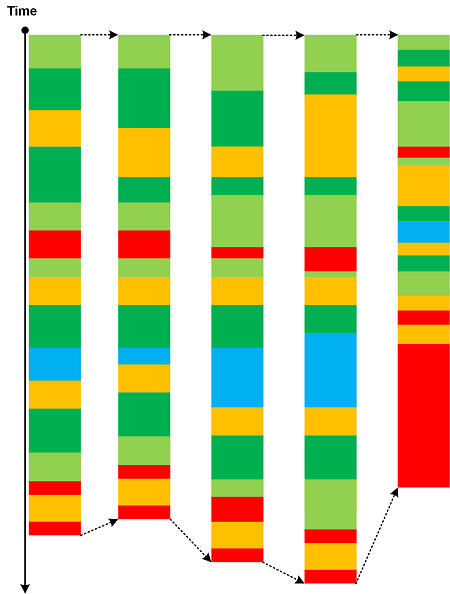
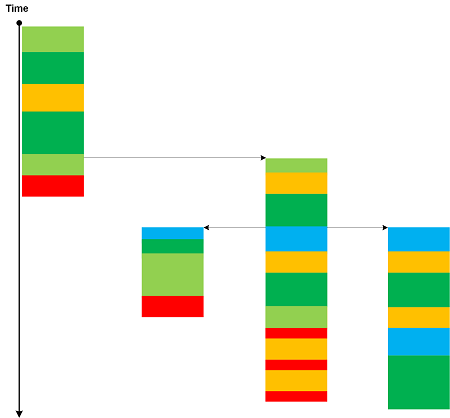
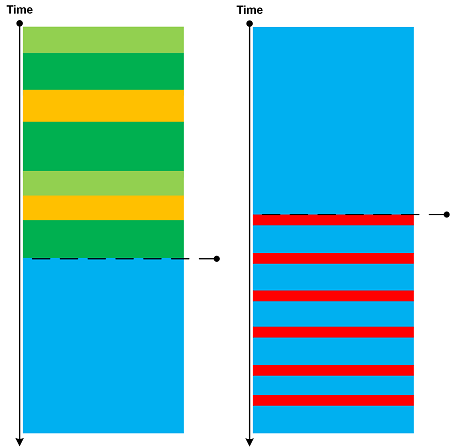
The advent of virtualization simplified the debugging of complex issues by allowing to save the snapshot of the execution environment and then resume it from the save point of execution. This allows continuing tracing using a different set of environmental conditions and input data. New tracing continuations constitute a network that we call Polytrace:

Bifurcation Point for two identical trace beginnings may be considered as an example of a simple Polytrace.

- Dmitry Vostokov @ DumpAnalysis.org + TraceAnalysis.org -

Crash Dump Analysis Patterns (Part 16d)

May 23rd, 2019

Stack Overflow (user mode) analysis pattern relied on prominent stack trace signs. However, in cases of low memory condition there may not be an opportunity to create a new guard page for the expanding stack region and the exception itself may be Hidden Exception:

0:003> kc
# Call Site
00 KERNELBASE!GetModuleHandleExW
01 EdgeContent!wil::details::GetModuleInformation
02 EdgeContent!wil::details::GetCurrentModuleName
03 EdgeContent!wil::details::LogFailure
04 EdgeContent!wil::details::ReportFailure
05 EdgeContent!wil::details::ReportFailure_Hr
06 EdgeContent!wil::details::in1diag3::FailFast_Hr
07 EdgeContent!`anonymous namespace'::MemoryLimitWatchdogThreadProc
08 kernel32!BaseThreadInitThunk
09 ntdll!RtlUserThreadStart

0:003> .exr -1
ExceptionAddress: 00007ff992f6391b (KERNELBASE!GetModuleHandleExW+0x000000000000007b)
ExceptionCode: c00000fd (Stack overflow)
ExceptionFlags: 00000000
NumberParameters: 2
Parameter[0]: 0000000000000001
Parameter[1]: 000000fe709fdfc8

0:003> r
rax=0000000000000001 rbx=0000000000000006 rcx=00007ff945e3fa80
rdx=000000fe709fe020 rsi=00007ff945e3fa80 rdi=000000fe709fe030
rip=00007ff992f6391b rsp=000000fe709fdfd0 rbp=0000000000000040
r8=000000fe709fe030  r9=0000000000000040 r10=00000fff28bc7dba
r11=0440000001000010 r12=00007ff94606be60 r13=000000000000013f
r14=0000000000000003 r15=0000000000000000
iopl=0         nv up ei pl nz na pe nc
cs=0033  ss=002b  ds=002b  es=002b  fs=0053  gs=002b             efl=00010200
KERNELBASE!GetModuleHandleExW+0x7b:
00007ff9`92f6391b ff1597f31200    call    qword ptr [KERNELBASE!_imp_RtlPcToFileHeader (00007ff9`93092cb8)] ds:00007ff9`93092cb8={ntdll!RtlPcToFileHeader (00007ff9`960d0f50)}

The stack trace is short and the exception seem happened during call so we examine the stack pointer:

0:003> !address 000000fe709fdfd0
Usage:                  Stack
Base Address:           000000fe`709fb000
End Address:            000000fe`70a00000
Region Size:            00000000`00005000 (  20.000 kB)
State:                  00001000          MEM_COMMIT

Protect:                00000004          PAGE_READWRITE
Type:                   00020000          MEM_PRIVATE
Allocation Base:        000000fe`70900000
Allocation Protect:     00000004          PAGE_READWRITE

The committed stack region is very small so we expect its surrounding from the output of !address WinDbg command (without any address parameters):

Opened log file 'c:\MemoryDumps\stack.txt'
0:003> !address 000000fe709fdfd0
[...]
+ fe`70600000 fe`706fb000 0`000fb000 MEM_PRIVATE MEM_RESERVE Stack [~1; 1f50.21d4]
fe`706fb000 fe`706fe000 0`00003000 MEM_PRIVATE MEM_COMMIT PAGE_READWRITE|PAGE_GUARD Stack [~1; 1f50.21d4]
fe`706fe000 fe`70700000 0`00002000 MEM_PRIVATE MEM_COMMIT PAGE_READWRITE Stack [~1; 1f50.21d4]
+ fe`70700000 fe`70800000 0`00100000 MEM_FREE PAGE_NOACCESS Free
+ fe`70800000 fe`708f9000 0`000f9000 MEM_PRIVATE MEM_RESERVE Stack [~2; 1f50.460c]
fe`708f9000 fe`708fc000 0`00003000 MEM_PRIVATE MEM_COMMIT PAGE_READWRITE|PAGE_GUARD Stack [~2; 1f50.460c]
fe`708fc000 fe`70900000 0`00004000 MEM_PRIVATE MEM_COMMIT PAGE_READWRITE Stack [~2; 1f50.460c]
+ fe`70900000 fe`709fb000 0`000fb000 MEM_PRIVATE MEM_RESERVE Stack [~3; 1f50.4f80]
fe`709fb000 fe`70a00000 0`00005000 MEM_PRIVATE MEM_COMMIT PAGE_READWRITE Stack [~3; 1f50.4f80]

+ fe`70a00000 fe`70afc000 0`000fc000 MEM_PRIVATE MEM_RESERVE Stack [~4; 1f50.4ff4]
fe`70afc000 fe`70aff000 0`00003000 MEM_PRIVATE MEM_COMMIT PAGE_READWRITE|PAGE_GUARD Stack [~4; 1f50.4ff4]
fe`70aff000 fe`70b00000 0`00001000 MEM_PRIVATE MEM_COMMIT PAGE_READWRITE Stack [~4; 1f50.4ff4]
+ fe`70b00000 fe`70bf9000 0`000f9000 MEM_PRIVATE MEM_RESERVE Stack [~5; 1f50.5ea0]
fe`70bf9000 fe`70bfc000 0`00003000 MEM_PRIVATE MEM_COMMIT PAGE_READWRITE|PAGE_GUARD Stack [~5; 1f50.5ea0]
fe`70bfc000 fe`70c00000 0`00004000 MEM_PRIVATE MEM_COMMIT PAGE_READWRITE Stack [~5; 1f50.5ea0]
[…]

We see that there is no guard page for the stack ~3 compared to other stacks and there is plenty of reserved space before that to create a new guard page in the normal circumstances. We also recall that the stack overflow exception is about the inability to create a guard page:

0:003> !error c00000fd
Error code: (NTSTATUS) 0xc00000fd (3221225725) - A new guard page for the stack cannot be created.

Looking at Stack Trace Collection we find the thread ~11 that was doing System Call:

0:003> ~*kc
[...]

11  Id: 1f50.2424 Suspend: 1 Teb: 000000fe`6fec8000 Unfrozen
# Call Site
00 ntdll!NtAllocateVirtualMemory
01 KERNELBASE!VirtualAlloc
02 eShims!NS_ACGLockdownTelemetry::APIHook_VirtualAlloc
03 Chakra!Memory::VirtualAllocWrapper::AllocPages
[…]

For this thread the last error value show that there was low memory condition, perhaps the page file was full to create new committed pages:

0:003> ~11s
ntdll!NtAllocateVirtualMemory+0x14:
00007ff9`9615aca4 c3              ret

0:011> !teb
TEB at 000000fe6fec8000
ExceptionList:        0000000000000000
StackBase:            000000fe71e00000
StackLimit:           000000fe7140a000
SubSystemTib:         0000000000000000
FiberData:            0000000000001e00
ArbitraryUserPointer: 0000000000000000
Self:                 000000fe6fec8000
EnvironmentPointer:   0000000000000000
ClientId:             0000000000001f50 . 0000000000002424
RpcHandle:            0000000000000000
Tls Storage:          0000023c84be2c70
PEB Address:          000000fe6fe97000
LastErrorValue:       1455
LastStatusValue:      c000012d
Count Owned Locks:    0
HardErrorMode:        0

0:011> !error c000012d
Error code: (NTSTATUS) 0xc000012d (3221225773) - {Out of Virtual Memory}  Your system is low on virtual memory. To ensure that Windows runs properly, increase the size of your virtual memory paging file. For more information, see Help.

0:011> !error 0n1455
Error code: (Win32) 0x5af (1455) - The paging file is too small for this operation to complete.

Because the original analysis you see above was done on the memory dump from the working computer we are not able to provide that memory dump for security reasons. So, to model this behavior, we created an application that has two threads: one leaks committed virtual memory and when the next allocation fails it creates a separate thread that attempts to do stack overflow. We then launched 20 copies of that process to limit the size of the individual crash dump. The example memory dump and the application PDB file can be downloaded from here.

- Dmitry Vostokov @ DumpAnalysis.org + TraceAnalysis.org -
Trace Analysis Patterns (Part 169)

May 6th, 2019

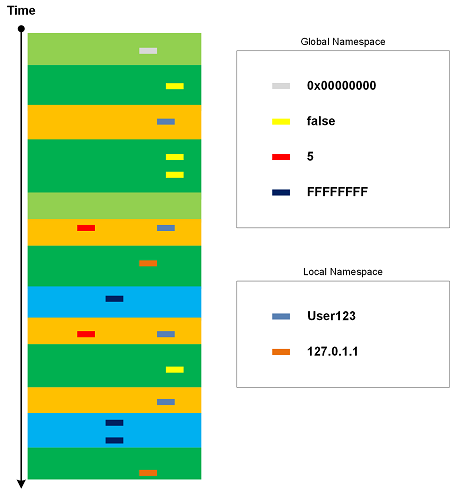
Every trace and log has its own set of constants, values that belong to global namespace such as true/false, NULL, Abnormal Values, and common error constants such as “access denied”. Trace Constants may be dependent upon Implementation Discourse. There are also constant values that are local to each trace, for example, user names and IP addresses. They may be constantly repeated in one log but may change for another log. Constants that belong to local namespace may be a part of Vocabulary Index and Basic Facts. Usually Trace Constant is not considered Message Invariant.

- Dmitry Vostokov @ DumpAnalysis.org + TraceAnalysis.org -

Trace Analysis Patterns (Part 168)

April 7th, 2019

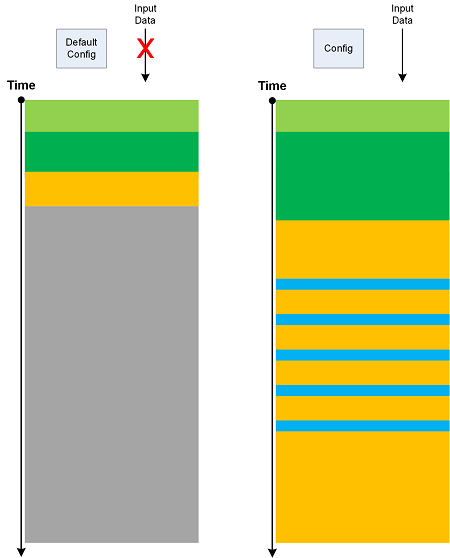
If we run software with its default configuration and no interaction (input data) we get its Minimal Trace:

Such traces may have their own Master Trace. Also, Minimal Trace is a specific Use Case Trail. Metaphorically, they can be considered as minimal surfaces.

- Dmitry Vostokov @ DumpAnalysis.org + TraceAnalysis.org -

Trace Analysis Patterns (Part 167)

March 31st, 2019

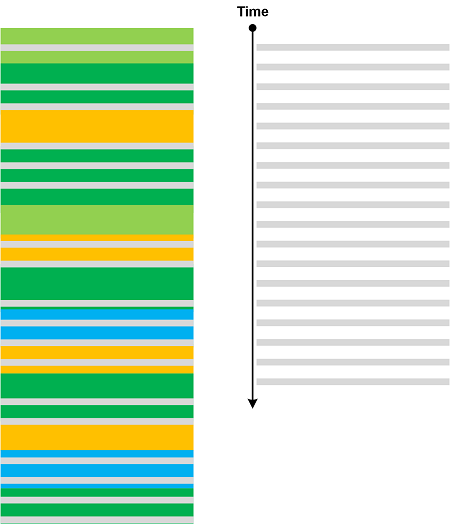
Sometimes we see a constantly repeated message throughout a trace or log (a trivial Periodic Message Block) with constant Time Delta. In certain trace forms (without explicit timing information) such messages may indicate internal time references as illustrated in the following diagram:

We name this pattern Drone Message based on analogy with Drone effect in music.

- Dmitry Vostokov @ DumpAnalysis.org + TraceAnalysis.org -

Trace Analysis Patterns (Part 166)

March 26th, 2019

Based on a mathematical analogy with critical points in topology (Morse theory) we introduce Critical Points in trace and log analysis where they signify the change of trace or log “shape” (topological or “geometric” properties) as illustrated in the following diagram:

Such a point may be an individual message, its Message Context, or Activity Region.

Critical Points are examples of Intra-Correlation whereas Bifurcation Points are examples of Inter-Correlation.

- Dmitry Vostokov @ DumpAnalysis.org + TraceAnalysis.org -
Crash Dump Analysis Patterns (Part 258)

February 3rd, 2019

When we have Active Thread:

0:001> kL
# Child-SP RetAddr Call Site
00 (Inline Function) --------`-------- Windows_Web!JsonParser::ParseString+0x96
01 0000007f`56efdb00 00007fff`700198c5 Windows_Web!JsonParser::ParseValue+0x3b7
02 0000007f`56efdb80 00007fff`70018ab3 Windows_Web!JsonParser::ParseArray+0xf5
03 0000007f`56efdbd0 00007fff`70018f72 Windows_Web!JsonParser::ParseValue+0x663
04 0000007f`56efdc50 00007fff`700186fb Windows_Web!JsonParser::ParseObject+0x422
05 0000007f`56efdda0 00007fff`700198c5 Windows_Web!JsonParser::ParseValue+0x2ab
06 0000007f`56efde20 00007fff`70018ab3 Windows_Web!JsonParser::ParseArray+0xf5
07 0000007f`56efde70 00007fff`70018f72 Windows_Web!JsonParser::ParseValue+0x663
08 0000007f`56efdef0 00007fff`700186fb Windows_Web!JsonParser::ParseObject+0x422
09 0000007f`56efe040 00007fff`70018f72 Windows_Web!JsonParser::ParseValue+0x2ab
0a 0000007f`56efe0c0 00007fff`700186fb Windows_Web!JsonParser::ParseObject+0x422
0b 0000007f`56efe210 00007fff`70011a69 Windows_Web!JsonParser::ParseValue+0x2ab
0c 0000007f`56efe290 00007fff`700119d2 Windows_Web!JsonValueImpl::ParseInternal+0x75
0d 0000007f`56efe2d0 00007fff`700118e8 Windows_Web!JsonValueImpl::InitializeFromString+0x16
0e 0000007f`56efe300 00007fff`70011876 Windows_Web!JsonValueFactory::TryParseInternal+0x50
0f 0000007f`56efe330 00007fff`3a6fe48e Windows_Web!JsonValueFactory::TryParse+0x36
10 0000007f`56efe360 00007fff`3a78f95c eModel!JsonUtils::GetJsonObject+0x82
[...]

which is also Spiking Thread:

0:001> !runaway f
User Mode Time
Thread Time
1:1a2c 0 days 0:03:37.562
8:52a8 0 days 0:00:36.890
[…]

Kernel Mode Time
Thread Time
8:52a8 0 days 0:00:10.625
1:1a2c 0 days 0:00:18.078
[...]

we can look at the relative proportion of User Mode / Kernel Mode times to infer Active Space. This can be further confirmed if we have Step Dumps, for example, in our case we had an earlier memory dump with the same Active Thread and Constant Subtrace (with Variable Subtraces in the same Active Space):

0:001> kL
# Child-SP RetAddr Call Site
00 0000007f`56efd8d0 00007fff`a1109453 ntdll!RtlpHpLfhSlotAllocate+0×126
01 0000007f`56efd9c0 00007fff`a110a8db ntdll!RtlpAllocateHeapInternal+0×313
02 0000007f`56efdaa0 00007fff`9ea09960 ntdll!RtlpHpAllocWithExceptionProtection+0×3b
03 0000007f`56efdb70 00007fff`7001ba1b msvcrt!malloc+0×70
04 0000007f`56efdba0 00007fff`700187ca Windows_Web!operator new+0×23
05 (Inline Function) ——–`——– Windows_Web!StringBuilder::EnsureBufferSpace+0×18
06 (Inline Function) ——–`——– Windows_Web!JsonParser::ParseString+0×59
07 0000007f`56efdbd0 00007fff`70018f72 Windows_Web!JsonParser::ParseValue+0×37a

08 0000007f`56efdc50 00007fff`700186fb Windows_Web!JsonParser::ParseObject+0×422
09 0000007f`56efdda0 00007fff`700198c5 Windows_Web!JsonParser::ParseValue+0×2ab
0a 0000007f`56efde20 00007fff`70018ab3 Windows_Web!JsonParser::ParseArray+0xf5
0b 0000007f`56efde70 00007fff`70018f72 Windows_Web!JsonParser::ParseValue+0×663
0c 0000007f`56efdef0 00007fff`700186fb Windows_Web!JsonParser::ParseObject+0×422
0d 0000007f`56efe040 00007fff`70018f72 Windows_Web!JsonParser::ParseValue+0×2ab
0e 0000007f`56efe0c0 00007fff`700186fb Windows_Web!JsonParser::ParseObject+0×422
0f 0000007f`56efe210 00007fff`70011a69 Windows_Web!JsonParser::ParseValue+0×2ab
10 0000007f`56efe290 00007fff`700119d2 Windows_Web!JsonValueImpl::ParseInternal+0×75
11 0000007f`56efe2d0 00007fff`700118e8 Windows_Web!JsonValueImpl::InitializeFromString+0×16
12 0000007f`56efe300 00007fff`70011876 Windows_Web!JsonValueFactory::TryParseInternal+0×50
13 0000007f`56efe330 00007fff`3a6fe48e Windows_Web!JsonValueFactory::TryParse+0×36
14 0000007f`56efe360 00007fff`3a78f95c eModel!JsonUtils::GetJsonObject+0×82
[…]

Even in the absence of Active Threads in process memory dumps it is useful to look at time spent in kernel and user modes to see any anomalies, especially when threads are blocked in System Calls. Then the high value of kernel mode time should suggest to inspect kernel Activity Space (for example, via a kernel dump). If we have an indication of high values of user mode time in a kernel memory dump we may need to obtain process memory Step Dumps.

- Dmitry Vostokov @ DumpAnalysis.org + TraceAnalysis.org -
Crash Dump Analysis Patterns (Part 257)

November 20th, 2018

In addition to Exception Thread analysis pattern (or several threads when we have Multiple Exceptions) that we named Exception Stack Trace there may be a separated thread that reports such exceptions (Exception Reporting Thread):

This dump file has an exception of interest stored in it.
The stored exception information can be accessed via .ecxr.
(4a0c.2ab4): Application hang - code cfffffff (first/second chance not available)
win32u!NtUserCreateWindowEx+0x14:

0:002> kc
# Call Site
00 win32u!NtUserCreateWindowEx
01 user32!VerNtUserCreateWindowEx
02 user32!CreateWindowInternal
03 user32!CreateWindowExW
04 CoreMessaging!Microsoft::CoreUI::Dispatch::UserAdapter:: InitializeWindow
05 CoreMessaging!Microsoft::CoreUI::Dispatch::UserAdapter::Initialize
06 CoreMessaging!Microsoft::CoreUI::Dispatch::EventLoop::Callback_Run
07 CoreMessaging!Microsoft::CoreUI::Messaging::MessageSession$R:: Microsoft__CoreUI__IExportMessageSession_Impl::Run
08 CoreMessaging!Microsoft::CoreUI:: IExportMessageSession$X__ExportAdapter::Run
09 CoreMessaging!Windows::System::DispatcherQueue::RunLoop
0a CoreMessaging!Windows::System::DispatcherQueueController:: DispatcherQueueThreadProc
0b kernel32!BaseThreadInitThunk
0c ntdll!RtlUserThreadStart

0:002> ~42kc
# Call Site
00 ntdll!NtWaitForMultipleObjects
01 ntdll!WerpWaitForCrashReporting
02 ntdll!RtlReportExceptionEx
03 eModel!s_ReportAsyncBoundaryHangOnSuspendedThread
04 kernel32!BaseThreadInitThunk
05 ntdll!RtlUserThreadStart

We can spot such a thread in Stack Trace Collection.

Although the example above is for application hang (Blocked Thread) and also illustrates Self-Diagnosis, similar threads may report Handled Exceptions. Usually, Exception Threads are also Exception Reporting Threads as shown in Invalid Parameter analysis pattern example.

- Dmitry Vostokov @ DumpAnalysis.org + TraceAnalysis.org -
Trace Analysis Patterns (Part 165)

November 17th, 2018

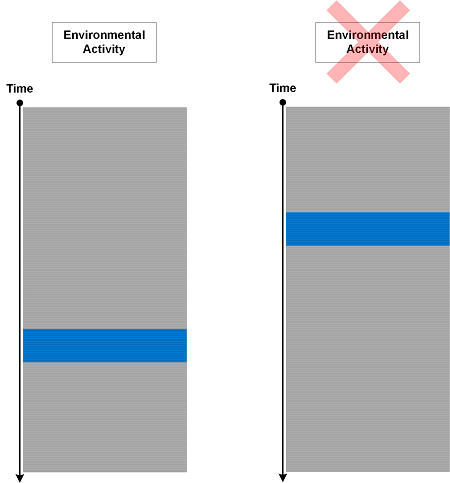
Sometimes we put trace statements to track responses to certain environmental actions and conditions but surprised to see them in logs when nothing happened outside that could have triggered them:

We call such an analysis pattern Phantom Activity. This is an indicator that internal program state was not updated correctly. The difference between such activities and Defamiliarizing Effect is that the former messages are expected but not in their current Message Context.

- Dmitry Vostokov @ DumpAnalysis.org + TraceAnalysis.org -
Trace Analysis Patterns (Part 164)

October 14th, 2018

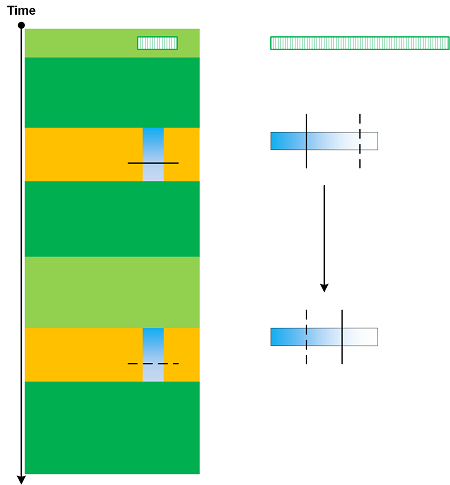
When we have very large traces (including Split Traces) we can use the concept of sharding to split a log into several shards for parallel processing. However, some patterns may require the analysis across the boundary of shards. Trace Sharding is illustrated in the following diagram:

- Dmitry Vostokov @ DumpAnalysis.org + TraceAnalysis.org -
Trace Analysis Patterns (Part 163)

October 13th, 2018

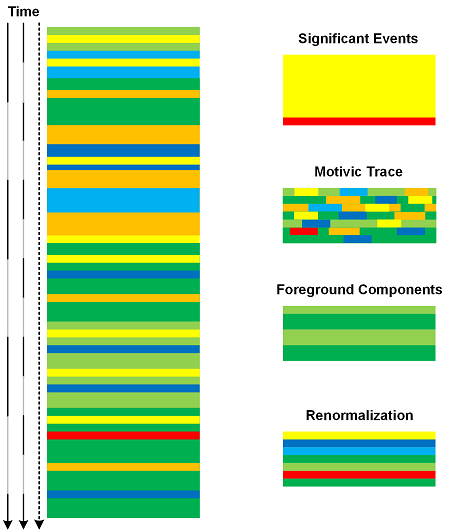
A software trace or log can be analyzed using different Time Scales. The coarser the scale the more messages are included in time intervals. Such per interval Message Sets can be analyzed and transformed into one message using analysis patterns such as Significant Event, Motivic Trace, Background and Foreground Components, and Renormalization. The resulted new trace will be a scaled version of the original trace as depicted in the following diagram:

- Dmitry Vostokov @ DumpAnalysis.org + TraceAnalysis.org -
Trace Analysis Patterns (Part 162)

October 7th, 2018

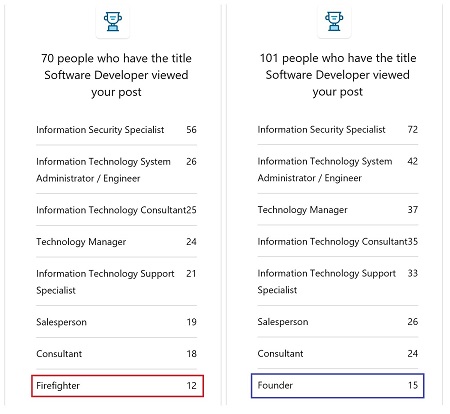
The data in individual messages and in State Dump message blocks may be truncated. This is similar to Visibility Limit at the log message level. When data values are sorted and resorted this may result in “hidden” data replacing the previously “visible” data and vice versa as shown in the following diagram:

This pattern (Truncated Data) was conceived after we observed the change of data key in sequence of a LinkedIn post (not related to firefighting) stats sorted by value and thought that was “strange”:

However, stats from the other post showed the both keys were valid:

- Dmitry Vostokov @ DumpAnalysis.org + TraceAnalysis.org -
Crash Dump Analysis Patterns (Part 13l)

October 6th, 2018

Insufficient stack memory may not result in Stack Overflow if there are internal thread checks or external watchdog threads. In some way this is a specialization of a more general Insufficient Memory (region) analysis pattern.

Consider this thread stack trace we see when we open a crash dump in WinDbg:

0:003> kc
# Call Site
00 EdgeContent!wil::details::ReportFailure
01 EdgeContent!wil::details::ReportFailure_Hr
02 EdgeContent!wil::details::in1diag3::FailFast_Hr
03 EdgeContent!`anonymous namespace'::MemoryLimitWatchdogThreadProc
04 kernel32!BaseThreadInitThunk
05 ntdll!RtlUserThreadStart

The reported error is related to general security checks and doesn’t reveal much:

0:003> .lastevent
Last event: 10e0.25fc: Security check failure or stack buffer overrun - code c0000409 (first/second chance not available)
debugger time: Sat Sep 29 21:30:31.531 2018 (UTC + 1:00)

However, from Stack Trace Motif we may infer that the failure was related to some memory limit.

When looking at Stack Trace Collection we notice the thread #11 which has the long sequence of frames:

11 Id: 10e0.d68 Suspend: 2 Teb: 000000ca`e96e3000 Unfrozen
# Call Site
00 ntdll!NtWaitForSingleObject
01 KERNELBASE!WaitForSingleObjectEx
02 Chakra!Memory::Recycler::WaitForConcurrentThread
03 Chakra!Memory::Recycler::FinishConcurrentCollect
04 Chakra!ThreadContext::ExecuteRecyclerCollectionFunction
05 Chakra!Memory::Recycler::FinishConcurrentCollectWrapped
06 Chakra!Memory::Recycler::LargeAlloc<0>
07 Chakra!Memory::Recycler::AllocLeaf
08 Chakra!Js::CompoundString::GetSz
09 Chakra!Js::JSONStringifier::ReadProperty
0a Chakra!Js::JSONStringifier::ReadObject
0b Chakra!Js::JSONStringifier::ReadProperty
0c Chakra!Js::JSONStringifier::Stringify
0d Chakra!JSON::Stringify
0e Chakra!amd64_CallFunction
0f Chakra!Js::InterpreterStackFrame::OP_CallCommon<Js::OpLayoutDynamicProfile<
Js::OpLayoutT_CallIWithICIndex<Js::LayoutSizePolicy<0> > > >
10 Chakra!Js::InterpreterStackFrame::ProcessUnprofiled
11 Chakra!Js::InterpreterStackFrame::Process
12 Chakra!Js::InterpreterStackFrame::InterpreterHelper
13 Chakra!Js::InterpreterStackFrame::InterpreterThunk
[...]
fa Chakra!ThreadContext::ExecuteImplicitCall<<
lambda_5a46706206cf607f01fe0fb33b6e8acf> >
fb Chakra!Js::DynamicObject::CallToPrimitiveFunction
fc Chakra!Js::DynamicObject::ToPrimitiveImpl<409>
fd Chakra!Js::DynamicObject::ToPrimitive
fe Chakra!Js::JavascriptConversion::OrdinaryToPrimitive
ff Chakra!Js::JavascriptConversion::MethodCallToPrimitive

It looks like the thread stack is really long that we suspect the possibility of overflow:

0:003> ~11kc 0xffff
[...]
c473 Chakra!amd64_CallFunction
c474 Chakra!Js::JavascriptFunction::CallFunction<1>
c475 Chakra!Js::JavascriptFunction::CallRootFunctionInternal
c476 Chakra!Js::JavascriptFunction::CallRootFunction
c477 Chakra!ScriptSite::CallRootFunction
c478 Chakra!ScriptSite::Execute
c479 Chakra!ScriptEngineBase::Execute
c47a edgehtml!CMutationObserver::PerformMicrotaskCheckpoint
c47b edgehtml!CObserverManager::InvokeObserversForCheckpoint
c47c edgehtml!CObserverManager::MicroTaskExecutionCallback
c47d edgehtml!HTML5TaskScheduler::RunReadiedTask
c47e edgehtml!HTML5TaskScheduler::PerformMicrotaskCheckpoint
c47f edgehtml!CJScript9Holder::ExecuteCallback
c480 edgehtml!CScriptTimer::ExecuteTimer
c481 edgehtml!CScriptTimerManager::OnTick
c482 edgehtml!CPaintAlignedTimerManager<CPaintBeat>::ProcessTimers
c483 edgehtml!CPaintBeat::OnProcessTimersTask
c484 edgehtml!GWndAsyncTask::Run
c485 edgehtml!HTML5TaskScheduler::RunReadiedTask
c486 edgehtml!TaskSchedulerBase::RunReadiedTasksInTaskQueueWithCallback
c487 edgehtml!HTML5TaskScheduler::RunReadiedTasks
c488 edgehtml!HTML5EventLoopDriver::DriveLowPriorityTaskExecution
c489 edgehtml!GlobalWndOnPaintPriorityMethodCall
c48a edgehtml!GlobalWndProc
c48b user32!FilteredProcessRedirectingWndProcW
c48c user32!UserCallWinProcCheckWow
c48d user32!DispatchClientMessage
c48e user32!_fnDWORD
c48f ntdll!KiUserCallbackDispatcherContinue
c490 win32u!NtUserDispatchMessage
c491 user32!DispatchMessageWorker
c492 EdgeContent!CBrowserTab::_TabWindowThreadProc
c493 EdgeContent!LCIETab_ThreadProc
c494 edgeIso!_IsoThreadProc_WrapperToReleaseScope
c495 kernel32!BaseThreadInitThunk
c496 ntdll!RtlUserThreadStart

However, the current stack pointer is the way above the stack region limit:

0:003> ~11s
ntdll!NtWaitForSingleObject+0x14:
00007ffa`b0d99f74 c3              ret

0:011> r rsp
rsp=000000caeb033348

0:011> !teb
TEB at 000000cae96e3000
ExceptionList:        0000000000000000
StackBase:            000000caeba00000
StackLimit:           000000caeb00b000
SubSystemTib:         0000000000000000
FiberData:            0000000000001e00
ArbitraryUserPointer: 0000000000000000
Self:                 000000cae96e3000
EnvironmentPointer:   0000000000000000
ClientId:             00000000000010e0 . 0000000000000d68
RpcHandle:            0000000000000000
Tls Storage:          000001e915185590
PEB Address:          000000cae96a8000
LastErrorValue:       1455
LastStatusValue:      c000012d
Count Owned Locks:    0
HardErrorMode:        0

The last error code shows possible Insufficient Memory (committed memory) pattern but there were enough space in the page file and the same crashes were observed in a much more spacious memory environments:

0:011> !error c000012d
Error code: (NTSTATUS) 0xc000012d (3221225773) - {Out of Virtual Memory}  Your system is low on virtual memory. To ensure that Windows runs properly, increase the size of your virtual memory paging file. For more information, see Help.

0:011> !error 0n1455
Error code: (Win32) 0x5af (1455) - The paging file is too small for this operation to complete.

When we look at a raw stack trace region though, we see it was used to the fullest:

0:011> dps 000000caeb00b000 L30
000000ca`eb00b000 00000000`00000000
000000ca`eb00b008 00000000`00000000
000000ca`eb00b010 00000000`00000000
000000ca`eb00b018 00000000`00000000
000000ca`eb00b020 00000000`00000000
000000ca`eb00b028 00000000`00000000
000000ca`eb00b030 00000000`00000000
000000ca`eb00b038 00000000`00000000
000000ca`eb00b040 00000000`00000000
000000ca`eb00b048 00000000`00000000
000000ca`eb00b050 00000000`00000000
000000ca`eb00b058 00000000`00000000
000000ca`eb00b060 00000000`00000000
000000ca`eb00b068 00000000`00000000
000000ca`eb00b070 00000000`00000000
000000ca`eb00b078 00000000`00000000
000000ca`eb00b080 00000000`00000000
000000ca`eb00b088 00000000`00000000
000000ca`eb00b090 00000000`00000000
000000ca`eb00b098 000001e9`258805c0
000000ca`eb00b0a0 00000000`00000000
000000ca`eb00b0a8 00000000`00000000
000000ca`eb00b0b0 00000000`00000131
000000ca`eb00b0b8 00007ffa`8de137a9 Chakra!Js::DictionaryTypeHandlerBase<unsigned>::GetProperty+0×119
000000ca`eb00b0c0 00000000`00000006
000000ca`eb00b0c8 000001e9`258805c0
000000ca`eb00b0d0 000001e9`258805c0
000000ca`eb00b0d8 000001e9`283d4e70
000000ca`eb00b0e0 000000ca`eb00b210
000000ca`eb00b0e8 00000000`00000000
000000ca`eb00b0f0 00000000`00000131
000000ca`eb00b0f8 000001f1`71863c70
000000ca`eb00b100 00007ffa`8e3cd468 Chakra!Js::BuiltInPropertyRecords::number
000000ca`eb00b108 00000000`00000000
000000ca`eb00b110 000001f1`71863c70
000000ca`eb00b118 000000ca`eb00b210
000000ca`eb00b120 000001e9`258805c0
000000ca`eb00b128 00007ffa`8de103d3 Chakra!Js::DynamicObject::GetPropertyQuery+0×53
000000ca`eb00b130 000001e9`24cc65b0
000000ca`eb00b138 000001e9`258805c0
000000ca`eb00b140 000001e9`258805c0
000000ca`eb00b148 00000000`00000131
000000ca`eb00b150 000000ca`eb00b210
000000ca`eb00b158 00000000`00000000
000000ca`eb00b160 000001f1`71863c70
000000ca`eb00b168 00000000`00000000
000000ca`eb00b170 00000000`00000000
000000ca`eb00b178 00007ffa`8df79864 Chakra!Js::JavascriptOperators::GetProperty_InternalSimple+0×64

We also see Execution Residue possibly indicating catch exception processing:

0:011> dpS 000000caeb00b000 L100
00007ffa`8de137a9 Chakra!Js::DictionaryTypeHandlerBase<unsigned short>::GetProperty+0x119
00007ffa`8e3cd468 Chakra!Js::BuiltInPropertyRecords::number
00007ffa`8de103d3 Chakra!Js::DynamicObject::GetPropertyQuery+0x53
00007ffa`8df79864 Chakra!Js::JavascriptOperators::GetProperty_InternalSimple+0x64
00007ffa`b0d470d0 ntdll!RtlSetLastWin32Error+0x40
00007ffa`b048a5da msvcrt!getptd_noexit+0x6e
00007ffa`8dfb36d6 Chakra!`Js::JavascriptExceptionOperators::StackTraceAccessor'::`1'::catch$8
+0x50
00007ffa`b048a553 msvcrt!getptd+0xb
00007ffa`b045aad6 msvcrt!_DestructExceptionObject+0x46
00007ffa`b0463798 msvcrt!_CxxCallCatchBlock+0x1e8
00007ffa`8ddb6d54 Chakra!Js::JavascriptExceptionOperators::StackTraceAccessor+0x2a4
00007ffa`8e324798 Chakra!ValueType::PrimitiveOrObject+0xa80
00007ffa`8dfb3686 Chakra!`Js::JavascriptExceptionOperators::StackTraceAccessor'::`1'::catch$8
00007ffa`8dd20000 Chakra!_jscriptinfo_IID_Lookup <PERF> (Chakra+0x0)
00007ffa`b04635b0 msvcrt!_CxxCallCatchBlock
00007ffa`b0d9e2b3 ntdll!RcConsolidateFrames+0x3
00007ffa`8ddb6d54 Chakra!Js::JavascriptExceptionOperators::StackTraceAccessor+0x2a4
00007ffa`8de137a9 Chakra!Js::DictionaryTypeHandlerBase<unsigned short>::GetProperty+0x119
00007ffa`8e3cd468 Chakra!Js::BuiltInPropertyRecords::number
00007ffa`8de103d3 Chakra!Js::DynamicObject::GetPropertyQuery+0x53
00007ffa`8df79864 Chakra!Js::JavascriptOperators::GetProperty_InternalSimple+0x64
00007ffa`b0d470d0 ntdll!RtlSetLastWin32Error+0x40
00007ffa`b048a5da msvcrt!getptd_noexit+0x6e
00007ffa`8dfb36d6 Chakra!`Js::JavascriptExceptionOperators::StackTraceAccessor'::`1'::catch$8
+0x50
00007ffa`b048a553 msvcrt!getptd+0xb
00007ffa`b045aad6 msvcrt!_DestructExceptionObject+0x46
00007ffa`b0463798 msvcrt!_CxxCallCatchBlock+0x1e8
00007ffa`8ddb6d54 Chakra!Js::JavascriptExceptionOperators::StackTraceAccessor+0x2a4

Another similar crash on a different machine with much more memory available had Active Thread Exception Stack Trace:

0:013> kc
# Call Site
00 ntdll!NtQueryWnfStateNameInformation
01 ntdll!SignalStartWerSvc
02 ntdll!SendMessageToWERService
03 ntdll!ReportExceptionInternal
04 kernel32!WerpReportFaultInternal
05 kernel32!WerpReportFault
06 KERNELBASE!UnhandledExceptionFilter
07 Chakra!FatalExceptionFilter
08 Chakra!ReportFatalException$filt$0
09 msvcrt!_C_specific_handler
0a ntdll!RtlpExecuteHandlerForException
0b ntdll!RtlDispatchException
0c ntdll!RtlRaiseException
0d KERNELBASE!RaiseException
0e Chakra!ReportFatalException
0f Chakra!OutOfMemory_fatal_error
10 Chakra!Js::Exception::RaiseIfScriptActive
11 Chakra!Js::Throw::OutOfMemory
12 Chakra!Memory::Recycler::LargeAlloc<0>
13 Chakra!Memory::Recycler::AllocLeaf
14 Chakra!Js::LazyJSONString::GetSz
15 Chakra!Js::CompoundString::AppendGeneric<Js::CompoundString>
16 Chakra!Js::JavascriptExceptionOperators::StackTraceAccessor
17 Chakra!Js::InlineCache::TryGetProperty<1,1,1,1,0>
18 Chakra!Js::CacheOperators::TryGetProperty<1,1,1,1,1,1,1,0,0>
19 Chakra!Js::JavascriptOperators::PatchGetValue<1,Js::InlineCache>
1a js!d.toString
[...]

which actually showed the Javascript URL:

0:013> .frame 1a
1a 00000037`4671e5e0 00007ffe`1753f1a1 js!d.toString [https://yastatic.net/awaps-ad-sdk-js-bundles/1.0-889/bundles/inpage.bundle.js @ 8,36454]

The stack region was also almost full with execution residue including exception catch processing. But this time it show “stack space” hint:

0:013> !teb
TEB at 00000037456dc000
ExceptionList:        0000000000000000
StackBase:            0000003747100000
StackLimit:           000000374670a000
SubSystemTib:         0000000000000000
FiberData:            0000000000001e00
ArbitraryUserPointer: 0000000000000000
Self:                 00000037456dc000
EnvironmentPointer:   0000000000000000
ClientId:             0000000000005914 . 0000000000001150
RpcHandle:            0000000000000000
Tls Storage:          000001a5bcfd88d0
PEB Address:          00000037456bd000
LastErrorValue:       0
LastStatusValue:      c000012d
Count Owned Locks:    0
HardErrorMode:        0

0:013> s-su 000000374670a000 00000037`46720000
[…]
00000037`4670d210 “tack space”
[…]

Note: Regardless of the actual root cause and mechanism for these crash dumps, such stack region monitoring can also be used for software prognostics purposes.

The example dump can be downloaded from here.

- Dmitry Vostokov @ DumpAnalysis.org + TraceAnalysis.org -