August 9th, 2009
Last week I was comparing the existing collection of memory dump analysis patterns to the collection of trace analysis patterns (in formation) in the search of isomorphism (or more correctly, general morphism) similar to Missing Component pattern. It is not a coincidence that such pattern pairs can be formed. For example, it is possible to discern deadlocks from both crash dumps and software traces (if appropriate information is available there). Fundamentally, it is implied by the definition of a software trace as some sort of a memory dump. And we can see traces in memory dumps too, for example, Execution Residue pattern. Because raw stack data resides in stack pages and in contemporary operating systems they are created from zero pages (metaphorically, out of the void) we can say that stack regions of threads are sorted by their creation time, for example, in this process user memory dump:
0:017> !runaway 4

 Elapsed Time

  Thread       Time

   0:49c       0 days 5:16:31.076

   4:4d8       0 days 5:16:30.967

   3:4d0       0 days 5:16:30.967

   2:4cc       0 days 5:16:30.967

   1:4c8       0 days 5:16:30.967

   5:4e8       0 days 5:16:30.936

   6:b6c       0 days 5:16:15.695

   7:b70       0 days 5:16:15.679

   9:b88       0 days 5:16:15.586

   8:b84       0 days 5:16:15.586

  11:348       0 days 5:16:12.934

  10:bfc       0 days 5:16:12.934

  12:1200      0 days 5:15:16.528

  15:1298      0 days 5:15:15.220

  14:1290      0 days 5:15:15.220

  13:128c      0 days 5:15:15.220

  17:12e4      0 days 5:15:13.257

  16:12dc      0 days 5:15:13.257

  18:12ec      0 days 5:15:13.117

  20:12f4      0 days 5:15:13.085

  19:12f0      0 days 5:15:13.085

  21:17a0      0 days 5:13:16.321

  22:1628      0 days 5:13:15.729

  24:1778      0 days 1:35:50.773

  23:17ec      0 days 1:35:50.773

  25:1570      0 days 1:27:54.190

  26:1724      0 days 1:27:10.151

  27:1490      0 days 0:05:46.732

  28:1950      0 days 0:02:28.153

  29:19b4      0 days 0:00:58.108

  30:177c      0 days 0:00:38.358

  31:1798      0 days 0:00:23.351

  32:1a7c      0 days 0:00:08.343
If we have complete memory dumps we can also account for other processes and their elapsed time. Within stack pages we have partial stack traces but do not have exact timing information between them except for stack frames from the current frozen thread stack trace or, if we are lucky, from a partial stack trace from the past execution. However, the timing between frames from different stacks is undefined and we can only guess it from higher level considerations like semantics of procedure calls and other information.
These considerations and the notion of a poset (partially ordered set) let me thinking about memory dumps as posets. I even created my interpretation of POSET abbreviation for this occasion:
POSET
Partially Ordered Software Execution Trace
- Dmitry Vostokov @ DumpAnalysis.org -
Posted in Crash Dump Analysis, Crash Dump Patterns, Debugging, Mathematics of Debugging, New Acronyms, Science of Memory Dump Analysis, Science of Software Tracing, Software Trace Analysis | No Comments »
August 9th, 2009
Errata for the previous book Windows Debugging: Practical Foundations has been published:
Errata
Next week the updated version (revision 2.0) should be available on Amazon and other stores for both paperback and hardback titles. Digital version on Lulu has already been updated.
- Dmitry Vostokov @ DumpAnalysis.org -
Posted in Announcements, Assembly Language, Books, Crash Dump Analysis, Debugging, Publishing | No Comments »
August 8th, 2009
The digital version of the book is finally available:
x64 Windows Debugging: Practical Foundations
Paperback should be available in 1-2 weeks on Amazon and other stores. When working on the book I fixed errors in the previous x86 version. Errata file for it should be available tomorrow.
- Dmitry Vostokov @ DumpAnalysis.org -
Posted in Announcements, Assembly Language, Books, C and C++, Certification, Code Reading, Crash Dump Analysis, Debugging, Education and Research, Memory Dump Analysis Jobs, Publishing, Security, Software Engineering, Software Technical Support, Testing, Tools, Training and Seminars, Vista, Windows 7, Windows Server 2008 | No Comments »
August 7th, 2009
The new contemporary movement of engineers resisting dump analysis automation (including automated debugging and perhaps automated software construction too)
Inspired by Luddite movement.
- Dmitry Vostokov @ DumpAnalysis.org -
Posted in Crash Dump Analysis, Fun with Crash Dumps, New Words | No Comments »
August 7th, 2009
While I was listening to Klaus Schulze In Blue album a colleague sent me the link to a tool that reconstructs blue screens from minidumps (small memory dumps):
BlueScreenView (written by Nir Sofer)
I immediately downloaded it at it works even with kernel dumps but without pointing to a module that triggered the bugcheck (it shows modules for minidumps):
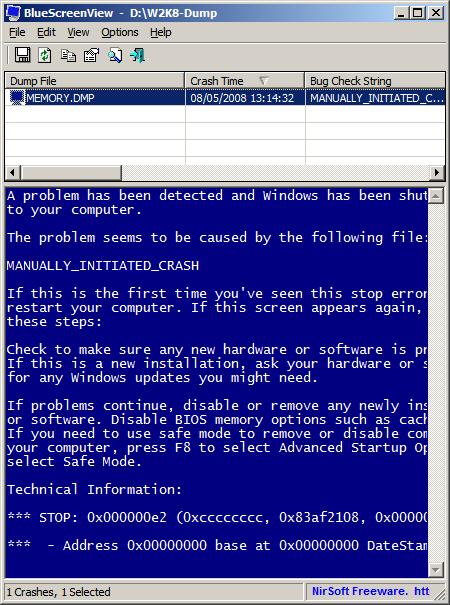
It ignores memory dumps and minidumps from x64 Windows so the next version I hope should do it 
PS. Long time ago I was thinking about writing a kernel driver that saves BSOD screen and embeds it in a memory dump.
- Dmitry Vostokov @ DumpAnalysis.org -
Posted in Announcements, Crash Dump Analysis, Crash Dumps for Dummies, Fun with Crash Dumps, Minidump Analysis, Software Technical Support, Tools, Windows System Administration | No Comments »
August 7th, 2009
This is an encyclopedic work I bought in a local book shop and finally finished reading today. It took me a year to read from cover to cover and pages were falling out of the glue but I continued to read. Highly recommended for education and another view on human history. The review of Freud was enlightening to me because I didn’t know about the recent scholarship criticizing his work. In fact, I so liked this book that just bought it again in a hardcover version from Folio Society and start rereading it again soon.
Ideas: A History of Thought and Invention, from Fire to Freud

The second encyclopedic book seems was written before the previous one but looks like the logical sequel to it. I’m starting reading it next week.
The Modern Mind: An Intellectual History of the 20th Century

- Dmitry Vostokov @ LiterateScientist.com -
Posted in Anthropology, Art, Biology, Chemistry, Economics, Ethics, Evolution, From Cover To Cover, General Science, Geography, History, Humanities, Ideas, Language, Medicine, Philosophy, Physics, Politics, Psychology, Reading List 2009, Religion, Reviewed on Amazon, Social Sciences, Statistics, Theology | No Comments »
August 6th, 2009
The road to immortality is paved with memory dumps.
Dmitry Vostokov
- Dmitry Vostokov @ DumpAnalysis.org -
Posted in Bugtations, Memory Religion (Memorianity) | No Comments »
August 6th, 2009
The hierarchy of Ψ1, …, Ψ8, …, Ψ16, …, Ψ32, …, Ψ64, …, …, …, ΨΨ numbers where the subscript denotes the number of bits a memory address can have, so Ψ32 and Ψ64 are memorillion and quadrimemorillion of memory dumps respectively. We only need to figure out the meaning of Ψ0 and ΨΨ. Perhaps there is some meaning in Dirac notation here: <Ψ0|ΨΨ>. More on this later because I have to finish this week the book x64 Windows Debugging: Practical Foundations and write an errata file for the previous x86 version of the book series.
Note: Ψ is an M upside down.
- Dmitry Vostokov @ DumpAnalysis.org -
Posted in Crash Dump Analysis, Crash Dump Patterns, Fun with Crash Dumps, Futuristic Memory Dump Analysis, Intelligent Memory Movement, Psi-computation, Science of Memory Dump Analysis | No Comments »
August 6th, 2009
There is an obvious pattern called Missing Component. We don’t see trace statements we expect and wonder whether the component was not loaded, its container ceased to exist or simply it wasn’t selected for tracing. In many support cases there is a trade-off between tracing everything and the size of trace files. Customers and engineers usually prefer smaller files to analyze. However in the case of predictable and reproducible issues with short duration we can always select all components or deselect a few (instead of selecting a few). Here is the article for Citrix CDF tracing best practices and it can be applied to other software traces as well:
Tracing Best Practices
We can find an example from Discontinuity pattern where the possibility of a sudden and silent gap in trace statements could happen because not all necessary components were selected for tracing.
Sometimes, in cases when the missing component was selected for tracing but we don’t see any trace output from it other module traces can give us an indication, perhaps showing the load failure message. For example, Process Monitor tracing done in parallel can reveal load failures.
- Dmitry Vostokov @ TraceAnalysis.org -
Posted in CDF Analysis Tips and Tricks, Citrix, Debugging, Software Trace Analysis, Trace Analysis Patterns | 4 Comments »
August 4th, 2009
Sometimes there are reported delays in application startup, session initialization, long response times and simply the absence of response. All these problems can be reflected in software traces showing sudden gaps in threads of activity. I call this pattern Discontinuity per analogy with continuous and discontinuous functions in mathematics. Here is an example I came upon recently and it will be covered fully in the forthcoming pattern cooperation case study spanning both memory dump and trace analysis. One process was reported to have a long period of CPU spiking calculation and a CDF trace was recorded. When we open it we see this periodic error:
N   PID  TID  Time         Message

[…]

326 2592 5476 08:17:18.823 OpenRegistry: Attempting to open [… Hive path …]

327 2592 5476 08:17:18.824 OpenRegistry: Failed: 2

[…]
However when looking for any discontinuities for the thread 5476 we see this gap of more than 7 minutes:
N    PID  TID  Time         Message

[...]

3395 2592 5476 08:17:19.608 OpenRegistry: Attempting to open [... Hive path ...]

3396 2592 5476 08:17:19.608 OpenRegistry: Failed: 2

3461 2592 5476 08:24:31.137 OpenRegistry: Attempting to open [… Hive path …]

3462 2592 5476 08:24:31.137 OpenRegistry: Failed: 2

[…]
Therefore we have 3 possibilities here:
1. The process twice did lengthy CPU spiking calculations involving registry access and was quiet between them.
2. Registry access belonged to some background activity and ceased for 7 minutes and during that time it had CPU spiking intensive calculation.
3. This discontinuity is irrelevant because either the calculation module was not selected for tracing or it simply doesn’t have relevant tracing statement coverage for the code that does calculation.
Stay tuned because this story will be unfolded in other patterns and in the final case study.
- Dmitry Vostokov @ TraceAnalysis.org -
Posted in CDF Analysis Tips and Tricks, Debugging, Software Trace Analysis, Trace Analysis Patterns | 2 Comments »
August 4th, 2009
OpenTask plans to expand its Practical Foundations series and publish the following 2 books for the forthcoming Memory Dump Analysis Fundamentals certification (Unix track) being developed by Memory Analysis and Debugging Institute:
Linux, FreeBSD and Mac OS X Debugging: Practical Foundations (ISBN: 978-1906717773)
64-bit Linux, FreeBSD and Mac OS X Debugging: Practical Foundations (ISBN: 978-1906717780)
- Dmitry Vostokov @ DumpAnalysis.org -
Posted in Announcements, Assembly Language, Books, Certification, Crash Dump Analysis, Debugging, Education and Research, FreeBSD Crash Corner, GDB for WinDbg Users, Linux Crash Corner, Mac Crash Corner, Memory Dump Analysis Jobs, Publishing, Software Engineering, Software Technical Support, Testing, Tools, Training and Seminars | No Comments »
August 3rd, 2009
When we have software traces that record process identifiers (PID) and thread identifiers (TID) it is important to differentiate between trace statements sorted by time and by Thread of Activity. The latter is simply the flow of trace messages sorted by TID and it is very helpful in cases with dense traces coming from hundreds of processes and components. Here is an example from MessageHistory bulk trace fragment showing different threads of activity in different colors:
Start time: 21:5:36:651

Format time: 21:5:43:133

Number of messages sent: 24736

Number of messages posted: 905
[...]

21:5:41:990 S PID: a7c TID: 554 HWND: 0×0000000000010E62  Class: “ToolbarWindow32″ Title: “” WM_USER+4b (0×44b) wParam: 0×14 lParam: 0×749e300

21:5:41:990 S PID: a7c TID: 554 HWND: 0×00010E4A  Class: “CtrlNotifySink” Title: “” WM_NOTIFY (0×4e) wParam: 0×0 lParam: 0×749efa8

21:5:41:990 S PID: a7c TID: 554 HWND: 0×00010E62  Class: “ToolbarWindow32″ Title: “” WM_USER+3f (0×43f) wParam: 0×14 lParam: 0×749e1e0

21:5:41:990 S PID: a7c TID: 554 HWND: 0×00010E62  Class: “ToolbarWindow32″ Title: “” WM_USER+4b (0×44b) wParam: 0×14 lParam: 0×749e300

21:5:41:990 S PID: a7c TID: 554 HWND: 0×00010E62  Class: “ToolbarWindow32″ Title: “” WM_USER+19 (0×419) wParam: 0×14 lParam: 0×0

21:5:41:990 S PID: a7c TID: 554 HWND: 0×00010E62  Class: “ToolbarWindow32″ Title: “” WM_USER+61 (0×461) wParam: 0×6 lParam: 0×0

21:5:41:990 S PID: a7c TID: 554 HWND: 0×00010E62  Class: “ToolbarWindow32″ Title: “” WM_USER+56 (0×456) wParam: 0×0 lParam: 0×0

21:5:41:990 S PID: a7c TID: 554 HWND: 0×00010E4A  Class: “CtrlNotifySink” Title: “” WM_NOTIFY (0×4e) wParam: 0×0 lParam: 0×749f290

21:5:41:990 S PID: a7c TID: 554 HWND: 0×000E04A8  Class: “CtrlNotifySink” Title: “” WM_NCPAINT (0×85) wParam: 0xffffffffcc043bdb lParam: 0×0

21:5:41:990 P PID: a7c TID: 554 HWND: 0×000E04A8  Class: “CtrlNotifySink” Title: “” WM_PAINT (0xf) wParam: 0×0 lParam: 0×0

21:5:42:007 S PID: 1a8 TID: 660 HWND: 0×0001003C  Class: “CiceroUIWndFrame” Title: “TF_FloatingLangBar_WndTitle” WM_WINDOWPOSCHANGING (0×46) wParam: 0×0 lParam: 0×29af030

21:5:42:007 P PID: a7c TID: 9b4 HWND: 0×00010084  Class: “CiceroUIWndFrame” Title: “TF_FloatingLangBar_WndTitle” WM_TIMER (0×113) wParam: 0×6 lParam: 0×0

21:5:42:007 P PID: 1a8 TID: 660 HWND: 0×0001003C  Class: “CiceroUIWndFrame” Title: “TF_FloatingLangBar_WndTitle” WM_TIMER (0×113) wParam: 0×8 lParam: 0×0

21:5:42:007 P PID: a7c TID: 9b4 HWND: 0×00010084  Class: “CiceroUIWndFrame” Title: “TF_FloatingLangBar_WndTitle” WM_TIMER (0×113) wParam: 0×9 lParam: 0×0

21:5:42:022 P PID: a7c TID: a28 HWND: 0×0001061A  Class: “WPDShServiceObject” Title: “WPDShServiceObject_WND” WM_TIMER (0×113) wParam: 0xd lParam: 0×0

21:5:42:022 P PID: a7c TID: 9b4 HWND: 0×00010084  Class: “CiceroUIWndFrame” Title: “TF_FloatingLangBar_WndTitle” WM_TIMER (0×113) wParam: 0×8 lParam: 0×0

21:5:42:022 P PID: a7c TID: 9b4 HWND: 0×00010084  Class: “CiceroUIWndFrame” Title: “TF_FloatingLangBar_WndTitle” WM_PAINT (0xf) wParam: 0×0 lParam: 0×0

21:5:42:036 P PID: 1a8 TID: 660 HWND: 0×0001003C  Class: “CiceroUIWndFrame” Title: “TF_FloatingLangBar_WndTitle” WM_TIMER (0×113) wParam: 0×5 lParam: 0×0

21:5:42:054 S PID: a7c TID: 9b4 HWND: 0×0001006C  Class: “ReBarWindow32″ Title: “” WM_USER+10 (0×410) wParam: 0×2 lParam: 0×0

21:5:42:054 S PID: a7c TID: 9b4 HWND: 0×0001006C  Class: “ReBarWindow32″ Title: “” WM_USER+18 (0×418) wParam: 0×2 lParam: 0×1041a

21:5:42:054 S PID: a7c TID: 9b4 HWND: 0×0001006C  Class: “ReBarWindow32″ Title: “” WM_USER+1a (0×41a) wParam: 0×0 lParam: 0×1041c

21:5:42:054 S PID: a7c TID: 9b4 HWND: 0×0001006C  Class: “ReBarWindow32″ Title: “” WM_USER+19 (0×419) wParam: 0×0 lParam: 0×0

21:5:42:054 S PID: a7c TID: 9b4 HWND: 0×00010084  Class: “CiceroUIWndFrame” Title: “TF_FloatingLangBar_WndTitle” WM_WINDOWPOSCHANGING (0×46) wParam: 0×0 lParam: 0×2bef960

21:5:42:054 P PID: a7c TID: 9b4 HWND: 0×00010084  Class: “CiceroUIWndFrame” Title: “TF_FloatingLangBar_WndTitle” WM_TIMER (0×113) wParam: 0×10 lParam: 0×0

21:5:42:054 P PID: a7c TID: 9b4 HWND: 0×00010084  Class: “CiceroUIWndFrame” Title: “TF_FloatingLangBar_WndTitle” WM_TIMER (0×113) wParam: 0×5 lParam: 0×0

21:5:42:074 S PID: a7c TID: 554 HWND: 0×00010E32  Class: “DirectUIHWND” Title: “” WM_NCHITTEST (0×84) wParam: 0×0 lParam: 0×640406

21:5:42:074 S PID: a7c TID: 554 HWND: 0×00010E30  Class: “DUIViewWndClassName” Title: “” WM_NCHITTEST (0×84) wParam: 0×0 lParam: 0×640406

21:5:42:074 S PID: a7c TID: 554 HWND: 0×00010E32  Class: “DirectUIHWND” Title: “” WM_SETCURSOR (0×20) wParam: 0×10e32 lParam: 0×2000001

21:5:42:074 S PID: a7c TID: 554 HWND: 0×00010E30  Class: “DUIViewWndClassName” Title: “” WM_SETCURSOR (0×20) wParam: 0×10e32 lParam: 0×2000001

21:5:42:074 S PID: a7c TID: 554 HWND: 0×00010E20  Class: “ShellTabWindowClass” Title: “Release” WM_SETCURSOR

[…]
Ususally when we see an error indication we select its current thread of activity and investigate what happened in this process and thread before. Here is a synthesised example from real CDF traces:
No     PID  TID  Time         Message

[...]

165797 4280 5696 07:07:23.709 FreeToken Handle 00000000

165798 4660 7948 07:07:23.709 EnumProcesses failed. Error=-2144534527

165799 7984 6216 07:07:23.749 GetData threw exception

165800 7984 6216 07:07:23.750 === Begin Exception Dump ===

[…]
We see the error and sort by TID 7948 to see what happened before and get additional information like server name:
No     PID  TID  Time         Message

[...]

165223 4660 7948 07:07:23.704 GetServerName: Exit. ServerName = SERVER02

165224 4660 7948 07:07:23.704 GetServerProcesses: ServerName is SERVER02

165798 4660 7948 07:07:23.709 EnumProcesses failed. Error=-2144534527

[…]
- Dmitry Vostokov @ TraceAnalysis.org -
Posted in CDF Analysis Tips and Tricks, Debugging, Software Trace Analysis, Trace Analysis Patterns | 3 Comments »
July 31st, 2009
Mark Russinovich and Bryce Cogswell published a graphical virtual memory visualization tool: VMMap. Since more and more tools appear I attempted to classify them into 2 major categories or memory views they can provide:
1. Traditional or synthetic memory visualization tools: show derived characteristics, like colors or computed values and graphs, from memory ranges.
2. Natural memory visualization tools: treat memory as a bitmap but can also include image annotations. Image annotation was one of my main interests when I worked at Accusoft (now Accusoft Pegasus) a decade ago.
- Dmitry Vostokov @ DumpAnalysis.org -
Posted in Debugging, Memory Visualization, Tools | 1 Comment »
July 31st, 2009
Centralized IT Ready In Xen
- Dmitry Vostokov @ DumpAnalysis.org -
Posted in Citrix, New Acronyms | No Comments »
July 30th, 2009
I got an Amazon voucher yesterday and finally after an hour of consideration recalled that I was planning to buy this book but saved in my cart previously:
Elements of Programming (by Alexander Stepanov and Paul McJones)

And so it happened I bought it. STL and meta-programming was (and perhaps still is) one of my favourite libraries and paradigms (correspondingly) and I was really excited when I saw C++-like templates during Search Inside. It is good to see that hardcore C++ books come back after some period of silence. Looking forward to reading and posting a review afterwards. I also see that Bjarne Stroustrup posted a review (the only one on Amazon by this moment and looking at his profile I see that he likes Chinese detective stories (his wish list). After reading another review that mentioned the fact that Stepanov recommends massive An Elementary Text-Book of Algebra by George Chrystal. So I bought 2 volumes of it too from Amazon Canada (the cheapest courier shipment for me, arriving tomorrow).
- Dmitry Vostokov @ DumpAnalysis.org -
Posted in Books, C and C++, Computer Science | No Comments »
July 29th, 2009
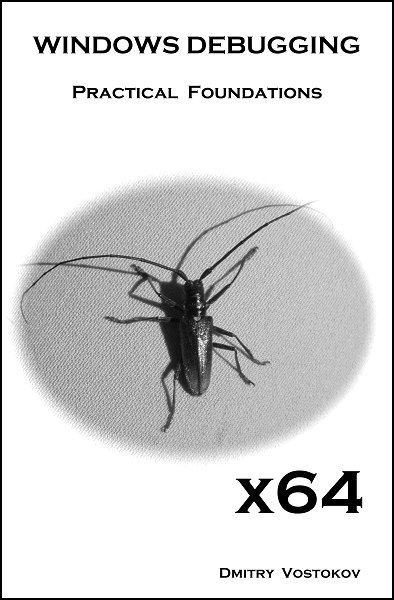
Here is the front cover for the forthcoming book X64 Windows Debugging: Practical Foundations (ISBN: 978-1906717568):
- Dmitry Vostokov @ DumpAnalysis.org -
Posted in Announcements, Books, Crash Dump Analysis, Debugging, Publishing | No Comments »
July 29th, 2009
Often analysis of software traces starts with searching for short textual patterns, like a failure or an exception code or simply the word “exception”. And indeed, some software components are able to record their own exceptions or exceptions that were propagated to them including full stack traces. This is all common in .NET and Java environments. Here is a synthetic and beautified example based on real software traces:
N      PID  TID  Message

[...]

265799 8984 4216 ComponentA.Store.GetData threw exception: ‘System.Reflection.TargetInvocationException: DCOM connection to server failed with error: ‘Exception from HRESULT: 0×842D0001′ —> System.Runtime.InteropServices.COMException (0×842D0001): Exception from HRESULT: 0×842D0001

   at ComponentA.GetData(Byte[] pKey)

   at System.RuntimeMethodHandle._InvokeMethodFast(Object target, Object[] arguments, SignatureStruct& sig, MethodAttributes methodAttributes, RuntimeTypeHandle typeOwner)

   at System.RuntimeMethodHandle.InvokeMethodFast(Object target, Object[] arguments, Signature sig, MethodAttributes methodAttributes, RuntimeTypeHandle typeOwner)

   at System.Reflection.RuntimeMethodInfo.Invoke(Object obj, BindingFlags invokeAttr, Binder binder, Object[] parameters, CultureInfo culture, Boolean skipVisibilityChecks)

   at System.Reflection.RuntimeMethodInfo.Invoke(Object obj, BindingFlags invokeAttr, Binder binder, Object[] parameters, CultureInfo culture)

   at ComponentB.Connections.ComInterfaceProxy.Invoke(IMessage message)’

265800 8984 4216 === Begin Exception Dump ===

265801 8984 4216 ComponentB.Exceptions.ConnectionException: DCOM connection to server failed with error: ‘Exception from HRESULT: 0×842D0001′ —> System.Runtime.InteropServices.COMException (0×842D0001): Exception from HRESULT: 0×842D0001

265802 8984 4216 at ComponentA.Store.GetData(Byte[] pKey)

[…]

265808 8984 4216 Exception rethrown at [0]:

265809 8984 4216 at System.Runtime.Remoting.Proxies.RealProxy.HandleReturnMessage(IMessage reqMsg, IMessage retMsg)

265810 8984 4216 at System.Runtime.Remoting.Proxies.RealProxy.PrivateInvoke(MessageData& msgData, Int32 type)

265811 8984 4216 at ComponentA.Store.GetData(Byte[] pKey)

265812 8984 4216 at ComponentA.App.EnumBusinessObjects()

[…]

265816 8984 4216 ===> InnerException:

265817 8984 4216 ** COM Exception Error Code: 0×842d0001

265818 8984 4216 System.Runtime.InteropServices.COMException (0×842D0001): Exception from HRESULT: 0×842D0001

265819 8984 4216 at ComponentA.Store.GetData(Byte[] pKey)

265820 8984 4216 === End Exception Dump ===

[…]
In the embedded stack trace we see that App object was trying to enumerate business objects and asked Store object to get some data and the latter object was probably trying to communicate to the real data store via DCOM. The communication attempt failed with HRESULT.
- Dmitry Vostokov @ TraceAnalysis.org -
Posted in .NET Debugging, CDF Analysis Tips and Tricks, Citrix, Debugging, Software Trace Analysis, Trace Analysis Patterns | 2 Comments »
July 28th, 2009
Here is another addition to identification of memory dumps coming from VMWare, VirtualPC and Xen Server virtualized Windows systems. Now I had a look at Windows Server 2008 Hyper-V host system running Windows Server 2008 as a guest and found that this information could serve as an identification if infrastructure components were installed:
kd> lm

[...]

fffffa60`00cc2000 fffffa60`00cd7000   winhv       (deferred)

fffff960`00810000 fffff960`0081b000   VMBusVideoD (deferred)

fffffa60`00c7e000 fffffa60`00cc2000   vmbus       (deferred)

fffffa60`00df6000 fffffa60`00dfbb00   VMBusHID    (deferred)

fffffa60`0201c000 fffffa60`02028000   VMBusVideoM (deferred)

[...]
winhv driver has lots of exported hypervisor related functions:
kd> x winhv!*

*** ERROR: Symbol file could not be found.  Defaulted to export symbols for winhv.sys -

fffffa60`00cc3100 winhv!WinHvGetCurrentVpIndex (<no parameter info>)

fffffa60`00cc3160 winhv!WinHvSetSintOnCurrentProcessor (<no parameter info>)

fffffa60`00cc3230 winhv!WinHvNtProcessorToVpIndex (<no parameter info>)

fffffa60`00cc3260 winhv!WinHvDisconnectPort (<no parameter info>)

fffffa60`00cc32e0 winhv!WinHvDeletePort (<no parameter info>)

fffffa60`00cc35c0 winhv!WinHvMapGpaPages (<no parameter info>)

fffffa60`00cc36e0 winhv!WinHvSetVpRegisters (<no parameter info>)

fffffa60`00cc3e20 winhv!WinHvGetVpRegisters (<no parameter info>)

fffffa60`00cc3ed0 winhv!WinHvLowMemoryPolicyAutoDeposit (<no parameter info>)

fffffa60`00cc4110 winhv!WinHvSetPartitionProperty (<no parameter info>)

fffffa60`00cc4250 winhv!WinHvGetPartitionProperty (<no parameter info>)

fffffa60`00cc4290 winhv!WinHvPostMessage (<no parameter info>)

fffffa60`00cc4320 winhv!WinHvCreatePort (<no parameter info>)

fffffa60`00cc4380 winhv!WinHvConnectPort (<no parameter info>)

fffffa60`00cc43e0 winhv!WinHvCreateVp (<no parameter info>)

fffffa60`00cc4430 winhv!WinHvMapEventLogBuffer (<no parameter info>)

fffffa60`00cc44d0 winhv!WinHvCreateEventLogBuffer (<no parameter info>)

fffffa60`00cc4580 winhv!WinHvGetPartitionId (<no parameter info>)

fffffa60`00cc45d0 winhv!WinHvWithdrawAllMemory (<no parameter info>)

fffffa60`00cc4600 winhv!WinHvReleaseEventLogBuffer (<no parameter info>)

fffffa60`00cc4630 winhv!WinHvCreatePartition (<no parameter info>)

fffffa60`00cc49d0 winhv!WinHvDeletePartition (<no parameter info>)

fffffa60`00cc4f50 winhv!WinHvUnmapGpaPages (<no parameter info>)

fffffa60`00cc5150 winhv!WinHvInstallIntercept (<no parameter info>)

fffffa60`00cc5240 winhv!WinHvInitializeEventLogBufferGroup (<no parameter info>)

fffffa60`00cc52c0 winhv!WinHvDeleteVp (<no parameter info>)

fffffa60`00cc5340 winhv!WinHvGetPortProperty (<no parameter info>)

fffffa60`00cc53a0 winhv!WinHvSetEventLogGroupSources (<no parameter info>)

fffffa60`00cc55a0 winhv!WinHvOnInterrupt (<no parameter info>)

fffffa60`00cc5870 winhv!WinHvCancelTimer (<no parameter info>)

fffffa60`00cc5a20 winhv!WinHvSetAbsoluteTimer (<no parameter info>)

fffffa60`00cc5b40 winhv!WinHvSetEventLogCompletedNotificationRoutine (<no parameter info>)

fffffa60`00cc5b50 winhv!WinHvQueryInterceptIrql (<no parameter info>)

fffffa60`00cc5b60 winhv!WinHvGetSintMessage (<no parameter info>)

fffffa60`00cc5b90 winhv!WinHvAllocatePartitionSintIndex (<no parameter info>)

fffffa60`00cc5d60 winhv!WinHvClearVirtualInterrupt (<no parameter info>)

fffffa60`00cc5db0 winhv!WinHvFlushEventLogBuffer (<no parameter info>)

fffffa60`00cc5e10 winhv!WinHvQueryReferenceCounter (<no parameter info>)

fffffa60`00cc5e50 winhv!WinHvSignalEvent (<no parameter info>)

fffffa60`00cc5ea0 winhv!WinHvWriteGpa (<no parameter info>)

fffffa60`00cc5fb0 winhv!WinHvReadGpa (<no parameter info>)

fffffa60`00cc60c0 winhv!WinHvTranslateVirtualAddress (<no parameter info>)

fffffa60`00cc61a0 winhv!WinHvAssertVirtualInterrupt (<no parameter info>)

fffffa60`00cc6240 winhv!WinHvGetSintEventFlags (<no parameter info>)

fffffa60`00cc6e90 winhv!WinHvIsCompatibleServicedHypervisorImplementation (<no parameter info>)

fffffa60`00cc6e90 winhv!WinHvIsCompatibleServicedDriverImplementation (<no parameter info>)

fffffa60`00cc6e90 winhv!WinHvIsCompatibleHypervisorImplementation (<no parameter info>)

fffffa60`00cc6e90 winhv!WinHvIsCompatibleDriverImplementation (<no parameter info>)

fffffa60`00cc6ea0 winhv!WinHvLookupPortId (<no parameter info>)

fffffa60`00cc6ee0 winhv!WinHvLowMemoryPolicyRaiseException (<no parameter info>)

fffffa60`00cc6f90 winhv!WinHvLowMemoryPolicyReturnStatus (<no parameter info>)

fffffa60`00cc7070 winhv!WinHvQueryFeaturesState (<no parameter info>)

fffffa60`00cc71f0 winhv!WinHvDeleteEventLogBuffer (<no parameter info>)

fffffa60`00cc7220 winhv!WinHvUnmapEventLogBuffer (<no parameter info>)

fffffa60`00cc7250 winhv!WinHvFinalizeEventLogBufferGroup (<no parameter info>)

fffffa60`00cc7310 winhv!WinHvSetEndOfMessage (<no parameter info>)

fffffa60`00cc7340 winhv!WinHvAllocateSingleSintIndex (<no parameter info>)

fffffa60`00cc7530 winhv!WinHvClearLogicalProcessorRunTimeGroup (<no parameter info>)

fffffa60`00cc7560 winhv!WinHvSetLogicalProcessorRunTimeGroup (<no parameter info>)

fffffa60`00cc7740 winhv!WinHvGetMemoryBalance (<no parameter info>)

fffffa60`00cc77a0 winhv!WinHvGetLogicalProcessorRunTime (<no parameter info>)

fffffa60`00cc7830 winhv!WinHvGetNextChildPartition (<no parameter info>)

fffffa60`00ccf0e0 winhv!WinHvReportPresentHypervisor (<no parameter info>)

fffffa60`00ccf400 winhv!WinHvSetSint (<no parameter info>)

fffffa60`00ccf5b0 winhv!WinHvMapStatsPage (<no parameter info>)

fffffa60`00ccfa90 winhv!WinHvWithdrawMemory (<no parameter info>)

fffffa60`00ccfc80 winhv!WinHvDepositMemory (<no parameter info>)

fffffa60`00ccfd80 winhv!WinHvAllocatePortId (<no parameter info>)

fffffa60`00ccfff0 winhv!WinHvUnmapStatsPage (<no parameter info>)

fffffa60`00cd02d0 winhv!WinHvDeleteTimer (<no parameter info>)

fffffa60`00cd02f0 winhv!WinHvCreateTimer (<no parameter info>)

fffffa60`00cd0360 winhv!WinHvFreePortId (<no parameter info>)

fffffa60`00cd03c0 winhv!WinHvSupplyInterruptVector (<no parameter info>)

fffffa60`00cd0a80 winhv!WinHvAdjustFeaturesState (<no parameter info>)

fffffa60`00cd0aa0 winhv!WinHvQueryFeatureInformation (<no parameter info>)

fffffa60`00cd0ab0 winhv!WinHvGetIdentifierString (<no parameter info>)

fffffa60`00cd0bd0 winhv!WinHvFreeSingleSintIndex (<no parameter info>)

fffffa60`00cd0c20 winhv!WinHvFreePartitionSintIndex (<no parameter info>)

fffffa60`00cd0dd0 winhv!DllUnload (<no parameter info>)

fffffa60`00cd0f30 winhv!WinHvReclaimInterruptVector (<no parameter info>)

fffffa60`00cd1030 winhv!WinHvRestorePartitionState (<no parameter info>)

fffffa60`00cd1170 winhv!WinHvSavePartitionState (<no parameter info>)

fffffa60`00cd3050 winhv!DllInitialize (<no parameter info>)

fffffa60`00cd3990 winhv!DriverEntry (<no parameter info>)
If we have a clean virtualized guest without any tools installed then we can rely on hardware information:
kd> !sysinfo machineid

Machine ID Information [From Smbios 2.3, DMIVersion 35, Size=3752]

BiosVendor = American Megatrends Inc.

BiosVersion = 080002

BiosReleaseDate = 05/05/2008

SystemManufacturer = Microsoft Corporation

SystemProductName = Virtual Machine

SystemVersion = 5.0

BaseBoardManufacturer = Microsoft Corporation

BaseBoardProduct = Virtual Machine

BaseBoardVersion = 5.0
- Dmitry Vostokov @ DumpAnalysis.org -
Posted in Crash Dump Analysis, Hyper-V, Virtualization, Windows Server 2008 | 1 Comment »