Trace Analysis Patterns (Part 112)

July 9th, 2015

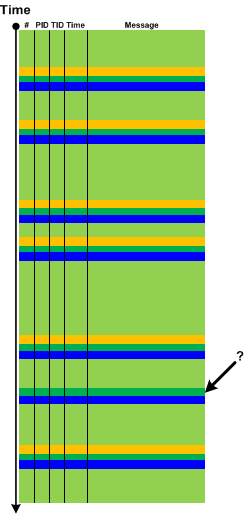
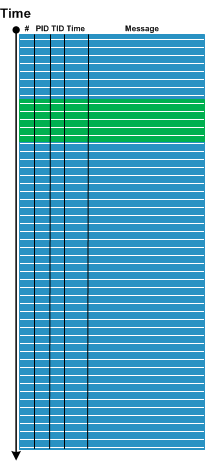
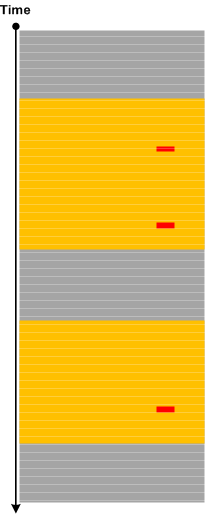
Sometimes a few Error Messages or Periodic Errors with low Statement Density for specific Activity Regions or Adjoint Threads of Activity (for specific component, file or function) may constitute Activity Disruption. If the particular functionality was no longer available at the logging time then its unavailability may not be explained by such disruptions, and such messages may be considered False Positive Errors in relation to the reported problem:

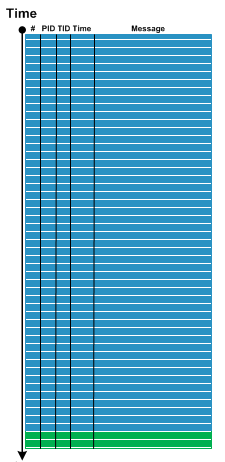
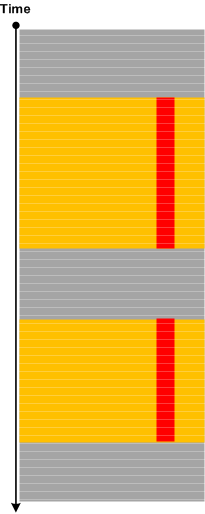
But, if we have Periodic Message Blocks containing only Periodic Errors, Activity Region or Adjoint Thread Discontinuity, or simply No Activity, then we may have the complete cease of activity that may correlate with the unavailable functionality:

- Dmitry Vostokov @ DumpAnalysis.org + TraceAnalysis.org -
Trace Analysis Patterns (Part 111)

July 6th, 2015

Sometimes we have messages that report about error but do not give exact details. For example, “Communication error. Problem at the server side” or “Access denied error”. This may be the case of Translated Messages. Such messages are plain language descriptions or reinterpretations of flags, error and status codes contained in another log message. These descriptions may be coming from system API, for example, FormatMessage from Windows API, or may be from custom formatting code. Since the code translating the message is in close proximity to the original message both messages usually follow each other with zero or very small Time Delta, come from the same component, file, function, and belong to the same Thread of Activity:

This pattern is different from Gossip because the latter messages come from different modules, and, although they reflect some underlying event, they are independent from each.

- Dmitry Vostokov @ DumpAnalysis.org + TraceAnalysis.org -
Trace Analysis Patterns (Part 110)

June 30th, 2015

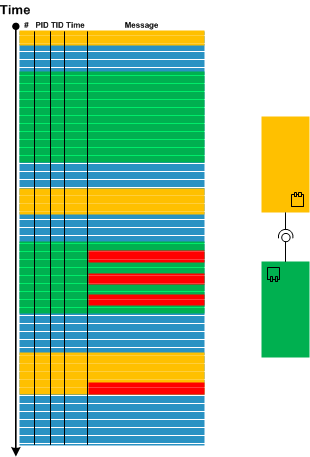
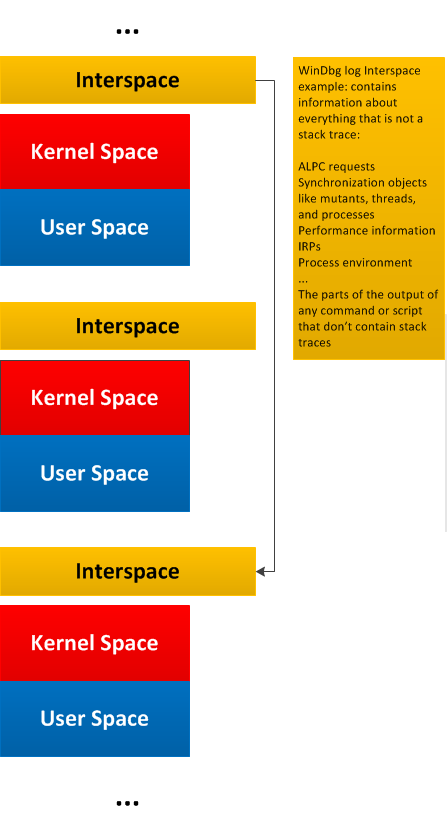
General traces and logs may have Message Space regions “surrounded” by the so-called Interspace. Such Interspace regions may link individual Message Space regions like in this diagram generalizing WinDbg !process 0 3f command output:

- Dmitry Vostokov @ DumpAnalysis.org + TraceAnalysis.org -
Trace Analysis Patterns (Part 109)

June 29th, 2015

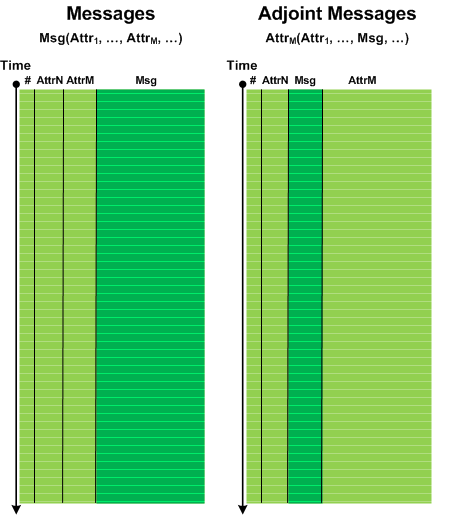
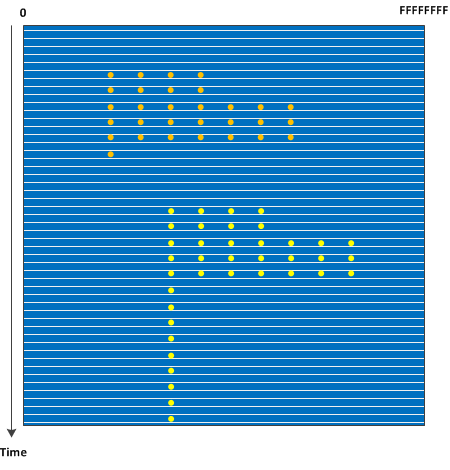
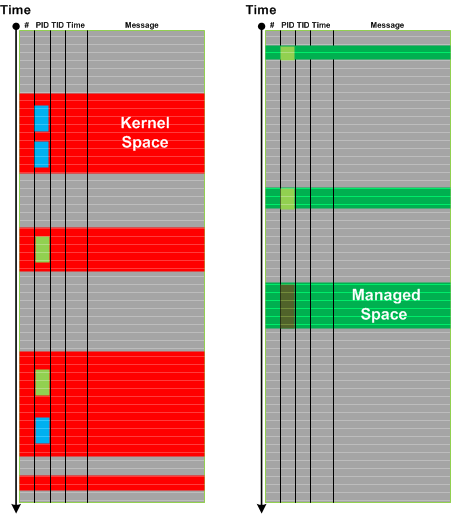
Message stream can be considered as a union of Message Spaces. A message space is an ordered set of messages preserving the structure of the overall trace. Such messages may be selected based on a memory space they came from or can be selected by some other general attribute, or a combination of attributes and facts. The differences from Message Set is that Message Space is usually much larger (with large scale structure) with various Message Sets extracted from it later for fine grained analysis. This pattern also fits nicely with Adjoint Spaces. Here’s an example of kernel and managed spaces in the same CDF / ETW trace from Windows platform where we see that kernel space messages came not only from System process but also from other process contexts:

In the context of general traces and logs such as debugger logs separate Message Space regions may be linked (or “surrounded”) by Interspace.

- Dmitry Vostokov @ DumpAnalysis.org + TraceAnalysis.org -
Crash Dump Analysis Patterns (Part 228)

June 28th, 2015

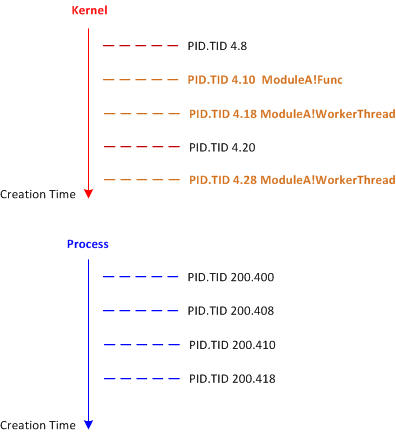
Predicate Stack Trace Collections allow you to get a subset of stack traces, for example, by showing only stack traces where a specific module is used (for example, !stacks 2 module WinDbg command). From diagnostic analysis perspective, the order in which threads from the subset appear is also important, especially when the output is sorted by thread creation time or simply the order is given by a global thread linked list. We call this analysis pattern Thread Poset by analogy with a mathematical concept of poset (partially ordered set):

Such an analysis pattern is mostly useful when we compare stack traces for differences or when we don’t have symbols for some problem version and want to map threads to some other previous normal run where symbol files are available. Any discrepancies may point in the direction of further diagnostic analysis. For example, we got this fragment of Stack Trace Collection:

4.000188 fffffa800d3d3b50 ffd0780f Blocked ModuleA+0x1ac1
4.00018c fffffa800d3f9950 ffd07b53 Blocked ModuleA+0xd802
4.000190 fffffa800d4161b0 fffffda6 Blocked ModuleA+0x9ce4
4.000194 fffffa800d418b50 fffffda6 Blocked ModuleA+0x9ce4
4.000198 fffffa800d418660 fffffda6 Blocked ModuleA+0x9ce4
4.0001ac fffffa800d41eb50 ffd078d2 Blocked ModuleA+0xa7cf
4.0001b0 fffffa800d41e660 ffd0780f Blocked ModuleA+0x9ce4
4.0001c0 fffffa800d48f300 ffd0e5c0 Blocked ModuleA+0x7ee5

We didn’t have symbols, and, therefore, didn’t know whether there was anything wrong with those threads. Fortunately, we had Thread Poset from an earlier 32-bit version with available symbol files:

4.0000ec 85d8dc58 000068c Blocked ModuleA!FuncA+0x9b
4.0000f0 85d9fc78 001375a Blocked ModuleA!FuncB+0x67
4.0000fc 85db8a58 000068c Blocked ModuleA!WorkerThread+0xa2
4.000104 85cdbd48 000ff44 Blocked ModuleA!WorkerThread+0xa2
4.000108 85da2788 000ff47 Blocked ModuleA!WorkerThread+0xa2

4.000110 857862e0 0013758 Blocked ModuleA!FuncC+0xe4
4.000114 85dda250 000ff44 Blocked ModuleA!FuncD+0xf2

If we map worker threads to the middle section of x64 version we see just one more worker thread but the overall order is the same:

4.000188 fffffa800d3d3b50 ffd0780f Blocked ModuleA+0x1ac1
4.00018c fffffa800d3f9950 ffd07b53 Blocked ModuleA+0xd802
4.000190 fffffa800d4161b0 fffffda6 Blocked ModuleA+0×9ce4
4.000194 fffffa800d418b50 fffffda6 Blocked ModuleA+0×9ce4
4.000198 fffffa800d418660 fffffda6 Blocked ModuleA+0×9ce4

4.0001ac fffffa800d41eb50 ffd078d2 Blocked ModuleA+0xa7cf
4.0001b0 fffffa800d41e660 ffd0780f Blocked ModuleA+0×9ce4
4.0001c0 fffffa800d48f300 ffd0e5c0 Blocked ModuleA+0×7ee5

So we may think of x64 Thread Poset as normal if x86 Thread Poset is normal too. Of course, only initially, then to continue looking for other patterns of abnormal behavior. If necessary, we may need to inspect stack traces deeper, because individual threads from two Thread Posets may differ in their stack trace depth, subtraces, and in usage of other components. Despite the same order, some threads may actually be abnormal.

- Dmitry Vostokov @ DumpAnalysis.org + TraceAnalysis.org -
Crash Dump Analysis Patterns (Part 227)

May 17th, 2015

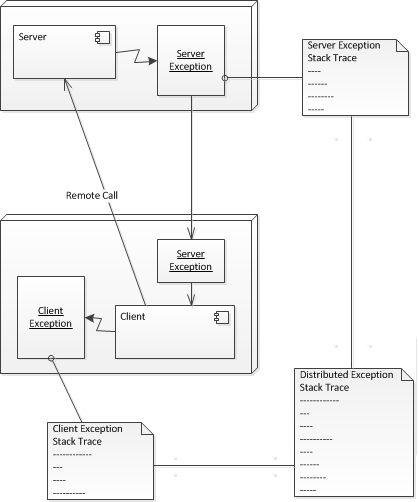
Managed code Nested Exceptions give us process virtual space bound stack traces. However, exception objects may be marshaled across processes and even computers. The remote stack trace return addresses don’t have the same validity in different process contexts. Fortunately, there is _remoteStackTraceString field in exception objects that contains the original stack trace. Default analysis command sometimes uses it:

0:013> !analyze -v

[...]

EXCEPTION_OBJECT: !pe 25203b0
Exception object: 00000000025203b0
Exception type: System.Reflection.TargetInvocationException
Message: Exception has been thrown by the target of an invocation.
InnerException: System.Management.Instrumentation.WmiProviderInstallationException, Use !PrintException 0000000002522cf0 to see more.
StackTrace (generated):
SP IP Function
000000001D39E720 0000000000000001 Component!Proxy.Start()+0x20
000000001D39E720 000007FEF503D0B6 mscorlib_ni!System.Threading.ExecutionContext.RunInternal(System.Threading.ExecutionContext, System.Threading.ContextCallback, System.Object, Boolean)+0x286
000000001D39E880 000007FEF503CE1A mscorlib_ni!System.Threading.ExecutionContext.Run(System.Threading.ExecutionContext, System.Threading.ContextCallback, System.Object, Boolean)+0xa
000000001D39E8B0 000007FEF503CDD8 mscorlib_ni!System.Threading.ExecutionContext.Run(System.Threading.ExecutionContext, System.Threading.ContextCallback, System.Object)+0x58
000000001D39E900 000007FEF4FB0302 mscorlib_ni!System.Threading.ThreadHelper.ThreadStart()+0x52

[...]

MANAGED_STACK_COMMAND: ** Check field _remoteStackTraceString **;!do 2522cf0;!do 2521900

[...]

0:013> !DumpObj 2522cf0
[...]
000007fef51b77f0 4000054 2c System.String 0 instance 2521900 _remoteStackTraceString
[…]

0:013> !DumpObj 2521900
Name: System.String
[…]
String: at System.Management.Instrumentation.InstrumentationManager.RegisterType(Type managementType)
at Component.Provider..ctor()
at Component.Start()

Checking this field may also be necessary for exceptions of interest from managed space Execution Residue. We call this pattern Distributed Exception. The basic idea is illustrated in the following diagram using the borrowed UML notation (not limited to just two computers):

- Dmitry Vostokov @ DumpAnalysis.org + TraceAnalysis.org -
Trace Analysis Patterns (Part 108)

May 13th, 2015

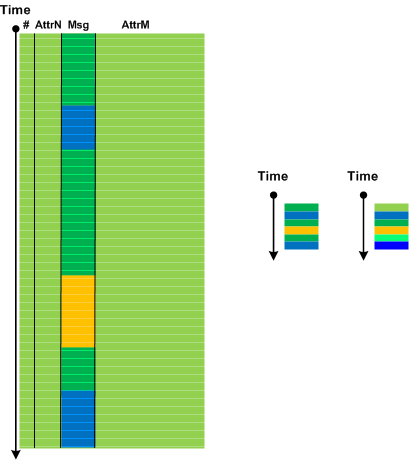
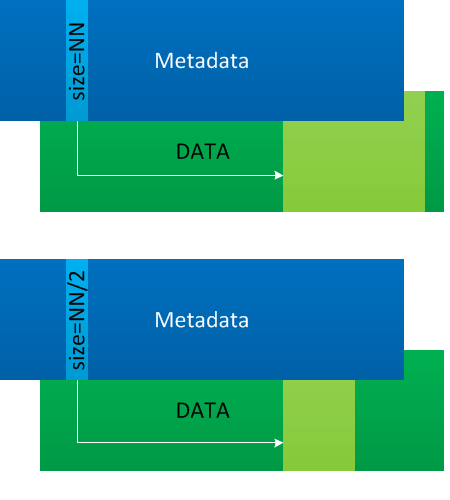
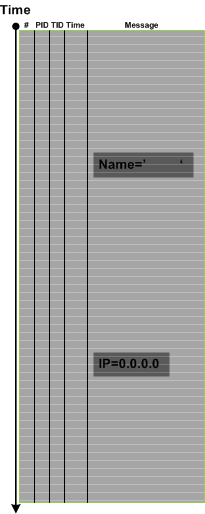
Palimpsest Messages are messages where some part or all of their content was erased or overwritten.

The name of this pattern comes from palimpsest manuscript scrolls. Such messages may be a part of malnarratives or result from Circular Tracing or trace buffer corruption. Sometimes, not all relevant data is erased and by using Intra- and Inter-Correlation, and via the analysis of Message Invariants it is possible to recover the original data. Also, as in Recovered Messages pattern it may be possible to use Message Context to infer some partial content.

- Dmitry Vostokov @ DumpAnalysis.org + TraceAnalysis.org -
Crash Dump Analysis Patterns (Part 226)

May 13th, 2015

Occasionally, we look at Stack Trace Collection and notice Internal Stack Trace. This is a stack trace that is shouldn’t be seen in a normal crash dump because statistically it is rare (we planned to name this pattern Rare Stack Trace initially). This stack trace is also not Special Stack Trace because it is not associated with the special system events or problems. It is also not a stack trace that belongs to various Wait Chains or Spiking Threads. This is also a real stack trace and not a reconstructed or hypothetical stack trace such as Rough Stack Trace or Past Stack Trace. This is simply a thread stack trace that shows some internal operation, for example, where it suggests that message hooking was involved:

THREAD fffffa8123702b00 Cid 11cc.0448 Teb: 000007fffffda000 Win32Thread: fffff900c1e6ec20 WAIT: (WrUserRequest) UserMode Non-Alertable
fffffa81230cf4e0 SynchronizationEvent
Not impersonating
DeviceMap fffff8a0058745e0
Owning Process fffffa81237a8b30 Image: ProcessA.exe
Attached Process N/A Image: N/A
Wait Start TickCount 1258266 Ticks: 18 (0:00:00:00.280)
Context Switch Count 13752 IdealProcessor: 1 NoStackSwap LargeStack
UserTime 00:00:00.468
KernelTime 00:00:00.187

Win32 Start Address ProcessA!ThreadProc (0×000007feff17c608)
Stack Init fffff8800878c700 Current fffff8800878ba10
Base fffff8800878d000 Limit fffff88008781000 Call fffff8800878c750
Priority 12 BasePriority 8 UnusualBoost 0 ForegroundBoost 2 IoPriority 2 PagePriority 5
Child-SP RetAddr Call Site
fffff880`0878ba50 fffff800`01a6c8f2 nt!KiSwapContext+0×7a
fffff880`0878bb90 fffff800`01a7dc9f nt!KiCommitThreadWait+0×1d2
fffff880`0878bc20 fffff960`0010dbd7 nt!KeWaitForSingleObject+0×19f
fffff880`0878bcc0 fffff960`0010dc71 win32k!xxxRealSleepThread+0×257
fffff880`0878bd60 fffff960`000c4bf7 win32k!xxxSleepThread+0×59
fffff880`0878bd90 fffff960`000d07a5 win32k!xxxInterSendMsgEx+0×112a
fffff880`0878bea0 fffff960`00151bf8 win32k!xxxCallHook2+0×62d
fffff880`0878c010 fffff960`000d2454 win32k!xxxCallMouseHook+0×40
fffff880`0878c050 fffff960`0010bf23 win32k!xxxScanSysQueue+0×1828

fffff880`0878c390 fffff960`00118fae win32k!xxxRealInternalGetMessage+0×453
fffff880`0878c470 fffff800`01a76113 win32k!NtUserRealInternalGetMessage+0×7e
fffff880`0878c500 00000000`771b913a nt!KiSystemServiceCopyEnd+0×13 (TrapFrame @ fffff880`0878c570)
00000000`053ff258 000007fe`fac910f4 USER32!NtUserRealInternalGetMessage+0xa
00000000`053ff260 000007fe`fac911fa DUser!CoreSC::xwProcessNL+0×173
00000000`053ff2d0 00000000`771b9181 DUser!MphProcessMessage+0xbd
00000000`053ff330 00000000`774111f5 USER32!_ClientGetMessageMPH+0×3d
00000000`053ff3c0 00000000`771b908a ntdll!KiUserCallbackDispatcherContinue (TrapFrame @ 00000000`053ff288)
00000000`053ff438 00000000`771b9055 USER32!NtUserPeekMessage+0xa
00000000`053ff440 000007fe`ebae03fa USER32!PeekMessageW+0×105
00000000`053ff490 000007fe`ebae4925 ProcessA+0×5a
[…]
00000000`053ff820 00000000`773ec541 kernel32!BaseThreadInitThunk+0xd
00000000`053ff850 00000000`00000000 ntdll!RtlUserThreadStart+0×1d

We see that this thread was neither waiting for significant time nor consuming CPU. It was reported that ProcessA.exe was very slow responding. So perhaps this was slowly punctuated thread execution with periodic small waits. In fact, Execution Residue analysis revealed Non-Coincidental Symbolic Information of the 3rd-party Message Hook and its Module Product Process was identified. Its removal resolved the problem.

- Dmitry Vostokov @ DumpAnalysis.org + TraceAnalysis.org -
Crash Dump Analysis Patterns (Part 127d)

May 10th, 2015

Here we add yet another Technology-Specific Subtrace pattern for COM client calls (as compared to COM interface invocation for servers). We recently got a complete memory dump where we had to find the destination server process, and we used the old technique described in the article In Search of Lost CID. We reprint the 32-bit stack subtrace trace here:

[...]
00faf828 7778c38b ole32!CRpcChannelBuffer::SwitchAptAndDispatchCall+0x112
00faf908 776c0565 ole32!CRpcChannelBuffer::SendReceive2+0xd3
00faf974 776c04fa ole32!CAptRpcChnl::SendReceive+0xab
00faf9c8 77ce247f ole32!CCtxComChnl::SendReceive+0×1a9
00faf9e4 77ce252f RPCRT4!NdrProxySendReceive+0×43
00fafdcc 77ce25a6 RPCRT4!NdrClientCall2+0×206
[...]

Here’s also an x64 fragment from Semantic Structures (PID.TID) pattern:

[...]
00000000`018ce450 000007fe`ffee041b ole32!CRpcChannelBuffer::SwitchAptAndDispatchCall+0xa3
00000000`018ce4f0 000007fe`ffd819c6 ole32!CRpcChannelBuffer::SendReceive2+0×11b
00000000`018ce6b0 000007fe`ffd81928 ole32!CAptRpcChnl::SendReceive+0×52
00000000`018ce780 000007fe`ffedfcf5 ole32!CCtxComChnl::SendReceive+0×68
00000000`018ce830 000007fe`ff56ba3b ole32!NdrExtpProxySendReceive+0×45
00000000`018ce860 000007fe`ffee02d0 RPCRT4!NdrpClientCall3+0×2e2
[...]

If we have the call over ALPC it is easy to find the server process and thread (Wait Chain). In case of a modal loop we can use raw stack analysis technique mentioned above (see also this case study).

Other subtrace examples can be found in pattern examples for High Contention (.NET CLR monitors), Wait Chain (RTL_RESOURCE), and in this case study.

- Dmitry Vostokov @ DumpAnalysis.org + TraceAnalysis.org -
Crash Dump Analysis Patterns (Part 225)

May 9th, 2015

One of the questions asked was what can we do if we got a kernel memory dump instead of the requested complete memory dump? Can it be useful? Of course, if we requested a complete memory dump after analyzing a kernel memory dump then the second kernel dump may be useful for double checking. Therefore, we assume that we just got a kernel memory dump for the first time and the issue is some performance issue or system freeze and not a bugcheck. If we have a bugcheck then kernel memory dumps are sufficient most of the time, and we do not consider them for this pattern.

Such a kernel memory dump is still useful because of user space diagnostic indicators pointing to possible patterns in user space or “interspace”. We call this pattern User Space Evidence. It is a collective super-pattern like Historical Information.

We can see patterns in kernel memory dumps such as Wait Chains (for example, ALPC or Process Objects), Deadlocks (for example ALPC), kernel stack traces corresponding to specific Dual Stack Traces (for example, exception processing), Handle Leaks, Missing Threads, Module Product Process, One-Thread Processes, Spiking Thread, Process Factory (for example, PPID for Zombie Processes), and others.

Found evidence may point to specific processes and process groups (Couples Processes, session processes) and suggest process memory dump collection (especially forcing further complete memory dumps is problematic) or troubleshooting steps for diagnosed processes.

- Dmitry Vostokov @ DumpAnalysis.org + TraceAnalysis.org -
Trace Analysis Patterns (Part 107)

May 3rd, 2015

If you analyze ETW-based traces such as CDF you may frequently encounter No Trace Metafile pattern especially after product updates and fixes. This complicates pattern analysis because we may not be able to see Significant Events, Anchor Messages, and Error Messages. In some cases we can recover messages by comparing Message Context for unknown messages. If we have source code access this may also help. Both approaches are illustrated in the following diagram:

The same approach may also be applied for a different kind of trace artifacts when some messages are corrupt. In such cases it is possible to recover diagnostic evidence and, therefore, we call this pattern Recovered Messages.

- Dmitry Vostokov @ DumpAnalysis.org + TraceAnalysis.org -
Trace Analysis Patterns (Part 106)

April 28th, 2015

Sometimes we notice that data values are in a different order than expected. We call this pattern Data Reversal. By data values we mean some variable parts of a specific repeated message such the address of some structure or object. Data Reversal may happen for one message type:

But it can also happen for some message types and not for others. Typical example here are Enter/Leave trace messages for nested synchronization objects such as monitors and critical sections:

Since we talk about the same message type (the same Message Invariant) this pattern is different from Event Sequence Order pattern.

In rare cases we may observe Data Reversal inside one message with several variable parts but this may also be a case of Data Association.

- Dmitry Vostokov @ DumpAnalysis.org + TraceAnalysis.org -
Virtualized process, stack trace collection, COM interface invocation subtrace, active thread, spiking thread, last error collection, RIP stack trace, value references, namespace, and module hint: pattern cooperation

April 26th, 2015

Recently we analyzed a memory dump posted in DA+TA group and posted our results there. The problem was resolved. Afterwards, we decided to look at the earlier dump that was posted for the same problem: a COM server program was unresponsive. That dump was not fully analyzed by group members so we decided to write a case study based on it since it had one more pattern.

When we open the dump in WinDbg it shows Virtualized Process (WOW64) pattern:

wow64cpu!TurboDispatchJumpAddressEnd+0x598:
00000000`77cf2772 c3 ret

We load symbols, WOW64 extension, and switch to x86 mode:

0:000> .symfix c:\mss

0:000> .reload

0:000> .load wow64exts

0:000> !sw
Switched to 32bit mode

Then we check threads in Stack Trace Collection:

0:000:x86> ~*kL

. 0 Id: 16d8.11e0 Suspend: 0 Teb: fffdc000 Unfrozen
ChildEBP RetAddr
002fb0a8 765c10fd ntdll_77d00000!NtWaitForSingleObject+0xc
002fb118 76606586 KERNELBASE!WaitForSingleObjectEx+0x99
002fb138 00499ddc KERNELBASE!GetOverlappedResult+0x9d
WARNING: Stack unwind information not available. Following frames may be wrong.
002fb1a0 005261a4 ServerA+0x99ddc
002fb1e4 005278c9 ServerA+0x1261a4
002fb454 0053bc4d ServerA+0x1278c9
002fba34 005fe5c8 ServerA+0x13bc4d
002fbe20 006094eb ServerA+0x1fe5c8
002fc40c 0060a0d7 ServerA+0x2094eb
0038ee8c 0061a0cb ServerA+0x20a0d7
0038eea4 75e65c3e ServerA+0x21a0cb
0038eed0 75edf497 rpcrt4!Invoke+0×2a
0038f55c 763b04d5 rpcrt4!NdrStubCall2+0×33c
0038f5a4 769aa572 combase!CStdStubBuffer_Invoke+0×96
0038f5c4 763b039d oleaut32!CUnivStubWrapper::Invoke+0×30
0038f650 762b3733 combase!SyncStubInvoke+0×144
(Inline) ——– combase!StubInvoke+0×9a
0038f77c 763b1198 combase!CCtxComChnl::ContextInvoke+0×222
(Inline) ——– combase!DefaultInvokeInApartment+0×4e
(Inline) ——– combase!ClassicSTAInvokeInApartment+0×103
0038f824 763b0bc2 combase!AppInvoke+0×258
0038f980 762b277e combase!ComInvokeWithLockAndIPID+0×5fb
(Inline) ——– combase!ComInvoke+0×15c

(Inline) ——– combase!ThreadDispatch+0×169
0038f9b0 75cf7834 combase!ThreadWndProc+0×2ad
0038f9dc 75cf7a9a user32!_InternalCallWinProc+0×23
0038fa6c 75cf988e user32!UserCallWinProcCheckWow+0×184
0038fad8 75d08857 user32!DispatchMessageWorker+0×208
0038fae0 0061cb88 user32!DispatchMessageA+0×10
0038ff74 0061d85a ServerA+0×21cb88
0038ff8c 7617919f ServerA+0×21d85a
0038ff98 77d4a8cb kernel32!BaseThreadInitThunk+0xe
0038ffdc 77d4a8a1 ntdll_77d00000!__RtlUserThreadStart+0×20
0038ffec 00000000 ntdll_77d00000!_RtlUserThreadStart+0×1b

1 Id: 16d8.f5c Suspend: 0 Teb: fffd9000 Unfrozen
ChildEBP RetAddr
WARNING: Frame IP not in any known module. Following frames may be wrong.
0159ff8c 7617919f 0×3b02c8
0159ff98 77d4a8cb kernel32!BaseThreadInitThunk+0xe
0159ffdc 77d4a8a1 ntdll_77d00000!__RtlUserThreadStart+0×20
0159ffec 00000000 ntdll_77d00000!_RtlUserThreadStart+0×1b

2 Id: 16d8.a88 Suspend: 0 Teb: ffe47000 Unfrozen
ChildEBP RetAddr
097cfde8 77d227d3 ntdll_77d00000!NtWaitForWorkViaWorkerFactory+0xc
097cff8c 7617919f ntdll_77d00000!TppWorkerThread+0x259
097cff98 77d4a8cb kernel32!BaseThreadInitThunk+0xe
097cffdc 77d4a8a1 ntdll_77d00000!__RtlUserThreadStart+0x20
097cffec 00000000 ntdll_77d00000!_RtlUserThreadStart+0x1b

3 Id: 16d8.ab0 Suspend: 0 Teb: fffd3000 Unfrozen
ChildEBP RetAddr
0414fde8 77d227d3 ntdll_77d00000!NtWaitForWorkViaWorkerFactory+0xc
0414ff8c 7617919f ntdll_77d00000!TppWorkerThread+0x259
0414ff98 77d4a8cb kernel32!BaseThreadInitThunk+0xe
0414ffdc 77d4a8a1 ntdll_77d00000!__RtlUserThreadStart+0x20
0414ffec 00000000 ntdll_77d00000!_RtlUserThreadStart+0x1b

4 Id: 16d8.868 Suspend: 0 Teb: ffe4d000 Unfrozen
ChildEBP RetAddr
0460fde8 77d227d3 ntdll_77d00000!NtWaitForWorkViaWorkerFactory+0xc
0460ff8c 7617919f ntdll_77d00000!TppWorkerThread+0x259
0460ff98 77d4a8cb kernel32!BaseThreadInitThunk+0xe
0460ffdc 77d4a8a1 ntdll_77d00000!__RtlUserThreadStart+0x20
0460ffec 00000000 ntdll_77d00000!_RtlUserThreadStart+0x1b

The first thread (#0) has Technology-Specific Subtrace (COM interface invocation) calling ServerA module code, and the second trace (#1) seems to be Active Thread (not waiting) having RIP Stack Trace.

However, only thread #0 seems to be Spiking Thread:

0:000:x86> !runaway f
 User Mode Time
  Thread       Time
   0:11e0      0 days 0:44:44.890
   4:868       0 days 0:00:00.000
   3:ab0       0 days 0:00:00.000
   2:a88       0 days 0:00:00.000
   1:f5c       0 days 0:00:00.000
 Kernel Mode Time
  Thread       Time
   0:11e0      0 days 0:10:38.312
   4:868       0 days 0:00:00.015
   3:ab0       0 days 0:00:00.000
   2:a88       0 days 0:00:00.000
   1:f5c       0 days 0:00:00.000
 Elapsed Time
  Thread       Time
   0:11e0      0 days 2:56:23.297
   1:f5c       0 days 2:56:22.625
   2:a88       0 days 2:54:36.883
   3:ab0       0 days 0:02:18.705
   4:868       0 days 0:01:07.372

Last Error Collection is clear but needs to be double checked by TEB32 (since we have a virtualized process):

0:000:x86> !gle
LastErrorValue: (Win32) 0 (0) - The operation completed successfully.
LastStatusValue: (NTSTATUS) 0 - STATUS_WAIT_0
Wow64 TEB status:
LastErrorValue: (Win32) 0 (0) - The operation completed successfully.
LastStatusValue: (NTSTATUS) 0 - STATUS_WAIT_0

0:000:x86> !teb
Wow64 TEB32 at 00000000fffde000
    ExceptionList:        00000000002fb108
    StackBase:            0000000000390000
    StackLimit:           0000000000255000
    SubSystemTib:         0000000000000000
    FiberData:            0000000000001e00
    ArbitraryUserPointer: 0000000000000000
    Self:                 00000000fffde000
    EnvironmentPointer:   0000000000000000
    ClientId:             00000000000016d8 . 00000000000011e0
    RpcHandle:            0000000000000000
    Tls Storage:          0000000000e12978
    PEB Address:          00000000fffdf000
    LastErrorValue:       38
    LastStatusValue:      c0000011
    Count Owned Locks:    0
    HardErrorMode:        0
Wow64 TEB at 00000000fffdc000
    ExceptionList:        00000000fffde000
    StackBase:            000000000008fd30
    StackLimit:           0000000000083000
    SubSystemTib:         0000000000000000
    FiberData:            0000000000001e00
    ArbitraryUserPointer: 0000000000000000
    Self:                 00000000fffdc000
    EnvironmentPointer:   0000000000000000
    ClientId:             00000000000016d8 . 00000000000011e0
    RpcHandle:            0000000000000000
    Tls Storage:          0000000000000000
    PEB Address:          00000000fffd6000
    LastErrorValue:       0
    LastStatusValue:      0
    Count Owned Locks:    0
    HardErrorMode:        0

From the errors we suggested to check the code dealing with EOF condition.

0:000:x86> !error 0n38
Error code: (Win32) 0x26 (38) - Reached the end of the file.

0:000:x86> !error c0000011
Error code: (NTSTATUS) 0xc0000011 (3221225489) - The end-of-file marker has been reached. There is no valid data in the file beyond this marker.

But let’s look at the thread #1 raw address and check whether we have traces of malware or JIT code or something else:

0:000:x86> ~1s
003b02c8 c20c00          ret     0Ch
0:001:x86> u 0×3b02c8
003b02c8 c20c00          ret     0Ch
003b02cb 90              nop
003b02cc cc              int     3
003b02cd cc              int     3
003b02ce cc              int     3
003b02cf cc              int     3
003b02d0 cc              int     3
003b02d1 cc              int     3
0:001:x86> ub 0x3b02c8
003b02b6 cc              int     3
003b02b7 cc              int     3
003b02b8 cc              int     3
003b02b9 cc              int     3
003b02ba cc              int     3
003b02bb cc              int     3
003b02bc b803000d00      mov     eax,0D0003h
003b02c1 64ff15c0000000  call    dword ptr fs:[0C0h]
0:001:x86> dps fs:[0C0h] L1
0053:000000c0  77cf11d8 wow64cpu!KiFastSystemCall
0:001:x86> !address 0x3b02c8
Usage:                  
Base Address:           003b0000
End Address:            003b1000
Region Size:            00001000
State:                  00001000	MEM_COMMIT
Protect:                00000020	PAGE_EXECUTE_READ
Type:                   00020000	MEM_PRIVATE
Allocation Base:        003b0000
Allocation Protect:     00000040	PAGE_EXECUTE_READWRITE

Dumping this executable region only shows WOW64 calls:

0:001:x86> dc 003b0000 003b1000
[...]
0:001:x86> .asm no_code_bytes
Assembly options: no_code_bytes
0:001:x86> u 003b0110 003b02e0
003b0110 add     byte ptr [eax],al
003b0112 add     byte ptr [eax],al
003b0114 add     byte ptr [eax],al
003b0116 add     byte ptr [eax],al
003b0118 mov     eax,3000Eh
003b011d call    dword ptr fs:[0C0h]
003b0124 ret     4
003b0127 nop
003b0128 int     3
003b0129 int     3
003b012a int     3
003b012b int     3
003b012c int     3
003b012d int     3
003b012e int     3
003b012f int     3
003b0130 int     3
003b0131 int     3
003b0132 int     3
003b0133 int     3
003b0134 mov     eax,32h
003b0139 call    dword ptr fs:[0C0h]
003b0140 ret     18h
003b0143 nop
003b0144 int     3
003b0145 int     3
003b0146 int     3
003b0147 int     3
003b0148 int     3
003b0149 int     3
003b014a int     3
003b014b int     3
003b014c int     3
003b014d int     3
003b014e int     3
003b014f int     3
003b0150 mov     eax,1B0006h
003b0155 call    dword ptr fs:[0C0h]
003b015c ret     28h
003b015f nop
003b0160 int     3
003b0161 int     3
003b0162 int     3
003b0163 int     3
003b0164 int     3
003b0165 int     3
003b0166 int     3
003b0167 int     3
003b0168 int     3
003b0169 int     3
003b016a int     3
003b016b int     3
003b016c mov     eax,7002Bh
003b0171 call    dword ptr fs:[0C0h]
003b0178 ret     8
003b017b nop
003b017c int     3
003b017d int     3
003b017e int     3
003b017f int     3
003b0180 int     3
003b0181 int     3
003b0182 int     3
003b0183 int     3
003b0184 int     3
003b0185 int     3
003b0186 int     3
003b0187 int     3
003b0188 mov     eax,17h
003b018d call    dword ptr fs:[0C0h]
003b0194 ret     18h
003b0197 nop
003b0198 int     3
003b0199 int     3
003b019a int     3
003b019b int     3
003b019c int     3
003b019d int     3
003b019e int     3
003b019f int     3
003b01a0 int     3
003b01a1 int     3
003b01a2 int     3
003b01a3 int     3
003b01a4 mov     eax,4Fh
003b01a9 call    dword ptr fs:[0C0h]
003b01b0 ret     14h
003b01b3 nop
003b01b4 int     3
003b01b5 int     3
003b01b6 int     3
003b01b7 int     3
003b01b8 int     3
003b01b9 int     3
003b01ba int     3
003b01bb int     3
003b01bc int     3
003b01bd int     3
003b01be int     3
003b01bf int     3
003b01c0 mov     eax,1Dh
003b01c5 call    dword ptr fs:[0C0h]
003b01cc ret     10h
003b01cf nop
003b01d0 int     3
003b01d1 int     3
003b01d2 int     3
003b01d3 int     3
003b01d4 int     3
003b01d5 int     3
003b01d6 int     3
003b01d7 int     3
003b01d8 int     3
003b01d9 int     3
003b01da int     3
003b01db int     3
003b01dc mov     eax,22h
003b01e1 call    dword ptr fs:[0C0h]
003b01e8 ret     18h
003b01eb nop
003b01ec int     3
003b01ed int     3
003b01ee int     3
003b01ef int     3
003b01f0 int     3
003b01f1 int     3
003b01f2 int     3
003b01f3 int     3
003b01f4 int     3
003b01f5 int     3
003b01f6 int     3
003b01f7 int     3
003b01f8 mov     eax,47h
003b01fd call    dword ptr fs:[0C0h]
003b0204 ret     14h
003b0207 nop
003b0208 int     3
003b0209 int     3
003b020a int     3
003b020b int     3
003b020c int     3
003b020d int     3
003b020e int     3
003b020f int     3
003b0210 int     3
003b0211 int     3
003b0212 int     3
003b0213 int     3
003b0214 mov     eax,1A0005h
003b0219 call    dword ptr fs:[0C0h]
003b0220 ret     24h
003b0223 nop
003b0224 int     3
003b0225 int     3
003b0226 int     3
003b0227 int     3
003b0228 int     3
003b0229 int     3
003b022a int     3
003b022b int     3
003b022c int     3
003b022d int     3
003b022e int     3
003b022f int     3
003b0230 mov     eax,10h
003b0235 call    dword ptr fs:[0C0h]
003b023c ret     14h
003b023f nop
003b0240 int     3
003b0241 int     3
003b0242 int     3
003b0243 int     3
003b0244 int     3
003b0245 int     3
003b0246 int     3
003b0247 int     3
003b0248 int     3
003b0249 int     3
003b024a int     3
003b024b int     3
003b024c mov     eax,112h
003b0251 call    dword ptr fs:[0C0h]
003b0258 ret     0Ch
003b025b nop
003b025c int     3
003b025d int     3
003b025e int     3
003b025f int     3
003b0260 int     3
003b0261 int     3
003b0262 int     3
003b0263 int     3
003b0264 int     3
003b0265 int     3
003b0266 int     3
003b0267 int     3
003b0268 mov     eax,13Eh
003b026d call    dword ptr fs:[0C0h]
003b0274 ret     0Ch
003b0277 nop
003b0278 int     3
003b0279 int     3
003b027a int     3
003b027b int     3
003b027c int     3
003b027d int     3
003b027e int     3
003b027f int     3
003b0280 int     3
003b0281 int     3
003b0282 int     3
003b0283 int     3
003b0284 mov     eax,24h
003b0289 call    dword ptr fs:[0C0h]
003b0290 ret     14h
003b0293 nop
003b0294 int     3
003b0295 int     3
003b0296 int     3
003b0297 int     3
003b0298 int     3
003b0299 int     3
003b029a int     3
003b029b int     3
003b029c int     3
003b029d int     3
003b029e int     3
003b029f int     3
003b02a0 mov     eax,18h
003b02a5 call    dword ptr fs:[0C0h]
003b02ac ret     14h
003b02af nop
003b02b0 int     3
003b02b1 int     3
003b02b2 int     3
003b02b3 int     3
003b02b4 int     3
003b02b5 int     3
003b02b6 int     3
003b02b7 int     3
003b02b8 int     3
003b02b9 int     3
003b02ba int     3
003b02bb int     3
003b02bc mov     eax,0D0003h
003b02c1 call    dword ptr fs:[0C0h]
003b02c8 ret     0Ch
003b02cb nop
003b02cc int     3
003b02cd int     3
003b02ce int     3
003b02cf int     3
003b02d0 int     3
003b02d1 int     3
003b02d2 int     3
003b02d3 int     3
003b02d4 int     3
003b02d5 int     3
003b02d6 int     3
003b02d7 int     3
003b02d8 add     byte ptr [eax],al
003b02da add     byte ptr [eax],al
003b02dc add     byte ptr [eax],al
003b02de add     byte ptr [eax],al
003b02e0 add     byte ptr [eax],al

Searching for the address of system call points to another executable region:

0:001:x86> s-d 0 L?(FFFFFFFF/4) 003b02bc
00030044 003b02bc 003b0284 71b74be0 0824448b ..;…;..K.q.D$.

0:001:x86> !address 00030044
Usage:                  
Base Address:           00030000
End Address:            00031000
Region Size:            00001000
State:                  00001000	MEM_COMMIT
Protect:                00000020	PAGE_EXECUTE_READ
Type:                   00020000	MEM_PRIVATE
Allocation Base:        00030000
Allocation Protect:     00000040	PAGE_EXECUTE_READWRITE

0:001:x86> dps 00030000 00031000
00030000 cd697e0e
00030004 4b6b72cc
00030008 036f2786
0003000c be5fe321
00030010 00000f5c
00030014 00000038
00030018 00000000
0003001c 00000030
00030020 00000000
00030024 00000001
00030028 003d0000
0003002c 003d0028
00030030 003b0000
00030034 00000000
00030038 77d4ce23 ntdll_77d00000!LdrLoadDll
0003003c 77d62fdd ntdll_77d00000!LdrUnloadDll
00030040 77d6094d ntdll_77d00000!LdrAddRefDll

00030044 003b02bc
00030048 003b0284
0003004c 71b74be0*** ERROR: Symbol file could not be found. Defaulted to export symbols for UMEngx86.dll -
UMEngx86+0×4be0

00030050 0824448b
00030054 00300589
00030058 52b8003d
0003005c e9000700
[…]

In addition to Ldr* Namespace we see a valid symbolic reference (Module Hint) to AV:

0:001:x86> u 71b74be0
UMEngx86+0x4be0:
71b74be0 push    ebp
71b74be1 mov     ebp,esp
71b74be3 push    0FFFFFFFEh
71b74be5 push    offset UMEngx86!RegQueryValueExW+0x29818 (71b9f9b8)
71b74bea push    offset UMEngx86!RegQueryValueExW+0x20b0 (71b78250)
71b74bef mov     eax,dword ptr fs:[00000000h]
71b74bf5 push    eax
71b74bf6 sub     esp,8
0:001:x86> lmv m UMEngx86
start             end                 module name
71b70000 71bae000   UMEngx86   (export symbols)       UMEngx86.dll
    Loaded symbol image file: UMEngx86.dll
    Image path: C:\ProgramData\Symantec\Symantec
        Endpoint Protection\12.1.4100.4126.105\Data\
        Definitions\BASHDefs\20150307.011\UMEngx86.dll
    Image name: UMEngx86.dll
    Timestamp:        Fri Jan 23 00:52:29 2015 (54C19B4D)
    CheckSum:         00045930
    ImageSize:        0003E000
    File version:     9.1.1.4
    Product version:  9.1.1.4
    File flags:       0 (Mask 3F)
    File OS:          4 Unknown Win32
    File type:        2.0 Dll
    File date:        00000000.00000000
    Translations:     0409.04b0
    CompanyName:      Symantec Corporation
    ProductName:      BASH
    InternalName:     UMEngx86
    OriginalFilename: UMEngx86.dll
    ProductVersion:   9.1.1.4
    FileVersion:      9.1.1.4
    FileDescription:  SONAR Engine
    LegalCopyright:   Copyright (C) 2009 - 2014 Symantec
         Corporation. All rights reserved.

- Dmitry Vostokov @ DumpAnalysis.org + TraceAnalysis.org -
Crash Dump Analysis Patterns (Part 224)

April 25th, 2015

When analyzing Spiking Threads across Snapshot Collection we are interested in finding a module (or a function) that was most likely responsible (for example, “looping” inside). Here we can compare the same thread stack trace from different memory dumps and find their Variable Subtrace. For such subtraces we have changes in kv-style output: in return addresses, stack frame values, and possible arguments. The call site that starts the variable subtrace is the most likely candidate (subject to the number of snapshots). For example, consider the following pseudo code:

ModuleA!start()
{
    ModuleA!func1();
}
ModuleA!func1()
{
    ModuleB!func2();
}
ModuleB!func2()
{
    while (…)
    {
        ModuleB!func3();
    }
}
ModuleB!func3()
{
    ModuleB!func4();
}
ModuleB!func4()
{
    ModuleB!func5();
}
ModuleB!func5()
{
    // ...
}

Here, the variable stack trace part will correspond to ModuleB frames. The memory dump can be saved anywhere inside the “while” loop and down the calls, and the last variable return address down the stack trace will belong to ModuleB!func2 address range. The non-variable part will start with ModuleA!func1 address range:

// snapshot 1

RetAddr
ModuleB!func4+0×20
ModuleB!func3+0×10
ModuleB!func2+0×40

ModuleA!func1+0×10
ModuleA!start+0×300

// snapshot 2

RetAddr
ModuleB!func2+0×20
ModuleA!func1+0×10
ModuleA!start+0×300

// snapshot 3

RetAddr
ModuleB!func3+0×20
ModuleB!func2+0×40

ModuleA!func1+0×10
ModuleA!start+0×300

To illustrate this analysis pattern we adopted Memory Cell Diagram (MCD) approach from Accelerated Disassembly, Reconstruction and Reversing training and introduce here Abstract Stack Trace Notation (ASTN) diagrams where different colors are used for different modules and changes are highlighted with different fill patterns. The following three ASTN diagrams from subsequently saved process memory dumps illustrate real stack traces we analyzed some time ago. We see that the variable subtrace contains only the 3rd-party ModuleB calls. Moreover, the loop is possibly contained inside ModuleB because all ModuleA frames are non-variable including Child-SP and Args column values.

If we had ASTN diagrams below instead we would have concluded that the loop was in ModuleA with changes in ModuleB columns as an execution side effect:

- Dmitry Vostokov @ DumpAnalysis.org + TraceAnalysis.org -
Trace Analysis Patterns (Part 105)

April 23rd, 2015

Reading Boris Uspensky’s book “A Poetics of Composition: The Structure of the Artistic Text and Typology of a Compositional Form” (in its original Russian version) led me to borrow the concept of viewpoints. The resulting analysis pattern is called Trace Viewpoints. These viewpoints are, “subjective” (semantically laden from the perspective of a trace and log reader), and can be (not limited to):

- Error viewpoints (see also False Positive Error, Periodic Error, and Error Distribution)

- Use case (functional) viewpoints (see also Use Case Trail)

- Architectural (design) viewpoints (see also Milestones)

- Implementation viewpoints (see also Implementation Discourse, Macrofunctions, and Focus of Tracing)

- Non-functional viewpoints (see also Counter Value and Diegetic Messages)

- Signal / noise viewpoints (see also Background and Foreground Components)

In comparison, Activity Regions, Data Flow, Thread of Activity, and Adjoint Thread of Activity are “objective” (structural, syntactical) viewpoints.

- Dmitry Vostokov @ DumpAnalysis.org + TraceAnalysis.org -
Win32 Start Address Fallacy

March 17th, 2015

One of the common mistakes is not double-checking symbolic output. Another example here is related to Win32 Start Address. In the output of !thread WinDbg command (or !process and !sprocess Stack Trace Collection commands) we can see Win32 Start Address and, in cases of Truncated Stack Traces or No Component Symbols, we may use this information to guess the purpose of the thread. Unfortunately, it is shown without function offsets and may give a false sense of the thread purpose. For example, this Win32 Start Address ModuleA!DoSomething may suggest that the purpose of the thread was to DoSomething:

THREAD fffffa803431cb50 Cid 03e8.2718 Teb: 000007fffff80000 Win32Thread: 0000000000000000 WAIT: (UserRequest) UserMode Non-Alertable
fffffa80330e0500 SynchronizationEvent
Impersonation token: fffff8a00b807060 (Level Impersonation)
Owning Process fffffa8032354c40 Image: ServiceA.exe
Attached Process N/A Image: N/A
Wait Start TickCount 107175 Ticks: 19677 (0:00:05:06.963)
Context Switch Count 2303 IdealProcessor: 1
UserTime 00:00:00.218
KernelTime 00:00:00.109
Win32 Start Address ModuleA!DoSomething (0×000007fef46b4cde)
Stack Init fffff88008e5fdb0 Current fffff88008e5f900
Base fffff88008e60000 Limit fffff88008e5a000 Call 0
Priority 10 BasePriority 10 UnusualBoost 0 ForegroundBoost 0 IoPriority 2 PagePriority 5
Kernel stack not resident.
Child-SP RetAddr Call Site
fffff880`08e5f940 fffff800`01c7cf72 nt!KiSwapContext+0×7a
fffff880`08e5fa80 fffff800`01c8e39f nt!KiCommitThreadWait+0×1d2
fffff880`08e5fb10 fffff800`01f7fe3e nt!KeWaitForSingleObject+0×19f
fffff880`08e5fbb0 fffff800`01c867d3 nt!NtWaitForSingleObject+0xde
fffff880`08e5fc20 00000000`76e5067a nt!KiSystemServiceCopyEnd+0×13 (TrapFrame @ fffff880`08e5fc20)
00000000`0427cca8 000007fe`f46a4afe ntdll!NtWaitForSingleObject+0xa
00000000`0427ccb0 000007fe`f46c68d4 ModuleA!DoSomething+0xc68d4
00000000`0427cd60 000007fe`f46c6ade ModuleA!DoSomething+0xc5ee8

But if we look at fragments of the stack trace we see function huge offsets and this means that this function was just some function from ModuleA export table. It was chosen because return addresses fall into an address range between exported functions. Because Win32 Start Address also falls into such an address range it is listed as ModuleA!DoSomething but without an offset. In our case, an engineer made the wrong assumption about the possible root cause and provided unnecessary troubleshooting instructions.

- Dmitry Vostokov @ DumpAnalysis.org + TraceAnalysis.org -
Trace Analysis Patterns (Part 104)

March 17th, 2015

Trace Mask is a superposition of two (or many) different traces. This is different from Inter-Correlation pattern where we may only search for certain messages without the synthesis of a new log. The most useful Trace Mask is when we have different time scales (or significantly different Trace Currents). Then we impose an additional structure on the one of the traces:

We got the idea from Narrative Masks discussed in Miroslav Drozda’s book “Narativní masky ruské prózy” (”Narrative Masks in Russian Prose”).

The very simple example of Trace Mask is shown in Debugging TV Episode 0×15.

- Dmitry Vostokov @ DumpAnalysis.org + TraceAnalysis.org -
Trace Analysis Patterns (Part 103)

March 14th, 2015

Sometimes we have a uniform stream of messages that belong to some Activity Region, Thread of Activity, or Adjoint Thread of Activity. We can use micro-Discontinuities to structure that message stream into groups of actions, for example, Macrofunctions, especially if semantics of trace messages is not yet fully clear to us. This may also help us to recognize Visitor trace. Originally we wanted to call this pattern Micro Delays, but, after recognizing that such delays only make sense for one activity (since there can be too many of them in the overall log), we named this pattern Punctuated Activity. Usually such delays are small compare to Timeouts and belong to Silent Messages.

- Dmitry Vostokov @ DumpAnalysis.org + TraceAnalysis.org -
Crash Dump Analysis Patterns (Part 223)

March 7th, 2015

Sometimes we can see signs of Crashed Processes in kernel and complete memory dumps. By crashes we mean the sudden disappearance of processes from Task Manager, for example. In memory dumps we can still see such processes as Zombie Processes. Special Processes found in the process list may help to select the possible candidate among many Zombie Processes. If a process is supposed to be launched only once (like a service) but found several times as Zombie Process and also as a normal process later in the process list (for example, as Last Object), then this may point to possible past crashes (or silent terminations). We also have a similar trace analysis pattern: Singleton Event. The following example illustrates both signs:

0: kd> !process 0 0

[...]

PROCESS fffffa80088a5640
SessionId: 0 Cid: 2184 Peb: 7fffffd7000 ParentCid: 0888
DirBase: 381b8000 ObjectTable: 00000000 HandleCount: 0.
Image: WerFault.exe

PROCESS fffffa8007254b30
SessionId: 0 Cid: 20ac Peb: 7fffffdf000 ParentCid: 02cc
DirBase: b3306000 ObjectTable: 00000000 HandleCount: 0.
Image: ServiceA.exe

[...]

PROCESS fffffa8007fe2b30
SessionId: 0 Cid: 2a1c Peb: 7fffffdf000 ParentCid: 02cc
DirBase: 11b649000 ObjectTable: fffff8a014939530 HandleCount: 112.
Image: ServiceA.exe

- Dmitry Vostokov @ DumpAnalysis.org + TraceAnalysis.org -
Trace Analysis Patterns (Part 102)

March 3rd, 2015

When we do tracing and logging much of computational activity is not visible. For live tracing and debugging this can be alleviated by adding Watch Threads. These are selected memory locations that may or may not be formatted according to specific data structures and are inspected at each main trace message occurrence or after specific intervals or events:

This analysis pattern is different from State Dump which is about intrinsic tracing where the developer of logging statements already incorporated variable watch in source code. Watch Threads are completely independent from original tracing and may be added independently. Counter Value is the simplest example of Watch Thread if done externally because the former usually doesn’t require source code and often means some OS or module variable independent of product internals. Watch Thread is also similar to Data Flow pattern where specific data we are interested in is a part of every trace message.

- Dmitry Vostokov @ DumpAnalysis.org + TraceAnalysis.org -