Archive for the ‘WinDbg Tips and Tricks’ Category

The First Windows® Memory Dump Analysis Book!

Tuesday, April 15th, 2008

I’m very proud to announce that it is finally available in both paperback and hardback. Why have I made available both editions? Because I personally prefer hardcover books. You can order the book today and it will be printed in 3-5 days (paperback) or 5-10 days (hardcover) and sent to you:

Memory Dump Analysis Anthology, Volume 1

Note: although listed on Amazon and other online bookstores it is not immediately available at these stores at the moment due to the late submission. I apologize for this. However, I expect that in a few weeks pre-orders taken there will be eventually fulfilled. In the mean time, if you want the book now, you can use the link above.

- Dmitry Vostokov @ DumpAnalysis.org -

WinDbg as a Binary Editor

Tuesday, April 15th, 2008

Sometimes we have a binary file or even a text file where we want to alter some bytes but we don’t have any binary editor at hand. We can use WinDbg for this purpose. To illustrate this, I created hello.bin file with “Hello World!” in its contents. Suppose we want to change it to “Hello WinDbg!”. First, we need to open any available full process user dump file and then get the list of valid address ranges by either using !address or lm command:

0:000> lm
start             end                 module name
00000000`00400000 00000000`0044d000   TestDefaultDebugger64
00000000`77850000 00000000`77981000   kernel32
00000000`77990000 00000000`77a5a000   user32
00000000`77a60000 00000000`77bda000   ntdll
000007fe`f8940000 000007fe`f8997000   winspool
000007fe`fcb00000 000007fe`fccf0000   comctl32
000007fe`fcfc0000 000007fe`fd012000   uxtheme
000007fe`fe1d0000 000007fe`fe2d4000   msctf
000007fe`fe380000 000007fe`fe3f1000   shlwapi
000007fe`fe660000 000007fe`fe799000   rpcrt4
000007fe`fe9f0000 000007fe`feac8000   oleaut32
000007fe`fead0000 000007fe`ff704000   shell32
000007fe`ff880000 000007fe`ff91a000   usp10
000007fe`ff920000 000007fe`ff9c1000   msvcrt
000007fe`ff9d0000 000007fe`ff9f8000   imm32
000007fe`ffa00000 000007fe`ffbe0000   ole32
000007fe`ffbe0000 000007fe`ffcdf000   advapi32
000007fe`ffce0000 000007fe`ffcec000   lpk
000007fe`ffcf0000 000007fe`ffd51000   gdi32

Let’s choose 00000000`00400000 address. It points to the following memory data:

0:000> dc 00000000`00400000
00000000`00400000  00905a4d 00000003 00000004 0000ffff  MZ..............
00000000`00400010  000000b8 00000000 00000040 00000000  ........@.......
00000000`00400020  00000000 00000000 00000000 00000000  ................
00000000`00400030  00000000 00000000 00000000 000000e8  ................
00000000`00400040  0eba1f0e cd09b400 4c01b821 685421cd  ........!..L.!Th
00000000`00400050  70207369 72676f72 63206d61 6f6e6e61  is program canno
00000000`00400060  65622074 6e757220 206e6920 20534f44  t be run in DOS
00000000`00400070  65646f6d 0a0d0d2e 00000024 00000000  mode....$.......

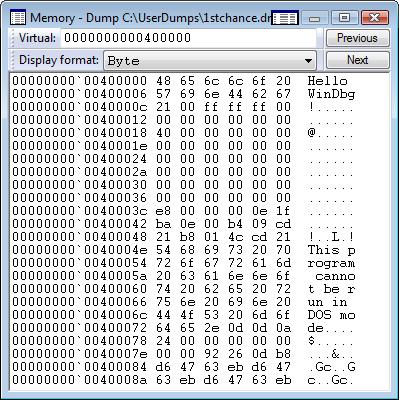
Now we load our hello.bin by specifying the this address and the number of bytes to load:

0:000> .readmem c:\dmitri\hello.bin 00000000`00400000 L0n12
Reading c bytes.

We see the new memory data immediately:

0:000> dc 00000000`00400000
00000000`00400000  6c6c6548 6f57206f 21646c72 0000ffff  Hello World!….
00000000`00400010  000000b8 00000000 00000040 00000000  ……..@…….
00000000`00400020  00000000 00000000 00000000 00000000  …………….
00000000`00400030  00000000 00000000 00000000 000000e8  …………….
00000000`00400040  0eba1f0e cd09b400 4c01b821 685421cd  ……..!..L.!Th
00000000`00400050  70207369 72676f72 63206d61 6f6e6e61  is program canno
00000000`00400060  65622074 6e757220 206e6920 20534f44  t be run in DOS
00000000`00400070  65646f6d 0a0d0d2e 00000024 00000000  mode….$…….

Then we can change it immediately using any of e* commands: 

0:000> ea 00000000`00400000+6 "WinDbg!"

0:000> dc 00000000`00400000
00000000`00400000  6c6c6548 6957206f 6762446e 2100ffff  Hello WinDbg!
00000000`00400010  000000b8 00000000 00000040 00000000  ……..@…….
00000000`00400020  00000000 00000000 00000000 00000000  …………….
00000000`00400030  00000000 00000000 00000000 000000e8  …………….
00000000`00400040  0eba1f0e cd09b400 4c01b821 685421cd  ……..!..L.!Th
00000000`00400050  70207369 72676f72 63206d61 6f6e6e61  is program canno
00000000`00400060  65622074 6e757220 206e6920 20534f44  t be run in DOS
00000000`00400070  65646f6d 0a0d0d2e 00000024 00000000  mode….$…….

Alternatively we can use GUI memory editor:

Now we can write memory contents back to our file:

0:000> .writemem c:\dmitri\hello.bin 00000000`00400000 L0n13
Writing d bytes.

- Dmitry Vostokov @ DumpAnalysis.org -

Complete Dump: User Space Critical Sections

Friday, March 28th, 2008

Just a short note. Suppose we have a complete memory dump and we want to check critical sections to see any anomalies. We can do this by using !for_each_process extension command:

0: kd> !for_each_process ".process /r /p @#Process; !ntsdexts.locks"
Implicit process is now a59a4648
Loading User Symbols

NTSDEXTS: Unable to resolve ntdll!RtlCriticalSectionList
NTSDEXTS: Please check your symbols
Implicit process is now a553cd88
Loading User Symbols
....

Scanned 11 critical sections
Implicit process is now a518b1b0
Loading User Symbols
....

Scanned 105 critical sections
Implicit process is now a513a348
Loading User Symbols
....

Scanned 977 critical sections
Implicit process is now a5659d88
Loading User Symbols
....

Scanned 438 critical sections
Implicit process is now a551abb8
Loading User Symbols
....
...
...
...
...

Here the first NTSDEXTS warning is normal because we don’t have user space for System process.

- Dmitry Vostokov @ DumpAnalysis.org -

Memory Dump Analysis Anthology, Volume 2

Tuesday, March 25th, 2008

Although the first volume has not been published yet (scheduled for 15th of April, 2008) the planning for the second volume has already begun. Preliminary information is:

  • Title: Memory Dump Analysis Anthology, Volume 2
  • Paperback: 512 pages (*)
  • ISBN-13: 978-0-9558328-7-1
  • Author: Dmitry Vostokov
  • Publisher: Opentask (01 Oct 2008)
  • Language: English
  • Product Dimensions: 22.86 x 15.24

Hardcover version is also planned. PDF version will be available for download too.

(*) subject to change

- Dmitry Vostokov @ DumpAnalysis.org -

Exploring NDIS Extension

Tuesday, March 25th, 2008

There is a good Microsoft white paper about !ndiskd commands to interrogate kernel dumps:

Debugging NDIS Drivers

Applying !ndiskd.protocols command we can see that there are more protocols added to Vista: 

Windows Server 2003 SP2:

kd> !ndiskd.protocols
 Protocol 862db330: NDISUIO
    Open 86420650 - Miniport: 862e2ab0 AMD PCNET Family PCI Ethernet Adapter

 Protocol 86324780: TCPIP_WANARP
    Open 86324008 - Miniport: 863a2130 WAN Miniport (IP)

 Protocol 86318790: TCPIP
    Open 8637c008 - Miniport: 862e2ab0 AMD PCNET Family PCI Ethernet Adapter

 Protocol 863e3c28: NDPROXY
    Open 8639e0d0 - Miniport: 86361530 Direct Parallel
    Open 8639bb48 - Miniport: 86361530 Direct Parallel
    Open 863e48b0 - Miniport: 863e3130 WAN Miniport (L2TP)
    Open 86404008 - Miniport: 863e3130 WAN Miniport (L2TP)

 Protocol 863a9d80: RASPPPOE

 Protocol 863a9008: NDISWAN
    Open 863e3ab0 - Miniport: 86361530 Direct Parallel
    Open 86398c30 - Miniport: 862c4530 WAN Miniport (PPTP)
    Open 864618f8 - Miniport: 8637a870 WAN Miniport (PPPOE)
    Open 86468a28 - Miniport: 863e3130 WAN Miniport (L2TP)

Vista: 

1: kd> !ndiskd.protocols
 Protocol fffffa8004569580: RSPNDR
    Open fffffa8004566a20 - Miniport: fffffa80039711a0 Broadcom NetXtreme 57xx Gigabit Controller

 Protocol fffffa80043a4900: LLTDIO
    Open fffffa800428a1d0 - Miniport: fffffa80039711a0 Broadcom NetXtreme 57xx Gigabit Controller

 Protocol fffffa8003f6c820: WANARPV6
    Open fffffa8003f1c010 - Miniport: fffffa800399f1a0 WAN Miniport (IPv6)

 Protocol fffffa8003f6cd20: WANARP
    Open fffffa8003f1c670 - Miniport: fffffa80039d61a0 WAN Miniport (IP)

 Protocol fffffa8003eedb10: TCPIP6TUNNEL
    Open fffffa8003f33010 - Miniport: fffffa800396c1a0 isatap.company.com
    Open fffffa8003f0f010 - Miniport: fffffa80038f21a0 Teredo Tunneling Pseudo-Interface

 Protocol fffffa8003eeb580: TCPIPTUNNEL

 Protocol fffffa8003eeb010: TCPIP6
    Open fffffa8003f452e0 - Miniport: fffffa80039711a0 Broadcom NetXtreme 57xx Gigabit Controller

 Protocol fffffa8003ee90d0: TCPIP
    Open fffffa8003ffc480 - Miniport: fffffa80039711a0 Broadcom NetXtreme 57xx Gigabit Controller

 Protocol fffffa8003c56010: NDPROXY
    Open fffffa8003d41450 - Miniport: fffffa800399d1a0 WAN Miniport (L2TP)
    Open fffffa8003d41a30 - Miniport: fffffa800399d1a0 WAN Miniport (L2TP)

 Protocol fffffa80039ad790: RASPPPOE

 Protocol fffffa80039af4e0: NDISWAN
    Open fffffa8004737a10 - Miniport: fffffa8004a321a0 RAS Async Adapter
    Open fffffa8003bf8ac0 - Miniport: fffffa80039c21a0 WAN Miniport (PPTP)
    Open fffffa8003c5cac0 - Miniport: fffffa80039c01a0 WAN Miniport (PPPOE)
    Open fffffa8003c565a0 - Miniport: fffffa800399d1a0 WAN Miniport (L2TP)

I noticed this extension when I got a bugcheck from the 3rd-party custom protocol driver:

SYSTEM_PTE_MISUSE (da)
The stack trace identifies the guilty driver.
Arguments:
Arg1: 00000400, Type of error.
Arg2: f7a9a413
Arg3: 00000001
Arg4: 00000000

0: kd> kL
ChildEBP RetAddr 
f5c68a68 8083b6e1 nt!KeBugCheckEx+0x1b
f5c68a90 8083d478 nt!MiRemoveIoSpaceMap+0x5d
f5c68b38 f5b6ebea nt!MmUnmapIoSpace+0x10c
WARNING: Stack unwind information not available. Following frames may be wrong.
f5c68b90 f5b69abe protocol!foo2+0x28ac
f5c68bf4 f70fd4be protocol!foo+0x1aa0
f5c68c90 f70fd2fc NDIS!ndisInitializeBinding+0x189
f5c68d18 f70fce48 NDIS!ndisCheckAdapterBindings+0xd9
f5c68d98 f70fca66 NDIS!ndisCheckProtocolBindings+0xd2
f5c68dac 80949b7c NDIS!ndisWorkerThread+0x74
f5c68ddc 8088e062 nt!PspSystemThreadStartup+0x2e
00000000 00000000 nt!KiThreadStartup+0x16

Arg1 0×400 one tells us this (from WinDbg help):

0×400 The base address of the I/O space mapping The number of pages to be freed 0 (Windows XP and later only) The caller is trying to free an I/O space mapping that the system is unaware of.

PTE  looks unknown indeed:

0: kd> !pte f7a9a413
VA f7a9a413
PDE at 00000000C0603DE8 PTE at 00000000C07BD4D0
contains 0000000000A87863 contains 0000000000000000
pfn a87 —DA–KWEV

We can see this protocol in the list:

0: kd> !ndiskd.protocols
 Protocol 89df10a0: CustomProtocol
    Open 89b4e6d8 - Miniport: 8a59d290 Broadcom BCM5708S NetXtreme II GigE (NDIS VBD Client)

 Protocol 8918f248: NDISUIO

 Protocol 89dd8008: TCPIP_WANARP
    Open 8a4da6f0 - Miniport: 8a50a9e8 WAN Miniport (IP)

 Protocol 89b4ec88: TCPIP

 Protocol 8a4cd5a0: NDPROXY
    Open 8a59b128 - Miniport: 8a58eab0 Direct Parallel
    Open 8a59b328 - Miniport: 8a58eab0 Direct Parallel
    Open 8a4f1580 - Miniport: 8a58a328 WAN Miniport (L2TP)
    Open 8a507008 - Miniport: 8a58a328 WAN Miniport (L2TP)

 Protocol 8a4e7008: RASPPPOE

 Protocol 8a5cb490: NDISWAN
    Open 8a59b988 - Miniport: 8a58eab0 Direct Parallel
    Open 8a5976c0 - Miniport: 8a591628 WAN Miniport (PPTP)
    Open 8a594468 - Miniport: 8a4e93f0 WAN Miniport (PPPOE)
    Open 8a4d3580 - Miniport: 8a58a328 WAN Miniport (L2TP)

- Dmitry Vostokov @ DumpAnalysis.org -

WinDbg book to be published after MDAA V1

Thursday, March 20th, 2008

This is a forthcoming reference book for technical support and escalation engineers troubleshooting and debugging complex software issues. The book is also invaluable for software maintenance and development engineers debugging unmanaged, managed and native code.

  • Title: Windows® Debugging Notebook: Essential Concepts, WinDbg Commands and Tools
  • Author: Dmitry Vostokov
  • Hardcover: 256 pages
  • ISBN-13: 978-0-9558328-5-7
  • Publisher: Opentask (1 September 2008)
  • Language: English
  • Product Dimensions: 22.86 x 15.24

- Dmitry Vostokov @ DumpAnalysis.org -

Memory Search Revisited

Thursday, March 20th, 2008

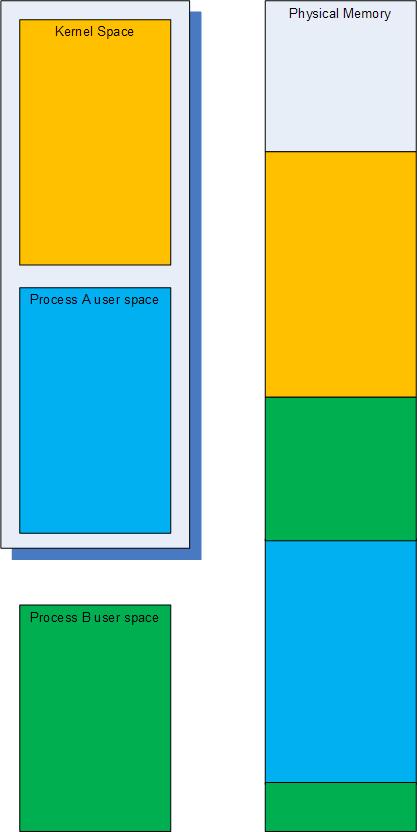
We all know about s memory search WinDbg command but it only searches the current virtual memory range. This is fine if we have a kernel memory or a user dump where we have uniform virtual space but for complete memory dumps we have many virtual to physical address mappings to cover user space of various processes. This is better illustrated on the following highly simplified picture where the typical current virtual space in a complete memory dump is enclosed in the shadowed box and consists of the kernel space and process A virtual address space ranges:


Therefore some data will be present in physical memory but not accessible through virtual memory search. To search through all physical memory there is !search WinDbg command and by default it searches for specific 32-bit value on 32-bit Windows and 64-bit value on 64-bit Windows. The latter means that we can search for 8 character string fragments on 64-bit Windows. For example, if we want to search for occurrences of ”ImaSrv.exe” string we can specify “ImaS” on 32-bit platform and “ImaSrv.e” on 64-bit platform. Taking into account little endian byte ordering we get the following hexadecimal equivalents:

0: kd> .formats 'SamI'
Evaluate expression:
  Hex:     53616d49
  Decimal: 1398893897
  Octal:   12330266511
  Binary:  01010011 01100001 01101101 01001001
  Chars:   SamI
  Time:    Wed Apr 30 22:38:17 2014
  Float:   low 9.68201e+011 high 0
  Double:  6.91145e-315

0: kd> .formats 'e.vrSamI'
Evaluate expression:
  Hex:     652e7672`53616d49
  Decimal: 7290895080156654921
  Octal:   0624563547112330266511
  Binary:  01100101 00101110 01110110 01110010 01010011 01100001 01101101 01001001
  Chars:   e.vrSamI
  Time:    Mon Dec  5 23:20:15.665 24704 (GMT+0)
  Float:   low 9.68201e+011 high 5.14923e+022
  Double:  2.46885e+179

Physical memory search gives us plenty of results:

0: kd> !search 53616d49
Searching PFNs in range 00000001 - 0013FFFF for [53616D49 - 53616D49]

Pfn      Offset   Hit      Va       Pte     
- - - - - - - - - - - - - - - - - - - - - - - - - - -
000079FA 000004C4 53616D49 A3AFB4C4 C051D7D8
 a3afb340+0x184   : Proc (Protected)  -- Process objects
00011442 00000848 53616D49 66EC2848 C0337610
00011442 0000093C 53616D49 66EC293C C0337610
0001328A 000009F4 43616D49 672E59F4 C0339728
000156F6 000009F4 43616D49 672E59F4 C0339728
00018C7C 000009DC 43616D49 671F49DC C0338FA0
0001ADF0 000003D4 52616D49 00000000 DC3E3B48
0001ADF0 000003E4 52616D49 00000000 DC3E3B48
00020BCE 000009DC 43616D49 671F49DC C0338FA0
...
...
...

We can dump either a virtual address if it is available and valid by using normal d* commands or dump a physical address by using their !d* extension equivalents, for example:

Pfn      Offset   Hit      Va       Pte     
- - - - - - - - - - - - - - - - - - - - - - - - - - -
00011442 00000848 53616D49 66EC2848 C0337610

 0: kd> !dc 11442000+00000848
#11442848 53616d49 65747379 6c642e6d 0000006c ImaSystem.dll...
#11442858 00000000 00000000 00000000 45cd0da0 ...............E
#11442868 00000000 0000293c 00000001 00000012 ....<)..........
#11442878 00000012 00002888 000028d0 00002918 .....(...(...)..
#11442888 00001160 000010b0 00001020 00001000 `....... .......
#11442898 00001130 00001010 000010a0 00001030 0...........0...
#114428a8 000020d8 000020cc 00001300 000013c0 . ... ..........
#114428b8 00001200 00001050 00001040 00001080 ....P...@.......

Note: Physical addresses are formed from PFN (Page Frame Numbers) by shifting them to the left by 12 bits (by adding 3 zeroes to the left). For example: 00011442 -> 11442000.

The cool feature of !search command is that it automatically recognizes pool tags and in our case it has found the process object: 

Pfn      Offset   Hit      Va       Pte     
- - - - - - - - - - - - - - - - - - - - - - - - - - -
000079FA 000004C4 53616D49 A3AFB4C4 C051D7D8
 a3afb340+0×184   : Proc (Protected)  — Process objects


0: kd> !pool A3AFB4C4
Pool page a3afb340 region is Nonpaged pool
 a3afb000 size:  120 previous size:    0  (Allocated)  MQAC
 a3afb120 size:   20 previous size:  120  (Allocated)  VadS
 a3afb140 size:   98 previous size:   20  (Allocated)  File (Protected)
 a3afb1d8 size:   30 previous size:   98  (Allocated)  MQAC
 a3afb208 size:   20 previous size:   30  (Allocated)  VadS
 a3afb228 size:   28 previous size:   20  (Free)       CcBc
 a3afb250 size:   30 previous size:   28  (Allocated)  Vad
 a3afb280 size:   30 previous size:   30  (Allocated)  Vad
 a3afb2b0 size:   20 previous size:   30  (Allocated)  VadS
 a3afb2d0 size:   40 previous size:   20  (Allocated)  SeTd
 a3afb310 size:   30 previous size:   40  (Allocated)  Vad
*a3afb340 size:  298 previous size:   30  (Allocated) *Proc (Protected)
  Pooltag Proc : Process objects, Binary : nt!ps

 a3afb5d8 size:    8 previous size:  298  (Free)       Irp
 a3afb5e0 size:   20 previous size:    8  (Allocated)  VadS
 a3afb600 size:    8 previous size:   20  (Free)       Irp
 a3afb608 size:   30 previous size:    8  (Allocated)  Even (Protected)
 a3afb638 size:   30 previous size:   30  (Allocated)  Vad
 a3afb668 size:   40 previous size:   30  (Allocated)  Vadl
 a3afb6a8 size:   70 previous size:   40  (Allocated)  NWFS
 a3afb718 size:   30 previous size:   70  (Allocated)  Vad
 a3afb748 size:   28 previous size:   30  (Allocated)  NpFr Process: a3afb360
 a3afb770 size:   98 previous size:   28  (Allocated)  File (Protected)
 a3afb808 size:   60 previous size:   98  (Allocated)  MmCa
 a3afb868 size:   98 previous size:   60  (Allocated)  File (Protected)
 a3afb900 size:   30 previous size:   98  (Allocated)  Even (Protected)
 a3afb930 size:   20 previous size:   30  (Allocated)  VadS
 a3afb950 size:   98 previous size:   20  (Allocated)  File (Protected)
 a3afb9e8 size:   30 previous size:   98  (Allocated)  MQAC
 a3afba18 size:  120 previous size:   30  (Allocated)  MQAC
 a3afbb38 size:   50 previous size:  120  (Allocated)  NpFc Process: a5659d88
 a3afbb88 size:   20 previous size:   50  (Allocated)  Port
 a3afbba8 size:   98 previous size:   20  (Allocated)  File (Protected)
 a3afbc40 size:   30 previous size:   98  (Allocated)  MQAC
 a3afbc70 size:  120 previous size:   30  (Allocated)  MQAC
 a3afbd90 size:  270 previous size:  120  (Allocated)  Thre (Protected)

0: kd> dc A3AFB4C4 l10
a3afb4c4  53616d49 652e7672 00006578 00000000  ImaSrv.exe......
a3afb4d4  00000000 00000000 00000000 a3afbfd4  ................
a3afb4e4  a282fe44 00000000 f7a60500 0000004c  D...........L...
a3afb4f4  001f07fb 00008005 00000000 7ffdd000  ................

Seems the search has found ImageFileName field of _EPROCESS structure. The field has 0×164 offset and we can dump the whole structure:

0: kd> dt _EPROCESS A3AFB4C4-0x164
ntdll!_EPROCESS
   +0x000 Pcb              : _KPROCESS
   +0x078 ProcessLock      : _EX_PUSH_LOCK
   +0x080 CreateTime       : _LARGE_INTEGER 0x1c86f66`5b95204a
   +0x088 ExitTime         : _LARGE_INTEGER 0x0
   +0x090 RundownProtect   : _EX_RUNDOWN_REF
   +0x094 UniqueProcessId  : 0x000009d0
   +0x098 ActiveProcessLinks : _LIST_ENTRY [ 0xa3af2598 - 0xa3b0a0b8 ]
   +0x0a0 QuotaUsage       : [3] 0x17030
   +0x0ac QuotaPeak        : [3] 0x18028
   +0x0b8 CommitCharge     : 0x37b6
   +0x0bc PeakVirtualSize  : 0x132d4000
   +0x0c0 VirtualSize      : 0x12d64000
   +0x0c4 SessionProcessLinks : _LIST_ENTRY [ 0xa3af25c4 - 0xa3b0a0e4 ]
   +0x0cc DebugPort        : (null)
   +0x0d0 ExceptionPort    : 0xd738e828
   +0x0d4 ObjectTable      : 0xdc23a008 _HANDLE_TABLE
   +0x0d8 Token            : _EX_FAST_REF
   +0x0dc WorkingSetPage   : 0x11741f
   +0x0e0 AddressCreationLock : _KGUARDED_MUTEX
   +0x100 HyperSpaceLock   : 0
   +0x104 ForkInProgress   : (null)
   +0x108 HardwareTrigger  : 0
   +0x10c PhysicalVadRoot  : 0xa3c21448 _MM_AVL_TABLE
   +0x110 CloneRoot        : (null)
   +0x114 NumberOfPrivatePages : 0x318d
   +0x118 NumberOfLockedPages : 7
   +0x11c Win32Process     : 0xbc33d968
   +0x120 Job              : (null)
   +0x124 SectionObject    : 0xdc2710c8
   +0x128 SectionBaseAddress : 0x00400000
   +0x12c QuotaBlock       : 0xa3bb2f38 _EPROCESS_QUOTA_BLOCK
   +0x130 WorkingSetWatch  : (null)
   +0x134 Win32WindowStation : 0x00000078
   +0x138 InheritedFromUniqueProcessId : 0x00000228
   +0x13c LdtInformation   : (null)
   +0x140 VadFreeHint      : (null)
   +0x144 VdmObjects       : (null)
   +0x148 DeviceMap        : 0xd7d0ff30
   +0x14c Spare0           : [3] (null)
   +0x158 PageDirectoryPte : _HARDWARE_PTE_X86
   +0x158 Filler           : 0
   +0x160 Session          : 0xf79d5000
   +0×164 ImageFileName    : [16]  “ImaSrv.exe”
   +0×174 JobLinks         : _LIST_ENTRY [ 0×0 - 0×0 ]
   +0×17c LockedPagesList  : (null)
   +0×180 ThreadListHead   : _LIST_ENTRY [ 0xa3afbfd4 - 0xa282fe44 ]
   +0×188 SecurityPort     : (null)
   +0×18c PaeTop           : 0xf7a60500
   +0×190 ActiveThreads    : 0×4c
   +0×194 GrantedAccess    : 0×1f07fb
   +0×198 DefaultHardErrorProcessing : 0×8005
   +0×19c LastThreadExitStatus : 0
   +0×1a0 Peb              : 0×7ffdd000 _PEB
   +0×1a4 PrefetchTrace    : _EX_FAST_REF
   +0×1a8 ReadOperationCount : _LARGE_INTEGER 0xf01d3
   +0×1b0 WriteOperationCount : _LARGE_INTEGER 0×3b08c
   +0×1b8 OtherOperationCount : _LARGE_INTEGER 0×67845
   +0×1c0 ReadTransferCount : _LARGE_INTEGER 0×9b087eec
   +0×1c8 WriteTransferCount : _LARGE_INTEGER 0×39f8a27a
   +0×1d0 OtherTransferCount : _LARGE_INTEGER 0×25dd749
   +0×1d8 CommitChargeLimit : 0
   +0×1dc CommitChargePeak : 0×394b
   +0×1e0 AweInfo          : (null)
   +0×1e4 SeAuditProcessCreationInfo : _SE_AUDIT_PROCESS_CREATION_INFO
   +0×1e8 Vm               : _MMSUPPORT
   +0×230 MmProcessLinks   : _LIST_ENTRY [ 0xa3af2730 - 0xa3b0a250 ]
   +0×238 ModifiedPageCount : 0xc835
   +0×23c JobStatus        : 0
   +0×240 Flags            : 0×4d0801
   +0×240 CreateReported   : 0y1
   +0×240 NoDebugInherit   : 0y0
   +0×240 ProcessExiting   : 0y0
   +0×240 ProcessDelete    : 0y0
   +0×240 Wow64SplitPages  : 0y0
   +0×240 VmDeleted        : 0y0
   +0×240 OutswapEnabled   : 0y0
   +0×240 Outswapped       : 0y0
   +0×240 ForkFailed       : 0y0
   +0×240 Wow64VaSpace4Gb  : 0y0
   +0×240 AddressSpaceInitialized : 0y10
   +0×240 SetTimerResolution : 0y0
   +0×240 BreakOnTermination : 0y0
   +0×240 SessionCreationUnderway : 0y0
   +0×240 WriteWatch       : 0y0
   +0×240 ProcessInSession : 0y1
   +0×240 OverrideAddressSpace : 0y0
   +0×240 HasAddressSpace  : 0y1
   +0×240 LaunchPrefetched : 0y1
   +0×240 InjectInpageErrors : 0y0
   +0×240 VmTopDown        : 0y0
   +0×240 ImageNotifyDone  : 0y1
   +0×240 PdeUpdateNeeded  : 0y0
   +0×240 VdmAllowed       : 0y0
   +0×240 SmapAllowed      : 0y0
   +0×240 CreateFailed     : 0y0
   +0×240 DefaultIoPriority : 0y000
   +0×240 Spare1           : 0y0
   +0×240 Spare2           : 0y0
   +0×244 ExitStatus       : 259
   +0×248 NextPageColor    : 0xf91e
   +0×24a SubSystemMinorVersion : 0 ”
   +0×24b SubSystemMajorVersion : 0×4 ”
   +0×24a SubSystemVersion : 0×400
   +0×24c PriorityClass    : 0×6 ”
   +0×250 VadRoot          : _MM_AVL_TABLE
   +0×270 Cookie           : 0×5a583219

We can also see that by default !search command finds entries differing in a single bit, for example:

Pfn      Offset   Hit      Va       Pte     
- - - - - - - - - - - - - - - - - - - - - - - - - - -
...
...
...
00011442 0000093C 53616D49 66EC293C C0337610
0001328A 000009F4 43616D49 672E59F4 C0339728


0: kd> !dc 0001328A9F4
#1328a9f4 43616d49 6f6d6d6f 64702e6e 00000062 ImaCommon.pdb...
#1328aa04 672e7170 00000000 00000000 ffffffff pq.g............
#1328aa14 00000000 00000000 672e5a04 00000000 .........Z.g....
#1328aa24 00000000 00000000 00000001 672e5a1c .............Z.g
#1328aa34 00000000 00000000 00000000 672e7170 ............pq.g
#1328aa44 672e5a24 00000000 00000000 00004c24 $Z.g........$L..
#1328aa54 00000000 00000000 00000000 00000000 ................
#1328aa64 00000000 672e7138 00000000 ffffffff ....8q.g........

In the case of kernel memory dumps physical memory search might be better alternative to virtual memory search if we need to see pool tags corresponding to search hits or search for data differing in some bits, for example:

3: kd> .ignore_missing_pages 1
Suppress kernel summary dump missing page error message

3: kd> s -d 80000000 L?20000000 53616d49
86a6eeec  53616d49 652e7672 00006578 00000000  ImaSrv.exe......

3: kd> !search 53616d49
Debuggee is a kernel summary dump, some physical pages may not be present.
Searches will miss hits from those pages.
Searching PFNs in range 00000001 - 0007FFFF for [53616D49 - 53616D49]

Pfn      Offset   Hit      Va       Pte     
- - - - - - - - - - - - - - - - - - - - - - - - - - -
00005DED 00000EEC 53616D49 86A6EEEC C021A9B8
 86a6ed68+0x184   : Proc (Protected)  -- Process objects
Search done.

- Dmitry Vostokov @ DumpAnalysis.org -

Crash Dump Analysis Patterns (Part 2b)

Thursday, March 13th, 2008

Here is an additional kernel space example to my old Dynamic Memory Corruption pattern. If kernel pools are corrupt then calls that allocate or free memory result in bugchecks C2 or 19 and in other less frequent bugchecks (from Google stats):

BugCheck C2: BAD_POOL_CALLER

1600

BugCheck 19: BAD_POOL_HEADER

434

BugCheck C5: DRIVER_CORRUPTED_EXPOOL

207

BugCheck DE: POOL_CORRUPTION_IN_FILE_AREA

106

BugCheck D0: DRIVER_CORRUPTED_MMPOOL

8

BugCheck D6: DRIVER_PAGE_FAULT_BEYOND_END_OF_ALLOCATION

3

BugCheck CD: PAGE_FAULT_BEYOND_END_OF_ALLOCATION

2

BugCheck C6: DRIVER_CAUGHT_MODIFYING_FREED_POOL

0

Bug Checks 0xC2 and 0×19 have parameters in bugcheck arguments that tell the type of detected pool corruption. Refer to WinDbg help for details or use the variant of !analyze command where you can supply optional bugcheck arguments:

1: kd> !analyze -show c2
BAD_POOL_CALLER (c2)
The current thread is making a bad pool request.  Typically this is at a bad IRQL level or double freeing the same allocation, etc.
Arguments:
Arg1: 00000000, The caller is requesting a zero byte pool allocation.
Arg2: 00000000, zero.
Arg3: 00000000, the pool type being allocated.
Arg4: 00000000, the pool tag being used.

1: kd> !analyze -show 19 2 1 1 1
BAD_POOL_HEADER (19)
The pool is already corrupt at the time of the current request.
This may or may not be due to the caller.
The internal pool links must be walked to figure out a possible cause of
the problem, and then special pool applied to the suspect tags or the driver
verifier to a suspect driver.
Arguments:
Arg1: 00000002, the verifier pool pattern check failed.  The owner has likely corrupted the pool block
Arg2: 00000001, the pool entry being checked.
Arg3: 00000001, size of the block.
Arg4: 00000001, 0.

If we enable special pool on suspected drivers we might get these bugchecks too with the following Google frequency:

BugCheck C1: SPECIAL_POOL_DETECTED_MEMORY_CORRUPTION

59

BugCheck D5: DRIVER_PAGE_FAULT_IN_FREED_SPECIAL_POOL

5

BugCheck CC: PAGE_FAULT_IN_FREED_SPECIAL_POOL

1

Here is one example of nonpaged pool corruption detected during free operation with the following !analyze -v output:

BAD_POOL_HEADER (19)
The pool is already corrupt at the time of the current request.
This may or may not be due to the caller.
The internal pool links must be walked to figure out a possible cause of
the problem, and then special pool applied to the suspect tags or the driver
verifier to a suspect driver.
Arguments:
Arg1: 00000020, a pool block header size is corrupt.
Arg2: a34583b8, The pool entry we were looking for within the page.
Arg3: a34584f0, The next pool entry.
Arg4: 0a270001, (reserved)

POOL_ADDRESS:  a34583b8 Nonpaged pool

PROCESS_NAME:  process.exe

CURRENT_IRQL:  2

STACK_TEXT: 
b80a60cc 808927bb nt!KeBugCheckEx+0x1b
b80a6134 80892b6f nt!ExFreePoolWithTag+0x477
b80a6144 b9591400 nt!ExFreePool+0xf
WARNING: Stack unwind information not available. Following frames may be wrong.
b80a615c b957b954 driver+0x38400
b80a617c b957d482 driver+0x22954
b80a61c0 b957abf4 driver+0x24482
b80a6260 b957ccef driver+0x21bf4
b80a62a8 8081df65 driver+0x23cef
b80a62bc f721ac45 nt!IofCallDriver+0x45
b80a62e4 8081df65 fltMgr!FltpDispatch+0x6f
b80a62f8 b99de70b nt!IofCallDriver+0x45
b80a6308 b99da6ee filter!Dispatch+0xfb
b80a6318 8081df65 filter!dispatch+0x6e
b80a632c b9bdebfe nt!IofCallDriver+0x45
b80a6334 8081df65 2ndfilter!Redirect+0x7ea
b80a6348 b9bd1756 nt!IofCallDriver+0x45
b80a6374 b9bd1860 3rdfilter!PassThrough+0x136
b80a6384 8081df65 3rdfilter!Dispatch+0x80
b80a6398 808f5437 nt!IofCallDriver+0x45
b80a63ac 808ef963 nt!IopSynchronousServiceTail+0x10b
b80a63d0 8088978c nt!NtQueryDirectoryFile+0x5d
b80a63d0 7c8285ec nt!KiFastCallEntry+0xfc
00139524 7c8274eb ntdll!KiFastSystemCallRet
00139528 77e6ba40 ntdll!NtQueryDirectoryFile+0xc
00139830 77e6bb5f kernel32!FindFirstFileExW+0x3d5
00139850 6002665e kernel32!FindFirstFileW+0x16
00139e74 60026363 process+0x2665e
0013a328 60027852 process+0x26363
0013a33c 60035b58 process+0x27852
0013b104 600385ff process+0x35b58
0013b224 612cb643 process+0x385ff
0013b988 612cc109 dll!FileDialog+0xc53
0013bba0 612cb47b dll!FileDialog+0x1719
0013c2c0 7739b6e3 dll!FileDialog+0xa8b
0013c2ec 77395f82 USER32!InternalCallWinProc+0x28
0013c368 77395e22 USER32!UserCallDlgProcCheckWow+0x147
0013c3b0 7739c9c6 USER32!DefDlgProcWorker+0xa8
0013c3d8 7c828536 USER32!__fnDWORD+0x24
0013c3d8 808308f4 ntdll!KiUserCallbackDispatcher+0x2e
b80a66b8 8091d6d1 nt!KiCallUserMode+0x4
b80a6710 bf8a2622 nt!KeUserModeCallback+0x8f
b80a6794 bf8a2517 win32k!SfnDWORD+0xb4
b80a67dc bf8a13d9 win32k!xxxSendMessageToClient+0x133
b80a6828 bf85ae67 win32k!xxxSendMessageTimeout+0x1a6
b80a684c bf8847a1 win32k!xxxWrapSendMessage+0x1b
b80a6868 bf8c1459 win32k!NtUserfnNCDESTROY+0x27
b80a68a0 8088978c win32k!NtUserMessageCall+0xc0
b80a68a0 7c8285ec nt!KiFastCallEntry+0xfc
0013c3d8 7c828536 ntdll!KiFastSystemCallRet
0013c3d8 808308f4 ntdll!KiUserCallbackDispatcher+0x2e
b80a6b7c 8091d6d1 nt!KiCallUserMode+0x4
b80a6bd4 bf8a2622 nt!KeUserModeCallback+0x8f
b80a6c58 bf8a23a0 win32k!SfnDWORD+0xb4
b80a6ca0 bf8a13d9 win32k!xxxSendMessageToClient+0x118
b80a6cec bf85ae67 win32k!xxxSendMessageTimeout+0x1a6
b80a6d10 bf8c148c win32k!xxxWrapSendMessage+0x1b
b80a6d40 8088978c win32k!NtUserMessageCall+0x9d
b80a6d40 7c8285ec nt!KiFastCallEntry+0xfc
0013f474 7c828536 ntdll!KiFastSystemCallRet
0013f4a0 7739d1ec ntdll!KiUserCallbackDispatcher+0x2e
0013f4dc 7738cf29 USER32!NtUserMessageCall+0xc
0013f4fc 612d3276 USER32!SendMessageA+0x7f
0013f63c 611add41 dll!SubWindow+0x3dc6
0013f658 7739b6e3 dll!SetWindowText+0x37a1
0013f684 7739b874 USER32!InternalCallWinProc+0x28
0013f6fc 7739ba92 USER32!UserCallWinProcCheckWow+0x151
0013f764 7739bad0 USER32!DispatchMessageWorker+0x327
0013f774 61221ca8 USER32!DispatchMessageW+0xf
0013f7e0 0040156d dll!MainLoop+0x2c8
0013ff24 00401dfa process+0x156d
0013ffc0 77e6f23b process+0x1dfa
0013fff0 00000000 kernel32!BaseProcessStart+0x23

MODULE_NAME: driver

IMAGE_NAME:  driver.sys

We see that WinDbg pointed to driver.sys by using a procedure described in one of my old minidump analysis posts: BugCheck C2 Minidump Analysis

However any OS component could corrupt the pool prior to detection as the bugcheck description says: “The pool is already corrupt at the time of the current request.”. What other evidence can reinforce our belief in driver.sys? Let’s look at our pool entry tag first:

1: kd> !pool a34583b8
Pool page a34583b8 region is Nonpaged pool
 a3458000 size:  270 previous size:    0  (Allocated)  Thre (Protected)
 a3458270 size:   10 previous size:  270  (Free)       RxIr
 a3458280 size:   40 previous size:   10  (Allocated)  Vadl
 a34582c0 size:   98 previous size:   40  (Allocated)  File (Protected)
 a3458358 size:    8 previous size:   98  (Free)       Vadl
 a3458360 size:   50 previous size:    8  (Allocated)  Gsem
 a34583b0 size:    8 previous size:   50  (Free)       CcSc
*a34583b8 size:  138 previous size:    8  (Allocated) *DRIV
  Owning component : Unknown (update pooltag.txt)
a34584f0 is not a valid large pool allocation, checking large session pool…
a34584f0 is freed (or corrupt) pool
Bad allocation size @a34584f0, zero is invalid

***
*** An error (or corruption) in the pool was detected;
*** Attempting to diagnose the problem.
***
*** Use !poolval a3458000 for more details.
***

Pool page [ a3458000 ] is __inVALID.

Analyzing linked list...
[ a34583b8 --> a34583d8 (size = 0x20 bytes)]: Corrupt region
[ a34583f8 --> a34585e8 (size = 0x1f0 bytes)]: Corrupt region

Scanning for single bit errors...

None found

We see that the tag is DRIV and we know either from association or from similar problems in the past that it belongs to driver.sys. Let’s dump our pool entry contents to see if there are any symbolic hints in it:

1: kd> dps a34583b8
a34583b8 0a270001
a34583bc 5346574e
a34583c0 00000000
a34583c4 00000000
a34583c8 b958f532 driver+0×36532
a34583cc a3471010
a34583d0 0000012e
a34583d4 00000001
a34583d8 00041457
a34583dc 05af0026
a34583e0 00068002
a34583e4 7b9ec6f5
a34583e8 ffffff00
a34583ec 73650cff
a34583f0 7461445c
a34583f4 97a10061
a34583f8 ff340004
a34583fc c437862a
a3458400 6a000394
a3458404 00000038
a3458408 00000000
a345840c bf000000
a3458410 bf0741b5
a3458414 f70741b5
a3458418 00000000
a345841c 00000000
a3458420 00000000
a3458424 00000000
a3458428 05000000
a345842c 34303220
a3458430 31323332
a3458434 ff322d36

Indeed we see the possible code pointer driver+0×36532 and the code around this address looks normal:

3: kd> .asm no_code_bytes
Assembly options: no_code_bytes

3: kd> u b958f532
driver+0x36532:
b958f532 push    2Ch
b958f534 push    offset driver+0x68d08 (b95c1d08)
b958f539 call    driver+0x65c50 (b95bec50)
b958f53e mov     byte ptr [ebp-19h],0
b958f542 and     dword ptr [ebp-24h],0
b958f546 call    dword ptr [driver+0x65f5c (b95bef5c)]
b958f54c mov     ecx,dword ptr [ebp+0Ch]
b958f54f cmp     eax,ecx

3: kd> ub b958f532
driver+0x36528:
b958f528 leave
b958f529 ret     18h
b958f52c int     3
b958f52d int     3
b958f52e int     3
b958f52f int     3
b958f530 int     3
b958f531 int     3

- Dmitry Vostokov @ DumpAnalysis.org -

Yet another great WinDbg resource

Saturday, February 16th, 2008

Just found this wonderful WinDbg command reference thematically grouped with examples written by Robert Kuster:

Common WinDbg Commands (Thematically Grouped)

and booklet

WinDbg. From A to Z!

I’m adding this to windbg.org

- Dmitry Vostokov @ DumpAnalysis.org -

Crash Dump Analysis Patterns (Part 50)

Friday, February 15th, 2008

Beginner users of WinDbg sometimes confuse the first 3 parameters (or 4 for x64) displayed by kb or kv commands with real function parameters: 

0:000> kbnL
 # ChildEBP RetAddr  Args to Child
00 002df5f4 0041167b 002df97c 00000000 7efdf000 ntdll!DbgBreakPoint
01 002df6d4 004115c9 00000000 40000000 00000001 CallingConventions!A::thiscallFunction+0×2b
02 002df97c 004114f9 00000001 40001000 00000002 CallingConventions!fastcallFunction+0×69
03 002dfbf8 0041142b 00000000 40000000 00000001 CallingConventions!cdeclFunction+0×59
04 002dfe7c 004116e8 00000000 40000000 00000001 CallingConventions!stdcallFunction+0×5b
05 002dff68 00411c76 00000001 005a2820 005a28c8 CallingConventions!wmain+0×38
06 002dffb8 00411abd 002dfff0 7d4e7d2a 00000000 CallingConventions!__tmainCRTStartup+0×1a6
07 002dffc0 7d4e7d2a 00000000 00000000 7efdf000 CallingConventions!wmainCRTStartup+0xd
08 002dfff0 00000000 00411082 00000000 000000c8 kernel32!BaseProcessStart+0×28

The calling sequence for it is:

stdcallFunction(0, 0x40000000, 1, 0x40001000, 2, 0x40002000) ->
cdeclFunction(0, 0x40000000, 1, 0x40001000, 2, 0x40002000) ->
fastcallFunction(0, 0x40000000, 1, 0x40001000, 2, 0x40002000) ->
A::thiscallFunction(0, 0x40000000, 1, 0x40001000, 2, 0x40002000)

and we see that only in the case of fastcall calling convention we have discrepancy due to the fact that the first 2 parameters are passed not via stack but through ECX and EDX:

0:000> ub 004114f9
CallingConventions!cdeclFunction+0x45
004114e5 push    ecx
004114e6 mov     edx,dword ptr [ebp+14h]
004114e9 push    edx
004114ea mov     eax,dword ptr [ebp+10h]
004114ed push    eax
004114ee mov     edx,dword ptr [ebp+0Ch]
004114f1 mov     ecx,dword ptr [ebp+8]
004114f4 call    CallingConventions!ILT+475(?fastcallFunctionYIXHHHHHHZ) (004111e0)

However if we have full symbols we can see all parameters:

0:000> .frame 2
02 002df97c 004114f9 CallingConventions!fastcallFunction+0x69

0:000> dv /i /V
prv param  002df974 @ebp-0x08               a = 0
prv param  002df968 @ebp-0x14               b = 1073741824
prv param  002df984 @ebp+0x08               c = 1
prv param  002df988 @ebp+0x0c               d = 1073745920
prv param  002df98c @ebp+0x10               e = 2
prv param  002df990 @ebp+0x14               f = 1073750016
prv local  002df7c7 @ebp-0x1b5             obj = class A
prv local  002df7d0 @ebp-0x1ac           dummy = int [100]

How does dv command know about values in ECX and EDX which were definitely overwritten by later code? This is because the called function prolog saved them as local variables which you can notice as negative offsets for EBP register in dv output above:

0:000> uf CallingConventions!fastcallFunction
CallingConventions!fastcallFunction
   32 00411560 push    ebp
   32 00411561 mov     ebp,esp
   32 00411563 sub     esp,27Ch
   32 00411569 push    ebx
   32 0041156a push    esi
   32 0041156b push    edi
   32 0041156c push    ecx
   32 0041156d lea     edi,[ebp-27Ch]
   32 00411573 mov     ecx,9Fh
   32 00411578 mov     eax,0CCCCCCCCh
   32 0041157d rep stos dword ptr es:[edi]
   32 0041157f pop     ecx
   32 00411580 mov     dword ptr [ebp-14h],edx
   32 00411583 mov     dword ptr [ebp-8],ecx


I call this pattern as False Function Parameters where double checks and knowledge of calling conventions are required. Sometimes this pattern is a consequence of another pattern that I previously called Optimized Code.

x64 stack traces don’t show any discrepancies except the fact that thiscall function parameters are shifted to the right:

0:000> kbL
RetAddr           : Args to Child                                                           : Call Site
00000001`40001397 : cccccccc`cccccccc cccccccc`cccccccc cccccccc`cccccccc cccccccc`cccccccc : ntdll!DbgBreakPoint
00000001`40001233 : 00000000`0012fa94 cccccccc`00000000 cccccccc`40000000 cccccccc`00000001 : CallingConventions!A::thiscallFunction+0×37
00000001`40001177 : cccccccc`00000000 cccccccc`40000000 cccccccc`00000001 cccccccc`40001000 : CallingConventions!fastcallFunction+0×93
00000001`400010c7 : cccccccc`00000000 cccccccc`40000000 cccccccc`00000001 cccccccc`40001000 : CallingConventions!cdeclFunction+0×87
00000001`400012ae : cccccccc`00000000 cccccccc`40000000 cccccccc`00000001 cccccccc`40001000 : CallingConventions!stdcallFunction+0×87
00000001`400018ec : 00000001`00000001 00000000`00481a80 00000000`00000000 00000001`400026ee : CallingConventions!wmain+0×4e
00000001`4000173e : 00000000`00000000 00000000`00000000 00000000`00000000 00000000`00000000 : CallingConventions!__tmainCRTStartup+0×19c
00000000`77d5964c : 00000000`77d59620 00000000`00000000 00000000`00000000 00000000`0012ffa8 : CallingConventions!wmainCRTStartup+0xe
00000000`00000000 : 00000001`40001730 00000000`00000000 00000000`00000000 00000000`00000000 : kernel32!BaseProcessStart+0×29

How this can happen if the standard x64 calling convention passes the first 4 parameters via ECX, EDX, R8 and R9? This is because the called function prolog saved them on stack (this might not be true in the case of optimized code):

0:000> uf CallingConventions!fastcallFunction
CallingConventions!fastcallFunction
   32 00000001`400011a0 44894c2420      mov     dword ptr [rsp+20h],r9d
   32 00000001`400011a5 4489442418      mov     dword ptr [rsp+18h],r8d
   32 00000001`400011aa 89542410        mov     dword ptr [rsp+10h],edx
   32 00000001`400011ae 894c2408        mov     dword ptr [rsp+8],ecx
...
...
...

A::thiscallFunction function passes this pointer via ECX too and this explains the right shift of parameters.

Here is the C++ code I used for experimentation:

#include "stdafx.h"
#include <windows.h>

void __stdcall stdcallFunction (int, int, int, int, int, int);
void __cdecl cdeclFunction (int, int, int, int, int, int);
void __fastcall fastcallFunction (int, int, int, int, int, int);

class A
{
public:
 void thiscallFunction (int, int, int, int, int, int) { DebugBreak(); };
};

void __stdcall stdcallFunction (int a, int b, int c, int d, int e, int f)
{
 int dummy[100] = {0};

 cdeclFunction (a, b, c, d, e, f);
}

void __cdecl cdeclFunction (int a, int b, int c, int d, int e, int f)
{
 int dummy[100] = {0};

 fastcallFunction (a, b, c, d, e, f);
}

void __fastcall fastcallFunction (int a, int b, int c, int d, int e, int f)
{
 int dummy[100] = {0};

 A obj;

 obj.thiscallFunction (a, b, c, d, e, f);
}

int _tmain(int argc, _TCHAR* argv[])
{
 stdcallFunction (0, 0x40000000, 1, 0x40001000, 2, 0x40002000);

 return 0;
}

- Dmitry Vostokov @ DumpAnalysis.org -
WinDbg

Friday, February 8th, 2008

Google shows different cheat sheets for WinDbg and I want to remind about my own version that is geared towards postmortem dump analysis of native code:

Memory Dump Analysis Checklist

This post was motivated by WinDbg blog post written by Volker von Einem :-)

- Dmitry Vostokov @ DumpAnalysis.org -
Memory Dump Analysis Anthology, Volume 1

Thursday, February 7th, 2008

It is very easy to become a publisher nowadays. Much easier than I thought. I registered myself as a publisher under the name of OpenTask which is my registered business name in Ireland. I also got the list of ISBN numbers and therefore can announce product details for the first volume of Memory Dump Analysis Anthology series:

Memory Dump Analysis Anthology, Volume 1

  • Paperback: 720 pages (*)
  • ISBN-13: 978-0-9558328-0-2
  • Hardcover: 720 pages (*)
  • ISBN-13: 978-0-9558328-1-9
  • Author: Dmitry Vostokov
  • Publisher: Opentask (15 Apr 2008)
  • Language: English
  • Product Dimensions: 22.86 x 15.24

(*) subject to change 

PDF file will be available for download too.

- Dmitry Vostokov @ DumpAnalysis.org -

Crash Dump Analysis Patterns (Part 13d)

Monday, February 4th, 2008

In order to maintain virtual to physical address translation OS needs page tables. These tables occupy memory too. If there is not enough memory for new tables the system will fail to create processes, allocate I/O buffers and memory from pools. You might see the following diagnostic message from WinDbg:

4: kd> !vm

*** Virtual Memory Usage ***
 Physical Memory:      851422 (   3405688 Kb)
 Page File: \??\C:\pagefile.sys
   Current:   2095104 Kb  Free Space:   2081452 Kb
   Minimum:   2095104 Kb  Maximum:      4190208 Kb
 Available Pages:      683464 (   2733856 Kb)
 ResAvail Pages:       800927 (   3203708 Kb)
 Locked IO Pages:         145 (       580 Kb)
 Free System PTEs:      23980 (     95920 Kb)

 ******* 356363 system PTE allocations have failed ******

 Free NP PTEs:           6238 (     24952 Kb)
 Free Special NP:           0 (         0 Kb)
 Modified Pages:          482 (      1928 Kb)
 Modified PF Pages:       482 (      1928 Kb)
 NonPagedPool Usage:    18509 (     74036 Kb)
 NonPagedPool Max:      31970 (    127880 Kb)
 PagedPool 0 Usage:      8091 (     32364 Kb)
 PagedPool 1 Usage:      2495 (      9980 Kb)
 PagedPool 2 Usage:      2580 (     10320 Kb)
 PagedPool 3 Usage:      2552 (     10208 Kb)
 PagedPool 4 Usage:      2584 (     10336 Kb)
 PagedPool Usage:       18302 (     73208 Kb)
 PagedPool Maximum:     39936 (    159744 Kb)

 ********** 48530 pool allocations have failed **********

 Shared Commit:          5422 (     21688 Kb)
 Special Pool:              0 (         0 Kb)
 Shared Process:         5762 (     23048 Kb)
 PagedPool Commit:      18365 (     73460 Kb)
 Driver Commit:          2347 (      9388 Kb)
 Committed pages:      129014 (    516056 Kb)
 Commit limit:        1342979 (   5371916 Kb)

We also see another diagnostic message about pool allocation failures which could be the consequence of PTE allocation failures.

The cause of system PTE allocation failures might be incorrect value of SystemPages registry key that needs to be adjusted as explained in the following TechNet article:

The number of free page table entries is low, which can cause system instability

Another cause would be /3GB boot option on x86 systems especially used for hosting terminal sessions. This case is explained in Brad Rutkowski’s blog post which also shows how to detect /3GB kernel and complete memory dumps:

Consequences of running 3GB and PAE together  

In our case the system was booted with /3GB:

4: kd> vertarget
Windows Server 2003 Kernel Version 3790 (Service Pack 2) MP (8 procs) Free x86 compatible
Product: Server, suite: Enterprise TerminalServer
Built by: 3790.srv03_sp2_gdr.070304-2240
Kernel base = 0xe0800000 PsLoadedModuleList = 0xe08af9c8
Debug session time: Fri Feb  1 09:10:17.703 2008 (GMT+0)
System Uptime: 6 days 17:14:45.528

Normal Windows 2003 systems have different kernel base address which can be checked from Reference Stack Traces for Windows Server 2003 (Virtual Memory section): 

kd> vertarget
Windows Server 2003 Kernel Version 3790 (Service Pack 2) UP Free x86 compatible
Product: Server, suite: Enterprise TerminalServer SingleUserTS
Built by: 3790.srv03_sp2_rtm.070216-1710
Kernel base = 0×80800000 PsLoadedModuleList = 0×8089ffa8
Debug session time: Wed Jan 30 17:54:13.390 2008 (GMT+0)
System Uptime: 0 days 0:30:12.000

- Dmitry Vostokov @ DumpAnalysis.org -

Introduction to WinDbg Scripts for C/C++ Users

Friday, January 11th, 2008

I have published the sample chapter from “Windows® Crash Dump Analysis” book. I have decided that it should be a short introduction to the scripting language from Debugging Tools for Windows package. If you know some C-style language like C, C++, Java or C# then the mapping between it and scripting facilities is pretty straightforward. You can download the chapter from this link:

Sample Chapter

- Dmitry Vostokov @ DumpAnalysis.org -

Raw Stack Dump of all threads (part 2)

Monday, December 24th, 2007

In the previous part I used WinDbg scripting to get raw stack data from user process dump. However the script needs to be modified if the dump is complete memory dump. Here I use !for_each_thread WinDbg extension command to dump stack trace and user space raw stack data for all threads except system threads because they don’t have user space stack counterpart and their TEB address is NULL:

!for_each_thread ".thread /r /p @#Thread; .if (@$teb != 0) {!thread @#Thread; r? $t1 = ((ntdll!_NT_TIB *)@$teb)->StackLimit; r? $t2 = ((ntdll!_NT_TIB *)@$teb)->StackBase; !teb; dps @$t1 @$t2}"

We need to open a log file. It will be huge and we might want to dump raw stack contents for specific process only. In such case we can filter the output of the script using $proc pseudo-register, the address of EPROCESS:

!for_each_thread ".thread /r /p @#Thread; .if (@$teb != 0 & @$proc == <EPROCESS>) {!thread @#Thread; r? $t1 = ((ntdll!_NT_TIB *)@$teb)->StackLimit; r? $t2 = ((ntdll!_NT_TIB *)@$teb)->StackBase; !teb; dps @$t1 @$t2}"

For example:

1: kd>!process 0 0
...
...
...
PROCESS 8596f9c8  SessionId: 0  Cid: 0fac    Peb: 7ffde000  ParentCid: 0f3c
    DirBase: 3fba6520  ObjectTable: d6654e28  HandleCount: 389.
    Image: explorer.exe


1: kd> !for_each_thread ".thread /r /p @#Thread; .if (@$teb != 0 & @$proc == 8596f9c8) {!thread @#Thread; r? $t1 = ((ntdll!_NT_TIB *)@$teb)->StackLimit; r? $t2 = ((ntdll!_NT_TIB *)@$teb)->StackBase; !teb; dps @$t1 @$t2}”
Implicit thread is now 8659b208
Implicit process is now 8659b478
Loading User Symbols

Implicit thread is now 86599db0
Implicit process is now 8659b478
Loading User Symbols

...
...
...
Implicit thread is now 85b32db0
Implicit process is now 8596f9c8
Loading User Symbols

THREAD 85b32db0  Cid 0fac.0fb0  Teb: 7ffdd000 Win32Thread: bc0a6be8 WAIT: (Unknown) UserMode Non-Alertable
    859bda20  SynchronizationEvent
Not impersonating
DeviceMap                 d743e440
Owning Process            8596f9c8       Image:         explorer.exe
Wait Start TickCount      376275         Ticks: 102 (0:00:00:01.593)
Context Switch Count      3509                 LargeStack
UserTime                  00:00:00.078
KernelTime                00:00:00.203
Win32 Start Address Explorer!ModuleEntry (0x010148a4)
Start Address kernel32!BaseProcessStartThunk (0x77e617f8)
Stack Init ba5fe000 Current ba5fdc50 Base ba5fe000 Limit ba5f9000 Call 0
Priority 10 BasePriority 8 PriorityDecrement 0
ChildEBP RetAddr  Args to Child             
ba5fdc68 80833465 85b32db0 85b32e58 00000000 nt!KiSwapContext+0x26
ba5fdc94 80829a62 00000000 bc0a6be8 00000000 nt!KiSwapThread+0x2e5
ba5fdcdc bf89abe3 859bda20 0000000d 00000001 nt!KeWaitForSingleObject+0x346
ba5fdd38 bf89da53 000024ff 00000000 00000001 win32k!xxxSleepThread+0x1be
ba5fdd4c bf89e411 000024ff 00000000 0007fef8 win32k!xxxRealWaitMessageEx+0x12
ba5fdd5c 8088978c 0007ff08 7c8285ec badb0d00 win32k!NtUserWaitMessage+0x14
ba5fdd5c 7c8285ec 0007ff08 7c8285ec badb0d00 nt!KiFastCallEntry+0xfc (TrapFrame @ ba5fdd64)
0007feec 7739bf53 7c92addc 77e619d1 000d9298 ntdll!KiFastSystemCallRet
0007ff08 7c8fadbd 00000000 0007ff5c 0100fff1 USER32!NtUserWaitMessage+0xc
0007ff14 0100fff1 000d9298 7ffde000 0007ffc0 SHELL32!SHDesktopMessageLoop+0x24
0007ff5c 0101490c 00000000 00000000 000207fa Explorer!ExplorerWinMain+0x2c4
0007ffc0 77e6f23b 00000000 00000000 7ffde000 Explorer!ModuleEntry+0x6d
0007fff0 00000000 010148a4 00000000 78746341 kernel32!BaseProcessStart+0x23

Last set context:
TEB at 7ffdd000
    ExceptionList:        0007ffe0
    StackBase:            00080000
    StackLimit:           00072000
    SubSystemTib:         00000000
    FiberData:            00001e00
    ArbitraryUserPointer: 00000000
    Self:                 7ffdd000
    EnvironmentPointer:   00000000
    ClientId:             00000fac . 00000fb0
    RpcHandle:            00000000
    Tls Storage:          00000000
    PEB Address:          7ffde000
    LastErrorValue:       6
    LastStatusValue:      c0000008
    Count Owned Locks:    0
    HardErrorMode:        0
00072000  ????????
00072004  ????????
00072008  ????????
0007200c  ????????
00072010  ????????
00072014  ????????
00072018  ????????
0007201c  ????????
...
...
...
00079ff8  ????????
00079ffc  ????????
0007a000  00000000
0007a004  00000000
0007a008  00000000
0007a00c  00000000
0007a010  00000000
0007a014  00000000
0007a018  00000000
0007a01c  00000000
0007a020  00000000
0007a024  00000000
0007a028  00000000
0007a02c  00000000
...
...
...
0007ff04  0007ff14
0007ff08  0007ff14
0007ff0c  7c8fadbd SHELL32!SHDesktopMessageLoop+0x24
0007ff10  00000000
0007ff14  0007ff5c
0007ff18  0100fff1 Explorer!ExplorerWinMain+0x2c4
0007ff1c  000d9298
0007ff20  7ffde000
0007ff24  0007ffc0
0007ff28  00000000
0007ff2c  0007fd28
0007ff30  0007ff50
0007ff34  7ffde000
0007ff38  7c82758b ntdll!ZwQueryInformationProcess+0xc
0007ff3c  77e6c336 kernel32!GetErrorMode+0x18
0007ff40  ffffffff
0007ff44  0000000c
0007ff48  00000000
0007ff4c  00018fb8
0007ff50  000000ec
0007ff54  00000001
0007ff58  000d9298
0007ff5c  0007ffc0
0007ff60  0101490c Explorer!ModuleEntry+0x6d
0007ff64  00000000
0007ff68  00000000
0007ff6c  000207fa
0007ff70  00000001
0007ff74  00000000
0007ff78  00000000
0007ff7c  00000044
0007ff80  0002084c
0007ff84  0002082c
0007ff88  000207fc
0007ff8c  00000000
0007ff90  00000000
0007ff94  00000000
0007ff98  00000000
0007ff9c  f60e87fc
0007ffa0  00000002
0007ffa4  021a006a
0007ffa8  00000001
0007ffac  00000001
0007ffb0  00000000
0007ffb4  00000000
0007ffb8  00000000
0007ffbc  00000000
0007ffc0  0007fff0
0007ffc4  77e6f23b kernel32!BaseProcessStart+0x23
0007ffc8  00000000
0007ffcc  00000000
0007ffd0  7ffde000
0007ffd4  00000000
0007ffd8  0007ffc8
0007ffdc  b9a94ce4
0007ffe0  ffffffff
0007ffe4  77e61a60 kernel32!_except_handler3
0007ffe8  77e6f248 kernel32!`string'+0x88
0007ffec  00000000
0007fff0  00000000
0007fff4  00000000
0007fff8  010148a4 Explorer!ModuleEntry
0007fffc  00000000
00080000  78746341
...
...
...

Because complete memory dumps contain only physical memory contents some pages of raw stack data can be in page files and therefore unavailable.

- Dmitry Vostokov @ DumpAnalysis.org -

Crash Dump Analysis Patterns (Part 42b)

Wednesday, December 19th, 2007

Here is another example of Wait Chain pattern where objects are critical sections. 

WinDbg can detect them if we use !analyze -v -hang command but it detects only one and not necessarily the longest or widest chain in cases with multiple wait chains:

DERIVED_WAIT_CHAIN:

Dl Eid Cid     WaitType
-- --- ------- --------------------------
   2   8d8.90c Critical Section       -->
   4   8d8.914 Critical Section       -->
   66  8d8.f9c Unknown

Looking at threads we see this chain and we also see that the final thread is blocked waiting for socket. 

 0:167> ~~[90c]kvL
ChildEBP RetAddr  Args to Child             
00bbfd9c 7c942124 7c95970f 00000ea0 00000000 ntdll!KiFastSystemCallRet
00bbfda0 7c95970f 00000ea0 00000000 00000000 ntdll!NtWaitForSingleObject+0xc
00bbfddc 7c959620 00000000 00000004 00000000 ntdll!RtlpWaitOnCriticalSection+0x19c
00bbfdfc 6748d2f9 06018b50 00000000 00000000 ntdll!RtlEnterCriticalSection+0xa8


00bbffb8 7c82608b 00315218 00000000 00000000 msvcrt!_endthreadex+0xa3
00bbffec 00000000 77b9b4bc 00315218 00000000 kernel32!BaseThreadStart+0×34

0:167> ~~[914]kvL 100
ChildEBP RetAddr  Args to Child             
00dbf1cc 7c942124 7c95970f 000004b0 00000000 ntdll!KiFastSystemCallRet
00dbf1d0 7c95970f 000004b0 00000000 00000000 ntdll!NtWaitForSingleObject+0xc
00dbf20c 7c959620 00000000 00000004 0031abcc ntdll!RtlpWaitOnCriticalSection+0x19c
00dbf22c 6748d244 0031abd8 003174e0 00dbf254 ntdll!RtlEnterCriticalSection+0xa8


00dbffb8 7c82608b 00315218 00000000 00000000 msvcrt!_endthreadex+0xa3
00dbffec 00000000 77b9b4bc 00315218 00000000 kernel32!BaseThreadStart+0×34

0:167> ~~[f9c]kvL 100
ChildEBP RetAddr  Args to Child             
0fe2a09c 7c942124 71933a09 00000b50 00000001 ntdll!KiFastSystemCallRet
0fe2a0a0 71933a09 00000b50 00000001 0fe2a0c8 ntdll!NtWaitForSingleObject+0xc
0fe2a0dc 7194576e 00000b50 00000234 00000000 mswsock!SockWaitForSingleObject+0x19d
0fe2a154 71a12679 00000234 0fe2a1b4 00000001 mswsock!WSPRecv+0x203
0fe2a190 62985408 00000234 0fe2a1b4 00000001 WS2_32!WSARecv+0x77
0fe2a1d0 6298326b 00000234 0274ebc6 00000810 component!wait+0x338
...
...
...
0fe2ffb8 7c82608b 060cfc70 00000000 00000000 msvcrt!_endthreadex+0xa3
0fe2ffec 00000000 77b9b4bc 060cfc70 00000000 kernel32!BaseThreadStart+0x34

If we look at all held critical sections we would see another thread that blocked +125 other threads:

0:167> !locks

CritSec +31abd8 at 0031abd8
WaiterWoken        No
LockCount          6
RecursionCount     1
OwningThread       f9c
EntryCount         0
ContentionCount    17
*** Locked

CritSec +51e4bd8 at 051e4bd8
WaiterWoken        No
LockCount          125
RecursionCount     1
OwningThread       830
EntryCount         0
ContentionCount    7d
*** Locked

CritSec +5f40620 at 05f40620
WaiterWoken        No
LockCount          0
RecursionCount     1
OwningThread       920
EntryCount         0
ContentionCount    0
*** Locked

CritSec +60b6320 at 060b6320
WaiterWoken        No
LockCount          1
RecursionCount     1
OwningThread       8a8
EntryCount         0
ContentionCount    1
*** Locked

CritSec +6017c60 at 06017c60
WaiterWoken        No
LockCount          0
RecursionCount     1
OwningThread       914
EntryCount         0
ContentionCount    0
*** Locked

CritSec +6018b50 at 06018b50
WaiterWoken        No
LockCount          3
RecursionCount     1
OwningThread       914
EntryCount         0
ContentionCount    3
*** Locked

CritSec +6014658 at 06014658
WaiterWoken        No
LockCount          2
RecursionCount     1
OwningThread       928
EntryCount         0
ContentionCount    2
*** Locked

0:167> ~~[830]kvL 100
ChildEBP RetAddr  Args to Child             
0ff2f300 7c942124 7c95970f 000004b0 00000000 ntdll!KiFastSystemCallRet
0ff2f304 7c95970f 000004b0 00000000 00000000 ntdll!NtWaitForSingleObject+0xc
0ff2f340 7c959620 00000000 00000004 0031abcc ntdll!RtlpWaitOnCriticalSection+0x19c
0ff2f360 6748d244 0031abd8 003174e0 0ff2f388 ntdll!RtlEnterCriticalSection+0xa8


0ff2ffb8 7c82608b 060cf9a0 00000000 00000000 msvcrt!_endthreadex+0xa3
0ff2ffec 00000000 77b9b4bc 060cf9a0 00000000 kernel32!BaseThreadStart+0×34

Searching for any thread waiting for critical section 051e4bd8 gives us:

   8  Id: 8d8.924 Suspend: 1 Teb: 7ffd5000 Unfrozen
ChildEBP RetAddr  Args to Child             
011ef8e0 7c942124 7c95970f 00000770 00000000 ntdll!KiFastSystemCallRet
011ef8e4 7c95970f 00000770 00000000 00000000 ntdll!NtWaitForSingleObject+0xc
011ef920 7c959620 00000000 00000004 00000000 ntdll!RtlpWaitOnCriticalSection+0x19c
011ef940 677b209d 051e4bd8 011efa0c 057bd36c ntdll!RtlEnterCriticalSection+0xa8


011effb8 7c82608b 00315510 00000000 00000000 msvcrt!_endthreadex+0xa3
011effec 00000000 77b9b4bc 00315510 00000000 kernel32!BaseThreadStart+0×34

and we can construct yet another wait chain:

   8   8d8.924 Critical Section       -->
   67  8d8.830 Critical Section       -->
   66  8d8.f9c Unknown

- Dmitry Vostokov @ DumpAnalysis.org -

Crash Dump Analysis Patterns (Part 41b)

Monday, December 17th, 2007

Now Manual Dump pattern as seen from process memory dumps. It is not possible to reliably identify manual dumps here because a debugger or another process dumper might have been attached to a process noninvasively and not leaving traces of intervention so we can only rely on the following information:

Comment field

Loading Dump File [C:\kktools\userdump8.1\x64\notepad.dmp]
User Mini Dump File with Full Memory: Only application data is available

Comment: 'Userdump generated complete user-mode minidump with Standalone function on COMPUTER-NAME'

Absence of exceptions

Loading Dump File [C:\UserDumps\notepad.dmp]
User Mini Dump File with Full Memory: Only application data is available

Symbol search path is: srv*c:\mss*http://msdl.microsoft.com/download/symbols
Executable search path is:
Windows Vista Version 6000 MP (2 procs) Free x64
Product: WinNt, suite: SingleUserTS
Debug session time: Mon Dec 17 16:31:31.000 2007 (GMT+0)
System Uptime: 0 days 0:45:11.148
Process Uptime: 0 days 0:00:36.000
....................
user32!ZwUserGetMessage+0xa:
00000000`76c8e6aa c3              ret
0:000> ~*kL

.  0  Id: 1b8.ed4 Suspend: 1 Teb: 000007ff`fffdc000 Unfrozen
Child-SP          RetAddr           Call Site
00000000`0029f618 00000000`76c8e6ea user32!ZwUserGetMessage+0xa
00000000`0029f620 00000000`ff2b6eca user32!GetMessageW+0x34
00000000`0029f650 00000000`ff2bcf8b notepad!WinMain+0x176
00000000`0029f6d0 00000000`76d7cdcd notepad!IsTextUTF8+0x24f
00000000`0029f790 00000000`76ecc6e1 kernel32!BaseThreadInitThunk+0xd
00000000`0029f7c0 00000000`00000000 ntdll!RtlUserThreadStart+0x1d

Wake debugger exception

Loading Dump File [C:\UserDumps\notepad2.dmp]
User Mini Dump File with Full Memory: Only application data is available

Symbol search path is: srv*c:\mss*http://msdl.microsoft.com/download/symbols
Executable search path is:
Windows Vista Version 6000 MP (2 procs) Free x64
Product: WinNt, suite: SingleUserTS
Debug session time: Mon Dec 17 16:35:37.000 2007 (GMT+0)
System Uptime: 0 days 0:49:13.806
Process Uptime: 0 days 0:02:54.000
....................
This dump file has an exception of interest stored in it.
The stored exception information can be accessed via .ecxr.
(314.1b4): Wake debugger - code 80000007 (first/second chance not available)”

user32!ZwUserGetMessage+0xa:
00000000`76c8e6aa c3              ret

Break instruction exception

Loading Dump File [C:\UserDumps\notepad3.dmp]
User Mini Dump File with Full Memory: Only application data is available

Symbol search path is: srv*c:\mss*http://msdl.microsoft.com/download/symbols
Executable search path is:
Windows Vista Version 6000 MP (2 procs) Free x64
Product: WinNt, suite: SingleUserTS
Debug session time: Mon Dec 17 16:45:15.000 2007 (GMT+0)
System Uptime: 0 days 0:58:52.699
Process Uptime: 0 days 0:14:20.000
....................
This dump file has an exception of interest stored in it.
The stored exception information can be accessed via .ecxr.
ntdll!DbgBreakPoint:
00000000`76ecfdf0 cc              int     3

0:001> ~*kL

   0  Id: 1b8.ed4 Suspend: 1 Teb: 000007ff`fffdc000 Unfrozen
Child-SP          RetAddr           Call Site
00000000`0029f618 00000000`76c8e6ea user32!ZwUserGetMessage+0xa
00000000`0029f620 00000000`ff2b6eca user32!GetMessageW+0x34
00000000`0029f650 00000000`ff2bcf8b notepad!WinMain+0x176
00000000`0029f6d0 00000000`76d7cdcd notepad!IsTextUTF8+0x24f
00000000`0029f790 00000000`76ecc6e1 kernel32!BaseThreadInitThunk+0xd
00000000`0029f7c0 00000000`00000000 ntdll!RtlUserThreadStart+0x1d

#  1  Id: 1b8.ec4 Suspend: 1 Teb: 000007ff`fffda000 Unfrozen
Child-SP          RetAddr           Call Site
00000000`030df798 00000000`76f633e8 ntdll!DbgBreakPoint
00000000`030df7a0 00000000`76d7cdcd ntdll!DbgUiRemoteBreakin+0×38

00000000`030df7d0 00000000`76ecc6e1 kernel32!BaseThreadInitThunk+0xd
00000000`030df800 00000000`00000000 ntdll!RtlUserThreadStart+0×1d

The latter might also be some assertion statement in the code leading to a process crash like in the following instance of Dynamic Memory Corruption pattern (heap corruption):  

FAULTING_IP:
ntdll!DbgBreakPoint+0
77f813b1 cc int 3

EXCEPTION_RECORD: ffffffff -- (.exr ffffffffffffffff)
ExceptionAddress: 77f813b1 (ntdll!DbgBreakPoint)
ExceptionCode: 80000003 (Break instruction exception)
ExceptionFlags: 00000000
NumberParameters: 3
Parameter[0]: 00000000
Parameter[1]: 09aef2ac
Parameter[2]: 09aeeee8

STACK_TEXT:
09aef0bc 77fb76aa ntdll!DbgBreakPoint
09aef0c4 77fa65c2 ntdll!RtlpBreakPointHeap+0×26
09aef2bc 77fb5367 ntdll!RtlAllocateHeapSlowly+0×212
09aef340 77fa64f6 ntdll!RtlDebugAllocateHeap+0xcb
09aef540 77fcc9e3 ntdll!RtlAllocateHeapSlowly+0×5a
09aef720 786f3f11 ntdll!RtlAllocateHeap+0×954
09aef730 786fd10e rpcrt4!operator new+0×12

09aef748 786fc042 rpcrt4!OSF_CCONNECTION::OSF_CCONNECTION+0×174
09aef79c 786fbe0d rpcrt4!OSF_CASSOCIATION::AllocateCCall+0xfa
09aef808 786fbd53 rpcrt4!OSF_BINDING_HANDLE::AllocateCCall+0×1cd
09aef83c 786f1f2f rpcrt4!OSF_BINDING_HANDLE::GetBuffer+0×28
09aef854 786f1ee4 rpcrt4!I_RpcGetBufferWithObject+0×6e
09aef860 786f1ea4 rpcrt4!I_RpcGetBuffer+0xb
09aef86c 78754762 rpcrt4!NdrGetBuffer+0×2b
09aefab8 796d78b5 rpcrt4!NdrClientCall2+0×3f9
09aefac8 796d7821 advapi32!LsarOpenPolicy2+0×14
09aefb1c 796d8b04 advapi32!LsaOpenPolicy+0xaf
09aefb84 796d8aa9 advapi32!LookupAccountSidInternal+0×63
09aefbac 0aaf5d8b advapi32!LookupAccountSidW+0×1f
WARNING: Stack unwind information not available. Following frames may be wrong.
09aeff40 0aad1665 ComponentDLL+0×35d8b
09aeff5c 3f69264c ComponentDLL+0×11665
09aeff7c 780085bc ComponentDLL+0×264c
09aeffb4 77e5438b msvcrt!_endthreadex+0xc1
09aeffec 00000000 kernel32!BaseThreadStart+0×52

- Dmitry Vostokov @ DumpAnalysis.org -

Teaching binary to decimal conversion

Monday, November 26th, 2007

Sometimes we have data in binary and we want to convert it to decimal to lookup some constant in a header file, for example. I used to do it previously via calc.exe. Now I use .formats WinDbg command and 0y binary prefix:

0:000> .formats 0y111010
Evaluate expression:
  Hex:     0000003a
  Decimal: 58
  Octal:   00000000072
  Binary:  00000000 00000000 00000000 00111010
  Chars:   ...:
  Time:    Thu Jan 01 00:00:58 1970
  Float:   low 8.12753e-044 high 0
  Double:  2.86558e-322

Some months ago I was flying SWISS and found this binary watch in their duty-free catalog which I use now to guess time :-)

01 The One Binary Watch
 

Buy from Amazon

It has 6 binary digits for minutes. There are desktop binary clocks and other binary watches available if you google them but they don’t have 6 binary digits for minutes. They approximate them by using 2 rows or columns: tenths of minutes and minutes (2 + 4 binary digits) and we are all good in handling 4 binary digits because of our work with hexadecimal nibbles but not good in handling more binary digits like 5 or 6 when we see them in one row. 

- Dmitry Vostokov @ DumpAnalysis.org -

Crash Dump Analysis Patterns (Part 39)

Friday, November 23rd, 2007

As mentioned in Early Crash Dump pattern saving crash dumps on first-chance exceptions helps to diagnose components that might have caused corruption and later crashes, hangs or CPU spikes by ignoring abnormal exceptions like access violation. In such cases we need to know whether an application installs its own Custom Exception Handler or several of them. If it uses only default handlers provided by runtime or windows subsystem then most likely a first-chance access violation exception will result in a last-chance exception and a postmortem dump. To check a chain of exception handlers we can use WinDbg !exchain extention command. For example:

0:000> !exchain
0017f9d8: TestDefaultDebugger!AfxWinMain+3f5 (00420aa9)
0017fa60: TestDefaultDebugger!AfxWinMain+34c (00420a00)
0017fb20: user32!_except_handler4+0 (770780eb)
0017fcc0: user32!_except_handler4+0 (770780eb)
0017fd24: user32!_except_handler4+0 (770780eb)
0017fe40: TestDefaultDebugger!AfxWinMain+16e (00420822)
0017feec: TestDefaultDebugger!AfxWinMain+797 (00420e4b)
0017ff90: TestDefaultDebugger!_except_handler4+0 (00410e00)
0017ffdc: ntdll!_except_handler4+0 (77961c78)

We see that TestDefaultDebugger doesn’t have its own exception handlers except ones provided by MFC and C/C++ runtime libraries which were linked statically. Here is another example. It was reported that a 3rd-party application was hanging and spiking CPU (Spiking Thread pattern) so a user dump was saved using command line userdump.exe:

0:000> vertarget
Windows Server 2003 Version 3790 (Service Pack 2) MP (4 procs) Free x86 compatible
Product: Server, suite: TerminalServer
kernel32.dll version: 5.2.3790.4062 (srv03_sp2_gdr.070417-0203)
Debug session time: Thu Nov 22 12:45:59.000 2007 (GMT+0)
System Uptime: 0 days 10:43:07.667
Process Uptime: 0 days 4:51:32.000 
Kernel time: 0 days 0:08:04.000 
User time: 0 days 0:23:09.000

0:000> !runaway 3 
User Mode Time 
Thread Time  
0:1c1c      0 days 0:08:04.218  
1:2e04      0 days 0:00:00.015
Kernel Mode Time 
Thread Time  
0:1c1c      0 days 0:23:09.156  
1:2e04      0 days 0:00:00.031

0:000> kL
ChildEBP RetAddr 
0012fb80 7739bf53 ntdll!KiFastSystemCallRet
0012fbb4 05ca73b0 user32!NtUserWaitMessage+0xc
WARNING: Stack unwind information not available. Following frames may be wrong.
0012fd20 05c8be3f 3rdPartyDLL+0x573b0
0012fd50 05c9e9ea 3rdPartyDLL+0x3be3f
0012fd68 7739b6e3 3rdPartyDLL+0x4e9ea
0012fd94 7739b874 user32!InternalCallWinProc+0x28
0012fe0c 7739c8b8 user32!UserCallWinProcCheckWow+0x151
0012fe68 7739c9c6 user32!DispatchClientMessage+0xd9
0012fe90 7c828536 user32!__fnDWORD+0x24
0012febc 7739d1ec ntdll!KiUserCallbackDispatcher+0x2e
0012fef8 7738cee9 user32!NtUserMessageCall+0xc
0012ff18 0050aea9 user32!SendMessageA+0x7f
0012ff70 00452ae4 3rdPartyApp+0x10aea9
0012ffac 00511941 3rdPartyApp+0x52ae4
0012ffc0 77e6f23b 3rdPartyApp+0x111941
0012fff0 00000000 kernel32!BaseProcessStart+0x23

Exception chain showed custom exception handlers:

0:000> !exchain
0012fb8c: 3rdPartyDLL+57acb (05ca7acb)
0012fd28: 3rdPartyDLL+3be57 (05c8be57)
0012fd34: 3rdPartyDLL+3be68 (05c8be68)

0012fdfc: user32!_except_handler3+0 (773aaf18)
  CRT scope  0, func:   user32!UserCallWinProcCheckWow+156 (773ba9ad)
0012fe58: user32!_except_handler3+0 (773aaf18)
0012fea0: ntdll!KiUserCallbackExceptionHandler+0 (7c8284e8)
0012ff3c: 3rdPartyApp+53310 (00453310)
0012ff48: 3rdPartyApp+5334b (0045334b)
0012ff9c: 3rdPartyApp+52d06 (00452d06)
0012ffb4: 3rdPartyApp+38d4 (004038d4)

0012ffe0: kernel32!_except_handler3+0 (77e61a60)
  CRT scope  0, filter: kernel32!BaseProcessStart+29 (77e76a10)
                func:   kernel32!BaseProcessStart+3a (77e81469)

The customer then enabled MS Exception Monitor and selected only Access violation exception code (c0000005) to avoid False Positive Dumps. During application execution various 1st-chance exception crash dumps were saved pointing to numerous access violations including function calls into unloaded modules, for example:

0:000> kL 100
ChildEBP RetAddr 
WARNING: Frame IP not in any known module. Following frames may be wrong.
0012f910 7739b6e3 <Unloaded_Another3rdParty.dll>+0x4ce58
0012f93c 7739b874 user32!InternalCallWinProc+0x28
0012f9b4 7739c8b8 user32!UserCallWinProcCheckWow+0x151
0012fa10 7739c9c6 user32!DispatchClientMessage+0xd9
0012fa38 7c828536 user32!__fnDWORD+0x24
0012fa64 7739d1ec ntdll!KiUserCallbackDispatcher+0x2e
0012faa0 7738cee9 user32!NtUserMessageCall+0xc
0012fac0 0a0f2e01 user32!SendMessageA+0x7f
0012fae4 0a0f2ac7 3rdPartyDLL+0x52e01
0012fb60 7c81a352 3rdPartyDLL+0x52ac7
0012fb80 7c839dee ntdll!LdrpCallInitRoutine+0x14
0012fc94 77e6b1bb ntdll!LdrUnloadDll+0x41a
0012fca8 0050c9c1 kernel32!FreeLibrary+0x41
0012fdf4 004374af 3rdPartyApp+0x10c9c1
0012fe24 0044a076 3rdPartyApp+0x374af
0012fe3c 7739b6e3 3rdPartyApp+0x4a076
0012fe68 7739b874 user32!InternalCallWinProc+0x28
0012fee0 7739ba92 user32!UserCallWinProcCheckWow+0x151
0012ff48 773a16e5 user32!DispatchMessageWorker+0x327
0012ff58 00452aa0 user32!DispatchMessageA+0xf
0012ffac 00511941 3rdPartyApp+0x52aa0
0012ffc0 77e6f23b 3rdPartyApp+0x111941
0012fff0 00000000 kernel32!BaseProcessStart+0x23

- Dmitry Vostokov @ DumpAnalysis.org -

Crash Dump Analysis Patterns (Part 38)

Thursday, November 22nd, 2007

Hooking functions using trampoline method is so common on Windows and sometimes we need to check Hooked Functions in specific modules and determine which module hooked them for troubleshooting or memory forensic analysis needs. If original unhooked modules are available (via symbol server, for example) this can be done by using !chkimg WinDbg extension command:

0:002> !chkimg -lo 50 -d !kernel32 -v
Searching for module with expression: !kernel32
Will apply relocation fixups to file used for comparison
Will ignore NOP/LOCK errors
Will ignore patched instructions
Image specific ignores will be applied
Comparison image path: c:\mss\kernel32.dll\44C60F39102000\kernel32.dll
No range specified

Scanning section:    .text
Size: 564445
Range to scan: 77e41000-77ecacdd
    77e44004-77e44008  5 bytes - kernel32!GetDateFormatA
 [ 8b ff 55 8b ec:e9 f7 bf 08 c0 ]
    77e4412e-77e44132  5 bytes - kernel32!GetTimeFormatA (+0×12a)
 [ 8b ff 55 8b ec:e9 cd be 06 c0 ]
    77e4e857-77e4e85b  5 bytes - kernel32!FileTimeToLocalFileTime (+0xa729)
 [ 8b ff 55 8b ec:e9 a4 17 00 c0 ]
    77e56b5f-77e56b63  5 bytes - kernel32!GetTimeZoneInformation (+0×8308)
 [ 8b ff 55 8b ec:e9 9c 94 00 c0 ]
    77e579a9-77e579ad  5 bytes - kernel32!GetTimeFormatW (+0xe4a)
 [ 8b ff 55 8b ec:e9 52 86 06 c0 ]
    77e57fc8-77e57fcc  5 bytes - kernel32!GetDateFormatW (+0×61f)
 [ 8b ff 55 8b ec:e9 33 80 08 c0 ]
    77e6f32b-77e6f32f  5 bytes - kernel32!GetLocalTime (+0×17363)
 [ 8b ff 55 8b ec:e9 d0 0c 00 c0 ]
    77e6f891-77e6f895  5 bytes - kernel32!LocalFileTimeToFileTime (+0×566)
 [ 8b ff 55 8b ec:e9 6a 07 01 c0 ]
    77e83499-77e8349d  5 bytes - kernel32!SetLocalTime (+0×13c08)
 [ 8b ff 55 8b ec:e9 62 cb 00 c0 ]
    77e88c32-77e88c36  5 bytes - kernel32!SetTimeZoneInformation (+0×5799)
 [ 8b ff 55 8b ec:e9 c9 73 01 c0 ]
Total bytes compared: 564445(100%)
Number of errors: 50
50 errors : !kernel32 (77e44004-77e88c36)

0:002> u 77e44004
kernel32!GetDateFormatA:
77e44004 e9f7bf08c0      jmp     37ed0000
77e44009 81ec18020000    sub     esp,218h
77e4400f a148d1ec77      mov     eax,dword ptr [kernel32!__security_cookie (77ecd148)]
77e44014 53              push    ebx
77e44015 8b5d14          mov     ebx,dword ptr [ebp+14h]
77e44018 56              push    esi
77e44019 8b7518          mov     esi,dword ptr [ebp+18h]
77e4401c 57              push    edi

0:002> u 37ed0000
*** ERROR: Symbol file could not be found.  Defaulted to export symbols for MyDateTimeHooks.dll -
37ed0000 e99b262f2d      jmp     MyDateTimeHooks+0×26a0 (651c26a0)
37ed0005 8bff            mov     edi,edi
37ed0007 55              push    ebp
37ed0008 8bec            mov     ebp,esp
37ed000a e9fa3ff73f      jmp     kernel32!GetDateFormatA+0×5 (77e44009)
37ed000f 0000            add     byte ptr [eax],al
37ed0011 0000            add     byte ptr [eax],al
37ed0013 0000            add     byte ptr [eax],al

- Dmitry Vostokov @ DumpAnalysis.org -