WinDbg as a Binary Editor
Sometimes we have a binary file or even a text file where we want to alter some bytes but we don’t have any binary editor at hand. We can use WinDbg for this purpose. To illustrate this, I created hello.bin file with “Hello World!” in its contents. Suppose we want to change it to “Hello WinDbg!”. First, we need to open any available full process user dump file and then get the list of valid address ranges by either using !address or lm command:
0:000> lm

start             end                 module name

00000000`00400000 00000000`0044d000   TestDefaultDebugger64

00000000`77850000 00000000`77981000   kernel32

00000000`77990000 00000000`77a5a000   user32

00000000`77a60000 00000000`77bda000   ntdll

000007fe`f8940000 000007fe`f8997000   winspool

000007fe`fcb00000 000007fe`fccf0000   comctl32

000007fe`fcfc0000 000007fe`fd012000   uxtheme

000007fe`fe1d0000 000007fe`fe2d4000   msctf

000007fe`fe380000 000007fe`fe3f1000   shlwapi

000007fe`fe660000 000007fe`fe799000   rpcrt4

000007fe`fe9f0000 000007fe`feac8000   oleaut32

000007fe`fead0000 000007fe`ff704000   shell32

000007fe`ff880000 000007fe`ff91a000   usp10

000007fe`ff920000 000007fe`ff9c1000   msvcrt

000007fe`ff9d0000 000007fe`ff9f8000   imm32

000007fe`ffa00000 000007fe`ffbe0000   ole32

000007fe`ffbe0000 000007fe`ffcdf000   advapi32

000007fe`ffce0000 000007fe`ffcec000   lpk

000007fe`ffcf0000 000007fe`ffd51000   gdi32
Let’s choose 00000000`00400000 address. It points to the following memory data:
0:000> dc 00000000`00400000

00000000`00400000  00905a4d 00000003 00000004 0000ffff  MZ..............

00000000`00400010  000000b8 00000000 00000040 00000000  ........@.......

00000000`00400020  00000000 00000000 00000000 00000000  ................

00000000`00400030  00000000 00000000 00000000 000000e8  ................

00000000`00400040  0eba1f0e cd09b400 4c01b821 685421cd  ........!..L.!Th

00000000`00400050  70207369 72676f72 63206d61 6f6e6e61  is program canno

00000000`00400060  65622074 6e757220 206e6920 20534f44  t be run in DOS

00000000`00400070  65646f6d 0a0d0d2e 00000024 00000000  mode....$.......
Now we load our hello.bin by specifying the this address and the number of bytes to load:
0:000> .readmem c:\dmitri\hello.bin 00000000`00400000 L0n12

Reading c bytes.
We see the new memory data immediately:
0:000> dc 00000000`00400000

00000000`00400000  6c6c6548 6f57206f 21646c72 0000ffff  Hello World!….

00000000`00400010  000000b8 00000000 00000040 00000000  ……..@…….

00000000`00400020  00000000 00000000 00000000 00000000  …………….

00000000`00400030  00000000 00000000 00000000 000000e8  …………….

00000000`00400040  0eba1f0e cd09b400 4c01b821 685421cd  ……..!..L.!Th

00000000`00400050  70207369 72676f72 63206d61 6f6e6e61  is program canno

00000000`00400060  65622074 6e757220 206e6920 20534f44  t be run in DOS

00000000`00400070  65646f6d 0a0d0d2e 00000024 00000000  mode….$…….
Then we can change it immediately using any of e* commands:
0:000> ea 00000000`00400000+6 "WinDbg!"
0:000> dc 00000000`00400000

00000000`00400000  6c6c6548 6957206f 6762446e 2100ffff  Hello WinDbg!…

00000000`00400010  000000b8 00000000 00000040 00000000  ……..@…….

00000000`00400020  00000000 00000000 00000000 00000000  …………….

00000000`00400030  00000000 00000000 00000000 000000e8  …………….

00000000`00400040  0eba1f0e cd09b400 4c01b821 685421cd  ……..!..L.!Th

00000000`00400050  70207369 72676f72 63206d61 6f6e6e61  is program canno

00000000`00400060  65622074 6e757220 206e6920 20534f44  t be run in DOS

00000000`00400070  65646f6d 0a0d0d2e 00000024 00000000  mode….$…….
Alternatively we can use GUI memory editor:
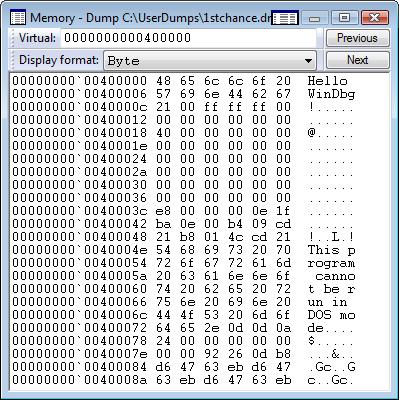
Now we can write memory contents back to our file:
0:000> .writemem c:\dmitri\hello.bin 00000000`00400000 L0n13

Writing d bytes.
- Dmitry Vostokov @ DumpAnalysis.org -
April 17th, 2008 at 3:05 am
What’s OS do you use? When I use the following approach on my Vista machine(using elevated windbg), it will generate error:
0:000> lm
start end module name
00800000 0081b000 BinaryEditorTest (deferred)
65f80000 660a3000 MSVCR90D (deferred)
769a0000 76a78000 kernel32 (deferred)
77020000 7713e000 ntdll (private pdb symbols) c:\localsymbols\ntdll.pdb\C0A498F0036E4D4FB5CBF69005B0F9242\ntdll.pdb
0:000> .readmem e:\test.txt 00800000 L0n12
Reading c bytes
Unable to write memory at 00800000, load is incomplete
I assume this is because PE header is marked as read-only:
0:000> !address 00800000
ProcessParametrs 001e11a8 in range 001e0000 001e3000
Environment 001e0808 in range 001e0000 001e3000
00800000 : 00800000 - 00001000
Type 01000000 MEM_IMAGE
Protect 00000002 PAGE_READONLY
State 00001000 MEM_COMMIT
Usage RegionUsageImage
FullPath BinaryEditorTest.exe
If I use the address from heap, it will succeed. So I believe we should use a writable memory page instead of read-only. PE file is not a good candidate.
April 17th, 2008 at 9:54 am
I did it on Vista x64. Did you attach WinDbg to a running process? In this case it seems logical that WinDbg cannot write to that region. In the case of a crash dump any memory seems to be just a buffer or mapped file.
April 17th, 2008 at 12:38 pm
Oh, thanks Dmitry.
I am using windbg to launch the exe instead of using a memory dump :-(.
You are right. If we use memory dump it will work since windbg will memory mapping the entire dump file as writable.
August 12th, 2008 at 3:19 pm
[…] needed to quickly check preferred load address for one DLL and recalled that I once used WinDbg as a binary editor. So I loaded that DLL as a crash […]