Archive for the ‘Crash Dump Analysis’ Category

In Search of Lost CID

Friday, July 11th, 2008

Paraphrasing the title of Marcel Proust’s “In Search of Lost Time” 6-volume classic we can say there is timeless empirical knowledge. One is target CID (Client ID, PID:TID) for RPC calls. We just need to search for even 16-bit numbers and compare them with the list of available PIDs. The example can be found on ntdebugging blog:

Tracking Down a Multi-Process Deadlock

Actually the second dword after PID can contain even 16-bit TID number as can be seen from another example:

1: kd> kv
ChildEBP RetAddr  Args to Child             
[...]
00faf828 7778c38b 00faf8f0 00faf9f0 06413b54 ole32!CRpcChannelBuffer::SwitchAptAndDispatchCall+0x112
00faf908 776c0565 06413b54 00fafa00 00faf9f0 ole32!CRpcChannelBuffer::SendReceive2+0xd3
00faf974 776c04fa 06413b54 00fafa00 00faf9f0 ole32!CAptRpcChnl::SendReceive+0xab
00faf9c8 77ce247f 06413b54 00fafa00 00faf9f0 ole32!CCtxComChnl::SendReceive+0×1a9
00faf9e4 77ce252f 03213bdc 00fafa2c 0600016e RPCRT4!NdrProxySendReceive+0×43
00fafdcc 77ce25a6 763050e8 76306bba 00fafe04 RPCRT4!NdrClientCall2+0×206
00fafdec 77c64f87 0000000c 00000005 00fafe3c RPCRT4!ObjectStublessClient+0×8b
00fafdfc 7784ba75 03213bdc 03235858 03235850 RPCRT4!ObjectStubless+0xf
[…]

1: kd> dpp 06413b54 l8
06413b54  77672418 7778bcdf ole32!CRpcChannelBuffer::QueryInterface
06413b58  776723e8 777267f5 ole32!CRpcChannelBuffer::QueryInterface
06413b5c  00000003
06413b60  00000002
06413b64  0743fde8 0316f080
06413b68  07676528 031d5ad0
06413b6c  064c9c80 064c9d00
06413b70  078843c0 00000000

1: kd> dd 064c9c80 l4
064c9c80  064c9d00 064c9c00 00003108 00001dac ; PID TID

I have been using this technique for a long time and only now see it documented.

- Dmitry Vostokov @ DumpAnalysis.org -

Crash Dump Analysis Patterns (Part 71)

Friday, July 11th, 2008

Dynamic memory corruption patterns in user and kernel spaces are specializations of one big parent pattern called Corrupt Structure because crashes there happen due to corrupt or overwritten heap or pool control structures (for the latter see Double Free pattern). Another frequently seen specialization is called Critical Section Corruption which is the subject of this post. Critical sections are linked together through statically pre-allocated or heap-allocated helper structure (shown in magenta) although themselves they can be stored anywhere from static and stack area to heap:

0:001> dt -r1 ntdll!_RTL_CRITICAL_SECTION 77795240
   +0×000 DebugInfo        : 0×00175d28 _RTL_CRITICAL_SECTION_DEBUG
      +0×000 Type             : 0
      +0×002 CreatorBackTraceIndex : 0
      +0×004 CriticalSection  : 0×77795240 _RTL_CRITICAL_SECTION
      +0×008 ProcessLocksList : _LIST_ENTRY [ 0×173a08 - 0×173298 ]
      +0×010 EntryCount       : 0
      +0×014 ContentionCount  : 0
      +0×018 Spare            : [2] 0

   +0×004 LockCount        : -1
   +0×008 RecursionCount   : 0
   +0×00c OwningThread     : (null)
   +0×010 LockSemaphore    : (null)
   +0×014 SpinCount        : 0

0:001> !address 77795240
    77670000 : 77792000 - 00005000
                    Type     01000000 MEM_IMAGE
                    Protect  00000004 PAGE_READWRITE
                    State    00001000 MEM_COMMIT
                  Usage    RegionUsageImage
                    FullPath C:\WINDOWS\system32\ole32.dll

0:001> !address 0×00175d28
    00140000 : 00173000 - 0000d000
                    Type     00020000 MEM_PRIVATE
                    Protect  00000004 PAGE_READWRITE
                    State    00001000 MEM_COMMIT
                    Usage    RegionUsageHeap
                    Handle   00140000

0:000> !locks

CritSec ntdll!LdrpLoaderLock+0 at 7c8877a0
WaiterWoken        No
LockCount          0
RecursionCount     1
OwningThread       1184
EntryCount         0
ContentionCount    b04707
*** Locked

0:000> dt -r1 _RTL_CRITICAL_SECTION 7c8877a0
   +0×000 DebugInfo        : 0×7c8877c0 _RTL_CRITICAL_SECTION_DEBUG
      +0×000 Type             : 0
      +0×002 CreatorBackTraceIndex : 0
      +0×004 CriticalSection  : 0×7c8877a0 _RTL_CRITICAL_SECTION
      +0×008 ProcessLocksList : _LIST_ENTRY [ 0×7c887be8 - 0×7c887bc8 ]
      +0×010 EntryCount       : 0
      +0×014 ContentionCount  : 0xb04707
      +0×018 Spare            : [2] 0

   +0×004 LockCount        : -2
   +0×008 RecursionCount   : 1
   +0×00c OwningThread     : 0×00001184
   +0×010 LockSemaphore    : 0×0000013c
   +0×014 SpinCount        : 0

0:000> !address 7c8877a0
    7c800000 : 7c887000 - 00003000
                    Type     01000000 MEM_IMAGE
                    Protect  00000004 PAGE_READWRITE
                    State    00001000 MEM_COMMIT
                    Usage    RegionUsageImage
                    FullPath C:\WINDOWS\system32\ntdll.dll

0:000> !address 0×7c8877c0
    7c800000 : 7c887000 - 00003000
                    Type     01000000 MEM_IMAGE
                    Protect  00000004 PAGE_READWRITE
                    State    00001000 MEM_COMMIT
                    Usage    RegionUsageImage
                    FullPath C:\WINDOWS\system32\ntdll.dll

Consider the case when CRITICAL_SECTION is defined on a stack and there was Local Buffer Overflow overwriting DebugInfo pointer. Then we have an example of Wild Pointer pattern and traversing the list of critical sections from this point will diverge into completely unrelated memory area or stop there. Consider another example of heap corruption or race condition overwriting ProcessLocksList or CriticalSection pointer. Then we have an instance of Wild Pointer pattern illustrated below:

0:000> !locks

CritSec ntdll!LdrpLoaderLock+0 at 7c8877a0
WaiterWoken        No
LockCount          0
RecursionCount     1
OwningThread       1184
EntryCount         0
ContentionCount    b04707
*** Locked

CritSec +1018de08 at 1018de08
WaiterWoken        Yes
LockCount          -49153
RecursionCount     5046347
OwningThread       460050
EntryCount         0
ContentionCount    0
*** Locked

CritSec +1018ddd8 at 1018ddd8
WaiterWoken        Yes
LockCount          -1
RecursionCount     0
OwningThread       0
*** Locked

CritSec +1018de28 at 1018de28
WaiterWoken        Yes
LockCount          -1
RecursionCount     0
OwningThread       0
*** Locked

CritSec +1018de08 at 1018de08
WaiterWoken        Yes
LockCount          -49153
RecursionCount     5046347
OwningThread       460050
EntryCount         0
ContentionCount    0
*** Locked

CritSec +1018de28 at 1018de28
WaiterWoken        Yes
LockCount          -1
RecursionCount     0
OwningThread       0
*** Locked

CritSec +1018ddd8 at 1018ddd8
WaiterWoken        Yes
LockCount          -1
RecursionCount     0
OwningThread       0
*** Locked

Scanned 841 critical sections

We see the signs of corruption at 1018de08 address which is interpreted as pointing to a locked critical section. To see where the corruption started we need to look at the list of all critical sections either locked or not locked:

0:000> !locks -v

CritSec ntdll!RtlCriticalSectionLock+0 at 7c887780
LockCount          NOT LOCKED
RecursionCount     0
OwningThread       0
EntryCount         0
ContentionCount    28

CritSec ntdll!LdrpLoaderLock+0 at 7c8877a0
WaiterWoken        No
LockCount          0
RecursionCount     1
OwningThread       1184
EntryCount         0
ContentionCount    b04707
*** Locked

CritSec ntdll!FastPebLock+0 at 7c887740
LockCount          NOT LOCKED
RecursionCount     0
OwningThread       0
EntryCount         0
ContentionCount    42c9

CritSec ntdll!RtlpCalloutEntryLock+0 at 7c888ea0
LockCount          NOT LOCKED
RecursionCount     0
OwningThread       0
EntryCount         0
ContentionCount    0

CritSec ntdll!PMCritSect+0 at 7c8883c0
LockCount          NOT LOCKED
RecursionCount     0
OwningThread       0
EntryCount         0
ContentionCount    0

CritSec ntdll!UMLogCritSect+0 at 7c888400
LockCount          NOT LOCKED
RecursionCount     0
OwningThread       0
EntryCount         0
ContentionCount    0

CritSec ntdll!RtlpProcessHeapsListLock+0 at 7c887960
LockCount          NOT LOCKED
RecursionCount     0
OwningThread       0
EntryCount         0
ContentionCount    0

CritSec +80608 at 00080608
LockCount          NOT LOCKED
RecursionCount     0
OwningThread       0
EntryCount         0
ContentionCount    22

[...]

CritSec cabinet!_adbgmsg+13c at 74fb4658
LockCount          NOT LOCKED
RecursionCount     0
OwningThread       0
EntryCount         0
ContentionCount    0

CritSec +c6c17c at 00c6c17c
LockCount          NOT LOCKED
RecursionCount     0
OwningThread       0
EntryCount         0
ContentionCount    0

CritSec +c6c0e4 at 00c6c0e4
LockCount          NOT LOCKED
RecursionCount     0
OwningThread       0
EntryCount         0
ContentionCount    0

CritSec at 1018de08 does not point back to the debug info at 00136a40
Perhaps the memory that held the critical section has been reused without calling DeleteCriticalSection() ?

CritSec +1018de08 at 1018de08
WaiterWoken        Yes
LockCount          -49153
RecursionCount     5046347
OwningThread       460050
EntryCount         0
ContentionCount    0
*** Locked

CritSec at 1018ddd8 does not point back to the debug info at 00136a68
Perhaps the memory that held the critical section has been reused without calling DeleteCriticalSection() ?

CritSec +1018ddd8 at 1018ddd8
WaiterWoken        Yes
LockCount          -1
RecursionCount     0
OwningThread       0
*** Locked

[...]

We see that the problem appears when the heap-allocated critical section at 00c6c0e4 address is linked to an inconsistent critical section at 0×1018de08 address where memory contains UNICODE string fragment:

0:000> !address 00c6c0e4
    00c60000 : 00c60000 - 00010000
                    Type     00020000 MEM_PRIVATE
                    Protect  00000004 PAGE_READWRITE
                    State    00001000 MEM_COMMIT
                    Usage    RegionUsageHeap
                    Handle   00c60000

0:000> dt -r1 _RTL_CRITICAL_SECTION 00c6c0e4
   +0x000 DebugInfo        : 0x00161140 _RTL_CRITICAL_SECTION_DEBUG
      +0x000 Type             : 0
      +0x002 CreatorBackTraceIndex : 0
      +0x004 CriticalSection  : 0x00c6c0e4 _RTL_CRITICAL_SECTION
      +0×008 ProcessLocksList : _LIST_ENTRY [ 0×136a48 - 0×119f58 ]
      +0×010 EntryCount       : 0
      +0×014 ContentionCount  : 0
      +0×018 Spare            : [2] 0
   +0×004 LockCount        : -1
   +0×008 RecursionCount   : 0
   +0×00c OwningThread     : (null)
   +0×010 LockSemaphore    : (null)
   +0×014 SpinCount        : 0

0:000> dt -r _RTL_CRITICAL_SECTION_DEBUG 0×00136a48-0×008
   +0×000 Type             : 0
   +0×002 CreatorBackTraceIndex : 0
   +0×004 CriticalSection  : 0×1018de08 _RTL_CRITICAL_SECTION
      +0×000 DebugInfo        : 0×000d001b _RTL_CRITICAL_SECTION_DEBUG
         +0×000 Type             : 0
         +0×002 CreatorBackTraceIndex : 0
         +0×004 CriticalSection  : (null)
         +0×008 ProcessLocksList : _LIST_ENTRY [ 0×0 - 0×0 ]
         +0×010 EntryCount       : 0
         +0×014 ContentionCount  : 0×37e3c700
         +0×018 Spare            : [2] 0×8000025
      +0×004 LockCount        : 196609
      +0×008 RecursionCount   : 5046347
      +0×00c OwningThread     : 0×00460050
      +0×010 LockSemaphore    : 0×00310033
      +0×014 SpinCount        : 0×520044
   +0×008 ProcessLocksList : _LIST_ENTRY [ 0×136a70 - 0×161148 ]
      +0×000 Flink            : 0×00136a70 _LIST_ENTRY [ 0×136a98 - 0×136a48 ]
         +0×000 Flink            : 0×00136a98 _LIST_ENTRY [ 0×136ae8 - 0×136a70 ]
         +0×004 Blink            : 0×00136a48 _LIST_ENTRY [ 0×136a70 - 0×161148 ]
      +0×004 Blink            : 0×00161148 _LIST_ENTRY [ 0×136a48 - 0×119f58 ]
         +0×000 Flink            : 0×00136a48 _LIST_ENTRY [ 0×136a70 - 0×161148 ]
         +0×004 Blink            : 0×00119f58 _LIST_ENTRY [ 0×161148 - 0×16cc3c0 ]
   +0×010 EntryCount       : 0
   +0×014 ContentionCount  : 0
   +0×018 Spare            : [2] 0×2e760000

0:000> !address 0x1018de08
    10120000 : 10120000 - 00100000
                    Type     00020000 MEM_PRIVATE
                    Protect  00000004 PAGE_READWRITE
                    State    00001000 MEM_COMMIT
                    Usage    RegionUsageIsVAD

The address points miraculously to some DLL: 

0:000> du 1018de08
1018de08  "....componentA.dll"

We might suggest that componentA.dll played some role there.

There are other messages from verbose version of !locks WinDbg command pointing to critical section problems:  

CritSec componentB!Section+0 at 74004008
LockCount          NOT LOCKED
RecursionCount     0
OwningThread       0
EntryCount         0
ContentionCount    0

The CritSec componentC!Info+c at 72455074 has been RE-INITIALIZED.
The critical section points to DebugInfo at 00107cc8 instead of 000f4788

CritSec componentC!Info+c at 72455074
LockCount          NOT LOCKED
RecursionCount     0
OwningThread       0
EntryCount         0
ContentionCount    0

CritSec componentD!foo+8ec0 at 0101add0
LockCount          NOT LOCKED
RecursionCount     0
OwningThread       0
EntryCount         0
ContentionCount    0

- Dmitry Vostokov @ DumpAnalysis.org -

Crash Dump Analysis Patterns (Part 70)

Thursday, July 10th, 2008

Sometimes compilers optimize code by replacing function calls with their bodies. This procedure is called function inlining and functions themselves are called inline. On one platform we can see the real function call on the stack trace but on another platform or product version we only see the same problem instruction. Fortunately the rest of stack trace should be the same. Therefore when comparing Stack Traces we shouldn’t pay attention only to the top function call. This pattern is called Inline Function Optimization.

It is frequently seen when threads crash while copying or moving memory. Consider this stack trace:

0: kd> kL
ChildEBP RetAddr 
f22efaf4 f279ec3d driver!QueueValue+0x26b
f22efb30 8081dcdf driver!BufferAppendData+0x35f
f22efc7c 808f47b7 nt!IofCallDriver+0x45
f22efc90 808f24ee nt!IopSynchronousServiceTail+0x10b
f22efd38 80888c7c nt!NtWriteFile+0x65a
f22efd38 7c82ed54 nt!KiFastCallEntry+0xfc

When looking at rep movs instruction we might suspect that QueueValue was copying memory:

0: kd> r
eax=00000640 ebx=89b23000 ecx=00000190 edx=89b3c828 esi=02124220 edi=e2108f58
eip=f279c797 esp=f22efadc ebp=f22efaf4 iopl=0 nv up ei pl nz na pe nc
cs=0008 ss=0010 ds=0023 es=0023 fs=0030 gs=0000 efl=00010206
driver!QueueValue+0x26b:
f279c797 f3a5 rep movs dword ptr es:[edi],dword ptr [esi] es:0023:e2108f58=dfefbecf ds:0023:02124220=????????

On x64 bit platform the same driver had the similar stack trace but with memcpy at its top:

fffffadf`8955f4a8 fffffadf`8d1bef46 driver!memcpy+0x1c0
fffffadf`8955f4b0 fffffadf`8d1c15c9 driver!QueueValue+0x2fe
fffffadf`8955f550 fffff800`01273ed9 driver!BufferAppendData+0x481
[...]

We also see how QueueValue+0×2fe and QueueValue+0×26b are close. In fact the source code for the driver calls RtlCopyMemory function only once and it is defined as memcpy in wdm.h. The latter function is also exported from nt:

0: kd> x nt!
[...]
80881780 nt!memcpy = <no type information>
[...]

but usually can be found in any driver that links it from C runtime library, for example, on my x64 Windows:

1: kd> x nt!memcpy
fffff800`01c464e0 nt!memcpy = <no type information>

1: kd> x srv!memcpy
fffff980`0eafdf20 srv!memcpy = <no type information>

1: kd> x win32k!memcpy
fffff960`000c1b40 win32k!memcpy = <no type information>

Therefore we see that when compiling for x86 platform Visual C++ compiler decided to inline memcpy code but AMD compiler on x64 platform didn’t inline it. The overall stack trace without offsets is very similar and we can suppose that the problem was identical.

- Dmitry Vostokov @ DumpAnalysis.org -

Crash Dump Analysis Patterns (Part 19b)

Thursday, July 10th, 2008

Previously I wrote about how to calculate thread waiting time in kernel and complete memory dumps (Waiting Thread Time pattern). Now I show how to do it for user dumps. Unfortunately this information is not available in user space and therefore this can be done only approximately by calculating average or maximum waiting time.

The key is to take advantage of !runaway WinDbg command. Modern versions of postmortem debuggers and process dumpers usually save thread time information additionally. For example, /ma switch for .dump command does it. The later versions of userdump.exe also do it. When !runaway is invoked with 0y111 (7) flag it shows each thread user and kernel times and also the time elapsed since each thread was created. Therefore for threads that didn’t do much CPU intensive computation their average waiting time will almost correspond to their elapsed time. Unfortunately we cannot say when that computation took place. It could be the case that the thread in question was waiting 98.9% of the time, then did some computation for 0.01% and was waiting again 1% of the time or it could be the case that it was doing computation 0.01% of the time initially and then waiting the rest of the time (99.9%) until the dump was saved.

Consider this example of a sleeping thread:

0:000> ~32kL 100
ChildEBP RetAddr 
0a18f03c 7c826f4b ntdll!KiFastSystemCallRet
0a18f040 77e41ed1 ntdll!NtDelayExecution+0xc
0a18f0a8 77e424ed kernel32!SleepEx+0x68
0a18f0b8 1b0ac343 kernel32!Sleep+0xf
0a18f100 1b00ba49 msjet40!System::AllocatePages+0x15e
0a18f11c 1b00ba08 msjet40!PageDesc::WireCurrentPage+0x2f
0a18f13c 1b00b8dd msjet40!PageDesc::ReadPage+0x119
0a18f164 1b01b567 msjet40!Database::ReadPage+0x7a
0a18f190 1b00e309 msjet40!TableMover::GetNextRow+0xc9
0a18f1a8 1b015de9 msjet40!TableMover::Move+0xc4
0a18f1d8 1b015d9c msjet40!ErrIsamMove+0x6c
0a18f1f0 1b038aa4 msjet40!ErrDispMove+0x43
0a18f43c 1b015d9c msjet40!ErrJPMoveRange+0x350
0a18f454 1b0200b3 msjet40!ErrDispMove+0x43
0a18f6a0 1b021e4d msjet40!ErrMaterializeRows+0x1fd
0a18f6f0 1b021c0d msjet40!ErrJPSetColumnSort+0x191
0a18f718 1b0210a4 msjet40!ErrJPOpenSort+0x105
0a18f750 1b020de5 msjet40!ErrJPOpenRvt+0x171
0a18f9f0 1b039b82 msjet40!ErrExecuteQuery+0x548
0a18fa3c 1b05548b msjet40!ErrExecuteTempQuery+0x13d
0a18fa6c 4c23b01e msjet40!JetExecuteTempQuery+0xc9
0a18fa94 4c23a8d1 odbcjt32!DoJetCloseTable+0x64
0a18fd10 4c23a6b6 odbcjt32!SQLInternalExecute+0x217
0a18fd20 4c23a694 odbcjt32!SQLExecuteCover+0x1f
0a18fd28 488b3fc1 odbcjt32!SQLExecute+0x9
0a18fd44 0c4898b5 odbc32!SQLExecute+0xd3
[...]

The process uptime can be seen from vertarget WinDbg command:

0:000> vertarget
[...]
Process Uptime: 0 days 1:17:22.000
[...]

Then we dump thread times (only information for our 32nd thread is shown here):

0:000> !runaway 0y111
 User Mode Time
  Thread       Time
  32:cfc       0 days 0:00:00.109
[...]
 Kernel Mode Time
  Thread       Time
  32:cfc       0 days 0:00:00.062
[...]
 Elapsed Time
  Thread       Time
[...]
  32:cfc       0 days 1:17:20.703
[...]

We see that 1 hour, 17 minutes and almost 21 seconds  passed since the thread was created. By subtracting this time from process uptime we see that it was created in the first 2 seconds and it was consuming less than one second of CPU time. Therefore, most of the time this thread was waiting. Unfortunately we cannot say when it was waiting most of the time, in the beginning before it started sleeping or after. Fortunately we might continue guessing by looking at Sleep argument:

0:032> kv
ChildEBP RetAddr  Args to Child             
0a18f03c 7c826f4b 77e41ed1 00000000 0a18f080 ntdll!KiFastSystemCallRet
0a18f040 77e41ed1 00000000 0a18f080 00000000 ntdll!NtDelayExecution+0xc
0a18f0a8 77e424ed 00000032 00000000 04390000 kernel32!SleepEx+0x68
0a18f0b8 1b0ac343 00000032 042a34b4 0a18f1c8 kernel32!Sleep+0xf
[…]

We see that it had been sleeping for at most 32 milliseconds and perhaps this is a retry / sleep loop. We might guess that the thread was recently spinning in that loop and therefore waiting all the time before that. Alternatively we might guess that the retry portion is very small and fast and 32 milliseconds are spread over all elapsed time and the thread was in this loop the significant proportion of time. What we can surely say that the last waiting time was no more than 32 milliseconds. in the case of waiting for an event, for example, I don’t see any reliable way of calculating this time. If anyone knows please post a comment.

- Dmitry Vostokov @ DumpAnalysis.org -
It’s Not a Bug, It’s Not a Feature, It’s a Gift!

Wednesday, July 9th, 2008

This little quotation book is a perfect gift to any software engineer or scientist:

It’s Not a Bug, It’s a Feature!: Computer Wit and Wisdom

Buy from Amazon

- Dmitry Vostokov @ DumpAnalysis.org -

The Hidden Tomb in Pyramid of Software Change

Wednesday, July 9th, 2008

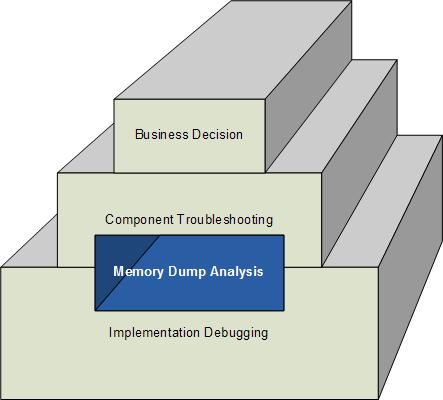
How does software change in production environment? My experience suggests 3 major ways:

  1. Executive decision to replace the whole software product with another competing product.
  2. Software troubleshooting at component level like upgrading or eliminating suspicious components and unrelated products that influence behaviour.
  3. Correction of individual components after debugging to address implementation and functional defects, non-functional, design or architecture deficiencies.

This can be shown on the following rough diagram (excluding possible overlapping of levels) highlighting the often hidden role of memory dump analysis in software change:

- Dmitry Vostokov @ DumpAnalysis.org -

Crash Dump Analysis AntiPatterns (Part 10)

Wednesday, July 9th, 2008

Often engineers spend 10 minutes pursuing a certain investigation path and then prematurely closing it and switching to another. This is what I call Myopic Troubleshooting and Debugging.

This anti-pattern name was inspired by Daniel Dennett’s discussion of insufficiently patient scientists doing computer simulations:

“mistaking a failure of imagination for an insight into necessity” (Darwin’s Dangerous Idea, page 175).

Paraphrasing we can say that engineers think of impossibility where their imagination fails.

- Dmitry Vostokov @ DumpAnalysis.org -

Crash Dump Analysis Patterns (Part 69)

Wednesday, July 9th, 2008

Sometimes patterns like Message Box and / or Stack Trace semantics reveal another pattern that I call Self-Diagnosis which may or may not result in Self-Dump. The diagnostic message may reveal the problem internally detected by runtime environment.

Consider the following stack trace:

0:000> kv
ChildEBP RetAddr  Args to Child             
0012e8c0 77f4bf53 77f4610a 00000000 00000000 ntdll!KiFastSystemCallRet
0012e8f8 77f3965e 000101a2 00000000 00000001 user32!NtUserWaitMessage+0xc
0012e920 77f4f762 77f30000 00151768 00000000 user32!InternalDialogBox+0xd0
0012ebe0 77f4f047 0012ed3c 00000000 ffffffff user32!SoftModalMessageBox+0x94b
0012ed30 77f4eec9 0012ed3c 00000028 00000000 user32!MessageBoxWorker+0x2ba
0012ed88 77f87d0d 00000000 001511a8 0014ef50 user32!MessageBoxTimeoutW+0x7a
0012edbc 77f742c8 00000000 0012ee70 1001d7d4 user32!MessageBoxTimeoutA+0x9c
0012eddc 77f742a4 00000000 0012ee70 1001d7d4 user32!MessageBoxExA+0x1b
0012edf8 10014c9a 00000000 0012ee70 1001d7d4 user32!MessageBoxA+0×45
WARNING: Stack unwind information not available. Following frames may be wrong.
0012ee2c 10010221 0012ee70 1001d7d4 00012010 component!Error+0×7e4a
[…]

Dumping the message box message and its title shows that Visual C++ runtime detected a buffer overflow condition:

0:000> da 0012ee70
0012ee70  "Buffer overrun detected!..Progra”
0012ee90  “m: E:\W\program.exe..A buffer ov”
0012eeb0  “errun has been detected which ha”
0012eed0  “s corrupted the program’s.intern”
0012eef0  “al state.  The program cannot sa”
0012ef10  “fely continue execution and must”
0012ef30  “.now be terminated..”

0:000> da 1001d7d4
1001d7d4  "Microsoft Visual C++ Runtime Lib"
1001d7f4  "rary"

- Dmitry Vostokov @ DumpAnalysis.org -

Software Exceptions: a Paranormal View

Wednesday, July 9th, 2008

Some view minds as software and some view software as minds. There is also mind / body problem for humans and less known mind / body problem for computers. This is what I define as ”Metaphorical Bijection (seems I coined a new term again). Some view minds as constrained by brains. Therefore we can say that software might be constrained by hardware too and exceptions (faults) arise when software is accidentally written for hardware or another software if hardware is virtualized, simulated, without limitations that constrain software execution. The current hardware constrains that accidentally written software and generates faults because it cannot deal with paranormal effects. 

- Dmitry Vostokov @ DumpAnalysis.org -

Crash Dump Analysis Patterns (Part 68)

Friday, June 27th, 2008

Setting a thread affinity mask to a specific processor or core makes that thread running in a single processor environment from that thread point of view. It is always scheduled to run on that processor. This potentially creates a problem found on real single processor environments if the processor runs another higher priority thread (Thread Starvation pattern) or loops at dispatch level IRQL (Dispatch Level Spin pattern). Therefore I call this pattern Affine Thread.

Here is one example. Dual core laptop was hanging and kernel memory dump showed the following Wait Chain pattern:

Resource @ nt!PopPolicyLock (0x80563080)    Exclusively owned
    Contention Count = 32
    NumberOfExclusiveWaiters = 9
     Threads: 8b3b08b8-01<*>
     Threads Waiting On Exclusive Access:
              872935f0       8744cb30       87535da8       8755a6b0      
              8588dba8       8a446c10       85891c50       87250020      
              8a6e7da8

The thread 8b3b08b8 blocked other 9 threads and had the following stack trace:

0: kd> !thread 8b3b08b8 1f
THREAD 8b3b08b8  Cid 0004.002c  Teb: 00000000 Win32Thread: 00000000 READY
Not impersonating
DeviceMap                 e1009248
Owning Process            8b3b2830       Image:         System
Wait Start TickCount      44419          Ticks: 8744 (0:00:02:16.625)
Context Switch Count      4579            
UserTime                  00:00:00.000
KernelTime                00:00:01.109
Start Address nt!ExpWorkerThread (0x8053867e)
Stack Init bad00000 Current bacffcb0 Base bad00000 Limit bacfd000 Call 0
Priority 15 BasePriority 12 PriorityDecrement 3 DecrementCount 16
ChildEBP RetAddr 
bacffcc8 804fd2c9 nt!KiUnlockDispatcherDatabase+0x9e
bacffcdc 8052a16f nt!KeSetSystemAffinityThread+0×5b
bacffd04 805caf03 nt!PopCompositeBatteryUpdateThrottleLimit+0×2d
bacffd24 805ca767 nt!PopCompositeBatteryDeviceHandler+0×1c5
bacffd3c 80529d3b nt!PopPolicyWorkerMain+0×25
bacffd7c 8053876d nt!PopPolicyWorkerThread+0xbf
bacffdac 805cff64 nt!ExpWorkerThread+0xef
bacffddc 805460de nt!PspSystemThreadStartup+0×34
00000000 00000000 nt!KiThreadStartup+0×16

Note this function and its first parameter: 

0: kd> !thread 8b3b08b8
[...]
bacffcdc 8052a16f 00000002 8a5b8cd8 00000030 nt!KeSetSystemAffinityThread+0×5b
[…]

The first parameter is KAFFINITY mask and 0×2 is 0y10 (binary) which is the second core. This thread had been already set to run on that core only:

0: kd> dt _KTHREAD 8b3b08b8
nt!_KTHREAD
   +0x000 Header           : _DISPATCHER_HEADER
[...]
   +0×124 Affinity         : 2
[…]
 

Let’s look at our second core:

0: kd> ~1s

1: kd> kL 100
ChildEBP RetAddr 
a8f00618 acd21947 hal!KeAcquireInStackQueuedSpinLock+0x43
a8f00618 acd21947 tcpip!IndicateData+0x98
a8f00684 acd173e5 tcpip!IndicateData+0x98
a8f0070c acd14ef5 tcpip!TCPRcv+0xbb0
a8f0076c acd14b19 tcpip!DeliverToUser+0x18e
a8f007e8 acd14836 tcpip!DeliverToUserEx+0x95e
a8f008a0 acd13928 tcpip!IPRcvPacket+0x6cb
a8f008e0 acd13853 tcpip!ARPRcvIndicationNew+0x149
a8f0091c ba56be45 tcpip!ARPRcvPacket+0x68
a8f00970 b635801d NDIS!ethFilterDprIndicateReceivePacket+0x307
a8f00984 b63581b4 psched!PsFlushReceiveQueue+0x15
a8f009a8 b63585f9 psched!PsEnqueueReceivePacket+0xda
a8f009c0 ba56c8ed psched!ClReceiveComplete+0x13
a8f009d8 b7defdb5 NDIS!EthFilterDprIndicateReceiveComplete+0x7c
a8f00a08 b7df0f78 driverA+0x17db5
a8f00a64 ba55ec2c driverA+0x18f78
a8f00a88 b6b0962c NDIS!ndisMSendCompleteX+0x8d
a8f00a9c b6b0a36d driverB+0x62c
a8f00ab8 ba55e88f driverB+0x136d
a8f00ae0 b7de003c NDIS!NdisReturnPackets+0xe9
a8f00af0 ba55e88f driverA+0x803c
a8f00b18 b6358061 NDIS!NdisReturnPackets+0xe9
a8f00b30 ba55e88f psched!MpReturnPacket+0x3b
a8f00b58 acc877cc NDIS!NdisReturnPackets+0xe9
87749da0 00000000 afd!AfdReturnBuffer+0xe1

1: kd> r
eax=a8f005f8 ebx=a8f00624 ecx=8a9862ed edx=a8f00b94 esi=874e2ed0 edi=8a9862d0
eip=806e6a33 esp=a8f005ec ebp=a8f00618 iopl=0         nv up ei pl nz na po nc
cs=0008  ss=0010  ds=0023  es=0023  fs=0030  gs=0000             efl=00000202
hal!KeAcquireInStackQueuedSpinLock+0x43:
806e6a33 74ee            je      hal!KeAcquireInStackQueuedSpinLock+0x33 (806e6a23) [br=0]

1: kd> !running

System Processors 3 (affinity mask)
  Idle Processors 1

     Prcb      Current   Next   
  1  bab38120  8a0c8ae8  8b3a7318  …………….

We see the thread 8a0c8ae8 had been spinning on the second core for more than 2 minutes:

1: kd> !thread 8a0c8ae8 1f
THREAD 8a0c8ae8  Cid 0660.0124  Teb: 7ffd7000 Win32Thread: e338c498 RUNNING on processor 1
IRP List:
    8a960008: (0006,01b4) Flags: 00000900  Mdl: 87535908
Not impersonating
DeviceMap                 e2f155b8
Owning Process            87373020       Image:         APPLICATION.EXE
Wait Start TickCount      43918          Ticks: 9245 (0:00:02:24.453)
Context Switch Count      690                 LargeStack
UserTime                  00:00:00.000
KernelTime                00:02:24.453
[…]

Its kernel time looks consistent with the starved thread waiting time:

0: kd> !thread 8b3b08b8 1f
THREAD 8b3b08b8  Cid 0004.002c  Teb: 00000000 Win32Thread: 00000000 READY
Not impersonating
DeviceMap                 e1009248
Owning Process            8b3b2830       Image:         System
Wait Start TickCount      44419          Ticks: 8744 (0:00:02:16.625)
[…]

For comparison, the spinning thread has affinity mask 0y11 (0×3) which means that it can be scheduled to run on both cores:

0: kd> dt _KTHREAD 8a0c8ae8
nt!_KTHREAD
   +0x000 Header           : _DISPATCHER_HEADER
[...]
   +0×124 Affinity         : 3
[…]

- Dmitry Vostokov @ DumpAnalysis.org -

Opentask publishing plans

Thursday, June 26th, 2008

In July-August Opentask publisher plans to have its own website. In the mean time here is the additional list of books to be published in the next 5-7 years starting from 2009 onwards:

- Memiotics (ISBN-13: 978-1906717087)

- Voice Recognition: Command and Control (ISBN-13: 978-1906717094)

- Memory Analysis: An Interdisciplinary Approach (ISBN-13: 978-1906717117)

- Deep Down C++ (ISBN-13: 978-1906717124)

- Management Bits: An Anthology from Reductionist Manager (ISBN-13: 978-1906717131)

- Classical, Quantum and Nonlinear Memoretics (ISBN-13: 978-1906717186)

- Crash Dump: A Software Engineering Autobiography (ISBN-13: 978-1906717193)

- Memoidealism: A New Kind of Philosophy (ISBN-13: 978-1906717209)

including 10-volume edition of Software Engineering Notebooks:

- Software Engineering Notebooks, Volume 1 (ISBN-13: 978-1906717148)

Details will be announced later on the publisher’s website.

Note: the book about voice recognition stands apart from the others. This is actually the title of the first book I wanted to write 5 years ago.

- Dmitry Vostokov @ DumpAnalysis.org -

Heuristic Stack Trace in WinDbg 6.9.3.113

Thursday, June 26th, 2008

Here is another 64-bit example of Hidden Exception pattern where looking at raw stack data helps in problem identification. Opening the dump in 6.8.0004.0 version of WinDbg shows this meaningless stack trace:

00000000`00000000 ??              ???

0:035> kL
Child-SP          RetAddr           : Call Site
00000000`00000000 00000000`00000000 : 0x0

Analysis command doesn’t help too:

FAULTING_IP:
ntdll!DbgBreakPoint+0
00000000`77ef2aa0 cc              int     3

EXCEPTION_RECORD:  ffffffffffffffff -- (.exr 0xffffffffffffffff)
ExceptionAddress: 0000000077ef2aa0 (ntdll!DbgBreakPoint)
   ExceptionCode: 80000003 (Break instruction exception)
  ExceptionFlags: 00000000
NumberParameters: 1
   Parameter[0]: 0000000000000000

FAULTING_THREAD:  0000000000000e50

DEFAULT_BUCKET_ID:  STATUS_BREAKPOINT

PROCESS_NAME:  application.exe

ERROR_CODE: (NTSTATUS) 0x80000003 - {EXCEPTION}  Breakpoint  A breakpoint has been reached.

NTGLOBALFLAG:  2000000

APPLICATION_VERIFIER_FLAGS:  0

LAST_CONTROL_TRANSFER:  from 0000000000000000 to 0000000000000000

STACK_TEXT: 
00000000`00000000 00000000`00000000 : 00000000`00000000 00000000`00000000 00000000`00000000 00000000`00000000 : 0x0

STACK_COMMAND:  kb

PRIMARY_PROBLEM_CLASS:  STATUS_BREAKPOINT

BUGCHECK_STR:  APPLICATION_FAULT_STATUS_BREAKPOINT_STACK_CORRUPTION

FOLLOWUP_IP:
ntdll!DbgBreakPoint+0
00000000`77ef2aa0 cc              int     3

SYMBOL_NAME:  ntdll!DbgBreakPoint+0

FOLLOWUP_NAME:  MachineOwner

MODULE_NAME: ntdll

IMAGE_NAME:  ntdll.dll

DEBUG_FLR_IMAGE_TIMESTAMP:  45d6cc72

FAILURE_BUCKET_ID:  ntdll.dll!DbgBreakPoint_80000003_STATUS_BREAKPOINT

BUCKET_ID:  X64_APPLICATION_FAULT_STATUS_BREAKPOINT_STACK_CORRUPTION_ntdll!DbgBreakPoint+0

Followup: MachineOwner
---------

However, looking at thread raw stack data allows us to get the problem stack trace showing that the full page heap enabled process detected heap corruption during free operation:

0:035> !teb
TEB at 000007fffff72000
    ExceptionList:        0000000000000000
    StackBase:            00000000080e0000
    StackLimit:           00000000080d8000

    SubSystemTib:         0000000000000000
    FiberData:            0000000000001e00
    ArbitraryUserPointer: 0000000000000000
    Self:                 000007fffff72000
    EnvironmentPointer:   0000000000000000
    ClientId:             0000000000000918 . 0000000000000e50
    RpcHandle:            0000000000000000
    Tls Storage:          0000000000000000
    PEB Address:          000007fffffd8000
    LastErrorValue:       0
    LastStatusValue:      c0000034
    Count Owned Locks:    0
    HardErrorMode:        0

0:035> dds 00000000080d8000 00000000080e0000
[...]
00000000`080dd7b8  00000000`77ef3202 ntdll!KiUserExceptionDispatcher+0×52
00000000`080dd7c0  00000000`0178070a
00000000`080dd7c8  00000000`080dd7c0 ; exception context

00000000`080dd7d0  00000000`08599d30
00000000`080dd7d8  00000000`00000020
00000000`080dd7e0  00000000`00000000
00000000`080dd7e8  00000000`00000000
00000000`080dd7f0  00001fa0`0010001f
00000000`080dd7f8  0053002b`002b0033
00000000`080dd800  00000202`002b002b
00000000`080dd808  00000000`00000000
[…]

0:035> .cxr 00000000`080dd7c0
rax=0000000000000001 rbx=0000000008599d30 rcx=000077fad8cd0000
rdx=00000000ffff0165 rsi=0000000077ec0000 rdi=0000000000000000
rip=0000000077ef2aa0 rsp=00000000080ddd58 rbp=0000000000000020
 r8=00000000ffffffff  r9=0000000000000000 r10=0000000000000007
r11=0000000000000000 r12=00000000080dde70 r13=0000000077f5d300
r14=0000000077f5d2f0 r15=0000000077f86bc0
iopl=0  nv up ei pl nz na pe nc
cs=0033 ss=002b ds=002b es=002b fs=0053 gs=002b efl=00000202
ntdll!DbgBreakPoint:
00000000`77ef2aa0 cc              int     3

0:035> kL 100
Child-SP          RetAddr           Call Site
00000000`080ddd58 00000000`77f5c78d ntdll!DbgBreakPoint
00000000`080ddd60 00000000`77f5da05 ntdll!RtlpDphReportCorruptedBlock+0×86d
00000000`080dde50 00000000`77f5a0f3 ntdll!RtlpDphNormalHeapFree+0×45
00000000`080ddfb0 00000000`77f60d5b ntdll!RtlpDebugPageHeapFree+0×203
00000000`080de0e0 00000000`77f3bcc8 ntdll!RtlDebugFreeHeap+0×3b
00000000`080de170 00000000`77edc095 ntdll!RtlFreeHeapSlowly+0×4e
00000000`080de2e0 000007ff`7fc2daab ntdll!RtlFreeHeap+0×15e
00000000`080de3f0 00000000`67fa288f msvcrt!free+0×1b
00000000`080de420 00000000`1000d3e9 dll!FreeMem+0xf

[…]
00000000`080df180 000007ff`7fe96cc9 RPCRT4!Invoke+0×65
00000000`080df1e0 000007ff`7fe9758d RPCRT4!NdrStubCall2+0×54d
00000000`080df7a0 000007ff`7fd697b4 RPCRT4!NdrServerCall2+0×1d
00000000`080df7d0 000007ff`7fde06b6 RPCRT4!DispatchToStubInCNoAvrf+0×14
00000000`080df800 000007ff`7fd6990d RPCRT4!DispatchToStubInCAvrf+0×16
00000000`080df830 000007ff`7fd69766 RPCRT4!RPC_INTERFACE::DispatchToStubWorker+0×50d
00000000`080df9a0 000007ff`7fd6b214 RPCRT4!RPC_INTERFACE::DispatchToStub+0×2ec
00000000`080dfa20 000007ff`7fd6b9e3 RPCRT4!LRPC_SCALL::DealWithRequestMessage+0×63b
00000000`080dfae0 000007ff`7fd7007c RPCRT4!LRPC_ADDRESS::DealWithLRPCRequest+0×3bf
00000000`080dfba0 000007ff`7fd45369 RPCRT4!LRPC_ADDRESS::ReceiveLotsaCalls+0×710
00000000`080dfeb0 000007ff`7fd65996 RPCRT4!RecvLotsaCallsWrapper+0×9
00000000`080dfee0 000007ff`7fd65d51 RPCRT4!BaseCachedThreadRoutine+0xde
00000000`080dff50 00000000`77d6b6da RPCRT4!ThreadStartRoutine+0×21
00000000`080dff80 00000000`00000000 kernel32!BaseThreadStart+0×3a

Opening the dump in 6.9.3.113 version of WinDbg and running verbose analysis command shows “heuristic” stack trace (all symbols from raw stack) similar to old W2K extension stack command (see Guessing stack trace) where I highlighted exception processing hints in magenta:

0:035> !analyze -v
[...]
STACK_TEXT: 
00000000`77f15fb3 ntdll!RtlLookupFunctionTable
000007ff`5738e62c ole32!_pfnDliNotifyHook2 <PERF> (ole32+0x24e62c)
000007ff`57140000 ole32!_imp_TraceMessage <PERF> (ole32+0x0)
000007ff`57178356 ole32!ICoCreateInstanceEx
00000000`77ec0000 ntdll!_real <PERF> (ntdll+0x0)
00000000`77ef31dd ntdll!KiUserExceptionDispatcher
00000000`77f3ad68 ntdll!RtlAllocateHeapSlowly
00000000`77f967b8 ntdll!$$VProc_ImageExportDirectory
00000000`77f416ce ntdll!RtlpLookupFunctionEntryForStackWalks
00000000`77ef2aa0 ntdll!DbgBreakPoint
00000000`77ee5a36 ntdll!RtlVirtualUnwind
00000000`77f41c13 ntdll!RtlpWalkFrameChain
00000000`77f5d300 ntdll!`string'
00000000`77f5d2f0 ntdll!`string'
00000000`77f86bc0 ntdll!`string'
00000000`77ee455d ntdll!RtlpExecuteHandlerForException
00000000`77edc095 ntdll!RtlFreeHeap
00000000`77f979e4 ntdll!$$VProc_ImageExportDirectory
00000000`77ed609a ntdll!RtlCreateProcessParameters
00000000`77d5c71f kernel32!BasePushProcessParameters
00000000`77dc059b kernel32!UnhandledExceptionFilter
00000000`77ee6097 ntdll!RtlDispatchException
00000000`77f51285 ntdll!RtlpCaptureStackTraceForLogging
00000000`77f60270 ntdll!RtlDebugAllocateHeap
00000000`77f511a3 ntdll!RtlpExtendStackTraceDataBase
00000000`77d6ec00 kernel32!BasepComputeProcessPath
00000000`77d5c5b2 kernel32!BasePushProcessParameters
00000000`77d59c71 kernel32!CreateProcessInternalW
00000000`77dbc2df kernel32!BaseThreadStart
00000000`77ee6583 ntdll!_C_specific_handler
00000000`77f51432 ntdll!RtlpLogCapturedStackTrace
00000000`77f5e572 ntdll!RtlpDphLogStackTrace
00000000`77d5c4b2 kernel32!BasePushProcessParameters
00000000`77f4bb56 ntdll!DeleteNodeFromTree
00000000`77f4bf24 ntdll!RtlDeleteElementGenericTableAvl
00000000`77f574e1 ntdll!RtlpDphRemoveFromBusyList
00000000`77f5a0dd ntdll!RtlpDebugPageHeapFree
00000000`77f41799 ntdll!RtlCaptureStackBackTrace
00000000`67fa288f dll!FreeMem
00000000`77f5e559 ntdll!RtlpDphLogStackTrace
00000000`77f5a09f ntdll!RtlpDebugPageHeapFree
00000000`77f60d5b ntdll!RtlDebugFreeHeap
00000000`77f3bcc8 ntdll!RtlFreeHeapSlowly
00000000`77d4f7bc kernel32!CreateProcessInternalW
00000000`77f513bd ntdll!RtlpLogCapturedStackTrace
00000000`77ed495f ntdll!RtlDestroyProcessParameters
00000000`77d5c7c2 kernel32!BasePushProcessParameters
00000000`77dc0730 kernel32!`string’
00000000`77d813f0 kernel32!`string’
00000001`000000e0 application!_imp_RegQueryValueExW <PERF> (application+0xe0)
00000000`77ef9971 ntdll!RtlImageNtHeader
00000000`77d6b302 kernel32!BaseCreateStack
00000000`77d5c8a1 kernel32!BaseInitializeContext
00000000`77ef5a81 ntdll!CsrClientCallServer
00000000`77d5c829 kernel32!CreateProcessInternalW
00000001`00000001 application!_imp_RegQueryValueExW <PERF> (application+0×1)
00000001`00000000 application!_imp_RegQueryValueExW <PERF> (application+0×0)
000007ff`57178717 ole32!CProcessActivator::CCICallback
000007ff`571921bf ole32!CoCreateInstance
00000000`77d59620 kernel32!BaseProcessStart
00000000`77dc05d4 kernel32!UnhandledExceptionFilter
00000000`77e346e0 kernel32!__PchSym_ <PERF> (kernel32+0xf46e0)
00000000`77d6b6da kernel32!BaseThreadStart
000007ff`7fe7a934 RPCRT4!Ndr64pSizing
00000000`77f41c93 ntdll!RtlpWalkFrameChain
00000000`77edca76 ntdll!RtlAllocateHeap
00000000`77d40000 kernel32!_imp_memcpy <PERF> (kernel32+0×0)
00000000`77fa0100 ntdll!RtlpStaticDebugInfo
00000000`77ed08b3 ntdll!vsnwprintf
00000000`77dbf42c kernel32!StringCchPrintfW
00000000`77d6e314 kernel32!CloseHandle
00000000`77dc06d8 kernel32!UnhandledExceptionFilter
00000000`77e0a958 kernel32!`string’
00000000`77e29080 kernel32!CfgmgrDllString
000007ff`7fd697b4 RPCRT4!DispatchToStubInCNoAvrf
00000000`77efc2d9 ntdll!bsearch
00000000`77efc791 ntdll!RtlpFindUnicodeStringInSection
00000000`77e23454 kernel32!__PchSym_ <PERF> (kernel32+0xe3454)
00000000`77e1d324 kernel32!g_hModW03A2409
00000000`77e1d330 kernel32!g_hModW03A2409
00000000`77f39fce ntdll!RtlLookupFunctionEntry
00000000`77f39231 ntdll!RtlDispatchException
00000000`77fa3c70 ntdll!RtlpCallbackEntryList
00000000`77d92290 kernel32!_C_specific_handler
00000000`77e30033 kernel32!__PchSym_ <PERF> (kernel32+0xf0033)
000007ff`7fd65d51 RPCRT4!ThreadStartRoutine
00000000`77efc437 ntdll!RtlpLocateActivationContextSection
00000000`77ef8708 ntdll!RtlFindActivationContextSectionString
000007ff`7fc2dab0 msvcrt!free
00000000`77fc5f08 ntdll!CsrPortMemoryRemoteDelta <PERF> (ntdll+0×105f08)
00000000`77fc5fe0 ntdll!CsrPortMemoryRemoteDelta <PERF> (ntdll+0×105fe0)
00000000`77fc5dd0 ntdll!CsrPortMemoryRemoteDelta <PERF> (ntdll+0×105dd0)
00000000`77fc6250 ntdll!CsrPortMemoryRemoteDelta <PERF> (ntdll+0×106250)
00000000`77fc2614 ntdll!CsrPortMemoryRemoteDelta <PERF> (ntdll+0×102614)
00000000`77fb2e28 ntdll!CsrPortMemoryRemoteDelta <PERF> (ntdll+0xf2e28)
000007ff`7fc00000 msvcrt!_imp_MultiByteToWideChar <PERF> (msvcrt+0×0)
000007ff`7fc7fb78 msvcrt!bufin <PERF> (msvcrt+0×7fb78)
00000000`77ef3202 ntdll!KiUserExceptionDispatcher
00000000`77f86220 ntdll!`string’
00000000`77f5c78d ntdll!RtlpDphReportCorruptedBlock
00000000`77f5d1b0 ntdll!`string’
00000000`77f5d1e0 ntdll!`string’
00000000`77f5d200 ntdll!`string’
00000000`77f5da05 ntdll!RtlpDphNormalHeapFree
000007ff`7fde06b6 RPCRT4!DispatchToStubInCAvrf
000007ff`7fd7007c RPCRT4!LRPC_ADDRESS::ReceiveLotsaCalls
000007ff`7fd45369 RPCRT4!RecvLotsaCallsWrapper
000007ff`7fd65996 RPCRT4!BaseCachedThreadRoutine
00000000`77f57370 ntdll!RtlpDphFindBusyMemory
00000000`77f5a0f3 ntdll!RtlpDebugPageHeapFree
000007ff`57197e5b ole32!CRetailMalloc_Free
00000000`77c30000 USER32!InternalCreateDialog
000007ff`5719a21a ole32!COleStaticMutexSem::Request
00000000`77d6d6e1 kernel32!FreeLibrary
000007ff`7ebc0000 OLEAUT32!_imp_RegFlushKey <PERF> (OLEAUT32+0×0)
000007ff`56db3024 msxml3!ModelInit::~ModelInit
00000000`77d6e76c kernel32!LocalAlloc
000007ff`7fc2daab msvcrt!free
000007ff`7fd70000 RPCRT4!LRPC_ADDRESS::ReceiveLotsaCalls
000007ff`7ff0b397 ADVAPI32!LocalBaseRegOpenKey
000007ff`7ff0b977 ADVAPI32!RegQueryValueExW
000007ff`7ff0b20e ADVAPI32!LocalBaseRegCloseKey
000007ff`7ff0b19f ADVAPI32!RegCloseKey
00000000`77ef7b33 ntdll!RtlNtStatusToDosError
000007ff`7fd66238 RPCRT4!LRPC_SCALL::ImpersonateClient
00000000`77efbcdf ntdll!RtlEqualSid
000007ff`7fd662a6 RPCRT4!LRPC_SCALL::RevertToSelf
000007ff`7ff0c6d4 ADVAPI32!GetTokenInformation
000007ff`7fd5cb7b RPCRT4!RpcRevertToSelf
000007ff`7fd666b2 RPCRT4!SCALL::AddToActiveContextHandles
000007ff`7fd37f76 RPCRT4!NDRSContextUnmarshall2
00000000`77f5a001 ntdll!RtlpDebugPageHeapFree
000007ff`7fd6f32b RPCRT4!DCE_BINDING::`scalar deleting destructor’
000007ff`7fd604c3 RPCRT4!RpcStringBindingParseW
000007ff`7fd30000 RPCRT4!_imp_GetSecurityDescriptorDacl <PERF> (RPCRT4+0×0)
000007ff`7fd66374 RPCRT4!NdrServerContextNewUnmarshall
000007ff`7fd605e5 RPCRT4!RpcStringFreeA
000007ff`7fd69e00 RPCRT4!NdrServerInitialize
000007ff`7fd65e81 RPCRT4!RPC_INTERFACE::CheckSecurityIfNecessary
000007ff`7fd6b9e3 RPCRT4!LRPC_ADDRESS::DealWithLRPCRequest
000007ff`7fd66c1e RPCRT4!NdrUnmarshallHandle
000007ff`7fd69a75 RPCRT4!Invoke
000007ff`7fe96cc9 RPCRT4!NdrStubCall2
00000000`77f5e500 ntdll!RtlpDphFreeDelayedBlocksFromHeap
000007ff`7fd608b4 RPCRT4!SVR_BINDING_HANDLE::SVR_BINDING_HANDLE
00000000`77ef7dbb ntdll!RtlInitializeCriticalSectionAndSpinCount
000007ff`7fd60100 RPCRT4!DCE_BINDING::StringBindingCompose
000007ff`7fe9758d RPCRT4!NdrServerCall2
000007ff`7fd5cffd RPCRT4!ParseAndCopyEndpointField
000007ff`7fd604ce RPCRT4!RpcStringBindingParseW
000007ff`7fd6990d RPCRT4!RPC_INTERFACE::DispatchToStubWorker
000007ff`7fc40b0f msvcrt!getptd
000007ff`7fd37eaf RPCRT4!RpcServerInqCallAttributesW
000007ff`7fd65e9c RPCRT4!RPC_INTERFACE::CheckSecurityIfNecessary
000007ff`7fd69766 RPCRT4!RPC_INTERFACE::DispatchToStub
000007ff`7fd6b214 RPCRT4!LRPC_SCALL::DealWithRequestMessage
000007ff`7fd70466 RPCRT4!LRPC_ADDRESS::DereferenceAssociation
000007ff`7fd6ee28 RPCRT4!LRPC_SASSOCIATION::DealWithCopyMessage
000007ff`7fd65d30 RPCRT4!ThreadStartRoutine
00000000`77d6b6a0 kernel32!BaseThreadStart

- Dmitry Vostokov @ DumpAnalysis.org -

Music for Debugging: The First Defect

Wednesday, June 25th, 2008

Although the first bug (the real one) was found in Mark II (see Software bug) the first general-purpose electronic computer was ENIAC and surely it had defects like overflow. In 80s there was an electronic music group called Software. I have a few CDs and listen to them sometimes. One album is called Software-Visions and it has these tracks (one of them is called Xenix - Microsoft UNIX-based OS):

1. Software Visions
2. Secrets
3. Stranger
4. Realtime
5. Mainframe
6. Snobol
7. Xenix
8. Syntax
9. Overflow
10. Interface
11. Eniac

Buy from Amazon

- Dmitry Vostokov @ DumpAnalysis.org -

Crash Dump Analysis Patterns (Part 67b)

Wednesday, June 25th, 2008

Nested exception analysis is much simpler in managed code than in unmanaged. Exception object references the inner exception if any and so on:

Exception.InnerException

WinDbg does a good job traversing all nested exceptions when executing !analyze -v command. In the following example of a Windows forms application crash ObjectDisposedException (shown in red) was re-thrown as Exception object with “Critical error” message (shown in magenta) which was re-thrown several times as Exception object with “Critical program error” message (shown in blue) that finally resulted in the process termination request in the top level exception handler:

MANAGED_STACK:
(TransitionMU)
001374B0 0B313757 System!System.Diagnostics.Process.Kill()+0x37
001374E4 0B3129C7 Component!Foo.HandleUnhandledException(System.Exception)+0x137
001374F4 07C0A7D3 Component!Foo+FooBarProcessMenuCommand(System.String)+0x33
(TransitionUM)
(TransitionMU)
[...]

EXCEPTION_OBJECT: !pe 3398614
Exception object: 03398614
Exception type: System.Exception
Message: Critical program error
InnerException: System.Exception, use !PrintException 03398560 to see more StackTrace (generated):

    SP       IP       Function
    001371A8 07C0CDD8 Foo.BarUserInteraction.Process(System.String)
    00137258 07C0CCA6 Foo.BarUserInteraction.ProcessUserInteraction(Sub, BarStepType)
    00137268 07C0A9BA Foo.BarMenu.Process(CMD)
    00137544 07C0A8D8 Foo.BarMenu.ProcessCMD(CMD)
    0013756C 07C0A7BE Foo+FooBar.ProcessBarMenuCommand(System.String)

StackTraceString: <none>
HResult: 80131500

EXCEPTION_OBJECT: !pe 3398560
Exception object: 03398560
Exception type: System.Exception
Message: Critical program error
InnerException: System.Exception, use !PrintException 033984ac to see more StackTrace (generated):

    SP       IP       Function
    00137154 07C0D4CA Foo.BarThreads+ProcessOpenQuery.Execute()
    00137218 07C0D3B3 Foo.BarMenu.ProcessQuery()
    00137220 07C0CCF3 Foo.BarUserInteraction.Process(System.String)

StackTraceString: <none>
HResult: 80131500

EXCEPTION_OBJECT: !pe 33984ac
Exception object: 033984ac
Exception type: System.Exception
Message: Critical program error
InnerException: System.Exception, use !PrintException 033983ec to see more StackTrace (generated):

    SP       IP       Function
    0013704C 0A6149DD Foo.Bar.OpenQueryThreaded(Foo.BarParameter)
    00137154 0A6140D0 Foo.BarThreads+ProcessParameter.Execute()
[…]

StackTraceString: <none>
HResult: 80131500

EXCEPTION_OBJECT: !pe 33983ec
Exception object: 033983ec
Exception type: System.Exception
Message: Critical program error
InnerException: System.Exception, use !PrintException 033982fc to see more StackTrace (generated):

    SP       IP       Function
    00137008 0ACA59F1 Foo.BarApplication.Refresh(Boolean, Boolean)
    001370C4 0A6144E0 Foo.Bar.OpenQueryThreaded(Foo.BarParameter)

StackTraceString: <none>
HResult: 80131500

EXCEPTION_OBJECT: !pe 33982fc
Exception object: 033982fc
Exception type: System.Exception
Message: Critical program error
InnerException: System.Exception, use !PrintException 03398260 to see more StackTrace (generated):

    SP       IP       Function
    00136F3C 0AE24983 Foo.BarDisplay.ShowVariableScreen(Foo.variables.BarVariables)
    00136FDC 0AE204F6 Foo.variables.BarVariables.ShowVariableScreen()
    00137070 0ACAFE1D Foo.BarApplication.ShowVariableScreen(Boolean)
    00137080 0ACA5977 Foo.BarApplication.Refresh(Boolean, Boolean)

StackTraceString: <none>
HResult: 80131500

EXCEPTION_OBJECT: !pe 3398260
Exception object: 03398260
Exception type: System.Exception
Message: Critical error
InnerException: System.ObjectDisposedException, use !PrintException 03397db8 to see more StackTrace (generated):

    SP       IP       Function
    00136FB4 0AE24905 Foo.BarDisplay.ShowVariableScreen(Foo.variables.BarVariables)

StackTraceString: <none>
HResult: 80131500

EXCEPTION_OBJECT: !pe 3397db8
Exception object: 03397db8
Exception type: System.ObjectDisposedException
Message: Cannot access a disposed object.
InnerException: <none>

StackTrace (generated):
    SP       IP       Function
    00136258 06D36158 System.Windows.Forms.Control.CreateHandle()
    001362B8 06D38F96 System.Windows.Forms.Control.get_Handle()
    001362C4 0B0C8C68 System.Windows.Forms.Control.PointToScreen(System.Drawing.Point)
    001362F0 0B0CECB4 System.Windows.Forms.Button.OnMouseUp(System.Windows.Forms.MouseEventArgs)
    00136314 0B0C8BB7 System.Windows.Forms.Control.WmMouseUp(System.Windows.Forms.Message ByRef, System.Windows.Forms.MouseButtons, Int32)
    00136384 06D385A0 System.Windows.Forms.Control.WndProc(System.Windows.Forms.Message ByRef)
    001363E8 0A69C73E System.Windows.Forms.ButtonBase.WndProc(System.Windows.Forms.Message ByRef)
    00136424 0A69C54D System.Windows.Forms.Button.WndProc(System.Windows.Forms.Message ByRef)
    0013642C 06D37FAD System.Windows.Forms.Control+ControlNativeWindow.OnMessage(System.Windows.Forms.Message ByRef)
    00136430 06D37F87 System.Windows.Forms.Control+ControlNativeWindow.WndProc(System.Windows.Forms.Message ByRef)
    00136440 06D37D9F System.Windows.Forms.NativeWindow.Callback(IntPtr, Int32, IntPtr, IntPtr)

StackTraceString: <none>
HResult: 80131622

[…]

EXCEPTION_MESSAGE:  Cannot access a disposed object.

STACK_TEXT: 
00137448 7c827c1b ntdll!KiFastSystemCallRet
0013744c 77e4201b ntdll!NtTerminateProcess+0xc
0013745c 05d78202 kernel32!TerminateProcess+0x20
[...]

- Dmitry Vostokov @ DumpAnalysis.org -

Forthcoming CDAP Encyclopedia

Wednesday, June 25th, 2008

I’m thinking big for a full-color book to celebrate the forthcoming anniversary of Memory Dump Analysis Anthology. Preliminary details:

  • Title: Encyclopedia of Crash Dump Analysis Patterns
  • Author: Dmitry Vostokov
  • Publisher: Opentask (15 April 2009)
  • Language: English
  • Product Dimensions: 21.6 x 14.0
  • ISBN-13: 978-1-906717-21-6
  • Paperback: 400 pages

- Dmitry Vostokov @ DumpAnalysis.org -

Forthcoming CDA pattern classification

Wednesday, June 25th, 2008

There are currently 86 patterns in 67 groups and more are coming. I’m working the first two weeks in July to classify them. The classification scheme(s) should appear around 15th of July.

- Dmitry Vostokov @ DumpAnalysis.org -

Crash Dump Analysis Patterns (Part 67)

Tuesday, June 24th, 2008

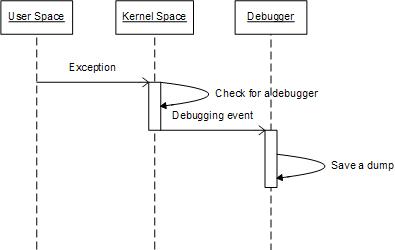
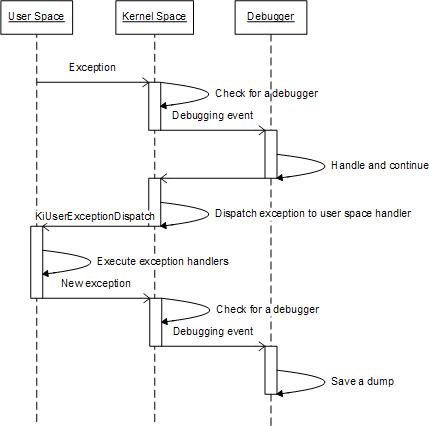
In one of my previous posts I wrote that in the case of a first-chance exception it is not possible to see it in a process crash dump because the entire exception processing was done in the kernel space (see the post How to distinguish between 1st and 2nd chances):

However the picture changes if we have Nested Exceptions pattern. In this case we should expect traces of inner exception processing like exception dispatcher code or exception handlers to be present on a raw stack dump:

Consider the following C++ code with two exception handlers:

 __try
 {
   __try
   {
     *(int *)NULL = 0;  // Exception 1
                        // Dump1 1st chance

   }
   __except (EXCEPTION_EXECUTE_HANDLER)
   {
     std::cout << “Inner” << std::endl;
     *(int *)NULL = 0;  // Exception 2
                        // Dump2 1st chance

   }
 }
 __except (EXCEPTION_EXECUTE_HANDLER)
 {
   std::cout << “Outer” << std::endl;
   *(int *)NULL = 0;    // Exception 3
                        // Dump3 1st chance
                        // Dump4 2nd chance

 }

If we run the actual program and we have set a default postmortem debugger we get a second-chance exception dump (Dump4). The program first outputs “Inner” and then “Outer” on a console and then crashes. When we look at the dump we see second-chance exception processing code where the exception record for NtRaiseException is the same and points to Exception 3 context (shown in red color): 

This dump file has an exception of interest stored in it.
The stored exception information can be accessed via .ecxr.
(11dc.f94): Access violation - code c0000005 (first/second chance not available)
*** ERROR: Module load completed but symbols could not be loaded for NestedException.exe
NestedException+0x1a72:
00000001`40001a72 c704250000000000000000 mov dword ptr [0],0 ds:00000000`00000000=????????

0:000> !teb
TEB at 000007fffffde000
    ExceptionList:        0000000000000000
    StackBase:            0000000000130000
    StackLimit:           000000000012d000
    SubSystemTib:         0000000000000000
    FiberData:            0000000000001e00
    ArbitraryUserPointer: 0000000000000000
    Self:                 000007fffffde000
    EnvironmentPointer:   0000000000000000
    ClientId:             00000000000011dc . 0000000000000f94
    RpcHandle:            0000000000000000
    Tls Storage:          000007fffffde058
    PEB Address:          000007fffffd5000
    LastErrorValue:       0
    LastStatusValue:      c000000d
    Count Owned Locks:    0
    HardErrorMode:        0

0:000> dqs 000000000012d000 0000000000130000
[...]
00000000`0012f918  00000000`00000006
00000000`0012f920  00000000`00000000
00000000`0012f928  00000000`775a208d ntdll!KiUserExceptionDispatch+0×53
00000000`0012f930  00000000`00000000
00000000`0012f938  00000000`0012f930 ; exception context
00000000`0012f940  01c8d5f0`00000000
00000000`0012f948  00000000`00000000
[…]

0:000> ub ntdll!KiUserExceptionDispatch+0x53
ntdll!KiUserExceptionDispatch+0x35:
00000000`775a206f xor     edx,edx
00000000`775a2071 call    ntdll!RtlRestoreContext (00000000`775a2255)
00000000`775a2076 jmp     ntdll!KiUserExceptionDispatch+0x53 (00000000`775a208d)
00000000`775a2078 mov     rcx,rsp
00000000`775a207b add     rcx,4D0h
00000000`775a2082 mov     rdx,rsp
00000000`775a2085 xor     r8b,r8b
00000000`775a2088 call    ntdll!NtRaiseException (00000000`775a1550)

0:000> .cxr 00000000`0012f930
rax=00000001400223d0 rbx=0000000000000000 rcx=0000000140022128
rdx=0000000000000001 rsi=0000000000000006 rdi=0000000140022120
rip=0000000140001a72 rsp=000000000012fed0 rbp=0000000000000000
 r8=000007fffffde000  r9=0000000000000001 r10=0000000000000000
r11=0000000000000246 r12=0000000000000000 r13=0000000000000002
r14=0000000000000000 r15=0000000000000000
iopl=0         nv up ei pl zr ac po nc
cs=0033  ss=002b  ds=002b  es=002b  fs=0053  gs=002b             efl=00010256
NestedException+0x1a72:
00000001`40001a72 c704250000000000000000 mov dword ptr [0],0 ds:00000000`00000000=????????

However if we have first-chance exception Dump3 from some exception monitoring program we see that NtRaiseException parameter points to ”Inner” Exception 2 context (a different and earlier address, shown in magenta color):

This dump file has an exception of interest stored in it.
The stored exception information can be accessed via .ecxr.
(11dc.f94): Access violation - code c0000005 (first/second chance not available)
*** ERROR: Module load completed but symbols could not be loaded for NestedException.exe
NestedException+0x1a72:
00000001`40001a72 c704250000000000000000 mov dword ptr [0],0 ds:00000000`00000000=????????

0:000> dqs 000000000012d000 0000000000130000
[...]
00000000`0012f918  00000000`00000006
00000000`0012f920  00000000`00000000
00000000`0012f928  00000000`775a2068 ntdll!KiUserExceptionDispatch+0×2e
00000000`0012f930  00000000`00000000
00000000`0012f938  00000000`0012f930 ; exception context
00000000`0012f940  01c8d5f0`00000000
[…]

0:000>  .cxr 00000000`0012f930
rax=00000001400223d0 rbx=0000000000000000 rcx=0000000140022128
rdx=0000000000000001 rsi=0000000000000006 rdi=0000000140022120
rip=00000001400019fa rsp=000000000012fed0 rbp=0000000000000000
 r8=000007fffffde000  r9=0000000000000001 r10=0000000000000000
r11=0000000000000246 r12=0000000000000000 r13=0000000000000002
r14=0000000000000000 r15=0000000000000000
iopl=0         nv up ei pl zr ac po nc
cs=0033  ss=002b  ds=002b  es=002b  fs=0053  gs=002b             efl=00010256
NestedException+0x19fa:
00000001`400019fa c704250000000000000000 mov dword ptr [0],0 ds:00000000`00000000=????????

Similar can be said about Dump2 where NtRaiseException parameter points to Exception 1 context. But Dump1 doesn’t have any traces of exception processing as expected.

All 4 dump files can be downloaded from FTP to play with:

ftp://dumpanalysis.org/pub/CDAPatternNestedExceptions.zip 

- Dmitry Vostokov @ DumpAnalysis.org -

Reflecting on 2008 (Part 1)

Monday, June 23rd, 2008

In 2007 in Retrospection (Part 2) post I put the most frequent search keywords what brought people to my site. Unfortunately due my mistake I lost all cumulative data for that period and began collecting it again since March, 2008. Here is the new list of top 100 keywords out of more than 22,000 for March - June (with my links where I try to provide answers or point to other resources):

kifastsystemcallret
crash dump analysis

crash dump
ntdll!kifastsystemcallret
vista crash dump
time travel debugging
dump analysis
crash dumps
windbg commands

memory dump analysis anthology
memory intelligence analysis
crashdump
your debugger is not using the correct symbols
symbol file could not be found
kmode_exception_not_handled
minidump analyze
windbg analyze
c++ dereferencing null debug
windows crash dump analysis
system_service_exception
kernel32!pnlsuserinfo
warning: frame ip not in any known module. following frames may be wrong.
win32 error 0n2
previously announced volume is available in trade
windbg script
kernel_mode_exception_not_handled
practical foundations of debugging
getcontextstate failed, 0×80070026
memory analysis intelligence
minidump analyzer
dxg.sys
crash dump vista
dr watson vista
calling+kernel+functions+from+userspace
crash dump analyzer
how to open corrupt memory dump
rtlfreeheap+38e
how to use windbg
dd srvcomputername
dmitry vostokov
warning: stack unwind information not available. following frames may be wrong.
drwtsn32 vista
nasdaq:aapl
1000 application fault crash dump
exfreepoolwithtag
time+travel+debugging
dumpanalysis.org
minidump analysis
your debugger is not using the correct symbols
windows via c/c++
windows internals
minidump
aapl
memoretics
user mode process dumper
memory dump analysis
type referenced: kernel32!pnlsuserinfo
ibmsprem.exe
memory dump
userdump
windbg !analyze
zwusergetmessage
memory dump analysis anthology, volume 1
pool corruption
windbg
windows vista crash dump
failure_bucket_id
frame ip not in any known module
kiswapcontext
werfault.exe
what is a crash dump
flow analysis was incomplete, some code may be missing
wanarpv6
ldrpcallinitroutine
windbg scripts
wow64exts
debug_flr_image_timestamp
userdump debug
crash analyzer
dumpanalysis
vdtw30.dll
windbg 64 bits dump identify
fnodobfm
the stored exception information can be accessed via .ecxr.
windbg tips
0×80070026
dmitri windbg
gdb teb
nmi_hardware_failure
system_thread_exception_not_handled
system_thread_exception_not_handled (7e)
windbg command
pool allocations have failed
receivelotsacalls
trap frame
vista dr watson
bios disassembly ninjutsu uncovered
citrix tools at pubforum
clock_watchdog_timeout
dump analyzer

- Dmitry Vostokov @ DumpAnalysis.org -

Prototyping front cover for MDAA, Volume 2

Friday, June 20th, 2008

The work for Memory Dump Analysis Anthology, Volume 2 is underway and it is natural to use the modular structure of a book heap again for its front cover. Now it is the partial reading list for this year (click to enlarge):

In addition to memory dump allegory the picture also symbolizes kernel / user space split of 4Gb virtual address space :-) Of course, this is just the base image and the book title will be put somewhere on it.

- Dmitry Vostokov @ DumpAnalysis.org -

Windows Debugging: Practical Foundations

Friday, June 20th, 2008

Many people expressed interest in expanding Practical Foundations of Debugging (x64) and merging it with commented version of Practical Foundations of Debugging (x86) and Reading Windows-based Code. I therefore decided to dedicate some time during the next two months for this task and publish a book. Its main purpose is to help technical support and escalation engineers, testers and software developers without the knowledge of assembly language and C to master all necessary prerequisites to understand and start debugging and crash dump analysis on Windows platforms. It doesn’t require any specific knowledge, fills the gap and lowers the learning curve required for Advanced Windows Debugging and for my own books. It will also serve as a hardware complement to my seminars that I give from time to time. More details will be posted later but for now there are preliminary product details:

  • Title: Windows Debugging: Practical Foundations
  • Author: Dmitry Vostokov
  • Publisher: Opentask (01 February 2009)
  • Language: English
  • Product Dimensions: 22.86 x 15.24
  • ISBN-13: 978-1-906717-10-0
  • Paperback: 200 pages

- Dmitry Vostokov @ DumpAnalysis.org -