Archive for the ‘Debugging’ Category

Crash Dump Analysis Patterns (Part 107)

Monday, September 27th, 2010

You are probably aware of Application and Driver Verifiers (including gflags.exe tool from Debugging Tools for Windows). These tools set flags that modify the behaviour of the system that is reflected in additional information being collected such as memory allocation history and in WinDbg output changes such as stack traces. These tools belong to a broad class of instrumentation tools and I call the analysis pattern Instrumentation Information. To check in a minidump, kernel and complete memory dumps whether Driver Verifier was enabled we use !verifier WinDbg command:

1: kd> !verifier

Verify Level 0 ... enabled options are:

Summary of All Verifier Statistics

RaiseIrqls                             0x0
AcquireSpinLocks                       0x0
Synch Executions                       0x0
Trims                                  0x0

Pool Allocations Attempted             0x0
Pool Allocations Succeeded             0x0
Pool Allocations Succeeded SpecialPool 0x0
Pool Allocations With NO TAG           0x0
Pool Allocations Failed                0x0
Resource Allocations Failed Deliberately   0x0

Current paged pool allocations         0x0 for 00000000 bytes
Peak paged pool allocations            0x0 for 00000000 bytes
Current nonpaged pool allocations      0x0 for 00000000 bytes
Peak nonpaged pool allocations         0x0 for 00000000 bytes

0: kd> !verifier

Verify Level 3 ... enabled options are:
       Special pool
       Special irql

Summary of All Verifier Statistics

RaiseIrqls                             0xdea5
AcquireSpinLocks                       0x87b5c
Synch Executions                       0x17b5
Trims                                  0xab36

Pool Allocations Attempted             0x8990e
Pool Allocations Succeeded             0x8990e
Pool Allocations Succeeded SpecialPool 0x29c0
Pool Allocations With NO TAG           0x1
Pool Allocations Failed                0x0
Resource Allocations Failed Deliberately   0x0

Current paged pool allocations         0x0 for 00000000 bytes
Peak paged pool allocations            0x0 for 00000000 bytes
Current nonpaged pool allocations      0x0 for 00000000 bytes
Peak nonpaged pool allocations         0x0 for 00000000 bytes
 

To check in a process user dump that Application Verifier (and gflags) was enabled use !avrf and !gflags WinDbg extension commands:

0:001> !avrf
Application verifier is not enabled for this process.
Page heap has been enabled separately.

0:001> !gflag
Current NtGlobalFlag contents: 0x02000000
    hpa - Place heap allocations at ends of pages

Here is an example of an instrumented stack trace:

68546e88 verifier!AVrfpDphFindBusyMemoryNoCheck+0xb8
68546f95 verifier!AVrfpDphFindBusyMemory+0×15
68547240 verifier!AVrfpDphFindBusyMemoryAndRemoveFromBusyList+0×20
68549080 verifier!AVrfDebugPageHeapFree+0×90

77190aac ntdll!RtlDebugFreeHeap+0×2f
7714a8ff ntdll!RtlpFreeHeap+0×5d
770f2a32 ntdll!RtlFreeHeap+0×142
75fb14d1 kernel32!HeapFree+0×14
748d4c39 msvcr80!free+0xcd
[…]
00a02bb2 ServiceA!ServiceMain+0×302
767175a8 sechost!ScSvcctrlThreadA+0×21
75fb3677 kernel32!BaseThreadInitThunk+0xe
770f9d42 ntdll!__RtlUserThreadStart+0×70
770f9d15 ntdll!_RtlUserThreadStart+0×1b

Another example that shows instrumentation difference. We run double free fault modeling application and see its stack trace from a crash dump:

0:000> !gflag
Current NtGlobalFlag contents: 0x00000000

0:000> kL 100
Child-SP          RetAddr           Call Site
00000000`002dec38 00000000`77735ce2 ntdll!NtWaitForSingleObject+0xa
00000000`002dec40 00000000`77735e85 ntdll!RtlReportExceptionEx+0x1d2
00000000`002ded30 00000000`77735eea ntdll!RtlReportException+0xb5
00000000`002dedb0 00000000`77736d25 ntdll!RtlpTerminateFailureFilter+0x1a
00000000`002dede0 00000000`77685148 ntdll!RtlReportCriticalFailure+0x96
00000000`002dee10 00000000`776a554d ntdll!_C_specific_handler+0x8c
00000000`002dee80 00000000`77685d1c ntdll!RtlpExecuteHandlerForException+0xd
00000000`002deeb0 00000000`776862ee ntdll!RtlDispatchException+0x3cb
00000000`002df590 00000000`77736cd2 ntdll!RtlRaiseException+0x221
00000000`002dfbd0 00000000`77737396 ntdll!RtlReportCriticalFailure+0x62
00000000`002dfca0 00000000`777386c2 ntdll!RtlpReportHeapFailure+0x26
00000000`002dfcd0 00000000`7773a0c4 ntdll!RtlpHeapHandleError+0x12
00000000`002dfd00 00000000`776dd1cd ntdll!RtlpLogHeapFailure+0xa4
00000000`002dfd30 00000000`77472c7a ntdll! ?? ::FNODOBFM::`string'+0x123b4
00000000`002dfdb0 00000000`6243c7bc kernel32!HeapFree+0xa
00000000`002dfde0 00000001`3f8f1033 msvcr90!free+0x1c
00000000`002dfe10 00000001`3f8f11f2 InstrumentedApp!wmain+0x33
00000000`002dfe50 00000000`7746f56d InstrumentedApp!__tmainCRTStartup+0x11a
00000000`002dfe80 00000000`776a3281 kernel32!BaseThreadInitThunk+0xd
00000000`002dfeb0 00000000`00000000 ntdll!RtlUserThreadStart+0x1d

Then we enable Application Verifier and full page heap in gflags.exe GUI. Actually 2 crash dumps are saved at the same time (we’d set up LocalDumps registry key on x64 W2K8 R2) with slightly different stack traces:

0:000> !gflag
Current NtGlobalFlag contents: 0x02000100
    vrf - Enable application verifier
    hpa - Place heap allocations at ends of pages

0:000> kL 100
Child-SP          RetAddr           Call Site
00000000`0022e438 00000000`77735ce2 ntdll!NtWaitForSingleObject+0xa
00000000`0022e440 00000000`77735e85 ntdll!RtlReportExceptionEx+0x1d2
00000000`0022e530 000007fe`f3ed26fb ntdll!RtlReportException+0xb5
00000000`0022e5b0 00000000`77688a8f verifier!AVrfpVectoredExceptionHandler+0×26b
00000000`0022e640 00000000`776859b2 ntdll!RtlpCallVectoredHandlers+0xa8
00000000`0022e6b0 00000000`776bfe48 ntdll!RtlDispatchException+0×22
00000000`0022ed90 000007fe`f3eca668 ntdll!KiUserExceptionDispatcher+0×2e
00000000`0022f350 000007fe`f3ec931d verifier!VerifierStopMessage+0×1f0
00000000`0022f400 000007fe`f3ec9736 verifier!AVrfpDphReportCorruptedBlock+0×155
00000000`0022f4c0 000007fe`f3ec99cd verifier!AVrfpDphCheckNormalHeapBlock+0xce
00000000`0022f530 000007fe`f3ec873a verifier!AVrfpDphNormalHeapFree+0×29
00000000`0022f560 00000000`7773c415 verifier!AVrfDebugPageHeapFree+0xb6

00000000`0022f5c0 00000000`776dd0fe ntdll!RtlDebugFreeHeap+0×35
00000000`0022f620 00000000`776c2075 ntdll! ?? ::FNODOBFM::`string’+0×122e2
00000000`0022f960 000007fe`f3edf4e1 ntdll!RtlFreeHeap+0×1a2
00000000`0022f9e0 00000000`77472c7a verifier!AVrfpRtlFreeHeap+0xa5
00000000`0022fa80 000007fe`f3ee09ae kernel32!HeapFree+0xa
00000000`0022fab0 00000000`642bc7bc verifier!AVrfpHeapFree+0xc6
00000000`0022fb40 00000001`3fac1033 msvcr90!free+0×1c
00000000`0022fb70 00000001`3fac11f2 InstrumentedApp!wmain+0×33
00000000`0022fbb0 00000000`7746f56d InstrumentedApp!__tmainCRTStartup+0×11a
00000000`0022fbe0 00000000`776a3281 kernel32!BaseThreadInitThunk+0xd
00000000`0022fc10 00000000`00000000 ntdll!RtlUserThreadStart+0×1d

0:000> kL 100
Child-SP          RetAddr           Call Site
00000000`0022e198 000007fe`f3ee0f82 ntdll!NtWaitForMultipleObjects+0xa
00000000`0022e1a0 000007fe`fd8513a6 verifier!AVrfpNtWaitForMultipleObjects+0×4e
00000000`0022e1e0 000007fe`f3ee0e2d KERNELBASE!WaitForMultipleObjectsEx+0xe8
00000000`0022e2e0 000007fe`f3ee0edd verifier!AVrfpWaitForMultipleObjectsExCommon+0xad
00000000`0022e320 00000000`77473143 verifier!AVrfpKernelbaseWaitForMultipleObjectsEx+0×2d

00000000`0022e370 00000000`774e9025 kernel32!WaitForMultipleObjectsExImplementation+0xb3
00000000`0022e400 00000000`774e91a7 kernel32!WerpReportFaultInternal+0×215
00000000`0022e4a0 00000000`774e91ff kernel32!WerpReportFault+0×77
00000000`0022e4d0 00000000`774e941c kernel32!BasepReportFault+0×1f
00000000`0022e500 00000000`7770573c kernel32!UnhandledExceptionFilter+0×1fc
00000000`0022e5e0 00000000`77685148 ntdll! ?? ::FNODOBFM::`string’+0×2365
00000000`0022e610 00000000`776a554d ntdll!_C_specific_handler+0×8c
00000000`0022e680 00000000`77685d1c ntdll!RtlpExecuteHandlerForException+0xd
00000000`0022e6b0 00000000`776bfe48 ntdll!RtlDispatchException+0×3cb
00000000`0022ed90 000007fe`f3eca668 ntdll!KiUserExceptionDispatcher+0×2e
00000000`0022f350 000007fe`f3ec931d verifier!VerifierStopMessage+0×1f0
00000000`0022f400 000007fe`f3ec9736 verifier!AVrfpDphReportCorruptedBlock+0×155
00000000`0022f4c0 000007fe`f3ec99cd verifier!AVrfpDphCheckNormalHeapBlock+0xce
00000000`0022f530 000007fe`f3ec873a verifier!AVrfpDphNormalHeapFree+0×29
00000000`0022f560 00000000`7773c415 verifier!AVrfDebugPageHeapFree+0xb6

00000000`0022f5c0 00000000`776dd0fe ntdll!RtlDebugFreeHeap+0×35
00000000`0022f620 00000000`776c2075 ntdll! ?? ::FNODOBFM::`string’+0×122e2
00000000`0022f960 000007fe`f3edf4e1 ntdll!RtlFreeHeap+0×1a2
00000000`0022f9e0 00000000`77472c7a verifier!AVrfpRtlFreeHeap+0xa5
00000000`0022fa80 000007fe`f3ee09ae kernel32!HeapFree+0xa
00000000`0022fab0 00000000`642bc7bc verifier!AVrfpHeapFree+0xc6
00000000`0022fb40 00000001`3fac1033 msvcr90!free+0×1c
00000000`0022fb70 00000001`3fac11f2 InstrumentedApp!wmain+0×33
00000000`0022fbb0 00000000`7746f56d InstrumentedApp!__tmainCRTStartup+0×11a
00000000`0022fbe0 00000000`776a3281 kernel32!BaseThreadInitThunk+0xd
00000000`0022fc10 00000000`00000000 ntdll!RtlUserThreadStart+0×1d

We also see above that enabling instrumentation triggers debug functions of runtime heap (RtlDebugFreeHeap).

- Dmitry Vostokov @ DumpAnalysis.org + TraceAnalysis.org -
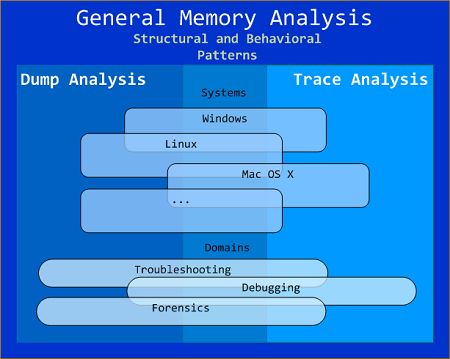
General Memory Analysis

Monday, September 27th, 2010

General Memory Analysis is another name for Memoretics, a discipline that studies memory snapshots including their similarities and differences on different system platforms such as Windows, Linus, Mac OS X, embedded and mobile systems, historical architectures, etc. The analysis of memory helps solve problems in various domains such as software troubleshooting and debugging, computer forensic analysis, etc.

The current focus of interdisciplinary research is to build a unified memory pattern language that covers both behavioral and structural patterns and also to study the possibility of building memory systems from below, not from requirements -> architecture -> design -> implementation -> compilation -> linking -> loading -> execution but from directly modeling and assembling memory systems using memory patterns.

- Dmitry Vostokov @ DumpAnalysis.org + TraceAnalysis.org -

Structural Memory Patterns (Part 3)

Sunday, September 26th, 2010

The next pattern is called Snapshot Collection. This is a collection of files combined from either linear memory snapshots or aggregate snapshots saved as separate files at different times. Typical examples include:

  • Several process memory dump files saved sequentially from a growing heap leaking process
  • Several software traces from working and non-working scenarios for comparative analysis

- Dmitry Vostokov @ DumpAnalysis.org + TraceAnalysis.org -

Structural Memory Patterns (Part 2)

Sunday, September 26th, 2010

The next pattern is called Aggregate Snapshot. It is any memory dump or software trace file that is combined from Memory Snapshots. Typical examples include:

  • A minidump file where only specific memory ranges are included
  • A software trace file combined from structured memory snapshots

Note. I’ve also created a dedicated page to list all structural patterns: 

Structural Memory Analysis Patterns

- Dmitry Vostokov @ DumpAnalysis.org + TraceAnalysis.org -

Icons for Memory Dump Analysis Patterns (Part 75)

Friday, September 24th, 2010

Today we introduce an icon for Corrupt Dump pattern (the motivation is that we can’t open such dumps):

B/W

Color

- Dmitry Vostokov @ DumpAnalysis.org + TraceAnalysis.org -

Structural Memory Patterns (Part 1)

Friday, September 24th, 2010

Now it’s time to divide memory analysis patterns discerned so far as mostly abnormal software behavior memory dump and software trace patterns into behavioral and structural catalogues. The goal is to account for normal system-independent structural entities and relationships visible in memory like modules, threads, processes and so on.

The first pattern (and also a super-pattern) we discuss in this part is called Memory Snapshot. It is further subdivided into Structured Memory Snapshot and BLOB Memory Snapshot. Structured sub-pattern includes:

- Contiguous memory dump files with artificially generated headers (for example, physical or process virtual space memory dump)

- Software trace messages with imposed internal structure

BLOB sub-pattern variety includes address range snapshots without any externally imposed structure, for example, saved by .writemem WinDbg command or ReadProcessMemory API and contiguous buffer and raw memory dumps saved by various memory acquisition tools.

Behavioral patterns that relate to Memory Snapshot pattern are:

I strive initially to publish at least one such pattern every day to fill the gap of normal patterns in memory analysis and later add more multi-platform details and examples from other platforms like Linux, Mac OS X, embedded and selected important historical architectures.

- Dmitry Vostokov @ DumpAnalysis.org + TraceAnalysis.org -

Icons for Memory Dump Analysis Patterns (Part 74)

Thursday, September 23rd, 2010

Today we introduce an icon for Wait Chain (RPC) pattern:

B/W

Color

- Dmitry Vostokov @ DumpAnalysis.org + TraceAnalysis.org -

Icons for Memory Dump Analysis Patterns (Part 73)

Wednesday, September 22nd, 2010

Today we introduce an icon for Wait Chain (process objects) pattern:

B/W

Color

- Dmitry Vostokov @ DumpAnalysis.org + TraceAnalysis.org -

Contention Patterns

Tuesday, September 21st, 2010

A page to reference all different kinds of contention is necessary, so I created this post:

I’ll update it as soon as I add more similar patterns.

- Dmitry Vostokov @ DumpAnalysis.org + TraceAnalysis.org -

Icons for Memory Dump Analysis Patterns (Part 72)

Tuesday, September 21st, 2010

Today we introduce an icon for Wait Chain (LPC/ALPC) pattern:

B/W

Color

- Dmitry Vostokov @ DumpAnalysis.org + TraceAnalysis.org -

Icons for Memory Dump Analysis Patterns (Part 71)

Monday, September 20th, 2010

Today we introduce an icon for Wait Chain (thread objects) pattern:

B/W

Color

- Dmitry Vostokov @ DumpAnalysis.org + TraceAnalysis.org -

Trace Analysis Patterns (Part 29)

Monday, September 20th, 2010

Sometimes, when comparing normal, expected (working) and abnormal (non-working) traces we can get a clue for further troubleshooting and debugging by looking at module load events. For example, when we see an unexpected module loaded in our non-working trace, its function (and sometimes even module name) can signify some difference to pay attention to:

#     PID  TID  Time         Message
[...]
14492 6908 6912 11:06:41.953 LoadImageEvent: ImageName(\WINDOWS\system32\3rdPartySso.dll)
[...]

I call this pattern Guest Component and it is a different from Missing Component. Although in the latter pattern a missing component in one trace may appear in another but the component name is known apriori and expected. In the former pattern the component is unexpected. For example, in the trace above, its partial name fragment “Sso” may trigger a suggestion to relate differences in authentication where in a non-working case SSO (single sign-on) was configured.

- Dmitry Vostokov @ DumpAnalysis.org + TraceAnalysis.org -

Debugged! MZ/PE March print issue is out

Sunday, September 19th, 2010

Finally, after the delay, the issue is available in print on Amazon and through other sellers:

Debugged! MZ/PE: Multithreading

- Dmitry Vostokov @ DumpAnalysis.org + TraceAnalysis.org -

Icons for Memory Dump Analysis Patterns (Part 70)

Friday, September 17th, 2010

Today we introduce an icon for Wait Chain (executive resources) pattern:

B/W

Color

- Dmitry Vostokov @ DumpAnalysis.org + TraceAnalysis.org -

Debugging Virtuoso or Debugging Vanity?

Wednesday, September 15th, 2010

Exploring the destiny theme of !analyze -vostokov further. Suddenly it came to me today that my initials DV are the same as initials of Debugging Virtuoso :-) It might be also Debugging Vanity as well…

With fix-privet,
Dr. DebugLove

- Dmitry Vostokov @ DumpAnalysis.org + TraceAnalysis.org -

Winners of Tell Your Windows Debugging Story Annual Competition

Wednesday, September 15th, 2010

The first annual competition was held between 7/7/2010 and 8/8/2010 and the following winners were selected (in alphabetical order):

- Tavis Ormandy
   nominated for “windows” story:
   https://docs.google.com/View?id=dfqd62nk_228h28szgz

- Andrey Permamedov
   selected entries from “Diary of war with bugs”:
   http://bugswar.blogspot.com/

- Sathish Venkataraman
   sent the tough enterprise debugging story:
   to be published in the next issue of Debugged! magazine

All winners will get 3 volumes of Memory Dump Analysis Anthology + Color Supplement all signed by the author.

- Dmitry Vostokov @ DumpAnalysis.org + TraceAnalysis.org -

Crash Dump Analysis Patterns (Part 42g)

Tuesday, September 14th, 2010

In addition to LPC / ALPC wait chains we can also see RPC chains in complete memory dumps and even mixed (A)LPC / RPC chains. How to distinguish RPC from (A)LPC (and RPC over LPC) threads? Here’s a fragment from an RPC over LPC thread (they also have “waiting for …” or “working on …” strings in THREAD output):

f50e4c20 80833491 nt!KiSwapContext+0x26
f50e4c4c 80829a82 nt!KiSwapThread+0x2e5
f50e4c94 8091ecf2 nt!KeWaitForSingleObject+0x346
f50e4d50 808897cc nt!NtRequestWaitReplyPort+0×776
f50e4d50 7c82860c nt!KiFastCallEntry+0xfc (TrapFrame @ f50e4d64)
00e5f2b8 7c827899 ntdll!KiFastSystemCallRet
00e5f2bc 77c80a6e ntdll!ZwRequestWaitReplyPort+0xc
00e5f308 77c7fcf0 RPCRT4!LRPC_CCALL::SendReceive+0×230

00e5f314 77c80673 RPCRT4!I_RpcSendReceive+0×24
00e5f328 77ce315a RPCRT4!NdrSendReceive+0×2b
00e5f710 771f40c4 RPCRT4!NdrClientCall2+0×22e

Here’s the thread stack of an RPC waiting thread (the connection was over a pipe):

THREAD 8a4b7320  Cid 0208.0220  Teb: 7ffa4000 Win32Thread: bc3eaea8 WAIT: (Unknown) UserMode Non-Alertable
        8bc379f8  NotificationEvent
IRP List:
        891879a8: (0006,0094) Flags: 00000800  Mdl: 00000000
Not impersonating
DeviceMap                 e1002270
Owning Process            8a5c8828       Image:         ApplicationA.exe
Attached Process          N/A            Image:         N/A
Wait Start TickCount      3044574        Ticks: 37746 (0:00:09:49.781)
Context Switch Count      54673                 LargeStack
UserTime                  00:00:00.015
KernelTime                00:00:00.046
Win32 Start Address MSVCR90!_threadstartex (0x7854345e)
Start Address kernel32!BaseThreadStartThunk (0x77e617ec)
Stack Init f473b000 Current f473ac60 Base f473b000 Limit f4737000 Call 0
Priority 11 BasePriority 10 PriorityDecrement 0
ChildEBP RetAddr 
f473ac78 80833491 nt!KiSwapContext+0x26
f473aca4 80829a82 nt!KiSwapThread+0x2e5
f473acec 80938dea nt!KeWaitForSingleObject+0x346
f473ad50 808897cc nt!NtWaitForSingleObject+0x9a
f473ad50 7c82860c nt!KiFastCallEntry+0xfc (TrapFrame @ f473ad64)
0155f0f4 7c827d29 ntdll!KiFastSystemCallRet
0155f0f8 77e61d1e ntdll!ZwWaitForSingleObject+0xc
0155f168 77c6a85f kernel32!WaitForSingleObjectEx+0xac
0155f184 77c69bf7 RPCRT4!UTIL_WaitForSyncIO+0×20
0155f1a8 77c6a935 RPCRT4!UTIL_GetOverlappedResultEx+0×1d
0155f1c4 77c6a8f3 RPCRT4!UTIL_GetOverlappedResult+0×17
0155f1e4 77c6944f RPCRT4!NMP_SyncSendRecv+0×73
0155f20c 77c69667 RPCRT4!OSF_CCONNECTION::TransSendReceive+0×7d
0155f294 77c695d4 RPCRT4!OSF_CCONNECTION::SendFragment+0×2ae
0155f2ec 77c6977a RPCRT4!OSF_CCALL::SendNextFragment+0×1e2
0155f334 77c699f2 RPCRT4!OSF_CCALL::FastSendReceive+0×148
0155f350 77c69975 RPCRT4!OSF_CCALL::SendReceiveHelper+0×5b
0155f380 77c7fcf0 RPCRT4!OSF_CCALL::SendReceive+0×41

0155f38c 77c80673 RPCRT4!I_RpcSendReceive+0×24
0155f3a0 77ce315a RPCRT4!NdrSendReceive+0×2b
0155f788 7d1fa0b1 RPCRT4!NdrClientCall2+0×22e
[…]
0155ffac 785434c7 MSVCR90!_callthreadstartex+0×1b
0155ffb8 77e6482f MSVCR90!_threadstartex+0×69
0155ffec 00000000 kernel32!BaseThreadStart+0×34

Here’s the endpoint thread stack in the RPC service processing the client call:

THREAD 8a631d80  Cid 0244.0290  Teb: 7ffd4000 Win32Thread: 00000000 WAIT: (Unknown) UserMode Non-Alertable
    8a6354d8  SynchronizationEvent
IRP List:
    882d0008: (0006,0094) Flags: 00000900  Mdl: 00000000
    8811c450: (0006,0094) Flags: 00000900  Mdl: 00000000
    8a4d1b28: (0006,0190) Flags: 00000000  Mdl: 8a4d2e40
    8a634188: (0006,0094) Flags: 00000800  Mdl: 00000000
Not impersonating
DeviceMap                 e1002270
Owning Process            8a5b3ac8       Image:         ServiceB.exe
Attached Process          N/A            Image:         N/A
Wait Start TickCount      3041752        Ticks: 40568 (0:00:10:33.875)
Context Switch Count      36194            
UserTime                  00:00:00.562
KernelTime                00:00:01.093
Win32 Start Address RPCRT4!ThreadStartRoutine (0x77c7b0f5)
Start Address kernel32!BaseThreadStartThunk (0x77e617ec)
Stack Init f5f3e000 Current f5f3dc60 Base f5f3e000 Limit f5f3b000 Call 0
Priority 12 BasePriority 10 PriorityDecrement 0
ChildEBP RetAddr 
f5f3dc78 80833491 nt!KiSwapContext+0x26
f5f3dca4 80829a82 nt!KiSwapThread+0x2e5
f5f3dcec 80938dea nt!KeWaitForSingleObject+0x346
f5f3dd50 808897cc nt!NtWaitForSingleObject+0x9a
f5f3dd50 7c82860c nt!KiFastCallEntry+0xfc (TrapFrame @ f5f3dd64)
00def83c 7c827d29 ntdll!KiFastSystemCallRet
00def840 7c83d266 ntdll!ZwWaitForSingleObject+0xc
00def87c 7c83d2b1 ntdll!RtlpWaitOnCriticalSection+0×1a3
00def89c 4ab773ea ntdll!RtlEnterCriticalSection+0xa8

00def8ac 4ab78726 ServiceB!AcquireLock+0×7c
[…]
00def944 77ce33e1 RPCRT4!Invoke+0×30
00defd44 77ce35c4 RPCRT4!NdrStubCall2+0×299
00defd60 77c7ff7a RPCRT4!NdrServerCall2+0×19
00defd94 77c8042d RPCRT4!DispatchToStubInCNoAvrf+0×38
00defde8 77c80353 RPCRT4!RPC_INTERFACE::DispatchToStubWorker+0×11f
00defe0c 77c68e0d RPCRT4!RPC_INTERFACE::DispatchToStub+0xa3
00defe40 77c68cb3 RPCRT4!OSF_SCALL::DispatchHelper+0×149
00defe54 77c68c2b RPCRT4!OSF_SCALL::DispatchRPCCall+0×10d
00defe84 77c68b5e RPCRT4!OSF_SCALL::ProcessReceivedPDU+0×57f
00defea4 77c6e8db RPCRT4!OSF_SCALL::BeginRpcCall+0×194
00deff04 77c6e7b4 RPCRT4!OSF_SCONNECTION::ProcessReceiveComplete+0×435
00deff18 77c7b799 RPCRT4!ProcessConnectionServerReceivedEvent+0×21
00deff84 77c7b9b5 RPCRT4!LOADABLE_TRANSPORT::ProcessIOEvents+0×1b8
00deff8c 77c8872d RPCRT4!ProcessIOEventsWrapper+0xd

00deffac 77c7b110 RPCRT4!BaseCachedThreadRoutine+0×9d
00deffb8 77e6482f RPCRT4!ThreadStartRoutine+0×1b
00deffec 00000000 kernel32!BaseThreadStart+0×34

We also see that the latter thread is waiting for a critical section so we have an example of a mixed wait chain here as well. Another example is an RPC over LPC server thread that is also an RPC client thread:

THREAD 8989f020  Cid 0170.1cfc  Teb: 7ff8c000 Win32Thread: 00000000 WAIT: (Unknown) UserMode Non-Alertable
    89a1c368  NotificationEvent
IRP List:
    887aac68: (0006,0094) Flags: 00000800  Mdl: 00000000
Not impersonating
DeviceMap                 e1002270
Owning Process            8a056b80       Image:         ServiceC.exe
Attached Process          N/A            Image:         N/A
Wait Start TickCount      3075354        Ticks: 6966 (0:00:01:48.843)
Context Switch Count      2521            
UserTime                  00:00:00.031
KernelTime                00:00:00.015
Win32 Start Address 0x00750d91
LPC Server thread working on message Id 750d91
Start Address kernel32!BaseThreadStartThunk (0×77e617ec)
Stack Init f26da000 Current f26d9c60 Base f26da000 Limit f26d7000 Call 0
Priority 8 BasePriority 8 PriorityDecrement 0
ChildEBP RetAddr 
f26d9c78 80833491 nt!KiSwapContext+0×26
f26d9ca4 80829a82 nt!KiSwapThread+0×2e5
f26d9cec 80938dea nt!KeWaitForSingleObject+0×346
f26d9d50 808897cc nt!NtWaitForSingleObject+0×9a
f26d9d50 7c82860c nt!KiFastCallEntry+0xfc (TrapFrame @ f26d9d64)
03e9efa8 7c827d29 ntdll!KiFastSystemCallRet
03e9efac 77e61d1e ntdll!ZwWaitForSingleObject+0xc
03e9f01c 77c6a85f kernel32!WaitForSingleObjectEx+0xac
03e9f038 77c69bf7 RPCRT4!UTIL_WaitForSyncIO+0×20
03e9f05c 77c6a935 RPCRT4!UTIL_GetOverlappedResultEx+0×1d
03e9f078 77c6a8f3 RPCRT4!UTIL_GetOverlappedResult+0×17
03e9f098 77c6944f RPCRT4!NMP_SyncSendRecv+0×73
03e9f0c0 77c69667 RPCRT4!OSF_CCONNECTION::TransSendReceive+0×7d
03e9f148 77c695d4 RPCRT4!OSF_CCONNECTION::SendFragment+0×2ae
03e9f1a0 77c6977a RPCRT4!OSF_CCALL::SendNextFragment+0×1e2
03e9f1f8 77c699f2 RPCRT4!OSF_CCALL::FastSendReceive+0×148
03e9f214 77c69975 RPCRT4!OSF_CCALL::SendReceiveHelper+0×5b
03e9f244 77c7fcf0 RPCRT4!OSF_CCALL::SendReceive+0×41

03e9f250 77c80673 RPCRT4!I_RpcSendReceive+0×24
03e9f264 77ce315a RPCRT4!NdrSendReceive+0×2b
03e9f64c 7d1fa0b1 RPCRT4!NdrClientCall2+0×22e
03e9f8ac 7654fa50 ServiceC!QueryInformation+0×801
[…]
03e9f8f8 77ce33e1 RPCRT4!Invoke+0×30
03e9fcf8 77ce35c4 RPCRT4!NdrStubCall2+0×299
03e9fd14 77c7ff7a RPCRT4!NdrServerCall2+0×19
03e9fd48 77c8042d RPCRT4!DispatchToStubInCNoAvrf+0×38
03e9fd9c 77c80353 RPCRT4!RPC_INTERFACE::DispatchToStubWorker+0×11f
03e9fdc0 77c811dc RPCRT4!RPC_INTERFACE::DispatchToStub+0xa3
03e9fdfc 77c812f0 RPCRT4!LRPC_SCALL::DealWithRequestMessage+0×42c
03e9fe20 77c88678 RPCRT4!LRPC_ADDRESS::DealWithLRPCRequest+0×127
03e9ff84 77c88792 RPCRT4!LRPC_ADDRESS::ReceiveLotsaCalls+0×430
03e9ff8c 77c8872d RPCRT4!RecvLotsaCallsWrapper+0xd

03e9ffac 77c7b110 RPCRT4!BaseCachedThreadRoutine+0×9d
03e9ffb8 77e6482f RPCRT4!ThreadStartRoutine+0×1b
03e9ffec 00000000 kernel32!BaseThreadStart+0×34

- Dmitry Vostokov @ DumpAnalysis.org + TraceAnalysis.org -

Ruminations on Automated Debugging (Part 1)

Tuesday, September 14th, 2010

In one of my previous posts I told the fictitious story about the power of human mind in debugging:

Can computers debug?

Here is another software defect that I think might require a human-computer pair to fix it. Consider the following problem description: after connecting to a remote desktop and launching an office suite application a display shows some aberrations and black lines appear and disappear frequently. If this depends on a real non-virtualized hardware then I don’t see easily how to quantify screen aberrations to setup an automated debugger procedure to locate the code especially if the problem disappears on a virtual machine.

- Dmitry Vostokov @ DumpAnalysis.org + TraceAnalysis.org -

Trace Analysis Patterns (Part 28)

Monday, September 13th, 2010

Often we see errors in software traces recorded during deviant software behavior (often called non-working software traces) and when we double check their presence in normal expected software behavior traces (often called working traces) we find them there too. This pattern is called False Positive Error. I already mentioned similar false positives when I introduced the first software trace analysis pattern called Periodic Error. Here is an example from the real trace. In a non-working trace we found this error in an adjoint thread of a foreground component:

OpenProcess error 5

However, we found the same error in the working trace so we continued looking and found several other errors:

Message request report: last error 1168, …
[…]
GetMsg result -2146435043

The last one if converted to a hex status is 8010001D but, unfortunately, the same errors were present in the working trace too in the same activity regions.

After that we started comparing both traces looking for a bifurcation point and we found the error that was only present in a non-working trace with a significant trace differences after that:

Error reading from the named pipe: 800700E9

My favourite tool (WinDbg) to convert error and status values gave this description:

0:000> !error 800700E9
Error code: (HRESULT) 0x800700e9 (2147942633) - No process is on the other end of the pipe.

- Dmitry Vostokov @ DumpAnalysis.org + TraceAnalysis.org -

Icons for Memory Dump Analysis Patterns (Part 69)

Friday, September 10th, 2010

Today we introduce an icon for Wait Chain (critical sections) pattern:

B/W

Color

- Dmitry Vostokov @ DumpAnalysis.org + TraceAnalysis.org -