Archive for the ‘Debugging’ Category

Crash Dump Analysis Patterns (Part 27b)

Monday, October 24th, 2011

Here’s a managed space counterpart to unmanaged Stack Trace Collection pattern. When looking at crash dumps from a different than a postmortem analysis machine we might need the appropriate version-specific SOS extension. To list all managed stack traces we use this combined command:

0:000> ~*e !CLRStack
OS Thread Id: 0×36f0 (0)
Child SP IP       Call Site
0031cf84 779b0f34 [HelperMethodFrame: 0031cf84]
0031cfd8 6b65665e System.Collections.ArrayList.GetEnumerator()
0031cfe4 059f4c92 ActiproSoftware.SyntaxEditor.EditorView.a(System.Windows.Forms.PaintEventArgs, System.Drawing.Rectangle, ActiproSoftware.SyntaxEditor.DocumentLine, ActiproSoftware.SyntaxEditor.DisplayLine, ActiproSoftware.SyntaxEditor.EditPositionRange, Int32 ByRef)
0031e158 05a01798 ActiproSoftware.SyntaxEditor.EditorView.OnRender(System.Windows.Forms.PaintEventArgs)
0031e748 04c5f888 ActiproSoftware.WinUICore.UIElement.Render(System.Windows.Forms.PaintEventArgs)
0031e758 04c5f602 ActiproSoftware.WinUICore.UIControl.OnRenderChildElements(System.Windows.Forms.PaintEventArgs)
0031e80c 04c5f1ac ActiproSoftware.WinUICore.UIControl.Render(System.Windows.Forms.PaintEventArgs)
0031e81c 04c5e6fe ActiproSoftware.WinUICore.UIControl.a(System.Windows.Forms.PaintEventArgs)
0031e9a4 04c5e415 ActiproSoftware.WinUICore.UIControl.OnPaint(System.Windows.Forms.PaintEventArgs)
0031e9b4 69f156f5 System.Windows.Forms.Control.PaintWithErrorHandling(System.Windows.Forms.PaintEventArgs, Int16)
0031e9e8 69f1809e System.Windows.Forms.Control.WmPaint(System.Windows.Forms.Message ByRef)
0031ead4 69f073b1 System.Windows.Forms.Control.WndProc(System.Windows.Forms.Message ByRef)
0031ead8 69f102aa [InlinedCallFrame: 0031ead8]
0031eb2c 69f102aa System.Windows.Forms.ScrollableControl.WndProc(System.Windows.Forms.Message ByRef)
0031eb38 048269c3 ActiproSoftware.SyntaxEditor.SyntaxEditor.WndProc(System.Windows.Forms.Message ByRef)
0031ebe8 69f070f3 System.Windows.Forms.Control+ControlNativeWindow.OnMessage(System.Windows.Forms.Message ByRef)
0031ebf0 69f07071 System.Windows.Forms.Control+ControlNativeWindow.WndProc(System.Windows.Forms.Message ByRef)
0031ec04 69f06fb6 System.Windows.Forms.NativeWindow.Callback(IntPtr, Int32, IntPtr, IntPtr)
0031ee44 00e71365 [InlinedCallFrame: 0031ee44]
0031ee40 69f22eec DomainNeutralILStubClass.IL_STUB_PInvoke(MSG ByRef)
0031ee44 69f171ff [InlinedCallFrame: 0031ee44] System.Windows.Forms.UnsafeNativeMethods.DispatchMessageW(MSG ByRef)
0031ee88 69f171ff System.Windows.Forms.Application+ComponentManager.System.Windows.Forms. UnsafeNativeMethods.IMsoComponentManager.FPushMessageLoop(IntPtr, Int32, Int32)
0031ee8c 69f16e2c [InlinedCallFrame: 0031ee8c]
0031ef24 69f16e2c System.Windows.Forms.Application+ThreadContext.RunMessageLoopInner(Int32, System.Windows.Forms.ApplicationContext)
0031ef7c 69f16c81 System.Windows.Forms.Application+ThreadContext.RunMessageLoop(Int32, System.Windows.Forms.ApplicationContext)
0031efac 69ea366d System.Windows.Forms.Application.Run(System.Windows.Forms.Form)
0031efc0 003c3f0d LINQPad.Program.Run(System.String, Boolean, System.String, Boolean, Boolean, System.String)
0031f0b4 003c1515 LINQPad.Program.Go(System.String[])
0031f2e4 003c0584 LINQPad.Program.Start(System.String[])
0031f324 003c034f LINQPad.ProgramStarter.Run(System.String[])
0031f330 003c00f5 LINQPad.Loader.Main(System.String[])
0031f570 6c1721db [GCFrame: 0031f570]
OS Thread Id: 0×36f8 (1)
Unable to walk the managed stack. The current thread is likely not a
managed thread. You can run !threads to get a list of managed threads in
the process

OS Thread Id: 0×36fc (2)
Child SP IP       Call Site
03c2fb78 779b0f34 [DebuggerU2MCatchHandlerFrame: 03c2fb78]
OS Thread Id: 0×3700 (3)
Child SP IP       Call Site
0470f0cc 779b0f34 [InlinedCallFrame: 0470f0cc]
0470f0c8 699380b7 DomainNeutralILStubClass.IL_STUB_PInvoke(Microsoft.Win32.SafeHandles.SafePipeHandle, IntPtr)
0470f0cc 699cc07c [InlinedCallFrame: 0470f0cc] Microsoft.Win32.UnsafeNativeMethods.ConnectNamedPipe(Microsoft.Win32.SafeHandles.SafePipeHandle, IntPtr)
0470f130 699cc07c System.IO.Pipes.NamedPipeServerStream.WaitForConnection()
0470f140 003c31ed LINQPad.Program.Listen()
0470f1d8 6b64ae5b System.Threading.ThreadHelper.ThreadStart_Context(System.Object)
0470f1e8 6b5d7ff4 System.Threading.ExecutionContext.Run(System.Threading.ExecutionContext, System.Threading.ContextCallback, System.Object, Boolean)
0470f20c 6b5d7f34 System.Threading.ExecutionContext.Run(System.Threading.ExecutionContext, System.Threading.ContextCallback, System.Object)
0470f228 6b64ade8 System.Threading.ThreadHelper.ThreadStart()
0470f44c 6c1721db [GCFrame: 0470f44c]
0470f710 6c1721db [DebuggerU2MCatchHandlerFrame: 0470f710]
OS Thread Id: 0×3704 (4)
Unable to walk the managed stack. The current thread is likely not a
managed thread. You can run !threads to get a list of managed threads in
the process

OS Thread Id: 0×3710 (5)
Unable to walk the managed stack. The current thread is likely not a
managed thread. You can run !threads to get a list of managed threads in
the process

OS Thread Id: 0×3714 (6)
Unable to walk the managed stack. The current thread is likely not a
managed thread. You can run !threads to get a list of managed threads in
the process

OS Thread Id: 0×3718 (7)
Child SP IP       Call Site
0596ee40 779b0f34 [GCFrame: 0596ee40]
0596ef34 779b0f34 [HelperMethodFrame_1OBJ: 0596ef34] System.Threading.Monitor.ObjWait(Boolean, Int32, System.Object)
0596ef90 6b5d9140 System.Threading.Monitor.Wait(System.Object, Int32, Boolean)
0596efa0 6bb9428a System.Threading.Monitor.Wait(System.Object)
0596efa4 003cb55a ActiproSoftware.SyntaxEditor.SemanticParserService.c()
0596f068 6b64ae5b System.Threading.ThreadHelper.ThreadStart_Context(System.Object)
0596f078 6b5d7ff4 System.Threading.ExecutionContext.Run(System.Threading.ExecutionContext, System.Threading.ContextCallback, System.Object, Boolean)
0596f09c 6b5d7f34 System.Threading.ExecutionContext.Run(System.Threading.ExecutionContext, System.Threading.ContextCallback, System.Object)
0596f0b8 6b64ade8 System.Threading.ThreadHelper.ThreadStart()
0596f2dc 6c1721db [GCFrame: 0596f2dc]
0596f5a0 6c1721db [DebuggerU2MCatchHandlerFrame: 0596f5a0]
OS Thread Id: 0×3764 (8)
Child SP IP       Call Site
0564f148 779b0f34 [HelperMethodFrame_1OBJ: 0564f148] System.Threading.WaitHandle.WaitOneNative(System.Runtime.InteropServices.SafeHandle, UInt32, Boolean, Boolean)
0564f1f0 6b64b5ef System.Threading.WaitHandle.InternalWaitOne(System.Runtime.InteropServices.SafeHandle, Int64, Boolean, Boolean)
0564f20c 6b64b5ad System.Threading.WaitHandle.WaitOne(Int32, Boolean)
0564f224 6b64b570 System.Threading.WaitHandle.WaitOne()
0564f22c 04b607d4 ActiproBridge.ReferenceManager+?15?.<StartAdvanceFeeder>b__4()
0564f268 6b64ae5b System.Threading.ThreadHelper.ThreadStart_Context(System.Object)
0564f278 6b5d7ff4 System.Threading.ExecutionContext.Run(System.Threading.ExecutionContext, System.Threading.ContextCallback, System.Object, Boolean)
0564f29c 6b5d7f34 System.Threading.ExecutionContext.Run(System.Threading.ExecutionContext, System.Threading.ContextCallback, System.Object)
0564f2b8 6b64ade8 System.Threading.ThreadHelper.ThreadStart()
0564f4dc 6c1721db [GCFrame: 0564f4dc]
0564f7a0 6c1721db [DebuggerU2MCatchHandlerFrame: 0564f7a0]
OS Thread Id: 0×3768 (9)
Unable to walk the managed stack. The current thread is likely not a
managed thread. You can run !threads to get a list of managed threads in
the process
OS Thread Id: 0×376c (10)
Child SP IP       Call Site
GetFrameContext failed: 1
OS Thread Id: 0×3798 (11)
Child SP IP       Call Site
GetFrameContext failed: 1
OS Thread Id: 0×37e0 (12)
Unable to walk the managed stack. The current thread is likely not a
managed thread. You can run !threads to get a list of managed threads in
the process

OS Thread Id: 0×37f8 (13)
Unable to walk the managed stack. The current thread is likely not a
managed thread. You can run !threads to get a list of managed threads in
the process

- Dmitry Vostokov @ DumpAnalysis.org + TraceAnalysis.org -
Crash Dump Analysis Patterns (Part 153)

Friday, October 21st, 2011

This pattern is a Duplicate Module equivalent for a debugger that uses loaded modules to extend its functionality. For example, in the case of WinDbg there is a possibility that two different Version-Specific Extensions are loaded wreaking havoc on debugging process (Debugger DLL Hell). For example, we loaded a specific version of SOS extension and successfully got a stack trace:

0:000> lmv m mscorwks
start    end        module name
79e70000 7a3ff000   mscorwks   (deferred)            
    Image path: C:\Windows\Microsoft.NET\Framework\v2.0.50727\mscorwks.dll
    Image name: mscorwks.dll
    Timestamp:        Wed Oct 24 08:41:29 2007 (471EF729)
    CheckSum:         00597AA8
    ImageSize:        0058F000
    File version:     2.0.50727.1433
    Product version:  2.0.50727.1433

    File flags:       0 (Mask 3F)
    File OS:          4 Unknown Win32
    File type:        2.0 Dll
    File date:        00000000.00000000
    Translations:     0409.04b0
    CompanyName:      Microsoft Corporation
    ProductName:      Microsoft® .NET Framework
    InternalName:     mscorwks.dll
    OriginalFilename: mscorwks.dll
    ProductVersion:   2.0.50727.1433
    FileVersion:      2.0.50727.1433 (REDBITS.050727-1400)
    FileDescription:  Microsoft .NET Runtime Common Language Runtime - WorkStation
    LegalCopyright:   © Microsoft Corporation.  All rights reserved.
    Comments:         Flavor=Retail

0:000> .chain
Extension DLL search Path:
[...]
Extension DLL chain:
    dbghelp: image 6.12.0002.633, API 6.1.6, built Mon Feb 01 20:08:26 2010
        [path: C:\Program Files (x86)\Debugging Tools for Windows (x86)\dbghelp.dll]
    ext: image 6.12.0002.633, API 1.0.0, built Mon Feb 01 20:08:31 2010
        [path: C:\Program Files (x86)\Debugging Tools for Windows (x86)\winext\ext.dll]
    exts: image 6.12.0002.633, API 1.0.0, built Mon Feb 01 20:08:24 2010
        [path: C:\Program Files (x86)\Debugging Tools for Windows (x86)\WINXP\exts.dll]
    uext: image 6.12.0002.633, API 1.0.0, built Mon Feb 01 20:08:23 2010
        [path: C:\Program Files (x86)\Debugging Tools for Windows (x86)\winext\uext.dll]
    ntsdexts: image 6.1.7650.0, API 1.0.0, built Mon Feb 01 20:08:08 2010
        [path: C:\Program Files (x86)\Debugging Tools for Windows (x86)\WINXP\ntsdexts.dll]

0:000> .load .load C:\Frameworks\32-bit\Framework.Updates\Microsoft.NET\Framework\v2.0.50727\sos

0:000> .chain
Extension DLL search Path:
[...]
Extension DLL chain:
    C:\Frameworks\32-bit\Framework.Updates\Microsoft.NET\Framework\v2.0.50727\sos: image 2.0.50727.1433, API 1.0.0, built Wed Oct 24 04:41:30 2007
        [path: C:\Frameworks\32-bit\Framework.Updates\Microsoft.NET\Framework\v2.0.50727\sos.dll]

    dbghelp: image 6.12.0002.633, API 6.1.6, built Mon Feb 01 20:08:26 2010
        [path: C:\Program Files (x86)\Debugging Tools for Windows (x86)\dbghelp.dll]
    ext: image 6.12.0002.633, API 1.0.0, built Mon Feb 01 20:08:31 2010
        [path: C:\Program Files (x86)\Debugging Tools for Windows (x86)\winext\ext.dll]
    exts: image 6.12.0002.633, API 1.0.0, built Mon Feb 01 20:08:24 2010
        [path: C:\Program Files (x86)\Debugging Tools for Windows (x86)\WINXP\exts.dll]
    uext: image 6.12.0002.633, API 1.0.0, built Mon Feb 01 20:08:23 2010
        [path: C:\Program Files (x86)\Debugging Tools for Windows (x86)\winext\uext.dll]
    ntsdexts: image 6.1.7650.0, API 1.0.0, built Mon Feb 01 20:08:08 2010
        [path: C:\Program Files (x86)\Debugging Tools for Windows (x86)\WINXP\ntsdexts.dll]

0:000> !CLRStack
OS Thread Id: 0xdd0 (0)
ESP       EIP    
002eeaa8 77c40f34 [InlinedCallFrame: 002eeaa8] System.Windows.Forms.UnsafeNativeMethods.WaitMessage()
002eeaa4 7b08374f System.Windows.Forms.Application+ComponentManager.System.Windows.Forms. UnsafeNativeMethods.IMsoComponentManager.FPushMessageLoop(Int32, Int32, Int32)
002eeb44 7b0831a5 System.Windows.Forms.Application+ThreadContext.RunMessageLoopInner(Int32, System.Windows.Forms.ApplicationContext)
002eebbc 7b082fe3 System.Windows.Forms.Application+ThreadContext.RunMessageLoop(Int32, System.Windows.Forms.ApplicationContext)
002eebec 7b0692c2 System.Windows.Forms.Application.Run(System.Windows.Forms.Form)
002eebfc 00833264 LINQPad.Program.Run(System.String, Boolean, System.String, Boolean, Boolean, System.String)
002eec50 008311dc LINQPad.Program.Go(System.String[])
002eedac 00830545 LINQPad.Program.Start(System.String[])
002eede0 00830362 LINQPad.ProgramStarter.Run(System.String[])
002eede8 008300e3 LINQPad.Loader.Main(System.String[])
002ef00c 79e7c74b [GCFrame: 002ef00c]

Then we tried the default analysis command !analyze -v -hang and continued using SOS commands. Unfortunately they no longer worked correctly:

0:000> !CLRStack
OS Thread Id: 0xdd0 (0)
ESP       EIP    
002eeaa8 77c40f34 [InlinedCallFrame: 002eeaa8]
002eeaa4 7b08374f
002eeb44 7b0831a5
002eebbc 7b082fe3
002eebec 7b0692c2
002eebfc 00833264
002eec50 008311dc
002eedac 00830545
002eede0 00830362
002eede8 008300e3

002ef00c 79e7c74b [GCFrame: 002ef00c]

Looking at loaded extensions list we see that an additional wrong version of sos.dll was loaded and that one gets all SOS commands:

0:000> .chain
Extension DLL search Path:
[...]
Extension DLL chain:
    C:\Windows\Microsoft.NET\Framework\v2.0.50727\sos: image 2.0.50727.4963, API 1.0.0, built Thu Jul 07 03:08:08 2011
        [path: C:\Windows\Microsoft.NET\Framework\v2.0.50727\sos.dll]

    C:\Frameworks\32-bit\Framework.Updates\Microsoft.NET\Framework\v2.0.50727\sos: image 2.0.50727.1433, API 1.0.0, built Wed Oct 24 04:41:30 2007
        [path: C:\Frameworks\32-bit\Framework.Updates\Microsoft.NET\Framework\v2.0.50727\sos.dll]

    dbghelp: image 6.12.0002.633, API 6.1.6, built Mon Feb 01 20:08:26 2010
        [path: C:\Program Files (x86)\Debugging Tools for Windows (x86)\dbghelp.dll]
    ext: image 6.12.0002.633, API 1.0.0, built Mon Feb 01 20:08:31 2010
        [path: C:\Program Files (x86)\Debugging Tools for Windows (x86)\winext\ext.dll]
    exts: image 6.12.0002.633, API 1.0.0, built Mon Feb 01 20:08:24 2010
        [path: C:\Program Files (x86)\Debugging Tools for Windows (x86)\WINXP\exts.dll]
    uext: image 6.12.0002.633, API 1.0.0, built Mon Feb 01 20:08:23 2010
        [path: C:\Program Files (x86)\Debugging Tools for Windows (x86)\winext\uext.dll]
    ntsdexts: image 6.1.7650.0, API 1.0.0, built Mon Feb 01 20:08:08 2010
        [path: C:\Program Files (x86)\Debugging Tools for Windows (x86)\WINXP\ntsdexts.dll]

If we specify the full path to the correct extension we get right stack trace:

0:000> !C:\Frameworks\32-bit\Framework.Updates\Microsoft.NET\Framework\v2.0.50727\sos.CLRStack
OS Thread Id: 0xdd0 (0)
ESP       EIP    
002eeaa8 77c40f34 [InlinedCallFrame: 002eeaa8] System.Windows.Forms.UnsafeNativeMethods.WaitMessage()
002eeaa4 7b08374f System.Windows.Forms.Application+ComponentManager.System.Windows.Forms. UnsafeNativeMethods.IMsoComponentManager.FPushMessageLoop(Int32, Int32, Int32)
002eeb44 7b0831a5 System.Windows.Forms.Application+ThreadContext.RunMessageLoopInner(Int32, System.Windows.Forms.ApplicationContext)
002eebbc 7b082fe3 System.Windows.Forms.Application+ThreadContext.RunMessageLoop(Int32, System.Windows.Forms.ApplicationContext)
002eebec 7b0692c2 System.Windows.Forms.Application.Run(System.Windows.Forms.Form)
002eebfc 00833264 LINQPad.Program.Run(System.String, Boolean, System.String, Boolean, Boolean, System.String)
002eec50 008311dc LINQPad.Program.Go(System.String[])
002eedac 00830545 LINQPad.Program.Start(System.String[])
002eede0 00830362 LINQPad.ProgramStarter.Run(System.String[])
002eede8 008300e3 LINQPad.Loader.Main(System.String[])
002ef00c 79e7c74b [GCFrame: 002ef00c]

To avoid confusion we unload the last loaded extension:

0:000> .unload C:\Windows\Microsoft.NET\Framework\v2.0.50727\sos
Unloading C:\Windows\Microsoft.NET\Framework\v2.0.50727\sos extension DLL

0:000> !CLRStack
OS Thread Id: 0xdd0 (0)
ESP       EIP    
002eeaa8 77c40f34 [InlinedCallFrame: 002eeaa8] System.Windows.Forms.UnsafeNativeMethods.WaitMessage()
002eeaa4 7b08374f System.Windows.Forms.Application+ComponentManager.System.Windows.Forms. UnsafeNativeMethods.IMsoComponentManager.FPushMessageLoop(Int32, Int32, Int32)
002eeb44 7b0831a5 System.Windows.Forms.Application+ThreadContext.RunMessageLoopInner(Int32, System.Windows.Forms.ApplicationContext)
002eebbc 7b082fe3 System.Windows.Forms.Application+ThreadContext.RunMessageLoop(Int32, System.Windows.Forms.ApplicationContext)
002eebec 7b0692c2 System.Windows.Forms.Application.Run(System.Windows.Forms.Form)
002eebfc 00833264 LINQPad.Program.Run(System.String, Boolean, System.String, Boolean, Boolean, System.String)
002eec50 008311dc LINQPad.Program.Go(System.String[])
002eedac 00830545 LINQPad.Program.Start(System.String[])
002eede0 00830362 LINQPad.ProgramStarter.Run(System.String[])
002eede8 008300e3 LINQPad.Loader.Main(System.String[])
002ef00c 79e7c74b [GCFrame: 002ef00c]

- Dmitry Vostokov @ DumpAnalysis.org + TraceAnalysis.org -

Crash Dump Analysis Patterns (Part 9g)

Monday, October 17th, 2011

Now we illustrate a synchronization block deadlock pattern in managed code. Here we can use either manual !syncblk WinDbg command coupled stack trace and disassembly analysis or SOSEX extension !dlk command (which automates the whole detection process).

0:011> !syncblk
Index SyncBlock MonitorHeld Recursion Owning Thread Info  SyncBlock Owner
373 052cbf1c            3         1 08f69280   bc0  14   0a1ffd84 System.String
375 052cbd3c            3         1 08f68728   b6c  12   0a1ffd4c System.String

0:011> ~12s
[…]

0:012> k
ChildEBP RetAddr
WARNING: Stack unwind information not available. Following frames may be wrong.
09c8ebd0 79ed98fd ntdll!KiFastSystemCallRet
09c8ec38 79ed9889 mscorwks!WaitForMultipleObjectsEx_SO_TOLERANT+0x6f
09c8ec58 79ed9808 mscorwks!Thread::DoAppropriateAptStateWait+0x3c
09c8ecdc 79ed96c4 mscorwks!Thread::DoAppropriateWaitWorker+0x13c
09c8ed2c 79ed9a62 mscorwks!Thread::DoAppropriateWait+0x40
09c8ed88 79e78944 mscorwks!CLREvent::WaitEx+0xf7
09c8ed9c 79ed7b37 mscorwks!CLREvent::Wait+0x17
09c8ee28 79ed7a9e mscorwks!AwareLock::EnterEpilog+0x8c
09c8ee44 79ebd7e4 mscorwks!AwareLock::Enter+0x61
09c8eee4 074c1f38 mscorwks!JIT_MonEnterWorker_Portable+0xb3
09c8ef0c 793b0d1f 0×74c1f38
09c8ef14 79373ecd mscorlib_ni+0×2f0d1f
09c8ef28 793b0c68 mscorlib_ni+0×2b3ecd
09c8ef40 79e7c74b mscorlib_ni+0×2f0c68
09c8ef50 79e7c6cc mscorwks!CallDescrWorker+0×33
09c8efd0 79e7c8e1 mscorwks!CallDescrWorkerWithHandler+0xa3
09c8f110 79e7c783 mscorwks!MethodDesc::CallDescr+0×19c
09c8f12c 79e7c90d mscorwks!MethodDesc::CallTargetWorker+0×1f
09c8f140 79fc58cd mscorwks!MethodDescCallSite::Call_RetArgSlot+0×18
09c8f328 79ef3207 mscorwks!ThreadNative::KickOffThread_Worker+0×190
09c8f33c 79ef31a3 mscorwks!Thread::DoADCallBack+0×32a
09c8f3d0 79ef30c3 mscorwks!Thread::ShouldChangeAbortToUnload+0xe3
09c8f40c 79f01723 mscorwks!Thread::ShouldChangeAbortToUnload+0×30a
09c8f41c 79f02a5d mscorwks!Thread::RaiseCrossContextException+0×434
09c8f4cc 79f02ab7 mscorwks!Thread::DoADCallBack+0xda
09c8f4e8 79ef31a3 mscorwks!Thread::DoADCallBack+0×310
09c8f57c 79ef30c3 mscorwks!Thread::ShouldChangeAbortToUnload+0xe3
09c8f5b8 79ef4826 mscorwks!Thread::ShouldChangeAbortToUnload+0×30a
09c8f5e0 79fc57b1 mscorwks!Thread::ShouldChangeAbortToUnload+0×33e
09c8f5f8 79fc56ac mscorwks!ManagedThreadBase::KickOff+0×13
09c8f694 79f95a2e mscorwks!ThreadNative::KickOffThread+0×269
09c8fd34 76573833 mscorwks!Thread::intermediateThreadProc+0×49
09c8fd40 77c1a9bd kernel32!BaseThreadInitThunk+0xe
09c8fd80 00000000 ntdll!LdrInitializeThunk+0×4d

0:012> ub 074c1f38
074c1f11 eb10            jmp     074c1f23
074c1f13 8b0df8927b02    mov     ecx,dword ptr ds:[27B92F8h]
074c1f19 e8367ef271      call    mscorlib_ni+0×329d54 (793e9d54)
074c1f1e e89272a472      call    mscorwks!JIT_EndCatch (79f091b5)
074c1f23 b9d0070000      mov     ecx,7D0h
074c1f28 e8c432b072      call    mscorwks!ThreadNative::Sleep (79fc51f1)
074c1f2d 8b0d88dc7b02    mov     ecx,dword ptr ds:[27BDC88h]
074c1f33 e811389b72      call    mscorwks!JIT_MonEnterWorker (79e75749)

0:012> dp 27BDC88h l1
027bdc88  0a1ffd84

0:012> ~14s

0:014> k
ChildEBP RetAddr
WARNING: Stack unwind information not available. Following frames may be wrong.
0b83ed04 79ed98fd ntdll!KiFastSystemCallRet
0b83ed6c 79ed9889 mscorwks!WaitForMultipleObjectsEx_SO_TOLERANT+0x6f
0b83ed8c 79ed9808 mscorwks!Thread::DoAppropriateAptStateWait+0x3c
0b83ee10 79ed96c4 mscorwks!Thread::DoAppropriateWaitWorker+0x13c
0b83ee60 79ed9a62 mscorwks!Thread::DoAppropriateWait+0x40
0b83eebc 79e78944 mscorwks!CLREvent::WaitEx+0xf7
0b83eed0 79ed7b37 mscorwks!CLREvent::Wait+0x17
0b83ef5c 79ed7a9e mscorwks!AwareLock::EnterEpilog+0x8c
0b83ef78 79ebd7e4 mscorwks!AwareLock::Enter+0x61
0b83f018 074c5681 mscorwks!JIT_MonEnterWorker_Portable+0xb3
0b83f01c 793b0d1f 0×74c5681
0b83f024 79373ecd mscorlib_ni+0×2f0d1f
0b83f038 793b0c68 mscorlib_ni+0×2b3ecd
0b83f050 79e7c74b mscorlib_ni+0×2f0c68
0b83f060 79e7c6cc mscorwks!CallDescrWorker+0×33
0b83f0e0 79e7c8e1 mscorwks!CallDescrWorkerWithHandler+0xa3
0b83f220 79e7c783 mscorwks!MethodDesc::CallDescr+0×19c
0b83f23c 79e7c90d mscorwks!MethodDesc::CallTargetWorker+0×1f
0b83f250 79fc58cd mscorwks!MethodDescCallSite::Call_RetArgSlot+0×18
0b83f438 79ef3207 mscorwks!ThreadNative::KickOffThread_Worker+0×190
0b83f44c 79ef31a3 mscorwks!Thread::DoADCallBack+0×32a
0b83f4e0 79ef30c3 mscorwks!Thread::ShouldChangeAbortToUnload+0xe3
0b83f51c 79f01723 mscorwks!Thread::ShouldChangeAbortToUnload+0×30a
0b83f52c 79f02a5d mscorwks!Thread::RaiseCrossContextException+0×434
0b83f5dc 79f02ab7 mscorwks!Thread::DoADCallBack+0xda
0b83f5f8 79ef31a3 mscorwks!Thread::DoADCallBack+0×310
0b83f68c 79ef30c3 mscorwks!Thread::ShouldChangeAbortToUnload+0xe3
0b83f6c8 79ef4826 mscorwks!Thread::ShouldChangeAbortToUnload+0×30a
0b83f6f0 79fc57b1 mscorwks!Thread::ShouldChangeAbortToUnload+0×33e
0b83f708 79fc56ac mscorwks!ManagedThreadBase::KickOff+0×13
0b83f7a4 79f95a2e mscorwks!ThreadNative::KickOffThread+0×269
0b83ff3c 76573833 mscorwks!Thread::intermediateThreadProc+0×49
0b83ff48 77c1a9bd kernel32!BaseThreadInitThunk+0xe
0b83ff88 00000000 ntdll!LdrInitializeThunk+0×4d

0:014> ub 074c5681
074c565c 080c54          or      byte ptr [esp+edx*2],cl
074c565f 07              pop     es
074c5660 8b0d88dc7b02    mov     ecx,dword ptr ds:[27BDC88h]
074c5666 e8de009b72      call    mscorwks!JIT_MonEnterWorker (79e75749)
074c566b a1240a5407      mov     eax,dword ptr ds:[07540A24h]
074c5670 3105280a5407    xor     dword ptr ds:[7540A28h],eax
074c5676 8b0d84dc7b02    mov     ecx,dword ptr ds:[27BDC84h]
074c567c e8c8009b72      call    mscorwks!JIT_MonEnterWorker (79e75749)

0:014> dp 27BDC84h l1
027bdc84  0a1ffd4c

0:014> !dlk
Examining SyncBlocks...
Scanning for ReaderWriterLock instances...
Scanning for holders of ReaderWriterLock locks...
Scanning for ReaderWriterLockSlim instances...
Scanning for holders of ReaderWriterLockSlim locks...
Examining CriticalSections...
Could not find symbol ntdll!RtlCriticalSectionList.
Scanning for threads waiting on SyncBlocks...
Scanning for threads waiting on ReaderWriterLock locks...
Scanning for threads waiting on ReaderWriterLocksSlim locks...
Scanning for threads waiting on CriticalSections...
*DEADLOCK DETECTED*
CLR thread 0xd holds the lock on SyncBlock 052cbd3c OBJ:0a1ffd4c[System.String] STRVAL=critical section 1
…and is waiting for the lock on SyncBlock 052cbf1c OBJ:0a1ffd84[System.String] STRVAL=critical section 2
CLR thread 0xb holds the lock on SyncBlock 052cbf1c OBJ:0a1ffd84[System.String] STRVAL=critical section 2
…and is waiting for the lock on SyncBlock 052cbd3c OBJ:0a1ffd4c[System.String] STRVAL=critical section 1
CLR Thread 0xd is waiting at UserQuery+ClassMain.thread_proc_1()(+0×42 IL)(+0×60 Native)
CLR Thread 0xb is waiting at UserQuery+ClassMain.thread_proc_2()(+0×19 IL)(+0×21 Native)

1 deadlock detected.

- Dmitry Vostokov @ DumpAnalysis.org + TraceAnalysis.org -

Crash Dump Analysis Patterns (Part 60b)

Monday, October 17th, 2011

This is a .NET counterpart to unmanaged and native code execution residue pattern. Here we can use SOS extension !DumpStack command for call level execution residue (see Caller-n-Callee pattern example) and !DumpStackObjects (!dso) for managed object references found on a raw stack:

0:011> !DumpStackObjects
OS Thread Id: 0x8e0 (11)
ESP/REG  Object   Name
09efe4b8 0a2571bc System.Threading.Thread
09efe538 0a1ffddc System.Threading.Thread
09efe844 0a1ffba8 UserQuery
09efe974 0a1ffce0 System.Signature
09efea20 0a1ffd10 System.RuntimeTypeHandle[]
09efeae8 08985e14 System.Object[]    (System.Reflection.AssemblyName[])
09efeaec 0a1ffa78 System.Diagnostics.Stopwatch
09efeaf0 0a1ffa6c LINQPad.Extensibility.DataContext.QueryExecutionManager
09efeafc 0a1ffba8 UserQuery
09efeb00 0a1ffa58 System.RuntimeType
09efeb04 08995474 LINQPad.ObjectGraph.Formatters.XhtmlWriter
09efeb08 08985dfc System.Reflection.Assembly
09efeb0c 08985dc8 LINQPad.ExecutionModel.ResultData
09efeb10 08984548 LINQPad.ExecutionModel.Server
09efebdc 0a1ffbe8 System.Reflection.RuntimeMethodInfo
09efebe0 0a1fcfc4 LINQPad.ExecutionModel.ConsoleTextReader
09efebe4 0a1fcddc System.IO.StreamReader+NullStreamReader
09efebe8 0899544c System.IO.TextWriter+SyncTextWriter
09efebec 08985efc System.Reflection.AssemblyName
09efebf0 08985d4c System.String    C:\Users\Training\AppData\Local\Temp\LINQPad\fcamvgpa
09efec30 08984548 LINQPad.ExecutionModel.Server
09efeedc 08985910 System.Threading.ThreadStart

0:011> !DumpObj 0a2571bc
Name: System.Threading.Thread
MethodTable: 790fe704
EEClass: 790fe694
Size: 56(0×38) bytes
(C:\Windows\assembly\GAC_32\mscorlib\2.0.0.0__b77a5c561934e089\mscorlib.dll)
Fields:
MT    Field   Offset                 Type VT     Attr    Value Name
7910a5c4  4000634        4 ….Contexts.Context  0 instance 08980ee4 m_Context
79104de8  4000635        8 ….ExecutionContext  0 instance 00000000 m_ExecutionContext
790fd8c4  4000636        c        System.String  0 instance 00000000 m_Name
790fe3b0  4000637       10      System.Delegate  0 instance 00000000 m_Delegate
79130084  4000638       14    System.Object[][]  0 instance 00000000 m_ThreadStaticsBuckets
7912d7c0  4000639       18       System.Int32[]  0 instance 00000000 m_ThreadStaticsBits
791028f4  400063a       1c …ation.CultureInfo  0 instance 00000000 m_CurrentCulture
791028f4  400063b       20 …ation.CultureInfo  0 instance 00000000 m_CurrentUICulture
790fd0f0  400063c       24        System.Object  0 instance 00000000 m_ThreadStartArg
791016bc  400063d       28        System.IntPtr  1 instance  8f69280 DONT_USE_InternalThread
79102290  400063e       2c         System.Int32  1 instance        2 m_Priority
79102290  400063f       30         System.Int32  1 instance       11 m_ManagedThreadId
7910a7a8  4000640      168 …LocalDataStoreMgr  0   shared   static s_LocalDataStoreMgr
>> Domain:Value  000710a8:06c42ef4 08e65d48:00000000 <<
790fd0f0  4000641      16c        System.Object  0   shared   static s_SyncObject
>> Domain:Value  000710a8:017b25d8 08e65d48:0898381c <<

Although unmanaged, CLR and JIT-code residue is useful for analysis, for example, as shown in Handled Exception pattern examples.

- Dmitry Vostokov @ DumpAnalysis.org + TraceAnalysis.org -

Crash Dump Analysis Patterns (Part 152b)

Monday, October 17th, 2011

Similar to unmanaged user space handled exceptions residue we can see similar one on raw stacks of .NET CLR threads. Here are some typical fragments (x86, CLR 4 has similar residue):

[...]
09c8e1e0  79ef2dee mscorwks!ExInfo::Init+0x41
09c8e1e4  00004000
09c8e1e8  79f088cc mscorwks!`string'
09c8e1ec  79f088c2 mscorwks!ExInfo::UnwindExInfo+0x14d
09c8e1f0  08f68728
09c8e1f4  95f5b898
09c8e1f8  09c8e1a4
09c8e1fc  09c8e92c
09c8e200  7a34d0d8 mscorwks!GetManagedNameForTypeInfo+0x22b02
09c8e204  79f091ee mscorwks!COMPlusCheckForAbort+0x15
09c8e208  00000000
09c8e20c  0aada664
09c8e210  0aaabff4
09c8e214  00000000
09c8e218  09c8eeec
09c8e21c  074c1f23
09c8e220  09c8ef0c
09c8e224  79f091cb mscorwks!JIT_EndCatch+0x16
09c8e228  09c8ef0c
09c8e22c  09c8eeec
09c8e230  074c1f23
09c8e234  09c8e25c
09c8e238  0009c108
09c8e23c  09c8e460
09c8e240  09c8e5c4
09c8e244  00071d88
09c8e248  08f68728
09c8e24c  79e734c4 mscorwks!ClrFlsSetValue+0x57
09c8e250  95f5b8e4
09c8e254  0aada634
09c8e258  08f68728
09c8e25c  0aada90c
09c8e260  0aaabff4
09c8e264  00000002
09c8e268  09c8e304
09c8e26c  0aada664
09c8e270  00000000
09c8e274  09c8ef0c
09c8e278  09c8e234
09c8e27c  074c1f13
09c8e280  00000000
09c8e284  08f688a0
09c8e288  09c8e234
09c8e28c  79f00c0b mscorwks!Thread::ReturnToContext+0x4e2
09c8e290  0aada90c
09c8e294  09c8eef4
09c8e298  09c8e2bc
09c8e29c  79f08eb8 mscorwks!EEJitManager::ResumeAtJitEH+0x28
09c8e2a0  09c8e460
09c8e2a4  074c1ed8
09c8e2a8  074b41a8
09c8e2ac  00000000
09c8e2b0  08f68728
09c8e2b4  00000000
09c8e2b8  09c8e410
09c8e2bc  09c8e3c8
09c8e2c0  79f08df5 mscorwks!COMPlusUnwindCallback+0x7c3
09c8e2c4  09c8e460
09c8e2c8  074b41a8
09c8e2cc  00000000
09c8e2d0  08f68728
09c8e2d4  00000000
09c8e2d8  0009c108
09c8e2dc  09c8e410
09c8e2e0  09c8e5c4
09c8e2e4  074b41a8
09c8e2e8  09c8e3a4
09c8e2ec  79e734c4 mscorwks!ClrFlsSetValue+0x57
09c8e2f0  95f5b984
09c8e2f4  0009c128
09c8e2f8  09c8e3a4
09c8e2fc  00000000
09c8e300  00000000
09c8e304  00000002
[...]
09c8e4e4  00000000
09c8e4e8  79f09160 mscorwks!_CT??_R0H+0x34b4
09c8e4ec  ffffffff
09c8e4f0  73792e2f msvcr80!_getptd+0x6
09c8e4f4  ffffffff
09c8e4f8  737b7a78 msvcr80!__FrameUnwindToState+0xd9
09c8e4fc  737b7a5e msvcr80!__FrameUnwindToState+0xbf
09c8e500  95f5bc05
09c8e504  e06d7363
09c8e508  1fffffff
09c8e50c  19930522
09c8e510  ffffffff
09c8e514  ffffffff
09c8e518  09c8e500
09c8e51c  09c8e554
09c8e520  09c8e5a8
09c8e524  73798cd9 msvcr80!_except_handler4
09c8e528  efbc0d3d
09c8e52c  fffffffe
09c8e530  737b7a5e msvcr80!__FrameUnwindToState+0xbf
09c8e534  737b89cb msvcr80!__InternalCxxFrameHandler+0x6d
09c8e538  09c8eab0
09c8e53c  09c8e6a0
09c8e540  79f09160 mscorwks!_CT??_R0H+0x34b4
09c8e544  ffffffff
09c8e548  00000000
09c8e54c  00000000
09c8e550  00000000
09c8e554  09c8e590
09c8e558  737b8af1 msvcr80!__CxxFrameHandler3+0x26
09c8e55c  09c8e600
09c8e560  09c8eab0
09c8e564  01010101
09c8e568  09000000
09c8e56c  09c8f160
09c8e570  07540c00
09c8e574  00071d88
09c8e578  08e65d48
09c8e57c  09c8e5ec
09c8e580  074c1ec8
09c8e584  00000024
09c8e588  00000001
09c8e58c  0009c108
09c8e590  08f68728
09c8e594  00000000
09c8e598  00000000
09c8e59c  09c8eb38
09c8e5a0  00000000
09c8e5a4  09c8e6a0
09c8e5a8  09c8f15c
09c8e5ac  09c8f15c
09c8e5b0  09c8eb38
09c8e5b4  95f5bf28
09c8e5b8  09c8e8f4
09c8e5bc  79e84bf2 mscorwks!Thread::StackWalkFrames+0xb8
09c8e5c0  08f68728
09c8e5c4  09c8ea40
09c8e5c8  79e84bf2 mscorwks!Thread::StackWalkFrames+0xb8
09c8e5cc  09c8e5ec
09c8e5d0  79f07d64 mscorwks!COMPlusUnwindCallback
09c8e5d4  09c8ea40
09c8e5d8  00000005
09c8e5dc  00000000
09c8e5e0  08f68728
09c8e5e4  08f688a0
09c8e5e8  08f68728
09c8e5ec  09c8ec20
09c8e5f0  00000000
09c8e5f4  09c8ecbc
09c8e5f8  09c8ecc0
09c8e5fc  09c8ecc4
09c8e600  09c8ecc8
09c8e604  09c8eccc
09c8e608  09c8ecd0
09c8e60c  09c8ecd4
09c8e610  09c8eeec
09c8e614  09c8ecd8
09c8e618  09c8ecd8
09c8e61c  00000024
09c8e620  00000000
09c8e624  0009c108
09c8e628  08f68728
09c8e62c  00000000
09c8e630  00000000
09c8e634  79e71ba4 mscorwks!Thread::CatchAtSafePoint
09c8e638  00000000
09c8e63c  79e71ba4 mscorwks!Thread::CatchAtSafePoint
09c8e640  09c8f15c
09c8e644  09c8f15c
09c8e648  00000000
09c8e64c  95f5bcc0
09c8e650  09c8e988
09c8e654  79e84bf2 mscorwks!Thread::StackWalkFrames+0xb8
09c8e658  09c8ea40
09c8e65c  79e84bf2 mscorwks!Thread::StackWalkFrames+0xb8
09c8e660  09c8e680
09c8e664  79f07957 mscorwks!COMPlusThrowCallback
09c8e668  09c8ea40
09c8e66c  00000000
09c8e670  00000000
09c8e674  0aada90c
09c8e678  09c8ea40
09c8e67c  79e84bff mscorwks!Thread::StackWalkFrames+0xc5
09c8e680  09c8ec20
09c8e684  00000000
09c8e688  09c8ecbc
09c8e68c  09c8ecc0
09c8e690  09c8ecc4
09c8e694  09c8ecc8
[...]
09c8e8f0  95f5b264
09c8e8f4  09c8e914
09c8e8f8  79f07d5e mscorwks!UnwindFrames+0x62
09c8e8fc  79f07d64 mscorwks!COMPlusUnwindCallback
09c8e900  09c8ea40
09c8e904  00000005
09c8e908  00000000
09c8e90c  09c8ef6c
09c8e910  08f68728
09c8e914  09c8e9a4
09c8e918  79f089cc mscorwks!COMPlusAfterUnwind+0x97
09c8e91c  08f68728
09c8e920  09c8ea40
09c8e924  00000001
09c8e928  00000000
09c8e92c  09c8ef6c
09c8e930  79f0a3d9 mscorwks!COMPlusNestedExceptionHandler
09c8e934  09c8f160
09c8e938  00000000
09c8e93c  00000000
09c8e940  cccccccc
[...]

Sometimes we can see ‘ExecuteHandler’ calls if they were not overwritten:

[...]
09d2e6e0  00000000
09d2e6e4  00000720
09d2e6e8  77c41039 ntdll!ExecuteHandler2+0x26
09d2e6ec  09d2e7c8
09d2e6f0  09d2eb60
09d2e6f4  09d2e7e4
09d2e6f8  09d2e7a4
09d2e6fc  09d2eb60
09d2e700  77c4104d ntdll!ExecuteHandler2+0x3a
09d2e704  09d2eb60
09d2e708  09d2e7b0
09d2e70c  77c4100b ntdll!ExecuteHandler+0x24
09d2e710  09d2e7c8
09d2e714  00000001
09d2e718  09d2e6b0
09d2e71c  09d2e7a4
09d2e720  09d2e784
09d2e724  76545ac9 kernel32!_except_handler4
[...]

If there are such traces they can be visible as Caller-n-Callee pattern:

0:011> !DumpStack
OS Thread Id: 0x3cc (11)
Current frame: ntdll!KiFastSystemCallRet
ChildEBP RetAddr  Caller, Callee
09d2e690 77c40690 ntdll!ZwWaitForMultipleObjects+0xc
09d2e694 76577e09 kernel32!WaitForMultipleObjectsEx+0x11d, calling ntdll!NtWaitForMultipleObjects
09d2e6d8 76578101 kernel32!WaitForMultipleObjectsEx+0x33, calling ntdll!RtlActivateActivationContextUnsafeFast
09d2e6e4 77c41039 ntdll!ExecuteHandler2+0×26
09d2e708 77c4100b ntdll!ExecuteHandler+0×24, calling ntdll!ExecuteHandler2

09d2e730 6baa516a clr!WaitForMultipleObjectsEx_SO_TOLERANT+0×56, calling kernel32!WaitForMultipleObjectsEx
09d2e794 6baa4f98 clr!Thread::DoAppropriateAptStateWait+0×4d, calling clr!WaitForMultipleObjectsEx_SO_TOLERANT
09d2e7b4 6baa4dd8 clr!Thread::DoAppropriateWaitWorker+0×17d, calling clr!Thread::DoAppropriateAptStateWait
09d2e848 6baa4e99 clr!Thread::DoAppropriateWait+0×60, calling clr!Thread::DoAppropriateWaitWorker
09d2e8b4 6baa4f17 clr!CLREvent::WaitEx+0×106, calling clr!Thread::DoAppropriateWait
09d2e8e0 6baa484b clr!CLRGetTickCount64+0×6b, calling clr!_allmul
09d2e908 6ba4d409 clr!CLREvent::Wait+0×19, calling clr!CLREvent::WaitEx
[…]

- Dmitry Vostokov @ DumpAnalysis.org + TraceAnalysis.org -

Crash Dump Analysis Patterns (Part 152a)

Monday, October 17th, 2011

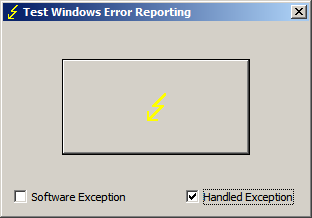
If we don’t see exception codes from hidden exceptions when we inspect raw stack data we, nevertheless, in some cases might see execution residue left after calling exception handlers. For example, we can see that when we launch TestWER tool and select ‘Handled Exception’ checkbox:

If we then click on a button and then save a process memory dump using Task Manager we find the following traces on a raw stack:

0:000> !teb
TEB at 7efdd000
ExceptionList:        0018fe20
StackBase:            00190000
StackLimit:           0018d000
SubSystemTib:         00000000
FiberData:            00001e00
ArbitraryUserPointer: 00000000
Self:                 7efdd000
EnvironmentPointer:   00000000
ClientId:             00000b38 . 00000f98
RpcHandle:            00000000
Tls Storage:          7efdd02c
PEB Address:          7efde000
LastErrorValue:       0
LastStatusValue:      c0000034
Count Owned Locks:    0
HardErrorMode:        0

0:000> dps 0018d000 00190000
[...]
0018f414  00000000
0018f418  0018f840
0018f41c  0018f4cc
0018f420  77726a9b ntdll!ExecuteHandler+0×24
0018f424  0018f4e4
0018f428  0018f840
0018f42c  0018f534
0018f430  0018f4b8
0018f434  00412600 TestWER!_except_handler4

0018f438  00000001
0018f43c  00000000
[…]

0:000> ub 77726a9b
ntdll!ExecuteHandler+0x7:
77726a7e 33f6            xor     esi,esi
77726a80 33ff            xor     edi,edi
77726a82 ff742420        push    dword ptr [esp+20h]
77726a86 ff742420        push    dword ptr [esp+20h]
77726a8a ff742420        push    dword ptr [esp+20h]
77726a8e ff742420        push    dword ptr [esp+20h]
77726a92 ff742420        push    dword ptr [esp+20h]
77726a96 e808000000      call    ntdll!ExecuteHandler2 (77726aa3)

If we compare the output above with the raw stack fragment from second chance exception memory dump (after we relaunch TestWER, don’t select ‘Handled Exception’ checkbox and click on the big lightning button) we would see the similar call fragment:

[...]
0018f3f4  00dd0aa7
0018f3f8  0018f41c
0018f3fc  77726ac9 ntdll!ExecuteHandler2+0x26
0018f400  fffffffe
0018f404  0018ffc4
0018f408  0018f534
0018f40c  0018f4b8
0018f410  0018f840
0018f414  77726add ntdll!ExecuteHandler2+0x3a
0018f418  0018ffc4
0018f41c  0018f4cc
0018f420  77726a9b ntdll!ExecuteHandler+0×24
0018f424  0018f4e4
0018f428  0018ffc4
0018f42c  0018f534
0018f430  0018f4b8
0018f434  77750ae5 ntdll!_except_handler4

0018f438  00000000
0018f43c  0018f4e4
0018f440  0018ffc4
0018f444  77726a3d ntdll!RtlDispatchException+0×127
0018f448  0018f4e4
0018f44c  0018ffc4
0018f450  0018f534
0018f454  0018f4b8
0018f458  77750ae5 ntdll!_except_handler4
0018f45c  00000111
0018f460  0018f4e4
[…]

Sometimes, we can also see “Unwind”, “StackWalk”, “WalkFrames”, ”EH”, “Catch” functions too. Sometimes we don’t see anything because such residue was overwritten by subsequent function calls after handled exceptions happened some time in the past.

- Dmitry Vostokov @ DumpAnalysis.org + TraceAnalysis.org -

8 years at Citrix!

Sunday, October 16th, 2011

switch(years_at_citrix)
{
  case 5:
  write_blog_post(”I’ve just passed 5 year mark … “);
  wait_for_certificate();
  write_blog_post(”Shortly after celebrating 5 years … “);
  break;
  case 6:
  write_blog_post(”Threads in my process run very fast. Not long ago … “);
  break;
  case 7:
  write_blog_post(”Transition to kernel mode and space … “);
  break;
  case 8:
  write_blog_posts(”A byte has passed”, “8 bits of Citrix”, … “);
  break;
  case 9:
  // … TBD
}

No default case label in the code yet.

- Dmitry Vostokov @ DumpAnalysis.org + TraceAnalysis.org -

Crash Dump Analysis Patterns (Part 151)

Thursday, October 13th, 2011

When disassembling JIT code it is good to see annotated function calls with full type and token information:

0:000> !CLRStack
OS Thread Id: 0xbf8 (0)
ESP       EIP
001fef90 003200a4 ClassMain.DoWork()
001fef94 00320082 ClassMain.Main(System.String[])
001ff1b0 79e7c74b [GCFrame: 001ff1b0]

0:000> !U 00320082
Normal JIT generated code
ClassMain.Main(System.String[])
Begin 00320070, size 13
00320070 b960300d00      mov     ecx,0D3060h (MT: ClassMain)
00320075 e8a21fdaff      call    000c201c (JitHelp: CORINFO_HELP_NEWSFAST)
0032007a 8bc8            mov     ecx,eax
0032007c ff159c300d00    call    dword ptr ds:[0D309Ch] (ClassMain.DoWork(), mdToken: 06000002)
>>> 00320082 c3              ret

However, this doesn’t work when we disable the output of raw bytes:

0:000> .asm no_code_bytes
Assembly options: no_code_bytes

0:000> !U 00320082
Normal JIT generated code
ClassMain.Main(System.String[])
Begin 00320070, size 13
00320070 mov     ecx,0D3060h
00320075 call    000c201c
0032007a mov     ecx,eax
0032007c call    dword ptr ds:[0D309Ch]
>>> 00320082 ret

Here we can still double check JIT-ed function calls manually:

0:000> dd 0D309Ch l1
000d309c  00320098

0:000> !IP2MD 00320098
MethodDesc: 000d3048
Method Name: ClassMain.DoWork()
Class: 000d1180
MethodTable: 000d3060
mdToken: 06000002
Module: 000d2c3c
IsJitted: yes
m_CodeOrIL: 00320098

- Dmitry Vostokov @ DumpAnalysis.org + TraceAnalysis.org -

Crash Dump Analysis (Part 42j)

Thursday, October 13th, 2011

This is an additional variation of the general Wait Chain pattern where mutexes (mutants) are involved in thread wait chains, for example:

THREAD fffffa8019388b60  Cid 02e8.cfd0  Teb: 000007fffffa2000 Win32Thread: 0000000000000000 WAIT: (UserRequest) UserMode Non-Alertable
    fffffa800d75daf0  Mutant - owning thread fffffa800ea2ab60
[...]

THREAD fffffa8016abab60  Cid 02e8.ec34  Teb: 000007fffffae000 Win32Thread: 0000000000000000 WAIT: (UserRequest) UserMode Non-Alertable
    fffffa800d75daf0  Mutant - owning thread fffffa800ea2ab60
[...]

We have seen such dependencies in various previous pattern interaction case studies such as:

- Inconsistent dump, stack trace collection, LPC, thread, process, executive resource wait chains, missing threads and waiting thread time

- Inconsistent dump, blocked threads, wait chains, incorrect stack trace and process factory

- Semantic Split pattern example

- Insufficient memory, handle leak, wait chain, deadlock, inconsistent dump and overaged system

- Blocked GUI thread, wait chain and virtualized process

- LPC/ALPC Wait Chain pattern example

- Mixed object Deadlock pattern example

- LPC Deadlock pattern example

Another example I show here is an unusual number of mutant dependencies in one complete memory dump from hang system:

AppA(KTHREAD-1)  -> AppB(KTHREAD-2)
AppB(KTHREAD-3)  -> ServiceA(KTHREAD-4)     
AppA(KTHREAD-5)  -> ServiceA(KTHREAD-4)
AppB(KTHREAD-6)  -> AppA(KTHREAD-7)
AppB(KTHREAD-6)  -> AppC(KTHREAD-8)
AppC(KTHREAD-9)  -> ServiceA(KTHREAD-4)
AppC(KTHREAD-10) -> AppB(KTHREAD-11)

Here the notation AppX(N)->AppY(M) means that a thread N from AppX process is waiting for a mutant that is owned by a thread M from AppY process. Because AppB, AppC and ServiceA belonged to the Same Vendor it was advised to check with that ISV.

- Dmitry Vostokov @ DumpAnalysis.org + TraceAnalysis.org -

Crash Dump Analysis Patterns (Part 70b)

Monday, October 10th, 2011

In addition to inline function optimization of unmanaged and native code we can see similar approach to JIT-compiled code:

public class ClassMain
{
    public bool time2stop = false;

   
    public static void Main(string[] args)
    {
        new ClassMain().Main();
    }

    public void Main()
    {
        while (!time2stop)
        {
            DoWork();
        }
 
    }

    volatile int inSensor, outSensor;

    void DoWork()
    {
        outSensor ^= inSensor;
    }
}

0:000> kL
ChildEBP RetAddr 
WARNING: Frame IP not in any known module. Following frames may be wrong.
001fefa0 79e7c6cc 0×3200a4
001ff020 79e7c8e1 mscorwks!CallDescrWorkerWithHandler+0xa3
001ff160 79e7c783 mscorwks!MethodDesc::CallDescr+0×19c
001ff17c 79e7c90d mscorwks!MethodDesc::CallTargetWorker+0×1f
001ff190 79eefb9e mscorwks!MethodDescCallSite::Call_RetArgSlot+0×18
001ff2f4 79eef830 mscorwks!ClassLoader::RunMain+0×263
001ff55c 79ef01da mscorwks!Assembly::ExecuteMainMethod+0xa6
001ffa2c 79fb9793 mscorwks!SystemDomain::ExecuteMainMethod+0×43f
001ffa7c 79fb96df mscorwks!ExecuteEXE+0×59
001ffac4 736455ab mscorwks!_CorExeMain+0×15c
001ffad0 73747f16 mscoreei!_CorExeMain+0×38
001ffae0 73744de3 mscoree!ShellShim__CorExeMain+0×99
001ffae8 76573833 mscoree!_CorExeMain_Exported+0×8
001ffaf4 77c1a9bd kernel32!BaseThreadInitThunk+0xe
001ffb34 00000000 ntdll!_RtlUserThreadStart+0×23

0:000> r
eax=00000000 ebx=001fefbc ecx=015316e0 edx=0037a238 esi=0037a238 edi=00000000
eip=003200a4 esp=001fef90 ebp=001fefa0 iopl=0  nv up ei pl zr na pe nc
cs=001b  ss=0023  ds=0023  es=0023  fs=003b  gs=0000      efl=00000246
003200a4 80790c00   cmp     byte ptr [ecx+0Ch],0   ds:0023:015316ec=00

0:000> !IP2MD 003200a4
MethodDesc: 000d3048
Method Name: ClassMain.Main()
Class: 000d1180
MethodTable: 000d3060
mdToken: 06000002
Module: 000d2c3c
IsJitted: yes
m_CodeOrIL: 00320098

0:000> .asm no_code_bytes
Assembly options: no_code_bytes

0:000> !U 003200a4
Normal JIT generated code
ClassMain.Main()
Begin 00320098, size 13
00320098 cmp     byte ptr [ecx+0Ch],0
0032009c jne     003200aa

0032009e mov     eax,dword ptr [ecx+4]
003200a1 xor     dword ptr [ecx+8],eax

>>> 003200a4 cmp     byte ptr [ecx+0Ch],0
003200a8 je      0032009e

003200aa ret

We see that DoWork code was inlined into Main function code.

- Dmitry Vostokov @ DumpAnalysis.org + TraceAnalysis.org -

Crash Dump Analysis Patterns (Part 150)

Monday, October 10th, 2011

I noticed this pattern when analyzing the output of !DumpStack WinDbg SOS extension command:

0:011> !DumpStack
OS Thread Id: 0xac (11)
[...]
ChildEBP RetAddr  Caller, Callee
[…]
0b73f65c 77c416dc ntdll!RtlAllocateHeap+0×17c, calling ntdll!RtlpLowFragHeapAllocFromContext
0b73f688 77c486cd ntdll!RtlAllocateHeap+0×193, calling ntdll!memset
0b73f6b0 7653a467 kernel32!TlsSetValue+0×4c, calling ntdll!RtlAllocateHeap
0b73f6cc 77a01c48 urlmon!CUrlMkTls::TLSAllocData+0×3f, calling kernel32!TlsSetValue
0b73f6dc 77a0198d urlmon!CUrlMkTls::CUrlMkTls+0×29, calling urlmon!CUrlMkTls::TLSAllocData
0b73f6e8 77a01be5 urlmon!TlsDllMain+0×100, calling urlmon!EnsureFeatureCache
0b73f6f4 6d016a21 mshtml!DllMain+0×10, calling kernel32!GetCurrentThreadId
0b73f704 6d016b6c mshtml!_CRT_INIT+0×281, calling mshtml!DllMain
0b73f71c 7239133e msimtf!_CRT_INIT+0×281, calling msimtf!DllMain
0b73f728 72391375 msimtf!_CRT_INIT+0×3e7, calling msimtf!_SEH_epilog4
0b73f764 6d016ad0 mshtml!_DllMainStartup+0×56, calling mshtml!_DllMainCRTStartup
0b73f778 72391375 msimtf!_CRT_INIT+0×3e7, calling msimtf!_SEH_epilog4
0b73f77c 77c4a604 ntdll!LdrpCallInitRoutine+0×14
0b73f7a4 77c1ab6c ntdll!LdrpInitializeThread+0×1e9, calling ntdll!RtlLeaveCriticalSection
0b73f7ac 77c1a9ea ntdll!LdrpInitializeThread+0×1cd, calling ntdll!_SEH_epilog4
0b73f800 77c1ab15 ntdll!LdrpInitializeThread+0×11f, calling ntdll!RtlActivateActivationContextUnsafeFast
0b73f804 77c1ab53 ntdll!LdrpInitializeThread+0×167, calling ntdll!RtlDeactivateActivationContextUnsafeFast
0b73f838 77c1a9ea ntdll!LdrpInitializeThread+0×1cd, calling ntdll!_SEH_epilog4
0b73f83c 77c405a0 ntdll!NtTestAlert+0xc
0b73f840 77c1a968 ntdll!_LdrpInitialize+0×29c, calling ntdll!_SEH_epilog4
0b73f8a0 77c3f3d0 ntdll!NtContinue+0xc
0b73f8a4 77c1a98a ntdll!LdrInitializeThunk+0×1a, calling ntdll!NtContinue
0b73fb30 6afd59f6 clr!Thread::intermediateThreadProc+0×39, calling clr!_alloca_probe_16
0b73fb44 76573833 kernel32!BaseThreadInitThunk+0xe
0b73fb50 77c1a9bd ntdll!_RtlUserThreadStart+0×23

Obviously the command collected “call-type” execution residue from the raw stack. The “calling” part wasn’t found in the nearby region:

0:011> dps 0b73f7a4-20 0b73f7a4+20
0b73f784  72390000 msimtf!_imp__RegOpenKeyW <PERF> (msimtf+0×0)
0b73f788  00000002
0b73f78c  00000000
0b73f790  00000001
0b73f794  0b73f80c
0b73f798  0b73f80c
0b73f79c  00000001
0b73f7a0  05636578
0b73f7a4  0b73f83c
0b73f7a8  77c1ab6c ntdll!LdrpInitializeThread+0×1e9
0b73f7ac  77ca5340 ntdll!LdrpLoaderLock
0b73f7b0  77c1a9ea ntdll!LdrpInitializeThread+0×1cd
0b73f7b4  0b7321f2
0b73f7b8  7ff4e000
0b73f7bc  7ffdf000
0b73f7c0  77ca51f4 ntdll!LdrpProcessInitialized
0b73f7c4  00000000

I tried to disassemble backwards the addresses and found the callees:

0:011> ub 77c1ab6c
ntdll!LdrpInitializeThread+0×16b:
77c1ab57 90              nop
77c1ab58 90              nop
77c1ab59 90              nop
77c1ab5a 90              nop
77c1ab5b 90              nop
77c1ab5c ff054452ca77    inc     dword ptr [ntdll!LdrpActiveThreadCount (77ca5244)]
77c1ab62 684053ca77      push    offset ntdll!LdrpLoaderLock (77ca5340)
77c1ab67 e8bd820000      call    ntdll!RtlLeaveCriticalSection (77c22e29)

0:011> ub 77a01be5
urlmon!TlsDllMain+0×2f:
77a01bce 8d4510          lea     eax,[ebp+10h]
77a01bd1 50              push    eax
77a01bd2 8d4d0c          lea     ecx,[ebp+0Ch]
77a01bd5 e88efdffff      call    urlmon!CUrlMkTls::CUrlMkTls (77a01968)
77a01bda 397d10          cmp     dword ptr [ebp+10h],edi
77a01bdd 7c09            jl      urlmon!TlsDllMain+0×103 (77a01be8)
77a01bdf 56              push    esi
77a01be0 e887fcffff      call    urlmon!EnsureFeatureCache (77a0186c)

In the past I was frequently referencing this pattern especially when discussing coincidental symbolic information but didn’t name it. Now it’s time to do that: Caller-n-Callee.

We can also run !DumpStack command against every thread (including nonmanaged) to get the summary of the call-type execution residue:

0:011> ~4s
eax=76573821 ebx=00000002 ecx=00000000 edx=74d01909 esi=00000000 edi=00000000
eip=77c40f34 esp=0478f8a0 ebp=0478f93c iopl=0 nv up ei pl zr na pe nc
cs=001b ss=0023 ds=0023 es=0023 fs=003b gs=0000 efl=00000246
ntdll!KiFastSystemCallRet:
77c40f34 c3 ret

0:004> k
ChildEBP RetAddr 
0478f89c 77c40690 ntdll!KiFastSystemCallRet
0478f8a0 76577e09 ntdll!ZwWaitForMultipleObjects+0xc
0478f93c 7674c4af kernel32!WaitForMultipleObjectsEx+0x11d
0478f990 76748b7b user32!RealMsgWaitForMultipleObjectsEx+0x13c
0478f9ac 74d01965 user32!MsgWaitForMultipleObjects+0x1f
0478f9f8 76573833 GdiPlus!BackgroundThreadProc+0x59
0478fa04 77c1a9bd kernel32!BaseThreadInitThunk+0xe
0478fa44 00000000 ntdll!_RtlUserThreadStart+0x23

0:004> !DumpStack
OS Thread Id: 0x950 (4)
Current frame: ntdll!KiFastSystemCallRet
ChildEBP RetAddr  Caller, Callee
0478f89c 77c40690 ntdll!ZwWaitForMultipleObjects+0xc
0478f8a0 76577e09 kernel32!WaitForMultipleObjectsEx+0x11d, calling ntdll!NtWaitForMultipleObjects
0478f914 76751a91 user32!UserCallWinProcCheckWow+0x5c, calling ntdll!RtlActivateActivationContextUnsafeFast
0478f918 76751b41 user32!UserCallWinProcCheckWow+0x16a, calling ntdll!RtlDeactivateActivationContextUnsafeFast
0478f93c 7674c4af user32!RealMsgWaitForMultipleObjectsEx+0x13c, calling kernel32!WaitForMultipleObjectsEx
0478f968 76752a65 user32!DispatchMessageWorker+0x396, calling user32!_SEH_epilog4
0478f980 76743c64 user32!PeekMessageA+0x129, calling user32!_PeekMessage
0478f990 76748b7b user32!MsgWaitForMultipleObjects+0x1f, calling user32!MsgWaitForMultipleObjectsEx
0478f9ac 74d01965 GdiPlus!BackgroundThreadProc+0x59, calling user32!MsgWaitForMultipleObjects
0478f9f8 76573833 kernel32!BaseThreadInitThunk+0xe
0478fa04 77c1a9bd ntdll!_RtlUserThreadStart+0x23

- Dmitry Vostokov @ DumpAnalysis.org + TraceAnalysis.org -

Crash Dump Analysis Patterns (Part 127c)

Monday, October 10th, 2011

When looking at process memory dumps and seeing CLR threads we can find fragments of JIT-ed code return addresses on the unmanaged stack trace:

0:011> kL
ChildEBP RetAddr 
WARNING: Frame IP not in any known module. Following frames may be wrong.
0b73e120 057223e2 0×572240f
0b73e134 6af44a2a 0×57223e2
0b73e1b0 6af44bcc clr!CallDescrWorkerWithHandler+0×8e
0b73e2f0 6af44c01 clr!MethodDesc::CallDescr+0×194
0b73e30c 6af44c21 clr!MethodDesc::CallTargetWorker+0×21
0b73e324 6afb7856 clr!MethodDescCallSite::Call+0×1c
0b73e4e8 6afb7ba3 clr!CallWithValueTypes_RetArgSlotWrapper+0×5c
0b73e7b4 6afb7d65 clr!InvokeImpl+0×621
0b73e880 6963d689 clr!RuntimeMethodHandle::InvokeMethodFast+0×180
0b73e8d4 6963d3d0 mscorlib_ni+0×2bd689
0b73e90c 6963bfed mscorlib_ni+0×2bd3d0
0b73e934 69643284 mscorlib_ni+0×2bbfed
0b73e958 6af3de7e mscorlib_ni+0×2c3284
0b73eb64 05720988 clr!ListLockEntry::Release+0×68
0b73ebc0 6962ae5b 0×5720988
0b73ebd0 695b7ff4 mscorlib_ni+0×2aae5b
0b73ebec 695b7f34 mscorlib_ni+0×237ff4
0b73ec0c 6962ade8 mscorlib_ni+0×237f34
0b73ec24 6af221db mscorlib_ni+0×2aade8
0b73ec34 6af44a2a clr!CallDescrWorker+0×33
0b73ecb0 6af44bcc clr!CallDescrWorkerWithHandler+0×8e
0b73ede8 6af44c01 clr!MethodDesc::CallDescr+0×194
0b73ee04 6b0bb512 clr!MethodDesc::CallTargetWorker+0×21
0b73f010 6afd5c05 clr!ThreadNative::KickOffThread_Worker+0×1e1
0b73f024 6afd5c87 clr!Thread::DoExtraWorkForFinalizer+0×114
0b73f0d4 6afd5d42 clr!Thread::ShouldChangeAbortToUnload+0×101
0b73f134 6afc37a2 clr!Thread::ShouldChangeAbortToUnload+0×399
0b73f140 6b0a6465 clr!Thread::RaiseCrossContextException+0×3f8
0b73f220 6afc37cf clr!Thread::DoADCallBack+0xf0
0b73f240 6afd5c87 clr!Thread::DoExtraWorkForFinalizer+0xfa
0b73f2f0 6afd5d42 clr!Thread::ShouldChangeAbortToUnload+0×101
0b73f350 6afd5dd9 clr!Thread::ShouldChangeAbortToUnload+0×399
0b73f374 6b0bb3e5 clr!Thread::ShouldChangeAbortToUnload+0×43a
0b73f38c 6b0bb2e0 clr!ManagedThreadBase::KickOff+0×15
0b73f424 6afd5a08 clr!ThreadNative::KickOffThread+0×23e
0b73fb44 76573833 clr!Thread::intermediateThreadProc+0×4b
0b73fb50 77c1a9bd kernel32!BaseThreadInitThunk+0xe

With the correct CLR version extension loaded we can inspect these addresses and get their method names, module and class addresses using !IP2MD WinDbg SOS extension command:

0:011> !IP2MD 0x572240f
MethodDesc:   057420e8
Method Name:  UserQuery+ClassMain.Main()
Class:        057341d8
MethodTable:  05742108
mdToken:      06000004
Module:       05741048
IsJitted:     yes
CodeAddr:     05722400
Transparency: Critical

0:011> !IP2MD 0x57223e2
MethodDesc:   0574204c
Method Name:  UserQuery.RunUserAuthoredQuery()
Class:        057340a4
MethodTable:  0574206c
mdToken:      06000001
Module:       05741048
IsJitted:     yes
CodeAddr:     057223d0
Transparency: Critical

0:011> !IP2MD 0x5720988
MethodDesc:   056e601c
Method Name:  LINQPad.ExecutionModel.Server.StartClrQuery()
Class:        0571f6e4
MethodTable:  056e60e4
mdToken:      06000c59
Module:       056e336c
IsJitted:     yes
CodeAddr:     05720910
Transparency: Critical

These method calls can also be seen on managed stack trace:

0:011> !CLRStack
OS Thread Id: 0xac (11)
Child SP IP       Call Site
0b73e120 0572240f UserQuery+ClassMain.Main()
0b73e128 057223e2 UserQuery.RunUserAuthoredQuery()
0b73e674 6af221db [DebuggerU2MCatchHandlerFrame: 0b73e674]
0b73e640 6af221db [CustomGCFrame: 0b73e640]
0b73e614 6af221db [GCFrame: 0b73e614]
0b73e5f8 6af221db [GCFrame: 0b73e5f8]
0b73e81c 6af221db [HelperMethodFrame_PROTECTOBJ: 0b73e81c] System.RuntimeMethodHandle._InvokeMethodFast(System.IRuntimeMethodInfo, System.Object, System.Object[], System.SignatureStruct ByRef, System.Reflection.MethodAttributes, System.RuntimeType)
0b73e898 6963d689 System.RuntimeMethodHandle.InvokeMethodFast(System.IRuntimeMethodInfo, System.Object, System.Object[], System.Signature, System.Reflection.MethodAttributes, System.RuntimeType)
0b73e8ec 6963d3d0 System.Reflection.RuntimeMethodInfo.Invoke(System.Object, System.Reflection.BindingFlags, System.Reflection.Binder, System.Object[], System.Globalization.CultureInfo, Boolean)
0b73e928 6963bfed System.Reflection.RuntimeMethodInfo.Invoke(System.Object, System.Reflection.BindingFlags, System.Reflection.Binder, System.Object[], System.Globalization.CultureInfo)
0b73e94c 69643284 System.Reflection.MethodBase.Invoke(System.Object, System.Object[])
0b73e958 0572134c LINQPad.ExecutionModel.Server.RunClrQuery()
0b73eb6c 05720988 LINQPad.ExecutionModel.Server.StartClrQuery()
0b73ebc8 6962ae5b System.Threading.ThreadHelper.ThreadStart_Context(System.Object)
0b73ebd8 695b7ff4 System.Threading.ExecutionContext.Run(System.Threading.ExecutionContext, System.Threading.ContextCallback, System.Object, Boolean)
0b73ebfc 695b7f34 System.Threading.ExecutionContext.Run(System.Threading.ExecutionContext, System.Threading.ContextCallback, System.Object)
0b73ec18 6962ade8 System.Threading.ThreadHelper.ThreadStart()
0b73ee30 6af221db [GCFrame: 0b73ee30]
0b73f0f4 6af221db [DebuggerU2MCatchHandlerFrame: 0b73f0f4]
0b73f18c 6af221db [ContextTransitionFrame: 0b73f18c]
0b73f310 6af221db [DebuggerU2MCatchHandlerFrame: 0b73f310]

- Dmitry Vostokov @ DumpAnalysis.org + TraceAnalysis.org -

Crash Dump Analysis Patterns (Part 149)

Friday, October 7th, 2011

Similar to Double Free (process heap) and Double Free (kernel pool) that might be detected through instrumentation such as gflags and Driver Verifier there is also an IRP double completion variant implemented through Self-Diagnosis (kernel mode). Here’s a typical example:

0: kd> !analyze -v

[...]

MULTIPLE_IRP_COMPLETE_REQUESTS (44)
A driver has requested that an IRP be completed (IoCompleteRequest()), but the packet has already been completed. This is a tough bug to find because the easiest case, a driver actually attempted to complete its own packet twice, is generally not what happened.  Rather, two separate drivers each believe that they own the packet, and each attempts to complete it.  The first actually works, and the second fails.  Tracking down which drivers in the system actually did this is difficult, generally because the trails of the first driver have been covered by the second.  However, the driver stack for the current request can be found by examining the DeviceObject fields in each of the stack locations.
Arguments:
Arg1: fffffa80104aa010, Address of the IRP
Arg2: 0000000000000eae
Arg3: 0000000000000000
Arg4: 0000000000000000

STACK_TEXT: 
fffff880`0e322428 fffff800`01666224 : 00000000`00000044 fffffa80`104aa010 00000000`00000eae 00000000`00000000 : nt!KeBugCheckEx
fffff880`0e322430 fffff880`03dd121f : fffffa80`0dc12c50 fffffa80`107750c8 fffffa80`104aa010 fffff880`0e322580 : nt! ?? ::FNODOBFM::`string'+0x3eb3d
fffff880`0e322520 fffff880`03def17f : fffffa80`0dc12c50 fffffa80`104aa010 fffffa80`0cacb610 00000000`00000001 : DriverA!DriverA::Create+0x3bf
[...]
fffff880`0e322740 fffff800`01972ba4 : fffffa80`0dc129f0 00000000`00000000 fffffa80`0fe7a010 00000000`00000001 : nt!IopParseDevice+0x5a7
fffff880`0e3228d0 fffff800`01977b7d : fffffa80`0fe7a010 fffff880`0e322a30 fffffa80`00000040 fffffa80`0cae5080 : nt!ObpLookupObjectName+0x585
fffff880`0e3229d0 fffff800`0197e647 : 00000000`000007ff 00000000`00000003 fffff8a0`05716d01 00000000`00000000 : nt!ObOpenObjectByName+0x1cd
fffff880`0e322a80 fffff800`01988398 : 00000000`03f3e510 fffff8a0`c0100000 fffff8a0`0c26fe50 00000000`03f3e118 : nt!IopCreateFile+0x2b7
fffff880`0e322b20 fffff800`0167b813 : fffffa80`0e10db30 00000000`00000001 fffffa80`1002b060 fffff800`0198f294 : nt!NtCreateFile+0x78
fffff880`0e322bb0 00000000`772efc0a : 000007fe`f62c358f 00000000`03f3e1b0 00000000`7719fd72 000007fe`f62c6490 : nt!KiSystemServiceCopyEnd+0x13
00000000`03f3e068 000007fe`f62c358f : 00000000`03f3e1b0 00000000`7719fd72 000007fe`f62c6490 00000000`00000005 : ntdll!NtCreateFile+0xa

[...]

0: kd> !irp fffffa80104aa010
Irp is active with 1 stacks 3 is current (= 0xfffffa80104aa170)
 No Mdl: No System Buffer: Thread fffffa801002b060:  Irp is completed.  Pending has been returned
     cmd  flg cl Device   File     Completion-Context
 [  0, 0]   0  2 fffffa800dc129f0 00000000 00000000-00000000   
        \Driver\DriverA
   Args: 00000000 00000000 00000000 ffffffffc00a0006

- Dmitry Vostokov @ DumpAnalysis.org + TraceAnalysis.org -

Debugging TV Frames Programme

Friday, October 7th, 2011

After the launch of the first episode about symbols I decided to make it recurrent where registration will be needed only once. So I apologize to all who already registered for episode 0×01 that another registration well be required for episode 0×02. However, no registration will be necessary for episode 0×03 and so on. If anyone misses episode 0×02 they can still register for episode 0×03 and all subsequent episodes only once, and so on by induction.

The second episode is about symbol file troubleshooting. All about this topic in 8 slides in 8 minutes including live WinDbg demonstration plus extra 8 minutes for you to ask questions.

Register for Debugging TV Frame 0×02 and further weekly episodes
Date: Friday, October 14, 2011
Time: 5:45 PM - 6:01 PM BST

Space is limited.
Reserve your seat now at:
https://www3.gotomeeting.com/register/318613774

After registering you will receive a confirmation email containing information about joining the show.

Debugging TV Frame 0×01
Recording: https://www3.gotomeeting.com/register/640694470
Slides: DebuggingTV_Frame_0×01.pdf
WinDbg log: DebuggingTV_Frame_0×01.txt

More frames are coming and www.debugging.tv will host TV programme and recordings of past episodes.

- Dmitry Vostokov @ DumpAnalysis.org + TraceAnalysis.org -

Bugtation No.147

Thursday, October 6th, 2011

The idea of this bugtation came to me when I bought the book in a local bookshop The Presence of the Past as interested in all things past:

The Presence of The Memory Dump: Code Resonance and the Habits of Debugging.

Rupert Sheldrake

- Dmitry Vostokov @ DumpAnalysis.org + TraceAnalysis.org -

Symbol Patterns

Wednesday, October 5th, 2011

A page to reference all different kinds of symbol patterns is necessary, so I created this post:

I’ll update it as soon as I add more similar patterns.

- Dmitry Vostokov @ DumpAnalysis.org + TraceAnalysis.org -

Recent News and Updates

Tuesday, October 4th, 2011

First, we announced Debugging TV and its first weekly program called Frames where each episode features some facet of debugging, memory dump, and software trace analysis in 8 minutes. The first episode is about symbol files plus extra 8 minutes to ask questions.

Debugging TV Frame 0×01
Date: Friday, October 7, 2011
Time: 5:45 PM - 6:01 PM BST

Space is limited.
Reserve your seat now at:
https://www3.gotomeeting.com/register/640694470

Second, Accelerated Windows Memory Dump Analysis book became available on Amazon and Barnes & Noble.

Third, a recording of Fundamentals of Complete Crash and Hang Memory Dump Analysis (Revision 2) Webinar was made available for viewing.

Fourth, I’m working now on the next 5 crash dump analysis patterns to be published this week.

- Dmitry Vostokov @ DumpAnalysis.org + TraceAnalysis.org -

Uses of Memoretics

Wednesday, September 21st, 2011

Memoretics promotes pattern-driven memory dump and software trace analysis which has many uses but not limited to:

  • Software and site reliability
  • Software Debugging
  • QA and Software Testing
  • Computer Security
  • Software Troubleshooting
  • Malware Research and Analysis
  • Tools as a Service (TaaS)
  • Supportability
  • Software Diagnostics

- Dmitry Vostokov @ DumpAnalysis.org + TraceAnalysis.org -

Crossdisciplinary Memoretics as Interdisciplinary Science

Wednesday, September 21st, 2011

Memoretics as a science of memory snapshots borrows many ideas from the following disciplines (the list is not exhaustive):

  • Troubleshooting and Debugging
  • Intelligence Analysis
  • Critical Thinking
  • Forensics
  • Linguistics
  • Archaeology
  • Psychoanalysis
  • History
  • Mathematics: Sets and Categories
  • Literary Criticism and Narratology

It also contributes many ideas back. The following diagram depicts such an interaction:

- Dmitry Vostokov @ DumpAnalysis.org + TraceAnalysis.org -

Icons for Memory Dump Analysis Patterns (Part 101)

Wednesday, September 21st, 2011

Today we introduce an icon for Optimized VM Layout pattern:

B/W

Color

- Dmitry Vostokov @ DumpAnalysis.org + TraceAnalysis.org -