Truncated dump, spiking thread, not my version and hooked functions: pattern cooperation

November 14th, 2008

Recently I got another manual complete memory dump from a hang workstation where default analysis pointed to a possibility for a Spiking Thread pattern:

0: kd> !analyze -v
[...]
MANUALLY_INITIATED_CRASH (e2)
The user manually initiated this crash dump.
Arguments:
Arg1: 00000000
Arg2: 00000000
Arg3: 00000000
Arg4: 00000000
[...]
GetContextState failed, 0x80070026
Unable to read selector for PCR for processor 1
GetContextState failed, 0x80070026
Unable to read selector for PCR for processor 1

PROCESS_NAME:  AppA.exe

CURRENT_IRQL:  0

LAST_CONTROL_TRANSFER:  from 808b73a4 to 808b72cb

STACK_TEXT: 
f46f5b44 808b73a4 e1a36008 00000004 00000018 nt!HvpFindFreeCellInThisViewWindow+0xd7
f46f5b6c 808bd07b e1a36008 00000002 00000018 nt!HvpFindFreeCell+0x98
f46f5b98 808bd588 e1a36008 e1a362fc 00000000 nt!HvpDoAllocateCell+0x69
f46f5bbc 808d0b22 e1a36008 009214a0 c94e24a4 nt!HvReallocateCell+0x9a
f46f5bdc 808c1028 e1a36008 051fa3e8 00000003 nt!CmpAddValueToList+0x46
f46f5c28 808c406a e1a36008 cddb7ccc f46f5d0c nt!CmpSetValueKeyNew+0xfa
f46f5cb4 808b7e2f e45872e0 f46f5d0c 00000004 nt!CmSetValueKey+0x426
f46f5d44 8088978c 00000438 0012fad0 00000000 nt!NtSetValueKey+0x241
f46f5d44 7c8285ec 00000438 0012fad0 00000000 nt!KiFastCallEntry+0xfc
0012fa58 7c827b7b 77f77703 00000438 0012fad0 ntdll!KiFastSystemCallRet
0012fa5c 77f77703 00000438 0012fad0 00000000 ntdll!ZwSetValueKey+0xc
0012faa0 77f5ec90 00000438 0012fad0 00000004 ADVAPI32!LocalBaseRegSetValue+0x12c
0012fb04 60072e40 00000438 6290c0c4 00000000 ADVAPI32!RegSetValueExA+0x160
WARNING: Stack unwind information not available. Following frames may be wrong.
0012fbf4 628e2d57 60062e70 60062b40 80000001 DLLA!GetObjectId+0×9600
[…]

FOLLOWUP_IP:
nt!HvpFindFreeCellInThisViewWindow+d7
808b72cb 034508          add     eax,dword ptr [ebp+8]

Looking at this thread information we see it RUNNING (this is also evident from its call stack):

0: kd> !thread
THREAD 8a0b2890  Cid 0814.10e8  Teb: 7ffdf000 Win32Thread: bc217c68 RUNNING on processor 0
Not impersonating
DeviceMap                 e440acc0
Owning Process            8a0d85f8       Image:         AppA.exe
Wait Start TickCount      153974         Ticks: 0
Context Switch Count      16905                 LargeStack
UserTime                  00:00:03.109
KernelTime                00:00:17.500
[…]

We also see that the thread accumulated 17 seconds as time spent in kernel. Switching to AppA process context and looking at its Image version we see that it is 5.80.x:

0: kd> lmv m AppA
start    end        module name
00400000 0049c000   AppA   (deferred)            
    Image path: C:\PROGRA~1\AppA\AppA.exe
    Image name: AppA.exe
    Timestamp:        Thu Jun 05 14:51:52 2008 (4847EF78)
    CheckSum:         0009D068
    ImageSize:        0009C000
    File version:     5.80.5.1764
    Product version:  5.80.0.0

However from Google search we can find that there is newer version available (variant of Not My Version pattern) and even some indication on various forums that the older ones had problems with CPU resource utilization. We may stop here but I usually scan all threads for any suspicious signs and we can see another running thread on the second CPU:

THREAD 8a2ed5d0  Cid 11b4.1100  Teb: 7ffdf000 Win32Thread: bc342b80 RUNNING on processor 1
Not impersonating
DeviceMap                 e44fc100
Owning Process            8a1efcb0       Image:         calc.exe
Wait Start TickCount      153973         Ticks: 1 (0:00:00:00.015)
Context Switch Count      50736                 LargeStack
UserTime                  00:01:04.515
KernelTime                00:00:00.015
Win32 Start Address calc (0×0101e23a)
Start Address kernel32!BaseProcessStartThunk (0×77e617f8)
Stack Init f4cd6000 Current f4cd5d00 Base f4cd6000 Limit f4cd1000 Call 0
Priority 6 BasePriority 6 PriorityDecrement 0
Unable to get context for thread running on processor 1, Win32 error 0n38

We also see that this thread spent more than a minute in user mode. Unfortunately we cannot see its thread stack because the dump shows signs of Truncated Dump pattern:

Loading Dump File [MEMORY.DMP]
Kernel Complete Dump File: Full address space is available

************************************************************
WARNING: Dump file has been truncated.  Data may be missing.
************************************************************

[…]

0: kd> ~1
GetContextState failed, 0×80070026
Unable to read selector for PCR for processor 1
WARNING: Unable to reset page directories
GetContextState failed, 0×80070026
Unable to get program counter
GetContextState failed, 0×80070026
Unable to get current machine context, Win32 error 0n38
GetContextState failed, 0×80070026

The dump file size 4,177,920 Kb is less than amount of physical memory 4,192,948 Kb:

1: kd> !vm
GetContextState failed, 0x80070026
Unable to get program counter

*** Virtual Memory Usage ***
 Physical Memory:     1048237 (   4192948 Kb)
 Page File: \??\R:\pagefile.sys
   Current:   4177920 Kb  Free Space:   4154440 Kb
   Minimum:   4177920 Kb  Maximum:      4194304 Kb

We can stop here and still recommend to upgrade AppA product seen from the thread running on the first processor but the fact that the second thread belongs to innocent calc.exe demands some attention. Was it calculating incessantly some financial figures following button clicks from a financial genius? Taking advantage of a complete memory dump and the fact that this process spent most of the time in user space we can check for Hooked Functions pattern:

1: kd> .process /r /p 8a1efcb0
Implicit process is now 8a1efcb0
Loading User Symbols
..........................
GetContextState failed, 0x80070026

1: kd> !chkimg -lo 50 -d !user32 -v
GetContextState failed, 0x80070026
Unable to get program counter
Searching for module with expression: !user32
Will apply relocation fixups to file used for comparison
Will ignore NOP/LOCK errors
Will ignore patched instructions
Image specific ignores will be applied
Comparison image path: c:\mss\USER32.dll\45D70AC791000\USER32.dll
No range specified

Scanning section:    .text
Size: 392891
Range to scan: 77381000-773e0ebb
    7738c341-7738c345  5 bytes - USER32!CreateWindowExA
 [ 8b ff 55 8b ec:e9 ba 3c 00 c0 ]
[…]
Total bytes compared: 73728(18%)
Number of errors: 75
75 errors : !user32 (7738c341-773a154d)
GetContextState failed, 0×80070026

1: kd> u 7738c341
USER32!CreateWindowExA:
7738c341 e9ba3c00c0      jmp     37390000
7738c346 6801000040      push    40000001h
7738c34b ff7534          push    dword ptr [ebp+34h]
7738c34e ff7530          push    dword ptr [ebp+30h]
7738c351 ff752c          push    dword ptr [ebp+2Ch]
7738c354 ff7528          push    dword ptr [ebp+28h]
7738c357 ff7524          push    dword ptr [ebp+24h]
7738c35a ff7520          push    dword ptr [ebp+20h]
GetContextState failed, 0×80070026

1: kd> u 37390000
37390000 e96b91562e      jmp     HookA!CreateWindowExA (658f9170)
37390005 8bff            mov     edi,edi
37390007 55              push    ebp
37390008 8bec            mov     ebp,esp
3739000a e937c3ff3f      jmp     USER32!CreateWindowExA+0×5 (7738c346)
3739000f 0000            add     byte ptr [eax],al
37390011 0000            add     byte ptr [eax],al
37390013 0000            add     byte ptr [eax],al
GetContextState failed, 0×80070026

Indeed we see that HookA module is involved and we can recommend to test the stability of the system without the product that uses it or upgrading or disabling this component.

- Dmitry Vostokov @ DumpAnalysis.org -

A Perfect Gift for a Small Publisher

November 12th, 2008

OpenTask, a publisher of my books, is about to release a notebook for small and self-publishers. It’s title is Title itself. For details please visit the page:

Title: Book Publisher’s Notebook

I found it indispensable to keep track of my own book titles and their book data in a hardcopy format.

- Dmitry Vostokov @ DumpAnalysis.org -
Bugtation No.62

November 11th, 2008

“To” debug “is to” code “twice.”

Joseph Joubert, Pensées

- Dmitry Vostokov @ DumpAnalysis.org -
Bugtation No.61

November 11th, 2008

“Impatient” engineers “always” debug “too late.”

Jean Gwenaël Dutourd, Le Fond et la Forme, essai alphabétique sur la morale et sur le style

- Dmitry Vostokov @ DumpAnalysis.org -

Welcome to Dun Bugmons!

November 10th, 2008

A number of writers expressed their wishes to be a co-author of the forthcoming SF novel Googol Dump. I have selected Dun Bugmons for his name sounding like Dún Laoghaire where I live nearby by walking distance in Monkstown and his surname accidentally reminding me of Bug Monitors. Please join me in congratulating Dun Bugmons!

- Dmitry Vostokov @ DumpAnalysis.org -

Abstract Debugging Commands (ADC) Initiative

November 10th, 2008

While working on WinDbg command cards and even before that when compiling a comparison table for both WinDbg and GDB I came to an idea of abstract debugging commands that correspond to common debugging tasks, have clear syntax and semantics and serve metaphorically as a basis for conversion of analog thinking to digital debugger assistance (see analog-to-digital conversion for ADC abbreviation). Here a WinDbg extension can help but now I think about using a tree-based approach similar to CMDTREE.TXT for CDA Checklist. More on this later. Any comments or suggestions are greatly appreciated.

- Dmitry Vostokov @ DumpAnalysis.org -

Learning WinDbg as a foreign language

November 10th, 2008

When we have tool commands that sound similar to English words like common root French or German vocabulary to English why not to leverage time-proven foreign language learning techniques:

WinDbg: A Reference Poster and Learning Cards

- Dmitry Vostokov @ DumpAnalysis.org -
WinDbg: A Reference Poster and Learning Cards

November 10th, 2008

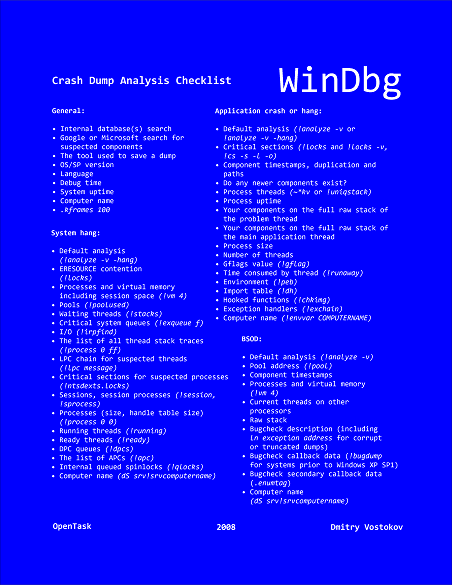
Suddenly the course of my publishing activities bended a little to produce a DIY poster and learning cards to be published soon. Here are the product details:

Annotation:
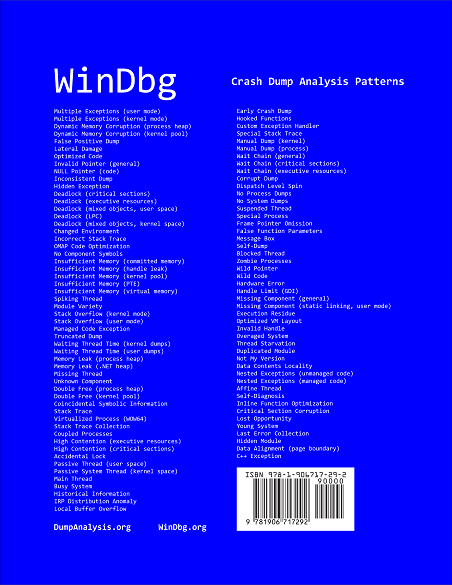
WinDbg is a powerful debugger from Microsoft Debugging Tools for Windows. It has more than 350 commands that can be used in different debugging scenarios. The cover of this book is a poster featuring crash dump analysis checklist and common patterns seen in memory dumps and live debugging sessions. Inside the book you can find ready to cut learning cards with commands and their descriptions coloured according to their use for crash dump or live debugging sessions and user, kernel or complete memory dumps. Tossing cards can create unexpected connections between commands and help to learn them more quickly. Uncut pages can also serve as birds eye view to WinDbg debugging capabilities. More than 350 WinDbg commands including meta-commands and extensions are included.

  • Title: WinDbg: A Reference Poster and Learning Cards
  • Authors: Dmitry Vostokov
  • Publisher: Opentask (20 November 2008)
  • Language: English
  • Product Dimensions: 28.0 x 21.6
  • ISBN-13: 978-1-906717-29-2
  • Paperback: 20 pages

Book Excerpt

Front cover:

Back cover:

After you take inside pages out you are left with a cover that you can use as a crash dump analysis checklist and patterns poster:

I also plan to update this book on a yearly basis. 

- Dmitry Vostokov @ DumpAnalysis.org -
Crash Dump Analysis Patterns (Part 42d)

November 7th, 2008

Another example of Wait Chain pattern for objects with ownership semantics is seen in kernel and complete memory dumps where threads are waiting for thread objects. A thread object is a synchronization object whose owner is a thread so they can be easily identified. For example, the main application thread is waiting for an object:

1: kd> !thread 8818e660 16
THREAD 8818e660  Cid 1890.1c50  Teb: 7ffdf000 Win32Thread: b8411008 WAIT: (Unknown) UserMode Non-Alertable
    87d569d8  Thread
    8818e6d8  NotificationTimer
Not impersonating
DeviceMap                 e10008d8
Owning Process            87db5d88       Image:         App.exe
Wait Start TickCount      299006         Ticks: 255 (0:00:00:03.984)
Context Switch Count      1208                 LargeStack
UserTime                  00:00:00.203
KernelTime                00:00:00.203
Start Address kernel32!BaseThreadStartThunk (0×77e617ec)
Stack Init b42c3000 Current b42c2c60 Base b42c3000 Limit b42be000 Call 0
Priority 15 BasePriority 15 PriorityDecrement 0
ChildEBP RetAddr  Args to Child             
b42c2c78 80833e8d 8818e660 8818e708 00000003 nt!KiSwapContext+0×26
b42c2ca4 80829b74 00000000 b42c2d14 00000000 nt!KiSwapThread+0×2e5
b42c2cec 8093b034 87d569d8 00000006 00804c01 nt!KeWaitForSingleObject+0×346
b42c2d50 8088ac4c 000001ec 00000000 b42c2d14 nt!NtWaitForSingleObject+0×9a
b42c2d50 7c8285ec 000001ec 00000000 b42c2d14 nt!KiFastCallEntry+0xfc
0006fde4 7c827d0b 77e61d1e 000001ec 00000000 ntdll!KiFastSystemCallRet
0006fde8 77e61d1e 000001ec 00000000 0006fe2c ntdll!NtWaitForSingleObject+0xc
0006fe58 77e61c8d 000001ec 00001388 00000000 kernel32!WaitForSingleObjectEx+0xac
0006fe6c 01039308 000001ec 00001388 00000000 kernel32!WaitForSingleObject+0×12
0006fe94 010204ac 0007cc00 00000001 00000002 App!WaitForNotifyList+0xf2
[…]

However that object is a thread too:

THREAD 87d569d8  Cid 1890.1ec0  Teb: 7ffd9000 Win32Thread: b869ba48 WAIT: (Unknown) UserMode Non-Alertable
    8a1f8870  Thread

Therefore, we see that thread 8818e660 is waiting for another thread 87d569d8 which belongs to the same process with PID 1890 and thread 87d569d8 itself is waiting for thread 8a1f8870 which has the following stack trace:

1: kd> !thread 8a1f8870 16
THREAD 8a1f8870  Cid 1890.07d8  Teb: 7ff95000 Win32Thread: 00000000 WAIT: (Unknown) UserMode Non-Alertable
    8a0ce4c0  NotificationEvent
    886f1870  NotificationEvent

Not impersonating
DeviceMap                 e10008d8
Owning Process            87db5d88       Image:         App.exe
Wait Start TickCount      292599         Ticks: 6662 (0:00:01:44.093)
Context Switch Count      17            
UserTime                  00:00:00.000
KernelTime                00:00:00.000
Win32 Start Address Dll!StartMonitoring (0×758217b8)
Start Address kernel32!BaseThreadStartThunk (0×77e617ec)
Stack Init b6d4f000 Current b6d4e900 Base b6d4f000 Limit b6d4c000 Call 0
Priority 14 BasePriority 13 PriorityDecrement 0
ChildEBP RetAddr  Args to Child             
b6d4e918 80833e8d 8a1f8870 00000002 00140000 nt!KiSwapContext+0×26
b6d4e944 808295ab 8a1f8870 00000002 00000000 nt!KiSwapThread+0×2e5
b6d4e978 8093b290 00000002 b6d4eaac 00000001 nt!KeWaitForMultipleObjects+0×3d7
b6d4ebf4 8093b3f2 00000002 b6d4ec1c 00000001 nt!ObpWaitForMultipleObjects+0×202
b6d4ed48 8088ac4c 00000002 026bfc08 00000001 nt!NtWaitForMultipleObjects+0xc8
b6d4ed48 7c8285ec 00000002 026bfc08 00000001 nt!KiFastCallEntry+0xfc
026bfbb8 7c827cfb 77e6202c 00000002 026bfc08 ntdll!KiFastSystemCallRet
026bfbbc 77e6202c 00000002 026bfc08 00000001 ntdll!NtWaitForMultipleObjects+0xc
026bfc64 77e62fbe 00000002 026bfca4 00000000 kernel32!WaitForMultipleObjectsEx+0×11a
026bfc80 6554a01f 00000002 026bfca4 00000000 kernel32!WaitForMultipleObjects+0×18
026bfcfc 758237a3 cd050002 ffffffff 026bfd4c Dll!GetStatusChange+0×7bf
026bffb8 77e64829 75833120 00000000 00000000 Dll!StartMonitoring+0×14b
026bffec 00000000 758217b8 75833120 00000000 kernel32!BaseThreadStart+0×34

Thread 8a1f8870 is waiting for two notification events disjointly which is confirmed by dumping WaitForMultipleObjects arguments. Neither of them is in signaled state and one is a named event “MyEventObject”:

1: kd> dd 026bfc08 l2
026bfc08  0000008c 00000084

1: kd> !handle 0000008c
processor number 1, process 87db5d88
PROCESS 87db5d88  SessionId: 4  Cid: 1890    Peb: 7ffdc000  ParentCid: 01d0
    DirBase: cfe438e0  ObjectTable: e178c228  HandleCount: 439.
    Image: App.exe

Handle table at e50d2000 with 439 Entries in use
008c: Object: 8a0ce4c0  GrantedAccess: 001f0003 Entry: e50d2118
Object: 8a0ce4c0  Type: (8b26ec00) Event
    ObjectHeader: 8a0ce4a8 (old version)
        HandleCount: 1  PointerCount: 3

1: kd> !handle 00000084
processor number 1, process 87db5d88
PROCESS 87db5d88  SessionId: 4  Cid: 1890    Peb: 7ffdc000  ParentCid: 01d0
    DirBase: cfe438e0  ObjectTable: e178c228  HandleCount: 439.
    Image: App.exe

Handle table at e50d2000 with 439 Entries in use
0084: Object: 886f1870  GrantedAccess: 001f0003 (Inherit) Entry: e50d2108
Object: 886f1870  Type: (8b26ec00) Event
    ObjectHeader: 886f1858 (old version)
        HandleCount: 1  PointerCount: 4
        Directory Object: e43ee320  Name: MyEventObject

1: kd> dt _DISPATCHER_HEADER 8a0ce4c0
cutildll!_DISPATCHER_HEADER
   +0×000 Type             : 0 ”
   +0×001 Absolute         : 0 ”
   +0×002 Size             : 0×4 ”
   +0×003 Inserted         : 0 ”
   +0×003 DebugActive      : 0 ”
   +0×000 Lock             : 262144
   +0×004 SignalState      : 0
   +0×008 WaitListHead     : _LIST_ENTRY [ 0×88519d18 - 0×8a1f8918 ]

1: kd> dt _DISPATCHER_HEADER 886f1870
cutildll!_DISPATCHER_HEADER
   +0×000 Type             : 0 ”
   +0×001 Absolute         : 0 ”
   +0×002 Size             : 0×4 ”
   +0×003 Inserted         : 0 ”
   +0×003 DebugActive      : 0 ”
   +0×000 Lock             : 262144
   +0×004 SignalState      : 0
   +0×008 WaitListHead     : _LIST_ENTRY [ 0×88519d30 - 0×8a1f8930 ]

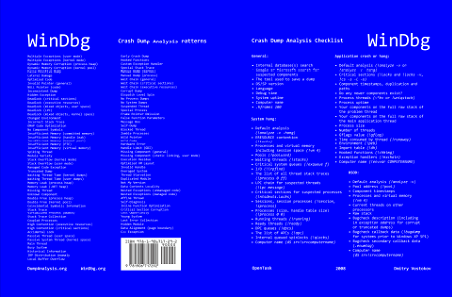
Here is a diagram showing this wait chain:

- Dmitry Vostokov @ DumpAnalysis.org -
Hide, seek and dump in a Citrix farm

November 7th, 2008

CtxHideEx32 tool has been updated to the version 1.1 and can be downloaded from Citrix support. It now allows a substring search for a window title or class, for example:

CtxHideEx32.exe HIDE "*error" "" OK

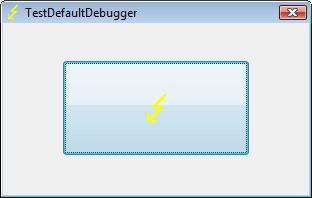
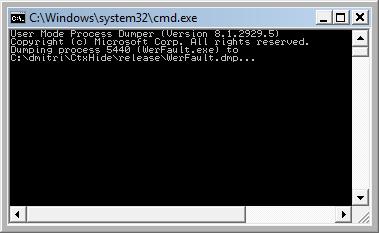
As by-product coupled with an optional command line I discovered that it allows to automatically dump any process displaying a message box with an error message in its window title. Here is an example using TestDefaultDebugger64 to simulate an application fault message where the following instance of CtxHideEx32 was setup to dump a process showing WER dialog on Vista:

CtxHideEx32.exe NONE "*Microsoft Windows" "" "C:\kktools\userdump8.1\x64\userdump.exe %d"

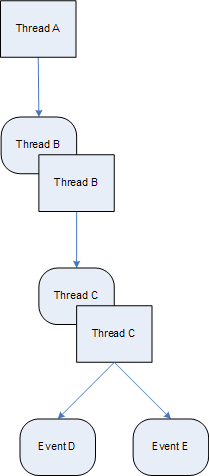
We click on a big lightning button:

and then WER dialog appears:

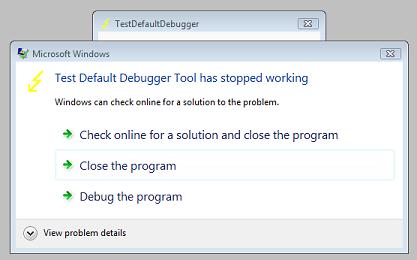
Immediately CtxHideEx32 kicks in and starts dumping the owner process incessantly so you better to dismiss this dialog by choosing something:

We see it was WerFault.exe. 

Note: I think I have to amend CtxHideEx32 to make it wait until the spawned command line interpreter finishes its job. Stay tuned.

- Dmitry Vostokov @ DumpAnalysis.org -
Googol Dump: A Computational SF Novel

November 7th, 2008

Science fiction books are among my favourite. I used to read lots of them (in Russian) during my school and university years. Also I started reading science fiction in English 8 years ago upon my arrival to Ireland and one of Asimov’s books about Foundation was my first English fiction book fully read from cover to cover. Now I want to write something fictional related to memory dump analysis and the notion of 3-dimensional memory dumps is a fascinating idea to exploit:

Googol Dump - a 3D memory dump where the 3rd dimension is a time arrow of computational 2D memory snapshots.

Note: one googol is 10100 and this number of bits is sufficient enough to record the full history of memory snapshots for 64-bit, 128-bit, 256-bit and even 1024-bit computers running thousands of years.

The novel is planned to be published next year (ISBN: 978-1906717322) and is written from the perspective of a debugger.

- Dmitry Vostokov @ DumpAnalysis.org -
To bugcheck or not to bugcheck

November 6th, 2008

This “Hamlet’s Question” of software technical support is often asked and unfortunately sometimes not even asked at all when troubleshooting and debugging complex enterprise environments. For applications the question of saving crash dumps is trivial. If a process is not in memory and not visible in Task Manager we won’t be able to dump it manually. With OS always running even when hanging the question often degenerates to “Let’s bugcheck and send the crash dump to dump file divers”. After that decision huge amounts of energy are spent in collecting, sending and storing gigabytes of data with always very little or no return. Therefore here is the preliminary list of symptoms where manual system dumps are appropriate and when they are not:

When a manual system dump is appropriate

  • - The system hangs visually (no GUI activity possible)

  • - No connections or logins are possible

  • - Abnormal system metrics (like pool, thread or process number growth)

  • - Insufficient system or session memory

When a manual process user dump is more appropriate than a complete memory dump

  • - Process hangs visually (other applications work as normal)

  • - Error message box appears

  • - Abnormal process metrics (like process memory growth or handle leaks)

When manual kernel and complete memory dumps are almost useless (I say almost because in rare circumstances they can aid in problem resolution so it is better not to collect them until explicitly asked from skilled memory dump file diver)

  • - Application failures resulted in their disappearance from the list of running processes

  • - Functional bugs (dynamic activity that requires historical tracing of events)

Note: 3rd-party kernel mode software developers should not face this question during the development of their drivers and delegate the responsibility for difficult bugcheck or panic decisions to an operating system. Surely Windows core developers face this question too.

Next we discuss another related question about choosing between kernel and complete memory dump options in Control Panel. 

- Dmitry Vostokov @ DumpAnalysis.org -
Lateral damage, stack overflow and execution residue: pattern cooperation

November 5th, 2008

As I mentioned in comments to Lateral Damage pattern it lies in between the normal healthy dump files and corrupt dumps. For example, the following 8Gb complete memory dump that fits perfectly into 16Gb page file had the problem of missing processor control region making it impossible to get meaningful information from certain WinDbg commands:

0: kd> !analyze -v

[...]

UNEXPECTED_KERNEL_MODE_TRAP (7f)
This means a trap occurred in kernel mode, and it's a trap of a kind
that the kernel isn't allowed to have/catch (bound trap) or that
is always instant death (double fault).  The first number in the
bugcheck params is the number of the trap (8 = double fault, etc)
Consult an Intel x86 family manual to learn more about what these
traps are. Here is a *portion* of those codes:
If kv shows a taskGate
        use .tss on the part before the colon, then kv.
Else if kv shows a trapframe
        use .trap on that value
Else
        .trap on the appropriate frame will show where the trap was taken
        (on x86, this will be the ebp that goes with the procedure KiTrap)
Endif
kb will then show the corrected stack.
Arguments:
Arg1: 00000008, EXCEPTION_DOUBLE_FAULT
Arg2: f7727fe0
Arg3: 00000000
Arg4: 00000000

Debugging Details:
------------------

Unable to read selector for PCR for processor 1
Unable to read selector for PCR for processor 3
Unable to read selector for PCR for processor 1
Unable to read selector for PCR for processor 3

[...]

STACK_TEXT: 
WARNING: Stack unwind information not available. Following frames may be wrong.
8089a600 8088ddf2 00000000 0000000e 00000000 processr+0x2886
8089a604 00000000 0000000e 00000000 00000000 nt!KiIdleLoop+0xa

[...]

0: kd> ~1
Unable to read selector for PCR for processor 1
WARNING: Unable to reset page directories

1: kd> !pcr
Unable to read selector for PCR for processor 1
Cannot get PRCB address 

1: kd> kv
ChildEBP RetAddr  Args to Child             
WARNING: Frame IP not in any known module. Following frames may be wrong.
00000000 00000000 00000000 00000000 00000000 0×0

The bugcheck argument 1 shows that we have a double fault that most often results from kernel stack overflow. If we go back to processor 0 to inspect its TSS we don’t get meaningful results too (we expect the value of Backlink to be 0×28):

0: kd> !pcr
KPCR for Processor 0 at ffdff000:
    Major 1 Minor 1
 NtTib.ExceptionList: ffffffff
     NtTib.StackBase: 00000000
    NtTib.StackLimit: 00000000
  NtTib.SubSystemTib: 80042000
       NtTib.Version: 2a1b0b08
   NtTib.UserPointer: 00000001
       NtTib.SelfTib: 00000000

             SelfPcr: ffdff000
                Prcb: ffdff120
                Irql: 0000001f
                 IRR: 00000000
                 IDR: ffffffff
       InterruptMode: 00000000
                 IDT: 8003f400
                 GDT: 8003f000
                 TSS: 80042000

       CurrentThread: 8089d8c0
          NextThread: 00000000
          IdleThread: 8089d8c0

           DpcQueue:

0: kd> dt _KTSS 80042000
nt!_KTSS
   +0×000 Backlink         : 0xc45
   +0×002 Reserved0        : 0×4d8a
   +0×004 Esp0             : 0×8089a6a0
   +0×008 Ss0              : 0×10
   +0×00a Reserved1        : 0xb70f
   +0×00c NotUsed1         : [4] 0×5031ff00
   +0×01c CR3              : 0×8b55ff8b
   +0×020 Eip              : 0xc75ffec
   +0×024 EFlags           : 0xe80875ff
   +0×028 Eax              : 0xfffffbdd
   +0×02c Ecx              : 0×1b75c084
   +0×030 Edx              : 0×8b184d8b
   +0×034 Ebx              : 0×7d8b57d1
   +0×038 Esp              : 0×2e9c110
   +0×03c Ebp              : 0xf3ffc883
   +0×040 Esi              : 0×83ca8bab
   +0×044 Edi              : 0xaaf303e1
   +0×048 Es               : 0xeb5f
   +0×04a Reserved2        : 0×6819
   +0×04c Cs               : 0×24fc
   +0×04e Reserved3        : 0×44
   +0×050 Ss               : 0×75ff
   +0×052 Reserved4        : 0xff18
   +0×054 Ds               : 0×1475
   +0×056 Reserved5        : 0×75ff
   +0×058 Fs               : 0xff10
   +0×05a Reserved6        : 0xc75
   +0×05c Gs               : 0×75ff
   +0×05e Reserved7        : 0xe808
   +0×060 LDT              : 0
   +0×062 Reserved8        : 0xffff
   +0×064 Flags            : 0
   +0×066 IoMapBase        : 0×20ac
   +0×068 IoMaps           : [1] _KiIoAccessMap
   +0×208c IntDirectionMap  : [32]  “???”

However if we try to list all thread stacks we see one thread running on processor 1:

0: kd> !process 0 ff

[...]

THREAD 8a241db0  Cid 1218.4420  Teb: 00000000 Win32Thread: 00000000 RUNNING on processor 1
IRP List:
   8b200008: (0006,0244) Flags: 00000884  Mdl: 00000000
   89beedb8: (0006,0244) Flags: 00000884  Mdl: 00000000
Not impersonating
DeviceMap                 e1002060
Owning Process            8bc63d88       Image:         svchost.exe
Wait Start TickCount      10242012       Ticks: 0
Context Switch Count      1832            
UserTime                  00:00:00.000
KernelTime                00:00:00.046
Start Address termdd (0xf75cc218)
Stack Init 9c849000 Current 9c846938 Base 9c849000 Limit 9c846000 Call 0
Priority 11 BasePriority 10 PriorityDecrement 0
Unable to read selector for PCR for processor 1

[...]

Now we can look at its raw stack to see execution residue and try to reconstruct partial stack traces:

0: kd> dds 9c846000  9c849000
9c846000  94040001
9c846004  00000014
9c846008  8d147848
9c84600c  8d0bfd08
9c846010  8d0bfd00
9c846014  00000001
9c846018  8d0bfd08
9c84601c  8d0bfd00
9c846020  8d0bfd00
9c846024  9c846034
9c846028  80a5c456 hal!KfLowerIrql+0×62
9c84602c  8d0bfdd8
9c846030  8d0bfd00
9c846034  9c846060
9c846038  80a5a56d hal!KeReleaseQueuedSpinLock+0×2d
9c84603c  00000011
9c846040  00000001
9c846044  8a241db0
9c846048  0000000e
9c84604c  00000000
9c846050  8d0bfdc0
9c846054  05000000
9c846058  00007400
9c84605c  00000001
9c846060  9c846084
9c846064  808b6138 driverA!MapData+0×4a
9c846068  8d0bfd08
9c84606c  00007400
9c846070  00000000
9c846074  00000018
9c846078  00000028
9c84607c  00001000
9c846080  00000018
9c846084  9c84609c
9c846088  f7b8f2e5 driverB!CheckData+0×7a
9c84608c  01b47538
9c846090  00000028
9c846094  0000001c
[…]

0: kd> k L=9c846024 9c846024 9c846024
ChildEBP RetAddr 
WARNING: Frame IP not in any known module. Following frames may be wrong.
9c846024 80a5c456 0×9c846024
9c846034 80a5a56d hal!KfLowerIrql+0×62
9c8460f0 8080d164 hal!KeReleaseQueuedSpinLock+0×2d
9c846060 808b6138 driverA!RemapData+0×3e
9c846084 f7b8f2e5 driverA!MapData+0×4a
9c84609c f7b8f340 driverB!CheckData+0×7a
9c8460e4 808b4000 driverB!CheckAttributes+0×36f
9c84610c f7b8e503 driverB!AddToRecord+0×2a
9c846174 f7b90df0 driverB!ReadRecord+0×1d0
f7b8e508 90909090 driverB!ReadAllRecords+0×7a
[…]

Using the current stack pointer we get another partial stack trace:

0: kd> k L=9c846034 9c846938 9c846938
ChildEBP RetAddr
WARNING: Frame IP not in any known module. Following frames may be wrong.
9c846954 8081df65 0×9c846938
9c846968 808f5437 nt!IofCallDriver+0×45
9c84697c 808ef963 nt!IopSynchronousServiceTail+0×10b
9c8469a0 8088978c nt!NtQueryDirectoryFile+0×5d
9c8469a0 8082f1c1 nt!KiFastCallEntry+0xfc
9c846a44 f5296f4b nt!ZwQueryDirectoryFile+0×11
9c846a90 f5297451 DriverC+0×2f4b
9c846adc f52a54cb DriverC+0×3451
9c846af8 f52a44e6 DriverC+0×114cb
9c846b1c f52b2941 DriverC+0×104e6
9c846b4c f52b2626 DriverC+0×1e941
9c846b88 f52a34a7 DriverC+0×1e626
9c846be8 f52a487c DriverC+0xf4a7
[…]

Using different base pointers for k command we can reconstruct different partial stack traces. We can also analyze the longest ones for any stack usage using variant of knf command that shows stack frame size in bytes and find drivers that consume the most of kernel stack. Because we see execution residue on top of the kernel stack (Limit) we can suspect this thread caused the actual stack overflow which resulted in the double fault bugcheck.

- Dmitry Vostokov @ DumpAnalysis.org -
New powerful memory snapshot tool

November 5th, 2008

Matthieu Suiche has released the new version of win32dd tool with the ability to save physical memory in a WinDbg-compliant memory dump file including pages that normally are not saved in a complete memory dump.

- Dmitry Vostokov @ DumpAnalysis.org -

Bugtation No.60

November 3rd, 2008

This is an example of an almost totally bugtated quotation:

Blue Color “of” Crash.

Ernest Lehman, Sweet Smell of Success

- Dmitry Vostokov @ DumpAnalysis.org -

The mystery of top hit kifastsystemcallret

November 3rd, 2008

I was always suspicious why kifastsystemcallretis the most searched keyword and now I think there are automated web scanning engines doing data mining for stack traces to keep their databases for crash dump analysis and other stats up-to-date. This is how I would design my own internet bot to find such stack traces. Originally I thought that people are looking for it and wrote this article:

What is KiFastSystemCallRet?

I might be wrong here and this function is searched by humans indeed because it is on top of stack traces and novice users of WinDbg or other debugging tools check its purpose.

- Dmitry Vostokov @ DumpAnalysis.org -

Bugtation No.59

October 31st, 2008

“One of the pleasures of reading old” memory dumps “is the knowledge that they need no answer.”

George Gordon Byron

- Dmitry Vostokov @ DumpAnalysis.org -

ManagementBits update (October, 2008)

October 31st, 2008

Monthly summary of my Management Bits and Tips blog:

- Dmitry Vostokov @ DumpAnalysis.org -

Draft cover for CDASA book

October 31st, 2008

Previously announced book Crash Dump Analysis for System Administrators and Support Engineers (Windows Edition) has got its draft cover featuring WinDbg  output from a kernel memory dump forced by Citrix SystemDump tool.

Front:

Back:

- Dmitry Vostokov @ DumpAnalysis.org -

LiterateScientist update (October, 2008)

October 30th, 2008

Monthly summary of my Literate Scientist blog:

- Dmitry Vostokov @ DumpAnalysis.org -