Dr. Watson’s Observational Patterns (Part 1)

February 7th, 2010

Today I started reading complete stories of Sherlock Holmes using the nice hardcover illustrated edition I bought in a local bookshop for just 12 euro (I give an Amazon link here though):

Buy from Amazon

I plan to read 1,408 pages of this book during my lunch time. The aim is to learn from Dr. Watson. Here is a pattern he discovered:

‘Very interesting reading it might be made, too,’ remarked Sherlock Holmes, sticking a small piece of plaster over the prick on his finger. ‘I have to be careful,’ he continued, turning to me with a smile, ‘for I dabble with poisons a good deal.’ He held out his hand as he spoke, and I [Dr. Watson] noticed that it was all mottled over with similar pieces of plaster, and discoloured with strong acids.

A Study in Scarlet, Part 1, 1: Mr. Sherlock Holmes, page 17 

I also noticed that Holmes analyzes dumps not too often but keeps his mouth shut like me for some time after seeing things there: 

I [Sherlock Holmes] get in the dumps at times, and don’t open my mouth for days on end.

A Study in Scarlet, Part 1, 1: Mr. Sherlock Holmes, page 17

Important trait of a memory dump analyst:

I [Dr. Watson] am extremely lazy.

A Study in Scarlet, Part 1, 1: Mr. Sherlock Holmes, page 17

- Dmitry Vostokov @ DumpAnalysis.org + TraceAnalysis.org -
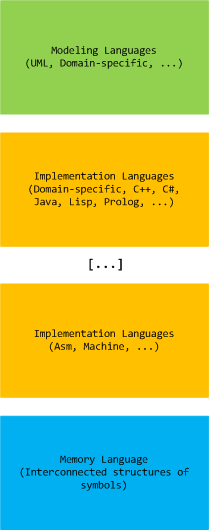
Bugtation No.112

February 5th, 2010

Debugging “with a purpose.”

Unknown Debugger

- Dmitry Vostokov @ DumpAnalysis.org + TraceAnalysis.org -

STUPID (Debugging Slang, Part 7)

February 5th, 2010

STUPID - Software Tracing Under Pressure Is Dumb

Examples: STUPID! STUPID! I told you to enable all modules! You included all but the one I need…

- Dmitry Vostokov @ DumpAnalysis.org + TraceAnalysis.org -
Demystifying first-chance exceptions (Part 2)

February 4th, 2010

Sometimes we are not interested in first-chance exceptions as in the previous part but are interested in only second-chance exceptions to be sure that they were not handled as a part of an implementation design. Some tools like ADPlus can save dump files for both debugger events but I was asked to explain the difference between the first- and second-chance exceptions on W2K3 system where NTSD debugger was used to attach to a service process and save a dump. Initially the following command was used:

C:\> ntsd -psn ServiceA -noio -g -c ".dump /ma /u C:\UserDumps\ServiceA; q"

The dump was saved and analyzed. An engineer then decided that a second-chance exception dump file was needed for confirmation of an unhandled exception (because it was perceived that a postmortem debugger wasn’t saving any crash dumps) and requested to use the same command but with an -x switch that disables first-chance exception break in a debugger:

C:\> ntsd -psn ServiceA -noio -g -x -c “.dump /ma /u C:\UserDumps\ServiceA; q”

Note that q command terminates the debuggee so it was also advised to use qd to detach NTSD and let the service die naturally.  

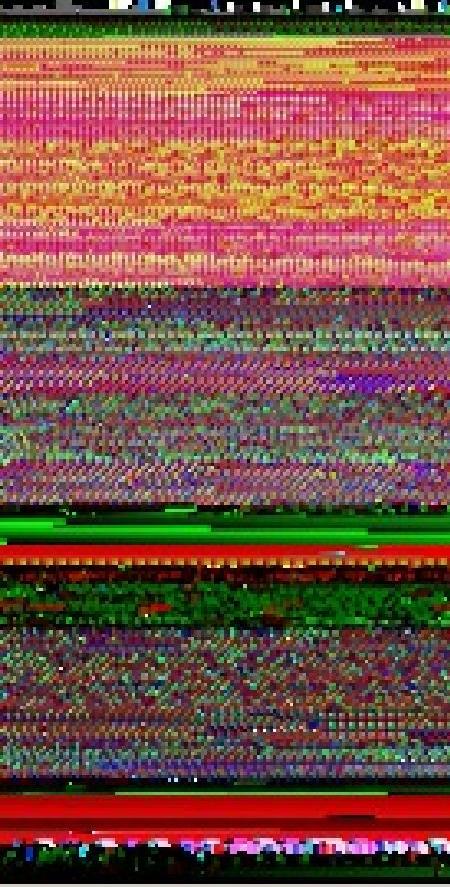
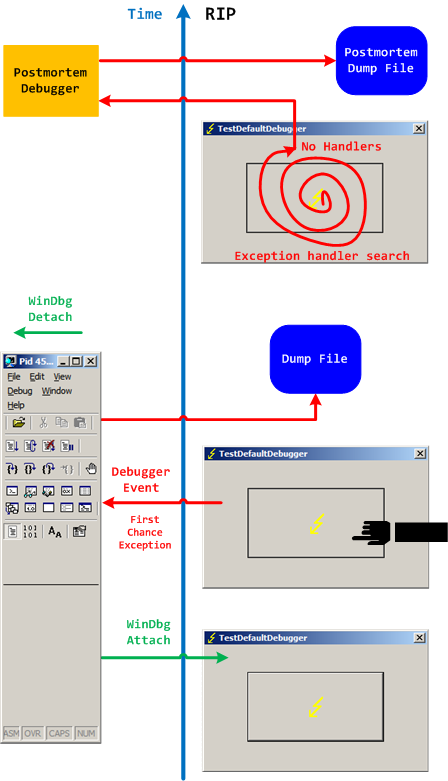
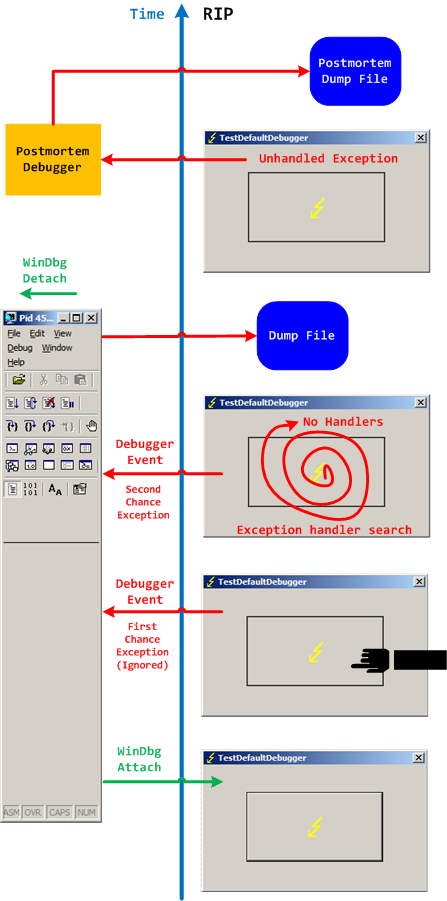
Two different possible exception memory dumps and the third possibility of a postmortem memory dump already complicates the picture not counting possible process-dumper-in-the-middle memory dumps that can be saved by userdump.exe if there is any exception dialog between the first- and second-chance exception processing. So I created two “Time Arrow” diagrams aiming to depict two exception scenarios using TestDefaultDebugger tool and the following simplified commands on x64 W2K3 system:

C:\> ntsd -pn TestDefaultDebugger64.exe -g -c ".dump /ma /u C:\UserDumps\TDD; qd"

and 

C:\> ntsd -pn TestDefaultDebugger64.exe -g -x -c “.dump /ma /u C:\UserDumps\TDD; qd”

Also drwtsn32.exe was set as a default postmortem debugger (but we could also use CDB, WinDbg or any other process dumper as shown in Vista example). 

The first diagram shows that an attached debugger (a screenshot of WinDbg is used in place of NTSD for both diagrams) receives a first-chance debugger event and saves a process memory dump, then detaches and the previous debuggee process continues looking for exception handlers and not finding anyone launches a postmortem debugger and, as a result, another dump is saved too:

We can double check the first-chance exception dump file to see if it is the right one. Indeed, there are no signs of exception processing on thread raw stack:

This dump file has an exception of interest stored in it.
The stored exception information can be accessed via .ecxr.
(e50.e54): Access violation - code c0000005 (first/second chance not available)
*** ERROR: Module load completed but symbols could not be loaded for TestDefaultDebugger64.exe
TestDefaultDebugger64+0×1570:
00000000`00401570 c704250000000000000000 mov dword ptr [0],0 ds:00000000`00000000=????????

0:000> !teb
TEB at 000007fffffde000
    ExceptionList:        0000000000000000
    StackBase:            0000000000130000
    StackLimit:           000000000012c000
    SubSystemTib:         0000000000000000
    FiberData:            0000000000001e00
    ArbitraryUserPointer: 0000000000000000
    Self:                 000007fffffde000
    EnvironmentPointer:   0000000000000000
    ClientId:             0000000000000e50 . 0000000000000e54
    RpcHandle:            0000000000000000
    Tls Storage:          0000000000000000
    PEB Address:          000007fffffda000
    LastErrorValue:       0
    LastStatusValue:      c0000023
    Count Owned Locks:    0
    HardErrorMode:        0

0:000> dqs 000000000012c000 0000000000130000
00000000`0012c000  00000000`00000000
00000000`0012c008  00000000`00000000
00000000`0012c010  00000000`00000000
00000000`0012c018  00000000`00000000

[... no c0000005 ...]

00000000`0012ff60  00000000`00000000
00000000`0012ff68  00000000`00000000
00000000`0012ff70  00000000`00000000
00000000`0012ff78  00000000`77d596ac kernel32!BaseProcessStart+0x29
00000000`0012ff80  00000000`00000000
00000000`0012ff88  00000000`00000000
00000000`0012ff90  00000000`00000000
00000000`0012ff98  00000000`00000000
00000000`0012ffa0  00000000`00000000
00000000`0012ffa8  00000000`00000000
00000000`0012ffb0  00000000`004148d0 TestDefaultDebugger64+0x148d0
00000000`0012ffb8  00000000`00000000
00000000`0012ffc0  00000000`00000000
00000000`0012ffc8  00000000`00000000
00000000`0012ffd0  00000000`00000000
00000000`0012ffd8  00000000`00000000
00000000`0012ffe0  00000000`00000000
00000000`0012ffe8  00000000`00000000
00000000`0012fff0  00000000`00000000
00000000`0012fff8  00000000`00000000
00000000`00130000  00000020`78746341

The second diagram shows that an attached debugger ignores a first-chance debugger event but saves  a process memory dump upon a second-chance exception event after the debugee can’t find any handlers, then detaches and the previous debuggee process launches a postmortem debugger to save another postmortem memory dump:

In both second-chance and postmortem process memory dump files we can find c0000005 exception code on thread raw stack.

- Dmitry Vostokov @ DumpAnalysis.org + TraceAnalysis.org -
Native Script Debugging

February 1st, 2010

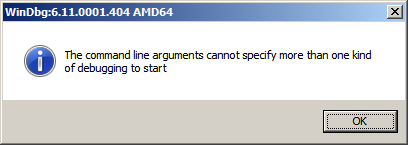
While testing a WinDbg script for the CARE system (the script enumerates files on a Windows PC and processes memory dumps to generate a log file with the output of debugger commands) I found that after successful processing of many files the next launched WinDbg instance suddenly showed this message box:

To find out, I attached another WinDbg instance to its process in order to examine the real command line. In this small case study instead of using kb WinDbg command to show a stack trace and its arguments I employ kn, .frame and kb <lines> commands for visual clarity and to illustrate strack trace frame navigation. In the failed WinDbg instance that had just started we see only one thread showing Message Box pattern:

0:000> ~*kn

.  0  Id: dc8.fb4 Suspend: 1 Teb: 000007ff`fffdc000 Unfrozen
 # Child-SP          RetAddr           Call Site
00 00000000`0025d4b8 00000000`76fc5118 USER32!NtUserWaitMessage+0xa
01 00000000`0025d4c0 00000000`76fc5770 USER32!DialogBox2+0x261
02 00000000`0025d540 00000000`7701000d USER32!InternalDialogBox+0x134
03 00000000`0025d5a0 00000000`7700f2b8 USER32!SoftModalMessageBox+0x9fb
04 00000000`0025d6d0 00000000`7700eb17 USER32!MessageBoxWorker+0x314
05 00000000`0025d890 00000000`7700ea10 USER32!MessageBoxTimeoutW+0xb3
06 00000000`0025d950 00000001`3f9016a6 USER32!MessageBoxW+0x4c
07 00000000`0025d990 00000001`3f90175c WinDbg!TextMsgBox+0x96
08 00000000`0025d9d0 00000001`3f9017d7 WinDbg!FormatMsgBoxV+0x9c
09 00000000`0025dbe0 00000001`3f9075c7 WinDbg!InfoBox+0x37
0a 00000000`0025dc20 00000001`3f9084f7 WinDbg!ParseCommandLine+0x1a57
0b 00000000`0025dcc0 00000001`3f913739 WinDbg!wmain+0×287
0c 00000000`0025fd80 00000000`7708be3d WinDbg!_CxxFrameHandler3+0×291
0d 00000000`0025fdc0 00000000`771c6a51 kernel32!BaseThreadInitThunk+0xd
0e 00000000`0025fdf0 00000000`00000000 ntdll!RtlUserThreadStart+0×1d

We see the frame # 0b contains the return address of wmain function (starting point of execution of UNICODE C/C++ programs) that has this prototype:

int wmain(int argc, wchar_t *argv[], wchar_t *envp[]);

We switch to that frame to examine its first 3 parameters and use kb command that shows stack traces starting from the current frame (we are interested in the top stack trace line only):

0:000> .frame b
0b 00000000`0025dcc0 00000001`3f913739 WinDbg!wmain+0×287

0:000> kb 1
RetAddr           : Args to Child                                                           : Call Site
00000001`3f913739 : 00000000`0000000c 00000000`00278b60 00000000`00279e10 000007de`a4ecc920 : WinDbg!wmain+0×287

Because the function prototype shows the second function parameter as an array of wide character null-terminated strings we use dpu command to dump them. We also note that we have only 0xc array members and use this as the length argument for dpu:

0:000> dpu 00000000`00278b60 Lc
00000000`00278b60  00000000`00278bc8 “C:\Program Files\Debugging Tools for Windows (x64)\WinD”
00000000`00278b68  00000000`00278c44 “-y”
00000000`00278b70  00000000`00278c4a “srv*c:\ms*http://msdl.microsoft.com/download/symbols;sr”
00000000`00278b78  00000000`00278d0c “-z”
00000000`00278b80  00000000`00278d12 “C:\MemoryDumps\CST\ColorimetricTracing”
00000000`00278b88  00000000`00278d60 “(4).DMP”

00000000`00278b90  00000000`00278d70 “-c”
00000000`00278b98  00000000`00278d76 “$$>a<DebuggerLogs.txt;q”
00000000`00278ba0  00000000`00278da6 “-Q”
00000000`00278ba8  00000000`00278dac “-QS”
00000000`00278bb0  00000000`00278db4 “-QY”
00000000`00278bb8  00000000`00278dbc “-QSY”

We see in the output above that “C:\MemoryDumps\CST\ColorimetricTracing” and “(4).DMP” strings were probably split from one file name “C:\MemoryDumps\CST\ColorimetricTracing (4).DMP” and this means that we forgot to enclose the file name parameter in double quotation marks when passing it from VB script to WinDbg.

- Dmitry Vostokov @ DumpAnalysis.org + TraceAnalysis.org -

Reasoning with a Bug

January 31st, 2010

If those bugs had been around for hundreds of millions of years before evolution climbed mount improbable to design human species does it mean that software bugs came before intelligent software? :-)

- Dmitry Vostokov @ DumpAnalysis.org + TraceAnalysis.org -

Bugtation No.111

January 31st, 2010

Software “bugs have been around for” decades.

A bugtated quotation from one website dedicated to bed bugs

- Dmitry Vostokov @ DumpAnalysis.org + TraceAnalysis.org -
Bugtation No.110

January 31st, 2010

Debugging at large. Remember those bugs from The Day Earth Stood Still movie that were nicely deactivated at once? Remember Nobel Laureate Professor Barnhardt was threading with Klaatu over the correct version of General Relativity on a blackboard and then at once realized that he was talking to an alien? His next phrase was the one that I repeat every day (and I also listen to Bach every day):

“I have so many questions to ask” this memory dump.

The Day the Earth Stood Still (2008 film)

- Dmitry Vostokov @ DumpAnalysis.org + TraceAnalysis.org -
Structure and Noise

January 29th, 2010

- Dmitry Vostokov @ DumpAnalysis.org + TraceAnalysis.org -
Mode-independent WinDbg scripts

January 29th, 2010

These are scripts that can be run without modification in both user and kernel modes to collect information from user and kernel spaces. For example, we want to collect thread stack traces for CARE system and we have different kinds of memory dumps stored on our computer. There is no a single command that can show stack traces for all threads in a process and kernel / complete memory dumps. However, we can combine separate mode-sensitive commands in one script:

.kframes 1000
!for_each_thread !thread @#Thread 1f
~*kv

The first command eliminates the common mistake of truncated traces. The second command fails for process user memory dumps but shows full 3-parameter stack trace for every thread in a system including user space thread stack counterpart for complete memory dumps after switching to the appropriate process context if any. The third command fails for kernel and complete memory dumps but lists stack traces for each thread in a process user memory dump. Therefore, we have just one script that we can run against all memory dumps.

- Dmitry Vostokov @ DumpAnalysis.org + TraceAnalysis.org -  

Debugger’s Screen Resolution

January 27th, 2010

What screen resolutions do debuggers use? Google analytics provides statistics for 2009. 1,071 different screen resolutions were used (I guess this diversity comes from multi-monitor configurations and PDA) with top 10:

Clearly old 800×600 is in minority today. There were lucky debuggers with 5120×1024 (128-bit ready for wider stack traces?) and 3840×2100 (I need more book sales for that) and even someone with screen resolution 0×0 viewed the content 12 times.

- Dmitry Vostokov @ DumpAnalysis.org + TraceAnalysis.org -

Operating Systems Scene: The View from DumpAnalysis.org

January 27th, 2010

Highly predictable picture from Google analytics of OS used to view portal and blog content:

One of the goals is to increase non-Windows OS presence over the next few years.

- Dmitry Vostokov @ DumpAnalysis.org + TraceAnalysis.org -

Internet Browsers Scene: The View from DumpAnalysis.org

January 27th, 2010

I was curious to see what browsers are used to view portal and blog content and Google analytics provided me statistics for 2009 (there is about 9% decline in IE variants compared to 2008). 62 “different” browsers viewed content with the top 10 (I actually expected more for IE and was surprised with statistics):

Some strange browser names below perhaps point to some sort of memory corruption :-) 

1. Internet Explorer
2. Firefox
3. Chrome
4. Opera
5. Safari
6. Mozilla
7. Mozilla Compatible Agent
8. SeaMonkey
9. Konqueror
10. BlackBerry8900
11. Opera Mini
12. Camino
13. IE with Chrome Frame
14. (not set)
15. Lynx
16. Netscape
17. Googlebot
18. BlackBerry9630
19. Playstation
20. BlackBerry9530
21. -^_^- Hello :)
22. <?echo ‘<pre>’; system
23. BlackBerry9000
24. Lunascape
25. NetFront
26. Unsupported Browser Version
27. 12345
28. Empty
29. Playstation Portable  2
30. SAMSUNG-SGH-I617  2
31. —
32. 31337′
33. 8900b
34. <?include
35. <script>alert
36. BlackBerry9500
37. Blazer
38. GOOGLEBOT
39. General Browser
40. HTC_P3490 Opera
41. HTC_Touch_HD_T8282 Opera
42. HTC_Touch_Pro2_T7373 Opera
43. HTC_Touch_Pro_T7272 Opera
44. Hellbrowser 6.66
45. Helyi user agent
46. IE 8
47. Midori
48. NCSA Mosaic
49. NightDynamo AdminPanel v0.2.1
50. NokiaE71-2;Mozilla
51. NokiaNokia 6210s
52. PPC; 240×320; HTC_P3450
53. SAMSUNG-SGH-I637
54. Samsung-SPHM540 Polaris
55. SonyEricssonK750
56. Uzbl
57. Yahoo! Slurp
58. holy_teacher FirePHP
59. mozilla
60. pippos.7
61. tdhbrowser
62. unknown

Here is the distribution of IE versions for 2009:


- Dmitry Vostokov @ DumpAnalysis.org + TraceAnalysis.org -

Operating Closure of Memory (Categories for the Working Software Defect Researcher, Part 2)

January 26th, 2010

In part 1 we defined MemP category and the operating field of a pointer as its link to a memory location it is pointing to. This operating field value can be in a different pseudo-memory plane if its value is outside memory bounds, for example, 8FFFFFF0 for a memory with the highest possible address 7FFFFFFF:


We define the closure of memory as the smallest MemP category that includes memory for operating fields of every pointer for the current memory snapshot. For example above, by adding another memory location that has a pointer value pointing back to the original memory region we have the following operating closure:


We can also add more memory as well:

- Dmitry Vostokov @ DumpAnalysis.org + TraceAnalysis.org -

Bug-sistential and Bug-sistentialism (Debugging Slang, Part 6)

January 26th, 2010

Bug-sistential - pertaining to existing bugs
Bug-sistentialism - a pessimistic outlook about the existence of bugs

Examples: What a bug-sistential problem we have to solve here! Pure bug-sistentialism!

- Dmitry Vostokov @ DumpAnalysis.org + TraceAnalysis.org -

Bugtation No.109

January 26th, 2010

Symmetrical bugtation:

Delusion of “difference and repetition” in debugging.

Gilles Deleuze, Difference and Repetition

- Dmitry Vostokov @ DumpAnalysis.org + TraceAnalysis.org -

Workaround Patterns (Part 3)

January 26th, 2010

What happens when Hidden Output and Frozen Process patterns don’t help with annoying popup windows? The former can’t prevent windows from reappearing afresh and the latter could block other coupled processes that might exchange window messages with our suspended process or simply use any IPC mechanism. Here Axed Code pattern can help as demonstrated below. One process was frequently and briefly showing network disconnection message box or dialog. The problem is that it was also bringing its main window into foreground disrupting work in other windows because they were loosing focus. Next time the dialog appeared we found its process ID in Task Manager and attached WinDbg to it. We wasn’t sure what dialog function to intercept so we put a general breakpoint on all “Dialog” functions for all threads:

0:000:x86> bm *Dialog*
[...]
  6: 73a8ba81 @!"MFC80!CDialog::~CDialog"
  7: 73ac25e2 @!"MFC80!CPageSetupDialog::~CPageSetupDialog"
  8: 73a94b6b @!"MFC80!CDHtmlDialog::_AfxSimpleScanf"
  9: 73a8fbe9 @!"MFC80!CFileDialog::OnTypeChange"
 10: 73a90b17 @!"MFC80!CColorDialog::GetRuntimeClass"
 11: 73a8bb4a @!"MFC80!CDialog::CreateIndirect"
[...]
360: 73a93750 @!"MFC80!CDHtmlDialog::OnNavigateComplete"
361: 73a8f1f3 @!"MFC80!CCommonDialog::OnOK"
362: 73a95d9f @!"MFC80!CDHtmlDialog::GetDropTarget"
363: 73a90266 @!"MFC80!CPrintDialog::GetDevMode"
364: 73ac1514 @!"MFC80!COleInsertDialog::COleInsertDialog"
365: 73ac27c7 @!"MFC80!COlePropertiesDialog::COlePropertiesDialog"
366: 73a75282 @!"MFC80!CWnd::UpdateDialogControls"
367: 73a7fd86 @!"MFC80!CDialogBar::SetOccDialogInfo"

0:000:x86> g
Breakpoint 314 hit
MFC80!_AfxPostInitDialog:
73a7134e 55              push    ebp

0:000:x86> kL 100
ChildEBP RetAddr  Args to Child             
0027ed2c 73a7180a MFC80!_AfxPostInitDialog
0027ed90 75628817 MFC80!_AfxActivationWndProc+0x90
0027edbc 7562898e USER32!InternalCallWinProc+0x23
0027ee34 7562c306 USER32!UserCallWinProcCheckWow+0x109
0027ee78 756375a2 USER32!SendMessageWorker+0x55b
0027ef4c 7563787a USER32!InternalCreateDialog+0xb64
0027ef70 75649b65 USER32!CreateDialogIndirectParamAorW+0x33
0027ef9c 75225192 USER32!CreateDialogParamA+0x4a
WARNING: Stack unwind information not available. Following frames may be wrong.
0027efc8 010c3bf1 DllA!WarningPopup+0×152
0027effc 73a71812 ProcessA+0×9fa1
00000000 00000000 MFC80!_AfxActivationWndProc+0×98

Now we cleared all breakpoints and put the new breakpoint on WarningPopup function:

0:000:x86> bc *

0:000:x86> bp DllA!WarningPopup

0:000:x86> g
Breakpoint 0 hit
DllA!WarningPopup:
75225040 51              push    ecx

Then we assumed that the calling convention was the default one used by C or C++ code like _cdecl and took the bold step to replace push ecx with ret instruction:

0:000:x86> a 75225040
75225040 ret
ret
75225041

0:000:x86> g
Breakpoint 0 hit
DllA!WarningPopup:
75225040 c3 ret

0:000:x86> bc *

0:000:x86> g

Result: no warning popups anymore.

I originally intended to name the pattern Patched Code but then realized that code axing can also be done at the source code level as a quick temporal fix.

- Dmitry Vostokov @ DumpAnalysis.org + TraceAnalysis.org -

Workaround Patterns (Part 2)

January 25th, 2010

Another workaround pattern for some problems is to freeze a process responsible for an annoying or excessive activity like in the case study: Debugger as a Shut Up Application. We can also use other tools for this purpose like Mark Russinovich’s PsSuspend. The suitable name for this pattern is Frozen Process.

- Dmitry Vostokov @ DumpAnalysis.org + TraceAnalysis.org -

Reading Notebook: 25-January-10

January 25th, 2010

Comments in italics are mine and express my own views, thoughts and opinions

Windows Internals by M. Russinovich, D. Solomon and A. Ionescu:

Kernel Process variables (p. 343)

0: kd> !process poi(PsIdleProcess)
PROCESS fffff800019910c0
SessionId: none  Cid: 0000    Peb: 00000000  ParentCid: 0000
DirBase: 00124000  ObjectTable: fffff88000000080  HandleCount: 606.
Image: Idle
VadRoot fffffa8003b97c70 Vads 1 Clone 0 Private 1. Modified 0. Locked 0.
DeviceMap 0000000000000000
Token                             fffff88000003330
ElapsedTime                       00:00:00.000
UserTime                          00:00:00.000
KernelTime                        00:00:00.000
QuotaPoolUsage[PagedPool]         0
QuotaPoolUsage[NonPagedPool]      0
Working Set Sizes (now,min,max)  (6, 50, 450) (24KB, 200KB, 1800KB)
PeakWorkingSetSize                6
VirtualSize                       0 Mb
PeakVirtualSize                   0 Mb
PageFaultCount                    1
MemoryPriority                    BACKGROUND
BasePriority                      0
CommitCharge                      0

        THREAD fffff80001990b80  Cid 0000.0000  Teb: 0000000000000000 Win32Thread: 0000000000000000 RUNNING on processor 0
Not impersonating
DeviceMap                 fffff88000007310
Owning Process            fffff800019910c0       Image:         Idle
Attached Process          fffffa8003bf1040       Image:         System
Wait Start TickCount      16021          Ticks: 13224 (0:00:03:26.295)
Context Switch Count      142852
UserTime                  00:00:00.000
KernelTime                00:06:13.700
Win32 Start Address nt!KiIdleLoop (0xfffff80001876880)
Stack Init fffff80002bdadb0 Current fffff80002bdad40
Base fffff80002bdb000 Limit fffff80002bd5000 Call 0
Priority 16 BasePriority 0 PriorityDecrement 0 IoPriority 0 PagePriority 0
Child-SP          RetAddr           Call Site
fffff800`02bdad80 fffff800`01a43860 nt!KiIdleLoop+0x11b
fffff800`02bdadb0 00000000`00000000 nt!zzz_AsmCodeRange_End+0x4

        THREAD fffffa60005f5d40  Cid 0000.0000  Teb: 0000000000000000 Win32Thread: 0000000000000000 RUNNING on processor 1
Not impersonating
DeviceMap                 fffff88000007310
Owning Process            fffff800019910c0       Image:         Idle
Attached Process          fffffa8003bf1040       Image:         System
Wait Start TickCount      0              Ticks: 29245 (0:00:07:36.224)
Context Switch Count      162365
UserTime                  00:00:00.000
KernelTime                00:06:14.808
Win32 Start Address nt!KiIdleLoop (0xfffff80001876880)
Stack Init fffffa600191bdb0 Current fffffa600191bd40
Base fffffa600191c000 Limit fffffa6001916000 Call 0
Priority 16 BasePriority 0 PriorityDecrement 0 IoPriority 0 PagePriority 0
Child-SP          RetAddr           Call Site
fffffa60`0191bd80 fffff800`01a43860 nt!KiIdleLoop+0x11b
fffffa60`0191bdb0 00000000`00000000 nt!zzz_AsmCodeRange_End+0x4

Relevant process functions (pp. 344 - 345) - More of them can be found here: http://msdn.microsoft.com/en-us/library/ms684847(VS.85).aspx

Protected processes (pp. 346 - 348) - It can be seen in _EPROCESS block (the output taken from a complete memory dump):

0: kd> dt _EPROCESS fffffa8004b5e040
ntdll!_EPROCESS
[...]
+0x36c ProtectedProcess : 0y1
[...]

The following script lists protected processes on W2K8:

0: kd> !for_each_process "dt _EPROCESS ImageFileName @#Process; dt _EPROCESS ProtectedProcess @#Process"
ntdll!_EPROCESS
+0x238 ImageFileName : [16]  "System"
ntdll!_EPROCESS
+0x36c ProtectedProcess : 0y1
[...]
ntdll!_EPROCESS
+0x238 ImageFileName : [16]  "audiodg.exe"
ntdll!_EPROCESS
+0x36c ProtectedProcess : 0y1
[...]

System process is protected because of Ksecdd.sys stores info in user space (p. 347)

PROCESS_QUERY_LIMITED_INFORMATION (p. 347)

Access violation by design for Protected Media Path processes when a kernel-mode debugger is enabled (p. 348) - this is not an optimal design in my opinion - I had problems with that: http://www.dumpanalysis.org/blog/index.php/2010/01/08/live-kernel-debugging-of-a-system-freeze-case-study/. The better way is to show a message box and gracefully exit and only emit AV if message box is bypassed. 


Advanced .NET Debugging by M. Hewardt:

PE format and its relation to .NET (pp. 26 - 27)

AddressOfEntryPoint (pp. 28 - 29 and p. 31) - we can also use !dh command to find that address (similar to what dumpbin.exe does):

0:001> lm m notepad
start             end                 module name
00000000`ff180000 00000000`ff1af000   notepad    (deferred)        

0:001> !dh 00000000`ff180000
[...]
OPTIONAL HEADER VALUES
20B magic #
8.00 linker version
E400 size of code
1CC00 size of initialized data
0 size of uninitialized data
D1B4 address of entry point
1000 base of code
—– new —–
00000000ff180000 image base
1000 section alignment
200 file alignment
2 subsystem (Windows GUI)
6.00 operating system version
6.00 image version
6.00 subsystem version
2F000 size of image
400 size of headers
32C26 checksum
[…]

0:001> u 00000000`ff180000+D1B4
notepad!WinMainCRTStartup:
00000000`ff18d1b4 4883ec28        sub     rsp,28h
00000000`ff18d1b8 e88b020000      call    notepad!_security_init_cookie (00000000`ff18d448)
00000000`ff18d1bd 4883c428        add     rsp,28h
00000000`ff18d1c1 e9b6fcffff      jmp     notepad!IsTextUTF8+0xc0 (00000000`ff18ce7c)
00000000`ff18d1c6 cc              int     3
00000000`ff18d1c7 cc              int     3
00000000`ff18d1c8 cc              int     3
00000000`ff18d1c9 cc              int     3

Application domains in ASP.NET; 3 default app domains (system, shared, default) in normal app (p. 34)

!dumpdomain SOS command (pp. 35 - 36)

Low(High)FrequencyHeap and StubHeap (p. 36) - Looks like they are not normal heaps or heap segments. I plan to test all commands on x64 .NET:

0:003> !dumpdomain
--------------------------------------
System Domain: 000007fef15a8ef0
LowFrequencyHeap: 000007fef15a8f38
HighFrequencyHeap: 000007fef15a8fc8
StubHeap: 000007fef15a9058
Stage: OPEN
Name: None
--------------------------------------
Shared Domain: 000007fef15a9860
LowFrequencyHeap: 000007fef15a98a8
HighFrequencyHeap: 000007fef15a9938
StubHeap: 000007fef15a99c8
Stage: OPEN
Name: None
Assembly: 0000000000372d10
--------------------------------------
Domain 1: 0000000000360840
LowFrequencyHeap: 0000000000360888
HighFrequencyHeap: 0000000000360918
StubHeap: 00000000003609a8
Stage: OPEN
SecurityDescriptor: 00000000003630e0
Name: TestCLR.exe
[...]

Workaround Patterns (Part 1)

January 24th, 2010

After fighting HTML comments in Safari and Chrome (see the case study below) I came to an idea to name and catalog workaround patterns in troubleshooting and debugging. The first one is called Hidden Output. Sometimes we can just remove message boxes reporting minor problems and generating unnecessary support calls by hiding their windows, for example, by using CtxHideEx32. A different example is what I did today when troubleshooting Amazon aStore widget HTML code. It worked well in IE8:

However, in Apple Safari and Google Chrome the widget code was visible at the top of the page:


After a few unsuccessful attempts to debug the problem and faced with other pressing tasks I got a flash in my mind to hide the visible code by changing its color to be the same as its background:

<font color=”D3E7F4″><script type=”text/javascript”><!–
amazon_ad_tag=”crasdumpanala-20″;
amazon_ad_width=”728″;
amazon_ad_height=”90″;
amazon_color_background=”D3E7F4″;
amazon_color_border=”0000FF”;
amazon_color_logo=”FFFFFF”;
amazon_color_link=”0000FF”;
amazon_ad_logo=”hide”;
amazon_ad_link_target=”new”;
amazon_ad_border=”hide”;
amazon_ad_title=”OpenTask Books, Magazines and Notebooks”; //–></script>
<script type=”text/javascript” src=”http://www.assoc-amazon.com/s/asw.js”></script></font>

 
After that the picture became nicer:

- Dmitry Vostokov @ DumpAnalysis.org + TraceAnalysis.org -