I/O and Memory Priority in Vista

January 27th, 2008

You might have noticed additional IoPriority and PagePriority values when using !thread command in kernel and complete memory dumps coming from Vista:

THREAD 8362a390  Cid 0b90.0b94  Teb: 7ffdf000 Win32Thread: ff34c848 WAIT: (WrUserRequest) UserMode Non-Alertable
    83656de0  SynchronizationEvent
Not impersonating
DeviceMap                 a7766db8
Owning Process            8362a638       Image:         explorer.exe
Wait Start TickCount      43496          Ticks: 3 (0:00:00:00.046)
Context Switch Count      14502            
UserTime                  00:00:00.436
KernelTime                00:00:00.608
Win32 Start Address Explorer!wWinMainCRTStartup (0x0052d070)
Stack Init 9e8b3000 Current 9e8b2c10 Base 9e8b3000 Limit 9e8b0000 Call 0
Priority 12 BasePriority 8 PriorityDecrement 2 IoPriority 2 PagePriority 5
ChildEBP RetAddr 
9e8b2c28 81cac9cf nt!KiSwapContext+0×26
9e8b2c64 81c293a7 nt!KiSwapThread+0×389
9e8b2cc0 8cedb8ed nt!KeWaitForSingleObject+0×414
9e8b2d1c 8cedb724 win32k!xxxRealSleepThread+0×1ad
9e8b2d38 8ced573c win32k!xxxSleepThread+0×2d
9e8b2d4c 8ced5759 win32k!xxxRealWaitMessageEx+0×12
9e8b2d5c 81c8caaa win32k!NtUserWaitMessage+0×14
9e8b2d5c 77490f34 nt!KiFastCallEntry+0×12a
000ffb94 761db5bc ntdll!KiFastSystemCallRet
000ffb98 765e07f6 USER32!NtUserWaitMessage+0xc
000ffbb0 76566f4e SHELL32!CDesktopBrowser::_MessageLoop+0×4c
000ffbbc 00529039 SHELL32!SHDesktopMessageLoop+0×24
000ffea8 0052d1e0 Explorer!wWinMain+0×447
000fff3c 75f33833 Explorer!_initterm_e+0×1b1
000fff48 7746a9bd kernel32!BaseThreadInitThunk+0xe
000fff88 00000000 ntdll!_RtlUserThreadStart+0×23

These are new thread priorities added to Vista kernel and explained in the following articles:

Inside the Windows Vista Kernel: Part 1 (I/O Priority section)
Inside the Windows Vista Kernel: Part 2 (Memory Priorities section)

You can change it for any process according to blogs.technet.com/vitalipro/archive/2007/02/16/645675.aspx

I changed values for notepad.exe and it works: 

[HKEY_LOCAL_MACHINE\SOFTWARE\Microsoft\Windows NT\CurrentVersion\Image File Execution Options\notepad.exe\PerfOptions]
"IoPriority"=dword:00000001
"PagePriority"=dword:00000001

THREAD 838edd78  Cid 0378.0d3c  Teb: 7ffdf000 Win32Thread: fed7e848 WAIT: (WrUserRequest) UserMode Non-Alertable
    838c84a0  SynchronizationEvent
Not impersonating
DeviceMap                 a7766db8
Owning Process            838e25a0       Image:         notepad.exe
Wait Start TickCount      12967          Ticks: 30532 (0:00:07:56.302)
Context Switch Count      490            
UserTime                  00:00:00.000
KernelTime                00:00:00.109
Win32 Start Address notepad!WinMainCRTStartup (0x003631f8)
Stack Init a691b000 Current a691ab68 Base a691b000 Limit a6918000 Call 0
Priority 12 BasePriority 8 PriorityDecrement 2 IoPriority 1 PagePriority 1
Kernel stack not resident.
ChildEBP RetAddr 
a691ab80 81cac9cf nt!KiSwapContext+0×26
a691abbc 81c293a7 nt!KiSwapThread+0×389
a691ac18 8cedb8ed nt!KeWaitForSingleObject+0×414
a691ac74 8cedb724 win32k!xxxRealSleepThread+0×1ad
a691ac90 8ced9976 win32k!xxxSleepThread+0×2d
a691ace8 8cedd983 win32k!xxxRealInternalGetMessage+0×4a4
a691ad4c 81c8caaa win32k!NtUserGetMessage+0×3f
a691ad4c 77490f34 nt!KiFastCallEntry+0×12a
0006f6d0 761e199a ntdll!KiFastSystemCallRet
0006f6d4 761e19cd USER32!NtUserGetMessage+0xc
0006f6f0 0036149c USER32!GetMessageW+0×33
0006f730 00361971 notepad!WinMain+0xec
0006f7c0 75f33833 notepad!_initterm_e+0×1a1
0006f7cc 7746a9bd kernel32!BaseThreadInitThunk+0xe
0006f80c 00000000 ntdll!_RtlUserThreadStart+0×23

- Dmitry Vostokov @ DumpAnalysis.org -

Crash Dump Analysis Patterns (Part 44)

January 25th, 2008

Spiking Thread pattern includes normal threads running at PASSIVE_LEVEL or APC_LEVEL IRQL that can be preempted by any other higher priority thread. Therefore, spiking threads are not necessarily ones that were in RUNNING state when the memory dump was saved. They consumed much CPU and this is reflected in their User and Kernel time values. The pattern also includes threads running at DISPATCH_LEVEL and higher IRQL. These threads cannot be preempted by another thread so they usually remain in RUNNING state all the time unless they lower their IRQL. Some of them I’ve seen were trying to acquire a spinlock and I decided to create another more specialized pattern and call it Dispatch Level Spin. We would see it when a spinlock for some data structure wasn’t released or was corrupt and some thread tries to acquire it and enters endless spinning loop unless interrupted by higher IRQL interrupt. These infinite loops can also happen due to software defects in code running at dispatch level or higher IRQL.

Let’s look at one example. The following running thread was interrupted by keyboard interrupt apparently to save Manual Dump. We see that it spent almost 11 minutes in kernel:

0: kd> !thread
THREAD 830c07c0  Cid 0588.0528  Teb: 7ffa3000 Win32Thread: e29546a8 RUNNING on processor 0
IRP List:
    86163008: (0006,01d8) Flags: 00000900  Mdl: 84f156c0
Not impersonating
DeviceMap                 e257b7c8
Owning Process            831ec608       Image:         MyApp.EXE
Wait Start TickCount      122850         Ticks: 40796 (0:00:10:37.437)
Context Switch Count      191                 LargeStack
UserTime                  00:00:00.000
KernelTime                00:10:37.406
Win32 Start Address MyApp!ThreadImpersonation (0×35f76821)
Start Address kernel32!BaseThreadStartThunk (0×7c810659)
Stack Init a07bf000 Current a07beca0 Base a07bf000 Limit a07bb000 Call 0
Priority 11 BasePriority 8 PriorityDecrement 2 DecrementCount 16
ChildEBP RetAddr
a07be0f8 f77777fa nt!KeBugCheckEx+0×1b
a07be114 f7777032 i8042prt!I8xProcessCrashDump+0×237
a07be15c 805448e5 i8042prt!I8042KeyboardInterruptService+0×21c
a07be15c 806e4a37 nt!KiInterruptDispatch+0×45 (FPO: [0,2] TrapFrame @ a07be180)

a07be220 a1342755 hal!KeAcquireInStackQueuedSpinLock+0×47
a07be220 a1342755 MyDriver!RcvData+0×98


To see the code and context we switch to the trap frame and disassemble the interrupted function:

1: kd> .trap a07be180
ErrCode = 00000000
eax=a07be200 ebx=a07be228 ecx=831dabf5 edx=a07beb94 esi=831d02a8 edi=831dabd8
eip=806e4a37 esp=a07be1f4 ebp=a07be220 iopl=0 nv up ei pl nz na po nc
cs=0008 ss=0010 ds=0000 es=0000 fs=0000 gs=0000 efl=00000202
hal!KeAcquireInStackQueuedSpinLock+0x47:
806e4a37 ebf3            jmp     hal!KeAcquireInStackQueuedSpinLock+0×3c (806e4a2c)

1: kd> uf hal!KeAcquireInStackQueuedSpinLock
hal!KeAcquireInStackQueuedSpinLock:
806e49f0 mov     eax,dword ptr ds:[FFFE0080h]
806e49f5 shr     eax,4
806e49f8 mov     al,byte ptr hal!HalpVectorToIRQL (806ef218)[eax]
806e49fe mov     dword ptr ds:[0FFFE0080h],41h
806e4a08 mov     byte ptr [edx+8],al
806e4a0b mov     dword ptr [edx+4],ecx
806e4a0e mov     dword ptr [edx],0
806e4a14 mov     eax,edx
806e4a16 xchg    edx,dword ptr [ecx]
806e4a18 cmp     edx,0
806e4a1b jne     hal!KeAcquireInStackQueuedSpinLock+0x34 (806e4a24)

hal!KeAcquireInStackQueuedSpinLock+0x2d:
806e4a1d or      ecx,2
806e4a20 mov     dword ptr [eax+4],ecx

hal!KeAcquireInStackQueuedSpinLock+0x33:
806e4a23 ret

hal!KeAcquireInStackQueuedSpinLock+0x34:
806e4a24 or      ecx,1
806e4a27 mov     dword ptr [eax+4],ecx
806e4a2a mov     dword ptr [edx],eax

hal!KeAcquireInStackQueuedSpinLock+0x3c:
806e4a2c test    dword ptr [eax+4],1
806e4a33 je      hal!KeAcquireInStackQueuedSpinLock+0×33 (806e4a23)

hal!KeAcquireInStackQueuedSpinLock+0x45:
806e4a35 pause
806e4a37 jmp     hal!KeAcquireInStackQueuedSpinLock+0×3c (806e4a2c)

JMP instruction transfers execution to the code that tests the first bit at [EAX+4] address. If it isn’t set it falls through to the same JMP instruction. We know the value of EAX from the trap frame so we can dereference that address:

1: kd> dyd eax+4 l1
           3          2          1          0
          10987654 32109876 54321098 76543210
          -------- -------- -------- --------
a07be204  10000011 00011101 10101011 11110101  831dabf5

The value is odd: the first leftmost bit is set. Therefore the code will loop indefinitely unless a different thread running on another processor clears that bit. However the second processor is idle:

0: kd> ~0s

0: kd> k
ChildEBP RetAddr
f794cd54 00000000 nt!KiIdleLoop+0x14

Seems we have a problem. We need to examine MyDriver.sys code to understand how it uses queued spinlocks.

Note: In addition to user-defined there are internal system queued spinlocks you can check by using !qlocks WinDbg command. 

- Dmitry Vostokov @ DumpAnalysis.org -
Crash Dump Analysis Patterns (Part 43)

January 24th, 2008

Corrupt Dump pattern was on my writing list for a long time. It is quite frequent and usually the consequence of Truncated Dump pattern. When we open such crash dumps we usually notice immediate errors in WinDbg output. I distinguish between 2 classes of corrupt memory dumps: totally corrupt and partially corrupt. Total corruption is less frequent, results from invalid file header and manifests itself in an error message box with the following Win32 error:

Loading Dump File [C:\Documents and Settings\All Users\Application Data\Microsoft\Dr Watson\user_corrupted.dmp]
ERROR: Directory not present in dump (RVA 0x20202020)
Could not open dump file [C:\Documents and Settings\All Users\Application Data\Microsoft\Dr Watson\user_corrupted.dmp], Win32 error 1392
    “The file or directory is corrupted and unreadable.”

Partially corrupt files can be loaded but some critical information is missing like the list of loaded modules and context for all or some processors. We can see lots of messages in WinDbg output like:

GetContextState failed, 0x80070026
Unable to get current machine context, Win32 error 0n38

or

GetContextState failed, 0x80004005

or

GetContextState failed, 0xD0000147

which mean:

?: kd> !error 0x80070026
Error code: (HRESULT) 0x80070026 (2147942438) - Reached the end of the file.

?: kd> !error 0x80004005
Error code: (HRESULT) 0x80004005 (2147500037) - Unspecified error

?: kd> !error 0xD0000147
Error code: (NTSTATUS) 0xd0000147 (3489661255) - {No Paging File Specified}  No paging file was specified in the system configuration.

However, in many such cases we can still see system information and bugcheck parameters:

************************************
THIS DUMP FILE IS PARTIALLY CORRUPT.
KdDebuggerDataBlock is not present or unreadable.
************************************
Unable to read PsLoadedModuleList
KdDebuggerData.KernBase < SystemRangeStart
Windows Server 2003 Kernel Version 3790 MP (4 procs) Free x86 compatible
Product: Server, suite: TerminalServer

Kernel base = 0×00000000 PsLoadedModuleList = 0×808af9c8
Debug session time: Wed Nov 21 20:29:31.373 2007 (GMT+0)
System Uptime: 0 days 0:45:02.312

Unable to read PsLoadedModuleList
KdDebuggerData.KernBase < SystemRangeStart
Loading Kernel Symbols
Unable to read PsLoadedModuleList
GetContextState failed, 0×80070026
CS descriptor lookup failed
GetContextState failed, 0×80070026
Unable to get program counter
GetContextState failed, 0×80070026
Unable to get current machine context, Win32 error 0n38
GetContextState failed, 0×80070026

Use !analyze -v to get detailed debugging information.

BugCheck 20, {0, ffff, 0, 1}

***** Debugger could not find nt in module list, module list might be corrupt, error 0x80070057.

GetContextState failed, 0x80070026
Unable to read selector for PCR for processor 0
GetContextState failed, 0x80070026
Unable to read selector for PCR for processor 0
GetContextState failed, 0x80070026
Unable to read selector for PCR for processor 0
GetContextState failed, 0x80070026
Unable to get current machine context, Win32 error 0n38
GetContextState failed, 0x80070026
Unable to get current machine context, Win32 error 0n38
GetContextState failed, 0x80070026

Looking at bugcheck number and parameters we can form some signature and check in our crash database (if it exists). We can also request a kernel minidump corresponding to debug session time. 

- Dmitry Vostokov @ DumpAnalysis.org -

Crash Dump Analysis Patterns (Part 42c)

January 22nd, 2008

The most common and easily detectable example of Wait Chain pattern in kernel and complete memory dumps is when objects are executive resources. In some complex cases we can even have multiple wait chains. For example, in the output of !locks WinDbg command below we can find at least 3 wait chains marked in red, blue and magenta:

883db310 -> 8967d020 -> 889fa230
89a74228 -> 883ad4e0 -> 88d7a3e0
88e13990 -> 899da538 -> 8805fac8

Try to figure other chains there. The manual procedure is simple. Pick up a thread marked with <*>. This is one that currently holds the resource. See what threads are waiting on exclusive access to that resource. Then search for other occurrences of <*> thread to see whether it is waiting exclusively for another resource blocked by some other thread and so on.

1: kd> !locks
**** DUMP OF ALL RESOURCE OBJECTS ****

Resource @ 0x8b4425c8    Shared 1 owning threads
    Contention Count = 45
    NumberOfSharedWaiters = 43
    NumberOfExclusiveWaiters = 2
     Threads: 8967d020-01<*> 88748b10-01    88b8b020-01    8b779ca0-01   
              88673248-01    8b7797c0-01    889c8358-01    8b777b40-01   
              8b7763f0-01    8b776b40-01    8b778b40-01    8841b020-01   
              8b7788d0-01    88cc7b00-01    8b776020-01    8b775020-01   
              87f6d6c8-01    8816b020-01    8b7773f0-01    89125db0-01   
              8b775db0-01    8846a020-01    87af2238-01    8b7792e0-01   
              8b777020-01    87f803b8-01    8b7783f0-01    8b7768d0-01   
              8b778020-01    8b779a30-01    8b778660-01    8943a020-01   
              88758020-01    8b777db0-01    88ee3590-01    896f3020-01   
              89fc4b98-01    89317938-01    8867f1e0-01    89414118-01   
              88e989a8-01    88de5b70-01    88c4b588-01    8907dd48-01   
     Threads Waiting On Exclusive Access:
              883db310       8907d280

Resource @ 0x899e27ac    Exclusively owned
    Contention Count = 1
    NumberOfExclusiveWaiters = 1
     Threads: 889fa230-01<*>
     Threads Waiting On Exclusive Access:
              8967d020

Resource @ 0x881a38f8    Exclusively owned
    Contention Count = 915554
    NumberOfExclusiveWaiters = 18
     Threads: 883ad4e0-01<*>
     Threads Waiting On Exclusive Access:
              89a74228       8844c630       8955e020       891aa440      
              8946a270       898b7ab0       89470d20       881e5760      
              8b594af8       88dce020       899df328       8aa86900      
              897ff020       8920adb0       8972b1c0       89657c70      
              88bcc868       88cb0cb0

Resource @ 0x88a8d5b0    Exclusively owned
    Contention Count = 39614
    NumberOfExclusiveWaiters = 3
     Threads: 88d7a3e0-01<*>
     Threads Waiting On Exclusive Access:
              883ad4e0       89a5f020       87d00020

Resource @ 0x89523658    Exclusively owned
    Contention Count = 799193
    NumberOfExclusiveWaiters = 18
     Threads: 899da538-01<*>
     Threads Waiting On Exclusive Access:
              88e13990       89a11cc0       88f4b2f8       898faab8      
              8b3200c0       88758468       88b289f0       89fa4a58      
              88bf2510       8911a020       87feb548       8b030db0      
              887ad2c8       8872e758       89665020       89129810      
              886be480       898a6020

Resource @ 0x897274b0    Exclusively owned
    Contention Count = 37652
    NumberOfExclusiveWaiters = 2
     Threads: 8805fac8-01<*>
     Threads Waiting On Exclusive Access:
              899da538       88210db0

Resource @ 0x8903db88    Exclusively owned
    Contention Count = 1127998
    NumberOfExclusiveWaiters = 17
     Threads: 882c9b68-01<*>
     Threads Waiting On Exclusive Access:
              8926fdb0       8918fd18       88036430       89bc2c18      
              88fca478       8856d710       882778f0       887c3240      
              88ee15e0       889d3640       89324c68       8887b020      
              88d826a0       8912ca08       894edb10       87e518f0      
              89896688

Resource @ 0x89351430    Exclusively owned
    Contention Count = 51202
    NumberOfExclusiveWaiters = 1
     Threads: 882c9b68-01<*>
     Threads Waiting On Exclusive Access:
              88d01378

Resource @ 0x87d6b220    Exclusively owned
    Contention Count = 303813
    NumberOfExclusiveWaiters = 14
     Threads: 8835d020-01<*>
     Threads Waiting On Exclusive Access:
              8b4c52a0       891e2ae0       89416888       897968e0      
              886e58a0       89b327d8       894ba4c0       8868d648      
              88a10968       89a1da88       8985a1d0       88f58a30      
              89499020       89661220

Resource @ 0x88332cc8    Exclusively owned
    Contention Count = 21214
    NumberOfExclusiveWaiters = 3
     Threads: 88d15b50-01<*>
     Threads Waiting On Exclusive Access:
              88648020       8835d020       88a20ab8
    

Resource @ 0x8986ab80    Exclusively owned
    Contention Count = 753246
    NumberOfExclusiveWaiters = 13
     Threads: 88e6ea60-01<*>
     Threads Waiting On Exclusive Access:
              89249020       87e01d50       889fb6c8       89742cd0      
              8803b6a8       888015e0       88a89ba0       88c09020      
              8874d470       88d97db0       8919a2d0       882732c0      
              89a9eb28

Resource @ 0x88c331c0    Exclusively owned
    Contention Count = 16940
    NumberOfExclusiveWaiters = 2
     Threads: 8b31c748-01<*>
     Threads Waiting On Exclusive Access:
              896b3390       88e6ea60

33816 total locks, 20 locks currently held

Now we can dump the top thread from selected wait chain to see its call stack and why it is stuck holding other threads. For example,

883db310 -> 8967d020 -> 889fa230

1: kd> !thread 889fa230
THREAD 889fa230  Cid 01e8.4054  Teb: 7ffac000 Win32Thread: 00000000 RUNNING on processor 3
IRP List:
    889fc008: (0006,0094) Flags: 00000a00  Mdl: 00000000
Impersonation token:  e29c1630 (Level Impersonation)
DeviceMap                 d7030620
Owning Process            89bcb480       Image:         MyService.exe
Wait Start TickCount      113612852      Ticks: 6 (0:00:00:00.093)
Context Switch Count      19326191            
UserTime                  00:00:11.0765
KernelTime                18:52:35.0750
Win32 Start Address 0×0818f190
LPC Server thread working on message Id 818f190
Start Address 0×77e6b5f3
Stack Init 8ca60000 Current 8ca5fb04 Base 8ca60000 Limit 8ca5d000 Call 0
Priority 8 BasePriority 8 PriorityDecrement 0
ChildEBP RetAddr  Args to Child             
8ca5fbb8 b86c1c93 c00a0006 00000003 8ca5fbfc driver!foo5+0×67
8ca5fbdc b86bdb8a 8b4742e0 00000003 8ca5fbfc driver!foo4+0×71
8ca5fc34 b86bf682 8b4742e0 889fc008 889fc078 driver!foo3+0xd8
8ca5fc50 b86bfc74 889fc008 889fc078 889fc008 driver!foo2+0×40
8ca5fc68 8081dcdf 8b45a3c8 889fc008 889fa438 driver!foo+0xd0
8ca5fc7c 808f47b7 889fc078 00000001 889fc008 nt!IofCallDriver+0×45
8ca5fc90 808f24ee 8b45a3c8 889fc008 89507e90 nt!IopSynchronousServiceTail+0×10b
8ca5fd38 80888c7c 0000025c 0000029d 00000000 nt!NtWriteFile+0×65a
8ca5fd38 7c82ed54 0000025c 0000029d 00000000 nt!KiFastCallEntry+0xfc

Because of huge kernel time, contention count and RUNNING status it is most probably the instance of Spiking Thread pattern involving driver.sys called in the context of MyService.exe process.

- Dmitry Vostokov @ DumpAnalysis.org -

New edition of Windows® Internals

January 20th, 2008

Finally I can pre-order this 1232 page 5th edition! Looking forward to seeing it in the post.

Windows® Internals: Including Windows Server 2008 and Windows Vista, Fifth Edition (PRO-Developer)

Buy from Amazon

I read all previous editions as the part of my knowledge read ahead cache. Here is my short review of the previous 4th edition.

- Dmitry Vostokov @ DumpAnalysis.org -

Software troubleshooting and causal models

January 15th, 2008

Recently became interested in causality, causal models and how they can be applied to software troubleshooting especially when we have various traces and logs. Looking at traces, system and application event logs and logs from other tools, technical support engineers see correlations between various events and build causal models that are used to trace symptoms back to their causes. They use prior knowledge, assumptions, informed guessing and event order to discern causal structure. Clearly event order in logs influences that so it is important to understand how we think in causal terms in order to learn about our biases.

Another important question from software engineering perspective is how to design tracing components to help technical support and software maintenance engineers build correct causal models of software issues. Just finished reading a book about causal modeling:

Review of Causal Models

- Dmitry Vostokov @ DumpAnalysis.org -

Iterative and Incremental Publishing Process

January 14th, 2008

Being committed to writing several books brings the question about the proper writing and publishing process beyond page-a-day time management. Borrowed from software engineering I decided to use iterative and incremental process to finish previously announced Windows® Crash Dump Analysis book. The first iteration will result in this working title:

Memory Dump Analysis Anthology, Volume I

This is revised, expanded, commented and cross-referenced 500 page volume of selected blog posts and other useful information. Details will be announced soon so stay tuned. Russian translation is also planned.

The abbreviation “MDAA” actually sounds funny in Russian. Similar to “Hmmm”  :-)

- Dmitry Vostokov @ DumpAnalysis.org -

Troubleshooter’s Block

January 13th, 2008

Have you ever had a problem when you don’t know what question to ask? This is what I call Troubleshooter’s Block by analogy with famous Writer’s Block. If such block happens to me I turn to the list of questions and try to find the similar one to my problem or assemble the new one based on some analogy. For example, I use Citrix Brief Troubleshooting Guide mentioned in the previous post. It contains plenty of questions that can be used as a template.

- Dmitry Vostokov @ DumpAnalysis.org -

Catalogue of Troubleshooting Tools

January 13th, 2008

This useful catalogue has links to many free tools that can be used to troubleshoot now ubiquitous Citrix environments. The last time I mentioned the catalogue was Oct 2006 and since then it was updated several times.

Troubleshooting Tools for Citrix Environments

The following document is also useful:

Citrix Brief Troubleshooting Guide 

- Dmitry Vostokov @ DumpAnalysis.org -

Introduction to WinDbg Scripts for C/C++ Users

January 11th, 2008

I have published the sample chapter from “Windows® Crash Dump Analysis” book. I have decided that it should be a short introduction to the scripting language from Debugging Tools for Windows package. If you know some C-style language like C, C++, Java or C# then the mapping between it and scripting facilities is pretty straightforward. You can download the chapter from this link:

Sample Chapter

- Dmitry Vostokov @ DumpAnalysis.org -

Crash Dumps and Global Conspiracy

January 11th, 2008

I’m reading a book now about global conspiracy to educate myself about various such theories and just for fun. There are Matrix-style conspiracy theories where we are like computer programs. Looking from crash dump analysis and debugging perspective I thought about this: can a process detect its own past crash dumps? Obviously yes, if the code was written with such intention. If the code was written without such intention but is complex enough to generate additional code or reuse the existing one to train itself in such procedure then it can detect past crash dumps too. You see where I’m heading now :-) If we can see our past crash dumps then this will be the proof that we live in a Matrix-type world. The link to the book I’m reading now is below and I promise to write a review when I finish it.

Yet another thought - are there any secret software engineering societies (SSES)? Can we see patterns in memory dumps linking to alien code?

The David Icke Guide to the Global Conspiracy

Buy from Amazon

- Dmitry Vostokov @ DumpAnalysis.org -

What is KiFastSystemCallRet?

January 10th, 2008

This question was asked hundreds of times in 2007 and here is the short answer. This is a return function address for trap frames created for system calls on x86 post-W2K systems. 

Since Pentium II Microsoft changed OS call dispatching from interrupt driven INT /IRETD mechanism used in Windows NT and Windows 2000 to faster optimized instruction sequence. This is SYSENTER / SYSEXIT pair on x86 32-bit Intel platforms and SYSCALL / SYSRET pair on x64 Intel and AMD platforms.

INT instruction saves a return address but SYSENTER doesn’t. Let’s look at a typical thread call stack from complete memory dump coming from x86 Windows 2003 system:

1: kd> kL
ChildEBP RetAddr 
a5a2ac64 80502d26 nt!KiSwapContext+0x2f
a5a2ac70 804faf20 nt!KiSwapThread+0x8a
a5a2ac98 805a4d6c nt!KeWaitForSingleObject+0x1c2
a5a2ad48 8054086c nt!NtReplyWaitReceivePortEx+0x3dc
a5a2ad48 7c91eb94 nt!KiFastCallEntry+0xfc
00a0fe18 7c91e399 ntdll!KiFastSystemCallRet
00a0fe1c 77e56703 ntdll!NtReplyWaitReceivePortEx+0xc
00a0ff80 77e56c22 RPCRT4!LRPC_ADDRESS::ReceiveLotsaCalls+0xf4
00a0ff88 77e56a3b RPCRT4!RecvLotsaCallsWrapper+0xd
00a0ffa8 77e56c0a RPCRT4!BaseCachedThreadRoutine+0×79
00a0ffb4 7c80b683 RPCRT4!ThreadStartRoutine+0×1a
00a0ffec 00000000 kernel32!BaseThreadStart+0×37

RPC module calls the native function to wait for a reply from an LPC port. Note that we disassemble the return address instead of the symbolic address because of OMAP Code Optimization:

1: kd> ub RPCRT4!LRPC_ADDRESS::ReceiveLotsaCalls+0xf4
                                                    ^ Unable to find valid previous instruction for 'ub RPCRT4!LRPC_ADDRESS::ReceiveLotsaCalls+0xf4'

1: kd> ub 77e56703
RPCRT4!LRPC_ADDRESS::ReceiveLotsaCalls+0xd9:
77e566e8 e8edfeffff      call    RPCRT4!RpcpPurgeEEInfoFromThreadIfNecessary (77e565da)
77e566ed ff75ec          push    dword ptr [ebp-14h]
77e566f0 8d45f0          lea     eax,[ebp-10h]
77e566f3 ff75f4          push    dword ptr [ebp-0Ch]
77e566f6 ff75fc          push    dword ptr [ebp-4]
77e566f9 50              push    eax
77e566fa ff7658          push    dword ptr [esi+58h]
77e566fd ff15b010e577    call    dword ptr [RPCRT4!_imp__NtReplyWaitReceivePortEx (77e510b0)]

1: kd> dps 77e510b0 l1
77e510b0  7c91e38d ntdll!ZwReplyWaitReceivePortEx

NTDLL stub for the native function is small and transitions to level 0 via shared SystemCallSub immediately:

1: kd> uf ntdll!NtReplyWaitReceivePortEx
ntdll!ZwReplyWaitReceivePortEx:
7c91e38d mov     eax,0C4h
7c91e392 mov     edx,offset SharedUserData!SystemCallStub (7ffe0300)
7c91e397 call    dword ptr [edx]

7c91e399 ret     14h

1: kd> dps 7ffe0300 l3
7ffe0300  7c91eb8b ntdll!KiFastSystemCall
7ffe0304  7c91eb94 ntdll!KiFastSystemCallRet
7ffe0308  00000000

1: kd> uf ntdll!KiFastSystemCall
ntdll!KiFastSystemCall:
7c91eb8b mov     edx,esp
7c91eb8d sysenter
7c91eb8f nop
7c91eb90 nop
7c91eb91 nop
7c91eb92 nop
7c91eb93 nop
7c91eb94 ret

Before executing SYSENTER ESP points to the following return address:

1: kd> u 7c91e399
ntdll!NtReplyWaitReceivePortEx+0xc:
7c91e399 ret     14h

SYSENTER instruction changes ESP and EIP to new values contained in machine-specific registers (MSR). As a result EIP points to nt!KiFastCallEntry. After saving a trap frame and checking parameters it calls nt!NtReplyWaitReceivePortEx address from system function table. When the latter function returns KiFastCallEntry proceeds to KiServiceExit and KiSystemCallExit2:

1: kd> ub 8054086c
nt!KiFastCallEntry+0xe2:
80540852 mov     ebx,dword ptr [edi+eax*4]
80540855 sub     esp,ecx
80540857 shr     ecx,2
8054085a mov     edi,esp
8054085c cmp     esi,dword ptr [nt!MmUserProbeAddress (80561114)]
80540862 jae     nt!KiSystemCallExit2+0×9f (80540a10)
80540868 rep movs dword ptr es:[edi],dword ptr [esi]
8054086a call    ebx

1: kd> u
nt!KiFastCallEntry+0x105:
80540875 mov     edx,dword ptr [ebp+3Ch]
80540878 mov     dword ptr [ecx+134h],edx
nt!KiServiceExit:
8054087e cli
8054087f test    dword ptr [ebp+70h],20000h
80540886 jne     nt!KiServiceExit+0x10 (8054088e)
80540888 test    byte ptr [ebp+6Ch],1
8054088c je      nt!KiServiceExit+0x66 (805408e4)
8054088e mov     ebx,dword ptr fs:[124h]

1: kd> u
nt!KiSystemCallExit2+0x12:
80540983 sti
80540984 sysexit

Let’s inspect the trap frame:

1: kd> kv5
ChildEBP RetAddr  Args to Child             
a5a2ac64 80502d26 82ffc090 82ffc020 804faf20 nt!KiSwapContext+0x2f
a5a2ac70 804faf20 e12424b0 8055c0a0 e12424b0 nt!KiSwapThread+0x8a
a5a2ac98 805a4d6c 00000001 00000010 00000001 nt!KeWaitForSingleObject+0x1c2
a5a2ad48 8054086c 000000c8 00a0ff70 00000000 nt!NtReplyWaitReceivePortEx+0x3dc
a5a2ad48 7c91eb94 000000c8 00a0ff70 00000000 nt!KiFastCallEntry+0xfc (TrapFrame @ a5a2ad64)

1: kd> .trap a5a2ad64
ErrCode = 00000000
eax=00000000 ebx=00000000 ecx=00a0fd6c edx=7c91eb94 esi=00159b38 edi=00000100
eip=7c91eb94 esp=00a0fe1c ebp=00a0ff80 iopl=0 nv up ei pl zr na pe nc
cs=001b ss=0023 ds=0023 es=0023 fs=003b gs=0000 efl=00000246
ntdll!KiFastSystemCallRet:
001b:7c91eb94 ret

1: kd> kL
  *** Stack trace for last set context - .thread/.cxr resets it
ChildEBP RetAddr 
00a0fe18 7c91e399 ntdll!KiFastSystemCallRet
00a0fe1c 77e56703 ntdll!NtReplyWaitReceivePortEx+0xc
00a0ff80 77e56c22 RPCRT4!LRPC_ADDRESS::ReceiveLotsaCalls+0xf4
00a0ff88 77e56a3b RPCRT4!RecvLotsaCallsWrapper+0xd
00a0ffa8 77e56c0a RPCRT4!BaseCachedThreadRoutine+0x79
00a0ffb4 7c80b683 RPCRT4!ThreadStartRoutine+0x1a
00a0ffec 00000000 kernel32!BaseThreadStart+0x37

Therefore I believe the dummy ntdll!KiFastSystemCallRet function with one RET instruction is used to create a uniform trap frame across system calls. Otherwise trap frames for different native API calls would contain different return values.

While reading this post I found two related articles. The first one explains old mechanism for Windows NT and the second one explains the new one:

I’ll cover SYSCALL / SYSRET in another blog post.  

- Dmitry Vostokov @ DumpAnalysis.org -

Crash Dump Analysis AntiPatterns (Part 8)

January 10th, 2008

This is sometime very funny one. It is called Fooled by Abbreviation. When someone is so presupposed or engaged in identifying Alien Components due to limited time and complexity of issues. For example, “Ctx” abbreviation in function names will most likely mean “Context” in general but can also be a function and data structure prefix used by a company with a similar sounding name. Opposite cases happen too when general is presupposed instead of particular, for example, ”Mms” prefix is read as “Memory Management Subsystem” but belongs to a multimedia system vendor. 

- Dmitry Vostokov @ DumpAnalysis.org -

2007 in Retrospection (Part 2)

January 8th, 2008

Here is the list of 100 most frequent phrases and keywords (out of almost 30,000 unique phrases recorded for 2007) from various search engines that brought people to my blog. Therefore I believe that publishing this list will bring more people searching for the same phrases straight to my blog, some kind of “SEO resonance” :-)

crash dump analysis
vista crash dump
what is kifastsystemcallret
kmode_exception_not_handled
crash dump
windbg commands
crash dump vista
werfault.exe
dump analysis
stressprinters
kernel_mode_exception_not_handled
debugging by thinking
interrupt enable flag asmpedia
fnodobfm
dr watson vista
debugging techniques using windbg
component timestamps crash dump
dumpanalysis
system_thread_exception_not_handled
windbg script
stack trace reconstruction
error inittyperead( teb )
false positive dump
coupled processes windbg
windbg
gs peb teb register
user mode process dumper
windows rootkits drivers rus
minidump analysis
windbg analyze
drwtsn32 vista
crash dumps
debugware.com
ntdll!kifastsystemcallret
csrss crash avoid
kifastsystemcallret
windbg scripts
bugcheck explained
memory dumping mechanism
irql_not_less_or_equal
dump analyzer
vdtw30.dll
vista dr watson
userdump
kei386eoihelper
windbg command
vista memory dump
windows crash kernel analysis
dmitry vostokov
wermgr.exe
kernel32!pnlsuserinfo
userdump.exe
!clrstack
vista crash analysis
xp ntsd .loadby
drwatson vista
how to use windbg
receivelotsacalls
system_thread_exception_not_handled (7e)
pspunhandledexceptioninsystemthread
x64 debugging
dr watson postmortem debugger
werfault.exe vista
wersvc
automate windbg dmp info
windbg tips
faultrep.dll
windbg tutorial
convertticket
windows crash dump analysis
your debugger is not using the correct symbols
werfault
warning: frame ip not in any known module. following frames may be wrong.
windbg !analyze
windbg dump
crash dump analyzer
analyze minidump
crash dump analysis blog
when a process dies silently
windbg crash dump analysis
vista crash dump analysis
dr watson postmortem
frame ip not in any known module
memory dump
windbg crash dump analysis blog
advanced windows debugging
ntsd vista
rtlactivateactivationcontextunsafefast
unable to find module ‘mscorwks’
vista crash dumps
exception_double_fault
vista 64bit post mortem debugger
windows vista crash dump
crash dump analysis tool
what is memory dump
crash dump in vista
double fault + x64
memory dump analysis
symbol file could not be found
systemdump

- Dmitry Vostokov @ DumpAnalysis.org -

What is a Software Defect?

January 8th, 2008

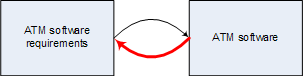
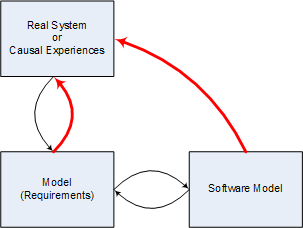
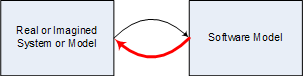
Software can be considered as models of real or imagined systems which may be models themselves. Any modeling act involves a mapping between a system and a model that preserves causal, ordering and inclusion relationships and a mapping from the model to the system that translates emerging relationships and causal structures back to that system. The latter I call modeling expectations and any observed deviations in structure and behavior between the model and the system I call software defects which can be functional failures, error messages, crashes or hangs (red line on diagrams below):

Consider ATM software as a venerable example. It models imagined world of ATM transactions which we call ATM software requirements. The latter specifies ACID (atomic, consistent, isolated and durable) transaction rules. If they are broken by the written software we have the defect:

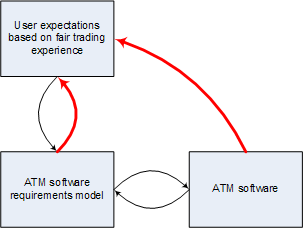
What are software requirements? They are models of real or imagined systems or can be models of past causal and relationship experiences. If requirements are wrong they do not translate back and we still consider software as having a defect:

Translating this to ATM example we have:

Another example where the perceived absence of failures can be considered as a defect is the program designed to model memory leaks that might not be leaking due to a defect in its source code.

Now we can answer the question ”What is a memory corruption?” which is the topic of the next post.

- Dmitry Vostokov @ DumpAnalysis.org -

Pooltags from Citrix drivers

January 7th, 2008

Citrix has recently published the list of their pooltags. Please refer to the following article:

http://support.citrix.com/article/ctx115257

So when you see the following or similar output from !poolused WinDbg command you can update your pooltag.txt file located in your Debugging Tools for Windows  installation \triage folder:

WD   UNKNOWN pooltag 'WD  ', please update pooltag.txt

Please also be aware that ‘Ica’ pooltag doesn’t belong to Citrix drivers although it sounds like “ICA protocol”. It comes from Microsoft termdd.sys driver.

- Dmitry Vostokov @ DumpAnalysis.org -

USHORT vs. ULONG websites

January 4th, 2008

It is about the number of visits a website has at some point of its evolution. This blog has been visited more than 65,535 times and now belongs to ULONG category (unsigned long type). Has anyone seen ULONGLONG websites?

- Dmitry Vostokov @ DumpAnalysis.org -

ManagementBits update (December, 2007)

January 4th, 2008

As promised I’m posting here the first monthly summary of my Management Bits and Tips blog where I introduced the port of crash dump analysis patterns to project failure analysis patterns.

- Dmitry Vostokov @ DumpAnalysis.org -

Literate Scientist

January 2nd, 2008

As a voracious reader (half of my book collection) I always wanted to share my book search results (I spend some time researching books on Amazon). Finally I opened my 3rd blog where I intend to review books written by literate scientists that I have read and which are not quite related to crash dump analysis and debugging domain:

http://www.literatescientist.com/

Happy New Year and Happy Reading in 2008  :-)

- Dmitry Vostokov @ DumpAnalysis.org -

How to distinguish between 1st and 2nd chances

January 2nd, 2008

Sometimes we look for Early Crash Dump pattern but information about whether an exception was first-chance or second-chance is missing from a crash dump file name or in a crash dump itself, for example:

This dump file has an exception of interest stored in it.
The stored exception information can be accessed via .ecxr.
(1254.1124): Access violation - code c0000005 (first/second chance not available)
TestDefaultDebugger64!CTestDefaultDebuggerDlg::OnBnClickedButton1:
00000000`00401570 c704250000000000000000 mov dword ptr [0],0 ds:00000000`00000000=????????

If we recall that first-chance exceptions don’t leave any traces on user space thread stacks (see Interrupts and Exceptions Explained, Part 6 for details) then we won’t see any exception codes on thread raw stack:

0:000> !teb
TEB at 000007fffffde000
    ExceptionList:        0000000000000000
    StackBase:            0000000000130000
    StackLimit:           000000000012b000

    SubSystemTib:         0000000000000000
    FiberData:            0000000000001e00
    ArbitraryUserPointer: 0000000000000000
    Self:                 000007fffffde000
    EnvironmentPointer:   0000000000000000
    ClientId:             0000000000001254 . 0000000000001124
    RpcHandle:            0000000000000000
    Tls Storage:          000007fffffde058
    PEB Address:          000007fffffd5000
    LastErrorValue:       0
    LastStatusValue:      c0000034
    Count Owned Locks:    0
    HardErrorMode:        0

0:000> s -d 000000000012b000 0000000000130000 c0000005

However, we would definitely see it on raw stack in second-chance exception crash dump: 

0:000> s -d 000000000012b000 0000000000130000 c0000005 
00000000`0012f000  c0000005 00000000 00000000 00000000  .

Using raw stack observations we can even tell when a crash dump was saved from a debugger handling a second-chance exception or saved by some postmortem debugger afterwards. For example, on my Vista x64 I see the following difference:

raw stack from a crash dump saved from WinDbg after receiving second-chance exception:

00000000`0012e278  00000000`00000000
00000000`0012e280  00000000`00000000
00000000`0012e288  00000000`7790032c kernel32!IsDebugPortPresent+0×2c
00000000`0012e290  00000000`00000000
00000000`0012e298  00000000`00000000
00000000`0012e2a0  00000000`00000000
00000000`0012e2a8  00000000`7790032c kernel32!IsDebugPortPresent+0×2c
00000000`0012e2b0  00000001`00010000
00000000`0012e2b8  00000000`00000000
00000000`0012e2c0  00000000`00000000
00000000`0012e2c8  00000000`77b63c94 ntdll! ?? ::FNODOBFM::`string’+0xbd14
00000000`0012e2d0  00000000`00000000
00000000`0012e2d8  00000000`0012e420
00000000`0012e2e0  00000000`77b63cb0 ntdll! ?? ::FNODOBFM::`string’+0xbd30
00000000`0012e2e8  00000000`7793cf47 kernel32!UnhandledExceptionFilter+0xb7
00000000`0012e2f0  ffffffff`ffffffff
00000000`0012e2f8  00000000`00000000
00000000`0012e300  00000000`00000000
00000000`0012e308  00000000`00000000
00000000`0012e310  00000000`00318718
00000000`0012e318  00000000`7799eb89 user32!ImeWndProcWorker+0×331
00000000`0012e320  00000000`00000000
00000000`0012e328  00000000`00000000
00000000`0012e330  00000000`00000000
00000000`0012e338  00000000`004189b0 TestDefaultDebugger64!_getptd_noexit+0×80
00000000`0012e340  00000000`01fb4b90
00000000`0012e348  00000000`0012e928
00000000`0012e350  00000000`00000000
00000000`0012e358  00000000`00418a50 TestDefaultDebugger64!_getptd+0×80
00000000`0012e360  00000000`01fb4b90
00000000`0012e368  00000000`0041776d TestDefaultDebugger64!_XcptFilter+0×1d
00000000`0012e370  00000000`0012e4f0
00000000`0012e378  00000000`77aa3cfa ntdll!RtlDecodePointer+0×2a
00000000`0012e380  00000000`00436fc4 TestDefaultDebugger64!__rtc_tzz+0×1f8c
00000000`0012e388  00000000`00000001
00000000`0012e390  00000000`0012f000
00000000`0012e398  00000000`77a60000 ntdll!`string’ <PERF> (ntdll+0×0)
00000000`0012e3a0  00000000`0004c6e1
00000000`0012e3a8  00000000`00000001
00000000`0012e3b0  00000000`0012ff90
00000000`0012e3b8  00000000`77afb1b5 ntdll!RtlUserThreadStart+0×95
00000000`0012e3c0  00000000`0012e420
00000000`0012e3c8  00000000`d4b99e6f
00000000`0012e3d0  00000000`00000000
00000000`0012e3d8  00000000`00000001
00000000`0012e3e0  00000000`0012e4f0
00000000`0012e3e8  00000000`77a8ae4b ntdll!_C_specific_handler+0×8c

raw stack from a crash dump saved by CDB installed as a default postmortem debugger (WER was used to launch it):

0:000> dqs 00000000`0012e278 00000000`0012e3e8
00000000`0012e278  00000000`00000000
00000000`0012e280  00000000`00000000
00000000`0012e288  00000000`00000000
00000000`0012e290  ffffffff`ffffffff
00000000`0012e298  00000000`779257ef kernel32!WerpReportExceptionInProcessContext+0×9f
00000000`0012e2a0  00000000`00000000
00000000`0012e2a8  00000000`0012ff90
00000000`0012e2b0  00000000`0012e420
00000000`0012e2b8  00000000`0041f4dc TestDefaultDebugger64!__CxxUnhandledExceptionFilter+0×5c
00000000`0012e2c0  00000000`00000000
00000000`0012e2c8  00000000`7a8b477b
00000000`0012e2d0  00000000`00000000
00000000`0012e2d8  fffff980`01000000
00000000`0012e2e0  00000000`00000001
00000000`0012e2e8  00000000`7793d07e kernel32!UnhandledExceptionFilter+0×1ee
00000000`0012e2f0  00000000`77b63cb0 ntdll! ?? ::FNODOBFM::`string’+0xbd30
00000000`0012e2f8  000007fe`00000000
00000000`0012e300  00000000`00000000
00000000`0012e308  00000000`00000001
00000000`0012e310  00000000`00000000
00000000`0012e318  00000000`00000000
00000000`0012e320  000007ff`00000000
00000000`0012e328  00000000`00000000
00000000`0012e330  00000000`00000000
00000000`0012e338  00000000`004189b0 TestDefaultDebugger64!_getptd_noexit+0×80
00000000`0012e340  00000000`023f4b90
00000000`0012e348  00000000`77ab8cf8 ntdll!RtlpFindNextActivationContextSection+0xaa
00000000`0012e350  00000000`00000000
00000000`0012e358  00000000`00418a50 TestDefaultDebugger64!_getptd+0×80
00000000`0012e360  00000000`023f4b90
00000000`0012e368  00000000`0041776d TestDefaultDebugger64!_XcptFilter+0×1d
00000000`0012e370  00000000`0012e4f0
00000000`0012e378  00000000`77aa3cfa ntdll!RtlDecodePointer+0×2a
00000000`0012e380  00000000`00436fc4 TestDefaultDebugger64!__rtc_tzz+0×1f8c
00000000`0012e388  00000000`00000001
00000000`0012e390  00000000`0012f000
00000000`0012e398  00000000`77a60000 ntdll!`string’ <PERF> (ntdll+0×0)
00000000`0012e3a0  00000000`0004c6e1
00000000`0012e3a8  00000000`00000001
00000000`0012e3b0  00000000`0012ff90
00000000`0012e3b8  00000000`77afb1b5 ntdll!RtlUserThreadStart+0×95
00000000`0012e3c0  00000000`0012e420
00000000`0012e3c8  00000000`7a8b477b
00000000`0012e3d0  00000000`00000000
00000000`0012e3d8  00000000`00000001
00000000`0012e3e0  00000000`0012e4f0
00000000`0012e3e8  00000000`77a8ae4b ntdll!_C_specific_handler+0×8c

- Dmitry Vostokov @ DumpAnalysis.org -