Archive for the ‘Minidump Analysis’ Category

Crash Dump Analysis AntiPatterns (Part 9)

Thursday, March 27th, 2008

Symbolless Analysis is another anti-pattern when an engineer either in a hurry or due to laziness doesn’t apply proper symbols and relies only on timestamps and module/offsets or trusts what WinDbg says and ignores symbol warnings. I usually apply symbols even in obvious cases and in hard ones strive to apply them until all possibilities are exhausted including search using PDBFinder.

Another weak variant is called Imageless Analysis when an engineer doesn’t specify proper Executable Image Search Path when it is necessary perhaps due to ignorance or just plain laziness again. Please see Minidump Analysis example for proper minidump analysis.

- Dmitry Vostokov @ DumpAnalysis.org -

Memory Dump Analysis Anthology, Volume 2

Tuesday, March 25th, 2008

Although the first volume has not been published yet (scheduled for 15th of April, 2008) the planning for the second volume has already begun. Preliminary information is:

  • Title: Memory Dump Analysis Anthology, Volume 2
  • Paperback: 512 pages (*)
  • ISBN-13: 978-0-9558328-7-1
  • Author: Dmitry Vostokov
  • Publisher: Opentask (01 Oct 2008)
  • Language: English
  • Product Dimensions: 22.86 x 15.24

Hardcover version is also planned. PDF version will be available for download too.

(*) subject to change

- Dmitry Vostokov @ DumpAnalysis.org -

WinDbg book to be published after MDAA V1

Thursday, March 20th, 2008

This is a forthcoming reference book for technical support and escalation engineers troubleshooting and debugging complex software issues. The book is also invaluable for software maintenance and development engineers debugging unmanaged, managed and native code.

  • Title: Windows® Debugging Notebook: Essential Concepts, WinDbg Commands and Tools
  • Author: Dmitry Vostokov
  • Hardcover: 256 pages
  • ISBN-13: 978-0-9558328-5-7
  • Publisher: Opentask (1 September 2008)
  • Language: English
  • Product Dimensions: 22.86 x 15.24

- Dmitry Vostokov @ DumpAnalysis.org -

Memory Dump Analysis Anthology, Volume 1

Thursday, February 7th, 2008

It is very easy to become a publisher nowadays. Much easier than I thought. I registered myself as a publisher under the name of OpenTask which is my registered business name in Ireland. I also got the list of ISBN numbers and therefore can announce product details for the first volume of Memory Dump Analysis Anthology series:

Memory Dump Analysis Anthology, Volume 1

  • Paperback: 720 pages (*)
  • ISBN-13: 978-0-9558328-0-2
  • Hardcover: 720 pages (*)
  • ISBN-13: 978-0-9558328-1-9
  • Author: Dmitry Vostokov
  • Publisher: Opentask (15 Apr 2008)
  • Language: English
  • Product Dimensions: 22.86 x 15.24

(*) subject to change 

PDF file will be available for download too.

- Dmitry Vostokov @ DumpAnalysis.org -

Crash Dump Analysis Patterns (Part 41a)

Wednesday, December 12th, 2007

Some memory dumps are generated on purpose to troubleshoot process and system hangs. They are usually called Manual Dumps, manual crash dumps or manual memory dumps. Kernel, complete and kernel mini dumps can be generated using the famous keyboard method described in the following Microsoft article which has been recently updated and contains the fix for USB keyboards:

http://support.microsoft.com/kb/244139

The crash dump will show E2 bugcheck:

MANUALLY_INITIATED_CRASH (e2)
The user manually initiated this crash dump.
Arguments:
Arg1: 00000000
Arg2: 00000000
Arg3: 00000000
Arg4: 00000000

Various tools including Citrix SystemDump reuse E2 bug check code and its arguments.  There are many other 3rd-party tools used to bugcheck Windows OS such as BANG! from OSR or NotMyFault from Sysinternals. The old one is crash.exe that loads crashdrv.sys and uses the following bugcheck:

Unknown bugcheck code (69696969)
Unknown bugcheck description
Arguments:
Arg1: 00000000
Arg2: 00000000
Arg3: 00000000
Arg4: 00000000

In a memory dump you would see its characteristic stack trace pointing to crashdrv module: 

STACK_TEXT:
b5b3ebe0 f615888d nt!KeBugCheck+0xf
WARNING: Stack unwind information not available. Following frames may be wrong.
b5b3ebec f61584e3 crashdrv+0x88d
b5b3ec00 8041eec9 crashdrv+0x4e3
b5b3ec14 804b328a nt!IopfCallDriver+0x35
b5b3ec28 804b40de nt!IopSynchronousServiceTail+0x60
b5b3ed00 804abd0a nt!IopXxxControlFile+0x5d6
b5b3ed34 80468379 nt!NtDeviceIoControlFile+0x28
b5b3ed34 77f82ca0 nt!KiSystemService+0xc9
0006fed4 7c5794f4 ntdll!NtDeviceIoControlFile+0xb
0006ff38 01001a74 KERNEL32!DeviceIoControl+0xf8
0006ff70 01001981 crash+0x1a74
0006ff80 01001f93 crash+0x1981
0006ffc0 7c5989a5 crash+0x1f93
0006fff0 00000000 KERNEL32!BaseProcessStart+0x3d

Sometimes various hardware buttons are used to trigger NMI and generate a crash dump when keyboard is not available. The bugcheck will be:

NMI_HARDWARE_FAILURE (80)
This is typically due to a hardware malfunction. The hardware supplier should be called.
Arguments:
Arg1: 004f4454
Arg2: 00000000
Arg3: 00000000
Arg4: 00000000

Critical process termination such as session 0 csrss.exe is used to force a memory dump:

CRITICAL_OBJECT_TERMINATION (f4)
A process or thread crucial to system operation has unexpectedly exited or been terminated.
Several processes and threads are necessary for the operation of the system; when they are terminated (for any reason), the system can no longer function.
Arguments:
Arg1: 00000003, Process
Arg2: 8a090d88, Terminating object
Arg3: 8a090eec, Process image file name
Arg4: 80967b74, Explanatory message (ascii)

- Dmitry Vostokov @ DumpAnalysis.org -

Minidump Analysis (Part 4)

Thursday, October 11th, 2007

In part 3 we explored raw stack dumps. Now suppose we have a minidump with a stack trace that involves our product driver and due to some reason WinDbg doesn’t pick symbols automatically and shows the following stack trace and crash address that point to driver.sys module:

1: kd> kL
ChildEBP RetAddr
WARNING: Stack unwind information not available. Following frames may be wrong.
ba0fd0e4 bfabd64b driver+0×2df2a
ba0fd1c8 bf8b495d driver+0×1f64b
ba0fd27c bf9166ae win32k!NtGdiBitBlt+0×52d
ba0fd2d8 bf9168d0 win32k!TileWallpaper+0xd4
ba0fd2f8 bf826c83 win32k!xxxDrawWallpaper+0×50
ba0fd324 bf8651df win32k!xxxDesktopPaintCallback+0×48
ba0fd388 bf8280f3 win32k!xxxEnumDisplayMonitors+0×13a
ba0fd3d4 bf8283ab win32k!xxxInternalPaintDesktop+0×66
ba0fd3f8 80833bdf win32k!NtUserPaintDesktop+0×41
ba0fd3f8 7c9485ec nt!KiFastCallEntry+0xfc

1: kd> r
eax=000007d0 ebx=000007d0 ecx=00000086 edx=bfb371a3 esi=bc492000 edi=bfb3775b
eip=bfacbf2a esp=ba0fd0b8 ebp=ba0fd0e4 iopl=0 nv up ei pl nz na po nc
cs=0008 ss=0010 ds=0023 es=0023 fs=0030 gs=0000 efl=00010202
driver+0×2df2a:
bfacbf2a f3a5 rep movs dword ptr es:[edi],dword ptr [esi] es:0023:bfb3775b=e4405a64 ds:0023:bc492000=????????

We can get timestamp of this module too: 

1: kd> lmv m driver
start    end        module name
bfa9e000 bfb42a00   driver   T (no symbols)
    Loaded symbol image file: driver.sys
    Image path: driver.sys
    Image name: driver.sys
    Timestamp:        Thu Mar 01 20:50:04 2007 (45E73C7C)
    CheckSum:         000A5062
    ImageSize:        000A4A00
    Translations:     0000.04b0 0000.04e0 0409.04b0 0409.04e0

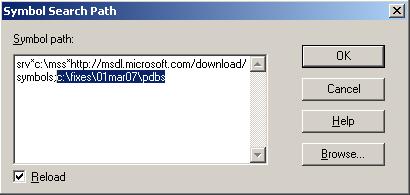
We see that no symbols for driver.sys were found and this is also indicated by the absence of function names and huge code offsets like 0×2df2a. Perhaps we don’t have a symbol server and store our symbol files somewhere. Or we got symbols from the developer of the recent fix that bugchecks and we want to apply them. In any case if we add a path to Symbol Search Path dialog (File -> Symbol File Path …) or use .sympath WinDbg command

we are able to get better stack trace and crash point:

1: kd> .reload
Loading Kernel Symbols
...
Loading User Symbols
Loading unloaded module list
...
Unable to load image driver.sys, Win32 error 0n2
*** WARNING: Unable to verify timestamp for driver.sys

1: kd> kL
ChildEBP RetAddr
ba0fd0c0 bfabc399 driver!ProcessBytes+0×18
ba0fd0e4 bfabd64b driver!ProcessObject+0xc9
ba0fd1c8 bf8b495d driver!CacheBitBlt+0×13d
ba0fd27c bf9166ae win32k!NtGdiBitBlt+0×52d
ba0fd2d8 bf9168d0 win32k!TileWallpaper+0xd4
ba0fd2f8 bf826c83 win32k!xxxDrawWallpaper+0×50
ba0fd324 bf8651df win32k!xxxDesktopPaintCallback+0×48
ba0fd388 bf8280f3 win32k!xxxEnumDisplayMonitors+0×13a
ba0fd3d4 bf8283ab win32k!xxxInternalPaintDesktop+0×66
ba0fd3f8 80833bdf win32k!NtUserPaintDesktop+0×41
ba0fd3f8 7c9485ec nt!KiFastCallEntry+0xfc

1: kd> r
eax=000007d0 ebx=000007d0 ecx=00000086 edx=bfb371a3 esi=bc492000 edi=bfb3775b
eip=bfacbf2a esp=ba0fd0b8 ebp=ba0fd0e4 iopl=0 nv up ei pl nz na po nc
cs=0008 ss=0010 ds=0023 es=0023 fs=0030 gs=0000 efl=00010202
driver!ProcessBytes+0×18:
bfacbf2a f3a5 rep movs dword ptr es:[edi],dword ptr [esi] es:0023:bfb3775b=e4405a64 ds:0023:bc492000=????????

Because WinDbg reports that it was unable to verify timestamp for driver.sys we might want to double check the return address saved when ProcessBytes function was called. If symbols are correct then disassembling the return address backwards will most likely show ProcessObject function code and “call” instruction with ProcessBytes address. Unfortunately minidumps don’t have code except for the currently executing function:

1: kd> ub bfabc399
                 ^ Unable to find valid previous instruction for 'ub bfabc399'

1: kd> uf driver!ProcessObject
No code found, aborting

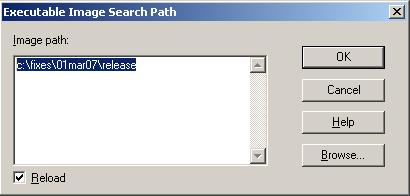
Therefore we need to point WinDbg to our driver.sys which contains executable code. This can be done by specifying a path in Executable Image Search Path dialog (File -> Image File Path …) or using .exepath WinDbg command.

Now we get more complete stack trace and we are able to double check the return address:

1: kd> .reload
Loading Kernel Symbols
...
Loading User Symbols
Loading unloaded module list
...

1: kd> kL
ChildEBP RetAddr
ba0fd0c0 bfabc399 driver!ProcessBytes+0×18
ba0fd0e4 bfabd64b driver!ProcessObject+0xc9
ba0fd104 bfac5aac driver!CacheBitBlt+0×13d
ba0fd114 bfac6840 driver!ProcessCommand+0×150
ba0fd140 bfac1878 driver!CheckSurface+0×258
ba0fd178 bfaba0ee driver!CopyBitsEx+0xfa
ba0fd1c8 bf8b495d driver!DrvCopyBits+0xb6
ba0fd27c bf9166ae win32k!NtGdiBitBlt+0×52d
ba0fd2d8 bf9168d0 win32k!TileWallpaper+0xd4
ba0fd2f8 bf826c83 win32k!xxxDrawWallpaper+0×50
ba0fd324 bf8651df win32k!xxxDesktopPaintCallback+0×48
ba0fd388 bf8280f3 win32k!xxxEnumDisplayMonitors+0×13a
ba0fd3d4 bf8283ab win32k!xxxInternalPaintDesktop+0×66
ba0fd3f8 80833bdf win32k!NtUserPaintDesktop+0×41
ba0fd3f8 7c9485ec nt!KiFastCallEntry+0xfc

1: kd> ub bfabc399
driver!ProcessObject+0xb7:
bfabc387 57              push    edi
bfabc388 40              inc     eax
bfabc389 50              push    eax
bfabc38a e861fb0000      call    driver!convert (bfacbef0)
bfabc38f ff7508          push    dword ptr [ebp+8]
bfabc392 57              push    edi
bfabc393 50              push    eax
bfabc394 e879fb0000      call    driver!ProcessBytes (bfacbf12)

- Dmitry Vostokov @ DumpAnalysis.org -

Minidump Analysis (Part 3)

Wednesday, September 12th, 2007

Part 2 dealt with stack traces. Unfortunately stack traces reported by WinDbg, especially involving 3rd-party components, are usually incomplete and sometimes not even correct. They can also point to stable drivers when the system failure happened after slowly accumulated corruption caused by some intermediate driver or a combination of drivers.

Sometimes there are other 3rd-party drivers involved before the system crash that are not visible in the output of !analyze -v command and simply removing them, disabling or upgrading software they are part from make the system stable. To see them we can look at the so called raw stack data. Because kernel mode thread stack size is small (12Kb or 0×3000) we can simply dump memory range between ESP-3000 and ESP+3000. We can use RSP register for x64 dumps but the output will be the same.

Let’s look at our minidump from the previous part. The stack trace is small, incomplete and points to DisplayDriver. This is because we don’t have symbol information for DisplayDriver.dll. Could it be the case that DisplayDriver.dll was used incorrectly by another driver or operating system component? What are other components that might have been used prior to BSOD? Raw stack dump shows additional symbols like DisplayDriver_mini, win32k and dxg:

0: kd> dps esp-3000 esp+3000
b4f4f8b4  ????????
b4f4f8b8  ????????
b4f4f8bc  ????????
b4f4f8c0  ????????
...
...
...
b4f51ffc  ????????
b4f52000  00001000
b4f52004  00006000
b4f52008  b4f5204c
b4f5200c  89025978
b4f52010  89139000
b4f52014  00000000
b4f52018  b4f527ec
b4f5201c  b4f52840
b4f52020  bfbf0ca6 DisplayDriver+0x21bca6
b4f52024  00000000
b4f52028  89025978
...
...
...
b4f52100  e24079e0
b4f52104  bfbf0ca6 DisplayDriver+0x21bca6
b4f52108  00000008
...
...
...
b4f52364  b4f52414
b4f52368  804dc0b2 nt!ExecuteHandler+0x24
b4f5236c  b4f527ec
b4f52370  b4f52d40
b4f52374  b4f524e8
b4f52378  b4f52400
b4f5237c  bf9d2132 dxg!_except_handler3
b4f52380  2a2a2a0a
...
...
...
b4f523e8  b4f52408
b4f523ec  8053738a nt!KeBugCheckEx+0x1b
b4f523f0  0000008e
b4f523f4  c0000005
b4f523f8  bfbf0ca6 DisplayDriver+0x21bca6
b4f523fc  b4f52840
b4f52400  00000000
b4f52404  00000000
b4f52408  b4f527d0
b4f5240c  80521fed nt!KiDispatchException+0x3b1
b4f52410  0000008e
b4f52414  c0000005
b4f52418  bfbf0ca6 DisplayDriver+0x21bca6
b4f5241c  b4f52840
b4f52420  00000000
b4f52424  03a3fb4c
b4f52428  03a3fb4c
b4f5242c  b4f52800
b4f52430  00000000
b4f52434  00000000
b4f52438  00000000
b4f5243c  b9deffc6 DisplayDriver_mini+0x4bfc6
b4f52440  897c621c
b4f52444  00000086
b4f52448  0000003c
b4f5244c  b9f3af5a DisplayDriver_mini+0x196f5a
b4f52450  897c6200
b4f52454  00000086
b4f52458  897c6200
b4f5245c  00000000
b4f52460  00000000
b4f52464  00000000
b4f52468  b9f38b4e DisplayDriver_mini+0x194b4e
b4f5246c  00000000
...
...
...
b4f5250c  00002800
b4f52510  b9f3ac10 DisplayDriver_mini+0x196c10
b4f52514  897c6200
b4f52518  00002504
b4f5251c  00000010
b4f52520  897c6200
b4f52524  b9f2d194 DisplayDriver_mini+0x189194
b4f52528  897c6200
b4f5252c  00002504
b4f52530  00000010
b4f52534  897c6200
b4f52538  898cca80
b4f5253c  00000080
b4f52540  89654008
b4f52544  b9f358e2 DisplayDriver_mini+0x1918e2
b4f52548  897c6200
...
...
...
b4f5256c  00000000
b4f52570  b9deff5c DisplayDriver_mini+0x4bf5c
b4f52574  00000000
...
...
...
b4f5259c  e24079e0
b4f525a0  bfbf0ca6 DisplayDriver+0x21bca6
b4f525a4  00000008
b4f525a8  00010246
b4f525ac  b4f528b4
b4f525b0  00000010
b4f525b4  0000003c
b4f525b8  b9f3af5a DisplayDriver_mini+0x196f5a
b4f525bc  897c6200
b4f525c0  00000086
b4f525c4  89b81008
b4f525c8  897c6200
b4f525cc  00000000
b4f525d0  00007c00
b4f525d4  b9deff5c DisplayDriver_mini+0x4bf5c
b4f525d8  b9deff5c DisplayDriver_mini+0x4bf5c
b4f525dc  8988d7d8
b4f525e0  b9deff66 DisplayDriver_mini+0x4bf66
b4f525e4  b9deff5c DisplayDriver_mini+0x4bf5c
b4f525e8  8961c288
b4f525ec  b9deff66 DisplayDriver_mini+0x4bf66
b4f525f0  8961c288
b4f525f4  00000000
b4f525f8  00000046
b4f525fc  00000000
b4f52600  89903000
b4f52604  b9e625a9 DisplayDriver_mini+0xbe5a9
b4f52608  8961c288
b4f5260c  00000046
b4f52610  00000000
b4f52614  b9deff5c DisplayDriver_mini+0x4bf5c
b4f52618  896ac008
...
...
...
b4f52630  898a8000
b4f52634  b9e9f220 DisplayDriver_mini+0xfb220
b4f52638  89941400
b4f5263c  b9e2ffec DisplayDriver_mini+0x8bfec
b4f52640  00000000
b4f52644  00000000
b4f52648  00000050
b4f5264c  b9e790d3 DisplayDriver_mini+0xd50d3
b4f52650  897c6200
...
...
...
b4f5266c  89bf6200
b4f52670  805502fa nt!ExFreePoolWithTag+0x664
b4f52674  00000000
b4f52678  88f322e0
b4f5267c  88c9d708
b4f52680  00000001
b4f52684  898cf918
b4f52688  ffdff538
b4f5268c  804dc766 nt!KiUnlockDispatcherDatabase+0x1c
b4f52690  b4f52901
b4f52694  b4f526ac
b4f52698  00000001
b4f5269c  804eaf06 nt!IopFreeIrp+0xed
b4f526a0  00000000
b4f526a4  00000000
b4f526a8  88c9d708
b4f526ac  b4f52700
b4f526b0  804f2b9f nt!IopCompleteRequest+0x319
b4f526b4  804f2bb5 nt!IopCompleteRequest+0x32f
b4f526b8  88c9d748
b4f526bc  89025978
b4f526c0  890259ac
b4f526c4  897752e8
b4f526c8  89025978
b4f526cc  b4f52910
b4f526d0  b4f527c8
b4f526d4  00000000
b4f526d8  b9e0d300 DisplayDriver_mini+0x69300
b4f526dc  88c9d708
b4f526e0  00000000
b4f526e4  00000086
b4f526e8  b4f526b8
b4f526ec  b9f3ad28 DisplayDriver_mini+0x196d28
b4f526f0  ffffffff
b4f526f4  804e2ed8 nt!_except_handler3
b4f526f8  804f2bb8 nt!GUID_DOCK_INTERFACE+0x424
b4f526fc  ffffffff
b4f52700  804f2bb5 nt!IopCompleteRequest+0x32f
b4f52704  804f2db5 nt!KiDeliverApc+0xb3
b4f52708  88c9d748
b4f5270c  b4f5274c
b4f52710  b4f52728
b4f52714  890259ac
b4f52718  804dce74 nt!KiDeliverApc+0x1e0
b4f5271c  806ffae4 hal!KeReleaseQueuedSpinLock+0x3c
b4f52720  89025978
b4f52724  b4f527f8
b4f52728  00000000
b4f5272c  89025a60
b4f52730  00000001
b4f52734  b4f52d64
b4f52738  88e775c8
b4f5273c  804f2a72 nt!IopCompleteRequest
b4f52740  00000000
b4f52744  00000000
b4f52748  00000000
b4f5274c  00000000
b4f52750  b4f52768
b4f52754  806ffef2 hal!HalpApcInterrupt+0xc6
b4f52758  00000000
b4f5275c  00000000
b4f52760  b4f52768
b4f52764  00000000
b4f52768  b4f527f8
b4f5276c  806ffae4 hal!KeReleaseQueuedSpinLock+0x3c
b4f52770  badb0d00
b4f52774  00000000
b4f52778  00000000
b4f5277c  806ffae4 hal!KeReleaseQueuedSpinLock+0x3c
b4f52780  00000008
b4f52784  00000246
b4f52788  804e5d2c nt!KeInsertQueueApc+0x6d
b4f5278c  88c9d748
...
...
...
b4f527c0  b4f52c10
b4f527c4  804e2ed8 nt!_except_handler3
b4f527c8  804faca0 nt!KiFindFirstSetLeft+0x120
b4f527cc  ffffffff
b4f527d0  b4f52840
b4f527d4  804de403 nt!CommonDispatchException+0x4d
b4f527d8  b4f527ec
...
...
...
b4f527f4  00000000
b4f527f8  bfbf0ca6 DisplayDriver+0x21bca6
b4f527fc  00000002
...
...
...
b4f52828  b4f52840
b4f5282c  804e0944 nt!KiTrap0E+0xd0
b4f52830  00000000
b4f52834  03a3fb4c
b4f52838  00000000
b4f5283c  804de3b4 nt!Kei386EoiHelper+0x18a
b4f52840  e24079e0
b4f52844  bfbf0ca6 DisplayDriver+0x21bca6
b4f52848  badb0d00
...
...
...
b4f52884  00000000
b4f52888  bfdba6c7 DisplayDriver+0x3e56c7
b4f5288c  b4f52c10
...
...
...
b4f528a4  00000000
b4f528a8  bfbf0ca6 DisplayDriver+0x21bca6
b4f528ac  00000008
...
...
...
b4f528d8  000000f3
b4f528dc  bfb6269f DisplayDriver+0x18d69f
b4f528e0  9745d083
b4f528e4  00000001
b4f528e8  e9a18d4c
b4f528ec  ffffffff
b4f528f0  bfb268e7 DisplayDriver+0x1518e7
b4f528f4  000000ab
...
...
...
b4f52960  0000027a
b4f52964  bfb2696c DisplayDriver+0x15196c
b4f52968  00000000
...
...
...
b4f5298c  e2004308
b4f52990  bfab8ce4 DisplayDriver+0xe3ce4
b4f52994  000000ab
...
...
...
b4f52bd0  00000000
b4f52bd4  bf804779 win32k!GreReleaseFastMutex+0x14
b4f52bd8  b4f52be8
b4f52bdc  bf8a04e3 win32k!dhpdevRetrieveNode+0x32
b4f52be0  89b20128
b4f52be4  b4f52c50
b4f52be8  b4f52c20
b4f52bec  bf907d15 win32k!WatchdogDdBlt+0x38
b4f52bf0  b4f52c50
...
...
...
b4f52c10  b4f52d40
b4f52c14  bf9877ae win32k!_except_handler3
b4f52c18  bf995380 win32k!`string'+0x2b4
b4f52c1c  00000000
b4f52c20  b4f52d50
b4f52c24  bf9cdd78 dxg!DxDdBlt+0x374
b4f52c28  b4f52c50
b4f52c2c  b4f52d64
b4f52c30  038dfaf4
b4f52c34  bf907ca3 win32k!NtGdiDdBlt
b4f52c38  00000001
...
...
...
b4f52c90  000000b0
b4f52c94  bf805b42 win32k!AllocateObject+0xaa
b4f52c98  00000001
b4f52c9c  00000006
b4f52ca0  b4f52cb0
b4f52ca4  32040ddf
b4f52ca8  bf805734 win32k!HANDLELOCK::vLockHandle+0x75
b4f52cac  00000ff4
b4f52cb0  00000000
b4f52cb4  bc40ddf0
b4f52cb8  b4f52cd0
b4f52cbc  00000001
b4f52cc0  804da3ee nt!ExAcquireResourceExclusiveLite+0x67
b4f52cc4  00000008
...
...
...
b4f52ce8  80004005
b4f52cec  804dc605 nt!ExReleaseResourceLite+0x8d
b4f52cf0  00000000
...
...
...
b4f52d08  b4f52d18
b4f52d0c  bf8018bf win32k!GreReleaseSemaphore+0xa
b4f52d10  bf803d1e win32k!GreUnlockDisplay+0x24
b4f52d14  00000000
...
...
...
b4f52d40  ffffffff
b4f52d44  bf9d2132 dxg!_except_handler3
b4f52d48  bf9d2928 dxg!GUID_MiscellaneousCallbacks+0x42c
b4f52d4c  ffffffff
b4f52d50  b4f52d64
b4f52d54  804dd99f nt!KiFastCallEntry+0xfc
b4f52d58  02400002
...
...
...
b4f52ddc  00000023
b4f52de0  804ec781 nt!KiThreadStartup+0x16
b4f52de4  f7849b85 NDIS!ndisWorkerThread
b4f52de8  88c9d4d0
b4f52dec  00000000
b4f52df0  0020027f
b4f52df4  011c0000
b4f52df8  bfdb97b7 DisplayDriver+0x3e47b7
b4f52dfc  00000008
...
...
...
b4f52e70  00000000
b4f52e74  f7800000 InCDPass+0x1000
b4f52e78  00004026
...
...
...
b4f52ff8  00000000
b4f52ffc  00000000
b4f53000  ????????
b4f53004  ????????

Some are coincidental like InCDPass and NDIS. Obviously DisplayDriver, DisplayDriver_mini, dxg and win32k are related due to their functions: Display, DirectX, GDI (Graphics Device Interface). 

Now we can check their module information:

0: kd> lmv m DisplayDriver
start    end        module name
bf9d5000 bff42500   DisplayDriver T (no symbols)
    Loaded symbol image file: DisplayDriver.dll
    Image path: DisplayDriver.dll
    Image name: DisplayDriver.dll
    Timestamp:        Fri Jun 29 09:13:08 2007 (4684BF14)
    CheckSum:         00570500
    ImageSize:        0056D500
    Translations:     0000.04b0 0000.04e0 0409.04b0 0409.04e0

0: kd> lmv m DisplayDriver_mini
start    end        module name
b9da4000 ba421f20   DisplayDriver_mini T (no symbols)
    Loaded symbol image file: DisplayDriver_mini.sys
    Image path: DisplayDriver_mini.sys
    Image name: DisplayDriver_mini.sys
    Timestamp:        Fri Jun 29 09:16:41 2007 (4684BFE9)
    CheckSum:         00680F20
    ImageSize:        0067DF20
    Translations:     0000.04b0 0000.04e0 0409.04b0 0409.04e0

0: kd> lmv m dxg
start    end        module name
bf9c3000 bf9d4580   dxg        (pdb symbols)
    Loaded symbol image file: dxg.sys
    Mapped memory image file: c:\websymbols\dxg.sys\41107B9311580\dxg.sys
    Image path: dxg.sys
    Image name: dxg.sys
    Timestamp:        Wed Aug 04 07:00:51 2004 (41107B93)
    CheckSum:         0001D181
    ImageSize:        00011580
    File version:     5.1.2600.2180
    Product version:  5.1.2600.2180
    File flags:       0 (Mask 3F)
    File OS:          40004 NT Win32
    File type:        3.7 Driver
    File date:        00000000.00000000
    Translations:     0409.04b0
    CompanyName:      Microsoft Corporation
    ProductName:      Microsoft® Windows® Operating System
    InternalName:     dxg.sys
    OriginalFilename: dxg.sys
    ProductVersion:   5.1.2600.2180
    FileVersion:      5.1.2600.2180 (xpsp_sp2_rtm.040803-2158)
    FileDescription:  DirectX Graphics Driver
    LegalCopyright:   © Microsoft Corporation. All rights reserved.

0: kd> lmv m win32k
start    end        module name
bf800000 bf9c2180   win32k   # (pdb symbols)
    Loaded symbol image file: win32k.sys
    Mapped memory image file: c:\websymbols\win32k.sys\45F013F61c2180\win32k.sys
    Image path: win32k.sys
    Image name: win32k.sys
    Timestamp:        Thu Mar 08 13:47:34 2007 (45F013F6)
    CheckSum:         001C4886
    ImageSize:        001C2180
    File version:     5.1.2600.3099
    Product version:  5.1.2600.3099
    File flags:       0 (Mask 3F)
    File OS:          40004 NT Win32
    File type:        3.7 Driver
    File date:        00000000.00000000
    Translations:     0406.04b0
    CompanyName:      Microsoft Corporation
    ProductName:      Microsoft® Windows® Operativsystem
    InternalName:     win32k.sys
    OriginalFilename: win32k.sys
    ProductVersion:   5.1.2600.3099
    FileVersion:      5.1.2600.3099 (xpsp_sp2_gdr.070308-0222)
    FileDescription:  Win32-flerbrugerdriver
    LegalCopyright:   © Microsoft Corporation. Alle rettigheder forbeholdes.

- Dmitry Vostokov @ DumpAnalysis.org -

Minidump Analysis (Part 2)

Thursday, September 6th, 2007

In the first part I outlined WinDbg commands we can use to get various information from system minidumps. In this part I will show how to find a 3rd-party driver that might have been responsible for system crash and verify that WinDbg reports that driver correctly.

For example, one of the log files shows the following !analyze -v results:

command> !analyze -v
*************************************************************
*                                                           *
*                     Bugcheck Analysis                     *
*                                                           *
*************************************************************

BAD_POOL_CALLER (c2)
The current thread is making a bad pool request. Typically this is at a bad IRQL level or double freeing the same allocation, etc.
Arguments:
Arg1: 00000047, Attempt to free a non-allocated nonpaged pool address
Arg2: 85083000, Starting address
Arg3: 00005083, physical page frame
Arg4: 000bfff9, highest physical page frame

Debugging Details:
------------------
BUGCHECK_STR:  0xc2_47

CUSTOMER_CRASH_COUNT:  2

DEFAULT_BUCKET_ID:  DRIVER_FAULT_SERVER_MINIDUMP

PROCESS_NAME:  3rdPartyAntivirus.exe

CURRENT_IRQL:  0

LAST_CONTROL_TRANSFER:  from 8054d2eb to 805435b9

STACK_TEXT:
b325db68 8054d2eb 000000c2 00000047 85083000 nt!KeBugCheckEx+0x19
b325db94 805689c2 85083000 00080000 85083000 nt!MmGetSizeOfBigPoolAllocation+0x1cb
b325dbe4 f77c8098 00000000 00000000 00000004 nt!ExFreePoolWithTag+0x1d0
WARNING: Stack unwind information not available. Following frames may be wrong.
b325dc24 f77c8234 8599d4e0 8599d4e0 88cecf38 3rdPartyAVDrv+0×1098
b325dc3c 804f04f3 871d2cf0 00004808 8743b6a0 3rdPartyAVDrv+0×1234
b325dc4c 80585208 8599d550 872c8028 8599d4e0 nt!IofCallDriver+0×3f
b325dc60 80585fe6 871d2cf0 8599d4f0 872c8028 nt!IopSynchronousServiceTail+0×6f
b325dd00 80586028 00000468 00000614 00000000 nt!IopXxxControlFile+0×607
b325dd34 804dfd24 00000468 00000614 00000000 nt!NtDeviceIoControlFile+0×28
b325dd34 7ffe0304 00000468 00000614 00000000 nt!KiSystemService+0xd0
0087b6c0 00000000 00000000 00000000 00000000 SharedUserData!SystemCallStub+0×4
STACK_COMMAND:  kb

FOLLOWUP_IP:
3rdPartyAVDrv+1098
f77c8098 ??              ???

SYMBOL_STACK_INDEX:  3

SYMBOL_NAME:  3rdPartyAVDrv+1098

FOLLOWUP_NAME:  MachineOwner

MODULE_NAME: 3rdPartyAVDrv

IMAGE_NAME:  3rdPartyAVDrv.sys

DEBUG_FLR_IMAGE_TIMESTAMP:  410752c5

FAILURE_BUCKET_ID:  0xc2_47_3rdPartyAVDrv+1098

BUCKET_ID:  0xc2_47_3rdPartyAVDrv+1098

Followup: MachineOwner
---------

MODULE_NAME and IMAGE_NAME report 3rd-party antivirus driver 3rdPartyAVDrv.sys responsible for BSOD. However the top lines from STACK_TEXT report nt module, Windows NT kernel and system. We can get information about all loaded drivers from the output of lmv command:

command> lmv
start    end        module name
804de000 80744000   nt       # (pdb symbols)          c:\...\ntkrnlmp.pdb\...\ntkrnlmp.pdb
    Loaded symbol image file: ntkrnlmp.exe
    Mapped memory image file: c:\...\ntkrnlmp.exe\...\ntkrnlmp.exe
    Image path: ntkrnlmp.exe
    Image name: ntkrnlmp.exe
    Timestamp:        Tue Mar 25 08:39:34 2003 (3E8015C6)
    CheckSum:         00254553
    ImageSize:        00266000
    File version:     5.2.3790.0
    Product version:  5.2.3790.0
    File flags:       0 (Mask 3F)
    File OS:          40004 NT Win32
    File type:        1.0 App
    File date:        00000000.00000000
    Translations:     0415.04b0
    CompanyName:      Microsoft Corporation
    ProductName:      Microsoft® Windows® Operating System
    InternalName:     ntkrnlmp.exe
    OriginalFilename: ntkrnlmp.exe
    ProductVersion:   5.2.3790.0
    FileVersion:      5.2.3790.0 (srv03_rtm.030324-2048)
    FileDescription:  NT Kernel & System
    LegalCopyright:   © Microsoft Corporation. All rights reserved.
...
...
...
f77c7000 f77cf000   3rdPartyAVDrv 3rdPartyAVDrv.sys
    Loaded symbol image file: 3rdPartyAVDrv.sys
    Symbol file: 3rdPartyAVDrv.sys
    Image path: 3rdPartyAVDrv.sys
    Timestamp:        Wed Jul 28 07:15:21 2004 (410752C5)
    CheckSum:         00011518
    ImageSize:        00008000
    Translations:     0000.04b0 0000.04e0 0409.04b0 0409.04e0
...
...
...

Why WinDbg skips Microsoft module and points to the 3rd-party one? Because, when WinDbg encounters a non-Microsoft driver, it always shows it as the possible cause. Then it looks at triage.ini file located in triage folder under Debugging Tools for Windows installation folder where certain modules and functions are listed with appropriate actions for WinDbg, for example:

nt!KeBugCheck*=ignore
nt!ExAllocatePool=Pool_corruption

Let’s add the following entry at the end of that INI file:

3rdPartyAVDrv!*=ignore

Now, if we load the dump in WinDbg, set the symbols and run the analysis, we get different results:

3: kd> .symfix
No downstream store given, using C:\Program Files\Debugging Tools for Windows\sym
3: kd> !analyze -v
...
...
...
FOLLOWUP_NAME:  MachineOwner

MODULE_NAME: nt

DEBUG_FLR_IMAGE_TIMESTAMP:  3e8015c6

SYMBOL_NAME:  nt!MmGetSizeOfBigPoolAllocation+1cb

IMAGE_NAME:  memory_corruption

FAILURE_BUCKET_ID:  0xc2_47_nt!MmGetSizeOfBigPoolAllocation+1cb

BUCKET_ID:  0xc2_47_nt!MmGetSizeOfBigPoolAllocation+1cb

Followup: MachineOwner
---------

Because nt!MmGetSizeOfBigPoolAllocation is not listed in triage.ini WinDbg reports nt module and memory corruption. The latter cause is probably inferred from either BAD_POOL_CALLER bugcheck name or Mm function prefix.

Let’s add more lines to tiage.ini:

3rdPartyAVDrv!*=ignore
nt!MmGetSizeOfBigPoolAllocation=ignore
nt!ExFreePoolWithTag=Dynamic memory corruption detected when freeing memory 

Now the analysis reports our custom follow up message:

3: kd> !analyze -v
...
...
...
FOLLOWUP_IP:
nt!ExFreePoolWithTag+1d0
805689c2 e9c8f0ffff      jmp     nt!ExFreePoolWithTag+0x1d0 (80567a8f)

SYMBOL_STACK_INDEX:  2

FOLLOWUP_NAME:  Dynamic memory corruption detected when freeing memory

MODULE_NAME: nt

IMAGE_NAME:  ntkrnlmp.exe

DEBUG_FLR_IMAGE_TIMESTAMP:  3e8015c6

SYMBOL_NAME:  nt!ExFreePoolWithTag+1d0

FAILURE_BUCKET_ID:  0xc2_47_nt!ExFreePoolWithTag+1d0

BUCKET_ID:  0xc2_47_nt!ExFreePoolWithTag+1d0

Followup: Dynamic memory corruption detected when freeing memory
---------

Let’s look at STACK_TEXT data:

STACK_TEXT:
b325db68 8054d2eb 000000c2 00000047 85083000 nt!KeBugCheckEx+0x19
b325db94 805689c2 85083000 00080000 85083000 nt!MmGetSizeOfBigPoolAllocation+0x1cb
b325dbe4 f77c8098 00000000 00000000 00000004 nt!ExFreePoolWithTag+0×1d0
WARNING: Stack unwind information not available. Following frames may be wrong.
b325dc24 f77c8234 8599d4e0 8599d4e0 88cecf38 3rdPartyAVDrv+0×1098
b325dc3c 804f04f3 871d2cf0 00004808 8743b6a0 3rdPartyAVDrv+0×1234
b325dc4c 80585208 8599d550 872c8028 8599d4e0 nt!IofCallDriver+0×3f
b325dc60 80585fe6 871d2cf0 8599d4f0 872c8028 nt!IopSynchronousServiceTail+0×6f
b325dd00 80586028 00000468 00000614 00000000 nt!IopXxxControlFile+0×607
b325dd34 804dfd24 00000468 00000614 00000000 nt!NtDeviceIoControlFile+0×28
b325dd34 7ffe0304 00000468 00000614 00000000 nt!KiSystemService+0xd0
0087b6c0 00000000 00000000 00000000 00000000 SharedUserData!SystemCallStub+0×4

We see that WinDbg is not sure that it correctly identified 3rdPartyAVDrv module. We can check this manually by subtracting 0×1098 from f77c8098 (shown in blue above). The latter address is the so called return address saved when nt!ExFreePoolWithTag was called and can located in the second column. We can see that it falls within 3rdPartyAVDrv address range and therefore the stack looks correct:

3: kd> ? f77c8098-0x1098
Evaluate expression: -142839808 = f77c7000

3: kd> lmv m 3rdPartyAVDrv
f77c7000 f77cf000   3rdPartyAVDrv 3rdPartyAVDrv.sys
    Loaded symbol image file: 3rdPartyAVDrv.sys
    Symbol file: 3rdPartyAVDrv.sys
    Image path: 3rdPartyAVDrv.sys
    Browse all global symbols  functions  data
    Timestamp:        Wed Jul 28 07:15:21 2004 (410752C5)
    CheckSum:         00011518
    ImageSize:        00008000
    Translations:     0000.04b0 0000.04e0 0409.04b0 0409.04e0

The driver is dated Jul, 2004 and therefore we can try either to disable it or contract the vendor for any updates. The “Timestamp” refers to the time when the driver was built at the vendor software factory and not the time when it was installed. This is a way to identify the version of the software if no more information except the time is present in the output of lmv command.

Also note the PROCESS_NAME field in the analysis output. It is a process that was active at the time of the system failure. The application that the process belongs to might be from the same vendor as the suspicious driver but usually they are independent, for example, if there is a bug in a display driver it might manifest when any application is running.

Sometimes stack trace (STACK_TEXT) starts with a warning like in this example:

STACK_TEXT:
WARNING: Stack unwind information not available. Following frames may be wrong.
b4f528b0 b4f52904 e24079e0 000000ab 000003cb DisplayDriver+0x21bca6
b4f528b4 e24079e0 000000ab 000003cb 43f0027f 0xb4f52904
b4f52904 00000000 000003cb 0000027a 00000135 0xe24079e0

In such cases we can look at a crash point (FAULTING_IP) and notice the module there:

FAULTING_IP:
DisplayDriver+21bca6
bfbf0ca6 8b3e            mov     edi,dword ptr [esi]

0: kd> lmv m DisplayDriver
start    end        module name
bf9d5000 bff42500   DisplayDriver T (no symbols)
    Loaded symbol image file: DisplayDriver.dll
    Image path: DisplayDriver.dll
    Image name: DisplayDriver.dll
    Timestamp:        Fri Jun 29 09:13:08 2007 (4684BF14)
    CheckSum:         00570500
    ImageSize:        0056D500
    Translations:     0000.04b0 0000.04e0 0409.04b0 0409.04e0

- Dmitry Vostokov @ DumpAnalysis.org -
Minidump Analysis (Part 1)

Wednesday, August 29th, 2007

Small Memory Dumps, also referred as minidumps because they are stored in %SystemRoot% \ Minidump folder, contain only bugcheck information, kernel mode stack data and the list of loaded drivers. They can be used to transmit system crash information to a vendor or a 3rd-party for an automated crash dump analysis. Another use is to keep system crash history. In this part I discuss the scripting approach to extract information from all minidumps stored on a particular system. The script processes all minidump files and creates text log files containing the following information:

  1. Crash dump name and type 

  2. OS information, crash time and system uptime 

  3. Processor context (r) and verbose stack trace (kv) prior to applying !analyze -v. This is useful sometimes when WinDbg reconstructs a different stack trace after changing a processor context to the execution context at the time of a trap, exception or fault. 

  4. The output of !analyze -v command

  5. Processor context (r) and verbose stack trace (kv) after !analyze -v command.

  6. Code disassembly for the current execution pointer (EIP or x64 RIP). This includes forward (u) and backward (ub) disassembly, and we also try to disassemble the whole function (uf) which should succeed if we have symbol information

  7. Raw stack dump with symbol information (dps)

  8. The same raw stack data but interpreted as pointers to Unicode zero-terminated strings (dpu). Some pointers on the stack might point to local string buffers located on the same stack. This can be a slow operation and WinDbg might temporarily hang.

  9. The same raw stack data but interpreted as pointers to ASCII zero-terminated strings (dpa). This can be a slow operation and WinDbg might temporarily hang.

  10. Verbose information about loaded drivers (lmv)

  11. CPU, machine ID, machine-specific registers, and verbose SMBIOS information like motherboard and devices (!sysinfo)

Here is WinDbg script listing:

$$
$$ MiniDmp2Txt: Dump information from minidump into log
$$
.logopen /d /u
.echo "command> ||"
||
.echo "command> vertarget"
vertarget
.echo "command> r (before analysis)"
r
.echo "command> kv (before analysis)"
kv 100
.echo "command> !analyze -v"
!analyze -v
.echo "command> r"
r
.echo "command> kv"
kv 100
.echo "command> ub eip"
ub eip
.echo "command> u eip"
u eip
.echo "command> uf eip"
uf eip
.echo "command> dps esp-3000 esp+3000"
dps esp-3000 esp+3000
.echo "command> dpu esp-3000 esp+3000"
dpu esp-3000 esp+3000
.echo "command> dpa esp-3000 esp+3000"
dpa esp-3000 esp+3000
.echo "command> lmv"
lmv
.echo "command> !sysinfo cpuinfo"
!sysinfo cpuinfo
.echo "command> !sysinfo cpuspeed"
!sysinfo cpuspeed
.echo "command> !sysinfo cpumicrocode"
!sysinfo cpumicrocode
.echo "command> !sysinfo gbl"
!sysinfo gbl
.echo "command> !sysinfo machineid"
!sysinfo machineid
.echo "command> !sysinfo registers"
!sysinfo registers
.echo "command> !sysinfo smbios -v"
!sysinfo smbios -v
.logclose
$$
$$ MiniDmp2Txt: End of File
$$

To run WinDbg automatically against each minidump file (.dmp) use the following VB script (customize symbol search path (-y) to point to your own folders):

'
' MiniDumps2Txt.vbs
'
Set fso = CreateObject("Scripting.FileSystemObject")
Set Folder = fso.GetFolder(".")
Set Files = Folder.Files
Set WshShell = CreateObject("WScript.Shell")
For Each File In Files
  If Mid(File.Name,Len(File.Name)-3,4) = ".dmp" Then
    Set oExec = WshShell.Exec("C:\Program Files\Debugging Tools for Windows\WinDbg.exe -y ""srv*c:\ms*http://msdl.microsoft.com/download/symbols"" -z " + File.Name + " -c ""$$><c:\scripts\MiniDmp2Txt.txt;q"" -Q -QS -QY -QSY")
    Do While oExec.Status = 0
      WScript.Sleep 1000
    Loop
  End If
Next
'
' MiniDumps2Txt.vbs: End of File
'

We can also use kd.exe instead of WinDbg but its window will be hidden if we use the same VB script.

Log file interpretation is the subject of the next minidump analysis part.

- Dmitry Vostokov @ DumpAnalysis.org -