Archive for the ‘Books’ Category

News for C++ and MFC funs

Thursday, November 15th, 2007

I write most of my tools using C++, MFC and STL and I was really delighted to hear about new MFC framework improvements in forthcoming Visual Studio 2008. You can read the following press release from Russian ISV:

http://www.bcgsoft.com/pressreleases/PR071110.pdf

This is also discussed on MS Visual C++ team blog:

http://blogs.msdn.com/vcblog/archive/2007/11/09/quick-tour-of-new-mfc-functionality.aspx

I was also thinking about extending my MFC projects with .NET class library and found this interesting practical book:

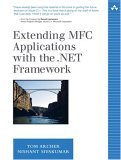
Extending MFC Applications with the .NET Framework

Buy from Amazon

- Dmitry Vostokov @ DumpAnalysis.org -

Crash Dump Analysis Patterns (Part 36)

Wednesday, November 14th, 2007

The pattern I should have written as one of the first is called Local Buffer Overflow. It is observed on x86 platforms when a local variable and a function return address and/or saved frame pointer EBP are overwritten with some data. As a result, the instruction pointer EIP becomes Wild Pointer and we have a process crash in user mode or a bugcheck in kernel mode. Sometimes this pattern is diagnosed by looking at mismatched EBP and ESP values and in the case of ASCII or UNICODE buffer overflow EIP register may contain 4-char or 2-wchar_t value and ESP or EBP or both registers might point at some string fragment like in the example below:

0:000> r
eax=000fa101 ebx=0000c026 ecx=01010001 edx=bd43a010 esi=000003e0 edi=00000000
eip=0048004a esp=0012f158 ebp=00510044 iopl=0  nv up ei pl nz na po nc
cs=001b ss=0023 ds=0023 es=0023 fs=0038 gs=0000 efl=00000202
0048004a 0000 add     byte ptr [eax],al  ds:0023:000fa101=??

0:000> kL
ChildEBP RetAddr 
WARNING: Frame IP not in any known module. Following frames may be wrong.
0012f154 00420047 0x48004a
0012f158 00440077 0x420047
0012f15c 00420043 0x440077
0012f160 00510076 0x420043
0012f164 00420049 0x510076
0012f168 00540041 0x420049
0012f16c 00540041 0x540041
...
...
...

Good buffer overflow case studies with complete analysis including assembly language tutorial can be found in Buffer Overflow Attacks book.

Buy from Amazon 

- Dmitry Vostokov @ DumpAnalysis.org -

What is Memory Dump Analysis?

Wednesday, November 7th, 2007

From a computer system we get a memory dump composed from fixed size observable values called bit or byte values. Then we impose some structure on it in order to extract various derived objects like threads, processes, etc., build some organization and understand what had happened. This activity is called modeling and memory, crash or core dump analysis is all about modeling a dynamical computer system based on its memory slice. Then we can make predictions and test them via controlled experiments called troubleshooting advices. Tools like WinDbg or GDB can be considered as abstract computers whose job is to model another computer when we feed memory dumps to them.

Modeling computers on computers is inherently reductionist approach and most of mainstream science is just plain reductionism. Just compare the notion of point-like particles as building blocks in physics and bits, recursiveness of physical states and computer algorithms.   

If you want to understand reductionist modeling in physics I would recommend the following book The Comprehensible Cosmos: Where Do the Laws of Physics Come From? written by Victor J. Stenger which I have just finished reading.

Buy from Amazon

The nice feature of this book is its clear separation between textual description and mathematics. The first 190 pages don’t have any mathematical formulas and the next 130 pages repeat the same discussion using undergraduate level of mathematics. 

- Dmitry Vostokov @ DumpAnalysis.org -

GDB for WinDbg Users (Part 7)

Friday, October 26th, 2007

It has been some time since I wrote the previous part. Here I will put some useful links. First link is a paper from Greg Lehey with core dump analysis cases studies on FreeBSD Intel platform using GDB and DDB (interactive kernel debugger)

Debugging Kernel Problems   

The second link is a modern x86 assembly language book written by Richard Blum featuring AT&T syntax, GAS and GDB, interfacing with C language and Linux system calls, optimized compiler code, FPU and SIMD commands, inline and GCC generated assembly code:

Professional Assembly Language

Buy from Amazon

- Dmitry Vostokov @ DumpAnalysis.org -

Threads as braided strings in abstract space (1)

Thursday, October 25th, 2007

In the past I was trying to find a way to depict running and blocked threads graphically perhaps as strings in some abstract n-dimensional space (manifold), preferably 3-dimensional manifold. If you have never encountered manifolds here is their informal definition:

3-dimensional manifold is a 3-dimensional space that looks like a 3-dimensional Euclidean space locally (in small regions) so we can explore the manifold space like we do in our 3-dimensional spatial world

Example: the surface of a sphere where small regions look like 2-dimensional rectangles (compare Earth surface and a football field on it)

My infrequent attempts were not satisfactory and only recently after reading the book Towards a Philosophy of Real Mathematics written by David Corfield I’ve found that it might be good to represent threads as n-string braids.

 Buy from Amazon

Braids are strings that raise monotonically without reversing their direction. It sounds like an arrow of time during computation. Braid theory is related to knot theory and might be at a good metaphor to explore. To picture thread strings we need to find abstract coordinates for our space. One of axes is obviously time axis and the other is a program counter axis (for example, the value of EIP register). 

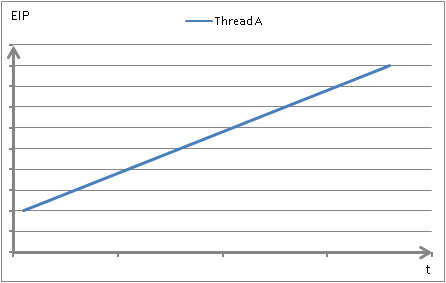
Here is a thread running through code sequentially without jumps or loops, acquiring and releasing a spinlock on its way:


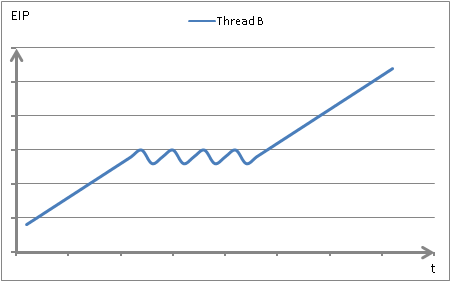
Here is another thread looping while trying to acquire a spinlock and finally taking ownership of it and then running through the same code sequentially:

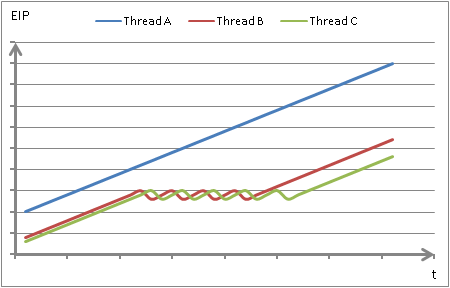
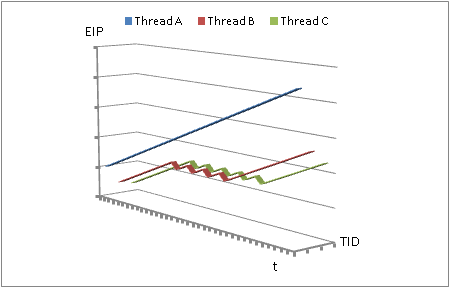
Suppose that both threads contend for the same spinlock and there is a 3rd thread doing the same. Let’s overlay them on one single diagram:

To have a perspective we can add a 3rd dimension - thread number or ID (TID):

Instead of TID axis we can use data address axis (the data address accessed by the current instruction) or have it as a 4th dimension. If we want to differentiate between read and write addresses we can add 5th axis. We will try to do it in the next part.

- Dmitry Vostokov @ DumpAnalysis.org -

Memory Dump - A Mathematical Definition

Wednesday, October 24th, 2007

This is the first post in Science of Memory Dump Analysis category where I apply philosophy, systems theory, mathematics, physics and computer science ideas. It was inspired after reading Life Itself book written by Robert Rosen where computers are depicted as direct sums of states. As shown in that book, in the case of machines, their synthetic models (direct sums) are equivalent to analytic models (direct product of observables). Taking every single bit as an observable having its values in Z2 set {0, 1} we can make a definition of an ideal memory dump as a direct product or a direct sum of bits saved instantaneously at the given time:

i si = i si

Of course, we can also consider bytes having 8 bits as observables having their values from Z256 set, etc.

In our case we can simply rewrite direct sum or product as the list of bits, bytes, words or double words, etc:

(…, si-1, si, si+1, …, sj-1, sj, sj+1, …)

According to Rosen we include hardware states (registers, for example) and partition memory into input, output states for particular computation and other states.

Saving a memory dump takes certain amount of time. Suppose that it takes 3 discrete time events (ticks). During the first tick we save memory up to (…, si-1, si) and that memory has some relationship to sj state. During the second tick sj state changes its value and during the 3rd tick we copy the rest of the memory (si+1, …, sj-1, sj, sj+1, …). Now we see that the final memory dump is inconsistent:

(…, si-1, si, si+1, …, sj-1, sj, sj+1, …)

I explained this earlier in plain words in Inconsistent Dump pattern. Therefore we might consider a real memory dump as a direct sum of disjoint memory areas Mt taken during some time interval (t0, …, tn)

M = t Mt where Mt = k stk or simply

M = t k stk

- Dmitry Vostokov @ DumpAnalysis.org -

TOC for Windows® Crash Dump Analysis

Monday, October 15th, 2007

Following up the announcement of the forthcoming book I’ve published a preliminary Table of Contents which can be found here:

http://www.dumpanalysis.org/index.php?q=TOC+for+Windows+Crash+Dump+Analysis+Book

In November I’m going to publish a sample chapter and by that time try to finalize TOC.

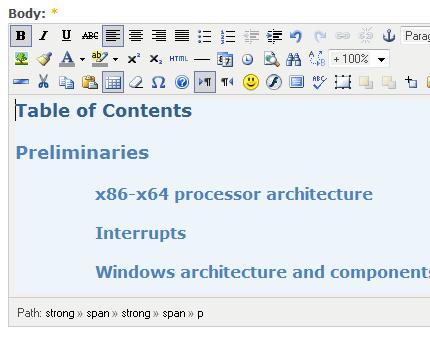
As a part of my preparatory work I also installed TinyMCE module for my Drupal installation and can now enjoy writing anytime and anywhere:

At the same time I’m trying to improve my writing by reading these two books:

Spring Into Technical Writing for Engineers and Scientists (Spring Into… Series)

Buy from Amazon

BUGS in Writing, Revised Edition: A Guide to Debugging Your Prose (2nd Edition)

Buy from Amazon

- Dmitry Vostokov @ DumpAnalysis.org -

XEN from a system programmer’s perspective

Wednesday, October 3rd, 2007

I’m trying to educate myself about virtualization and XEN and found the book The Definitive Guide to the Xen Hypervisor written by David Chisnall that is about to be published:

Buy from Amazon

Table of Contents

I’ll write a review once I get it and read it.  

- Dmitry Vostokov @ DumpAnalysis.org -

Heaps and heap corruption explained

Tuesday, October 2nd, 2007

Excellent free chapter explaining process heap implementation and debugging heap corruption issues from the authors of Advanced Windows Debugging book:

Sample Chapter

- Dmitry Vostokov @ DumpAnalysis.org -

My unsorted collection of books

Monday, October 1st, 2007

Recently brought almost all my programming and math books into one place:

Will spend some time sorting them and publish the new picture afterwards.  

- Dmitry Vostokov @ DumpAnalysis.org -

Is there any life inside Windows?

Thursday, September 13th, 2007

This question came into my mind while reading the fascinating book “Life Itself: A Comprehensive Inquiry into the Nature, Origin, and Fabrication of Life” written by theoretical biologist Robert Rosen and recalling that 13-14 years ago one Unix guru saw a Matt Pietrek’s book “Windows Internals” about Windows 3.x and asked me a rhetorical question: “Is there a life?”. Now we can ask the question again: “Is there any life inside a contemporary computer system?”.

Jokes apart, Rosen’s book about life is the most interesting science book I have ever read. It is a bit mathematical but doesn’t require more mathematical maturity than general science undergraduate level and even covers Category Theory in the context of modeling systems. Most people learnt about sets and their foundational nature at school or university but have never heard about a different approach via categories. Hopefully, this book will provide the right answer to me when I finish reading it.

Buy from Amazon

- Dmitry Vostokov @ DumpAnalysis.org -

Jeffrey Richter updates his classic book

Thursday, August 30th, 2007

Jeffrey Richter updates his book “Programming Applications for Microsoft Windows” to include information about Windows XP and Vista. The new book title is ”Windows via C/C++”. Looking forward to reading this classic book again. 

Buy from Amazon

- Dmitry Vostokov @ DumpAnalysis.org -

Book: Windows® Crash Dump Analysis

Sunday, August 26th, 2007

After blogging for more than a year, accumulating initial amount of material and being persuaded by my colleagues at Citrix I finally decided to embrace a new challenge and write a book with a simple working title: Windows® Crash Dump Analysis.

The reader will master crash and hang memory dump analysis for process, kernel and complete memory dumps. The book will provide answers to many questions including those in the following list:

Memory Dump Analysis Interview Questions

and will also include guidelines for implementing SMART (Smart Memory Analysis in Real Time) process in a technical support or software maintenance environment.

As this is my first book I’m going to write the draft version online. More details and the link to Table of Contents will be announced in September/October.

I’ll continue blogging about crash dump analysis at the same time.

- Dmitry Vostokov @ DumpAnalysis.org -

Moving to kernel space (updated references)

Sunday, August 26th, 2007

If you are developing and debugging user space applications (and/or doing crash dump analysis in user space) and you want to understand Windows kernel dumps and device drivers better (and probably start writing your own kernel tools) here is the reading list I found the most effective over the last 4 years:

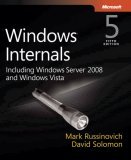
0. Read and re-read Windows Internals book in parallel while reading all other books. I read all editions by the way. It will show you the big picture and some useful WinDbg commands and techniques but you need to read device driver books to fill the gaps and be confident in kernel space:

Buy from Amazon

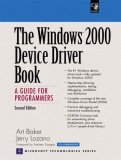
1. Start with “The Windows 2000 Device Driver Book: A Guide for Programmers (2nd Edition)”. This short book will show you the basics and you can start writing your drivers and kernel tools immediately.

Buy from Amazon

2. Next read “Windows NT Device Driver Development” book to consolidate your knowledge. This book has been reprinted by OSR:

Buy from Amazon

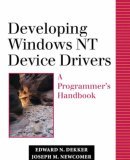
3. Don’t stop here. Read “Developing Windows NT Device Drivers:
 A Programmer’s Handbook”. This is very good book explaining everything in great detail and good pictures. You will finally understand various buffering methods.

Buy from Amazon

4. Continue with WDM drivers and modern presentation: “Programming the Microsoft Windows Driver Model, Second Edition”. Must read even if your drivers are not WDM.

Buy from Amazon

5. Finally read “Developing Drivers with the Windows Driver Foundation” book as this is the future and it also covers ETW (event tracing for Windows), WinDbg extensions, PREfast and static driver verifier.

Buy from Amazon

Additional reading (not including DDK Help which you will use anyway) can be done in parallel after finishing “Windows NT Device Driver Development” book:

1. OSR NT Insider articles. I have their full printed collection 1996 - 2006

http://www.osronline.com/

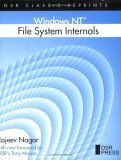
2. “Windows NT File System Internals” reprinted by OSR:

Buy from Amazon

3. “Rootkits: Subverting the Windows Kernel” book will show you Windows kernel from hacker perspective. In addition you will find overview of kernel areas not covered in other books.

Buy from Amazon

Of course, you must know C language and its idioms really well. Really know it down to assembly language level! I’ll publish another reading list soon. Stay tuned.

- Dmitry Vostokov @ DumpAnalysis.org -

Security and Static Code Analysis

Sunday, August 19th, 2007

Almost finished reading the book and wrote a short review:

Secure Programming with Static Analysis

- Dmitry Vostokov @ DumpAnalysis.org -

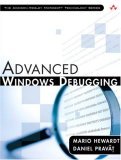
Book: Advanced Windows Debugging

Friday, August 17th, 2007

Waiting for this book to be released:

Advanced Windows Debugging by Mario Hewardt and Daniel Pravat

Buy from Amazon

Already ordered it and will post my review as soon as it arrives.

- Dmitry Vostokov @ DumpAnalysis.org -

BIOS Internals

Friday, August 10th, 2007

The life of OS starts with BIOS and if you are curious about BIOS technology, x86 computer architecture and security the following book that I recently discovered and bought will help you:

BIOS Disassembly Ninjutsu Uncovered

- Dmitry Vostokov @ DumpAnalysis.org -

Crash Dump Analysis Patterns (Part 17)

Friday, July 20th, 2007

.NET programs also crash either from defects in .NET runtime (Common Language Runtime, CLR) or from non-handled runtime exceptions in managed code executed by .NET virtual machine. The latter exceptions are re-thrown from .NET runtime to be handled by operating system and intercepted by native debuggers. Therefore our next crash dump analysis pattern is called Managed Code Exception

When you get a dump from .NET application it is the dump from a native process. !analyze -v output can usually tell you that exception is actually CLR exception and give you other hints to look at managed code stack (CLR stack):

FAULTING_IP:
kernel32!RaiseException+53
77e4bee7 5e              pop     esi

EXCEPTION_RECORD:  ffffffff -- (.exr 0xffffffffffffffff)
ExceptionAddress: 77e4bee7 (kernel32!RaiseException+0x00000053)
   ExceptionCode: e0434f4d (CLR exception)
   ExceptionFlags: 00000001
NumberParameters: 1
   Parameter[0]: 80131604

DEFAULT_BUCKET_ID:  CLR_EXCEPTION

PROCESS_NAME:  mmc.exe

ERROR_CODE: (NTSTATUS) 0xe0434f4d - <Unable to get error code text>

MANAGED_STACK: !dumpstack -EE
No export dumpstack found

STACK_TEXT:
05faf3d8 79f97065 e0434f4d 00000001 00000001 kernel32!RaiseException+0x53
WARNING: Stack unwind information not available. Following frames may be wrong.
05faf438 7a0945a4 023f31e0 00000000 00000000 mscorwks!DllCanUnloadNowInternal+0×37a9
05faf4fc 00f2f00a 02066be4 02085ee8 023d0df0 mscorwks!CorLaunchApplication+0×12005
05faf500 02066be4 02085ee8 023d0df0 023d0e2c 0xf2f00a
05faf504 02085ee8 023d0df0 023d0e2c 05e00dfa 0×2066be4
05faf508 023d0df0 023d0e2c 05e00dfa 023d0e10 0×2085ee8
05faf50c 023d0e2c 05e00dfa 023d0e10 05351d30 0×23d0df0
05faf510 05e00dfa 023d0e10 05351d30 023d0e10 0×23d0e2c

FOLLOWUP_IP:
mscorwks!DllCanUnloadNowInternal+37a9
79f97065 c745fcfeffffff  mov     dword ptr [ebp-4],0FFFFFFFEh

SYMBOL_NAME:  mscorwks!DllCanUnloadNowInternal+37a9

MODULE_NAME: mscorwks

IMAGE_NAME:  mscorwks.dll

PRIMARY_PROBLEM_CLASS:  CLR_EXCEPTION

BUGCHECK_STR:  APPLICATION_FAULT_CLR_EXCEPTION

Sometimes you can see mscorwks.dll on raw stack or see it loaded and find it on other thread stacks than the current one.

When you get such hints you might want to get managed code stack as well. First you need to load the appropriate WinDbg SOS extension (Son of Strike) corresponding to .NET runtime version. This can be done by the following command:

0:015> .loadby sos mscorwks

You can check which SOS extension version was loaded this by using .chain command:

0:015> .chain
Extension DLL search Path:
...
...
...
Extension DLL chain:
    C:\WINDOWS\Microsoft.NET\Framework\v2.0.50727\sos: image 2.0.50727.42, API 1.0.0, built Fri Sep 23 08:27:26 2005
        [path: C:\WINDOWS\Microsoft.NET\Framework\v2.0.50727\sos.dll]

    dbghelp: image 6.6.0007.5, API 6.0.6, built Sat Jul 08 21:11:32 2006
        [path: C:\Program Files\Debugging Tools for Windows\dbghelp.dll]
    ext: image 6.6.0007.5, API 1.0.0, built Sat Jul 08 21:10:52 2006
        [path: C:\Program Files\Debugging Tools for Windows\winext\ext.dll]
    exts: image 6.6.0007.5, API 1.0.0, built Sat Jul 08 21:10:48 2006
        [path: C:\Program Files\Debugging Tools for Windows\WINXP\exts.dll]
    uext: image 6.6.0007.5, API 1.0.0, built Sat Jul 08 21:11:02 2006
        [path: C:\Program Files\Debugging Tools for Windows\winext\uext.dll]
    ntsdexts: image 6.0.5457.0, API 1.0.0, built Sat Jul 08 21:29:38 2006
        [path: C:\Program Files\Debugging Tools for Windows\WINXP\ntsdexts.dll]

Then you can use !dumpstack to dump the current stack or !EEStack command to dump all thread stacks. The native stack trace would be mixed with managed stack trace:

0:015> !dumpstack
OS Thread Id: 0x16e8 (15)
Current frame: kernel32!RaiseException+0x53
ChildEBP RetAddr Caller,Callee
05faf390 77e4bee7 kernel32!RaiseException+0x53, calling ntdll!RtlRaiseException
05faf3a8 79e814da mscorwks!Binder::RawGetClass+0x23, calling mscorwks!Module::LookupTypeDef
05faf3bc 79e87ff4 mscorwks!Binder::IsClass+0x21, calling mscorwks!Binder::RawGetClass
05faf3c8 79f958b8 mscorwks!Binder::IsException+0x13, calling mscorwks!Binder::IsClass
05faf3d8 79f97065 mscorwks!RaiseTheExceptionInternalOnly+0x226, calling kernel32!RaiseException
05faf438 7a0945a4 mscorwks!JIT_Throw+0xd0, calling mscorwks!RaiseTheExceptionInternalOnly
05faf4ac 7a0944ea mscorwks!JIT_Throw+0x1e, calling mscorwks!LazyMachStateCaptureState
05faf4c8 793d424e (MethodDesc 0x7924ad68 +0x2e System.Threading.WaitHandle.WaitOne(Int64, Boolean)), calling mscorwks!WaitHandleNative::CorWaitOneNative
05faf4fc 00f2f00a (MethodDesc 0x4f97500 +0x9a Ironring.Management.MMC.SnapinBase+MmcWindow.Invoke(System.Delegate, System.Object[])), calling mscorwks!JIT_Throw
05faf510 05e00dfa (MethodDesc 0×4f98fd8 +0xca MyNamespace.MyClass.MyMethod(Boolean)), calling 05fc7124
05faf55c 00f62fbc (MethodDesc 0×4f95f90 +0×16f4 MyNamespace.MyClass.MyMethod.Initialise(System.Object))

05faf740 793d912f (MethodDesc 0×7925fc70 +0×2f System.Threading._ThreadPoolWaitCallback.WaitCallback_Context(System.Object))
05faf748 793683dd (MethodDesc 0×7913f3d0 +0×81 System.Threading.ExecutionContext.Run(System.Threading.ExecutionContext, System.Threading.ContextCallback, System.Object))
05faf75c 793d9218 (MethodDesc 0×7925fc80 +0×6c System.Threading._ThreadPoolWaitCallback.PerformWaitCallback(System.Object)), calling (MethodDesc 0×7913f3d0 +0 System.Threading.ExecutionContext.Run(System.Threading.ExecutionContext, System.Threading.ContextCallback, System.Object))
05faf774 79e88f63 mscorwks!CallDescrWorker+0×33
05faf784 79e88ee4 mscorwks!CallDescrWorkerWithHandler+0xa3, calling mscorwks!CallDescrWorker
05faf804 79f20212 mscorwks!DispatchCallBody+0×1e, calling mscorwks!CallDescrWorkerWithHandler
05faf824 79f201bc mscorwks!DispatchCallDebuggerWrapper+0×3d, calling mscorwks!DispatchCallBody
05faf888 79f2024b mscorwks!DispatchCallNoEH+0×51, calling mscorwks!DispatchCallDebuggerWrapper
05faf8bc 7a07bdf0 mscorwks!Holder,2>::~Holder,2>+0xbb, calling mscorwks!DispatchCallNoEH
05faf90c 77e61d1e kernel32!WaitForSingleObjectEx+0xac, calling ntdll!ZwWaitForSingleObject
05faf91c 79ecb4a4 mscorwks!Thread::UserResumeThread+0xfb
05faf92c 79ecb442 mscorwks!Thread::DoADCallBack+0×355, calling mscorwks!Thread::UserResumeThread+0xae
05faf950 79e74afe mscorwks!Thread::EnterRuntimeNoThrow+0×9b, calling mscorwks!_EH_epilog3
05faf988 79e77fe8 mscorwks!PEImage::LoadImage+0×1e1, calling mscorwks!_SEH_epilog4
05faf9c0 79ecb364 mscorwks!Thread::DoADCallBack+0×541, calling mscorwks!Thread::DoADCallBack+0×2a5
05faf9fc 7a0e1b7e mscorwks!Thread::DoADCallBack+0×575, calling mscorwks!Thread::DoADCallBack+0×4d4
05fafa24 7a0e1bab mscorwks!ManagedThreadBase::ThreadPool+0×13, calling mscorwks!Thread::DoADCallBack+0×550
05fafa38 7a07cae8 mscorwks!QueueUserWorkItemCallback+0×9d, calling mscorwks!ManagedThreadBase::ThreadPool
05fafa54 7a07ca48 mscorwks!QueueUserWorkItemCallback, calling mscorwks!UnwindAndContinueRethrowHelperAfterCatch
05fafa90 7a110f08 mscorwks!ThreadpoolMgr::ExecuteWorkRequest+0×40
05fafaa8 7a112328 mscorwks!ThreadpoolMgr::WorkerThreadStart+0×1f2, calling mscorwks!ThreadpoolMgr::ExecuteWorkRequest
05fafad0 79e7839d mscorwks!EEHeapFreeInProcessHeap+0×21, calling mscorwks!EEHeapFree
05fafae0 79e782dc mscorwks!operator delete[]+0×30, calling mscorwks!EEHeapFreeInProcessHeap
05fafb14 79ecb00b mscorwks!Thread::intermediateThreadProc+0×49
05fafb48 77e65512 kernel32!FlsSetValue+0xc7, calling kernel32!_SEH_epilog
05fafb6c 75da14d0 sxs!_calloc_crt+0×19, calling sxs!calloc
05fafb80 77e65512 kernel32!FlsSetValue+0xc7, calling kernel32!_SEH_epilog
05fafb88 75da1401 sxs!_CRT_INIT+0×17e, calling sxs!_initptd
05fafb8c 75da1408 sxs!_CRT_INIT+0×185, calling kernel32!GetCurrentThreadId
05fafb9c 30403805 MMCFormsShim!DllMain+0×15, calling MMCFormsShim!PrxDllMain
05fafbb0 30418b69 MMCFormsShim!__DllMainCRTStartup+0×7a, calling MMCFormsShim!DllMain
05fafbdc 75de0e4c sxs!_SxsDllMain+0×87, calling sxs!DllStartup_CrtInit
05fafbf0 30418bf9 MMCFormsShim!__DllMainCRTStartup+0×10a, calling MMCFormsShim!__SEH_epilog4
05fafbf4 30418c22 MMCFormsShim!_DllMainCRTStartup+0×1d, calling MMCFormsShim!__DllMainCRTStartup
05fafbfc 7c81a352 ntdll!LdrpCallInitRoutine+0×14
05fafc24 7c82ee8b ntdll!LdrpInitializeThread+0×1a5, calling ntdll!RtlLeaveCriticalSection
05fafc2c 7c82edec ntdll!LdrpInitializeThread+0×18f, calling ntdll!_SEH_epilog
05fafc7c 7c82ed71 ntdll!LdrpInitializeThread+0xd8, calling ntdll!RtlActivateActivationContextUnsafeFast
05fafc80 7c82ed35 ntdll!LdrpInitializeThread+0×12c, calling ntdll!RtlDeactivateActivationContextUnsafeFast
05fafcb4 7c82edec ntdll!LdrpInitializeThread+0×18f, calling ntdll!_SEH_epilog
05fafcb8 7c827c3b ntdll!NtTestAlert+0xc
05fafcbc 7c82ecb1 ntdll!_LdrpInitialize+0×1de, calling ntdll!_SEH_epilog
05fafd10 7c82ecb1 ntdll!_LdrpInitialize+0×1de, calling ntdll!_SEH_epilog
05fafd14 7c826d9b ntdll!NtContinue+0xc
05fafd18 7c8284da ntdll!KiUserApcDispatcher+0×3a, calling ntdll!NtContinue
05faffa4 79ecaff9 mscorwks!Thread::intermediateThreadProc+0×37, calling mscorwks!_alloca_probe_16
05faffb8 77e64829 kernel32!BaseThreadStart+0×34

.NET language symbolic names are usually reconstructed from .NET assembly metadata. 

You can examine a CLR exception and get managed stack trace by using !PrintException and !CLRStack commands, for example:

0:014> !PrintException
Exception object: 02320314
Exception type: System.Reflection.TargetInvocationException
Message: Exception has been thrown by the target of an invocation.
InnerException: System.Runtime.InteropServices.COMException, use !PrintException 023201a8 to see more
StackTrace (generated):
    SP       IP       Function
    075AF4FC 016BFD9A Ironring.Management.MMC.SnapinBase+MmcWindow.Invoke(System.Delegate, System.Object[])
    ...
    ...
    ...
    075AF740 793D87AF System.Threading._ThreadPoolWaitCallback.WaitCallback_Context(System.Object)
    075AF748 793608FD System.Threading.ExecutionContext.Run(System.Threading.ExecutionContext, System.Threading.ContextCallback, System.Object)
    075AF760 793D8898 System.Threading._ThreadPoolWaitCallback.PerformWaitCallback(System.Object)

StackTraceString: <none>
HResult: 80131604

0:014> !PrintException 023201a8
Exception object: 023201a8
Exception type: System.Runtime.InteropServices.COMException
Message: Error HRESULT E_FAIL has been returned from a call to a COM component.
InnerException: <none>
StackTrace (generated):
    SP       IP       Function
    00000000 00000001 Ironring.Management.MMC.IMMCFormsShim.HostUserControl3(System.Object, System.Object, System.String, System.String, Int32, Int32)
    0007F724 073875B9 Ironring.Management.MMC.FormNode.SetShimControl(System.Object)
    0007F738 053D9DDE Ironring.Management.MMC.FormNode.set_ControlType(System.Type)
    ...
    ...
    ...

StackTraceString: <none>
HResult: 80004005

0:014> !CLRStack
OS Thread Id: 0x11ec (14)
ESP       EIP
075af4fc 016bfd9a Ironring.Management.MMC.SnapinBase+MmcWindow.Invoke(System.Delegate, System.Object[])
...
...
...
075af740 793d87af System.Threading._ThreadPoolWaitCallback.WaitCallback_Context(System.Object)
075af748 793608fd System.Threading.ExecutionContext.Run(System.Threading.ExecutionContext, System.Threading.ContextCallback, System.Object)
075af760 793d8898 System.Threading._ThreadPoolWaitCallback.PerformWaitCallback(System.Object)
075af8f0 79e7be1b [GCFrame: 075af8f0]

!help command gives the list of other available SOS extension commands:

0:014> !help

Object Inspection

DumpObj (do)
DumpArray (da)
DumpStackObjects (dso)
DumpHeap
DumpVC
GCRoot
ObjSize
FinalizeQueue
PrintException (pe)
TraverseHeap

Examining code and stacks

Threads
CLRStack
IP2MD
U
DumpStack
EEStack
GCInfo
EHInfo
COMState
BPMD

Examining CLR data structures

DumpDomain
EEHeap
Name2EE
SyncBlk
DumpMT
DumpClass
DumpMD
Token2EE
EEVersion
DumpModule
ThreadPool
DumpAssembly
DumpMethodSig
DumpRuntimeTypes
DumpSig
RCWCleanupList
DumpIL

Diagnostic Utilities

VerifyHeap
DumpLog
FindAppDomain
SaveModule
GCHandles
GCHandleLeaks
VMMap
VMStat
ProcInfo
StopOnException (soe)
MinidumpMode

Other

FAQ

If you are new to .NET and interested in .NET debugging I would recommend 3 books:

Essential .NET, Volume I: The Common Language Runtime

Buy from Amazon

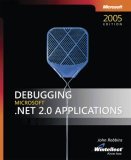
Debugging Microsoft .NET 2.0 Applications
Buy from Amazon

Advanced .NET Debugging

Buy from Amazon

Expert .NET 2.0 IL Assembler

Buy from Amazon

- Dmitry Vostokov @ DumpAnalysis.org -

GDB for WinDbg Users (Part 4)

Sunday, July 1st, 2007

If you are looking for debugging tutorials with a wider scope than just listing various debugger commands then the following books will be useful:

Both use GDB for debugging case studies and will be useful for engineers with any level of debugging experience.

- Dmitry Vostokov @ DumpAnalysis.org -
Moving to UML 2.x

Friday, May 4th, 2007

As a part of improving my UML diagrams and moving towards UML 2.x I’m evaluating free community editors and found the one that seems to be good: Visual Paradigm for UML 6.0 Community Edition.
Here are some diagram screenshots:

http://www.visual-paradigm.com/product/vpuml/vpumlscreenshots.jsp

If you don’t know you can be certified in UML 2:

http://www.omg.org/uml-certification/index.htm

In 2003 I was one of beta-testers of UML Fundamentals exam and passed it. I guess from my certificate number (B100031) I was the 31st person who passed the exam, the highest bit offset in a double word. Now I’m aiming to be certified in the next Intermediate level. This exam is a pure UML language exam. It is not about applying UML in your domain. The only one book for this certification is this and which I found very good for exam preparation:

UML 2 Certification Guide: Fundamental & Intermediate Exams

Buy from Amazon

- Dmitry Vostokov -