Archive for the ‘CDF Analysis Tips and Tricks’ Category
Thursday, April 8th, 2010
This is a new open source tool similar to PDBFinder in functionality but with much simpler interface and internal implementation (based on the file name structure of the certain classes of TMF files for ETW). To be released this month on TraceAnalysis.org.
- Dmitry Vostokov @ DumpAnalysis.org + TraceAnalysis.org -
Posted in CDF Analysis Tips and Tricks, Citrix, Debugging, Escalation Engineering, Software Technical Support, Software Trace Analysis, Tools | No Comments »
Monday, April 5th, 2010
Typical software narrative history consists of requests and responses, for example, function or object method calls and returns:
#     Module PID  TID  Time         File    Function Message

[...]

26060 dllA   1604 7108 10:06:21.746 fileA.c foo      Calling bar

[...]

26232 dllA   1604 7108 10:06:22.262 fileA.c foo      bar returns 0x5

[...]
The code that generates execution history is response-complete if it traces both requests and responses. For such code (except in cases where tracing is stopped before a response) the absence of expected responses could be a sign of blocked threads or quiet exception processing. The code that generates execution history is exception-complete if it also traces exception processing. Response-complete and exception-complete code is called call-complete. If we don’t see response messages for call-complete code we have Incomplete History.
In general, we can talk about the absence of certain messages in a trace as a deviation from the standard trace sequence template corresponding to a use case. The difference there is in a missing request too. This is a topic for next patterns.
- Dmitry Vostokov @ DumpAnalysis.org + TraceAnalysis.org -
Posted in CDF Analysis Tips and Tricks, Debugging, Software Narratology, Software Trace Analysis, Trace Analysis Patterns | No Comments »
Wednesday, March 24th, 2010
Here is one of the first case studies in pattern-driven software trace analysis. A user starts printing but nothing comes out. However, if the older printer driver is installed everything works as expected. We suspect that print spooler crashes if the newer printer driver is used. Based on known module name in ETW trace we find PID for print spooler process (19984) and immediately see discontinuity in the trace with the large time delta between the last PID message and the last trace statement (almost 4 minutes):
No   Source        PID   TID   Time         Message

712  \src\print\ui 19984 16200 12:22:31.571 PropertySheet returns 1

[… no messages for PID 19984 …]

5103 \src\mgmt   1292  7604  12:26:11.659 WaitAction
If we select the adjoint thread of source \src\print\driver (in other words, filter only its messages) we would see discontinuity with the similar time delta. We know that printer driver runs in print spooler context. However, PID had changed and that means print spooler was restarted (perhaps after a crash):
No   Source            PID   TID   Time         Message

557  \src\print\driver 19984 16200 12:22:28.069 DisableDevice returns

[… discontinuity for \print\driver …]

1462 \src\print\driver 10828 17584 12:26:03.854 DllMain
- Dmitry Vostokov @ DumpAnalysis.org + TraceAnalysis.org -
Posted in CDF Analysis Tips and Tricks, Debugging, Software Trace Analysis, Trace Analysis Patterns | No Comments »
Monday, March 8th, 2010
Sometimes we have a sequence of Activity Regions with increasing values of Statement Current, like depicted here:
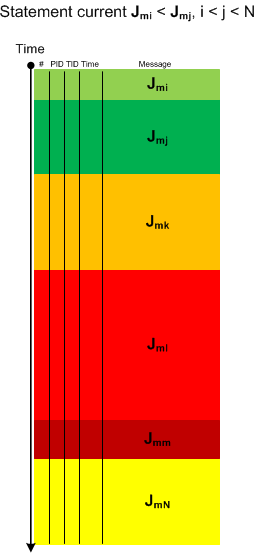
The boundaries of regions may be blurry and arbitrarily drawn. Nevertheless, the current is visibly increasing or decreasing, hence the name of this pattern: Trace Acceleration, by analogy with physical acceleration, second-order derivative. We can also metaphorically use here the notion of a partial derivative for trace statement current and acceleration for Threads of Activity and Adjoint Threads of Activity but whether it is useful remains to be seen.
- Dmitry Vostokov @ DumpAnalysis.org + TraceAnalysis.org -
Posted in CDF Analysis Tips and Tricks, Debugging, Software Trace Analysis, Software Trace Visualization, Trace Analysis Patterns | 1 Comment »
Thursday, March 4th, 2010
This is an extension of Thread of Activity pattern based on the concept of multibraiding and it is called Adjoint Thread of Activity correspondingly. I’m going to illustrate it soon when I publish a synthetic case study involving several software trace analysis patterns.
- Dmitry Vostokov @ DumpAnalysis.org + TraceAnalysis.org -
Posted in CDF Analysis Tips and Tricks, Debugging, Science of Software Tracing, Software Trace Analysis, Trace Analysis Patterns | 3 Comments »
Saturday, February 13th, 2010
Another useful pattern is called Time Delta. This is a time interval between significant events. For example,
#     Module PID  TID  Time         File    Function Message

1                      10:06:18.994                  (Start)

[...]

6060  dllA   1604 7108 10:06:21.746 fileA.c DllMain  DLL_PROCESS_ATTACH

[…]

24480 dllA   1604 7108 10:06:32.262 fileA.c Exec     Path: C:\Program Files\CompanyA\appB.exe

[…]

24550 dllB   1604 9588 10:06:32.362 fileB.c PostMsg  Event Q

[…]

28230                  10:07:05.170                  (End)
Such deltas are useful in examining delays. In the trace fragment above we are interested in dllA activity from its load until it launches appB.exe. We see that the time delta was only 10 seconds. The message #24550 was the last message from the process ID 1604 and after that we didn’t “hear” from that PID for more than 30 seconds until the tracing was stopped.
- Dmitry Vostokov @ DumpAnalysis.org + TraceAnalysis.org -
Posted in CDF Analysis Tips and Tricks, Debugging, Software Trace Analysis, Trace Analysis Patterns | 1 Comment »
Saturday, February 13th, 2010
When looking at software traces and doing either a search for or just scrolling certain messages have our attention immediately. We call them Significant Events and hence the name of this pattern, Significant Event. It could be a recorded exception or an error, a basic fact, a trace message from vocabulary index, or just any trace statement that marks the start of some activity we want to explore in depth, for example, a certain DLL is attached to the process, a coupled process is started or a function is called. The start of a trace and the end of it are trivial significant events and are used in deciding whether the trace is circular, in determining the trace recording interval or its average statement current.
- Dmitry Vostokov @ DumpAnalysis.org + TraceAnalysis.org -
Posted in CDF Analysis Tips and Tricks, Debugging, Software Trace Analysis, Trace Analysis Patterns | 1 Comment »
Thursday, February 11th, 2010
This is a revised, edited, cross-referenced and thematically organized volume of selected DumpAnalysis.org blog posts about crash dump analysis and debugging written in July 2009 - January 2010 for software engineers developing and maintaining products on Windows platforms, quality assurance engineers testing software on Windows platforms and technical support and escalation engineers dealing with complex software issues. The fourth volume features:
- 13 new crash dump analysis patterns
- 13 new pattern interaction case studies
- 10 new trace analysis patterns
- 6 new Debugware patterns and case study
- Workaround patterns
- Updated checklist
- Fully cross-referenced with Volume 1, Volume 2 and Volume 3
- New appendixes
Product information:
- Title: Memory Dump Analysis Anthology, Volume 4
- Author: Dmitry Vostokov
- Language: English
- Product Dimensions: 22.86 x 15.24
- Paperback: 410 pages
- Publisher: Opentask (30 March 2010)
- ISBN-13: 978-1-906717-86-5
- Hardcover: 410 pages
- Publisher: Opentask (30 April 2010)
- ISBN-13: 978-1-906717-87-2

Back cover features memory space art image: Internal Process Combustion.
- Dmitry Vostokov @ DumpAnalysis.org + TraceAnalysis.org -
Posted in .NET Debugging, Aesthetics of Memory Dumps, Announcements, AntiPatterns, Art, Assembly Language, Books, C and C++, CDA Pattern Classification, CDF Analysis Tips and Tricks, Categorical Debugging, Certification, Citrix, Code Reading, Common Mistakes, Computer Science, Countefactual Debugging, Crash Analysis Report Environment (CARE), Crash Dump Analysis, Crash Dump Patterns, Crash Dumps for Dummies, DebugWare Patterns, Debugging, Debugging Slang, Education and Research, Escalation Engineering, Fun with Crash Dumps, Games for Debugging, Hardware, Horrors of Computation, Hyper-V, Kernel Development, Laws of Troubleshooting and Debugging, Mathematics of Debugging, Memiotics (Memory Semiotics), Memoidealism, Memoretics, Memory Analysis Culture, Memory Analysis Forensics and Intelligence, Memory Dreams, Memory Dump Analysis Jobs, Memory Dumps in Movies, Memory Space Art, Memory Visualization, Memuonics, Minidump Analysis, Multithreading, Music for Debugging, New Acronyms, New Words, Opcodism, Philosophy, Physicalist Art, Publishing, Science Fiction, Science of Memory Dump Analysis, Science of Software Tracing, Security, Software Architecture, Software Defect Construction, Software Engineering, Software Generalist, Software Maintenance Institute, Software Narratology, Software Technical Support, Software Trace Analysis, Software Trace Visualization, Software Tracing for Dummies, Software Victimology, Stack Trace Collection, Testing, Tools, Trace Analysis Patterns, Training and Seminars, Troubleshooting Methodology, Victimware, Virtualization, Vista, Visual Dump Analysis, WinDbg Scripts, WinDbg Tips and Tricks, WinDbg for GDB Users, Windows 7, Windows Server 2008, Windows System Administration, Workaround Patterns | No Comments »
Tuesday, January 12th, 2010
Inter-Correlation pattern is analogous to the previously described Intra-Correlation pattern but involves several traces from possibly different trace agents recorded (most commonly) at the same time or during an overlapping time interval:
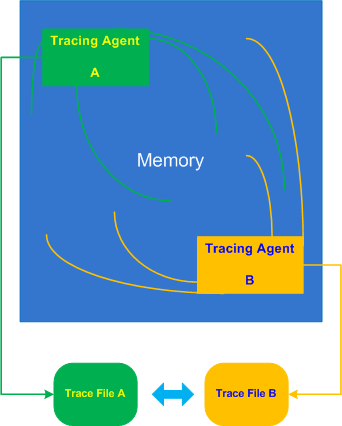
Let’s look at a typical example of an application subclassing windows to add additional look and feel element to its GUI or thjat hooks into window messaging. Suppose this application also records important trace points like window parameters before and after subclassing using ETW technology (Event Tracing for Windows). When we run the application in terminal services environment all windows (including other processes) are shown with an incorrect dimension. We therefore request the application trace and in addition WindowHistory trace to see how coordinates of all windows are changed over time. We easily find some Basic Facts in both traces such as window class name or time but it looks like window handle is different. In another set of traces recorded for comparison we have same window handle values, class name is absent from the ETW trace but a process and thread ID for the same window handle are different. We, therefore, don’t see a correlation between these traces and suspect that both traces in 2 sets were recorded in different terminal sessions, for example:
ETW trace:
#      PID   TID   Time          Message

[…]

46750  5890  6960  10:17:18.825  Subclassing, handle=0×100B8, class=MyWindowClass, […]

[…]
WindowHistory trace:
Handle: 0001006E Class: “MyWindowClass” Title: “”

Captured at: 10:17:19:637

   Process ID: 19e0

Thread ID: 16e4

Parent: 0

Screen position (l,t,r,b): (-2,896,1282,1026)

Client rectangle (l,t,r,b): (0,0,1276,122)

Visible: true

Window placement command: SW_SHOWNORMAL

Foreground: false

HungApp: false

Minimized: false

Maximized: false

[…]
- Dmitry Vostokov @ TraceAnalysis.org -
Posted in CDF Analysis Tips and Tricks, Debugging, Software Trace Analysis, Trace Analysis Patterns | No Comments »
Thursday, January 7th, 2010
Some practical engineers asked me how do Debugged! MZ/PE magazine back covers look like from a birds eye view:
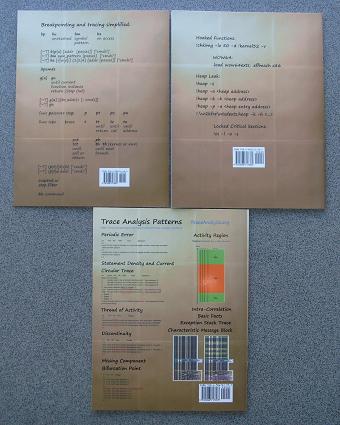
One engineer even commented that they look better and better (counterclockwise) :-)
- Dmitry Vostokov @ DumpAnalysis.org -
Posted in Announcements, Art, Books, CDF Analysis Tips and Tricks, Crash Dump Analysis, Crash Dump Patterns, Debugged! MZ/PE, Debugging, Publishing, Software Trace Analysis, Trace Analysis Patterns, WinDbg Tips and Tricks | No Comments »
Thursday, December 31st, 2009
What will you do confronted with a one million trace messages recorded between 10:44:15 and 10:46:55 with an average trace statement current of 7,000 msg/s from dozens of modules and having a one sentence problem description? One solution is to try to search for a specific vocabulary relevant to the problem description, for example, if a problem is an intermittent re-authentication then we might try to search for a word “password” or a similar one drawn from a troubleshooting domain vocabulary. So it is useful to have a Vocabulary Index to search for. Hence, the same name of this pattern. In our trace example, the search for “password” jumps straight to a small activity region of authorization modules starting from the message number #180,010 and the last “password” occurrence is in the message #180,490 that narrows initial analysis region to just 500 messages. Note the similarity here between a book and its index and a trace as a software narrative and its vocabulary index.
- Dmitry Vostokov @ TraceAnalysis.org -
Posted in CDF Analysis Tips and Tricks, Debugging, Software Narratology, Software Trace Analysis, Trace Analysis Patterns | 1 Comment »
Sunday, December 20th, 2009
“Memory dumps are facts.”
I’m very excited to announce that Volume 3 is available in paperback, hardcover and digital editions:
Memory Dump Analysis Anthology, Volume 3
Table of Contents
In two weeks paperback edition should also appear on Amazon and other bookstores. Amazon hardcover edition is planned to be available in January 2010.
The amount of information was so voluminous that I had to split the originally planned volume into two. Volume 4 should appear by the middle of February together with Color Supplement for Volumes 1-4.
- Dmitry Vostokov @ DumpAnalysis.org -
Posted in .NET Debugging, Aesthetics of Memory Dumps, Announcements, AntiPatterns, Art, Assembly Language, Books, Bugtations, C and C++, CDA Pattern Classification, CDF Analysis Tips and Tricks, Certification, Citrix, Code Reading, Common Mistakes, Computer Science, Crash Dump Analysis, Crash Dump Patterns, Crash Dumps for Dummies, DebugWare Patterns, Debugging, Debugging Slang, Deep Down C++, Education and Research, Escalation Engineering, Fun with Crash Dumps, Hardware, Horrors of Computation, Kernel Development, Mathematics of Debugging, Memiotics (Memory Semiotics), Memoidealism, Memoretics, Memory Analysis Culture, Memory Analysis Forensics and Intelligence, Memory Space Art, Memory Visualization, Minidump Analysis, Multithreading, Philosophy, Poetry, Publishing, Science of Memory Dump Analysis, Science of Software Tracing, Security, Software Architecture, Software Defect Construction, Software Engineering, Software Narratology, Software Technical Support, Software Trace Analysis, Software Trace Visualization, Software Tracing for Dummies, Software Victimology, Stack Trace Collection, Testing, Tools, Trace Analysis Patterns, Training and Seminars, Troubleshooting Methodology, Victimware, Virtualization, Vista, Visual Dump Analysis, WinDbg Scripts, WinDbg Tips and Tricks, WinDbg for GDB Users, Windows 7, Windows Server 2008, Windows System Administration | 1 Comment »
Wednesday, December 16th, 2009
Finally, after the long delay, the issue is available in print on Amazon and through other sellers:
Debugged! MZ/PE: Software Tracing

- Dmitry Vostokov @ DumpAnalysis.org -
Posted in Announcements, Books, CDF Analysis Tips and Tricks, Computer Science, Crash Dump Analysis, Crash Dump Patterns, Debugged! MZ/PE, Debugging, Education and Research, Fun with Crash Dumps, Memoretics, Memory Visualization, Publishing, Science of Memory Dump Analysis, Science of Software Tracing, Software Technical Support, Software Trace Analysis, Software Trace Visualization, Testing, Tools, Trace Analysis Patterns, Training and Seminars, Troubleshooting Methodology, Visual Dump Analysis | 1 Comment »
Tuesday, November 17th, 2009
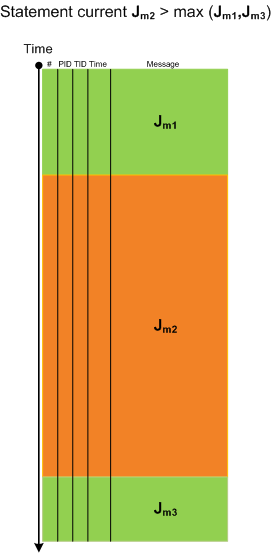
When looking at lengthy traces with thousands and millions of messages (trace statements) we can see regions of activity where statement current (Jm, msg/s) is much higher than in surrounding temporal regions. Hence the name of this pattern, Activity Region. Here is an illustration for a typical ETW/CDF trace where a middle region of activity (Jm2) signifies a system performing some response function like a user session initialization and application launch:
- Dmitry Vostokov @ TraceAnalysis.org -
Posted in CDF Analysis Tips and Tricks, Debugging, Software Trace Analysis, Software Trace Visualization, Trace Analysis Patterns | 8 Comments »
Friday, November 6th, 2009
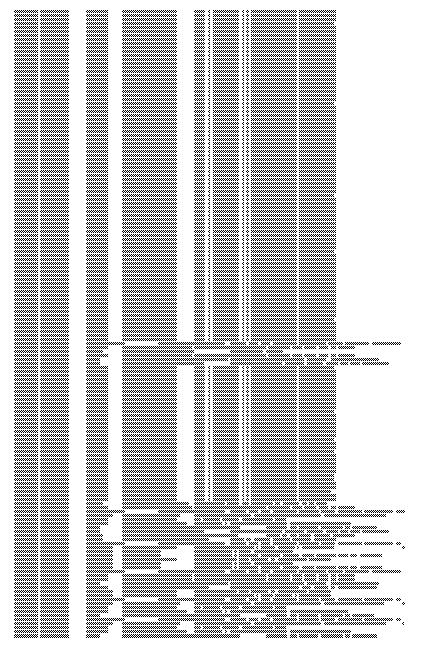
Here is a fragment of a condensed view of a CDF (ETW-based) trace imported into MS Word:
- Dmitry Vostokov @ TraceAnalysis.org -
Posted in CDF Analysis Tips and Tricks, Debugging, Memory Visualization, Software Trace Analysis, Software Trace Visualization, Trace Analysis Patterns | 1 Comment »
Saturday, September 26th, 2009
This is a revised, edited, cross-referenced and thematically organized volume of selected DumpAnalysis.org blog posts about crash dump analysis and debugging written in October 2008 - June 2009 for software engineers developing and maintaining products on Windows platforms, quality assurance engineers testing software on Windows platforms and technical support and escalation engineers dealing with complex software issues. The third volume features:
- 15 new crash dump analysis patterns
- 29 new pattern interaction case studies
- Trace analysis patterns
- Updated checklist
- Fully cross-referenced with Volume 1 and Volume 2
- New appendixes
Product information:
- Title: Memory Dump Analysis Anthology, Volume 3
- Author: Dmitry Vostokov
- Language: English
- Product Dimensions: 22.86 x 15.24
- Paperback: 404 pages
- Publisher: Opentask (20 December 2009)
- ISBN-13: 978-1-906717-43-8
- Hardcover: 404 pages
- Publisher: Opentask (30 January 2010)
- ISBN-13: 978-1-906717-44-5

Back cover features 3D computer memory visualization image.
- Dmitry Vostokov @ DumpAnalysis.org -
Posted in Announcements, AntiPatterns, Art, Assembly Language, Books, C and C++, CDF Analysis Tips and Tricks, Certification, Citrix, Code Reading, Common Mistakes, Computational Ghosts and Bug Hauntings, Computer Science, Countefactual Debugging, Crash Dump Analysis, Crash Dump Patterns, Crash Dumps for Dummies, DebugWare Patterns, Debugging, Debugging Slang, Deep Down C++, Education and Research, Escalation Engineering, Fun with Crash Dumps, Futuristic Memory Dump Analysis, Games for Debugging, Hardware, Horrors of Computation, Hyper-V, Intelligent Memory Movement, Kernel Development, Mathematics of Debugging, Memiotics (Memory Semiotics), Memoidealism, Memoretics, Memory Analysis Culture, Memory Analysis Forensics and Intelligence, Memory Dreams, Memory Dump Analysis Jobs, Memory Space Music, Memory Visualization, Memuonics, Minidump Analysis, Multithreading, Music for Debugging, New Acronyms, New Words, Occult Debugging, Philosophy, Poetry, Psi-computation, Publishing, Science of Memory Dump Analysis, Science of Software Tracing, Security, Software Architecture, Software Defect Construction, Software Engineering, Software Generalist, Software Narratology, Software Technical Support, Software Trace Analysis, Software Tracing for Dummies, Testing, Tools, Trace Analysis Patterns, Training and Seminars, Troubleshooting Methodology, Virtualization, Vista, Visual Dump Analysis, WinDbg Scripts, WinDbg Tips and Tricks, WinDbg for GDB Users, Windows 7, Windows Server 2008, Windows System Administration | No Comments »
Tuesday, September 22nd, 2009
Citrix released the powerful GUI CDF trace analyzer tool that can work with hundred Mb trace files with millions of trace messages:
http://support.citrix.com/article/CTX122741
I use it on day-to-day basis while analyzing CDF traces from terminal services environments and highly recommend. Its ability to quick filter out modules is indispensable when dealing with messages from hundreds of processes and thousands of threads. I haven’t tried it yet with MS TMF files though.
- Dmitry Vostokov @ DumpAnalysis.org -
Posted in Announcements, CDF Analysis Tips and Tricks, Citrix, Debugging, Software Technical Support, Software Trace Analysis, Tools, Trace Analysis Patterns | 1 Comment »
Tuesday, September 1st, 2009
Recently I came upon two software traces from working and non-working software environments that were a perfect example of Bifurcation Point pattern (the name is borrowed from catastrophe theory):
Working (issue is absent):
#   PID  TID  Message

[…]

25  2768 3056 Trace Statement A

26  3756 2600 Trace Statement B

27  3756 2600 Trace Statement C

[…]

149 3756  836 Trace Statement X (Query result: XXX)

150 3756  836 Trace Statement 150.1

151 3756  836 Trace Statement 151.1

152 3756  836 Trace Statement 152.1

153 3756  836 Trace Statement 153.1

[…]
Non-working (issue is present):
#   PID  TID  Message

[…]

27  2768 3056 Trace Statement A

28  3756 2176 Trace Statement B

29  3756 2176 Trace Statement C

[…]

151 3756 5940 Trace Statement Y (Query result: YYY)

152 3756 5940 Trace Statement 152.2

153 3756 5940 Trace Statement 153.2

154 3756 5940 Trace Statement 154.2

155 3756 5940 Trace Statement 155.2

[…]
First, we notice that in both traces PID are the same (2768 and 3756) and we can conclude that most likely both traces came from the same environment and session. Second, messages A, B, C and further are identical up to messages X and Y. The latter two messages differ greatly in their query results XXX and YYY. After that, message distribution differs greatly in both size and content. Despite the same tracing time, 15 seconds, statement current is 155 msg/s for working and 388 msg/s for non-working case.
Bifurcation points are easily observed when tracing noise ratio is small and, for example, in the case of Citrix terminal services environments, could be achieved by selecting appropriate tracing modules based on problem description or filtering irrelevant ones from full CDF traces.
- Dmitry Vostokov @ TraceAnalysis.org -
Posted in CDF Analysis Tips and Tricks, Citrix, Debugging, Software Trace Analysis, Trace Analysis Patterns | 1 Comment »
Thursday, August 6th, 2009
There is an obvious pattern called Missing Component. We don’t see trace statements we expect and wonder whether the component was not loaded, its container ceased to exist or simply it wasn’t selected for tracing. In many support cases there is a trade-off between tracing everything and the size of trace files. Customers and engineers usually prefer smaller files to analyze. However in the case of predictable and reproducible issues with short duration we can always select all components or deselect a few (instead of selecting a few). Here is the article for Citrix CDF tracing best practices and it can be applied to other software traces as well:
Tracing Best Practices
We can find an example from Discontinuity pattern where the possibility of a sudden and silent gap in trace statements could happen because not all necessary components were selected for tracing.
Sometimes, in cases when the missing component was selected for tracing but we don’t see any trace output from it other module traces can give us an indication, perhaps showing the load failure message. For example, Process Monitor tracing done in parallel can reveal load failures.
- Dmitry Vostokov @ TraceAnalysis.org -
Posted in CDF Analysis Tips and Tricks, Citrix, Debugging, Software Trace Analysis, Trace Analysis Patterns | 4 Comments »
Tuesday, August 4th, 2009
Sometimes there are reported delays in application startup, session initialization, long response times and simply the absence of response. All these problems can be reflected in software traces showing sudden gaps in threads of activity. I call this pattern Discontinuity per analogy with continuous and discontinuous functions in mathematics. Here is an example I came upon recently and it will be covered fully in the forthcoming pattern cooperation case study spanning both memory dump and trace analysis. One process was reported to have a long period of CPU spiking calculation and a CDF trace was recorded. When we open it we see this periodic error:
N   PID  TID  Time         Message

[…]

326 2592 5476 08:17:18.823 OpenRegistry: Attempting to open [… Hive path …]

327 2592 5476 08:17:18.824 OpenRegistry: Failed: 2

[…]
However when looking for any discontinuities for the thread 5476 we see this gap of more than 7 minutes:
N    PID  TID  Time         Message

[...]

3395 2592 5476 08:17:19.608 OpenRegistry: Attempting to open [... Hive path ...]

3396 2592 5476 08:17:19.608 OpenRegistry: Failed: 2

3461 2592 5476 08:24:31.137 OpenRegistry: Attempting to open [… Hive path …]

3462 2592 5476 08:24:31.137 OpenRegistry: Failed: 2

[…]
Therefore we have 3 possibilities here:
1. The process twice did lengthy CPU spiking calculations involving registry access and was quiet between them.
2. Registry access belonged to some background activity and ceased for 7 minutes and during that time it had CPU spiking intensive calculation.
3. This discontinuity is irrelevant because either the calculation module was not selected for tracing or it simply doesn’t have relevant tracing statement coverage for the code that does calculation.
Stay tuned because this story will be unfolded in other patterns and in the final case study.
- Dmitry Vostokov @ TraceAnalysis.org -
Posted in CDF Analysis Tips and Tricks, Debugging, Software Trace Analysis, Trace Analysis Patterns | 2 Comments »