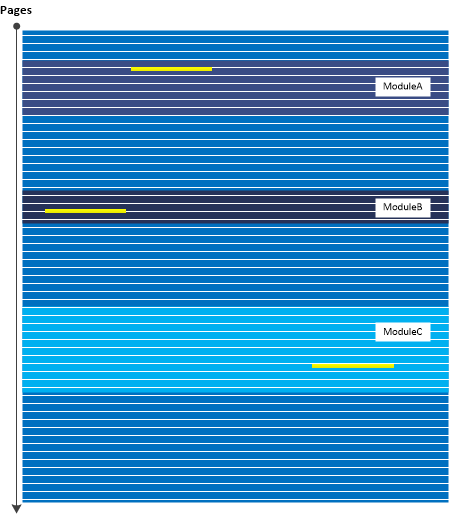
Windows processes may contain Execution Residue such as ASCII window class names in mapped memory regions pointing to other running processes (perhaps as a result of Hooksware). For example, calc.exe process memory dump saved on my Windows 10 notebook “knows” about Visio and WinDbg windows that were opened at that time:
0:000> s-a 0 L?FFFFFFFFFFFFFFFF "VISIOA"

00000015`42c6bdd0  56 49 53 49 4f 41 00 00-00 00 00 00 00 00 00 00  VISIOA.............
0:000> s-a 0 L?FFFFFFFFFFFFFFFF "WinDbg"

00000015`42d19720  57 69 6e 44 62 67 46 72-61 6d 65 43 6c 61 73 73  WinDbgFrameClass
This may be useful for some troubleshooting scenarios, for example, pointing to processes which are known for their problematic behavior or Special Processes. Of course, we assume that those windows or classes were genuine, not faked. We call this analysis pattern Window Hint similar to Environment Hint and Module Hint analysis patterns.
Going deeper, we can dump strings from the whole region limiting the output to the strings with length more than 5:
0:000> !address 00000015`42d19720
Usage:                  <unknown>

Base Address:           00000015`42b20000

End Address:            00000015`42d3a000

Region Size:            00000000`0021a000 (   2.102 MB)

State:                  00001000          MEM_COMMIT

Protect:                00000002          PAGE_READONLY

Type:                   00040000          MEM_MAPPED

Allocation Base:        00000015`42b20000

Allocation Protect:     00000002          PAGE_READONLY
Content source: 1 (target), length: 208e0
0:000> s-[l5]sa 00000015`42b20000 00000015`42d3a000

00000015`42b20a60  “#32769″

00000015`42b20cc0  “Message”

00000015`42b20f40  “#32774″

00000015`42b21060  “#32772″

00000015`42b21510  “Ghost”

00000015`42b215e0  “LivePreview”

00000015`42b216f0  “UserAdapterWindowClass”

00000015`42b21ce0  “MSCTFIME Composition”

00000015`42b222a0  “#32772″

00000015`42b22390  “#32772″

00000015`42b22460  “RichEdit20W”

00000015`42b22530  “RichEdit20A”

00000015`42b22600  “ToolbarWindow32″

00000015`42b226e0  “tooltips_class32″

00000015`42b227c0  “msctls_statusbar32″

00000015`42b228a0  “SysListView32″

00000015`42b22980  “SysHeader32″

00000015`42b22a50  “SysTabControl32″

00000015`42b22b30  “SysTreeView32″

00000015`42b22c10  “msctls_trackbar32″

00000015`42b22cf0  “msctls_updown32″

00000015`42b22dd0  “msctls_progress32″

00000015`42b22eb0  “msctls_hotkey32″

00000015`42b22f8f  “‘SysAnimate32″

00000015`42b230f0  “SysIPAddress32″

00000015`42b231d0  “ReBarWindow32″

00000015`42b232b0  “ComboBoxEx32″

00000015`42b23390  “SysMonthCal32″

00000015`42b23470  “SysDateTimePick32″

00000015`42b23550  “DropDown”

00000015`42b23620  “SysLink”

00000015`42b236f0  “SysPager”

00000015`42b23960  “msctls_netaddress”
[...]
00000015`42d175e0  "OutlookFbThreadWnd"

00000015`42d19720  "WinDbgFrameClass"

00000015`42d19750  "DockClass"

00000015`42d19770  "GhostClass"

00000015`42d19a30  "ATL:00007FF60D792730"

00000015`42d1a0f0  "MSCTFIME Composition"

00000015`42d1a4af  "%OleMainThreadWndClass"

00000015`42d1be10  "CicMarshalWndClass"

00000015`42d1c0e0  "VSyncHelper-00000040EC4CA5F0-1f8"

00000015`42d1c100  "8855daf"

00000015`42d1c190  "URL Moniker Notification Window"

00000015`42d1c390  "UserAdapterWindowClass"

00000015`42d1d080  "@>zG#"

00000015`42d1dcaf  "!VSyncHelper-00000040D60C5850-1e"

00000015`42d1dccf  "ef0477df"

00000015`42d20d50  "VSyncHelper-00000040F39C5650-1f0"

00000015`42d20d70  "313c5a0"

00000015`42d250d0  "#32770"

00000015`42d250f0  "URL Moniker Notification Window"

00000015`42d29270  "VSyncHelper-00000079321C32E0-1f2"

00000015`42d29290  "fb11f8c"

00000015`42d2a1d0  "MSCTFIME Composition"

00000015`42d2a480  "CicMarshalWndClass"

00000015`42d2ac80  "MSCTFIME Composition"

00000015`42d2b8d0  "ShockwaveFlashFullScreen"

00000015`42d2bbb8  "P?U!\"

00000015`42d2c690  "Xaml_WindowedPopupClass"

00000015`42d30a10  "ShockwaveFlashFullScreen"

00000015`42d30b50  "MSCTFIME UI"

00000015`42d30b90  "WinBaseClass"

00000015`42d3441f  "!Alternate Owner"

00000015`42d34460  "ShockwaveFlashFullScreen"

00000015`42d344a0  "ATL:00007FF60D792530"

00000015`42d34a50  "SysAnimate32"

00000015`42d34a7f  "'ComboBoxEx32"

00000015`42d34ed0  "tooltips_class32"

00000015`42d34f00  "msctls_statusbar32"

00000015`42d35e70  "RawInputClass"

00000015`42d36a10  "SysTabControl32"

00000015`42d38650  "CicMarshalWndClass"

00000015`42d38eb0  "#32772"

00000015`42d3951f  "!VSyncHelper-000000C9DA06CD10-1f"

00000015`42d3953f  "110e8d16"
- Dmitry Vostokov @ DumpAnalysis.org + TraceAnalysis.org -