Archive for August 7th, 2008

Memory dumps are banned in North Korea

Thursday, August 7th, 2008

Hmm, I was looking at Google Analytics stats for dumpanalysis.org and here is the list of 154 visitor countries sorted by the decreasing number of visits (data for March - August, 2008):

United States
United Kingdom
India
Canada
Germany
China
Russia
France
Japan
South Korea
Ireland
Australia
Taiwan
Netherlands
Israel
Sweden
Italy
Brazil
Spain
Singapore
Romania
Norway
Ukraine
Belgium
Czech Republic
Switzerland
Poland
Denmark
Malaysia
Finland
Turkey
Austria
New Zealand
Hong Kong
Portugal
Argentina
South Africa
Belarus
Greece
(not set)
Philippines
Hungary
Bulgaria
Mexico
Slovakia
Malta
Serbia
Thailand
Croatia
Estonia
Vietnam
Lithuania
Slovenia
Bolivia
United Arab Emirates
Iran
Latvia
Indonesia
Pakistan
Iceland
Saudi Arabia
Egypt
Serbia and Montenegro
Chile
Colombia
Uruguay
Luxembourg
Peru
Morocco
Kazakhstan
Costa Rica
Jordan
Venezuela
Moldova
Cyprus
Jamaica
Algeria
Ecuador
Panama
Bangladesh
Puerto Rico
Sri Lanka
Bosnia and Herzegovina
Lebanon
Guatemala
Qatar
Kuwait
Tunisia
Mongolia
Syria
Guinea
Dominican Republic
Macedonia
Uzbekistan
Nepal
Bahrain
El Salvador
Palestinian Territory
Mauritius
Armenia
Barbados
Trinidad and Tobago
Georgia
Oman
Brunei
Nigeria
Kenya
Bermuda
Yemen
Cuba
Uganda
Bahamas
Netherlands Antilles
Iraq
Reunion
Maldives
Ghana
Ivory Coast
U.S. Virgin Islands
Guyana
Ethiopia
Andorra
Liechtenstein
Sudan
Namibia
Dominica
Saint Lucia
Seychelles
Angola
Guadeloupe
Libya
Paraguay
Cayman Islands
Gibraltar
Aruba
Laos
Somalia
New Caledonia
Zambia
Saint Vincent and the Grenadines
Montenegro
Congo - Kinshasa
Tanzania
Fiji
Azerbaijan
Faroe Islands
Botswana
Antigua and Barbuda
French Guiana
Myanmar
Grenada
Cambodia
Kyrgyzstan
Greenland

Here is the relative graph:
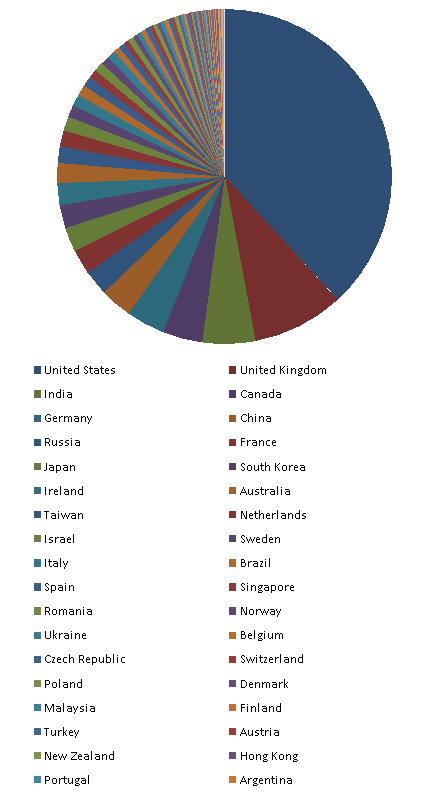
Another possible reason why North Korea is not on the list could be the total absence of Internet even in government and military institutions. Also note the presence of (not set) territory on the list. I suspect these are spies and other security and forensics professionals hiding their true location.

Other countries where people don’t know about memory dumps are:

Nicaragua
Honduras
Senegal
Western Sahara
Guinea-Bissau
Mauritania
Sierra Leone
Liberia
Mali
Burkina Faso
Benin
Niger
Chad
Cameroon
Gabon
Congo - Brazzaville
Central African Republic
Zimbabwe
Mozambique
Malawi
Madagascar
Afghanistan
Turkmenistan
Tajikistan
Papua New Guinea

They are depicted in red:
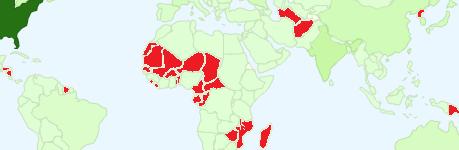
I’m thinking now about Memory Dump Awareness Index (MDAI) to assign to each country :-) 

- Dmitry Vostokov @ DumpAnalysis.org -

Crash Dump Analysis Patterns (Part 75)

Thursday, August 7th, 2008

Sometimes we look for modules that were loaded and unloaded at some time. lm command lists unloaded modules but some of them could be mapped to address space without using runtime loader. The latter case is common for drm-type protection tools, rootkits, malware or crimeware which can influence a process execution. In such cases we can hope that they still remain in virtual memory and search for them. WinDbg .imgscan command greatly helps in identifying MZ/PE module headers. The following example just illustrates this command without implying that the found module did any harm:

0:000> .imgscan
MZ at 000d0000, prot 00000002, type 01000000 - size 6000
  Name: usrxcptn.dll

MZ at 00350000, prot 00000002, type 01000000 - size 9b000
  Name: ADVAPI32.dll
MZ at 00400000, prot 00000002, type 01000000 - size 23000
  Name: javaw.exe
MZ at 01df0000, prot 00000002, type 01000000 - size 8b000
  Name: OLEAUT32.dll
MZ at 01e80000, prot 00000002, type 01000000 - size 52000
  Name: SHLWAPI.dll
[…]

We don’t see usrxcptn in either loaded or unloaded module lists:

0:002> lm
start    end        module name
00350000 003eb000   advapi32  
00400000 00423000   javaw    
01df0000 01e7b000   oleaut32 
01e80000 01ed2000   shlwapi 
[...]

Unloaded modules:

This is why I call this pattern Hidden Module. We can use Unknown Component pattern to see the module resources if present in memory:

0:002> !dh 000d0000

[...]

SECTION HEADER #4
   .rsrc name
     418 virtual size
    4000 virtual address

     600 size of raw data
    1600 file pointer to raw data
       0 file pointer to relocation table
       0 file pointer to line numbers
       0 number of relocations
       0 number of line numbers
40000040 flags
         Initialized Data
         (no align specified)
         Read Only

[...]

0:002> dc 000d0000+4000 L418
[…]
000d4140  […] n…z.)…F.i.l.
000d4150  […] e.D.e.s.c.r.i.p.
000d4160  […] t.i.o.n…..U.s.
000d4170  […]   e.r. .D.u.m.p. .
000d4180  […] U.s.e.r. .M.o.d.
000d4190  […] e. .E.x.c.e.p.t.
000d41a0  […] i.o.n. .D.i.s.p.
000d41b0  […] a.t.c.h.e.r…..

0:002> du 000d416C
000d416c  "User Dump User Mode Exception Di"
000d41ac  "spatcher"

This component seems to be loaded or mapped only if userdump package was fully installed where usrxcptn.dll is a part of its redistribution. Although from the memory dump comment we also see that the dump was taken manually using command line userdump.exe we see that the full userdump package was additionally installed which was probably not necessary (see Correcting Microsoft article about userdump.exe):

Loading Dump File [javaw.dmp]
User Mini Dump File with Full Memory: Only application data is available

Comment: 'Userdump generated complete user-mode minidump with Standalone function on COMPUTER-NAME'

- Dmitry Vostokov @ DumpAnalysis.org -

Pseudo-corrupt memory dumps

Thursday, August 7th, 2008

One of the users got these errors when opening a few crash dumps:

[...]
Ignored in-page I/O error
Exception 0xc0000006 while accessing file mapping
Unable to read KLDR_DATA_TABLE_ENTRY at 8a3dd228 - NTSTATUS 0xC0000006
Ignored in-page I/O error
[...]

He was wondering whether something was wrong with his disk or network drive mapping where they were stored or this was another sign of Corrupt Dump pattern. I also noticed these errors when I keep dump files open for weeks and then come back to them. So my conclusion was to advise him to close and open new drive mappings and/or reopen dump files.

- Dmitry Vostokov @ DumpAnalysis.org -

Tool Tips: Live Sysinternals

Thursday, August 7th, 2008

If you need the latest updates of Sysinternals tools you can always check this page:

http://live.sysinternals.com/

and you can also map a drive to this location (it is done automatically via WebDAV redirector):

\\live.sysinternals.com

- Dmitry Vostokov @ DumpAnalysis.org -