Archive for July, 2008

Lean Tracing

Sunday, July 13th, 2008

Sometimes ETW (or CDF) traces can be really huge. Unless we trace the elusive but the specific error we already know about, there is no need to make such traces if we can reproduce the issue. My favourite example is connectivity problems when you cannot connect to a terminal server. The best way is to start tracing, try to connect, get an error and stop tracing. Usually it takes no more than a couple of minutes. We can even trace all modules here just to make sure that we don’t miss anything. It is also better to focus on one specific scenario per one lean trace instead of packing several of them into one big trace.

- Dmitry Vostokov @ DumpAnalysis.org -

Debugging PHP

Sunday, July 13th, 2008

Yesterday I noticed that certain wp-admin PHP pages were not accessible anymore. I was able to view messages but not to post them or change options. Originally I thought that this was the side effect of having two versions of Wordpress running at the same time or improper DB charset configuration of the second instance (I recently set up the Russian version of my blog). I tried to reinstall the latter instance with proper configuration and language but this didn’t help. HTTP fiddler showed no response from the server for problem PHP pages. I also noticed that my other domains running on the same server didn’t have this problem. Finally I hit upon the clue: one of logs had this error:

[client xx.xx.xx.xxx] PHP Fatal error: Allowed memory size of 8388608 bytes exhausted (tried to allocate 11 bytes) in […] dumpanalysis.org/httpdocs/ru/blog/wp-admin/includes/update.php on line 17

Out of memory error! Googling “PHP memory” hit upon the solution to add the following line to .htaccess file:

php_value memory_limit 20M

Now it all suddenly made sense to me. I didn’t think of possible artificial memory limits in script engines. Adding the second instance of Wordpress hit PHP memory limit which was already almost exhausted by my Wordpress blog with more than 500 posts, Drupal portal, phpBB forum and MediaWiki.

Now I’m able to write posts again :-) Happy debugging!

- Dmitry Vostokov @ DumpAnalysis.org -

Software Debugging Generalist

Saturday, July 12th, 2008

Who’s that person? I came up with this title long time ago when I heard some kernel software developers bragging that they don’t care about user space. Actually it was apparently visible that they never analyzed complete memory dumps in all their entirety. A software debugging generalist feels comfortable in every space and mode, in live debugging of every possible application, service and driver and in postmortem analysis of every memory dump type (see also Programmer Universalis for a similar description). 

- Dmitry Vostokov @ DumpAnalysis.org

In Search of Lost CID

Friday, July 11th, 2008

Paraphrasing the title of Marcel Proust’s “In Search of Lost Time” 6-volume classic we can say there is timeless empirical knowledge. One is target CID (Client ID, PID:TID) for RPC calls. We just need to search for even 16-bit numbers and compare them with the list of available PIDs. The example can be found on ntdebugging blog:

Tracking Down a Multi-Process Deadlock

Actually the second dword after PID can contain even 16-bit TID number as can be seen from another example:

1: kd> kv
ChildEBP RetAddr  Args to Child             
[...]
00faf828 7778c38b 00faf8f0 00faf9f0 06413b54 ole32!CRpcChannelBuffer::SwitchAptAndDispatchCall+0x112
00faf908 776c0565 06413b54 00fafa00 00faf9f0 ole32!CRpcChannelBuffer::SendReceive2+0xd3
00faf974 776c04fa 06413b54 00fafa00 00faf9f0 ole32!CAptRpcChnl::SendReceive+0xab
00faf9c8 77ce247f 06413b54 00fafa00 00faf9f0 ole32!CCtxComChnl::SendReceive+0×1a9
00faf9e4 77ce252f 03213bdc 00fafa2c 0600016e RPCRT4!NdrProxySendReceive+0×43
00fafdcc 77ce25a6 763050e8 76306bba 00fafe04 RPCRT4!NdrClientCall2+0×206
00fafdec 77c64f87 0000000c 00000005 00fafe3c RPCRT4!ObjectStublessClient+0×8b
00fafdfc 7784ba75 03213bdc 03235858 03235850 RPCRT4!ObjectStubless+0xf
[…]

1: kd> dpp 06413b54 l8
06413b54  77672418 7778bcdf ole32!CRpcChannelBuffer::QueryInterface
06413b58  776723e8 777267f5 ole32!CRpcChannelBuffer::QueryInterface
06413b5c  00000003
06413b60  00000002
06413b64  0743fde8 0316f080
06413b68  07676528 031d5ad0
06413b6c  064c9c80 064c9d00
06413b70  078843c0 00000000

1: kd> dd 064c9c80 l4
064c9c80  064c9d00 064c9c00 00003108 00001dac ; PID TID

I have been using this technique for a long time and only now see it documented.

- Dmitry Vostokov @ DumpAnalysis.org -

Crash Dump Analysis Patterns (Part 71)

Friday, July 11th, 2008

Dynamic memory corruption patterns in user and kernel spaces are specializations of one big parent pattern called Corrupt Structure because crashes there happen due to corrupt or overwritten heap or pool control structures (for the latter see Double Free pattern). Another frequently seen specialization is called Critical Section Corruption which is the subject of this post. Critical sections are linked together through statically pre-allocated or heap-allocated helper structure (shown in magenta) although themselves they can be stored anywhere from static and stack area to heap:

0:001> dt -r1 ntdll!_RTL_CRITICAL_SECTION 77795240
   +0×000 DebugInfo        : 0×00175d28 _RTL_CRITICAL_SECTION_DEBUG
      +0×000 Type             : 0
      +0×002 CreatorBackTraceIndex : 0
      +0×004 CriticalSection  : 0×77795240 _RTL_CRITICAL_SECTION
      +0×008 ProcessLocksList : _LIST_ENTRY [ 0×173a08 - 0×173298 ]
      +0×010 EntryCount       : 0
      +0×014 ContentionCount  : 0
      +0×018 Spare            : [2] 0

   +0×004 LockCount        : -1
   +0×008 RecursionCount   : 0
   +0×00c OwningThread     : (null)
   +0×010 LockSemaphore    : (null)
   +0×014 SpinCount        : 0

0:001> !address 77795240
    77670000 : 77792000 - 00005000
                    Type     01000000 MEM_IMAGE
                    Protect  00000004 PAGE_READWRITE
                    State    00001000 MEM_COMMIT
                  Usage    RegionUsageImage
                    FullPath C:\WINDOWS\system32\ole32.dll

0:001> !address 0×00175d28
    00140000 : 00173000 - 0000d000
                    Type     00020000 MEM_PRIVATE
                    Protect  00000004 PAGE_READWRITE
                    State    00001000 MEM_COMMIT
                    Usage    RegionUsageHeap
                    Handle   00140000

0:000> !locks

CritSec ntdll!LdrpLoaderLock+0 at 7c8877a0
WaiterWoken        No
LockCount          0
RecursionCount     1
OwningThread       1184
EntryCount         0
ContentionCount    b04707
*** Locked

0:000> dt -r1 _RTL_CRITICAL_SECTION 7c8877a0
   +0×000 DebugInfo        : 0×7c8877c0 _RTL_CRITICAL_SECTION_DEBUG
      +0×000 Type             : 0
      +0×002 CreatorBackTraceIndex : 0
      +0×004 CriticalSection  : 0×7c8877a0 _RTL_CRITICAL_SECTION
      +0×008 ProcessLocksList : _LIST_ENTRY [ 0×7c887be8 - 0×7c887bc8 ]
      +0×010 EntryCount       : 0
      +0×014 ContentionCount  : 0xb04707
      +0×018 Spare            : [2] 0

   +0×004 LockCount        : -2
   +0×008 RecursionCount   : 1
   +0×00c OwningThread     : 0×00001184
   +0×010 LockSemaphore    : 0×0000013c
   +0×014 SpinCount        : 0

0:000> !address 7c8877a0
    7c800000 : 7c887000 - 00003000
                    Type     01000000 MEM_IMAGE
                    Protect  00000004 PAGE_READWRITE
                    State    00001000 MEM_COMMIT
                    Usage    RegionUsageImage
                    FullPath C:\WINDOWS\system32\ntdll.dll

0:000> !address 0×7c8877c0
    7c800000 : 7c887000 - 00003000
                    Type     01000000 MEM_IMAGE
                    Protect  00000004 PAGE_READWRITE
                    State    00001000 MEM_COMMIT
                    Usage    RegionUsageImage
                    FullPath C:\WINDOWS\system32\ntdll.dll

Consider the case when CRITICAL_SECTION is defined on a stack and there was Local Buffer Overflow overwriting DebugInfo pointer. Then we have an example of Wild Pointer pattern and traversing the list of critical sections from this point will diverge into completely unrelated memory area or stop there. Consider another example of heap corruption or race condition overwriting ProcessLocksList or CriticalSection pointer. Then we have an instance of Wild Pointer pattern illustrated below:

0:000> !locks

CritSec ntdll!LdrpLoaderLock+0 at 7c8877a0
WaiterWoken        No
LockCount          0
RecursionCount     1
OwningThread       1184
EntryCount         0
ContentionCount    b04707
*** Locked

CritSec +1018de08 at 1018de08
WaiterWoken        Yes
LockCount          -49153
RecursionCount     5046347
OwningThread       460050
EntryCount         0
ContentionCount    0
*** Locked

CritSec +1018ddd8 at 1018ddd8
WaiterWoken        Yes
LockCount          -1
RecursionCount     0
OwningThread       0
*** Locked

CritSec +1018de28 at 1018de28
WaiterWoken        Yes
LockCount          -1
RecursionCount     0
OwningThread       0
*** Locked

CritSec +1018de08 at 1018de08
WaiterWoken        Yes
LockCount          -49153
RecursionCount     5046347
OwningThread       460050
EntryCount         0
ContentionCount    0
*** Locked

CritSec +1018de28 at 1018de28
WaiterWoken        Yes
LockCount          -1
RecursionCount     0
OwningThread       0
*** Locked

CritSec +1018ddd8 at 1018ddd8
WaiterWoken        Yes
LockCount          -1
RecursionCount     0
OwningThread       0
*** Locked

Scanned 841 critical sections

We see the signs of corruption at 1018de08 address which is interpreted as pointing to a locked critical section. To see where the corruption started we need to look at the list of all critical sections either locked or not locked:

0:000> !locks -v

CritSec ntdll!RtlCriticalSectionLock+0 at 7c887780
LockCount          NOT LOCKED
RecursionCount     0
OwningThread       0
EntryCount         0
ContentionCount    28

CritSec ntdll!LdrpLoaderLock+0 at 7c8877a0
WaiterWoken        No
LockCount          0
RecursionCount     1
OwningThread       1184
EntryCount         0
ContentionCount    b04707
*** Locked

CritSec ntdll!FastPebLock+0 at 7c887740
LockCount          NOT LOCKED
RecursionCount     0
OwningThread       0
EntryCount         0
ContentionCount    42c9

CritSec ntdll!RtlpCalloutEntryLock+0 at 7c888ea0
LockCount          NOT LOCKED
RecursionCount     0
OwningThread       0
EntryCount         0
ContentionCount    0

CritSec ntdll!PMCritSect+0 at 7c8883c0
LockCount          NOT LOCKED
RecursionCount     0
OwningThread       0
EntryCount         0
ContentionCount    0

CritSec ntdll!UMLogCritSect+0 at 7c888400
LockCount          NOT LOCKED
RecursionCount     0
OwningThread       0
EntryCount         0
ContentionCount    0

CritSec ntdll!RtlpProcessHeapsListLock+0 at 7c887960
LockCount          NOT LOCKED
RecursionCount     0
OwningThread       0
EntryCount         0
ContentionCount    0

CritSec +80608 at 00080608
LockCount          NOT LOCKED
RecursionCount     0
OwningThread       0
EntryCount         0
ContentionCount    22

[...]

CritSec cabinet!_adbgmsg+13c at 74fb4658
LockCount          NOT LOCKED
RecursionCount     0
OwningThread       0
EntryCount         0
ContentionCount    0

CritSec +c6c17c at 00c6c17c
LockCount          NOT LOCKED
RecursionCount     0
OwningThread       0
EntryCount         0
ContentionCount    0

CritSec +c6c0e4 at 00c6c0e4
LockCount          NOT LOCKED
RecursionCount     0
OwningThread       0
EntryCount         0
ContentionCount    0

CritSec at 1018de08 does not point back to the debug info at 00136a40
Perhaps the memory that held the critical section has been reused without calling DeleteCriticalSection() ?

CritSec +1018de08 at 1018de08
WaiterWoken        Yes
LockCount          -49153
RecursionCount     5046347
OwningThread       460050
EntryCount         0
ContentionCount    0
*** Locked

CritSec at 1018ddd8 does not point back to the debug info at 00136a68
Perhaps the memory that held the critical section has been reused without calling DeleteCriticalSection() ?

CritSec +1018ddd8 at 1018ddd8
WaiterWoken        Yes
LockCount          -1
RecursionCount     0
OwningThread       0
*** Locked

[...]

We see that the problem appears when the heap-allocated critical section at 00c6c0e4 address is linked to an inconsistent critical section at 0×1018de08 address where memory contains UNICODE string fragment:

0:000> !address 00c6c0e4
    00c60000 : 00c60000 - 00010000
                    Type     00020000 MEM_PRIVATE
                    Protect  00000004 PAGE_READWRITE
                    State    00001000 MEM_COMMIT
                    Usage    RegionUsageHeap
                    Handle   00c60000

0:000> dt -r1 _RTL_CRITICAL_SECTION 00c6c0e4
   +0x000 DebugInfo        : 0x00161140 _RTL_CRITICAL_SECTION_DEBUG
      +0x000 Type             : 0
      +0x002 CreatorBackTraceIndex : 0
      +0x004 CriticalSection  : 0x00c6c0e4 _RTL_CRITICAL_SECTION
      +0×008 ProcessLocksList : _LIST_ENTRY [ 0×136a48 - 0×119f58 ]
      +0×010 EntryCount       : 0
      +0×014 ContentionCount  : 0
      +0×018 Spare            : [2] 0
   +0×004 LockCount        : -1
   +0×008 RecursionCount   : 0
   +0×00c OwningThread     : (null)
   +0×010 LockSemaphore    : (null)
   +0×014 SpinCount        : 0

0:000> dt -r _RTL_CRITICAL_SECTION_DEBUG 0×00136a48-0×008
   +0×000 Type             : 0
   +0×002 CreatorBackTraceIndex : 0
   +0×004 CriticalSection  : 0×1018de08 _RTL_CRITICAL_SECTION
      +0×000 DebugInfo        : 0×000d001b _RTL_CRITICAL_SECTION_DEBUG
         +0×000 Type             : 0
         +0×002 CreatorBackTraceIndex : 0
         +0×004 CriticalSection  : (null)
         +0×008 ProcessLocksList : _LIST_ENTRY [ 0×0 - 0×0 ]
         +0×010 EntryCount       : 0
         +0×014 ContentionCount  : 0×37e3c700
         +0×018 Spare            : [2] 0×8000025
      +0×004 LockCount        : 196609
      +0×008 RecursionCount   : 5046347
      +0×00c OwningThread     : 0×00460050
      +0×010 LockSemaphore    : 0×00310033
      +0×014 SpinCount        : 0×520044
   +0×008 ProcessLocksList : _LIST_ENTRY [ 0×136a70 - 0×161148 ]
      +0×000 Flink            : 0×00136a70 _LIST_ENTRY [ 0×136a98 - 0×136a48 ]
         +0×000 Flink            : 0×00136a98 _LIST_ENTRY [ 0×136ae8 - 0×136a70 ]
         +0×004 Blink            : 0×00136a48 _LIST_ENTRY [ 0×136a70 - 0×161148 ]
      +0×004 Blink            : 0×00161148 _LIST_ENTRY [ 0×136a48 - 0×119f58 ]
         +0×000 Flink            : 0×00136a48 _LIST_ENTRY [ 0×136a70 - 0×161148 ]
         +0×004 Blink            : 0×00119f58 _LIST_ENTRY [ 0×161148 - 0×16cc3c0 ]
   +0×010 EntryCount       : 0
   +0×014 ContentionCount  : 0
   +0×018 Spare            : [2] 0×2e760000

0:000> !address 0x1018de08
    10120000 : 10120000 - 00100000
                    Type     00020000 MEM_PRIVATE
                    Protect  00000004 PAGE_READWRITE
                    State    00001000 MEM_COMMIT
                    Usage    RegionUsageIsVAD

The address points miraculously to some DLL: 

0:000> du 1018de08
1018de08  "....componentA.dll"

We might suggest that componentA.dll played some role there.

There are other messages from verbose version of !locks WinDbg command pointing to critical section problems:  

CritSec componentB!Section+0 at 74004008
LockCount          NOT LOCKED
RecursionCount     0
OwningThread       0
EntryCount         0
ContentionCount    0

The CritSec componentC!Info+c at 72455074 has been RE-INITIALIZED.
The critical section points to DebugInfo at 00107cc8 instead of 000f4788

CritSec componentC!Info+c at 72455074
LockCount          NOT LOCKED
RecursionCount     0
OwningThread       0
EntryCount         0
ContentionCount    0

CritSec componentD!foo+8ec0 at 0101add0
LockCount          NOT LOCKED
RecursionCount     0
OwningThread       0
EntryCount         0
ContentionCount    0

- Dmitry Vostokov @ DumpAnalysis.org -

Crash Dump Analysis in Russian

Friday, July 11th, 2008

Finally I decided to translate selected blog posts into Russian language to make them available for Russian search engines and additionally improve, or better to say, restore my native language skills because I have been reading and writing mostly in English for the last 8 years:

Анализ Дампов Памяти

I also hope that the ongoing translation will help me in the future to publish Memory Dump Analysis Anthology in Russian language.  

- Dmitry Vostokov @ DumpAnalysis.org -

Crash Dump Analysis Patterns (Part 70)

Thursday, July 10th, 2008

Sometimes compilers optimize code by replacing function calls with their bodies. This procedure is called function inlining and functions themselves are called inline. On one platform we can see the real function call on the stack trace but on another platform or product version we only see the same problem instruction. Fortunately the rest of stack trace should be the same. Therefore when comparing Stack Traces we shouldn’t pay attention only to the top function call. This pattern is called Inline Function Optimization.

It is frequently seen when threads crash while copying or moving memory. Consider this stack trace:

0: kd> kL
ChildEBP RetAddr 
f22efaf4 f279ec3d driver!QueueValue+0x26b
f22efb30 8081dcdf driver!BufferAppendData+0x35f
f22efc7c 808f47b7 nt!IofCallDriver+0x45
f22efc90 808f24ee nt!IopSynchronousServiceTail+0x10b
f22efd38 80888c7c nt!NtWriteFile+0x65a
f22efd38 7c82ed54 nt!KiFastCallEntry+0xfc

When looking at rep movs instruction we might suspect that QueueValue was copying memory:

0: kd> r
eax=00000640 ebx=89b23000 ecx=00000190 edx=89b3c828 esi=02124220 edi=e2108f58
eip=f279c797 esp=f22efadc ebp=f22efaf4 iopl=0 nv up ei pl nz na pe nc
cs=0008 ss=0010 ds=0023 es=0023 fs=0030 gs=0000 efl=00010206
driver!QueueValue+0x26b:
f279c797 f3a5 rep movs dword ptr es:[edi],dword ptr [esi] es:0023:e2108f58=dfefbecf ds:0023:02124220=????????

On x64 bit platform the same driver had the similar stack trace but with memcpy at its top:

fffffadf`8955f4a8 fffffadf`8d1bef46 driver!memcpy+0x1c0
fffffadf`8955f4b0 fffffadf`8d1c15c9 driver!QueueValue+0x2fe
fffffadf`8955f550 fffff800`01273ed9 driver!BufferAppendData+0x481
[...]

We also see how QueueValue+0×2fe and QueueValue+0×26b are close. In fact the source code for the driver calls RtlCopyMemory function only once and it is defined as memcpy in wdm.h. The latter function is also exported from nt:

0: kd> x nt!
[...]
80881780 nt!memcpy = <no type information>
[...]

but usually can be found in any driver that links it from C runtime library, for example, on my x64 Windows:

1: kd> x nt!memcpy
fffff800`01c464e0 nt!memcpy = <no type information>

1: kd> x srv!memcpy
fffff980`0eafdf20 srv!memcpy = <no type information>

1: kd> x win32k!memcpy
fffff960`000c1b40 win32k!memcpy = <no type information>

Therefore we see that when compiling for x86 platform Visual C++ compiler decided to inline memcpy code but AMD compiler on x64 platform didn’t inline it. The overall stack trace without offsets is very similar and we can suppose that the problem was identical.

- Dmitry Vostokov @ DumpAnalysis.org -

Windows Internals Beta Exam

Thursday, July 10th, 2008

The new Microsoft beta exam is open for registration from 17th of July! Details can be found here:

Windows Internals Beta Exam 71-660

- Dmitry Vostokov @ DumpAnalysis.org -

Crash Dump Analysis Patterns (Part 19b)

Thursday, July 10th, 2008

Previously I wrote about how to calculate thread waiting time in kernel and complete memory dumps (Waiting Thread Time pattern). Now I show how to do it for user dumps. Unfortunately this information is not available in user space and therefore this can be done only approximately by calculating average or maximum waiting time.

The key is to take advantage of !runaway WinDbg command. Modern versions of postmortem debuggers and process dumpers usually save thread time information additionally. For example, /ma switch for .dump command does it. The later versions of userdump.exe also do it. When !runaway is invoked with 0y111 (7) flag it shows each thread user and kernel times and also the time elapsed since each thread was created. Therefore for threads that didn’t do much CPU intensive computation their average waiting time will almost correspond to their elapsed time. Unfortunately we cannot say when that computation took place. It could be the case that the thread in question was waiting 98.9% of the time, then did some computation for 0.01% and was waiting again 1% of the time or it could be the case that it was doing computation 0.01% of the time initially and then waiting the rest of the time (99.9%) until the dump was saved.

Consider this example of a sleeping thread:

0:000> ~32kL 100
ChildEBP RetAddr 
0a18f03c 7c826f4b ntdll!KiFastSystemCallRet
0a18f040 77e41ed1 ntdll!NtDelayExecution+0xc
0a18f0a8 77e424ed kernel32!SleepEx+0x68
0a18f0b8 1b0ac343 kernel32!Sleep+0xf
0a18f100 1b00ba49 msjet40!System::AllocatePages+0x15e
0a18f11c 1b00ba08 msjet40!PageDesc::WireCurrentPage+0x2f
0a18f13c 1b00b8dd msjet40!PageDesc::ReadPage+0x119
0a18f164 1b01b567 msjet40!Database::ReadPage+0x7a
0a18f190 1b00e309 msjet40!TableMover::GetNextRow+0xc9
0a18f1a8 1b015de9 msjet40!TableMover::Move+0xc4
0a18f1d8 1b015d9c msjet40!ErrIsamMove+0x6c
0a18f1f0 1b038aa4 msjet40!ErrDispMove+0x43
0a18f43c 1b015d9c msjet40!ErrJPMoveRange+0x350
0a18f454 1b0200b3 msjet40!ErrDispMove+0x43
0a18f6a0 1b021e4d msjet40!ErrMaterializeRows+0x1fd
0a18f6f0 1b021c0d msjet40!ErrJPSetColumnSort+0x191
0a18f718 1b0210a4 msjet40!ErrJPOpenSort+0x105
0a18f750 1b020de5 msjet40!ErrJPOpenRvt+0x171
0a18f9f0 1b039b82 msjet40!ErrExecuteQuery+0x548
0a18fa3c 1b05548b msjet40!ErrExecuteTempQuery+0x13d
0a18fa6c 4c23b01e msjet40!JetExecuteTempQuery+0xc9
0a18fa94 4c23a8d1 odbcjt32!DoJetCloseTable+0x64
0a18fd10 4c23a6b6 odbcjt32!SQLInternalExecute+0x217
0a18fd20 4c23a694 odbcjt32!SQLExecuteCover+0x1f
0a18fd28 488b3fc1 odbcjt32!SQLExecute+0x9
0a18fd44 0c4898b5 odbc32!SQLExecute+0xd3
[...]

The process uptime can be seen from vertarget WinDbg command:

0:000> vertarget
[...]
Process Uptime: 0 days 1:17:22.000
[...]

Then we dump thread times (only information for our 32nd thread is shown here):

0:000> !runaway 0y111
 User Mode Time
  Thread       Time
  32:cfc       0 days 0:00:00.109
[...]
 Kernel Mode Time
  Thread       Time
  32:cfc       0 days 0:00:00.062
[...]
 Elapsed Time
  Thread       Time
[...]
  32:cfc       0 days 1:17:20.703
[...]

We see that 1 hour, 17 minutes and almost 21 seconds  passed since the thread was created. By subtracting this time from process uptime we see that it was created in the first 2 seconds and it was consuming less than one second of CPU time. Therefore, most of the time this thread was waiting. Unfortunately we cannot say when it was waiting most of the time, in the beginning before it started sleeping or after. Fortunately we might continue guessing by looking at Sleep argument:

0:032> kv
ChildEBP RetAddr  Args to Child             
0a18f03c 7c826f4b 77e41ed1 00000000 0a18f080 ntdll!KiFastSystemCallRet
0a18f040 77e41ed1 00000000 0a18f080 00000000 ntdll!NtDelayExecution+0xc
0a18f0a8 77e424ed 00000032 00000000 04390000 kernel32!SleepEx+0x68
0a18f0b8 1b0ac343 00000032 042a34b4 0a18f1c8 kernel32!Sleep+0xf
[…]

We see that it had been sleeping for at most 32 milliseconds and perhaps this is a retry / sleep loop. We might guess that the thread was recently spinning in that loop and therefore waiting all the time before that. Alternatively we might guess that the retry portion is very small and fast and 32 milliseconds are spread over all elapsed time and the thread was in this loop the significant proportion of time. What we can surely say that the last waiting time was no more than 32 milliseconds. in the case of waiting for an event, for example, I don’t see any reliable way of calculating this time. If anyone knows please post a comment.

- Dmitry Vostokov @ DumpAnalysis.org -

Windows Debugging on Facebook

Thursday, July 10th, 2008

There is a growing Windows Debugging group on Facebook which I joined recently:

http://www.facebook.com/group.php?gid=23775552268

- Dmitry Vostokov @ DumpAnalysis.org -

MDAA V1 becomes #1 Debugging bestseller

Thursday, July 10th, 2008

Previously I noticed that it reached #1 bestseller status in Assembly Language Programming category but today I see it #1 bestseller in Debugging category:

#1 in  Books > Computers & Internet > Programming > Languages & Tools > Debugging
#1 in  Books > Computers & Internet > Programming > Languages & Tools > Assembly Language Programming

And again, I remind that because the status is updated every hour you might not see the same status when you read this post :-)

- Dmitry Vostokov @ DumpAnalysis.org -

Memory Dump Analysis and Computationalism

Wednesday, July 9th, 2008

Computer consciousness, the mind / body problem for computers, life inside the machine - all these topics are of great interest to me after I read Rosen’s book and wrote this post:

Is there any life inside Windows?

Although the book says there is no life there I still cannot believe it. To educate myself in recent developments in the computational theory of mind I opened this book:

Computationalism: New Directions

Buy from Amazon

If minds ultimately happen to be computers why not the other way around?

I removed the book jacket and found that it is yellow, almost like the spine and the title of my Memory Dump Analysis Anthology, Volume 1! This really reinforced my dream about memory slices from thinking computers :-) Here is the picture of the book with its jacket removed:

Jokes apart, this book is really good in removing narrowness of the current computer science education we get as undergraduates. I will post a review on my Literate Scientist blog as soon as I read through sufficient number of pages.

- Dmitry Vostokov @ DumpAnalysis.org -

It’s Not a Bug, It’s Not a Feature, It’s a Gift!

Wednesday, July 9th, 2008

This little quotation book is a perfect gift to any software engineer or scientist:

It’s Not a Bug, It’s a Feature!: Computer Wit and Wisdom

Buy from Amazon

- Dmitry Vostokov @ DumpAnalysis.org -

The Hidden Tomb in Pyramid of Software Change

Wednesday, July 9th, 2008

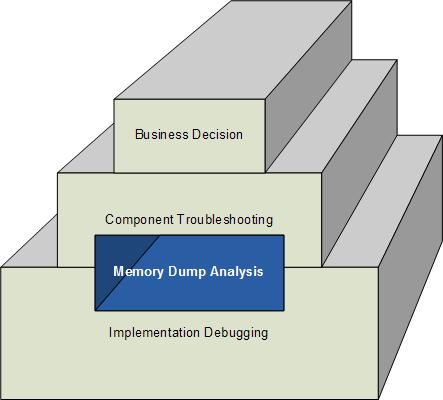
How does software change in production environment? My experience suggests 3 major ways:

  1. Executive decision to replace the whole software product with another competing product.
  2. Software troubleshooting at component level like upgrading or eliminating suspicious components and unrelated products that influence behaviour.
  3. Correction of individual components after debugging to address implementation and functional defects, non-functional, design or architecture deficiencies.

This can be shown on the following rough diagram (excluding possible overlapping of levels) highlighting the often hidden role of memory dump analysis in software change:

- Dmitry Vostokov @ DumpAnalysis.org -

Crash Dump Analysis AntiPatterns (Part 10)

Wednesday, July 9th, 2008

Often engineers spend 10 minutes pursuing a certain investigation path and then prematurely closing it and switching to another. This is what I call Myopic Troubleshooting and Debugging.

This anti-pattern name was inspired by Daniel Dennett’s discussion of insufficiently patient scientists doing computer simulations:

“mistaking a failure of imagination for an insight into necessity” (Darwin’s Dangerous Idea, page 175).

Paraphrasing we can say that engineers think of impossibility where their imagination fails.

- Dmitry Vostokov @ DumpAnalysis.org -

Crash Dump Analysis Patterns (Part 69)

Wednesday, July 9th, 2008

Sometimes patterns like Message Box and / or Stack Trace semantics reveal another pattern that I call Self-Diagnosis which may or may not result in Self-Dump. The diagnostic message may reveal the problem internally detected by runtime environment.

Consider the following stack trace:

0:000> kv
ChildEBP RetAddr  Args to Child             
0012e8c0 77f4bf53 77f4610a 00000000 00000000 ntdll!KiFastSystemCallRet
0012e8f8 77f3965e 000101a2 00000000 00000001 user32!NtUserWaitMessage+0xc
0012e920 77f4f762 77f30000 00151768 00000000 user32!InternalDialogBox+0xd0
0012ebe0 77f4f047 0012ed3c 00000000 ffffffff user32!SoftModalMessageBox+0x94b
0012ed30 77f4eec9 0012ed3c 00000028 00000000 user32!MessageBoxWorker+0x2ba
0012ed88 77f87d0d 00000000 001511a8 0014ef50 user32!MessageBoxTimeoutW+0x7a
0012edbc 77f742c8 00000000 0012ee70 1001d7d4 user32!MessageBoxTimeoutA+0x9c
0012eddc 77f742a4 00000000 0012ee70 1001d7d4 user32!MessageBoxExA+0x1b
0012edf8 10014c9a 00000000 0012ee70 1001d7d4 user32!MessageBoxA+0×45
WARNING: Stack unwind information not available. Following frames may be wrong.
0012ee2c 10010221 0012ee70 1001d7d4 00012010 component!Error+0×7e4a
[…]

Dumping the message box message and its title shows that Visual C++ runtime detected a buffer overflow condition:

0:000> da 0012ee70
0012ee70  "Buffer overrun detected!..Progra”
0012ee90  “m: E:\W\program.exe..A buffer ov”
0012eeb0  “errun has been detected which ha”
0012eed0  “s corrupted the program’s.intern”
0012eef0  “al state.  The program cannot sa”
0012ef10  “fely continue execution and must”
0012ef30  “.now be terminated..”

0:000> da 1001d7d4
1001d7d4  "Microsoft Visual C++ Runtime Lib"
1001d7f4  "rary"

- Dmitry Vostokov @ DumpAnalysis.org -

Software Exceptions: a Paranormal View

Wednesday, July 9th, 2008

Some view minds as software and some view software as minds. There is also mind / body problem for humans and less known mind / body problem for computers. This is what I define as ”Metaphorical Bijection (seems I coined a new term again). Some view minds as constrained by brains. Therefore we can say that software might be constrained by hardware too and exceptions (faults) arise when software is accidentally written for hardware or another software if hardware is virtualized, simulated, without limitations that constrain software execution. The current hardware constrains that accidentally written software and generates faults because it cannot deal with paranormal effects. 

- Dmitry Vostokov @ DumpAnalysis.org -

From Russia with a Bug

Wednesday, July 9th, 2008

Just came from Russia where in the woods of Udmurtia I found this bug:

It will be on a front page of one of my forthcoming books scheduled by the end of August.

- Dmitry Vostokov @ DumpAnalysis.org -

PARTS: Problem Solving Power of Thought

Tuesday, July 1st, 2008

Problem Analysis and Resolution Troubleshooting System (PARTS) is the new troubleshooting methodology for critical problem analysis and resolution. It consists of Problem Analysis and Resolution Tasks (PARTs). The motivation to create this system came to me after looking at various software support processes in various companies around the globe, how they relate to software engineering methodologies and the scientific method, and finally after looking at “The Master Key System” devised by Charles Haanel almost 100 years ago. Borrowing the idea of “Creative Power of Thought” I subtitle PARTS as Problem Solving Power of Thought.

PARTS (Problem Analysis and Resolution Troubleshooting System): Problem Solving Power of Thought.

More on this later.

- Dmitry Vostokov @ DumpAnalysis.org -